Urban metabolic mapping on the
web: An example from Bangalore,
            India
                   5 September 2012
      Indian Institute of Management, Bangalore

             Dr. Deepak Malghan (IIM-B),
               Dr. Vishal K. Mehta (SEI)
             Dr. Eric Kemp-Benedict (SEI)
                 Guozhong Wang(SEI)
1.   CONTEXT
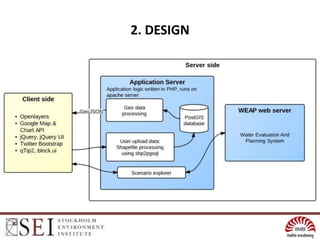
2.   DESIGN
3.   FEATURES
4.   WHAT NEXT
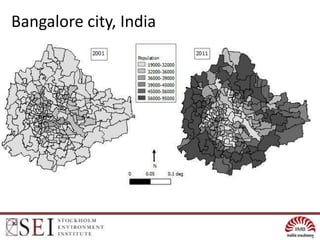
Bangalore city, India
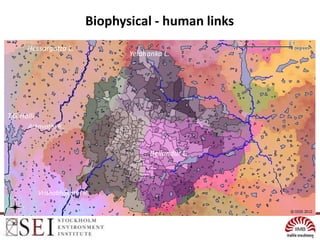
Biophysical - human links
      Hessargatta L.
                                  Yelahanka L.


T.G.Halli
       Arkavathi R..


                                        Bellandur L..


            Vrishabhavathi R.
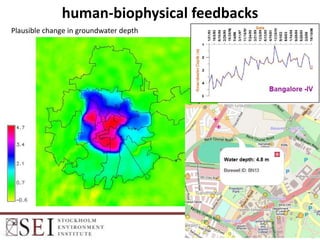
human-biophysical feedbacks
Plausible change in groundwater depth
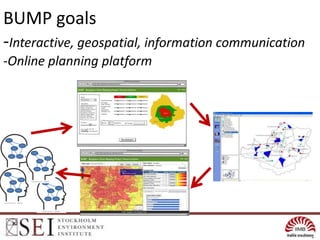
BUMP goals
-Interactive, geospatial, information communication
-Online planning platform
2. DESIGN
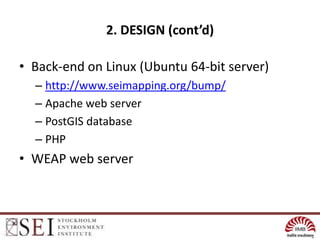
2. DESIGN (cont’d)

• Back-end on Linux (Ubuntu 64-bit server)
  – http://www.seimapping.org/bump/
  – Apache web server
  – PostGIS database
  – PHP
• WEAP web server
2. DESIGN (cont’d)

• Front end
  – OpenLayers
  – Communicate with back-end using AJAX
     • GeoJSON format
     • Compressed to reduce traffic
  – Other JavaScript libraries
     • jQuery, jQuery UI, qTip, and Twitter Bootstrap
     • Google Chart API
2. DESIGN (cont’d)

• Why use GeoJSON?
  – No raster data
  – Easy to setup
  – Easy to compress
  – Can be stored as JavaScript object
2. DESIGN (cont’d)

• Data structure:                         • Example:
   – Collection                             – Demography
      • Attribute list                         • [Ward name, BBMP Ward
                                                 ID, Ward area]
      • Layer list                             • 2001 Ward population
          –   …                                   –   …
          –   Extra variable list                 –   []
          –   Is this layer distributed           –   True
          –   Is this layer time series           –   False
          –   Type                                –   Polygon
          –   Geo data                            –   GeoJSON object
          –   …                                   –   …
3. FEATURES

• Basic mapping functions: basemaps selection,
  thematic colouring, feature selection
• Advanced functions: Google Chart API and
  Places Autocomplete integration
• Upload shapefile
• Online scenario runs using WEAP model on
  the web
3. FEATURES (cont’d)

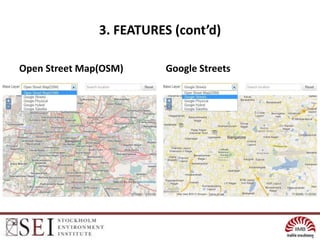
Open Street Map(OSM)     Google Streets
3. FEATURES (cont’d)

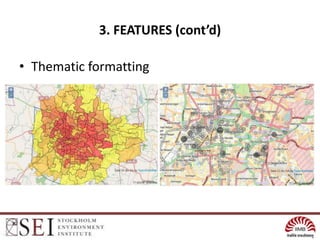
• Thematic formatting
3. FEATURES (cont’d)
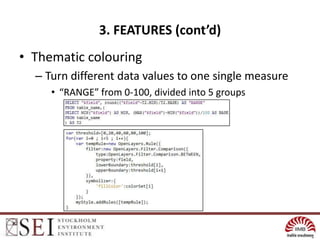
• Thematic colouring
  – Turn different data values to one single measure
     • “RANGE” from 0-100, divided into 5 groups
3. FEATURES (cont’d)

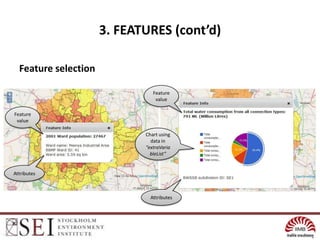
  Feature selection

                                Feature
                                 value

Feature
 value

                             Chart using
                               data in
                             “extraVaria
                               bleList”


Attributes


                               Attributes
3. FEATURES (cont’d)

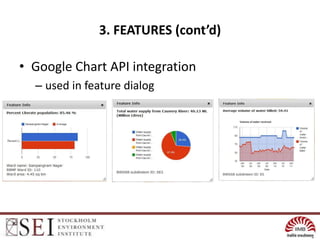
• Google Chart API integration
  – used in feature dialog
3. FEATURES (cont’d)

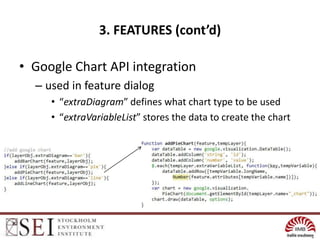
• Google Chart API integration
  – used in feature dialog
     • “extraDiagram” defines what chart type to be used
     • “extraVariableList” stores the data to create the chart
3. FEATURES (cont’d)

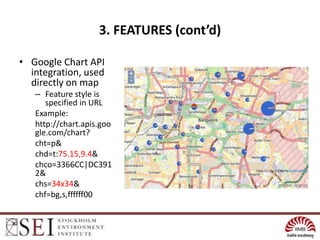
• Google Chart API
  integration, used
  directly on map
   – Feature style is
      specified in URL
   Example:
   http://chart.apis.goo
   gle.com/chart?
   cht=p&
   chd=t:75.15,9.4&
   chco=3366CC|DC391
   2&
   chs=34x34&
   chf=bg,s,ffffff00
3. FEATURES (cont’d)

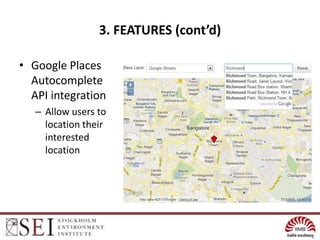
• Google Places
  Autocomplete
  API integration
   – Allow users to
     location their
     interested
     location
3. FEATURES (cont’d)
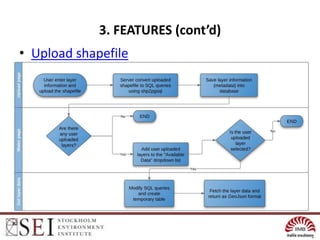
• Upload shapefile
3. FEATURES (cont’d)

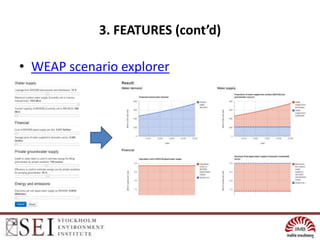
• Scenario explorer
  – Based on WEAP ("Water Evaluation And Planning" system),
    developed by the Stockholm Environment Institute's U.S.
    Centre.
  – “WEAP is a user-friendly software tool that takes an
    integrated approach to water resources planning.”
  – Latest version includes a internal web server
  – Browser  BUMP server  WEAP server
  – Results in six area: water demand, supply, costs and
    revenues, and electricity and emissions
3. FEATURES (cont’d)

• WEAP scenario explorer
3. FEATURES (Demo)

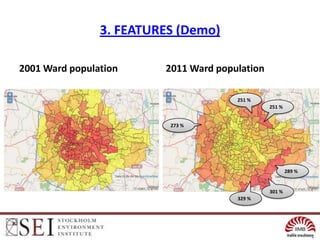
2001 Ward population     2011 Ward population

                                       251 %
                                                251 %


                          273 %


                                                        289 %


                                                301 %
                                       329 %
3. FEATURES (Demo)
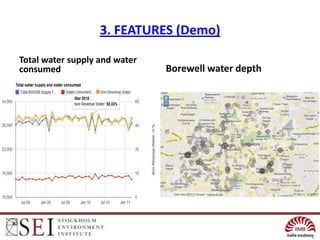
Total water supply and water
consumed                       Borewell water depth
3. FEATURES (Demo)

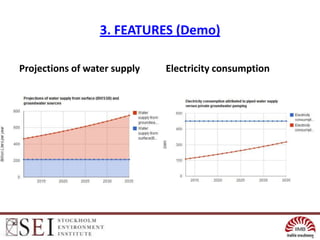
Projections of water supply   Electricity consumption
4. WHAT NEXT

•   Crowdsourcing to fill in knowledge gaps?
•   Online surveys on BUMP?
•   Volunteer information
•   Multiple web-users for online scenarios
•   Extending to other cities
•   Linking to distributed groundwater models e.g. GRASS
•   Extending to the energy sector


• Interested in helping? Contact us!
    – Vishal Mehta : vishal.mehta@sei-us.org

SEI OSGIS presentation

  • 1.
    Urban metabolic mappingon the web: An example from Bangalore, India 5 September 2012 Indian Institute of Management, Bangalore Dr. Deepak Malghan (IIM-B), Dr. Vishal K. Mehta (SEI) Dr. Eric Kemp-Benedict (SEI) Guozhong Wang(SEI)
  • 2.
    1. CONTEXT 2. DESIGN 3. FEATURES 4. WHAT NEXT
  • 3.
  • 4.
    Biophysical - humanlinks Hessargatta L. Yelahanka L. T.G.Halli Arkavathi R.. Bellandur L.. Vrishabhavathi R.
  • 5.
  • 6.
    BUMP goals -Interactive, geospatial,information communication -Online planning platform
  • 7.
  • 8.
    2. DESIGN (cont’d) •Back-end on Linux (Ubuntu 64-bit server) – http://www.seimapping.org/bump/ – Apache web server – PostGIS database – PHP • WEAP web server
  • 9.
    2. DESIGN (cont’d) •Front end – OpenLayers – Communicate with back-end using AJAX • GeoJSON format • Compressed to reduce traffic – Other JavaScript libraries • jQuery, jQuery UI, qTip, and Twitter Bootstrap • Google Chart API
  • 10.
    2. DESIGN (cont’d) •Why use GeoJSON? – No raster data – Easy to setup – Easy to compress – Can be stored as JavaScript object
  • 11.
    2. DESIGN (cont’d) •Data structure: • Example: – Collection – Demography • Attribute list • [Ward name, BBMP Ward ID, Ward area] • Layer list • 2001 Ward population – … – … – Extra variable list – [] – Is this layer distributed – True – Is this layer time series – False – Type – Polygon – Geo data – GeoJSON object – … – …
  • 12.
    3. FEATURES • Basicmapping functions: basemaps selection, thematic colouring, feature selection • Advanced functions: Google Chart API and Places Autocomplete integration • Upload shapefile • Online scenario runs using WEAP model on the web
  • 13.
    3. FEATURES (cont’d) OpenStreet Map(OSM) Google Streets
  • 14.
    3. FEATURES (cont’d) •Thematic formatting
  • 15.
    3. FEATURES (cont’d) •Thematic colouring – Turn different data values to one single measure • “RANGE” from 0-100, divided into 5 groups
  • 16.
    3. FEATURES (cont’d) Feature selection Feature value Feature value Chart using data in “extraVaria bleList” Attributes Attributes
  • 17.
    3. FEATURES (cont’d) •Google Chart API integration – used in feature dialog
  • 18.
    3. FEATURES (cont’d) •Google Chart API integration – used in feature dialog • “extraDiagram” defines what chart type to be used • “extraVariableList” stores the data to create the chart
  • 19.
    3. FEATURES (cont’d) •Google Chart API integration, used directly on map – Feature style is specified in URL Example: http://chart.apis.goo gle.com/chart? cht=p& chd=t:75.15,9.4& chco=3366CC|DC391 2& chs=34x34& chf=bg,s,ffffff00
  • 20.
    3. FEATURES (cont’d) •Google Places Autocomplete API integration – Allow users to location their interested location
  • 21.
  • 22.
    3. FEATURES (cont’d) •Scenario explorer – Based on WEAP ("Water Evaluation And Planning" system), developed by the Stockholm Environment Institute's U.S. Centre. – “WEAP is a user-friendly software tool that takes an integrated approach to water resources planning.” – Latest version includes a internal web server – Browser  BUMP server  WEAP server – Results in six area: water demand, supply, costs and revenues, and electricity and emissions
  • 23.
    3. FEATURES (cont’d) •WEAP scenario explorer
  • 24.
    3. FEATURES (Demo) 2001Ward population 2011 Ward population 251 % 251 % 273 % 289 % 301 % 329 %
  • 25.
    3. FEATURES (Demo) Totalwater supply and water consumed Borewell water depth
  • 26.
    3. FEATURES (Demo) Projectionsof water supply Electricity consumption
  • 27.
    4. WHAT NEXT • Crowdsourcing to fill in knowledge gaps? • Online surveys on BUMP? • Volunteer information • Multiple web-users for online scenarios • Extending to other cities • Linking to distributed groundwater models e.g. GRASS • Extending to the energy sector • Interested in helping? Contact us! – Vishal Mehta : vishal.mehta@sei-us.org

Editor's Notes

  • #2 http://www.outsmart360.com/alley/bangalore-is-%E2%80%9Cthe-silicon-valley-of-india%E2%80%9D/http://www.portfolio.com/business-travel/city-guides/bangalorehttp://en.wikipedia.org/wiki/File:Shiva_Bangalore_.jpghttp://www.googlemonopoly.eu/index.php/2011/06/google-streetview-team-told-to-pull-over-in-bangalore-india/
  • #3 The Bangalore Urban Mapping Project is one part of a multidisciplinary, multi-institutional urban sustainability effort.Its conceptual notion of sustainability uses metabolism as a framework. Cities are like living entities, needing a continuous throughput of resources and energy for survival and growth, creating waste in the process.
  • #4 The Bangalore Urban Mapping Project is one part of a multidisciplinary, multi-institutional urban sustainability effort.Its conceptual notion of sustainability uses metabolism as a framework. Cities are like living entities, needing a continuous throughput of resources and energy for survival and growth, creating waste in the process.Our current focus is on Indian cities- India is rapidly urbanizing, with its 370 million population exceeding the total population of all countries except China. We start with Bangalore and the water sector. Bangalore is India’s software capital and a posterchild of the problems faced in Indian cities where basic services have not kept up with rapid growth. Last 10 years 3 million people added compared to previous 2 decades of 1 million each.
  • #5 What is missing in the previous maps? The city is intricately tied to the ecosystem. Here we see the 2011 population distribution laid over terrain and watersheds, lakes and streams.
  • #6 Patterns of population, socioeconomic characteristics and infrastructure access determine the extraction, consumption and waste flows of water metabolism.This is a map of modeled change in groundwater depth (leakage scenario – natural This shows that in the centre of the city, which also receives more piped water, water levels are elevated above their natural state. Corroboration of this phenomena is available through Sekhar and Kumar (2009) and some long-term CGWB observations.But what is happening outside of the centre? In this thought experiment, our model show not much difference from natural states. Remember however that we have only modeled supply to meet residential demand. What about all other demands? Pumping from these might be causing reduced levels in outer areas of the city.
  • #8 This slide shows the overall design
  • #9 This slide shows some of the API’s used in the application.The application, titled Bangalore Urban Mapping Project (BUMP) is built on a free and open source web GIS stack consisting of a PostGIS database, PHP, OpenLayers, and Apache Web Server deployed on a 64-bit Ubuntu Linux server platform. The application logic is written in PHP to connect the many components of the interactive application. The application is made available on the BUMP website (http://www.seimapping.org/bump/index.php). The application relies on AJAX to fetch layer data from the server and render the layer using OpenLayers on the fly. This allows users to view multiple layers at the same time without refreshing the page. Data is packed in GeoJSON format and is compressed to reduce traffic. Beyond thematic representation of each of twenty different map layers, graphical and tabular summaries of demographic and water data are presented dynamically using JavaScript libraries including the Google Chart API. The application also uses other common JavaScript libraries/plug-ins, like jQuery, jQuery UI, qTip, to ease the development and to ensure cross-browser compatibility
  • #10 This slide shows some of the API’s used in the application.The application, titled Bangalore Urban Mapping Project (BUMP) is built on a free and open source web GIS stack consisting of a PostGIS database, PHP, OpenLayers, and Apache Web Server deployed on a 64-bit Ubuntu Linux server platform. The application logic is written in PHP to connect the many components of the interactive application. The application is made available on the BUMP website (http://www.seimapping.org/bump/index.php). The application relies on AJAX to fetch layer data from the server and render the layer using OpenLayers on the fly. This allows users to view multiple layers at the same time without refreshing the page. Data is packed in GeoJSON format and is compressed to reduce traffic. Beyond thematic representation of each of twenty different map layers, graphical and tabular summaries of demographic and water data are presented dynamically using JavaScript libraries including the Google Chart API. The application also uses other common JavaScript libraries/plug-ins, like jQuery, jQuery UI, qTip, to ease the development and to ensure cross-browser compatibility
  • #12 Use demonstrations to also show content organization (system level data vs. spatial data, time series,, content organization (collection and themes)
  • #13 SELECTED FEATURES OF THE APPLICATION TO BE DEMONSTRATED AND BRIEFLY EXPLAINEDIN THIS SECTION
  • #17 Explain attribute, variable; extra variable. Data structure?
  • #23 WEAP (Water Evaluation And Planning)WEAP ("Water Evaluation And Planning" system) is a user-friendly software tool that takes an integrated approach to water resources planning.
  • #24 WEAP (Water Evaluation And Planning)WEAP ("Water Evaluation And Planning" system) is a user-friendly software tool that takes an integrated approach to water resources planning.