Petrel Introduction Course
UAB
Marc Diviu
Desember 8th, 2014
• Petrel E&P provides an integrated solution from exploration
to production reservoir management
• Utilities: Geological modeling, seismic interpretation,
uncertainity analysis (e.g. Map-based volume calculation),
fracture modeling, well planning and reservoir simulations
Introduction
Introduction
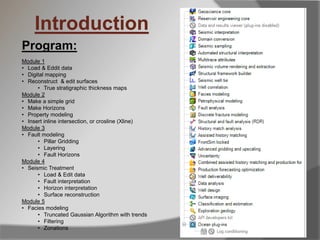
Program:
Module 1
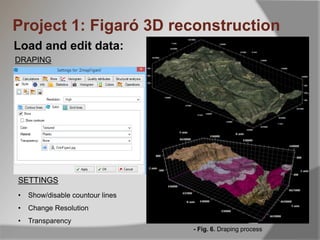
• Load & Eddit data
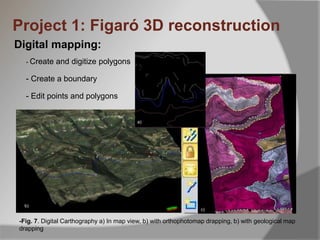
• Digital mapping
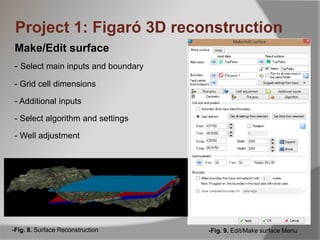
• Reconstruct & edit surfaces
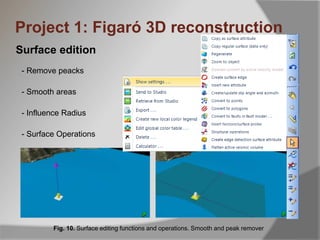
• True stratigraphic thickness maps
Module 2
• Make a simple grid
• Make Horizons
• Property modeling
• Insert inline intersection, or crosline (Xline)
Module 3
• Fault modeling
• Pillar Gridding
• Layering
• Fault Horizons
Module 4
• Seismic Treatment
• Load & Edit data
• Fault interpretation
• Horizon interpretation
• Surface reconstruction
Module 5
• Facies modeling
• Truncated Gaussian Algorithm with trends
• Filtering
• Zonations
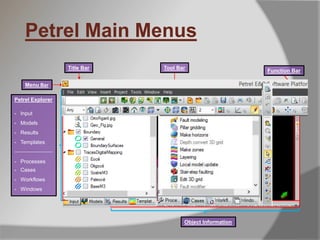
Petrel Main Menus
Petrel Explorer
- Input
- Models
- Results
- Templates
______________
- Processes
- Cases
- Workflows
- Windows
Title Bar
Visualization
Windows
Object Information
Function Bar
Menu Bar
Tool Bar
Fault modeling
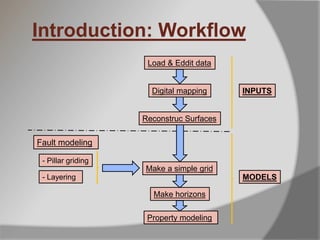
Load & Eddit data
Digital mapping
Reconstruc Surfaces
Make a simple grid
Property modeling
- Pillar griding
MODELS
INPUTS
Introduction: Workflow
- Layering
Make horizons
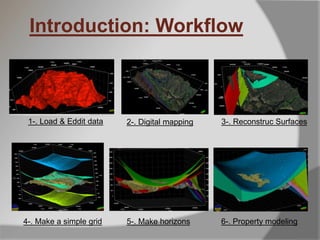
1-. Load & Eddit data 2-. Digital mapping 3-. Reconstruc Surfaces
Introduction: Workflow
6-. Property modeling5-. Make horizons4-. Make a simple grid
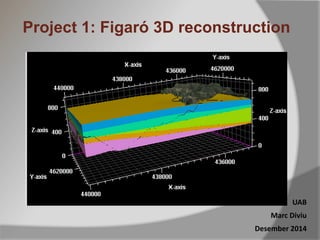
Project 1: Figaró 3D reconstruction
UAB
Marc Diviu
Desember 2014
Project 1: Figaró 3D reconstruction
Topics
 Import and edit data
 Digital mapping strategies
 Reconstruct Surfaces from field data, cartography
or logs
 Make stratigraphyc thickness maps
 Modelize zones between reconstructed surfaces
from horizons
Project 1: Figaró 3D reconstruction
Load and edit data:
- Import & treatment of data: Digital Elevation Models
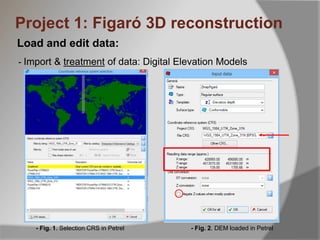
- Fig. 1. Selection CRS in Petrel - Fig. 2. DEM loaded in Petrel
Project 1: Figaró 3D reconstruction
Load and edit data:
- Import & treatment of data: Digital Elevation Models
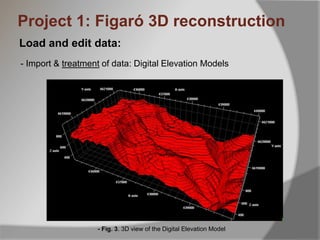
- Fig. 3. 3D view of the Digital Elevation Model
Load and edit data:
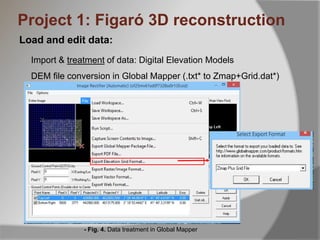
Import & treatment of data: Digital Elevation Models
DEM file conversion in Global Mapper (.txt* to Zmap+Grid.dat*)
- Fig. 4. Data treatment in Global Mapper
Project 1: Figaró 3D reconstruction
Load and edit data:
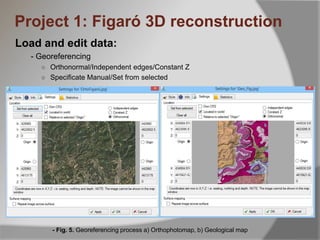
- Georeferencing
○ Orthonormal/Independent edges/Constant Z
○ Specificate Manual/Set from selected
- Fig. 5. Georeferencing process a) Orthophotomap, b) Geological map
Project 1: Figaró 3D reconstruction
Load and edit data:
- Fig. 6. Draping process
Project 1: Figaró 3D reconstruction
• Show/disable countour lines
• Change Resolution
• Transparency
DRAPING
SETTINGS
-Fig. 7. Digital Carthography a) In map view, b) with orthophotomap drapping, b) with geological map
drapping
b)
c)
a)
Digital mapping:
- Create and digitize polygons
- Create a boundary
- Edit points and polygons
Project 1: Figaró 3D reconstruction
Make/Edit surface
- Select main inputs and boundary
- Grid cell dimensions
- Additional inputs
- Select algorithm and settings
- Well adjustment
-Fig. 9. Edit/Make surface Menu-Fig. 8. Surface Reconstruction
Project 1: Figaró 3D reconstruction
Surface edition
Fig. 10. Surface editing functions and operations. Smooth and peak remover
Project 1: Figaró 3D reconstruction
- Remove peacks
- Smooth areas
- Influence Radius
- Surface Operations
Surface edition
Project 1: Figaró 3D reconstruction
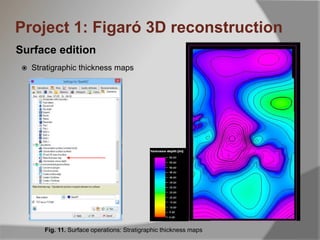
 Stratigraphic thickness maps
Fig. 11. Surface operations: Stratigraphic thickness maps
Surface edition
Project 1: Figaró 3D reconstruction
- Map Windows Layout
Viewport settings
Fig. 12. Map Windows layout
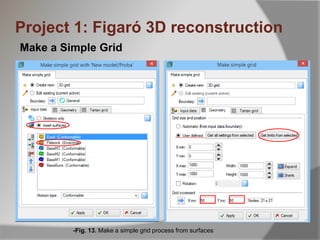
Make a Simple Grid
Project 1: Figaró 3D reconstruction
-Fig. 13. Make a simple grid process from surfaces
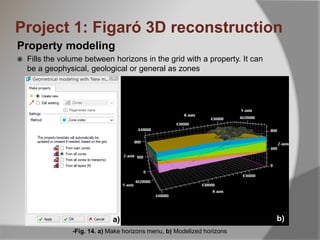
Property modeling
 Fills the volume between horizons in the grid with a property. It can
be a geophysical, geological or general as zones
-Fig. 14. a) Make horizons menu, b) Modelized horizons
Project 1: Figaró 3D reconstruction
a) b)

Petrel course Module_1: Import data and management, make simple surfaces

  • 1.
    Petrel Introduction Course UAB MarcDiviu Desember 8th, 2014
  • 2.
    • Petrel E&Pprovides an integrated solution from exploration to production reservoir management • Utilities: Geological modeling, seismic interpretation, uncertainity analysis (e.g. Map-based volume calculation), fracture modeling, well planning and reservoir simulations Introduction
  • 3.
    Introduction Program: Module 1 • Load& Eddit data • Digital mapping • Reconstruct & edit surfaces • True stratigraphic thickness maps Module 2 • Make a simple grid • Make Horizons • Property modeling • Insert inline intersection, or crosline (Xline) Module 3 • Fault modeling • Pillar Gridding • Layering • Fault Horizons Module 4 • Seismic Treatment • Load & Edit data • Fault interpretation • Horizon interpretation • Surface reconstruction Module 5 • Facies modeling • Truncated Gaussian Algorithm with trends • Filtering • Zonations
  • 4.
    Petrel Main Menus PetrelExplorer - Input - Models - Results - Templates ______________ - Processes - Cases - Workflows - Windows Title Bar Visualization Windows Object Information Function Bar Menu Bar Tool Bar
  • 5.
    Fault modeling Load &Eddit data Digital mapping Reconstruc Surfaces Make a simple grid Property modeling - Pillar griding MODELS INPUTS Introduction: Workflow - Layering Make horizons
  • 6.
    1-. Load &Eddit data 2-. Digital mapping 3-. Reconstruc Surfaces Introduction: Workflow 6-. Property modeling5-. Make horizons4-. Make a simple grid
  • 7.
    Project 1: Figaró3D reconstruction UAB Marc Diviu Desember 2014
  • 8.
    Project 1: Figaró3D reconstruction Topics  Import and edit data  Digital mapping strategies  Reconstruct Surfaces from field data, cartography or logs  Make stratigraphyc thickness maps  Modelize zones between reconstructed surfaces from horizons
  • 9.
    Project 1: Figaró3D reconstruction Load and edit data: - Import & treatment of data: Digital Elevation Models - Fig. 1. Selection CRS in Petrel - Fig. 2. DEM loaded in Petrel
  • 10.
    Project 1: Figaró3D reconstruction Load and edit data: - Import & treatment of data: Digital Elevation Models - Fig. 3. 3D view of the Digital Elevation Model
  • 11.
    Load and editdata: Import & treatment of data: Digital Elevation Models DEM file conversion in Global Mapper (.txt* to Zmap+Grid.dat*) - Fig. 4. Data treatment in Global Mapper Project 1: Figaró 3D reconstruction
  • 12.
    Load and editdata: - Georeferencing ○ Orthonormal/Independent edges/Constant Z ○ Specificate Manual/Set from selected - Fig. 5. Georeferencing process a) Orthophotomap, b) Geological map Project 1: Figaró 3D reconstruction
  • 13.
    Load and editdata: - Fig. 6. Draping process Project 1: Figaró 3D reconstruction • Show/disable countour lines • Change Resolution • Transparency DRAPING SETTINGS
  • 14.
    -Fig. 7. DigitalCarthography a) In map view, b) with orthophotomap drapping, b) with geological map drapping b) c) a) Digital mapping: - Create and digitize polygons - Create a boundary - Edit points and polygons Project 1: Figaró 3D reconstruction
  • 15.
    Make/Edit surface - Selectmain inputs and boundary - Grid cell dimensions - Additional inputs - Select algorithm and settings - Well adjustment -Fig. 9. Edit/Make surface Menu-Fig. 8. Surface Reconstruction Project 1: Figaró 3D reconstruction
  • 16.
    Surface edition Fig. 10.Surface editing functions and operations. Smooth and peak remover Project 1: Figaró 3D reconstruction - Remove peacks - Smooth areas - Influence Radius - Surface Operations
  • 17.
    Surface edition Project 1:Figaró 3D reconstruction  Stratigraphic thickness maps Fig. 11. Surface operations: Stratigraphic thickness maps
  • 18.
    Surface edition Project 1:Figaró 3D reconstruction - Map Windows Layout Viewport settings Fig. 12. Map Windows layout
  • 19.
    Make a SimpleGrid Project 1: Figaró 3D reconstruction -Fig. 13. Make a simple grid process from surfaces
  • 20.
    Property modeling  Fillsthe volume between horizons in the grid with a property. It can be a geophysical, geological or general as zones -Fig. 14. a) Make horizons menu, b) Modelized horizons Project 1: Figaró 3D reconstruction a) b)