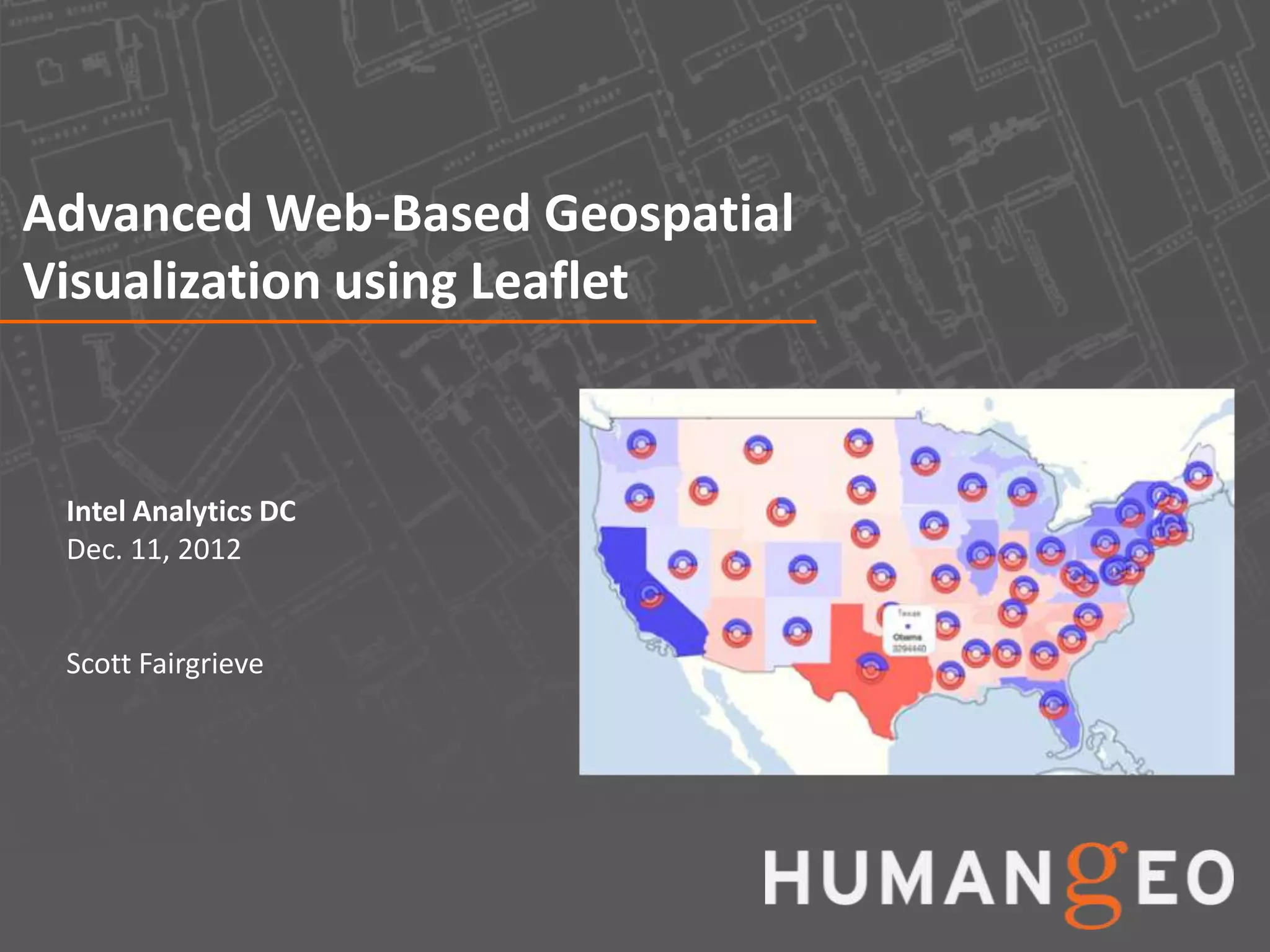
Advanced Web-Based Geospatial
Visualization using Leaflet


 Intel Analytics DC
 Dec. 11, 2012


 Scott Fairgrieve
Agenda


• Web mapping challenges
• Leaflet Overview
• Overview of HumanGeo’s Leaflet Data Visualization
  Framework
• Examples
• Next Steps


                                                      2
Challenges


• Deciding what mapping framework to use
    – There are lots of options (Google
      Maps, Bing, Yahoo, OpenLayers, etc.), each with its own API
    – This presentation focuses on Leaflet
• Understanding the structure/format of the data that’s going to be
  visualized
    –   Is it web map/JavaScript friendly?
    –   Does it work well with the mapping framework you’ve chosen?
    –   Will you always be dealing with the same format?
    –   Integrating data from a variety of sources typically requires custom code
        or code to standardize formats
• Lots of different ways of specifying location: lat/lon, grid
  formats, addresses, country/state codes, city names, etc.
    – Handling location formats other than lat/lon can be difficult and often
      requires additional web services


                                                                                    3
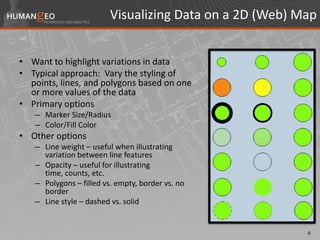
Visualizing Data on a 2D (Web) Map


• Want to highlight variations in data
• Typical approach: Vary the styling of
  points, lines, and polygons based on one
  or more values of the data
• Primary options
   – Marker Size/Radius
   – Color/Fill Color
• Other options
   – Line weight – useful when illustrating
     variation between line features
   – Opacity – useful for illustrating
     time, counts, etc.
   – Polygons – filled vs. empty, border vs. no
     border
   – Line style – dashed vs. solid


                                                         4
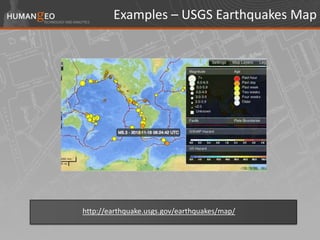
Examples – USGS Earthquakes Map


http://earthquake.usgs.gov/earthquakes/map/
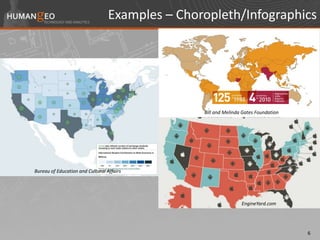
Examples – Choropleth/Infographics


                                                 Bill and Melinda Gates Foundation


Bureau of Education and Cultural Affairs


                                                                 EngineYard.com


                                                                                     6
Leaflet Overview


• Developed by CloudMade
• Relatively new (first released in 2011)
• Simple compared to other JavaScript web mapping
  frameworks  a pro and a con
• Smooth animation and works well on mobile devices
• Pretty good documentation/examples
• http://leafletjs.com/index.html


                                                      7
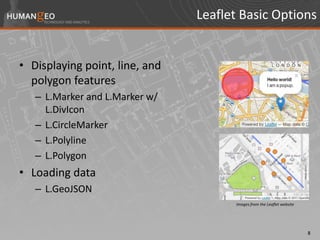
Leaflet Basic Options


• Displaying point, line, and
  polygon features
   – L.Marker and L.Marker w/
     L.DivIcon
   – L.CircleMarker
   – L.Polyline
   – L.Polygon
• Loading data
   – L.GeoJSON
                                      Images from the Leaflet website


                                                                        8
Leaflet Vector Layers


• Leaflet is Scalable Vector Graphics (SVG) based
• Behind the scenes, non-image based markers are
  drawn using an SVG path element
  <path [path attributes] d=”[path data (e.g. M548 254L548 49L676
  49L676 254L548 254z)]"></path>
• Leaflet style options are mapped to path attributes
• Style options include:
  color, fillColor, opacity, fillOpacity, weight, dashArray,
   stroke, fill, radius
• We can create custom markers dynamically by
  inheriting from the L.Path class
                                                                    9
HumanGeo’s Leaflet Data Visualization Framework


• Started as a side project (a few hours per week)
• A work in progress (still in the alpha phase)
• Goals:
   – Enable cool, interactive, infographic style visualizations
   – Support displaying data in any JSON-based data format
   – Eliminate redundant code/tasks related to displaying data
   – Standardize the way in which data are loaded/displayed
   – Minimize dependency on server-side components for
     typical use cases (e.g. visualizing data by state or country)
   – Remain consistent with Leaflet’s coding style


                                                                      10
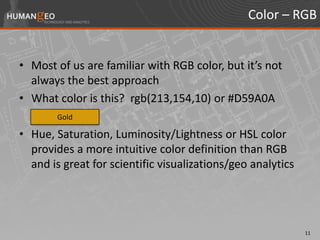
Color – RGB


• Most of us are familiar with RGB color, but it’s not
  always the best approach
• What color is this? rgb(213,154,10) or #D59A0A
        Gold

• Hue, Saturation, Luminosity/Lightness or HSL color
  provides a more intuitive color definition than RGB
  and is great for scientific visualizations/geo analytics


                                                             11
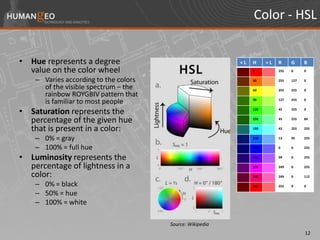
Color - HSL


• Hue represents a degree                                  <L   H     >L   R     G     B
  value on the color wheel                                      0          255   0     0

    – Varies according to the colors                            30         255   127   0

      of the visible spectrum – the                             60         255   255   0
      rainbow ROYGBIV pattern that
      is familiar to most people                                90         127   255   0


• Saturation represents the                                     120        45    255   0


  percentage of the given hue                                   150        45    255   84


  that is present in a color:                                   180        43    255   255


    – 0% = gray                                                 210        13    95    255

    – 100% = full hue                                           240        0     0     255


• Luminosity represents the                                     270        99    0     255

  percentage of lightness in a                                  300        249   0     255

  color:                                                        330        249   0     112

    – 0% = black                                                360        255   0     0

    – 50% = hue
    – 100% = white

                                       Source: Wikipedia
                                                                                       12
Framework Basics – Linear Functions for Dynamic Styling


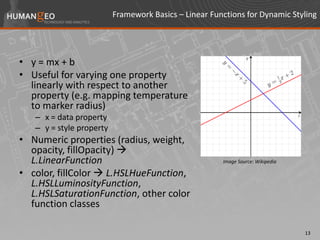
• y = mx + b
• Useful for varying one property
  linearly with respect to another
  property (e.g. mapping temperature
  to marker radius)
   – x = data property
   – y = style property
• Numeric properties (radius, weight,
  opacity, fillOpacity) 
  L.LinearFunction                                     Image Source: Wikipedia

• color, fillColor  L.HSLHueFunction,
  L.HSLLuminosityFunction,
  L.HSLSaturationFunction, other color
  function classes

                                                                                 13
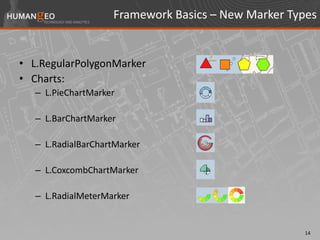
Framework Basics – New Marker Types


• L.RegularPolygonMarker
• Charts:
   – L.PieChartMarker

   – L.BarChartMarker

   – L.RadialBarChartMarker

   – L.CoxcombChartMarker

   – L.RadialMeterMarker


                                                    14
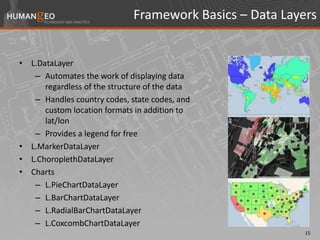
Framework Basics – Data Layers


• L.DataLayer
   – Automates the work of displaying data
      regardless of the structure of the data
   – Handles country codes, state codes, and
      custom location formats in addition to
      lat/lon
   – Provides a legend for free
• L.MarkerDataLayer
• L.ChoroplethDataLayer
• Charts
   – L.PieChartDataLayer
   – L.BarChartDataLayer
   – L.RadialBarChartDataLayer
   – L.CoxcombChartDataLayer
                                                          15
Examples


• USGS Earthquakes
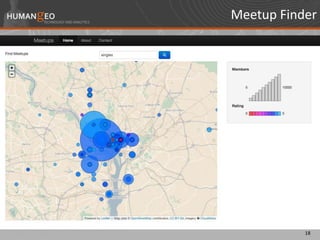
• Meetup Finder
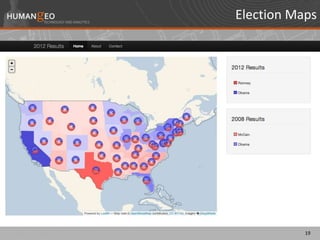
• Election Maps


                           16
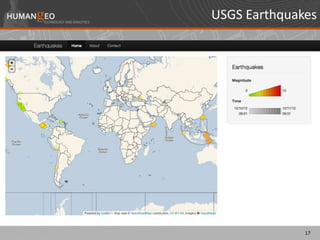
USGS Earthquakes


              17
Meetup Finder


           18
Election Maps


           19
Next Steps


• Clean up, simplify, test, and document code
• Write tutorials/blog posts (in the works)
• Consider additional marker and data layer types and
  additional classes/functions for making things easier
• Release code on GitHub


                                                          20
Interested in Using the Framework?


• Look for code to be released on HumanGeo’s GitHub
  site: https://github.com/humangeo
• Watch for updates/tutorials on HumanGeo’s blog:
  http://blog.thehumangeo.com
• Send me an e-mail if you’re interested or want to
  contribute: scott@thehumangeo.com


                                                      21

Advanced Web-Based Geospatial Visualization using Leaflet

  • 1.
    Advanced Web-Based Geospatial Visualizationusing Leaflet Intel Analytics DC Dec. 11, 2012 Scott Fairgrieve
  • 2.
    Agenda • Web mappingchallenges • Leaflet Overview • Overview of HumanGeo’s Leaflet Data Visualization Framework • Examples • Next Steps 2
  • 3.
    Challenges • Deciding whatmapping framework to use – There are lots of options (Google Maps, Bing, Yahoo, OpenLayers, etc.), each with its own API – This presentation focuses on Leaflet • Understanding the structure/format of the data that’s going to be visualized – Is it web map/JavaScript friendly? – Does it work well with the mapping framework you’ve chosen? – Will you always be dealing with the same format? – Integrating data from a variety of sources typically requires custom code or code to standardize formats • Lots of different ways of specifying location: lat/lon, grid formats, addresses, country/state codes, city names, etc. – Handling location formats other than lat/lon can be difficult and often requires additional web services 3
  • 4.
    Visualizing Data ona 2D (Web) Map • Want to highlight variations in data • Typical approach: Vary the styling of points, lines, and polygons based on one or more values of the data • Primary options – Marker Size/Radius – Color/Fill Color • Other options – Line weight – useful when illustrating variation between line features – Opacity – useful for illustrating time, counts, etc. – Polygons – filled vs. empty, border vs. no border – Line style – dashed vs. solid 4
  • 5.
    Examples – USGSEarthquakes Map http://earthquake.usgs.gov/earthquakes/map/
  • 6.
    Examples – Choropleth/Infographics Bill and Melinda Gates Foundation Bureau of Education and Cultural Affairs EngineYard.com 6
  • 7.
    Leaflet Overview • Developedby CloudMade • Relatively new (first released in 2011) • Simple compared to other JavaScript web mapping frameworks  a pro and a con • Smooth animation and works well on mobile devices • Pretty good documentation/examples • http://leafletjs.com/index.html 7
  • 8.
    Leaflet Basic Options •Displaying point, line, and polygon features – L.Marker and L.Marker w/ L.DivIcon – L.CircleMarker – L.Polyline – L.Polygon • Loading data – L.GeoJSON Images from the Leaflet website 8
  • 9.
    Leaflet Vector Layers •Leaflet is Scalable Vector Graphics (SVG) based • Behind the scenes, non-image based markers are drawn using an SVG path element <path [path attributes] d=”[path data (e.g. M548 254L548 49L676 49L676 254L548 254z)]"></path> • Leaflet style options are mapped to path attributes • Style options include: color, fillColor, opacity, fillOpacity, weight, dashArray, stroke, fill, radius • We can create custom markers dynamically by inheriting from the L.Path class 9
  • 10.
    HumanGeo’s Leaflet DataVisualization Framework • Started as a side project (a few hours per week) • A work in progress (still in the alpha phase) • Goals: – Enable cool, interactive, infographic style visualizations – Support displaying data in any JSON-based data format – Eliminate redundant code/tasks related to displaying data – Standardize the way in which data are loaded/displayed – Minimize dependency on server-side components for typical use cases (e.g. visualizing data by state or country) – Remain consistent with Leaflet’s coding style 10
  • 11.
    Color – RGB •Most of us are familiar with RGB color, but it’s not always the best approach • What color is this? rgb(213,154,10) or #D59A0A Gold • Hue, Saturation, Luminosity/Lightness or HSL color provides a more intuitive color definition than RGB and is great for scientific visualizations/geo analytics 11
  • 12.
    Color - HSL •Hue represents a degree <L H >L R G B value on the color wheel 0 255 0 0 – Varies according to the colors 30 255 127 0 of the visible spectrum – the 60 255 255 0 rainbow ROYGBIV pattern that is familiar to most people 90 127 255 0 • Saturation represents the 120 45 255 0 percentage of the given hue 150 45 255 84 that is present in a color: 180 43 255 255 – 0% = gray 210 13 95 255 – 100% = full hue 240 0 0 255 • Luminosity represents the 270 99 0 255 percentage of lightness in a 300 249 0 255 color: 330 249 0 112 – 0% = black 360 255 0 0 – 50% = hue – 100% = white Source: Wikipedia 12
  • 13.
    Framework Basics –Linear Functions for Dynamic Styling • y = mx + b • Useful for varying one property linearly with respect to another property (e.g. mapping temperature to marker radius) – x = data property – y = style property • Numeric properties (radius, weight, opacity, fillOpacity)  L.LinearFunction Image Source: Wikipedia • color, fillColor  L.HSLHueFunction, L.HSLLuminosityFunction, L.HSLSaturationFunction, other color function classes 13
  • 14.
    Framework Basics –New Marker Types • L.RegularPolygonMarker • Charts: – L.PieChartMarker – L.BarChartMarker – L.RadialBarChartMarker – L.CoxcombChartMarker – L.RadialMeterMarker 14
  • 15.
    Framework Basics –Data Layers • L.DataLayer – Automates the work of displaying data regardless of the structure of the data – Handles country codes, state codes, and custom location formats in addition to lat/lon – Provides a legend for free • L.MarkerDataLayer • L.ChoroplethDataLayer • Charts – L.PieChartDataLayer – L.BarChartDataLayer – L.RadialBarChartDataLayer – L.CoxcombChartDataLayer 15
  • 16.
    Examples • USGS Earthquakes •Meetup Finder • Election Maps 16
  • 17.
  • 18.
  • 19.
  • 20.
    Next Steps • Cleanup, simplify, test, and document code • Write tutorials/blog posts (in the works) • Consider additional marker and data layer types and additional classes/functions for making things easier • Release code on GitHub 20
  • 21.
    Interested in Usingthe Framework? • Look for code to be released on HumanGeo’s GitHub site: https://github.com/humangeo • Watch for updates/tutorials on HumanGeo’s blog: http://blog.thehumangeo.com • Send me an e-mail if you’re interested or want to contribute: scott@thehumangeo.com 21