Secure Remote Work:
threats, scenarios and best practices
Agenda
1. The COVID-19 threat landscape
2. Tips & Trick, best practices on how to protect
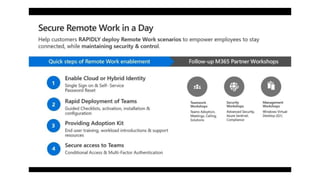
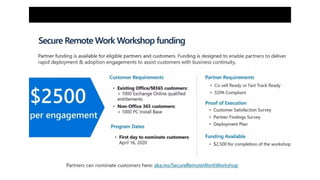
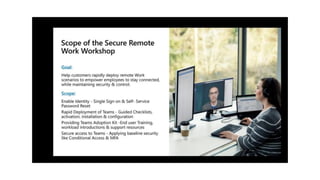
3. Unboxing the Remote work workshop
Attackers are capitalizing on fear. We’re watching
them. We’re pushing back.
The COVID-19 threat landscape
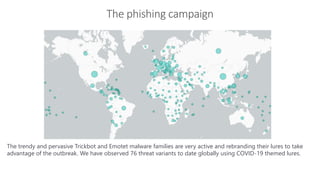
The phishing campaign
Infrastructure security
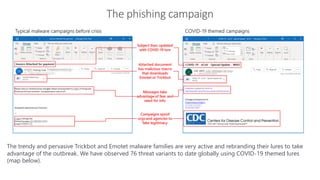
The trendy and pervasive Trickbot and Emotet malware families are very active and rebranding their lures to take
advantage of the outbreak. We have observed 76 threat variants to date globally using COVID-19 themed lures
(map below).
The phishing campaign
Infrastructure security
The trendy and pervasive Trickbot and Emotet malware families are very active and rebranding their lures to take
advantage of the outbreak. We have observed 76 threat variants to date globally using COVID-19 themed lures.
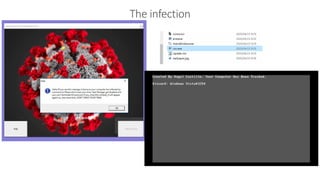
The infection
Infras
truct
ure
secur
ity
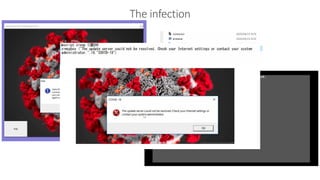
The infection
Infras
truct
ure
secur
ity
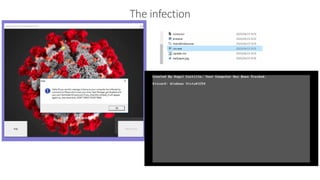
The infection
Infras
truct
ure
secur
ity
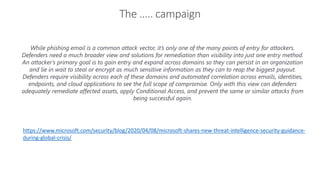
The ….. campaign
Infrastructure security
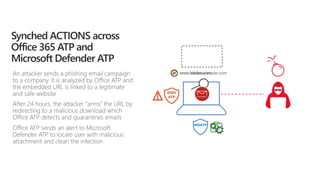
While phishing email is a common attack vector, it’s only one of the many points of entry for attackers.
Defenders need a much broader view and solutions for remediation than visibility into just one entry method.
An attacker’s primary goal is to gain entry and expand across domains so they can persist in an organization
and lie in wait to steal or encrypt as much sensitive information as they can to reap the biggest payout.
Defenders require visibility across each of these domains and automated correlation across emails, identities,
endpoints, and cloud applications to see the full scope of compromise. Only with this view can defenders
adequately remediate affected assets, apply Conditional Access, and prevent the same or similar attacks from
being successful again.
https://www.microsoft.com/security/blog/2020/04/08/microsoft-shares-new-threat-intelligence-security-guidance-
during-global-crisis/
Tips & Trick, best practices on how to protect
Browse to
a website
Phishing
mail
Open
attachment
Click a URL
Exploitation
& Installation
Command
& Control
User account
is compromised
Brute force account or use
stolen account credentials
Attacker attempts
lateral movement
Privileged account
compromised
Domain
compromised
Attacker accesses
sensitive data
Exfiltrate data
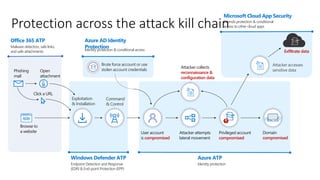
Azure AD Identity
Protection
Identity protection & conditional access
Microsoft Cloud App Security
Extends protection & conditional
access to other cloud appsProtection across the attack kill chain
Office 365 ATP
Malware detection, safe links,
and safe attachments
Windows Defender ATP
Endpoint Detection and Response
(EDR) & End-point Protection (EPP)
Azure ATP
Identity protection
Attacker collects
reconnaissance &
configuration data
O365 ATP
Office 365 ATP, Microsoft’s cloud-based email filtering service, which shields against phishing and malware,
including features to safeguard your organization from messaging-policy violations, targeted attacks, zero-
days, and malicious URLs. Intelligent recommendations from Security Policy Advisor can help reduce macro
attack surface, and the Office Cloud Policy Service can help you implement security baselines.
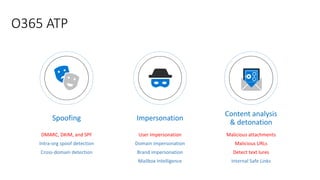
ImpersonationSpoofing
Content analysis
& detonation
O365 ATP
Malicious attachments
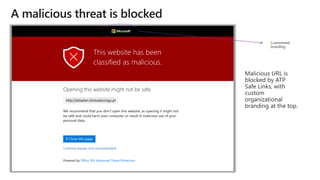
Malicious URLs
Detect text lures
Internal Safe Links
User impersonation
Domain impersonation
Brand impersonation
Mailbox Intelligence
DMARC, DKIM, and SPF
Intra-org spoof detection
Cross-domain detection
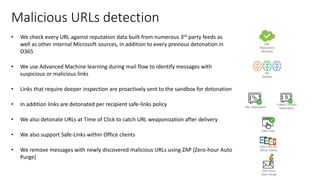
• We check every URL against reputation data built from numerous 3rd party feeds as
well as other internal Microsoft sources, in addition to every previous detonation in
O365
• We use Advanced Machine learning during mail flow to identify messages with
suspicious or malicious links
• Links that require deeper inspection are proactively sent to the sandbox for detonation
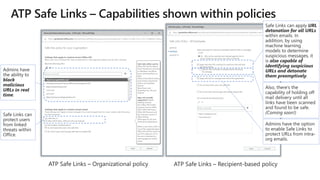
• In addition links are detonated per recipient safe-links policy
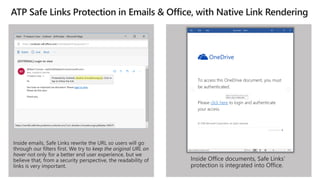
• We also detonate URLs at Time of Click to catch URL weaponization after delivery
• We also support Safe-Links within Office clients
• We remove messages with newly discovered malicious URLs using ZAP (Zero-hour Auto
Purge)
Malicious URLs detection
ML
Models
Linked Content
DetonationURL Detonation
URL
Reputation
Blocking
Safe Links
Safe Links for
Office Clients
Zero-hour
Auto-Purge
URL
Alerting
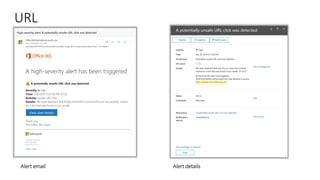
Alert email Alert details
Defender ATP
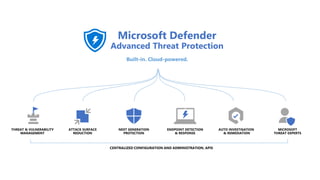
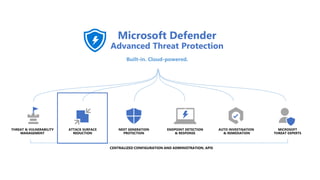
Protect endpoints with Microsoft Defender ATP, which covers licensed users for up to five concurrent devices that can
be easily onboarded at any time. Microsoft Defender ATP monitors threats from across platforms, including macOS.
Our tech community post includes additional guidance, best practices, onboarding, and licensing information
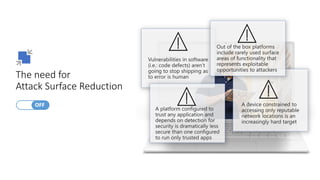
The need for
Attack Surface Reduction
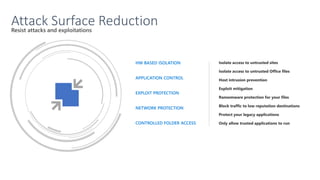
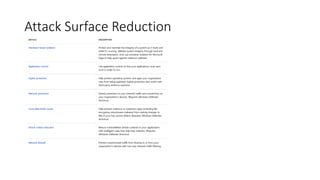
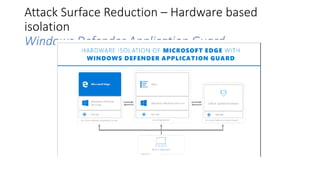
Attack Surface Reduction – Hardware based
isolation
Windows Defender Application Guard
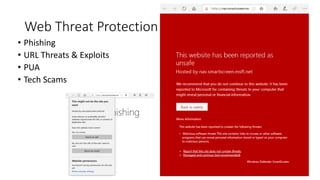
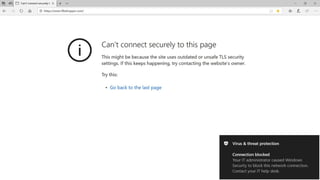
Web Threat Protection
• Phishing
• URL Threats & Exploits
• PUA
• Tech Scams
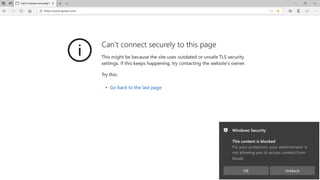
https://www.gmail.com/
Gmail.
Identity protection
Enable multi-factor authentication (MFA) and Conditional Access through Azure Active Directory to protect identities.
This is more important than ever to mitigate credential compromise as users work from home. We recommend
connecting all apps to Azure AD for single sign-on – from SaaS to on-premises apps; enabling MFA and applying
Conditional Access policies; and extending secure access to contractors and partners. Microsoft also offers a free Azure
AD service for single sign-on, including MFA using the Microsoft Authenticator app
MCAS
Microsoft Cloud App Security can help protect against shadow IT and unsanctioned app usage, identify and remediate
cloud-native attacks, and control how data travels across cloud apps from Microsoft or third-party applications.
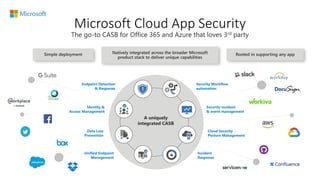
Microsoft Cloud App Security
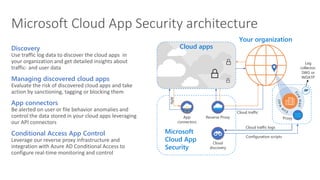
Microsoft Cloud App Security architecture
Discovery
Use traffic log data to discover the cloud apps in
your organization and get detailed insights about
traffic- and user data
Managing discovered cloud apps
Evaluate the risk of discovered cloud apps and take
action by sanctioning, tagging or blocking them
App connectors
Be alerted on user or file behavior anomalies and
control the data stored in your cloud apps leveraging
our API connectors
Conditional Access App Control
Leverage our reverse proxy infrastructure and
integration with Azure AD Conditional Access to
configure real-time monitoring and control
Cloud apps
Microsoft
Cloud App
Security
App
connectors
Reverse Proxy
Cloud
discovery
Cloud traffic
Proxy
Configuration scripts
Cloud traffic logs
Your organization
APIs
A
PI
s
Log
collector,
SWG or
WDATP
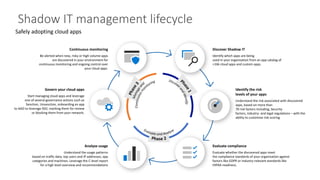
Shadow IT management lifecycle
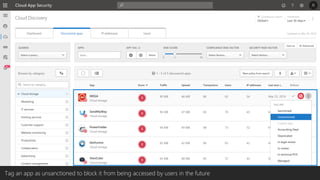
Tag an app as unsanctioned to block it from being accessed by users in the future
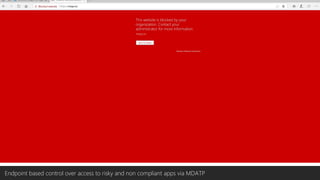
Endpoint based control over access to risky and non compliant apps via MDATP
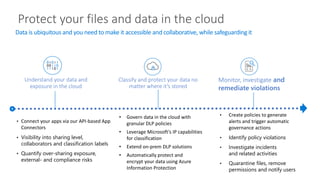
Protect your files and data in the cloud
Data is ubiquitous and you need to make it accessible and collaborative, while safeguarding it
Understand your data and
exposure in the cloud
Classify and protect your data no
matter where it’s stored
Monitor, investigate and
remediate violations
• Connect your apps via our API-based App
Connectors
• Visibility into sharing level,
collaborators and classification labels
• Quantify over-sharing exposure,
external- and compliance risks
• Govern data in the cloud with
granular DLP policies
• Leverage Microsoft’s IP capabilities
for classification
• Extend on-prem DLP solutions
• Automatically protect and
encrypt your data using Azure
Information Protection
• Create policies to generate
alerts and trigger automatic
governance actions
• Identify policy violations
• Investigate incidents
and related activities
• Quarantine files, remove
permissions and notify users
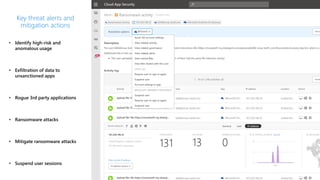
• Identify high-risk and
anomalous usage
• Exfiltration of data to
unsanctioned apps
• Rogue 3rd party applications
• Ransomware attacks
• Mitigate ransomware attacks
• Suspend user sessions
Key threat alerts and
mitigation actions
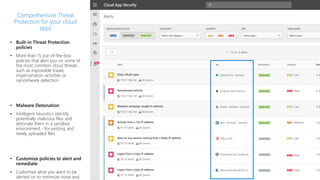
• Built-in Threat Protection
policies
• More than 15 out-of-the-box
policies that alert you on some of
the most common cloud threats
such as impossible travel,
impersonation activities or
ransomware detection
• Malware Detonation
• Intelligent heuristics identify
potentially malicious files and
detonate them in a sandbox
environment - for existing and
newly uploaded files
• Customize policies to alert and
remediate
• Customize what you want to be
alerted on to minimize noise and
Comprehensive Threat
Protection for your cloud
apps
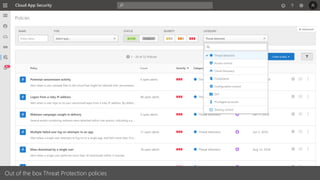
Out of the box Threat Protection policies
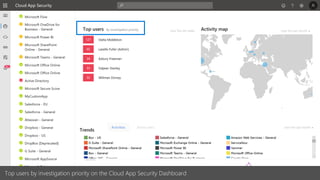
Top users by investigation priority on the Cloud App Security Dashboard
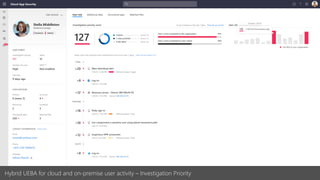
Hybrid UEBA for cloud and on-premise user activity – Investigation Priority
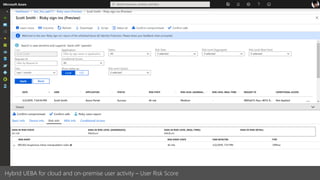
Hybrid UEBA for cloud and on-premise user activity – User Risk Score
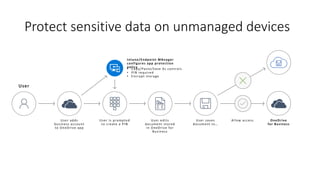
Protect sensitive data on unmanaged devices
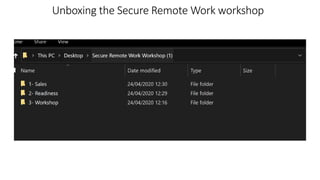
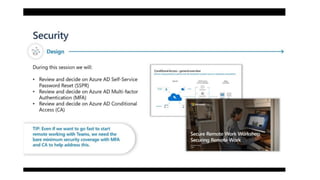
Unboxing the Secure Remote Work workshop
https://www.microsoft.com/microsoft-365/partners/microsoft-365-accelerators#microsoft-365-partner-accelerators-
secure-remote-work
Unboxing the Secure Remote Work workshop
Q&A

Secure remote work

  • 1.
    Secure Remote Work: threats,scenarios and best practices
  • 2.
    Agenda 1. The COVID-19threat landscape 2. Tips & Trick, best practices on how to protect 3. Unboxing the Remote work workshop
  • 3.
    Attackers are capitalizingon fear. We’re watching them. We’re pushing back. The COVID-19 threat landscape
  • 4.
    The phishing campaign Infrastructuresecurity The trendy and pervasive Trickbot and Emotet malware families are very active and rebranding their lures to take advantage of the outbreak. We have observed 76 threat variants to date globally using COVID-19 themed lures (map below).
  • 5.
    The phishing campaign Infrastructuresecurity The trendy and pervasive Trickbot and Emotet malware families are very active and rebranding their lures to take advantage of the outbreak. We have observed 76 threat variants to date globally using COVID-19 themed lures.
  • 6.
  • 7.
  • 8.
  • 9.
    The ….. campaign Infrastructuresecurity While phishing email is a common attack vector, it’s only one of the many points of entry for attackers. Defenders need a much broader view and solutions for remediation than visibility into just one entry method. An attacker’s primary goal is to gain entry and expand across domains so they can persist in an organization and lie in wait to steal or encrypt as much sensitive information as they can to reap the biggest payout. Defenders require visibility across each of these domains and automated correlation across emails, identities, endpoints, and cloud applications to see the full scope of compromise. Only with this view can defenders adequately remediate affected assets, apply Conditional Access, and prevent the same or similar attacks from being successful again. https://www.microsoft.com/security/blog/2020/04/08/microsoft-shares-new-threat-intelligence-security-guidance- during-global-crisis/
  • 10.
    Tips & Trick,best practices on how to protect
  • 11.
    Browse to a website Phishing mail Open attachment Clicka URL Exploitation & Installation Command & Control User account is compromised Brute force account or use stolen account credentials Attacker attempts lateral movement Privileged account compromised Domain compromised Attacker accesses sensitive data Exfiltrate data Azure AD Identity Protection Identity protection & conditional access Microsoft Cloud App Security Extends protection & conditional access to other cloud appsProtection across the attack kill chain Office 365 ATP Malware detection, safe links, and safe attachments Windows Defender ATP Endpoint Detection and Response (EDR) & End-point Protection (EPP) Azure ATP Identity protection Attacker collects reconnaissance & configuration data
  • 12.
    O365 ATP Office 365ATP, Microsoft’s cloud-based email filtering service, which shields against phishing and malware, including features to safeguard your organization from messaging-policy violations, targeted attacks, zero- days, and malicious URLs. Intelligent recommendations from Security Policy Advisor can help reduce macro attack surface, and the Office Cloud Policy Service can help you implement security baselines.
  • 13.
    ImpersonationSpoofing Content analysis & detonation O365ATP Malicious attachments Malicious URLs Detect text lures Internal Safe Links User impersonation Domain impersonation Brand impersonation Mailbox Intelligence DMARC, DKIM, and SPF Intra-org spoof detection Cross-domain detection
  • 14.
    • We checkevery URL against reputation data built from numerous 3rd party feeds as well as other internal Microsoft sources, in addition to every previous detonation in O365 • We use Advanced Machine learning during mail flow to identify messages with suspicious or malicious links • Links that require deeper inspection are proactively sent to the sandbox for detonation • In addition links are detonated per recipient safe-links policy • We also detonate URLs at Time of Click to catch URL weaponization after delivery • We also support Safe-Links within Office clients • We remove messages with newly discovered malicious URLs using ZAP (Zero-hour Auto Purge) Malicious URLs detection ML Models Linked Content DetonationURL Detonation URL Reputation Blocking Safe Links Safe Links for Office Clients Zero-hour Auto-Purge
  • 18.
  • 19.
    Defender ATP Protect endpointswith Microsoft Defender ATP, which covers licensed users for up to five concurrent devices that can be easily onboarded at any time. Microsoft Defender ATP monitors threats from across platforms, including macOS. Our tech community post includes additional guidance, best practices, onboarding, and licensing information
  • 23.
    The need for AttackSurface Reduction
  • 25.
  • 26.
    Attack Surface Reduction– Hardware based isolation Windows Defender Application Guard
  • 27.
    Web Threat Protection •Phishing • URL Threats & Exploits • PUA • Tech Scams
  • 29.
  • 30.
    Identity protection Enable multi-factorauthentication (MFA) and Conditional Access through Azure Active Directory to protect identities. This is more important than ever to mitigate credential compromise as users work from home. We recommend connecting all apps to Azure AD for single sign-on – from SaaS to on-premises apps; enabling MFA and applying Conditional Access policies; and extending secure access to contractors and partners. Microsoft also offers a free Azure AD service for single sign-on, including MFA using the Microsoft Authenticator app
  • 31.
    MCAS Microsoft Cloud AppSecurity can help protect against shadow IT and unsanctioned app usage, identify and remediate cloud-native attacks, and control how data travels across cloud apps from Microsoft or third-party applications.
  • 32.
  • 33.
    Microsoft Cloud AppSecurity architecture Discovery Use traffic log data to discover the cloud apps in your organization and get detailed insights about traffic- and user data Managing discovered cloud apps Evaluate the risk of discovered cloud apps and take action by sanctioning, tagging or blocking them App connectors Be alerted on user or file behavior anomalies and control the data stored in your cloud apps leveraging our API connectors Conditional Access App Control Leverage our reverse proxy infrastructure and integration with Azure AD Conditional Access to configure real-time monitoring and control Cloud apps Microsoft Cloud App Security App connectors Reverse Proxy Cloud discovery Cloud traffic Proxy Configuration scripts Cloud traffic logs Your organization APIs A PI s Log collector, SWG or WDATP
  • 34.
  • 35.
    Tag an appas unsanctioned to block it from being accessed by users in the future
  • 36.
    Endpoint based controlover access to risky and non compliant apps via MDATP
  • 37.
    Protect your filesand data in the cloud Data is ubiquitous and you need to make it accessible and collaborative, while safeguarding it Understand your data and exposure in the cloud Classify and protect your data no matter where it’s stored Monitor, investigate and remediate violations • Connect your apps via our API-based App Connectors • Visibility into sharing level, collaborators and classification labels • Quantify over-sharing exposure, external- and compliance risks • Govern data in the cloud with granular DLP policies • Leverage Microsoft’s IP capabilities for classification • Extend on-prem DLP solutions • Automatically protect and encrypt your data using Azure Information Protection • Create policies to generate alerts and trigger automatic governance actions • Identify policy violations • Investigate incidents and related activities • Quarantine files, remove permissions and notify users
  • 38.
    • Identify high-riskand anomalous usage • Exfiltration of data to unsanctioned apps • Rogue 3rd party applications • Ransomware attacks • Mitigate ransomware attacks • Suspend user sessions Key threat alerts and mitigation actions
  • 39.
    • Built-in ThreatProtection policies • More than 15 out-of-the-box policies that alert you on some of the most common cloud threats such as impossible travel, impersonation activities or ransomware detection • Malware Detonation • Intelligent heuristics identify potentially malicious files and detonate them in a sandbox environment - for existing and newly uploaded files • Customize policies to alert and remediate • Customize what you want to be alerted on to minimize noise and Comprehensive Threat Protection for your cloud apps
  • 40.
    Out of thebox Threat Protection policies
  • 41.
    Top users byinvestigation priority on the Cloud App Security Dashboard
  • 42.
    Hybrid UEBA forcloud and on-premise user activity – Investigation Priority
  • 43.
    Hybrid UEBA forcloud and on-premise user activity – User Risk Score
  • 44.
    Protect sensitive dataon unmanaged devices
  • 45.
    Unboxing the SecureRemote Work workshop https://www.microsoft.com/microsoft-365/partners/microsoft-365-accelerators#microsoft-365-partner-accelerators- secure-remote-work
  • 49.
    Unboxing the SecureRemote Work workshop
  • 51.