

3 minute review of last week -- Object-oriented design Define the context and modes of use of the system Design the system architecture Identify the principal system objects Develop design models Specify object interfaces
3 minute review of last week -- Design   with reuse Increased reliability Effective use of specialists Standards compliance Accelerated development CBD -- Provides/Requires interface Application Frameworks -- abstract classes Application families -- common core is reused platform/configuration/functional specialisation Design patterns -- well-tried solution to a common problem and accumulated wisdom and experience
Ch 15 -- The user interface design Designing effective interfaces  for software systems   System users often judge a system by its  interface rather than its functionality Poor user interface design is the reason why so  many software systems are never used A poorly designed interface can cause a user to  make catastrophic errors Most users of business systems interact through graphical interfaces
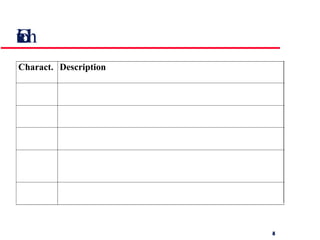
GUI characteristics
GUI advantages They are easy to learn and use.  Users without experience can learn to use the system  quickly. The user may switch quickly from one task to  another and can interact with several different applications. Information remains visible in its own window when  attention is switched . Fast, full-screen interaction is possible with immediate access to anywhere on the screen
User-centred design The aim of this chapter is to sensitise software engineers to key issues underlying the design rather than the implementation of user interfaces User-centred design is an approach to UI design where the needs of the user are paramount and where the user is involved in the design process UI design always involves the development of prototype interfaces
User interface design process
15.1 UI design principles UI design must take account of the needs, experience and capabilities of the system users Designers should be aware of people’s physical and mental limitations (e.g. limited short-term memory) and should recognise that people make mistakes UI design principles underlie interface designs although not all principles are applicable to all designs
Design principles User familiarity The interface should be based on user-oriented  terms and concepts rather than computer concepts. E.g., an office system should use letters, documents, folders etc. rather than directories, file identifiers, etc. Consistency The interface should be consistent in that, comparable operations should be activated in the same way. Minimal surprise The user should be able to predict the operation of comparable commands
Design principles Recoverability The interface should include mechanisms to allow users to recover from errors . E.g., undo facility, confirmation of  destructive actions, 'soft' deletes, etc. User guidance Some user guidance such as help systems, on-line manuals, etc. should be supplied User diversity Interaction facilities for different types of user should be supported. For example, some users have seeing difficulties and so larger text should be available
15.2 User-system interaction Two problems must be addressed in interactive systems design How should information from the user be provided to the computer system? How should information from the computer system be presented to the user? User interaction and information presentation may be integrated through a coherent framework such as a user interface metaphor
Interaction styles Direct manipulation Menu selection Form fill-in Command language Natural language
Direct manipulation  -- advantages and disadvantages User learning time is relatively short Users get immediate feedback on their actions  so mistakes can be quickly detected and  corrected Direct manipulation interfaces can be complex to program and make heavy demands on the computer system Only suitable where there is a visual metaphor for tasks and objects
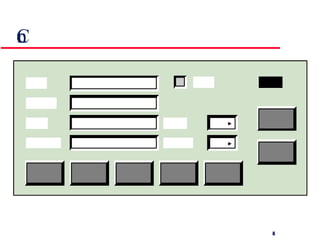
Control panel interface
Menu systems -- advantages and disadvantages Users need not remember command names as they are always presented with a list of valid commands Typing effort is minimal User errors are trapped by the interface Actions which involve logical conjunction (and)  or disjunction (or) are awkward to represent If there are many choices, some menu structuring facility must be used Experienced users find menus slower than  command language
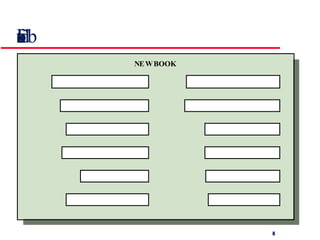
Form-based interface
Form-based interface Simple data entry Easy to learn Takes up a lot of screen space Suitable for Stock control, Personal loan processing
Command interfaces -- advantages and disadvantages User types commands to give instructions to the system e.g. UNIX May be implemented using cheap terminals. Commands of arbitrary complexity can be  created by command combination Users have to learn and remember a command  language -- unsuitable for occasional users Users make errors in command. An error  detection and recovery system is required System interaction is through a keyboard so  typing ability is required
Natural language interfaces The user types a command in a natural language. Generally, the vocabulary is limited and these systems are confined to specific application domains (e.g. timetable enquiries) NL processing technology is now good enough to make these interfaces effective for casual users but experienced users find that they require too much typing
Multiple user interfaces
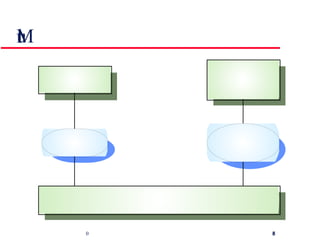
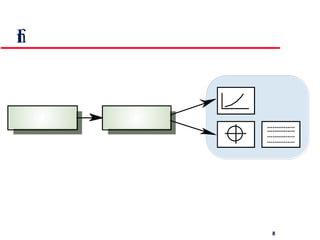
15.3 Information presentation Information presentation is concerned with presenting system information to system users The information may be presented directly (e.g. text in a word processor) or may be transformed in some way for presentation (e.g. in some graphical form) The Model-View-Controller approach is a way of supporting multiple presentations of data
Information presentation
Information presentation Static information Initialised at the beginning of a session. It does not change during the session May be either numeric or textual Dynamic  information Changes during a session and the changes must be  communicated to the system user May be either numeric or textual
Information display factors Is the user interested in precise information or  data relationships? How quickly do information values change?  Must the change be indicated immediately? Must the user take some action in response to  a change? Is there a direct manipulation interface? Is the information textual or numeric? Are relative values important?
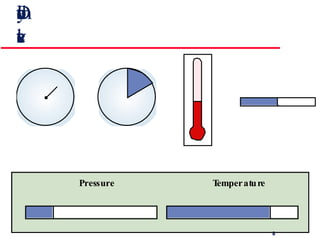
Alternative information presentations
Analogue vs. digital presentation Digital presentation Compact - takes up little screen space Precise values can be communicated Analogue presentation Easier to get an 'at a glance' impression of a value Possible to show relative values Easier to see exceptional data values
Dynamic information and  relative values
Textual highlighting
Data visualisation Concerned with techniques for displaying large amounts of information Visualisation can reveal relationships between entities and trends in the data Possible data visualisations are: Weather information collected from a number of sources The state of a telephone network as a linked set of nodes A model of a molecule displayed in 3 dimensions Web pages displayed as a hyperbolic tree
Colour displays Colour adds an extra dimension to an interface  and can help the user understand complex  information structures Can be used to highlight exceptional events Common mistakes in the use of colour in  interface design include: The use of colour to communicate meaning Over-use of colour in the display
Colour use guidelines Don't use too many colours Use colour coding to support use tasks Allow users to control colour coding Design for monochrome then add colour Use colour coding consistently Avoid colour pairings which clash Use colour change to show status change Be aware that colour displays are usually lower  resolution
15.4 User support   User guidance covers all system facilities to support users including on-line help, error messages, manuals etc. The user guidance system should be integrated with the user interface to help users when they need information about the system or when they make some kind of error The help and message system should, if possible, be integrated
Help and message system
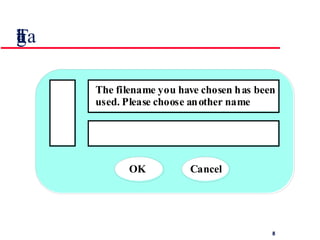
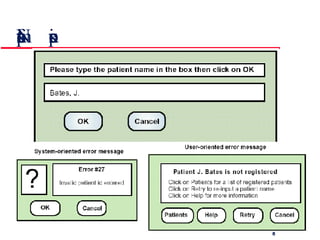
Error messages Error message design is critically important.  Poor error messages can mean that a user  rejects rather than accepts a system Messages should be polite, concise, consistent  and constructive The background and experience of users  should be the determining factor in message  design
Design factors in message wording
Nurse input of a patient’s name
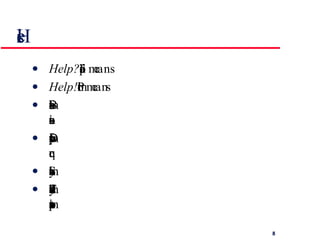
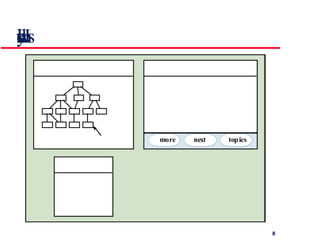
Help system design Help?  means ‘help I want information” Help!  means “HELP. I'm in trouble” Both of these requirements have to be taken  into account in help system design Different facilities in the help system may be  required Should not simply be an on-line manual The dynamic characteristics of the display can  improve information presentation
Help system windows
User documentation As well as on-line information, paper documentation should be supplied with a system Documentation should be designed for a range of users from inexperienced to experienced As well as manuals, other easy-to-use documentation such as a quick reference card may be provided
User document types At least 5 documents (or chapters in 1 document) should be delivered with a software system. Examples  error-causes  new hardware recovery  recovery  handling
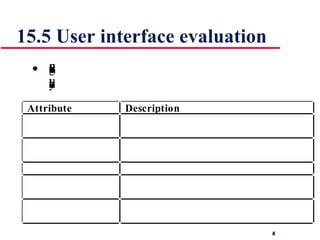
15.5 User interface evaluation Some evaluation of a user interface design  should be carried out to assess its suitability
Simple evaluation techniques Questionnaires for user feedback Video recording of system use and subsequent  tape evaluation. Instrumentation of code to collect information  about facility use and user errors. The provision of a gripe button for on-line user  feedback.
Key points Interface design should be user-centred. An interface should be logical and consistent and help users recover from errors Interaction styles include direct manipulation, menu systems, form fill-in, command languages and natural language Graphical displays should be used to present trends and approximate values. Digital displays when precision is required Colour should be used sparingly and consistently
Key points Systems should provide on-line help. This should include “help, I’m in trouble” and “help, I want information” Error messages should be positive rather than  negative. A range of different types of user documents should be provided Ideally, a user interface should be evaluated against a usability specification
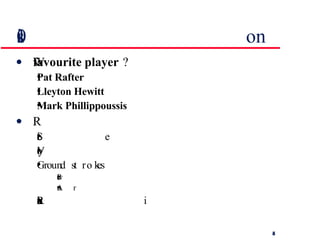
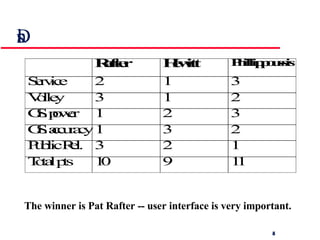
10 minute break - a discussion Which one of the following tennis stars is your  favourite player  ? Pat Rafter Lleyton Hewitt Mark Phillippoussis Rank them as per the following characteristics: Service Volley Ground strokes Power Accuracy Public Relations
Discussion cont. The winner is Pat Rafter -- user interface is very important.
Ch 16 -- Dependability The extent to which a critical system is trusted by its users For critical systems, it is usually the case that the most important system property is the dependability of the system The dependability of a system reflects the user’s degree of trust in that system. It reflects the extent of the user’s confidence that it will operate as users expect and that it will not ‘fail’ in normal use Usefulness and trustworthiness are not the same thing. A system does not have to be trusted to be useful
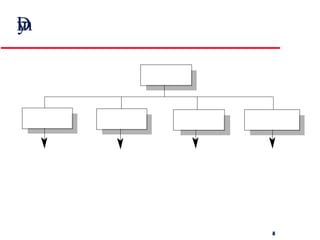
Dimensions of dependability
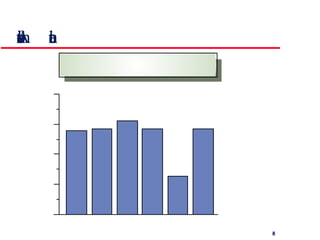
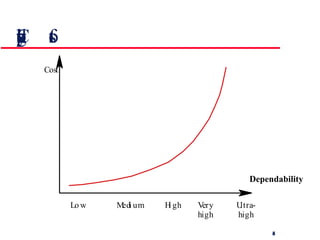
Costs of increasing dependability C o s t L o w M e d i u m H i g h V e r y h i g h U l t r a - h i g h Dependability
Dependability costs Dependability costs tend to increase exponentially as increasing levels of dependability are required There are two reasons for this The use of more expensive development techniques and hardware that are required to achieve the higher levels of dependability The increased testing and system validation that is required to convince the system client that the required levels of dependability have been achieved
Dependability vs performance Untrustworthy systems may be rejected by their users System failure costs may be very high It is very difficult to tune systems to make them more dependable It may be possible to compensate for poor performance Untrustworthy systems may cause loss of valuable information Dependability comes at the cost of performance due to redundancy introduced. However, it is more important:
Dependability economics Because of very high costs of dependability achievement, it may be more cost effective to accept untrustworthy systems and pay for failure costs However, this depends on social and political factors. A reputation for products  that can’t be trusted may lose future business Depends on system type - for business systems in particular, modest levels of dependability may be adequate
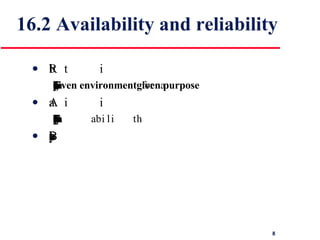
16.2 Availability and reliability Reliability The probability of failure-free system operation over a specified time in a  given environment  for a  given purpose Availability The probability that a system, at a point in time, will be operational and able to deliver the requested services Both of these attributes can be expressed quantitatively
Availability and reliability It is sometimes possible to subsume system availability under system reliability Obviously if a system is unavailable it is not delivering the specified system services However, it is possible to have systems with low reliability that must be available. So long as system failures can be repaired quickly and do not damage data, low reliability may not be a problem e.g., Telephone exchange switch Availability takes repair time into account
Reliability terminology Fault --> Error --> Failure
Faults and failures Failures are a usually a result of system errors that are derived from faults in the system However, faults do not necessarily result in system errors Errors do not necessarily lead to system failures The error can be corrected by built-in error detection and recovery  The failure can be protected against by built-in protection facilities. These may, for example, protect system resources from system errors
Perceptions of reliability The formal definition of reliability does not always reflect the user’s perception of a system’s reliability The assumptions that are made about the environment where a system will be used may be incorrect The consequences of system failures affects the perception of reliability Unreliable windscreen wipers in a car may be irrelevant in a dry climate Failures that have serious consequences (such as an engine breakdown in a car) are given greater weight by users than failures that are inconvenient
Reliability achievement Fault avoidance -- discussed further in Ch 24 Development technique are used that either minimise the possibility of mistakes or trap mistakes before they result in the introduction of system faults-- no pointers Fault detection and removal -- Ch 19, 20 Verification and validation techniques that increase the probability of detecting and correcting errors before the system goes into service are used Fault tolerance -- Ch 18 Run-time techniques are used to ensure that system faults do not result in system errors and/or that system errors do not lead to system failures
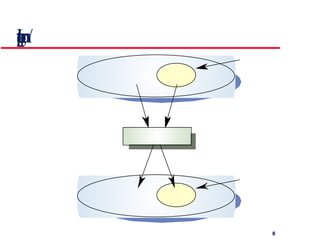
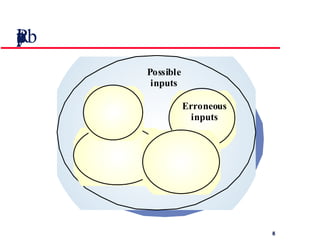
Reliability modelling You can model a system as an input-output mapping where some inputs will result in erroneous outputs The reliability of the system is the probability that a particular input will lie in the set of inputs that cause erroneous outputs Different people will use the system in different ways so this probability is not a static system attribute but depends on the system’s environment
Input/output mapping
Reliability perception
Reliability improvement Removing X% of the faults in a system will not necessarily improve the reliability by X%.  A study at IBM showed that removing 60% of product defects resulted in a 3% improvement in reliability Program defects may be in rarely executed sections of the code so may never be encountered by users. Removing these does not affect the perceived reliability A program with known faults may therefore still be seen as reliable by its users
16.3 Safety Safety is a property of a system that reflects the system’s ability to operate, normally or abnormally, without danger of causing human injury or death and without damage to the system’s environment It is increasingly important to consider software safety as more and more devices incorporate software-based control systems  Safety requirements are exclusive requirements i.e. they exclude undesirable situations rather than specify required system services
Primary safety-critical systems Embedded software systems whose failure can cause the associated hardware to fail and directly threaten people. e.g., aircraft control system Secondary safety-critical systems Systems whose failure results in faults in other systems which can threaten people. e.g., CAD Discussion here focuses on primary safety-critical systems Secondary safety-critical systems can only be considered on a one-off basis Safety criticality
Safety and reliability are related but distinct In general, reliability and availability are necessary but not sufficient conditions for system safety  Reliability is concerned with conformance to a given specification and delivery of service Safety is concerned with ensuring system cannot cause damage irrespective of whether  or not it conforms to its specification Safety and reliability
Specification errors If the system specification is incorrect then the system can behave as specified but still cause an accident Hardware failures generating spurious inputs Hard to anticipate in the specification Context-sensitive commands i.e. issuing the right command at the wrong time Often the result of operator error Unsafe reliable systems
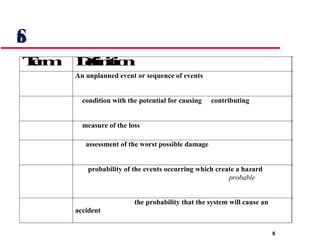
Safety terminology
Safety achievement Hazard avoidance The system is designed so that some classes of hazard simply cannot arise. E.g., 2 buttons to cut   Hazard detection and removal The system is designed so that hazards are detected and removed before they result in an accident.  E.g., detect excess pressure and open relief valve Damage limitation The system includes protection features that minimise the damage that may result from an accident.  E.g., Automatic fire extinguishers in cockpit
Normal accidents Accidents in complex systems rarely have a single cause as these systems are designed to be resilient to a single point of failure Designing systems so that a single point of failure does not cause an accident is a fundamental principle of safe systems design Almost all accidents are a result of combinations of malfunctions It is probably the case that anticipating all problem combinations, especially, in software controlled systems is impossible so achieving complete safety is impossible
16.4 Security The security of a system is a system property that reflects the system’s ability to protect itself from accidental or deliberate external attack Security is becoming increasingly important as systems are networked so that external access to the system through the Internet is possible Security is an essential pre-requisite for availability, reliability and safety
Fundamental security If a system is a networked system and is insecure then statements about its reliability and its safety are unreliable These statements depend on the executing system and the developed system being the same. However, intrusion can change the executing system and/or its data Therefore, the reliability and safety assurance is no longer valid
Security terminology
Damage from insecurity Denial of service The system is forced into a state where normal services are unavailable or where service provision is significantly degraded -- availability affected Corruption of programs or data The programs or data in the system may be modified in an unauthorised way -- reliability & safety Disclosure of confidential information Information that is managed by the system may be exposed to people who are not authorised to read or use that information
Security assurance Vulnerability avoidance The system is designed so that vulnerabilities do not occur. For example, if there is no external network connection then external attack is impossible Attack detection and elimination The system is designed so that attacks on vulnerabilities are detected and neutralised before they result in an exposure. For example, virus checkers find and remove viruses before they infect a system Exposure limitation The system is designed so that the adverse consequences of a successful attack are minimised. For example, a backup policy
Key points The dependability in a system reflects the user’s trust in that system The availability of a system is the probability that it will be available to deliver services when requested The reliability of a system is the probability that system services will be delivered as specified Reliability and availability are generally seen as necessary but not sufficient conditions for safety and security
Key points Reliability is related to the probability of an error occurring in operational use. A system with known faults may be reliable Safety is a system attribute that reflects the system’s ability to operate without threatening people or the environment Security is a system attribute that reflects the system’s ability to protect itself from external attack

SECh1516

  • 1.
    3 minute reviewof last week -- Object-oriented design Define the context and modes of use of the system Design the system architecture Identify the principal system objects Develop design models Specify object interfaces
  • 2.
    3 minute reviewof last week -- Design with reuse Increased reliability Effective use of specialists Standards compliance Accelerated development CBD -- Provides/Requires interface Application Frameworks -- abstract classes Application families -- common core is reused platform/configuration/functional specialisation Design patterns -- well-tried solution to a common problem and accumulated wisdom and experience
  • 3.
    Ch 15 --The user interface design Designing effective interfaces for software systems System users often judge a system by its interface rather than its functionality Poor user interface design is the reason why so many software systems are never used A poorly designed interface can cause a user to make catastrophic errors Most users of business systems interact through graphical interfaces
  • 4.
  • 5.
    GUI advantages Theyare easy to learn and use. Users without experience can learn to use the system quickly. The user may switch quickly from one task to another and can interact with several different applications. Information remains visible in its own window when attention is switched . Fast, full-screen interaction is possible with immediate access to anywhere on the screen
  • 6.
    User-centred design Theaim of this chapter is to sensitise software engineers to key issues underlying the design rather than the implementation of user interfaces User-centred design is an approach to UI design where the needs of the user are paramount and where the user is involved in the design process UI design always involves the development of prototype interfaces
  • 7.
  • 8.
    15.1 UI designprinciples UI design must take account of the needs, experience and capabilities of the system users Designers should be aware of people’s physical and mental limitations (e.g. limited short-term memory) and should recognise that people make mistakes UI design principles underlie interface designs although not all principles are applicable to all designs
  • 9.
    Design principles Userfamiliarity The interface should be based on user-oriented terms and concepts rather than computer concepts. E.g., an office system should use letters, documents, folders etc. rather than directories, file identifiers, etc. Consistency The interface should be consistent in that, comparable operations should be activated in the same way. Minimal surprise The user should be able to predict the operation of comparable commands
  • 10.
    Design principles RecoverabilityThe interface should include mechanisms to allow users to recover from errors . E.g., undo facility, confirmation of destructive actions, 'soft' deletes, etc. User guidance Some user guidance such as help systems, on-line manuals, etc. should be supplied User diversity Interaction facilities for different types of user should be supported. For example, some users have seeing difficulties and so larger text should be available
  • 11.
    15.2 User-system interactionTwo problems must be addressed in interactive systems design How should information from the user be provided to the computer system? How should information from the computer system be presented to the user? User interaction and information presentation may be integrated through a coherent framework such as a user interface metaphor
  • 12.
    Interaction styles Directmanipulation Menu selection Form fill-in Command language Natural language
  • 13.
    Direct manipulation -- advantages and disadvantages User learning time is relatively short Users get immediate feedback on their actions so mistakes can be quickly detected and corrected Direct manipulation interfaces can be complex to program and make heavy demands on the computer system Only suitable where there is a visual metaphor for tasks and objects
  • 14.
  • 15.
    Menu systems --advantages and disadvantages Users need not remember command names as they are always presented with a list of valid commands Typing effort is minimal User errors are trapped by the interface Actions which involve logical conjunction (and) or disjunction (or) are awkward to represent If there are many choices, some menu structuring facility must be used Experienced users find menus slower than command language
  • 16.
  • 17.
    Form-based interface Simpledata entry Easy to learn Takes up a lot of screen space Suitable for Stock control, Personal loan processing
  • 18.
    Command interfaces --advantages and disadvantages User types commands to give instructions to the system e.g. UNIX May be implemented using cheap terminals. Commands of arbitrary complexity can be created by command combination Users have to learn and remember a command language -- unsuitable for occasional users Users make errors in command. An error detection and recovery system is required System interaction is through a keyboard so typing ability is required
  • 19.
    Natural language interfacesThe user types a command in a natural language. Generally, the vocabulary is limited and these systems are confined to specific application domains (e.g. timetable enquiries) NL processing technology is now good enough to make these interfaces effective for casual users but experienced users find that they require too much typing
  • 20.
  • 21.
    15.3 Information presentationInformation presentation is concerned with presenting system information to system users The information may be presented directly (e.g. text in a word processor) or may be transformed in some way for presentation (e.g. in some graphical form) The Model-View-Controller approach is a way of supporting multiple presentations of data
  • 22.
  • 23.
    Information presentation Staticinformation Initialised at the beginning of a session. It does not change during the session May be either numeric or textual Dynamic information Changes during a session and the changes must be communicated to the system user May be either numeric or textual
  • 24.
    Information display factorsIs the user interested in precise information or data relationships? How quickly do information values change? Must the change be indicated immediately? Must the user take some action in response to a change? Is there a direct manipulation interface? Is the information textual or numeric? Are relative values important?
  • 25.
  • 26.
    Analogue vs. digitalpresentation Digital presentation Compact - takes up little screen space Precise values can be communicated Analogue presentation Easier to get an 'at a glance' impression of a value Possible to show relative values Easier to see exceptional data values
  • 27.
    Dynamic information and relative values
  • 28.
  • 29.
    Data visualisation Concernedwith techniques for displaying large amounts of information Visualisation can reveal relationships between entities and trends in the data Possible data visualisations are: Weather information collected from a number of sources The state of a telephone network as a linked set of nodes A model of a molecule displayed in 3 dimensions Web pages displayed as a hyperbolic tree
  • 30.
    Colour displays Colouradds an extra dimension to an interface and can help the user understand complex information structures Can be used to highlight exceptional events Common mistakes in the use of colour in interface design include: The use of colour to communicate meaning Over-use of colour in the display
  • 31.
    Colour use guidelinesDon't use too many colours Use colour coding to support use tasks Allow users to control colour coding Design for monochrome then add colour Use colour coding consistently Avoid colour pairings which clash Use colour change to show status change Be aware that colour displays are usually lower resolution
  • 32.
    15.4 User support User guidance covers all system facilities to support users including on-line help, error messages, manuals etc. The user guidance system should be integrated with the user interface to help users when they need information about the system or when they make some kind of error The help and message system should, if possible, be integrated
  • 33.
  • 34.
    Error messages Errormessage design is critically important. Poor error messages can mean that a user rejects rather than accepts a system Messages should be polite, concise, consistent and constructive The background and experience of users should be the determining factor in message design
  • 35.
    Design factors inmessage wording
  • 36.
    Nurse input ofa patient’s name
  • 37.
    Help system designHelp? means ‘help I want information” Help! means “HELP. I'm in trouble” Both of these requirements have to be taken into account in help system design Different facilities in the help system may be required Should not simply be an on-line manual The dynamic characteristics of the display can improve information presentation
  • 38.
  • 39.
    User documentation Aswell as on-line information, paper documentation should be supplied with a system Documentation should be designed for a range of users from inexperienced to experienced As well as manuals, other easy-to-use documentation such as a quick reference card may be provided
  • 40.
    User document typesAt least 5 documents (or chapters in 1 document) should be delivered with a software system. Examples error-causes new hardware recovery recovery handling
  • 41.
    15.5 User interfaceevaluation Some evaluation of a user interface design should be carried out to assess its suitability
  • 42.
    Simple evaluation techniquesQuestionnaires for user feedback Video recording of system use and subsequent tape evaluation. Instrumentation of code to collect information about facility use and user errors. The provision of a gripe button for on-line user feedback.
  • 43.
    Key points Interfacedesign should be user-centred. An interface should be logical and consistent and help users recover from errors Interaction styles include direct manipulation, menu systems, form fill-in, command languages and natural language Graphical displays should be used to present trends and approximate values. Digital displays when precision is required Colour should be used sparingly and consistently
  • 44.
    Key points Systemsshould provide on-line help. This should include “help, I’m in trouble” and “help, I want information” Error messages should be positive rather than negative. A range of different types of user documents should be provided Ideally, a user interface should be evaluated against a usability specification
  • 45.
    10 minute break- a discussion Which one of the following tennis stars is your favourite player ? Pat Rafter Lleyton Hewitt Mark Phillippoussis Rank them as per the following characteristics: Service Volley Ground strokes Power Accuracy Public Relations
  • 46.
    Discussion cont. Thewinner is Pat Rafter -- user interface is very important.
  • 47.
    Ch 16 --Dependability The extent to which a critical system is trusted by its users For critical systems, it is usually the case that the most important system property is the dependability of the system The dependability of a system reflects the user’s degree of trust in that system. It reflects the extent of the user’s confidence that it will operate as users expect and that it will not ‘fail’ in normal use Usefulness and trustworthiness are not the same thing. A system does not have to be trusted to be useful
  • 48.
  • 49.
    Costs of increasingdependability C o s t L o w M e d i u m H i g h V e r y h i g h U l t r a - h i g h Dependability
  • 50.
    Dependability costs Dependabilitycosts tend to increase exponentially as increasing levels of dependability are required There are two reasons for this The use of more expensive development techniques and hardware that are required to achieve the higher levels of dependability The increased testing and system validation that is required to convince the system client that the required levels of dependability have been achieved
  • 51.
    Dependability vs performanceUntrustworthy systems may be rejected by their users System failure costs may be very high It is very difficult to tune systems to make them more dependable It may be possible to compensate for poor performance Untrustworthy systems may cause loss of valuable information Dependability comes at the cost of performance due to redundancy introduced. However, it is more important:
  • 52.
    Dependability economics Becauseof very high costs of dependability achievement, it may be more cost effective to accept untrustworthy systems and pay for failure costs However, this depends on social and political factors. A reputation for products that can’t be trusted may lose future business Depends on system type - for business systems in particular, modest levels of dependability may be adequate
  • 53.
    16.2 Availability andreliability Reliability The probability of failure-free system operation over a specified time in a given environment for a given purpose Availability The probability that a system, at a point in time, will be operational and able to deliver the requested services Both of these attributes can be expressed quantitatively
  • 54.
    Availability and reliabilityIt is sometimes possible to subsume system availability under system reliability Obviously if a system is unavailable it is not delivering the specified system services However, it is possible to have systems with low reliability that must be available. So long as system failures can be repaired quickly and do not damage data, low reliability may not be a problem e.g., Telephone exchange switch Availability takes repair time into account
  • 55.
    Reliability terminology Fault--> Error --> Failure
  • 56.
    Faults and failuresFailures are a usually a result of system errors that are derived from faults in the system However, faults do not necessarily result in system errors Errors do not necessarily lead to system failures The error can be corrected by built-in error detection and recovery The failure can be protected against by built-in protection facilities. These may, for example, protect system resources from system errors
  • 57.
    Perceptions of reliabilityThe formal definition of reliability does not always reflect the user’s perception of a system’s reliability The assumptions that are made about the environment where a system will be used may be incorrect The consequences of system failures affects the perception of reliability Unreliable windscreen wipers in a car may be irrelevant in a dry climate Failures that have serious consequences (such as an engine breakdown in a car) are given greater weight by users than failures that are inconvenient
  • 58.
    Reliability achievement Faultavoidance -- discussed further in Ch 24 Development technique are used that either minimise the possibility of mistakes or trap mistakes before they result in the introduction of system faults-- no pointers Fault detection and removal -- Ch 19, 20 Verification and validation techniques that increase the probability of detecting and correcting errors before the system goes into service are used Fault tolerance -- Ch 18 Run-time techniques are used to ensure that system faults do not result in system errors and/or that system errors do not lead to system failures
  • 59.
    Reliability modelling Youcan model a system as an input-output mapping where some inputs will result in erroneous outputs The reliability of the system is the probability that a particular input will lie in the set of inputs that cause erroneous outputs Different people will use the system in different ways so this probability is not a static system attribute but depends on the system’s environment
  • 60.
  • 61.
  • 62.
    Reliability improvement RemovingX% of the faults in a system will not necessarily improve the reliability by X%. A study at IBM showed that removing 60% of product defects resulted in a 3% improvement in reliability Program defects may be in rarely executed sections of the code so may never be encountered by users. Removing these does not affect the perceived reliability A program with known faults may therefore still be seen as reliable by its users
  • 63.
    16.3 Safety Safetyis a property of a system that reflects the system’s ability to operate, normally or abnormally, without danger of causing human injury or death and without damage to the system’s environment It is increasingly important to consider software safety as more and more devices incorporate software-based control systems Safety requirements are exclusive requirements i.e. they exclude undesirable situations rather than specify required system services
  • 64.
    Primary safety-critical systemsEmbedded software systems whose failure can cause the associated hardware to fail and directly threaten people. e.g., aircraft control system Secondary safety-critical systems Systems whose failure results in faults in other systems which can threaten people. e.g., CAD Discussion here focuses on primary safety-critical systems Secondary safety-critical systems can only be considered on a one-off basis Safety criticality
  • 65.
    Safety and reliabilityare related but distinct In general, reliability and availability are necessary but not sufficient conditions for system safety Reliability is concerned with conformance to a given specification and delivery of service Safety is concerned with ensuring system cannot cause damage irrespective of whether or not it conforms to its specification Safety and reliability
  • 66.
    Specification errors Ifthe system specification is incorrect then the system can behave as specified but still cause an accident Hardware failures generating spurious inputs Hard to anticipate in the specification Context-sensitive commands i.e. issuing the right command at the wrong time Often the result of operator error Unsafe reliable systems
  • 67.
  • 68.
    Safety achievement Hazardavoidance The system is designed so that some classes of hazard simply cannot arise. E.g., 2 buttons to cut Hazard detection and removal The system is designed so that hazards are detected and removed before they result in an accident. E.g., detect excess pressure and open relief valve Damage limitation The system includes protection features that minimise the damage that may result from an accident. E.g., Automatic fire extinguishers in cockpit
  • 69.
    Normal accidents Accidentsin complex systems rarely have a single cause as these systems are designed to be resilient to a single point of failure Designing systems so that a single point of failure does not cause an accident is a fundamental principle of safe systems design Almost all accidents are a result of combinations of malfunctions It is probably the case that anticipating all problem combinations, especially, in software controlled systems is impossible so achieving complete safety is impossible
  • 70.
    16.4 Security Thesecurity of a system is a system property that reflects the system’s ability to protect itself from accidental or deliberate external attack Security is becoming increasingly important as systems are networked so that external access to the system through the Internet is possible Security is an essential pre-requisite for availability, reliability and safety
  • 71.
    Fundamental security Ifa system is a networked system and is insecure then statements about its reliability and its safety are unreliable These statements depend on the executing system and the developed system being the same. However, intrusion can change the executing system and/or its data Therefore, the reliability and safety assurance is no longer valid
  • 72.
  • 73.
    Damage from insecurityDenial of service The system is forced into a state where normal services are unavailable or where service provision is significantly degraded -- availability affected Corruption of programs or data The programs or data in the system may be modified in an unauthorised way -- reliability & safety Disclosure of confidential information Information that is managed by the system may be exposed to people who are not authorised to read or use that information
  • 74.
    Security assurance Vulnerabilityavoidance The system is designed so that vulnerabilities do not occur. For example, if there is no external network connection then external attack is impossible Attack detection and elimination The system is designed so that attacks on vulnerabilities are detected and neutralised before they result in an exposure. For example, virus checkers find and remove viruses before they infect a system Exposure limitation The system is designed so that the adverse consequences of a successful attack are minimised. For example, a backup policy
  • 75.
    Key points Thedependability in a system reflects the user’s trust in that system The availability of a system is the probability that it will be available to deliver services when requested The reliability of a system is the probability that system services will be delivered as specified Reliability and availability are generally seen as necessary but not sufficient conditions for safety and security
  • 76.
    Key points Reliabilityis related to the probability of an error occurring in operational use. A system with known faults may be reliable Safety is a system attribute that reflects the system’s ability to operate without threatening people or the environment Security is a system attribute that reflects the system’s ability to protect itself from external attack