SAMR : Model of
Technology Integration
Brandon Morton
K-12 Technology Integrationist
Hampton-Dumont CSD, Hampton, Iowa
http://morton.hdcsd.org/
Follow along at

WWW.REELAPP.COM/515518
Little bit more about me

Starting 3rd year as Technology Integrationist (9th
year in education)
Previous 6 years as a K-5 Technology Teacher
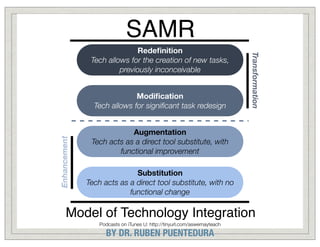
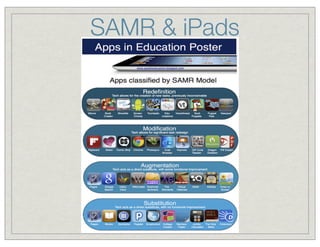
SAMR

Enhancement

Modification
Tech allows for significant task redesign

Transformation

Redefinition
Tech allows for the creation of new tasks,
previously inconceivable

Augmentation
Tech acts as a direct tool substitute, with
functional improvement
Substitution
Tech acts as a direct tool substitute, with no
functional change

Model of Technology Integration
Podcasts on iTunes U: http://tinyurl.com/aswemayteach

BY DR. RUBEN PUENTEDURA
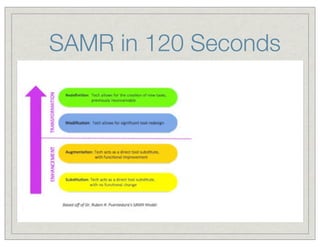
SAMR in 120 Seconds
Teacher EXAMPLE HERE
Showcase
PUT YOUR
HTTP://SCRUMBLR.CA/SAMR

PreK - 5th Grade teacher examples
How are your students using technology in
your classroom and categorize it within
SAMR?
1.
SAMR Article
Article - SAMR and the Integration of
Tech Standards
http://tinyurl.com/samr2
Jot Down Thoughts
http://padlet.com/wall/samrmoti
Teacher Showcase
PUT YOUR EXAMPLE HERE
HTTP://SCRUMBLR.CA/SAMR

6th - 8th grade teacher examples
How are your students using technology in your
classroom and categorize it within SAMR?
1.
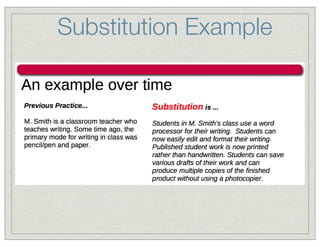
Substitution Example
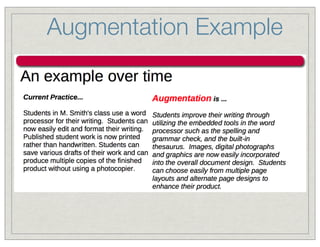
Augmentation Example
Teacher EXAMPLE HERE
Showcase
PUT YOUR
HTTP://SCRUMBLR.CA/SAMR

High School teacher examples
How are your students using technology in your
classroom and categorize it within SAMR?
1.
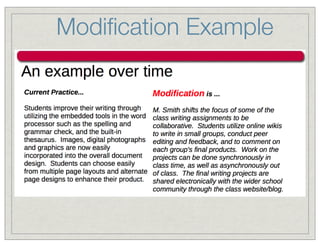
Modification Example
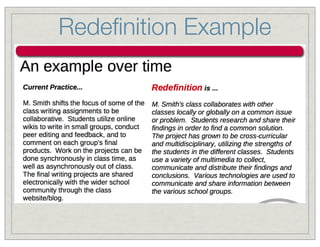
Redefinition Example
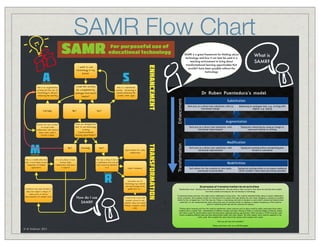
SAMR Flow Chart

SAMR

For purposeful use of
educational technology

A

S

lesson

Augmentation

Substitution

This is an augmentation

Could this activity

technology is still just

analogue (non-tech)

enhancing the learning

activity - technology is
purely enhancing the
activity. Think again.

means?

Partially

No?

Yes?

to bring

transformational

share work online &

learning opportunities?

receive critique

Partially

Yes?

Opportunities for online
collaboration

It is very likely to have

The task is likely to be at

task. It most likely involves

involved online

a redefinition level and will

integration of multiple

collaboration with peers

have some key elements

applications.

& experts

to it.

R

Expert feedback

Redefinition

Innovative use of
technology, eg a shared
narrated Google Earth
guided tour or.........

Transform the task further to
allow for expert critique of
online work to inform

How do I use
SAMR?

A shared lab result with
another school to see
whether they can repeat
findings. Compare results
online.

TRANSFORMATION

No?

Modification

improvements of student work

Dr Ruben Puentedura's model

task to use technology

to include online

This is a modification level

Examples of transformation level activities
T
ransformation level activities have some key characteristics. One key thing to take on board is that these are activities that wouldn't
have been possible previously but are now because of technology.
If examining literacy activities, this might involve collaborative writing online - this could be extended further taking on board collaboration
across continents, and accepting critique for improvement from experts that help develop the work online. Blogging is certainly an excellent
vehicle for this to happen but it isn't the only one. Oracy is a key literacy skill and so narration on work which is posted and shared online
would fall in to the transformational areas. Using tools such as Camtasia Studio on desktops or Explain Everything on iPad would be
great for transforming the task and the outcomes for learners.
Thinking about numeracy and how this could be transformed, similar activities such as above would be useful, particularly those where
students have to explain their understanding of dif ferent concepts and ideas. Sharing of these in a personal playlist of learning, shared
with others would hit transformation levels and bring about significant learning opportunities. Other activities in STEM activities could
involve completing dif ferent tests and then sharing these results with other classes. The other classes, which could be anywhere in the
world, could then complete the same tests & the classes could compare their results.
Have you got any more examples?
Please share them with me on @ICTEvangelist.

© M Anderson 2013

What is
SAMR?

Have you designed the

Develop the task further
collaboration with experts,

M

This is a substitution

be completed by

activity but the use of

ENHANCEMENT

I want to use

technology in my

SAMR is a great framework for thinking about
technology and how it can best be used in a
teaching environment to bring about
transformational learning opportunities that
wouldn't have been possible without the
technology
TIM Videos and their
levels of SAMR
Technology Integration Matrix Videos activity
Also go back to your specific Teacher Example (link
below) and modify it and AMP it up to the next level
of SAMR.

PUT YOUR EXAMPLE HERE
HTTP://SCRUMBLR.CA/SAMR
SAMR & iPads
SAMR & iPads
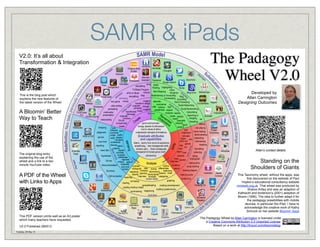
V2.0: It’s all about
Transformation & Integration
s

d
iPa

This is the blog post which
explains the new features of
the latest version of the Wheel

Nearpod

Aurasma

iAnnotate

The Padagogy
Wheel V2.0

iThoughts

iPa
Twitter
dA
Interview
pp
s
DocsToGo
Fotobabble Assistant Facebook
Google Search
Toontastic
song Bullet
Prezi
storytelling
Garageband
Pointing Highlighting
Bump
TV/Radio Program
name
cartoon Mind Mapping
Blog Docs MentalCase
recognize Ac
ePub or iBook
ies
tiv
iMovie
vit
Bookmarking or Favouriting
storytelling Rap
Blog ities
cti
Voicethread
A animating
Commenting Journalling
Easy
imagine describe
new game mixing
Word Processing
Release
transform design
CourseNotes Maptini
summarize Act
s suppose
Social Networking
i
video editing
Wordpress
erb compose change infer retrieve find on V
e
nV
podcasting
suggest
paraphrase explain rbs Social Bookmarking
tio
Ac hypothesize invent
Subscribing
multimedia
iTimeLapse
compare identify
FeeddlerRSS
Blooms
rearrange
presentation
Pro
Re
Searching or
originate
locate classify
Quizcast
ScreenChomp
Un me
Googling list
e
produce
t
videocasting
de mb match
find an
exemplify
ea
rst er interpret
Recalling
Cr
unusual way
good communicator
an
editing
report
d
Ustream
create
energy, passion & enthusiasm
expand
critiquing
WikiNodes
role playing
rank
true to values & ethics
edit
Explain
network post
movie making
judgement
understands strengths & limitations
Everything
conclude
implement
demonstrating
judge justify
simulate
WEB to PDF
Graduate attributes
opinion
debate
presenting
verify
share use
Keynote
and capabilities
compare
ShareBoard
carry out
interviewing
court trial
conference
listens, learns from errors & experience
upload
mapping
discuss select
Sonic Pics
play
reporting
empathizing, time management skills
run
support
hack
simulating
remains calm, thinks strategically
Prompster
news item
decide
Articulate
Evernote
teach load
transparent & honest, gives credit
Pro
collecting
prioritise
Peek
evaluate
persevering
execute
Hypothesis
taking
Co
Google
collaborate
draw
gn
photograph
ins
appraise
Docs
itiv
Survey
ma interview operate
Evernote
critique defend
e
Do
making diary
Notability
Analyse
Recommendation moderate contrast
construct
outline
scrap booking
give your
record
Taposé
opinion distinguish infer survey differentiate
drawing diagram
compare deconstruct
determine
Summary
sequence
AudioBoo Adobe
examine demonstrate deduce mash
classify
making puzzle
Connect
Self-evaluation reporting
interview simulate categorise
sculpturing
Action Verbs
Edmodo
Skype
graphing
surveying
charting
spreadsheeting
Perfectly Clr
creating advertisement
Quick
creating mashup media
building questionnaire
Voice
StudentPad
summarising diagraming
Google+
Activities
Animation
MiniMash
Creation
AIM
MindMash
Inspiration
iCardSort
Pages
Numbers
Comic Life
Maps

Developed by
Allan Carrington
Designing Outcomes

a
Evalu

erb
nV

io
Act

ities

Activ

s
App
iPad

ps

Tuesday, 28 May 13

iPad
Ap

V2.0 Published 280513

Activ
ities

This PDF version prints well as an A3 poster
which many teachers have requested.

Verb
s

A PDF of the Wheel
with Links to Apps

Actio
n

The original blog entry
explaining the use of the
wheel and a link to a two
minute YouTube video.

App
ly

s

te

A Bloomin’ Better
Way to Teach

p
Ap

Creative Book
Builder

SurveyPro

FilemakerGo 11

Popplet
Bento

iPad Apps

DropVox

Allan’s contact details

Standing on the
Shoulders of Giants
This Taxonomy wheel, without the apps, was
first discovered on the website of Paul
Hopkin’s educational consultancy website
mmiweb.org.uk That wheel was produced by
Sharon Artley and was an adaption of
Kathwohl and Anderson’s (2001) adaption of
Bloom (1956). The idea to further adapt it for
the pedagogy possibilities with mobile
devices, in particular the iPad, I have to
acknowledge the creative work of Kathy
Schrock on her website Bloomin’ Apps

The Padagogy Wheel by Allan Carrington is licensed under
a Creative Commons Attribution 3.0 Unported License.
Based on a work at http://tinyurl.com/bloomsblog.
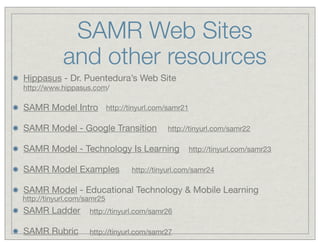
SAMR Web Sites
and other resources
Hippasus - Dr. Puentedura’s Web Site
http://www.hippasus.com/

SAMR Model Intro http://tinyurl.com/samr21
SAMR Model - Google Transition

http://tinyurl.com/samr22

SAMR Model - Technology Is Learning
SAMR Model Examples

http://tinyurl.com/samr23

http://tinyurl.com/samr24

SAMR Model - Educational Technology & Mobile Learning

http://tinyurl.com/samr25

SAMR Ladder

http://tinyurl.com/samr26

SAMR Rubric

http://tinyurl.com/samr27
Questions
Contact Information
bmorton@hdcsd.org
@morty_44
Feedback
http://tinyurl.com/bemfeedback

SAMR

  • 1.
    SAMR : Modelof Technology Integration Brandon Morton K-12 Technology Integrationist Hampton-Dumont CSD, Hampton, Iowa http://morton.hdcsd.org/
  • 2.
  • 3.
    Little bit moreabout me Starting 3rd year as Technology Integrationist (9th year in education) Previous 6 years as a K-5 Technology Teacher
  • 4.
    SAMR Enhancement Modification Tech allows forsignificant task redesign Transformation Redefinition Tech allows for the creation of new tasks, previously inconceivable Augmentation Tech acts as a direct tool substitute, with functional improvement Substitution Tech acts as a direct tool substitute, with no functional change Model of Technology Integration Podcasts on iTunes U: http://tinyurl.com/aswemayteach BY DR. RUBEN PUENTEDURA
  • 5.
    SAMR in 120Seconds
  • 6.
    Teacher EXAMPLE HERE Showcase PUTYOUR HTTP://SCRUMBLR.CA/SAMR PreK - 5th Grade teacher examples How are your students using technology in your classroom and categorize it within SAMR? 1.
  • 7.
    SAMR Article Article -SAMR and the Integration of Tech Standards http://tinyurl.com/samr2 Jot Down Thoughts http://padlet.com/wall/samrmoti
  • 8.
    Teacher Showcase PUT YOUREXAMPLE HERE HTTP://SCRUMBLR.CA/SAMR 6th - 8th grade teacher examples How are your students using technology in your classroom and categorize it within SAMR? 1.
  • 9.
  • 10.
  • 11.
    Teacher EXAMPLE HERE Showcase PUTYOUR HTTP://SCRUMBLR.CA/SAMR High School teacher examples How are your students using technology in your classroom and categorize it within SAMR? 1.
  • 12.
  • 13.
  • 14.
    SAMR Flow Chart SAMR Forpurposeful use of educational technology A S lesson Augmentation Substitution This is an augmentation Could this activity technology is still just analogue (non-tech) enhancing the learning activity - technology is purely enhancing the activity. Think again. means? Partially No? Yes? to bring transformational share work online & learning opportunities? receive critique Partially Yes? Opportunities for online collaboration It is very likely to have The task is likely to be at task. It most likely involves involved online a redefinition level and will integration of multiple collaboration with peers have some key elements applications. & experts to it. R Expert feedback Redefinition Innovative use of technology, eg a shared narrated Google Earth guided tour or......... Transform the task further to allow for expert critique of online work to inform How do I use SAMR? A shared lab result with another school to see whether they can repeat findings. Compare results online. TRANSFORMATION No? Modification improvements of student work Dr Ruben Puentedura's model task to use technology to include online This is a modification level Examples of transformation level activities T ransformation level activities have some key characteristics. One key thing to take on board is that these are activities that wouldn't have been possible previously but are now because of technology. If examining literacy activities, this might involve collaborative writing online - this could be extended further taking on board collaboration across continents, and accepting critique for improvement from experts that help develop the work online. Blogging is certainly an excellent vehicle for this to happen but it isn't the only one. Oracy is a key literacy skill and so narration on work which is posted and shared online would fall in to the transformational areas. Using tools such as Camtasia Studio on desktops or Explain Everything on iPad would be great for transforming the task and the outcomes for learners. Thinking about numeracy and how this could be transformed, similar activities such as above would be useful, particularly those where students have to explain their understanding of dif ferent concepts and ideas. Sharing of these in a personal playlist of learning, shared with others would hit transformation levels and bring about significant learning opportunities. Other activities in STEM activities could involve completing dif ferent tests and then sharing these results with other classes. The other classes, which could be anywhere in the world, could then complete the same tests & the classes could compare their results. Have you got any more examples? Please share them with me on @ICTEvangelist. © M Anderson 2013 What is SAMR? Have you designed the Develop the task further collaboration with experts, M This is a substitution be completed by activity but the use of ENHANCEMENT I want to use technology in my SAMR is a great framework for thinking about technology and how it can best be used in a teaching environment to bring about transformational learning opportunities that wouldn't have been possible without the technology
  • 15.
    TIM Videos andtheir levels of SAMR Technology Integration Matrix Videos activity Also go back to your specific Teacher Example (link below) and modify it and AMP it up to the next level of SAMR. PUT YOUR EXAMPLE HERE HTTP://SCRUMBLR.CA/SAMR
  • 16.
  • 17.
    SAMR & iPads V2.0:It’s all about Transformation & Integration s d iPa This is the blog post which explains the new features of the latest version of the Wheel Nearpod Aurasma iAnnotate The Padagogy Wheel V2.0 iThoughts iPa Twitter dA Interview pp s DocsToGo Fotobabble Assistant Facebook Google Search Toontastic song Bullet Prezi storytelling Garageband Pointing Highlighting Bump TV/Radio Program name cartoon Mind Mapping Blog Docs MentalCase recognize Ac ePub or iBook ies tiv iMovie vit Bookmarking or Favouriting storytelling Rap Blog ities cti Voicethread A animating Commenting Journalling Easy imagine describe new game mixing Word Processing Release transform design CourseNotes Maptini summarize Act s suppose Social Networking i video editing Wordpress erb compose change infer retrieve find on V e nV podcasting suggest paraphrase explain rbs Social Bookmarking tio Ac hypothesize invent Subscribing multimedia iTimeLapse compare identify FeeddlerRSS Blooms rearrange presentation Pro Re Searching or originate locate classify Quizcast ScreenChomp Un me Googling list e produce t videocasting de mb match find an exemplify ea rst er interpret Recalling Cr unusual way good communicator an editing report d Ustream create energy, passion & enthusiasm expand critiquing WikiNodes role playing rank true to values & ethics edit Explain network post movie making judgement understands strengths & limitations Everything conclude implement demonstrating judge justify simulate WEB to PDF Graduate attributes opinion debate presenting verify share use Keynote and capabilities compare ShareBoard carry out interviewing court trial conference listens, learns from errors & experience upload mapping discuss select Sonic Pics play reporting empathizing, time management skills run support hack simulating remains calm, thinks strategically Prompster news item decide Articulate Evernote teach load transparent & honest, gives credit Pro collecting prioritise Peek evaluate persevering execute Hypothesis taking Co Google collaborate draw gn photograph ins appraise Docs itiv Survey ma interview operate Evernote critique defend e Do making diary Notability Analyse Recommendation moderate contrast construct outline scrap booking give your record Taposé opinion distinguish infer survey differentiate drawing diagram compare deconstruct determine Summary sequence AudioBoo Adobe examine demonstrate deduce mash classify making puzzle Connect Self-evaluation reporting interview simulate categorise sculpturing Action Verbs Edmodo Skype graphing surveying charting spreadsheeting Perfectly Clr creating advertisement Quick creating mashup media building questionnaire Voice StudentPad summarising diagraming Google+ Activities Animation MiniMash Creation AIM MindMash Inspiration iCardSort Pages Numbers Comic Life Maps Developed by Allan Carrington Designing Outcomes a Evalu erb nV io Act ities Activ s App iPad ps Tuesday, 28 May 13 iPad Ap V2.0 Published 280513 Activ ities This PDF version prints well as an A3 poster which many teachers have requested. Verb s A PDF of the Wheel with Links to Apps Actio n The original blog entry explaining the use of the wheel and a link to a two minute YouTube video. App ly s te A Bloomin’ Better Way to Teach p Ap Creative Book Builder SurveyPro FilemakerGo 11 Popplet Bento iPad Apps DropVox Allan’s contact details Standing on the Shoulders of Giants This Taxonomy wheel, without the apps, was first discovered on the website of Paul Hopkin’s educational consultancy website mmiweb.org.uk That wheel was produced by Sharon Artley and was an adaption of Kathwohl and Anderson’s (2001) adaption of Bloom (1956). The idea to further adapt it for the pedagogy possibilities with mobile devices, in particular the iPad, I have to acknowledge the creative work of Kathy Schrock on her website Bloomin’ Apps The Padagogy Wheel by Allan Carrington is licensed under a Creative Commons Attribution 3.0 Unported License. Based on a work at http://tinyurl.com/bloomsblog.
  • 18.
    SAMR Web Sites andother resources Hippasus - Dr. Puentedura’s Web Site http://www.hippasus.com/ SAMR Model Intro http://tinyurl.com/samr21 SAMR Model - Google Transition http://tinyurl.com/samr22 SAMR Model - Technology Is Learning SAMR Model Examples http://tinyurl.com/samr23 http://tinyurl.com/samr24 SAMR Model - Educational Technology & Mobile Learning http://tinyurl.com/samr25 SAMR Ladder http://tinyurl.com/samr26 SAMR Rubric http://tinyurl.com/samr27
  • 19.