A Taxonomy
for
Technology Transformation in Online Courses
Pre-Webinar
Checklist
Mic is off for
participants
Hid self is optional
Record is on
Course Module has
content
Take the Poll
Share screen +
audio
AGENDA
• Intro. + analogy
• Relevance to you
• Your Initial Thoughts
• Present SAMR
• Self-Reflection
• Group-Reflection
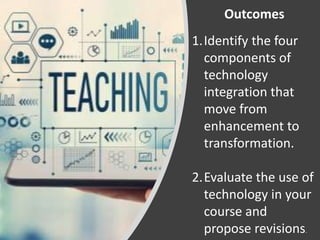
Outcomes
1.Identify the four
components of
technology
integration that
move from
enhancement to
transformation.
2.Evaluate the use of
technology in your
course and
propose revisions.
1. How do I
integrate tech
into my
teaching? What
rules do I tend
to follow?
2. What are the
implications of
doing it poorly?
Of doing it well?
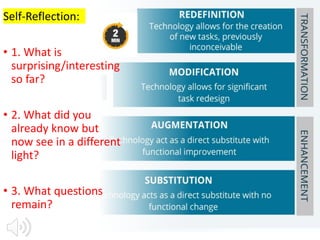
Self-Reflection:
• 1. What is
surprising/interesting
so far?
• 2. What did you
already know but
now see in a different
light?
• 3. What questions
remain?
`
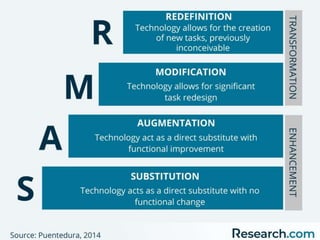
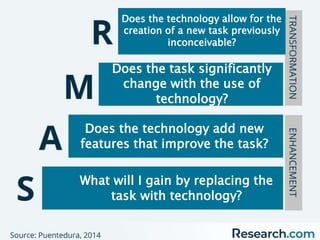
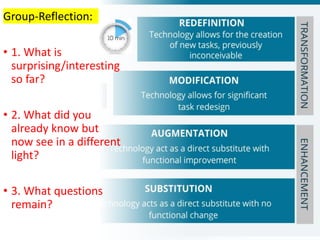
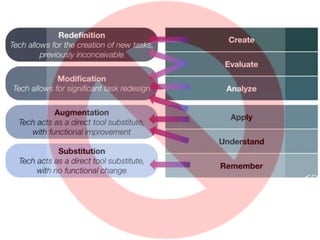
What will I gain by replacing the
task with technology?
Does the technology add new
features that improve the task?
Does the task significantly
change with the use of
technology?
Does the technology allow for the
creation of a new task previously
inconceivable?
Group-Reflection:
• 1. What is
surprising/interesting
so far?
• 2. What did you
already know but
now see in a different
light?
• 3. What questions
remain?
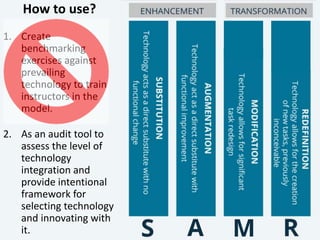
How to use?
1. Create
benchmarking
exercises against
prevailing
technology to train
instructors in the
model.
2. As an audit tool to
assess the level of
technology
integration and
provide intentional
framework for
selecting technology
and innovating with
it.
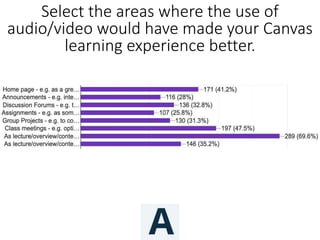
Select the areas where the use of
audio/video would have made your Canvas
learning experience better.
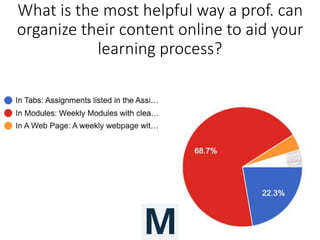
What is the most helpful way a prof. can
organize their content online to aid your
learning process?
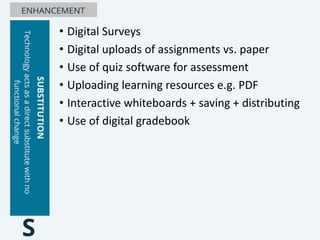
• Digital Surveys
• Digital uploads of assignments vs. paper
• Use of quiz software for assessment
• Uploading learning resources e.g. PDF
• Interactive whiteboards + saving + distributing
• Use of digital gradebook
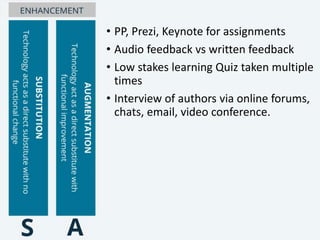
• PP, Prezi, Keynote for assignments
• Audio feedback vs written feedback
• Low stakes learning Quiz taken multiple
times
• Interview of authors via online forums,
chats, email, video conference.
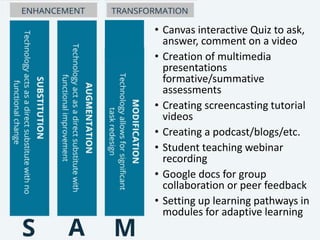
• Canvas interactive Quiz to ask,
answer, comment on a video
• Creation of multimedia
presentations
formative/summative
assessments
• Creating screencasting tutorial
videos
• Creating a podcast/blogs/etc.
• Student teaching webinar
recording
• Google docs for group
collaboration or peer feedback
• Setting up learning pathways in
modules for adaptive learning
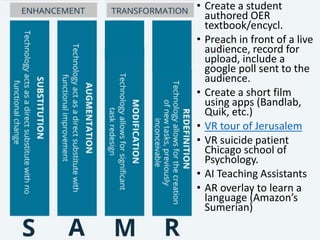
• Create a student
authored OER
textbook/encycl.
• Preach in front of a live
audience, record for
upload, include a
google poll sent to the
audience.
• Create a short film
using apps (Bandlab,
Quik, etc.)
• VR tour of Jerusalem
• VR suicide patient
Chicago school of
Psychology.
• AI Teaching Assistants
• AR overlay to learn a
language (Amazon’s
Sumerian)
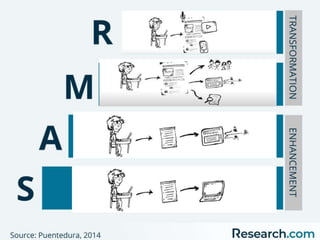
The S.A.M.R. Model
for
Technology Transformation in Online Courses
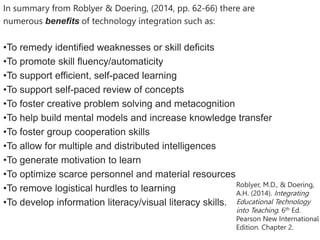
In summary from Roblyer & Doering, (2014, pp. 62-66) there are
numerous benefits of technology integration such as:
•To remedy identified weaknesses or skill deficits
•To promote skill fluency/automaticity
•To support efficient, self-paced learning
•To support self-paced review of concepts
•To foster creative problem solving and metacognition
•To help build mental models and increase knowledge transfer
•To foster group cooperation skills
•To allow for multiple and distributed intelligences
•To generate motivation to learn
•To optimize scarce personnel and material resources
•To remove logistical hurdles to learning
•To develop information literacy/visual literacy skills.
Roblyer, M.D., & Doering,
A.H. (2014). Integrating
Educational Technology
into Teaching. 6th Ed.
Pearson New International
Edition. Chapter 2.
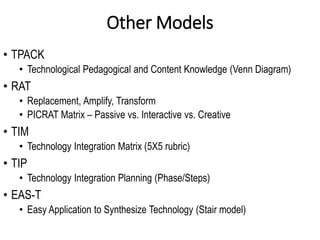
Other Models
• TPACK
• Technological Pedagogical and Content Knowledge (Venn Diagram)
• RAT
• Replacement, Amplify, Transform
• PICRAT Matrix – Passive vs. Interactive vs. Creative
• TIM
• Technology Integration Matrix (5X5 rubric)
• TIP
• Technology Integration Planning (Phase/Steps)
• EAS-T
• Easy Application to Synthesize Technology (Stair model)

SAMR Webinar for Module.pptx

  • 1.
  • 2.
    Pre-Webinar Checklist Mic is offfor participants Hid self is optional Record is on Course Module has content Take the Poll Share screen + audio
  • 3.
    AGENDA • Intro. +analogy • Relevance to you • Your Initial Thoughts • Present SAMR • Self-Reflection • Group-Reflection
  • 4.
    Outcomes 1.Identify the four componentsof technology integration that move from enhancement to transformation. 2.Evaluate the use of technology in your course and propose revisions.
  • 7.
    1. How doI integrate tech into my teaching? What rules do I tend to follow? 2. What are the implications of doing it poorly? Of doing it well?
  • 12.
    Self-Reflection: • 1. Whatis surprising/interesting so far? • 2. What did you already know but now see in a different light? • 3. What questions remain?
  • 14.
    ` What will Igain by replacing the task with technology? Does the technology add new features that improve the task? Does the task significantly change with the use of technology? Does the technology allow for the creation of a new task previously inconceivable?
  • 15.
    Group-Reflection: • 1. Whatis surprising/interesting so far? • 2. What did you already know but now see in a different light? • 3. What questions remain?
  • 16.
    How to use? 1.Create benchmarking exercises against prevailing technology to train instructors in the model. 2. As an audit tool to assess the level of technology integration and provide intentional framework for selecting technology and innovating with it.
  • 18.
    Select the areaswhere the use of audio/video would have made your Canvas learning experience better.
  • 19.
    What is themost helpful way a prof. can organize their content online to aid your learning process?
  • 23.
    • Digital Surveys •Digital uploads of assignments vs. paper • Use of quiz software for assessment • Uploading learning resources e.g. PDF • Interactive whiteboards + saving + distributing • Use of digital gradebook
  • 24.
    • PP, Prezi,Keynote for assignments • Audio feedback vs written feedback • Low stakes learning Quiz taken multiple times • Interview of authors via online forums, chats, email, video conference.
  • 25.
    • Canvas interactiveQuiz to ask, answer, comment on a video • Creation of multimedia presentations formative/summative assessments • Creating screencasting tutorial videos • Creating a podcast/blogs/etc. • Student teaching webinar recording • Google docs for group collaboration or peer feedback • Setting up learning pathways in modules for adaptive learning
  • 26.
    • Create astudent authored OER textbook/encycl. • Preach in front of a live audience, record for upload, include a google poll sent to the audience. • Create a short film using apps (Bandlab, Quik, etc.) • VR tour of Jerusalem • VR suicide patient Chicago school of Psychology. • AI Teaching Assistants • AR overlay to learn a language (Amazon’s Sumerian)
  • 28.
    The S.A.M.R. Model for TechnologyTransformation in Online Courses
  • 30.
    In summary fromRoblyer & Doering, (2014, pp. 62-66) there are numerous benefits of technology integration such as: •To remedy identified weaknesses or skill deficits •To promote skill fluency/automaticity •To support efficient, self-paced learning •To support self-paced review of concepts •To foster creative problem solving and metacognition •To help build mental models and increase knowledge transfer •To foster group cooperation skills •To allow for multiple and distributed intelligences •To generate motivation to learn •To optimize scarce personnel and material resources •To remove logistical hurdles to learning •To develop information literacy/visual literacy skills. Roblyer, M.D., & Doering, A.H. (2014). Integrating Educational Technology into Teaching. 6th Ed. Pearson New International Edition. Chapter 2.
  • 35.
    Other Models • TPACK •Technological Pedagogical and Content Knowledge (Venn Diagram) • RAT • Replacement, Amplify, Transform • PICRAT Matrix – Passive vs. Interactive vs. Creative • TIM • Technology Integration Matrix (5X5 rubric) • TIP • Technology Integration Planning (Phase/Steps) • EAS-T • Easy Application to Synthesize Technology (Stair model)

Editor's Notes

  • #2 Pic https://thelearningcounsel.com/article/two-models-leveling-how-you-integrate-technology-and-teaching
  • #3 Mic Off Welcome to Hide Self Optional – tied to Zoom fatigue RECORD SHARE SCREEN AUDIO YES POLL at the Beginning and in the Module 4 Question Evaluation = Please help us gather data to find out what is helpful.
  • #4 Initial Thoughts - Google Doc open/Word/Notepad Pic https://thelearningcounsel.com/article/two-models-leveling-how-you-integrate-technology-and-teaching
  • #5 Let's start with an analogy I just got new car insurance. Pic https://thelearningcounsel.com/article/two-models-leveling-how-you-integrate-technology-and-teaching
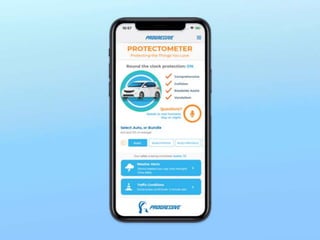
  • #6 I just got new car insurance and it tracks me, tells me WHAT I'm doing and HOW I can get better. Evidently I only have a B+ because of "Hard Breaking" I don't think people in KY drive like people in MA where I am from. https://dribbble.com/shots/14576815-Progressive-app
  • #7 T: Similar way SAMR model tells me what I am doing with technology right now, and offers me a way to make it better or more integrated. Emerging technologies, easy to feel overwhelmed or stressed out or like we are competing with tech = SAMR offers a simple way through all of that confusion. But it does take thought and intentionality. Much like my driving!
  • #8 What do I know about how technology should be integrated with my pedagogy/content knowledge? Rules, principles I follow. What are the implications if I do it poorly? Well? Wandering Wizard - may want to mute. If you finish, can you please use the raise hand feature to let me know you're all done. https://www.amazon.com/Initial-Thoughts-Midakev/dp/B084ZKDDQM
  • #9 SAMR is popular at the K-12 level, in recent years making it's way up to higher ed as a helpful model for assessing technological integration in the classroom. Is it relevant to YOU and your content and context? That's something you have to answer and will get to share with us.
  • #15 You can also turn the descriptions into questions.
  • #19 Summer Student Poll 2022; 2500 students; 434 response; about 15% response rate.
  • #20 Summer Student Poll – If you build it in Modules, Tabs auto populates. So focus on Modules and 90% of students will be helped.
  • #21 Summer Student Poll
  • #22 Summer Student Poll
  • #23 Go to module Canvas Higher Ed. Certification Course, lets check out that resource in modules and see if there is anything you think is helpful. Self-Evaluation = Do you like where your summative formative assessments are at? Would you like more Mod or Red? Impact do you think this will have for you?
  • #27 OER = Open Educational Resources
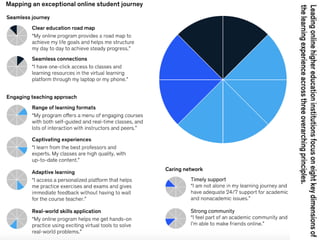
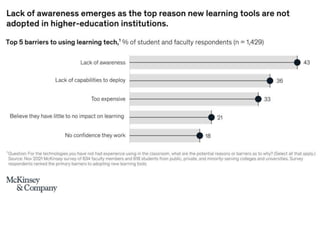
  • #33 https://www.mckinsey.com/industries/education/our-insights/setting-a-new-bar-for-online-higher-education
  • #34 https://www.mckinsey.com/industries/education/our-insights/how-technology-is-shaping-learning-in-higher-education