Introduction to Operating Systems
Using Computer with Windows
Computer Software
 Computer software gives instructions that make
hardware work. The four main types of software are
operating systems, application programs, utility
software, and programming languages.
Computer Software
 An operating system is an interface between the
hardware and the user. It is responsible for the direct
control and management of the hardware and basic
system operations to run other software, such as
word processing programs and web browsers.
Windows, Linux, and Mac OS are examples of
operating systems.
 An application program is a program designed to
help with a specific task, such as word processing,
accounting, counting the items in a shop or
warehouse, or
maintaining a database. Application software makes
a computer work to suit your needs.
Computer Software
 Utility software is a kind of system software
designed to help analyze, configure, optimize, and
maintain the computer. Utility software can clean
your computer’s registry, recover lost or damaged
data, generate free space on its hard drive, repair
and defragment its hard drive, optimize system
processes, and back up data.
 A programming language is used to create
application programs. Basic, Pascal, Java, C++, and
COBOL are some examples of programming
languages.
Operating System
 An operating system is a piece of software that controls
how hardware resources such as memory, the central
processing unit (CPU), disk space, and other devices are
used. Application software requires that the operating
system access the hardware resources.
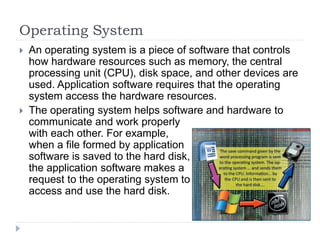
 The operating system helps software and hardware to
communicate and work properly
with each other. For example,
when a file formed by application
software is saved to the hard disk,
the application software makes a
request to the operating system to
access and use the hard disk.
Four Main Tasks of an Operating System
 Controlling and Managing Computer Hardware: Operating
systems control all devices of your computer system. They
make graphics and text appear on your monitor and make
your mouse point and click. When you click on the Shut Down
button in Windows, all computer hardware—including the hard
disk, power supply, fans, and CPU—stops working.
 Running Application Programs: Operating systems run all
your programs. Without an operating system, your word
processor (e.g., WordPad, Notepad, MS Word), web browser
(e.g., Internet Explorer, Mozilla Firefox, Safari), and games
wouldn’t work. The operating system lets your programs talk to
your hardware; for example, your word processor can print
documents to the printer or your modem communicates to
enable you to surf the Internet using your web browser.
 Organizing Files: Operating systems store information in files
and folders on your computer’s storage units (e.g., hard disk,
flash memory, DVD), just like you store files and folders in a
filing cabinet.
Four Main Tasks of an Operating System
 Providing a User Interface: An operating system provides an
interface for users that lets them input commands and data.
An operating system has two parts: a kernel and a shell. The
kernel is the core of the operating system. It manages
memory, files, and other devices; maintains the time and date;
starts applications; and manages system resources. The
shell provides direct communication between the user and the
kernel. It is an interface between the user and the kernel.
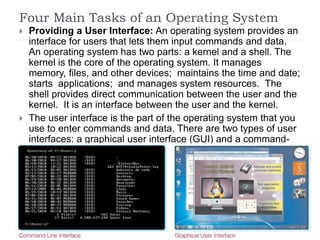
 The user interface is the part of the operating system that you
use to enter commands and data. There are two types of user
interfaces: a graphical user interface (GUI) and a command-
line interface (CLI).
Operating Systems
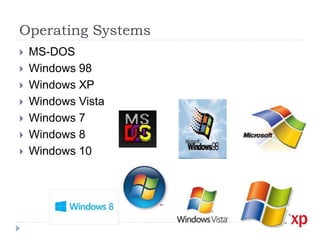
 MS-DOS
 Windows 98
 Windows XP
 Windows Vista
 Windows 7
 Windows 8
 Windows 10
Operating Systems
 Mac OS
 Unix
 Linux
 Novell NetWare
 BeOS and Haiku
Mobile Operating Systems
 Symbian OS
 Google Android
 Mobile Linux
 BlackBerry OS
 iOS

S02.W01 - Introduction to Operating Systems

  • 1.
    Introduction to OperatingSystems Using Computer with Windows
  • 2.
    Computer Software  Computersoftware gives instructions that make hardware work. The four main types of software are operating systems, application programs, utility software, and programming languages.
  • 3.
    Computer Software  Anoperating system is an interface between the hardware and the user. It is responsible for the direct control and management of the hardware and basic system operations to run other software, such as word processing programs and web browsers. Windows, Linux, and Mac OS are examples of operating systems.  An application program is a program designed to help with a specific task, such as word processing, accounting, counting the items in a shop or warehouse, or maintaining a database. Application software makes a computer work to suit your needs.
  • 4.
    Computer Software  Utilitysoftware is a kind of system software designed to help analyze, configure, optimize, and maintain the computer. Utility software can clean your computer’s registry, recover lost or damaged data, generate free space on its hard drive, repair and defragment its hard drive, optimize system processes, and back up data.  A programming language is used to create application programs. Basic, Pascal, Java, C++, and COBOL are some examples of programming languages.
  • 5.
    Operating System  Anoperating system is a piece of software that controls how hardware resources such as memory, the central processing unit (CPU), disk space, and other devices are used. Application software requires that the operating system access the hardware resources.  The operating system helps software and hardware to communicate and work properly with each other. For example, when a file formed by application software is saved to the hard disk, the application software makes a request to the operating system to access and use the hard disk.
  • 6.
    Four Main Tasksof an Operating System  Controlling and Managing Computer Hardware: Operating systems control all devices of your computer system. They make graphics and text appear on your monitor and make your mouse point and click. When you click on the Shut Down button in Windows, all computer hardware—including the hard disk, power supply, fans, and CPU—stops working.  Running Application Programs: Operating systems run all your programs. Without an operating system, your word processor (e.g., WordPad, Notepad, MS Word), web browser (e.g., Internet Explorer, Mozilla Firefox, Safari), and games wouldn’t work. The operating system lets your programs talk to your hardware; for example, your word processor can print documents to the printer or your modem communicates to enable you to surf the Internet using your web browser.  Organizing Files: Operating systems store information in files and folders on your computer’s storage units (e.g., hard disk, flash memory, DVD), just like you store files and folders in a filing cabinet.
  • 7.
    Four Main Tasksof an Operating System  Providing a User Interface: An operating system provides an interface for users that lets them input commands and data. An operating system has two parts: a kernel and a shell. The kernel is the core of the operating system. It manages memory, files, and other devices; maintains the time and date; starts applications; and manages system resources. The shell provides direct communication between the user and the kernel. It is an interface between the user and the kernel.  The user interface is the part of the operating system that you use to enter commands and data. There are two types of user interfaces: a graphical user interface (GUI) and a command- line interface (CLI).
  • 8.
    Operating Systems  MS-DOS Windows 98  Windows XP  Windows Vista  Windows 7  Windows 8  Windows 10
  • 9.
    Operating Systems  MacOS  Unix  Linux  Novell NetWare  BeOS and Haiku
  • 10.
    Mobile Operating Systems Symbian OS  Google Android  Mobile Linux  BlackBerry OS  iOS