OPERATING SYSTEMS
INTRODUCTION
BY
Dr.N SARANYA
DEPRTMENT OF COMPUTER SCIENCE AND ENGINEERING
CONTENTS
• What is an OS.
• What are its key function
• What are the popular types of OS.
• Basics of UNIX and Windows.
3
What is an Operating System?
• Computer System = Hardware + Software
• Software = Application Software + System Software(OS)
• An Operating System is a system Software that acts as an
intermediary/interface between a user of a computer and the computer
hardware.
• Operating system goals:
 Execute user programs and make solving user problems easier
 Make the computer system convenient to use
 Use the computer hardware in an efficient manner
4
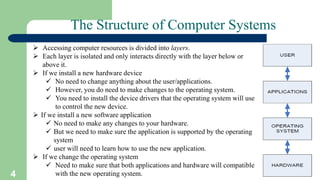
The Structure of Computer Systems
 Accessing computer resources is divided into layers.
 Each layer is isolated and only interacts directly with the layer below or
above it.
 If we install a new hardware device
 No need to change anything about the user/applications.
 However, you do need to make changes to the operating system.
 You need to install the device drivers that the operating system will use
to control the new device.
 If we install a new software application
 No need to make any changes to your hardware.
 But we need to make sure the application is supported by the operating
system
 user will need to learn how to use the new application.
 If we change the operating system
 Need to make sure that both applications and hardware will compatible
with the new operating system.
6
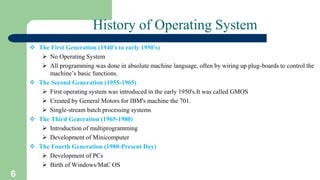
History of Operating System
 The First Generation (1940's to early 1950's)
 No Operating System
 All programming was done in absolute machine language, often by wiring up plug-boards to control the
machine’s basic functions.
 The Second Generation (1955-1965)
 First operating system was introduced in the early 1950's.It was called GMOS
 Created by General Motors for IBM's machine the 701.
 Single-stream batch processing systems
 The Third Generation (1965-1980)
 Introduction of multiprogramming
 Development of Minicomputer
 The Fourth Generation (1980-Present Day)
 Development of PCs
 Birth of Windows/MaC OS
7
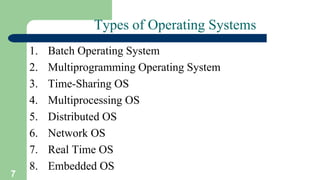
Types of Operating Systems
1. Batch Operating System
2. Multiprogramming Operating System
3. Time-Sharing OS
4. Multiprocessing OS
5. Distributed OS
6. Network OS
7. Real Time OS
8. Embedded OS
8
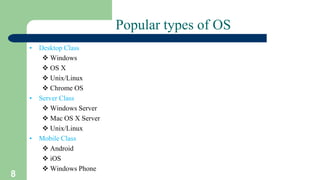
Popular types of OS
• Desktop Class
 Windows
 OS X
 Unix/Linux
 Chrome OS
• Server Class
 Windows Server
 Mac OS X Server
 Unix/Linux
• Mobile Class
 Android
 iOS
 Windows Phone
9
Desktop Class Operating Systems:-
• Platform: the hardware required to run a particular
operating system
– Intel platform (IBM-compatible)
• Windows
• DOS
• UNIX
• Linux
– Macintosh platform
• Mac OS
– iPad and iPhone platform

OPERATING SYSTEMS.pptx

  • 1.
  • 2.
    CONTENTS • What isan OS. • What are its key function • What are the popular types of OS. • Basics of UNIX and Windows.
  • 3.
    3 What is anOperating System? • Computer System = Hardware + Software • Software = Application Software + System Software(OS) • An Operating System is a system Software that acts as an intermediary/interface between a user of a computer and the computer hardware. • Operating system goals:  Execute user programs and make solving user problems easier  Make the computer system convenient to use  Use the computer hardware in an efficient manner
  • 4.
    4 The Structure ofComputer Systems  Accessing computer resources is divided into layers.  Each layer is isolated and only interacts directly with the layer below or above it.  If we install a new hardware device  No need to change anything about the user/applications.  However, you do need to make changes to the operating system.  You need to install the device drivers that the operating system will use to control the new device.  If we install a new software application  No need to make any changes to your hardware.  But we need to make sure the application is supported by the operating system  user will need to learn how to use the new application.  If we change the operating system  Need to make sure that both applications and hardware will compatible with the new operating system.
  • 6.
    6 History of OperatingSystem  The First Generation (1940's to early 1950's)  No Operating System  All programming was done in absolute machine language, often by wiring up plug-boards to control the machine’s basic functions.  The Second Generation (1955-1965)  First operating system was introduced in the early 1950's.It was called GMOS  Created by General Motors for IBM's machine the 701.  Single-stream batch processing systems  The Third Generation (1965-1980)  Introduction of multiprogramming  Development of Minicomputer  The Fourth Generation (1980-Present Day)  Development of PCs  Birth of Windows/MaC OS
  • 7.
    7 Types of OperatingSystems 1. Batch Operating System 2. Multiprogramming Operating System 3. Time-Sharing OS 4. Multiprocessing OS 5. Distributed OS 6. Network OS 7. Real Time OS 8. Embedded OS
  • 8.
    8 Popular types ofOS • Desktop Class  Windows  OS X  Unix/Linux  Chrome OS • Server Class  Windows Server  Mac OS X Server  Unix/Linux • Mobile Class  Android  iOS  Windows Phone
  • 9.
    9 Desktop Class OperatingSystems:- • Platform: the hardware required to run a particular operating system – Intel platform (IBM-compatible) • Windows • DOS • UNIX • Linux – Macintosh platform • Mac OS – iPad and iPhone platform