
Process Simulate:
Virtual Commissioning
Michał Gurgul
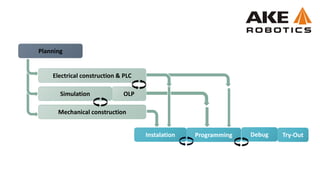
Mechanical construction
Electrical construction & PLC
Simulation
Instalation Try-OutProgramming Debug
Planning
OLP
Offline robotics
Current state of simulation and OLP software
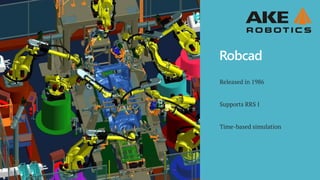
Robcad
Released in 1986
Supports RRS I
Time-based simulation
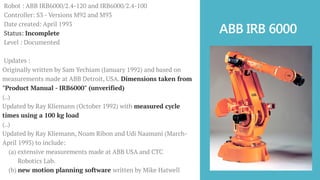
ABB IRB 6000
Robot : ABB IRB6000/2.4-120 and IRB6000/2.4-100
Controller: S3 - Versions M92 and M93
Date created: April 1993
Status: Incomplete
Level : Documented
Updates :
Originally written by Sam Yechiam (January 1992) and based on
measurements made at ABB Detroit, USA. Dimensions taken from
"Product Manual - IRB6000" (unverified)
(..)
Updated by Ray Kliemann (October 1992) with measured cycle
times using a 100 kg load
(..)
Updated by Ray Kliemann, Noam Ribon and Udi Naamani (March-
April 1993) to include:
(a) extensive measurements made at ABB USA and CTC
Robotics Lab.
(b) new motion planning software written by Mike Hatwell
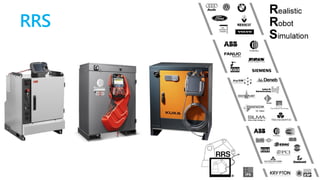
RRS
RRS_INITIALIZE
RRS_SET_INITIAL-POSITION
RRS_GET_NEXT_STEP
RRS_SET_OVERRIDE_ACC
[X, Y, Z, Rx, Ry, Rz]
SET_NEXT_TARGET
RCS
RRS
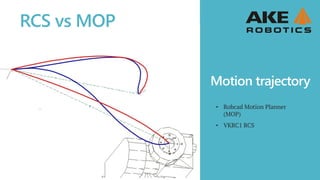
Motion trajectory
• Robcad Motion Planner
(MOP)
• VKRC1 RCS
RCS vs MOP
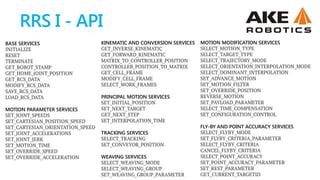
BASE SERVICES
INITIALIZE
RESET
TERMINATE
GET_ROBOT_STAMP
GET_HOME_JOINT_POSITION
GET_RCS_DATA
MODIFY_RCS_DATA
SAVE_RCS_DATA
LOAD_RCS_DATA
MOTION PARAMETER SERVICES
SET_JOINT_SPEEDS
SET_CARTESIAN_POSITION_SPEED
SET_CARTESIAN_ORIENTATION_SPEED
SET_JOINT_ACCELERATIONS
SET_JOINT_JERK
SET_MOTION_TIME
SET_OVERRIDE_SPEED
SET_OVERRIDE_ACCELERATION
KINEMATIC AND CONVERSION SERVICES
GET_INVERSE_KINEMATIC
GET_FORWARD_KINEMATIC
MATRIX_TO_CONTROLLER_POSITION
CONTROLLER_POSITION_TO_MATRIX
GET_CELL_FRAME
MODIFY_CELL_FRAME
SELECT_WORK_FRAMES
PRINCIPAL MOTION SERVICES
SET_INITIAL_POSITION
SET_NEXT_TARGET
GET_NEXT_STEP
SET_INTERPOLATION_TIME
TRACKING SERVICES
SELECT_TRACKING
SET_CONVEYOR_POSITION
WEAVING SERVICES
SELECT_WEAVING_MODE
SELECT_WEAVING_GROUP
SET_WEAVING_GROUP_PARAMETER
MOTION MODIFICATION SERVICES
SELECT_MOTION_TYPE
SELECT_TARGET_TYPE
SELECT_TRAJECTORY_MODE
SELECT_ORIENTATION_INTERPOLATION_MODE
SELECT_DOMINANT_INTERPOLATION
SET_ADVANCE_MOTION
SET_MOTION_FILTER
SET_OVERRIDE_POSITION
REVERSE_MOTION
SET_PAYLOAD_PARAMETER
SELECT_TIME_COMPENSATION
SET_CONFIGURATION_CONTROL
FLY-BY AND POINT ACCURACY SERVICES
SELECT_FLYBY_MODE
SET_FLYBY_CRITERIA_PARAMETER
SELECT_FLYBY_CRITERIA
CANCEL_FLYBY_CRITERIA
SELECT_POINT_ACCURACY
SET_POINT_ACCURACY_PARAMETER
SET_REST_PARAMETER
GET_CURRENT_TARGETID
RRS I - API
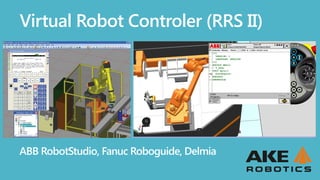
ABB RobotStudio, Fanuc Roboguide, Delmia
Virtual Robot Controler (RRS II)
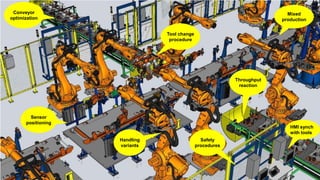
HMI synch
with tools
Throughput
reaction
Sensor
positioning
Tool change
procedure
Mixed
production
Safety
procedures
Handling
variants
Conveyor
optimization
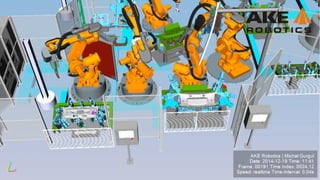
Virtual Commisionning
How it works?
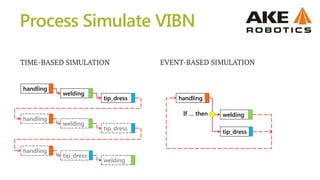
Process Simulate VIBN
TIME-BASED SIMULATION EVENT-BASED SIMULATION
handling
tip_dress
welding
handling
welding
tip_dress
If … then
handling
tip_dress
welding
handling
tip_dress
welding
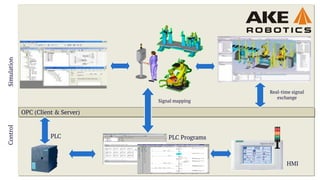
ControlSimulation
OPC (Client & Server)
Signal mapping
Real-time signal
exchange
PLC ProgramsPLC
HMI
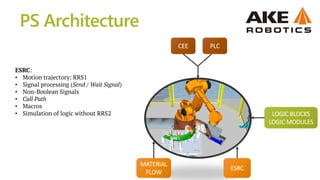
CEE PLC
LOGIC BLOCKS
LOGIC MODULES
ESRC
MATERIAL
FLOW
ESRC:
• Motion trajectory: RRS1
• Signal processing (Send / Wait Signal)
• Non-Boolean Signals
• Call Path
• Macros
• Simulation of logic without RRS2
PS Architecture
Signal management
Logic Blocks / Modules
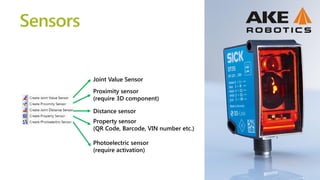
Proximity sensor
(require 3D component)
Photoelectric sensor
(require activation)
Property sensor
(QR Code, Barcode, VIN number etc.)
Joint Value Sensor
Distance sensor
Sensors
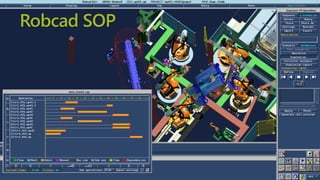
Robcad SOP
welding
tip_dress
handling
handling_end
welding_end
tip_dress_end
Transitions conditions
handling
Signal
value
t[s]
0
1
Connections in Gantt Chart
don’t determine operations
executing order!
CEE
parts_counter>=20
part on FX
Real PLC (S7-300)
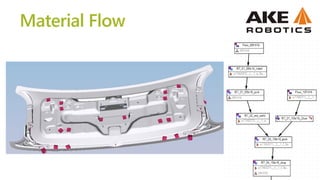
Material Flow
Summary
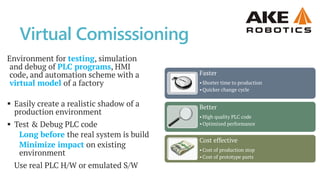
Environment for testing, simulation
and debug of PLC programs, HMI
code, and automation scheme with a
virtual model of a factory
Faster
•Shorter time to production
•Quicker change cycle
Better
•High quality PLC code
•Optimized performance
Cost effective
•Cost of production stop
•Cost of prototype parts
 Easily create a realistic shadow of a
production environment
 Test & Debug PLC code
Long before the real system is build
Minimize impact on existing
environment
Use real PLC H/W or emulated S/W
Virtual Comisssioning
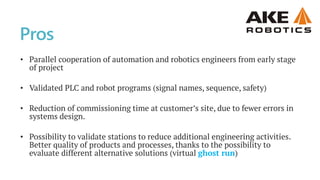
• Parallel cooperation of automation and robotics engineers from early stage
of project
• Validated PLC and robot programs (signal names, sequence, safety)
• Reduction of commissioning time at customer’s site, due to fewer errors in
systems design.
• Possibility to validate stations to reduce additional engineering activities.
Better quality of products and processes, thanks to the possibility to
evaluate different alternative solutions (virtual ghost run)
Pros
• Simulation is very complex and require 100% verified documentation.
[mechanical CAD data, ePlan, cycle time diagrams].
• Expensive H/W equipment to run the simulation tools, along with the cost
of licenses.
• Process simulation software is not ready for full VC, many open issues and
bugs on the software.
Cons
Live demo
Hemming
nhOffsRoller := [[0.015,10.2,-17.5],OrientZYX(0.00,0.00,9.9907)];
GHO := [[0,0,0],[0,0,0],[0,0,0]];
NHsetHO 10, 0, 0, 0, 0, 0, -10, 20;
MoveJ NHTarget(f57_area4,HO{10}),v2500,z10,t_r2_cl,WObj:=wobj_15FX16;
! Spot lsp195621_f57;
VP_SpotL lsp195621_f57,Id_03, vmax, t_Gun1_varioWobj:=wobj_22fx16_f57;
!Move VarioPiker Backward
VP_GunOpen 1000;
Performance
 Signals update rate
 Proximity sensors are
resource consuming
Thanks for your attention!
Michał Gurgul

Robotics: Virtual Commissioning in Process Simulate

  • 1.
  • 3.
    Mechanical construction Electrical construction& PLC Simulation Instalation Try-OutProgramming Debug Planning OLP
  • 4.
    Offline robotics Current stateof simulation and OLP software
  • 5.
    Robcad Released in 1986 SupportsRRS I Time-based simulation
  • 6.
    ABB IRB 6000 Robot: ABB IRB6000/2.4-120 and IRB6000/2.4-100 Controller: S3 - Versions M92 and M93 Date created: April 1993 Status: Incomplete Level : Documented Updates : Originally written by Sam Yechiam (January 1992) and based on measurements made at ABB Detroit, USA. Dimensions taken from "Product Manual - IRB6000" (unverified) (..) Updated by Ray Kliemann (October 1992) with measured cycle times using a 100 kg load (..) Updated by Ray Kliemann, Noam Ribon and Udi Naamani (March- April 1993) to include: (a) extensive measurements made at ABB USA and CTC Robotics Lab. (b) new motion planning software written by Mike Hatwell
  • 7.
  • 8.
  • 9.
    Motion trajectory • RobcadMotion Planner (MOP) • VKRC1 RCS RCS vs MOP
  • 10.
    BASE SERVICES INITIALIZE RESET TERMINATE GET_ROBOT_STAMP GET_HOME_JOINT_POSITION GET_RCS_DATA MODIFY_RCS_DATA SAVE_RCS_DATA LOAD_RCS_DATA MOTION PARAMETERSERVICES SET_JOINT_SPEEDS SET_CARTESIAN_POSITION_SPEED SET_CARTESIAN_ORIENTATION_SPEED SET_JOINT_ACCELERATIONS SET_JOINT_JERK SET_MOTION_TIME SET_OVERRIDE_SPEED SET_OVERRIDE_ACCELERATION KINEMATIC AND CONVERSION SERVICES GET_INVERSE_KINEMATIC GET_FORWARD_KINEMATIC MATRIX_TO_CONTROLLER_POSITION CONTROLLER_POSITION_TO_MATRIX GET_CELL_FRAME MODIFY_CELL_FRAME SELECT_WORK_FRAMES PRINCIPAL MOTION SERVICES SET_INITIAL_POSITION SET_NEXT_TARGET GET_NEXT_STEP SET_INTERPOLATION_TIME TRACKING SERVICES SELECT_TRACKING SET_CONVEYOR_POSITION WEAVING SERVICES SELECT_WEAVING_MODE SELECT_WEAVING_GROUP SET_WEAVING_GROUP_PARAMETER MOTION MODIFICATION SERVICES SELECT_MOTION_TYPE SELECT_TARGET_TYPE SELECT_TRAJECTORY_MODE SELECT_ORIENTATION_INTERPOLATION_MODE SELECT_DOMINANT_INTERPOLATION SET_ADVANCE_MOTION SET_MOTION_FILTER SET_OVERRIDE_POSITION REVERSE_MOTION SET_PAYLOAD_PARAMETER SELECT_TIME_COMPENSATION SET_CONFIGURATION_CONTROL FLY-BY AND POINT ACCURACY SERVICES SELECT_FLYBY_MODE SET_FLYBY_CRITERIA_PARAMETER SELECT_FLYBY_CRITERIA CANCEL_FLYBY_CRITERIA SELECT_POINT_ACCURACY SET_POINT_ACCURACY_PARAMETER SET_REST_PARAMETER GET_CURRENT_TARGETID RRS I - API
  • 11.
    ABB RobotStudio, FanucRoboguide, Delmia Virtual Robot Controler (RRS II)
  • 12.
    HMI synch with tools Throughput reaction Sensor positioning Toolchange procedure Mixed production Safety procedures Handling variants Conveyor optimization
  • 13.
  • 14.
    Process Simulate VIBN TIME-BASEDSIMULATION EVENT-BASED SIMULATION handling tip_dress welding handling welding tip_dress If … then handling tip_dress welding handling tip_dress welding
  • 15.
    ControlSimulation OPC (Client &Server) Signal mapping Real-time signal exchange PLC ProgramsPLC HMI
  • 16.
    CEE PLC LOGIC BLOCKS LOGICMODULES ESRC MATERIAL FLOW ESRC: • Motion trajectory: RRS1 • Signal processing (Send / Wait Signal) • Non-Boolean Signals • Call Path • Macros • Simulation of logic without RRS2 PS Architecture
  • 17.
  • 18.
  • 19.
    Proximity sensor (require 3Dcomponent) Photoelectric sensor (require activation) Property sensor (QR Code, Barcode, VIN number etc.) Joint Value Sensor Distance sensor Sensors
  • 20.
  • 21.
    welding tip_dress handling handling_end welding_end tip_dress_end Transitions conditions handling Signal value t[s] 0 1 Connections inGantt Chart don’t determine operations executing order! CEE parts_counter>=20 part on FX
  • 22.
  • 23.
  • 24.
  • 25.
    Environment for testing,simulation and debug of PLC programs, HMI code, and automation scheme with a virtual model of a factory Faster •Shorter time to production •Quicker change cycle Better •High quality PLC code •Optimized performance Cost effective •Cost of production stop •Cost of prototype parts  Easily create a realistic shadow of a production environment  Test & Debug PLC code Long before the real system is build Minimize impact on existing environment Use real PLC H/W or emulated S/W Virtual Comisssioning
  • 26.
    • Parallel cooperationof automation and robotics engineers from early stage of project • Validated PLC and robot programs (signal names, sequence, safety) • Reduction of commissioning time at customer’s site, due to fewer errors in systems design. • Possibility to validate stations to reduce additional engineering activities. Better quality of products and processes, thanks to the possibility to evaluate different alternative solutions (virtual ghost run) Pros
  • 27.
    • Simulation isvery complex and require 100% verified documentation. [mechanical CAD data, ePlan, cycle time diagrams]. • Expensive H/W equipment to run the simulation tools, along with the cost of licenses. • Process simulation software is not ready for full VC, many open issues and bugs on the software. Cons
  • 28.
  • 29.
    Hemming nhOffsRoller := [[0.015,10.2,-17.5],OrientZYX(0.00,0.00,9.9907)]; GHO:= [[0,0,0],[0,0,0],[0,0,0]]; NHsetHO 10, 0, 0, 0, 0, 0, -10, 20; MoveJ NHTarget(f57_area4,HO{10}),v2500,z10,t_r2_cl,WObj:=wobj_15FX16; ! Spot lsp195621_f57; VP_SpotL lsp195621_f57,Id_03, vmax, t_Gun1_varioWobj:=wobj_22fx16_f57; !Move VarioPiker Backward VP_GunOpen 1000;
  • 30.
    Performance  Signals updaterate  Proximity sensors are resource consuming
  • 31.
    Thanks for yourattention! Michał Gurgul

Editor's Notes

  • #2 Opracowaliśmy ten szablon, aby każdy członek zespołu projektowego miał zestaw slajdów z własnym motywem, na których mógłby prezentować swoje badania. Członkowie, zobaczcie, jak dodać slajd do takiego zestawu: Oznacz miejsce, w którym chcesz dodać slajd: zaznacz istniejący slajd w okienku Miniatury, kliknij przycisk Nowy slajd, a następnie wybierz układ. Nowy slajd będzie miał ten sam motyw co zaznaczony wcześniej slajd. Uwaga! Nie irytuj pozostałych osób prezentujących swoje wyniki przypadkową zmianą ich motywów. Tak może się zdarzyć, jeśli wybierzesz motyw Wariant na karcie Projekt, co spowoduje zmianę wyglądu wszystkich slajdów prezentacji.