SIMULATION OF ROBOTIC
POSITIONS AND
PROGRAMMING
PREPARED BY : RACHIT LAHARIA (S174670)
SIMULATION OF ROBOTIC POSITIONS
• Using a model of real system for experimentation for robotic positions.
• For robots, these models are typically implemented using kinematics or dynamics,
** Unlike kinematics, dynamics involves the changes of velocity over time, which raises issue
such as momentum, forces and torques , inertia and mass.
WHY SIMULATION ?
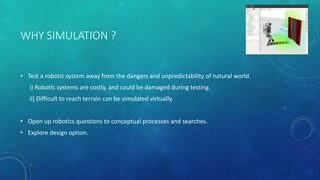
• Test a robotic system away from the dangers and unpredictability of natural world.
i) Robotic systems are costly, and could be damaged during testing.
ii) Difficult to reach terrain can be simulated virtually.
• Open up robotics questions to conceptual processes and searches.
• Explore design option.
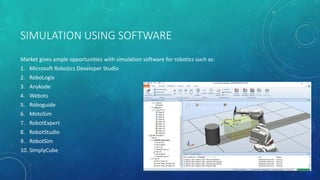
SIMULATION USING SOFTWARE
Market gives ample opportunities with simulation software for robotics such as:
1. Microsoft Robotics Developer Studio
2. RoboLogix
3. Anykode
4. Webots
5. Roboguide
6. MotoSim
7. RobotExpert
8. RobotStudio
9. RobotSim
10. SimplyCube
ADVANTAGES OF SIMULATION
• Low costs to produce a robot from scratch;
• Programming code can be tested according to specifications;
• Robot design can be modified without costs;
• Any robot part can be tested;
• In a complex project the robot can be simulated in stages;
• A complete simulation can determine if the robot meet the specifications;
• Almost all simulations software are compatible with a wide range of programming languages;
• Elapsed time between the start of the project and its completion can be shortened;
DISADVANTAGES
• The real world may subject the robot at too many more scenarios than a virtual world;
• All simulation programs simulate what are programmed to simulate;
ROBOTIC PROGRAMMING
• Robotic programming is the defining of desired motion so that the robot may perform them
without human interventions.
- Identifying and specifying the robot configurations (i.e. the pose of the end-factor, Pe, with
respect to base frame.
TYPE OF PROGRAMMING
• Joint level programming
- basic actions are positions (and possibly movements) of the individual joints of the robot
arm: joint angles in the case of rotational joints and linear positions in the case of linear or
prismatic joints.
• Robot-level programming
- the basic actions are positions and orientations (and perhaps trajectories) of Pe and the frame
of reference attached to it.
• High-level programming
- Object-level programming
- Task-level programming
OBJECT LEVEL PROGRAMMING
Basic actions are operations to be performed on the parts, or relationships that must be established between parts
pick-up part-A by side-A1 and side-A3
move part-A to location-2
pick-up part-B by side-B1 and side-B3
put part-B on-top-off part-A
with side-A5 in-plane-with side-B6 and
with side-A1 in-plane-with side-B1 and
with side-A2 in-plane-with side-B2
TASK LEVEL PROGRAMMING
Basic actions specified by the program are complete tasks or subtasks
paint-the car-body red
assemble the gear-box
PROGRAMMING METHODS
• Offline
– write a program using a text-based robot programming language
– does not need access to the robot until its final testing and implementation
• On-line
– Use the robot to generate the program :Teaching/guiding the robot through a sequence of
motions that can them be executed repeatedly
• Combination Programming
– Often programming is a combination of on-line and off-line • on-line to teach locations in
space • off-line to define the task or “sequence of operations"
PROGRAMMING TECHNIQUE
• Offline programming
-Robot programming languages
-Task level programming
• Online programming
-Teach pendant
-Lead through programming
OFFLINE PROGRAMMING
• Programs can be developed without needing to use the robot
• The sequence of operations and robot movements can be optimized or easily improved
• Previously developed and tested procedures and subroutines can be used
• External sensor data can be incorporated, though this typically makes the programs more
complicated, and so more difficult to modify and maintain
• Existing CAD data can be incorporated-the dimensions of parts and the geometric
relationships between them, for example
• Programs can be tested and evaluated using simulation techniques, though this can never
remove the need to do final testing of the program using the real robot
• Programs can more easily be maintained and modified
• Programs can more be easily properly documented and commented
OFFLINE PROGRAMMING LANGUAGE
• Motivation
– need to interface robot control system to external sensors, to provide “real time” changes based on
sensory equipment
– computing based on geometry of environment
– ability to interface with CAD/CAM systems
– meaningful task descriptions
– off-line programming capability
• Large number of robot languages available –AML, VAL, AL, RAIL, RobotStudio, etc. (200+)
• Each robot manufacturer has their own robot programming language
• No standards exist
• Portability of programs virtually nonexistent
ONLINE PROGRAMMING
• Requires access to the robot
• Programs exist only in the memory of robot control system – often difficult to transfer,
document, maintain, modify SUMMARY OF ROBOT APPLICATIONS
• Easy to use, no special programming skills required
• Useful when programming robots for wide range of repetitive tasks for long production runs
• RAPID
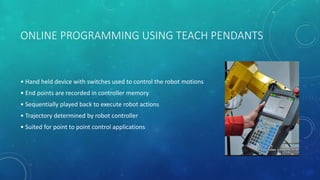
ONLINE PROGRAMMING USING TEACH PENDANTS
• Hand held device with switches used to control the robot motions
• End points are recorded in controller memory
• Sequentially played back to execute robot actions
• Trajectory determined by robot controller
• Suited for point to point control applications
ADVANTAGES AND DISADVANTAGES OF TEACH
PENDANTS
• Advantage:
– Easy
– No special programming skills or training
– Can specify other conditions on robot movements (type of trajectory to use – line, arc)
• Disadvantages:
– Potential dangerous (motors are on)
ONLINE PROGRAMMING USING LEAD THROUGH
• Lead the robot physically through the required sequence of motions
• Trajectory and endpoints are recorded, using a sampling routine which records points at 60-
80 times a second
• When played back results in a smooth continuous motion
• Large memory requirements
ADVANTAGES AND DISADVANTAGE OF LEAD
THROUGH PROGRAMMING
• Advantage:
– Easy
– No special programming skills or training
• Disadvantages:
– not practical for large or heavy robots
– High accuracy and straight-line movements are difficult to achieve, as are any other kind of
geometrically defined trajectory, such as circular arcs, etc.
– difficult to edit out unwanted operator moves
– difficult to incorporate external sensor data
– Synchronization with other machines or equipment in the work cell is difficult
– A large amount of memory is required
APPLICATION OF PROGRAMMABLE ROBOTS
• Work environment hazardous for human beings
• Repetitive tasks
• Boring and unpleasant tasks
• Multi shift operations
• Infrequent changeovers
• Performing at a steady pace
• Operating for long hours without rest
• Responding in automated operations
• Minimizing variation
DISADVANTAGES OF ROBOTS
• Robots lack capability to respond in emergencies, this can cause:
-Inappropriate and wrong responses A lack of decision-making power
-A loss of power
-Damage to the robot and other devices
-Human injuries
• Robots may have limited capabilities in
-Degrees of Freedom
-Dexterity
-Sensors Vision systems
-Real-time Response
• Robots are costly, due to
-Initial cost of equipment
-Installation
-Costs Need for peripherals
-Need for training
-Need for Programming
Simulation of robotic positions and programming

Simulation of robotic positions and programming

  • 1.
    SIMULATION OF ROBOTIC POSITIONSAND PROGRAMMING PREPARED BY : RACHIT LAHARIA (S174670)
  • 2.
    SIMULATION OF ROBOTICPOSITIONS • Using a model of real system for experimentation for robotic positions. • For robots, these models are typically implemented using kinematics or dynamics, ** Unlike kinematics, dynamics involves the changes of velocity over time, which raises issue such as momentum, forces and torques , inertia and mass.
  • 3.
    WHY SIMULATION ? •Test a robotic system away from the dangers and unpredictability of natural world. i) Robotic systems are costly, and could be damaged during testing. ii) Difficult to reach terrain can be simulated virtually. • Open up robotics questions to conceptual processes and searches. • Explore design option.
  • 4.
    SIMULATION USING SOFTWARE Marketgives ample opportunities with simulation software for robotics such as: 1. Microsoft Robotics Developer Studio 2. RoboLogix 3. Anykode 4. Webots 5. Roboguide 6. MotoSim 7. RobotExpert 8. RobotStudio 9. RobotSim 10. SimplyCube
  • 5.
    ADVANTAGES OF SIMULATION •Low costs to produce a robot from scratch; • Programming code can be tested according to specifications; • Robot design can be modified without costs; • Any robot part can be tested; • In a complex project the robot can be simulated in stages; • A complete simulation can determine if the robot meet the specifications; • Almost all simulations software are compatible with a wide range of programming languages; • Elapsed time between the start of the project and its completion can be shortened;
  • 6.
    DISADVANTAGES • The realworld may subject the robot at too many more scenarios than a virtual world; • All simulation programs simulate what are programmed to simulate;
  • 7.
    ROBOTIC PROGRAMMING • Roboticprogramming is the defining of desired motion so that the robot may perform them without human interventions. - Identifying and specifying the robot configurations (i.e. the pose of the end-factor, Pe, with respect to base frame.
  • 8.
    TYPE OF PROGRAMMING •Joint level programming - basic actions are positions (and possibly movements) of the individual joints of the robot arm: joint angles in the case of rotational joints and linear positions in the case of linear or prismatic joints. • Robot-level programming - the basic actions are positions and orientations (and perhaps trajectories) of Pe and the frame of reference attached to it. • High-level programming - Object-level programming - Task-level programming
  • 9.
    OBJECT LEVEL PROGRAMMING Basicactions are operations to be performed on the parts, or relationships that must be established between parts pick-up part-A by side-A1 and side-A3 move part-A to location-2 pick-up part-B by side-B1 and side-B3 put part-B on-top-off part-A with side-A5 in-plane-with side-B6 and with side-A1 in-plane-with side-B1 and with side-A2 in-plane-with side-B2
  • 10.
    TASK LEVEL PROGRAMMING Basicactions specified by the program are complete tasks or subtasks paint-the car-body red assemble the gear-box
  • 11.
    PROGRAMMING METHODS • Offline –write a program using a text-based robot programming language – does not need access to the robot until its final testing and implementation • On-line – Use the robot to generate the program :Teaching/guiding the robot through a sequence of motions that can them be executed repeatedly • Combination Programming – Often programming is a combination of on-line and off-line • on-line to teach locations in space • off-line to define the task or “sequence of operations"
  • 12.
    PROGRAMMING TECHNIQUE • Offlineprogramming -Robot programming languages -Task level programming • Online programming -Teach pendant -Lead through programming
  • 13.
    OFFLINE PROGRAMMING • Programscan be developed without needing to use the robot • The sequence of operations and robot movements can be optimized or easily improved • Previously developed and tested procedures and subroutines can be used • External sensor data can be incorporated, though this typically makes the programs more complicated, and so more difficult to modify and maintain • Existing CAD data can be incorporated-the dimensions of parts and the geometric relationships between them, for example • Programs can be tested and evaluated using simulation techniques, though this can never remove the need to do final testing of the program using the real robot • Programs can more easily be maintained and modified • Programs can more be easily properly documented and commented
  • 14.
    OFFLINE PROGRAMMING LANGUAGE •Motivation – need to interface robot control system to external sensors, to provide “real time” changes based on sensory equipment – computing based on geometry of environment – ability to interface with CAD/CAM systems – meaningful task descriptions – off-line programming capability • Large number of robot languages available –AML, VAL, AL, RAIL, RobotStudio, etc. (200+) • Each robot manufacturer has their own robot programming language • No standards exist • Portability of programs virtually nonexistent
  • 15.
    ONLINE PROGRAMMING • Requiresaccess to the robot • Programs exist only in the memory of robot control system – often difficult to transfer, document, maintain, modify SUMMARY OF ROBOT APPLICATIONS • Easy to use, no special programming skills required • Useful when programming robots for wide range of repetitive tasks for long production runs • RAPID
  • 16.
    ONLINE PROGRAMMING USINGTEACH PENDANTS • Hand held device with switches used to control the robot motions • End points are recorded in controller memory • Sequentially played back to execute robot actions • Trajectory determined by robot controller • Suited for point to point control applications
  • 17.
    ADVANTAGES AND DISADVANTAGESOF TEACH PENDANTS • Advantage: – Easy – No special programming skills or training – Can specify other conditions on robot movements (type of trajectory to use – line, arc) • Disadvantages: – Potential dangerous (motors are on)
  • 18.
    ONLINE PROGRAMMING USINGLEAD THROUGH • Lead the robot physically through the required sequence of motions • Trajectory and endpoints are recorded, using a sampling routine which records points at 60- 80 times a second • When played back results in a smooth continuous motion • Large memory requirements
  • 19.
    ADVANTAGES AND DISADVANTAGEOF LEAD THROUGH PROGRAMMING • Advantage: – Easy – No special programming skills or training • Disadvantages: – not practical for large or heavy robots – High accuracy and straight-line movements are difficult to achieve, as are any other kind of geometrically defined trajectory, such as circular arcs, etc. – difficult to edit out unwanted operator moves – difficult to incorporate external sensor data – Synchronization with other machines or equipment in the work cell is difficult – A large amount of memory is required
  • 20.
    APPLICATION OF PROGRAMMABLEROBOTS • Work environment hazardous for human beings • Repetitive tasks • Boring and unpleasant tasks • Multi shift operations • Infrequent changeovers • Performing at a steady pace • Operating for long hours without rest • Responding in automated operations • Minimizing variation
  • 21.
    DISADVANTAGES OF ROBOTS •Robots lack capability to respond in emergencies, this can cause: -Inappropriate and wrong responses A lack of decision-making power -A loss of power -Damage to the robot and other devices -Human injuries • Robots may have limited capabilities in -Degrees of Freedom -Dexterity -Sensors Vision systems -Real-time Response • Robots are costly, due to -Initial cost of equipment -Installation -Costs Need for peripherals -Need for training -Need for Programming