RESPONSIVE
WEB DESIGN

November 3, 2011 – Microsoft Web & Phone UX Tour Belgium
Bram               Simon            Thomas
      @bram_            @scoudeville      @decthomas
Information architect   Web designer   Front-end developer
You may remember us from such clients as:
netlash.com/blog
1. Why you should use responsive design
2. Design responsive design
3. Technical challenges
Why responsive design?
1. How not to approach mobile web
2. Why responsive design is key
3. Think mobile first
4. It starts with IA
No stats and numbers.
You’re here so you know
mobile is big.
HOW NOT TO
APPROACH
MOBILE WEB
Imagine:
a mobile operator in 2006
We need a mobile website!


                         Mark Obistar
             CEO at random mobile operator
m.*
mobile.*
“Go to full website”
A separate mobile website (1)
‣   What about tablet pc’s?
‣   What about new devices with unknown
    display sizes?
Raise your hand if you never used
your smartphone laying in bed.
A separate mobile website (2)
‣   Mobile users ≠ users on the road
‣   You probably need all your content
“How should I configure my phone
to use mobile internet?”
m.proximus.be
m.mobistar.be
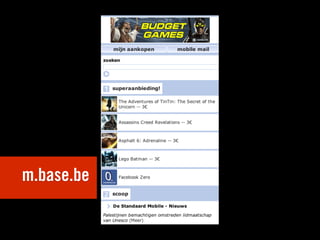
m.base.be
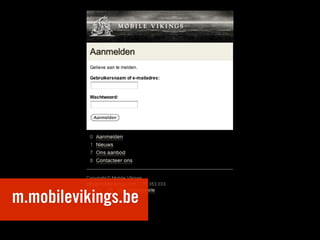
m.mobilevikings.be
A separate mobile website (3)
‣   You’ll have to manage all your
    content twice
A separate mobile website (4)
‣   Users share links.
‣   Different users use different devices.
A separate mobile website
(conclusion)
‣   Only optimized for small screens
‣   Need to provide all content
‣   content has to be managed twice
‣   Issues when sharing content
‣   Pretty expensive for an unsatisfying result
Imagine:
a newspaper company in 2010
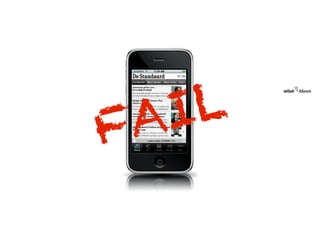
We need an app!


              P. Vandermeersch
           CEO at a random newspaper
                             company
FA I L
Native apps (1)
Cfr. separate mobile website:
‣   What about tablet pc’s?
‣   Mobile users ≠ users on the road
‣   You’ll have to manage all your
    content twice
Native apps (2)
‣   Which platforms will you support?
    (iOS, Android, WindowsPhone)
‣   Each update:
    - cost per platform
    - might take time (approval)
Native apps (3)
‣   Store owners take a cut on in-app
    purchases
Native apps (4)
‣   What about search engines?
‣   Your content won’t be indexed by them
Native apps (5)
‣   links to websites open in a new app (!)
‣   no native browser functions
    (bookmarking!)
‣   non selectable text (no copy-paste)
‣   App’s often have their own interface
    language
Remind you to something?
‣   issues with links to other websites
‣   no native browser functions like bookmarking
‣   non selectable text (no copy-paste)
‣   each interface is different
Please.
Let’s not go there again.
(of course native apps can
be the best answer)
‣   If you need hardware functions that
    browsers don’t yet support (camera,
    compass, gyroscope, gpu power, ...).
Native apps (conclusion)
‣   Different platforms to support
‣   Cut on in-app-purchases
‣   Content has to be managed twice and won’t
    be indexed by search engines
‣   Risk on usability issues
‣   Only if you need specific hardware functions
In a lot of cases, neither separate
mobile websites nor native apps
provide an effective answer on
todays needs.
RESPONSIVE
IS KEY
Responsive web design:
‣   One website (content!)
‣   No issues with sharing or search engines
‣   One design
‣   Layout adapts to any screen size
handelsbeurs.be
HOW TO START?
(This is how we do it)
Our proces
1. Online strategy
2. Information architecture
3. Design
4. Front-end design
5. Development
THINK MOBILE
FIRST
What mobile first does not mean
What mobile first does not
mean:
‣   We should only focus on mobile from
    now on
‣   Mobile is more important than
    desktop
Creating a website: 2 options
‣   Mobile first
‣   Desktop first
Why mobile first (1)
Mobile is harder to use
‣   Smaller screen
‣   Touch instead of keyboard and
    mouse(pad)
‣   Slower internet connection
Why mobile first (2)
Mobile users have typically less
patience
‣   Because it’s harder to use
‣   Might be on the move
‣   Need that info to use it right now
Why mobile first (3)
Forces you to focus:
‣   No space for complexity
‣   No space for extra’s
‣   Focus on core features and simplicity
It’s easier to make a simple thing
more complex than to make a
complex thing more simple.
If you can support the mobile
web, you can support anything.
Our proces
1. Online strategy
2. Information architecture
3. Design
4. Front-end design
5. Development
IA FOR MOBILE
(actually it counts as much for desktop)
Know the online strategy
3 basics:
‣   Target audience
‣   Goal of the client
‣   USP of the client
KISS: Keep it simple and
straightforward
‣   Top tasks (key services) in main menu
‣   Short and simple copy
‣   Throw away anything that isn’t needed
‣   White space is allowed
‣   Conclusion first, details later
“Don’t make me think” (1)
‣   At any point it should be clear how to
    get closer to the wanted answer
‣   Extra click is way better than complex
    navigation
“Don’t make me think” (2)
‣   2 types of page: choice page and
    action page
‣   Homepage is a choice page
CONCLUSION
SO FAR
Conclusion so far
‣   For content-driven websites, responsive
    web design is the future
‣   Think mobile first
‣   KISS, focus on core tasks (starts with IA)
twitter.com/bram_
bram@netlash.com
www.netlash.com
designing
responsive websites
Our proces
1. Online strategy
2. Information architecture
3. Design
4. Front-end design
5. Development
1. Web design trends
2. Where to start & how to start
3. Fluid grid vs fixed grid
4. Design decisions beyond photoshop
1. Web design trends
2. Where to start & how to start
3. Fluid grid vs fixed grid
4. Design decisions beyond photoshop
1. Web design trends
2. Where to start & how to start
3. Fluid grid vs fixed grid
4. Design decisions beyond photoshop
1. Web design trends
2. Where to start & how to start
3. Fluid grid vs fixed grid
4. Design decisions beyond photoshop
Responsive webdesign consists of three
components: a fluid grid, fluid media and
media queries
                            Ethan Marcotte
                                 alistapart.com
informationarchitects.jp
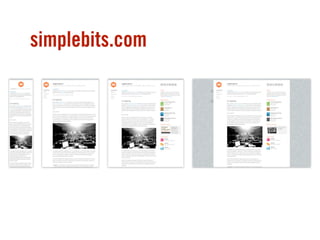
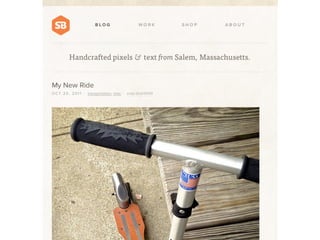
simplebits.com
bostonglobe.com
mediaqueri.es
Web design trends
1. Content & organisation of content first
2. Typography
3. No unnecessary visual design elements
1. Content & organisation of content first
2. Typography
3. No unnecessary visual design elements
1. Content & organisation of
2. Typography
3. No unnecessary visual design elements
Designing
in the browser
1. The browser is our canvas
2. A static image doesn’t feel like a real page
3. Content organisation before design
4. Accessibility & appropriate hierarchy
1. The browser is our canvas
2. A static image doesn’t feel like a real page
3. Content organisation before design
4. Accessibility & appropriate hierarchy
1. The browser is our canvas
2. A static image doesn’t feel like a real page
3. Content organisation before design
4. Accessibility & appropriate
1. The browser is our canvas
2. A static image doesn’t feel like a real page
3. Content organisation before design
4. Accessibility & appropriate hierarchy
Designing
in photoshop
1. Photoshop as creative outlet
2. No limitations
3. Try things not possible with only
1. Photoshop as creative outlet
2. No limitations
3. Try things not possible with only
1. Photoshop as creative outlet
2. No limitations
3. Try things not possible with only css3
Establish the
global visual design direction
1. Starting point
2. Something to fall back on
3. The designer ≠ front-end dev
1. Starting point
2. Something to fall back on
3. The designer ≠ front-end dev
1. Starting point
2. Something to fall back on
3. The designer ≠ front-end dev
Before you start:
solid IA for hierarchy of info
Designing
proportions.
1. Forget pixels!
2. Think proportions, ratios, percentages
3. Modular!
1. Forget pixels!
2. Think proportions, ratios, percentages
3. Modular!
1. Forget pixels!
2. Think proportions, ratios, percentages
3. Modular!
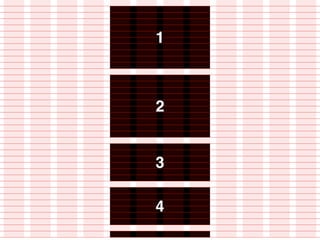
Width?
1. Decide on a maximum width
2. Dependent of the amount of content
3. Dependent of number of modules
4. old principles of webdesign still stand
1. Decide on a maximum width
2. Dependent of the amount of content
3. Dependent of number of modules
4. old principles of webdesign still stand
1. Decide on a maximum width
2. Dependent of the amount of content
3. Dependent of number of modules
4. old principles of webdesign still stand
1. Decide on a maximum width
2. Dependent of the amount of content
3. Dependent of number of modules
4. old principles of webdesign still stand
Grid!
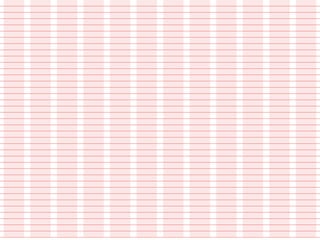
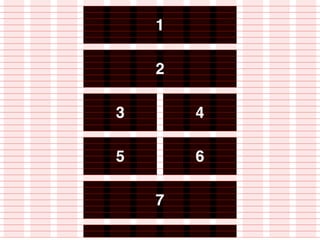
1. Solid grid helps establish proportions
2. Forget 960 grid system
3. Make your own grid
1. Solid grid helps establish proportion
2. Forget 960 grid system
3. Make your own grid
1. Solid grid helps establish
2. Forget 960 grid system
3. Make your own grid
Modular grid extension


             modulargrid.org
Design decisions
beyond photoshop
Fluid grid vs fixed grid
Fluid grid
1. Page adapts to every possible resolution
2. Maximum width defined once
3. Takes up all the available space
4. Harder to achieve (fluid media)
1. Page adapts to every possible
2. Maximum width defined once
3. Takes up all the available space
4. Harder to achieve (fluid media)
1. Page adapts to every possible
2. Maximum width defined once
3. Takes up all the available space
4. Harder to achieve (fluid media)
1. Page adapts to every possible
2. Maximum width defined once
3. Takes up all the available space
4. Harder to achieve (fluid media)
fixed grid
1. Different layouts defined in fixed widths
2. Easier to achieve.
3. Not optimizied for future screen sizes?
1. Different layouts defined in fixed widths
2. Easier to achieve.
3. Not optimizied for future screen sizes?
1. Different layouts defined in fixed widths
2. Easier to achieve.
3. Not optimizied for future screen sizes
flexible modules
In close association with
information architect
best practices
1. Define a maximum width
2. Start with a solid grid
3. Design flexible modules
4. Use a fluid layout when possible
1. Define a maximum width
2. Start with a solid grid
3. Design flexible modules
4. Use a fluid layout when possible
1. Define a maximum width
2. Start with a solid grid
3. Design flexible modules
4. Use a fluid layout when possible
1. Define a maximum width
2. Start with a solid grid
3. Design flexible modules
4. Use a fluid layout when
twitter.com/scoudeville
simon@netlash.com
www.netlash.com
Front-end
Our proces
1. Online strategy
2. Information architecture
3. Design
4. Front-end design
5. Development
1. Media queries
2. Adaptive images
3. Flexbox
4. Multi-column
1. Media queries
2. Adaptive images
3. Flexbox
4. Multi-column
1. Media queries
2. Adaptive images
3. Flexbox
4. Multi-column
1. Media queries
2. Adaptive images
3. Flexbox
4. Multi-column
Media queries
Media queries
 1. Not new
Media queries


  @media print { /* print styles here */ }
Media queries
 1. Not new
 2. Screen sizes (basics)
Media queries
 ‣   max-width 479px (smartphones portrait)
Media queries
 ‣   max-width 479px (smartphones portrait)
 ‣   max-width 767px (smartphones landscape)
Media queries
 ‣   max-width 479px (smartphones portrait)
 ‣   max-width 767px (smartphones landscape)
 ‣   max-width 1023px (tablets portrait)
Media queries
 ‣   max-width 479px (smartphones portrait)
 ‣   max-width 767px (smartphones landscape)
 ‣   max-width 1023px (tablets portrait)
 ‣   min-width 1024px (tablets landscape & others)
Media queries
 ‣   max-width 479px (smartphones portrait)
 ‣   max-width 767px (smartphones landscape)
 ‣   max-width 1023px (tablets portrait)
 ‣   min-width 1024px (tablets landscape & others)
 ‣   inheritance!
Media queries
 1. Not new
 2. Screen sizes (basics)
 3. Screen sizes (advanced)
Media queries
 ‣   max-width 479px (smartphones portrait)
Media queries
 ‣   max-width 479px (smartphones portrait)
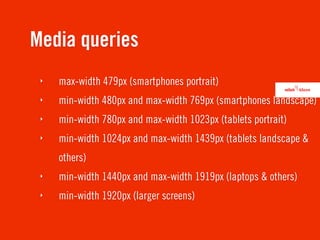
 ‣   min-width 480px and max-width 769px (smartphones landscape)
Media queries
 ‣   max-width 479px (smartphones portrait)
 ‣   min-width 480px and max-width 769px (smartphones landscape)
 ‣   min-width 780px and max-width 1023px (tablets portrait)
Media queries
 ‣   max-width 479px (smartphones portrait)
 ‣   min-width 480px and max-width 769px (smartphones landscape)
 ‣   min-width 780px and max-width 1023px (tablets portrait)
 ‣   min-width 1024px and max-width 1439px (tablets landscape &
     others)
Media queries
 ‣   max-width 479px (smartphones portrait)
 ‣   min-width 480px and max-width 769px (smartphones landscape)
 ‣   min-width 780px and max-width 1023px (tablets portrait)
 ‣   min-width 1024px and max-width 1439px (tablets landscape &
     others)
 ‣   min-width 1440px and max-width 1919px (laptops & others)
Media queries
 ‣   max-width 479px (smartphones portrait)
 ‣   min-width 480px and max-width 769px (smartphones landscape)
 ‣   min-width 780px and max-width 1023px (tablets portrait)
 ‣   min-width 1024px and max-width 1439px (tablets landscape &
     others)
 ‣   min-width 1440px and max-width 1919px (laptops & others)
 ‣   min-width 1920px (larger screens)
Media queries
 ‣   max-width 479px (smartphones portrait)
 ‣   min-width 480px and max-width 769px (smartphones landscape)
 ‣   min-width 780px and max-width 1023px (tablets portrait)
 ‣   min-width 1024px and max-width 1439px (tablets landscape &
     others)
 ‣   min-width 1440px and max-width 1919px (laptops & others)
 ‣   min-width 1920px (larger screens)
 ‣   no inheritance
Media queries
 1. Not new
 2. Screen sizes (basics)
 3. Screen sizes (advanced)
 4. Polyfills
Media queries
 ‣   Check for native browser support
Modernizr
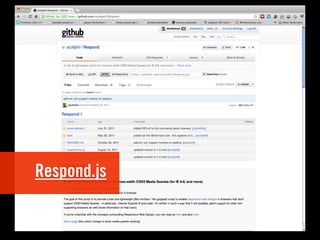
Respond.js
Media queries
 1. Not new
 2. Screen sizes (basics)
 3. Screen sizes (advanced)
 4. Polyfills
 5. Frameworks
Less Framework
Golden Grid System
Skeleton
CSS Grid
HTML5 Boilerplate
1. Media queries
2. Adaptive images
3. Flexbox
4. Multi-column
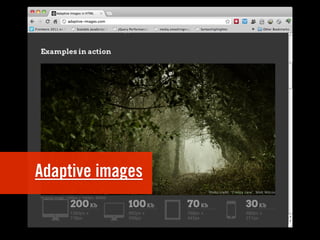
Adaptive images
Adaptive images
 1. Lots of screen sizes
Adaptive images
 1. Lots of screen sizes
 2. Devices: download speed
Adaptive images
 ‣   image optimization
Adaptive images
 ‣   image optimization
 ‣   http://imageoptim.pornel.net/
Adaptive images
 ‣   image optimization
 ‣   http://imageoptim.pornel.net/
 ‣   http://smushit.com
Adaptive images
 ‣   serve different images
Adaptive images
 ‣   serve different images
 ‣   write own JS
Adaptive images
 ‣   serve different images
 ‣   write own JS
 ‣   existing solution
Adaptive images
1. Media queries
2. Adaptive images
3. Flexbox
4. Multi-column
Flexbox
Flexbox
 1. Working draft
Flexbox
 1. Working draft
 2. Positioning elements
Flexbox
 1. Working draft
 2. Positioning elements
 3. display: flexbox;
Flexbox
 1. Working draft
 2. Positioning elements
 3. display: flexbox;
 4. For now - display: box;
1. Media queries
2. Adaptive images
3. Flexbox
4. Multi-column
Multi-column
Multi-column
 1. Candidate recommendation
Multi-column
 1. Candidate recommendation
 2. Divide content into columns
Multi-column
 1. Candidate recommendation
 2. Divide content into columns
 3. column-count: 3;
Multi-column
 ‣   columns
Multi-column
 ‣   columns
 ‣   column-width
Multi-column
 ‣   columns
 ‣   column-width
 ‣   column-count
Multi-column
 ‣   columns
 ‣   column-width
 ‣   column-count
 ‣   column-gap
Multi-column
 ‣   columns
 ‣   column-width
 ‣   column-count
 ‣   column-gap
 ‣   column-rule
Multi-column
 ‣   columns
 ‣   column-width
 ‣   column-count
 ‣   column-gap
 ‣   column-rule
 ‣   column-span
Useful links
 ‣   http://www.w3.org/TR/css3-mediaqueries/
 ‣   http://www.w3.org/TR/css3-flexbox/
 ‣   https://developer.mozilla.org/en/CSS/-moz-box-flex
 ‣   http://www.w3.org/TR/css3-multicol/
 ‣   https://developer.mozilla.org/en/CSS3_Columns
 ‣   http://www.slideshare.net/stephenhay/realworld-
     responsive-design
twitter.com/decthomas
thomas@fork-cms.com
www.netlash.com
QUESTIONS?

Responsive webdesign

  • 1.
    RESPONSIVE WEB DESIGN November 3,2011 – Microsoft Web & Phone UX Tour Belgium
  • 2.
    Bram Simon Thomas @bram_ @scoudeville @decthomas Information architect Web designer Front-end developer
  • 3.
    You may rememberus from such clients as:
  • 4.
  • 5.
    1. Why youshould use responsive design 2. Design responsive design 3. Technical challenges
  • 6.
    Why responsive design? 1.How not to approach mobile web 2. Why responsive design is key 3. Think mobile first 4. It starts with IA
  • 7.
    No stats andnumbers. You’re here so you know mobile is big.
  • 8.
  • 9.
  • 10.
    We need amobile website! Mark Obistar CEO at random mobile operator
  • 11.
  • 12.
    A separate mobilewebsite (1) ‣ What about tablet pc’s? ‣ What about new devices with unknown display sizes?
  • 13.
    Raise your handif you never used your smartphone laying in bed.
  • 14.
    A separate mobilewebsite (2) ‣ Mobile users ≠ users on the road ‣ You probably need all your content
  • 15.
    “How should Iconfigure my phone to use mobile internet?”
  • 16.
  • 17.
  • 18.
  • 19.
  • 20.
    A separate mobilewebsite (3) ‣ You’ll have to manage all your content twice
  • 21.
    A separate mobilewebsite (4) ‣ Users share links. ‣ Different users use different devices.
  • 22.
    A separate mobilewebsite (conclusion) ‣ Only optimized for small screens ‣ Need to provide all content ‣ content has to be managed twice ‣ Issues when sharing content ‣ Pretty expensive for an unsatisfying result
  • 23.
  • 24.
    We need anapp! P. Vandermeersch CEO at a random newspaper company
  • 26.
  • 27.
    Native apps (1) Cfr.separate mobile website: ‣ What about tablet pc’s? ‣ Mobile users ≠ users on the road ‣ You’ll have to manage all your content twice
  • 28.
    Native apps (2) ‣ Which platforms will you support? (iOS, Android, WindowsPhone) ‣ Each update: - cost per platform - might take time (approval)
  • 29.
    Native apps (3) ‣ Store owners take a cut on in-app purchases
  • 30.
    Native apps (4) ‣ What about search engines? ‣ Your content won’t be indexed by them
  • 31.
    Native apps (5) ‣ links to websites open in a new app (!) ‣ no native browser functions (bookmarking!) ‣ non selectable text (no copy-paste) ‣ App’s often have their own interface language
  • 32.
    Remind you tosomething? ‣ issues with links to other websites ‣ no native browser functions like bookmarking ‣ non selectable text (no copy-paste) ‣ each interface is different
  • 34.
  • 35.
    (of course nativeapps can be the best answer) ‣ If you need hardware functions that browsers don’t yet support (camera, compass, gyroscope, gpu power, ...).
  • 36.
    Native apps (conclusion) ‣ Different platforms to support ‣ Cut on in-app-purchases ‣ Content has to be managed twice and won’t be indexed by search engines ‣ Risk on usability issues ‣ Only if you need specific hardware functions
  • 37.
    In a lotof cases, neither separate mobile websites nor native apps provide an effective answer on todays needs.
  • 38.
  • 39.
    Responsive web design: ‣ One website (content!) ‣ No issues with sharing or search engines ‣ One design ‣ Layout adapts to any screen size
  • 40.
  • 41.
    HOW TO START? (Thisis how we do it)
  • 42.
    Our proces 1. Onlinestrategy 2. Information architecture 3. Design 4. Front-end design 5. Development
  • 43.
  • 44.
    What mobile firstdoes not mean
  • 45.
    What mobile firstdoes not mean: ‣ We should only focus on mobile from now on ‣ Mobile is more important than desktop
  • 46.
    Creating a website:2 options ‣ Mobile first ‣ Desktop first
  • 47.
    Why mobile first(1) Mobile is harder to use ‣ Smaller screen ‣ Touch instead of keyboard and mouse(pad) ‣ Slower internet connection
  • 48.
    Why mobile first(2) Mobile users have typically less patience ‣ Because it’s harder to use ‣ Might be on the move ‣ Need that info to use it right now
  • 49.
    Why mobile first(3) Forces you to focus: ‣ No space for complexity ‣ No space for extra’s ‣ Focus on core features and simplicity
  • 50.
    It’s easier tomake a simple thing more complex than to make a complex thing more simple.
  • 51.
    If you cansupport the mobile web, you can support anything.
  • 52.
    Our proces 1. Onlinestrategy 2. Information architecture 3. Design 4. Front-end design 5. Development
  • 53.
    IA FOR MOBILE (actuallyit counts as much for desktop)
  • 54.
    Know the onlinestrategy 3 basics: ‣ Target audience ‣ Goal of the client ‣ USP of the client
  • 55.
    KISS: Keep itsimple and straightforward ‣ Top tasks (key services) in main menu ‣ Short and simple copy ‣ Throw away anything that isn’t needed ‣ White space is allowed ‣ Conclusion first, details later
  • 56.
    “Don’t make methink” (1) ‣ At any point it should be clear how to get closer to the wanted answer ‣ Extra click is way better than complex navigation
  • 57.
    “Don’t make methink” (2) ‣ 2 types of page: choice page and action page ‣ Homepage is a choice page
  • 59.
  • 60.
    Conclusion so far ‣ For content-driven websites, responsive web design is the future ‣ Think mobile first ‣ KISS, focus on core tasks (starts with IA)
  • 61.
  • 62.
  • 63.
    Our proces 1. Onlinestrategy 2. Information architecture 3. Design 4. Front-end design 5. Development
  • 64.
    1. Web designtrends 2. Where to start & how to start 3. Fluid grid vs fixed grid 4. Design decisions beyond photoshop
  • 65.
    1. Web designtrends 2. Where to start & how to start 3. Fluid grid vs fixed grid 4. Design decisions beyond photoshop
  • 66.
    1. Web designtrends 2. Where to start & how to start 3. Fluid grid vs fixed grid 4. Design decisions beyond photoshop
  • 67.
    1. Web designtrends 2. Where to start & how to start 3. Fluid grid vs fixed grid 4. Design decisions beyond photoshop
  • 68.
    Responsive webdesign consistsof three components: a fluid grid, fluid media and media queries Ethan Marcotte alistapart.com
  • 69.
  • 73.
  • 78.
  • 83.
  • 84.
  • 85.
    1. Content &organisation of content first 2. Typography 3. No unnecessary visual design elements
  • 86.
    1. Content &organisation of content first 2. Typography 3. No unnecessary visual design elements
  • 87.
    1. Content &organisation of 2. Typography 3. No unnecessary visual design elements
  • 89.
  • 90.
    1. The browseris our canvas 2. A static image doesn’t feel like a real page 3. Content organisation before design 4. Accessibility & appropriate hierarchy
  • 91.
    1. The browseris our canvas 2. A static image doesn’t feel like a real page 3. Content organisation before design 4. Accessibility & appropriate hierarchy
  • 92.
    1. The browseris our canvas 2. A static image doesn’t feel like a real page 3. Content organisation before design 4. Accessibility & appropriate
  • 93.
    1. The browseris our canvas 2. A static image doesn’t feel like a real page 3. Content organisation before design 4. Accessibility & appropriate hierarchy
  • 94.
  • 95.
    1. Photoshop ascreative outlet 2. No limitations 3. Try things not possible with only
  • 96.
    1. Photoshop ascreative outlet 2. No limitations 3. Try things not possible with only
  • 97.
    1. Photoshop ascreative outlet 2. No limitations 3. Try things not possible with only css3
  • 98.
  • 99.
    1. Starting point 2.Something to fall back on 3. The designer ≠ front-end dev
  • 100.
    1. Starting point 2.Something to fall back on 3. The designer ≠ front-end dev
  • 101.
    1. Starting point 2.Something to fall back on 3. The designer ≠ front-end dev
  • 102.
    Before you start: solidIA for hierarchy of info
  • 103.
  • 104.
    1. Forget pixels! 2.Think proportions, ratios, percentages 3. Modular!
  • 105.
    1. Forget pixels! 2.Think proportions, ratios, percentages 3. Modular!
  • 106.
    1. Forget pixels! 2.Think proportions, ratios, percentages 3. Modular!
  • 107.
  • 108.
    1. Decide ona maximum width 2. Dependent of the amount of content 3. Dependent of number of modules 4. old principles of webdesign still stand
  • 109.
    1. Decide ona maximum width 2. Dependent of the amount of content 3. Dependent of number of modules 4. old principles of webdesign still stand
  • 110.
    1. Decide ona maximum width 2. Dependent of the amount of content 3. Dependent of number of modules 4. old principles of webdesign still stand
  • 111.
    1. Decide ona maximum width 2. Dependent of the amount of content 3. Dependent of number of modules 4. old principles of webdesign still stand
  • 112.
  • 113.
    1. Solid gridhelps establish proportions 2. Forget 960 grid system 3. Make your own grid
  • 114.
    1. Solid gridhelps establish proportion 2. Forget 960 grid system 3. Make your own grid
  • 115.
    1. Solid gridhelps establish 2. Forget 960 grid system 3. Make your own grid
  • 116.
    Modular grid extension modulargrid.org
  • 121.
  • 122.
    Fluid grid vsfixed grid
  • 123.
  • 124.
    1. Page adaptsto every possible resolution 2. Maximum width defined once 3. Takes up all the available space 4. Harder to achieve (fluid media)
  • 125.
    1. Page adaptsto every possible 2. Maximum width defined once 3. Takes up all the available space 4. Harder to achieve (fluid media)
  • 126.
    1. Page adaptsto every possible 2. Maximum width defined once 3. Takes up all the available space 4. Harder to achieve (fluid media)
  • 127.
    1. Page adaptsto every possible 2. Maximum width defined once 3. Takes up all the available space 4. Harder to achieve (fluid media)
  • 128.
  • 129.
    1. Different layoutsdefined in fixed widths 2. Easier to achieve. 3. Not optimizied for future screen sizes?
  • 130.
    1. Different layoutsdefined in fixed widths 2. Easier to achieve. 3. Not optimizied for future screen sizes?
  • 131.
    1. Different layoutsdefined in fixed widths 2. Easier to achieve. 3. Not optimizied for future screen sizes
  • 132.
  • 133.
    In close associationwith information architect
  • 134.
  • 135.
    1. Define amaximum width 2. Start with a solid grid 3. Design flexible modules 4. Use a fluid layout when possible
  • 136.
    1. Define amaximum width 2. Start with a solid grid 3. Design flexible modules 4. Use a fluid layout when possible
  • 137.
    1. Define amaximum width 2. Start with a solid grid 3. Design flexible modules 4. Use a fluid layout when possible
  • 138.
    1. Define amaximum width 2. Start with a solid grid 3. Design flexible modules 4. Use a fluid layout when
  • 139.
  • 140.
  • 141.
    Our proces 1. Onlinestrategy 2. Information architecture 3. Design 4. Front-end design 5. Development
  • 142.
    1. Media queries 2.Adaptive images 3. Flexbox 4. Multi-column
  • 143.
    1. Media queries 2.Adaptive images 3. Flexbox 4. Multi-column
  • 144.
    1. Media queries 2.Adaptive images 3. Flexbox 4. Multi-column
  • 145.
    1. Media queries 2.Adaptive images 3. Flexbox 4. Multi-column
  • 146.
  • 147.
  • 148.
    Media queries @media print { /* print styles here */ }
  • 149.
    Media queries 1.Not new 2. Screen sizes (basics)
  • 150.
    Media queries ‣ max-width 479px (smartphones portrait)
  • 151.
    Media queries ‣ max-width 479px (smartphones portrait) ‣ max-width 767px (smartphones landscape)
  • 152.
    Media queries ‣ max-width 479px (smartphones portrait) ‣ max-width 767px (smartphones landscape) ‣ max-width 1023px (tablets portrait)
  • 153.
    Media queries ‣ max-width 479px (smartphones portrait) ‣ max-width 767px (smartphones landscape) ‣ max-width 1023px (tablets portrait) ‣ min-width 1024px (tablets landscape & others)
  • 154.
    Media queries ‣ max-width 479px (smartphones portrait) ‣ max-width 767px (smartphones landscape) ‣ max-width 1023px (tablets portrait) ‣ min-width 1024px (tablets landscape & others) ‣ inheritance!
  • 155.
    Media queries 1.Not new 2. Screen sizes (basics) 3. Screen sizes (advanced)
  • 156.
    Media queries ‣ max-width 479px (smartphones portrait)
  • 157.
    Media queries ‣ max-width 479px (smartphones portrait) ‣ min-width 480px and max-width 769px (smartphones landscape)
  • 158.
    Media queries ‣ max-width 479px (smartphones portrait) ‣ min-width 480px and max-width 769px (smartphones landscape) ‣ min-width 780px and max-width 1023px (tablets portrait)
  • 159.
    Media queries ‣ max-width 479px (smartphones portrait) ‣ min-width 480px and max-width 769px (smartphones landscape) ‣ min-width 780px and max-width 1023px (tablets portrait) ‣ min-width 1024px and max-width 1439px (tablets landscape & others)
  • 160.
    Media queries ‣ max-width 479px (smartphones portrait) ‣ min-width 480px and max-width 769px (smartphones landscape) ‣ min-width 780px and max-width 1023px (tablets portrait) ‣ min-width 1024px and max-width 1439px (tablets landscape & others) ‣ min-width 1440px and max-width 1919px (laptops & others)
  • 161.
    Media queries ‣ max-width 479px (smartphones portrait) ‣ min-width 480px and max-width 769px (smartphones landscape) ‣ min-width 780px and max-width 1023px (tablets portrait) ‣ min-width 1024px and max-width 1439px (tablets landscape & others) ‣ min-width 1440px and max-width 1919px (laptops & others) ‣ min-width 1920px (larger screens)
  • 162.
    Media queries ‣ max-width 479px (smartphones portrait) ‣ min-width 480px and max-width 769px (smartphones landscape) ‣ min-width 780px and max-width 1023px (tablets portrait) ‣ min-width 1024px and max-width 1439px (tablets landscape & others) ‣ min-width 1440px and max-width 1919px (laptops & others) ‣ min-width 1920px (larger screens) ‣ no inheritance
  • 163.
    Media queries 1.Not new 2. Screen sizes (basics) 3. Screen sizes (advanced) 4. Polyfills
  • 164.
    Media queries ‣ Check for native browser support
  • 165.
  • 166.
  • 167.
    Media queries 1.Not new 2. Screen sizes (basics) 3. Screen sizes (advanced) 4. Polyfills 5. Frameworks
  • 168.
  • 169.
  • 170.
  • 171.
  • 172.
  • 173.
    1. Media queries 2.Adaptive images 3. Flexbox 4. Multi-column
  • 174.
  • 175.
    Adaptive images 1.Lots of screen sizes
  • 176.
    Adaptive images 1.Lots of screen sizes 2. Devices: download speed
  • 177.
    Adaptive images ‣ image optimization
  • 178.
    Adaptive images ‣ image optimization ‣ http://imageoptim.pornel.net/
  • 179.
    Adaptive images ‣ image optimization ‣ http://imageoptim.pornel.net/ ‣ http://smushit.com
  • 180.
    Adaptive images ‣ serve different images
  • 181.
    Adaptive images ‣ serve different images ‣ write own JS
  • 182.
    Adaptive images ‣ serve different images ‣ write own JS ‣ existing solution
  • 183.
  • 184.
    1. Media queries 2.Adaptive images 3. Flexbox 4. Multi-column
  • 185.
  • 186.
  • 187.
    Flexbox 1. Workingdraft 2. Positioning elements
  • 188.
    Flexbox 1. Workingdraft 2. Positioning elements 3. display: flexbox;
  • 189.
    Flexbox 1. Workingdraft 2. Positioning elements 3. display: flexbox; 4. For now - display: box;
  • 190.
    1. Media queries 2.Adaptive images 3. Flexbox 4. Multi-column
  • 191.
  • 192.
  • 193.
    Multi-column 1. Candidaterecommendation 2. Divide content into columns
  • 194.
    Multi-column 1. Candidaterecommendation 2. Divide content into columns 3. column-count: 3;
  • 195.
  • 196.
    Multi-column ‣ columns ‣ column-width
  • 197.
    Multi-column ‣ columns ‣ column-width ‣ column-count
  • 198.
    Multi-column ‣ columns ‣ column-width ‣ column-count ‣ column-gap
  • 199.
    Multi-column ‣ columns ‣ column-width ‣ column-count ‣ column-gap ‣ column-rule
  • 200.
    Multi-column ‣ columns ‣ column-width ‣ column-count ‣ column-gap ‣ column-rule ‣ column-span
  • 201.
    Useful links ‣ http://www.w3.org/TR/css3-mediaqueries/ ‣ http://www.w3.org/TR/css3-flexbox/ ‣ https://developer.mozilla.org/en/CSS/-moz-box-flex ‣ http://www.w3.org/TR/css3-multicol/ ‣ https://developer.mozilla.org/en/CSS3_Columns ‣ http://www.slideshare.net/stephenhay/realworld- responsive-design
  • 202.
  • 203.