Optimizing User Experience
      Across Devices with
Responsive Web Design
    User Focus - October 19, 2012

           Clarissa Peterson
              @clarissa
Captions have been added for those of
  you viewing this online. So you can
pretend like you were actually there…
Responsive Web Design


Before starting, I want to make sure everyone knows what responsive design is.
If you’ve visited websites on a smartphone like an iPhone, you’re
probably used to seeing the regular desktop version of a website shrunk
   down to a small size.You have to zoom in to read any of the text.
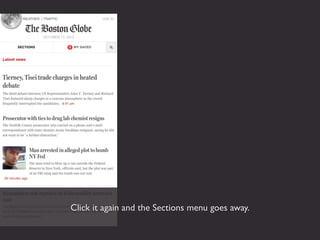
And you’ve seen websites that have a separate mobile version.
 You don’t have to zoom on your mobile phone, but you also
   may not get all of the content that’s on the full website.
One Website


   On a responsive website, the browser responds to the size of the screen and
displays the content in a way that it is appropriate for that screen size. But it’s only
     one website, one set of code, one set of content. Not separate websites.
It makes more sense if I show you. This is The Boston Globe
website, which launched a responsive redesign in 2011. At the
time, it was the largest responsive web design project to date.
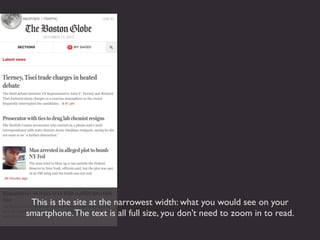
This is the site at the narrowest width: what you would see on your
smartphone. The text is all full size, you don’t need to zoom in to read.
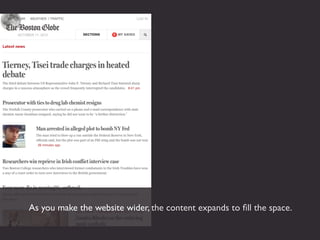
As you make the website wider, the content expands to fill the space.
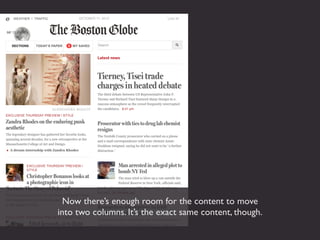
Now there’s enough room for the content to move
into two columns. It’s the exact same content, though.
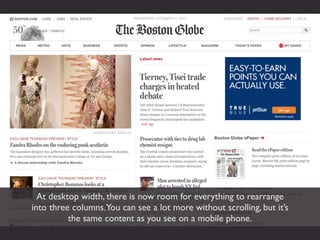
At desktop width, there is now room for everything to rearrange
into three columns.You can see a lot more without scrolling, but it’s
          the same content as you see on a mobile phone.
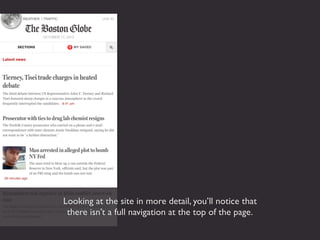
Looking at the site in more detail, you’ll notice that
 there isn’t a full navigation at the top of the page.
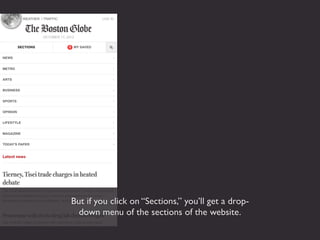
But if you click on “Sections,” you’ll get a drop-
  down menu of the sections of the website.
Click it again and the Sections menu goes away.
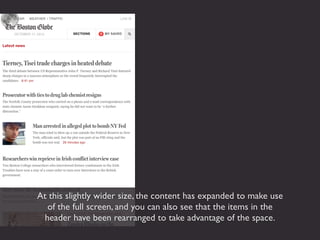
At this slightly wider size, the content has expanded to make use
  of the full screen, and you can also see that the items in the
 header have been rearranged to take advantage of the space.
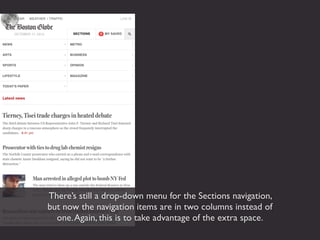
There’s still a drop-down menu for the Sections navigation,
but now the navigation items are in two columns instead of
  one. Again, this is to take advantage of the extra space.
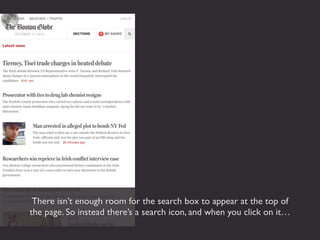
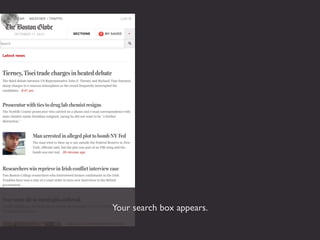
There isn’t enough room for the search box to appear at the top of
the page. So instead there’s a search icon, and when you click on it…
Your search box appears.
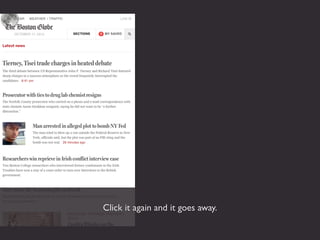
Click it again and it goes away.
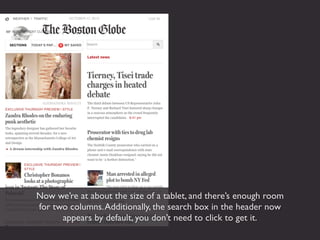
Now we’re at about the size of a tablet, and there’s enough room
for two columns. Additionally, the search box in the header now
      appears by default, you don’t need to click to get it.
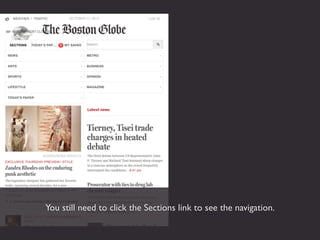
You still need to click the Sections link to see the navigation.
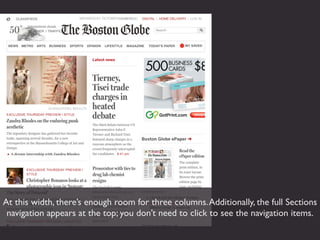
At this width, there’s enough room for three columns. Additionally, the full Sections
 navigation appears at the top; you don’t need to click to see the navigation items.
As we go even wider, things expand to take advantage of the extra
room, including the picture at the top left. The picture continues to
  be the full width of the column even as the column gets wider.
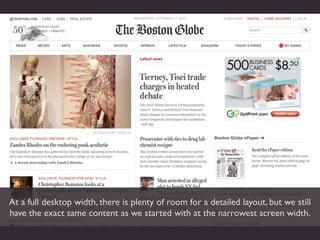
At a full desktop width, there is plenty of room for a detailed layout, but we still
have the exact same content as we started with at the narrowest screen width.
Before I tell you how responsive design improves the user experience of a site, I’m
    first going to tell you a little bit about how responsive design came about.
Before
Before mobile, computers and phones were totally separate. Our jobs as UX
designers were much easier. And we couldn’t have even imagined what was coming.
After
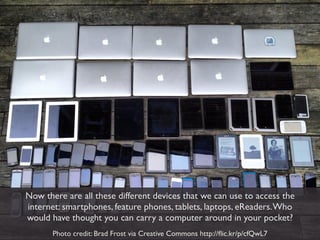
Now there are all these different devices that we can use to access the
internet: smartphones, feature phones, tablets, laptops, eReaders. Who
would have thought you can carry a computer around in your pocket?
       Photo credit: Brad Frost via Creative Commons http://flic.kr/p/cfQwL7
Nobody could have predicted the way things are now. So we need to
 understand we can’t predict the way things may be in the future.
Fixed-width Site


When we first started designing for mobile phones, there were two main options.
 The first was to just leave the site the way it was.You could still access the site
  from your mobile phone, you just had to zoom in and out to see everything.
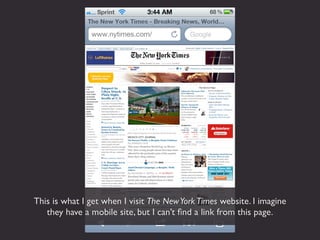
This is what I get when I visit The New York Times website. I imagine
   they have a mobile site, but I can’t find a link from this page.
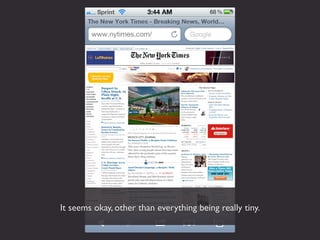
It seems okay, other than everything being really tiny.
But when I zoom in so that the text is actually large enough
  for me to read, this is what I get. It’s pretty hard to read
    when you can’t even see a full line of text all at once.
Separate Mobile Site


 The other option was to create a separate mobile website. It had
separate code, and often separate content, from your main website.
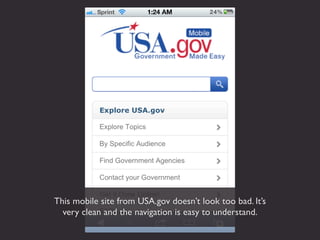
This mobile site from USA.gov doesn’t look too bad. It’s
  very clean and the navigation is easy to understand.
But when I go to the main USA.gov website, there’s all this content that isn’t
 on the mobile site. If I’m viewing the mobile site, I won’t have access to it.
Neither of those options was the right answer. Web designers tried
  out a lot of different ideas and techniques, looking for a better
     solution to the challenge of designing for mobile phones.
Responsive Design


In 2010, web designer Ethan Marcotte put together a few different techniques
  into something he called “Responsive Web Design.” It started to catch on.
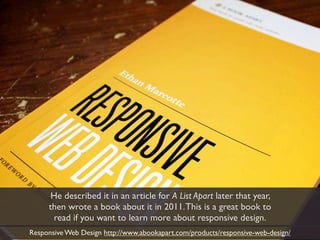
He described it in an article for A List Apart later that year,
     then wrote a book about it in 2011. This is a great book to
      read if you want to learn more about responsive design.
Responsive Web Design http://www.abookapart.com/products/responsive-web-design/
Responsive web design offers us a way
forward, finally allowing us to “design for
the ebb and flow of things.”


                         - Ethan Marcotte
Future-Friendly


One of the great things about responsive design is it allows us to plan for
what might be coming in the future. We can’t predict the future and make
our websites future-proof, but we can make our websites future-friendly.
Content Parity


An important user experience issue that we need to think about is content
 parity, which is the idea that everybody should have access to the same
    content, no matter what device they’ve using to access the website.
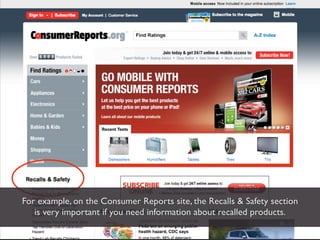
For example, on the Consumer Reports site, the Recalls & Safety section
   is very important if you need information about recalled products.
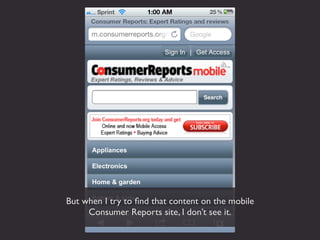
But when I try to find that content on the mobile
     Consumer Reports site, I don’t see it.
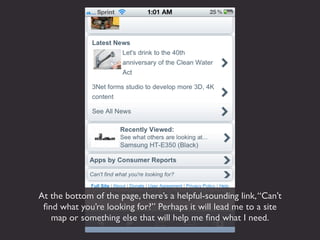
At the bottom of the page, there’s a helpful-sounding link, “Can’t
 find what you’re looking for?” Perhaps it will lead me to a site
   map or something else that will help me find what I need.
But when I click it, I get this. (read #2 above)
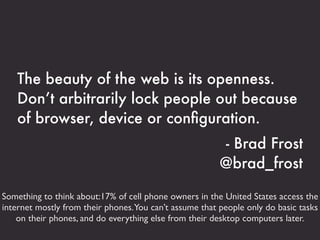
The beauty of the web is its openness.
   Don’t arbitrarily lock people out because
   of browser, device or configuration.
                                                        - Brad Frost
                                                        @brad_frost

Something to think about:17% of cell phone owners in the United States access the
internet mostly from their phones.You can’t assume that people only do basic tasks
    on their phones, and do everything else from their desktop computers later.
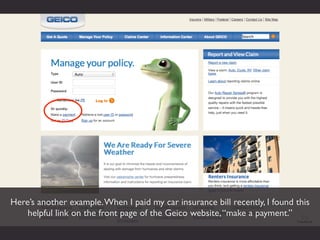
Here’s another example. When I paid my car insurance bill recently, I found this
    helpful link on the front page of the Geico website, “make a payment.”
This next page was kind of unnecessary, but then...
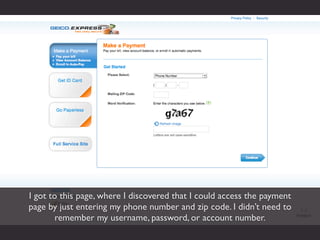
I got to this page, where I discovered that I could access the payment
page by just entering my phone number and zip code. I didn’t need to
        remember my username, password, or account number.
It makes sense. Why have unnecessary security on a page
where the only option is to give them your money? Who is
     going to try to sneak in to pay someone else’s bill?
I thought I’d check whether I’d have the same option on Geico’s mobile site. First, I
 got redirected to a page that tried to convince me to download an app to pay my
  bill. It seemed a lot of effort to just pay a bill, so I clicked “No thanks,” and then...
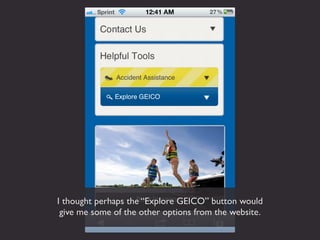
I got this page, half of which is wasted on a photo of the night
sky. It seems like the only option for paying my bill is to log in.
I thought perhaps the “Explore GEICO” button would
 give me some of the other options from the website.
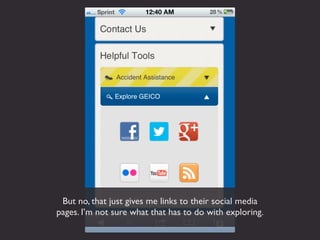
But no, that just gives me links to their social media
pages. I’m not sure what that has to do with exploring.
So my only option, if I didn’t want to log in to pay my bill, was to click
this tiny “Desktop Site” link all the way at the bottom of the screen. It’s
clear that they don’t care if I can find my way to the rest of the content.
Context of Use


Another important user experience consideration is context of use.
This refers to the conditions under which the website is being used.
You’ll hear people talk about “mobile context,” but it’s more complicated than
that. Not all people using mobile devices are out running around somewhere,
      and not all people using desktops/laptops are sitting behind a desk.
Some people actually are running around when they’re using their mobile device.

           Photo credit: Mith Huang via Creative Commons http://flic.kr/p/9B7A4c
But others might be sitting on the sofa at home,
   browsing the web or buying tickets to Disney World.

Photo credit: Kai Chan Vong via Creative Commons http://flic.kr/p/5c4Sfv
I’m not sure what these kids are doing, especially the one
   on the left, but they’re definitely not running around.

Photo credit: Carlos Smith via Creative Commons http://flic.kr/p/8tLb4P
It can be downright surprising where people are using their mobile devices.

        Photo credit: Pete Markham via Creative Commons http://flic.kr/p/2zvrrJ
Just as there isn’t only one context of use for people with mobile devices, there
      also isn’t only one context of use for desktop and laptop computers.
For example, you can’t assume someone on a phone has a slow connection, and
  someone on a laptop/desktop has a fast connection. Most of us have suffered
through slow hotel room wifi where it takes a couple minutes to load one page.
          Photo credit: Wendi Dunlap via Creative Commons http://flic.kr/p/vMJM6
So then why not make it faster for everybody, not just mobile users?
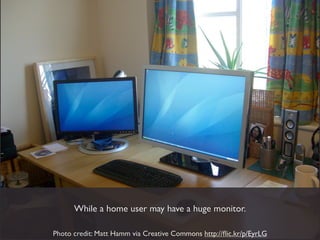
You also can’t make assumptions about screen size.
       An office worker may have a tiny screen...

Photo credit: Channy Yun via Creative Commons http://flic.kr/p/51QJr6
While a home user may have a huge monitor.

Photo credit: Matt Hamm via Creative Commons http://flic.kr/p/EyrLG
Responsive Design


 So you need a site that works for everyone.
  That’s where responsive design comes in.

Mobile First


There are different ways to put together a responsive design. The best way
is to use a mobile-first perspective. Designing for the smallest screen first
  forces you to focus on the content, and decide what’s really important.
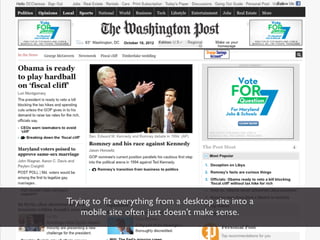
Trying to fit everything from a desktop site into a
    mobile site often just doesn’t make sense.
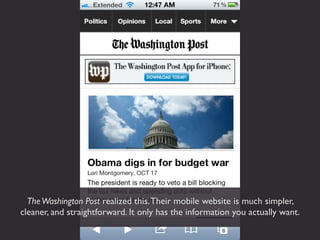
The Washington Post realized this. Their mobile website is much simpler,
cleaner, and straightforward. It only has the information you actually want.
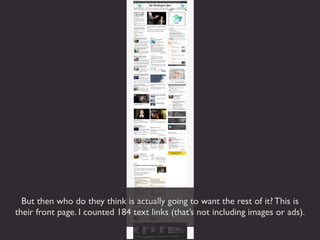
But then who do they think is actually going to want the rest of it? This is
their front page. I counted 184 text links (that’s not including images or ads).
Too much visual information thrown at me all at once makes my head hurt.
Mobile use case: I just transferred money
at my desk using my phone because
logging into my banking app requires
fewer steps.
                                    - Stephanie Rieger
                                     @stephanierieger
     Why is it easier to do a transaction on a mobile phone
          rather than on the bank’s regular website?
Make it work better for everybody.
Examples
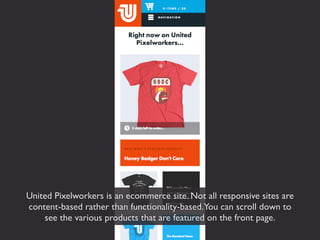
United Pixelworkers is an ecommerce site. Not all responsive sites are
content-based rather than functionality-based.You can scroll down to
    see the various products that are featured on the front page.
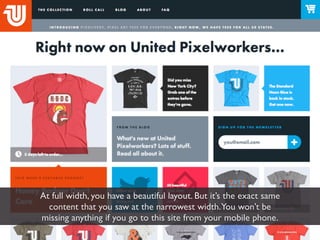
When the screen gets wider, everything rearranges so you can see more at once.
At full width, you have a beautiful layout. But it’s the exact same
  content that you saw at the narrowest width.You won’t be
missing anything if you go to this site from your mobile phone.
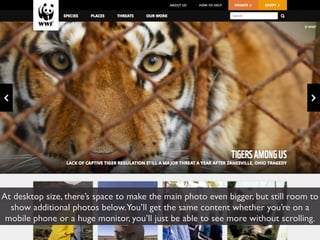
The WWF site has beautiful photography. They don’t want to
   waste it by making the photos tiny on a small screen.
At desktop size, there’s space to make the main photo even bigger, but still room to
  show additional photos below.You’ll get the same content whether you’re on a
 mobile phone or a huge monitor, you’ll just be able to see more without scrolling.
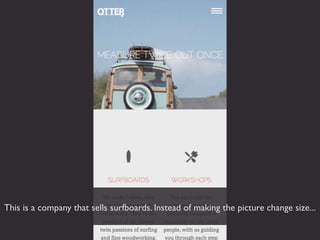
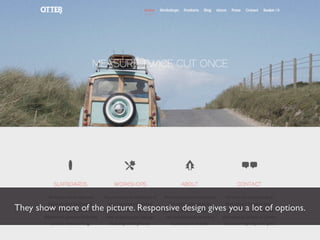
This is a company that sells surfboards. Instead of making the picture change size...
They show more of the picture. Responsive design gives you a lot of options.
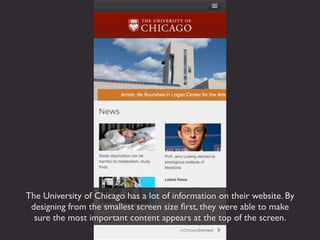
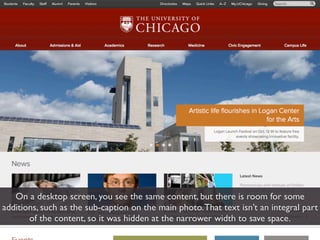
The University of Chicago has a lot of information on their website. By
 designing from the smallest screen size first, they were able to make
  sure the most important content appears at the top of the screen.
On a desktop screen, you see the same content, but there is room for some
additions, such as the sub-caption on the main photo. That text isn’t an integral part
       of the content, so it was hidden at the narrower width to save space.
You’ve probably noticed from these examples that responsive designs
tend to be very clean and uncluttered. Compare that to the Washington
      Post site we saw earlier. Which is a better user experience?
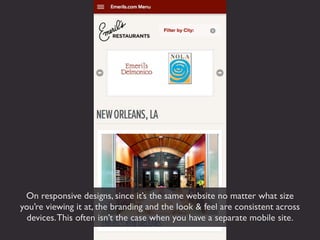
On responsive designs, since it’s the same website no matter what size
you’re viewing it at, the branding and the look & feel are consistent across
  devices. This often isn’t the case when you have a separate mobile site.
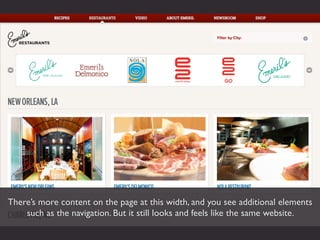
There’s more content on the page at this width, and you see additional elements
    such as the navigation. But it still looks and feels like the same website.
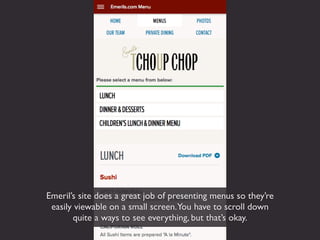
Emeril’s site does a great job of presenting menus so they’re
 easily viewable on a small screen.You have to scroll down
       quite a ways to see everything, but that’s okay.
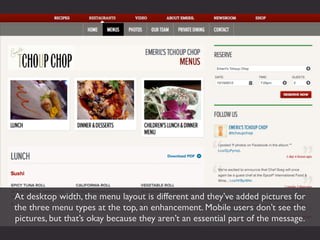
At desktop width, the menu layout is different and they’ve added pictures for
the three menu types at the top, an enhancement. Mobile users don’t see the
pictures, but that’s okay because they aren’t an essential part of the message.
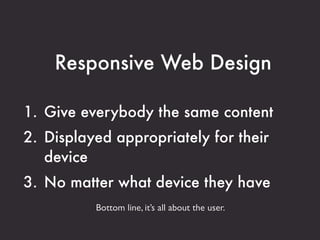
Responsive Web Design

1. Give everybody the same content
2. Displayed appropriately for their
   device
3. No matter what device they have
          Bottom line, it’s all about the user.
There is no Mobile Web. There is only
The Web, which we view in different
ways. There is also no Desktop Web. Or
Tablet Web.
                          - Stephen Hay
                           @stephenhay
Clarissa Peterson
   clarissapeterson.com
 mail@clarissapeterson.com
          @clarissa

Optimizing User Experience with Responsive Web Design

  • 1.
    Optimizing User Experience Across Devices with Responsive Web Design User Focus - October 19, 2012 Clarissa Peterson @clarissa
  • 2.
    Captions have beenadded for those of you viewing this online. So you can pretend like you were actually there…
  • 3.
    Responsive Web Design Beforestarting, I want to make sure everyone knows what responsive design is.
  • 4.
    If you’ve visitedwebsites on a smartphone like an iPhone, you’re probably used to seeing the regular desktop version of a website shrunk down to a small size.You have to zoom in to read any of the text.
  • 5.
    And you’ve seenwebsites that have a separate mobile version. You don’t have to zoom on your mobile phone, but you also may not get all of the content that’s on the full website.
  • 6.
    One Website On a responsive website, the browser responds to the size of the screen and displays the content in a way that it is appropriate for that screen size. But it’s only one website, one set of code, one set of content. Not separate websites.
  • 7.
    It makes moresense if I show you. This is The Boston Globe website, which launched a responsive redesign in 2011. At the time, it was the largest responsive web design project to date.
  • 8.
    This is thesite at the narrowest width: what you would see on your smartphone. The text is all full size, you don’t need to zoom in to read.
  • 9.
    As you makethe website wider, the content expands to fill the space.
  • 10.
    Now there’s enoughroom for the content to move into two columns. It’s the exact same content, though.
  • 11.
    At desktop width,there is now room for everything to rearrange into three columns.You can see a lot more without scrolling, but it’s the same content as you see on a mobile phone.
  • 12.
    Looking at thesite in more detail, you’ll notice that there isn’t a full navigation at the top of the page.
  • 13.
    But if youclick on “Sections,” you’ll get a drop- down menu of the sections of the website.
  • 14.
    Click it againand the Sections menu goes away.
  • 15.
    At this slightlywider size, the content has expanded to make use of the full screen, and you can also see that the items in the header have been rearranged to take advantage of the space.
  • 16.
    There’s still adrop-down menu for the Sections navigation, but now the navigation items are in two columns instead of one. Again, this is to take advantage of the extra space.
  • 17.
    There isn’t enoughroom for the search box to appear at the top of the page. So instead there’s a search icon, and when you click on it…
  • 18.
  • 19.
    Click it againand it goes away.
  • 20.
    Now we’re atabout the size of a tablet, and there’s enough room for two columns. Additionally, the search box in the header now appears by default, you don’t need to click to get it.
  • 21.
    You still needto click the Sections link to see the navigation.
  • 22.
    At this width,there’s enough room for three columns. Additionally, the full Sections navigation appears at the top; you don’t need to click to see the navigation items.
  • 23.
    As we goeven wider, things expand to take advantage of the extra room, including the picture at the top left. The picture continues to be the full width of the column even as the column gets wider.
  • 24.
    At a fulldesktop width, there is plenty of room for a detailed layout, but we still have the exact same content as we started with at the narrowest screen width.
  • 25.
    Before I tellyou how responsive design improves the user experience of a site, I’m first going to tell you a little bit about how responsive design came about.
  • 26.
  • 27.
    Before mobile, computersand phones were totally separate. Our jobs as UX designers were much easier. And we couldn’t have even imagined what was coming.
  • 28.
  • 29.
    Now there areall these different devices that we can use to access the internet: smartphones, feature phones, tablets, laptops, eReaders. Who would have thought you can carry a computer around in your pocket? Photo credit: Brad Frost via Creative Commons http://flic.kr/p/cfQwL7
  • 30.
    Nobody could havepredicted the way things are now. So we need to understand we can’t predict the way things may be in the future.
  • 31.
    Fixed-width Site When wefirst started designing for mobile phones, there were two main options. The first was to just leave the site the way it was.You could still access the site from your mobile phone, you just had to zoom in and out to see everything.
  • 32.
    This is whatI get when I visit The New York Times website. I imagine they have a mobile site, but I can’t find a link from this page.
  • 33.
    It seems okay,other than everything being really tiny.
  • 34.
    But when Izoom in so that the text is actually large enough for me to read, this is what I get. It’s pretty hard to read when you can’t even see a full line of text all at once.
  • 35.
    Separate Mobile Site The other option was to create a separate mobile website. It had separate code, and often separate content, from your main website.
  • 36.
    This mobile sitefrom USA.gov doesn’t look too bad. It’s very clean and the navigation is easy to understand.
  • 37.
    But when Igo to the main USA.gov website, there’s all this content that isn’t on the mobile site. If I’m viewing the mobile site, I won’t have access to it.
  • 38.
    Neither of thoseoptions was the right answer. Web designers tried out a lot of different ideas and techniques, looking for a better solution to the challenge of designing for mobile phones.
  • 39.
    Responsive Design In 2010,web designer Ethan Marcotte put together a few different techniques into something he called “Responsive Web Design.” It started to catch on.
  • 40.
    He described itin an article for A List Apart later that year, then wrote a book about it in 2011. This is a great book to read if you want to learn more about responsive design. Responsive Web Design http://www.abookapart.com/products/responsive-web-design/
  • 41.
    Responsive web designoffers us a way forward, finally allowing us to “design for the ebb and flow of things.” - Ethan Marcotte
  • 42.
    Future-Friendly One of thegreat things about responsive design is it allows us to plan for what might be coming in the future. We can’t predict the future and make our websites future-proof, but we can make our websites future-friendly.
  • 43.
    Content Parity An importantuser experience issue that we need to think about is content parity, which is the idea that everybody should have access to the same content, no matter what device they’ve using to access the website.
  • 44.
    For example, onthe Consumer Reports site, the Recalls & Safety section is very important if you need information about recalled products.
  • 45.
    But when Itry to find that content on the mobile Consumer Reports site, I don’t see it.
  • 46.
    At the bottomof the page, there’s a helpful-sounding link, “Can’t find what you’re looking for?” Perhaps it will lead me to a site map or something else that will help me find what I need.
  • 47.
    But when Iclick it, I get this. (read #2 above)
  • 48.
    The beauty ofthe web is its openness. Don’t arbitrarily lock people out because of browser, device or configuration. - Brad Frost @brad_frost Something to think about:17% of cell phone owners in the United States access the internet mostly from their phones.You can’t assume that people only do basic tasks on their phones, and do everything else from their desktop computers later.
  • 49.
    Here’s another example.When I paid my car insurance bill recently, I found this helpful link on the front page of the Geico website, “make a payment.”
  • 50.
    This next pagewas kind of unnecessary, but then...
  • 51.
    I got tothis page, where I discovered that I could access the payment page by just entering my phone number and zip code. I didn’t need to remember my username, password, or account number.
  • 52.
    It makes sense.Why have unnecessary security on a page where the only option is to give them your money? Who is going to try to sneak in to pay someone else’s bill?
  • 53.
    I thought I’dcheck whether I’d have the same option on Geico’s mobile site. First, I got redirected to a page that tried to convince me to download an app to pay my bill. It seemed a lot of effort to just pay a bill, so I clicked “No thanks,” and then...
  • 54.
    I got thispage, half of which is wasted on a photo of the night sky. It seems like the only option for paying my bill is to log in.
  • 55.
    I thought perhapsthe “Explore GEICO” button would give me some of the other options from the website.
  • 56.
    But no, thatjust gives me links to their social media pages. I’m not sure what that has to do with exploring.
  • 57.
    So my onlyoption, if I didn’t want to log in to pay my bill, was to click this tiny “Desktop Site” link all the way at the bottom of the screen. It’s clear that they don’t care if I can find my way to the rest of the content.
  • 58.
    Context of Use Anotherimportant user experience consideration is context of use. This refers to the conditions under which the website is being used.
  • 59.
    You’ll hear peopletalk about “mobile context,” but it’s more complicated than that. Not all people using mobile devices are out running around somewhere, and not all people using desktops/laptops are sitting behind a desk.
  • 60.
    Some people actuallyare running around when they’re using their mobile device. Photo credit: Mith Huang via Creative Commons http://flic.kr/p/9B7A4c
  • 61.
    But others mightbe sitting on the sofa at home, browsing the web or buying tickets to Disney World. Photo credit: Kai Chan Vong via Creative Commons http://flic.kr/p/5c4Sfv
  • 62.
    I’m not surewhat these kids are doing, especially the one on the left, but they’re definitely not running around. Photo credit: Carlos Smith via Creative Commons http://flic.kr/p/8tLb4P
  • 63.
    It can bedownright surprising where people are using their mobile devices. Photo credit: Pete Markham via Creative Commons http://flic.kr/p/2zvrrJ
  • 64.
    Just as thereisn’t only one context of use for people with mobile devices, there also isn’t only one context of use for desktop and laptop computers.
  • 65.
    For example, youcan’t assume someone on a phone has a slow connection, and someone on a laptop/desktop has a fast connection. Most of us have suffered through slow hotel room wifi where it takes a couple minutes to load one page. Photo credit: Wendi Dunlap via Creative Commons http://flic.kr/p/vMJM6
  • 66.
    So then whynot make it faster for everybody, not just mobile users?
  • 67.
    You also can’tmake assumptions about screen size. An office worker may have a tiny screen... Photo credit: Channy Yun via Creative Commons http://flic.kr/p/51QJr6
  • 68.
    While a homeuser may have a huge monitor. Photo credit: Matt Hamm via Creative Commons http://flic.kr/p/EyrLG
  • 69.
    Responsive Design Soyou need a site that works for everyone. That’s where responsive design comes in.
  • 70.
    Mobile First There aredifferent ways to put together a responsive design. The best way is to use a mobile-first perspective. Designing for the smallest screen first forces you to focus on the content, and decide what’s really important.
  • 71.
    Trying to fiteverything from a desktop site into a mobile site often just doesn’t make sense.
  • 72.
    The Washington Postrealized this. Their mobile website is much simpler, cleaner, and straightforward. It only has the information you actually want.
  • 73.
    But then whodo they think is actually going to want the rest of it? This is their front page. I counted 184 text links (that’s not including images or ads).
  • 74.
    Too much visualinformation thrown at me all at once makes my head hurt.
  • 75.
    Mobile use case:I just transferred money at my desk using my phone because logging into my banking app requires fewer steps. - Stephanie Rieger @stephanierieger Why is it easier to do a transaction on a mobile phone rather than on the bank’s regular website?
  • 76.
    Make it workbetter for everybody.
  • 77.
  • 78.
    United Pixelworkers isan ecommerce site. Not all responsive sites are content-based rather than functionality-based.You can scroll down to see the various products that are featured on the front page.
  • 79.
    When the screengets wider, everything rearranges so you can see more at once.
  • 80.
    At full width,you have a beautiful layout. But it’s the exact same content that you saw at the narrowest width.You won’t be missing anything if you go to this site from your mobile phone.
  • 81.
    The WWF sitehas beautiful photography. They don’t want to waste it by making the photos tiny on a small screen.
  • 82.
    At desktop size,there’s space to make the main photo even bigger, but still room to show additional photos below.You’ll get the same content whether you’re on a mobile phone or a huge monitor, you’ll just be able to see more without scrolling.
  • 83.
    This is acompany that sells surfboards. Instead of making the picture change size...
  • 84.
    They show moreof the picture. Responsive design gives you a lot of options.
  • 85.
    The University ofChicago has a lot of information on their website. By designing from the smallest screen size first, they were able to make sure the most important content appears at the top of the screen.
  • 86.
    On a desktopscreen, you see the same content, but there is room for some additions, such as the sub-caption on the main photo. That text isn’t an integral part of the content, so it was hidden at the narrower width to save space.
  • 87.
    You’ve probably noticedfrom these examples that responsive designs tend to be very clean and uncluttered. Compare that to the Washington Post site we saw earlier. Which is a better user experience?
  • 88.
    On responsive designs,since it’s the same website no matter what size you’re viewing it at, the branding and the look & feel are consistent across devices. This often isn’t the case when you have a separate mobile site.
  • 89.
    There’s more contenton the page at this width, and you see additional elements such as the navigation. But it still looks and feels like the same website.
  • 90.
    Emeril’s site doesa great job of presenting menus so they’re easily viewable on a small screen.You have to scroll down quite a ways to see everything, but that’s okay.
  • 91.
    At desktop width,the menu layout is different and they’ve added pictures for the three menu types at the top, an enhancement. Mobile users don’t see the pictures, but that’s okay because they aren’t an essential part of the message.
  • 92.
    Responsive Web Design 1.Give everybody the same content 2. Displayed appropriately for their device 3. No matter what device they have Bottom line, it’s all about the user.
  • 93.
    There is noMobile Web. There is only The Web, which we view in different ways. There is also no Desktop Web. Or Tablet Web. - Stephen Hay @stephenhay
  • 94.
    Clarissa Peterson clarissapeterson.com mail@clarissapeterson.com @clarissa