YOU


                                 RIGHT
 EVERYTHING


                     NOT QUITE
              KNOW                       ANYMORE
              IS
RETHINKING BEST PRACTICES TO RESPOND TO THE FUTURE
Dave Olsen           Doug Gapinski
Professional Technologist     Strategist
West Virginia University      mStoner

         @dmolsen              @thedougco
Doug: planning
                     and design


Dave: development
 and performance
PLEASE RETWEET


#heweb12
 #uad2
EVERYTHING YOU KNOW IS NOT QUITE RIGHT ANYMORE


         I. Rethink everything
               II. Our reality
          III. Making the case
       IV. Planning + patterns
      V. Optimization + testing
I. RETHINK EVERYTHING
Most colleges and universities are
 only showing ~10 to 15% traffic
 from mobile operating systems.


      Source: anecdotal from clients
55% of Facebook's monthly
  active user base accesses
Facebook on a mobile device.


       Source: Facebook
“...we actually have more people
on a daily basis using mobile web
Facebook than we have using our
iOS or Android apps combined.”


 Source: Mark Zuckerburg @ Disrupt 2012
Sequential browsing:
  90% of people begin a task on
  one device (most commonly a
smartphone) and finish it on another.

            Source: Google
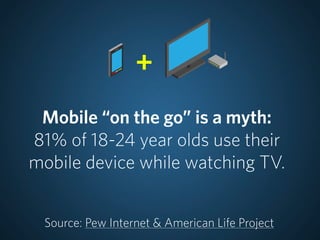
+
 Mobile “on the go” is a myth:
81% of 18-24 year olds use their
mobile device while watching TV.


 Source: Pew Internet & American Life Project
17% of cellphone users in the US
use their phone as their primary
    web browsing platform.

 Source: Pew Internet & American Life Project
+          >
Mobile and tablet traffic is predicted
    to outpace desktop traffic
        by 2015 or sooner.

              Source: IDC
48% of prospects who visited a
   school with a mobile site were
        positively affected.


Source: Noel Levitz’s “Mobile E-Expectations Report”
We can see that the need to
deliver content on multiple
      devices exists.

  We must be proactive in
creating great experiences for
  audiences on all devices.
After the launch of a responsive
home page for WVU mobile traffic
   increased from 11% to 22%
       in less than a month.

         Source: WVU analytics
II. OUR REALITY


                  http://flic.kr/p/8BPQ2q
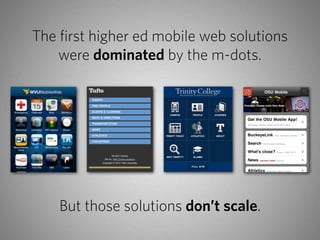
The first higher ed mobile web solutions
    were dominated by the m-dots.


    But those solutions don’t scale.
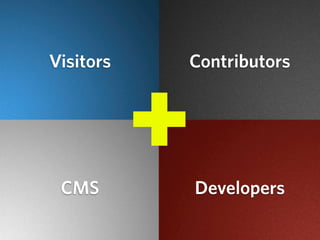
Visitors       Contributors


 CMS
           +
           +


               Developers
VISITORS WILL STILL RELY ON TRADITIONAL MEANS OF ACCESS


“ Not every mobile device will have
   your app on it but every mobile
     device will have a browser. ”
          — Jason Grigsby
CLIENTS WANT TO KEEP DOING WHAT THEY’VE ALWAYS DONE


    “ Links don’t open apps. ”
              — Jason Grigsby
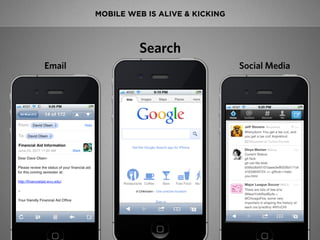
MOBILE WEB IS ALIVE & KICKING


                 Search
Email                                   Social Media
http://flic.kr/p/axKd6X


Coming to Grips


       Finding balance.
ELEGANCE + LAZINESS
http://flic.kr/p/9UmsCJ
III. MAKING THE CASE
100% SUCCESS RATE FOR SELLING JUST BY TALKING ABOUT IT


   Responsive Redesigns in Progress         Retrofits in Progress


      UC Hastings                     University of Rochester
  Webster University                   Manhattan College
   Drake University
   Miami University
   Whittier College
Spring Arbor University
  Herzing University
  St. Joseph’s College
Show, don’t sell


bostonglobe.com
                                        weedygarden.net


                  mediaqueri.es
Source: gomobile.tamu.edu
IV. PLANNING AND PATTERNS
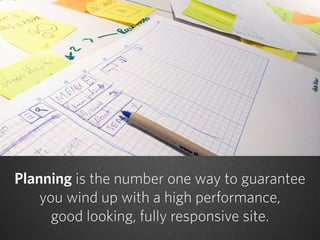
Planning is the number one way to guarantee
    you wind up with a high performance,
      good looking, fully responsive site.
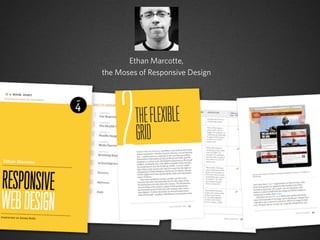
Ethan Marcotte,
the Moses of Responsive Design
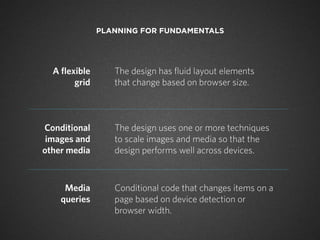
PLANNING FOR FUNDAMENTALS


  A flexible      The design has fluid layout elements
        grid      that change based on browser size.


Conditional       The design uses one or more techniques
 images and       to scale images and media so that the
other media       design performs well across devices.


     Media        Conditional code that changes items on a
    queries       page based on device detection or
                  browser width.
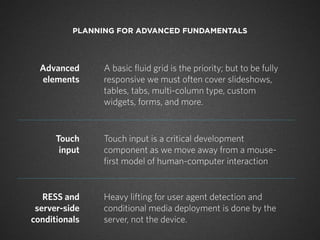
PLANNING FOR ADVANCED FUNDAMENTALS


  Advanced      A basic fluid grid is the priority; but to be fully
  elements      responsive we must often cover slideshows,
                tables, tabs, multi-column type, custom
                widgets, forms, and more.


      Touch     Touch input is a critical development
       input    component as we move away from a mouse-
                first model of human-computer interaction


   RESS and     Heavy lifting for user agent detection and
 server-side    conditional media deployment is done by the
conditionals    server, not the device.
+
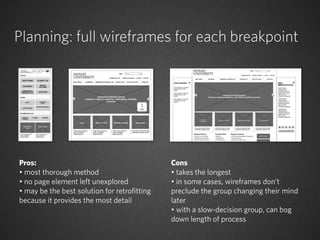
Planning: full wireframes for each breakpoint


Pros:                                         Cons
• most thorough method                        • takes the longest
• no page element left unexplored             • in some cases, wireframes don’t
• may be the best solution for retrofitting   preclude the group changing their mind
because it provides the most detail           later
                                              • with a slow-decision group, can bog
                                              down length of process
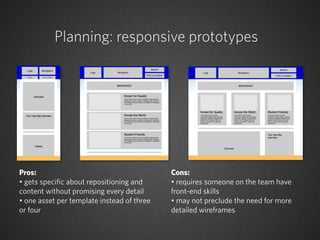
Planning: responsive prototypes


Pros:                                       Cons:
• gets specific about repositioning and     • requires someone on the team have
content without promising every detail      front-end skills
• one asset per template instead of three   • may not preclude the need for more
or four                                     detailed wireframes
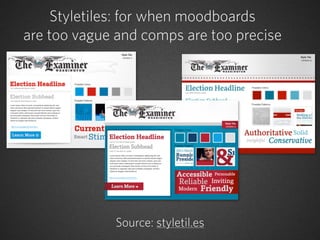
Styletiles: for when moodboards
are too vague and comps are too precise


             Source: styletil.es
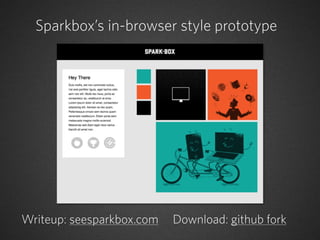
Sparkbox’s in-browser style prototype


Writeup: seesparkbox.com   Download: github fork
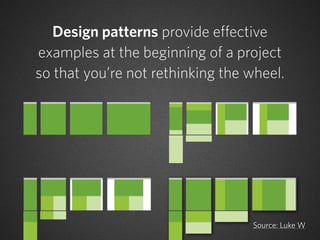
Design patterns provide effective
examples at the beginning of a project
so that you’re not rethinking the wheel.


                                  Source: Luke W
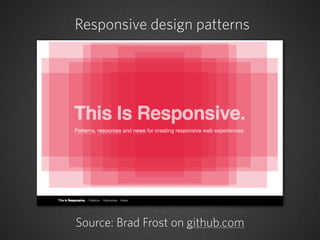
Responsive design patterns


Source: Brad Frost on github.com
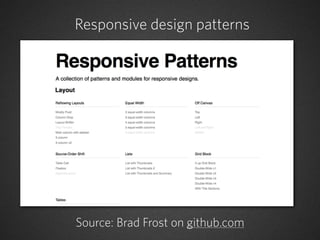
Responsive design patterns


Source: Brad Frost on github.com
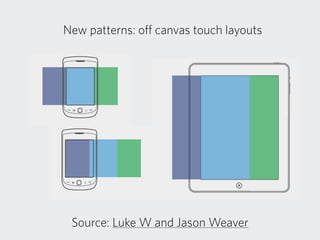
New patterns: off canvas touch layouts


 Source: Luke W and Jason Weaver
Source: Zurb
Patterns for contemporary look and feel


                                             patterntap.com


dribbble.com


               mobiletuxedo.com
A last note on planning: plan to conduct
    user testing on multiple devices
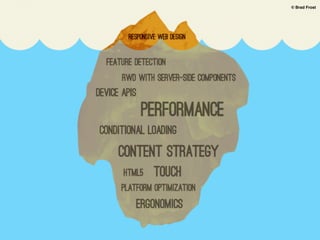
© Brad Frost


brad’s iceberg
© Brad Frost


brad’s iceberg
V. OPTIMIZATION & TESTING
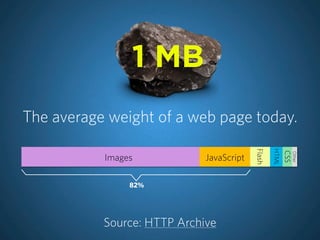
1 MB
The average weight of a web page today.


                                          Flash

                                                  HTML
                                                         CSS
                                                               Other
           Images            JavaScript

                82%


           Source: HTTP Archive
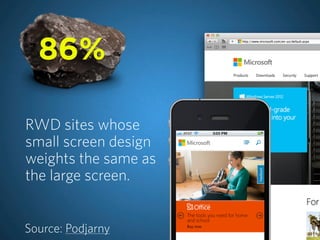
86%

RWD sites whose
small screen design
weights the same as
the large screen.


Source: Podjarny
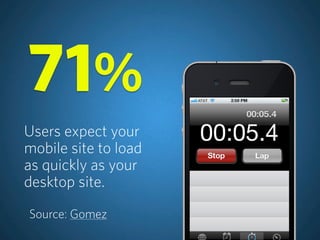
71%
Users expect your
mobile site to load
as quickly as your
desktop site.

Source: Gomez
“ The way in which CSS media
queries have been promoted for
 mobile hides tough problems
  and gives developers a false
promise of a simple solution for
  designing for small screens.”

   Source: Jason Grigsby on Speakerdeck
Mobile first means
performance first
(start thinking about performance at the design stage)
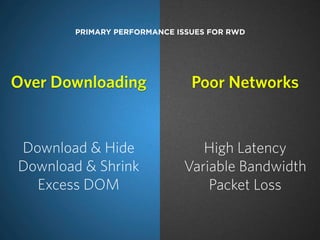
PRIMARY PERFORMANCE ISSUES FOR RWD


Over Downloading               Poor Networks


Download & Hide                 High Latency
Download & Shrink            Variable Bandwidth
  Excess DOM                     Packet Loss
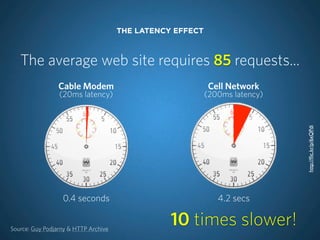
THE LATENCY EFFECT


   The average web site requires 85 requests...
                 Cable Modem                               Cell Network
                 (20ms latency)                            (200ms latency)


                                                                             http://flic.kr/p/6xQPdi
                  0.4 seconds                                 4.2 secs


Source: Guy Podjarny & HTTP Archive
                                                 10 times slower!
MOBILE OPTIMIZATION FOCUS


                            1. Reduce asset size
                            2. Reduce requests
                            3. Speed-up page
                               render
                                          http://flic.kr/p/4zzKee
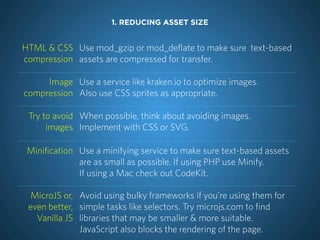
1. REDUCING ASSET SIZE


HTML & CSS Use mod_gzip or mod_deflate to make sure text-based
compression assets are compressed for transfer.

     Image Use a service like kraken.io to optimize images.
compression Also use CSS sprites as appropriate.

 Try to avoid When possible, think about avoiding images.
      images Implement with CSS or SVG.

 Minification Use a minifying service to make sure text-based assets
              are as small as possible. If using PHP use Minify.
              If using a Mac check out CodeKit.

  MicroJS or, Avoid using bulky frameworks if you’re using them for
 even better, simple tasks like selectors. Try microjs.com to find
   Vanilla JS libraries that may be smaller & more suitable.
              JavaScript also blocks the rendering of the page.
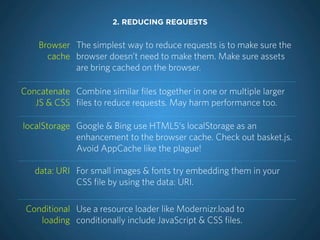
2. REDUCING REQUESTS


    Browser The simplest way to reduce requests is to make sure the
      cache browser doesn’t need to make them. Make sure assets
            are bring cached on the browser.

Concatenate Combine similar files together in one or multiple larger
   JS & CSS files to reduce requests. May harm performance too.

localStorage Google & Bing use HTML5‘s localStorage as an
             enhancement to the browser cache. Check out basket.js.
             Avoid AppCache like the plague!

   data: URI For small images & fonts try embedding them in your
             CSS file by using the data: URI.

 Conditional Use a resource loader like Modernizr.load to
    loading conditionally include JavaScript & CSS files.
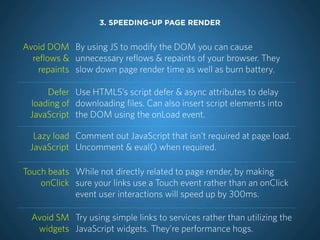
3. SPEEDING-UP PAGE RENDER


Avoid DOM By using JS to modify the DOM you can cause
  reflows & unnecessary reflows & repaints of your browser. They
    repaints slow down page render time as well as burn battery.

     Defer Use HTML5’s script defer & async attributes to delay
 loading of downloading files. Can also insert script elements into
 JavaScript the DOM using the onLoad event.

  Lazy load Comment out JavaScript that isn’t required at page load.
 JavaScript Uncomment & eval() when required.

Touch beats While not directly related to page render, by making
    onClick sure your links use a Touch event rather than an onClick
            event user interactions will speed up by 300ms.

  Avoid SM Try using simple links to services rather than utilizing the
   widgets JavaScript widgets. They’re performance hogs.
http://flic.kr/p/a4VsPv
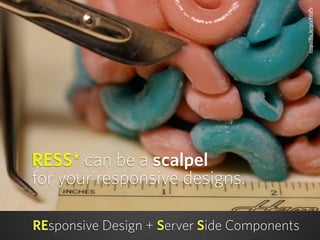
RESS* can be a scalpel
for your responsive designs.

REsponsive Design + Server Side Components
toolbox, tools


            TESTING TOOLS


                         Testing Tools


http://flic.kr/p/4BZsQJ
PERFORMANCE TESTING SITES


WebPagetest                   Mobitest
LEARN TO LOVE THE INSPECTOR
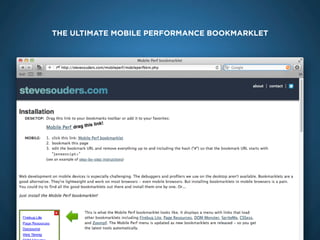
THE ULTIMATE MOBILE PERFORMANCE BOOKMARKLET


        mobile bookmarklet
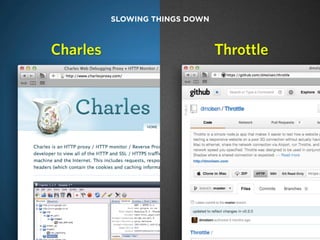
SLOWING THINGS DOWN


   Charles                         Throttle


charlesproxy.com
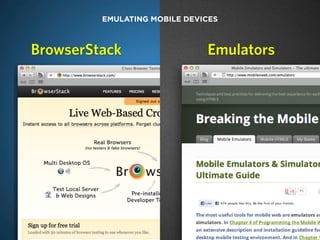
EMULATING MOBILE DEVICES


BrowserStack                   Emulators


charlesproxy.com
GET YOUR HANDS ON REAL DEVICES


eBay
MobileKarma.com
Cellphone store leftovers
Open device labs

                                 http://flic.kr/p/7972f6
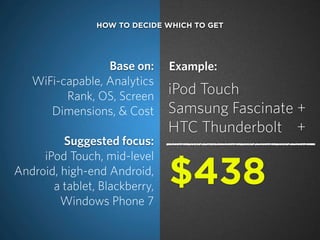
HOW TO DECIDE WHICH TO GET


                 Base on:      Example:
   WiFi-capable, Analytics
         Rank, OS, Screen      iPod Touch
      Dimensions, & Cost       Samsung Fascinate +
                               HTC Thunderbolt +
         Suggested focus:
     iPod Touch, mid-level
Android, high-end Android,
       a tablet, Blackberry,   $438
         Windows Phone 7
ADOBE EDGE INSPECT

(THE APP FORMERLY KNOWN AS ADOBE SHADOW)
Higher education professionals
 need to think & behave in a
    future-friendly way.

        Visit: futurefriend.ly
QUESTIONS?
THANKS!


       Dave Olsen                     Doug Gapinski
Professional Technologist               Strategist
West Virginia University                mStoner

         @dmolsen                        @thedougco

Everything You Know is Not Quite Right Anymore: Rethinking Best Web Practices to Respond to the Future

  • 1.
    YOU RIGHT EVERYTHING NOT QUITE KNOW ANYMORE IS RETHINKING BEST PRACTICES TO RESPOND TO THE FUTURE
  • 2.
    Dave Olsen Doug Gapinski Professional Technologist Strategist West Virginia University mStoner @dmolsen @thedougco
  • 3.
    Doug: planning and design Dave: development and performance
  • 4.
  • 5.
    EVERYTHING YOU KNOWIS NOT QUITE RIGHT ANYMORE I. Rethink everything II. Our reality III. Making the case IV. Planning + patterns V. Optimization + testing
  • 6.
  • 7.
    Most colleges anduniversities are only showing ~10 to 15% traffic from mobile operating systems. Source: anecdotal from clients
  • 8.
    55% of Facebook'smonthly active user base accesses Facebook on a mobile device. Source: Facebook
  • 9.
    “...we actually havemore people on a daily basis using mobile web Facebook than we have using our iOS or Android apps combined.” Source: Mark Zuckerburg @ Disrupt 2012
  • 10.
    Sequential browsing: 90% of people begin a task on one device (most commonly a smartphone) and finish it on another. Source: Google
  • 11.
    + Mobile “onthe go” is a myth: 81% of 18-24 year olds use their mobile device while watching TV. Source: Pew Internet & American Life Project
  • 12.
    17% of cellphoneusers in the US use their phone as their primary web browsing platform. Source: Pew Internet & American Life Project
  • 13.
    + > Mobile and tablet traffic is predicted to outpace desktop traffic by 2015 or sooner. Source: IDC
  • 14.
    48% of prospectswho visited a school with a mobile site were positively affected. Source: Noel Levitz’s “Mobile E-Expectations Report”
  • 15.
    We can seethat the need to deliver content on multiple devices exists. We must be proactive in creating great experiences for audiences on all devices.
  • 16.
    After the launchof a responsive home page for WVU mobile traffic increased from 11% to 22% in less than a month. Source: WVU analytics
  • 17.
    II. OUR REALITY http://flic.kr/p/8BPQ2q
  • 18.
    The first highered mobile web solutions were dominated by the m-dots. But those solutions don’t scale.
  • 19.
    Visitors Contributors CMS + + Developers
  • 20.
    VISITORS WILL STILLRELY ON TRADITIONAL MEANS OF ACCESS “ Not every mobile device will have your app on it but every mobile device will have a browser. ” — Jason Grigsby
  • 21.
    CLIENTS WANT TOKEEP DOING WHAT THEY’VE ALWAYS DONE “ Links don’t open apps. ” — Jason Grigsby
  • 22.
    MOBILE WEB ISALIVE & KICKING Search Email Social Media
  • 23.
  • 24.
  • 25.
  • 26.
  • 27.
    100% SUCCESS RATEFOR SELLING JUST BY TALKING ABOUT IT Responsive Redesigns in Progress Retrofits in Progress UC Hastings University of Rochester Webster University Manhattan College Drake University Miami University Whittier College Spring Arbor University Herzing University St. Joseph’s College
  • 28.
    Show, don’t sell bostonglobe.com weedygarden.net mediaqueri.es
  • 29.
  • 30.
  • 31.
    Planning is thenumber one way to guarantee you wind up with a high performance, good looking, fully responsive site.
  • 32.
    Ethan Marcotte, the Mosesof Responsive Design
  • 33.
    PLANNING FOR FUNDAMENTALS A flexible The design has fluid layout elements grid that change based on browser size. Conditional The design uses one or more techniques images and to scale images and media so that the other media design performs well across devices. Media Conditional code that changes items on a queries page based on device detection or browser width.
  • 34.
    PLANNING FOR ADVANCEDFUNDAMENTALS Advanced A basic fluid grid is the priority; but to be fully elements responsive we must often cover slideshows, tables, tabs, multi-column type, custom widgets, forms, and more. Touch Touch input is a critical development input component as we move away from a mouse- first model of human-computer interaction RESS and Heavy lifting for user agent detection and server-side conditional media deployment is done by the conditionals server, not the device.
  • 35.
  • 36.
    Planning: full wireframesfor each breakpoint Pros: Cons • most thorough method • takes the longest • no page element left unexplored • in some cases, wireframes don’t • may be the best solution for retrofitting preclude the group changing their mind because it provides the most detail later • with a slow-decision group, can bog down length of process
  • 37.
    Planning: responsive prototypes Pros: Cons: • gets specific about repositioning and • requires someone on the team have content without promising every detail front-end skills • one asset per template instead of three • may not preclude the need for more or four detailed wireframes
  • 38.
    Styletiles: for whenmoodboards are too vague and comps are too precise Source: styletil.es
  • 39.
    Sparkbox’s in-browser styleprototype Writeup: seesparkbox.com Download: github fork
  • 40.
    Design patterns provideeffective examples at the beginning of a project so that you’re not rethinking the wheel. Source: Luke W
  • 41.
    Responsive design patterns Source:Brad Frost on github.com
  • 42.
    Responsive design patterns Source:Brad Frost on github.com
  • 43.
    New patterns: offcanvas touch layouts Source: Luke W and Jason Weaver
  • 44.
  • 45.
    Patterns for contemporarylook and feel patterntap.com dribbble.com mobiletuxedo.com
  • 46.
    A last noteon planning: plan to conduct user testing on multiple devices
  • 47.
  • 48.
  • 49.
  • 50.
    1 MB The averageweight of a web page today. Flash HTML CSS Other Images JavaScript 82% Source: HTTP Archive
  • 51.
    86% RWD sites whose smallscreen design weights the same as the large screen. Source: Podjarny
  • 52.
    71% Users expect your mobilesite to load as quickly as your desktop site. Source: Gomez
  • 53.
    “ The wayin which CSS media queries have been promoted for mobile hides tough problems and gives developers a false promise of a simple solution for designing for small screens.” Source: Jason Grigsby on Speakerdeck
  • 54.
    Mobile first means performancefirst (start thinking about performance at the design stage)
  • 55.
    PRIMARY PERFORMANCE ISSUESFOR RWD Over Downloading Poor Networks Download & Hide High Latency Download & Shrink Variable Bandwidth Excess DOM Packet Loss
  • 56.
    THE LATENCY EFFECT The average web site requires 85 requests... Cable Modem Cell Network (20ms latency) (200ms latency) http://flic.kr/p/6xQPdi 0.4 seconds 4.2 secs Source: Guy Podjarny & HTTP Archive 10 times slower!
  • 57.
    MOBILE OPTIMIZATION FOCUS 1. Reduce asset size 2. Reduce requests 3. Speed-up page render http://flic.kr/p/4zzKee
  • 58.
    1. REDUCING ASSETSIZE HTML & CSS Use mod_gzip or mod_deflate to make sure text-based compression assets are compressed for transfer. Image Use a service like kraken.io to optimize images. compression Also use CSS sprites as appropriate. Try to avoid When possible, think about avoiding images. images Implement with CSS or SVG. Minification Use a minifying service to make sure text-based assets are as small as possible. If using PHP use Minify. If using a Mac check out CodeKit. MicroJS or, Avoid using bulky frameworks if you’re using them for even better, simple tasks like selectors. Try microjs.com to find Vanilla JS libraries that may be smaller & more suitable. JavaScript also blocks the rendering of the page.
  • 59.
    2. REDUCING REQUESTS Browser The simplest way to reduce requests is to make sure the cache browser doesn’t need to make them. Make sure assets are bring cached on the browser. Concatenate Combine similar files together in one or multiple larger JS & CSS files to reduce requests. May harm performance too. localStorage Google & Bing use HTML5‘s localStorage as an enhancement to the browser cache. Check out basket.js. Avoid AppCache like the plague! data: URI For small images & fonts try embedding them in your CSS file by using the data: URI. Conditional Use a resource loader like Modernizr.load to loading conditionally include JavaScript & CSS files.
  • 60.
    3. SPEEDING-UP PAGERENDER Avoid DOM By using JS to modify the DOM you can cause reflows & unnecessary reflows & repaints of your browser. They repaints slow down page render time as well as burn battery. Defer Use HTML5’s script defer & async attributes to delay loading of downloading files. Can also insert script elements into JavaScript the DOM using the onLoad event. Lazy load Comment out JavaScript that isn’t required at page load. JavaScript Uncomment & eval() when required. Touch beats While not directly related to page render, by making onClick sure your links use a Touch event rather than an onClick event user interactions will speed up by 300ms. Avoid SM Try using simple links to services rather than utilizing the widgets JavaScript widgets. They’re performance hogs.
  • 61.
    http://flic.kr/p/a4VsPv RESS* can bea scalpel for your responsive designs. REsponsive Design + Server Side Components
  • 62.
    toolbox, tools TESTING TOOLS Testing Tools http://flic.kr/p/4BZsQJ
  • 63.
  • 64.
    LEARN TO LOVETHE INSPECTOR
  • 65.
    THE ULTIMATE MOBILEPERFORMANCE BOOKMARKLET mobile bookmarklet
  • 66.
    SLOWING THINGS DOWN Charles Throttle charlesproxy.com
  • 67.
    EMULATING MOBILE DEVICES BrowserStack Emulators charlesproxy.com
  • 68.
    GET YOUR HANDSON REAL DEVICES eBay MobileKarma.com Cellphone store leftovers Open device labs http://flic.kr/p/7972f6
  • 69.
    HOW TO DECIDEWHICH TO GET Base on: Example: WiFi-capable, Analytics Rank, OS, Screen iPod Touch Dimensions, & Cost Samsung Fascinate + HTC Thunderbolt + Suggested focus: iPod Touch, mid-level Android, high-end Android, a tablet, Blackberry, $438 Windows Phone 7
  • 70.
    ADOBE EDGE INSPECT (THEAPP FORMERLY KNOWN AS ADOBE SHADOW)
  • 71.
    Higher education professionals need to think & behave in a future-friendly way. Visit: futurefriend.ly
  • 72.
  • 73.
    THANKS! Dave Olsen Doug Gapinski Professional Technologist Strategist West Virginia University mStoner @dmolsen @thedougco