Interactive design: Educational tablet
Daniel Marshall
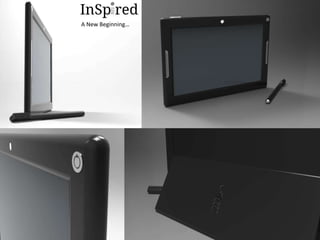
A New Beginning…
The third world/developing world has been recorded as a state of poverty for many years now. Families
and young children struggle daily to survive and life in the conditions they are faced. Existing companies
and organisations, (World Reader and Outreach International, examples), have attempted to battle
poverty, and have proven so far this can be possible by making a change. However, research has shown
only people can erase poverty when working together.
In 2007, only 25% of elementary schools students went to a high school, due to expense. This is a
problem, as this lowers innovation and skills whilst raising unemployment and dependency on foreign aid.
Children possess the potential to unlock new opportunities for people when properly educated, therefore
making this issue significant to resolve.
The aim of the project will be to identify and develop a new solution of interaction and education for
young children. The solution must be affordable, easy to use, sustainable, highly eco-friendly and
educational. To achieve these deliverables research will be conducted in the conditions of existing
education in these communities, exploring what lacks within the schools and testing what technologies
could be used within the system solution.
Briefing of the project:
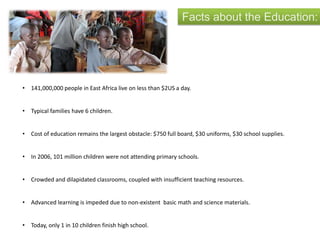
Facts about the Education:
• 141,000,000 people in East Africa live on less than $2US a day.
• Typical families have 6 children.
• Cost of education remains the largest obstacle: $750 full board, $30 uniforms, $30 school supplies.
• In 2006, 101 million children were not attending primary schools.
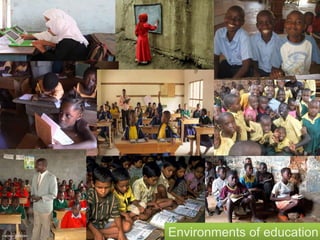
• Crowded and dilapidated classrooms, coupled with insufficient teaching resources.
• Advanced learning is impeded due to non-existent basic math and science materials.
• Today, only 1 in 10 children finish high school.
Environments of education
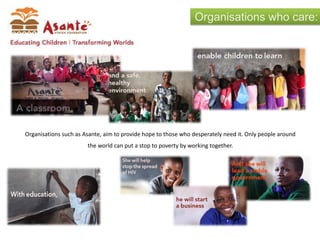
Organisations who care:
Organisations such as Asante, aim to provide hope to those who desperately need it. Only people around
the world can put a stop to poverty by working together.
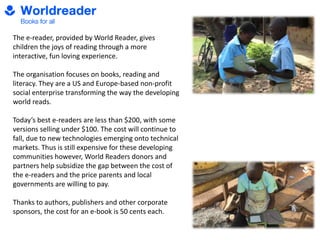
The e-reader, provided by World Reader, gives
children the joys of reading through a more
interactive, fun loving experience.
The organisation focuses on books, reading and
literacy. They are a US and Europe-based non-profit
social enterprise transforming the way the developing
world reads.
Today’s best e-readers are less than $200, with some
versions selling under $100. The cost will continue to
fall, due to new technologies emerging onto technical
markets. Thus is still expensive for these developing
communities however, World Readers donors and
partners help subsidize the gap between the cost of
the e-readers and the price parents and local
governments are willing to pay.
Thanks to authors, publishers and other corporate
sponsors, the cost for an e-book is 50 cents each.
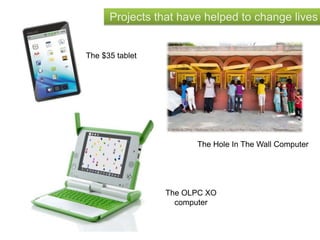
Projects that have helped to change lives
The $35 tablet
The OLPC XO
computer
The Hole In The Wall Computer
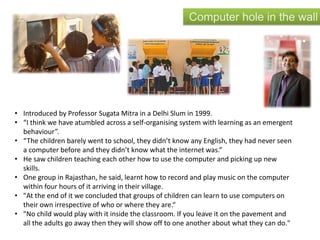
Computer hole in the wall
• Introduced by Professor Sugata Mitra in a Delhi Slum in 1999.
• “I think we have atumbled across a self-organising system with learning as an emergent
behaviour”.
• “The children barely went to school, they didn’t know any English, they had never seen
a computer before and they didn’t know what the internet was.”
• He saw children teaching each other how to use the computer and picking up new
skills.
• One group in Rajasthan, he said, learnt how to record and play music on the computer
within four hours of it arriving in their village.
• "At the end of it we concluded that groups of children can learn to use computers on
their own irrespective of who or where they are.“
• "No child would play with it inside the classroom. If you leave it on the pavement and
all the adults go away then they will show off to one another about what they can do."
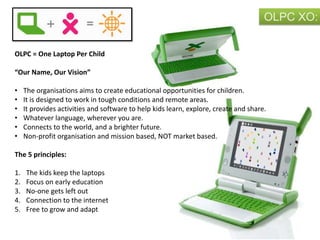
OLPC XO:
OLPC = One Laptop Per Child
“Our Name, Our Vision”
• The organisations aims to create educational opportunities for children.
• It is designed to work in tough conditions and remote areas.
• It provides activities and software to help kids learn, explore, create and share.
• Whatever language, wherever you are.
• Connects to the world, and a brighter future.
• Non-profit organisation and mission based, NOT market based.
The 5 principles:
1. The kids keep the laptops
2. Focus on early education
3. No-one gets left out
4. Connection to the internet
5. Free to grow and adapt
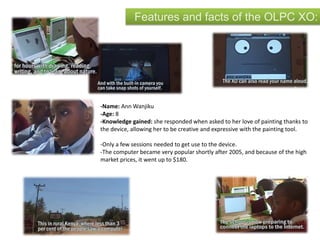
Features and facts of the OLPC XO:
-Name: Ann Wanjiku
-Age: 8
-Knowledge gained: she responded when asked to her love of painting thanks to
the device, allowing her to be creative and expressive with the painting tool.
-Only a few sessions needed to get use to the device.
-The computer became very popular shortly after 2005, and because of the high
market prices, it went up to $180.
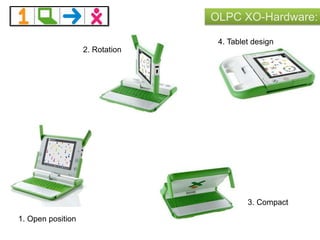
OLPC XO-Hardware:
1. Open position
2. Rotation
3. Compact
4. Tablet design
OLPC XO-Software:
Diary
New doc. Internet
Talk to
your
neighbour
BatteryVolumeUSB
Your ID
Neighbours
via WIFI
The interface of the OLPC,
(One Laptop Per Child) is
very simplified for children
who haven’t used this basis
of interaction or interface
before.
No extremely complicated
images or logo’s are used to
present each application,
unlike technical products like
an iPad, in which use icons
as presented below.
Research has shown that
when people are presented
with technology; in relation
to this product, a Music note
icon = Music, so the user
would ‘click’ the icon.
Paint
Icon examples:
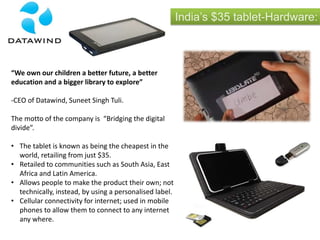
India’s $35 tablet-Hardware:
“We own our children a better future, a better
education and a bigger library to explore”
-CEO of Datawind, Suneet Singh Tuli.
The motto of the company is “Bridging the digital
divide”.
• The tablet is known as being the cheapest in the
world, retailing from just $35.
• Retailed to communities such as South Asia, East
Africa and Latin America.
• Allows people to make the product their own; not
technically, instead, by using a personalised label.
• Cellular connectivity for internet; used in mobile
phones to allow them to connect to any internet
any where.
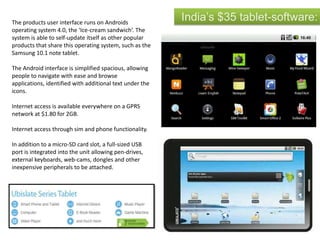
India’s $35 tablet-software:The products user interface runs on Androids
operating system 4.0, the ‘Ice-cream sandwich’. The
system is able to self-update itself as other popular
products that share this operating system, such as the
Samsung 10.1 note tablet.
The Android interface is simplified spacious, allowing
people to navigate with ease and browse
applications, identified with additional text under the
icons.
Internet access is available everywhere on a GPRS
network at $1.80 for 2GB.
Internet access through sim and phone functionality.
In addition to a micro-SD card slot, a full-sized USB
port is integrated into the unit allowing pen-drives,
external keyboards, web-cams, dongles and other
inexpensive peripherals to be attached.
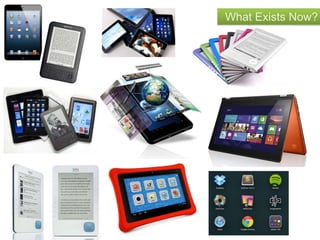
What Exists Now?
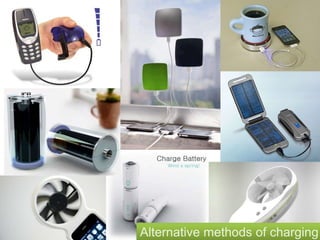
Alternative methods of charging
Information ergonomics• Human-computer interaction, (HCI), involves the study, planning and
design of the interaction between people and computers. This term
will firstly look at computer science and what aspects needs to be
reviewed in terms of hardware
• The computer science behind tablets, (as this will be the primary focus
of this project), looks closely at how tablets actually work. Tablets are
built with a touch screen, enabling users to have a more personalised
experience.
• Some tablets are built with stylus’s, enabling users to use the product
in another form of interaction; this tool is useful for a tablets
applications, (software).
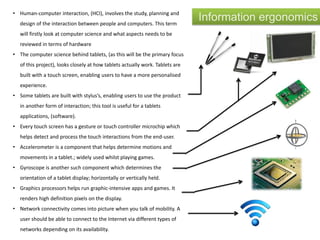
• Every touch screen has a gesture or touch controller microchip which
helps detect and process the touch interactions from the end-user.
• Accelerometer is a component that helps determine motions and
movements in a tablet.; widely used whilst playing games.
• Gyroscope is another such component which determines the
orientation of a tablet display; horizontally or vertically held.
• Graphics processors helps run graphic-intensive apps and games. It
renders high definition pixels on the display.
• Network connectivity comes into picture when you talk of mobility. A
user should be able to connect to the Internet via different types of
networks depending on its availability.
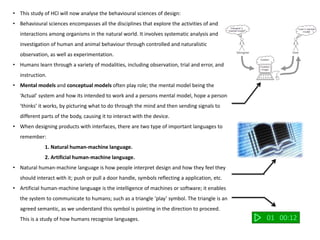
• This study of HCI will now analyse the behavioural sciences of design:
• Behavioural sciences encompasses all the disciplines that explore the activities of and
interactions among organisms in the natural world. It involves systematic analysis and
investigation of human and animal behaviour through controlled and naturalistic
observation, as well as experimentation.
• Humans learn through a variety of modalities, including observation, trial and error, and
instruction.
• Mental models and conceptual models often play role; the mental model being the
‘Actual’ system and how its intended to work and a persons mental model, hope a person
‘thinks’ it works, by picturing what to do through the mind and then sending signals to
different parts of the body, causing it to interact with the device.
• When designing products with interfaces, there are two type of important languages to
remember:
1. Natural human-machine language.
2. Artificial human-machine language.
• Natural human-machine language is how people interpret design and how they feel they
should interact with it; push or pull a door handle, symbols reflecting a application, etc.
• Artificial human-machine language is the intelligence of machines or software; it enables
the system to communicate to humans; such as a triangle ‘play’ symbol. The triangle is an
agreed semantic, as we understand this symbol is pointing in the direction to proceed.
This is a study of how humans recognise languages. 01 00:12
Project Plan and Considerations
Summary of research:
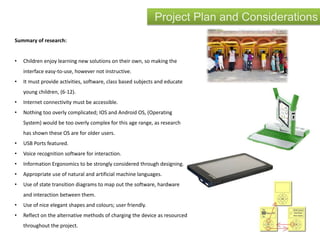
• Children enjoy learning new solutions on their own, so making the
interface easy-to-use, however not instructive.
• It must provide activities, software, class based subjects and educate
young children, (6-12).
• Internet connectivity must be accessible.
• Nothing too overly complicated; IOS and Android OS, (Operating
System) would be too overly complex for this age range, as research
has shown these OS are for older users.
• USB Ports featured.
• Voice recognition software for interaction.
• Information Ergonomics to be strongly considered through designing.
• Appropriate use of natural and artificial machine languages.
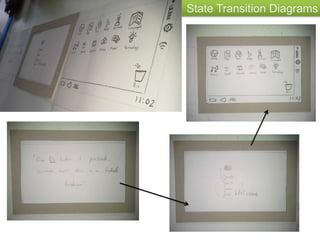
• Use of state transition diagrams to map out the software, hardware
and interaction between them.
• Use of nice elegant shapes and colours; user friendly.
• Reflect on the alternative methods of charging the device as resourced
throughout the project.
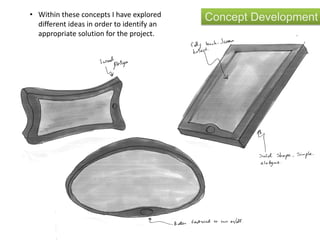
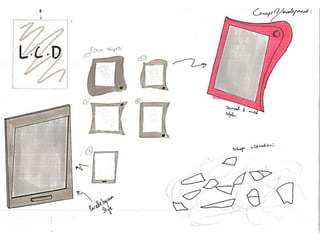
Concept Development• Within these concepts I have explored
different ideas in order to identify an
appropriate solution for the project.
A New Beginning…
State Transition Diagrams
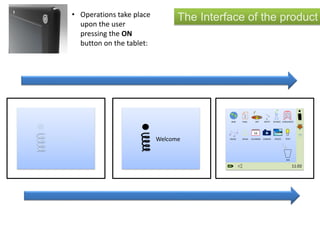
The Interface of the product
Welcome Welcome
21
3
16
11:02
WEB PAGE ART MATH SCIENCE LANGUAGES
MUSIC SPEAK CALENDER CAMERA PHOTO TECH
BIN
• Operations take place
upon the user
pressing the ON
button on the tablet:
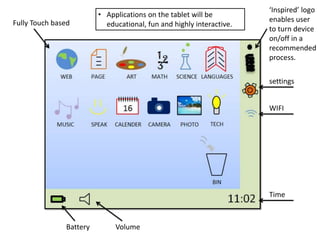
Fully Touch based
‘Inspired’ logo
enables user
to turn device
on/off in a
recommended
process.
settings
WIFI
Time
VolumeBattery
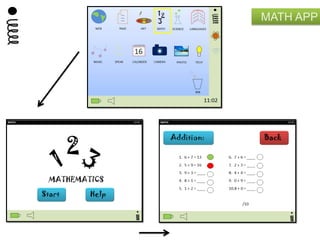
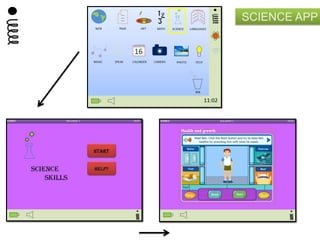
• Applications on the tablet will be
educational, fun and highly interactive.
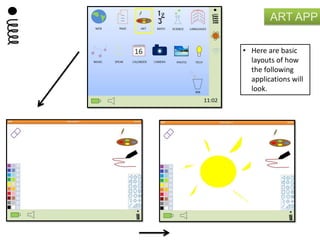
ART APP
• Here are basic
layouts of how
the following
applications will
look.
MATH APP
SCIENCE APP
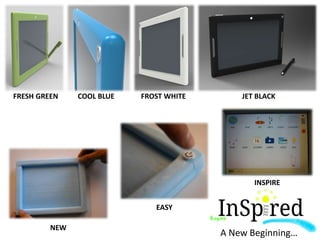
A New Beginning…
EASY
NEW
INSPIRE
FRESH GREEN COOL BLUE FROST WHITE JET BLACK

Research sketchbook - Interaction Module

  • 1.
    Interactive design: Educationaltablet Daniel Marshall A New Beginning…
  • 2.
    The third world/developingworld has been recorded as a state of poverty for many years now. Families and young children struggle daily to survive and life in the conditions they are faced. Existing companies and organisations, (World Reader and Outreach International, examples), have attempted to battle poverty, and have proven so far this can be possible by making a change. However, research has shown only people can erase poverty when working together. In 2007, only 25% of elementary schools students went to a high school, due to expense. This is a problem, as this lowers innovation and skills whilst raising unemployment and dependency on foreign aid. Children possess the potential to unlock new opportunities for people when properly educated, therefore making this issue significant to resolve. The aim of the project will be to identify and develop a new solution of interaction and education for young children. The solution must be affordable, easy to use, sustainable, highly eco-friendly and educational. To achieve these deliverables research will be conducted in the conditions of existing education in these communities, exploring what lacks within the schools and testing what technologies could be used within the system solution. Briefing of the project:
  • 3.
    Facts about theEducation: • 141,000,000 people in East Africa live on less than $2US a day. • Typical families have 6 children. • Cost of education remains the largest obstacle: $750 full board, $30 uniforms, $30 school supplies. • In 2006, 101 million children were not attending primary schools. • Crowded and dilapidated classrooms, coupled with insufficient teaching resources. • Advanced learning is impeded due to non-existent basic math and science materials. • Today, only 1 in 10 children finish high school.
  • 4.
  • 5.
    Organisations who care: Organisationssuch as Asante, aim to provide hope to those who desperately need it. Only people around the world can put a stop to poverty by working together.
  • 6.
    The e-reader, providedby World Reader, gives children the joys of reading through a more interactive, fun loving experience. The organisation focuses on books, reading and literacy. They are a US and Europe-based non-profit social enterprise transforming the way the developing world reads. Today’s best e-readers are less than $200, with some versions selling under $100. The cost will continue to fall, due to new technologies emerging onto technical markets. Thus is still expensive for these developing communities however, World Readers donors and partners help subsidize the gap between the cost of the e-readers and the price parents and local governments are willing to pay. Thanks to authors, publishers and other corporate sponsors, the cost for an e-book is 50 cents each.
  • 7.
    Projects that havehelped to change lives The $35 tablet The OLPC XO computer The Hole In The Wall Computer
  • 8.
    Computer hole inthe wall • Introduced by Professor Sugata Mitra in a Delhi Slum in 1999. • “I think we have atumbled across a self-organising system with learning as an emergent behaviour”. • “The children barely went to school, they didn’t know any English, they had never seen a computer before and they didn’t know what the internet was.” • He saw children teaching each other how to use the computer and picking up new skills. • One group in Rajasthan, he said, learnt how to record and play music on the computer within four hours of it arriving in their village. • "At the end of it we concluded that groups of children can learn to use computers on their own irrespective of who or where they are.“ • "No child would play with it inside the classroom. If you leave it on the pavement and all the adults go away then they will show off to one another about what they can do."
  • 9.
    OLPC XO: OLPC =One Laptop Per Child “Our Name, Our Vision” • The organisations aims to create educational opportunities for children. • It is designed to work in tough conditions and remote areas. • It provides activities and software to help kids learn, explore, create and share. • Whatever language, wherever you are. • Connects to the world, and a brighter future. • Non-profit organisation and mission based, NOT market based. The 5 principles: 1. The kids keep the laptops 2. Focus on early education 3. No-one gets left out 4. Connection to the internet 5. Free to grow and adapt
  • 10.
    Features and factsof the OLPC XO: -Name: Ann Wanjiku -Age: 8 -Knowledge gained: she responded when asked to her love of painting thanks to the device, allowing her to be creative and expressive with the painting tool. -Only a few sessions needed to get use to the device. -The computer became very popular shortly after 2005, and because of the high market prices, it went up to $180.
  • 11.
    OLPC XO-Hardware: 1. Openposition 2. Rotation 3. Compact 4. Tablet design
  • 12.
    OLPC XO-Software: Diary New doc.Internet Talk to your neighbour BatteryVolumeUSB Your ID Neighbours via WIFI The interface of the OLPC, (One Laptop Per Child) is very simplified for children who haven’t used this basis of interaction or interface before. No extremely complicated images or logo’s are used to present each application, unlike technical products like an iPad, in which use icons as presented below. Research has shown that when people are presented with technology; in relation to this product, a Music note icon = Music, so the user would ‘click’ the icon. Paint Icon examples:
  • 13.
    India’s $35 tablet-Hardware: “Weown our children a better future, a better education and a bigger library to explore” -CEO of Datawind, Suneet Singh Tuli. The motto of the company is “Bridging the digital divide”. • The tablet is known as being the cheapest in the world, retailing from just $35. • Retailed to communities such as South Asia, East Africa and Latin America. • Allows people to make the product their own; not technically, instead, by using a personalised label. • Cellular connectivity for internet; used in mobile phones to allow them to connect to any internet any where.
  • 14.
    India’s $35 tablet-software:Theproducts user interface runs on Androids operating system 4.0, the ‘Ice-cream sandwich’. The system is able to self-update itself as other popular products that share this operating system, such as the Samsung 10.1 note tablet. The Android interface is simplified spacious, allowing people to navigate with ease and browse applications, identified with additional text under the icons. Internet access is available everywhere on a GPRS network at $1.80 for 2GB. Internet access through sim and phone functionality. In addition to a micro-SD card slot, a full-sized USB port is integrated into the unit allowing pen-drives, external keyboards, web-cams, dongles and other inexpensive peripherals to be attached.
  • 15.
  • 16.
  • 17.
    Information ergonomics• Human-computerinteraction, (HCI), involves the study, planning and design of the interaction between people and computers. This term will firstly look at computer science and what aspects needs to be reviewed in terms of hardware • The computer science behind tablets, (as this will be the primary focus of this project), looks closely at how tablets actually work. Tablets are built with a touch screen, enabling users to have a more personalised experience. • Some tablets are built with stylus’s, enabling users to use the product in another form of interaction; this tool is useful for a tablets applications, (software). • Every touch screen has a gesture or touch controller microchip which helps detect and process the touch interactions from the end-user. • Accelerometer is a component that helps determine motions and movements in a tablet.; widely used whilst playing games. • Gyroscope is another such component which determines the orientation of a tablet display; horizontally or vertically held. • Graphics processors helps run graphic-intensive apps and games. It renders high definition pixels on the display. • Network connectivity comes into picture when you talk of mobility. A user should be able to connect to the Internet via different types of networks depending on its availability.
  • 18.
    • This studyof HCI will now analyse the behavioural sciences of design: • Behavioural sciences encompasses all the disciplines that explore the activities of and interactions among organisms in the natural world. It involves systematic analysis and investigation of human and animal behaviour through controlled and naturalistic observation, as well as experimentation. • Humans learn through a variety of modalities, including observation, trial and error, and instruction. • Mental models and conceptual models often play role; the mental model being the ‘Actual’ system and how its intended to work and a persons mental model, hope a person ‘thinks’ it works, by picturing what to do through the mind and then sending signals to different parts of the body, causing it to interact with the device. • When designing products with interfaces, there are two type of important languages to remember: 1. Natural human-machine language. 2. Artificial human-machine language. • Natural human-machine language is how people interpret design and how they feel they should interact with it; push or pull a door handle, symbols reflecting a application, etc. • Artificial human-machine language is the intelligence of machines or software; it enables the system to communicate to humans; such as a triangle ‘play’ symbol. The triangle is an agreed semantic, as we understand this symbol is pointing in the direction to proceed. This is a study of how humans recognise languages. 01 00:12
  • 19.
    Project Plan andConsiderations Summary of research: • Children enjoy learning new solutions on their own, so making the interface easy-to-use, however not instructive. • It must provide activities, software, class based subjects and educate young children, (6-12). • Internet connectivity must be accessible. • Nothing too overly complicated; IOS and Android OS, (Operating System) would be too overly complex for this age range, as research has shown these OS are for older users. • USB Ports featured. • Voice recognition software for interaction. • Information Ergonomics to be strongly considered through designing. • Appropriate use of natural and artificial machine languages. • Use of state transition diagrams to map out the software, hardware and interaction between them. • Use of nice elegant shapes and colours; user friendly. • Reflect on the alternative methods of charging the device as resourced throughout the project.
  • 20.
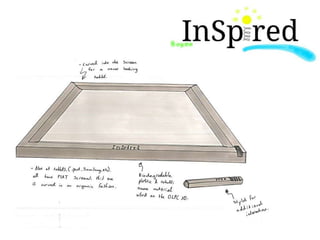
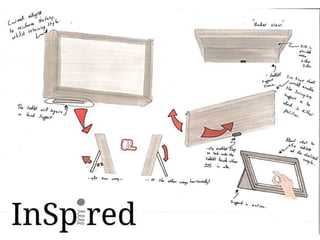
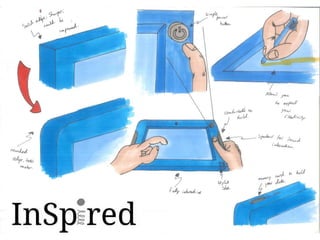
    Concept Development• Withinthese concepts I have explored different ideas in order to identify an appropriate solution for the project.
  • 25.
  • 26.
  • 27.
    The Interface ofthe product Welcome Welcome 21 3 16 11:02 WEB PAGE ART MATH SCIENCE LANGUAGES MUSIC SPEAK CALENDER CAMERA PHOTO TECH BIN • Operations take place upon the user pressing the ON button on the tablet:
  • 28.
    Fully Touch based ‘Inspired’logo enables user to turn device on/off in a recommended process. settings WIFI Time VolumeBattery • Applications on the tablet will be educational, fun and highly interactive.
  • 29.
    ART APP • Hereare basic layouts of how the following applications will look.
  • 30.
  • 31.
  • 32.
    A New Beginning… EASY NEW INSPIRE FRESHGREEN COOL BLUE FROST WHITE JET BLACK