gRPC - 打造輕量、高效能
的後端服務
黃升煌 Mike
多奇數位創意有限公司
wellwind
fullstackledder
gRPC 簡介
關於 gRPC
• 高效能的 RPC 框架
• 基於 HTTP/2 傳輸協定
• 支援多種程式語言
• 使用 Protocol Buffers 定義傳輸介面
關於 HTTP/2
• 更快、更安全的傳輸方式
• Single TCP connection
• Headers 壓縮
• 以 binary 格式傳輸
• 連線多工處理
• 支援 Server Push
• 允許雙向溝通
• 更多…
• 相容 HTTP 1.1
HTTP/2 瀏覽器支援
• 主流瀏覽器都支援 HTTP/2
• IE 11 須在 Windows 10 下支援
關於 Protocol Buffers
• 簡稱 protobuff (副檔名通常為 .proto)
• 用來定義資料結構的一種語言
• 語言更簡單、更好理解
• 語言本身即可代表文件 (先寫文件在寫 code)
• 使用 Protocol Buffer Compiler 將其轉換成各種語言的實作
• 完整的 Protocol Buffer 語法說明
Protocol Buffer 基本語法
syntax = "proto3";
service Greeter {
rpc SayHello (HelloRequest) returns (HelloReply);
}
message HelloRequest {
string name = 1;
}
message HelloReply {
string message = 1;
}
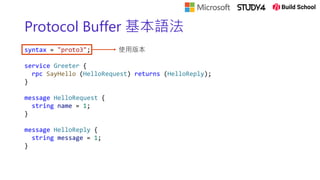
Protocol Buffer 基本語法
syntax = "proto3";
service Greeter {
rpc SayHello (HelloRequest) returns (HelloReply);
}
message HelloRequest {
string name = 1;
}
message HelloReply {
string message = 1;
}
使用版本
Protocol Buffer 基本語法
syntax = "proto3";
service Greeter {
rpc SayHello (HelloRequest) returns (HelloReply);
}
message HelloRequest {
string name = 1;
}
message HelloReply {
string message = 1;
}
定義服務
Protocol Buffer 基本語法
syntax = "proto3";
service Greeter {
rpc SayHello (HelloRequest) returns (HelloReply);
}
message HelloRequest {
string name = 1;
}
message HelloReply {
string message = 1;
}
服務提供方法
Protocol Buffer 基本語法
syntax = "proto3";
service Greeter {
rpc SayHello (HelloRequest) returns (HelloReply);
}
message HelloRequest {
string name = 1;
}
message HelloReply {
string message = 1;
}
Request 資料結構定義
Request 資料結構名稱
Protocol Buffer 基本語法
syntax = "proto3";
service Greeter {
rpc SayHello (HelloRequest) returns (HelloReply);
}
message HelloRequest {
string name = 1;
}
message HelloReply {
string message = 1;
}
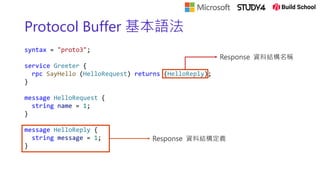
Response 資料結構定義
Response 資料結構名稱
Protocol Buffer 基本語法
syntax = "proto3";
service Greeter {
rpc SayHello (HelloRequest) returns (HelloReply);
}
message HelloRequest {
string name = 1;
}
message HelloReply {
string message = 1;
}
欄位編號
• 在每個 message 內不可重複
• 編號範圍 1~229-1
• 常用欄位建議使用 1~15 (1 byte)
• 編號 19000~19999 不可以使用
4 種 gRPC 交換資料類型
https://dev.to/techschoolguru/is-grpc-better-than-rest-where-to-use-it-3blg
Protocol Buffer 基本語法
• Unary
• rpc SayHello (HelloRequest) returns (HelloReply);
• Server Stream
• rpc GetStockPrices (GetPriceRequest) returns (stream GetPriceReply);
• Client Stream
• rpc UpdateStockPrices (stream UpdatePriceRequest) returns (UpdatePriceReply);
• Bi-directional Stream
• rpc Echo (stream EchoRequest) returns (stream EchoReply);
gRPC 實戰
使用 ASP.NET Core
建立 gRPC Server
使用 ASP.NET Core
建立 gRPC Server
• dotnet new grpc -n GrpcGreeter
• cd GrpcGreeter
• dotnet run
macOS
• macOS 不支援具有 TLS 的 ASP.NET Core gRPC
• 無法在 macOS 上啟動 ASP.NET Core gRPC 應用程式
public static IHostBuilder CreateHostBuilder(string[] args) =>
Host.CreateDefaultBuilder(args)
.ConfigureWebHostDefaults(webBuilder =>
{
webBuilder.ConfigureKestrel(options =>
{
// Setup a HTTP/2 endpoint without TLS.
options.ListenLocalhost(5000, o => o.Protocols = HttpProtocols.Http2);
});
webBuilder.UseStartup<Startup>();
});
gRPC Server 程式碼說明
• GrpcGreeter.csproj
<Project Sdk="Microsoft.NET.Sdk.Web">
<PropertyGroup>
<TargetFramework>net5.0</TargetFramework>
</PropertyGroup>
<ItemGroup>
<Protobuf Include="Protosgreet.proto" GrpcServices="Server" />
</ItemGroup>
<ItemGroup>
<PackageReference Include="Grpc.AspNetCore" Version="2.32.0" />
</ItemGroup>
</Project>
gRPC Server 程式碼說明
• Startup.cs
public void ConfigureServices(IServiceCollection services)
{
services.AddGrpc();
}
public void Configure(IApplicationBuilder app, IWebHostEnvironment env)
{
...
app.UseEndpoints(endpoints =>
{
endpoints.MapGrpcService<GreeterService>();
...
});
}
gRPC Server 程式碼說明
• Protos/greet.proto
gRPC Server 程式碼說明
• Services/GreeterService.cs
gRPC Server 程式碼說明
• Greeter.GreeterBase
• obj/Debug/net5.0/Protos/GreetGrpc.cs
• 加入 proto 檔後,在 build 時自動產生
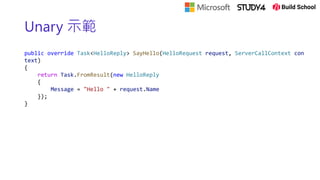
Unary 示範
public override Task<HelloReply> SayHello(HelloRequest request, ServerCallContext con
text)
{
return Task.FromResult(new HelloReply
{
Message = "Hello " + request.Name
});
}
Server Stream 示範
public override async Task GetStockPrices(
GetPriceRequest request,
IServerStreamWriter<GetPriceReply> responseStream,
ServerCallContext context)
{
for (var i = 0; i < 5; ++i)
{
await responseStream.WriteAsync(new GetPriceReply()
{
StockId = request.StockId,
Price = 100 + i
});
await Task.Delay(TimeSpan.FromSeconds(1));
}
}
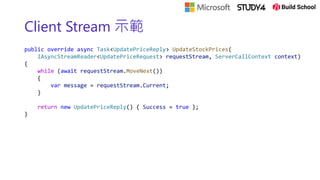
Client Stream 示範
public override async Task<UpdatePriceReply> UpdateStockPrices(
IAsyncStreamReader<UpdatePriceRequest> requestStream, ServerCallContext context)
{
while (await requestStream.MoveNext())
{
var message = requestStream.Current;
}
return new UpdatePriceReply() { Success = true };
}
Bi-directional Stream 示範
public override async Task Echo(
IAsyncStreamReader<EchoRequest> requestStream,
IServerStreamWriter<EchoReply> responseStream,
ServerCallContext context)
{
var readTask = Task.Run(async () =>
{
await foreach (var message in requestStream.ReadAllAsync())
{
await responseStream.WriteAsync(new EchoReply() { ... });
}
});
while (!readTask.IsCompleted)
{
await responseStream.WriteAsync(new EchoReply() { ... });
await Task.Delay(TimeSpan.FromSeconds(5), context.CancellationToken);
}
}
建立 gRPC Client
使用 .NET Core Console
建立 gRPC Client
• dotnet new console -n GrpcGreeterClient
• cd GrpcGreeterClient
• dotnet add package Grpc.Net.Client
• dotnet add package Google.Protobuf
• dotnet add package Grpc.Tools
加入 greet.proto
• 將 Server 的 Protos/greet.proto
• 複製到 Client 的 Protos/greet.proto
• 修改 Client greet.proto 檔的 namespace
option csharp_namespace = "GrpcGreeterClient";
呼叫 Server 服務
using var channel = GrpcChannel.ForAddress("https://localhost:5001");
var client = new Greeter.GreeterClient(channel);
var reply = await client.SayHelloAsync(
new HelloRequest { Name = "GreeterClient" });
Console.WriteLine("Greeting: " + reply.Message);
建立連線
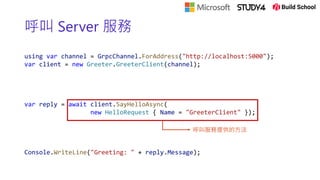
呼叫 Server 服務
using var channel = GrpcChannel.ForAddress("http://localhost:5000");
var client = new Greeter.GreeterClient(channel);
var reply = await client.SayHelloAsync(
new HelloRequest { Name = "GreeterClient" });
Console.WriteLine("Greeting: " + reply.Message);
呼叫服務提供的方法
呼叫 Server 服務
using var channel = GrpcChannel.ForAddress("http://localhost:5000");
var client = new Greeter.GreeterClient(channel);
var reply = await client.SayHelloAsync(
new HelloRequest { Name = "GreeterClient" });
Console.WriteLine("Greeting: " + reply.Message);
回傳結果
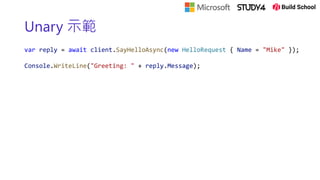
Unary 示範
var reply = await client.SayHelloAsync(new HelloRequest { Name = "Mike" });
Console.WriteLine("Greeting: " + reply.Message);
Server Stream 示範
var call = client.GetStockPrices(new GetPriceRequest() { StockId = "2330" });
while (await call.ResponseStream.MoveNext(new System.Threading.CancellationToken()))
{
Console.WriteLine("Greeting: " + call.ResponseStream.Current.Price);
}
Client Stream 示範
var call = client.UpdateStockPrices();
for (var i = 0; i < 5; i++)
{
await call.RequestStream.WriteAsync(new UpdatePriceRequest
{
StockId = "2330",
Price = 100 + i
});
await Task.Delay(TimeSpan.FromSeconds(1));
}
await call.RequestStream.CompleteAsync();
Bi-directional Stream 示範
var call = client.Echo();
var readTask = Task.Run(async () =>
{
await foreach (var response in call.ResponseStream.ReadAllAsync())
{
Console.WriteLine(response.Message);
}
});
while (true)
{
var result = Console.ReadLine();
if (string.IsNullOrEmpty(result)) { break; }
await call.RequestStream.WriteAsync(new EchoRequest() { Message = result });
}
await call.RequestStream.CompleteAsync();
await readTask;
gRPC in Web
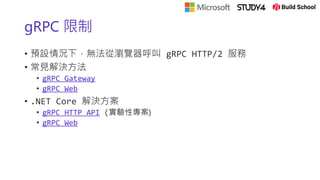
gRPC 限制
• 預設情況下,無法從瀏覽器呼叫 gRPC HTTP/2 服務
• 常見解決方法
• gRPC Gateway
• gRPC Web
• .NET Core 解決方案
• gRPC HTTP API (實驗性專案)
• gRPC Web
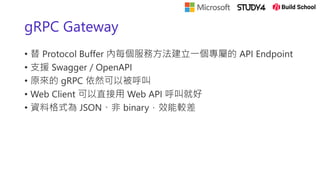
gRPC Gateway
• 替 Protocol Buffer 內每個服務方法建立一個專屬的 API Endpoint
• 支援 Swagger / OpenAPI
• 原來的 gRPC 依然可以被呼叫
• Web Client 可以直接用 Web API 呼叫就好
• 資料格式為 JSON、非 binary,效能較差
gRPC Gateway
https://github.com/grpc-ecosystem/grpc-gateway
gRPC Web
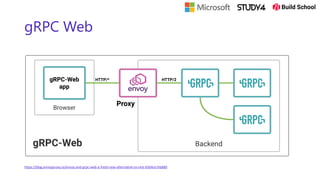
• 透過 Reverse Proxy 處理 Client 傳送封包內容
• 傳送格式為 binary,速度較快,效能較好
• 對於一般前端開發支援較不友善
gRPC Web
https://blog.envoyproxy.io/envoy-and-grpc-web-a-fresh-new-alternative-to-rest-6504ce7eb880
gRPC UI
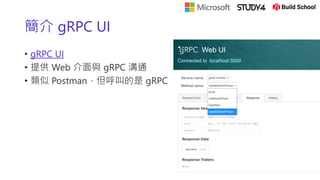
簡介 gRPC UI
• gRPC UI
• 提供 Web 介面與 gRPC 溝通
• 類似 Postman,但呼叫的是 gRPC
.NET Core gRPC Server 設定
• 安裝套件
• dotnet add package Grpc.AspNetCore.Server.Reflection
• Startup.cs -> ConfigureServices()
• services.AddGrpcReflection();
• Startup.cs -> Configure()
• endpoints.MapGrpcReflectionService();
啟動 gRPC UI
• 安裝 gRPC UI
• https://github.com/fullstorydev/grpcui#installation
• 執行 gRPC UI
• grpcui -plaintext localhost:5000
DEMO
https://github.com/wellwind/dotnet-conf-2020-grpc-demo
Resources
Resources
• Documents
• 開始使用 gRPC 服務
• gRPC 版本策略
• .NET Core gRPC Server
• .NET Core gRPC Client
• gRPC Web
• gRPC HTTP API
• gRPC Curl 與 gRPC UI
• Protocol Compilers
• protoc
• protoc-gen-grpc-web
• GitHub Sample
• 今天的 DEMO
• gRPC .NET Core Samples
• gRPC Web Client Sample
Thanks for joining!
Ask questions on Twitter using #dotNETConf
特別感謝
探索 .NET 新世界
.NET Conf

gRPC - 打造輕量、高效能的後端服務

  • 1.
    gRPC - 打造輕量、高效能 的後端服務 黃升煌Mike 多奇數位創意有限公司 wellwind fullstackledder
  • 2.
  • 3.
    關於 gRPC • 高效能的RPC 框架 • 基於 HTTP/2 傳輸協定 • 支援多種程式語言 • 使用 Protocol Buffers 定義傳輸介面
  • 4.
    關於 HTTP/2 • 更快、更安全的傳輸方式 •Single TCP connection • Headers 壓縮 • 以 binary 格式傳輸 • 連線多工處理 • 支援 Server Push • 允許雙向溝通 • 更多… • 相容 HTTP 1.1
  • 5.
    HTTP/2 瀏覽器支援 • 主流瀏覽器都支援HTTP/2 • IE 11 須在 Windows 10 下支援
  • 6.
    關於 Protocol Buffers •簡稱 protobuff (副檔名通常為 .proto) • 用來定義資料結構的一種語言 • 語言更簡單、更好理解 • 語言本身即可代表文件 (先寫文件在寫 code) • 使用 Protocol Buffer Compiler 將其轉換成各種語言的實作 • 完整的 Protocol Buffer 語法說明
  • 7.
    Protocol Buffer 基本語法 syntax= "proto3"; service Greeter { rpc SayHello (HelloRequest) returns (HelloReply); } message HelloRequest { string name = 1; } message HelloReply { string message = 1; }
  • 8.
    Protocol Buffer 基本語法 syntax= "proto3"; service Greeter { rpc SayHello (HelloRequest) returns (HelloReply); } message HelloRequest { string name = 1; } message HelloReply { string message = 1; } 使用版本
  • 9.
    Protocol Buffer 基本語法 syntax= "proto3"; service Greeter { rpc SayHello (HelloRequest) returns (HelloReply); } message HelloRequest { string name = 1; } message HelloReply { string message = 1; } 定義服務
  • 10.
    Protocol Buffer 基本語法 syntax= "proto3"; service Greeter { rpc SayHello (HelloRequest) returns (HelloReply); } message HelloRequest { string name = 1; } message HelloReply { string message = 1; } 服務提供方法
  • 11.
    Protocol Buffer 基本語法 syntax= "proto3"; service Greeter { rpc SayHello (HelloRequest) returns (HelloReply); } message HelloRequest { string name = 1; } message HelloReply { string message = 1; } Request 資料結構定義 Request 資料結構名稱
  • 12.
    Protocol Buffer 基本語法 syntax= "proto3"; service Greeter { rpc SayHello (HelloRequest) returns (HelloReply); } message HelloRequest { string name = 1; } message HelloReply { string message = 1; } Response 資料結構定義 Response 資料結構名稱
  • 13.
    Protocol Buffer 基本語法 syntax= "proto3"; service Greeter { rpc SayHello (HelloRequest) returns (HelloReply); } message HelloRequest { string name = 1; } message HelloReply { string message = 1; } 欄位編號 • 在每個 message 內不可重複 • 編號範圍 1~229-1 • 常用欄位建議使用 1~15 (1 byte) • 編號 19000~19999 不可以使用
  • 14.
    4 種 gRPC交換資料類型 https://dev.to/techschoolguru/is-grpc-better-than-rest-where-to-use-it-3blg
  • 15.
    Protocol Buffer 基本語法 •Unary • rpc SayHello (HelloRequest) returns (HelloReply); • Server Stream • rpc GetStockPrices (GetPriceRequest) returns (stream GetPriceReply); • Client Stream • rpc UpdateStockPrices (stream UpdatePriceRequest) returns (UpdatePriceReply); • Bi-directional Stream • rpc Echo (stream EchoRequest) returns (stream EchoReply);
  • 16.
  • 17.
  • 18.
    建立 gRPC Server •dotnet new grpc -n GrpcGreeter • cd GrpcGreeter • dotnet run
  • 19.
    macOS • macOS 不支援具有TLS 的 ASP.NET Core gRPC • 無法在 macOS 上啟動 ASP.NET Core gRPC 應用程式 public static IHostBuilder CreateHostBuilder(string[] args) => Host.CreateDefaultBuilder(args) .ConfigureWebHostDefaults(webBuilder => { webBuilder.ConfigureKestrel(options => { // Setup a HTTP/2 endpoint without TLS. options.ListenLocalhost(5000, o => o.Protocols = HttpProtocols.Http2); }); webBuilder.UseStartup<Startup>(); });
  • 20.
    gRPC Server 程式碼說明 •GrpcGreeter.csproj <Project Sdk="Microsoft.NET.Sdk.Web"> <PropertyGroup> <TargetFramework>net5.0</TargetFramework> </PropertyGroup> <ItemGroup> <Protobuf Include="Protosgreet.proto" GrpcServices="Server" /> </ItemGroup> <ItemGroup> <PackageReference Include="Grpc.AspNetCore" Version="2.32.0" /> </ItemGroup> </Project>
  • 21.
    gRPC Server 程式碼說明 •Startup.cs public void ConfigureServices(IServiceCollection services) { services.AddGrpc(); } public void Configure(IApplicationBuilder app, IWebHostEnvironment env) { ... app.UseEndpoints(endpoints => { endpoints.MapGrpcService<GreeterService>(); ... }); }
  • 22.
  • 23.
    gRPC Server 程式碼說明 •Services/GreeterService.cs
  • 24.
    gRPC Server 程式碼說明 •Greeter.GreeterBase • obj/Debug/net5.0/Protos/GreetGrpc.cs • 加入 proto 檔後,在 build 時自動產生
  • 25.
    Unary 示範 public overrideTask<HelloReply> SayHello(HelloRequest request, ServerCallContext con text) { return Task.FromResult(new HelloReply { Message = "Hello " + request.Name }); }
  • 26.
    Server Stream 示範 publicoverride async Task GetStockPrices( GetPriceRequest request, IServerStreamWriter<GetPriceReply> responseStream, ServerCallContext context) { for (var i = 0; i < 5; ++i) { await responseStream.WriteAsync(new GetPriceReply() { StockId = request.StockId, Price = 100 + i }); await Task.Delay(TimeSpan.FromSeconds(1)); } }
  • 27.
    Client Stream 示範 publicoverride async Task<UpdatePriceReply> UpdateStockPrices( IAsyncStreamReader<UpdatePriceRequest> requestStream, ServerCallContext context) { while (await requestStream.MoveNext()) { var message = requestStream.Current; } return new UpdatePriceReply() { Success = true }; }
  • 28.
    Bi-directional Stream 示範 publicoverride async Task Echo( IAsyncStreamReader<EchoRequest> requestStream, IServerStreamWriter<EchoReply> responseStream, ServerCallContext context) { var readTask = Task.Run(async () => { await foreach (var message in requestStream.ReadAllAsync()) { await responseStream.WriteAsync(new EchoReply() { ... }); } }); while (!readTask.IsCompleted) { await responseStream.WriteAsync(new EchoReply() { ... }); await Task.Delay(TimeSpan.FromSeconds(5), context.CancellationToken); } }
  • 29.
    建立 gRPC Client 使用.NET Core Console
  • 30.
    建立 gRPC Client •dotnet new console -n GrpcGreeterClient • cd GrpcGreeterClient • dotnet add package Grpc.Net.Client • dotnet add package Google.Protobuf • dotnet add package Grpc.Tools
  • 31.
    加入 greet.proto • 將Server 的 Protos/greet.proto • 複製到 Client 的 Protos/greet.proto • 修改 Client greet.proto 檔的 namespace option csharp_namespace = "GrpcGreeterClient";
  • 32.
    呼叫 Server 服務 usingvar channel = GrpcChannel.ForAddress("https://localhost:5001"); var client = new Greeter.GreeterClient(channel); var reply = await client.SayHelloAsync( new HelloRequest { Name = "GreeterClient" }); Console.WriteLine("Greeting: " + reply.Message); 建立連線
  • 33.
    呼叫 Server 服務 usingvar channel = GrpcChannel.ForAddress("http://localhost:5000"); var client = new Greeter.GreeterClient(channel); var reply = await client.SayHelloAsync( new HelloRequest { Name = "GreeterClient" }); Console.WriteLine("Greeting: " + reply.Message); 呼叫服務提供的方法
  • 34.
    呼叫 Server 服務 usingvar channel = GrpcChannel.ForAddress("http://localhost:5000"); var client = new Greeter.GreeterClient(channel); var reply = await client.SayHelloAsync( new HelloRequest { Name = "GreeterClient" }); Console.WriteLine("Greeting: " + reply.Message); 回傳結果
  • 35.
    Unary 示範 var reply= await client.SayHelloAsync(new HelloRequest { Name = "Mike" }); Console.WriteLine("Greeting: " + reply.Message);
  • 36.
    Server Stream 示範 varcall = client.GetStockPrices(new GetPriceRequest() { StockId = "2330" }); while (await call.ResponseStream.MoveNext(new System.Threading.CancellationToken())) { Console.WriteLine("Greeting: " + call.ResponseStream.Current.Price); }
  • 37.
    Client Stream 示範 varcall = client.UpdateStockPrices(); for (var i = 0; i < 5; i++) { await call.RequestStream.WriteAsync(new UpdatePriceRequest { StockId = "2330", Price = 100 + i }); await Task.Delay(TimeSpan.FromSeconds(1)); } await call.RequestStream.CompleteAsync();
  • 38.
    Bi-directional Stream 示範 varcall = client.Echo(); var readTask = Task.Run(async () => { await foreach (var response in call.ResponseStream.ReadAllAsync()) { Console.WriteLine(response.Message); } }); while (true) { var result = Console.ReadLine(); if (string.IsNullOrEmpty(result)) { break; } await call.RequestStream.WriteAsync(new EchoRequest() { Message = result }); } await call.RequestStream.CompleteAsync(); await readTask;
  • 39.
  • 40.
    gRPC 限制 • 預設情況下,無法從瀏覽器呼叫gRPC HTTP/2 服務 • 常見解決方法 • gRPC Gateway • gRPC Web • .NET Core 解決方案 • gRPC HTTP API (實驗性專案) • gRPC Web
  • 41.
    gRPC Gateway • 替Protocol Buffer 內每個服務方法建立一個專屬的 API Endpoint • 支援 Swagger / OpenAPI • 原來的 gRPC 依然可以被呼叫 • Web Client 可以直接用 Web API 呼叫就好 • 資料格式為 JSON、非 binary,效能較差
  • 42.
  • 43.
    gRPC Web • 透過Reverse Proxy 處理 Client 傳送封包內容 • 傳送格式為 binary,速度較快,效能較好 • 對於一般前端開發支援較不友善
  • 44.
  • 45.
  • 46.
    簡介 gRPC UI •gRPC UI • 提供 Web 介面與 gRPC 溝通 • 類似 Postman,但呼叫的是 gRPC
  • 47.
    .NET Core gRPCServer 設定 • 安裝套件 • dotnet add package Grpc.AspNetCore.Server.Reflection • Startup.cs -> ConfigureServices() • services.AddGrpcReflection(); • Startup.cs -> Configure() • endpoints.MapGrpcReflectionService();
  • 48.
    啟動 gRPC UI •安裝 gRPC UI • https://github.com/fullstorydev/grpcui#installation • 執行 gRPC UI • grpcui -plaintext localhost:5000
  • 49.
  • 50.
  • 51.
    Resources • Documents • 開始使用gRPC 服務 • gRPC 版本策略 • .NET Core gRPC Server • .NET Core gRPC Client • gRPC Web • gRPC HTTP API • gRPC Curl 與 gRPC UI • Protocol Compilers • protoc • protoc-gen-grpc-web • GitHub Sample • 今天的 DEMO • gRPC .NET Core Samples • gRPC Web Client Sample
  • 52.
    Thanks for joining! Askquestions on Twitter using #dotNETConf
  • 53.
  • 54.