Geo-Data in R 
From visualization to analysis 
Massimiliano Ruocco, PhD! 
ruoccoma et gmail dot com!
Outline 
Introduc)on 
(10 
min) 
Basic 
R 
(30 
min) 
Geo-­‐Data 
Visualiza)on 
Geo-­‐Data 
Analysis 
(20 
min) 
(20 
min) 
R 
for 
Big 
Data 
(10 
min) 
2
Introduc)on 
(10 
min)
Introduction 
What is R 
• Dialect of S-language: 20 years old 
• Language + Environment for statistical computing 
• Flexibility: package based 
– Cran Task views 
• Object-Oriented language 
• Free! (Open Source) 
4
Introduction 
Getting Started 
• Painless Installation 
• Start it up: 
– Rprofile.site file 
• Workspace: 
– .Rdata file 
• History: 
– .Rhistory file 
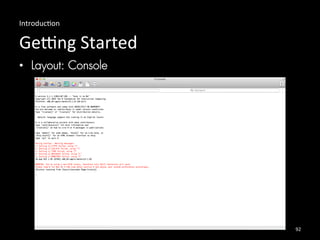
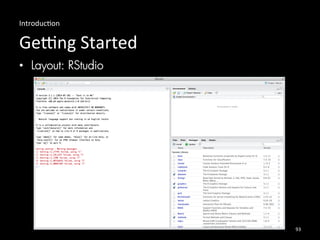
• Layout: 
– Console 
– RStudio 
5
Introduction 
R Commands 
• Case sensitive 
• Expression or Assignment 
• Comments starting with # 
• Quit command: q() 
6
Introduction 
Need Help? 
• Help commands: 
– help(…) 
– help.search(…) 
– apropos(…) 
– example(…) 
7
Introduction 
The working directory 
• getwd() 
• setwd(…) 
8
Introduction 
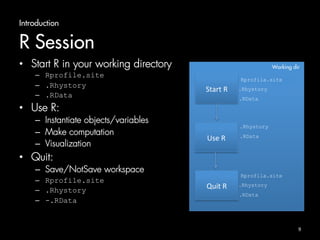
R Session 
• Start R in your working directory 
– Rprofile.site 
– .Rhystory 
– .RData 
• Use R: 
– Instantiate objects/variables 
– Make computation 
– Visualization 
• Quit: 
– Save/NotSave workspace 
– Rprofile.site 
– .Rhystory 
– -.RData 
Working dir 
Start 
R 
Rprofila.site 
.Rhystory 
.RData 
Use 
R 
.Rhystory 
.RData 
Quit 
R 
Rprofila.site 
.Rhystory 
.RData 
9
Basic 
R 
(20 
min)
Basic R 
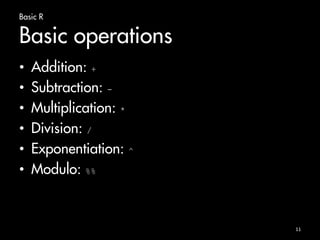
Basic operations 
• Addition: + 
• Subtraction: - 
• Multiplication: * 
• Division: / 
• Exponentiation: ^ 
• Modulo: %% 
11
Basic R 
Basic operations 
> 1+1 # Addition 
[1] 2 
> 4 - 3 # Subtraction 
[1] 1 
> 4 * 2 + 1 # Operator precedence 
[1] 9 
> 6 ^ 2 # Exponentiation 
[1] 36 
> sqrt(5) # Math function 
[1] 2.236068 
12
Basic R 
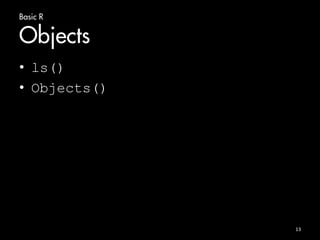
Objects 
• ls() 
• Objects() 
13
Basic R 
Vectors 
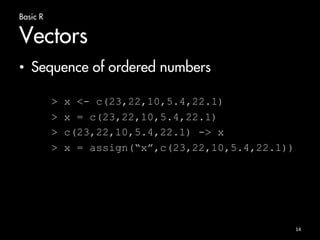
• Sequence of ordered numbers 
> x <- c(23,22,10,5.4,22.1) 
> x = c(23,22,10,5.4,22.1) 
> c(23,22,10,5.4,22.1) -> x 
> x = assign(“x”,c(23,22,10,5.4,22.1)) 
14
Basic R 
Vectors 
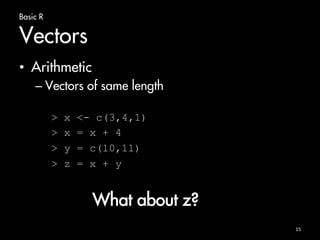
• Arithmetic 
– Vectors of same length 
> x <- c(3,4,1) 
> x = x + 4 
> y = c(10,11) 
> z = x + y 
15 
What about z?
Basic R 
Vectors 
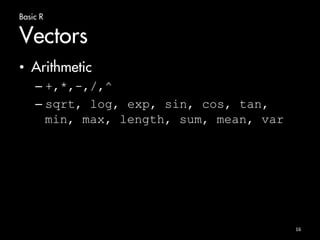
• Arithmetic 
– +,*,-,/,^ 
– sqrt, log, exp, sin, cos, tan, 
min, max, length, sum, mean, var 
16
Basic R 
Vectors 
• Sequence 
17 
> 1:10 
[1] 1 2 3 4 5 6 7 8 9 10 
> 10:1 
[1] 10 9 8 7 6 5 4 3 2 1 
> seq(from = 1, to = 10) 
[1] 1 2 3 4 5 6 7 8 9 10 
> seq(from = 10, to = 1) 
[1] 10 9 8 7 6 5 4 3 2 1 
> seq(from = 1, length = 10, by =4) 
[1] 1 5 9 13 17 21 25 29 33 37
Basic R 
Vectors 
• Logical vectors 
> x = seq(from=1, to=10) 
> x 
[1] 1 2 3 4 5 6 7 8 9 10 
> y = (x %% 3 == 0) 
> y 
[1] FALSE FALSE TRUE FALSE FALSE TRUE 
FALSE FALSE TRUE FALSE 
18
Basic R 
Vectors 
• Index vectors 
– Access by index 
– From 1 
– Logical condition 
19 
> x = c(2,5,7,9) 
> x[1] 
[1] 2 
> x[c(2,4)] 
[1] 5 9 
> x[x<7] 
[1] 2 5
Basic R 
Arrays and Matrices in R 
• Matrix 
– A matrix is a two-dimensional object 
– matrix function 
20 
> matrixA = matrix(data = c(1:10), ncol = 2, nrow = 5) 
> matrixA 
[,1] [,2] 
[1,] 1 6 
[2,] 2 7 
[3,] 3 8 
[4,] 4 9 
[5,] 5 10
Basic R 
Arrays and Matrices in R 
• Array 
– A matrix is a n-dimensional object 
– array function + dim 
> x = c(1:18) 
> x 
[1] 1 2 3 4 5 6 7 8 9 10 11 12 13 14 15 16 17 18 
> y = array(data=x, dim=c(2,3,3)) 
21
Basic R 
Arrays and Matrices in R 
• Accessing by index 
22 
> x <- array(data=c(1:12), dim=c(3,4)) #generate 3 by 4 matrix 
> x 
[,1] [,2] [,3] [,4] 
[1,] 1 4 7 10 
[2,] 2 5 8 11 
[3,] 3 6 9 12 
> i <- array(c(1:3,3:1), dim=c(3,2)) 
> i 
> [,1] [,2] 
> [1,] 1 3 
> [2,] 2 2 
> [3,] 3 1 
> x[i] 
[1] 7 5 3 
> x[i] <- -1 
> x 
[,1] [,2] [,3] [,4] 
[1,] 1 4 -1 10 
[2,] 2 -1 8 11 
[3,] -1 6 9 12
Basic R 
Lists 
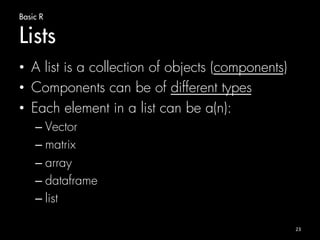
• A list is a collection of objects (components) 
• Components can be of different types 
• Each element in a list can be a(n): 
– Vector 
– matrix 
– array 
– dataframe 
– list 
23
Basic R 
Lists 
• Example: 
24 
> lst = list(name="Massimiliano", surname="Ruocco", 
> age=99, birthplace="Italy") 
> lst$name 
[1] "Massimiliano” 
> lst[1] 
$name 
[1] "Massimiliano"
Basic R 
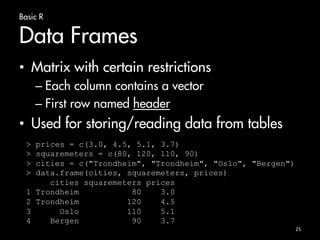
Data Frames 
• Matrix with certain restrictions 
– Each column contains a vector 
– First row named header 
• Used for storing/reading data from tables 
25 
> prices = c(3.0, 4.5, 5.1, 3.7) 
> squaremeters = c(80, 120, 110, 90) 
> cities = c("Trondheim", "Trondheim", "Oslo", "Bergen") 
> data.frame(cities, squaremeters, prices) 
cities squaremeters prices 
1 Trondheim 80 3.0 
2 Trondheim 120 4.5 
3 Oslo 110 5.1 
4 Bergen 90 3.7
Basic R 
Data Frames 
• Accessing as a normal matrix 
26 
> apartmentPrices[2,1] 
[1] Trondheim 
Levels: Bergen Oslo Trondheim 
> apartmentPrices[1,] 
cities squaremeters prices 
1 Trondheim 80 3 
> apartmentPrices$prices 
[1] 3.0 4.5 5.1 3.7
Basic R 
Data Frames 
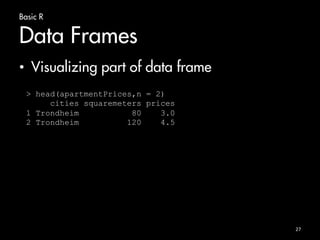
• Visualizing part of data frame 
27 
> head(apartmentPrices,n = 2) 
cities squaremeters prices 
1 Trondheim 80 3.0 
2 Trondheim 120 4.5
Basic R 
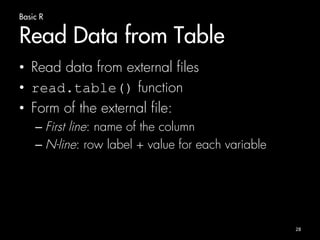
Read Data from Table 
• Read data from external files 
• read.table() function 
• Form of the external file: 
– First line: name of the column 
– N-line: row label + value for each variable 
28
Basic R 
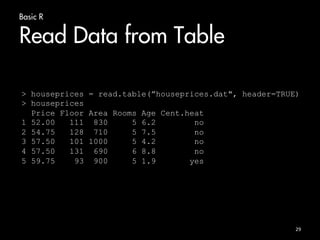
Read Data from Table 
> houseprices = read.table(”houseprices.dat", header=TRUE) 
> houseprices 
29 
Price Floor Area Rooms Age Cent.heat 
1 52.00 111 830 5 6.2 no 
2 54.75 128 710 5 7.5 no 
3 57.50 101 1000 5 4.2 no 
4 57.50 131 690 6 8.8 no 
5 59.75 93 900 5 1.9 yes
Basic R 
Functions 
30 
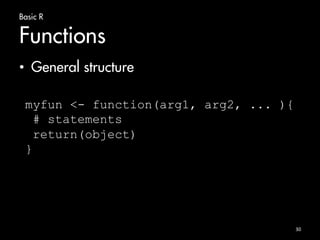
• General structure 
myfun <- function(arg1, arg2, ... ){ 
# statements 
return(object) 
}
Basic R 
Functions 
31 
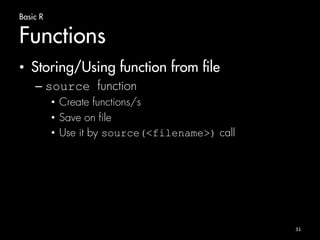
• Storing/Using function from file 
– source function 
• Create functions/s 
• Save on file 
• Use it by source(<filename>) call
Basic R 
Graphics in R 
• Examine Data 
• Several functions/packages 
• plot() function 
32
Basic R 
Graphics in R 
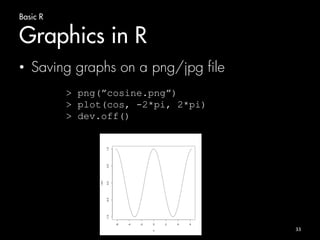
• Saving graphs on a png/jpg file 
33 
> png(”cosine.png”) 
> plot(cos, -2*pi, 2*pi) 
> dev.off()
Basic R 
Installing packages 
• install.packages + library functions 
34 
> install.packages(”ggmap”) 
… 
> library(ggmap)
Visualiza)on 
of 
Geo-­‐Data 
in 
R 
(20 
min)
Visualization of Geo-Data in R 
Visualizing Maps 
• maps (http://cran.r-project.org/web/packages/maps/) 
• creating maps of countries and regions of the world 
• latitude and longitude 
• Low resolution maps 
• Main usage: 
> map(database=“world”, region=“.”) 
36
Visualization of Geo-Data in R 
Visualizing Maps 
• maps (http://cran.r-project.org/web/packages/maps/) 
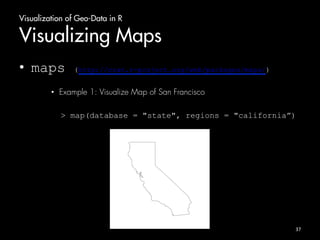
• Example 1: Visualize Map of San Francisco 
> map(database = "state", regions = "california”) 
37
Visualization of Geo-Data in R 
Visualizing Maps 
• maps (http://cran.r-project.org/web/packages/maps/) 
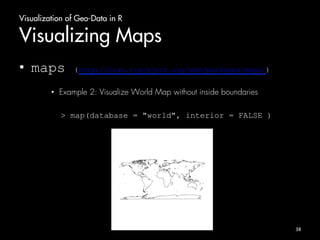
• Example 2: Visualize World Map without inside boundaries 
> map(database = "world", interior = FALSE ) 
38
Visualization of Geo-Data in R 
Visualizing Maps 
• mapdata (http://cran.r-project.org/web/packages/mapdata/) 
• Larger/higher resolution map db 
39
Visualization of Geo-Data in R 
Visualizing Maps 
• mapdata (http://cran.r-project.org/web/packages/mapdata/) 
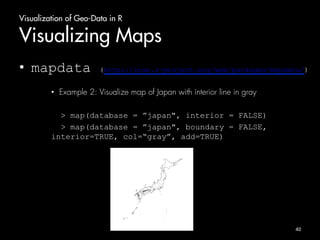
• Example 2: Visualize map of Japan with interior line in gray 
> map(database = ”japan", interior = FALSE) 
> map(database = ”japan", boundary = FALSE, 
interior=TRUE, col=“gray”, add=TRUE) 
40
Visualization of Geo-Data in R 
Visualizing Maps 
• ggmap (http://cran.r-project.org/web/packages/ggmap/) 
• GoogleMap + Open Street Map 
41
Visualization of Geo-Data in R 
Visualizing Maps 
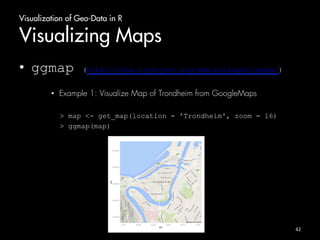
• ggmap (http://cran.r-project.org/web/packages/ggmap/) 
• Example 1: Visualize Map of Trondheim from GoogleMaps 
> map <- get_map(location = 'Trondheim', zoom = 16) 
> ggmap(map) 
42
Visualization of Geo-Data in R 
Visualizing Maps 
• rworldmap (http://cran.r-project.org/web/packages/rworldmap/) 
• Visualizing world data (country code or gridded) 
43
Visualization of Geo-Data in R 
Visualizing Maps 
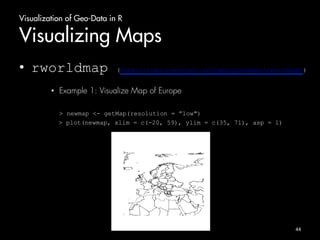
• rworldmap (http://cran.r-project.org/web/packages/rworldmap/) 
• Example 1: Visualize Map of Europe 
> newmap <- getMap(resolution = ”low") 
> plot(newmap, xlim = c(-20, 59), ylim = c(35, 71), asp = 1) 
44
Visualization of Geo-Data in R 
Geocoding 
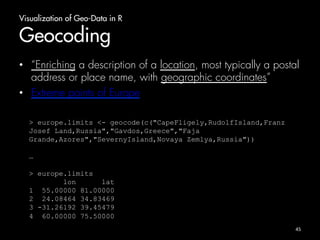
• “Enriching a description of a location, most typically a postal 
address or place name, with geographic coordinates” 
• Extreme points of Europe 
45 
> europe.limits <- geocode(c("CapeFligely,RudolfIsland,Franz 
Josef Land,Russia","Gavdos,Greece","Faja 
Grande,Azores","SevernyIsland,Novaya Zemlya,Russia")) 
… 
> europe.limits 
lon lat 
1 55.00000 81.00000 
2 24.08464 34.83469 
3 -31.26192 39.45479 
4 60.00000 75.50000
Visualization of Geo-Data in R 
Visualizing Maps 
• rworldmap (http://cran.r-project.org/web/packages/rworldmap/) 
• Example 1: Visualize Map of Europe 
> plot(newmap, xlim = range(europe.limits$lon), ylim = 
range(europe.limits$lat), asp = 1) 
46
Visualization of Geo-Data in R 
Yes…but now? 
• Maps useless without Data! 
47
Visualization of Geo-Data in R 
Packages 
• ggplot2 (http://docs.ggplot2.org/current/) 
• powerful graphics language for creating elegant and complex plots 
• univariate and multivariate numerical and categorical data 
• Grammar of Graphics (Wilkinson, 2005) 
• Designed to work in a layered fashion 
48
Visualization of Geo-Data in R 
Packages 
• ggplot2 (http://docs.ggplot2.org/current/) 
– Plot point pattern on a map 
– geom_point() function 
49
Analysis 
of 
Geo-­‐Data 
in 
R 
(20 
min)
Analysis of Geo-Data in R 
Introduction 
• Exploratory Analysis 
– Explore the structure of geographical distributed set of points 
• Point Process Statistics 
– Spatial Point Pattern 
– Spatial Point Process 
– Complete Spatial Randomness (CSR) Test 
– Ripley’s K-function 
51
Analysis of Geo-Data in R 
Exploratory Analysis of Geo-Data 
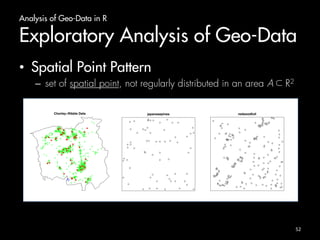
• Spatial Point Pattern 
– set of spatial point, not regularly distributed in an area A R2 
Chorley−Ribble Data 
! 
! 
! 
! 
! 
! 
! 
! 
! 
! 
! 
! 
! 
! 
! 
! 
! 
! 
! 
! 
! 
! 
! 
! 
! 
! 
! 
! 
! 
! 
! 
! 
! 
! ! 
! 
! 
! 
! 
! 
! 
! ! 
! 
! 
! 
! 
! 
! 
! 
! 
! 
! 
! !! ! 
! 
japanesepines 
! ! 
! 
! ! 
! 
! 
! 
!! 
! ! 
! ! 
! ! 
! ! 
! 
! ! 
! 
! 
! 
! 
! 
! 
! 
! 
! 
! 
! 
! 
! ! 
! 
! 
! ! ! 
! 
! ! ! ! ! ! 
! 
! ! 
! 
! 
! ! 
! 
! 
! 
! 
! ! 
!! 
! ! ! 
redwoodfull 
! 
! 
! 
! !!! ! 
! ! ! ! ! ! ! !! ! ! !! ! ! ! !! !! 
! ! 
! ! 
! 
! !! 
! !! ! !!! !! ! ! ! ! ! !!! !!!! ! ! ! ! ! 
! ! 
! 
! 
! 
! 
! 
! ! 
! ! ! ! !! ! 
! ! !! 
! ! 
! ! ! 
! ! 
! 
! ! 
! !! ! 
! 
! ! ! 
! 
! 
! 
!! ! ! ! ! 
! ! 
! !! ! ! ! 
! 
! 
! 
! 
! ! !!! !! ! ! !! ! ! !! 
!! ! ! ! ! ! ! ! ! ! !! ! ! ! ! ! ! 
!!! ! 
!!!! 
! !! 
! 
! 
! 
!! !!!! ! ! ! ! !! 
! 
! 
!!! !! !! 
!!!!! 
52
Analysis of Geo-Data in R 
Exploratory Analysis of Geo-Data 
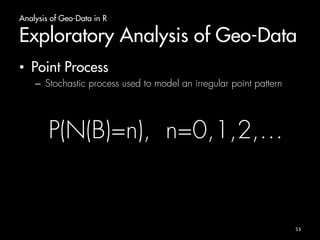
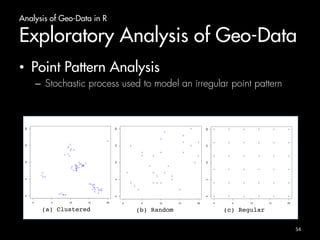
• Point Process 
– Stochastic process used to model an irregular point pattern 
P(N(B)=n), n=0,1,2,… 
53
Analysis of Geo-Data in R 
Exploratory Analysis of Geo-Data 
• Point Pattern Analysis 
– Stochastic process used to model an irregular point pattern 
! 
! 
! 
! 
!! 
! 
! 
! 
! 
! 
! 
! 
! 
! 
! 
! 
! 
! 
! 
! 
! 
! ! 
! 
! ! 
! 
! 
! 
! 
! 
! 
! 
! 
! 
! 
! ! 
! 
! 
! 
!! 
! ! 
! 
! 
! 
! 
! 
! 
! 
! 
! 
! 
! 
! 
! 
0 5 10 15 20 
0 5 10 15 20 
! 
! 
! 
! 
! 
! 
! 
! 
! 
! 
! 
! ! 
! 
! 
! 
! 
! 
! 
! 
! 
! 
! 
! 
! 
! 
! 
! 
! 
! 
0 5 10 15 20 
0 5 10 15 20 
! ! ! ! ! ! 
! ! ! ! ! ! 
! ! ! ! ! ! 
! ! ! ! ! ! 
! ! ! ! ! ! 
! ! ! ! ! ! 
0 5 10 15 20 
0 5 10 15 20 
(a) Clustered! (b) Random! (c) Regular! 
54
Analysis of Geo-Data in R 
Exploratory Analysis of Geo-Data 
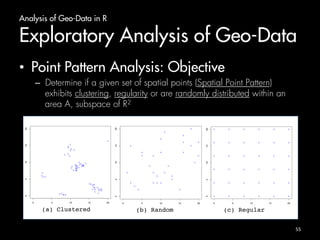
• Point Pattern Analysis: Objective 
– Determine if a given set of spatial points (Spatial Point Pattern) 
exhibits clustering, regularity or are randomly distributed within an 
area A, subspace of R2 
! 
! 
! 
! 
!! 
! 
! 
! 
! 
! 
! 
! 
! 
! 
! 
! 
! 
! 
! 
! 
! 
! ! 
! 
! ! 
! 
! 
! 
! 
! 
! 
! 
! 
! 
! 
! ! 
! 
! 
! 
!! 
! ! 
! 
! 
! 
! 
! 
! 
! 
! 
! 
! 
! 
! 
! 
0 5 10 15 20 
0 5 10 15 20 
! 
! 
! 
! 
! 
! 
! 
! 
! 
! 
! 
! ! 
! 
! 
! 
! 
! 
! 
! 
! 
! 
! 
! 
! 
! 
! 
! 
! 
! 
0 5 10 15 20 
0 5 10 15 20 
! ! ! ! ! ! 
! ! ! ! ! ! 
! ! ! ! ! ! 
! ! ! ! ! ! 
! ! ! ! ! ! 
! ! ! ! ! ! 
0 5 10 15 20 
0 5 10 15 20 
(a) Clustered! (b) Random! (c) Regular! 
55
Analysis of Geo-Data in R 
Exploratory Analysis of Geo-Data 
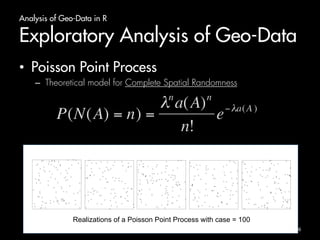
• Poisson Point Process 
– Theoretical model for Complete Spatial Randomness 
! 
! ! 
! 
! 
! 
! 
! 
! 
! 
! 
! 
! 
! 
! 
! 
! 
! 
! 
! 
! 
! 
! 
! 
! 
! 
! 
! 
! 
! 
! 
! 
! 
! 
! 
! 
! 
! 
! 
! 
! 
! 
! 
! 
! 
! 
! 
! 
! 
! 
! 
! 
! 
! 
! 
! 
! 
! 
! 
! 
! 
! 
! 
! 
! 
! 
! 
! 
! 
! 
! 
! 
! 
! 
! 
! 
! 
! 
! 
! 
! 
! 
! 
! 
! 
! 
! 
! 
! 
! 
! 
! 
! 
! 
! 
! 
! 
! 
! 
! 
! 
! 
! 
! 
! 
! 
! 
! 
! 
! 
! ! 
! 
! 
! 
! 
! 
! 
! 
! 
! 
! 
! 
! 
! 
! 
! 
! 
! 
! 
! 
! 
! 
! 
! 
! 
! 
! 
! 
! 
! 
! 
! 
! 
! 
! 
! 
! 
! 
! 
! 
! 
! 
! 
! 
! 
! 
! 
! 
! 
! 
! 
! 
! 
! 
! 
! 
! 
! 
! 
! 
! 
! 
! 
! 
! 
! 
! 
! 
! 
! 
! 
! 
! 
! 
! 
! 
! 
! 
! 
! 
! 
! 
! 
! 
! 
! 
! 
! 
! 
! 
! 
! 
! 
! 
! ! 
! 
! 
! 
! 
! 
! 
! 
! 
! 
! 
! 
! 
! 
! 
! 
! 
! 
! 
! 
! 
! 
! 
! 
! 
! 
! 
! 
! 
! 
! 
! 
! 
! 
! 
! 
! 
! 
! 
! 
! 
! 
! 
! 
! 
! 
! 
! 
! 
! 
! 
! 
! 
! 
! 
! 
! 
! 
! 
! 
! 
! 
! 
! 
! 
! 
! 
! 
! 
! 
! 
! 
! 
! 
! 
! 
! 
! 
! 
! ! 
! 
! 
! 
! 
! 
! 
! 
! 
! 
! 
! 
! 
! 
! 
! 
! 
! 
!! 
! 
! ! 
! 
! 
! 
! ! 
! 
! 
! 
! 
! 
! 
! 
! 
! 
! 
! 
! 
! 
! 
! 
! 
! 
! 
! 
! 
! 
! 
! 
! 
! 
! 
! 
! 
! 
! 
! 
! 
! 
! 
! 
! 
! 
! 
! 
! 
! 
! 
! 
! 
! 
! 
! 
! 
! ! 
! 
! 
! 
! 
! ! 
! 
! 
! 
! 
! 
! 
! 
! 
! 
! 
! 
! 
! 
! 
! 
! 
! 
! 
! ! 
! 
! 
! 
! 
! 
! 
! 
! 
! 
! 
! 
! 
! 
! 
! 
! 
! 
! 
! 
! 
! 
! 
! 
! 
! 
! 
! 
! 
! 
! 
! 
! 
! 
! 
! 
! 
! 
! 
! 
! 
! 
! 
! 
! 
! 
! 
! 
! 
! 
! 
! 
! 
! 
! 
! 
! 
! 
! 
! 
! 
! 
! 
! 
! 
! 
! 
! 
! 
! 
! 
! 
! 
! 
! 
! 
! 
! 
! 
! 
! 
! 
Realizations of a Poisson Point Process with case = 100 
56
Analysis of Geo-Data in R 
Exploratory Analysis of Geo-Data 
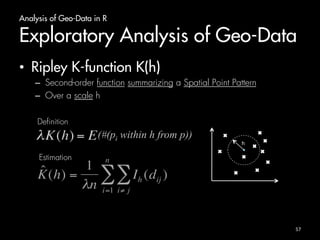
• Ripley K-function K(h) 
– Second-order function summarizing a Spatial Point Pattern 
– Over a scale h 
h 
(#(pi within h from p)) 
Definition 
Estimation 
57
Analysis of Geo-Data in R 
Exploratory Analysis of Geo-Data 
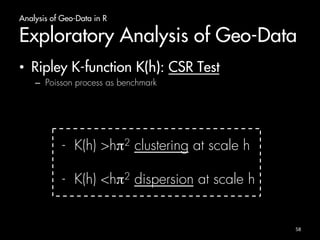
• Ripley K-function K(h): CSR Test 
– Poisson process as benchmark 
- K(h) >hπ2 clustering at scale h 
- K(h) <hπ2 dispersion at scale h 
58
Analysis of Geo-Data in R 
Exploratory Analysis of Geo-Data 
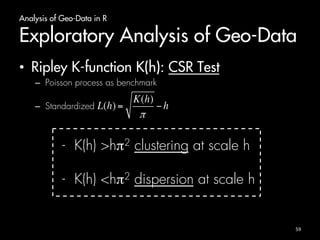
• Ripley K-function K(h): CSR Test 
– Poisson process as benchmark 
– Standardized 
- K(h) >hπ2 clustering at scale h 
- K(h) <hπ2 dispersion at scale h 
59
Analysis of Geo-Data in R 
Exploratory Analysis of Geo-Data 
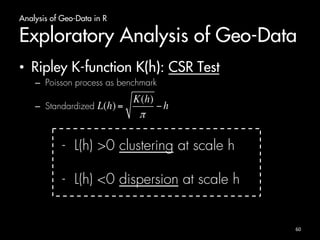
• Ripley K-function K(h): CSR Test 
– Poisson process as benchmark 
– Standardized 
- L(h) >0 clustering at scale h 
- L(h) <0 dispersion at scale h 
60
Analysis of Geo-Data in R 
Exploratory Analysis of Geo-Data 
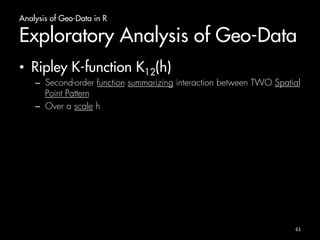
• Ripley K-function K12(h) 
– Second-order function summarizing interaction between TWO Spatial 
Point Pattern 
– Over a scale h 
61
Analysis of Geo-Data in R 
Exploratory Analysis of Geo-Data 
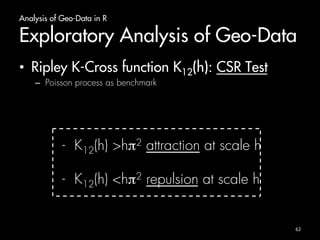
• Ripley K-Cross function K12(h): CSR Test 
– Poisson process as benchmark 
- K12(h) >hπ2 attraction at scale h 
- K12(h) <hπ2 repulsion at scale h 
62
Analysis of Geo-Data in R 
Exploratory Analysis of Geo-Data 
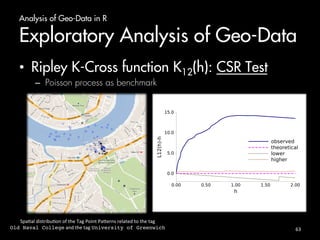
• Ripley K-Cross function K12(h): CSR Test 
– Poisson process as benchmark 


63
Spa)al 
distribu)on 
of 
the 
Tag 
Point 
PaPerns 
related 
to 
the 
tag 
Old Naval College 
and 
the 
tag 
University of Greenwich !
Basic R 
Exploratory Analysis of Geo-Data 
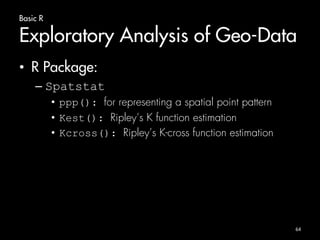
• R Package: 
– Spatstat 
• ppp(): for representing a spatial point pattern 
• Kest(): Ripley’s K function estimation 
• Kcross(): Ripley’s K-cross function estimation 
64
Big 
Data 
and 
R 
(10 
min)
Big Data and R 
Introduction 
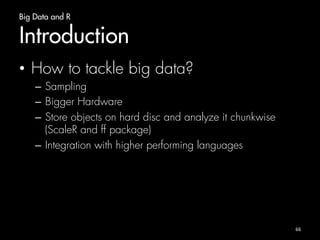
• How to tackle big data? 
– Sampling 
– Bigger Hardware 
– Store objects on hard disc and analyze it chunkwise 
(ScaleR and ff package) 
– Integration with higher performing languages 
66
Big Data and R 
Bigmemory package 
• Functions for creation, managing and exploration of 
massive matrices 
• data structures allocated to shared memory 
• multiple R sessions on the same machine access to 
shared mem 
• Big.matrix compatible with standard matrices 
67
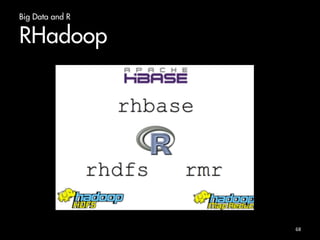
Big Data and R 
RHadoop 
68
Summary
Summary 
• What is R: environment + language 
– Package-based 
– Free! 
• Briefly introduction on R Language 
– Data structures 
– Function 
– Graphics 
• Geo-Data Visualization 
– Plot real data on a map 
• Geo-Data Analysis 
– Exploratory analysis 
• R and Big Data 
– Managing large matrix 
– Revolutionary Analytics 
70
A bit of Exercises 
Massimiliano Ruocco, PhD! 
ruoccoma et gmail dot com!
Outline 
• 9 Koan 
• Increasing degree of difficulty 
72
Koan 
1
Koan 1 
Install R and RStudio 
• Install R: 
– http://www.r-project.org/ : project website 
– http://cran.uib.no/ : download 
• Install RStudio: 
– http://www.rstudio.com/ : project website 
– Desktop version 
74
Koan 
2
Koan 2 
Basic R (1) 
• calculate average of vector without using 
mean function. Compare the result with 
the value obtained by using the function 
mean() 
76
Koan 
3
Koan 3 
Basic R (2) 
• create a vector with only odd numbers 
from 1 to 100 
• create a vector [1,2,3,...,100]. Extract 
from this the vector with only odd 
numbers 
• Compare the two resulting vectors 
78
Koan 
4
Koan 4 
Basic R (3) 
• read table piccadilly.txt. Add column 
names lat, lan, time” to the table. 
Visualize a preview of the data.frame with 
the function head() 
• Ingredients: colnames(), head() 
80
Koan 
5
Koan 5 
Basic R (4) 
• Create a function reading a table from a file 
and returning its length. Try using it from 
external file and for getting the length of the 
the table in file “piccadilly.txt” 
82
Koan 
6
Koan 6 
Visualization (1) 
• Visualize the map of USA without region border. 
Save on png file 
• Visualize the map of USA with region border in 
red. Save on png file. 
• Ingredients: mapdata, maps, png 
84
Koan 
7
Koan 7 
Visualization (2) 
• Visualize Map of Oslo in Google Maps. Save 
on a png file 
• Visualize the map of Norway. Save on a png 
file. 
• Ingredients: ggmap, gplot2, png, plot 
86
Koan 
8
Koan 8 
Visualization (3) 
• Visualize pictures tagged with piccadilly on 
London Map (file “piccadilly.txt”) 
• Visualize pictures tagged with ”britishlibrary” 
and pictures tagged with “piccadilly” on 
London Map 
• Ingredients: ggmap(), geom_point() 
88
Koan 
9
Koan 9 
Analysis 
• Read data related to term piccadilly as 
dataframe 
• Visualize on Map of London 
• Estimate Ripley´s K function 
• Plot on a graph 
• Save on png file 
• Ingredients: ggmap(), geom_point(), 
Kest(), png 
90
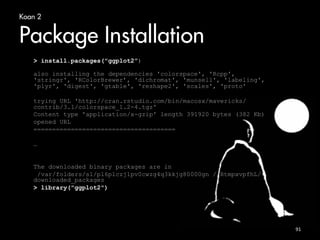
Koan 2 
Package Installation 
 install.packages(ggplot2”) 
also installing the dependencies 'colorspace', 'Rcpp', 
'stringr', 'RColorBrewer’, 'dichromat', 'munsell', 'labeling', 
'plyr', 'digest', 'gtable', 'reshape2', 'scales', 'proto' 
trying URL 'http://cran.rstudio.com/bin/macosx/mavericks/ 
contrib/3.1/colorspace_1.2-4.tgz' 
Content type 'application/x-gzip' length 391920 bytes (382 Kb) 
opened URL 
====================================== 
… 
The downloaded binary packages are in 
/var/folders/s1/pl6plczj1pv0cwzg4q3kkjg80000gn //RtmpxvpfhL/ 
downloaded_packages 
 library(ggplot2) 
91
Introduc)on 
GeRng 
Started 
• Layout: Console 
92
Introduc)on 
GeRng 
Started 
• Layout: RStudio 
93

Big datacourse

  • 1.
    Geo-Data in R From visualization to analysis Massimiliano Ruocco, PhD! ruoccoma et gmail dot com!
  • 2.
    Outline Introduc)on (10 min) Basic R (30 min) Geo-­‐Data Visualiza)on Geo-­‐Data Analysis (20 min) (20 min) R for Big Data (10 min) 2
  • 3.
  • 4.
    Introduction What isR • Dialect of S-language: 20 years old • Language + Environment for statistical computing • Flexibility: package based – Cran Task views • Object-Oriented language • Free! (Open Source) 4
  • 5.
    Introduction Getting Started • Painless Installation • Start it up: – Rprofile.site file • Workspace: – .Rdata file • History: – .Rhistory file • Layout: – Console – RStudio 5
  • 6.
    Introduction R Commands • Case sensitive • Expression or Assignment • Comments starting with # • Quit command: q() 6
  • 7.
    Introduction Need Help? • Help commands: – help(…) – help.search(…) – apropos(…) – example(…) 7
  • 8.
    Introduction The workingdirectory • getwd() • setwd(…) 8
  • 9.
    Introduction R Session • Start R in your working directory – Rprofile.site – .Rhystory – .RData • Use R: – Instantiate objects/variables – Make computation – Visualization • Quit: – Save/NotSave workspace – Rprofile.site – .Rhystory – -.RData Working dir Start R Rprofila.site .Rhystory .RData Use R .Rhystory .RData Quit R Rprofila.site .Rhystory .RData 9
  • 10.
  • 11.
    Basic R Basicoperations • Addition: + • Subtraction: - • Multiplication: * • Division: / • Exponentiation: ^ • Modulo: %% 11
  • 12.
    Basic R Basicoperations > 1+1 # Addition [1] 2 > 4 - 3 # Subtraction [1] 1 > 4 * 2 + 1 # Operator precedence [1] 9 > 6 ^ 2 # Exponentiation [1] 36 > sqrt(5) # Math function [1] 2.236068 12
  • 13.
    Basic R Objects • ls() • Objects() 13
  • 14.
    Basic R Vectors • Sequence of ordered numbers > x <- c(23,22,10,5.4,22.1) > x = c(23,22,10,5.4,22.1) > c(23,22,10,5.4,22.1) -> x > x = assign(“x”,c(23,22,10,5.4,22.1)) 14
  • 15.
    Basic R Vectors • Arithmetic – Vectors of same length > x <- c(3,4,1) > x = x + 4 > y = c(10,11) > z = x + y 15 What about z?
  • 16.
    Basic R Vectors • Arithmetic – +,*,-,/,^ – sqrt, log, exp, sin, cos, tan, min, max, length, sum, mean, var 16
  • 17.
    Basic R Vectors • Sequence 17 > 1:10 [1] 1 2 3 4 5 6 7 8 9 10 > 10:1 [1] 10 9 8 7 6 5 4 3 2 1 > seq(from = 1, to = 10) [1] 1 2 3 4 5 6 7 8 9 10 > seq(from = 10, to = 1) [1] 10 9 8 7 6 5 4 3 2 1 > seq(from = 1, length = 10, by =4) [1] 1 5 9 13 17 21 25 29 33 37
  • 18.
    Basic R Vectors • Logical vectors > x = seq(from=1, to=10) > x [1] 1 2 3 4 5 6 7 8 9 10 > y = (x %% 3 == 0) > y [1] FALSE FALSE TRUE FALSE FALSE TRUE FALSE FALSE TRUE FALSE 18
  • 19.
    Basic R Vectors • Index vectors – Access by index – From 1 – Logical condition 19 > x = c(2,5,7,9) > x[1] [1] 2 > x[c(2,4)] [1] 5 9 > x[x<7] [1] 2 5
  • 20.
    Basic R Arraysand Matrices in R • Matrix – A matrix is a two-dimensional object – matrix function 20 > matrixA = matrix(data = c(1:10), ncol = 2, nrow = 5) > matrixA [,1] [,2] [1,] 1 6 [2,] 2 7 [3,] 3 8 [4,] 4 9 [5,] 5 10
  • 21.
    Basic R Arraysand Matrices in R • Array – A matrix is a n-dimensional object – array function + dim > x = c(1:18) > x [1] 1 2 3 4 5 6 7 8 9 10 11 12 13 14 15 16 17 18 > y = array(data=x, dim=c(2,3,3)) 21
  • 22.
    Basic R Arraysand Matrices in R • Accessing by index 22 > x <- array(data=c(1:12), dim=c(3,4)) #generate 3 by 4 matrix > x [,1] [,2] [,3] [,4] [1,] 1 4 7 10 [2,] 2 5 8 11 [3,] 3 6 9 12 > i <- array(c(1:3,3:1), dim=c(3,2)) > i > [,1] [,2] > [1,] 1 3 > [2,] 2 2 > [3,] 3 1 > x[i] [1] 7 5 3 > x[i] <- -1 > x [,1] [,2] [,3] [,4] [1,] 1 4 -1 10 [2,] 2 -1 8 11 [3,] -1 6 9 12
  • 23.
    Basic R Lists • A list is a collection of objects (components) • Components can be of different types • Each element in a list can be a(n): – Vector – matrix – array – dataframe – list 23
  • 24.
    Basic R Lists • Example: 24 > lst = list(name="Massimiliano", surname="Ruocco", > age=99, birthplace="Italy") > lst$name [1] "Massimiliano” > lst[1] $name [1] "Massimiliano"
  • 25.
    Basic R DataFrames • Matrix with certain restrictions – Each column contains a vector – First row named header • Used for storing/reading data from tables 25 > prices = c(3.0, 4.5, 5.1, 3.7) > squaremeters = c(80, 120, 110, 90) > cities = c("Trondheim", "Trondheim", "Oslo", "Bergen") > data.frame(cities, squaremeters, prices) cities squaremeters prices 1 Trondheim 80 3.0 2 Trondheim 120 4.5 3 Oslo 110 5.1 4 Bergen 90 3.7
  • 26.
    Basic R DataFrames • Accessing as a normal matrix 26 > apartmentPrices[2,1] [1] Trondheim Levels: Bergen Oslo Trondheim > apartmentPrices[1,] cities squaremeters prices 1 Trondheim 80 3 > apartmentPrices$prices [1] 3.0 4.5 5.1 3.7
  • 27.
    Basic R DataFrames • Visualizing part of data frame 27 > head(apartmentPrices,n = 2) cities squaremeters prices 1 Trondheim 80 3.0 2 Trondheim 120 4.5
  • 28.
    Basic R ReadData from Table • Read data from external files • read.table() function • Form of the external file: – First line: name of the column – N-line: row label + value for each variable 28
  • 29.
    Basic R ReadData from Table > houseprices = read.table(”houseprices.dat", header=TRUE) > houseprices 29 Price Floor Area Rooms Age Cent.heat 1 52.00 111 830 5 6.2 no 2 54.75 128 710 5 7.5 no 3 57.50 101 1000 5 4.2 no 4 57.50 131 690 6 8.8 no 5 59.75 93 900 5 1.9 yes
  • 30.
    Basic R Functions 30 • General structure myfun <- function(arg1, arg2, ... ){ # statements return(object) }
  • 31.
    Basic R Functions 31 • Storing/Using function from file – source function • Create functions/s • Save on file • Use it by source(<filename>) call
  • 32.
    Basic R Graphicsin R • Examine Data • Several functions/packages • plot() function 32
  • 33.
    Basic R Graphicsin R • Saving graphs on a png/jpg file 33 > png(”cosine.png”) > plot(cos, -2*pi, 2*pi) > dev.off()
  • 34.
    Basic R Installingpackages • install.packages + library functions 34 > install.packages(”ggmap”) … > library(ggmap)
  • 35.
  • 36.
    Visualization of Geo-Datain R Visualizing Maps • maps (http://cran.r-project.org/web/packages/maps/) • creating maps of countries and regions of the world • latitude and longitude • Low resolution maps • Main usage: > map(database=“world”, region=“.”) 36
  • 37.
    Visualization of Geo-Datain R Visualizing Maps • maps (http://cran.r-project.org/web/packages/maps/) • Example 1: Visualize Map of San Francisco > map(database = "state", regions = "california”) 37
  • 38.
    Visualization of Geo-Datain R Visualizing Maps • maps (http://cran.r-project.org/web/packages/maps/) • Example 2: Visualize World Map without inside boundaries > map(database = "world", interior = FALSE ) 38
  • 39.
    Visualization of Geo-Datain R Visualizing Maps • mapdata (http://cran.r-project.org/web/packages/mapdata/) • Larger/higher resolution map db 39
  • 40.
    Visualization of Geo-Datain R Visualizing Maps • mapdata (http://cran.r-project.org/web/packages/mapdata/) • Example 2: Visualize map of Japan with interior line in gray > map(database = ”japan", interior = FALSE) > map(database = ”japan", boundary = FALSE, interior=TRUE, col=“gray”, add=TRUE) 40
  • 41.
    Visualization of Geo-Datain R Visualizing Maps • ggmap (http://cran.r-project.org/web/packages/ggmap/) • GoogleMap + Open Street Map 41
  • 42.
    Visualization of Geo-Datain R Visualizing Maps • ggmap (http://cran.r-project.org/web/packages/ggmap/) • Example 1: Visualize Map of Trondheim from GoogleMaps > map <- get_map(location = 'Trondheim', zoom = 16) > ggmap(map) 42
  • 43.
    Visualization of Geo-Datain R Visualizing Maps • rworldmap (http://cran.r-project.org/web/packages/rworldmap/) • Visualizing world data (country code or gridded) 43
  • 44.
    Visualization of Geo-Datain R Visualizing Maps • rworldmap (http://cran.r-project.org/web/packages/rworldmap/) • Example 1: Visualize Map of Europe > newmap <- getMap(resolution = ”low") > plot(newmap, xlim = c(-20, 59), ylim = c(35, 71), asp = 1) 44
  • 45.
    Visualization of Geo-Datain R Geocoding • “Enriching a description of a location, most typically a postal address or place name, with geographic coordinates” • Extreme points of Europe 45 > europe.limits <- geocode(c("CapeFligely,RudolfIsland,Franz Josef Land,Russia","Gavdos,Greece","Faja Grande,Azores","SevernyIsland,Novaya Zemlya,Russia")) … > europe.limits lon lat 1 55.00000 81.00000 2 24.08464 34.83469 3 -31.26192 39.45479 4 60.00000 75.50000
  • 46.
    Visualization of Geo-Datain R Visualizing Maps • rworldmap (http://cran.r-project.org/web/packages/rworldmap/) • Example 1: Visualize Map of Europe > plot(newmap, xlim = range(europe.limits$lon), ylim = range(europe.limits$lat), asp = 1) 46
  • 47.
    Visualization of Geo-Datain R Yes…but now? • Maps useless without Data! 47
  • 48.
    Visualization of Geo-Datain R Packages • ggplot2 (http://docs.ggplot2.org/current/) • powerful graphics language for creating elegant and complex plots • univariate and multivariate numerical and categorical data • Grammar of Graphics (Wilkinson, 2005) • Designed to work in a layered fashion 48
  • 49.
    Visualization of Geo-Datain R Packages • ggplot2 (http://docs.ggplot2.org/current/) – Plot point pattern on a map – geom_point() function 49
  • 50.
  • 51.
    Analysis of Geo-Datain R Introduction • Exploratory Analysis – Explore the structure of geographical distributed set of points • Point Process Statistics – Spatial Point Pattern – Spatial Point Process – Complete Spatial Randomness (CSR) Test – Ripley’s K-function 51
  • 52.
    Analysis of Geo-Datain R Exploratory Analysis of Geo-Data • Spatial Point Pattern – set of spatial point, not regularly distributed in an area A R2 Chorley−Ribble Data ! ! ! ! ! ! ! ! ! ! ! ! ! ! ! ! ! ! ! ! ! ! ! ! ! ! ! ! ! ! ! ! ! ! ! ! ! ! ! ! ! ! ! ! ! ! ! ! ! ! ! ! ! ! !! ! ! japanesepines ! ! ! ! ! ! ! ! !! ! ! ! ! ! ! ! ! ! ! ! ! ! ! ! ! ! ! ! ! ! ! ! ! ! ! ! ! ! ! ! ! ! ! ! ! ! ! ! ! ! ! ! ! ! ! ! ! ! ! !! ! ! ! redwoodfull ! ! ! ! !!! ! ! ! ! ! ! ! ! !! ! ! !! ! ! ! !! !! ! ! ! ! ! ! !! ! !! ! !!! !! ! ! ! ! ! !!! !!!! ! ! ! ! ! ! ! ! ! ! ! ! ! ! ! ! ! ! !! ! ! ! !! ! ! ! ! ! ! ! ! ! ! ! !! ! ! ! ! ! ! ! ! !! ! ! ! ! ! ! ! !! ! ! ! ! ! ! ! ! ! !!! !! ! ! !! ! ! !! !! ! ! ! ! ! ! ! ! ! !! ! ! ! ! ! ! !!! ! !!!! ! !! ! ! ! !! !!!! ! ! ! ! !! ! ! !!! !! !! !!!!! 52
  • 53.
    Analysis of Geo-Datain R Exploratory Analysis of Geo-Data • Point Process – Stochastic process used to model an irregular point pattern P(N(B)=n), n=0,1,2,… 53
  • 54.
    Analysis of Geo-Datain R Exploratory Analysis of Geo-Data • Point Pattern Analysis – Stochastic process used to model an irregular point pattern ! ! ! ! !! ! ! ! ! ! ! ! ! ! ! ! ! ! ! ! ! ! ! ! ! ! ! ! ! ! ! ! ! ! ! ! ! ! ! ! ! !! ! ! ! ! ! ! ! ! ! ! ! ! ! ! ! 0 5 10 15 20 0 5 10 15 20 ! ! ! ! ! ! ! ! ! ! ! ! ! ! ! ! ! ! ! ! ! ! ! ! ! ! ! ! ! ! 0 5 10 15 20 0 5 10 15 20 ! ! ! ! ! ! ! ! ! ! ! ! ! ! ! ! ! ! ! ! ! ! ! ! ! ! ! ! ! ! ! ! ! ! ! ! 0 5 10 15 20 0 5 10 15 20 (a) Clustered! (b) Random! (c) Regular! 54
  • 55.
    Analysis of Geo-Datain R Exploratory Analysis of Geo-Data • Point Pattern Analysis: Objective – Determine if a given set of spatial points (Spatial Point Pattern) exhibits clustering, regularity or are randomly distributed within an area A, subspace of R2 ! ! ! ! !! ! ! ! ! ! ! ! ! ! ! ! ! ! ! ! ! ! ! ! ! ! ! ! ! ! ! ! ! ! ! ! ! ! ! ! ! !! ! ! ! ! ! ! ! ! ! ! ! ! ! ! ! 0 5 10 15 20 0 5 10 15 20 ! ! ! ! ! ! ! ! ! ! ! ! ! ! ! ! ! ! ! ! ! ! ! ! ! ! ! ! ! ! 0 5 10 15 20 0 5 10 15 20 ! ! ! ! ! ! ! ! ! ! ! ! ! ! ! ! ! ! ! ! ! ! ! ! ! ! ! ! ! ! ! ! ! ! ! ! 0 5 10 15 20 0 5 10 15 20 (a) Clustered! (b) Random! (c) Regular! 55
  • 56.
    Analysis of Geo-Datain R Exploratory Analysis of Geo-Data • Poisson Point Process – Theoretical model for Complete Spatial Randomness ! ! ! ! ! ! ! ! ! ! ! ! ! ! ! ! ! ! ! ! ! ! ! ! ! ! ! ! ! ! ! ! ! ! ! ! ! ! ! ! ! ! ! ! ! ! ! ! ! ! ! ! ! ! ! ! ! ! ! ! ! ! ! ! ! ! ! ! ! ! ! ! ! ! ! ! ! ! ! ! ! ! ! ! ! ! ! ! ! ! ! ! ! ! ! ! ! ! ! ! ! ! ! ! ! ! ! ! ! ! ! ! ! ! ! ! ! ! ! ! ! ! ! ! ! ! ! ! ! ! ! ! ! ! ! ! ! ! ! ! ! ! ! ! ! ! ! ! ! ! ! ! ! ! ! ! ! ! ! ! ! ! ! ! ! ! ! ! ! ! ! ! ! ! ! ! ! ! ! ! ! ! ! ! ! ! ! ! ! ! ! ! ! ! ! ! ! ! ! ! ! ! ! ! ! ! ! ! ! ! ! ! ! ! ! ! ! ! ! ! ! ! ! ! ! ! ! ! ! ! ! ! ! ! ! ! ! ! ! ! ! ! ! ! ! ! ! ! ! ! ! ! ! ! ! ! ! ! ! ! ! ! ! ! ! ! ! ! ! ! ! ! ! ! ! ! ! ! ! ! ! ! ! ! ! ! ! ! ! ! ! ! ! ! ! ! ! ! ! ! ! ! ! ! !! ! ! ! ! ! ! ! ! ! ! ! ! ! ! ! ! ! ! ! ! ! ! ! ! ! ! ! ! ! ! ! ! ! ! ! ! ! ! ! ! ! ! ! ! ! ! ! ! ! ! ! ! ! ! ! ! ! ! ! ! ! ! ! ! ! ! ! ! ! ! ! ! ! ! ! ! ! ! ! ! ! ! ! ! ! ! ! ! ! ! ! ! ! ! ! ! ! ! ! ! ! ! ! ! ! ! ! ! ! ! ! ! ! ! ! ! ! ! ! ! ! ! ! ! ! ! ! ! ! ! ! ! ! ! ! ! ! ! ! ! ! ! ! ! ! ! ! ! ! ! ! ! ! ! ! ! ! ! ! ! ! ! ! ! ! Realizations of a Poisson Point Process with case = 100 56
  • 57.
    Analysis of Geo-Datain R Exploratory Analysis of Geo-Data • Ripley K-function K(h) – Second-order function summarizing a Spatial Point Pattern – Over a scale h h (#(pi within h from p)) Definition Estimation 57
  • 58.
    Analysis of Geo-Datain R Exploratory Analysis of Geo-Data • Ripley K-function K(h): CSR Test – Poisson process as benchmark - K(h) >hπ2 clustering at scale h - K(h) <hπ2 dispersion at scale h 58
  • 59.
    Analysis of Geo-Datain R Exploratory Analysis of Geo-Data • Ripley K-function K(h): CSR Test – Poisson process as benchmark – Standardized - K(h) >hπ2 clustering at scale h - K(h) <hπ2 dispersion at scale h 59
  • 60.
    Analysis of Geo-Datain R Exploratory Analysis of Geo-Data • Ripley K-function K(h): CSR Test – Poisson process as benchmark – Standardized - L(h) >0 clustering at scale h - L(h) <0 dispersion at scale h 60
  • 61.
    Analysis of Geo-Datain R Exploratory Analysis of Geo-Data • Ripley K-function K12(h) – Second-order function summarizing interaction between TWO Spatial Point Pattern – Over a scale h 61
  • 62.
    Analysis of Geo-Datain R Exploratory Analysis of Geo-Data • Ripley K-Cross function K12(h): CSR Test – Poisson process as benchmark - K12(h) >hπ2 attraction at scale h - K12(h) <hπ2 repulsion at scale h 62
  • 63.
    Analysis of Geo-Datain R Exploratory Analysis of Geo-Data • Ripley K-Cross function K12(h): CSR Test – Poisson process as benchmark 63
  • 64.
    Spa)al distribu)on of the Tag Point PaPerns related to the tag Old Naval College and the tag University of Greenwich !
  • 65.
    Basic R ExploratoryAnalysis of Geo-Data • R Package: – Spatstat • ppp(): for representing a spatial point pattern • Kest(): Ripley’s K function estimation • Kcross(): Ripley’s K-cross function estimation 64
  • 66.
    Big Data and R (10 min)
  • 67.
    Big Data andR Introduction • How to tackle big data? – Sampling – Bigger Hardware – Store objects on hard disc and analyze it chunkwise (ScaleR and ff package) – Integration with higher performing languages 66
  • 68.
    Big Data andR Bigmemory package • Functions for creation, managing and exploration of massive matrices • data structures allocated to shared memory • multiple R sessions on the same machine access to shared mem • Big.matrix compatible with standard matrices 67
  • 69.
    Big Data andR RHadoop 68
  • 70.
  • 71.
    Summary • Whatis R: environment + language – Package-based – Free! • Briefly introduction on R Language – Data structures – Function – Graphics • Geo-Data Visualization – Plot real data on a map • Geo-Data Analysis – Exploratory analysis • R and Big Data – Managing large matrix – Revolutionary Analytics 70
  • 72.
    A bit ofExercises Massimiliano Ruocco, PhD! ruoccoma et gmail dot com!
  • 73.
    Outline • 9Koan • Increasing degree of difficulty 72
  • 74.
  • 75.
    Koan 1 InstallR and RStudio • Install R: – http://www.r-project.org/ : project website – http://cran.uib.no/ : download • Install RStudio: – http://www.rstudio.com/ : project website – Desktop version 74
  • 76.
  • 77.
    Koan 2 BasicR (1) • calculate average of vector without using mean function. Compare the result with the value obtained by using the function mean() 76
  • 78.
  • 79.
    Koan 3 BasicR (2) • create a vector with only odd numbers from 1 to 100 • create a vector [1,2,3,...,100]. Extract from this the vector with only odd numbers • Compare the two resulting vectors 78
  • 80.
  • 81.
    Koan 4 BasicR (3) • read table piccadilly.txt. Add column names lat, lan, time” to the table. Visualize a preview of the data.frame with the function head() • Ingredients: colnames(), head() 80
  • 82.
  • 83.
    Koan 5 BasicR (4) • Create a function reading a table from a file and returning its length. Try using it from external file and for getting the length of the the table in file “piccadilly.txt” 82
  • 84.
  • 85.
    Koan 6 Visualization(1) • Visualize the map of USA without region border. Save on png file • Visualize the map of USA with region border in red. Save on png file. • Ingredients: mapdata, maps, png 84
  • 86.
  • 87.
    Koan 7 Visualization(2) • Visualize Map of Oslo in Google Maps. Save on a png file • Visualize the map of Norway. Save on a png file. • Ingredients: ggmap, gplot2, png, plot 86
  • 88.
  • 89.
    Koan 8 Visualization(3) • Visualize pictures tagged with piccadilly on London Map (file “piccadilly.txt”) • Visualize pictures tagged with ”britishlibrary” and pictures tagged with “piccadilly” on London Map • Ingredients: ggmap(), geom_point() 88
  • 90.
  • 91.
    Koan 9 Analysis • Read data related to term piccadilly as dataframe • Visualize on Map of London • Estimate Ripley´s K function • Plot on a graph • Save on png file • Ingredients: ggmap(), geom_point(), Kest(), png 90
  • 92.
    Koan 2 PackageInstallation install.packages(ggplot2”) also installing the dependencies 'colorspace', 'Rcpp', 'stringr', 'RColorBrewer’, 'dichromat', 'munsell', 'labeling', 'plyr', 'digest', 'gtable', 'reshape2', 'scales', 'proto' trying URL 'http://cran.rstudio.com/bin/macosx/mavericks/ contrib/3.1/colorspace_1.2-4.tgz' Content type 'application/x-gzip' length 391920 bytes (382 Kb) opened URL ====================================== … The downloaded binary packages are in /var/folders/s1/pl6plczj1pv0cwzg4q3kkjg80000gn //RtmpxvpfhL/ downloaded_packages library(ggplot2) 91
  • 93.
    Introduc)on GeRng Started • Layout: Console 92
  • 94.
    Introduc)on GeRng Started • Layout: RStudio 93