


A picture speaks a thousand words
Data Visualisation with R
Barbara Fusinska
@BasiaFusinska
About me
Programmer
Machine Learning
Data Solutions Architect
@BasiaFusinska
Agenda
• Exploratory Data Analysis
• Elements of EDA
• Visual artifacts
• R Visualisation ecosystem
• Base/Lattice/ggplot2 comparison
• Layers in ggplot2
• Interesting visualisations
https://github.com/BasiaFusinska
https://katacoda.com/BasiaFusinska
Exploratory Data Analysis (EDA) is an
approach to analysing data sets to
summarize their main characteristics, often
with visual methods.
A statistical model can be used or not, but
primarily EDA is for seeing what the data
can tell us beyond the formal modelling or
hypothesis testing task.
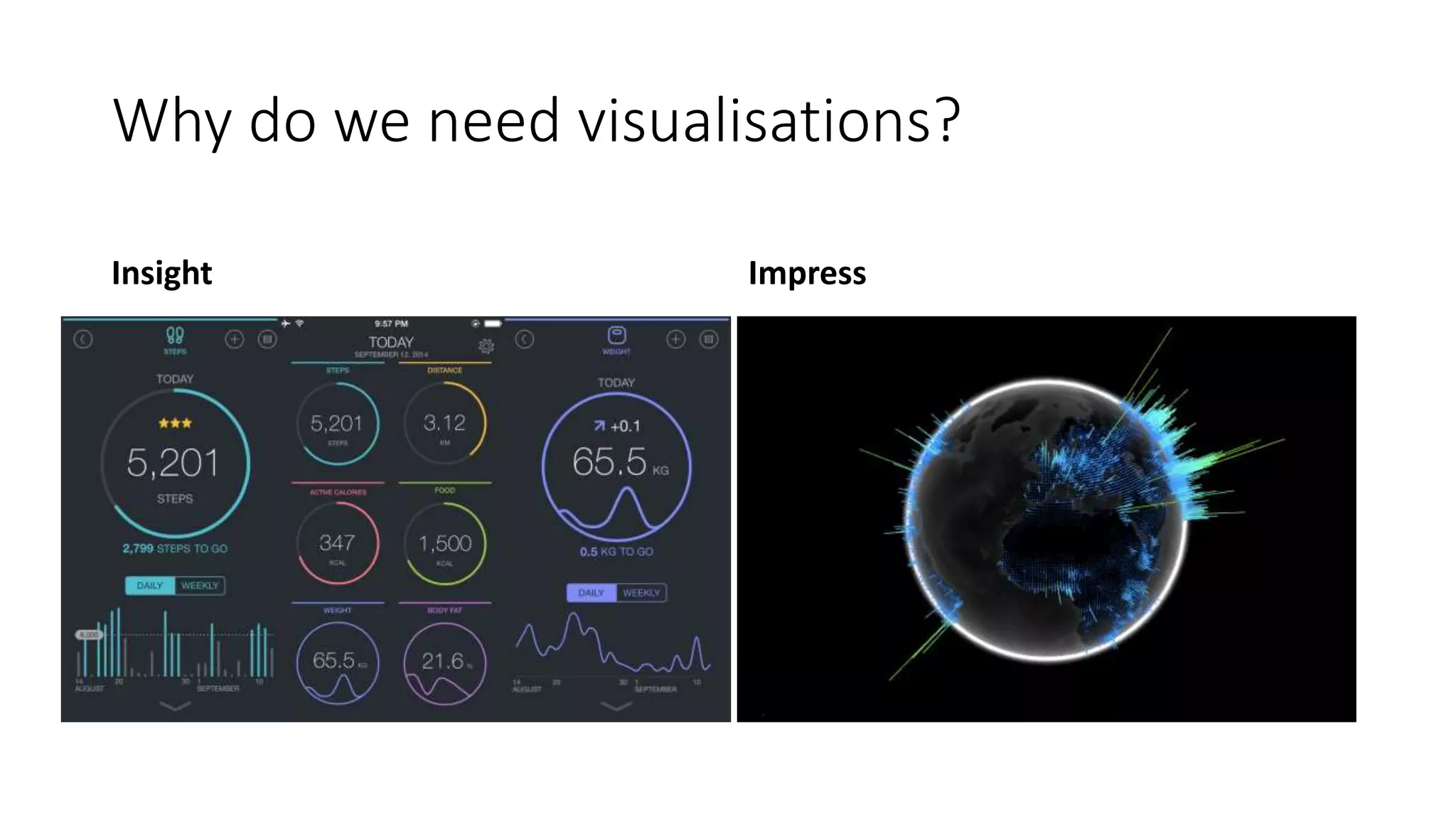
Why do we need visualisations?
Insight Impress
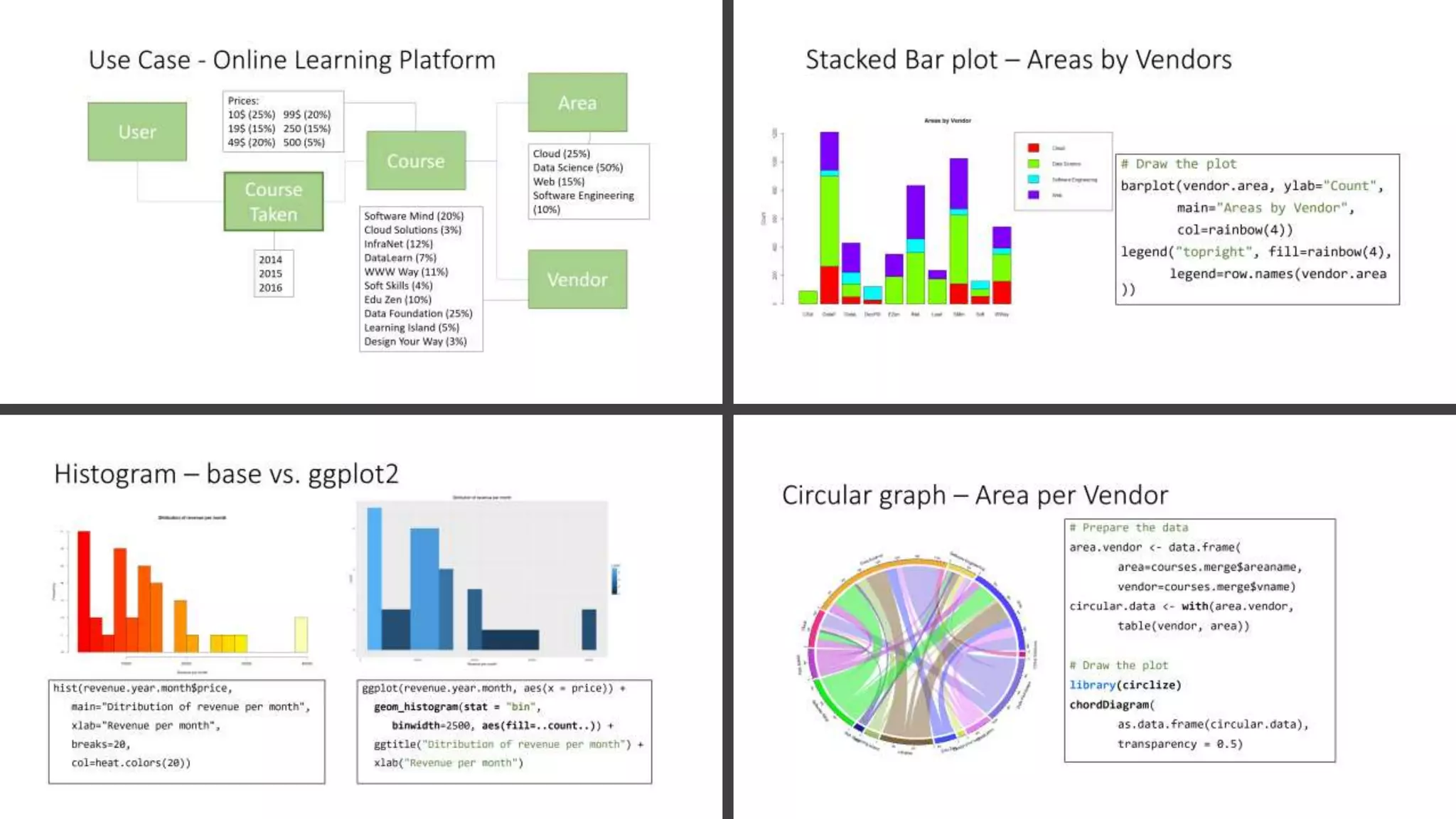
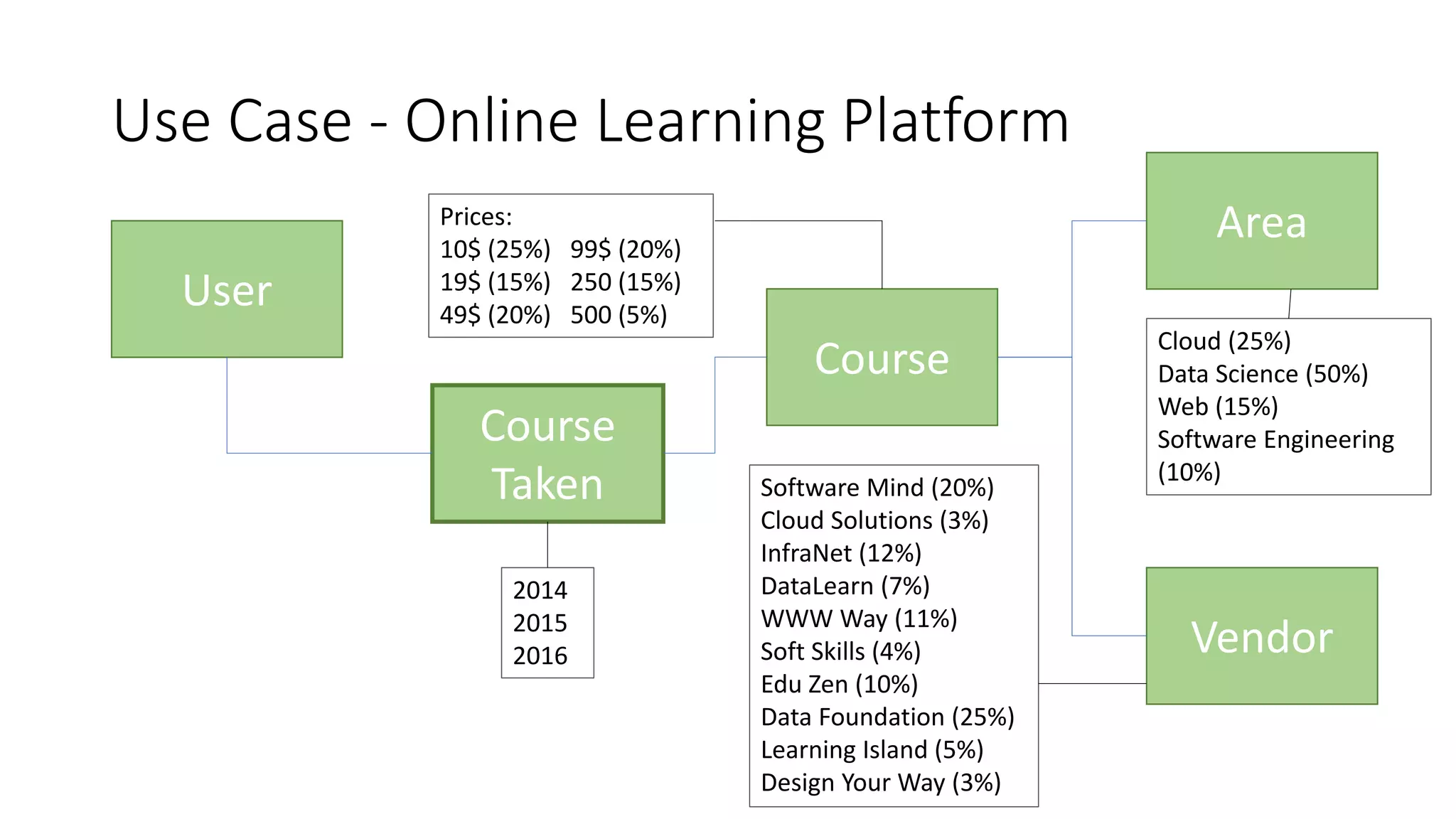
Use Case - Online Learning Platform
User
Area
Vendor
Course
Course
Taken
Cloud (25%)
Data Science (50%)
Web (15%)
Software Engineering
(10%)
Software Mind (20%)
Cloud Solutions (3%)
InfraNet (12%)
DataLearn (7%)
WWW Way (11%)
Soft Skills (4%)
Edu Zen (10%)
Data Foundation (25%)
Learning Island (5%)
Design Your Way (3%)
2014
2015
2016
Prices:
10$ (25%) 99$ (20%)
19$ (15%) 250 (15%)
49$ (20%) 500 (5%)
courses.aggregate
Name Area Vendor Year Month Price [$]
Perez, Lisa Data Science Data Foundation 2015 7 99
Tran, Janiro Software Engineering DataLearn 2016 2 10
Bajwa, John Cloud InfraNet 2015 9 250
Lindsey, Aaron Web Software Mind 2014 6 19
Cooper, Duncan Software Engineering Learning Island 2014 7 250
Grumbach, Alexander Web Design Your Way 2015 2 99
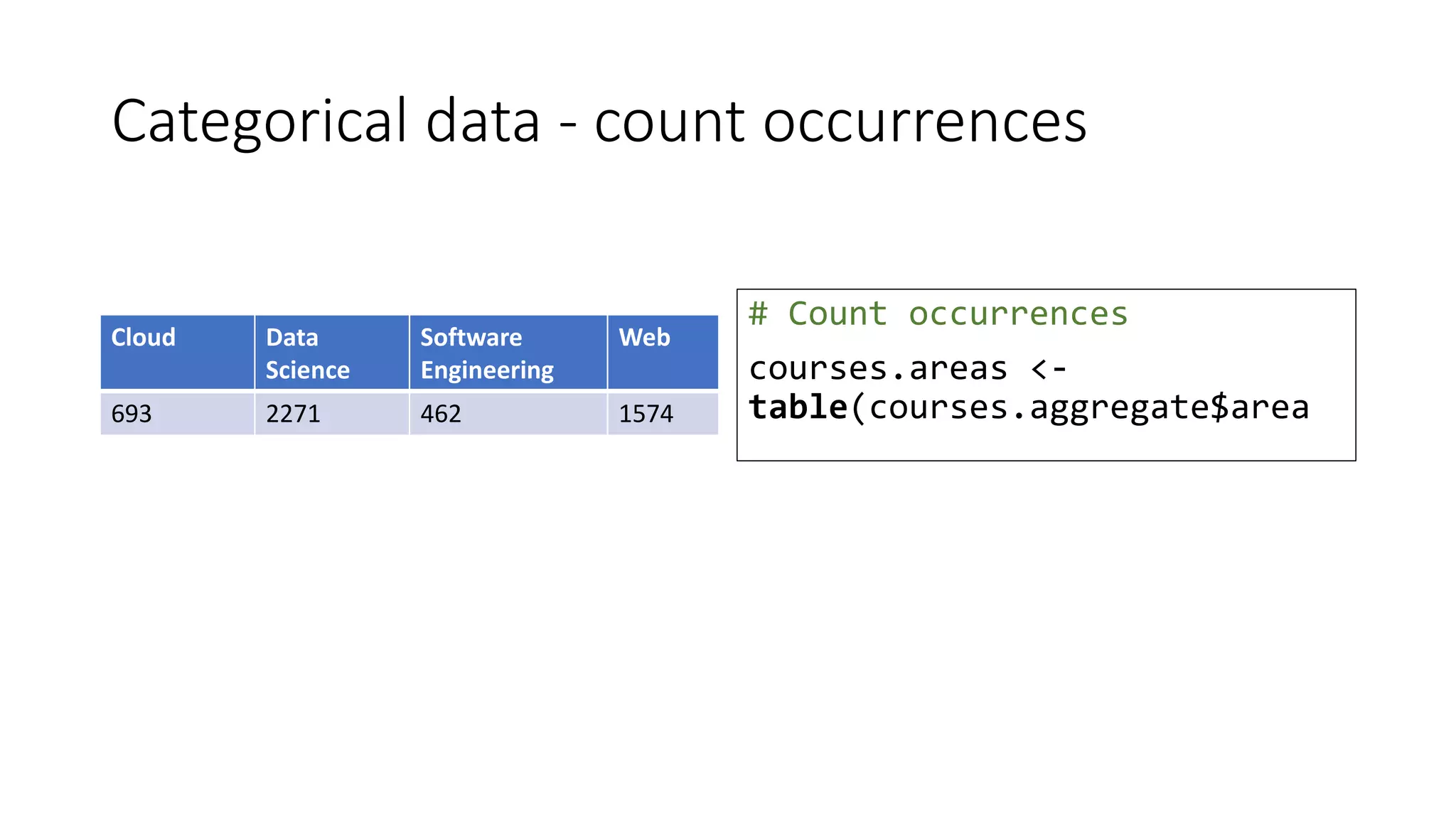
Categorical data - count occurrences
Cloud Data
Science
Software
Engineering
Web
693 2271 462 1574
# Count occurrences
courses.areas <-
table(courses.aggregate$area
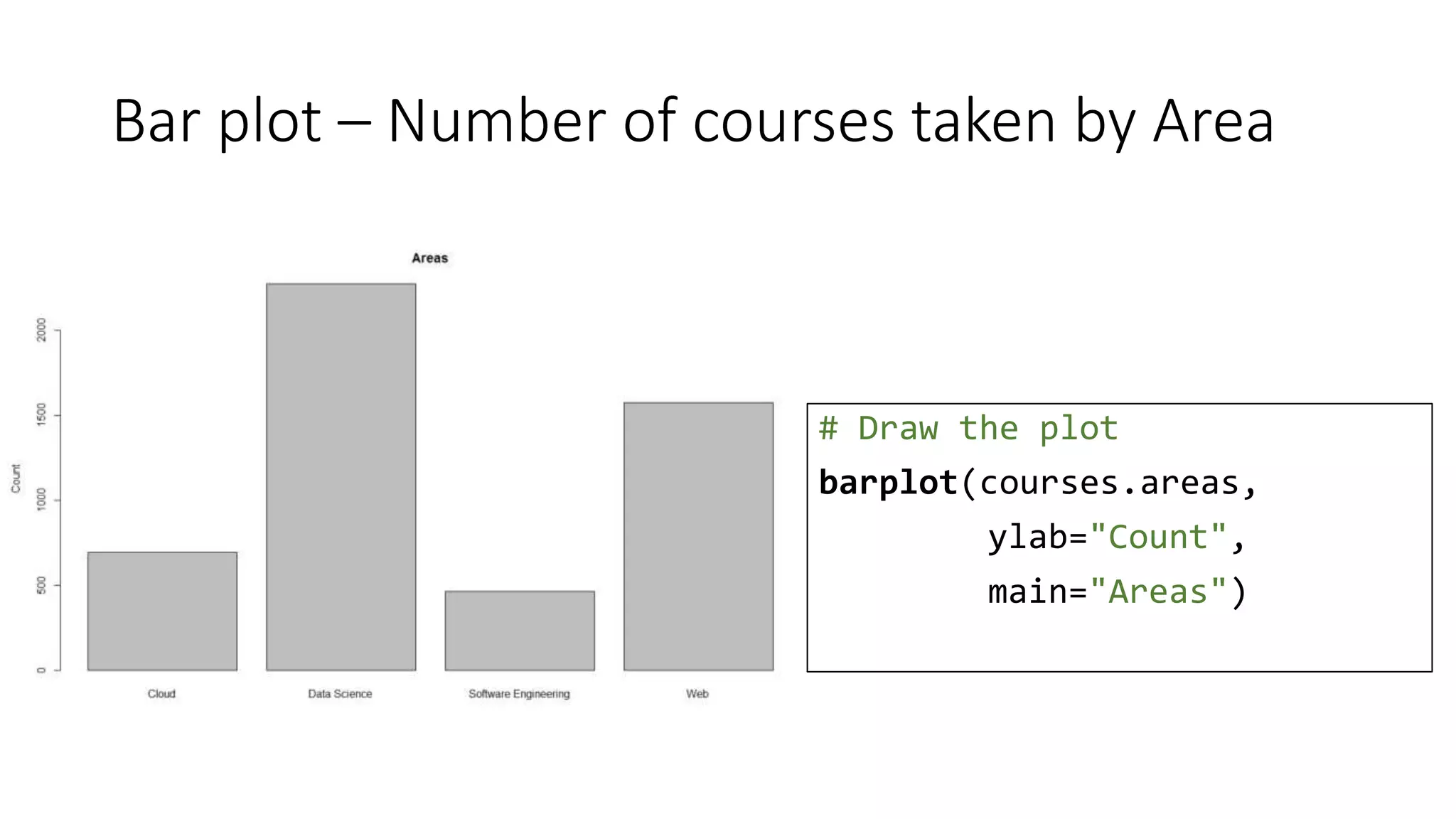
Bar plot – Number of courses taken by Area
# Draw the plot
barplot(courses.areas,
ylab="Count",
main="Areas")
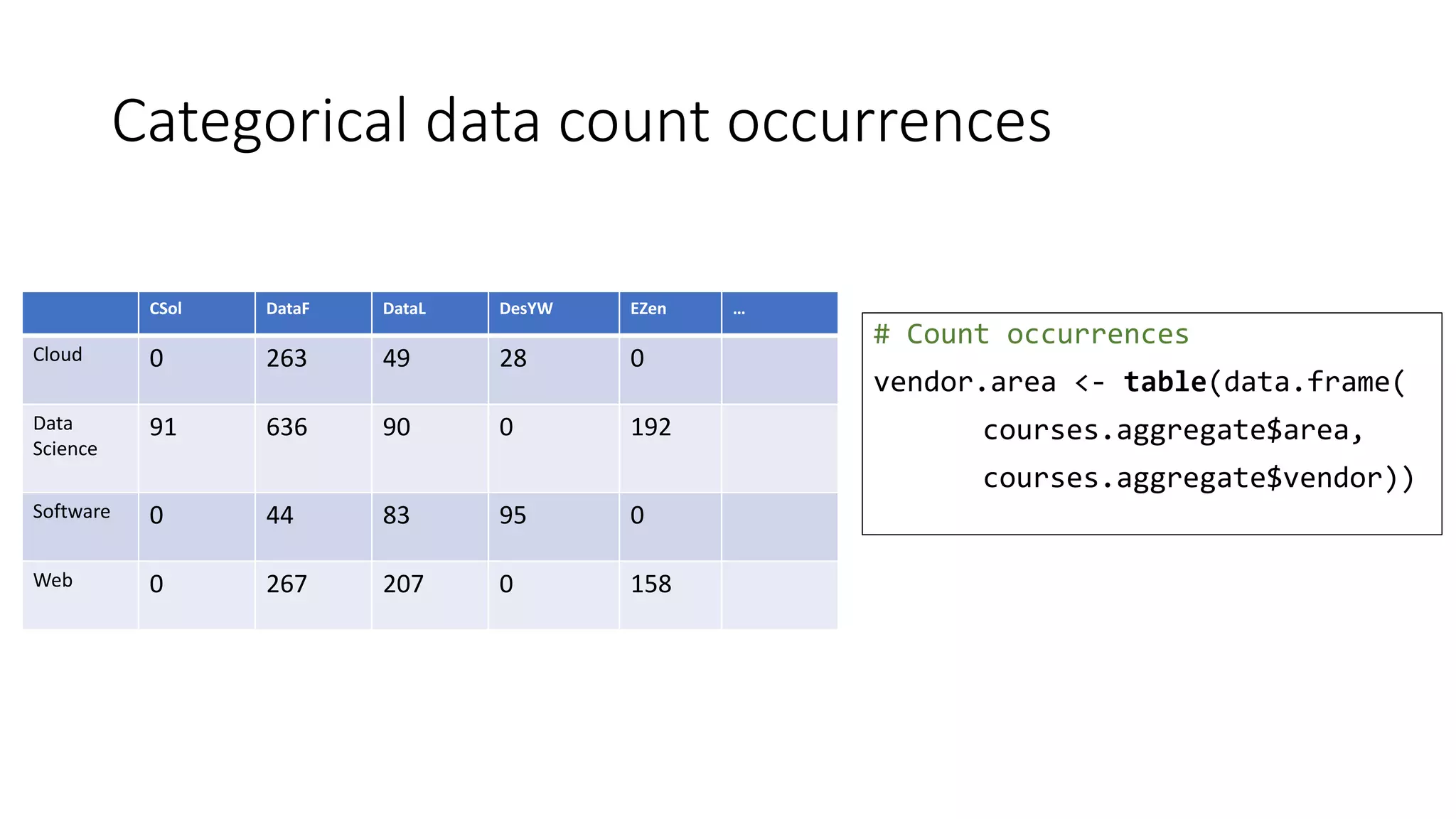
Categorical data count occurrences
# Count occurrences
vendor.area <- table(data.frame(
courses.aggregate$area,
courses.aggregate$vendor))
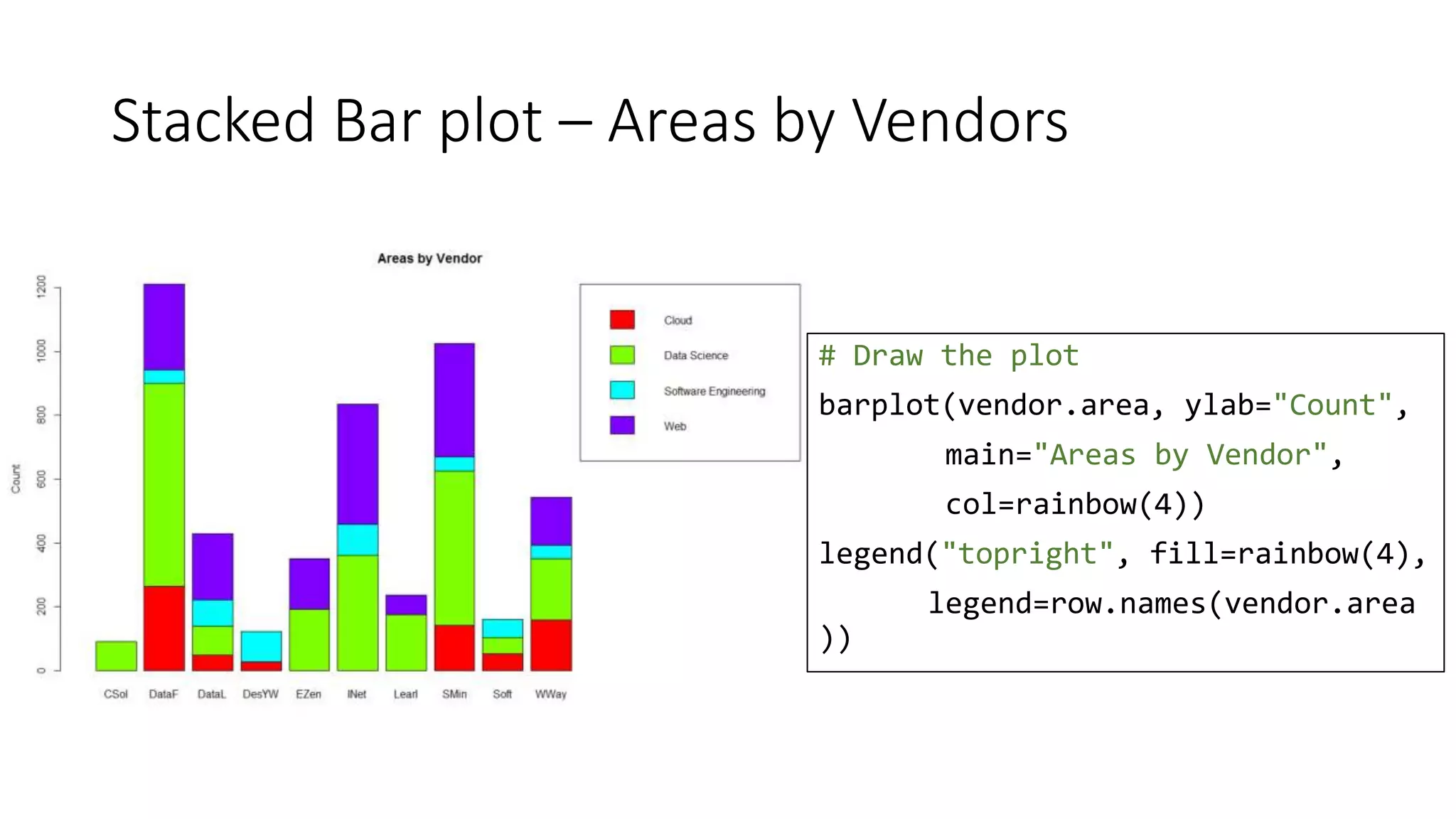
CSol DataF DataL DesYW EZen …
Cloud 0 263 49 28 0
Data
Science
91 636 90 0 192
Software 0 44 83 95 0
Web 0 267 207 0 158
Stacked Bar plot – Areas by Vendors
# Draw the plot
barplot(vendor.area, ylab="Count",
main="Areas by Vendor",
col=rainbow(4))
legend("topright", fill=rainbow(4),
legend=row.names(vendor.area
))
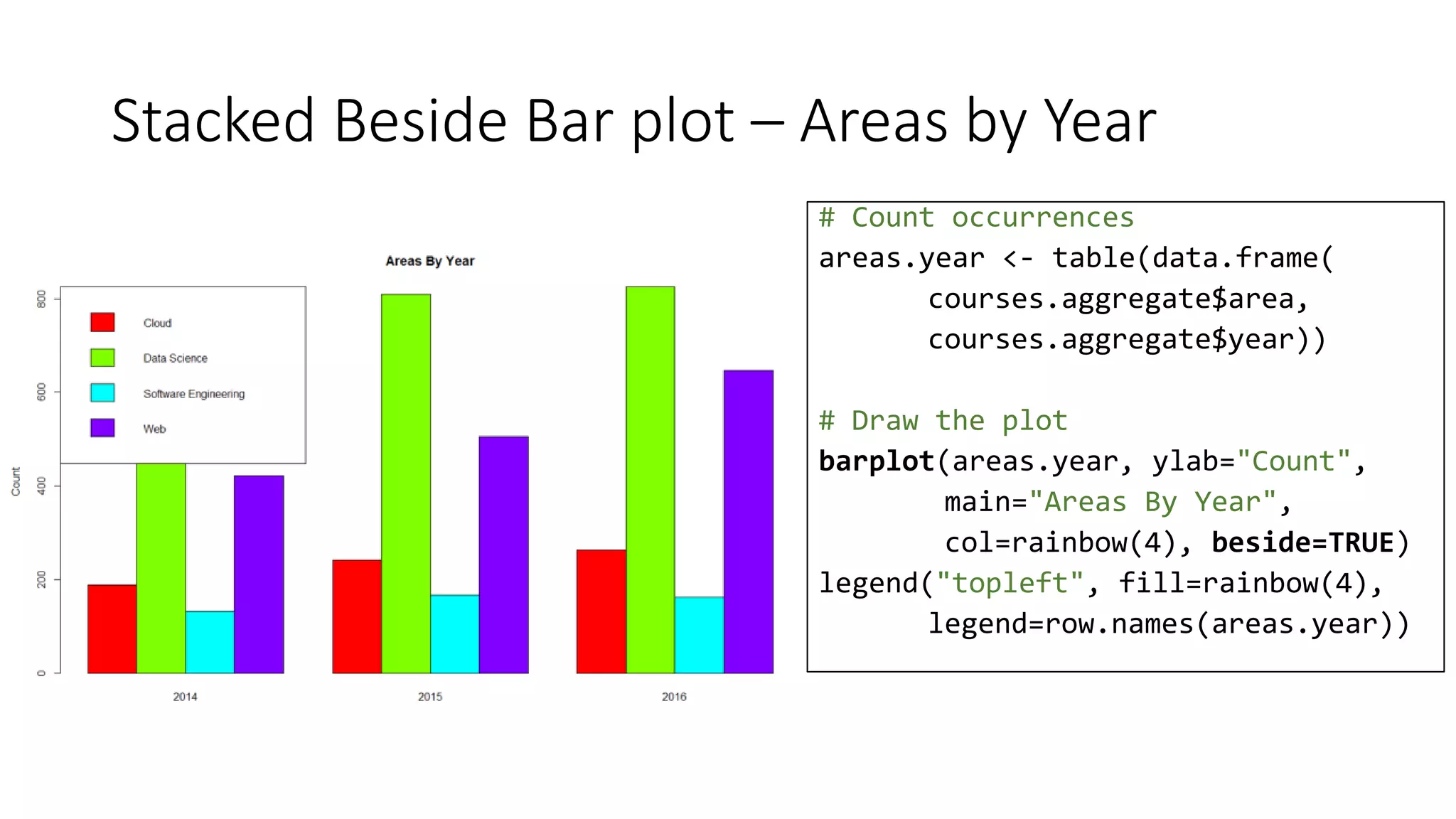
Stacked Beside Bar plot – Areas by Year
# Count occurrences
areas.year <- table(data.frame(
courses.aggregate$area,
courses.aggregate$year))
# Draw the plot
barplot(areas.year, ylab="Count",
main="Areas By Year",
col=rainbow(4), beside=TRUE)
legend("topleft", fill=rainbow(4),
legend=row.names(areas.year))
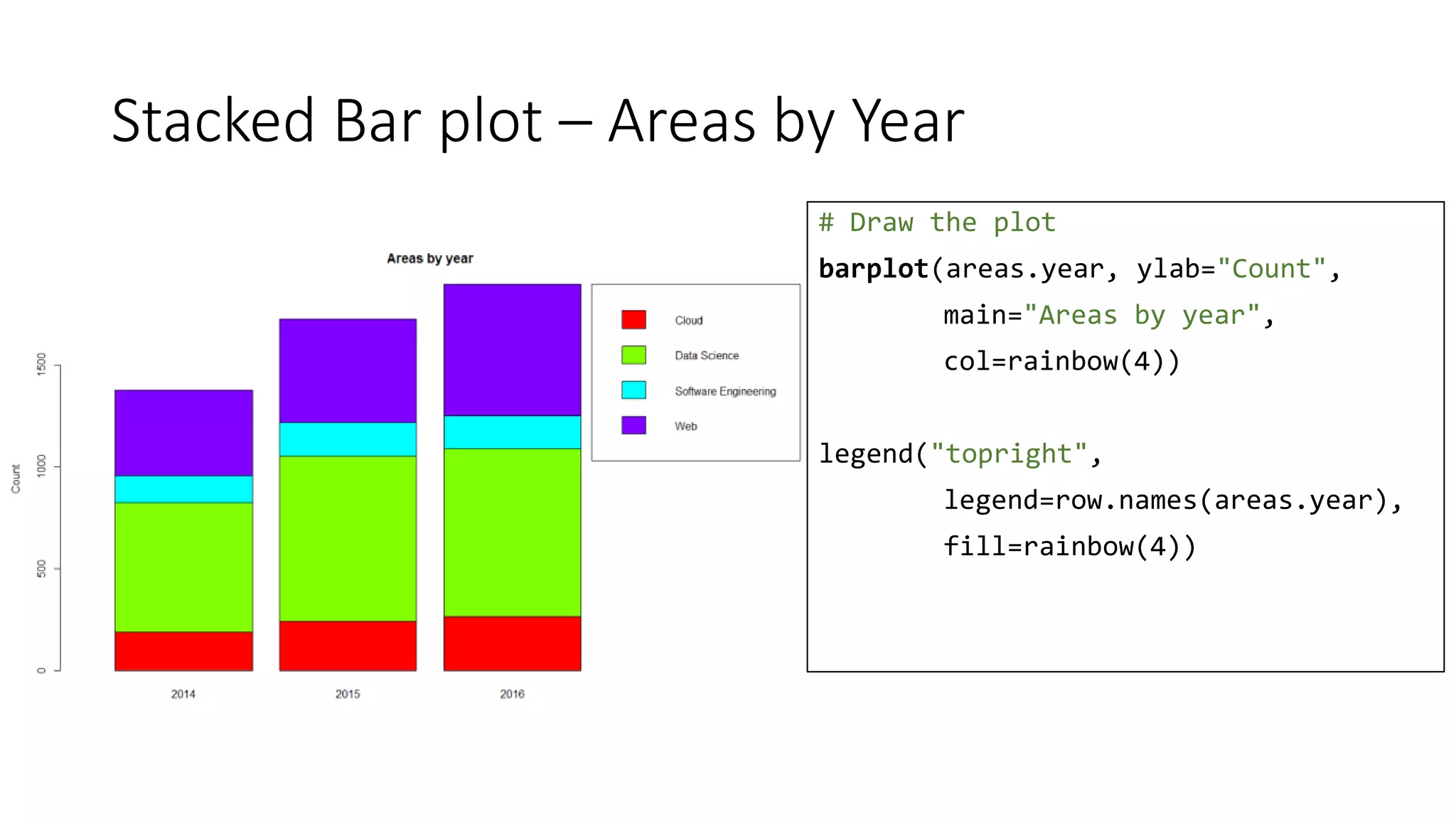
Stacked Bar plot – Areas by Year
# Draw the plot
barplot(areas.year, ylab="Count",
main="Areas by year",
col=rainbow(4))
legend("topright",
legend=row.names(areas.year),
fill=rainbow(4))
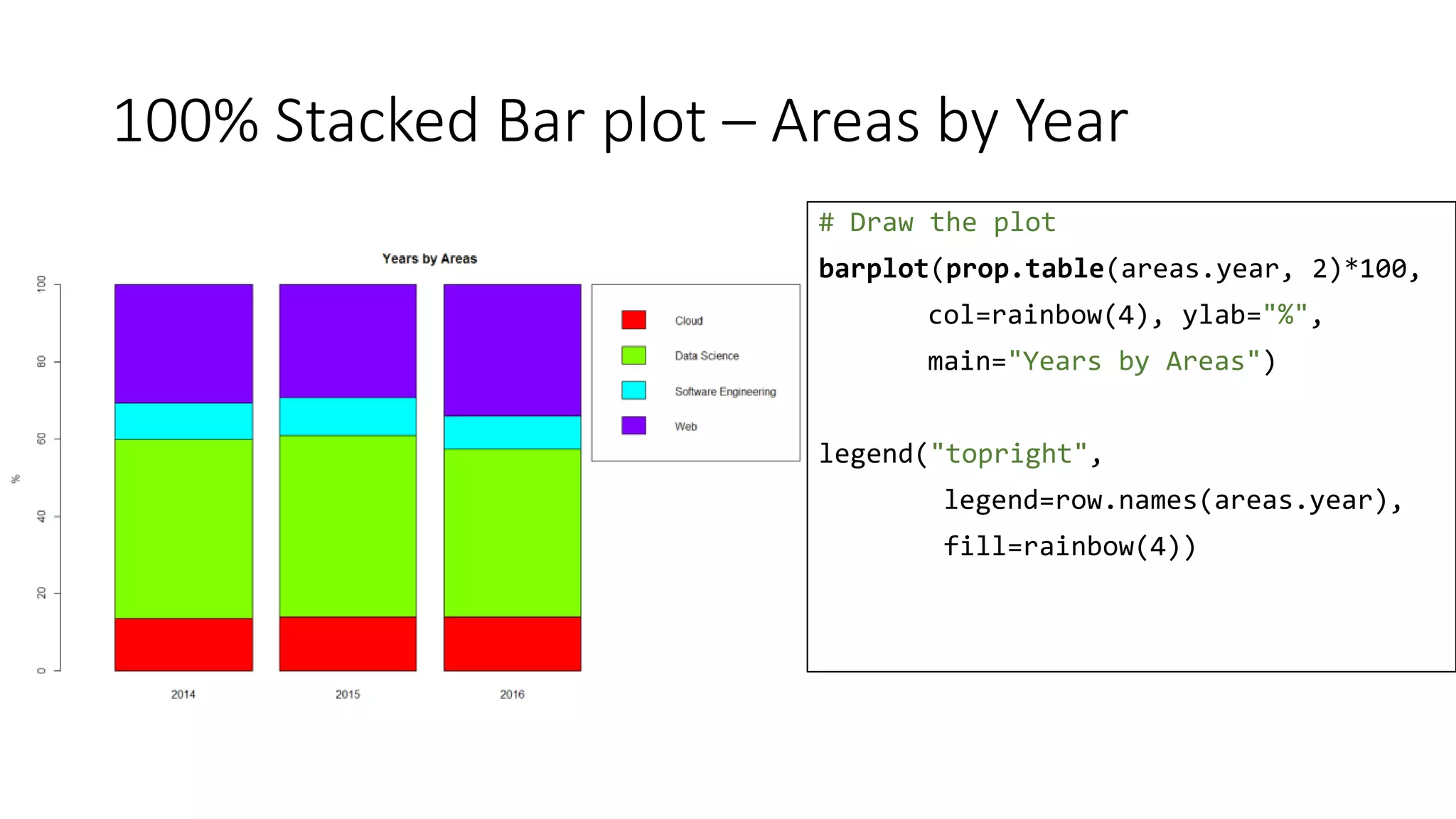
100% Stacked Bar plot – Areas by Year
# Draw the plot
barplot(prop.table(areas.year, 2)*100,
col=rainbow(4), ylab="%",
main="Years by Areas")
legend("topright",
legend=row.names(areas.year),
fill=rainbow(4))
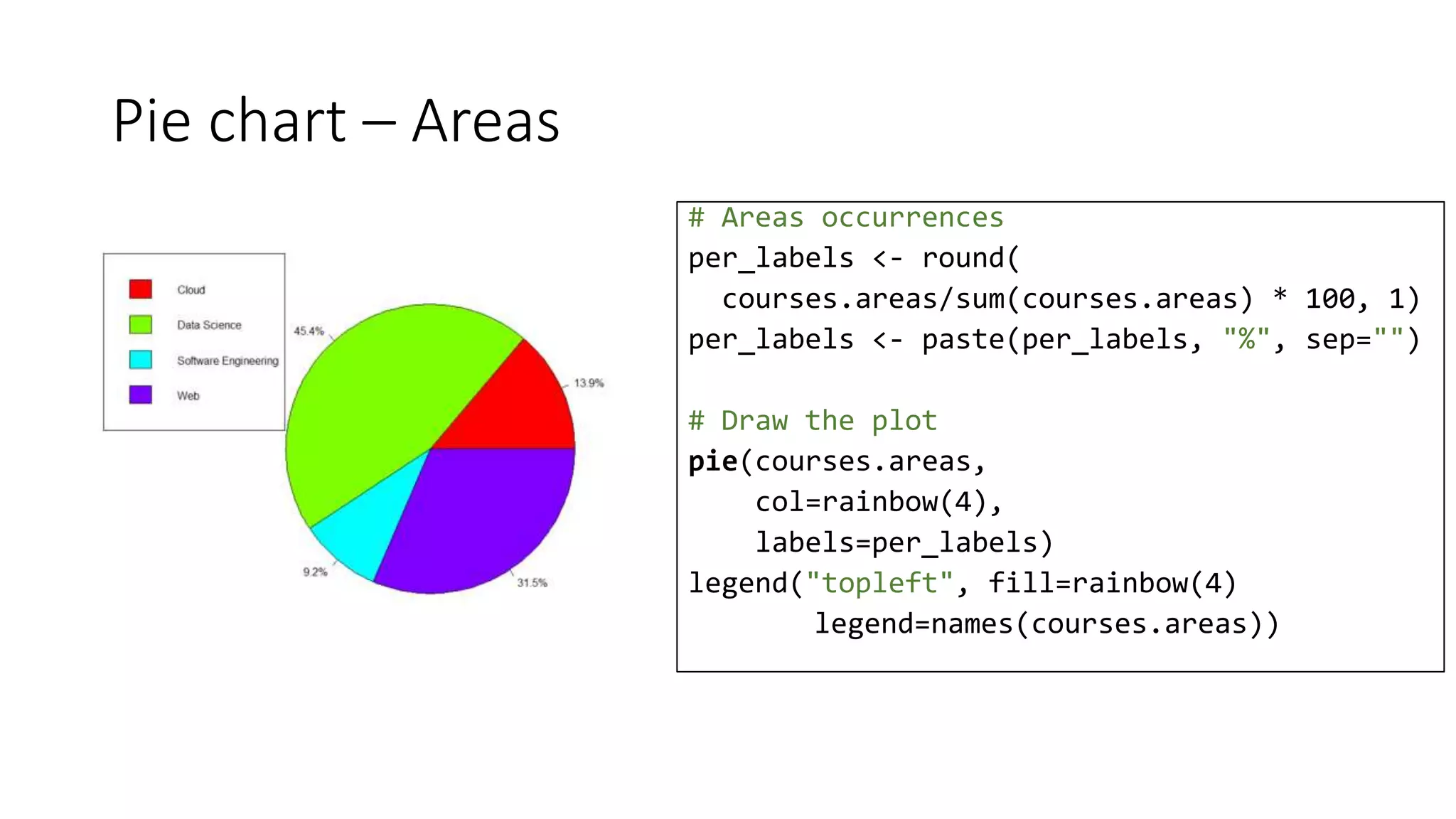
Pie chart – Areas
# Areas occurrences
per_labels <- round(
courses.areas/sum(courses.areas) * 100, 1)
per_labels <- paste(per_labels, "%", sep="")
# Draw the plot
pie(courses.areas,
col=rainbow(4),
labels=per_labels)
legend("topleft", fill=rainbow(4)
legend=names(courses.areas))
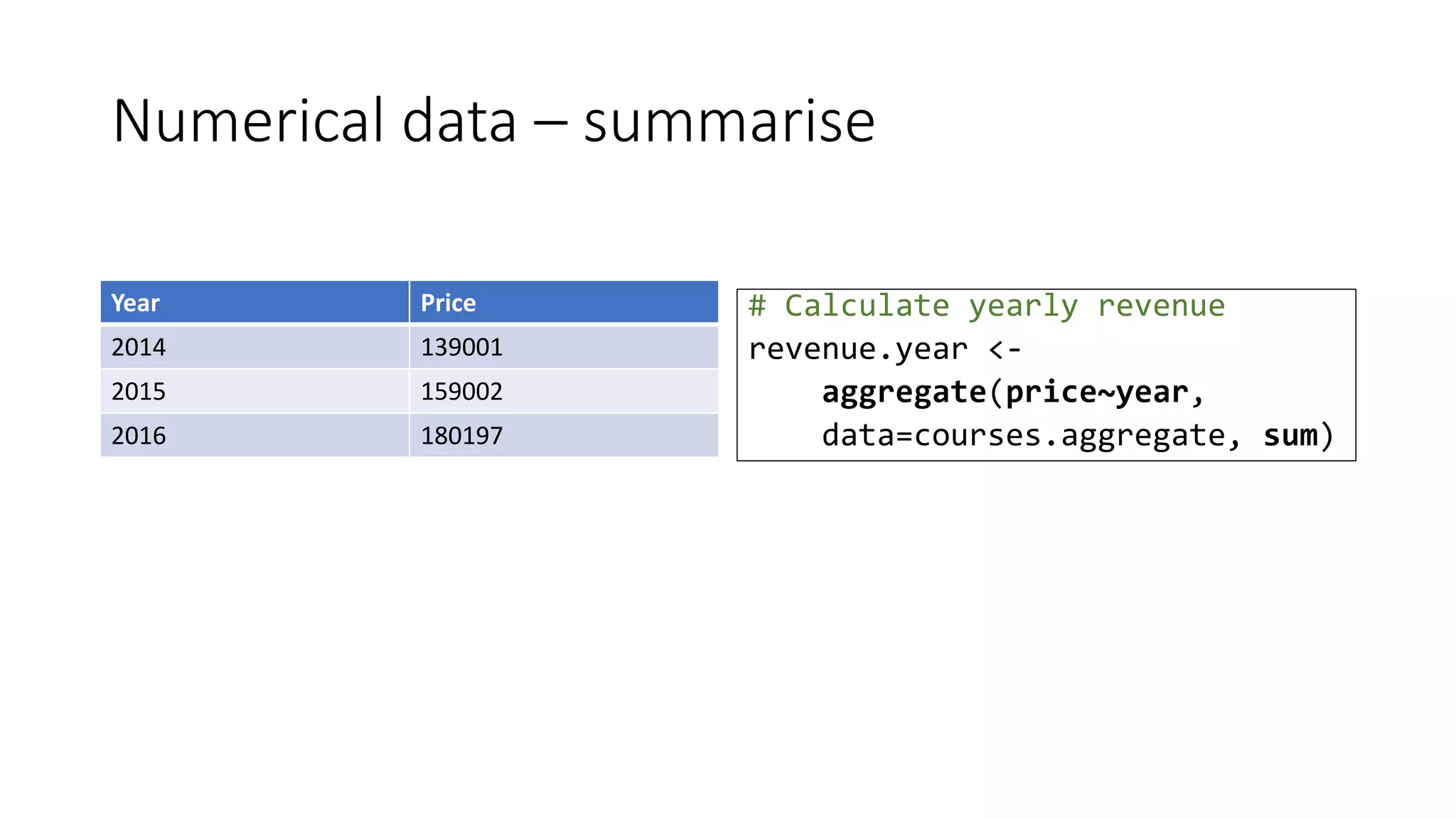
Numerical data – summarise
# Calculate yearly revenue
revenue.year <-
aggregate(price~year,
data=courses.aggregate, sum)
Year Price
2014 139001
2015 159002
2016 180197
Bar plot – Revenue per year
# Draw the plot
barplot(revenue.year$price,
names.arg =
revenue.year$year,
ylab="Count [$]",
main="Revenue per year")
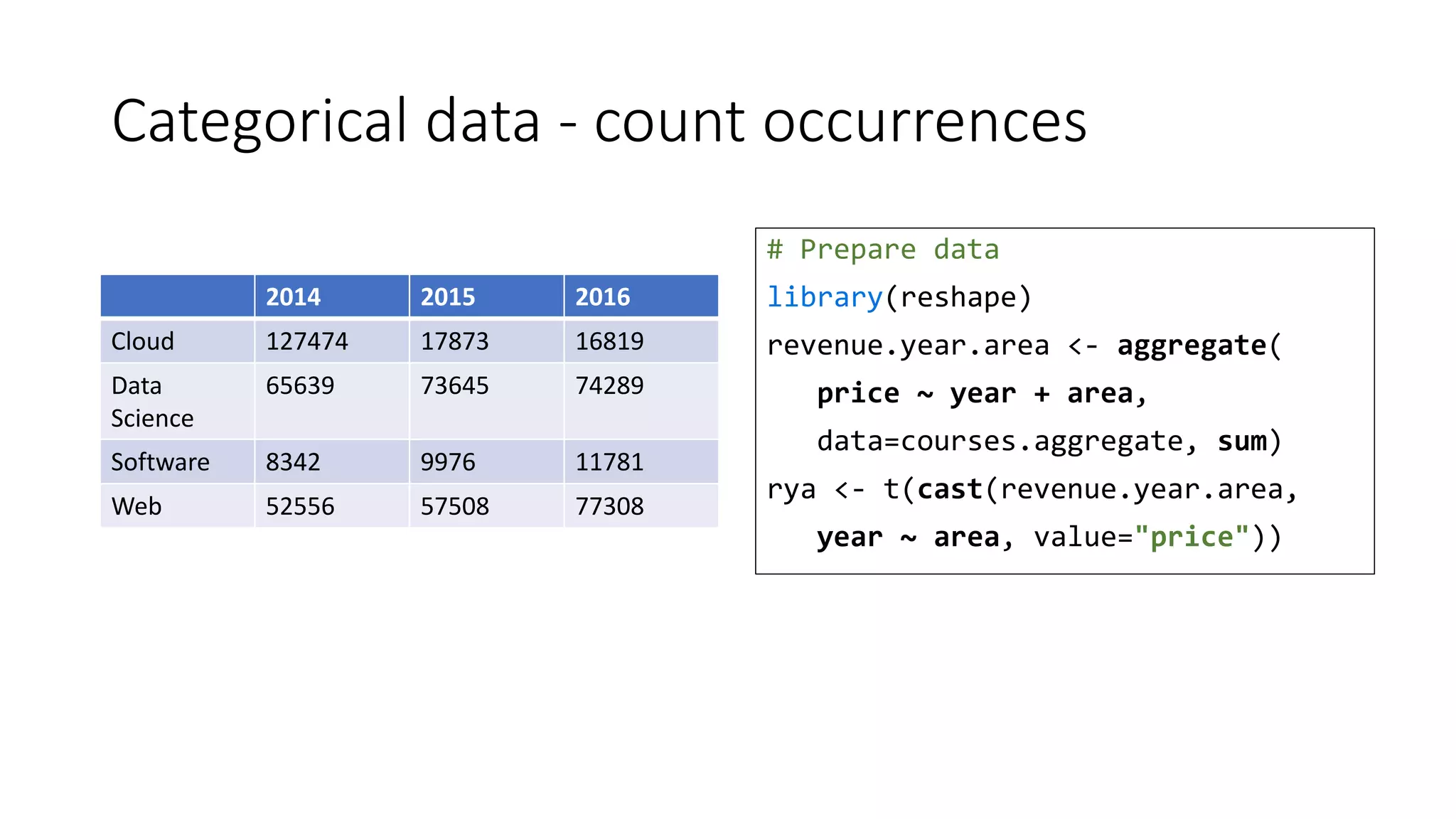
Categorical data - count occurrences
# Prepare data
library(reshape)
revenue.year.area <- aggregate(
price ~ year + area,
data=courses.aggregate, sum)
rya <- t(cast(revenue.year.area,
year ~ area, value="price"))
2014 2015 2016
Cloud 127474 17873 16819
Data
Science
65639 73645 74289
Software 8342 9976 11781
Web 52556 57508 77308
Stacked Bar plot – Revenue by Year and Area
# Draw the plot
barplot(rya, col=rainbow(4),
ylab="Count [$]",
main="Revenue by Year & Area")
legend("topright", fill=rainbow(4),
legend=row.names(rya))
Stacked Beside Bar plot – Areas Revenue by Year
# Draw the plot
barplot(rya, col=rainbow(4),
ylab="Count [$]",
main="Revenue by Year & Area",
beside=TRUE)
legend("topright", fill=rainbow(3),
legend=row.names(rya))
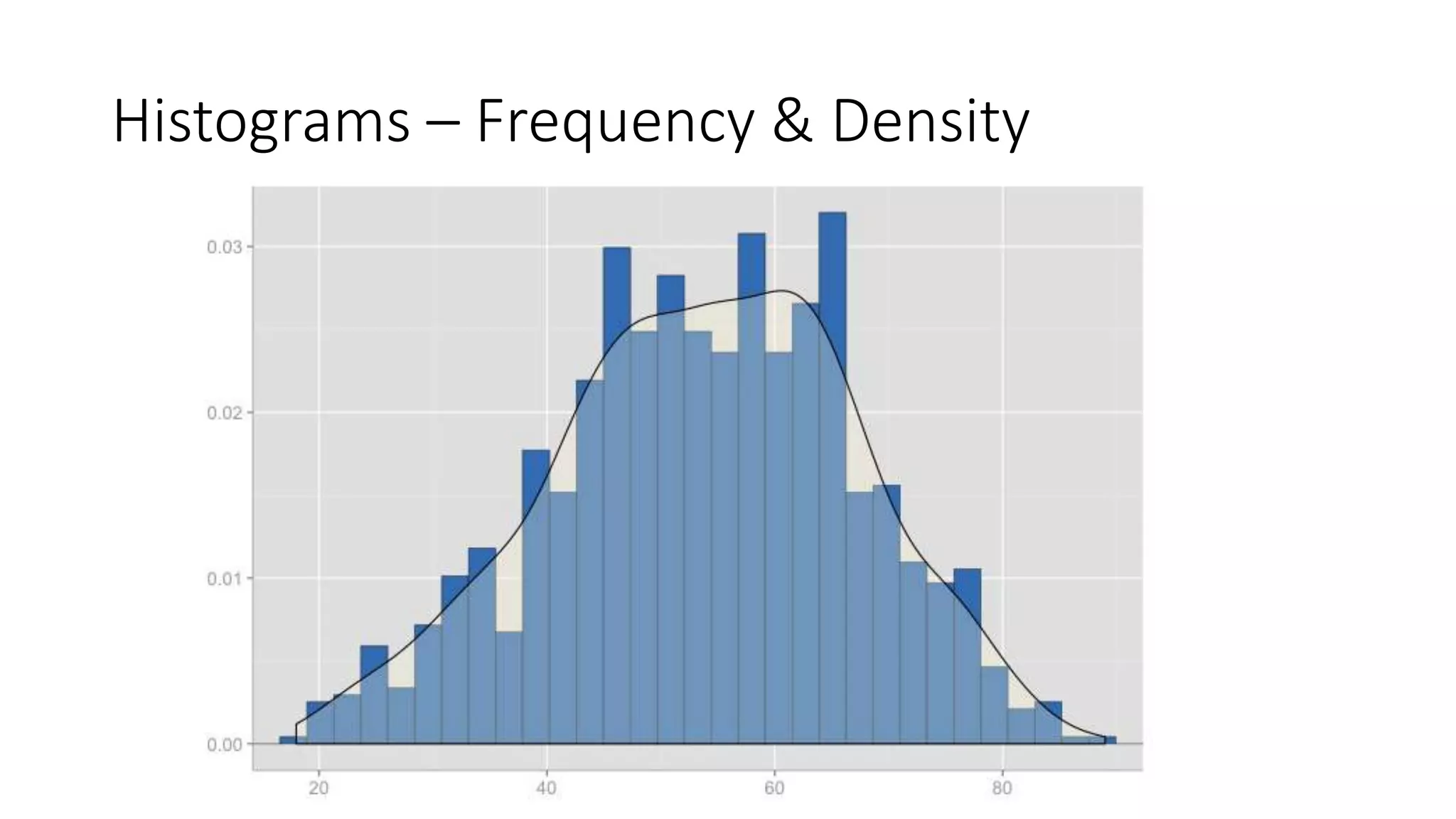
Histograms – Frequency & Density
Histogram – Course Prices
# Draw the plot
hist(courses.aggregate$price,
main="Ditribution of prices",
xlab="Course price",
breaks=20,
col=heat.colors(20))
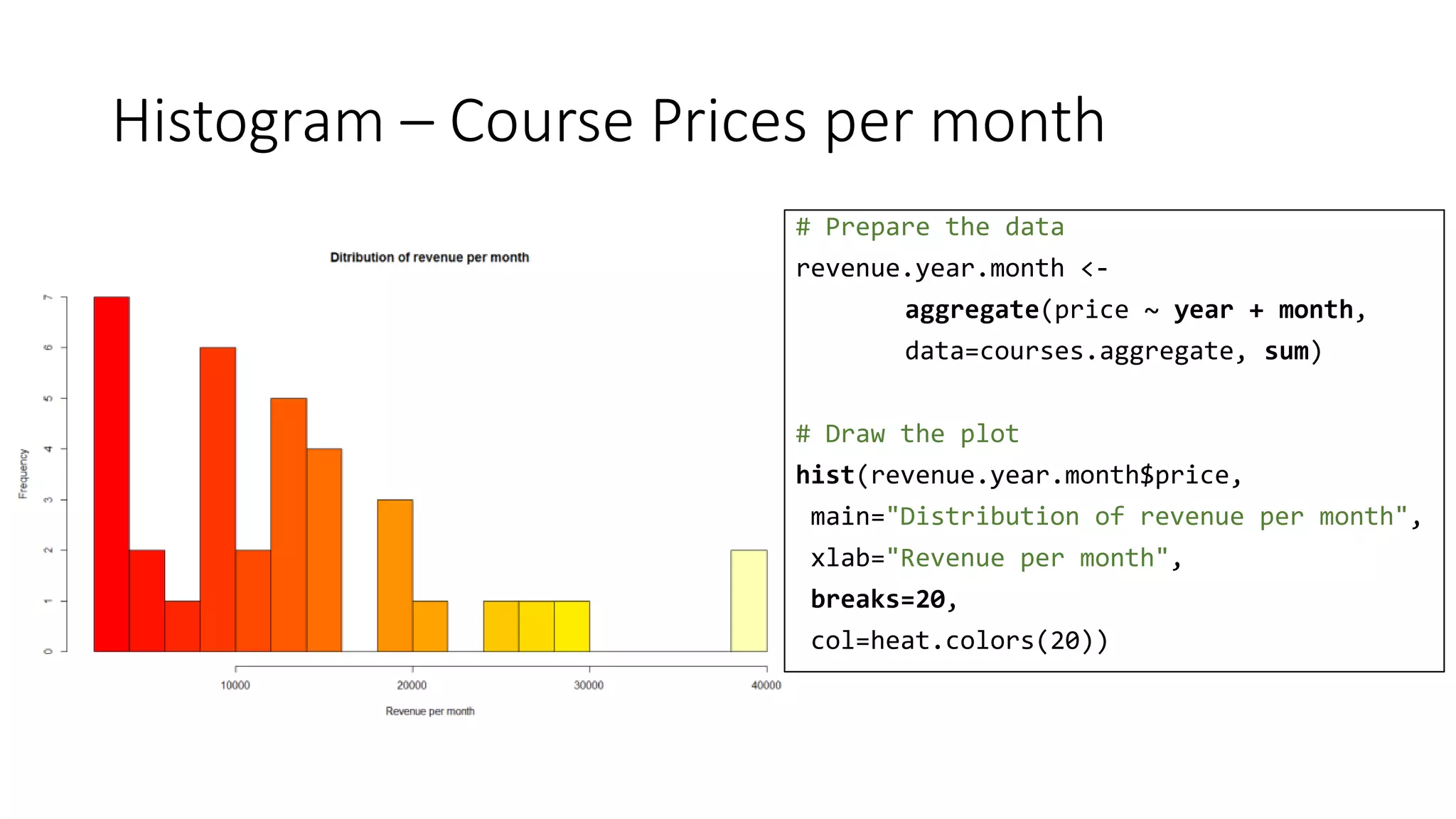
Histogram – Course Prices per month
# Prepare the data
revenue.year.month <-
aggregate(price ~ year + month,
data=courses.aggregate, sum)
# Draw the plot
hist(revenue.year.month$price,
main="Distribution of revenue per month",
xlab="Revenue per month",
breaks=20,
col=heat.colors(20))
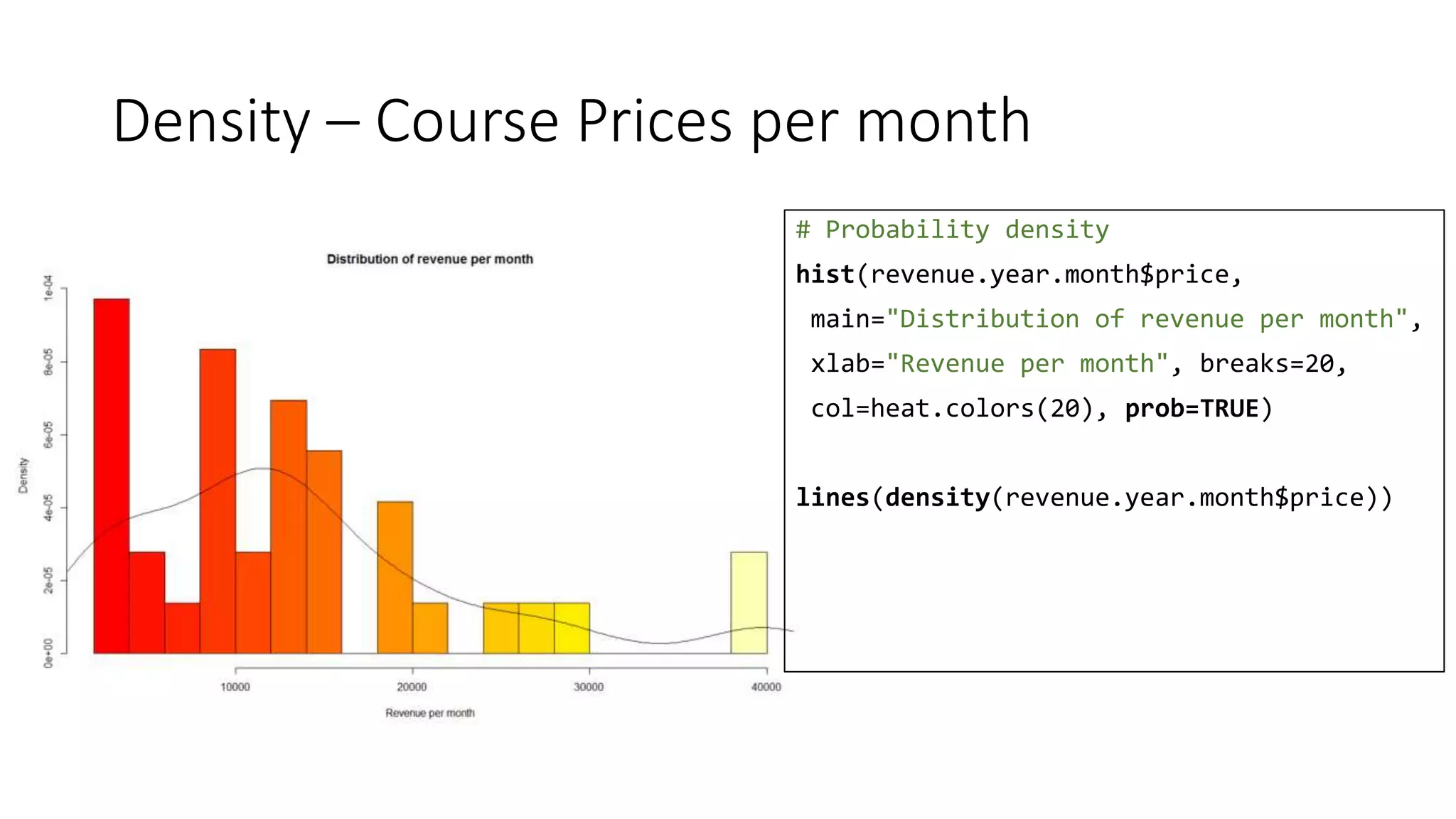
Density – Course Prices per month
# Probability density
hist(revenue.year.month$price,
main="Distribution of revenue per month",
xlab="Revenue per month", breaks=20,
col=heat.colors(20), prob=TRUE)
lines(density(revenue.year.month$price))
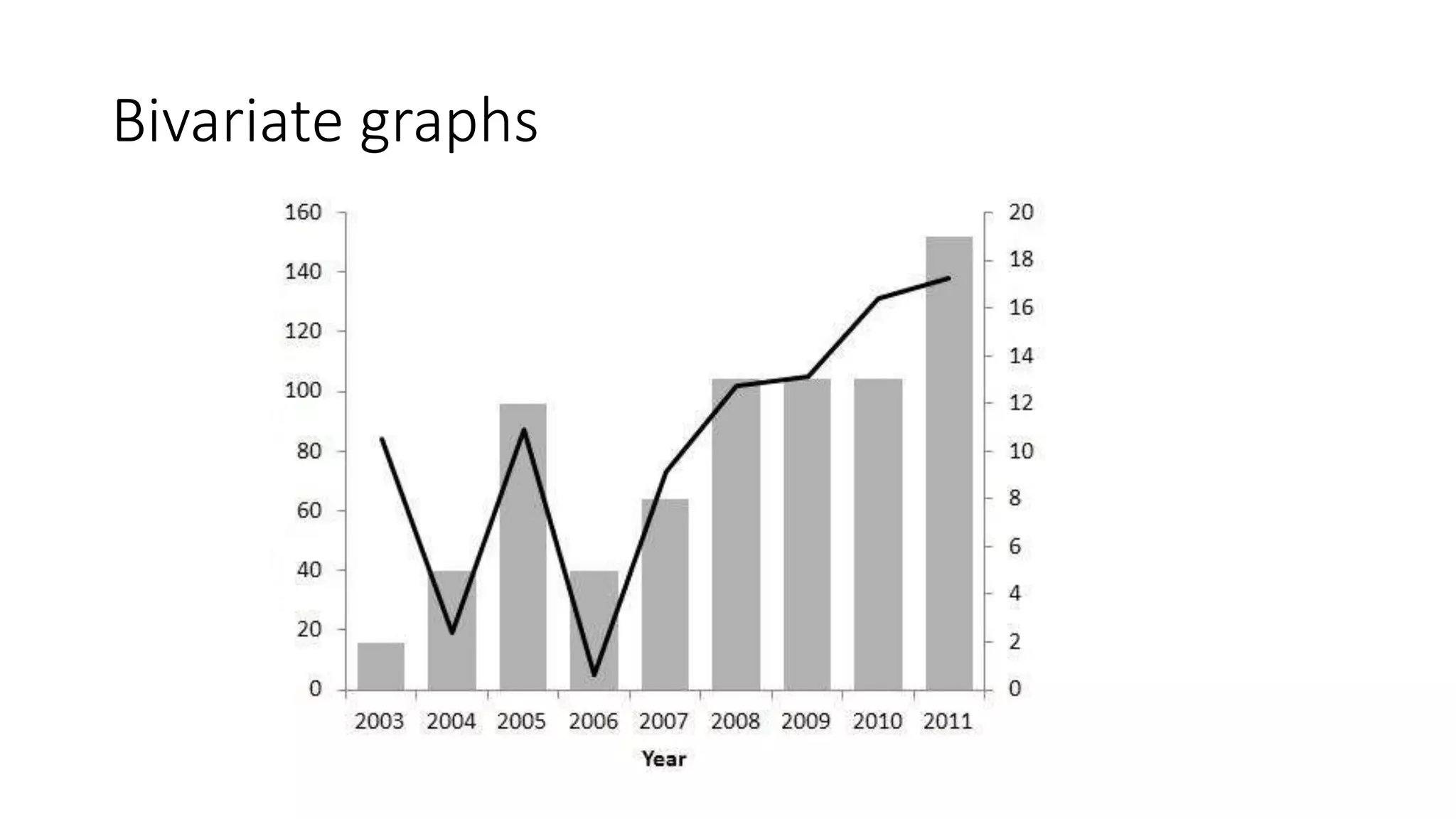
Bivariate graphs
Bar & line plot – Revenue by month
# Draw the plot
revenue.bar <- barplot(
revenue.month$price,
names.arg = labels ,
ylab="Revenue [$]",
main="2016 Revenue by month")
lines(x=revenue.bar,
y=revenue.month$units*100)
points(x=revenue.bar,
y=revenue.month$units*100)
Line plot & trend – Revenue by month
# Draw the plot
months <- 1:12
plot(price ~ month, data=revenue.month,
xaxt="n", type="l",
ylab="Revenue [$]", xlab="",
main="Revenue in 2016")
axis(1, at=months, labels=labels)
# Display the trend
lines(c(1,12), c(25000, 12000), type="l",
lty=2, col="blue")
legend("topright", c("Revenue", "Trend"),
col=c("black", "blue"), lty=1:2)
Line plot & trend – Revenue by Units
# Draw the plot
plot(price~units,
data=revenue.month,
xlab="Units",
ylab="Revenue [$]",
main="Revenue by Units in 2016")
lines(c(30, 380), c(3000, 35000),
type='l', lty=2, col="blue")
legend("topleft",
c("revenue/freq", "trend"),
col=c("black", "blue"),
lty=c(0,2), pch=c(21, -1))
Line plot & trend – Revenue by Units
# Draw the plot
plot(price~units,
data=revenue.month.area,
xlab="Units",
ylab="Revenue [$]",
col=area,
main="Revenue by Units (All years)")
legend("topleft",
legend=levels(revenue.month.area$area),
col=1:length(
levels(revenue.month.area$area)),
pch=21, text.width = 30)
base vs. lattice vs. ggplot2
Stacked Bar chart – base vs. lattice
barplot(rya, col=rainbow(4),
ylab="Count [$]",
main="Revenue by Year & Area")
legend("topright", fill=rainbow(4),
legend=row.names(rya))
barchart(Cloud + `Data Science` +
`Software Engineering` + Web ~ year
data=t(rya), auto.key=TRUE,
stack=TRUE, horizontal=FALSE,
ylab="Count [$]", main="Areas by Year")
Stacked Bar chart – base vs. ggplot2
barplot(rya, col=rainbow(4),
ylab="Count [$]",
main="Revenue by Year & Area")
legend("topright", fill=rainbow(4),
legend=row.names(rya))
ggplot(revenue.year.area,
aes(x = year, y=price, fill = area)) +
geom_bar(stat = "identity") +
ggtitle("Revenue by Year & Area") +
ylab("Count [$]")
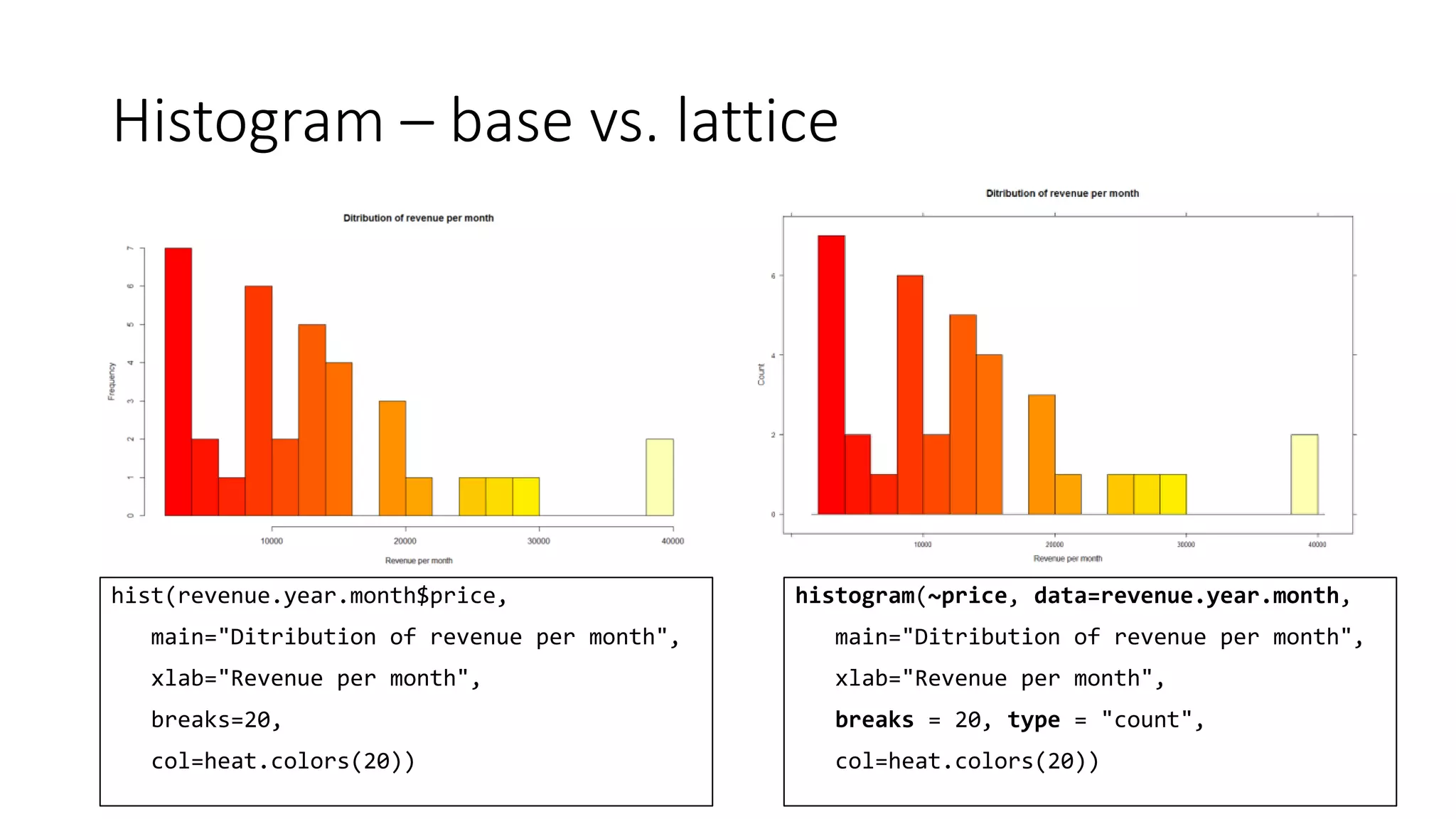
Histogram – base vs. lattice
hist(revenue.year.month$price,
main="Ditribution of revenue per month",
xlab="Revenue per month",
breaks=20,
col=heat.colors(20))
histogram(~price, data=revenue.year.month,
main="Ditribution of revenue per month",
xlab="Revenue per month",
breaks = 20, type = "count",
col=heat.colors(20))
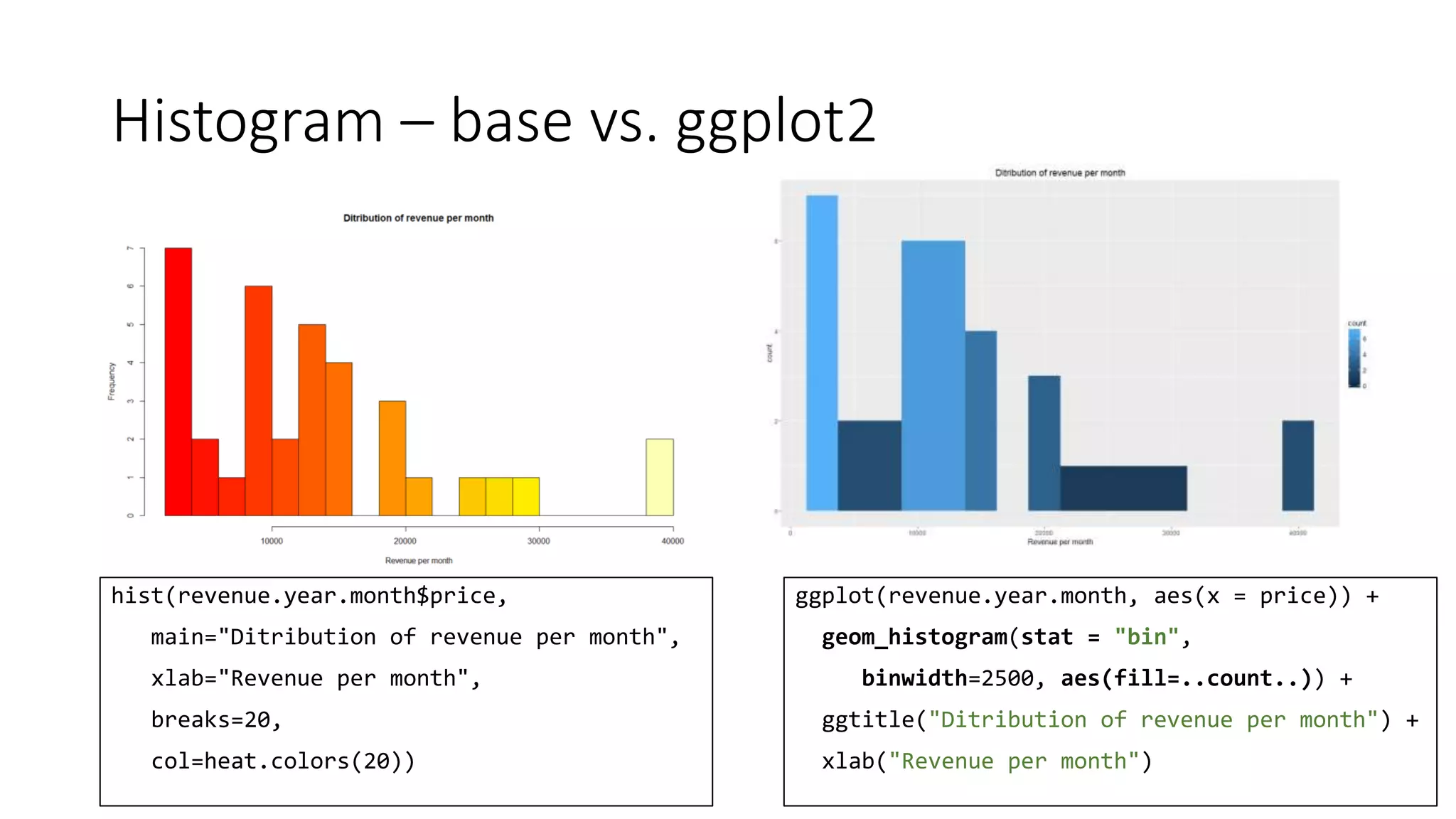
Histogram – base vs. ggplot2
hist(revenue.year.month$price,
main="Ditribution of revenue per month",
xlab="Revenue per month",
breaks=20,
col=heat.colors(20))
ggplot(revenue.year.month, aes(x = price)) +
geom_histogram(stat = "bin",
binwidth=2500, aes(fill=..count..)) +
ggtitle("Ditribution of revenue per month") +
xlab("Revenue per month")
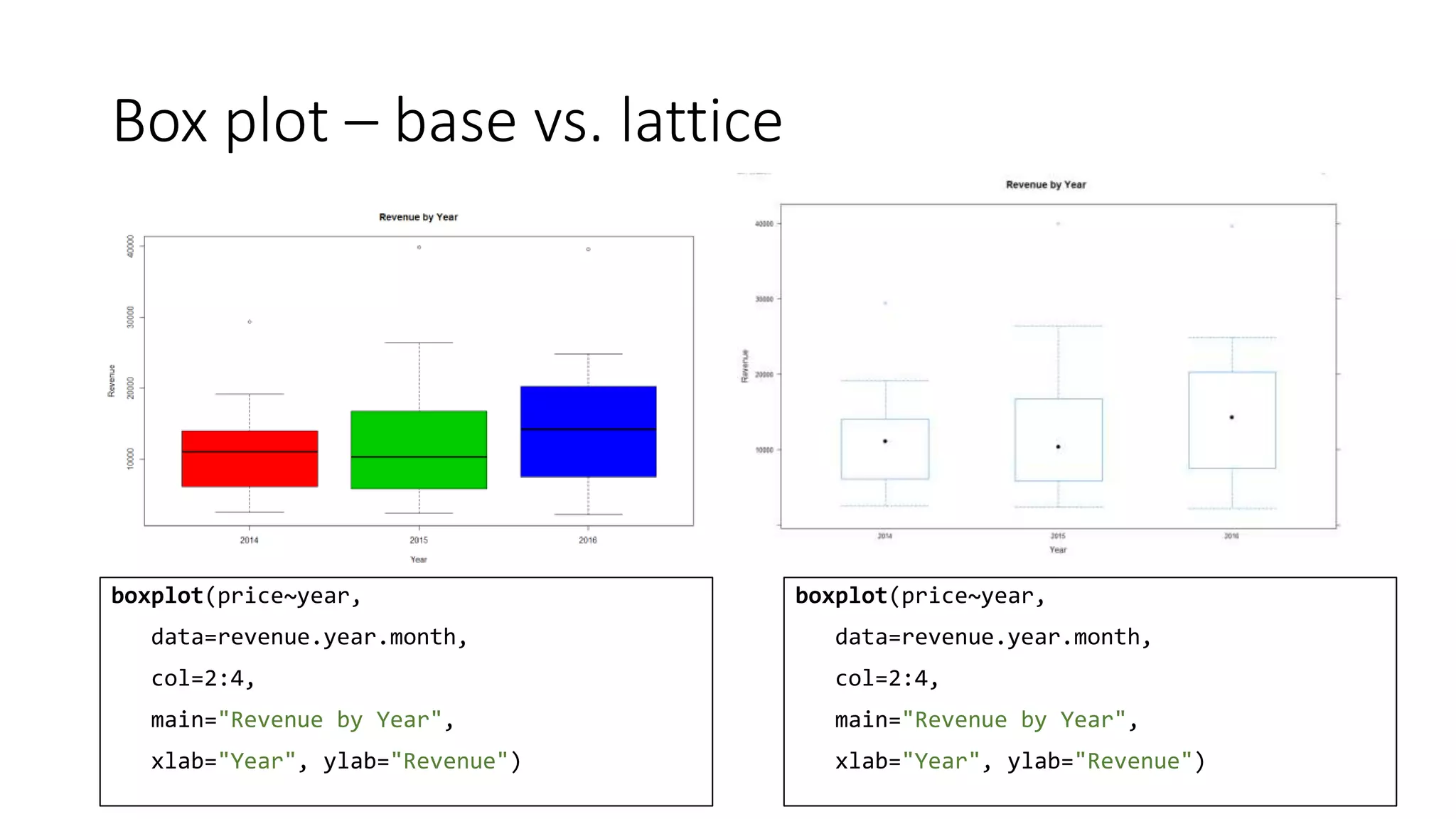
Box plot – base vs. lattice
boxplot(price~year,
data=revenue.year.month,
col=2:4,
main="Revenue by Year",
xlab="Year", ylab="Revenue")
boxplot(price~year,
data=revenue.year.month,
col=2:4,
main="Revenue by Year",
xlab="Year", ylab="Revenue")
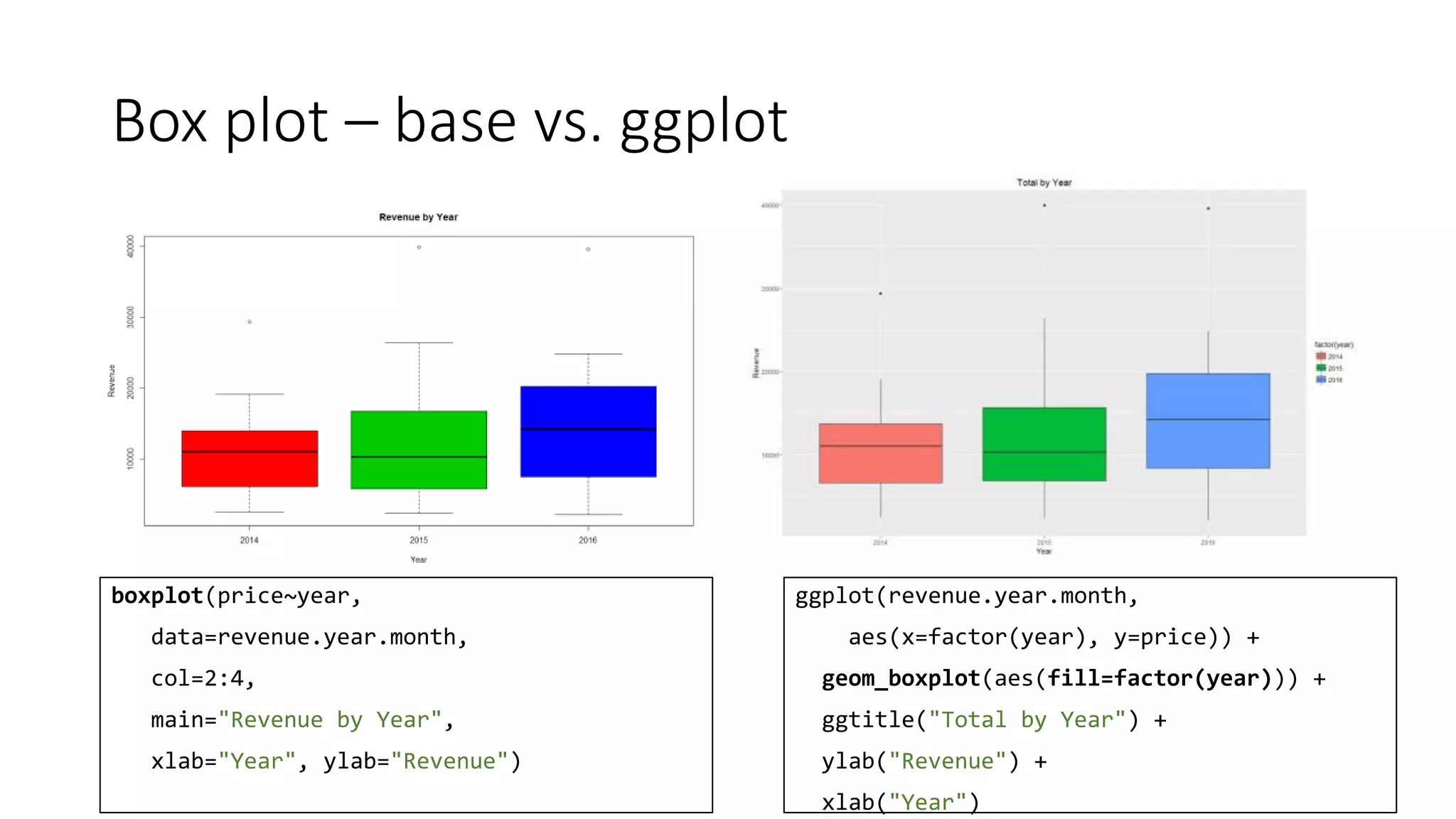
Box plot – base vs. ggplot
boxplot(price~year,
data=revenue.year.month,
col=2:4,
main="Revenue by Year",
xlab="Year", ylab="Revenue")
ggplot(revenue.year.month,
aes(x=factor(year), y=price)) +
geom_boxplot(aes(fill=factor(year))) +
ggtitle("Total by Year") +
ylab("Revenue") +
xlab("Year")
Scatter plot – base vs. lattice
plot(price~units, data=revenue.month.area,
xlab="Units", ylab="Revenue [$]",
col=area,
main="Revenue by Units (All years)")
# And you need legend manually created
xyplot(price~units, data=revenue.month.area,
xlab="Units", ylab="Revenue [$]",
pch=19,
group = area,
auto.key = TRUE)
Scatter plot – base vs. ggplot2
plot(price~units, data=revenue.month.area,
xlab="Units", ylab="Revenue [$]",
col=area,
main="Revenue by Units (All years)")
# And you need legend manually created
ggplot(revenue.month.area,
aes(x=units, y=price)) +
geom_point(aes(col=area)) +
ggtitle("Revenue by Units (All years)") +
ylab("Revenue [$]") + xlab("Units")
ggplot2 & layers
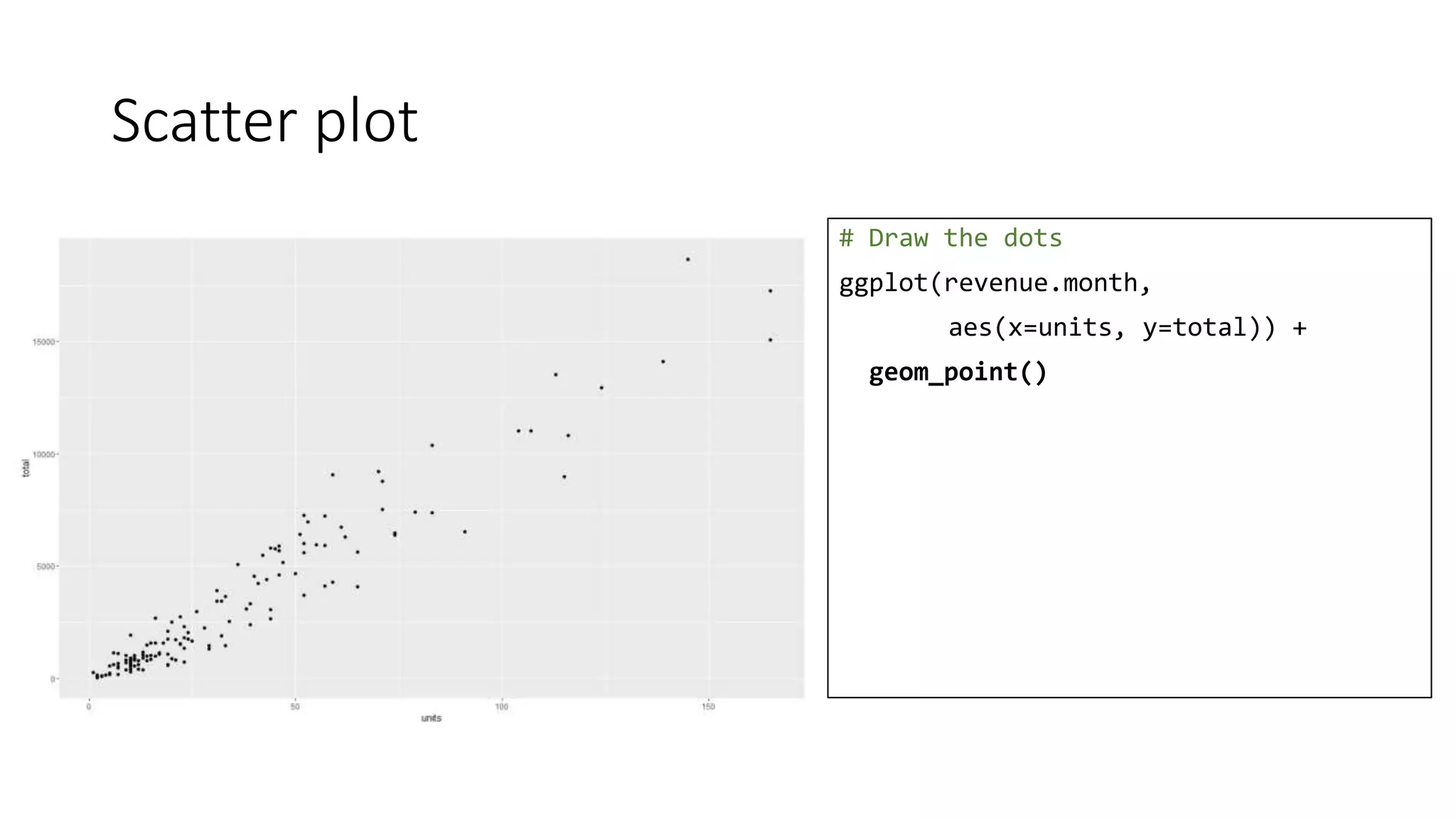
Scatter plot
# Draw the dots
ggplot(revenue.month,
aes(x=units, y=total)) +
geom_point()
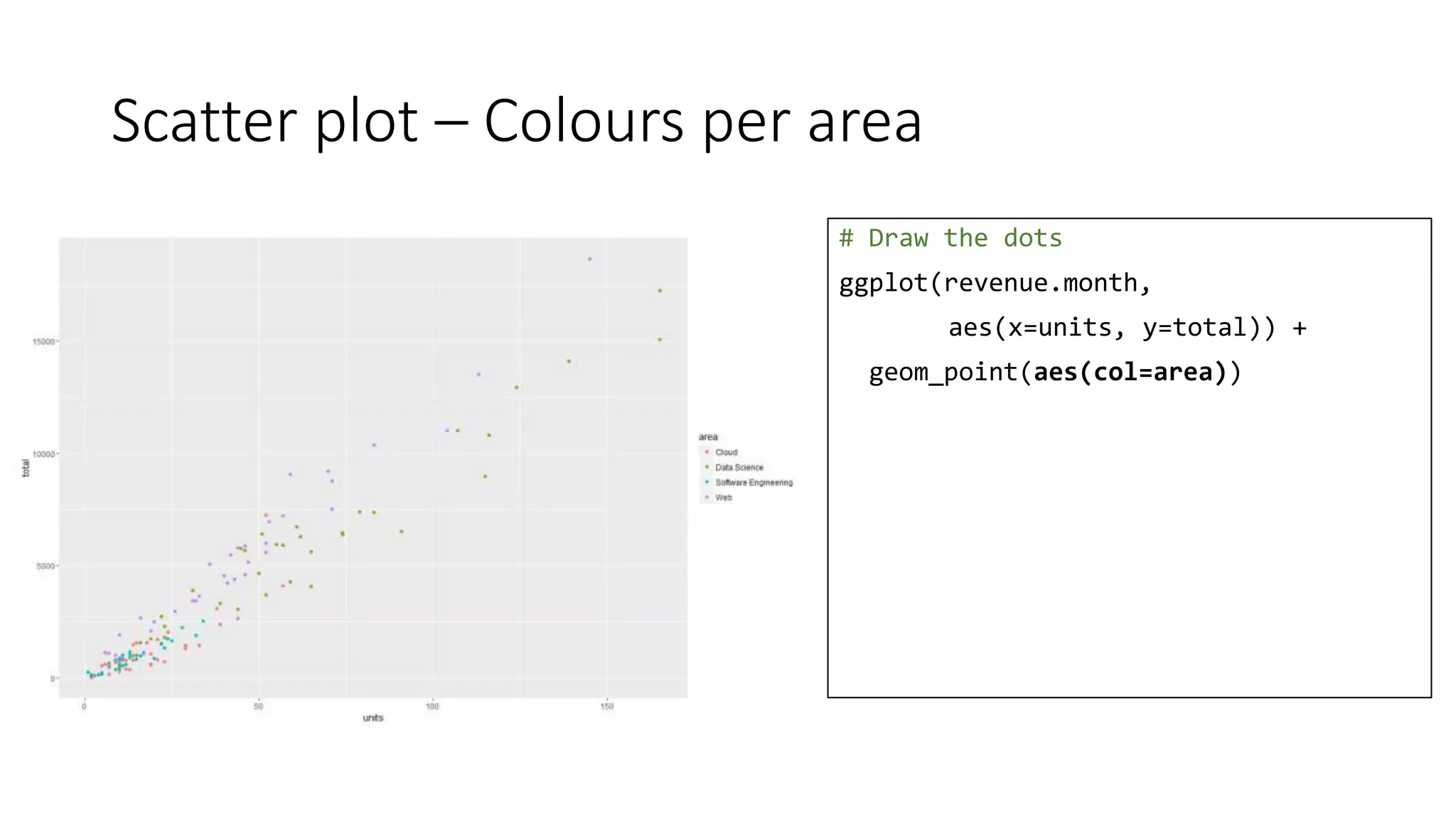
Scatter plot – Colours per area
# Draw the dots
ggplot(revenue.month,
aes(x=units, y=total)) +
geom_point(aes(col=area))
Scatter plot – Labels
# Draw the dots
ggplot(revenue.month,
aes(x=units, y=total)) +
geom_point(aes(col=area)) +
ggtitle("Revenue by Units (All years)") +
ylab("Revenue [$]") +
xlab("Units")
Scatter plot – Dots’ size
# Draw the dots
ggplot(revenue.month,
aes(x=units, y=total)) +
geom_point(aes(col=area, size=dltotal)) +
ggtitle("Revenue by Units (All years)") +
ylab("Revenue [$]") +
xlab("Units")
Scatter plot – Lines
# Draw the dots
ggplot(revenue.month,
aes(x=units, y=total)) +
geom_point(aes(col=area)) +
geom_line() +
ggtitle("Revenue by Units (All years)") +
ylab("Revenue [$]") +
xlab("Units")
Scatter plot – ab line
# Draw the dots
ggplot(revenue.month,
aes(x=units, y=total)) +
geom_point(aes(col=area)) +
geom_abline(intercept = 0, slope = 110) +
ggtitle("Revenue by Units (All years)") +
ylab("Revenue [$]") +
xlab("Units")
Scatter plot – smooth line
# Draw the dots
ggplot(revenue.month,
aes(x=units, y=total)) +
geom_point(aes(col=area)) +
stat_smooth() +
ggtitle("Revenue by Units (All years)") +
ylab("Revenue [$]") +
xlab("Units")
Scatter plot – smooth line
# Draw the dots
ggplot(revenue.month,
aes(x=units, y=total)) +
geom_point(aes(col=area)) +
stat_smooth() +
ggtitle("Revenue by Units (All years)") +
ylab("Revenue [$]") +
xlab("Units") +
theme(legend.title=element_text(
colour="chocolate", size=16,
face="bold"))
Scatter plot – smooth line
# Draw the dots
ggplot(revenue.month,
aes(x=units, y=total)) +
geom_point(aes(col=area)) +
stat_smooth() +
ggtitle("Revenue by Units (All years)") +
ylab("Revenue [$]") +
xlab("Units") +
theme(legend.title=element_text(
colour="chocolate", size=16,
face="bold")) +
scale_color_discrete(
name="Learning Areas")
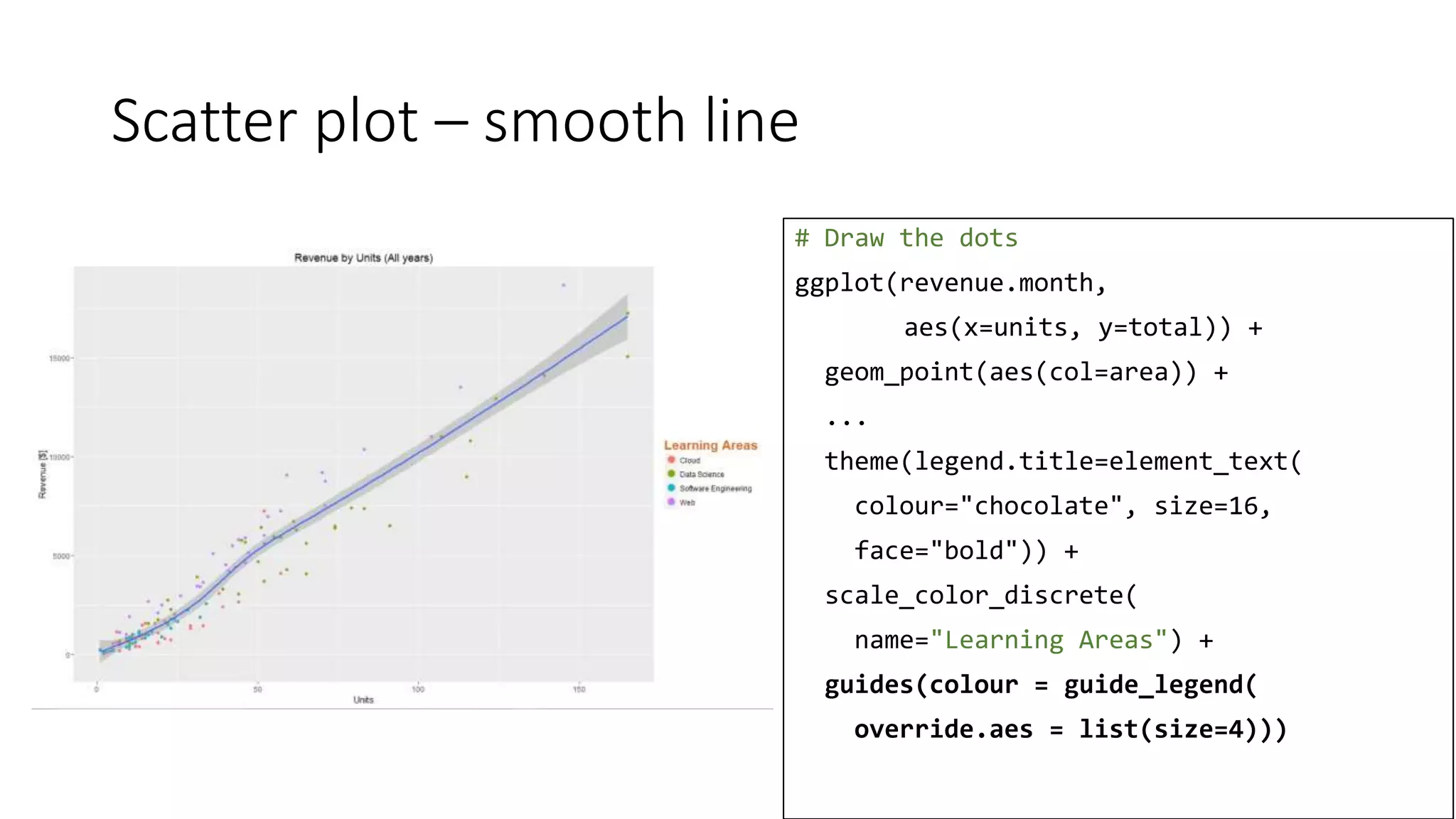
Scatter plot – smooth line
# Draw the dots
ggplot(revenue.month,
aes(x=units, y=total)) +
geom_point(aes(col=area)) +
...
theme(legend.title=element_text(
colour="chocolate", size=16,
face="bold")) +
scale_color_discrete(
name="Learning Areas") +
guides(colour = guide_legend(
override.aes = list(size=4)))
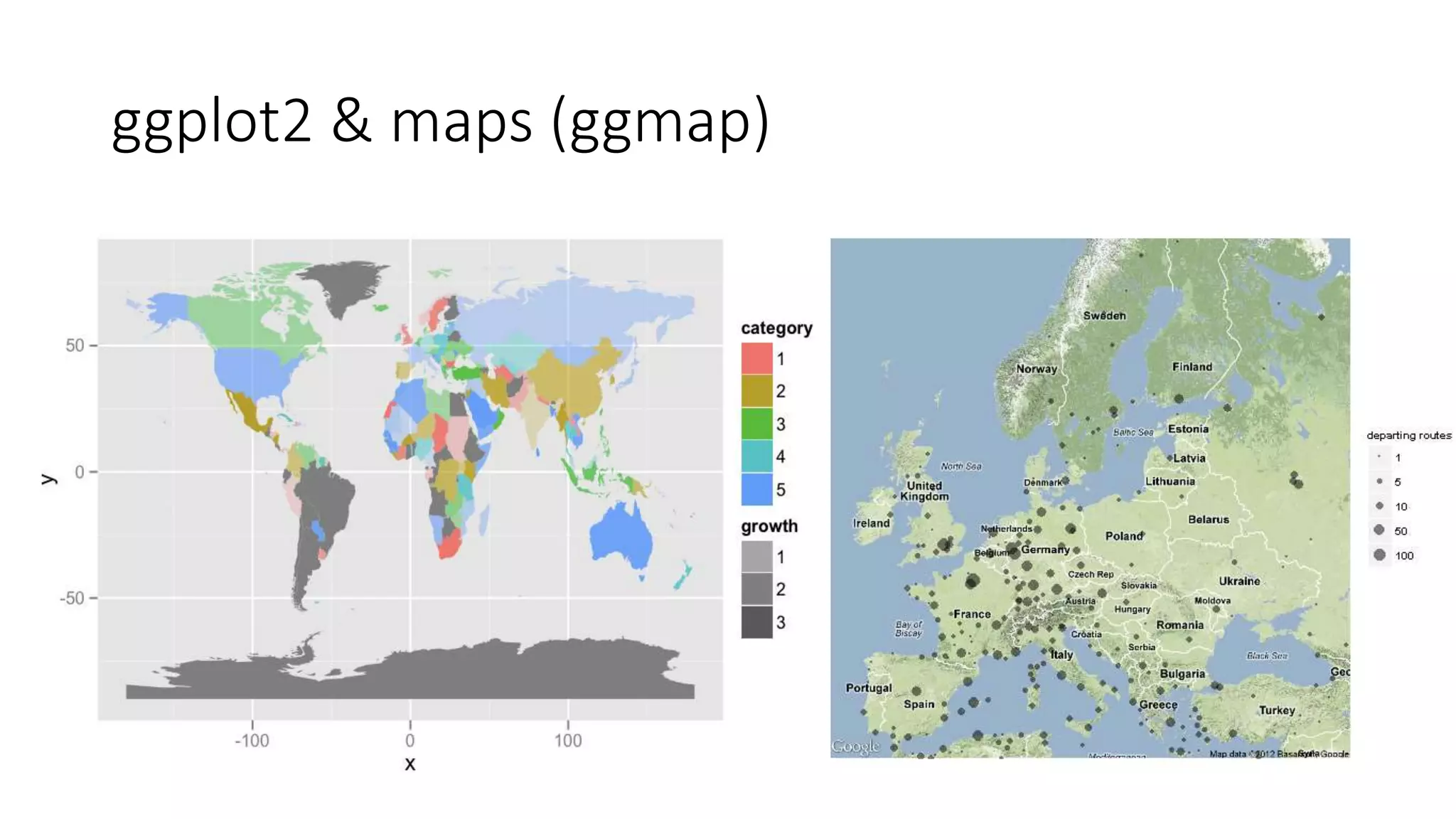
ggplot2 & maps (ggmap)
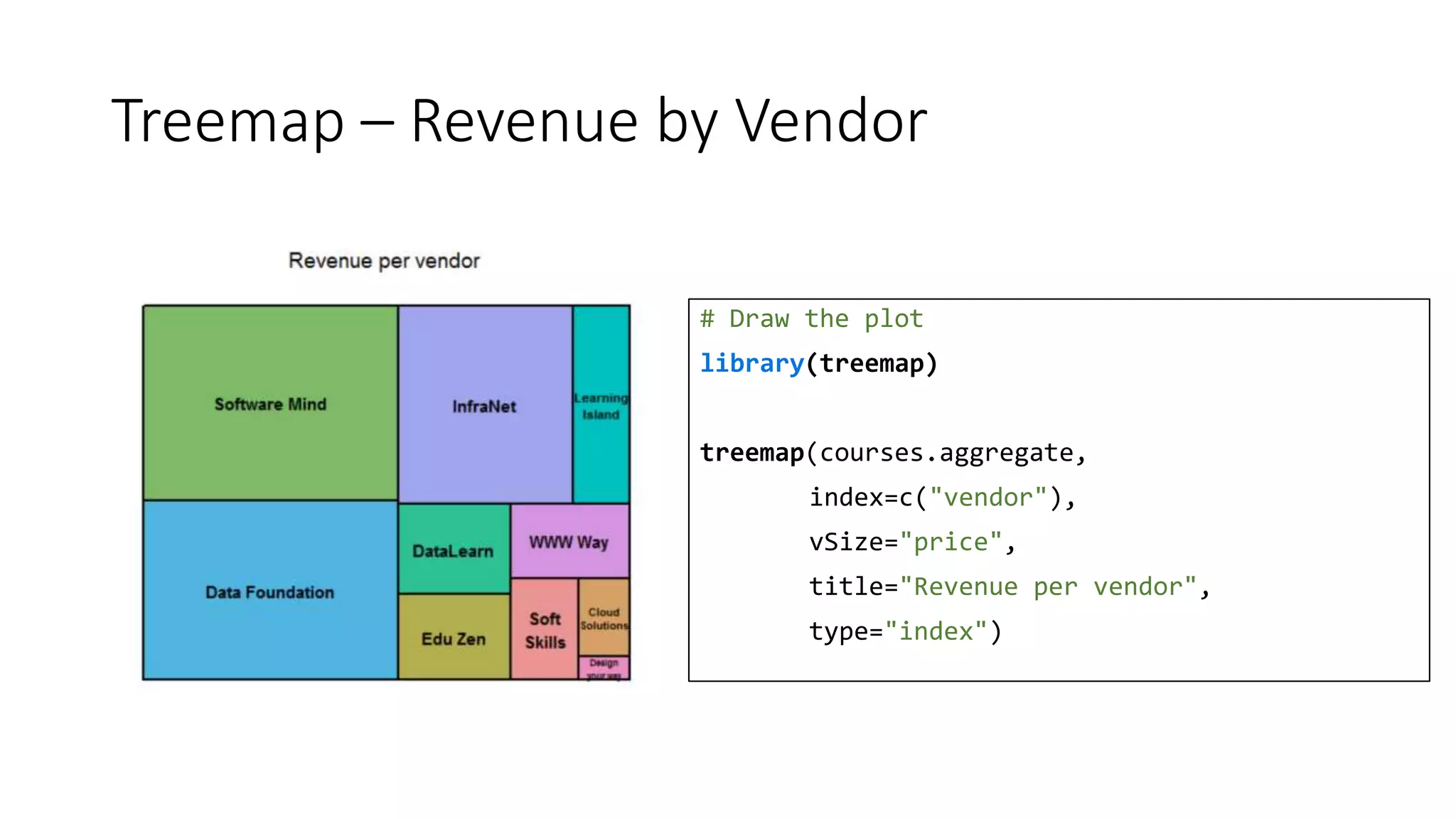
Treemap – Revenue by Vendor
# Draw the plot
library(treemap)
treemap(courses.aggregate,
index=c("vendor"),
vSize="price",
title="Revenue per vendor",
type="index")
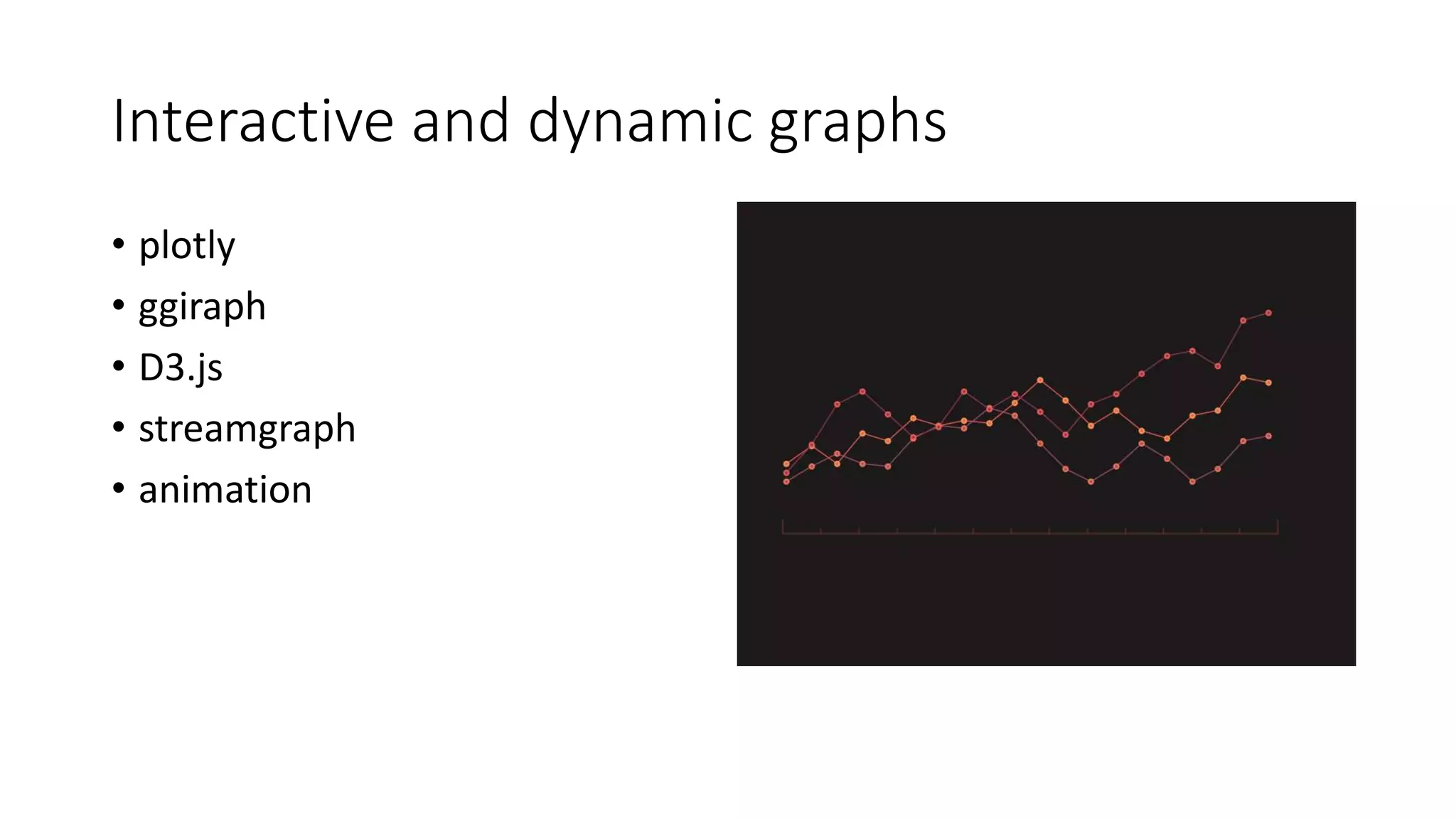
Interactive and dynamic graphs
• plotly
• ggiraph
• D3.js
• streamgraph
• animation
plotly - Interactive graphs
# Draw the plot
library(plotly)
plot_ly(revenue.month.vendor,
x=~units, y=~total, mode="markers",
color = ~factor(area),
size=~dltotal/1000,
text=~paste("Units:",
units, "</br>Revenue", total,
"</br>DataLearn cut:", dltotal),
hoverinfo="text", type="scatter") %>%
layout(title="Revenue per vendor",
xaxis=list(title="Units"),
yaxis=list(title="Revenue [$]"))
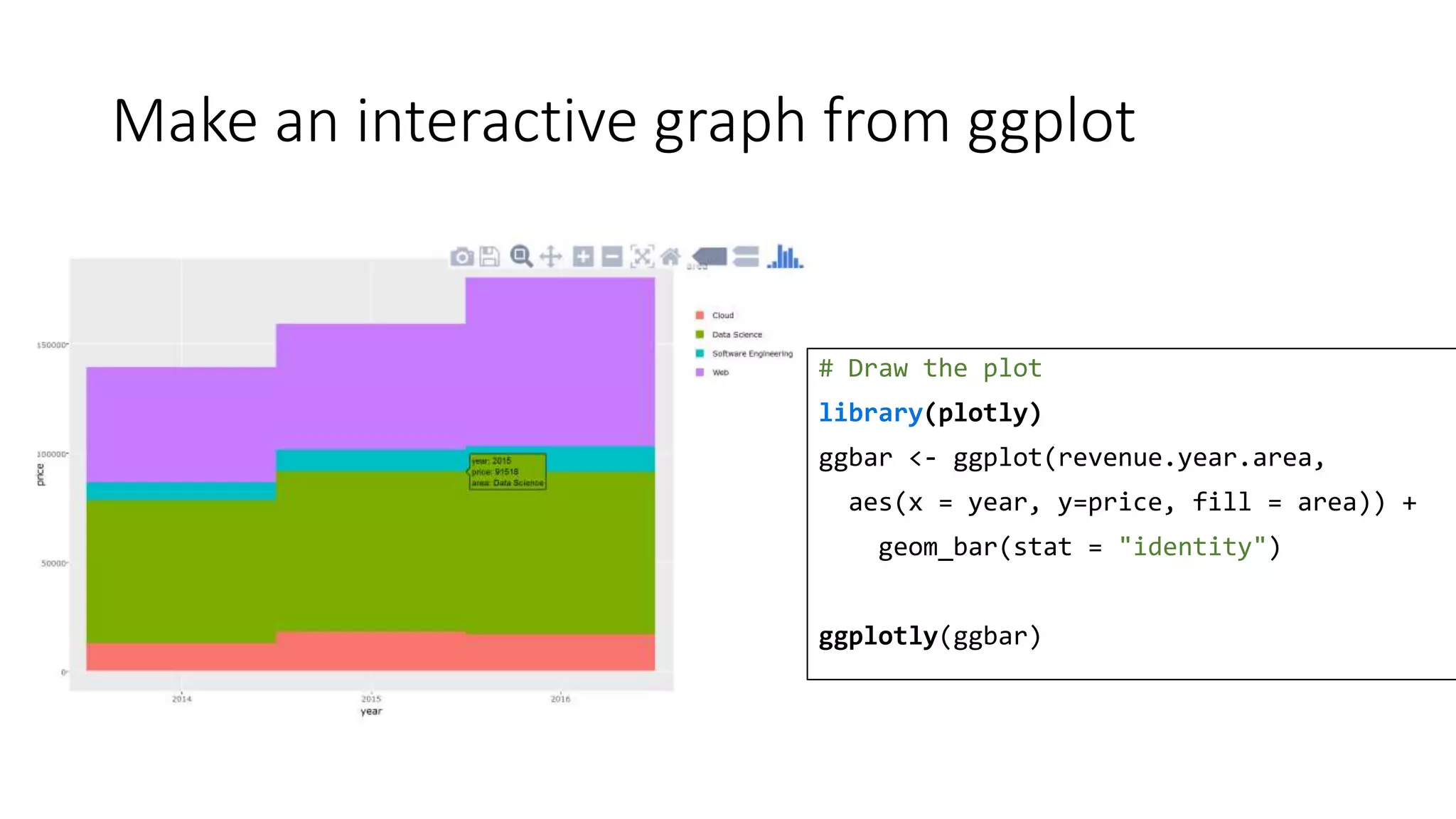
Make an interactive graph from ggplot
# Draw the plot
library(plotly)
ggbar <- ggplot(revenue.year.area,
aes(x = year, y=price, fill = area)) +
geom_bar(stat = "identity")
ggplotly(ggbar)
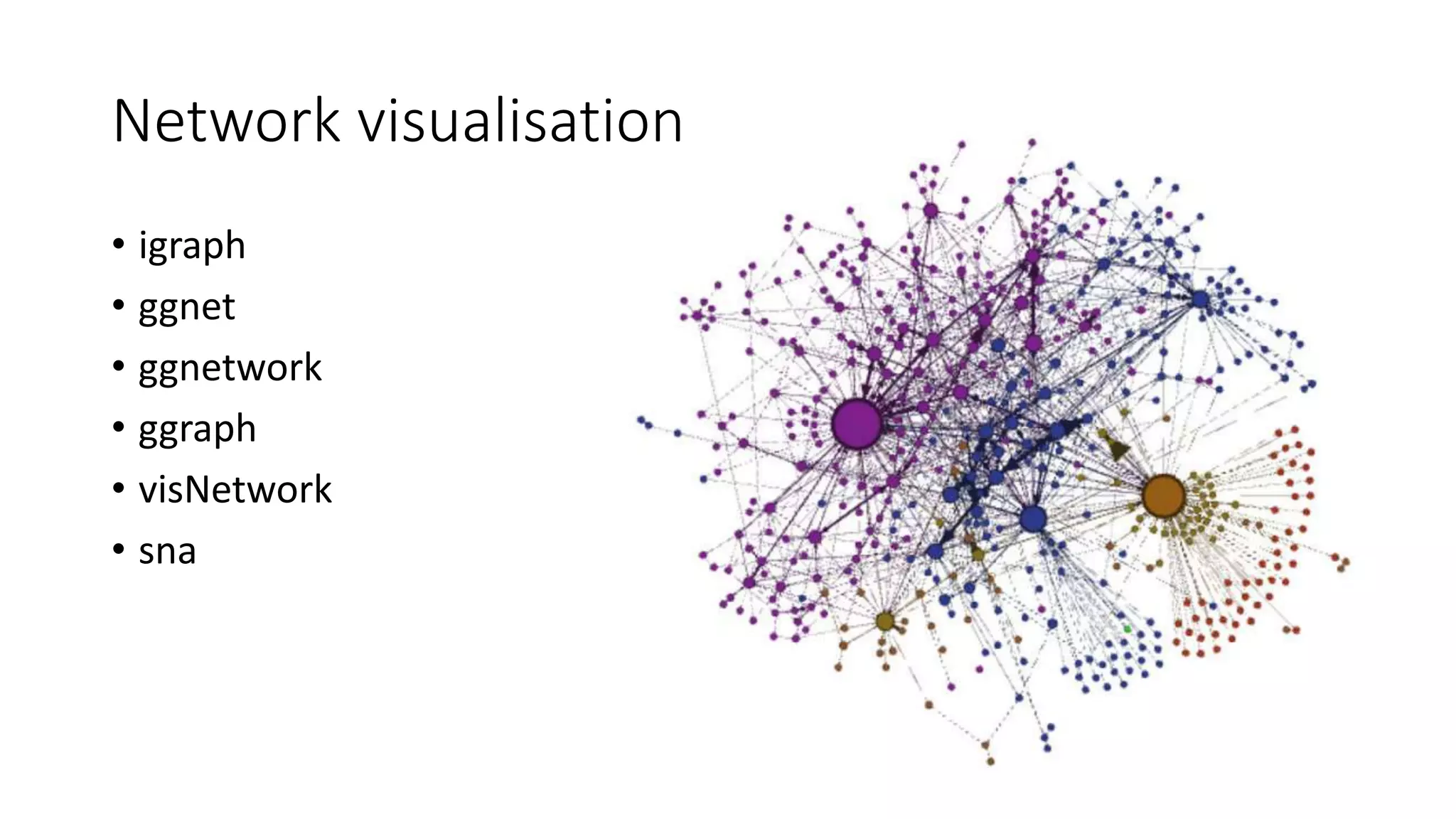
Network visualisation
• igraph
• ggnet
• ggnetwork
• ggraph
• visNetwork
• sna
igraph – Courses taken by Users
# Draw the plot
user.area <- data.frame(
user=courses.aggregate$name,
area=courses.aggregate$area)
user.area <- user.area[
sample(1:500, 50, replace=FALSE),]
user.area <- aggregate(
cbind(user.area[0], width=1),
user.area, length)
# Build the graph
library(igraph)
user.area.graph <- graph.data.frame(
user.area, directed = FALSE,
vertices=vertices)
plot(user.area.graph, main="Courses taken by users")
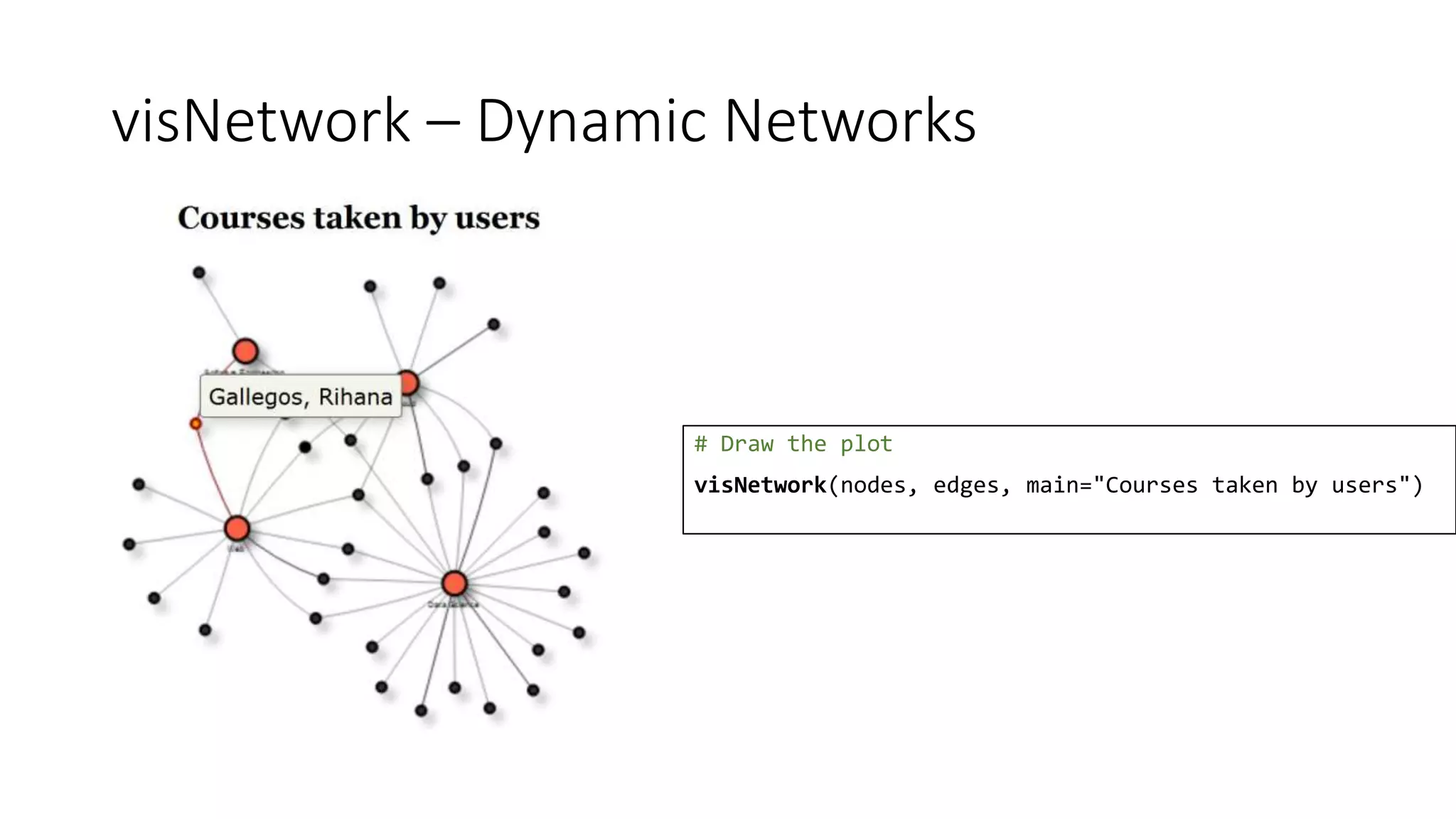
visNetwork – Dynamic Networks
# Draw the plot
visNetwork(nodes, edges, main="Courses taken by users")
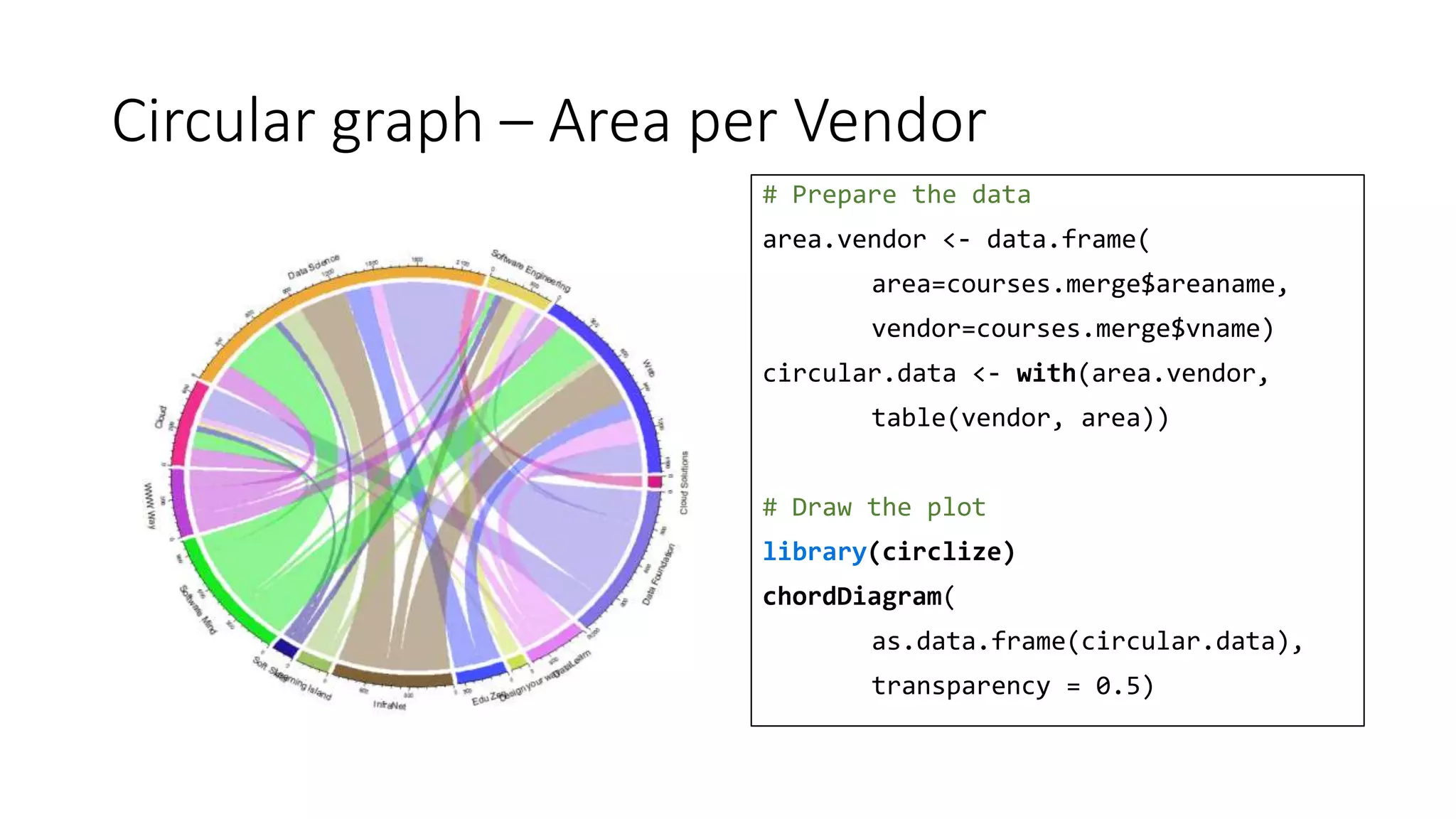
Circular graph – Area per Vendor
# Prepare the data
area.vendor <- data.frame(
area=courses.merge$areaname,
vendor=courses.merge$vname)
circular.data <- with(area.vendor,
table(vendor, area))
# Draw the plot
library(circlize)
chordDiagram(
as.data.frame(circular.data),
transparency = 0.5)
Keep in touch
BarbaraFusinska.com
@BasiaFusinska

A picture speaks a thousand words - Data Visualisation with R

  • 1.
    A picture speaksa thousand words Data Visualisation with R Barbara Fusinska @BasiaFusinska
  • 2.
    About me Programmer Machine Learning DataSolutions Architect @BasiaFusinska
  • 3.
    Agenda • Exploratory DataAnalysis • Elements of EDA • Visual artifacts • R Visualisation ecosystem • Base/Lattice/ggplot2 comparison • Layers in ggplot2 • Interesting visualisations
  • 4.
  • 5.
    Exploratory Data Analysis(EDA) is an approach to analysing data sets to summarize their main characteristics, often with visual methods. A statistical model can be used or not, but primarily EDA is for seeing what the data can tell us beyond the formal modelling or hypothesis testing task.
  • 6.
    Why do weneed visualisations? Insight Impress
  • 7.
    Use Case -Online Learning Platform User Area Vendor Course Course Taken Cloud (25%) Data Science (50%) Web (15%) Software Engineering (10%) Software Mind (20%) Cloud Solutions (3%) InfraNet (12%) DataLearn (7%) WWW Way (11%) Soft Skills (4%) Edu Zen (10%) Data Foundation (25%) Learning Island (5%) Design Your Way (3%) 2014 2015 2016 Prices: 10$ (25%) 99$ (20%) 19$ (15%) 250 (15%) 49$ (20%) 500 (5%)
  • 8.
    courses.aggregate Name Area VendorYear Month Price [$] Perez, Lisa Data Science Data Foundation 2015 7 99 Tran, Janiro Software Engineering DataLearn 2016 2 10 Bajwa, John Cloud InfraNet 2015 9 250 Lindsey, Aaron Web Software Mind 2014 6 19 Cooper, Duncan Software Engineering Learning Island 2014 7 250 Grumbach, Alexander Web Design Your Way 2015 2 99
  • 10.
    Categorical data -count occurrences Cloud Data Science Software Engineering Web 693 2271 462 1574 # Count occurrences courses.areas <- table(courses.aggregate$area
  • 11.
    Bar plot –Number of courses taken by Area # Draw the plot barplot(courses.areas, ylab="Count", main="Areas")
  • 12.
    Categorical data countoccurrences # Count occurrences vendor.area <- table(data.frame( courses.aggregate$area, courses.aggregate$vendor)) CSol DataF DataL DesYW EZen … Cloud 0 263 49 28 0 Data Science 91 636 90 0 192 Software 0 44 83 95 0 Web 0 267 207 0 158
  • 13.
    Stacked Bar plot– Areas by Vendors # Draw the plot barplot(vendor.area, ylab="Count", main="Areas by Vendor", col=rainbow(4)) legend("topright", fill=rainbow(4), legend=row.names(vendor.area ))
  • 14.
    Stacked Beside Barplot – Areas by Year # Count occurrences areas.year <- table(data.frame( courses.aggregate$area, courses.aggregate$year)) # Draw the plot barplot(areas.year, ylab="Count", main="Areas By Year", col=rainbow(4), beside=TRUE) legend("topleft", fill=rainbow(4), legend=row.names(areas.year))
  • 15.
    Stacked Bar plot– Areas by Year # Draw the plot barplot(areas.year, ylab="Count", main="Areas by year", col=rainbow(4)) legend("topright", legend=row.names(areas.year), fill=rainbow(4))
  • 16.
    100% Stacked Barplot – Areas by Year # Draw the plot barplot(prop.table(areas.year, 2)*100, col=rainbow(4), ylab="%", main="Years by Areas") legend("topright", legend=row.names(areas.year), fill=rainbow(4))
  • 17.
    Pie chart –Areas # Areas occurrences per_labels <- round( courses.areas/sum(courses.areas) * 100, 1) per_labels <- paste(per_labels, "%", sep="") # Draw the plot pie(courses.areas, col=rainbow(4), labels=per_labels) legend("topleft", fill=rainbow(4) legend=names(courses.areas))
  • 19.
    Numerical data –summarise # Calculate yearly revenue revenue.year <- aggregate(price~year, data=courses.aggregate, sum) Year Price 2014 139001 2015 159002 2016 180197
  • 20.
    Bar plot –Revenue per year # Draw the plot barplot(revenue.year$price, names.arg = revenue.year$year, ylab="Count [$]", main="Revenue per year")
  • 21.
    Categorical data -count occurrences # Prepare data library(reshape) revenue.year.area <- aggregate( price ~ year + area, data=courses.aggregate, sum) rya <- t(cast(revenue.year.area, year ~ area, value="price")) 2014 2015 2016 Cloud 127474 17873 16819 Data Science 65639 73645 74289 Software 8342 9976 11781 Web 52556 57508 77308
  • 22.
    Stacked Bar plot– Revenue by Year and Area # Draw the plot barplot(rya, col=rainbow(4), ylab="Count [$]", main="Revenue by Year & Area") legend("topright", fill=rainbow(4), legend=row.names(rya))
  • 23.
    Stacked Beside Barplot – Areas Revenue by Year # Draw the plot barplot(rya, col=rainbow(4), ylab="Count [$]", main="Revenue by Year & Area", beside=TRUE) legend("topright", fill=rainbow(3), legend=row.names(rya))
  • 24.
  • 25.
    Histogram – CoursePrices # Draw the plot hist(courses.aggregate$price, main="Ditribution of prices", xlab="Course price", breaks=20, col=heat.colors(20))
  • 26.
    Histogram – CoursePrices per month # Prepare the data revenue.year.month <- aggregate(price ~ year + month, data=courses.aggregate, sum) # Draw the plot hist(revenue.year.month$price, main="Distribution of revenue per month", xlab="Revenue per month", breaks=20, col=heat.colors(20))
  • 27.
    Density – CoursePrices per month # Probability density hist(revenue.year.month$price, main="Distribution of revenue per month", xlab="Revenue per month", breaks=20, col=heat.colors(20), prob=TRUE) lines(density(revenue.year.month$price))
  • 28.
  • 29.
    Bar & lineplot – Revenue by month # Draw the plot revenue.bar <- barplot( revenue.month$price, names.arg = labels , ylab="Revenue [$]", main="2016 Revenue by month") lines(x=revenue.bar, y=revenue.month$units*100) points(x=revenue.bar, y=revenue.month$units*100)
  • 30.
    Line plot &trend – Revenue by month # Draw the plot months <- 1:12 plot(price ~ month, data=revenue.month, xaxt="n", type="l", ylab="Revenue [$]", xlab="", main="Revenue in 2016") axis(1, at=months, labels=labels) # Display the trend lines(c(1,12), c(25000, 12000), type="l", lty=2, col="blue") legend("topright", c("Revenue", "Trend"), col=c("black", "blue"), lty=1:2)
  • 31.
    Line plot &trend – Revenue by Units # Draw the plot plot(price~units, data=revenue.month, xlab="Units", ylab="Revenue [$]", main="Revenue by Units in 2016") lines(c(30, 380), c(3000, 35000), type='l', lty=2, col="blue") legend("topleft", c("revenue/freq", "trend"), col=c("black", "blue"), lty=c(0,2), pch=c(21, -1))
  • 32.
    Line plot &trend – Revenue by Units # Draw the plot plot(price~units, data=revenue.month.area, xlab="Units", ylab="Revenue [$]", col=area, main="Revenue by Units (All years)") legend("topleft", legend=levels(revenue.month.area$area), col=1:length( levels(revenue.month.area$area)), pch=21, text.width = 30)
  • 33.
    base vs. latticevs. ggplot2
  • 34.
    Stacked Bar chart– base vs. lattice barplot(rya, col=rainbow(4), ylab="Count [$]", main="Revenue by Year & Area") legend("topright", fill=rainbow(4), legend=row.names(rya)) barchart(Cloud + `Data Science` + `Software Engineering` + Web ~ year data=t(rya), auto.key=TRUE, stack=TRUE, horizontal=FALSE, ylab="Count [$]", main="Areas by Year")
  • 35.
    Stacked Bar chart– base vs. ggplot2 barplot(rya, col=rainbow(4), ylab="Count [$]", main="Revenue by Year & Area") legend("topright", fill=rainbow(4), legend=row.names(rya)) ggplot(revenue.year.area, aes(x = year, y=price, fill = area)) + geom_bar(stat = "identity") + ggtitle("Revenue by Year & Area") + ylab("Count [$]")
  • 36.
    Histogram – basevs. lattice hist(revenue.year.month$price, main="Ditribution of revenue per month", xlab="Revenue per month", breaks=20, col=heat.colors(20)) histogram(~price, data=revenue.year.month, main="Ditribution of revenue per month", xlab="Revenue per month", breaks = 20, type = "count", col=heat.colors(20))
  • 37.
    Histogram – basevs. ggplot2 hist(revenue.year.month$price, main="Ditribution of revenue per month", xlab="Revenue per month", breaks=20, col=heat.colors(20)) ggplot(revenue.year.month, aes(x = price)) + geom_histogram(stat = "bin", binwidth=2500, aes(fill=..count..)) + ggtitle("Ditribution of revenue per month") + xlab("Revenue per month")
  • 38.
    Box plot –base vs. lattice boxplot(price~year, data=revenue.year.month, col=2:4, main="Revenue by Year", xlab="Year", ylab="Revenue") boxplot(price~year, data=revenue.year.month, col=2:4, main="Revenue by Year", xlab="Year", ylab="Revenue")
  • 39.
    Box plot –base vs. ggplot boxplot(price~year, data=revenue.year.month, col=2:4, main="Revenue by Year", xlab="Year", ylab="Revenue") ggplot(revenue.year.month, aes(x=factor(year), y=price)) + geom_boxplot(aes(fill=factor(year))) + ggtitle("Total by Year") + ylab("Revenue") + xlab("Year")
  • 40.
    Scatter plot –base vs. lattice plot(price~units, data=revenue.month.area, xlab="Units", ylab="Revenue [$]", col=area, main="Revenue by Units (All years)") # And you need legend manually created xyplot(price~units, data=revenue.month.area, xlab="Units", ylab="Revenue [$]", pch=19, group = area, auto.key = TRUE)
  • 41.
    Scatter plot –base vs. ggplot2 plot(price~units, data=revenue.month.area, xlab="Units", ylab="Revenue [$]", col=area, main="Revenue by Units (All years)") # And you need legend manually created ggplot(revenue.month.area, aes(x=units, y=price)) + geom_point(aes(col=area)) + ggtitle("Revenue by Units (All years)") + ylab("Revenue [$]") + xlab("Units")
  • 42.
  • 43.
    Scatter plot # Drawthe dots ggplot(revenue.month, aes(x=units, y=total)) + geom_point()
  • 44.
    Scatter plot –Colours per area # Draw the dots ggplot(revenue.month, aes(x=units, y=total)) + geom_point(aes(col=area))
  • 45.
    Scatter plot –Labels # Draw the dots ggplot(revenue.month, aes(x=units, y=total)) + geom_point(aes(col=area)) + ggtitle("Revenue by Units (All years)") + ylab("Revenue [$]") + xlab("Units")
  • 46.
    Scatter plot –Dots’ size # Draw the dots ggplot(revenue.month, aes(x=units, y=total)) + geom_point(aes(col=area, size=dltotal)) + ggtitle("Revenue by Units (All years)") + ylab("Revenue [$]") + xlab("Units")
  • 47.
    Scatter plot –Lines # Draw the dots ggplot(revenue.month, aes(x=units, y=total)) + geom_point(aes(col=area)) + geom_line() + ggtitle("Revenue by Units (All years)") + ylab("Revenue [$]") + xlab("Units")
  • 48.
    Scatter plot –ab line # Draw the dots ggplot(revenue.month, aes(x=units, y=total)) + geom_point(aes(col=area)) + geom_abline(intercept = 0, slope = 110) + ggtitle("Revenue by Units (All years)") + ylab("Revenue [$]") + xlab("Units")
  • 49.
    Scatter plot –smooth line # Draw the dots ggplot(revenue.month, aes(x=units, y=total)) + geom_point(aes(col=area)) + stat_smooth() + ggtitle("Revenue by Units (All years)") + ylab("Revenue [$]") + xlab("Units")
  • 50.
    Scatter plot –smooth line # Draw the dots ggplot(revenue.month, aes(x=units, y=total)) + geom_point(aes(col=area)) + stat_smooth() + ggtitle("Revenue by Units (All years)") + ylab("Revenue [$]") + xlab("Units") + theme(legend.title=element_text( colour="chocolate", size=16, face="bold"))
  • 51.
    Scatter plot –smooth line # Draw the dots ggplot(revenue.month, aes(x=units, y=total)) + geom_point(aes(col=area)) + stat_smooth() + ggtitle("Revenue by Units (All years)") + ylab("Revenue [$]") + xlab("Units") + theme(legend.title=element_text( colour="chocolate", size=16, face="bold")) + scale_color_discrete( name="Learning Areas")
  • 52.
    Scatter plot –smooth line # Draw the dots ggplot(revenue.month, aes(x=units, y=total)) + geom_point(aes(col=area)) + ... theme(legend.title=element_text( colour="chocolate", size=16, face="bold")) + scale_color_discrete( name="Learning Areas") + guides(colour = guide_legend( override.aes = list(size=4)))
  • 53.
  • 54.
    Treemap – Revenueby Vendor # Draw the plot library(treemap) treemap(courses.aggregate, index=c("vendor"), vSize="price", title="Revenue per vendor", type="index")
  • 55.
    Interactive and dynamicgraphs • plotly • ggiraph • D3.js • streamgraph • animation
  • 56.
    plotly - Interactivegraphs # Draw the plot library(plotly) plot_ly(revenue.month.vendor, x=~units, y=~total, mode="markers", color = ~factor(area), size=~dltotal/1000, text=~paste("Units:", units, "</br>Revenue", total, "</br>DataLearn cut:", dltotal), hoverinfo="text", type="scatter") %>% layout(title="Revenue per vendor", xaxis=list(title="Units"), yaxis=list(title="Revenue [$]"))
  • 57.
    Make an interactivegraph from ggplot # Draw the plot library(plotly) ggbar <- ggplot(revenue.year.area, aes(x = year, y=price, fill = area)) + geom_bar(stat = "identity") ggplotly(ggbar)
  • 58.
    Network visualisation • igraph •ggnet • ggnetwork • ggraph • visNetwork • sna
  • 59.
    igraph – Coursestaken by Users # Draw the plot user.area <- data.frame( user=courses.aggregate$name, area=courses.aggregate$area) user.area <- user.area[ sample(1:500, 50, replace=FALSE),] user.area <- aggregate( cbind(user.area[0], width=1), user.area, length) # Build the graph library(igraph) user.area.graph <- graph.data.frame( user.area, directed = FALSE, vertices=vertices) plot(user.area.graph, main="Courses taken by users")
  • 60.
    visNetwork – DynamicNetworks # Draw the plot visNetwork(nodes, edges, main="Courses taken by users")
  • 61.
    Circular graph –Area per Vendor # Prepare the data area.vendor <- data.frame( area=courses.merge$areaname, vendor=courses.merge$vname) circular.data <- with(area.vendor, table(vendor, area)) # Draw the plot library(circlize) chordDiagram( as.data.frame(circular.data), transparency = 0.5)
  • 63.