




















Qualitative Research
vs Quantitative Research
Dan Fleetwood
About the Presenters
President
Research & Insights
Harshad Deshpande
Director Higher Education &
Non Profit
Agenda
● Qualitative Research versus Quantitative Research
● Heatmap and Hotspot Testing
● Card Sorting
● Video Discussions (Online Focus Groups)
● LiveCast (Beta feature)
● Q&A
Qualitative Research
vs Quantitative Research
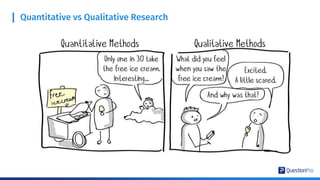
Quantitative vs Qualitative Research
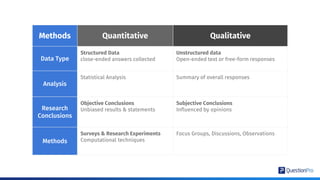
Methods Quantitative Qualitative
Data Type
Structured Data
close-ended answers collected
Unstructured data
Open-ended text or free-form responses
Analysis
Statistical Analysis Summary of overall responses
Research
Conclusions
Objective Conclusions
Unbiased results & statements
Subjective Conclusions
Influenced by opinions
Methods
Surveys & Research Experiments
Computational techniques
Focus Groups, Discussions, Observations
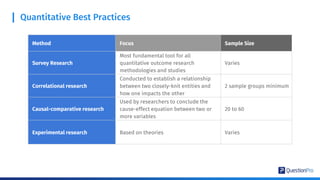
Quantitative Best Practices
Method Focus Sample Size
Survey Research
Most fundamental tool for all
quantitative outcome research
methodologies and studies
Varies
Correlational research
Conducted to establish a relationship
between two closely-knit entities and
how one impacts the other
2 sample groups minimum
Causal-comparative research
Used by researchers to conclude the
cause-effect equation between two or
more variables
20 to 60
Experimental research Based on theories Varies
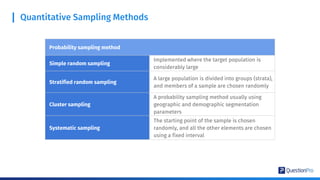
Quantitative Sampling Methods
Probability sampling method
Simple random sampling
Implemented where the target population is
considerably large
Stratified random sampling
A large population is divided into groups (strata),
and members of a sample are chosen randomly
Cluster sampling
A probability sampling method usually using
geographic and demographic segmentation
parameters
Systematic sampling
The starting point of the sample is chosen
randomly, and all the other elements are chosen
using a fixed interval
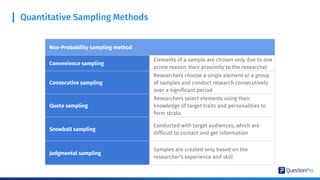
Quantitative Sampling Methods
Non-Probability sampling method
Convenience sampling
Elements of a sample are chosen only due to one
prime reason: their proximity to the researcher
Consecutive sampling
Researchers choose a single element or a group
of samples and conduct research consecutively
over a significant period
Quota sampling
Researchers select elements using their
knowledge of target traits and personalities to
form strata
Snowball sampling
Conducted with target audiences, which are
difficult to contact and get information
Judgmental sampling
Samples are created only based on the
researcher’s experience and skill
Why Do Qualitative Research?
Humanize The numbers
Context is everything!
● Paint the story
Qualitative responses helps tell the story of the
specific project
● Empowers Key Stakeholders To Make
Quicker Business Decisions
Are they passionate and excited to strategize
next steps? Qualitative helps build excitement
around insights collected
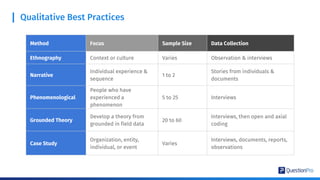
Qualitative Best Practices
Method Focus Sample Size Data Collection
Ethnography Context or culture Varies Observation & interviews
Narrative
Individual experience &
sequence
1 to 2
Stories from individuals &
documents
Phenomenological
People who have
experienced a
phenomenon
5 to 25 Interviews
Grounded Theory
Develop a theory from
grounded in field data
20 to 60
Interviews, then open and axial
coding
Case Study
Organization, entity,
individual, or event
Varies
Interviews, documents, reports,
observations
Mobile
Qualitative
Research
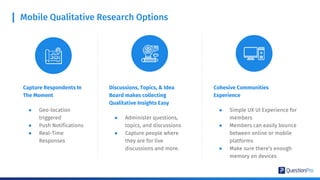
Mobile Qualitative Research Options
Capture Respondents In
The Moment
● Geo-location
triggered
● Push Notifications
● Real-Time
Responses
Discussions, Topics, & Idea
Board makes collecting
Qualitative Insights Easy
● Administer questions,
topics, and discussions
● Capture people where
they are for live
discussions and more.
Cohesive Communities
Experience
● Simple UX UI Experience for
members
● Members can easily bounce
between online or mobile
platforms
● Make sure there’s enough
memory on devices
Qualitative
Analytics
Qualitative Analytics
Word CloudAutomated
Text Categorization
Downloadable Text Reports
All Formats
Q/A
Derive optimal research insights through
Heatmap and HotSpot testing
Heatmap
Analysis
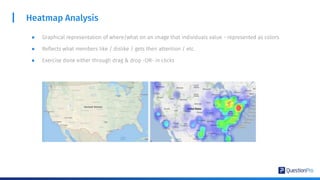
Heatmap Analysis
● Graphical representation of where/what on an image that individuals value - represented as colors
● Reflects what members like / dislike / gets their attention / etc.
● Exercise done either through drag & drop -OR- in clicks
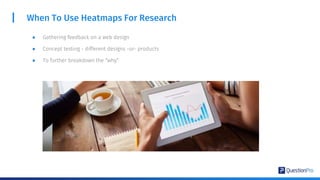
When To Use Heatmaps For Research
● Gathering feedback on a web design
● Concept testing - different designs -or- products
● To further breakdown the “why”
Advantages Of Heatmaps
● Saves time & resources converting qualitative into quantitative
● Deeper insights
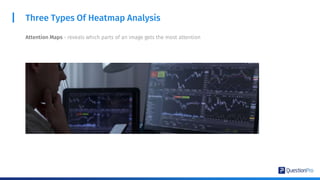
Three Types Of Heatmap Analysis
Attention Maps - reveals which parts of an image gets the most attention
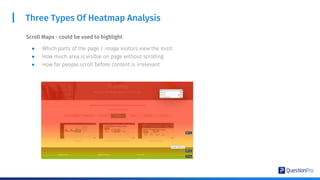
Three Types Of Heatmap Analysis
Scroll Maps - could be used to highlight
● Which parts of the page / image visitors view the most
● How much area is visible on page without scrolling
● How far people scroll before content is irrelevant
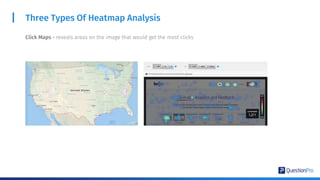
Three Types Of Heatmap Analysis
Click Maps - reveals areas on the image that would get the most clicks
HotSpot Image
Testing
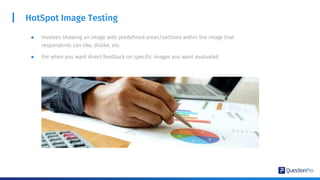
HotSpot Image Testing
● Involves showing an image with predefined areas/sections within the image that
respondents can like, dislike, etc.
● For when you want direct feedback on specific images you want evaluated
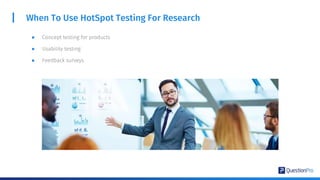
When To Use HotSpot Testing For Research
● Concept testing for products
● Usability testing
● Feedback surveys
Advantages of HotSpot
● Quick feedback
● Straightforward/exact insights
● Another fun exercise for your respondents!
Q/A
Card Sorting
What is Card Sorting?
Card sorting is a highly interactive question type that
respondents use to sort answer options into specific buckets
which helps to conduct user research. Answers rank from the
least to the most crucial answer options. These questions are
highly engaging and require a more in-depth level interaction
with the survey, which means they are preferred to question
types that use radio buttons, single select, etc.
Use Case
I am a brand that wants to derive consumer insights from an
audience about features that they want to categorize or bucket into
predetermined segments, I can use the card sorting question type
that is highly engaging.
I also want that information that is in buckets to be ranked from
most to least important to get macro and micro level insights into a
person’s decision making.
I can make product or service tweaks on the basis of the decision
making of an audience. I can even price depending on importance of
different vectors.
Card Sorting Question Type
Card Sorting allows the respondent to group items into two or more
categories, and simultaneously rank the items within those groups.
● Closed-card sorting: Predefined card categories for respondents
to use from. This question type is generally used when the
audience are promoters of the brand so the data collection is
from a mature audience.
● Open-card sorting: Users can define their own buckets. This
question type is generally used when the audience know the
brand but aren’t necessarily brand promoters.
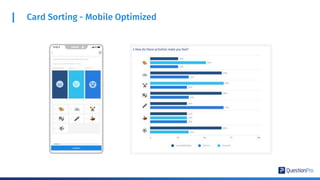
Card Sorting - Mobile Optimized
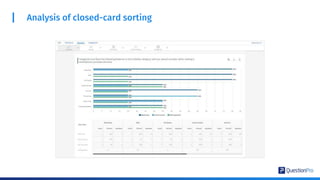
Closed Card Sorting Analysis
We offer an industry first, 4 types of viewing the data -
clustered bar chart, clustered column chart, stacked
bar chart, and stacked column chart. Look at data in a
way that works the best for your brand. You can also
view this data in a table representation to easily make
sense of its multiple categorizations. Each line item in
the answer is easily viewed under an easy to read
tabular format into the answer selections. This also
shows the average rank for each answer option.
Analysis of closed-card sorting
Open Card Sorting Analysis
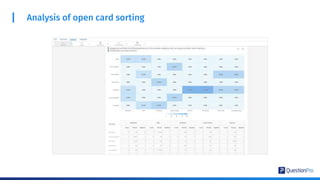
We offer a tabular heatmap that no one else in the industry offers. This
heatmap shows a percentage breakdown of categorization for each answer
option. For repeat answer options, we also provide predictive answer options
when respondents bucket options under a previously selected answer option.
This provides the ability to get a collective response from respondents.
The heatmap offers a snapshot view of each time an answer option was put
into a certain bucket by a respondent. The tabular view represents this same
data into a format that is just numerical but also easy to read. This also
displays the average rank for each answer option under each bucket.
Analysis of open card sorting
Q/A
Video Discussions
Using Communities
Many of our existing community customers have been
talking about how even though they are on lockdown,
they would like their insights collection to go on.
An online community is now one of the most powerful
methods and widely used methods to conduct
research. The ability to conduct video discussions
elevates the ability to manage online qualitative
research for our customers and researchers.
Why do we need Video Discussions?
● Use smart filters to enroll the most
relevant community members
● Community administrator and
researcher can
plan, schedule, and efficiently
conduct live discussions
● Replicate offline focus groups’
models from the comfort of your
online community.
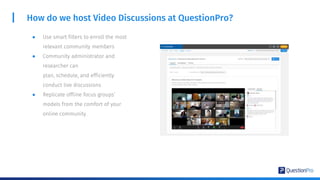
How do we host Video Discussions at QuestionPro?
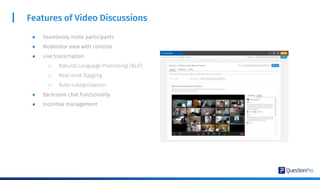
Features of Video Discussions
● Seamlessly invite participants
● Moderator view with controls
● Live transcription
○ Natural Language Processing (NLP)
○ Real-time flagging
○ Auto-categorization
● Backroom chat functionality
● Incentive management
LiveCast
Videos, Insights, Emotions
What is LiveCast?
LiveCast is a brand new question type introduced
by QuestionPro which will help you to collect real
time video feedback.
Once the videos are submitted QuestionPro uses
machine learning and natural language processing
to identify the underlying emotions within each
individual videos and generate comprehensive
reports
Today customers prefer to submit their feedback via videos rather than other conventional mediums.
People are constantly sharing video feedback via social media and other channels.
However, researchers avoid collecting feedback via videos as it is tedious to record videos and even more
complicated to analyze. It involves days of manual work to go through each video and come up with themes
and add annotations by hand.
Using the LiveCast technology, you can not only automate this process, but also uncover sentiments for
different themes across hours of video feedback in one go.
Why is LiveCast required?
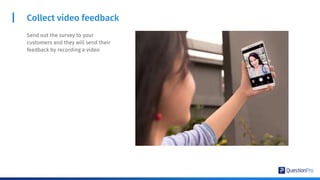
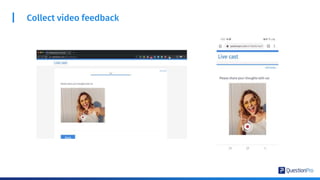
Collect video feedback
Send out the survey to your
customers and they will send their
feedback by recording a video
Collect video feedback
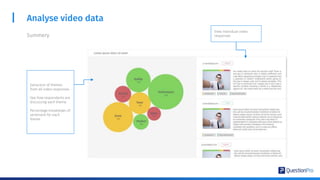
Analyse video data
Extraction of themes
from all video responses.
See how respondents are
discussing each theme.
Percentage breakdown of
sentiment for each
theme.
View individual video
responsesSummery
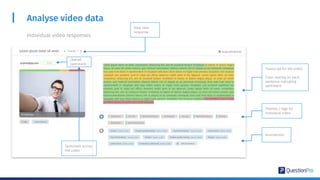
Analyse video data
Individual video responses
Transcript for the video.
Color overlay on each
sentence indicating
sentiment
Themes / tags for
individual video
Annotations
View next
response
Overall
sentiment
Sentiment across
the video
Q/A
dan.fleetwood@questionpro.com
linkedin.com/in/danfleetwood
Thank you!
harshad.deshpande@questionpro.com
linkedin.com/in/harshad-deshpande

Qualitative Research vs Quantitative Research - a QuestionPro Academic Webinar

  • 1.
  • 2.
    Dan Fleetwood About thePresenters President Research & Insights Harshad Deshpande Director Higher Education & Non Profit
  • 3.
    Agenda ● Qualitative Researchversus Quantitative Research ● Heatmap and Hotspot Testing ● Card Sorting ● Video Discussions (Online Focus Groups) ● LiveCast (Beta feature) ● Q&A
  • 4.
  • 5.
  • 6.
    Methods Quantitative Qualitative DataType Structured Data close-ended answers collected Unstructured data Open-ended text or free-form responses Analysis Statistical Analysis Summary of overall responses Research Conclusions Objective Conclusions Unbiased results & statements Subjective Conclusions Influenced by opinions Methods Surveys & Research Experiments Computational techniques Focus Groups, Discussions, Observations
  • 7.
    Quantitative Best Practices MethodFocus Sample Size Survey Research Most fundamental tool for all quantitative outcome research methodologies and studies Varies Correlational research Conducted to establish a relationship between two closely-knit entities and how one impacts the other 2 sample groups minimum Causal-comparative research Used by researchers to conclude the cause-effect equation between two or more variables 20 to 60 Experimental research Based on theories Varies
  • 8.
    Quantitative Sampling Methods Probabilitysampling method Simple random sampling Implemented where the target population is considerably large Stratified random sampling A large population is divided into groups (strata), and members of a sample are chosen randomly Cluster sampling A probability sampling method usually using geographic and demographic segmentation parameters Systematic sampling The starting point of the sample is chosen randomly, and all the other elements are chosen using a fixed interval
  • 9.
    Quantitative Sampling Methods Non-Probabilitysampling method Convenience sampling Elements of a sample are chosen only due to one prime reason: their proximity to the researcher Consecutive sampling Researchers choose a single element or a group of samples and conduct research consecutively over a significant period Quota sampling Researchers select elements using their knowledge of target traits and personalities to form strata Snowball sampling Conducted with target audiences, which are difficult to contact and get information Judgmental sampling Samples are created only based on the researcher’s experience and skill
  • 10.
    Why Do QualitativeResearch? Humanize The numbers Context is everything! ● Paint the story Qualitative responses helps tell the story of the specific project ● Empowers Key Stakeholders To Make Quicker Business Decisions Are they passionate and excited to strategize next steps? Qualitative helps build excitement around insights collected
  • 11.
    Qualitative Best Practices MethodFocus Sample Size Data Collection Ethnography Context or culture Varies Observation & interviews Narrative Individual experience & sequence 1 to 2 Stories from individuals & documents Phenomenological People who have experienced a phenomenon 5 to 25 Interviews Grounded Theory Develop a theory from grounded in field data 20 to 60 Interviews, then open and axial coding Case Study Organization, entity, individual, or event Varies Interviews, documents, reports, observations
  • 12.
  • 13.
    Mobile Qualitative ResearchOptions Capture Respondents In The Moment ● Geo-location triggered ● Push Notifications ● Real-Time Responses Discussions, Topics, & Idea Board makes collecting Qualitative Insights Easy ● Administer questions, topics, and discussions ● Capture people where they are for live discussions and more. Cohesive Communities Experience ● Simple UX UI Experience for members ● Members can easily bounce between online or mobile platforms ● Make sure there’s enough memory on devices
  • 14.
  • 15.
    Qualitative Analytics Word CloudAutomated TextCategorization Downloadable Text Reports All Formats
  • 16.
  • 17.
    Derive optimal researchinsights through Heatmap and HotSpot testing
  • 18.
  • 19.
    Heatmap Analysis ● Graphicalrepresentation of where/what on an image that individuals value - represented as colors ● Reflects what members like / dislike / gets their attention / etc. ● Exercise done either through drag & drop -OR- in clicks
  • 20.
    When To UseHeatmaps For Research ● Gathering feedback on a web design ● Concept testing - different designs -or- products ● To further breakdown the “why”
  • 21.
    Advantages Of Heatmaps ●Saves time & resources converting qualitative into quantitative ● Deeper insights
  • 22.
    Three Types OfHeatmap Analysis Attention Maps - reveals which parts of an image gets the most attention
  • 23.
    Three Types OfHeatmap Analysis Scroll Maps - could be used to highlight ● Which parts of the page / image visitors view the most ● How much area is visible on page without scrolling ● How far people scroll before content is irrelevant
  • 24.
    Three Types OfHeatmap Analysis Click Maps - reveals areas on the image that would get the most clicks
  • 25.
  • 26.
    HotSpot Image Testing ●Involves showing an image with predefined areas/sections within the image that respondents can like, dislike, etc. ● For when you want direct feedback on specific images you want evaluated
  • 27.
    When To UseHotSpot Testing For Research ● Concept testing for products ● Usability testing ● Feedback surveys
  • 28.
    Advantages of HotSpot ●Quick feedback ● Straightforward/exact insights ● Another fun exercise for your respondents!
  • 29.
  • 30.
  • 31.
    What is CardSorting? Card sorting is a highly interactive question type that respondents use to sort answer options into specific buckets which helps to conduct user research. Answers rank from the least to the most crucial answer options. These questions are highly engaging and require a more in-depth level interaction with the survey, which means they are preferred to question types that use radio buttons, single select, etc.
  • 32.
    Use Case I ama brand that wants to derive consumer insights from an audience about features that they want to categorize or bucket into predetermined segments, I can use the card sorting question type that is highly engaging. I also want that information that is in buckets to be ranked from most to least important to get macro and micro level insights into a person’s decision making. I can make product or service tweaks on the basis of the decision making of an audience. I can even price depending on importance of different vectors.
  • 33.
    Card Sorting QuestionType Card Sorting allows the respondent to group items into two or more categories, and simultaneously rank the items within those groups. ● Closed-card sorting: Predefined card categories for respondents to use from. This question type is generally used when the audience are promoters of the brand so the data collection is from a mature audience. ● Open-card sorting: Users can define their own buckets. This question type is generally used when the audience know the brand but aren’t necessarily brand promoters.
  • 34.
    Card Sorting -Mobile Optimized
  • 35.
    Closed Card SortingAnalysis We offer an industry first, 4 types of viewing the data - clustered bar chart, clustered column chart, stacked bar chart, and stacked column chart. Look at data in a way that works the best for your brand. You can also view this data in a table representation to easily make sense of its multiple categorizations. Each line item in the answer is easily viewed under an easy to read tabular format into the answer selections. This also shows the average rank for each answer option.
  • 36.
  • 37.
    Open Card SortingAnalysis We offer a tabular heatmap that no one else in the industry offers. This heatmap shows a percentage breakdown of categorization for each answer option. For repeat answer options, we also provide predictive answer options when respondents bucket options under a previously selected answer option. This provides the ability to get a collective response from respondents. The heatmap offers a snapshot view of each time an answer option was put into a certain bucket by a respondent. The tabular view represents this same data into a format that is just numerical but also easy to read. This also displays the average rank for each answer option under each bucket.
  • 38.
    Analysis of opencard sorting
  • 39.
  • 40.
  • 41.
    Many of ourexisting community customers have been talking about how even though they are on lockdown, they would like their insights collection to go on. An online community is now one of the most powerful methods and widely used methods to conduct research. The ability to conduct video discussions elevates the ability to manage online qualitative research for our customers and researchers. Why do we need Video Discussions?
  • 42.
    ● Use smartfilters to enroll the most relevant community members ● Community administrator and researcher can plan, schedule, and efficiently conduct live discussions ● Replicate offline focus groups’ models from the comfort of your online community. How do we host Video Discussions at QuestionPro?
  • 43.
    Features of VideoDiscussions ● Seamlessly invite participants ● Moderator view with controls ● Live transcription ○ Natural Language Processing (NLP) ○ Real-time flagging ○ Auto-categorization ● Backroom chat functionality ● Incentive management
  • 44.
  • 45.
    What is LiveCast? LiveCastis a brand new question type introduced by QuestionPro which will help you to collect real time video feedback. Once the videos are submitted QuestionPro uses machine learning and natural language processing to identify the underlying emotions within each individual videos and generate comprehensive reports
  • 46.
    Today customers preferto submit their feedback via videos rather than other conventional mediums. People are constantly sharing video feedback via social media and other channels. However, researchers avoid collecting feedback via videos as it is tedious to record videos and even more complicated to analyze. It involves days of manual work to go through each video and come up with themes and add annotations by hand. Using the LiveCast technology, you can not only automate this process, but also uncover sentiments for different themes across hours of video feedback in one go. Why is LiveCast required?
  • 47.
    Collect video feedback Sendout the survey to your customers and they will send their feedback by recording a video
  • 48.
  • 49.
    Analyse video data Extractionof themes from all video responses. See how respondents are discussing each theme. Percentage breakdown of sentiment for each theme. View individual video responsesSummery
  • 50.
    Analyse video data Individualvideo responses Transcript for the video. Color overlay on each sentence indicating sentiment Themes / tags for individual video Annotations View next response Overall sentiment Sentiment across the video
  • 51.
  • 52.