4WEB
RTS
ADR
DAS
APS
OTM
PILOT
Queryser
BI
MESSAGING
DASHBOARD
VW - VISUAL WAREHOUSE
4WEB – Internet Access
APS – Advanced Planning & Scheduling
WMS – Warehouse Management System
TMS – Transport Management System
YMS – Yard Management System
TOS
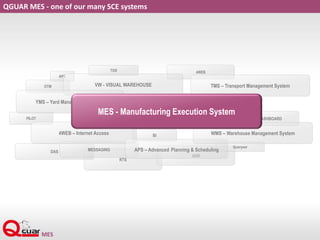
QGUAR MES - one of our many SCE systems
MES - Manufacturing Execution System
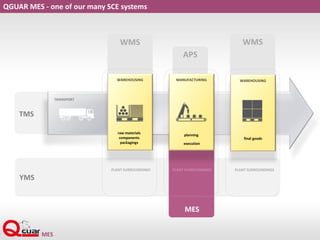
QGUAR MES - one of our many SCE systems
APS
WMS WMS
TRANSPORT
TMS
MES
WAREHOUSING
raw materials
components
packagings
PLANT SURROUNDINGS PLANT SURROUNDINGS PLANT SURROUNDINGS
YMS
WAREHOUSING
final goods
MANUFACTURING
planning
execution
MES
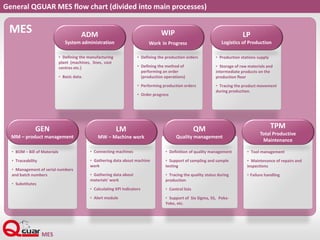
General QGUAR MES flow chart (divided into main processes)
• Defining the manufacturing
plant (machines, lines, cost
centres etc.)
• Basic data.
ADM
System administration
• Defining the production orders
• Defining the method of
performing an order
(production operations)
• Performing production orders
• Order progress
WIP
Work in Progress
• Production stations supply
• Storage of raw materials and
intermediate products on the
production floor
• Tracing the product movement
during production.
LP
Logistics of Production
• BOM – Bill of Materials
• Traceability
• Management of serial numbers
and batch numbers
• Substitutes
GEN
MM – product management
• Connecting machines
• Gathering data about machine
work
• Gathering data about
materials' work
• Calculating KPI indicators
• Alert module
LM
MW – Machine work
• Definition of quality management
• Support of sampling and sample
testing
• Tracing the quality status during
production
• Control lists
• Support of Six Sigma, 5S, Poka-
Yoke, etc.
QM
Quality management
• Tool management
• Maintenance of repairs and
inspections
• Failure handling
TPM
Total Productive
Maintenance
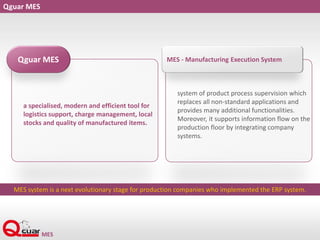
Qguar MES
a specialised, modern and efficient tool for
logistics support, charge management, local
stocks and quality of manufactured items.
Qguar MES
system of product process supervision which
replaces all non-standard applications and
provides many additional functionalities.
Moreover, it supports information flow on the
production floor by integrating company
systems.
MES - Manufacturing Execution System
MES system is a next evolutionary stage for production companies who implemented the ERP system.
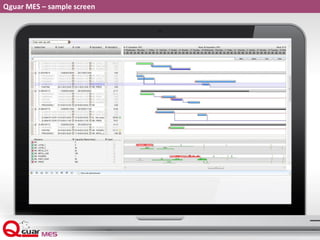
Qguar MES – sample screen
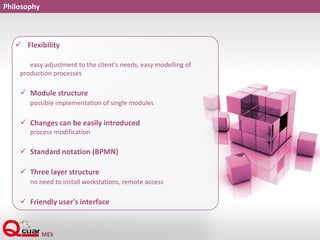
Philosophy
 Flexibility
easy adjustment to the client's needs, easy modelling of
production processes
 Module structure
possible implementation of single modules
 Changes can be easily introduced
process modification
 Standard notation (BPMN)
 Three layer structure
no need to install workstations, remote access
 Friendly user's interface
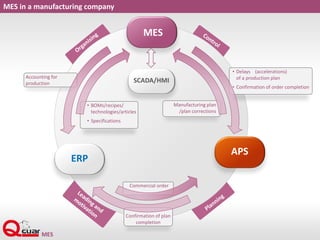
MES in a manufacturing company
Accounting for
production
• BOMs/recipes/
technologies/articles
• Specifications
SCADA/HMI
APS
MES
ERP
• Delays (accelerations)
of a production plan
• Confirmation of order completion
Manufacturing plan
/plan corrections
Commercial order
Confirmation of plan
completion
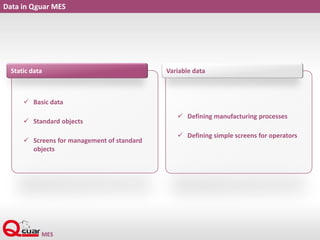
Data in Qguar MES
 Basic data
 Standard objects
 Screens for management of standard
objects
Static data
 Defining manufacturing processes
 Defining simple screens for operators
Variable data
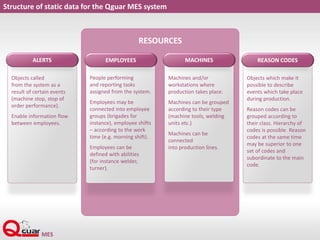
Structure of static data for the Qguar MES system
RESOURCES
Objects called
from the system as a
result of certain events
(machine stop, stop of
order performance).
Enable information flow
between employees.
ALERTS
People performing
and reporting tasks
assigned from the system.
Employees may be
connected into employee
groups (brigades for
instance), employee shifts
– according to the work
time (e.g. morning shift).
Employees can be
defined with abilities
(for instance welder,
turner).
EMPLOYEES
Machines and/or
workstations where
production takes place.
Machines can be grouped
according to their type
(machine tools, welding
units etc.)
Machines can be
connected
into production lines.
MACHINES
Objects which make it
possible to describe
events which take place
during production.
Reason codes can be
grouped according to
their class. Hierarchy of
codes is possible. Reason
codes at the same time
may be superior to one
set of codes and
subordinate to the main
code.
REASON CODES
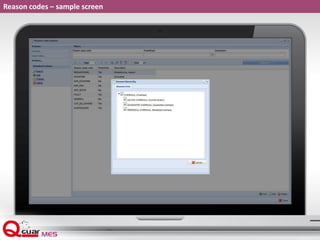
Reason codes – sample screen
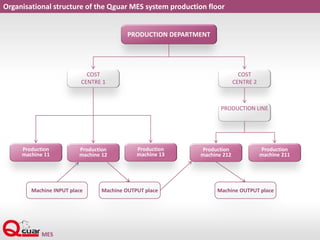
Organisational structure of the Qguar MES system production floor
Production
machine 11
Production
machine 12
Production
machine 13
Production
machine 212
Production
machine 211
PRODUCTION DEPARTMENT
COST
CENTRE 1
COST
CENTRE 2
PRODUCTION LINE
Machine INPUT place Machine OUTPUT place Machine OUTPUT place
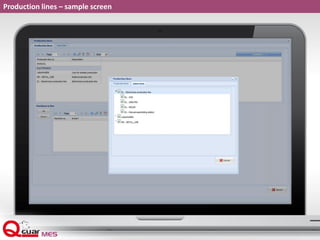
Production lines – sample screen
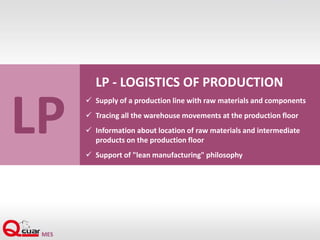
LP
LP - LOGISTICS OF PRODUCTION
 Supply of a production line with raw materials and components
 Tracing all the warehouse movements at the production floor
 Information about location of raw materials and intermediate
products on the production floor
 Support of "lean manufacturing" philosophy
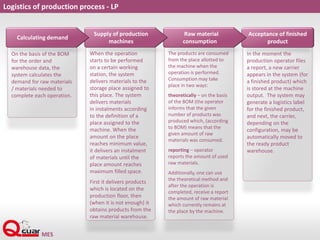
Logistics of production process - LP
On the basis of the BOM
for the order and
warehouse data, the
system calculates the
demand for raw materials
/ materials needed to
complete each operation.
When the operation
starts to be performed
on a certain working
station, the system
delivers materials to the
storage place assigned to
this place. The system
delivers materials
in instalments according
to the definition of a
place assigned to the
machine. When the
amount on the place
reaches minimum value,
it delivers an instalment
of materials until the
place amount reaches
maximum filled space.
First it delivers products
which is located on the
production floor, then
(when it is not enough) it
obtains products from the
raw material warehouse.
The products are consumed
from the place allotted to
the machine when the
operation is performed.
Consumption may take
place in two ways:
theoretically – on the basis
of the BOM (the operator
informs that the given
number of products was
produced which, (according
to BOM) means that the
given amount of raw
materials was consumed.
reporting – operator
reports the amount of used
raw materials.
Additionally, one can use
the theoretical method and
after the operation is
completed, receive a report
the amount of raw material
which currently remains at
the place by the machine.
In the moment the
production operator files
a report, a new carrier
appears in the system (for
a finished product) which
is stored at the machine
output. The system may
generate a logistics label
for the finished product,
and next, the carrier,
depending on the
configuration, may be
automatically moved to
the ready product
warehouse.
Acceptance of finished
product
Raw material
consumption
Supply of production
machines
Calculating demand
Qguar MES
Qguar MES Mobile
REPORT (SETTLEMENT)
OF PRODUCTION
PRODUCTION
ORDER
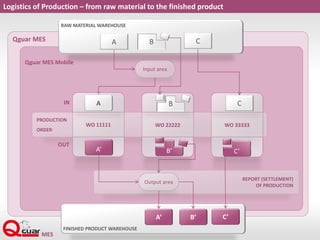
Logistics of Production – from raw material to the finished product
RAW MATERIAL WAREHOUSE
WO 11111 WO 22222 WO 33333
FINISHED PRODUCT WAREHOUSE
Output area
A
A’ C’B’
B
C
Input area
BA
B’A’ C’
IN
OUT
C
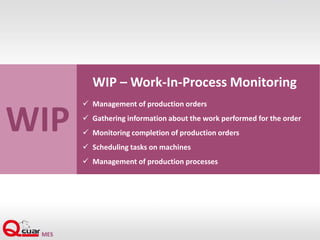
WIP
WIP – Work-In-Process Monitoring
 Management of production orders
 Gathering information about the work performed for the order
 Monitoring completion of production orders
 Scheduling tasks on machines
 Management of production processes
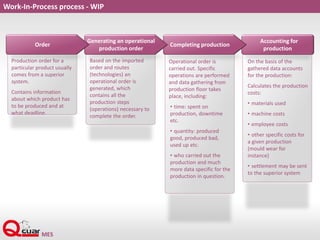
On the basis of the
gathered data accounts
for the production:
Calculates the production
costs:
• materials used
• machine costs
• employee costs
• other specific costs for
a given production
(mould wear for
instance)
• settlement may be sent
to the superior system
Work-In-Process process - WIP
Production order for a
particular product usually
comes from a superior
system.
Contains information
about which product has
to be produced and at
what deadline.
Based on the imported
order and routes
(technologies) an
operational order is
generated, which
contains all the
production steps
(operations) necessary to
complete the order.
Operational order is
carried out. Specific
operations are performed
and data gathering from
production floor takes
place, including:
• time: spent on
production, downtime
etc.
• quantity: produced
good, produced bad,
used up etc.
• who carried out the
production and much
more data specific for the
production in question.
Accounting for
production
Completing production
Generating an operational
production order
Order
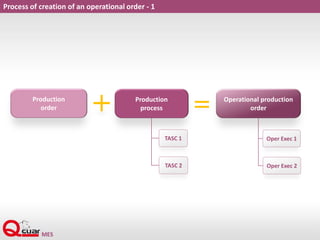
Process of creation of an operational order - 1
Production
order
Production
process
Operational production
order
TASC 1
TASC 2
Oper Exec 1
Oper Exec 2
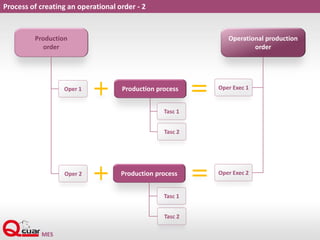
Process of creating an operational order - 2
Production
order
Operational production
order
Oper 1
Oper 2
Oper Exec 1
Oper Exec 2
Production process
Tasc 1
Tasc 2
Production process
Tasc 1
Tasc 2
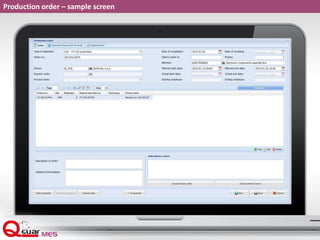
Production order – sample screen
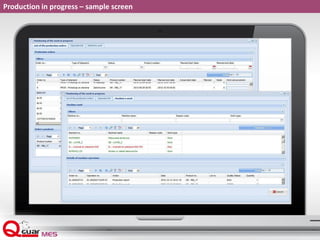
Production in progress – sample screen
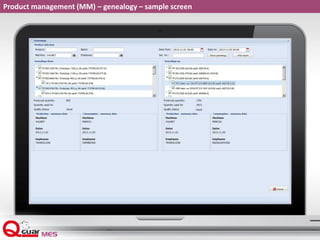
Product management (MM) – genealogy – sample screen
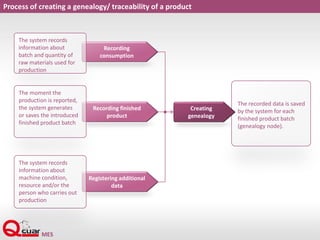
Process of creating a genealogy/ traceability of a product
Registering additional
data
Recording finished
product
Recording
consumption
The system records
information about
batch and quantity of
raw materials used for
production
The moment the
production is reported,
the system generates
or saves the introduced
finished product batch
The system records
information about
machine condition,
resource and/or the
person who carries out
production
The recorded data is saved
by the system for each
finished product batch
(genealogy node).
Creating
genealogy
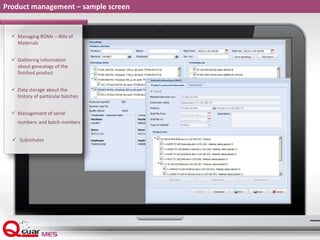
Product management – sample screen
 Managing BOMs – Bills of
Materials
 Gathering information
about genealogy of the
finished product
 Data storage about the
history of particular batches
 Management of serial
numbers and batch numbers
 Substitutes
TPM
TPM - TOTAL PRODUCTIVE MAINTENANCE
 Managing tools, forms, accessories
 Failure handling
 Management of repairs and inspection of machine park
 Defining machine structure
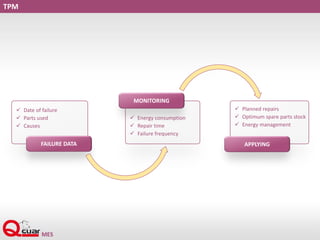
TPM
 Date of failure
 Parts used
 Causes
 Energy consumption
 Repair time
 Failure frequency
 Planned repairs
 Optimum spare parts stock
 Energy management
FAILURE DATA
MONITORING
APPLYING
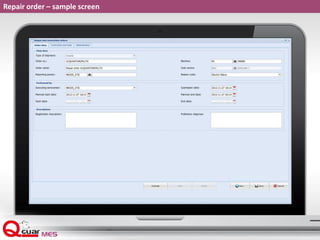
Repair order – sample screen
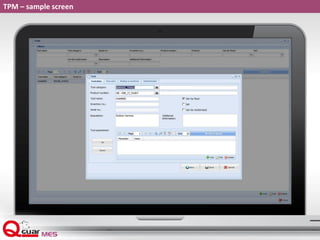
TPM – sample screen
LM
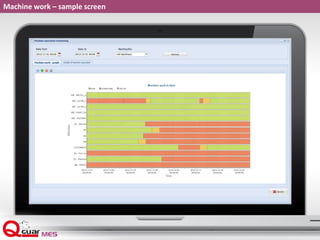
LM – MACHINE WORK
 Gathering information about reason codes for downtimes
 Gathering information from machines via an OPC server
 Tracing of order performance on a machine
 Calculating standard KPI – OEE
 Alert system
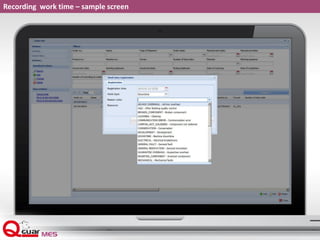
Recording work time – sample screen
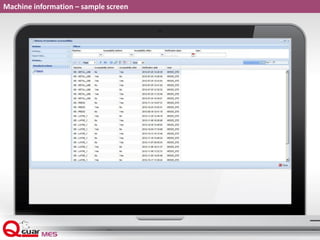
Machine information – sample screen
Machine work – sample screen
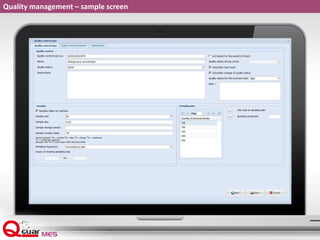
QM – QUALITY MANAGEMENT
 Supporting gathered sample tests
 Possibility to trace quality statuses from raw material to a
finished product
 Algorithm for determining batch status on the basis of
sample control
 Automatic and manual sampling
 Control lists
 Support of Six Sigma, 5S, Poka-Yoke, etc.
QM
Quality management – sample screen
BPMN
Business Process Modelling NotationBPMN
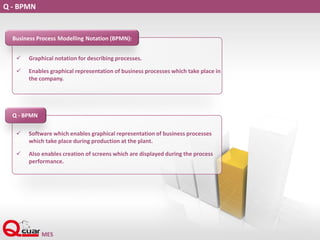
Q - BPMN
 Graphical notation for describing processes.
 Enables graphical representation of business processes which take place in
the company.
Business Process Modelling Notation (BPMN):
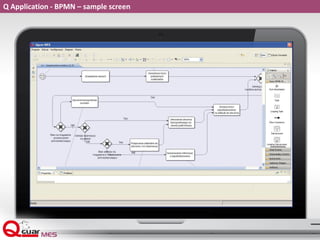
 Software which enables graphical representation of business processes
which take place during production at the plant.
 Also enables creation of screens which are displayed during the process
performance.
Q - BPMN
Why BPMN?
 Configuration of the course of business processes
 Uniqueness
 Access to the inner definition structure - additional user-defined
functions may be written
 Can be used for describing processes for MES, WMS and ERP software
classes.
 Established open standard
 Supported by the largest IT companies
 Promotion of BPMN on the world markets
Process types
 Processes assigned to the production order (or operation) will serve as a
routing; they will activate and be available to be performed as the status
of an order or an operation changes.
 Processes of gathering information regarding the work performed on the
finished product which are not directly connected to the order (servicing
machine signals, for instance)
 Business processes which do not enhance the product value but they are
necessary for the production flow to be easier, raw material delivery to
the line, for instance
 Processes taking place automatically in the background on the basis of
rules predefined during implementation, assigning machines to an
operation, for instance
Application Q BPMN – sample screen
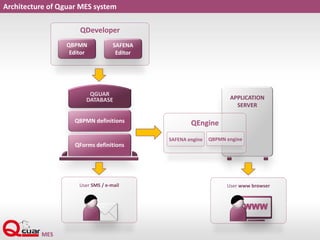
User SMS / e-mail
Architecture of Qguar MES system
QDeveloper
QBPMN
Editor
SAFENA
Editor
QGUAR
DATABASE
QBPMN definitions
QForms definitions
APPLICATION
SERVER
QEngine
QBPMN engineSAFENA engine
User www browser
WWW
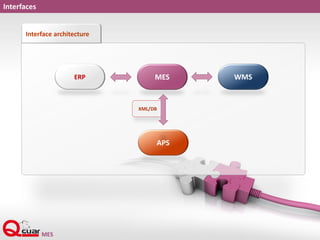
Interfaces
Interface architecture
ERP MES
XML/DB
WMS
APS
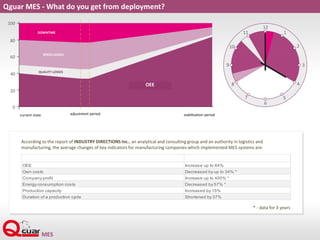
Qguar MES - What do you get from deployment?
OEE Increase up to 84%
Own costs Decreased by up to 34% *
Company profit Increase up to 400% *
Energy consumption costs Decreased by 57% *
Production capacity Increased by 15%
Duration of a production cycle Shortened by 37%
According to the report of INDUSTRY DIRECTIONS Inc., an analytical and consulting group and an authority in logistics and
manufacturing, the average changes of key indicators for manufacturing companies which implemented MES systems are:
* - data for 3 years
adjustment period stabilisation periodcurrent state
DOWNTIME
SPEED LOSSES
QUALITY LOSSES
OEE
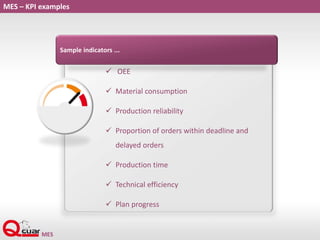
MES – KPI examples
 OEE
 Material consumption
 Production reliability
 Proportion of orders within deadline and
delayed orders
 Production time
 Technical efficiency
 Plan progress
Sample indicators ...
Qguar MES - Advantages
 Shorter and fully controllable production cycle
 Monitoring of production in progress, machine work, resources
 Shorter information flow, real-time information
 Shorter planned and unplanned downtime, elimination of failures
and damage
 Lower production costs
 Increased indicators (productivity, OEE etc.)
 Origin of produced defective products, prevention of defects,
increased production quality.
 Comparison of plant work before and after Qguar MES was
implemented...
Thank you for your time

Qguar MES - ENGLISH

  • 2.
    4WEB RTS ADR DAS APS OTM PILOT Queryser BI MESSAGING DASHBOARD VW - VISUALWAREHOUSE 4WEB – Internet Access APS – Advanced Planning & Scheduling WMS – Warehouse Management System TMS – Transport Management System YMS – Yard Management System TOS QGUAR MES - one of our many SCE systems MES - Manufacturing Execution System
  • 3.
    QGUAR MES -one of our many SCE systems APS WMS WMS TRANSPORT TMS MES WAREHOUSING raw materials components packagings PLANT SURROUNDINGS PLANT SURROUNDINGS PLANT SURROUNDINGS YMS WAREHOUSING final goods MANUFACTURING planning execution
  • 4.
    MES General QGUAR MESflow chart (divided into main processes) • Defining the manufacturing plant (machines, lines, cost centres etc.) • Basic data. ADM System administration • Defining the production orders • Defining the method of performing an order (production operations) • Performing production orders • Order progress WIP Work in Progress • Production stations supply • Storage of raw materials and intermediate products on the production floor • Tracing the product movement during production. LP Logistics of Production • BOM – Bill of Materials • Traceability • Management of serial numbers and batch numbers • Substitutes GEN MM – product management • Connecting machines • Gathering data about machine work • Gathering data about materials' work • Calculating KPI indicators • Alert module LM MW – Machine work • Definition of quality management • Support of sampling and sample testing • Tracing the quality status during production • Control lists • Support of Six Sigma, 5S, Poka- Yoke, etc. QM Quality management • Tool management • Maintenance of repairs and inspections • Failure handling TPM Total Productive Maintenance
  • 5.
    Qguar MES a specialised,modern and efficient tool for logistics support, charge management, local stocks and quality of manufactured items. Qguar MES system of product process supervision which replaces all non-standard applications and provides many additional functionalities. Moreover, it supports information flow on the production floor by integrating company systems. MES - Manufacturing Execution System MES system is a next evolutionary stage for production companies who implemented the ERP system.
  • 6.
    Qguar MES –sample screen
  • 7.
    Philosophy  Flexibility easy adjustmentto the client's needs, easy modelling of production processes  Module structure possible implementation of single modules  Changes can be easily introduced process modification  Standard notation (BPMN)  Three layer structure no need to install workstations, remote access  Friendly user's interface
  • 8.
    MES in amanufacturing company Accounting for production • BOMs/recipes/ technologies/articles • Specifications SCADA/HMI APS MES ERP • Delays (accelerations) of a production plan • Confirmation of order completion Manufacturing plan /plan corrections Commercial order Confirmation of plan completion
  • 9.
    Data in QguarMES  Basic data  Standard objects  Screens for management of standard objects Static data  Defining manufacturing processes  Defining simple screens for operators Variable data
  • 10.
    Structure of staticdata for the Qguar MES system RESOURCES Objects called from the system as a result of certain events (machine stop, stop of order performance). Enable information flow between employees. ALERTS People performing and reporting tasks assigned from the system. Employees may be connected into employee groups (brigades for instance), employee shifts – according to the work time (e.g. morning shift). Employees can be defined with abilities (for instance welder, turner). EMPLOYEES Machines and/or workstations where production takes place. Machines can be grouped according to their type (machine tools, welding units etc.) Machines can be connected into production lines. MACHINES Objects which make it possible to describe events which take place during production. Reason codes can be grouped according to their class. Hierarchy of codes is possible. Reason codes at the same time may be superior to one set of codes and subordinate to the main code. REASON CODES
  • 11.
    Reason codes –sample screen
  • 12.
    Organisational structure ofthe Qguar MES system production floor Production machine 11 Production machine 12 Production machine 13 Production machine 212 Production machine 211 PRODUCTION DEPARTMENT COST CENTRE 1 COST CENTRE 2 PRODUCTION LINE Machine INPUT place Machine OUTPUT place Machine OUTPUT place
  • 13.
    Production lines –sample screen
  • 14.
    LP LP - LOGISTICSOF PRODUCTION  Supply of a production line with raw materials and components  Tracing all the warehouse movements at the production floor  Information about location of raw materials and intermediate products on the production floor  Support of "lean manufacturing" philosophy
  • 15.
    Logistics of productionprocess - LP On the basis of the BOM for the order and warehouse data, the system calculates the demand for raw materials / materials needed to complete each operation. When the operation starts to be performed on a certain working station, the system delivers materials to the storage place assigned to this place. The system delivers materials in instalments according to the definition of a place assigned to the machine. When the amount on the place reaches minimum value, it delivers an instalment of materials until the place amount reaches maximum filled space. First it delivers products which is located on the production floor, then (when it is not enough) it obtains products from the raw material warehouse. The products are consumed from the place allotted to the machine when the operation is performed. Consumption may take place in two ways: theoretically – on the basis of the BOM (the operator informs that the given number of products was produced which, (according to BOM) means that the given amount of raw materials was consumed. reporting – operator reports the amount of used raw materials. Additionally, one can use the theoretical method and after the operation is completed, receive a report the amount of raw material which currently remains at the place by the machine. In the moment the production operator files a report, a new carrier appears in the system (for a finished product) which is stored at the machine output. The system may generate a logistics label for the finished product, and next, the carrier, depending on the configuration, may be automatically moved to the ready product warehouse. Acceptance of finished product Raw material consumption Supply of production machines Calculating demand
  • 16.
    Qguar MES Qguar MESMobile REPORT (SETTLEMENT) OF PRODUCTION PRODUCTION ORDER Logistics of Production – from raw material to the finished product RAW MATERIAL WAREHOUSE WO 11111 WO 22222 WO 33333 FINISHED PRODUCT WAREHOUSE Output area A A’ C’B’ B C Input area BA B’A’ C’ IN OUT C
  • 17.
    WIP WIP – Work-In-ProcessMonitoring  Management of production orders  Gathering information about the work performed for the order  Monitoring completion of production orders  Scheduling tasks on machines  Management of production processes
  • 18.
    On the basisof the gathered data accounts for the production: Calculates the production costs: • materials used • machine costs • employee costs • other specific costs for a given production (mould wear for instance) • settlement may be sent to the superior system Work-In-Process process - WIP Production order for a particular product usually comes from a superior system. Contains information about which product has to be produced and at what deadline. Based on the imported order and routes (technologies) an operational order is generated, which contains all the production steps (operations) necessary to complete the order. Operational order is carried out. Specific operations are performed and data gathering from production floor takes place, including: • time: spent on production, downtime etc. • quantity: produced good, produced bad, used up etc. • who carried out the production and much more data specific for the production in question. Accounting for production Completing production Generating an operational production order Order
  • 19.
    Process of creationof an operational order - 1 Production order Production process Operational production order TASC 1 TASC 2 Oper Exec 1 Oper Exec 2
  • 20.
    Process of creatingan operational order - 2 Production order Operational production order Oper 1 Oper 2 Oper Exec 1 Oper Exec 2 Production process Tasc 1 Tasc 2 Production process Tasc 1 Tasc 2
  • 21.
    Production order –sample screen
  • 22.
    Production in progress– sample screen
  • 23.
    Product management (MM)– genealogy – sample screen
  • 24.
    Process of creatinga genealogy/ traceability of a product Registering additional data Recording finished product Recording consumption The system records information about batch and quantity of raw materials used for production The moment the production is reported, the system generates or saves the introduced finished product batch The system records information about machine condition, resource and/or the person who carries out production The recorded data is saved by the system for each finished product batch (genealogy node). Creating genealogy
  • 25.
    Product management –sample screen  Managing BOMs – Bills of Materials  Gathering information about genealogy of the finished product  Data storage about the history of particular batches  Management of serial numbers and batch numbers  Substitutes
  • 26.
    TPM TPM - TOTALPRODUCTIVE MAINTENANCE  Managing tools, forms, accessories  Failure handling  Management of repairs and inspection of machine park  Defining machine structure
  • 27.
    TPM  Date offailure  Parts used  Causes  Energy consumption  Repair time  Failure frequency  Planned repairs  Optimum spare parts stock  Energy management FAILURE DATA MONITORING APPLYING
  • 28.
    Repair order –sample screen
  • 29.
  • 30.
    LM LM – MACHINEWORK  Gathering information about reason codes for downtimes  Gathering information from machines via an OPC server  Tracing of order performance on a machine  Calculating standard KPI – OEE  Alert system
  • 31.
    Recording work time– sample screen
  • 32.
  • 33.
    Machine work –sample screen
  • 34.
    QM – QUALITYMANAGEMENT  Supporting gathered sample tests  Possibility to trace quality statuses from raw material to a finished product  Algorithm for determining batch status on the basis of sample control  Automatic and manual sampling  Control lists  Support of Six Sigma, 5S, Poka-Yoke, etc. QM
  • 35.
  • 36.
  • 37.
    Q - BPMN Graphical notation for describing processes.  Enables graphical representation of business processes which take place in the company. Business Process Modelling Notation (BPMN):  Software which enables graphical representation of business processes which take place during production at the plant.  Also enables creation of screens which are displayed during the process performance. Q - BPMN
  • 38.
    Why BPMN?  Configurationof the course of business processes  Uniqueness  Access to the inner definition structure - additional user-defined functions may be written  Can be used for describing processes for MES, WMS and ERP software classes.  Established open standard  Supported by the largest IT companies  Promotion of BPMN on the world markets
  • 39.
    Process types  Processesassigned to the production order (or operation) will serve as a routing; they will activate and be available to be performed as the status of an order or an operation changes.  Processes of gathering information regarding the work performed on the finished product which are not directly connected to the order (servicing machine signals, for instance)  Business processes which do not enhance the product value but they are necessary for the production flow to be easier, raw material delivery to the line, for instance  Processes taking place automatically in the background on the basis of rules predefined during implementation, assigning machines to an operation, for instance
  • 40.
    Application Q BPMN– sample screen
  • 41.
    User SMS /e-mail Architecture of Qguar MES system QDeveloper QBPMN Editor SAFENA Editor QGUAR DATABASE QBPMN definitions QForms definitions APPLICATION SERVER QEngine QBPMN engineSAFENA engine User www browser WWW
  • 42.
  • 43.
    Qguar MES -What do you get from deployment? OEE Increase up to 84% Own costs Decreased by up to 34% * Company profit Increase up to 400% * Energy consumption costs Decreased by 57% * Production capacity Increased by 15% Duration of a production cycle Shortened by 37% According to the report of INDUSTRY DIRECTIONS Inc., an analytical and consulting group and an authority in logistics and manufacturing, the average changes of key indicators for manufacturing companies which implemented MES systems are: * - data for 3 years adjustment period stabilisation periodcurrent state DOWNTIME SPEED LOSSES QUALITY LOSSES OEE
  • 44.
    MES – KPIexamples  OEE  Material consumption  Production reliability  Proportion of orders within deadline and delayed orders  Production time  Technical efficiency  Plan progress Sample indicators ...
  • 45.
    Qguar MES -Advantages  Shorter and fully controllable production cycle  Monitoring of production in progress, machine work, resources  Shorter information flow, real-time information  Shorter planned and unplanned downtime, elimination of failures and damage  Lower production costs  Increased indicators (productivity, OEE etc.)  Origin of produced defective products, prevention of defects, increased production quality.  Comparison of plant work before and after Qguar MES was implemented...
  • 46.
    Thank you foryour time