Map Warehouse An integrated software solution covering areas from the warehouse to the production  with RFID areakappa   software solutions
areakappa   software solutions Areakappa is an highly experienced consultant team, working in italian and international IT environement: Project Management, software process organization and development. Software systems design and implementation Since 2004 working on projects for: Warehouse management, including new technologies like RFID and WiFi. Product and Component Traceability. Warehouse &  Manufacturing  Process Management. Production device control:  device interfacing using different communication protocols.
areakappa   software solutions areakappa  has  created and developed  M ap Warehouse , all-in-one solution with built-in software modules.  Each of these modules can be installed as standalone solution or be part of the whole solution to: Support warehouse and logistic management. Solve problems with Product/Component traceability. Improve m anufacturing and  warehouse Process automation & management. Improve the manufacture devices automation and control.
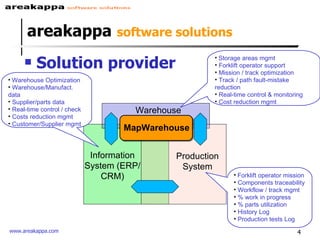
areakappa   software solutions Solution provider Forklift operator mission Components traceability Workflow / track mgmt % work in progress % parts utilization History Log  Production tests Log Storage areas mgmt Forklift operator support Mission / track optimization Track / path fault-mistake reduction Real-time control & monitoring Cost reduction mgmt  Warehouse Optimization Warehouse/Manufact. data Supplier/parts data Real-time control / check Costs reduction mgmt  Customer/Supplier mgmt Warehouse MapWarehouse Information System (ERP/CRM) Production System
Map Warehouse Solution provider Has the aim to improve company information management and data exchange between existing Information Systems as: ERP, production planners, supply chain software systems.  Can use advanced identification technologies like RFID or simpler barcode.
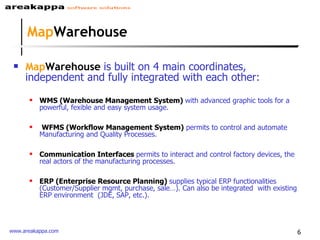
Map Warehouse Map Warehouse  is built on 4 main coordinates,  independent and fully integrated with each other: WMS (Warehouse Management System)  with advanced graphic tools for a powerful, fexible and easy system usage. WFMS (Workflow Management System)  permits to control and automate  Manufacturing and Quality Processes.  Communication Interfaces  permits to interact and control factory devices, the real actors of the manufacturing processes. ERP (Enterprise Resource Planning)   supplies typical ERP functionalities (Customer/Supplier mgmt, purchase, sale…). Can also be integrated  with existing ERP environment  (JDE, SAP, etc.).
WMS   warehouse logistics WMS  (Warehouse Management System) warehouse logistics
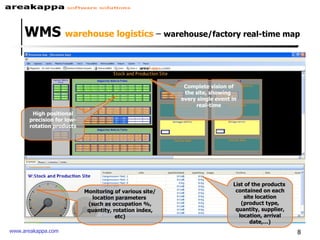
WMS  warehouse logistics  –  warehouse/factory real-time map   High positional precision for low-rotation products Complete vision of the site, showing  every single event in real-time List of the products  contained on each site location (product type, quantity, supplier, location, arrival date,…) Monitoring of various site/location parameters  (such as occupation %, quantity, rotation index, etc)
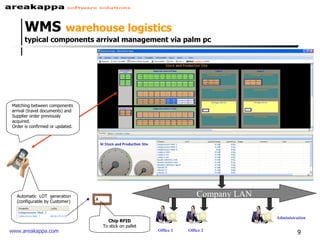
WMS   warehouse logistics  typical components arrival management via palm pc  Company LAN Office 1 Office 2 Administration Matching between components arrival (travel documents) and Supplier order previously acquired.  Order is confirmed or updated. Chip RFID To stick on pallet Automatic  LOT  generation (configurable by Customer)
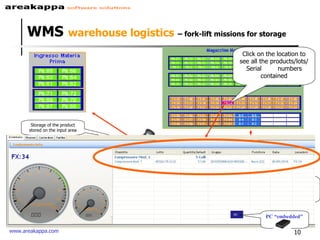
WMS   warehouse logistics   – fork-lift missions for storage Database Storage of the product stored on the input area Via palm-pc, MapWarehouse discovers the most convenient place where to stock the product Movement orders are generated for stocking the product Forklift operators take in charge the movement order and perform the stocking Gate RFID Click on the location to see all the products/lots/Serial  numbers contained PC PC “embedded”
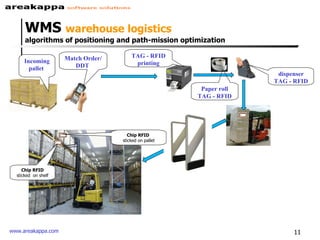
WMS  warehouse logistics algorithms of positioning and path-mission optimization Incoming pallet  TAG - RFID printing Paper roll TAG - RFID dispenser TAG - RFID Chip RFID   sticked on pallet Chip RFID sticked  on shelf Match Order/DDT
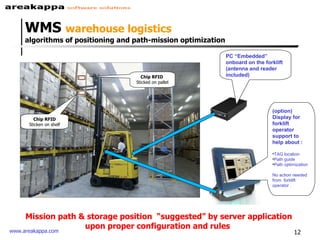
WMS  warehouse logistics algorithms of positioning and path-mission optimization PC “Embedded” onboard on the forklift  (antenna and reader included) (option) Display for forklift operator support to help about : TAG location Path guide Path optimization No action needed from  forklift operator . Chip RFID   Sticked on pallet Chip RFID Sticken on shelf Mission path & storage position  “suggested” by server application upon proper configuration and rules
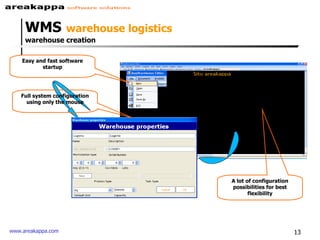
WMS   warehouse logistics  warehouse creation Easy and fast software startup Full system configuration using only the mouse A lot of configuration possibilities for best flexibility
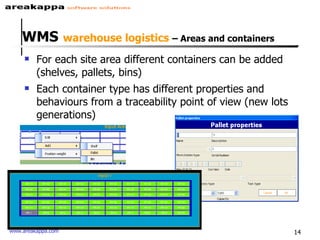
WMS   warehouse logistics  – Areas and containers For each site area different containers can be added (shelves, pallets, bins) Each container type has different properties and behaviours from a traceability point of view (new lots generations)
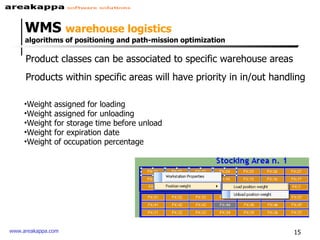
WMS  warehouse logistics algorithms of positioning and path-mission optimization Product classes can be associated to specific warehouse areas Weight assigned for loading Weight assigned for unloading Weight for storage time before unload Weight for expiration date Weight of occupation percentage Products within specific areas will have priority in in/out handling
WMS  warehouse logistics BENEFITS Significant reduction of fault and mistakes, thanks to  WMS and RFID utilization. Full traceability of products, components and their suppliers.  Real Time monitoring (what, where, how much) of components utilization, shared with all Company people involved. No more “time consuming” due to wrong components storage or allocation.
WFMS  production process control WFMS  (Workflow Management System)   production process control
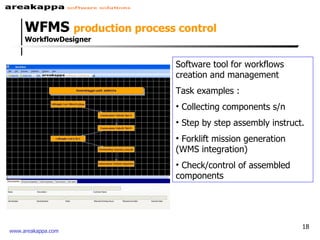
Software tool for workflows creation and management  Task examples : Collecting components s/n Step by step assembly instruct. Forklift mission generation (WMS integration) Check/control of assembled components WFMS  production process control WorkflowDesigner
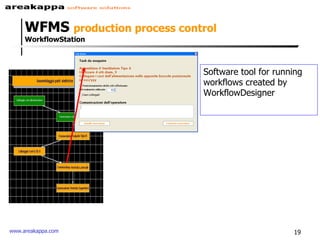
Software tool for running workflows created by WorkflowDesigner WFMS  production process control  WorkflowStation
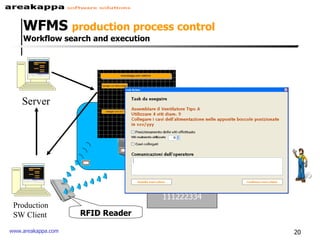
Server Reading S/N unit 111222334 Production SW Client  RFID Reader WFMS  production process control  Workflow search and execution Workstation
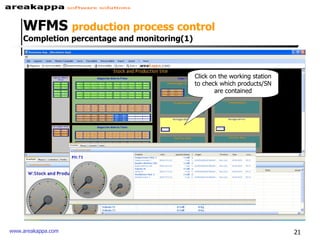
Click on the working station to check which products/SN are contained WFMS  production process control  Completion percentage and monitoring(1)
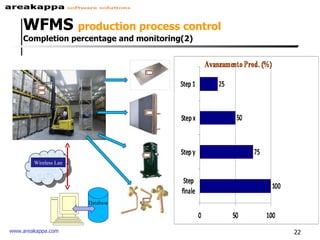
Database Wireless Lan Step 1 Step 2 Step 3 Step 4 WFMS  production process control Completion percentage and monitoring(2)
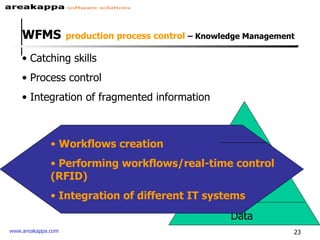
WFMS   production process control  – Knowledge Management Catching skills Process control Integration of fragmented information Data Information Knowledge Workflows creation Performing workflows/real-time control (RFID) Integration of different IT systems
Process Control & Information, shared with involved Company people (thanks to WF data capture). Full traceability of manufacturing process (thanks to  WFMS and RFID). Real time step-by-step production monitoring and troubleshooting in order to avoid bottle-necks. Operator Monitoring (operator database, monitoring and timing for each operator & task completion). Work in Progress, monitoring and control. WFMS  production process control  Benefits
Factory devices interface Map Warehouse  can integrate and/or interface  with many factory devices Pilot automatic-forklift (PC driven) movements Switch on/off electronic devices (also in network environment) The above feature permits automation and control of factory processes executed by electromechanical devices.
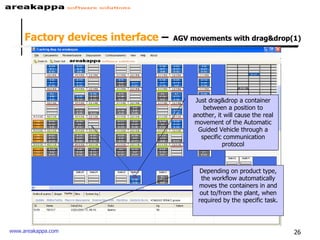
Factory devices interface  –   AGV movements with drag&drop(1) Just drag&drop a container between a position to another, it will cause the real movement of the Automatic Guided Vehicle through a specific communication protocol Depending on product type, the workflow automatically moves the containers in and out to/from the plant, when required by the specific task.
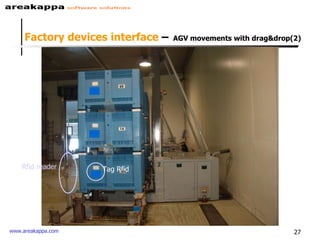
Rfid reader Tag Rfid Factory devices interface  –   AGV movements with drag&drop(2)
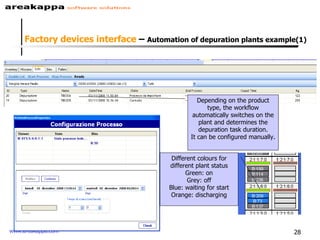
Depending on the product type, the workflow automatically switches on the plant and determines the depuration task duration. It can be configured manually. Different colours for different plant status Green: on Grey: off Blue: waiting for start Orange: discharging Factory devices interface  –  Automation of depuration plants example(1)
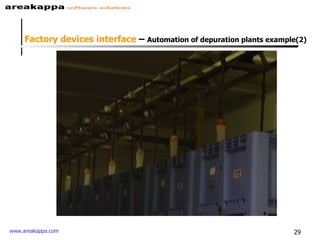
Factory devices interface  –  Automation of depuration plants example(2)
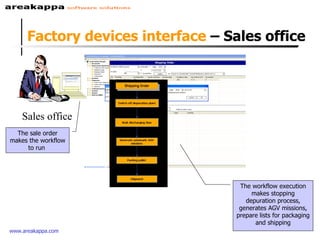
Factory devices interface  – Sales office Sales office The sale order makes the workflow to run  The workflow execution makes stopping depuration process, generates AGV missions, prepare lists for packaging and shipping
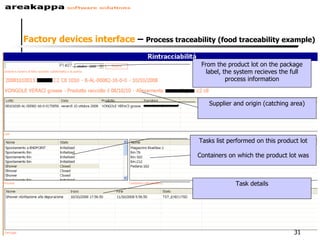
From the product lot on the package label, the system recieves the full process information Supplier and origin (catching area) Tasks list performed on this product lot Containers on which the product lot was Task details Factory devices interface  –  Process traceability (food traceability example)
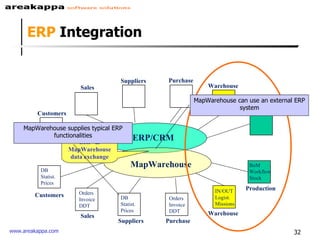
Purchase Warehouse Production Customers Suppliers ERP/CRM Purchase Sales Warehouse Production Suppliers MapWarehouse Orders Invoice DDT Orders Invoice DDT IN/OUT Logist. Missions BoM Workflow Stock ERP  & MapWarehouse data exchange DB Statist. Prices  DB Statist. Prices ERP  Integration Customers Sales MapWarehouse supplies typical ERP functionalities MapWarehouse can use an external ERP system
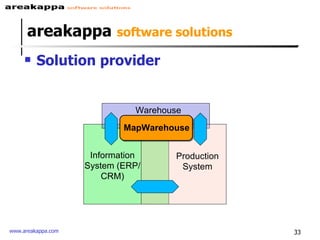
areakappa   software solutions Solution provider Warehouse MapWarehouse Information System (ERP/CRM) Production System
Contacts Web:  www.areakappa.com   Mail:  [email_address]

MapWarehouse

  • 1.
    Map Warehouse Anintegrated software solution covering areas from the warehouse to the production with RFID areakappa software solutions
  • 2.
    areakappa software solutions Areakappa is an highly experienced consultant team, working in italian and international IT environement: Project Management, software process organization and development. Software systems design and implementation Since 2004 working on projects for: Warehouse management, including new technologies like RFID and WiFi. Product and Component Traceability. Warehouse & Manufacturing Process Management. Production device control: device interfacing using different communication protocols.
  • 3.
    areakappa software solutions areakappa has created and developed M ap Warehouse , all-in-one solution with built-in software modules. Each of these modules can be installed as standalone solution or be part of the whole solution to: Support warehouse and logistic management. Solve problems with Product/Component traceability. Improve m anufacturing and warehouse Process automation & management. Improve the manufacture devices automation and control.
  • 4.
    areakappa software solutions Solution provider Forklift operator mission Components traceability Workflow / track mgmt % work in progress % parts utilization History Log Production tests Log Storage areas mgmt Forklift operator support Mission / track optimization Track / path fault-mistake reduction Real-time control & monitoring Cost reduction mgmt Warehouse Optimization Warehouse/Manufact. data Supplier/parts data Real-time control / check Costs reduction mgmt Customer/Supplier mgmt Warehouse MapWarehouse Information System (ERP/CRM) Production System
  • 5.
    Map Warehouse Solutionprovider Has the aim to improve company information management and data exchange between existing Information Systems as: ERP, production planners, supply chain software systems. Can use advanced identification technologies like RFID or simpler barcode.
  • 6.
    Map Warehouse MapWarehouse is built on 4 main coordinates, independent and fully integrated with each other: WMS (Warehouse Management System) with advanced graphic tools for a powerful, fexible and easy system usage. WFMS (Workflow Management System) permits to control and automate Manufacturing and Quality Processes. Communication Interfaces permits to interact and control factory devices, the real actors of the manufacturing processes. ERP (Enterprise Resource Planning) supplies typical ERP functionalities (Customer/Supplier mgmt, purchase, sale…). Can also be integrated with existing ERP environment (JDE, SAP, etc.).
  • 7.
    WMS warehouse logistics WMS (Warehouse Management System) warehouse logistics
  • 8.
    WMS warehouselogistics – warehouse/factory real-time map High positional precision for low-rotation products Complete vision of the site, showing every single event in real-time List of the products contained on each site location (product type, quantity, supplier, location, arrival date,…) Monitoring of various site/location parameters (such as occupation %, quantity, rotation index, etc)
  • 9.
    WMS warehouse logistics typical components arrival management via palm pc Company LAN Office 1 Office 2 Administration Matching between components arrival (travel documents) and Supplier order previously acquired. Order is confirmed or updated. Chip RFID To stick on pallet Automatic LOT generation (configurable by Customer)
  • 10.
    WMS warehouse logistics – fork-lift missions for storage Database Storage of the product stored on the input area Via palm-pc, MapWarehouse discovers the most convenient place where to stock the product Movement orders are generated for stocking the product Forklift operators take in charge the movement order and perform the stocking Gate RFID Click on the location to see all the products/lots/Serial numbers contained PC PC “embedded”
  • 11.
    WMS warehouselogistics algorithms of positioning and path-mission optimization Incoming pallet TAG - RFID printing Paper roll TAG - RFID dispenser TAG - RFID Chip RFID sticked on pallet Chip RFID sticked on shelf Match Order/DDT
  • 12.
    WMS warehouselogistics algorithms of positioning and path-mission optimization PC “Embedded” onboard on the forklift (antenna and reader included) (option) Display for forklift operator support to help about : TAG location Path guide Path optimization No action needed from forklift operator . Chip RFID Sticked on pallet Chip RFID Sticken on shelf Mission path & storage position “suggested” by server application upon proper configuration and rules
  • 13.
    WMS warehouse logistics warehouse creation Easy and fast software startup Full system configuration using only the mouse A lot of configuration possibilities for best flexibility
  • 14.
    WMS warehouse logistics – Areas and containers For each site area different containers can be added (shelves, pallets, bins) Each container type has different properties and behaviours from a traceability point of view (new lots generations)
  • 15.
    WMS warehouselogistics algorithms of positioning and path-mission optimization Product classes can be associated to specific warehouse areas Weight assigned for loading Weight assigned for unloading Weight for storage time before unload Weight for expiration date Weight of occupation percentage Products within specific areas will have priority in in/out handling
  • 16.
    WMS warehouselogistics BENEFITS Significant reduction of fault and mistakes, thanks to WMS and RFID utilization. Full traceability of products, components and their suppliers. Real Time monitoring (what, where, how much) of components utilization, shared with all Company people involved. No more “time consuming” due to wrong components storage or allocation.
  • 17.
    WFMS productionprocess control WFMS (Workflow Management System) production process control
  • 18.
    Software tool forworkflows creation and management Task examples : Collecting components s/n Step by step assembly instruct. Forklift mission generation (WMS integration) Check/control of assembled components WFMS production process control WorkflowDesigner
  • 19.
    Software tool forrunning workflows created by WorkflowDesigner WFMS production process control WorkflowStation
  • 20.
    Server Reading S/Nunit 111222334 Production SW Client RFID Reader WFMS production process control Workflow search and execution Workstation
  • 21.
    Click on theworking station to check which products/SN are contained WFMS production process control Completion percentage and monitoring(1)
  • 22.
    Database Wireless LanStep 1 Step 2 Step 3 Step 4 WFMS production process control Completion percentage and monitoring(2)
  • 23.
    WFMS production process control – Knowledge Management Catching skills Process control Integration of fragmented information Data Information Knowledge Workflows creation Performing workflows/real-time control (RFID) Integration of different IT systems
  • 24.
    Process Control &Information, shared with involved Company people (thanks to WF data capture). Full traceability of manufacturing process (thanks to WFMS and RFID). Real time step-by-step production monitoring and troubleshooting in order to avoid bottle-necks. Operator Monitoring (operator database, monitoring and timing for each operator & task completion). Work in Progress, monitoring and control. WFMS production process control Benefits
  • 25.
    Factory devices interfaceMap Warehouse can integrate and/or interface with many factory devices Pilot automatic-forklift (PC driven) movements Switch on/off electronic devices (also in network environment) The above feature permits automation and control of factory processes executed by electromechanical devices.
  • 26.
    Factory devices interface – AGV movements with drag&drop(1) Just drag&drop a container between a position to another, it will cause the real movement of the Automatic Guided Vehicle through a specific communication protocol Depending on product type, the workflow automatically moves the containers in and out to/from the plant, when required by the specific task.
  • 27.
    Rfid reader TagRfid Factory devices interface – AGV movements with drag&drop(2)
  • 28.
    Depending on theproduct type, the workflow automatically switches on the plant and determines the depuration task duration. It can be configured manually. Different colours for different plant status Green: on Grey: off Blue: waiting for start Orange: discharging Factory devices interface – Automation of depuration plants example(1)
  • 29.
    Factory devices interface – Automation of depuration plants example(2)
  • 30.
    Factory devices interface – Sales office Sales office The sale order makes the workflow to run The workflow execution makes stopping depuration process, generates AGV missions, prepare lists for packaging and shipping
  • 31.
    From the productlot on the package label, the system recieves the full process information Supplier and origin (catching area) Tasks list performed on this product lot Containers on which the product lot was Task details Factory devices interface – Process traceability (food traceability example)
  • 32.
    Purchase Warehouse ProductionCustomers Suppliers ERP/CRM Purchase Sales Warehouse Production Suppliers MapWarehouse Orders Invoice DDT Orders Invoice DDT IN/OUT Logist. Missions BoM Workflow Stock ERP & MapWarehouse data exchange DB Statist. Prices DB Statist. Prices ERP Integration Customers Sales MapWarehouse supplies typical ERP functionalities MapWarehouse can use an external ERP system
  • 33.
    areakappa software solutions Solution provider Warehouse MapWarehouse Information System (ERP/CRM) Production System
  • 34.
    Contacts Web: www.areakappa.com Mail: [email_address]