4WEB
RPS
ADR
DAS
SIECI
OTM
moRFID
Queryser
SBS
4WEB – Manufactoring Execution System
TMS Mobile
VW - VISUAL WAREHOUSE
4WEB – Internet Acces
APS – Advanced Planning & Scheduling
WMS – Warehouse Management System
TMS – Transport Management System
YMS – Yard Management System
TOS
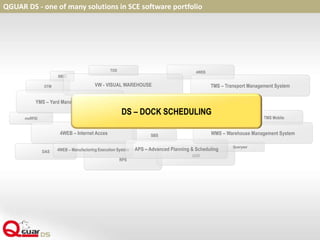
QGUAR DS - one of many solutions in SCE software portfolio
DS – DOCK SCHEDULING
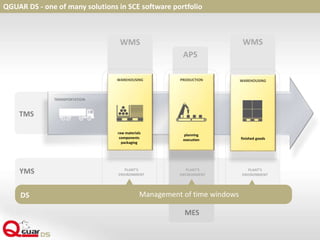
QGUAR DS - one of many solutions in SCE software portfolio
APS
WMS WMS
TRANSPORTATION
TMS
MES
WAREHOUSING
raw materials
components
packaging
PLANT’S
ENVIRONMENT
PLANT’S
ENVIRONMENT
PLANT’S
ENVIRONMENT
YMS
WAREHOUSING
finished goods
PRODUCTION
planning
execution
DS Management of time windows
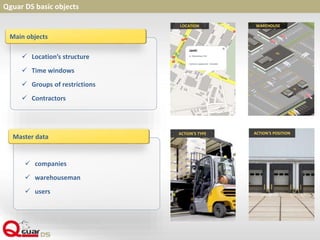
Qguar DS basic objects
LOCATION WAREHOUSE
 Location’s structure
 Time windows
 Groups of restrictions
 Contractors
Main objects
 companies
 warehouseman
 users
Master data
ACTION’S POSITIONACTION’S TYPE
Qguar DS
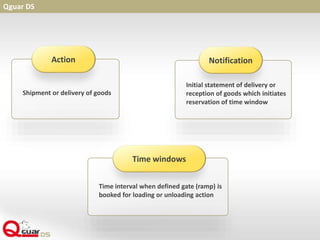
Shipment or delivery of goods
Action
Initial statement of delivery or
reception of goods which initiates
reservation of time window
Notification
Time interval when defined gate (ramp) is
booked for loading or unloading action
Time windows
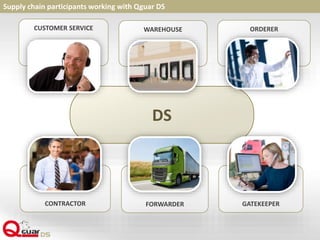
DS
CUSTOMER SERVICE
Supply chain participants working with Qguar DS
WAREHOUSE ORDERER
CONTRACTOR FORWARDER GATEKEEPER
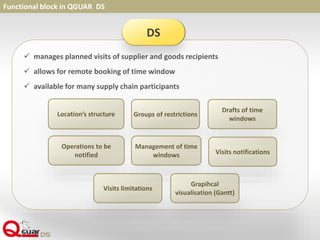
Functional block in QGUAR DS
 manages planned visits of supplier and goods recipients
 allows for remote booking of time window
 available for many supply chain participants
DS
Location’s structure Groups of restrictions
Drafts of time
windows
Operations to be
notified Visits notifications
Management of time
windows
Visits limitations
Grapihcal
visualisation (Gantt)
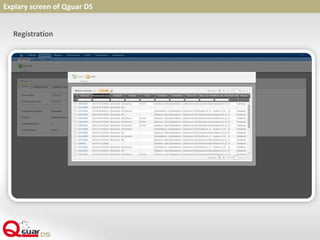
Explary screen of Qguar DS
Registration
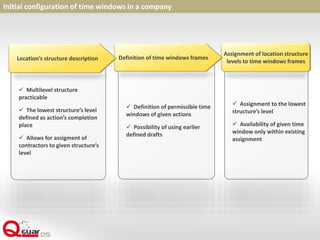
 Assignment to the lowest
structure’s level
 Availability of given time
window only within existing
assignment
 Definition of permissible time
windows of given actions
 Possibility of using earlier
defined drafts
 Multilevel structure
practicable
 The lowest structure’s level
defined as action’s completion
place
 Allows for assigment of
contractors to given structure’s
level
Initial configuration of time windows in a company
Assignment of location structure
levels to time windows frames
Definition of time windows framesLocation’s structure description
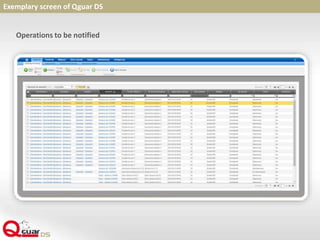
Exemplary screen of Qguar DS
Operations to be notified
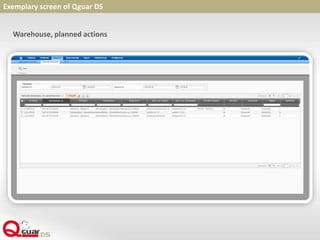
Exemplary screen of Qguar DS
Warehouse, planned actions
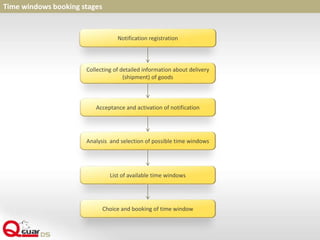
Time windows booking stages
Notification registration
Collecting of detailed information about delivery
(shipment) of goods
Acceptance and activation of notification
Analysis and selection of possible time windows
List of available time windows
Choice and booking of time window
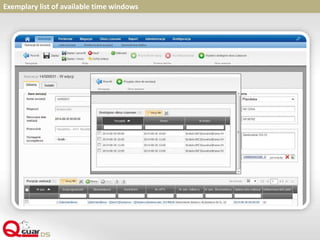
Exemplary list of available time windows
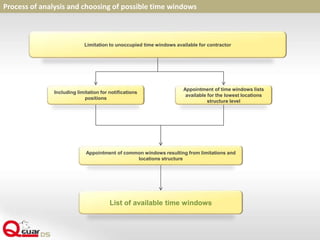
Process of analysis and choosing of possible time windows
Limitation to unoccupied time windows available for contractor
Including limitation for notifications
positions
List of available time windows
Appointment of time windows lists
available for the lowest locations
structure level
Appointment of common windows resulting from limitations and
locations structure
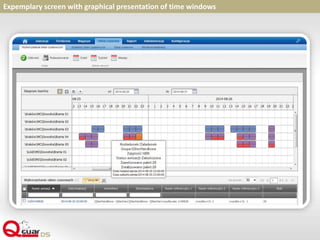
Expemplary screen with graphical presentation of time windows
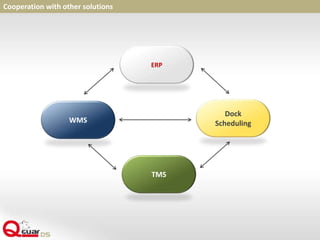
Cooperation with other solutions
ERP
Dock
SchedulingWMS
TMS
 Contractors define by themself times of operation’s completions
 We want to manage on companies area the means of transport,
 Work in the warehouse is beeing adjusted to the dates defined by
contractors
 Deliveries/shipments are performed by few companies
(orderer, forwarder, recipient)
 We want to manage the visits of supplier and recipients in parallel
Qguar Dock Scheduling – when to use?
Chosen KPIs in the area suppoorted by Dock Scheduling
 Average time of mean of transport handling
 Average time of loading/unloading
 Average time of waiting on the parkingplace or residence
on yard
 Locations utilization level
 Punctuality of driver appearance according to notifications
Work improvement indicators after implementation of QGUAR DS
 Significant lowering of time and resources engaged into definition of date, location
and queue of loading and unloading
 Improvement of service fluency
 Increase of warehouse efficiency
 Better utiluzation of resources (eg. gates, parkingplaces)
 Improvement of gatekeepers work due to lower number of mistakes
(eg. wrong allocation of trucks), tie-ups, etc.
 Better relations with contractors based on their involvement into notification
process
Advantages of QGUAR DS
 Adjustment of visit time to contactors requirement
 Fast reaction to possible increasment of visits
 Transparent way of graphical presentation
 Defining of actions after notification
 Time windows created on the basis of drafts
 More efficient contractors service
 Intuitive and user frendly proces handling
 Reduction of logistic costs
 Better relations with forwarders
Thank you for your time

Qguar DS - ENGLISH

  • 2.
    4WEB RPS ADR DAS SIECI OTM moRFID Queryser SBS 4WEB – ManufactoringExecution System TMS Mobile VW - VISUAL WAREHOUSE 4WEB – Internet Acces APS – Advanced Planning & Scheduling WMS – Warehouse Management System TMS – Transport Management System YMS – Yard Management System TOS QGUAR DS - one of many solutions in SCE software portfolio DS – DOCK SCHEDULING
  • 3.
    QGUAR DS -one of many solutions in SCE software portfolio APS WMS WMS TRANSPORTATION TMS MES WAREHOUSING raw materials components packaging PLANT’S ENVIRONMENT PLANT’S ENVIRONMENT PLANT’S ENVIRONMENT YMS WAREHOUSING finished goods PRODUCTION planning execution DS Management of time windows
  • 4.
    Qguar DS basicobjects LOCATION WAREHOUSE  Location’s structure  Time windows  Groups of restrictions  Contractors Main objects  companies  warehouseman  users Master data ACTION’S POSITIONACTION’S TYPE
  • 5.
    Qguar DS Shipment ordelivery of goods Action Initial statement of delivery or reception of goods which initiates reservation of time window Notification Time interval when defined gate (ramp) is booked for loading or unloading action Time windows
  • 6.
    DS CUSTOMER SERVICE Supply chainparticipants working with Qguar DS WAREHOUSE ORDERER CONTRACTOR FORWARDER GATEKEEPER
  • 7.
    Functional block inQGUAR DS  manages planned visits of supplier and goods recipients  allows for remote booking of time window  available for many supply chain participants DS Location’s structure Groups of restrictions Drafts of time windows Operations to be notified Visits notifications Management of time windows Visits limitations Grapihcal visualisation (Gantt)
  • 8.
    Explary screen ofQguar DS Registration
  • 9.
     Assignment tothe lowest structure’s level  Availability of given time window only within existing assignment  Definition of permissible time windows of given actions  Possibility of using earlier defined drafts  Multilevel structure practicable  The lowest structure’s level defined as action’s completion place  Allows for assigment of contractors to given structure’s level Initial configuration of time windows in a company Assignment of location structure levels to time windows frames Definition of time windows framesLocation’s structure description
  • 10.
    Exemplary screen ofQguar DS Operations to be notified
  • 11.
    Exemplary screen ofQguar DS Warehouse, planned actions
  • 12.
    Time windows bookingstages Notification registration Collecting of detailed information about delivery (shipment) of goods Acceptance and activation of notification Analysis and selection of possible time windows List of available time windows Choice and booking of time window
  • 13.
    Exemplary list ofavailable time windows
  • 14.
    Process of analysisand choosing of possible time windows Limitation to unoccupied time windows available for contractor Including limitation for notifications positions List of available time windows Appointment of time windows lists available for the lowest locations structure level Appointment of common windows resulting from limitations and locations structure
  • 15.
    Expemplary screen withgraphical presentation of time windows
  • 16.
    Cooperation with othersolutions ERP Dock SchedulingWMS TMS
  • 17.
     Contractors defineby themself times of operation’s completions  We want to manage on companies area the means of transport,  Work in the warehouse is beeing adjusted to the dates defined by contractors  Deliveries/shipments are performed by few companies (orderer, forwarder, recipient)  We want to manage the visits of supplier and recipients in parallel Qguar Dock Scheduling – when to use?
  • 18.
    Chosen KPIs inthe area suppoorted by Dock Scheduling  Average time of mean of transport handling  Average time of loading/unloading  Average time of waiting on the parkingplace or residence on yard  Locations utilization level  Punctuality of driver appearance according to notifications
  • 19.
    Work improvement indicatorsafter implementation of QGUAR DS  Significant lowering of time and resources engaged into definition of date, location and queue of loading and unloading  Improvement of service fluency  Increase of warehouse efficiency  Better utiluzation of resources (eg. gates, parkingplaces)  Improvement of gatekeepers work due to lower number of mistakes (eg. wrong allocation of trucks), tie-ups, etc.  Better relations with contractors based on their involvement into notification process
  • 20.
    Advantages of QGUARDS  Adjustment of visit time to contactors requirement  Fast reaction to possible increasment of visits  Transparent way of graphical presentation  Defining of actions after notification  Time windows created on the basis of drafts  More efficient contractors service  Intuitive and user frendly proces handling  Reduction of logistic costs  Better relations with forwarders
  • 21.
    Thank you foryour time