PyCascading for Intuitive
Flow Processing With
Hadoop
Gabor Szabo
Senior Data Scientist
Twitter, Inc.
Outline
• Basic concepts in the Hadoop ecosystem, with an example
• Hadoop
• Cascading
• PyCascading
• Essential PyCascading operations
• PyCascading by example: discovering main interests among friends
• Miscellaneous remarks, caveats
2
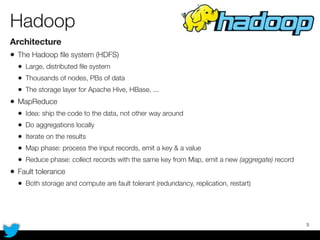
Hadoop
Architecture
• The Hadoop file system (HDFS)
• Large, distributed file system
• Thousands of nodes, PBs of data
• The storage layer for Apache Hive, HBase, ...
• MapReduce
• Idea: ship the code to the data, not other way around
• Do aggregations locally
• Iterate on the results
• Map phase: process the input records, emit a key & a value
• Reduce phase: collect records with the same key from Map, emit a new (aggregate) record
• Fault tolerance
• Both storage and compute are fault tolerant (redundancy, replication, restart)
3
Hadoop
In practice
• Language
• Java
• Need to think in MapReduce
• Hard to translate the problem to MR
• Hard to maintain and make changes in the topology
• Best used for
• Archiving (HDFS)
• Batch processing (MR)
4
Cascading	
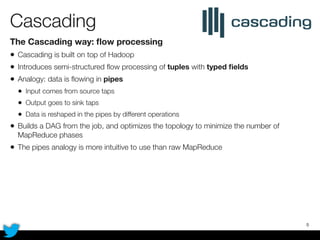
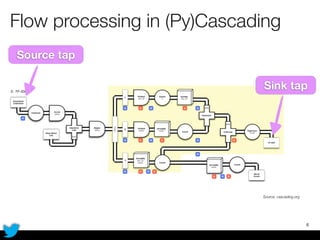
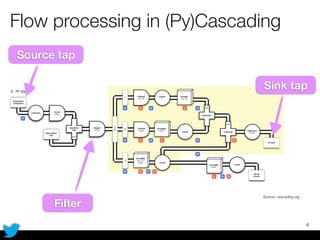
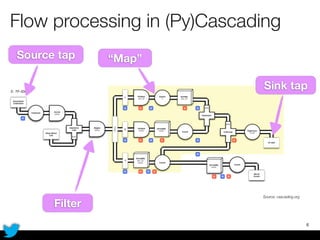
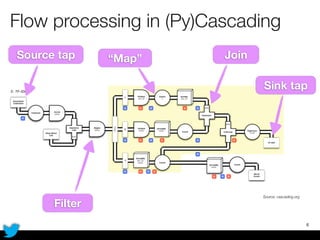
The Cascading way: flow processing
• Cascading is built on top of Hadoop
• Introduces semi-structured flow processing of tuples with typed fields
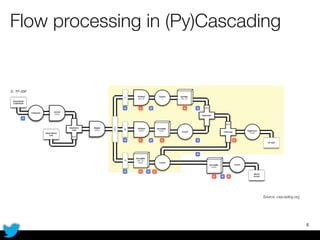
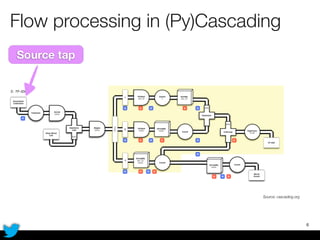
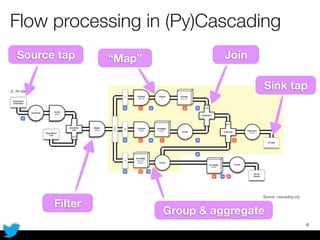
• Analogy: data is flowing in pipes
• Input comes from source taps
• Output goes to sink taps
• Data is reshaped in the pipes by different operations
• Builds a DAG from the job, and optimizes the topology to minimize the number of
MapReduce phases
• The pipes analogy is more intuitive to use than raw MapReduce
5
Flow processing in (Py)Cascading
6
Source: cascading.org
Flow processing in (Py)Cascading
6
Source: cascading.org
Source tap
Flow processing in (Py)Cascading
6
Source: cascading.org
Source tap
Sink tap
Flow processing in (Py)Cascading
6
Source: cascading.org
Source tap
Filter
Sink tap
Flow processing in (Py)Cascading
6
Source: cascading.org
Source tap
Filter
Sink tap
“Map”
Flow processing in (Py)Cascading
6
Source: cascading.org
Source tap
Filter
Sink tap
“Map” Join
Flow processing in (Py)Cascading
6
Source: cascading.org
Source tap
Filter
Group & aggregate
Sink tap
“Map” Join
PyCascading
Design
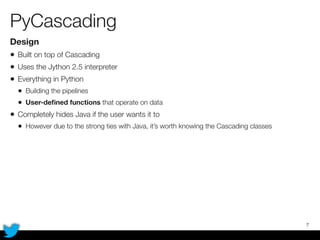
• Built on top of Cascading
• Uses the Jython 2.5 interpreter
• Everything in Python
• Building the pipelines
• User-defined functions that operate on data
• Completely hides Java if the user wants it to
• However due to the strong ties with Java, it’s worth knowing the Cascading classes
7
Example: as always, WordCount
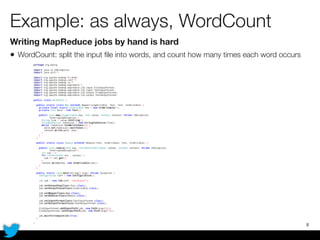
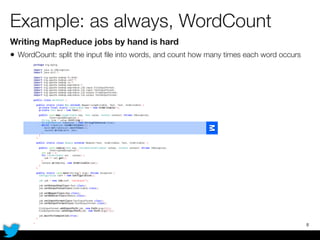
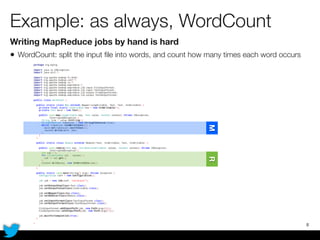
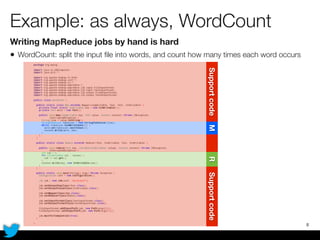
Writing MapReduce jobs by hand is hard
• WordCount: split the input file into words, and count how many times each word occurs
8
Example: as always, WordCount
Writing MapReduce jobs by hand is hard
• WordCount: split the input file into words, and count how many times each word occurs
8
M
Example: as always, WordCount
Writing MapReduce jobs by hand is hard
• WordCount: split the input file into words, and count how many times each word occurs
8
MR
Example: as always, WordCount
Writing MapReduce jobs by hand is hard
• WordCount: split the input file into words, and count how many times each word occurs
8
MRSupportcodeSupportcode
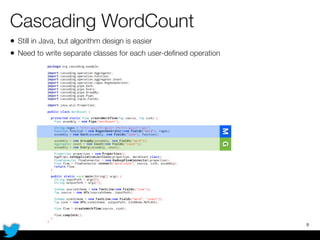
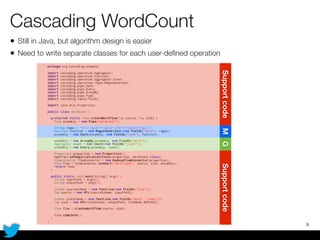
Cascading WordCount
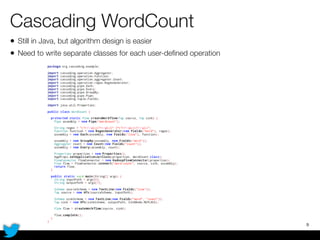
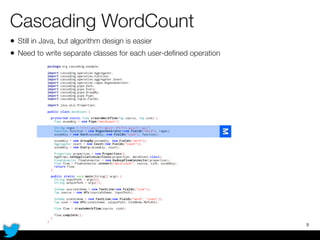
• Still in Java, but algorithm design is easier
• Need to write separate classes for each user-defined operation
9
Cascading WordCount
• Still in Java, but algorithm design is easier
• Need to write separate classes for each user-defined operation
9
M
Cascading WordCount
• Still in Java, but algorithm design is easier
• Need to write separate classes for each user-defined operation
9
MG
Cascading WordCount
• Still in Java, but algorithm design is easier
• Need to write separate classes for each user-defined operation
9
MGSupportcodeSupportcode
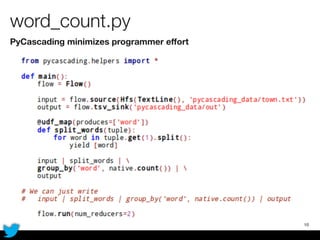
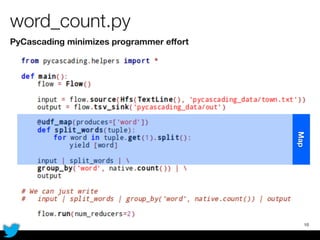
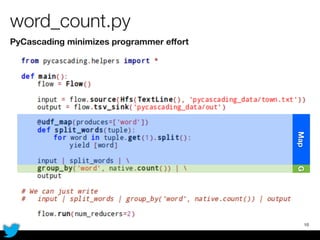
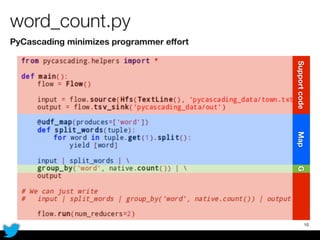
word_count.py
PyCascading minimizes programmer effort
10
word_count.py
PyCascading minimizes programmer effort
10
Map
word_count.py
PyCascading minimizes programmer effort
10
GMap
word_count.py
PyCascading minimizes programmer effort
10
GSupportcodeMap
PyCascading workflow
The basics of writing a Cascading flow in Python
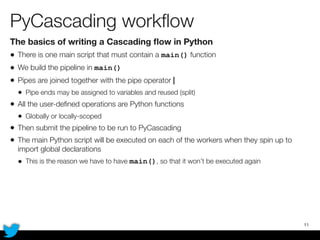
• There is one main script that must contain a main() function
• We build the pipeline in main()
• Pipes are joined together with the pipe operator |
• Pipe ends may be assigned to variables and reused (split)
• All the user-defined operations are Python functions
• Globally or locally-scoped
• Then submit the pipeline to be run to PyCascading
• The main Python script will be executed on each of the workers when they spin up to
import global declarations
• This is the reason we have to have main(), so that it won’t be executed again
11
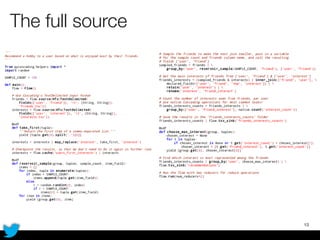
PyCascading by example
Walk through the operations using an example
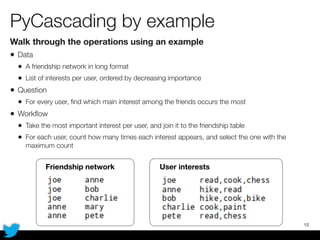
• Data
• A friendship network in long format
• List of interests per user, ordered by decreasing importance
• Question
• For every user, find which main interest among the friends occurs the most
• Workflow
• Take the most important interest per user, and join it to the friendship table
• For each user, count how many times each interest appears, and select the one with the
maximum count
12
Friendship network User interests
The full source
13
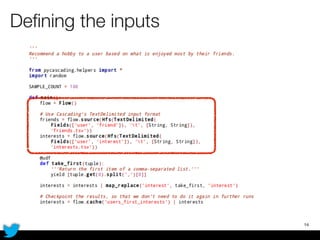
Defining the inputs
14
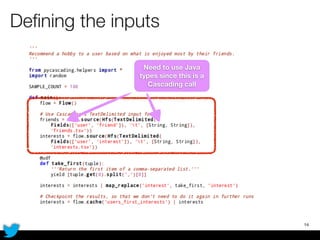
Defining the inputs
14
Need to use Java
types since this is a
Cascading call
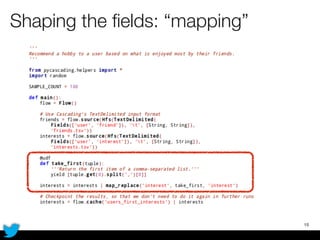
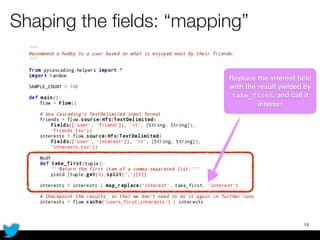
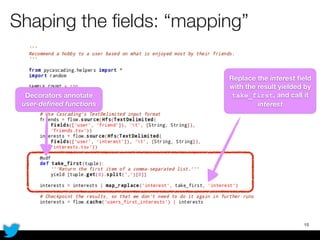
Shaping the fields: “mapping”
15
Shaping the fields: “mapping”
15
Replace the interest field
with the result yielded by
take_first, and call it
interest
Shaping the fields: “mapping”
15
Decorators annotate
user-defined functions
Replace the interest field
with the result yielded by
take_first, and call it
interest
Shaping the fields: “mapping”
15
Decorators annotate
user-defined functions
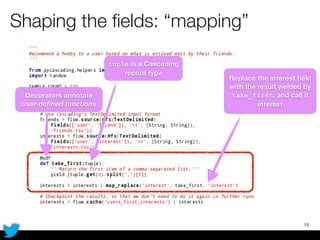
tuple is a Cascading
record type
Replace the interest field
with the result yielded by
take_first, and call it
interest
Shaping the fields: “mapping”
15
Decorators annotate
user-defined functions
tuple is a Cascading
record type
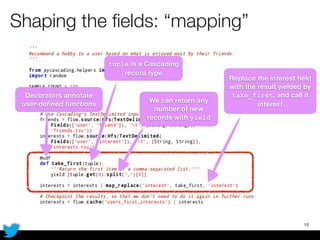
We can return any
number of new
records with yield
Replace the interest field
with the result yielded by
take_first, and call it
interest
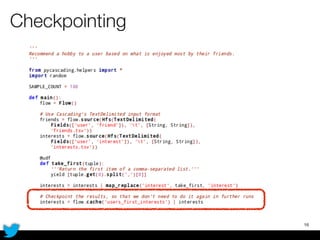
Checkpointing
16
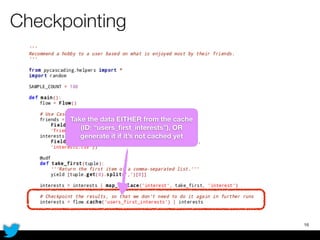
Checkpointing
16
Take the data EITHER from the cache
(ID: “users_first_interests”), OR
generate it if it’s not cached yet
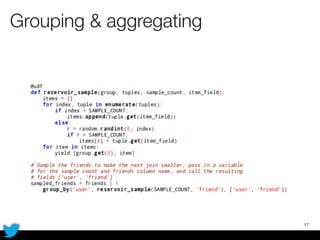
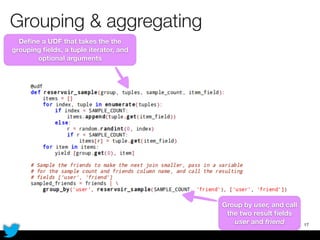
Grouping & aggregating
17
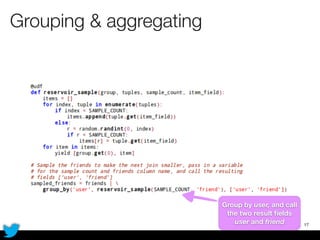
Grouping & aggregating
17
Group by user, and call
the two result fields
user and friend
Grouping & aggregating
17
Define a UDF that takes the the
grouping fields, a tuple iterator, and
optional arguments
Group by user, and call
the two result fields
user and friend
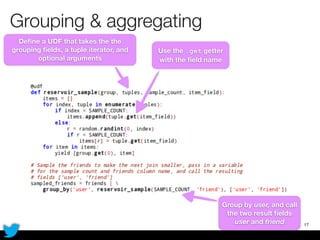
Grouping & aggregating
17
Define a UDF that takes the the
grouping fields, a tuple iterator, and
optional arguments
Use the .get getter
with the field name
Group by user, and call
the two result fields
user and friend
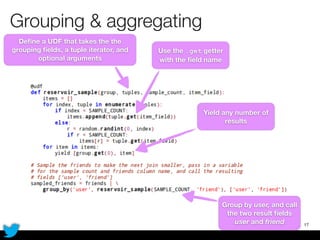
Grouping & aggregating
17
Define a UDF that takes the the
grouping fields, a tuple iterator, and
optional arguments
Use the .get getter
with the field name
Yield any number of
results
Group by user, and call
the two result fields
user and friend
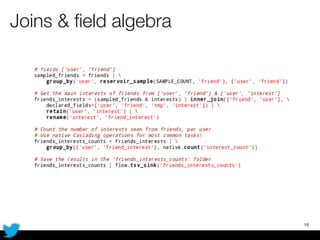
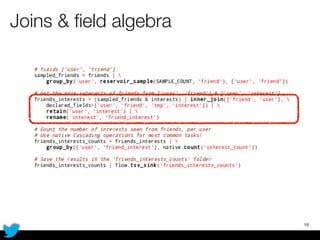
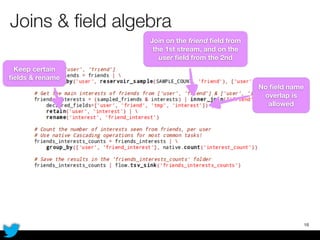
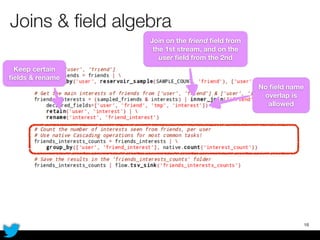
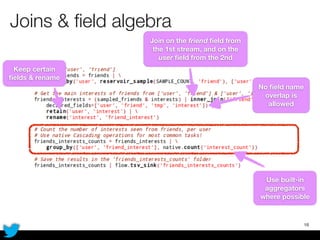
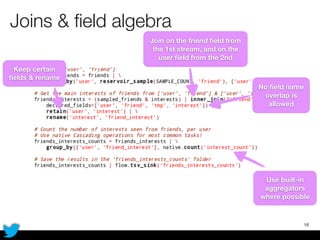
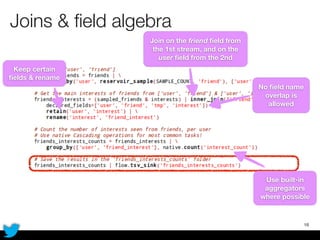
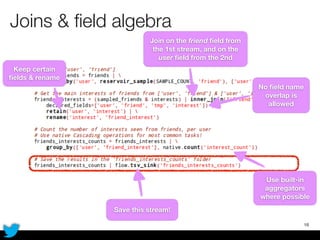
Joins & field algebra
18
Joins & field algebra
18
Joins & field algebra
18
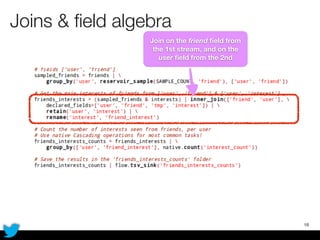
Join on the friend field from
the 1st stream, and on the
user field from the 2nd
Joins & field algebra
18
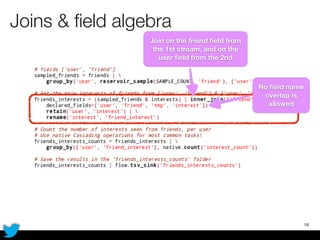
No field name
overlap is
allowed
Join on the friend field from
the 1st stream, and on the
user field from the 2nd
Joins & field algebra
18
No field name
overlap is
allowed
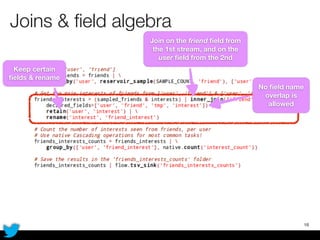
Keep certain
fields & rename
Join on the friend field from
the 1st stream, and on the
user field from the 2nd
Joins & field algebra
18
No field name
overlap is
allowed
Keep certain
fields & rename
Join on the friend field from
the 1st stream, and on the
user field from the 2nd
Joins & field algebra
18
No field name
overlap is
allowed
Keep certain
fields & rename
Join on the friend field from
the 1st stream, and on the
user field from the 2nd
Joins & field algebra
18
No field name
overlap is
allowed
Keep certain
fields & rename
Join on the friend field from
the 1st stream, and on the
user field from the 2nd
Use built-in
aggregators
where possible
Joins & field algebra
18
No field name
overlap is
allowed
Keep certain
fields & rename
Join on the friend field from
the 1st stream, and on the
user field from the 2nd
Use built-in
aggregators
where possible
Joins & field algebra
18
No field name
overlap is
allowed
Keep certain
fields & rename
Join on the friend field from
the 1st stream, and on the
user field from the 2nd
Use built-in
aggregators
where possible
Joins & field algebra
18
No field name
overlap is
allowed
Keep certain
fields & rename
Join on the friend field from
the 1st stream, and on the
user field from the 2nd
Save this stream!
Use built-in
aggregators
where possible
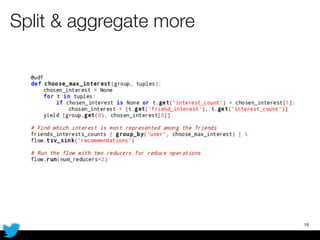
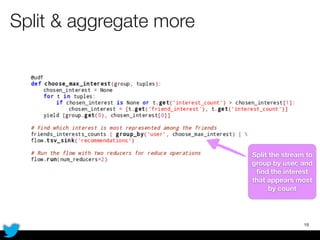
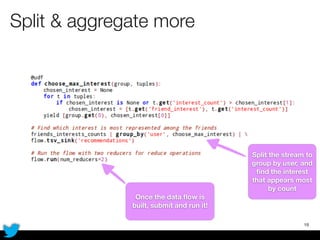
Split & aggregate more
19
Split & aggregate more
19
Split the stream to
group by user, and
find the interest
that appears most
by count
Split & aggregate more
19
Split the stream to
group by user, and
find the interest
that appears most
by count
Once the data flow is
built, submit and run it!
Running the script
Local or remote runs
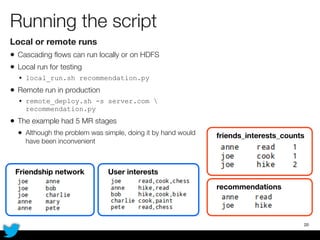
• Cascading flows can run locally or on HDFS
• Local run for testing
• local_run.sh recommendation.py
• Remote run in production
• remote_deploy.sh -s server.com 
recommendation.py
• The example had 5 MR stages
• Although the problem was simple, doing it by hand would
have been inconvenient
20
Friendship network User interests
friends_interests_counts
recommendations
Some remarks
• Benefits
• Can use any Java class
• Can be mixed with Java code
• Can use Python libraries
• Caveats
• Only pure Python code can be used, no compiled C (numpy, scipy)
• But with streaming it’s possible to execute a CPython interpreter
• Some idiosyncrasies because of Jython’s representation of basic types
• Strings are OK, but Python integers are represented as java.math.BigInteger, so
before yielding explicit conversion is needed (joins!)
21
Contact
• Javadoc: http://cascading.org
• Other Cascading-based wrappers
• Scalding (Scala), Cascalog (Clojure), Cascading-JRuby (Ruby)
22
http://github.org/twitter/pycascading
http://pycascading.org
@gaborjszabo
gabor@twitter.com
Implementation details
Challenges due to an interpreted language
• We need to make code available on all workers
• Java bytecode is easy, same .jar everywhere
• Although Jython represents Python functions as classes, they cannot be serialized
• We need to start an interpreter on every worker
• The Python source of the UDFs is retrieved and shipped in the .jar
• Different Hadoop distributions explode the .jar differently, need to use the Hadoop distributed
cache
23

PyCascading for Intuitive Flow Processing with Hadoop (gabor szabo)

  • 1.
    PyCascading for Intuitive FlowProcessing With Hadoop Gabor Szabo Senior Data Scientist Twitter, Inc.
  • 2.
    Outline • Basic conceptsin the Hadoop ecosystem, with an example • Hadoop • Cascading • PyCascading • Essential PyCascading operations • PyCascading by example: discovering main interests among friends • Miscellaneous remarks, caveats 2
  • 3.
    Hadoop Architecture • The Hadoopfile system (HDFS) • Large, distributed file system • Thousands of nodes, PBs of data • The storage layer for Apache Hive, HBase, ... • MapReduce • Idea: ship the code to the data, not other way around • Do aggregations locally • Iterate on the results • Map phase: process the input records, emit a key & a value • Reduce phase: collect records with the same key from Map, emit a new (aggregate) record • Fault tolerance • Both storage and compute are fault tolerant (redundancy, replication, restart) 3
  • 4.
    Hadoop In practice • Language •Java • Need to think in MapReduce • Hard to translate the problem to MR • Hard to maintain and make changes in the topology • Best used for • Archiving (HDFS) • Batch processing (MR) 4
  • 5.
    Cascading The Cascading way:flow processing • Cascading is built on top of Hadoop • Introduces semi-structured flow processing of tuples with typed fields • Analogy: data is flowing in pipes • Input comes from source taps • Output goes to sink taps • Data is reshaped in the pipes by different operations • Builds a DAG from the job, and optimizes the topology to minimize the number of MapReduce phases • The pipes analogy is more intuitive to use than raw MapReduce 5
  • 6.
    Flow processing in(Py)Cascading 6 Source: cascading.org
  • 7.
    Flow processing in(Py)Cascading 6 Source: cascading.org Source tap
  • 8.
    Flow processing in(Py)Cascading 6 Source: cascading.org Source tap Sink tap
  • 9.
    Flow processing in(Py)Cascading 6 Source: cascading.org Source tap Filter Sink tap
  • 10.
    Flow processing in(Py)Cascading 6 Source: cascading.org Source tap Filter Sink tap “Map”
  • 11.
    Flow processing in(Py)Cascading 6 Source: cascading.org Source tap Filter Sink tap “Map” Join
  • 12.
    Flow processing in(Py)Cascading 6 Source: cascading.org Source tap Filter Group & aggregate Sink tap “Map” Join
  • 13.
    PyCascading Design • Built ontop of Cascading • Uses the Jython 2.5 interpreter • Everything in Python • Building the pipelines • User-defined functions that operate on data • Completely hides Java if the user wants it to • However due to the strong ties with Java, it’s worth knowing the Cascading classes 7
  • 14.
    Example: as always,WordCount Writing MapReduce jobs by hand is hard • WordCount: split the input file into words, and count how many times each word occurs 8
  • 15.
    Example: as always,WordCount Writing MapReduce jobs by hand is hard • WordCount: split the input file into words, and count how many times each word occurs 8 M
  • 16.
    Example: as always,WordCount Writing MapReduce jobs by hand is hard • WordCount: split the input file into words, and count how many times each word occurs 8 MR
  • 17.
    Example: as always,WordCount Writing MapReduce jobs by hand is hard • WordCount: split the input file into words, and count how many times each word occurs 8 MRSupportcodeSupportcode
  • 18.
    Cascading WordCount • Stillin Java, but algorithm design is easier • Need to write separate classes for each user-defined operation 9
  • 19.
    Cascading WordCount • Stillin Java, but algorithm design is easier • Need to write separate classes for each user-defined operation 9 M
  • 20.
    Cascading WordCount • Stillin Java, but algorithm design is easier • Need to write separate classes for each user-defined operation 9 MG
  • 21.
    Cascading WordCount • Stillin Java, but algorithm design is easier • Need to write separate classes for each user-defined operation 9 MGSupportcodeSupportcode
  • 22.
  • 23.
  • 24.
  • 25.
  • 26.
    PyCascading workflow The basicsof writing a Cascading flow in Python • There is one main script that must contain a main() function • We build the pipeline in main() • Pipes are joined together with the pipe operator | • Pipe ends may be assigned to variables and reused (split) • All the user-defined operations are Python functions • Globally or locally-scoped • Then submit the pipeline to be run to PyCascading • The main Python script will be executed on each of the workers when they spin up to import global declarations • This is the reason we have to have main(), so that it won’t be executed again 11
  • 27.
    PyCascading by example Walkthrough the operations using an example • Data • A friendship network in long format • List of interests per user, ordered by decreasing importance • Question • For every user, find which main interest among the friends occurs the most • Workflow • Take the most important interest per user, and join it to the friendship table • For each user, count how many times each interest appears, and select the one with the maximum count 12 Friendship network User interests
  • 28.
  • 29.
  • 30.
    Defining the inputs 14 Needto use Java types since this is a Cascading call
  • 31.
    Shaping the fields:“mapping” 15
  • 32.
    Shaping the fields:“mapping” 15 Replace the interest field with the result yielded by take_first, and call it interest
  • 33.
    Shaping the fields:“mapping” 15 Decorators annotate user-defined functions Replace the interest field with the result yielded by take_first, and call it interest
  • 34.
    Shaping the fields:“mapping” 15 Decorators annotate user-defined functions tuple is a Cascading record type Replace the interest field with the result yielded by take_first, and call it interest
  • 35.
    Shaping the fields:“mapping” 15 Decorators annotate user-defined functions tuple is a Cascading record type We can return any number of new records with yield Replace the interest field with the result yielded by take_first, and call it interest
  • 36.
  • 37.
    Checkpointing 16 Take the dataEITHER from the cache (ID: “users_first_interests”), OR generate it if it’s not cached yet
  • 38.
  • 39.
    Grouping & aggregating 17 Groupby user, and call the two result fields user and friend
  • 40.
    Grouping & aggregating 17 Definea UDF that takes the the grouping fields, a tuple iterator, and optional arguments Group by user, and call the two result fields user and friend
  • 41.
    Grouping & aggregating 17 Definea UDF that takes the the grouping fields, a tuple iterator, and optional arguments Use the .get getter with the field name Group by user, and call the two result fields user and friend
  • 42.
    Grouping & aggregating 17 Definea UDF that takes the the grouping fields, a tuple iterator, and optional arguments Use the .get getter with the field name Yield any number of results Group by user, and call the two result fields user and friend
  • 43.
    Joins & fieldalgebra 18
  • 44.
    Joins & fieldalgebra 18
  • 45.
    Joins & fieldalgebra 18 Join on the friend field from the 1st stream, and on the user field from the 2nd
  • 46.
    Joins & fieldalgebra 18 No field name overlap is allowed Join on the friend field from the 1st stream, and on the user field from the 2nd
  • 47.
    Joins & fieldalgebra 18 No field name overlap is allowed Keep certain fields & rename Join on the friend field from the 1st stream, and on the user field from the 2nd
  • 48.
    Joins & fieldalgebra 18 No field name overlap is allowed Keep certain fields & rename Join on the friend field from the 1st stream, and on the user field from the 2nd
  • 49.
    Joins & fieldalgebra 18 No field name overlap is allowed Keep certain fields & rename Join on the friend field from the 1st stream, and on the user field from the 2nd
  • 50.
    Joins & fieldalgebra 18 No field name overlap is allowed Keep certain fields & rename Join on the friend field from the 1st stream, and on the user field from the 2nd Use built-in aggregators where possible
  • 51.
    Joins & fieldalgebra 18 No field name overlap is allowed Keep certain fields & rename Join on the friend field from the 1st stream, and on the user field from the 2nd Use built-in aggregators where possible
  • 52.
    Joins & fieldalgebra 18 No field name overlap is allowed Keep certain fields & rename Join on the friend field from the 1st stream, and on the user field from the 2nd Use built-in aggregators where possible
  • 53.
    Joins & fieldalgebra 18 No field name overlap is allowed Keep certain fields & rename Join on the friend field from the 1st stream, and on the user field from the 2nd Save this stream! Use built-in aggregators where possible
  • 54.
  • 55.
    Split & aggregatemore 19 Split the stream to group by user, and find the interest that appears most by count
  • 56.
    Split & aggregatemore 19 Split the stream to group by user, and find the interest that appears most by count Once the data flow is built, submit and run it!
  • 57.
    Running the script Localor remote runs • Cascading flows can run locally or on HDFS • Local run for testing • local_run.sh recommendation.py • Remote run in production • remote_deploy.sh -s server.com recommendation.py • The example had 5 MR stages • Although the problem was simple, doing it by hand would have been inconvenient 20 Friendship network User interests friends_interests_counts recommendations
  • 58.
    Some remarks • Benefits •Can use any Java class • Can be mixed with Java code • Can use Python libraries • Caveats • Only pure Python code can be used, no compiled C (numpy, scipy) • But with streaming it’s possible to execute a CPython interpreter • Some idiosyncrasies because of Jython’s representation of basic types • Strings are OK, but Python integers are represented as java.math.BigInteger, so before yielding explicit conversion is needed (joins!) 21
  • 59.
    Contact • Javadoc: http://cascading.org •Other Cascading-based wrappers • Scalding (Scala), Cascalog (Clojure), Cascading-JRuby (Ruby) 22 http://github.org/twitter/pycascading http://pycascading.org @gaborjszabo gabor@twitter.com
  • 60.
    Implementation details Challenges dueto an interpreted language • We need to make code available on all workers • Java bytecode is easy, same .jar everywhere • Although Jython represents Python functions as classes, they cannot be serialized • We need to start an interpreter on every worker • The Python source of the UDFs is retrieved and shipped in the .jar • Different Hadoop distributions explode the .jar differently, need to use the Hadoop distributed cache 23