Hadoop
Ecosystem
Ran
Silberman
Dec. 2014
What types of ecosystems exist?
● Systems that are based on MapReduce
● Systems that replace MapReduce
● Complementary databases
● Utilities
● See complete list here
Systems based
on MapReduce
Hive
● Part of the Apache project
● General SQL-like syntax for querying HDFS or other
large databases
● Each SQL statement is translated to one or more
MapReduce jobs (in some cases none)
● Supports pluggable Mappers, Reducers and SerDe’s
(Serializer/Deserializer)
● Pro: Convenient for analytics people that use SQL
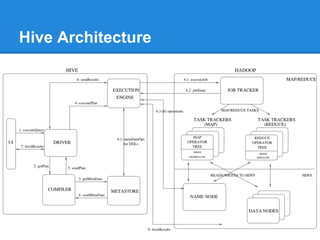
Hive Architecture
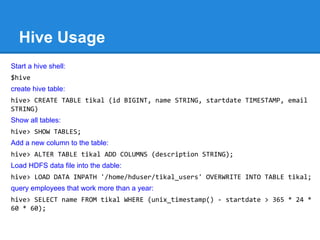
Hive Usage
Start a hive shell:
$hive
create hive table:
hive> CREATE TABLE tikal (id BIGINT, name STRING, startdate TIMESTAMP, email
STRING)
Show all tables:
hive> SHOW TABLES;
Add a new column to the table:
hive> ALTER TABLE tikal ADD COLUMNS (description STRING);
Load HDFS data file into the dable:
hive> LOAD DATA INPATH '/home/hduser/tikal_users' OVERWRITE INTO TABLE tikal;
query employees that work more than a year:
hive> SELECT name FROM tikal WHERE (unix_timestamp() - startdate > 365 * 24 *
60 * 60);
Pig
● Part of the Apache project
● A programing language that is compiled into one or
more MaprRecuce jobs.
● Supports User Defined functions
● Pro: More Convenient to write than pure MapReduce.
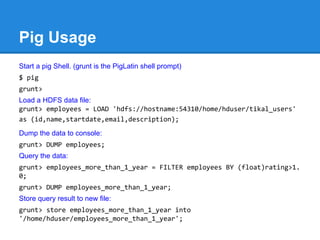
Pig Usage
Start a pig Shell. (grunt is the PigLatin shell prompt)
$ pig
grunt>
Load a HDFS data file:
grunt> employees = LOAD 'hdfs://hostname:54310/home/hduser/tikal_users'
as (id,name,startdate,email,description);
Dump the data to console:
grunt> DUMP employees;
Query the data:
grunt> employees_more_than_1_year = FILTER employees BY (float)rating>1.
0;
grunt> DUMP employees_more_than_1_year;
Store query result to new file:
grunt> store employees_more_than_1_year into
'/home/hduser/employees_more_than_1_year';
Cascading
● An infrastructure with API that is compiled to one or
more MapReduce jobs
● Provide graphical view of the MapReduce jobs workflow
● Ways to tweak setting and improve performance of
workflow.
● Pros:
○ Hides MapReduce API and joins jobs
○ Graphical view and performance tuning
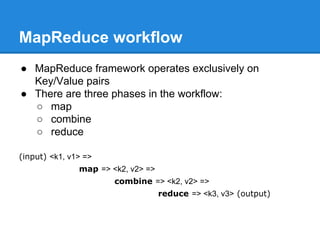
MapReduce workflow
● MapReduce framework operates exclusively on
Key/Value pairs
● There are three phases in the workflow:
○ map
○ combine
○ reduce
(input) <k1, v1> =>
map => <k2, v2> =>
combine => <k2, v2> =>
reduce => <k3, v3> (output)
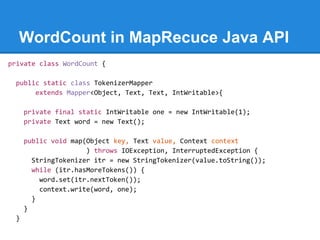
WordCount in MapRecuce Java API
private class WordCount {
public static class TokenizerMapper
extends Mapper<Object, Text, Text, IntWritable>{
private final static IntWritable one = new IntWritable(1);
private Text word = new Text();
public void map(Object key, Text value, Context context
) throws IOException, InterruptedException {
StringTokenizer itr = new StringTokenizer(value.toString());
while (itr.hasMoreTokens()) {
word.set(itr.nextToken());
context.write(word, one);
}
}
}
WordCount in MapRecuce Java Cont.
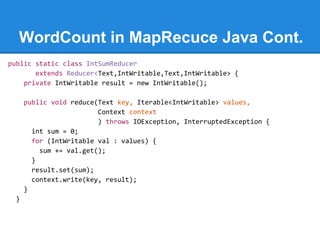
public static class IntSumReducer
extends Reducer<Text,IntWritable,Text,IntWritable> {
private IntWritable result = new IntWritable();
public void reduce(Text key, Iterable<IntWritable> values,
Context context
) throws IOException, InterruptedException {
int sum = 0;
for (IntWritable val : values) {
sum += val.get();
}
result.set(sum);
context.write(key, result);
}
}
WordCount in MapRecuce Java Cont.
public static void main(String[] args) throws Exception {
Configuration conf = new Configuration();
Job job = Job.getInstance(conf, "word count");
job.setJarByClass(WordCount.class);
job.setMapperClass(TokenizerMapper.class);
job.setCombinerClass(IntSumReducer.class);
job.setReducerClass(IntSumReducer.class);
job.setOutputKeyClass(Text.class);
job.setOutputValueClass(IntWritable.class);
FileInputFormat.addInputPath(job, new Path(args[0]));
FileOutputFormat.setOutputPath(job, new Path(args[1]));
System.exit(job.waitForCompletion(true) ? 0 : 1);
}
}
MapReduce workflow example.
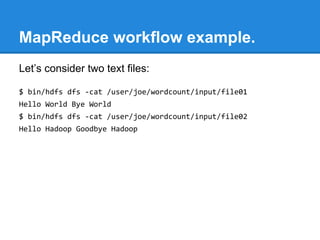
Let’s consider two text files:
$ bin/hdfs dfs -cat /user/joe/wordcount/input/file01
Hello World Bye World
$ bin/hdfs dfs -cat /user/joe/wordcount/input/file02
Hello Hadoop Goodbye Hadoop
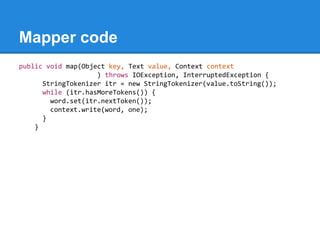
Mapper code
public void map(Object key, Text value, Context context
) throws IOException, InterruptedException {
StringTokenizer itr = new StringTokenizer(value.toString());
while (itr.hasMoreTokens()) {
word.set(itr.nextToken());
context.write(word, one);
}
}
Mapper output
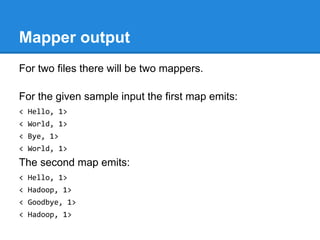
For two files there will be two mappers.
For the given sample input the first map emits:
< Hello, 1>
< World, 1>
< Bye, 1>
< World, 1>
The second map emits:
< Hello, 1>
< Hadoop, 1>
< Goodbye, 1>
< Hadoop, 1>
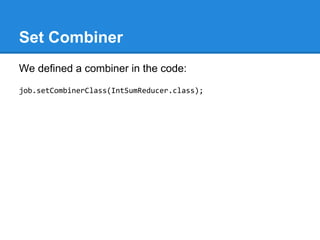
Set Combiner
We defined a combiner in the code:
job.setCombinerClass(IntSumReducer.class);
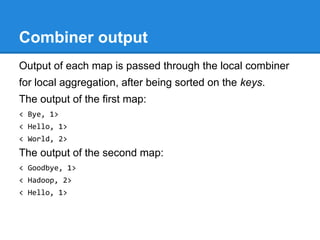
Combiner output
Output of each map is passed through the local combiner
for local aggregation, after being sorted on the keys.
The output of the first map:
< Bye, 1>
< Hello, 1>
< World, 2>
The output of the second map:
< Goodbye, 1>
< Hadoop, 2>
< Hello, 1>
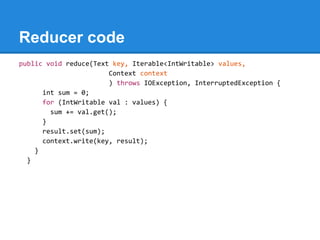
Reducer code
public void reduce(Text key, Iterable<IntWritable> values,
Context context
) throws IOException, InterruptedException {
int sum = 0;
for (IntWritable val : values) {
sum += val.get();
}
result.set(sum);
context.write(key, result);
}
}
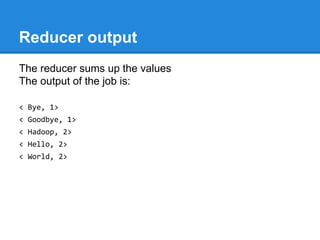
Reducer output
The reducer sums up the values
The output of the job is:
< Bye, 1>
< Goodbye, 1>
< Hadoop, 2>
< Hello, 2>
< World, 2>
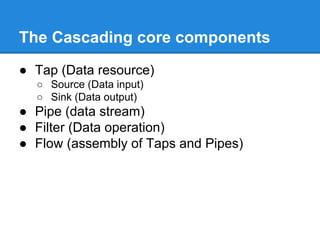
The Cascading core components
● Tap (Data resource)
○ Source (Data input)
○ Sink (Data output)
● Pipe (data stream)
● Filter (Data operation)
● Flow (assembly of Taps and Pipes)
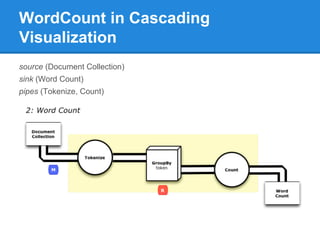
WordCount in Cascading
Visualization
source (Document Collection)
sink (Word Count)
pipes (Tokenize, Count)
WodCount in Cascading Cont.
// define source and sink Taps.
Scheme sourceScheme = new TextLine( new Fields( "line" ) );
Tap source = new Hfs( sourceScheme, inputPath );
Scheme sinkScheme = new TextLine( new Fields( "word", "count" ) );
Tap sink = new Hfs( sinkScheme, outputPath, SinkMode.REPLACE );
// the 'head' of the pipe assembly
Pipe assembly = new Pipe( "wordcount" );
// For each input Tuple
// parse out each word into a new Tuple with the field name "word"
// regular expressions are optional in Cascading
String regex = "(?<!pL)(?=pL)[^ ]*(?<=pL)(?!pL)";
Function function = new RegexGenerator( new Fields( "word" ), regex );
assembly = new Each( assembly, new Fields( "line" ), function );
// group the Tuple stream by the "word" value
assembly = new GroupBy( assembly, new Fields( "word" ) );
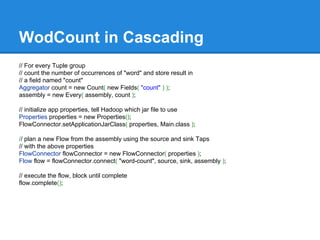
WodCount in Cascading
// For every Tuple group
// count the number of occurrences of "word" and store result in
// a field named "count"
Aggregator count = new Count( new Fields( "count" ) );
assembly = new Every( assembly, count );
// initialize app properties, tell Hadoop which jar file to use
Properties properties = new Properties();
FlowConnector.setApplicationJarClass( properties, Main.class );
// plan a new Flow from the assembly using the source and sink Taps
// with the above properties
FlowConnector flowConnector = new FlowConnector( properties );
Flow flow = flowConnector.connect( "word-count", source, sink, assembly );
// execute the flow, block until complete
flow.complete();
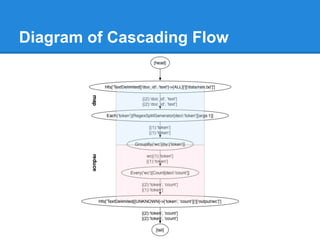
Diagram of Cascading Flow
Scalding
● Extension to Cascading
● Programing language is Scala instead of Java
● Good for functional programing paradigms in Data
Applications
● Pro: code can be very compact!
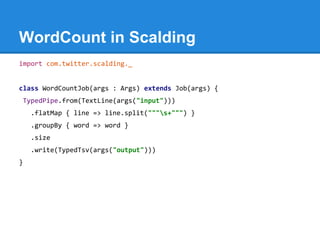
WordCount in Scalding
import com.twitter.scalding._
class WordCountJob(args : Args) extends Job(args) {
TypedPipe.from(TextLine(args("input")))
.flatMap { line => line.split("""s+""") }
.groupBy { word => word }
.size
.write(TypedTsv(args("output")))
}
Summingbird
● An open source from Twitter.
● An API that is compiled to Scalding and to Storm
topologies.
● Can be written in Java or Scala
● Pro: When you want to use Lambda Architecture and
you want to write one code that will run on both Hadoop
and Storm.
WordCount in Summingbird
def wordCount[P <: Platform[P]]
(source: Producer[P, String], store: P#Store[String, Long]) =
source.flatMap { sentence =>
toWords(sentence).map(_ -> 1L)
}.sumByKey(store)
Systems that
replace MapReduce
Spark
● Part of the Apache project
● Replaces MapReduce with it own engine that works
much faster without compromising consistency
● Architecture not based on Map-reduce but rather on two
concepts: RDD (Resilient Distributed Dataset) and DAG
(Directed Acyclic Graph)
● Pro’s:
○ Works much faster than MapReduce;
○ fast growing community.
Impala
● Open Source from Cloudera
● Used for Interactive queries with SQL syntax
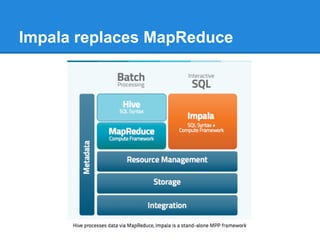
● Replaces MapReduce with its own Impala Server
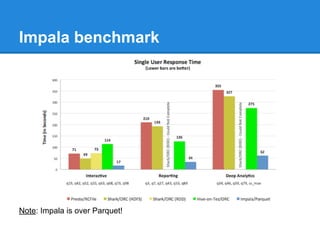
● Pro: Can get much faster response time for SQL over
HDFS than Hive or Pig.
Impala benchmark
Note: Impala is over Parquet!
Impala replaces MapReduce
Impala architecture
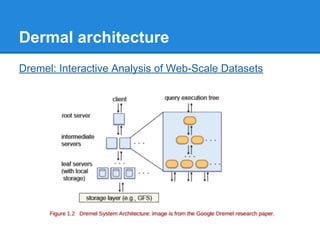
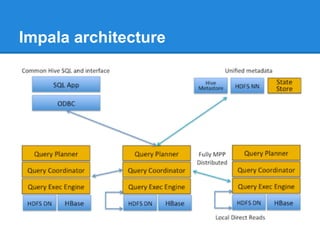
● Impala architecture was inspired by Google Dremel
● MapReduce is great for functional programming, but not
efficient for SQL.
● Impala replaced the MapReduce with Distributed Query
Engine that is optimized for fast queries.
Dermal architecture
Dremel: Interactive Analysis of Web-Scale Datasets
Impala architecture
Presto, Drill, Tez
● Several more alternatives:
○ Presto by Facebook
○ Apache Drill pushed by MapR
○ Apache Tez pushed by Hortonworks
● all are alternatives to Impala and do more or less the
same: provide faster response time for queries over
HDFS.
● Each of the above claim to have very fast results.
● Be careful of benchmarks they publish: to get better
results they use indexed data rather than sequential
files in HDFS (i.e., ORC file, Parquet, HBase)
Complementary
Databases
HBase
● Apache project
● NoSQL cluster database that can grow linearly
● Can store billions of rows X millions of columns
● Storage is based on HDFS
● API based on MapReduce
● Pros:
○ Strongly consistent read/writes
○ Good for high-speed counter aggregations
Parquet
● Apache (incubator) project. Initiated by Twitter &
Cloudera
● Columnar File Format - write one column at a time
● Integrated with Hadoop ecosystem (MapReduce, Hive)
● Supports Avro, Thrift and ProtBuf
● Pro: keep I/O to a minimum by reading from a disk only
the data required for the query
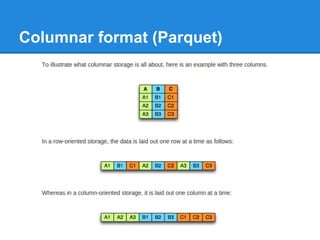
Columnar format (Parquet)
Advantages of Columnar formats
● Better compression as data is more homogenous.
● I/O will be reduced as we can efficiently scan only a
subset of the columns while reading the data.
● When storing data of the same type in each column,
we can use encodings better suited to the modern
processors’ pipeline by making instruction branching
more predictable.
Utilities
Flume
● Cloudera product
● Used to collect files from distributed systems and send
them to central repository
● Designed for integration with HDFS but can write to
other FS
● Supports listening to TCP and UDP sockets
● Main Use Case: collect distributed logs to HDFS
Avro
● An Apache project
● Data Serialization by Schema
● Support rich data structures. Defined in Json-like syntax
● Support Schema evolution
● Integrated with Hadoop I/O API
● Similar to Thrift and ProtocolBuffers
Oozie
● An Apache project
● Workflow Scheduler for Hadoop jobs
● Very close integration with the Hadoop API
Mesos
● Apache project
● Cluster manager that abstracts resources
● Integrated with Hadoop to allocate resources
● Scalable to 10,000 nodes
● Supports physical machines, VM’s, Docker
● Multi resource scheduler (memory, CPU, disk, ports)
● Web UI for viewing cluster status

Hadoop ecosystem

  • 1.
  • 2.
    What types ofecosystems exist? ● Systems that are based on MapReduce ● Systems that replace MapReduce ● Complementary databases ● Utilities ● See complete list here
  • 3.
  • 4.
    Hive ● Part ofthe Apache project ● General SQL-like syntax for querying HDFS or other large databases ● Each SQL statement is translated to one or more MapReduce jobs (in some cases none) ● Supports pluggable Mappers, Reducers and SerDe’s (Serializer/Deserializer) ● Pro: Convenient for analytics people that use SQL
  • 5.
  • 6.
    Hive Usage Start ahive shell: $hive create hive table: hive> CREATE TABLE tikal (id BIGINT, name STRING, startdate TIMESTAMP, email STRING) Show all tables: hive> SHOW TABLES; Add a new column to the table: hive> ALTER TABLE tikal ADD COLUMNS (description STRING); Load HDFS data file into the dable: hive> LOAD DATA INPATH '/home/hduser/tikal_users' OVERWRITE INTO TABLE tikal; query employees that work more than a year: hive> SELECT name FROM tikal WHERE (unix_timestamp() - startdate > 365 * 24 * 60 * 60);
  • 7.
    Pig ● Part ofthe Apache project ● A programing language that is compiled into one or more MaprRecuce jobs. ● Supports User Defined functions ● Pro: More Convenient to write than pure MapReduce.
  • 8.
    Pig Usage Start apig Shell. (grunt is the PigLatin shell prompt) $ pig grunt> Load a HDFS data file: grunt> employees = LOAD 'hdfs://hostname:54310/home/hduser/tikal_users' as (id,name,startdate,email,description); Dump the data to console: grunt> DUMP employees; Query the data: grunt> employees_more_than_1_year = FILTER employees BY (float)rating>1. 0; grunt> DUMP employees_more_than_1_year; Store query result to new file: grunt> store employees_more_than_1_year into '/home/hduser/employees_more_than_1_year';
  • 9.
    Cascading ● An infrastructurewith API that is compiled to one or more MapReduce jobs ● Provide graphical view of the MapReduce jobs workflow ● Ways to tweak setting and improve performance of workflow. ● Pros: ○ Hides MapReduce API and joins jobs ○ Graphical view and performance tuning
  • 10.
    MapReduce workflow ● MapReduceframework operates exclusively on Key/Value pairs ● There are three phases in the workflow: ○ map ○ combine ○ reduce (input) <k1, v1> => map => <k2, v2> => combine => <k2, v2> => reduce => <k3, v3> (output)
  • 11.
    WordCount in MapRecuceJava API private class WordCount { public static class TokenizerMapper extends Mapper<Object, Text, Text, IntWritable>{ private final static IntWritable one = new IntWritable(1); private Text word = new Text(); public void map(Object key, Text value, Context context ) throws IOException, InterruptedException { StringTokenizer itr = new StringTokenizer(value.toString()); while (itr.hasMoreTokens()) { word.set(itr.nextToken()); context.write(word, one); } } }
  • 12.
    WordCount in MapRecuceJava Cont. public static class IntSumReducer extends Reducer<Text,IntWritable,Text,IntWritable> { private IntWritable result = new IntWritable(); public void reduce(Text key, Iterable<IntWritable> values, Context context ) throws IOException, InterruptedException { int sum = 0; for (IntWritable val : values) { sum += val.get(); } result.set(sum); context.write(key, result); } }
  • 13.
    WordCount in MapRecuceJava Cont. public static void main(String[] args) throws Exception { Configuration conf = new Configuration(); Job job = Job.getInstance(conf, "word count"); job.setJarByClass(WordCount.class); job.setMapperClass(TokenizerMapper.class); job.setCombinerClass(IntSumReducer.class); job.setReducerClass(IntSumReducer.class); job.setOutputKeyClass(Text.class); job.setOutputValueClass(IntWritable.class); FileInputFormat.addInputPath(job, new Path(args[0])); FileOutputFormat.setOutputPath(job, new Path(args[1])); System.exit(job.waitForCompletion(true) ? 0 : 1); } }
  • 14.
    MapReduce workflow example. Let’sconsider two text files: $ bin/hdfs dfs -cat /user/joe/wordcount/input/file01 Hello World Bye World $ bin/hdfs dfs -cat /user/joe/wordcount/input/file02 Hello Hadoop Goodbye Hadoop
  • 15.
    Mapper code public voidmap(Object key, Text value, Context context ) throws IOException, InterruptedException { StringTokenizer itr = new StringTokenizer(value.toString()); while (itr.hasMoreTokens()) { word.set(itr.nextToken()); context.write(word, one); } }
  • 16.
    Mapper output For twofiles there will be two mappers. For the given sample input the first map emits: < Hello, 1> < World, 1> < Bye, 1> < World, 1> The second map emits: < Hello, 1> < Hadoop, 1> < Goodbye, 1> < Hadoop, 1>
  • 17.
    Set Combiner We defineda combiner in the code: job.setCombinerClass(IntSumReducer.class);
  • 18.
    Combiner output Output ofeach map is passed through the local combiner for local aggregation, after being sorted on the keys. The output of the first map: < Bye, 1> < Hello, 1> < World, 2> The output of the second map: < Goodbye, 1> < Hadoop, 2> < Hello, 1>
  • 19.
    Reducer code public voidreduce(Text key, Iterable<IntWritable> values, Context context ) throws IOException, InterruptedException { int sum = 0; for (IntWritable val : values) { sum += val.get(); } result.set(sum); context.write(key, result); } }
  • 20.
    Reducer output The reducersums up the values The output of the job is: < Bye, 1> < Goodbye, 1> < Hadoop, 2> < Hello, 2> < World, 2>
  • 21.
    The Cascading corecomponents ● Tap (Data resource) ○ Source (Data input) ○ Sink (Data output) ● Pipe (data stream) ● Filter (Data operation) ● Flow (assembly of Taps and Pipes)
  • 22.
    WordCount in Cascading Visualization source(Document Collection) sink (Word Count) pipes (Tokenize, Count)
  • 23.
    WodCount in CascadingCont. // define source and sink Taps. Scheme sourceScheme = new TextLine( new Fields( "line" ) ); Tap source = new Hfs( sourceScheme, inputPath ); Scheme sinkScheme = new TextLine( new Fields( "word", "count" ) ); Tap sink = new Hfs( sinkScheme, outputPath, SinkMode.REPLACE ); // the 'head' of the pipe assembly Pipe assembly = new Pipe( "wordcount" ); // For each input Tuple // parse out each word into a new Tuple with the field name "word" // regular expressions are optional in Cascading String regex = "(?<!pL)(?=pL)[^ ]*(?<=pL)(?!pL)"; Function function = new RegexGenerator( new Fields( "word" ), regex ); assembly = new Each( assembly, new Fields( "line" ), function ); // group the Tuple stream by the "word" value assembly = new GroupBy( assembly, new Fields( "word" ) );
  • 24.
    WodCount in Cascading //For every Tuple group // count the number of occurrences of "word" and store result in // a field named "count" Aggregator count = new Count( new Fields( "count" ) ); assembly = new Every( assembly, count ); // initialize app properties, tell Hadoop which jar file to use Properties properties = new Properties(); FlowConnector.setApplicationJarClass( properties, Main.class ); // plan a new Flow from the assembly using the source and sink Taps // with the above properties FlowConnector flowConnector = new FlowConnector( properties ); Flow flow = flowConnector.connect( "word-count", source, sink, assembly ); // execute the flow, block until complete flow.complete();
  • 25.
  • 26.
    Scalding ● Extension toCascading ● Programing language is Scala instead of Java ● Good for functional programing paradigms in Data Applications ● Pro: code can be very compact!
  • 27.
    WordCount in Scalding importcom.twitter.scalding._ class WordCountJob(args : Args) extends Job(args) { TypedPipe.from(TextLine(args("input"))) .flatMap { line => line.split("""s+""") } .groupBy { word => word } .size .write(TypedTsv(args("output"))) }
  • 28.
    Summingbird ● An opensource from Twitter. ● An API that is compiled to Scalding and to Storm topologies. ● Can be written in Java or Scala ● Pro: When you want to use Lambda Architecture and you want to write one code that will run on both Hadoop and Storm.
  • 29.
    WordCount in Summingbird defwordCount[P <: Platform[P]] (source: Producer[P, String], store: P#Store[String, Long]) = source.flatMap { sentence => toWords(sentence).map(_ -> 1L) }.sumByKey(store)
  • 30.
  • 31.
    Spark ● Part ofthe Apache project ● Replaces MapReduce with it own engine that works much faster without compromising consistency ● Architecture not based on Map-reduce but rather on two concepts: RDD (Resilient Distributed Dataset) and DAG (Directed Acyclic Graph) ● Pro’s: ○ Works much faster than MapReduce; ○ fast growing community.
  • 32.
    Impala ● Open Sourcefrom Cloudera ● Used for Interactive queries with SQL syntax ● Replaces MapReduce with its own Impala Server ● Pro: Can get much faster response time for SQL over HDFS than Hive or Pig.
  • 33.
  • 34.
  • 35.
    Impala architecture ● Impalaarchitecture was inspired by Google Dremel ● MapReduce is great for functional programming, but not efficient for SQL. ● Impala replaced the MapReduce with Distributed Query Engine that is optimized for fast queries.
  • 36.
    Dermal architecture Dremel: InteractiveAnalysis of Web-Scale Datasets
  • 37.
  • 38.
    Presto, Drill, Tez ●Several more alternatives: ○ Presto by Facebook ○ Apache Drill pushed by MapR ○ Apache Tez pushed by Hortonworks ● all are alternatives to Impala and do more or less the same: provide faster response time for queries over HDFS. ● Each of the above claim to have very fast results. ● Be careful of benchmarks they publish: to get better results they use indexed data rather than sequential files in HDFS (i.e., ORC file, Parquet, HBase)
  • 39.
  • 40.
    HBase ● Apache project ●NoSQL cluster database that can grow linearly ● Can store billions of rows X millions of columns ● Storage is based on HDFS ● API based on MapReduce ● Pros: ○ Strongly consistent read/writes ○ Good for high-speed counter aggregations
  • 41.
    Parquet ● Apache (incubator)project. Initiated by Twitter & Cloudera ● Columnar File Format - write one column at a time ● Integrated with Hadoop ecosystem (MapReduce, Hive) ● Supports Avro, Thrift and ProtBuf ● Pro: keep I/O to a minimum by reading from a disk only the data required for the query
  • 42.
  • 43.
    Advantages of Columnarformats ● Better compression as data is more homogenous. ● I/O will be reduced as we can efficiently scan only a subset of the columns while reading the data. ● When storing data of the same type in each column, we can use encodings better suited to the modern processors’ pipeline by making instruction branching more predictable.
  • 44.
  • 45.
    Flume ● Cloudera product ●Used to collect files from distributed systems and send them to central repository ● Designed for integration with HDFS but can write to other FS ● Supports listening to TCP and UDP sockets ● Main Use Case: collect distributed logs to HDFS
  • 46.
    Avro ● An Apacheproject ● Data Serialization by Schema ● Support rich data structures. Defined in Json-like syntax ● Support Schema evolution ● Integrated with Hadoop I/O API ● Similar to Thrift and ProtocolBuffers
  • 47.
    Oozie ● An Apacheproject ● Workflow Scheduler for Hadoop jobs ● Very close integration with the Hadoop API
  • 48.
    Mesos ● Apache project ●Cluster manager that abstracts resources ● Integrated with Hadoop to allocate resources ● Scalable to 10,000 nodes ● Supports physical machines, VM’s, Docker ● Multi resource scheduler (memory, CPU, disk, ports) ● Web UI for viewing cluster status