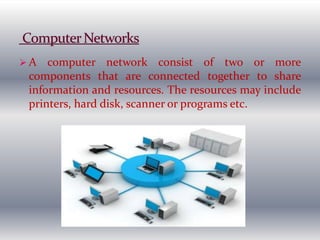
 A computer network consist of two or more
components that are connected together to share
information and resources. The resources may include
printers, hard disk, scanner or programs etc.
 Computer network can be used in an office.
 Internet is also an example of computer network.
Applications/Benefits
Information and Resource Sharing
Money Saving
Communication
Internet Access Sharing
Data Security and Management
Entertainment
Transferring Funds
Some disadvantages are as follows:
 Hardware, Software & Setup Costs
 Hardware & Software Management Costs
 Undesirable sharing
 Illegal or Undesirable Behavior
 Data Security Concerns
Client
A client is a computer in the network that is
connected with a server to access different resources. The
client computer sends request to the server.
Server
A server is a computer that provides services to the
computers and other devices connected to the network.
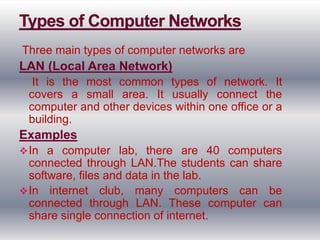
Three main types of computer networks are
LAN (Local Area Network)
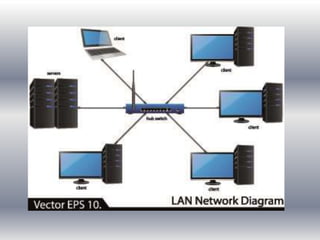
It is the most common types of network. It
covers a small area. It usually connect the
computer and other devices within one office or a
building.
Examples
In a computer lab, there are 40 computers
connected through LAN.The students can share
software, files and data in the lab.
In internet club, many computers can be
connected through LAN. These computer can
share single connection of internet.
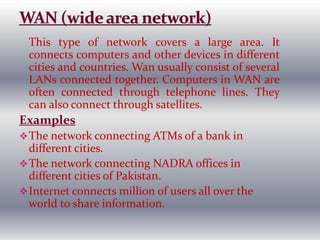
This type of network covers a large area. It
connects computers and other devices in different
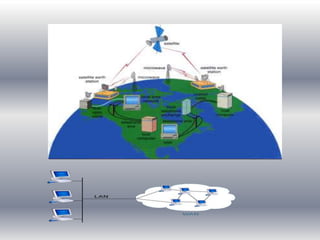
cities and countries. Wan usually consist of several
LANs connected together. Computers in WAN are
often connected through telephone lines. They
can also connect through satellites.
Examples
The network connecting ATMs of a bank in
different cities.
The network connecting NADRA offices in
different cities of Pakistan.
Internet connects million of users all over the
world to share information.
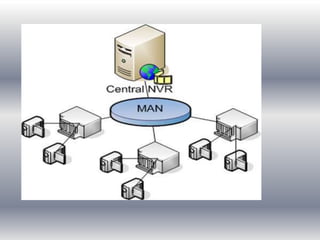
This type of network covers an area of city. MAN is
larger than LAN but smaller than WAN. It is
usually used to connect two more LAN in a city or
town.
Examples
The network connecting different branches of a
company in a city.
The network connecting different campuses of a
college in a city.
Cable TV network in a city
Data communication is a process of transferring
data electronically from one place to an other
place. Data can be transferred by using different
media.
Sending Device
A device that send message is called sending
device. It is also called source or transmitter.
Receiving device
A device that receive the message is called
receiving device. It is also called sink.
Communication Device
Communication device are used to transmit
messages between sending and receiving device
through communication medium.
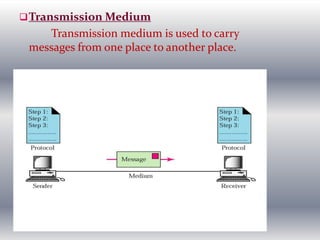
Transmission Medium
Transmission medium is used to carry
messages from one place to another place.
Types of Data Transmission
The two forms of data transmission
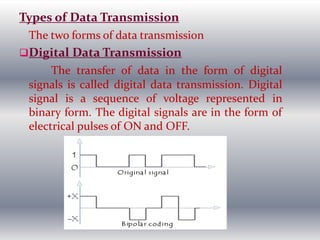
Digital Data Transmission
The transfer of data in the form of digital
signals is called digital data transmission. Digital
signal is a sequence of voltage represented in
binary form. The digital signals are in the form of
electrical pulses of ON and OFF.
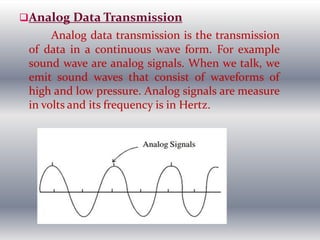
Analog Data Transmission
Analog data transmission is the transmission
of data in a continuous wave form. For example
sound wave are analog signals. When we talk, we
emit sound waves that consist of waveforms of
high and low pressure. Analog signals are measure
in volts and its frequency is in Hertz.
The path through which data is transmitted from
one place to another place is called channel. It is
also known as a communication media.
Types
o Bounded /Guided Transmission Media
Communication device are directly
connected with each other by using physical
media like wires.
Examples
o Twisted Pair
Twisted pair is the most commonly used
physical transmission medium. It is used in local
area network.
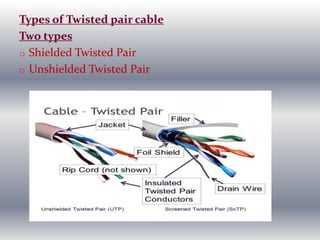
Types of Twisted pair cable
Two types
o Shielded Twisted Pair
o Unshielded Twisted Pair
Characteristics of Twisted Pair
Different characteristics of twisted pair are as
follows:
o It is an inexpensive transmission medium.
o It is easy to install.
o It can transfer data to a short distance.
Coaxial Cable
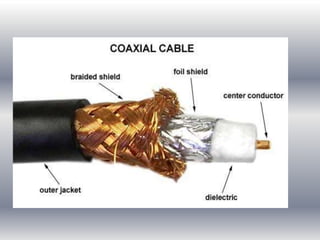
Coaxial cable consist of copper wire covered
by insulating material. The insulated copper wire
is covered by copper mesh.
Characteristics of Coaxial Cable
Different characteristics of coaxial cable are:
o It is more expensive transmission medium than
twisted pair.
o It can be installed very easily.
Fiber Optics
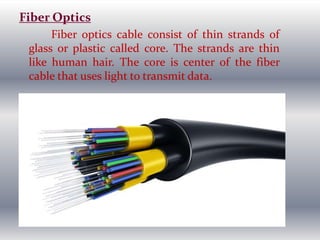
Fiber optics cable consist of thin strands of
glass or plastic called core. The strands are thin
like human hair. The core is center of the fiber
cable that uses light to transmit data.
Advantages of Fiber Optics
o It is not affected by electromagnetic waves.
o It is more secure and reliable form of data
transmission.
o Fiber optic is lighter and smaller in size.
o Fiber optic networks work at very high speed.
Disadvantages
o It is difficult to install.
o It is expensive.
In unguided media, communication devices
communicate with each other through air or space
using broadcast radio signals, microwave signals
and infrared signals. Data can be transferred all
over the world using this media . It is called
unbounded media.
Examples
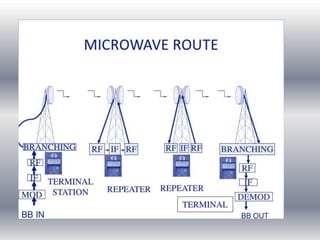
Microwave System
Microwave are radio wave that are used to provide
high speed transmission. Both voice and data can
be transmitted through microwave. Data is
transmitted through the air from one microwave
station to another similar to radio signals.
Communication Satellite
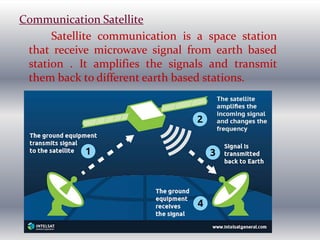
Satellite communication is a space station
that receive microwave signal from earth based
station . It amplifies the signals and transmit
them back to different earth based stations.
Broadcast Radio
Broadcast radio is wireless transmission
medium. It distributes radio signals through the
air over long and short distance.
Example of short range broadcast radio is
bluetooth.
Cellular Communication
Cellular communication is a wireless
communication system. It is widely used all over
the world for mobile communication. A cellular
communication system is used to transmit text,
images, voice and video.
Infrared
Infrared is a wireless transmission medium.
It sends signals using infrared light waves.
Communication and Network Devices
The hardware used to transmit data, instruction
between sending and receiving device is called
communication device. A communication device at
sending end sends data to a communication channel. A
communication device at receiving end receives data to
a communication channel.
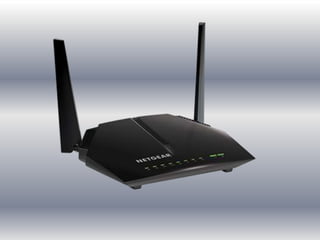
Modem
Modem stands for modulator/demodulator. It is
commonly used communication device. Modem send
and receive data from one computer to another
computer on the internet through telephone lines. The
sending and receiving computers both have modems.
Types of Modem
Different types of modem are as follows:
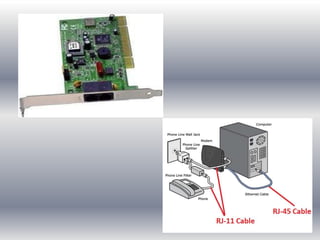
External Modem
External modem is attached to the system unit as
an external device through telephone line. It is
connected to telephone wall jack by another cable. It
require external power supply. It is easy to setup.
Internal Modem
Internal modem is circuit board that is inserted
into an expansion slot on the motherboard. Internal
modem cannot be moved from one computer to
another easily. It is difficult to setup than other types
of modem.
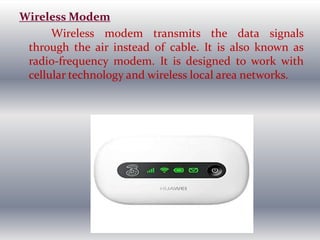
Wireless Modem
Wireless modem transmits the data signals
through the air instead of cable. It is also known as
radio-frequency modem. It is designed to work with
cellular technology and wireless local area networks.
ISDN Modems
ISDN modem allows digital transmission of data
over telephone lines. It is also known as ISDN adapter.
It supports data transfer rates up to 1.54 Mbps.
DSL Modem
DSL modem allows faster transmission over the
standard telephone lines. It is faster than ISDN.There
are two types of DSL.
ADSL
It stand for Asymmetric Digital Subscriber Line. It
uses faster transmission downstream than upstream. It
provides the upload speed of up to 640 Kbps and
download speed of up to 8.1 Mbps.
SDSL
It stands for Symmetric Subscriber Line. It uses the
same transmission rate for both directions. It transfers
data at 3 Mbps approximately in both directions.
Cable Modem
Cable modem is also known as broadband modem.
Cable modem is a stand-alone device connected with a
cable to USB port. It sends and receives data over the
cable television network. It provides faster internet speed
than dial-up modem,DSL modem and ISDN.
Satellite Modem
Satellite modem is used to send and receive data
using satellite technology . It is commonly used for high
speed internet service.
Wireless Access Point
Wireless access point is central communication
device. It allows computer and other devices to
transfer data wirelessly among themselves or to a
wired network. Wireless access point have a high
quality antennas for optimal signals.
HUB
A hub also called concentrator or multistation
access unit (MAU) . It provide the central point for
cables in a network. Hubs also transmit signals and
have multiple ports to which devices are connected.
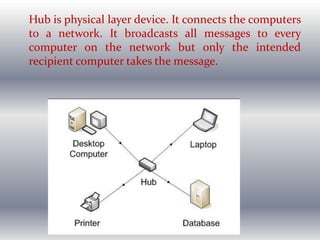
Hub is physical layer device. It connects the computers
to a network. It broadcasts all messages to every
computer on the network but only the intended
recipient computer takes the message.
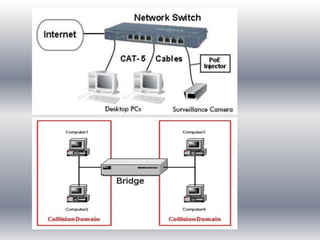
Network Switch
Network switch is a more intelligent device than
Hub. The switch improves the efficiency of data
transfer in the network. It receives a message from any
device connected to it and than transmits the message
only to that device for which the message was meant .
It can also handle multiple communication channels at
the same time.
Network Bridge
A network bridge can be used in computer
networks to interconnects two LANS and to separate
network segments. A segments is a section of network
separated by bridges , switches & routers. The bridge
uses MAC address information for making decision to
forward data packets.
Routers
A router is a communication device that connects
multiple computers or others routers together. It
connects multiple networks using similar or different
protocols.
A network can be arranged in different ways. The
physical layout or arrangement of connected devices in
a network is called topology. It is the shape of a
network. Different network topologies are as follows:
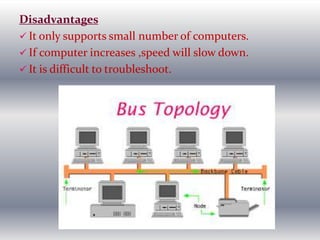
Bus Topology
Bus topology is the simplest type of network. It
supports a small number of computers. In bus
topology, all computer or network nodes are connected
to a common communication medium. This medium is
often a central wire known as bus. The terminators are
used at the end of a bus to absorb signals. A collision
can occur in a bus topology if two computer transmit
data at same time.
Working of Bus Network
The sending computer send data and destination
address through the bus. The data and address move
from one computer to another in a network. Each
computer checks the address. If it matches with the
address of a computer, the computer keeps the data.
Otherwise the data moves to the next computer.
Advantages
 Simple and easy to use.
 It requires small length of cable to connect computes.
 Less expensive
 If one node fails, it does not affect the rest of the
network.
Disadvantages
 It only supports small number of computers.
 If computer increases ,speed will slow down.
 It is difficult to troubleshoot.
Star Topology
All computers in star topology are connected with
a central device called hub. Star topology is the best
LAN topology. It is easy to remove or add a device in
this topology. It is easy to troubleshoot than other
topologies.
Working
Sending computer sends data to hub. Hub send
data to receiving computer. Each computer in star
network communicates with a central hub.
Advantages
 Easy to maintain and modify network.
 Adding or removing computers can be done without
disturbing the network.
 Finding faults become very simple.
 Single computer failure does not bring down the whole
network.
Disadvantages
 IF central network break, the entire network break
down.
 More expensive.
 Requires a large length cable to connect.
Ring Topology
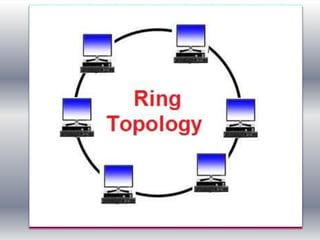
In this topology, each computer is connected to
next computer with the last one connected to the first .
Thus a ring of computer is formed.
Working of Ring Network
Every computer is connected to next in a ring.
Each computer receive message from the previous
computer and transmit it to next computer. The
message is passed around the ring until it reaches the
correct destination computer.
Advantages
 It is less expensive than star topology.
 Every computer has equal access to the network.
Disadvantages
 Failure of one computer affect whole network.
 It is difficult to troubleshoot.
 Adding or removing computers affect the whole
network.
Tree Topology
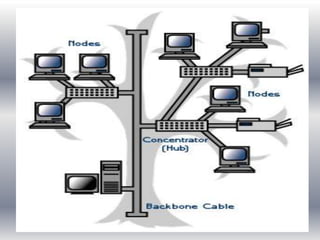
A tree topology combines the characteristics of bus
and star topologies. It consist of different groups of
computers attached in star topology. The groups are
than connected to a bus backbone cable.
Advantages
 If one of them gets damaged other networks are not
affected .
 Easier maintenance and fault finding.
Disadvantages
 If backbone line breaks, the entire segment goes down.
 Huge cabling is needed.
 A lot of maintenance is needed.
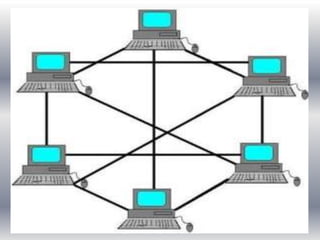
Mesh Topology
In mesh topology, every device in a network is
physically connected to every other device in a
network. A message can be sent on different possible
paths from source to destination. Mesh network are
not used much in LAN. Mostly used in WAN.
Advantages
 It is easy to troubleshoot.
 If one link becomes unusable, it does not harm the
entire system.
Disadvantages
 Very expensive.
 It is difficult to install .
Network Protocols
A standard used by networks for communication
between different devices connected to a network is
called protocol. It represent an agreement between the
communication devices. The device cannot
communicate without a protocol.
Types of protocol
Some important protocols are as follows:
Ethernet
Ethernet is most widely used protocol. It uses an access
method called CSMA/CD (Carrier Sense
Access/Collision Detection). It is a system
Where each computer listens to the cable before sending
anything through network. The computer transmit
only if the network is clear. If some other node is
already transmitting data on the cable , the computer
waits and attempts again when line is clear.
ATM
Asynchronous Transfer Mode (ATM) protocol
transmit data at a speed off 155 Mbps and higher.ATM
works by transmitting all in small packets of a fixed
size. It supports a variety of media such as video, CD
quality audio and imaging.
FDDI
Fiber Distributed Data Interface protocol is used
primarily to interconnect two or more local area
networks. It uses token passing access method. It
operates over fiber optic cable at 100 Mbps.
Token Ring
Token ring protocol was developed by IBM. It uses
token passing access method. An electronic token
moves from one computer to the next .A computer can
transmit data ,only if it has empty token. It can operate
transmission speed of 4 Mbps to 16 Mbps.
TCP
Transmission Control protocol is the protocol suite
used for communications between hosts in most local
networks and on the internet. It can be used to enable
network communication in a local area networks and
wide area networks as long as host support the
protocol.TCP is widely supported and included in
operating system such as Windows 7, XP, Vista etc.
THANK YOU

Prepare 2 COMPUTER_NETWORKS Lecture 1 & 2.pptx

  • 2.
     A computernetwork consist of two or more components that are connected together to share information and resources. The resources may include printers, hard disk, scanner or programs etc.
  • 3.
     Computer networkcan be used in an office.  Internet is also an example of computer network. Applications/Benefits Information and Resource Sharing Money Saving Communication Internet Access Sharing Data Security and Management Entertainment Transferring Funds
  • 4.
    Some disadvantages areas follows:  Hardware, Software & Setup Costs  Hardware & Software Management Costs  Undesirable sharing  Illegal or Undesirable Behavior  Data Security Concerns Client A client is a computer in the network that is connected with a server to access different resources. The client computer sends request to the server. Server A server is a computer that provides services to the computers and other devices connected to the network.
  • 5.
    Three main typesof computer networks are LAN (Local Area Network) It is the most common types of network. It covers a small area. It usually connect the computer and other devices within one office or a building. Examples In a computer lab, there are 40 computers connected through LAN.The students can share software, files and data in the lab. In internet club, many computers can be connected through LAN. These computer can share single connection of internet.
  • 7.
    This type ofnetwork covers a large area. It connects computers and other devices in different cities and countries. Wan usually consist of several LANs connected together. Computers in WAN are often connected through telephone lines. They can also connect through satellites. Examples The network connecting ATMs of a bank in different cities. The network connecting NADRA offices in different cities of Pakistan. Internet connects million of users all over the world to share information.
  • 9.
    This type ofnetwork covers an area of city. MAN is larger than LAN but smaller than WAN. It is usually used to connect two more LAN in a city or town. Examples The network connecting different branches of a company in a city. The network connecting different campuses of a college in a city. Cable TV network in a city
  • 11.
    Data communication isa process of transferring data electronically from one place to an other place. Data can be transferred by using different media. Sending Device A device that send message is called sending device. It is also called source or transmitter. Receiving device A device that receive the message is called receiving device. It is also called sink. Communication Device Communication device are used to transmit messages between sending and receiving device through communication medium.
  • 12.
    Transmission Medium Transmission mediumis used to carry messages from one place to another place.
  • 13.
    Types of DataTransmission The two forms of data transmission Digital Data Transmission The transfer of data in the form of digital signals is called digital data transmission. Digital signal is a sequence of voltage represented in binary form. The digital signals are in the form of electrical pulses of ON and OFF.
  • 14.
    Analog Data Transmission Analogdata transmission is the transmission of data in a continuous wave form. For example sound wave are analog signals. When we talk, we emit sound waves that consist of waveforms of high and low pressure. Analog signals are measure in volts and its frequency is in Hertz.
  • 15.
    The path throughwhich data is transmitted from one place to another place is called channel. It is also known as a communication media. Types o Bounded /Guided Transmission Media Communication device are directly connected with each other by using physical media like wires. Examples o Twisted Pair Twisted pair is the most commonly used physical transmission medium. It is used in local area network.
  • 16.
    Types of Twistedpair cable Two types o Shielded Twisted Pair o Unshielded Twisted Pair
  • 17.
    Characteristics of TwistedPair Different characteristics of twisted pair are as follows: o It is an inexpensive transmission medium. o It is easy to install. o It can transfer data to a short distance. Coaxial Cable Coaxial cable consist of copper wire covered by insulating material. The insulated copper wire is covered by copper mesh. Characteristics of Coaxial Cable Different characteristics of coaxial cable are: o It is more expensive transmission medium than twisted pair. o It can be installed very easily.
  • 19.
    Fiber Optics Fiber opticscable consist of thin strands of glass or plastic called core. The strands are thin like human hair. The core is center of the fiber cable that uses light to transmit data.
  • 20.
    Advantages of FiberOptics o It is not affected by electromagnetic waves. o It is more secure and reliable form of data transmission. o Fiber optic is lighter and smaller in size. o Fiber optic networks work at very high speed. Disadvantages o It is difficult to install. o It is expensive.
  • 21.
    In unguided media,communication devices communicate with each other through air or space using broadcast radio signals, microwave signals and infrared signals. Data can be transferred all over the world using this media . It is called unbounded media. Examples Microwave System Microwave are radio wave that are used to provide high speed transmission. Both voice and data can be transmitted through microwave. Data is transmitted through the air from one microwave station to another similar to radio signals.
  • 23.
    Communication Satellite Satellite communicationis a space station that receive microwave signal from earth based station . It amplifies the signals and transmit them back to different earth based stations.
  • 24.
    Broadcast Radio Broadcast radiois wireless transmission medium. It distributes radio signals through the air over long and short distance. Example of short range broadcast radio is bluetooth. Cellular Communication Cellular communication is a wireless communication system. It is widely used all over the world for mobile communication. A cellular communication system is used to transmit text, images, voice and video. Infrared Infrared is a wireless transmission medium. It sends signals using infrared light waves.
  • 25.
    Communication and NetworkDevices The hardware used to transmit data, instruction between sending and receiving device is called communication device. A communication device at sending end sends data to a communication channel. A communication device at receiving end receives data to a communication channel. Modem Modem stands for modulator/demodulator. It is commonly used communication device. Modem send and receive data from one computer to another computer on the internet through telephone lines. The sending and receiving computers both have modems.
  • 27.
    Types of Modem Differenttypes of modem are as follows: External Modem External modem is attached to the system unit as an external device through telephone line. It is connected to telephone wall jack by another cable. It require external power supply. It is easy to setup. Internal Modem Internal modem is circuit board that is inserted into an expansion slot on the motherboard. Internal modem cannot be moved from one computer to another easily. It is difficult to setup than other types of modem.
  • 29.
    Wireless Modem Wireless modemtransmits the data signals through the air instead of cable. It is also known as radio-frequency modem. It is designed to work with cellular technology and wireless local area networks.
  • 30.
    ISDN Modems ISDN modemallows digital transmission of data over telephone lines. It is also known as ISDN adapter. It supports data transfer rates up to 1.54 Mbps. DSL Modem DSL modem allows faster transmission over the standard telephone lines. It is faster than ISDN.There are two types of DSL. ADSL It stand for Asymmetric Digital Subscriber Line. It uses faster transmission downstream than upstream. It provides the upload speed of up to 640 Kbps and download speed of up to 8.1 Mbps.
  • 31.
    SDSL It stands forSymmetric Subscriber Line. It uses the same transmission rate for both directions. It transfers data at 3 Mbps approximately in both directions. Cable Modem Cable modem is also known as broadband modem. Cable modem is a stand-alone device connected with a cable to USB port. It sends and receives data over the cable television network. It provides faster internet speed than dial-up modem,DSL modem and ISDN.
  • 32.
    Satellite Modem Satellite modemis used to send and receive data using satellite technology . It is commonly used for high speed internet service.
  • 33.
    Wireless Access Point Wirelessaccess point is central communication device. It allows computer and other devices to transfer data wirelessly among themselves or to a wired network. Wireless access point have a high quality antennas for optimal signals. HUB A hub also called concentrator or multistation access unit (MAU) . It provide the central point for cables in a network. Hubs also transmit signals and have multiple ports to which devices are connected.
  • 34.
    Hub is physicallayer device. It connects the computers to a network. It broadcasts all messages to every computer on the network but only the intended recipient computer takes the message.
  • 35.
    Network Switch Network switchis a more intelligent device than Hub. The switch improves the efficiency of data transfer in the network. It receives a message from any device connected to it and than transmits the message only to that device for which the message was meant . It can also handle multiple communication channels at the same time.
  • 36.
    Network Bridge A networkbridge can be used in computer networks to interconnects two LANS and to separate network segments. A segments is a section of network separated by bridges , switches & routers. The bridge uses MAC address information for making decision to forward data packets. Routers A router is a communication device that connects multiple computers or others routers together. It connects multiple networks using similar or different protocols.
  • 39.
    A network canbe arranged in different ways. The physical layout or arrangement of connected devices in a network is called topology. It is the shape of a network. Different network topologies are as follows: Bus Topology Bus topology is the simplest type of network. It supports a small number of computers. In bus topology, all computer or network nodes are connected to a common communication medium. This medium is often a central wire known as bus. The terminators are used at the end of a bus to absorb signals. A collision can occur in a bus topology if two computer transmit data at same time.
  • 40.
    Working of BusNetwork The sending computer send data and destination address through the bus. The data and address move from one computer to another in a network. Each computer checks the address. If it matches with the address of a computer, the computer keeps the data. Otherwise the data moves to the next computer. Advantages  Simple and easy to use.  It requires small length of cable to connect computes.  Less expensive  If one node fails, it does not affect the rest of the network.
  • 41.
    Disadvantages  It onlysupports small number of computers.  If computer increases ,speed will slow down.  It is difficult to troubleshoot.
  • 42.
    Star Topology All computersin star topology are connected with a central device called hub. Star topology is the best LAN topology. It is easy to remove or add a device in this topology. It is easy to troubleshoot than other topologies. Working Sending computer sends data to hub. Hub send data to receiving computer. Each computer in star network communicates with a central hub.
  • 43.
    Advantages  Easy tomaintain and modify network.  Adding or removing computers can be done without disturbing the network.  Finding faults become very simple.  Single computer failure does not bring down the whole network. Disadvantages  IF central network break, the entire network break down.  More expensive.  Requires a large length cable to connect.
  • 44.
    Ring Topology In thistopology, each computer is connected to next computer with the last one connected to the first . Thus a ring of computer is formed. Working of Ring Network Every computer is connected to next in a ring. Each computer receive message from the previous computer and transmit it to next computer. The message is passed around the ring until it reaches the correct destination computer.
  • 45.
    Advantages  It isless expensive than star topology.  Every computer has equal access to the network. Disadvantages  Failure of one computer affect whole network.  It is difficult to troubleshoot.  Adding or removing computers affect the whole network.
  • 47.
    Tree Topology A treetopology combines the characteristics of bus and star topologies. It consist of different groups of computers attached in star topology. The groups are than connected to a bus backbone cable. Advantages  If one of them gets damaged other networks are not affected .  Easier maintenance and fault finding. Disadvantages  If backbone line breaks, the entire segment goes down.  Huge cabling is needed.  A lot of maintenance is needed.
  • 49.
    Mesh Topology In meshtopology, every device in a network is physically connected to every other device in a network. A message can be sent on different possible paths from source to destination. Mesh network are not used much in LAN. Mostly used in WAN. Advantages  It is easy to troubleshoot.  If one link becomes unusable, it does not harm the entire system. Disadvantages  Very expensive.  It is difficult to install .
  • 51.
    Network Protocols A standardused by networks for communication between different devices connected to a network is called protocol. It represent an agreement between the communication devices. The device cannot communicate without a protocol. Types of protocol Some important protocols are as follows: Ethernet Ethernet is most widely used protocol. It uses an access method called CSMA/CD (Carrier Sense Access/Collision Detection). It is a system
  • 52.
    Where each computerlistens to the cable before sending anything through network. The computer transmit only if the network is clear. If some other node is already transmitting data on the cable , the computer waits and attempts again when line is clear. ATM Asynchronous Transfer Mode (ATM) protocol transmit data at a speed off 155 Mbps and higher.ATM works by transmitting all in small packets of a fixed size. It supports a variety of media such as video, CD quality audio and imaging.
  • 53.
    FDDI Fiber Distributed DataInterface protocol is used primarily to interconnect two or more local area networks. It uses token passing access method. It operates over fiber optic cable at 100 Mbps. Token Ring Token ring protocol was developed by IBM. It uses token passing access method. An electronic token moves from one computer to the next .A computer can transmit data ,only if it has empty token. It can operate transmission speed of 4 Mbps to 16 Mbps.
  • 54.
    TCP Transmission Control protocolis the protocol suite used for communications between hosts in most local networks and on the internet. It can be used to enable network communication in a local area networks and wide area networks as long as host support the protocol.TCP is widely supported and included in operating system such as Windows 7, XP, Vista etc.
  • 55.