Computer Concepts and Applications
Lecture No: 3
Communicating Digital Content: Wired and Wireless Networks and Devices
Instructor: Muhammad Ramzan
Email Address: Muhammad.ramzan@iobm.edu.pk
2
Communication
 Communication
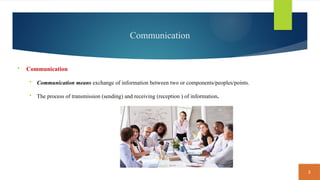
 Communication means exchange of information between two or components/peoples/points.
 The process of transmission (sending) and receiving (reception ) of information.
3
Digital Communication
Digital communications
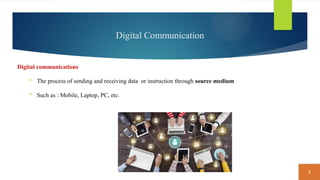
 The process of sending and receiving data or instruction through source medium
 Such as : Mobile, Laptop, PC, etc.
4
Communication Device
Communications device
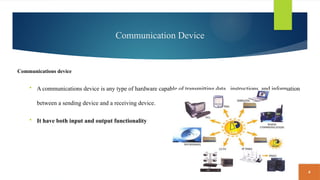
 A communications device is any type of hardware capable of transmitting data , instructions, and information
between a sending device and a receiving device.
 It have both input and output functionality
5
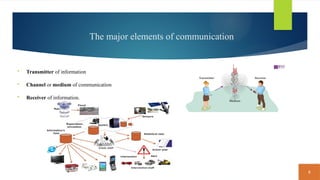
The major elements of communication
 Transmitter of information
 Channel or medium of communication
 Receiver of information.
6
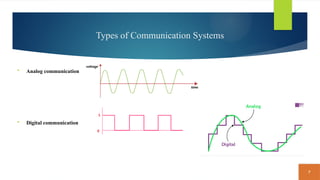
Types of Communication Systems
Analog communication: Analog refers to the continuous time-varying signal.
 Analog communication means communication with the help of analog signals.
 The example of analog signal is sound waves. The signals that continuously vary with time
 such as telephone transmission, audio and video signals.
Digital communication: the electronic exchange of information.
 It depends(relies) on the use of technology.
 in digital technology, the data are generated and processed in discrete values
 It takes only two values 0 and 1, which is known as bits.
 The data is transmitted in the form of these bits
7
Types of Communication Systems
 Analog communication
 Digital communication
8
Transmission Channel / Media
Transmission Channel / Media : source of transmitting data is from one place to another place.
 A communication media is the way (path) / source in which data is transmitted from one place to another place.
 Every data message is converted into binary digits then encoded into signal that can be transmitted over
appropriate medium.
 For example: phone calls, text messages, emails, video, radio, and social media are all types of communication
channels
9
Types of Transmission Channel / Media
10
Types of Transmission Channel / Media
Guided Media
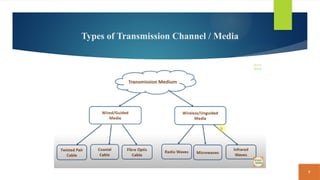
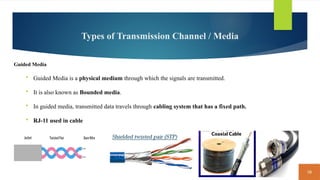
 Guided Media is a physical medium through which the signals are transmitted.
 It is also known as Bounded media.
 In guided media, transmitted data travels through cabling system that has a fixed path.
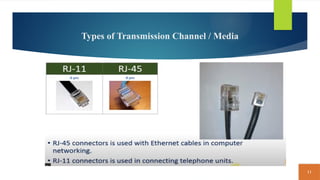
 RJ-11 used in cable
11
Types of Transmission Channel / Media
12
Types of Transmission Channel / Media
Un-Guided Media
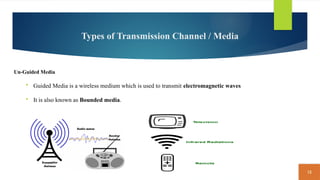
 Guided Media is a wireless medium which is used to transmit electromagnetic waves
 It is also known as Bounded media.
13
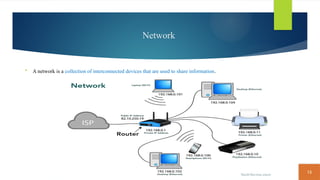
Network
 A network is a collection of interconnected devices that are used to share information.
14
Uses of Network
 Facilitate communications. Using a network, people communicate efficiently and easily via email, social networks, video calls,, and
more. Some of these communications occur within an internal network. Other times, they occur globally over the Internet.
 Share hardware: Hardware access to the network can be provided to any computer or device on the network Thus, home and
business users create networks to save budget on hardware expenses. Example: Centralized Printer
 Share data and information. Any authorized user can access data and information stored on a network. A large company, for
example, might have a database of customer information. Any authorized employee can access the database using a computer or
mobile device connected to the network
 Share software. Users connected to a network can access software on the network. To support multiple users’ software access.
 Transfer funds. Electronic funds transfer (EFT) allows users connected to a network to exchange money from one account to another
via transmission media.
15
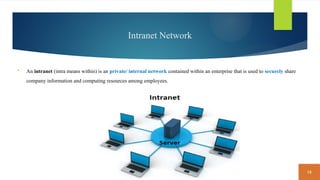
Intranet Network
 An intranet (intra means within) is an private/ internal network contained within an enterprise that is used to securely share
company information and computing resources among employees.
16
Types of Networks
1) Personal Area Network (PAN)
2) Local Area Network (LAN)
3) Metropolitan Area Network (MAN)
4) Wide Area Network (WAN )
17
Types of Networks
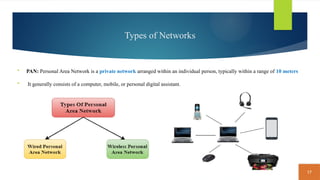
 PAN: Personal Area Network is a private network arranged within an individual person, typically within a range of 10 meters
 It generally consists of a computer, mobile, or personal digital assistant.
18
Types of Networks
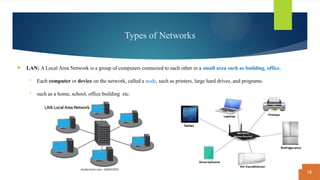
 LAN: A Local Area Network is a group of computers connected to each other in a small area such as building, office.
 Each computer or device on the network, called a node, such as printers, large hard drives, and programs.
 such as a home, school, office building etc.
19
Types of Networks
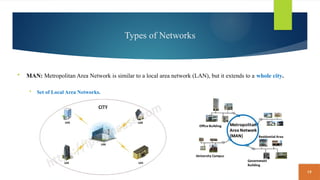
 MAN: Metropolitan Area Network is similar to a local area network (LAN), but it extends to a whole city.
 Set of Local Area Networks.
20
Types of Networks
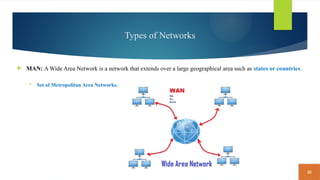
 MAN: A Wide Area Network is a network that extends over a large geographical area such as states or countries.
 Set of Metropolitan Area Networks.
21
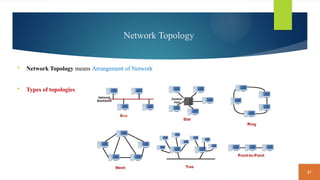
Network Topology
 Network Topology means Arrangement of Network
 Types of topologies
22
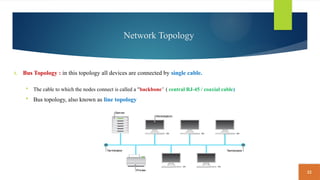
Network Topology
1. Bus Topology : in this topology all devices are connected by single cable.
 The cable to which the nodes connect is called a "backbone“ ( central RJ-45 / coaxial cable)
 Bus topology, also known as line topology
23
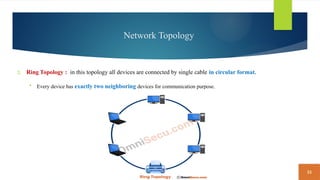
Network Topology
2. Ring Topology : in this topology all devices are connected by single cable in circular format.
 Every device has exactly two neighboring devices for communication purpose.
24
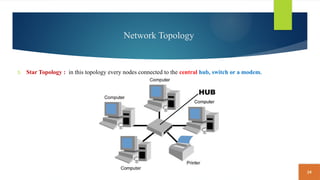
Network Topology
3. Star Topology : in this topology every nodes connected to the central hub, switch or a modem.
25
Network Topology
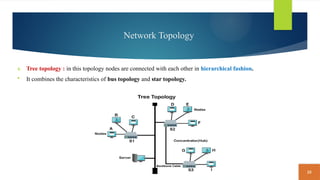
4. Tree topology : in this topology nodes are connected with each other in hierarchical fashion.
 It combines the characteristics of bus topology and star topology.
26
Network Topology
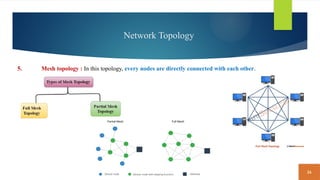
5. Mesh topology : In this topology, every nodes are directly connected with each other.
27
Network Topology
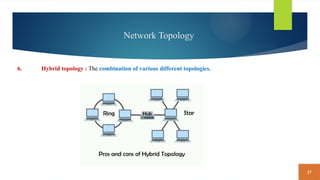
6. Hybrid topology : The combination of various different topologies.
28
Network Devices
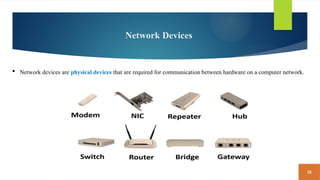
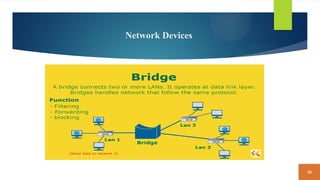
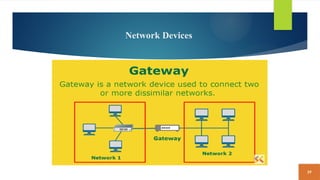
 Network devices are physical devices that are required for communication between hardware on a computer network.
29
Network Devices
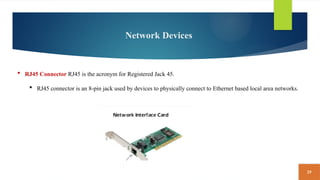
 RJ45 Connector RJ45 is the acronym for Registered Jack 45.
 RJ45 connector is an 8-pin jack used by devices to physically connect to Ethernet based local area networks.
30
Network Devices
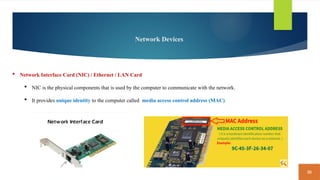
 Network Interface Card (NIC) / Ethernet / LAN Card
 NIC is the physical components that is used by the computer to communicate with the network.
 It provides unique identity to the computer called media access control address (MAC)
31
Network Devices
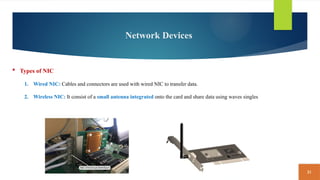
 Types of NIC
1. Wired NIC: Cables and connectors are used with wired NIC to transfer data.
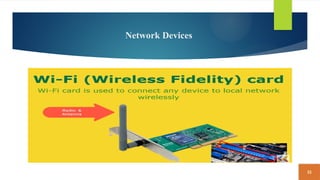
2. Wireless NIC: It consist of a small antenna integrated onto the card and share data using waves singles
32
Network Devices
33
Network Devices
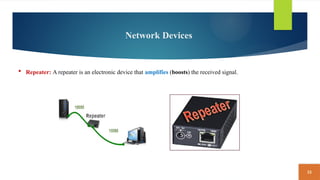
 Repeater: A repeater is an electronic device that amplifies (boosts) the received signal.
34
Network Devices
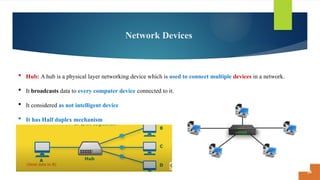
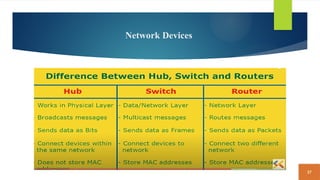
 Hub: A hub is a physical layer networking device which is used to connect multiple devices in a network.
 It broadcasts data to every computer device connected to it.
 It considered as not intelligent device
 It has Half duplex mechanism
35
Network Devices
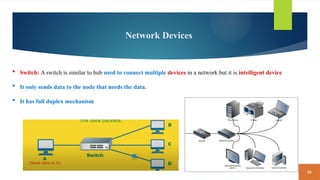
 Switch: A switch is similar to hub used to connect multiple devices in a network but it is intelligent device
 It only sends data to the node that needs the data.
 It has full duplex mechanism
36
Network Devices
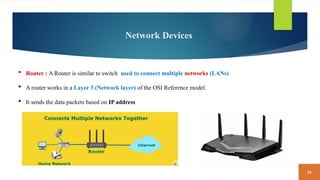
 Router : A Router is similar to switch used to connect multiple networks (LANs)
 A router works in a Layer 3 (Network layer) of the OSI Reference model.
 It sends the data packets based on IP address
37
Network Devices
38
Network Devices
39
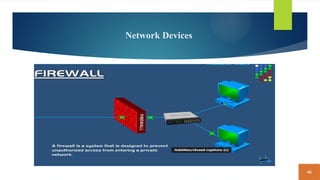
Network Devices
40
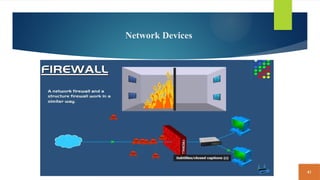
Network Devices
41
Network Devices
42
Network Devices
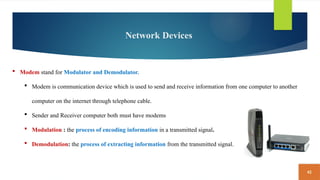
 Modem stand for Modulator and Demodulator.
 Modem is communication device which is used to send and receive information from one computer to another
computer on the internet through telephone cable.
 Sender and Receiver computer both must have modems
 Modulation : the process of encoding information in a transmitted signal.
 Demodulation: the process of extracting information from the transmitted signal.
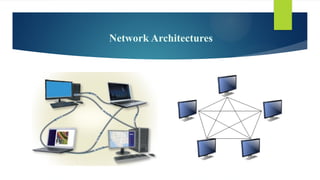
Network Architectures
 The configuration of computers, devices, and media on a ­
network is sometimes called the network architecture.
 Two examples of ­
network architectures are client/server or peer-to-peer
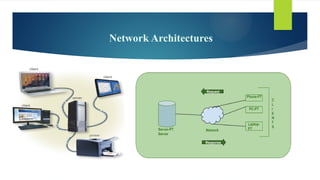
 Client/Server: Client/Server network is a network model designed for the end users called clients, to access the resources such
as songs, video, etc. from a central computer known as Server.
 Client/server architecture is a computing model in which multiple components work in strictly defined roles to communicate.
 A server, sometimes called a host computer, controls access to the hardware, software, and other resources on the network
and provides a centralized storage area for programs, data, and information
 Client: When we talk the word Client, it mean to talk of a person or an organization using a particular service. Similarly in
the digital world a Client is a computer i.e. capable of receiving information or using a particular service from the service
providers (Servers).
Network Architectures
 Advantages of Client/Server:
 A Client/Server network contains the centralized system. Therefore we can back up the data easily.
 A Client/Server network has a dedicated server that improves the overall performance of the whole system.
 Security is better in Client/Server network as a single server administers the shared resources.
 It also increases the speed of the sharing resources.
 Disadvantages Of Client/Server network:
 Client/Server network is expensive as it requires the server with large memory.
 A server has a Network Operating System(NOS) to provide the resources to the clients, but the cost of NOS is very high.
 It requires a dedicated network administrator to manage all the resources.
Network Architectures
 Peer-to-peer: Client/server architecture is a computing model in which multiple components work in strictly
defined roles to communicate.
 Peer-To-Peer network is a network in which all the computers are linked together with equal privilege and
responsibilities for processing the data.
 Peer-To-Peer network is useful for small environments, usually up to 10 computers.
 Peer-To-Peer network has no dedicated server.
 P2P file sharing, sometimes called a file sharing network, describes a network configuration on which users access
one another’s hard drives and exchange files directly via a file sharing program
Network Architectures
 Advantages Of Peer-To-Peer Network:
 It is less costly as it does not contain any dedicated server.
 If one computer stops working but, other computers will not stop working.
 It is easy to set up and maintain as each computer manages itself.
 Disadvantages Of Peer-To-Peer Network:
 In the case of Peer-To-Peer network, it does not contain the centralized system . Therefore, it cannot back up the data as the data is
different in different locations.
 It has a security issue as the device is managed itself.
Network Architectures
Communications Software
 Communications software consists of programs and apps that (1) help users establish a connection to another
computer, mobile device, or network; (2) manage the transmission of data, instructions, and information; and (3)
provide an interface for users to communicate with one another.
 Text/Picture/Video Messaging
 Internet Messaging
 Voice and Video Calling
Network Communications Standards and Protocols
 Networking standards define the rules for data communications that are needed for interoperability of
networking technologies and processes.
 A network standard defines guidelines that specify the way computers access the medium to which they are
connected.
 Hardware and software manufacturers design their products to meet the guidelines specified in a particular standard,
so that their devices can communicate with the network.
 A standard that outlines characteristics of how two devices communicate on a ­
network is called a protocol.
Network Communications Standards and Protocols
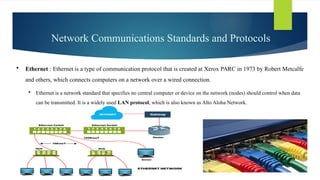
 Ethernet : Ethernet is a type of communication protocol that is created at Xerox PARC in 1973 by Robert Metcalfe
and others, which connects computers on a network over a wired connection.
 Ethernet is a network standard that specifies no central computer or device on the network (nodes) should control when data
can be transmitted. It is a widely used LAN protocol, which is also known as Alto Aloha Network.
Network Communications Standards and Protocols
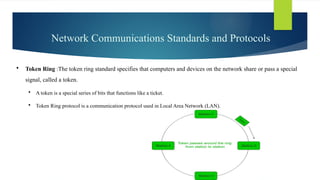
 Token Ring :The token ring standard specifies that computers and devices on the network share or pass a special
signal, called a token.
 A token is a special series of bits that functions like a ticket.
 Token Ring protocol is a communication protocol used in Local Area Network (LAN).
Network Communications Standards and Protocols
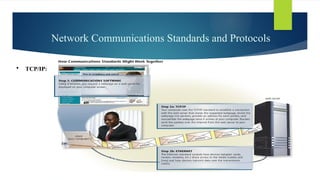
 TCP/IP: Transmission Control Protocol/Internet Protocol communications protocols that allow digital
computers to communicate over long distances.
 TCP/IP describes rules for dividing messages into small pieces, called packets; providing addresses for each
packet; checking for and detecting errors; sequencing packets; and regulating the flow of messages along the
network
 TCP is the component that collects and reassembles the packets of data, while IP is responsible for making sure the
packets are sent to the right destination.
Network Communications Standards and Protocols
 TCP/IP:
Network Communications Standards and Protocols
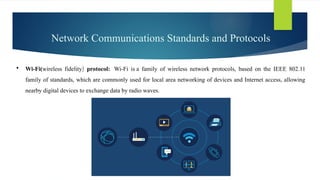
 Wi-Fi(wireless fidelity) protocol: Wi-Fi is a family of wireless network protocols, based on the IEEE 802.11
family of standards, which are commonly used for local area networking of devices and Internet access, allowing
nearby digital devices to exchange data by radio waves.
Network Communications Standards and Protocols
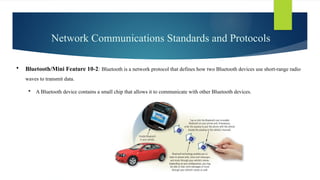
 Bluetooth/Mini Feature 10-2: Bluetooth is a network protocol that defines how two Bluetooth devices use short-range radio
waves to transmit data.
 A Bluetooth device contains a small chip that allows it to communicate with other Bluetooth devices.
Network Communications Standards and Protocols
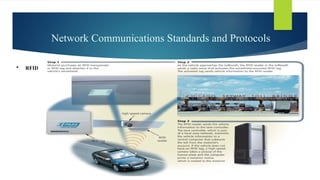
 RFID: RFID (radio frequency identification) is a protocol that defines how a network uses radio signals to
communicate with a tag placed in or attached to an object, an animal, or a person.
 The tag, called a transponder, consists of an antenna and a memory chip that contains the information to be
transmitted via radio waves.
 Through an antenna, an RFID reader, also called a transceiver, reads the radio signals and transfers the information
to a computer or computing device
Network Communications Standards and Protocols
 RFID:
Communications Lines
 A dedicated line is a type of always-on physical connection that is established between two communications
devices.
 Businesses often use dedicated lines to connect geographically distant offices.
 Dedicated lines can be either analog or digital.
 Digital dedicated lines include cable television lines, DSL, ISDN lines, FTTP, T-carrier lines, and ATM. Table 10-2
shows speeds of various dedicated digital lines.
Communications Lines
 Cable Television. The cable television (CATV) network provides high-speed Internet connections, called cable
Internet service.
 The CATV signal enters a building through a single line, usually a coaxial cable.
 This cable connects to a modem, which typically attaches to your computer via an Ethernet cable. Home and small
business users often subscribe to cable Internet service.
Communications Lines
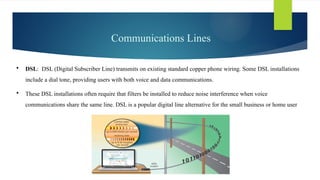
 DSL: DSL (Digital Subscriber Line) transmits on existing standard copper phone wiring. Some DSL installations
include a dial tone, providing users with both voice and data communications.
 These DSL installations often require that filters be installed to reduce noise interference when voice
communications share the same line. DSL is a popular digital line alternative for the small business or home user
Communications Lines
 ISDN: ISDN (Integrated Services Digital Network) is a set of standards for digital transmission of data over
standard copper phone lines.
 With ISDN, the same phone line that could carry only one computer signal now can carry three or more signals at
once through the same line, using a technique called multiplexing
Communications Devices
 A communications device is any type of hardware capable of transmitting data, ­
instructions, and information
between a sending device and a receiving device.
 At the sending end, a communications device sends the data, instructions, or information from the sending device to
transmission media.
 At the receiving end, a communications device receives the signals from the transmission media
 variety of communications devices: modems, wireless access points, routers, network cards, and hubs and switch
Communications Devices
 Digital Modems: Cable, DSL, and ISDN
 A broadband modem, also called a digital modem, is a communications device that sends and receives data and
information to and from a digital line.
 Three types of broadband modems are cable modems, DSL modems, and ISDN modems.
 These modems typically include built-in Wi-Fi connectivity
Communications Devices
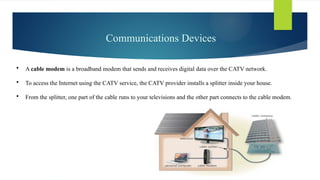
 A cable modem is a broadband modem that sends and receives digital data over the CATV network.
 To access the Internet using the CATV service, the CATV provider installs a splitter inside your house.
 From the splitter, one part of the cable runs to your televisions and the other part connects to the cable modem.
Communications Devices
 A DSL modem is a broadband modem that sends digital data and information from a computer to a DSL line and
receives digital data and information from a DSL line.
 Similarly, an ISDN modem is a broadband modem that sends digital data and information from a computer to an
ISDN line and receives digital data and information from an ISDN line.
 DSL and ISDN modems usually are external devices, in which one end connects to the phone line and the other end
connects to a port on the computer.
Communications Devices
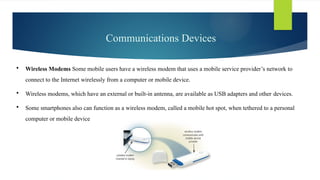
 Wireless Modems Some mobile users have a wireless modem that uses a mobile service provider’s network to
connect to the Internet wirelessly from a computer or mobile device.
 Wireless modems, which have an external or built-in antenna, are available as USB adapters and other devices.
 Some smartphones also can function as a wireless modem, called a mobile hot spot, when tethered to a personal
computer or mobile device
Communications Devices
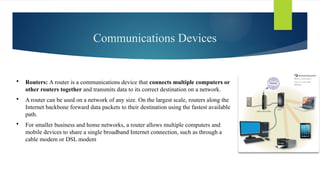
 Routers: A router is a communications device that connects multiple computers or
other routers together and transmits data to its correct destination on a network.
 A router can be used on a network of any size. On the largest scale, routers along the
Internet backbone forward data packets to their destination using the fastest available
path.
 For smaller business and home networks, a router allows multiple computers and
mobile devices to share a single broadband Internet connection, such as through a
cable modem or DSL modem
Communications Devices
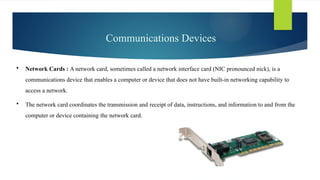
 Network Cards : A network card, sometimes called a network interface card (NIC pronounced nick), is a
communications device that enables a computer or device that does not have built-in networking capability to
access a network.
 The network card coordinates the transmission and receipt of data, instructions, and information to and from the
computer or device containing the ­
network card.
Communications Devices
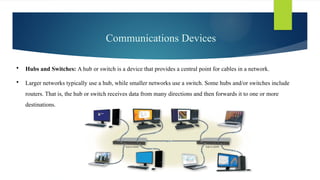
 Hubs and Switches: A hub or switch is a device that provides a central point for cables in a network.
 Larger networks typically use a hub, while smaller networks use a switch. Some hubs and/or switches include
routers. That is, the hub or switch receives data from many directions and then forwards it to one or more ­
destinations.
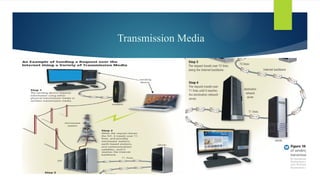
Transmission Media
 Transmission media consist of ­
materials or substances capable of carrying one or more ­
communications signals.
 When you send data from a computer or mobile device, the signal that carries the data may travel over various
transmission media. This is especially true when the transmission spans a long distance.
 Broadband media transmit multiple signals simultaneously. The amount of data, instructions, and information that
can travel over transmission media sometimes is called the bandwidth.
 Latency, with respect to communications, is the time it takes a signal to travel from one location to another on a
network. Several factors that negatively can affect latency include the distance between the two points, the type of
transmission media, and the number of nodes through which the data must travel over the network. For best
performance, bandwidth should be high and latency low. Read Ethics & Issues 10-3 to consider whether ISPs
should be able to control Internet usage.
Transmission Media
Lecture No 3 Communicating Digital Content 2.pptx

Lecture No 3 Communicating Digital Content 2.pptx

  • 1.
    Computer Concepts andApplications Lecture No: 3 Communicating Digital Content: Wired and Wireless Networks and Devices Instructor: Muhammad Ramzan Email Address: Muhammad.ramzan@iobm.edu.pk
  • 2.
    2 Communication  Communication  Communicationmeans exchange of information between two or components/peoples/points.  The process of transmission (sending) and receiving (reception ) of information.
  • 3.
    3 Digital Communication Digital communications The process of sending and receiving data or instruction through source medium  Such as : Mobile, Laptop, PC, etc.
  • 4.
    4 Communication Device Communications device A communications device is any type of hardware capable of transmitting data , instructions, and information between a sending device and a receiving device.  It have both input and output functionality
  • 5.
    5 The major elementsof communication  Transmitter of information  Channel or medium of communication  Receiver of information.
  • 6.
    6 Types of CommunicationSystems Analog communication: Analog refers to the continuous time-varying signal.  Analog communication means communication with the help of analog signals.  The example of analog signal is sound waves. The signals that continuously vary with time  such as telephone transmission, audio and video signals. Digital communication: the electronic exchange of information.  It depends(relies) on the use of technology.  in digital technology, the data are generated and processed in discrete values  It takes only two values 0 and 1, which is known as bits.  The data is transmitted in the form of these bits
  • 7.
    7 Types of CommunicationSystems  Analog communication  Digital communication
  • 8.
    8 Transmission Channel /Media Transmission Channel / Media : source of transmitting data is from one place to another place.  A communication media is the way (path) / source in which data is transmitted from one place to another place.  Every data message is converted into binary digits then encoded into signal that can be transmitted over appropriate medium.  For example: phone calls, text messages, emails, video, radio, and social media are all types of communication channels
  • 9.
    9 Types of TransmissionChannel / Media
  • 10.
    10 Types of TransmissionChannel / Media Guided Media  Guided Media is a physical medium through which the signals are transmitted.  It is also known as Bounded media.  In guided media, transmitted data travels through cabling system that has a fixed path.  RJ-11 used in cable
  • 11.
    11 Types of TransmissionChannel / Media
  • 12.
    12 Types of TransmissionChannel / Media Un-Guided Media  Guided Media is a wireless medium which is used to transmit electromagnetic waves  It is also known as Bounded media.
  • 13.
    13 Network  A networkis a collection of interconnected devices that are used to share information.
  • 14.
    14 Uses of Network Facilitate communications. Using a network, people communicate efficiently and easily via email, social networks, video calls,, and more. Some of these communications occur within an internal network. Other times, they occur globally over the Internet.  Share hardware: Hardware access to the network can be provided to any computer or device on the network Thus, home and business users create networks to save budget on hardware expenses. Example: Centralized Printer  Share data and information. Any authorized user can access data and information stored on a network. A large company, for example, might have a database of customer information. Any authorized employee can access the database using a computer or mobile device connected to the network  Share software. Users connected to a network can access software on the network. To support multiple users’ software access.  Transfer funds. Electronic funds transfer (EFT) allows users connected to a network to exchange money from one account to another via transmission media.
  • 15.
    15 Intranet Network  Anintranet (intra means within) is an private/ internal network contained within an enterprise that is used to securely share company information and computing resources among employees.
  • 16.
    16 Types of Networks 1)Personal Area Network (PAN) 2) Local Area Network (LAN) 3) Metropolitan Area Network (MAN) 4) Wide Area Network (WAN )
  • 17.
    17 Types of Networks PAN: Personal Area Network is a private network arranged within an individual person, typically within a range of 10 meters  It generally consists of a computer, mobile, or personal digital assistant.
  • 18.
    18 Types of Networks LAN: A Local Area Network is a group of computers connected to each other in a small area such as building, office.  Each computer or device on the network, called a node, such as printers, large hard drives, and programs.  such as a home, school, office building etc.
  • 19.
    19 Types of Networks MAN: Metropolitan Area Network is similar to a local area network (LAN), but it extends to a whole city.  Set of Local Area Networks.
  • 20.
    20 Types of Networks MAN: A Wide Area Network is a network that extends over a large geographical area such as states or countries.  Set of Metropolitan Area Networks.
  • 21.
    21 Network Topology  NetworkTopology means Arrangement of Network  Types of topologies
  • 22.
    22 Network Topology 1. BusTopology : in this topology all devices are connected by single cable.  The cable to which the nodes connect is called a "backbone“ ( central RJ-45 / coaxial cable)  Bus topology, also known as line topology
  • 23.
    23 Network Topology 2. RingTopology : in this topology all devices are connected by single cable in circular format.  Every device has exactly two neighboring devices for communication purpose.
  • 24.
    24 Network Topology 3. StarTopology : in this topology every nodes connected to the central hub, switch or a modem.
  • 25.
    25 Network Topology 4. Treetopology : in this topology nodes are connected with each other in hierarchical fashion.  It combines the characteristics of bus topology and star topology.
  • 26.
    26 Network Topology 5. Meshtopology : In this topology, every nodes are directly connected with each other.
  • 27.
    27 Network Topology 6. Hybridtopology : The combination of various different topologies.
  • 28.
    28 Network Devices  Networkdevices are physical devices that are required for communication between hardware on a computer network.
  • 29.
    29 Network Devices  RJ45Connector RJ45 is the acronym for Registered Jack 45.  RJ45 connector is an 8-pin jack used by devices to physically connect to Ethernet based local area networks.
  • 30.
    30 Network Devices  NetworkInterface Card (NIC) / Ethernet / LAN Card  NIC is the physical components that is used by the computer to communicate with the network.  It provides unique identity to the computer called media access control address (MAC)
  • 31.
    31 Network Devices  Typesof NIC 1. Wired NIC: Cables and connectors are used with wired NIC to transfer data. 2. Wireless NIC: It consist of a small antenna integrated onto the card and share data using waves singles
  • 32.
  • 33.
    33 Network Devices  Repeater:A repeater is an electronic device that amplifies (boosts) the received signal.
  • 34.
    34 Network Devices  Hub:A hub is a physical layer networking device which is used to connect multiple devices in a network.  It broadcasts data to every computer device connected to it.  It considered as not intelligent device  It has Half duplex mechanism
  • 35.
    35 Network Devices  Switch:A switch is similar to hub used to connect multiple devices in a network but it is intelligent device  It only sends data to the node that needs the data.  It has full duplex mechanism
  • 36.
    36 Network Devices  Router: A Router is similar to switch used to connect multiple networks (LANs)  A router works in a Layer 3 (Network layer) of the OSI Reference model.  It sends the data packets based on IP address
  • 37.
  • 38.
  • 39.
  • 40.
  • 41.
  • 42.
    42 Network Devices  Modemstand for Modulator and Demodulator.  Modem is communication device which is used to send and receive information from one computer to another computer on the internet through telephone cable.  Sender and Receiver computer both must have modems  Modulation : the process of encoding information in a transmitted signal.  Demodulation: the process of extracting information from the transmitted signal.
  • 43.
    Network Architectures  Theconfiguration of computers, devices, and media on a ­ network is sometimes called the network architecture.  Two examples of ­ network architectures are client/server or peer-to-peer  Client/Server: Client/Server network is a network model designed for the end users called clients, to access the resources such as songs, video, etc. from a central computer known as Server.  Client/server architecture is a computing model in which multiple components work in strictly defined roles to communicate.  A server, sometimes called a host computer, controls access to the hardware, software, and other resources on the network and provides a centralized storage area for programs, data, and information  Client: When we talk the word Client, it mean to talk of a person or an organization using a particular service. Similarly in the digital world a Client is a computer i.e. capable of receiving information or using a particular service from the service providers (Servers).
  • 44.
    Network Architectures  Advantagesof Client/Server:  A Client/Server network contains the centralized system. Therefore we can back up the data easily.  A Client/Server network has a dedicated server that improves the overall performance of the whole system.  Security is better in Client/Server network as a single server administers the shared resources.  It also increases the speed of the sharing resources.  Disadvantages Of Client/Server network:  Client/Server network is expensive as it requires the server with large memory.  A server has a Network Operating System(NOS) to provide the resources to the clients, but the cost of NOS is very high.  It requires a dedicated network administrator to manage all the resources.
  • 45.
  • 46.
    Network Architectures  Peer-to-peer:Client/server architecture is a computing model in which multiple components work in strictly defined roles to communicate.  Peer-To-Peer network is a network in which all the computers are linked together with equal privilege and responsibilities for processing the data.  Peer-To-Peer network is useful for small environments, usually up to 10 computers.  Peer-To-Peer network has no dedicated server.  P2P file sharing, sometimes called a file sharing network, describes a network configuration on which users access one another’s hard drives and exchange files directly via a file sharing program
  • 47.
    Network Architectures  AdvantagesOf Peer-To-Peer Network:  It is less costly as it does not contain any dedicated server.  If one computer stops working but, other computers will not stop working.  It is easy to set up and maintain as each computer manages itself.  Disadvantages Of Peer-To-Peer Network:  In the case of Peer-To-Peer network, it does not contain the centralized system . Therefore, it cannot back up the data as the data is different in different locations.  It has a security issue as the device is managed itself.
  • 48.
  • 49.
    Communications Software  Communicationssoftware consists of programs and apps that (1) help users establish a connection to another computer, mobile device, or network; (2) manage the transmission of data, instructions, and information; and (3) provide an interface for users to communicate with one another.  Text/Picture/Video Messaging  Internet Messaging  Voice and Video Calling
  • 50.
    Network Communications Standardsand Protocols  Networking standards define the rules for data communications that are needed for interoperability of networking technologies and processes.  A network standard defines guidelines that specify the way computers access the medium to which they are connected.  Hardware and software manufacturers design their products to meet the guidelines specified in a particular standard, so that their devices can communicate with the network.  A standard that outlines characteristics of how two devices communicate on a ­ network is called a protocol.
  • 51.
    Network Communications Standardsand Protocols  Ethernet : Ethernet is a type of communication protocol that is created at Xerox PARC in 1973 by Robert Metcalfe and others, which connects computers on a network over a wired connection.  Ethernet is a network standard that specifies no central computer or device on the network (nodes) should control when data can be transmitted. It is a widely used LAN protocol, which is also known as Alto Aloha Network.
  • 52.
    Network Communications Standardsand Protocols  Token Ring :The token ring standard specifies that computers and devices on the network share or pass a special signal, called a token.  A token is a special series of bits that functions like a ticket.  Token Ring protocol is a communication protocol used in Local Area Network (LAN).
  • 53.
    Network Communications Standardsand Protocols  TCP/IP: Transmission Control Protocol/Internet Protocol communications protocols that allow digital computers to communicate over long distances.  TCP/IP describes rules for dividing messages into small pieces, called packets; providing addresses for each packet; checking for and detecting errors; sequencing packets; and regulating the flow of messages along the network  TCP is the component that collects and reassembles the packets of data, while IP is responsible for making sure the packets are sent to the right destination.
  • 54.
    Network Communications Standardsand Protocols  TCP/IP:
  • 55.
    Network Communications Standardsand Protocols  Wi-Fi(wireless fidelity) protocol: Wi-Fi is a family of wireless network protocols, based on the IEEE 802.11 family of standards, which are commonly used for local area networking of devices and Internet access, allowing nearby digital devices to exchange data by radio waves.
  • 56.
    Network Communications Standardsand Protocols  Bluetooth/Mini Feature 10-2: Bluetooth is a network protocol that defines how two Bluetooth devices use short-range radio waves to transmit data.  A Bluetooth device contains a small chip that allows it to communicate with other Bluetooth devices.
  • 57.
    Network Communications Standardsand Protocols  RFID: RFID (radio frequency identification) is a protocol that defines how a network uses radio signals to communicate with a tag placed in or attached to an object, an animal, or a person.  The tag, called a transponder, consists of an antenna and a memory chip that contains the information to be transmitted via radio waves.  Through an antenna, an RFID reader, also called a transceiver, reads the radio signals and transfers the information to a computer or computing device
  • 58.
    Network Communications Standardsand Protocols  RFID:
  • 59.
    Communications Lines  Adedicated line is a type of always-on physical connection that is established between two communications devices.  Businesses often use dedicated lines to connect geographically distant offices.  Dedicated lines can be either analog or digital.  Digital dedicated lines include cable television lines, DSL, ISDN lines, FTTP, T-carrier lines, and ATM. Table 10-2 shows speeds of various dedicated digital lines.
  • 60.
    Communications Lines  CableTelevision. The cable television (CATV) network provides high-speed Internet connections, called cable Internet service.  The CATV signal enters a building through a single line, usually a coaxial cable.  This cable connects to a modem, which typically attaches to your computer via an Ethernet cable. Home and small business users often subscribe to cable Internet service.
  • 61.
    Communications Lines  DSL:DSL (Digital Subscriber Line) transmits on existing standard copper phone wiring. Some DSL installations include a dial tone, providing users with both voice and data communications.  These DSL installations often require that filters be installed to reduce noise interference when voice communications share the same line. DSL is a popular digital line alternative for the small business or home user
  • 62.
    Communications Lines  ISDN:ISDN (Integrated Services Digital Network) is a set of standards for digital transmission of data over standard copper phone lines.  With ISDN, the same phone line that could carry only one computer signal now can carry three or more signals at once through the same line, using a technique called multiplexing
  • 63.
    Communications Devices  Acommunications device is any type of hardware capable of transmitting data, ­ instructions, and information between a sending device and a receiving device.  At the sending end, a communications device sends the data, instructions, or information from the sending device to transmission media.  At the receiving end, a communications device receives the signals from the transmission media  variety of communications devices: modems, wireless access points, routers, network cards, and hubs and switch
  • 64.
    Communications Devices  DigitalModems: Cable, DSL, and ISDN  A broadband modem, also called a digital modem, is a communications device that sends and receives data and information to and from a digital line.  Three types of broadband modems are cable modems, DSL modems, and ISDN modems.  These modems typically include built-in Wi-Fi connectivity
  • 65.
    Communications Devices  Acable modem is a broadband modem that sends and receives digital data over the CATV network.  To access the Internet using the CATV service, the CATV provider installs a splitter inside your house.  From the splitter, one part of the cable runs to your televisions and the other part connects to the cable modem.
  • 66.
    Communications Devices  ADSL modem is a broadband modem that sends digital data and information from a computer to a DSL line and receives digital data and information from a DSL line.  Similarly, an ISDN modem is a broadband modem that sends digital data and information from a computer to an ISDN line and receives digital data and information from an ISDN line.  DSL and ISDN modems usually are external devices, in which one end connects to the phone line and the other end connects to a port on the computer.
  • 67.
    Communications Devices  WirelessModems Some mobile users have a wireless modem that uses a mobile service provider’s network to connect to the Internet wirelessly from a computer or mobile device.  Wireless modems, which have an external or built-in antenna, are available as USB adapters and other devices.  Some smartphones also can function as a wireless modem, called a mobile hot spot, when tethered to a personal computer or mobile device
  • 68.
    Communications Devices  Routers:A router is a communications device that connects multiple computers or other routers together and transmits data to its correct destination on a network.  A router can be used on a network of any size. On the largest scale, routers along the Internet backbone forward data packets to their destination using the fastest available path.  For smaller business and home networks, a router allows multiple computers and mobile devices to share a single broadband Internet connection, such as through a cable modem or DSL modem
  • 69.
    Communications Devices  NetworkCards : A network card, sometimes called a network interface card (NIC pronounced nick), is a communications device that enables a computer or device that does not have built-in networking capability to access a network.  The network card coordinates the transmission and receipt of data, instructions, and information to and from the computer or device containing the ­ network card.
  • 70.
    Communications Devices  Hubsand Switches: A hub or switch is a device that provides a central point for cables in a network.  Larger networks typically use a hub, while smaller networks use a switch. Some hubs and/or switches include routers. That is, the hub or switch receives data from many directions and then forwards it to one or more ­ destinations.
  • 71.
    Transmission Media  Transmissionmedia consist of ­ materials or substances capable of carrying one or more ­ communications signals.  When you send data from a computer or mobile device, the signal that carries the data may travel over various transmission media. This is especially true when the transmission spans a long distance.  Broadband media transmit multiple signals simultaneously. The amount of data, instructions, and information that can travel over transmission media sometimes is called the bandwidth.  Latency, with respect to communications, is the time it takes a signal to travel from one location to another on a network. Several factors that negatively can affect latency include the distance between the two points, the type of transmission media, and the number of nodes through which the data must travel over the network. For best performance, bandwidth should be high and latency low. Read Ethics & Issues 10-3 to consider whether ISPs should be able to control Internet usage.
  • 72.