Learning objectives
learningabout computer network organization
and implementation, obtaining a theoretical
understanding of data communication and
computer networks.
2
Dr. Ibrahim A. S.
3.
Course Outline
Discussconnectivity, the wireless revolution,
and communication systems
Describe physical and wireless communications
channels
Discuss connection devices, and services
including dial-up, DSL, cable, satellite and
cellular.
3
Dr. Ibrahim A. S.
4.
4
1.0 Technology Revolution
•18th Century Mechanical systems
• 19th Century Steam Engine
• 20th Century Information
- gathering
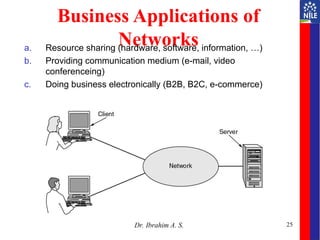
- distribution
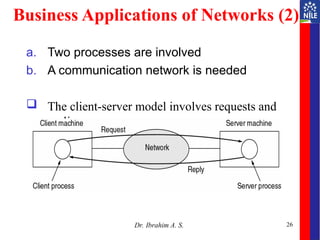
- processing
- creating
Dr. Ibrahim A. S.
5.
5
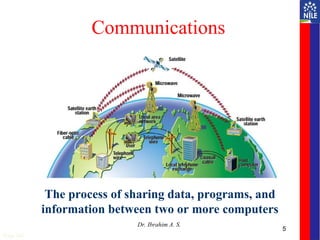
Communications
The process ofsharing data, programs, and
information between two or more computers
Page 248
Dr. Ibrahim A. S.
6.
6
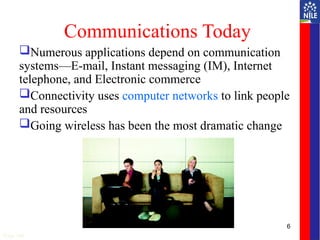
Communications Today
Numerous applicationsdepend on communication
systems—E-mail, Instant messaging (IM), Internet
telephone, and Electronic commerce
Connectivity uses computer networks to link people
and resources
Going wireless has been the most dramatic change
Page 248
7.
7
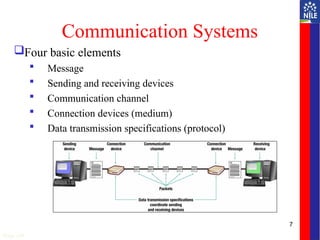
Communication Systems
Four basicelements
Message
Sending and receiving devices
Communication channel
Connection devices (medium)
Data transmission specifications (protocol)
Page 249
8.
Fundamental Characteristics
Theeffectiveness of a data communication
system depend on four fundamental
characteristics:
Delivery
Accuracy
Timelines
Jitter
9.
9
Communication Channels/
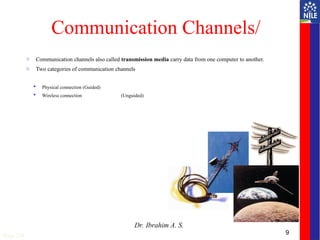
o Communicationchannels also called transmission media carry data from one computer to another.
o Two categories of communication channels
Physical connection (Guided)
Wireless connection (Unguided)
Page 250
Dr. Ibrahim A. S.
10.
Guided media
Guidedtransmission media are more commonly known
as the wired communication or bounded transmission
media.
The electromagnetic signals travel between the
communicating devices through a physical
medium/conductor.
As the medium for transmission is a physical conductor,
it also provides direction to the signal.
Dr. Ibrahim A. S.
10
11.
11
Physical Connections
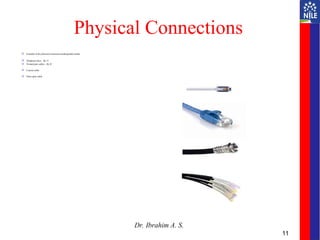
Exampleof the physical connection media/guided media
Telephone lines – Rj 15
Twisted pair cables – Rj 45
Coaxial cable
Fiber-optic cable
Dr. Ibrahim A. S.
12.
Unguided media
Theunguided media is also called wireless
communication.
It does not require any physical medium to transmit
electromagnetic signals.
In unguided media, the electromagnetic signals are
broadcasted through air to everyone.
These signals are available to one who has the device
capable of receiving those signal.
Dr. Ibrahim A. S.
12
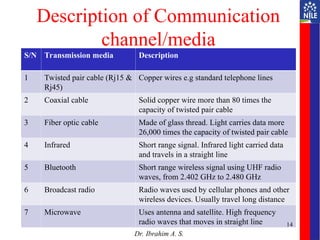
Description of Communication
channel/media
S/NTransmission media Description
1 Twisted pair cable (Rj15 &
Rj45)
Copper wires e.g standard telephone lines
2 Coaxial cable Solid copper wire more than 80 times the
capacity of twisted pair cable
3 Fiber optic cable Made of glass thread. Light carries data more
26,000 times the capacity of twisted pair cable
4 Infrared Short range signal. Infrared light carried data
and travels in a straight line
5 Bluetooth Short range wireless signal using UHF radio
waves, from 2.402 GHz to 2.480 GHz
6 Broadcast radio Radio waves used by cellular phones and other
wireless devices. Usually travel long distance
7 Microwave Uses antenna and satellite. High frequency
radio waves that moves in straight line
Dr. Ibrahim A. S.
14
15.
Comparison of Communication
media
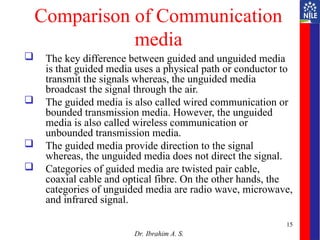
The key difference between guided and unguided media
is that guided media uses a physical path or conductor to
transmit the signals whereas, the unguided media
broadcast the signal through the air.
The guided media is also called wired communication or
bounded transmission media. However, the unguided
media is also called wireless communication or
unbounded transmission media.
The guided media provide direction to the signal
whereas, the unguided media does not direct the signal.
Categories of guided media are twisted pair cable,
coaxial cable and optical fibre. On the other hands, the
categories of unguided media are radio wave, microwave,
and infrared signal.
Dr. Ibrahim A. S.
15
16.
16
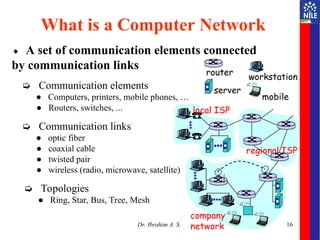
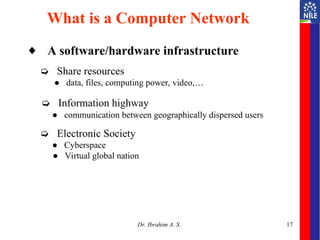
◆ A setof communication elements connected
by communication links
➭ Communication elements
● Computers, printers, mobile phones, …
● Routers, switches, ...
➭ Communication links
● optic fiber
● coaxial cable
● twisted pair
● wireless (radio, microwave, satellite)
➭ Topologies
● Ring, Star, Bus, Tree, Mesh
What is a Computer Network
local ISP
company
network
regional ISP
router
workstation
server
mobile
Dr. Ibrahim A. S.
17.
17
◆ A software/hardwareinfrastructure
➭ Share resources
● data, files, computing power, video,…
➭ Information highway
● communication between geographically dispersed users
➭ Electronic Society
● Cyberspace
● Virtual global nation
What is a Computer Network
Dr. Ibrahim A. S.
18.
18
Computer Networks
Acomputer network is a communication system
Connects two or more computers
Network provides “connectivity”
Page 257
Dr. Ibrahim A. S.
19.
What is “Connectivity”?
Direct or indirect access to every other node in the
network
Connectivity is the magic needed to communicate
if you do not have a direct pt-pt physical link.
Allows information exchange
Potential of networking:
move bits everywhere, cheaply, and with desired
performance characteristics
Tradeoff: Performance characteristics worse than true physical link!
20.
20
Computer Networks
Common networkterms
• Node
• Client
• Server
• Hub
• Network interface cards (NIC)
• Network operating system
(NOS)
• Distributed processing
• Host computer
• Network administrator
Page 257
Computer Networks Connect Computers
Dr. Ibrahim A. S.
21.
Other importantnetworks include the voice telephone
network and the cable TV network used to
disseminate video signals.
The main things these networks have in common are
that they are specialized to handle one particular kind
of data (keystrokes, voice, or video) and
they typically connect to special-purpose devices
(terminals, hand receivers, and television sets).
21
Dr. Ibrahim A. S.
22.
What distinguishesa computer network from these other types
of networks?
Probably the most important characteristic of a computer
network is its generality.
Computer networks are built primarily from general-purpose
programmable hardware, and
they are not optimized for a particular application like making
phone calls or delivering television signals.
Instead, they are able to carry many different types of data, and
they support a wide, and ever growing, range of applications
22
Dr. Ibrahim A. S.
23.
23
Computer Network
–an interconnected collection of autonomous
computers
Internet: “network of networks”
– loosely hierarchical
– public Internet versus private intranet
WWW a distributed systems run on the top of Internet
Distributed System
– High degree of cohesiveness and transparency
– A software system built on top of a network
Dr. Ibrahim A. S.
24.
24
Uses of ComputerNetworks
• Business Applications
• Home Applications
• Mobile Users
• Social Issues
Dr. Ibrahim A. S.
25.
25
Business Applications of
Networks
a.Resource sharing (hardware, software, information, …)
b. Providing communication medium (e-mail, video
conferenceing)
c. Doing business electronically (B2B, B2C, e-commerce)
A network with two clients and one server.
Dr. Ibrahim A. S.
26.
26
Business Applications ofNetworks (2)
a. Two processes are involved
b. A communication network is needed
The client-server model involves requests and
replies.
Dr. Ibrahim A. S.
27.
27
Goals of Networksfor Companies
Resource sharing: equipment, programs, data
high reliability
– replicated data
– hardware
Saving money
– mainframe: 10 times faster, but 1000 times more
expensive than PC
– client-server model
Scalability
– mainframe: replace a larger one
– client-server model: add more servers
Communication medium for separated employees
Dr. Ibrahim A. S.
28.
28
Home Network Applications
•Access to remote information
• Person-to-person communication
• Interactive entertainment
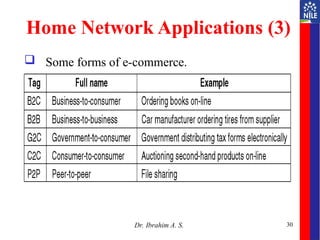
• Electronic commerce
Dr. Ibrahim A. S.
29.
29
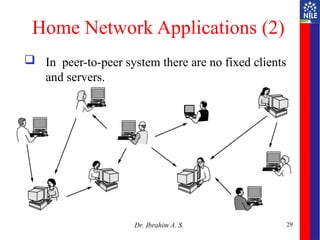
Home Network Applications(2)
In peer-to-peer system there are no fixed clients
and servers.
Dr. Ibrahim A. S.
31
Networks forPeople
– Access to remote information
• e.g.: financial, shopping, customized newspapers,
on-line digital library, WWW
– Person-to-person communication
• email, video conference, newsgroup
– Interactive entertainment
• VOD, interactive movies or TVs, game playing
Dr. Ibrahim A. S.
32.
Summary
Data communicationis the process of sharing data,
programs, and information between two or more
computers.
Data communication rely on connectivity.
Connectivity uses computer networks to link
people and resources.
Computer network is a set of communication
elements connected by communication links.
Computer network is used for various purposes
such as business, home, office, e.t.c.
Dr. Ibrahim A. S.
32
#5 Ask students to give examples of communication devices that they use daily
#6 Connectivity is a concept related to using computer networks to link people and resources
Microcomputers. minicomputers, and mainframes can all be connected
Wireless revolution
Use of mobile or wireless devices
The revolution is the support of more than just the wireless telephone
Many devices can and will connect to one another without any physical connection
#7 Electronic systems that transmit data from one location to another
Communication systems can be wired or wireless
Basic elements
Sending and receiving devices – computer or a specialized communication device
Communication channel – carries the message
Connection devices – act as an interface between sending and receiving devices; convert outgoing messages into packets (key term) that can travel across the communication channel
Data transmission specifications – rules and procedures that coordinate the sending and receiving devices
#9 Channels are essential to a communication system
They carry data
Types of channels
Telephone lines (key term)
Coaxial cables(key term)
Fiber-optic cable (key term)
Infrared (key term)
Broadcast radio (key term)
Microwave (key term)
Satellite (key term)
#11 Telephone lines – consists of twisted pair cable; slowest; being phased out by more advanced and reliable media
Coaxial cable – single solid copper core; 80 times transmission of twisted pair; television and computer networks
Fiber optic – 26,000 times capacity of twisted pair cable; more secure and reliable; best over limited distances; lighter, more reliable, and less expensive than coaxial cable
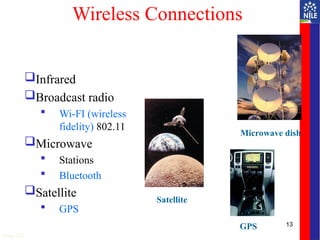
#13 Wireless connections do not use a solid substance to connect; uses the air itself
Types of wireless connections are:
Infrared
Light waves used over short distances
Sometimes called line of sight communications
Sending and receiving devices must be in clear view of one another
Broadcast radio
Uses towers called transceivers (key term)
Web-enabled devices follow a standard known as Wi-FI (wireless fidelity)
Microwave
Uses high-frequency radio waves
Also line of sight
Used for short distances
Bluetooth used for distances up to 33 feet (not line of sight)
Satellite uses satellites orbiting about 22,000 miles above the earth as microwave relay stations; many of these offered by Intelsat, the International Telecommunications Satellite Consortium which is owned by 114 governments and forms a worldwide communications system
Satellites can be used to send and receive data; Uplink
is sending data to satellite and Downlink refers to receiving data from a Satellite
GPS (Global Positioning system) use a network of 24 satellites owned and managed by the Defense Department which continuously sends location information to earth
#18 A computer network is a communication system that connects two or more computers so that they can exchange information and share resources
#20 Node – any device connected to a network
Client – a node that requests and uses resources available from other nodes
Server – a node that shares resources with other nodes; dedicated servers specialize in performing specific tasks—could be an application server, communication server, database server, file server, printer server, or Web server
Hub – the center or central node for other nodes
Network interface cards (NIC) – connects the computer to a network
Network operating system (NOS) – software to control and coordinate activities between computers on a network
Distributed processing - computing power located and shared at different locations
Host computer – large centralized computer
Network administrator – a computer specialist; network administrator