Pre-Production
Harry
Resources
Pre-production is important for the smooth running of a project. It
is for you to go through final development and organisation for
your project before you start production.
The pre-production tasks you do will depend on your project. You
need to undertake appropriate tasks in order to make your project
work.
A production schedule should be in everyone’s project.
The blue slides are here to give advice. This advice can also be
found in the main lecture. Delete when you don’t need it. Don’t
submit your work with this in.
PRE-PRODUCTIONPre-production paperwork for a print production could include:
 Risk assessment
 Flat plans
 Style Sheets
 Equipment/Resource list
 Contingency plan
 Copy (the written part of your work)
 Thorough production schedule/ Action Plan
 Location Recce for photographs
 Budget
 Model call sheet
PRE-PRODUCTIONPre-production paperwork for moving image could include:
 Risk assessment
 Storyboard
 Shotlist
 Equipment list and bookings
 Contingency plan
 Script
 Thorough production schedule/ Action Plan
 Call sheet
 Location Recce
 Budget
PRE-PRODUCTION
Pre-production paperwork for a video game production could
include:
 Risk assessment
 Sound effect list
 Music list
 Style sheet or other visual planning
 Contingency plan
 Scene plan
 Thorough production schedule/ Action Plan
 Budget
PRE-PRODUCTION
Pre-production paperwork for an audio production could include:
 Risk assessment
 Sound effect list
 Music list
 Equipment/Resource list
 Script/Questions
 Contingency plan
 Location plan
 Contributor information (interviewees/guests/actors)
 Thorough production schedule/ Action Plan
 Budget
PRE-PRODUCTION• Style sheet
– Collection of potential choice you could make for your products visuals
(colours, image styles and fonts). Provide some indication of which ones you
will use, where you will use them and reasons why
– This should explore alternatives to everything- don’t just include one
option. Look at several potential aspects to include and reference the ones
you plan to use and why
• Layout Plans
– Potential designs you could do for your product using images, fonts and
colours from style sheet
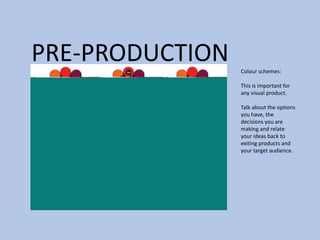
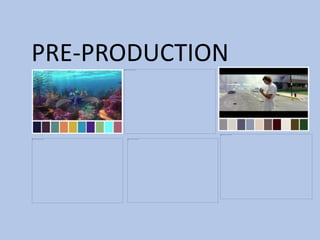
PRE-PRODUCTION Colour schemes:
This is important for
any visual product.
Talk about the options
you have, the
decisions you are
making and relate
your ideas back to
exiting products and
your target audience.
PRE-PRODUCTION
PRE-PRODUCTION
Storyboard
Pre-production
• What are you making? (explain what you have been asked to
do)
• Why? (What is the purpose of making your Film)
• Who is it for? (Audience)
• Where will it appear/on what? (How will audience see it)
Reflection:
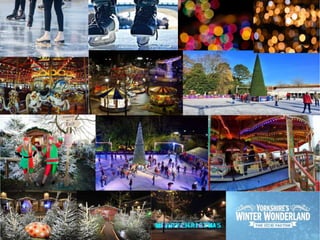
Mood board
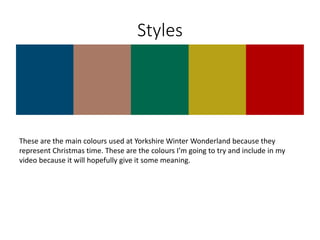
Styles
These are the main colours used at Yorkshire Winter Wonderland because they
represent Christmas time. These are the colours I’m going to try and include in my
video because it will hopefully give it some meaning.
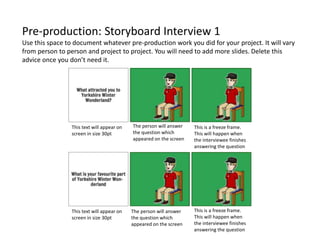
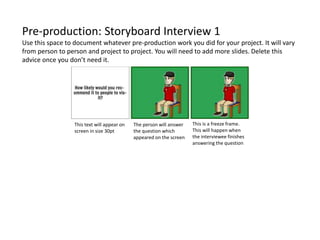
Pre-production: Storyboard Interview 1
Use this space to document whatever pre-production work you did for your project. It will vary
from person to person and project to project. You will need to add more slides. Delete this
advice once you don’t need it.
This text will appear on
screen in size 30pt
The person will answer
the question which
appeared on the screen
This is a freeze frame.
This will happen when
the interviewee finishes
answering the question
This text will appear on
screen in size 30pt
This is a freeze frame.
This will happen when
the interviewee finishes
answering the question
The person will answer
the question which
appeared on the screen
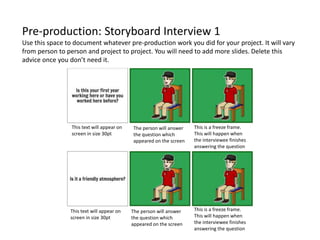
Pre-production: Storyboard Interview 1
Use this space to document whatever pre-production work you did for your project. It will vary
from person to person and project to project. You will need to add more slides. Delete this
advice once you don’t need it.
The person will answer
the question which
appeared on the screen
The person will answer
the question which
appeared on the screen
This text will appear on
screen in size 30pt
This text will appear on
screen in size 30pt
This is a freeze frame.
This will happen when
the interviewee finishes
answering the question
This is a freeze frame.
This will happen when
the interviewee finishes
answering the question
Pre-production: Storyboard Interview 1
Use this space to document whatever pre-production work you did for your project. It will vary
from person to person and project to project. You will need to add more slides. Delete this
advice once you don’t need it.
This is a freeze frame.
This will happen when
the interviewee finishes
answering the question
The person will answer
the question which
appeared on the screen
This text will appear on
screen in size 30pt
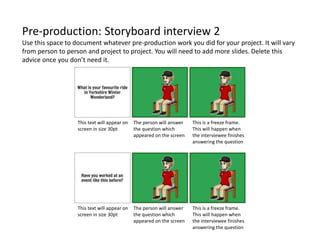
Pre-production: Storyboard interview 2
Use this space to document whatever pre-production work you did for your project. It will vary
from person to person and project to project. You will need to add more slides. Delete this
advice once you don’t need it.
This text will appear on
screen in size 30pt
This text will appear on
screen in size 30pt
The person will answer
the question which
appeared on the screen
The person will answer
the question which
appeared on the screen
This is a freeze frame.
This will happen when
the interviewee finishes
answering the question
This is a freeze frame.
This will happen when
the interviewee finishes
answering the question
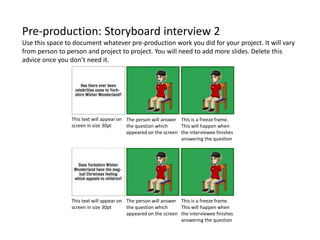
Pre-production: Storyboard interview 2
Use this space to document whatever pre-production work you did for your project. It will vary
from person to person and project to project. You will need to add more slides. Delete this
advice once you don’t need it.
This is a freeze frame.
This will happen when
the interviewee finishes
answering the question
This is a freeze frame.
This will happen when
the interviewee finishes
answering the question
The person will answer
the question which
appeared on the screen
The person will answer
the question which
appeared on the screen
This text will appear on
screen in size 30pt
This text will appear on
screen in size 30pt
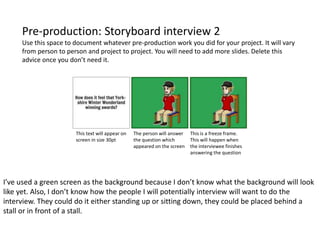
Pre-production: Storyboard interview 2
Use this space to document whatever pre-production work you did for your project. It will vary
from person to person and project to project. You will need to add more slides. Delete this
advice once you don’t need it.
This text will appear on
screen in size 30pt
The person will answer
the question which
appeared on the screen
This is a freeze frame.
This will happen when
the interviewee finishes
answering the question
I’ve used a green screen as the background because I don’t know what the background will look
like yet. Also, I don’t know how the people I will potentially interview will want to do the
interview. They could do it either standing up or sitting down, they could be placed behind a
stall or in front of a stall.
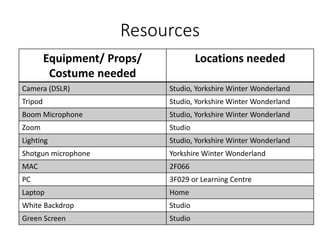
Resources
Equipment/ Props/
Costume needed
Locations needed
Camera (DSLR) Studio, Yorkshire Winter Wonderland
Tripod Studio, Yorkshire Winter Wonderland
Boom Microphone Studio, Yorkshire Winter Wonderland
Zoom Studio
Lighting Studio, Yorkshire Winter Wonderland
Shotgun microphone Yorkshire Winter Wonderland
MAC 2F066
PC 3F029 or Learning Centre
Laptop Home
White Backdrop Studio
Green Screen Studio
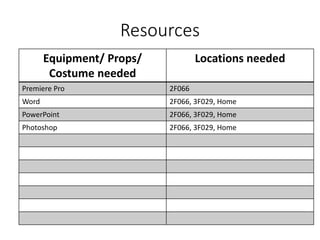
Resources
Equipment/ Props/
Costume needed
Locations needed
Premiere Pro 2F066
Word 2F066, 3F029, Home
PowerPoint 2F066, 3F029, Home
Photoshop 2F066, 3F029, Home
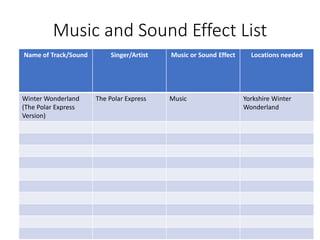
Music and Sound Effect List
Name of Track/Sound Singer/Artist Music or Sound Effect Locations needed
Winter Wonderland
(The Polar Express
Version)
The Polar Express Music Yorkshire Winter
Wonderland
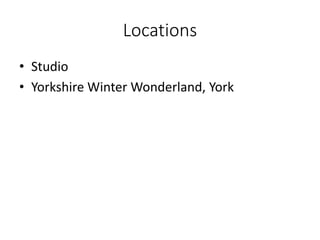
Locations
• Studio
• Yorkshire Winter Wonderland, York
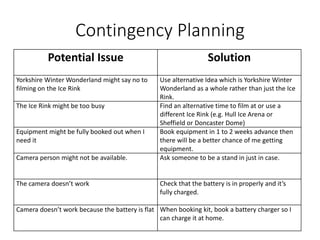
Contingency Planning
Potential Issue Solution
Yorkshire Winter Wonderland might say no to
filming on the Ice Rink
Use alternative Idea which is Yorkshire Winter
Wonderland as a whole rather than just the Ice
Rink.
The Ice Rink might be too busy Find an alternative time to film at or use a
different Ice Rink (e.g. Hull Ice Arena or
Sheffield or Doncaster Dome)
Equipment might be fully booked out when I
need it
Book equipment in 1 to 2 weeks advance then
there will be a better chance of me getting
equipment.
Camera person might not be available. Ask someone to be a stand in just in case.
The camera doesn’t work Check that the battery is in properly and it’s
fully charged.
Camera doesn’t work because the battery is flat When booking kit, book a battery charger so I
can charge it at home.
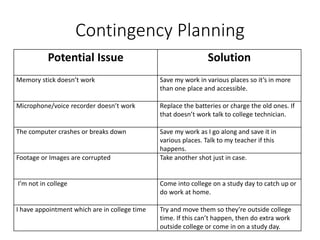
Contingency Planning
Potential Issue Solution
Memory stick doesn’t work Save my work in various places so it’s in more
than one place and accessible.
Microphone/voice recorder doesn’t work Replace the batteries or charge the old ones. If
that doesn’t work talk to college technician.
The computer crashes or breaks down Save my work as I go along and save it in
various places. Talk to my teacher if this
happens.
Footage or Images are corrupted Take another shot just in case.
I’m not in college Come into college on a study day to catch up or
do work at home.
I have appointment which are in college time Try and move them so they’re outside college
time. If this can’t happen, then do extra work
outside college or come in on a study day.
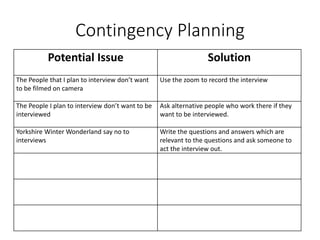
Contingency Planning
Potential Issue Solution
The People that I plan to interview don’t want
to be filmed on camera
Use the zoom to record the interview
The People I plan to interview don’t want to be
interviewed
Ask alternative people who work there if they
want to be interviewed.
Yorkshire Winter Wonderland say no to
interviews
Write the questions and answers which are
relevant to the questions and ask someone to
act the interview out.
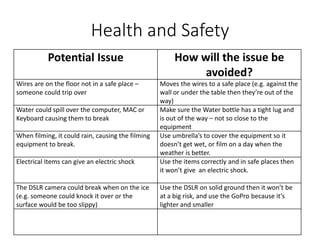
Health and Safety
Potential Issue How will the issue be
avoided?
Wires are on the floor not in a safe place –
someone could trip over
Moves the wires to a safe place (e.g. against the
wall or under the table then they’re out of the
way)
Water could spill over the computer, MAC or
Keyboard causing them to break
Make sure the Water bottle has a tight lug and
is out of the way – not so close to the
equipment
When filming, it could rain, causing the filming
equipment to break.
Use umbrella’s to cover the equipment so it
doesn’t get wet, or film on a day when the
weather is better.
Electrical Items can give an electric shock Use the items correctly and in safe places then
it won’t give an electric shock.
The DSLR camera could break when on the ice
(e.g. someone could knock it over or the
surface would be too slippy)
Use the DSLR on solid ground then it won’t be
at a big risk, and use the GoPro because it’s
lighter and smaller
Weather Planning
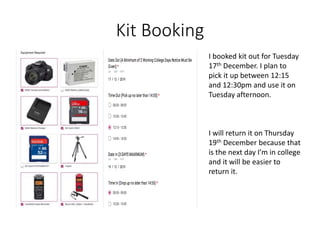
Kit Booking
I booked kit out for Tuesday
17th December. I plan to
pick it up between 12:15
and 12:30pm and use it on
Tuesday afternoon.
I will return it on Thursday
19th December because that
is the next day I’m in college
and it will be easier to
return it.
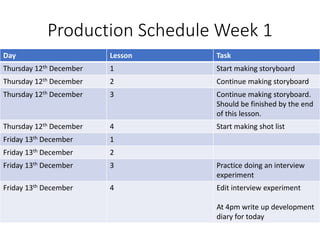
Production Schedule Week 1
Day Lesson Task
Thursday 12th December 1 Start making storyboard
Thursday 12th December 2 Continue making storyboard
Thursday 12th December 3 Continue making storyboard.
Should be finished by the end
of this lesson.
Thursday 12th December 4 Start making shot list
Friday 13th December 1
Friday 13th December 2
Friday 13th December 3 Practice doing an interview
experiment
Friday 13th December 4 Edit interview experiment
At 4pm write up development
diary for today
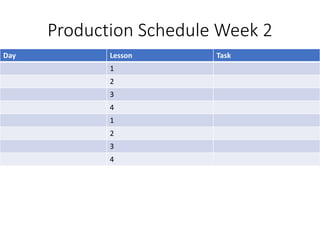
Production Schedule Week 2
Day Lesson Task
1
2
3
4
1
2
3
4
Production Schedule Week 3
Day Lesson Task
1
2
3
4
1
2
3
4
Production Schedule Week 4
Day Lesson Task
1
2
3
4
1
2
3
4

Pre production

  • 1.
  • 2.
    Resources Pre-production is importantfor the smooth running of a project. It is for you to go through final development and organisation for your project before you start production. The pre-production tasks you do will depend on your project. You need to undertake appropriate tasks in order to make your project work. A production schedule should be in everyone’s project. The blue slides are here to give advice. This advice can also be found in the main lecture. Delete when you don’t need it. Don’t submit your work with this in.
  • 3.
    PRE-PRODUCTIONPre-production paperwork fora print production could include:  Risk assessment  Flat plans  Style Sheets  Equipment/Resource list  Contingency plan  Copy (the written part of your work)  Thorough production schedule/ Action Plan  Location Recce for photographs  Budget  Model call sheet
  • 4.
    PRE-PRODUCTIONPre-production paperwork formoving image could include:  Risk assessment  Storyboard  Shotlist  Equipment list and bookings  Contingency plan  Script  Thorough production schedule/ Action Plan  Call sheet  Location Recce  Budget
  • 5.
    PRE-PRODUCTION Pre-production paperwork fora video game production could include:  Risk assessment  Sound effect list  Music list  Style sheet or other visual planning  Contingency plan  Scene plan  Thorough production schedule/ Action Plan  Budget
  • 6.
    PRE-PRODUCTION Pre-production paperwork foran audio production could include:  Risk assessment  Sound effect list  Music list  Equipment/Resource list  Script/Questions  Contingency plan  Location plan  Contributor information (interviewees/guests/actors)  Thorough production schedule/ Action Plan  Budget
  • 7.
    PRE-PRODUCTION• Style sheet –Collection of potential choice you could make for your products visuals (colours, image styles and fonts). Provide some indication of which ones you will use, where you will use them and reasons why – This should explore alternatives to everything- don’t just include one option. Look at several potential aspects to include and reference the ones you plan to use and why • Layout Plans – Potential designs you could do for your product using images, fonts and colours from style sheet
  • 8.
    PRE-PRODUCTION Colour schemes: Thisis important for any visual product. Talk about the options you have, the decisions you are making and relate your ideas back to exiting products and your target audience.
  • 9.
  • 10.
  • 11.
    Pre-production • What areyou making? (explain what you have been asked to do) • Why? (What is the purpose of making your Film) • Who is it for? (Audience) • Where will it appear/on what? (How will audience see it) Reflection:
  • 12.
  • 14.
    Styles These are themain colours used at Yorkshire Winter Wonderland because they represent Christmas time. These are the colours I’m going to try and include in my video because it will hopefully give it some meaning.
  • 15.
    Pre-production: Storyboard Interview1 Use this space to document whatever pre-production work you did for your project. It will vary from person to person and project to project. You will need to add more slides. Delete this advice once you don’t need it. This text will appear on screen in size 30pt The person will answer the question which appeared on the screen This is a freeze frame. This will happen when the interviewee finishes answering the question This text will appear on screen in size 30pt This is a freeze frame. This will happen when the interviewee finishes answering the question The person will answer the question which appeared on the screen
  • 16.
    Pre-production: Storyboard Interview1 Use this space to document whatever pre-production work you did for your project. It will vary from person to person and project to project. You will need to add more slides. Delete this advice once you don’t need it. The person will answer the question which appeared on the screen The person will answer the question which appeared on the screen This text will appear on screen in size 30pt This text will appear on screen in size 30pt This is a freeze frame. This will happen when the interviewee finishes answering the question This is a freeze frame. This will happen when the interviewee finishes answering the question
  • 17.
    Pre-production: Storyboard Interview1 Use this space to document whatever pre-production work you did for your project. It will vary from person to person and project to project. You will need to add more slides. Delete this advice once you don’t need it. This is a freeze frame. This will happen when the interviewee finishes answering the question The person will answer the question which appeared on the screen This text will appear on screen in size 30pt
  • 18.
    Pre-production: Storyboard interview2 Use this space to document whatever pre-production work you did for your project. It will vary from person to person and project to project. You will need to add more slides. Delete this advice once you don’t need it. This text will appear on screen in size 30pt This text will appear on screen in size 30pt The person will answer the question which appeared on the screen The person will answer the question which appeared on the screen This is a freeze frame. This will happen when the interviewee finishes answering the question This is a freeze frame. This will happen when the interviewee finishes answering the question
  • 19.
    Pre-production: Storyboard interview2 Use this space to document whatever pre-production work you did for your project. It will vary from person to person and project to project. You will need to add more slides. Delete this advice once you don’t need it. This is a freeze frame. This will happen when the interviewee finishes answering the question This is a freeze frame. This will happen when the interviewee finishes answering the question The person will answer the question which appeared on the screen The person will answer the question which appeared on the screen This text will appear on screen in size 30pt This text will appear on screen in size 30pt
  • 20.
    Pre-production: Storyboard interview2 Use this space to document whatever pre-production work you did for your project. It will vary from person to person and project to project. You will need to add more slides. Delete this advice once you don’t need it. This text will appear on screen in size 30pt The person will answer the question which appeared on the screen This is a freeze frame. This will happen when the interviewee finishes answering the question I’ve used a green screen as the background because I don’t know what the background will look like yet. Also, I don’t know how the people I will potentially interview will want to do the interview. They could do it either standing up or sitting down, they could be placed behind a stall or in front of a stall.
  • 21.
    Resources Equipment/ Props/ Costume needed Locationsneeded Camera (DSLR) Studio, Yorkshire Winter Wonderland Tripod Studio, Yorkshire Winter Wonderland Boom Microphone Studio, Yorkshire Winter Wonderland Zoom Studio Lighting Studio, Yorkshire Winter Wonderland Shotgun microphone Yorkshire Winter Wonderland MAC 2F066 PC 3F029 or Learning Centre Laptop Home White Backdrop Studio Green Screen Studio
  • 22.
    Resources Equipment/ Props/ Costume needed Locationsneeded Premiere Pro 2F066 Word 2F066, 3F029, Home PowerPoint 2F066, 3F029, Home Photoshop 2F066, 3F029, Home
  • 23.
    Music and SoundEffect List Name of Track/Sound Singer/Artist Music or Sound Effect Locations needed Winter Wonderland (The Polar Express Version) The Polar Express Music Yorkshire Winter Wonderland
  • 24.
    Locations • Studio • YorkshireWinter Wonderland, York
  • 25.
    Contingency Planning Potential IssueSolution Yorkshire Winter Wonderland might say no to filming on the Ice Rink Use alternative Idea which is Yorkshire Winter Wonderland as a whole rather than just the Ice Rink. The Ice Rink might be too busy Find an alternative time to film at or use a different Ice Rink (e.g. Hull Ice Arena or Sheffield or Doncaster Dome) Equipment might be fully booked out when I need it Book equipment in 1 to 2 weeks advance then there will be a better chance of me getting equipment. Camera person might not be available. Ask someone to be a stand in just in case. The camera doesn’t work Check that the battery is in properly and it’s fully charged. Camera doesn’t work because the battery is flat When booking kit, book a battery charger so I can charge it at home.
  • 26.
    Contingency Planning Potential IssueSolution Memory stick doesn’t work Save my work in various places so it’s in more than one place and accessible. Microphone/voice recorder doesn’t work Replace the batteries or charge the old ones. If that doesn’t work talk to college technician. The computer crashes or breaks down Save my work as I go along and save it in various places. Talk to my teacher if this happens. Footage or Images are corrupted Take another shot just in case. I’m not in college Come into college on a study day to catch up or do work at home. I have appointment which are in college time Try and move them so they’re outside college time. If this can’t happen, then do extra work outside college or come in on a study day.
  • 27.
    Contingency Planning Potential IssueSolution The People that I plan to interview don’t want to be filmed on camera Use the zoom to record the interview The People I plan to interview don’t want to be interviewed Ask alternative people who work there if they want to be interviewed. Yorkshire Winter Wonderland say no to interviews Write the questions and answers which are relevant to the questions and ask someone to act the interview out.
  • 28.
    Health and Safety PotentialIssue How will the issue be avoided? Wires are on the floor not in a safe place – someone could trip over Moves the wires to a safe place (e.g. against the wall or under the table then they’re out of the way) Water could spill over the computer, MAC or Keyboard causing them to break Make sure the Water bottle has a tight lug and is out of the way – not so close to the equipment When filming, it could rain, causing the filming equipment to break. Use umbrella’s to cover the equipment so it doesn’t get wet, or film on a day when the weather is better. Electrical Items can give an electric shock Use the items correctly and in safe places then it won’t give an electric shock. The DSLR camera could break when on the ice (e.g. someone could knock it over or the surface would be too slippy) Use the DSLR on solid ground then it won’t be at a big risk, and use the GoPro because it’s lighter and smaller
  • 29.
  • 30.
    Kit Booking I bookedkit out for Tuesday 17th December. I plan to pick it up between 12:15 and 12:30pm and use it on Tuesday afternoon. I will return it on Thursday 19th December because that is the next day I’m in college and it will be easier to return it.
  • 31.
    Production Schedule Week1 Day Lesson Task Thursday 12th December 1 Start making storyboard Thursday 12th December 2 Continue making storyboard Thursday 12th December 3 Continue making storyboard. Should be finished by the end of this lesson. Thursday 12th December 4 Start making shot list Friday 13th December 1 Friday 13th December 2 Friday 13th December 3 Practice doing an interview experiment Friday 13th December 4 Edit interview experiment At 4pm write up development diary for today
  • 32.
    Production Schedule Week2 Day Lesson Task 1 2 3 4 1 2 3 4
  • 33.
    Production Schedule Week3 Day Lesson Task 1 2 3 4 1 2 3 4
  • 34.
    Production Schedule Week4 Day Lesson Task 1 2 3 4 1 2 3 4

Editor's Notes

  • #14 Use this space to document whatever pre-production work you did for your project. It will vary from person to person and project to project.
  • #16 Use this space to document whatever pre-production work you did for your project. It will vary from person to person and project to project.
  • #17 Use this space to document whatever pre-production work you did for your project. It will vary from person to person and project to project.
  • #18 Use this space to document whatever pre-production work you did for your project. It will vary from person to person and project to project.
  • #19 Use this space to document whatever pre-production work you did for your project. It will vary from person to person and project to project.
  • #20 Use this space to document whatever pre-production work you did for your project. It will vary from person to person and project to project.
  • #21 Use this space to document whatever pre-production work you did for your project. It will vary from person to person and project to project.