How To Change
Microsoft Outlook
POP3 To IMAP
Info About POP 3
Post Office Protocol 3 (POP3) is a latest
version protocol used for local email
receiving from remote server over TCP/IP .
Virtually all modern email client and
server supports pop3 account. This is most
prevalent standard tool that use for
retrieving emails from Google mail, yahoo
mail and Microsoft Mail etc.
Info About IMAP
Internet Message Access Protocol (IMAP) is a
protocol that can be used for e-mail retrieval and
storage developed on server. It works same like
pop3 but it provides more capabilities to organize
folders on the server. The benefits of IMAP is
when you change on your local machine, it will
automatically updates on server.
Change POP3 To IMAP
If you want to change POP3 account to IMAP
apply below method.
• Remove POP3 account.
• Configure with IMAP account.
Steps:
File-> Account Settings-> select your POP3
account-> press Remove button
How to Remove POP3 Account
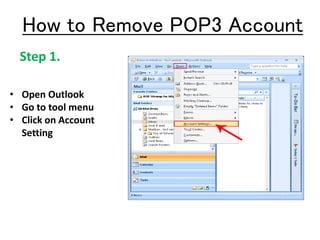
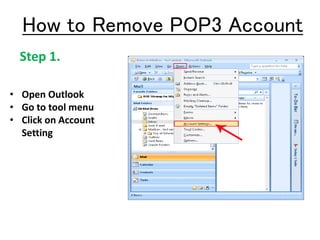
• Open Outlook
• Go to tool menu
• Click on Account
Setting
Step 1.
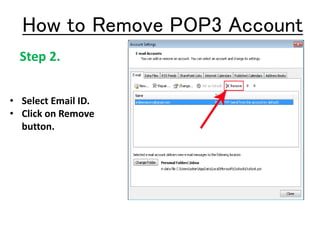
Step 2.
• Select Email ID.
• Click on Remove
button.
How to Remove POP3 Account
Step 1.
• Open Outlook
• Go to tool menu
• Click on Account
Setting
How to Remove POP3 Account
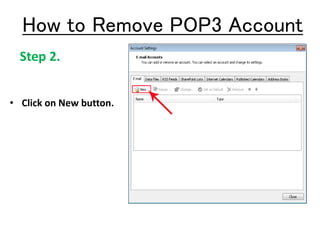
Step 2.
• Click on New button.
How to Remove POP3 Account
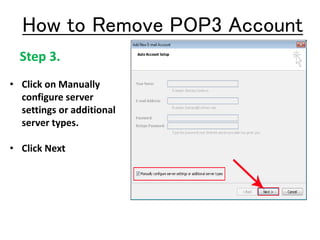
Step 3.
• Click on Manually
configure server
settings or additional
server types.
• Click Next
How to Remove POP3 Account
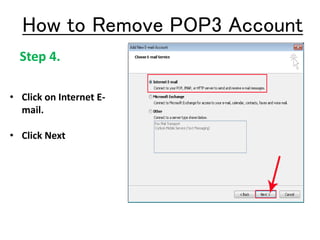
Step 4.
• Click on Internet E-
mail.
• Click Next
How to Remove POP3 Account
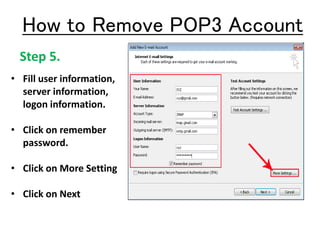
Step 5.
• Fill user information,
server information,
logon information.
• Click on remember
password.
• Click on More Setting
• Click on Next
How to Remove POP3 Account
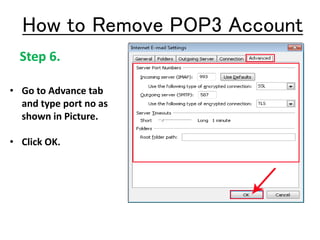
Step 6.
• Go to Advance tab
and type port no as
shown in Picture.
• Click OK.
How to Remove POP3 Account
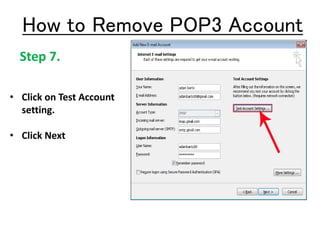
Step 7.
• Click on Test Account
setting.
• Click Next
How to Remove POP3 Account
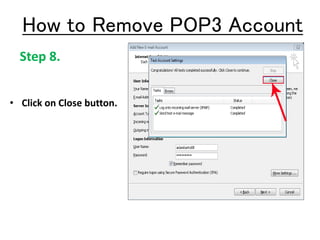
Step 8.
• Click on Close button.
How to Remove POP3 Account
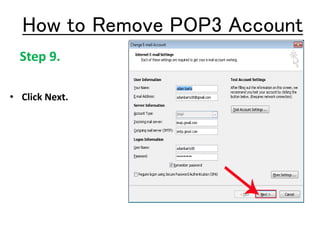
Step 9.
• Click Next.
How to Remove POP3 Account
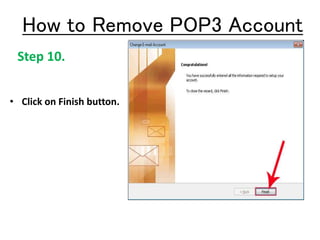
Step 10.
• Click on Finish button.
How to Remove POP3 Account
For more info Visit Our site:
http://www.msoutlooktools.com/category/account/convert-pop3-account-to-imap.html

pop to imap

  • 1.
    How To Change MicrosoftOutlook POP3 To IMAP
  • 2.
    Info About POP3 Post Office Protocol 3 (POP3) is a latest version protocol used for local email receiving from remote server over TCP/IP . Virtually all modern email client and server supports pop3 account. This is most prevalent standard tool that use for retrieving emails from Google mail, yahoo mail and Microsoft Mail etc.
  • 3.
    Info About IMAP InternetMessage Access Protocol (IMAP) is a protocol that can be used for e-mail retrieval and storage developed on server. It works same like pop3 but it provides more capabilities to organize folders on the server. The benefits of IMAP is when you change on your local machine, it will automatically updates on server.
  • 4.
    Change POP3 ToIMAP If you want to change POP3 account to IMAP apply below method. • Remove POP3 account. • Configure with IMAP account. Steps: File-> Account Settings-> select your POP3 account-> press Remove button
  • 5.
    How to RemovePOP3 Account • Open Outlook • Go to tool menu • Click on Account Setting Step 1.
  • 6.
    Step 2. • SelectEmail ID. • Click on Remove button. How to Remove POP3 Account
  • 7.
    Step 1. • OpenOutlook • Go to tool menu • Click on Account Setting How to Remove POP3 Account
  • 8.
    Step 2. • Clickon New button. How to Remove POP3 Account
  • 9.
    Step 3. • Clickon Manually configure server settings or additional server types. • Click Next How to Remove POP3 Account
  • 10.
    Step 4. • Clickon Internet E- mail. • Click Next How to Remove POP3 Account
  • 11.
    Step 5. • Filluser information, server information, logon information. • Click on remember password. • Click on More Setting • Click on Next How to Remove POP3 Account
  • 12.
    Step 6. • Goto Advance tab and type port no as shown in Picture. • Click OK. How to Remove POP3 Account
  • 13.
    Step 7. • Clickon Test Account setting. • Click Next How to Remove POP3 Account
  • 14.
    Step 8. • Clickon Close button. How to Remove POP3 Account
  • 15.
    Step 9. • ClickNext. How to Remove POP3 Account
  • 16.
    Step 10. • Clickon Finish button. How to Remove POP3 Account
  • 17.
    For more infoVisit Our site: http://www.msoutlooktools.com/category/account/convert-pop3-account-to-imap.html