Problems with Outlook 2010
Introduction 
 How to Done Changes in Outlook Calendar? 
 How to Change Print Color for Appointments in 
Outlook Calendar? 
 How to Change Appointment Series Color? 
 Steps to Create Style in Outlook
How to Done Changes in Outlook 
Calendar? 
Microsoft Outlook provides numerous features 
and free inbuilt -apps. You can take advantage 
of ‘Categorize Feature in MS Outlook ‘ and 
easily print emails with different touch.
How to Change Print Colors for 
Appointments in Outlook Calendar? 
Change Individual Appointment Color 
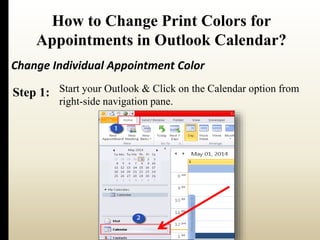
Step 1: Start your Outlook & Click on the Calendar option from 
right-side navigation pane.
How to Change Print Colors for 
Appointments in Outlook Calendar? 
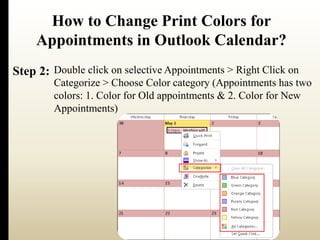
Step 2: Double click on selective Appointments > Right Click on 
Categorize > Choose Color category (Appointments has two 
colors: 1. Color for Old appointments & 2. Color for New 
Appointments)
How to Change Print Colors for 
Appointments in Outlook Calendar? 
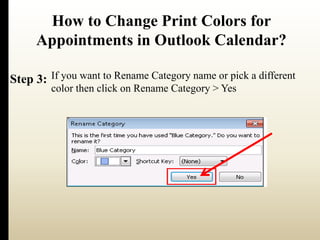
Step 3: If you want to Rename Category name or pick a different 
color then click on Rename Category > Yes
How to Change Appointments Series Color? 
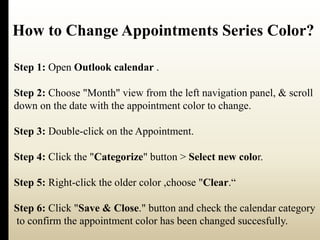
Step 1: Open Outlook calendar . 
Step 2: Choose "Month" view from the left navigation panel, & scroll 
down on the date with the appointment color to change. 
Step 3: Double-click on the Appointment. 
Step 4: Click the "Categorize" button > Select new color. 
Step 5: Right-click the older color ,choose "Clear.“ 
Step 6: Click "Save & Close." button and check the calendar category 
to confirm the appointment color has been changed succesfully.
Steps to Create Style in MS Outlook 
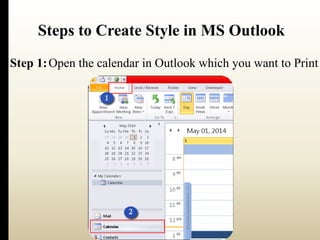
Step 1:Open the calendar in Outlook which you want to Print
Steps to Create Style in MS Outlook 
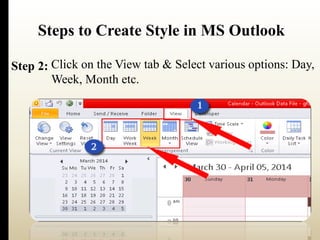
Click on the View tab & Select various options: Day, 
Week, Month etc. 
Step 2:
Steps to Create Style in MS Outlook 
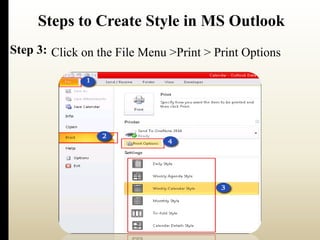
Step 3: Click on the File Menu >Print > Print Options
Know More Info-http:// 
goo.gl/adfTPi
Thank You For 
Watching..

Common Problems with Outlook 2010

  • 1.
  • 2.
    Introduction  Howto Done Changes in Outlook Calendar?  How to Change Print Color for Appointments in Outlook Calendar?  How to Change Appointment Series Color?  Steps to Create Style in Outlook
  • 3.
    How to DoneChanges in Outlook Calendar? Microsoft Outlook provides numerous features and free inbuilt -apps. You can take advantage of ‘Categorize Feature in MS Outlook ‘ and easily print emails with different touch.
  • 4.
    How to ChangePrint Colors for Appointments in Outlook Calendar? Change Individual Appointment Color Step 1: Start your Outlook & Click on the Calendar option from right-side navigation pane.
  • 5.
    How to ChangePrint Colors for Appointments in Outlook Calendar? Step 2: Double click on selective Appointments > Right Click on Categorize > Choose Color category (Appointments has two colors: 1. Color for Old appointments & 2. Color for New Appointments)
  • 6.
    How to ChangePrint Colors for Appointments in Outlook Calendar? Step 3: If you want to Rename Category name or pick a different color then click on Rename Category > Yes
  • 7.
    How to ChangeAppointments Series Color? Step 1: Open Outlook calendar . Step 2: Choose "Month" view from the left navigation panel, & scroll down on the date with the appointment color to change. Step 3: Double-click on the Appointment. Step 4: Click the "Categorize" button > Select new color. Step 5: Right-click the older color ,choose "Clear.“ Step 6: Click "Save & Close." button and check the calendar category to confirm the appointment color has been changed succesfully.
  • 8.
    Steps to CreateStyle in MS Outlook Step 1:Open the calendar in Outlook which you want to Print
  • 9.
    Steps to CreateStyle in MS Outlook Click on the View tab & Select various options: Day, Week, Month etc. Step 2:
  • 10.
    Steps to CreateStyle in MS Outlook Step 3: Click on the File Menu >Print > Print Options
  • 11.
    Know More Info-http:// goo.gl/adfTPi
  • 12.
    Thank You For Watching..