How to Create Automatic 
Hyperlink in Outlook for 
Specific Word ?
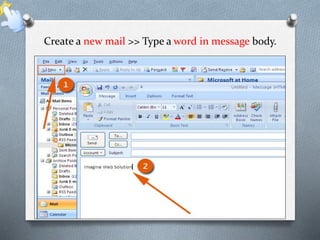
Create a new mail >> Type a word in message body.
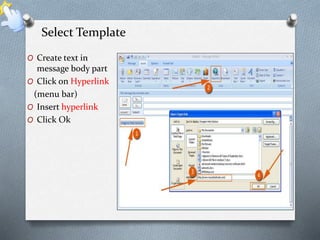
Select Template 
O Create text in 
message body part 
O Click on Hyperlink 
(menu bar) 
O Insert hyperlink 
O Click Ok
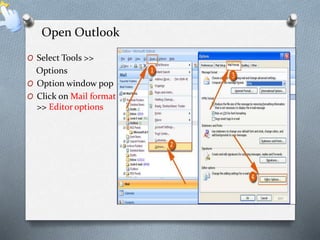
Open Outlook 
O Select Tools >> 
Options 
O Option window pop 
O Click on Mail format 
>> Editor options
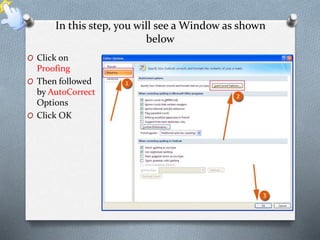
In this step, you will see a Window as shown 
below 
O Click on 
Proofing 
O Then followed 
by AutoCorrect 
Options 
O Click OK
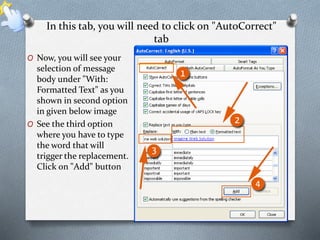
In this tab, you will need to click on "AutoCorrect" 
tab 
O Now, you will see your 
selection of message 
body under "With: 
Formatted Text" as you 
shown in second option 
in given below image 
O See the third option 
where you have to type 
the word that will 
trigger the replacement. 
Click on "Add" button
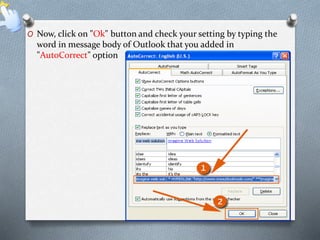
O Now, click on "Ok" button and check your setting by typing the 
word in message body of Outlook that you added in 
"AutoCorrect" option
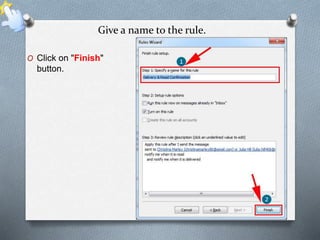
Give a name to the rule. 
O Click on "Finish" 
button.
Get more information : 
http://www.msoutlooktools.com/category/email/create-automatic-hyperlink-in-outlook.html

How to Create Automatic Hyperlink in Outlook for Specific Word ?

  • 1.
    How to CreateAutomatic Hyperlink in Outlook for Specific Word ?
  • 3.
    Create a newmail >> Type a word in message body.
  • 4.
    Select Template OCreate text in message body part O Click on Hyperlink (menu bar) O Insert hyperlink O Click Ok
  • 5.
    Open Outlook OSelect Tools >> Options O Option window pop O Click on Mail format >> Editor options
  • 6.
    In this step,you will see a Window as shown below O Click on Proofing O Then followed by AutoCorrect Options O Click OK
  • 7.
    In this tab,you will need to click on "AutoCorrect" tab O Now, you will see your selection of message body under "With: Formatted Text" as you shown in second option in given below image O See the third option where you have to type the word that will trigger the replacement. Click on "Add" button
  • 8.
    O Now, clickon "Ok" button and check your setting by typing the word in message body of Outlook that you added in "AutoCorrect" option
  • 9.
    Give a nameto the rule. O Click on "Finish" button.
  • 10.
    Get more information: http://www.msoutlooktools.com/category/email/create-automatic-hyperlink-in-outlook.html