Method to Print Multiple Notes on a single page 
Notes
Introduction 
What is Notes in Outlook 
How to Print Multiple Notes on a Single page 
How to Create Notes using Outlook 
Another way to Compact ‘Notes’
What is Notes? 
Use notes feature to remember some ideas, 
questions and anything, which you would write on 
paper. This is an inbuilt feature provided by 
Microsoft. If you are receiving lots of messages 
and you need to write short description about their 
suggestion, at that time you can use 
‘Sticky Notes’ feature in Outlook.
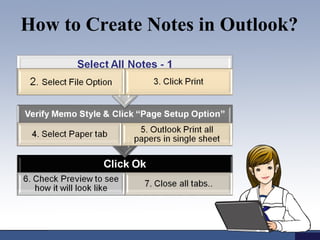
How to Create Notes in Outlook?
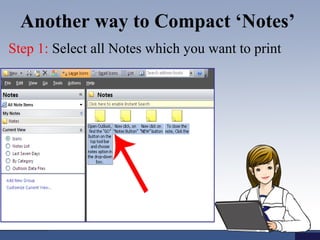
Another way to Compact ‘Notes’ 
Step 1: Select all Notes which you want to print
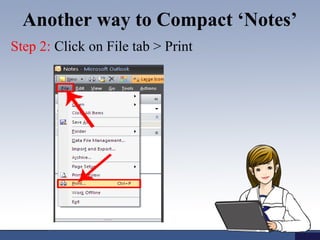
Another way to Compact ‘Notes’ 
Step 2: Click on File tab > Print
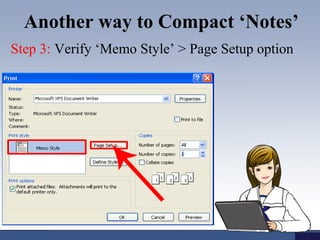
Another way to Compact ‘Notes’ 
Step 3: Verify ‘Memo Style’ > Page Setup option
Another way to Compact ‘Notes’ 
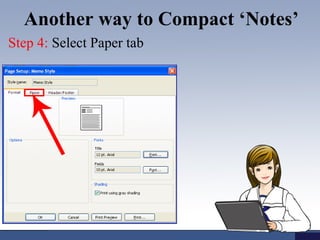
Step 4: Select Paper tab
Another way to Compact ‘Notes’ 
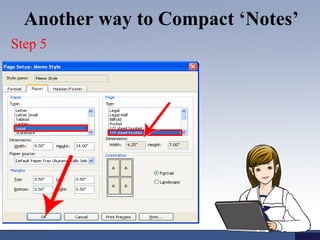
Step 5: Fill all required fields in paper tab. 
Firstly choose paper type. For Example A4 or 
Letter. Select page size from the Right pane. Select 
page size smaller than paper size. Outlook prints 
multiple pages on a single sheet of paper. 
• 1/2 sheet booklet prints 2 pages on 
1sheet
Another way to Compact ‘Notes’ 
Step 5
Know More: 
http://goo.gl/o7qCd1
Method to Print Multiple Notes on a single page

Method to Print Multiple Notes on a single page

  • 1.
    Method to PrintMultiple Notes on a single page Notes
  • 2.
    Introduction What isNotes in Outlook How to Print Multiple Notes on a Single page How to Create Notes using Outlook Another way to Compact ‘Notes’
  • 3.
    What is Notes? Use notes feature to remember some ideas, questions and anything, which you would write on paper. This is an inbuilt feature provided by Microsoft. If you are receiving lots of messages and you need to write short description about their suggestion, at that time you can use ‘Sticky Notes’ feature in Outlook.
  • 4.
    How to CreateNotes in Outlook?
  • 5.
    Another way toCompact ‘Notes’ Step 1: Select all Notes which you want to print
  • 6.
    Another way toCompact ‘Notes’ Step 2: Click on File tab > Print
  • 7.
    Another way toCompact ‘Notes’ Step 3: Verify ‘Memo Style’ > Page Setup option
  • 8.
    Another way toCompact ‘Notes’ Step 4: Select Paper tab
  • 9.
    Another way toCompact ‘Notes’ Step 5: Fill all required fields in paper tab. Firstly choose paper type. For Example A4 or Letter. Select page size from the Right pane. Select page size smaller than paper size. Outlook prints multiple pages on a single sheet of paper. • 1/2 sheet booklet prints 2 pages on 1sheet
  • 10.
    Another way toCompact ‘Notes’ Step 5
  • 11.

Editor's Notes

  • #3 http://www.msoutlooktools.com/category/notes/print-multiple-notes-on-single-page.html