Project
Planning and Scheduling
November 22, 2004
2
 Definition of scheduling and its relationship to the
project management process
 Scheduling uses and benefits
 Schedule types
 Characteristics of a good schedule
 Schedule preparation, reports and control
 Network scheduling including analysis techniques
and relationships
Scheduling Topics Covered
Project Planning and Scheduling
http://www.maxwideman.com/issacons/index.htm
3
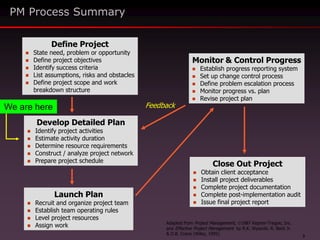
PM Process Summary
Launch Plan
 Recruit and organize project team
 Establish team operating rules
 Level project resources
 Assign work
Monitor & Control Progress
 Establish progress reporting system
 Set up change control process
 Define problem escalation process
 Monitor progress vs. plan
 Revise project plan
Close Out Project
 Obtain client acceptance
 Install project deliverables
 Complete project documentation
 Complete post-implementation audit
 Issue final project report
Develop Detailed Plan
 Identify project activities
 Estimate activity duration
 Determine resource requirements
 Construct / analyze project network
 Prepare project schedule
Define Project
 State need, problem or opportunity
 Define project objectives
 Identify success criteria
 List assumptions, risks and obstacles
 Define project scope and work
breakdown structure
Feedback
Adapted from Project Management, 1987 Kepner-Tregoe, Inc.
and Effective Project Management by R.K. Wysocki, R. Beck Jr.
& D.B. Crane (Wiley, 1995)
We are here
4
The process of converting a general or
outline plan for a project into a time-based
graphic presentation using information on
available resources and time constraints.
Scheduling
http://www.maxwideman.com/issacons/index.htm
Project Planning and Scheduling
5
 Scheduling is a management tool
 It can be used to satisfy a number of objectives
– Coordination
– Analysis and forecasting
– Reporting against a baseline
 Scheduling enables you to
– Integrate the activities of the various project
participants
– Show interface responsibilities particularly with
respect to timing
– Secure, record and communicate commitment to
tasks by the various contributors to the project
effort
Scheduling
Project Planning and Scheduling
http://www.maxwideman.com/issacons/index.htm
6
 Scheduling also enables you to
– Identify the key activity sequence (critical path)
determining the length of the project
– Display departmental work loading and hence
facilitate departmental planning
– Provide the basis for more detailed scheduling
Scheduling
Project Planning and Scheduling
http://www.maxwideman.com/issacons/index.htm
7
 Scheduling enables analysis and forecasting
 You can
– Show priorities for procuring equipment, material,
labor and services
– Analyze complex work areas with many interrelated
activities through network analysis
– Facilitate long range planning and future resource
allocation
– Measure progress
– Measure performance
– Maintain control over time and cost of the project
– Produce a cash flow forecast
Scheduling
Project Planning and Scheduling
http://www.maxwideman.com/issacons/index.htm
8
 Use scheduling for reporting
– Provide a visible summary of important or
major activities
– Report planned completion dates
– Report deviations from plan
– Provide an early warning system for delays
– Monitor cash flow
– Record actual dates
– For forecasting
– For estimating on future projects
Scheduling
Project Planning and Scheduling
http://www.maxwideman.com/issacons/index.htm
9
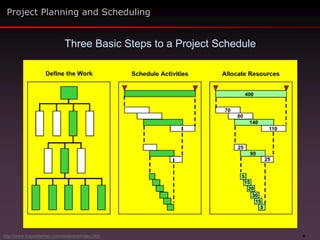
Three Basic Steps to a Project Schedule
Project Planning and Scheduling
http://www.maxwideman.com/issacons/index.htm
10
 There are many ways of presenting similar
information, each with different objectives
 Gantt Chart is another name for Bar Chart
 Milestone Chart
 Progress Chart
 Networks
 Earned Value or Trend lines
 Line of Balance
 And several others
Types of Schedules
Project Planning and Scheduling
http://www.maxwideman.com/issacons/index.htm
11
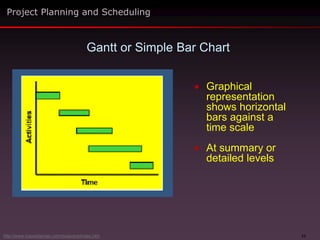
 Graphical
representation
shows horizontal
bars against a
time scale
 At summary or
detailed levels
Gantt or Simple Bar Chart
Project Planning and Scheduling
http://www.maxwideman.com/issacons/index.htm
12
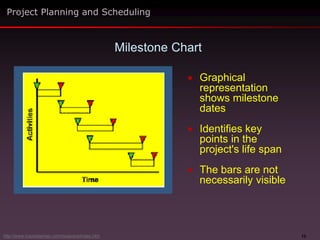
 Graphical
representation
shows milestone
dates
 Identifies key
points in the
project's life span
 The bars are not
necessarily visible
Milestone Chart
Project Planning and Scheduling
http://www.maxwideman.com/issacons/index.htm
13
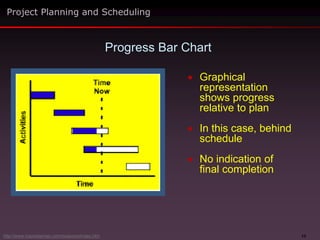
 Graphical
representation
shows progress
relative to plan
 In this case, behind
schedule
 No indication of
final completion
Progress Bar Chart
Project Planning and Scheduling
http://www.maxwideman.com/issacons/index.htm
14
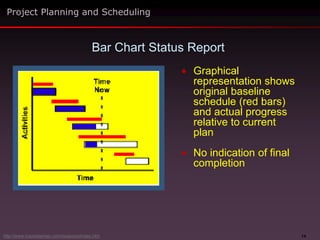
 Graphical
representation shows
original baseline
schedule (red bars)
and actual progress
relative to current
plan
 No indication of final
completion
Bar Chart Status Report
Project Planning and Scheduling
http://www.maxwideman.com/issacons/index.htm
15
Advantages
 Good communication tool
 Easy to prepare (minimal cost)
 Easy to update
 Good for small projects
Disadvantages
 Do not show relationships between
activities without a lot of extra lines
 Limited help for project control
Bar Charts Pros and Cons
Project Planning and Scheduling
http://www.maxwideman.com/issacons/index.htm
16
 A good schedule will be
– Logical
– Simple and easy to work with
– Easy to monitor
– Flexible, easy to revise
– Specific and timely
 It will also
– Anticipate problems
– Promote effective communication
Project Planning and Scheduling
Characteristics of a Good Schedule
http://www.maxwideman.com/issacons/index.htm
17
 The highest summary level schedule for a project
showing the overall phasing and all major
interfaces, key milestones and significant work
elements
 Also known as an Executive Summary Level
Schedule
 Usually prepared manually as an outline of intent
very early in the project's life span
Master Schedule
Project Planning and Scheduling
http://www.maxwideman.com/issacons/index.htm
18
 Developed as early as possible in the project life span
 Maintained by the project manager
 For the project owner/sponsor
 Preferably developed through negotiation with the
project sponsor
 Should show all major activities at a summary level
 Include key milestones or events relating to each
major activity at critical points in time
Master Schedule
Project Planning and Scheduling
http://www.maxwideman.com/issacons/index.htm
19
 Original version is the baseline or target schedule
 Provides a yardstick for the overall project status
against which overall progress is measured
 Because of its simplicity, it can be used throughout
the project as the reporting base
Master Schedule
Project Planning and Scheduling
http://www.maxwideman.com/issacons/index.htm
20
 The Baseline Master Schedule should not be
changed unless
– A formal and agreed re-scheduling takes place for
the entire project or a major part of it
– The current actual progress and the target
schedule become so far apart that recovery is
impossible and target objectives have become
meaningless
– Such changes are recognized by senior
management and approved by the sponsor/client
Master Schedule
Project Planning and Scheduling
http://www.maxwideman.com/issacons/index.htm
21
 Project scheduling can be very sophisticated
 Refer to some of the many books on the subject
for an in-depth understanding
 For our purposes there are ten general steps in
preparing a reliable schedule
Preparing a Schedule
Project Planning and Scheduling
http://www.maxwideman.com/issacons/index.htm
22
 Before you start preparing a serious detailed
schedule, you must first have
– A Work Breakdown Structure (WBS)
– A list of tasks derived from each Work Package
– Staffing and resources required, or available,
for each task
Preparing a Schedule
Project Planning and Scheduling
http://www.maxwideman.com/issacons/index.htm
23
 Do you really need all of that information?
– Yes. And also assemble any other information
that will affect schedule calculations
 You can of course start developing a schedule long
before you have all of that information, but
– Such a schedule will be "High-level"
– And correspondingly less reliable
 In fact, your detailed schedule should only come
after several schedule iterations earlier in the
project life span
Preparing a Schedule
Project Planning and Scheduling
http://www.maxwideman.com/issacons/index.htm
24
 There are a number of recommended steps,
depending on your particular project
 But first
– Assemble key team members who will be
responsible for conducting the project
– Brief them on the purpose of the meeting
 Inevitably there will be some preliminary discussion
Preparing a Schedule
Project Planning and Scheduling
http://www.maxwideman.com/issacons/index.htm
25
 Establish and agree the scheduling assumptions,
especially a clear set of scheduling objectives
– For example, product quality grade, time and
cost limitations that will affect activities
 Overall strategy for the project
 Methodology or technology to be used and how it
will be applied
 Sources of resources and their competence, or
training needs
 Working hours, holidays, other interruptions
Preparing a Schedule
Project Planning and Scheduling
Step 1
http://www.maxwideman.com/issacons/index.htm
26
 Identify each logical work area as reflected
in the WBS and the activities associated
with each
 Make sure that all the necessary major
activities and tasks have been included to
create the required intermediate and final
deliverables
 If you have too many activities consider
using "hammocks” to group discrete tasks
as one activity
Preparing a Schedule
Project Planning and Scheduling
Step 2
Hammock - An aggregate or summary
activity. All related activities are tied as
one summary activity and reported at
the summary level.
http://www.maxwideman.com/issacons/index.htm
27
 Establish the project's natural or "inherent" logic
 Some projects have very clear logic while others
provide more options depending on resources or
the nature of the project or other circumstances
 Nevertheless, there is almost always a preferred
way of doing things
 It is worth spending time to look for it
 Work the activities from the beginning to the end
 Then work from the end back to the beginning!
Preparing a Schedule
Project Planning and Scheduling
Step 3
http://www.maxwideman.com/issacons/index.htm
28
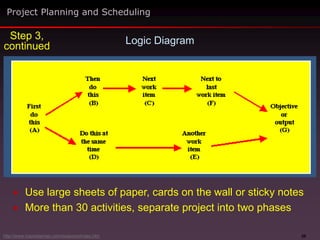
 Develop a flow chart or logic diagram – AKA a network
diagram – paint a picture of the schedule
 Use the work breakdown structure as a “To do” list
 Which of these items must be done first?
– Label that item “A”
 What must follow next?
– Label those B, C, D, etc
 Now ask what can be done concurrently with A, B or C?
 Assemble a simple logic diagram arranged from left to right
Project Planning and Scheduling
Step 3,
continued Preparing a Schedule
http://www.maxwideman.com/issacons/index.htm
29
Logic Diagram
 Use large sheets of paper, cards on the wall or sticky notes
 More than 30 activities, separate project into two phases
Project Planning and Scheduling
Step 3,
continued
http://www.maxwideman.com/issacons/index.htm
30
 Incorporate any "Management Choice" logic, i.e.,
dates or sequence mandated by management
 These may or may not make sense
 Make sure that management understands the
implications of imposed management decisions
 Adjust the logic accordingly
 Always double check that the schedule logic is sound
 Steps 3 and 4 establish the schedule network
configuration
Preparing a Schedule
Project Planning and Scheduling
Step 4
http://www.maxwideman.com/issacons/index.htm
31
 Estimate the duration of each activity or task
 Pay particular attention to this step since the whole
schedule will depend upon it
 Use all available sources of information
 Be careful with published information since the
circumstances of your project may be different
 Some tasks will still be difficult to estimate, seek expert
help, use ranges
 Document areas of high uncertainty (risk)
 Always aim for the “most likely" duration – don't build in
contingency at every step, or the project will not fly
 Always be realistic – you can refine on the second pass
and make appropriate contingency allowances later
Preparing a Schedule
Project Planning and Scheduling
Step 5
http://www.maxwideman.com/issacons/index.htm
32
 Calculate the Forward Pass by adding the durations
along each path in your network to establish the
earliest start (ES) and finish (EF) dates for each activity
 Calculate the Backward Pass by repeat this operation
but working backwards from the last date established in
the Forward Pass or from a specified Required
Completion date to establish the latest start (LS) and
finish (LF) dates for each activity
 This is much easier using scheduling software
Preparing a Schedule
Project Planning and Scheduling
Step 6
http://www.maxwideman.com/issacons/index.htm
33
 If you examine the values of (ES-LS) and (EF-LF)
you will note that
– The string of activities where these values are
zero is the longest path through the network
– This is known as the Critical Path
– Where the values are positive indicates that
there is Float for those activities
Preparing a Schedule
Project Planning and Scheduling
Step 6,
continued
http://www.maxwideman.com/issacons/index.htm
34
 A negative ES-LS value implies that you must start an
activity before you are logically able to do so, that is,
you don't have enough time to do all of the work as
planned
 This usually only happens when you are given a
mandated finish date which is inadequate or too tight
(senior management's favorite pastime)
 If you have negative values the schedule doesn't
work, and you need to go to Step 7
Preparing a Schedule
Project Planning and Scheduling
Step 6,
continued
http://www.maxwideman.com/issacons/index.htm
35
 There are a number of things you can do to fix an
unworkable schedule
 To meet a predetermined end date
– Check whether all activities are really necessary
– Move activities off the critical path or eliminate
them altogether
– Accelerate critical activities
– Using overtime or more resources
– Work some activities in parallel (concurrently) or
increase the amount of overlap
 Insist that management provides faster feedback on
decision-making
Preparing a Schedule
Project Planning and Scheduling
Step 7
http://www.maxwideman.com/issacons/index.htm
36
 Make sure the resulting schedule chart makes sense
and looks good
 A well-presented bar chart will show the grouped
activities in a progressive cascade making it clear and
easy to read
 Use the calendar dates and create an ideal master
schedule of milestone dates identifying the completion
of major or key activities
Preparing a Schedule
Project Planning and Scheduling
Step 8
http://www.maxwideman.com/issacons/index.htm
37
 Finally, when everyone is satisfied, follow up
with these last two steps
 Chart or print the results and distribute for
final team review and acceptance before
issuing it to management
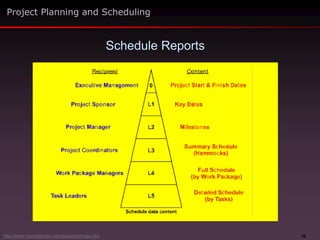
 Abstract or summarize schedule data for
different levels of management
Preparing a Schedule
Project Planning and Scheduling
Step 9
Step 10
http://www.maxwideman.com/issacons/index.htm
38
Schedule Reports
Project Planning and Scheduling
http://www.maxwideman.com/issacons/index.htm
39
 Strictly speaking, you cannot control the schedule
 What you can do is
– Create a schedule
– Have it distributed for action
– Observe what is actually going on
– Compare and update the schedule
– Report your findings to those in charge
– Conduct review meetings with your team
Schedule Control
Project Planning and Scheduling
http://www.maxwideman.com/issacons/index.htm
40
 The agenda should include
– Significant variances
– Impact on future milestones
– Impact on activities of others
– Proposed actions to catch up
– Summary of expected future key milestone dates
Planning and Schedule Review Meetings
Project Planning and Scheduling
http://www.maxwideman.com/issacons/index.htm
41
 If there is a severe problem with the schedule,
recovery actions may well depend on the
technology that you are dealing with
 However, management steps that you might
consider include
– Closer control
– Crashing – reduce time by increasing resources
– Working overtime or double shifts
– Fast tracking – overlap serial activities
– Trade-offs between scope, quality, time and cost
– Change methods, materials or equipment
– Negotiate a revised schedule
Changing the Schedule
Project Planning and Scheduling
http://www.maxwideman.com/issacons/index.htm
42
 If the schedule gets really out of whack you may need
to do more than just negotiate a revised schedule
 You may need to obtain approval for
– A major revision of the timeline
– Major revisions of the methodology or resources
– Revision of the project scope with all appropriate
approvals, of course
– In other words, a major re-planning effort
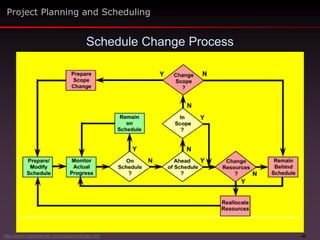
 A suggested flow chart for a schedule change process
is shown on the next slide
Changing the Schedule
Project Planning and Scheduling
http://www.maxwideman.com/issacons/index.htm
43
Schedule Change Process
Project Planning and Scheduling
http://www.maxwideman.com/issacons/index.htm
44
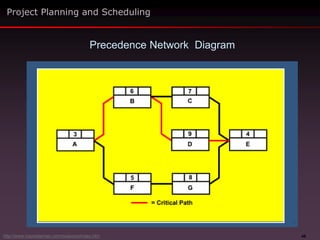
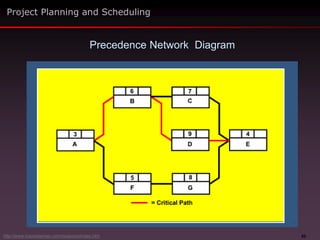
 A graphical display of the logical order of activities
that defines the sequence of work in a project where
activities are represented by boxes
 Networks are usually drawn from left to right with
lines drawn between the boxes to show the
precedence relationships between them
 Arrow heads are sometimes placed on the lines to
indicate the direction of the flow through time
Network Scheduling
Project Planning and Scheduling
http://www.maxwideman.com/issacons/index.htm
45
 Precedence diagram format is the most common (see
next slide)
 Shows logical inter-relationships between activities,
that is, their interdependence
 Enables easy calculation of critical path either
manually or with software
 Critical Path activities have zero float and constitutes
the longest path in the project
 Shows how much float other activities have
Network Advantages
Project Planning and Scheduling
http://www.maxwideman.com/issacons/index.htm
46
Project Planning and Scheduling
Precedence Network Diagram
http://www.maxwideman.com/issacons/index.htm
47
 The critical path determines length of project according
to the project logic and the critical activities for that
particular scenario
 Easy to assign leads and lags between activities to
solve a deadline problem
 Easy to apply resources and determine resource or
time trade-offs
 Facilitates “what if" scenarios
 By running the same network with actuals it is fairly
easy to assess project progress and performance
Network Advantages
Project Planning and Scheduling
http://www.maxwideman.com/issacons/index.htm
48
 If you have more than a few activities you need to
use software
 The network itself is not a good presentation
communication tool
 Good software will present the same information as a
bar chart
 The network itself is really only a means to an end
Network Disadvantages
Project Planning and Scheduling
http://www.maxwideman.com/issacons/index.htm
49
 Activity – An item of work that consumes time and
resources to produce some result
 Critical Path –
– The series of activities all of which must finish on
time for the whole project to finish on time
– Sometimes described as the longest path through a
network, hence the shortest project time
– A critical path has zero float
– A critical path assumes that the network logic is
sound
Network Terminology
Project Planning and Scheduling
http://www.maxwideman.com/issacons/index.htm
50
 Event or Milestone –
– A point in time when certain conditions have been
fulfilled, such as the start or completion of one or
more activities
– Unlike an activity, does not consume time or
resources
– Hence, expresses a state of being
– Activities take place between events
 Float or Slack Time – The additional time available
to complete a non-critical activity
Network Terminology
Project Planning and Scheduling
http://www.maxwideman.com/issacons/index.htm
51
 Leads and Lags – An imposed modification of the
logical relationship between activities to accelerate
or delay the apparent natural order
 Scheduling Network – Graphical representation of
activities or nodes and the dependencies between
them
 Time Estimate – The prediction of the most likely
duration of an activity
Network Terminology
Project Planning and Scheduling
http://www.maxwideman.com/issacons/index.htm
52
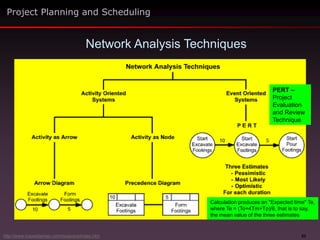
 Essentially there are three different approaches
– Activity-oriented systems,
– Event-oriented systems
– Event-oriented systems plus probability
 Activity-oriented systems use either activities as
connectors or Activities as nodes
 Event-based approach focuses on start and finish
times and may involve PERT
 Shown graphically on the next slide
Approaches to Network Analysis
Project Planning and Scheduling
http://www.maxwideman.com/issacons/index.htm
53
Network Analysis Techniques
Project Planning and Scheduling
http://www.maxwideman.com/issacons/index.htm
PERT –
Project
Evaluation
and Review
Technique
Calculation produces an "Expected time" Te,
where Te = (To+4Tm+Tp)/6, that is to say,
the mean value of the three estimates
54
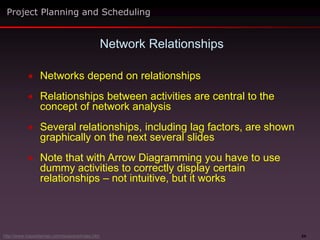
 Networks depend on relationships
 Relationships between activities are central to the
concept of network analysis
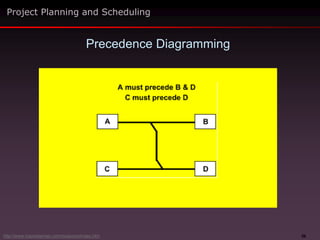
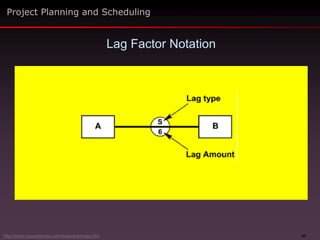
 Several relationships, including lag factors, are shown
graphically on the next several slides
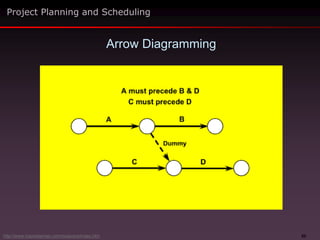
 Note that with Arrow Diagramming you have to use
dummy activities to correctly display certain
relationships – not intuitive, but it works
Network Relationships
Project Planning and Scheduling
http://www.maxwideman.com/issacons/index.htm
55
Arrow Diagramming
Project Planning and Scheduling
http://www.maxwideman.com/issacons/index.htm
56
Precedence Diagramming
Project Planning and Scheduling
http://www.maxwideman.com/issacons/index.htm
57
Lag Factor Notation
Project Planning and Scheduling
http://www.maxwideman.com/issacons/index.htm
58
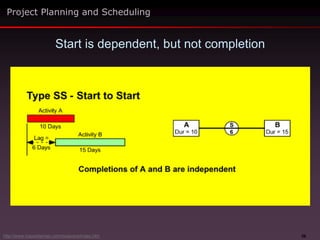
Start is dependent, but not completion
Project Planning and Scheduling
http://www.maxwideman.com/issacons/index.htm
59
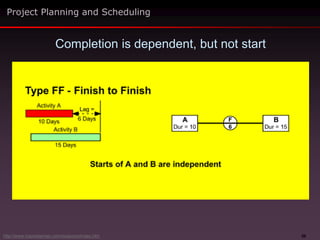
Completion is dependent, but not start
Project Planning and Scheduling
http://www.maxwideman.com/issacons/index.htm
60
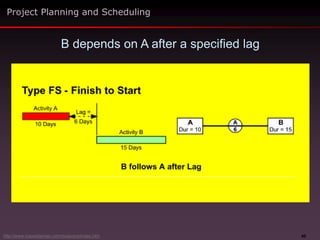
B depends on A after a specified lag
Project Planning and Scheduling
http://www.maxwideman.com/issacons/index.htm
61
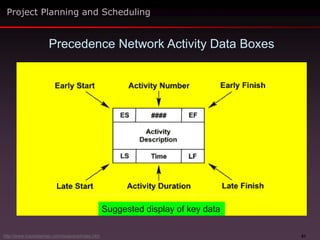
Precedence Network Activity Data Boxes
Project Planning and Scheduling
http://www.maxwideman.com/issacons/index.htm
Suggested display of key data
62
Project Planning and Scheduling
Precedence Network Diagram
http://www.maxwideman.com/issacons/index.htm
63
 You'll probably want to make your first cut at a
complicated network schedule on paper
 Start with a large sheet of paper
 Fill it with blank data boxes (previous slides) all neatly
lined up in rows and columns with space between
them all
 Use sticky notes for the boxes so you can move them
around
 Display as many activities as you can think of
 Now draw in the dependency lines
 Enter any other data you have – this all makes it
easier to computerize later
 Larry’s note – It’s easier said than done
First Cut at a Complex Schedule
Project Planning and Scheduling
http://www.maxwideman.com/issacons/index.htm
64
 We’ve covered the essentials of project scheduling
– Definition of scheduling
– Uses and benefits
– Types of schedules
– Schedule preparation
– Schedule reports and control
– Network scheduling and analysis techniques
Summary
Project Planning and Scheduling
http://www.maxwideman.com/issacons/index.htm
65

Planning_and_scheduling.pptx

  • 1.
  • 2.
    2  Definition ofscheduling and its relationship to the project management process  Scheduling uses and benefits  Schedule types  Characteristics of a good schedule  Schedule preparation, reports and control  Network scheduling including analysis techniques and relationships Scheduling Topics Covered Project Planning and Scheduling http://www.maxwideman.com/issacons/index.htm
  • 3.
    3 PM Process Summary LaunchPlan  Recruit and organize project team  Establish team operating rules  Level project resources  Assign work Monitor & Control Progress  Establish progress reporting system  Set up change control process  Define problem escalation process  Monitor progress vs. plan  Revise project plan Close Out Project  Obtain client acceptance  Install project deliverables  Complete project documentation  Complete post-implementation audit  Issue final project report Develop Detailed Plan  Identify project activities  Estimate activity duration  Determine resource requirements  Construct / analyze project network  Prepare project schedule Define Project  State need, problem or opportunity  Define project objectives  Identify success criteria  List assumptions, risks and obstacles  Define project scope and work breakdown structure Feedback Adapted from Project Management, 1987 Kepner-Tregoe, Inc. and Effective Project Management by R.K. Wysocki, R. Beck Jr. & D.B. Crane (Wiley, 1995) We are here
  • 4.
    4 The process ofconverting a general or outline plan for a project into a time-based graphic presentation using information on available resources and time constraints. Scheduling http://www.maxwideman.com/issacons/index.htm Project Planning and Scheduling
  • 5.
    5  Scheduling isa management tool  It can be used to satisfy a number of objectives – Coordination – Analysis and forecasting – Reporting against a baseline  Scheduling enables you to – Integrate the activities of the various project participants – Show interface responsibilities particularly with respect to timing – Secure, record and communicate commitment to tasks by the various contributors to the project effort Scheduling Project Planning and Scheduling http://www.maxwideman.com/issacons/index.htm
  • 6.
    6  Scheduling alsoenables you to – Identify the key activity sequence (critical path) determining the length of the project – Display departmental work loading and hence facilitate departmental planning – Provide the basis for more detailed scheduling Scheduling Project Planning and Scheduling http://www.maxwideman.com/issacons/index.htm
  • 7.
    7  Scheduling enablesanalysis and forecasting  You can – Show priorities for procuring equipment, material, labor and services – Analyze complex work areas with many interrelated activities through network analysis – Facilitate long range planning and future resource allocation – Measure progress – Measure performance – Maintain control over time and cost of the project – Produce a cash flow forecast Scheduling Project Planning and Scheduling http://www.maxwideman.com/issacons/index.htm
  • 8.
    8  Use schedulingfor reporting – Provide a visible summary of important or major activities – Report planned completion dates – Report deviations from plan – Provide an early warning system for delays – Monitor cash flow – Record actual dates – For forecasting – For estimating on future projects Scheduling Project Planning and Scheduling http://www.maxwideman.com/issacons/index.htm
  • 9.
    9 Three Basic Stepsto a Project Schedule Project Planning and Scheduling http://www.maxwideman.com/issacons/index.htm
  • 10.
    10  There aremany ways of presenting similar information, each with different objectives  Gantt Chart is another name for Bar Chart  Milestone Chart  Progress Chart  Networks  Earned Value or Trend lines  Line of Balance  And several others Types of Schedules Project Planning and Scheduling http://www.maxwideman.com/issacons/index.htm
  • 11.
    11  Graphical representation shows horizontal barsagainst a time scale  At summary or detailed levels Gantt or Simple Bar Chart Project Planning and Scheduling http://www.maxwideman.com/issacons/index.htm
  • 12.
    12  Graphical representation shows milestone dates Identifies key points in the project's life span  The bars are not necessarily visible Milestone Chart Project Planning and Scheduling http://www.maxwideman.com/issacons/index.htm
  • 13.
    13  Graphical representation shows progress relativeto plan  In this case, behind schedule  No indication of final completion Progress Bar Chart Project Planning and Scheduling http://www.maxwideman.com/issacons/index.htm
  • 14.
    14  Graphical representation shows originalbaseline schedule (red bars) and actual progress relative to current plan  No indication of final completion Bar Chart Status Report Project Planning and Scheduling http://www.maxwideman.com/issacons/index.htm
  • 15.
    15 Advantages  Good communicationtool  Easy to prepare (minimal cost)  Easy to update  Good for small projects Disadvantages  Do not show relationships between activities without a lot of extra lines  Limited help for project control Bar Charts Pros and Cons Project Planning and Scheduling http://www.maxwideman.com/issacons/index.htm
  • 16.
    16  A goodschedule will be – Logical – Simple and easy to work with – Easy to monitor – Flexible, easy to revise – Specific and timely  It will also – Anticipate problems – Promote effective communication Project Planning and Scheduling Characteristics of a Good Schedule http://www.maxwideman.com/issacons/index.htm
  • 17.
    17  The highestsummary level schedule for a project showing the overall phasing and all major interfaces, key milestones and significant work elements  Also known as an Executive Summary Level Schedule  Usually prepared manually as an outline of intent very early in the project's life span Master Schedule Project Planning and Scheduling http://www.maxwideman.com/issacons/index.htm
  • 18.
    18  Developed asearly as possible in the project life span  Maintained by the project manager  For the project owner/sponsor  Preferably developed through negotiation with the project sponsor  Should show all major activities at a summary level  Include key milestones or events relating to each major activity at critical points in time Master Schedule Project Planning and Scheduling http://www.maxwideman.com/issacons/index.htm
  • 19.
    19  Original versionis the baseline or target schedule  Provides a yardstick for the overall project status against which overall progress is measured  Because of its simplicity, it can be used throughout the project as the reporting base Master Schedule Project Planning and Scheduling http://www.maxwideman.com/issacons/index.htm
  • 20.
    20  The BaselineMaster Schedule should not be changed unless – A formal and agreed re-scheduling takes place for the entire project or a major part of it – The current actual progress and the target schedule become so far apart that recovery is impossible and target objectives have become meaningless – Such changes are recognized by senior management and approved by the sponsor/client Master Schedule Project Planning and Scheduling http://www.maxwideman.com/issacons/index.htm
  • 21.
    21  Project schedulingcan be very sophisticated  Refer to some of the many books on the subject for an in-depth understanding  For our purposes there are ten general steps in preparing a reliable schedule Preparing a Schedule Project Planning and Scheduling http://www.maxwideman.com/issacons/index.htm
  • 22.
    22  Before youstart preparing a serious detailed schedule, you must first have – A Work Breakdown Structure (WBS) – A list of tasks derived from each Work Package – Staffing and resources required, or available, for each task Preparing a Schedule Project Planning and Scheduling http://www.maxwideman.com/issacons/index.htm
  • 23.
    23  Do youreally need all of that information? – Yes. And also assemble any other information that will affect schedule calculations  You can of course start developing a schedule long before you have all of that information, but – Such a schedule will be "High-level" – And correspondingly less reliable  In fact, your detailed schedule should only come after several schedule iterations earlier in the project life span Preparing a Schedule Project Planning and Scheduling http://www.maxwideman.com/issacons/index.htm
  • 24.
    24  There area number of recommended steps, depending on your particular project  But first – Assemble key team members who will be responsible for conducting the project – Brief them on the purpose of the meeting  Inevitably there will be some preliminary discussion Preparing a Schedule Project Planning and Scheduling http://www.maxwideman.com/issacons/index.htm
  • 25.
    25  Establish andagree the scheduling assumptions, especially a clear set of scheduling objectives – For example, product quality grade, time and cost limitations that will affect activities  Overall strategy for the project  Methodology or technology to be used and how it will be applied  Sources of resources and their competence, or training needs  Working hours, holidays, other interruptions Preparing a Schedule Project Planning and Scheduling Step 1 http://www.maxwideman.com/issacons/index.htm
  • 26.
    26  Identify eachlogical work area as reflected in the WBS and the activities associated with each  Make sure that all the necessary major activities and tasks have been included to create the required intermediate and final deliverables  If you have too many activities consider using "hammocks” to group discrete tasks as one activity Preparing a Schedule Project Planning and Scheduling Step 2 Hammock - An aggregate or summary activity. All related activities are tied as one summary activity and reported at the summary level. http://www.maxwideman.com/issacons/index.htm
  • 27.
    27  Establish theproject's natural or "inherent" logic  Some projects have very clear logic while others provide more options depending on resources or the nature of the project or other circumstances  Nevertheless, there is almost always a preferred way of doing things  It is worth spending time to look for it  Work the activities from the beginning to the end  Then work from the end back to the beginning! Preparing a Schedule Project Planning and Scheduling Step 3 http://www.maxwideman.com/issacons/index.htm
  • 28.
    28  Develop aflow chart or logic diagram – AKA a network diagram – paint a picture of the schedule  Use the work breakdown structure as a “To do” list  Which of these items must be done first? – Label that item “A”  What must follow next? – Label those B, C, D, etc  Now ask what can be done concurrently with A, B or C?  Assemble a simple logic diagram arranged from left to right Project Planning and Scheduling Step 3, continued Preparing a Schedule http://www.maxwideman.com/issacons/index.htm
  • 29.
    29 Logic Diagram  Uselarge sheets of paper, cards on the wall or sticky notes  More than 30 activities, separate project into two phases Project Planning and Scheduling Step 3, continued http://www.maxwideman.com/issacons/index.htm
  • 30.
    30  Incorporate any"Management Choice" logic, i.e., dates or sequence mandated by management  These may or may not make sense  Make sure that management understands the implications of imposed management decisions  Adjust the logic accordingly  Always double check that the schedule logic is sound  Steps 3 and 4 establish the schedule network configuration Preparing a Schedule Project Planning and Scheduling Step 4 http://www.maxwideman.com/issacons/index.htm
  • 31.
    31  Estimate theduration of each activity or task  Pay particular attention to this step since the whole schedule will depend upon it  Use all available sources of information  Be careful with published information since the circumstances of your project may be different  Some tasks will still be difficult to estimate, seek expert help, use ranges  Document areas of high uncertainty (risk)  Always aim for the “most likely" duration – don't build in contingency at every step, or the project will not fly  Always be realistic – you can refine on the second pass and make appropriate contingency allowances later Preparing a Schedule Project Planning and Scheduling Step 5 http://www.maxwideman.com/issacons/index.htm
  • 32.
    32  Calculate theForward Pass by adding the durations along each path in your network to establish the earliest start (ES) and finish (EF) dates for each activity  Calculate the Backward Pass by repeat this operation but working backwards from the last date established in the Forward Pass or from a specified Required Completion date to establish the latest start (LS) and finish (LF) dates for each activity  This is much easier using scheduling software Preparing a Schedule Project Planning and Scheduling Step 6 http://www.maxwideman.com/issacons/index.htm
  • 33.
    33  If youexamine the values of (ES-LS) and (EF-LF) you will note that – The string of activities where these values are zero is the longest path through the network – This is known as the Critical Path – Where the values are positive indicates that there is Float for those activities Preparing a Schedule Project Planning and Scheduling Step 6, continued http://www.maxwideman.com/issacons/index.htm
  • 34.
    34  A negativeES-LS value implies that you must start an activity before you are logically able to do so, that is, you don't have enough time to do all of the work as planned  This usually only happens when you are given a mandated finish date which is inadequate or too tight (senior management's favorite pastime)  If you have negative values the schedule doesn't work, and you need to go to Step 7 Preparing a Schedule Project Planning and Scheduling Step 6, continued http://www.maxwideman.com/issacons/index.htm
  • 35.
    35  There area number of things you can do to fix an unworkable schedule  To meet a predetermined end date – Check whether all activities are really necessary – Move activities off the critical path or eliminate them altogether – Accelerate critical activities – Using overtime or more resources – Work some activities in parallel (concurrently) or increase the amount of overlap  Insist that management provides faster feedback on decision-making Preparing a Schedule Project Planning and Scheduling Step 7 http://www.maxwideman.com/issacons/index.htm
  • 36.
    36  Make surethe resulting schedule chart makes sense and looks good  A well-presented bar chart will show the grouped activities in a progressive cascade making it clear and easy to read  Use the calendar dates and create an ideal master schedule of milestone dates identifying the completion of major or key activities Preparing a Schedule Project Planning and Scheduling Step 8 http://www.maxwideman.com/issacons/index.htm
  • 37.
    37  Finally, wheneveryone is satisfied, follow up with these last two steps  Chart or print the results and distribute for final team review and acceptance before issuing it to management  Abstract or summarize schedule data for different levels of management Preparing a Schedule Project Planning and Scheduling Step 9 Step 10 http://www.maxwideman.com/issacons/index.htm
  • 38.
    38 Schedule Reports Project Planningand Scheduling http://www.maxwideman.com/issacons/index.htm
  • 39.
    39  Strictly speaking,you cannot control the schedule  What you can do is – Create a schedule – Have it distributed for action – Observe what is actually going on – Compare and update the schedule – Report your findings to those in charge – Conduct review meetings with your team Schedule Control Project Planning and Scheduling http://www.maxwideman.com/issacons/index.htm
  • 40.
    40  The agendashould include – Significant variances – Impact on future milestones – Impact on activities of others – Proposed actions to catch up – Summary of expected future key milestone dates Planning and Schedule Review Meetings Project Planning and Scheduling http://www.maxwideman.com/issacons/index.htm
  • 41.
    41  If thereis a severe problem with the schedule, recovery actions may well depend on the technology that you are dealing with  However, management steps that you might consider include – Closer control – Crashing – reduce time by increasing resources – Working overtime or double shifts – Fast tracking – overlap serial activities – Trade-offs between scope, quality, time and cost – Change methods, materials or equipment – Negotiate a revised schedule Changing the Schedule Project Planning and Scheduling http://www.maxwideman.com/issacons/index.htm
  • 42.
    42  If theschedule gets really out of whack you may need to do more than just negotiate a revised schedule  You may need to obtain approval for – A major revision of the timeline – Major revisions of the methodology or resources – Revision of the project scope with all appropriate approvals, of course – In other words, a major re-planning effort  A suggested flow chart for a schedule change process is shown on the next slide Changing the Schedule Project Planning and Scheduling http://www.maxwideman.com/issacons/index.htm
  • 43.
    43 Schedule Change Process ProjectPlanning and Scheduling http://www.maxwideman.com/issacons/index.htm
  • 44.
    44  A graphicaldisplay of the logical order of activities that defines the sequence of work in a project where activities are represented by boxes  Networks are usually drawn from left to right with lines drawn between the boxes to show the precedence relationships between them  Arrow heads are sometimes placed on the lines to indicate the direction of the flow through time Network Scheduling Project Planning and Scheduling http://www.maxwideman.com/issacons/index.htm
  • 45.
    45  Precedence diagramformat is the most common (see next slide)  Shows logical inter-relationships between activities, that is, their interdependence  Enables easy calculation of critical path either manually or with software  Critical Path activities have zero float and constitutes the longest path in the project  Shows how much float other activities have Network Advantages Project Planning and Scheduling http://www.maxwideman.com/issacons/index.htm
  • 46.
    46 Project Planning andScheduling Precedence Network Diagram http://www.maxwideman.com/issacons/index.htm
  • 47.
    47  The criticalpath determines length of project according to the project logic and the critical activities for that particular scenario  Easy to assign leads and lags between activities to solve a deadline problem  Easy to apply resources and determine resource or time trade-offs  Facilitates “what if" scenarios  By running the same network with actuals it is fairly easy to assess project progress and performance Network Advantages Project Planning and Scheduling http://www.maxwideman.com/issacons/index.htm
  • 48.
    48  If youhave more than a few activities you need to use software  The network itself is not a good presentation communication tool  Good software will present the same information as a bar chart  The network itself is really only a means to an end Network Disadvantages Project Planning and Scheduling http://www.maxwideman.com/issacons/index.htm
  • 49.
    49  Activity –An item of work that consumes time and resources to produce some result  Critical Path – – The series of activities all of which must finish on time for the whole project to finish on time – Sometimes described as the longest path through a network, hence the shortest project time – A critical path has zero float – A critical path assumes that the network logic is sound Network Terminology Project Planning and Scheduling http://www.maxwideman.com/issacons/index.htm
  • 50.
    50  Event orMilestone – – A point in time when certain conditions have been fulfilled, such as the start or completion of one or more activities – Unlike an activity, does not consume time or resources – Hence, expresses a state of being – Activities take place between events  Float or Slack Time – The additional time available to complete a non-critical activity Network Terminology Project Planning and Scheduling http://www.maxwideman.com/issacons/index.htm
  • 51.
    51  Leads andLags – An imposed modification of the logical relationship between activities to accelerate or delay the apparent natural order  Scheduling Network – Graphical representation of activities or nodes and the dependencies between them  Time Estimate – The prediction of the most likely duration of an activity Network Terminology Project Planning and Scheduling http://www.maxwideman.com/issacons/index.htm
  • 52.
    52  Essentially thereare three different approaches – Activity-oriented systems, – Event-oriented systems – Event-oriented systems plus probability  Activity-oriented systems use either activities as connectors or Activities as nodes  Event-based approach focuses on start and finish times and may involve PERT  Shown graphically on the next slide Approaches to Network Analysis Project Planning and Scheduling http://www.maxwideman.com/issacons/index.htm
  • 53.
    53 Network Analysis Techniques ProjectPlanning and Scheduling http://www.maxwideman.com/issacons/index.htm PERT – Project Evaluation and Review Technique Calculation produces an "Expected time" Te, where Te = (To+4Tm+Tp)/6, that is to say, the mean value of the three estimates
  • 54.
    54  Networks dependon relationships  Relationships between activities are central to the concept of network analysis  Several relationships, including lag factors, are shown graphically on the next several slides  Note that with Arrow Diagramming you have to use dummy activities to correctly display certain relationships – not intuitive, but it works Network Relationships Project Planning and Scheduling http://www.maxwideman.com/issacons/index.htm
  • 55.
    55 Arrow Diagramming Project Planningand Scheduling http://www.maxwideman.com/issacons/index.htm
  • 56.
    56 Precedence Diagramming Project Planningand Scheduling http://www.maxwideman.com/issacons/index.htm
  • 57.
    57 Lag Factor Notation ProjectPlanning and Scheduling http://www.maxwideman.com/issacons/index.htm
  • 58.
    58 Start is dependent,but not completion Project Planning and Scheduling http://www.maxwideman.com/issacons/index.htm
  • 59.
    59 Completion is dependent,but not start Project Planning and Scheduling http://www.maxwideman.com/issacons/index.htm
  • 60.
    60 B depends onA after a specified lag Project Planning and Scheduling http://www.maxwideman.com/issacons/index.htm
  • 61.
    61 Precedence Network ActivityData Boxes Project Planning and Scheduling http://www.maxwideman.com/issacons/index.htm Suggested display of key data
  • 62.
    62 Project Planning andScheduling Precedence Network Diagram http://www.maxwideman.com/issacons/index.htm
  • 63.
    63  You'll probablywant to make your first cut at a complicated network schedule on paper  Start with a large sheet of paper  Fill it with blank data boxes (previous slides) all neatly lined up in rows and columns with space between them all  Use sticky notes for the boxes so you can move them around  Display as many activities as you can think of  Now draw in the dependency lines  Enter any other data you have – this all makes it easier to computerize later  Larry’s note – It’s easier said than done First Cut at a Complex Schedule Project Planning and Scheduling http://www.maxwideman.com/issacons/index.htm
  • 64.
    64  We’ve coveredthe essentials of project scheduling – Definition of scheduling – Uses and benefits – Types of schedules – Schedule preparation – Schedule reports and control – Network scheduling and analysis techniques Summary Project Planning and Scheduling http://www.maxwideman.com/issacons/index.htm
  • 65.