Pipelining
and
Co-processor
What is Pipelining
 In simple words Pipelining means starting the
execution of 2nd
process before 1st
is
completed.
Overview
 Pipelining is widely used in modern
processors.
 Pipelining improves system performance in
terms of throughput.
 Pipelined organization requires sophisticated
compilation techniques.
Basic Concept
Faster Execution
Multi Tasking
Making the Execution of
Programs Faster
 Use faster circuit technology to build the
processor and the main memory.
 Arrange the hardware so that more than one
operation can be performed at the same time.
 In the latter way, the number of operations
performed per second is increased even
though the elapsed time needed to perform
any one operation is not changed.
Traditional Pipeline Concept
 A, B, C, D
each have one load of clothes
to wash, dry, and fold.
“Washer” takes 30 minutes
“Dryer” takes 40 minutes
“Folder” takes 20 minutes
A B C D
Laundry Example
Traditional Pipeline Concept
 Sequential laundry takes 6
hours for 4 loads
 If they learned pipelining,
how long would laundry
take?
A
B
C
D
30 40 20 30 40 20 30 40 20 30 40 20
6 PM 7 8 9 10 11 Midnight
Time
Traditional Pipeline Concept
Pipelined laundry takes
3.5 hours for 4 loads
A
B
C
D
6 PM 7 8 9 10 11 Midnight
T
a
s
k
O
r
d
e
r
Time
30 40 40 40 40 20
Traditional Pipeline Concept
A
B
C
D
6 PM 7 8 9
T
a
s
k
O
r
d
e
r
Time
30 40 40 40 40 20
Use the Idea of Pipelining in a
Computer
F
1
E
1
F
2
E
2
F
3
E
3
I1 I2 I3
(a) Sequential execution
Ttime
F1 E1
F2 E2
F3 E3
I1
I2
I3
Instruction
(c) Pipelined execution
Figure of Basic idea of instruction pipelining.
Clock cycle 1 2 3 4
T
Time
Fetch + Execution
Role of Cache Memory
 Each pipeline stage is expected to complete in one
clock cycle.
 The clock period should be long enough to let the
slowest pipeline stage to complete.
 Faster stages can only wait for the slowest one to
complete.
 Since main memory is very slow compared to the
execution, if each instruction needs to be fetched
from main memory, pipeline is almost useless.
 Fortunately, we have cache.
Pipeline Performance
 The potential increase in performance
resulting from pipelining is proportional to the
number of pipeline stages.
 However, this increase would be achieved
only if all pipeline stages require the same
time to complete, and there is no interruption
throughout program execution.
 Unfortunately, this is not true.
Pipeline Performance
F1
F2
F3
I1
I2
I3
D1
D2
D3
E1
E2
E3
W1
W2
W3
Instruction
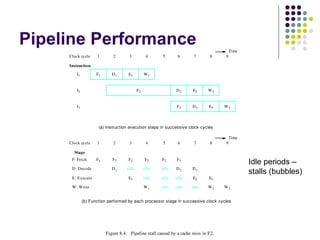
Figure 8.4. Pipeline stall caused by a cache miss in F2.
1 2 3 4 5 6 7 8 9Clock cycle
(a) Instruction execution steps in successive clock cycles
1 2 3 4 5 6 7 8Clock cycle
Stage
F: Fetch
D: Decode
E: Execute
W: Write
F1 F2 F3
D1 D2 D3idle idle idle
E1 E2 E3idle idle idle
W1 W2idle idle idle
(b) Function performed by each processor stage in successive clock cycles
9
W3
F2 F2 F2
Time
Time
Idle periods –
stalls (bubbles)
Pipeline Performance
F1
F2
F3
I1
I2 (Load)
I3
E1
M2
D1
D2
D3
W1
W2
Instruction
F4I4
Clock cycle 1 2 3 4 5 6 7
Figure 8.5. Effect of a Load instruction on pipeline timing.
F5I5 D5
Time
E2
E3 W3
E4D4
Load X(R1), R2
Structural
hazard
Pipeline Performance
 Again, pipelining does not result in individual
instructions being executed faster; rather, it is the
throughput that increases.
 Throughput is measured by the rate at which
instruction execution is completed.
 Pipeline stall causes degradation in pipeline
performance.
 We need to identify all hazards that may cause the
pipeline to stall and to find ways to minimize their
impact.
Pipeline Hazards
 There are situations, called hazards, that
prevent the next instruction in the instruction
stream from executing during its designated
cycle
 There are three classes of hazards
 Structural hazard
 Data hazard
 Branch hazard
Pipeline Hazards
 Structural hazard
 Resource conflicts when the hardware cannot support
all possible combination of instructions simultaneously
 Data hazard
 An instruction depends on the results of a previous
instruction
 Branch hazard
 Instructions that change the PC
Pipeline Stall
 When a hazard prevents an instruction step
from happening, the processor pauses the
executing the step until hazard will restored.
 Pipeline stalls slow the execution of an
Instruction , but do not prevent it from
executing correctly.
CO-PROCESSOR’s
WHAT IS CO-PROCESSOR
 A computer co-processor is processor
used to supplement the function of
primary processor.
 First seen on mainframe computers.
 Accelerate the system performance.
HISTORY OF CO-PROCESSOR
 Co-processor for floating point arithmetic first
appeared in desktop computers in 1970s.
 The coprocessors become common in 1980s
and into the early 1990s.
 Early 8_Bit and 16 Bit processor uses
software to carryout the floating point
arithmetic operations.
 Math co-processor were popular purchase for
users of computer-aided design (CAD)
software and scientific and engineering
calculations.
OPERATION PERFORMED BY
COPROCESSOR
 Floating point arithmetic
 Graphic & Signal processing.
 String processing.
 Encryption
 Coprocessor are Unable to fetch the code
from the memory so they work under the
control of main processor .
Architecture of 8087
INTEL 8087
 Numeric Processor.
 Packed in 40 pin ceramic DIP package.
 Available in 5 MHz, 8MHz, 10MHz
versions compatible with 8086, 8088,
80186, 80188.
 It adds 68 new instruction to the
instruction set of 8086.
How it works
 The 8087 instruction may lie interleaved in the
8086 program, but it is the task of 8086 to
identify the 8087 instructions from the program,
send it to 8087 for further execution & after the
completion of execution cycle the result may be
referred back to CPU.
 Operation of 8087 does not require any
software support from the system software or
operating system.
Architecture of 8087
Two major sections:
1) Control unit
2) Numeric Execution unit
Control Unit
Function :
 It interface the coprocessor to the
microprocessor – system data bus.
 Monitors the instruction stream.
 If the instruction is an ESCape
(coprocessor) instruction, the coprocessor
executes it; if not the microprocessor
executes it.
 It receives , decodes instructions, read and
write memory operands and executes the
8087 instruction
Numeric Execution Unit (NEU)
Functions :
 Execute all the numeric processor
instructions.
 It has 8 register (80 bit) stack that holds
the operands for arithmetic instructions &
the result.
 Instruction either address data in specific
stack data – register or uses push and
pop mechanism to store and retrieve data.
Control Word Register of 8087
Coprocessor Control Instructions
 The coprocessor has control instructions for
initialization, exception handling, and task
switching.
 All control instructions have two forms.
Coprocessor Control Instructions
FINIT/FNINIT
 Performs a reset (initialize) operation on the
arithmetic coprocessor.
 The coprocessor operates with a closure of
projective (unsigned infinity), rounds to the
nearest or even, and uses extended-
precision when reset or initialized.
 also sets register 0 as the top of the stack
Coprocessor Control Instructions
FSETPM
 Changes the coprocessor to the protected-
addressing mode.
 used when the microprocessor is protected mode
 Protected mode can only be exited by a
hardware reset.
 or in 80386-Pentium 4, with a change to the
control register
Coprocessor Control Instructions
FLDCW
 Loads the control register with the
word addressed by the operand.
FSTCW
 Stores the control register into the
word-sized memory operand.
Coprocessor Control Instructions
FSTSW AX
 Copies the contents of the control register
to the AX register.
 not available to 8087
FCLEX
 Clears the error flags in the status register
and also the busy flag.
Graphics Coprocessor
 noun a high-speed display adapter that is
dedicated to graphics operations such as line
drawing and plotting
 A coprocessor utilized to accelerate the
displaying of graphics, significantly speeding up
the updating of the images on a screen, and
freeing the CPU to take care of other tasks.
 A graphics coprocessor maybe incorporated into
a graphics accelerator, or may be part of a
separate subsystem. Also called graphics
processor .
Pipelining and co processor.

Pipelining and co processor.

  • 1.
  • 2.
    What is Pipelining In simple words Pipelining means starting the execution of 2nd process before 1st is completed.
  • 3.
    Overview  Pipelining iswidely used in modern processors.  Pipelining improves system performance in terms of throughput.  Pipelined organization requires sophisticated compilation techniques.
  • 4.
  • 5.
    Making the Executionof Programs Faster  Use faster circuit technology to build the processor and the main memory.  Arrange the hardware so that more than one operation can be performed at the same time.  In the latter way, the number of operations performed per second is increased even though the elapsed time needed to perform any one operation is not changed.
  • 6.
    Traditional Pipeline Concept A, B, C, D each have one load of clothes to wash, dry, and fold. “Washer” takes 30 minutes “Dryer” takes 40 minutes “Folder” takes 20 minutes A B C D Laundry Example
  • 7.
    Traditional Pipeline Concept Sequential laundry takes 6 hours for 4 loads  If they learned pipelining, how long would laundry take? A B C D 30 40 20 30 40 20 30 40 20 30 40 20 6 PM 7 8 9 10 11 Midnight Time
  • 8.
    Traditional Pipeline Concept Pipelinedlaundry takes 3.5 hours for 4 loads A B C D 6 PM 7 8 9 10 11 Midnight T a s k O r d e r Time 30 40 40 40 40 20
  • 9.
    Traditional Pipeline Concept A B C D 6PM 7 8 9 T a s k O r d e r Time 30 40 40 40 40 20
  • 10.
    Use the Ideaof Pipelining in a Computer F 1 E 1 F 2 E 2 F 3 E 3 I1 I2 I3 (a) Sequential execution Ttime F1 E1 F2 E2 F3 E3 I1 I2 I3 Instruction (c) Pipelined execution Figure of Basic idea of instruction pipelining. Clock cycle 1 2 3 4 T Time Fetch + Execution
  • 11.
    Role of CacheMemory  Each pipeline stage is expected to complete in one clock cycle.  The clock period should be long enough to let the slowest pipeline stage to complete.  Faster stages can only wait for the slowest one to complete.  Since main memory is very slow compared to the execution, if each instruction needs to be fetched from main memory, pipeline is almost useless.  Fortunately, we have cache.
  • 12.
    Pipeline Performance  Thepotential increase in performance resulting from pipelining is proportional to the number of pipeline stages.  However, this increase would be achieved only if all pipeline stages require the same time to complete, and there is no interruption throughout program execution.  Unfortunately, this is not true.
  • 13.
    Pipeline Performance F1 F2 F3 I1 I2 I3 D1 D2 D3 E1 E2 E3 W1 W2 W3 Instruction Figure 8.4. Pipeline stall caused by a cache miss in F2. 12 3 4 5 6 7 8 9Clock cycle (a) Instruction execution steps in successive clock cycles 1 2 3 4 5 6 7 8Clock cycle Stage F: Fetch D: Decode E: Execute W: Write F1 F2 F3 D1 D2 D3idle idle idle E1 E2 E3idle idle idle W1 W2idle idle idle (b) Function performed by each processor stage in successive clock cycles 9 W3 F2 F2 F2 Time Time Idle periods – stalls (bubbles)
  • 14.
    Pipeline Performance F1 F2 F3 I1 I2 (Load) I3 E1 M2 D1 D2 D3 W1 W2 Instruction F4I4 Clock cycle 12 3 4 5 6 7 Figure 8.5. Effect of a Load instruction on pipeline timing. F5I5 D5 Time E2 E3 W3 E4D4 Load X(R1), R2 Structural hazard
  • 15.
    Pipeline Performance  Again,pipelining does not result in individual instructions being executed faster; rather, it is the throughput that increases.  Throughput is measured by the rate at which instruction execution is completed.  Pipeline stall causes degradation in pipeline performance.  We need to identify all hazards that may cause the pipeline to stall and to find ways to minimize their impact.
  • 16.
    Pipeline Hazards  Thereare situations, called hazards, that prevent the next instruction in the instruction stream from executing during its designated cycle  There are three classes of hazards  Structural hazard  Data hazard  Branch hazard
  • 17.
    Pipeline Hazards  Structuralhazard  Resource conflicts when the hardware cannot support all possible combination of instructions simultaneously  Data hazard  An instruction depends on the results of a previous instruction  Branch hazard  Instructions that change the PC
  • 18.
    Pipeline Stall  Whena hazard prevents an instruction step from happening, the processor pauses the executing the step until hazard will restored.  Pipeline stalls slow the execution of an Instruction , but do not prevent it from executing correctly.
  • 19.
  • 20.
    WHAT IS CO-PROCESSOR A computer co-processor is processor used to supplement the function of primary processor.  First seen on mainframe computers.  Accelerate the system performance.
  • 21.
    HISTORY OF CO-PROCESSOR Co-processor for floating point arithmetic first appeared in desktop computers in 1970s.  The coprocessors become common in 1980s and into the early 1990s.  Early 8_Bit and 16 Bit processor uses software to carryout the floating point arithmetic operations.  Math co-processor were popular purchase for users of computer-aided design (CAD) software and scientific and engineering calculations.
  • 22.
    OPERATION PERFORMED BY COPROCESSOR Floating point arithmetic  Graphic & Signal processing.  String processing.  Encryption  Coprocessor are Unable to fetch the code from the memory so they work under the control of main processor .
  • 24.
  • 25.
    INTEL 8087  NumericProcessor.  Packed in 40 pin ceramic DIP package.  Available in 5 MHz, 8MHz, 10MHz versions compatible with 8086, 8088, 80186, 80188.  It adds 68 new instruction to the instruction set of 8086.
  • 26.
    How it works The 8087 instruction may lie interleaved in the 8086 program, but it is the task of 8086 to identify the 8087 instructions from the program, send it to 8087 for further execution & after the completion of execution cycle the result may be referred back to CPU.  Operation of 8087 does not require any software support from the system software or operating system.
  • 27.
  • 28.
    Two major sections: 1)Control unit 2) Numeric Execution unit
  • 29.
    Control Unit Function : It interface the coprocessor to the microprocessor – system data bus.  Monitors the instruction stream.  If the instruction is an ESCape (coprocessor) instruction, the coprocessor executes it; if not the microprocessor executes it.  It receives , decodes instructions, read and write memory operands and executes the 8087 instruction
  • 30.
    Numeric Execution Unit(NEU) Functions :  Execute all the numeric processor instructions.  It has 8 register (80 bit) stack that holds the operands for arithmetic instructions & the result.  Instruction either address data in specific stack data – register or uses push and pop mechanism to store and retrieve data.
  • 31.
  • 32.
    Coprocessor Control Instructions The coprocessor has control instructions for initialization, exception handling, and task switching.  All control instructions have two forms.
  • 33.
    Coprocessor Control Instructions FINIT/FNINIT Performs a reset (initialize) operation on the arithmetic coprocessor.  The coprocessor operates with a closure of projective (unsigned infinity), rounds to the nearest or even, and uses extended- precision when reset or initialized.  also sets register 0 as the top of the stack
  • 34.
    Coprocessor Control Instructions FSETPM Changes the coprocessor to the protected- addressing mode.  used when the microprocessor is protected mode  Protected mode can only be exited by a hardware reset.  or in 80386-Pentium 4, with a change to the control register
  • 35.
    Coprocessor Control Instructions FLDCW Loads the control register with the word addressed by the operand. FSTCW  Stores the control register into the word-sized memory operand.
  • 36.
    Coprocessor Control Instructions FSTSWAX  Copies the contents of the control register to the AX register.  not available to 8087 FCLEX  Clears the error flags in the status register and also the busy flag.
  • 37.
    Graphics Coprocessor  nouna high-speed display adapter that is dedicated to graphics operations such as line drawing and plotting  A coprocessor utilized to accelerate the displaying of graphics, significantly speeding up the updating of the images on a screen, and freeing the CPU to take care of other tasks.  A graphics coprocessor maybe incorporated into a graphics accelerator, or may be part of a separate subsystem. Also called graphics processor .