Piecewise Functions 
In Matlab
Piecewise Functions 
• A piecewise function is a function which is 
defined by multiple sub functions, each 
sub function applying to a certain interval 
of the main function's domain.
Piecewise Functions 
• We’ll show one way to define and plot 
them in Matlab without using loops. 
• We’ll use a vectorized way: no scalar 
values or iterations will be used.
Piecewise Functions 
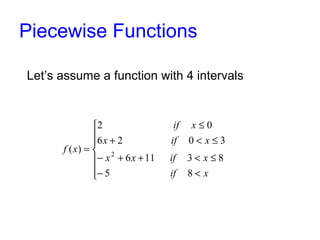
Let’s assume a function with 4 intervals 
ì 
ï ï í 
2 0 
6 2 0 3 
( ) 2 
ï ï 
î 
£ 
if x 
x if x 
+ < £ 
x x if x 
- + + < £ 
6 11 3 8 
- < 
= 
if x 
f x 
5 8
Piecewise Functions 
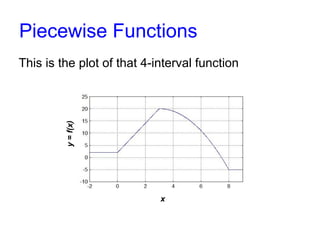
This is the plot of that 4-interval function 
x 
y = f(x)
Piecewise Functions 
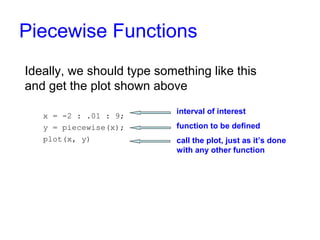
Ideally, we should type something like this 
and get the plot shown above 
x = -2 : .01 : 9; 
y = piecewise(x); 
plot(x, y) 
interval of interest 
function to be defined 
call the plot, just as it’s done 
with any other function
Piecewise Functions 
The interesting part is how to define the 
piecewise function without going number-by-number 
in the domain, but going instead 
interval-by-interval. 
To accomplish this, we’ll use two ideas: 
• Specially selected indices. 
• Function find.
Piecewise Functions 
First important concept: special indices 
In Matlab, if we have vector x = [-2 -1 0 1 2 3 4 5 6 7 8 9], and do this: 
i2 = x(0 < x & x <= 3) 
we’ll take all the values in vector x that meet the condition 0 < x ≤ 3, that is, 
i2 = [1 2 3] 
If we do: 
i3 = x(3 < x & x <= 8) 
we’ll take all the values in vector x that meet the condition 3 < x ≤ 8, thus 
i3 = [4 5 6 7 8]
Piecewise Functions 
Second important concept: function find 
In Matlab, if we have vector x = [-2 -1 0 1 2 3 4 5 6 7 8 9], and do this: 
find(0 < x & x <= 3) 
we’ll find the indices (not values) in vector x that meet 0 < x ≤ 3, so we’ll get 
the vector [4 5 6]. 
If we do: 
find(3 < x & x <= 8) 
we’ll get the vector [7 8 9 10 11]
Piecewise Functions 
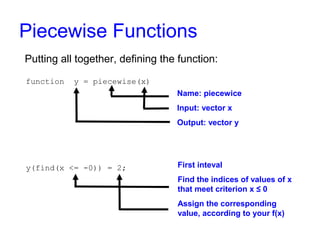
Putting all together, defining the function: 
function y = piecewise(x) 
y(find(x <= -0)) = 2; 
Name: piecewice 
Input: vector x 
Output: vector y 
First interval 
Find the indices of values of x 
that meet criterion x ≤ 0 
Assign the corresponding value, 
according to your f(x)
Piecewise Functions 
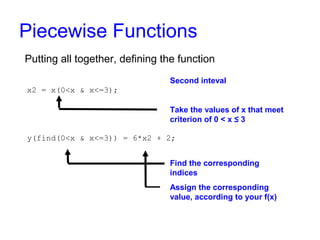
Putting all together, defining the function 
Second inteval 
Take the values of x that meet 
criterion of 0 < x ≤ 3 
Find the corresponding indices 
Assign the corresponding value, 
according to your f(x) 
x2 = x(0<x & x<=3); 
y(find(0<x & x<=3)) = 6*x2 + 2;
Piecewise Functions 
Putting all together, defining the function 
Third interval 
Take the values of x that meet 
criterion of 3 < x ≤ 8 
Find the corresponding indices 
Assign the corresponding value, 
according to your f(x) 
x3 = x(3<x & x<=8); 
y(find(3<x & x<=8)) = -x3.^2 + 
6*x3 + 11;
Piecewise Functions 
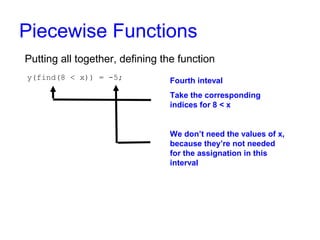
Putting all together, defining the function 
Fourth inteval 
Take the corresponding indices 
for 8 < x 
We don’t need the values of x 
now, because they’re not 
needed for the assignation in 
this interval 
y(find(8 < x)) = -5;
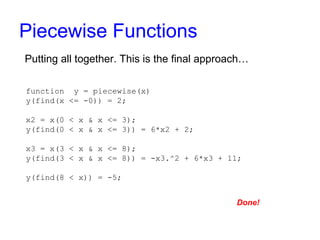
Piecewise Functions 
Putting all together. This is the final code… 
function y = piecewise(x) 
y(find(x <= -0)) = 2; 
x2 = x(0 < x & x <= 3); 
y(find(0 < x & x <= 3)) = 6*x2 + 2; 
x3 = x(3 < x & x <= 8); 
y(find(3 < x & x <= 8)) = -x3.^2 + 6*x3 + 11; 
y(find(8 < x)) = -5;
Piecewise Functions 
Now, if we type this code… 
clc, clear all, close all 
x = -2 : .01 : 9; 
y = piecewise(x); 
plot(x, y) 
axis([-2 9 -10 25]) 
grid on 
We get this plot…
Piecewise Functions 
For more examples and details, visit: 
matrixlab-examples.com/piecewise-function.html

Piecewise Functions in Matlab

  • 1.
  • 2.
    Piecewise Functions •A piecewise function is a function which is defined by multiple sub functions, each sub function applying to a certain interval of the main function's domain.
  • 3.
    Piecewise Functions •We’ll show one way to define and plot them in Matlab without using loops. • We’ll use a vectorized way: no scalar values or iterations will be used.
  • 4.
    Piecewise Functions Let’sassume a function with 4 intervals ì ï ï í 2 0 6 2 0 3 ( ) 2 ï ï î £ if x x if x + < £ x x if x - + + < £ 6 11 3 8 - < = if x f x 5 8
  • 5.
    Piecewise Functions Thisis the plot of that 4-interval function x y = f(x)
  • 6.
    Piecewise Functions Ideally,we should type something like this and get the plot shown above x = -2 : .01 : 9; y = piecewise(x); plot(x, y) interval of interest function to be defined call the plot, just as it’s done with any other function
  • 7.
    Piecewise Functions Theinteresting part is how to define the piecewise function without going number-by-number in the domain, but going instead interval-by-interval. To accomplish this, we’ll use two ideas: • Specially selected indices. • Function find.
  • 8.
    Piecewise Functions Firstimportant concept: special indices In Matlab, if we have vector x = [-2 -1 0 1 2 3 4 5 6 7 8 9], and do this: i2 = x(0 < x & x <= 3) we’ll take all the values in vector x that meet the condition 0 < x ≤ 3, that is, i2 = [1 2 3] If we do: i3 = x(3 < x & x <= 8) we’ll take all the values in vector x that meet the condition 3 < x ≤ 8, thus i3 = [4 5 6 7 8]
  • 9.
    Piecewise Functions Secondimportant concept: function find In Matlab, if we have vector x = [-2 -1 0 1 2 3 4 5 6 7 8 9], and do this: find(0 < x & x <= 3) we’ll find the indices (not values) in vector x that meet 0 < x ≤ 3, so we’ll get the vector [4 5 6]. If we do: find(3 < x & x <= 8) we’ll get the vector [7 8 9 10 11]
  • 10.
    Piecewise Functions Puttingall together, defining the function: function y = piecewise(x) y(find(x <= -0)) = 2; Name: piecewice Input: vector x Output: vector y First interval Find the indices of values of x that meet criterion x ≤ 0 Assign the corresponding value, according to your f(x)
  • 11.
    Piecewise Functions Puttingall together, defining the function Second inteval Take the values of x that meet criterion of 0 < x ≤ 3 Find the corresponding indices Assign the corresponding value, according to your f(x) x2 = x(0<x & x<=3); y(find(0<x & x<=3)) = 6*x2 + 2;
  • 12.
    Piecewise Functions Puttingall together, defining the function Third interval Take the values of x that meet criterion of 3 < x ≤ 8 Find the corresponding indices Assign the corresponding value, according to your f(x) x3 = x(3<x & x<=8); y(find(3<x & x<=8)) = -x3.^2 + 6*x3 + 11;
  • 13.
    Piecewise Functions Puttingall together, defining the function Fourth inteval Take the corresponding indices for 8 < x We don’t need the values of x now, because they’re not needed for the assignation in this interval y(find(8 < x)) = -5;
  • 14.
    Piecewise Functions Puttingall together. This is the final code… function y = piecewise(x) y(find(x <= -0)) = 2; x2 = x(0 < x & x <= 3); y(find(0 < x & x <= 3)) = 6*x2 + 2; x3 = x(3 < x & x <= 8); y(find(3 < x & x <= 8)) = -x3.^2 + 6*x3 + 11; y(find(8 < x)) = -5;
  • 15.
    Piecewise Functions Now,if we type this code… clc, clear all, close all x = -2 : .01 : 9; y = piecewise(x); plot(x, y) axis([-2 9 -10 25]) grid on We get this plot…
  • 16.
    Piecewise Functions Formore examples and details, visit: matrixlab-examples.com/piecewise-function.html