B Y G E O R G E S M I T H - M O O R E
Personalising Desktop
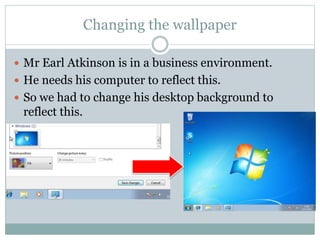
Changing the wallpaper
 Mr Earl Atkinson is in a business environment.
 He needs his computer to reflect this.
 So we had to change his desktop background to
reflect this.
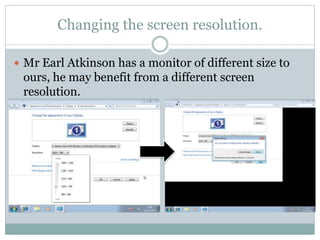
Changing the screen resolution.
 Mr Earl Atkinson has a monitor of different size to
ours, he may benefit from a different screen
resolution.
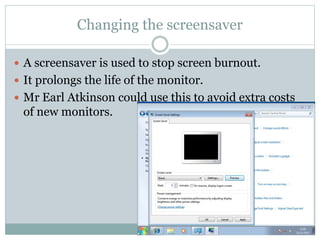
Changing the screensaver
 A screensaver is used to stop screen burnout.
 It prolongs the life of the monitor.
 Mr Earl Atkinson could use this to avoid extra costs
of new monitors.
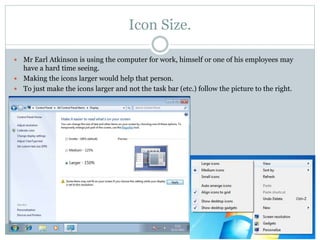
Icon Size.
 Mr Earl Atkinson is using the computer for work, himself or one of his employees may
have a hard time seeing.
 Making the icons larger would help that person.
 To just make the icons larger and not the task bar (etc.) follow the picture to the right.
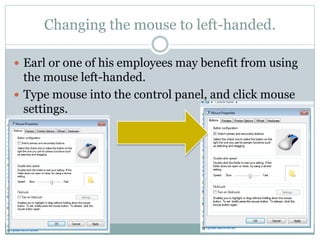
Changing the mouse to left-handed.
 Earl or one of his employees may benefit from using
the mouse left-handed.
 Type mouse into the control panel, and click mouse
settings.

Personalising desktop

  • 1.
    B Y GE O R G E S M I T H - M O O R E Personalising Desktop
  • 2.
    Changing the wallpaper Mr Earl Atkinson is in a business environment.  He needs his computer to reflect this.  So we had to change his desktop background to reflect this.
  • 3.
    Changing the screenresolution.  Mr Earl Atkinson has a monitor of different size to ours, he may benefit from a different screen resolution.
  • 4.
    Changing the screensaver A screensaver is used to stop screen burnout.  It prolongs the life of the monitor.  Mr Earl Atkinson could use this to avoid extra costs of new monitors.
  • 5.
    Icon Size.  MrEarl Atkinson is using the computer for work, himself or one of his employees may have a hard time seeing.  Making the icons larger would help that person.  To just make the icons larger and not the task bar (etc.) follow the picture to the right.
  • 6.
    Changing the mouseto left-handed.  Earl or one of his employees may benefit from using the mouse left-handed.  Type mouse into the control panel, and click mouse settings.