Performance Tuning Best Practices


                                     Jay Pipes
                     Community Relations Manager, North America
                                 (jay@mysql.com)


Copyright MySQL AB                                  The World’s Most Popular Open Source Database   1
Overview
   ●    Benchmarking and Profiling Concepts
   ●    Sources of Problems
   ●    Schemas and Indexes
   ●    SQL Coding
   ●    Server Parameters


Copyright MySQL AB                       The World’s Most Popular Open Source Database   2
Benchmarking Concepts
   ●    Provides a track record of changes
         ➢ Baseline is the starting point


         ➢ Testing done iteratively


         ➢ Deltas between tests show difference that the change(s) made


   ●    Stress/Load testing of application and/or database
   ●    Harness or framework useful to automate many benchmark tasks


Copyright MySQL AB                               The World’s Most Popular Open Source Database   3
Benchmarking Tips
      ●     Always give yourself a target
      ●     Record everything
          ✔   Schema dump
          ✔   my.cnf files
          ✔   hardware/os configuration files as needed
      ●     Isolate the problem
          ✔   Shut down unnecessary programs
          ✔   Stop network traffic to machine
          ✔   Disable the query cache
          ✔   Change one thing at a time


Copyright MySQL AB                                   The World’s Most Popular Open Source Database   4
Benchmarking Toolbox
   ●    SysBench
         ➢ http://sysbench.sourceforge.net/


   ●    mysqlslap (5.1+)
         ➢ http://dev.mysql.com/doc/refman/5.1/en/mysqlslap.html


   ●    Apache Bench (ab)
   ●    supersmack
         ➢ http://www.vegan.net/tony/supersmack/


   ●    MyBench
         ● http://jeremy.zawodny.com/mysql/mybench/


Copyright MySQL AB                         The World’s Most Popular Open Source Database   5
Profiling Concepts
   ●    Diagnose a running system
   ●    Low hanging fruit
         ➢ Diminishing returns

         ➢ Be careful not to over-optimize


   ●    Identify performance bottlenecks in
         ➢ Memory

         ➢ CPU

         ➢ I/O (Disk)

         ➢ Network and OS


Copyright MySQL AB                            The World’s Most Popular Open Source Database   6
Profiling Toolbox
   ●    SHOW Commands
          ➢   SHOW PROCESSLIST | STATUS | INNODB STATUS
          http://dev.mysql.com/show
          ➢


   ●    EXPLAIN
         ➢ http://dev.mysql.com/explain


   ●    MyTop
         ➢ http://jeremy.zawodny.com/mysql/mytop/


   ●    Whole host of Linux power tools
         ➢ gprof / oprofile

         ➢ vmstat / ps / top / mpstat / procinfo


   ●    apd for PHP developers
         ➢ http://pecl.php.net/package/apd


Copyright MySQL AB                          The World’s Most Popular Open Source Database   7
Slow Query Log
   ●    Slow Query Log
          ●   log_slow_queries=/var/lib/mysql/slow­queries.log
          ●   long_query_time=2
          ●   log_long_format
          ●   Use mysqldumpslow to parse the file
          ●   (5.1+) Can log directly to a table, plus does not require
              restart of server
                ●    SET GLOBAL SLOW_QUERY_LOG = { ON | OFF }
                ●    http://dev.mysql.com/doc/refman/5.1/en/log-
                     tables.html


Copyright MySQL AB                                 The World’s Most Popular Open Source Database   8
Profiling Tips
   ●    Get very familiar with EXPLAIN
         ➢ Access types

         ➢ Learn the type, key, ref, rows, Extra columns


   ●    Low hanging fruit (diminishing returns)
   ●    Use MyTop to catch locking and long-running queries in
        real-time


Copyright MySQL AB                         The World’s Most Popular Open Source Database   9
Sources of Problems
   ●    Inefficient or bloated schema design
   ●    Poor or nonexistent indexing
   ●    Bad SQL Coding Practices
   ●    Server variables not tuned properly
   ●    Hardware and/or network bottlenecks


Copyright MySQL AB                         The World’s Most Popular Open Source Database   10
Schema Guidelines
      ●   Inefficient schema a great way to kill performance
      ●   Use the smallest data types necessary
          ➢ Do you really need that BIGINT?


      ●   Fewer fields = Narrow rows = More records per block
      ●   Normalize first, denormalize only in extreme cases...


Copyright MySQL AB                           The World’s Most Popular Open Source Database   11
Ahh,
          normalization...


 http://thedailywtf.com/forums/thread/75982.aspx
Copyright MySQL AB                                 The World’s Most Popular Open Source Database   12
Schema Tips
      ●   Consider horizontally splitting many-columned tables
          (example ahead)
      ●   Consider vertically partitioning many-rowed tables
          ➢ Merge tables (MyISAM only)

          ➢ Homegrown (email example)

          ➢ Partitioning (5.1+)


      ●   Use AUTO_INCREMENT columns vs. homegrown
          sequences. Faster and built-in to the database.
      ●   Use “counter” tables to mitigate query cache issues
          (example ahead)
          ➢ Essential for InnoDB


Copyright MySQL AB                           The World’s Most Popular Open Source Database   13
Horizontal Partitioning Example
                                              CREATE TABLE Users (
                                                user_id INT NOT NULL AUTO_INCREMENT
                                              , email VARCHAR(80) NOT NULL
      CREATE TABLE Users (
                                              , display_name VARCHAR(50) NOT NULL
        user_id INT NOT NULL AUTO_INCREMENT
                                              , password CHAR(41) NOT NULL
      , email VARCHAR(80) NOT NULL
                                              , PRIMARY KEY (user_id)
      , display_name VARCHAR(50) NOT NULL
                                              , UNIQUE INDEX (email)
      , password CHAR(41) NOT NULL
                                              ) ENGINE=InnoDB;
      , first_name VARCHAR(25) NOT NULL
      , last_name VARCHAR(25) NOT NULL
                                              CREATE TABLE UserExtra (
      , address VARCHAR(80) NOT NULL
                                                user_id INT NOT NULL
      , city VARCHAR(30) NOT NULL
                                              , first_name VARCHAR(25) NOT NULL
      , province CHAR(2) NOT NULL
                                              , last_name VARCHAR(25) NOT NULL
      , postcode CHAR(7) NOT NULL
                                              , address VARCHAR(80) NOT NULL
      , interests TEXT NULL
                                              , city VARCHAR(30) NOT NULL
      , bio TEXT NULL
                                              , province CHAR(2) NOT NULL
      , signature TEXT NULL
                                              , postcode CHAR(7) NOT NULL
      , skills TEXT NULL
                                              , interests TEXT NULL
      , company TEXT NULL
                                              , bio TEXT NULL
      , PRIMARY KEY (user_id)
                                              , signature TEXT NULL
      , UNIQUE INDEX (email)
                                              , skills TEXT NULL
      ) ENGINE=InnoDB;
                                              , company TEXT NULL
                                              , PRIMARY KEY (user_id)
                                              ) ENGINE=InnoDB;


Copyright MySQL AB                                     The World’s Most Popular Open Source Database   14
Horizontal Partitioning Benefits
      ●   Main table has narrow rows, so...
          ✔ More records fit into a single data page

          ✔ Fewer reads from memory/disk to get same number of

            records
      ●   Less frequently queried data doesn't take up memory
      ●   More possibilities for indexing and different storage
          engines
          ➢ Allows targeted multiple MyISAM key caches for hot

            and cold data (example ahead)


Copyright MySQL AB                          The World’s Most Popular Open Source Database   15
Multiple MyISAM Key Caches
 ●   Method of controlling key          // /etc/my.cnf

     cache invalidation                 [mysql.server]
                                        init_file=/path/to/datadir/init.sql

 ●   “Pins” key cache blocks
 ●   Allows you to place
                                        // init.sql
     frequently accessed table          // Setup the hot cache

     indexes into a hot cache           SET GLOBAL 
                                        hot_cache.key_buffer_size=128K

 ●   Destroyed upon server              // Cache the postcode lookup
                                        CACHE INDEX zip_lookup 
     restart, so use init_file          TO hot_cache;

 ●   Preload hot cache with LOAD        // Preload the index sequentially
                                        LOAD INDEX INTO CACHE zip_lookup;
     INDEX INTO CACHE
                                        // Control cache invalidation
 ●   Control index scan                 SET GLOBAL 
                                        default.key_cache_division_limit=70;
     invalidation with division limit

Copyright MySQL AB                              The World’s Most Popular Open Source Database   16
Counter Table Example

                                                CREATE TABLE Products (
                                                  product_id INT NOT NULL AUTO_INCREMENT
                                                , name VARCHAR(80) NOT NULL
     CREATE TABLE Products (
                                                , unit_cost DECIMAL(7,2) NOT NULL
       product_id INT NOT NULL AUTO_INCREMENT
                                                , description TEXT NULL
     , name VARCHAR(80) NOT NULL
                                                , image_path TEXT NULL
     , unit_cost DECIMAL(7,2) NOT NULL
                                                , PRIMARY KEY (product_id)
     , description TEXT NULL
                                                , INDEX (name(20))
     , image_path TEXT NULL
                                                ) ENGINE=InnoDB; // Or MyISAM
     , num_views INT UNSIGNED NOT NULL
     , num_in_stock INT UNSIGNED NOT NULL
                                                CREATE TABLE ProductCounts (
     , num_on_order INT UNSIGNED NOT NULL
                                                  product_id INT NOT NULL
     , PRIMARY KEY (product_id)
                                                , num_views INT UNSIGNED NOT NULL
     , INDEX (name(20))
                                                , num_in_stock INT UNSIGNED NOT NULL
     ) ENGINE=InnoDB; // Or MyISAM
                                                , num_on_order INT UNSIGNED NOT NULL
                                                , PRIMARY KEY (product_id)
     // Getting a simple COUNT of products
                                                ) ENGINE=InnoDB;
     // easy on MyISAM, terrible on InnoDB
     SELECT COUNT(*)
                                                CREATE TABLE ProductCountSummary (
     FROM Products;
                                                  total_products INT UNSIGNED NOT NULL
                                                ) ENGINE=MEMORY;


Copyright MySQL AB                                       The World’s Most Popular Open Source Database   17
Counter Table Benefits
      ●   Critical for InnoDB because of complications of MVCC
      ●   Allows query cache to cache specific data set which will
          be invalidated only infrequently
      ●   Allows you to target SQL_NO_CACHE for SELECTs against
          counter tables, freeing query cache
      ●   Allows MEMORY storage engine for summary counters,
          since stats can be rebuilt


Copyright MySQL AB                            The World’s Most Popular Open Source Database   18
Schema Tips (cont'd)
      ●   Ensure small clustering key (InnoDB)
      ●   Don't use artificial keys when a naturally occurring
          primary key exists
          ● Example of what not to do:


                      CREATE TABLE Products2Tags (
                        record_id INT UNSIGNED NOT NULL AUTO_INCREMENT
                      , product_id INT UNSIGNED NOT NULL
                      , tag_id INT UNSIGNED NOT NULL
                      , PRIMARY KEY (record_id)
                      , UNIQUE INDEX (product_id, tag_id)
                      ) ENGINE=InnoDB;


Copyright MySQL AB                                      The World’s Most Popular Open Source Database   19
Indexing Guidelines
      ●   Poor or missing index fastest way to kill a system
      ●   Ensure good selectivity on field (example ahead)
      ●   Look for covering index opportunities (example ahead)
      ●   On multi-column indexes, pay attention to the order of
          the fields in the index (example ahead)
      ●   As database grows, examine distribution of values
          within indexed field
      ●   Remove redundant indexes for faster write performance


Copyright MySQL AB                          The World’s Most Popular Open Source Database   20
Selectivity
      ●   The relaive uniqueness of the index values to each
          other
      ●   S(I) = d/n
      ●   Multiple columns in an index = multiple levels of
          selectivity
      ●   So, how do we determine selectivity?


Copyright MySQL AB                           The World’s Most Popular Open Source Database   21
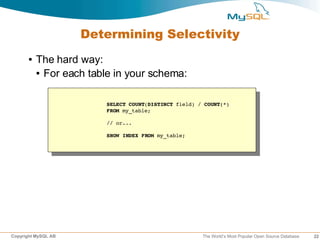
Determining Selectivity
      ●   The hard way:
          ● For each table in your schema:


                        SELECT COUNT(DISTINCT field) / COUNT(*)
                        FROM my_table;

                        // or...

                        SHOW INDEX FROM my_table;


Copyright MySQL AB                                    The World’s Most Popular Open Source Database   22
Determining Selectivity
      ●   The easy way: use INFORMATION_SCHEMA
               SELECT
                 t.TABLE_SCHEMA
                , t.TABLE_NAME
                , s.INDEX_NAME
                , s.COLUMN_NAME
                , s.SEQ_IN_INDEX
                , (
                  SELECT MAX(SEQ_IN_INDEX)
                  FROM INFORMATION_SCHEMA.STATISTICS s2
                  WHERE s.TABLE_SCHEMA = s2.TABLE_SCHEMA
                  AND s.TABLE_NAME = s2.TABLE_NAME
                  AND s.INDEX_NAME = s2.INDEX_NAME
                 ) AS "COLS_IN_INDEX"
                , s.CARDINALITY AS "CARD"
                , t.TABLE_ROWS AS "ROWS"
                , ROUND(((s.CARDINALITY / IFNULL(t.TABLE_ROWS, 0.01)) * 100), 2) AS "SEL %"
               FROM INFORMATION_SCHEMA.STATISTICS s
                INNER JOIN INFORMATION_SCHEMA.TABLES t
                 ON s.TABLE_SCHEMA = t.TABLE_SCHEMA
                 AND s.TABLE_NAME = t.TABLE_NAME
               WHERE t.TABLE_SCHEMA != 'mysql'
               AND t.TABLE_ROWS > 10
               AND s.CARDINALITY IS NOT NULL
               AND (s.CARDINALITY / IFNULL(t.TABLE_ROWS, 0.01)) < 1.00
               ORDER BY t.TABLE_SCHEMA, t.TABLE_NAME, s.INDEX_NAME, "SEL %"
               LIMIT 5;


Copyright MySQL AB                                                 The World’s Most Popular Open Source Database   23
Common Index Problem

                                                // This top query uses the index
     CREATE TABLE Tags (
                                                // on Products2Tags
       tag_id INT NOT NULL AUTO_INCREMENT
     , tag_text VARCHAR(50) NOT NULL
                                                SELECT p.name
     , PRIMARY KEY (tag_id)
                                                , COUNT(*) as tags
     ) ENGINE=MyISAM;
                                                FROM Products2Tags p2t
                                                INNER JOIN Products p
     CREATE TABLE Products (
                                                ON p2t.product_id = p.product_id
       product_id INT NOT NULL AUTO_INCREMENT
                                                GROUP BY p.name;
     , name VARCHAR(100) NOT NULL
     // many more fields...
                                                // This one does not because
     , PRIMARY KEY (product_id)
                                                // index order prohibits it
     ) ENGINE=MyISAM; 
                                                SELECT t.tag_text
     CREATE TABLE Products2Tags (
                                                , COUNT(*) as products
       product_id INT NOT NULL
                                                FROM Products2Tags p2t
     , tag_id INT NOT NULL
                                                INNER JOIN Tags t
     , PRIMARY KEY (product_id, tag_id)
                                                ON p2t.tag_id = t.tag_id
     ) ENGINE=MyISAM;
                                                GROUP BY t.tag_text;


Copyright MySQL AB                                    The World’s Most Popular Open Source Database   24
Common Index Problem Solved


     CREATE TABLE Tags (
       tag_id INT NOT NULL AUTO_INCREMENT
     , tag_text VARCHAR(50) NOT NULL
     , PRIMARY KEY (tag_id)
     ) ENGINE=MyISAM;
                                                CREATE INDEX ix_tag 
                                                ON Products2Tags (tag_id);
     CREATE TABLE Products (
       product_id INT NOT NULL AUTO_INCREMENT
                                                // or... create a covering index:
     , name VARCHAR(100) NOT NULL
     // many more fields...
                                                CREATE INDEX ix_tag_prod
     , PRIMARY KEY (product_id)
                                                ON Products2Tags (tag_id, product_id);
     ) ENGINE=MyISAM; 
                                                // But, only if not InnoDB... why?
     CREATE TABLE Products2Tags (
       product_id INT NOT NULL
     , tag_id INT NOT NULL
     , PRIMARY KEY (product_id, tag_id)
     ) ENGINE=MyISAM;


Copyright MySQL AB                                       The World’s Most Popular Open Source Database   25
SQL Coding Topics
   ●    Change the way you think about SQL programming
   ●    Coding guidelines
   ●    Common Pitfalls
   ●    Bulk loading performance
   ●    The DELETE statement


Copyright MySQL AB                      The World’s Most Popular Open Source Database   26
Thinking In Terms of Sets
   ●    SQL programming != procedural programming
   ●    Break an English-language request into a group of sets,
        either intersecting or joining
         ● Example: “Show the maximum price that each

            product was sold, along with the product description
            for each product”
         ● We're dealing with two sets of data:

              ● Set of product descriptions

              ● Set of maximum sold prices

         ● NOT:

              ● for each...


Copyright MySQL AB                          The World’s Most Popular Open Source Database   27
Coding Guidelines
      ●   Use “chunky” coding habits (KISS)
      ●   Use stored procedures for a performance boost (5.0+)
      ●   Isolate indexed fields on one side of equation (example
          ahead)
      ●   Use calculated fields if necessary (example ahead)
      ●   Learn to use joins (!)
          ➢ Eliminate correlated subqueries using standard joins

            (examples ahead)
      ●   Don't try to outthink the optimizer
          ➢ Sergey, Timour and Igor are really, really smart...


Copyright MySQL AB                           The World’s Most Popular Open Source Database   28
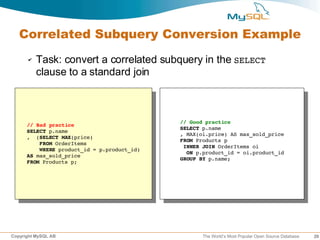
Correlated Subquery Conversion Example
      ✔   Task: convert a correlated subquery in the SELECT
          clause to a standard join


                                             // Good practice
      // Bad practice
                                             SELECT p.name
      SELECT p.name
                                             , MAX(oi.price) AS max_sold_price
      ,  (SELECT MAX(price)
                                             FROM Products p
          FROM OrderItems
                                              INNER JOIN OrderItems oi
          WHERE product_id = p.product_id)
                                               ON p.product_id = oi.product_id
      AS max_sold_price
                                             GROUP BY p.name;
      FROM Products p;


Copyright MySQL AB                                  The World’s Most Popular Open Source Database   29
Derived Table Example
      ✔   Task: convert a correlated subquery in the WHERE clause
          to a standard join on a derived table

                                              // Good performance
                                              SELECT
                                              c.company
    // Bad performance
                                              , o.*                              FROM
    SELECT
                                              Customers c
    c.company
                                               INNER JOIN (
    , o.*                              FROM
                                                SELECT 
    Customers c
                                                   customer_id
     INNER JOIN Orders o
                                                 , MAX(order_date) as max_order
      ON c.customer_id = o.customer_id   
                                                FROM Orders
    WHERE order_date = (
                                                GROUP BY customer_id
     SELECT MAX(order_date)
                                               ) AS m 
     FROM Orders 
                                                ON c.customer_id = m.customer_id
     WHERE customer = o.customer
                                               INNER JOIN Orders o
    )
                                                ON c.customer_id = o.customer_id
    GROUP BY c.company;
                                                AND o.order_date = m.max_order
                                              GROUP BY c.company;


Copyright MySQL AB                                      The World’s Most Popular Open Source Database   30
Demonstration :)
      ●   What did I show earlier that used a correlated
          subquery?
      ●   Do you think we can rewrite it to use a better performing
          block of SQL code?
      ●   Cool. Let's do it.


Copyright MySQL AB                            The World’s Most Popular Open Source Database   31
Avoiding Common Pitfalls
      ●   Isolate indexed fields on one side of equation (example
          ahead)
      ●   Use calculated fields if necessary (example ahead)
      ●   Problems with non-deterministic functions (example
          ahead)
      ●   Retrieving random records in a scalable way (example
          ahead)


Copyright MySQL AB                           The World’s Most Popular Open Source Database   32
Isolating Indexed Fields Example
      ✔   Task: get the Order ID, date of order, and Customer ID
          for all orders in the last 7 days


    // Bad idea
                                    // Better idea
    SELECT *
                                    SELECT *
    FROM Orders
                                    FROM Orders
    WHERE 
                                    WHERE 
    TO_DAYS(order_created) – 
                                    order_created >= CURRENT_DATE() – INTERVAL 7 DAY;
    TO_DAYS(CURRENT_DATE()) >= 7;


Copyright MySQL AB                                      The World’s Most Popular Open Source Database   33
Calculated Fields Example
      ✔   Task: search for top-level domain in email addresses
                                   // So, we enable fast searching on a reversed field
                                   // value by inserting a calculated field
                                   ALTER TABLE Customers
                                   ADD COLUMN rv_email VARCHAR(80) NOT NULL;
    // Initial schema
    CREATE TABLE Customers (       // Now, we update the existing table values
      customer_id INT NOT NULL     UPDATE Customers SET rv_email = REVERSE(email);
    , email VARCHAR(80) NOT NULL
    // more fields                 // Then, we create an index on the new field
    , PRIMARY KEY (customer_id)    CREATE INDEX ix_rv_email ON Customers (rv_email);
    , INDEX (email(40))
    ) ENGINE=InnoDB;               // Then, we make a trigger to keep our data in sync
                                   DELIMITER ;;
    // Bad idea, can't use index   CREATE TRIGGER trg_bi_cust 
    // on email field              BEFORE INSERT ON Customers
    SELECT *                       FOR EACH ROW BEGIN
    FROM Customers                  SET NEW.rv_email = REVERSE(NEW.email);
    WHERE email LIKE '%.com';      END ;;

                                   // same trigger for BEFORE UPDATE...
                                   // Then SELECT on the new field...
                                   WHERE rv_email LIKE CONCAT(REVERSE('.com'), '%');


Copyright MySQL AB                                      The World’s Most Popular Open Source Database   34
Non Deterministic Function Dilemma
      ➢   A non-deterministic function does not return the same
          data given the same parameters
      ➢   So, what's the problem here?

   // Bad idea
   SELECT *                           // Best idea is to factor out the CURRENT_DATE
   FROM Orders                        // non­deterministic function in your application
   WHERE                              // code and replace the function with a constant.
   TO_DAYS(order_created) – 
   TO_DAYS(CURRENT_DATE()) >= 7;      // For instance, in your PHP code, you would
                                      // simply insert date('Y­m­d') in the query
   // Better idea                     // instead of CURRENT_DATE()
   SELECT *
   FROM Orders                        // Now, query cache can actually cache the query!
   WHERE                              SELECT order_id, order_created, customer_id
   order_created >= CURRENT_DATE()    FROM Orders
   – INTERVAL 7 DAY;                  WHERE order_created >= '2006­05­24' – INTERVAL 7 DAY;


Copyright MySQL AB                                          The World’s Most Popular Open Source Database   35
Dealing With Random Records
      ➢   Task: Retrieve a single random banner ad from our
          table of ads


                                // The query on the left forces MySQL to do a full
                                // table scan on the entire table.  NOT GOOD!

                                // Instead, issue the following, which allows
          // Bad idea... why?   // MySQL to quickly use indexes in order to 
          SELECT *              // grab the desired row
          FROM Ads
          ORDER BY RAND()       SELECT @row_id := COUNT(*) FROM Ads;
          LIMIT 1               SELECT @row_id := FLOOR(RAND() * @row_id) + 1;
                                SELECT * FROM Ads WHERE ad_id = @row_id;

                                // Pop quiz: what should the above look like 
                                // if the Ads table is an InnoDB table? :)


Copyright MySQL AB                                  The World’s Most Popular Open Source Database   36
Bulk Loading Performance
   ●    Always use multi-record INSERT for mass bulk loading
   ●    Use ALTER TABLE ... DISABLE KEYS
   ●    If possible, use LOAD DATA INFILE or use the CSV
        storage engine, and ALTER TABLE
   ●    If inserting into an InnoDB table:
         ● First, insert into MyISAM table, then do: INSERT INTO 

              innodb_table SELECT * FROM myisam_table
   ●    Add or drop multiple indexes in one go using ALTER 
        TABLE vs many CREATE or DROP INDEX statements


Copyright MySQL AB                          The World’s Most Popular Open Source Database   37
DELETE and UPDATE
   ●    The UPDATE statement
         ● Use the ON DUPLICATE KEY UPDATE clause of the


           INSERT statement for a performance gain
   ●    The DELETE statement
         ● Do you really need to delete the row?

         ● Properly segment data that should be deleted using

           vertical partitioning so that you can use TRUNCATE 
           TABLE instead
         ● Or, INSERT the record id into a separate table, then:


                       DELETE main_table FROM main_table
                       LEFT JOIN deleted_records
                       ON main_table.id = deleted_records.id
                       WHERE deleted_records.id IS NOT NULL;


Copyright MySQL AB                                     The World’s Most Popular Open Source Database   38
Server Variable Guidelines
      ●   Be aware of what is global vs per thread
      ●   Make small changes, then test
      ●   Often provide a quick solution, but temporary
      ●   Query Cache is not a panacea
      ●   key_buffer_size != innodb_buffer_size
          ➢Also, remember mysql system database is MyISAM
      ●   Memory is cheapest, fastest, easiest way to increase
          performance


Copyright MySQL AB                           The World’s Most Popular Open Source Database   39
Tuning Server Variable Topics
   ●    Use SHOW VARIABLES to see current settings
   ●    Use SHOW STATUS to see server counters
   ●    Global vs Per Connection
   ●    Storage engine-specific variables
         ✔ Critial MyISAM variables

         ✔ Critical InnoDB variables


Copyright MySQL AB                       The World’s Most Popular Open Source Database   40
Critical MyISAM Server Variables
   ●
        key_buffer_size >> Main     MyISAM key cache
         ● Blocks of size 1024 (1K)

         ● Examine Key_reads vs Key_read_requests


         ● Watch for Key_blocks_unused approaching 0


   ●
        table_cache (InnoDB too...)
         ● Number of simultaneously open file descriptors

         ● < 5.1 contains meta data about tables and file

           descriptor
            ● >= 5.1 Split into table_open_cache

   ●    myisam_sort_buffer_size
          ●   Building indexes, set this as high as possible


Copyright MySQL AB                              The World’s Most Popular Open Source Database   41
Critical MyISAM Connection Variables
   ●
        read_buffer_size >>     For table scans
         ● No block size like key_cache

         ● Pop quiz: what cache is used for MyISAM data

           records?
         ● Increase within session if you know you will be doing

           a large table scan
         ● Examine Handler_read_rnd_next/Handler_read_rnd


           for average size of table scans
   ●
        sort_buffer_size >> Cache for GROUP BY/ORDER BY
         ● If you see Created_tmp_disk_table increasing


           dramatically, increase this as well as check the
           tmp_table_size variable


Copyright MySQL AB                          The World’s Most Popular Open Source Database   42
Critical InnoDB Server Variables
   ●
        innodb_buffer_pool_size >> Both     data and index
        pages
         ● Blocks of size 16K

         ● If you have InnoDB-only system, set to 60-80% of

           total memory
         ● Examine Innodb_buffer_pool_reads vs

              Innodb_buffer_pool_read_requests
          ●   Watch for Innodb_buffer_pool_pages_free 
              approaching 0
   ●    innodb_log_file_size
          ●   Size of the actual log file
          ●   Set to 40-50% of innodb_buffer_pool_size

Copyright MySQL AB                          The World’s Most Popular Open Source Database   43
Critical InnoDB Server Variables (cont'd)
   ●
        innodb_log_buffer_size >>        Size of double-write log
        buffer
         ● Set < 16M (recommend 1M to 8M)

   ●    innodb_flush_method
          ●   Determines how InnoDB flushes data and logs
          ●   defaults to fsync()
          ●   If getting lots of Innodb_data_pending_fsyncs
                ● Consider O_DIRECT (Linux only)

          ●   Other ideas
                ● Get a battery-backed disk controller with a write-

                  back cache
                ● Set innodb_flush_log_at_trx_commit=2 (Risky)


Copyright MySQL AB                               The World’s Most Popular Open Source Database   44
Recommended Resources
      ✔   http://www.mysqlperformanceblog.com/
          ➢ Peter Zaitsev's blog – Excellent material


      ✔   Optimizing Linux Performance
          ➢ Philip Ezolt (HP Press)


      ✔   http://dev.mysql.com/tech-resources/articles/pro-mysql-
          ch6.pdf
          ➢ Pro MySQL (Apress) chapter on profiling (EXPLAIN)


      ✔   Advanced PHP Programming
          ➢ George Schlossnagle (Developer's Library)


Copyright MySQL AB                           The World’s Most Popular Open Source Database   45
Final Thoughts

      ●   The road ahead
          ➢ More storage engines

            ➢ Falcon, SolidDB, PBXT, more

          ➢ Online Backup API

          ➢ Foreign Key support for more engines

          ➢ Subquery optimization


      ●   MySQL Forge
      ●   http://jpipes.com
      ●   jay@mysql.com


Copyright MySQL AB                          The World’s Most Popular Open Source Database   46

Performance Tuning Best Practices

  • 1.
    Performance Tuning BestPractices Jay Pipes Community Relations Manager, North America (jay@mysql.com) Copyright MySQL AB The World’s Most Popular Open Source Database 1
  • 2.
    Overview ● Benchmarking and Profiling Concepts ● Sources of Problems ● Schemas and Indexes ● SQL Coding ● Server Parameters Copyright MySQL AB The World’s Most Popular Open Source Database 2
  • 3.
    Benchmarking Concepts ● Provides a track record of changes ➢ Baseline is the starting point ➢ Testing done iteratively ➢ Deltas between tests show difference that the change(s) made ● Stress/Load testing of application and/or database ● Harness or framework useful to automate many benchmark tasks Copyright MySQL AB The World’s Most Popular Open Source Database 3
  • 4.
    Benchmarking Tips ● Always give yourself a target ● Record everything ✔ Schema dump ✔ my.cnf files ✔ hardware/os configuration files as needed ● Isolate the problem ✔ Shut down unnecessary programs ✔ Stop network traffic to machine ✔ Disable the query cache ✔ Change one thing at a time Copyright MySQL AB The World’s Most Popular Open Source Database 4
  • 5.
    Benchmarking Toolbox ● SysBench ➢ http://sysbench.sourceforge.net/ ● mysqlslap (5.1+) ➢ http://dev.mysql.com/doc/refman/5.1/en/mysqlslap.html ● Apache Bench (ab) ● supersmack ➢ http://www.vegan.net/tony/supersmack/ ● MyBench ● http://jeremy.zawodny.com/mysql/mybench/ Copyright MySQL AB The World’s Most Popular Open Source Database 5
  • 6.
    Profiling Concepts ● Diagnose a running system ● Low hanging fruit ➢ Diminishing returns ➢ Be careful not to over-optimize ● Identify performance bottlenecks in ➢ Memory ➢ CPU ➢ I/O (Disk) ➢ Network and OS Copyright MySQL AB The World’s Most Popular Open Source Database 6
  • 7.
    Profiling Toolbox ● SHOW Commands ➢ SHOW PROCESSLIST | STATUS | INNODB STATUS http://dev.mysql.com/show ➢ ● EXPLAIN ➢ http://dev.mysql.com/explain ● MyTop ➢ http://jeremy.zawodny.com/mysql/mytop/ ● Whole host of Linux power tools ➢ gprof / oprofile ➢ vmstat / ps / top / mpstat / procinfo ● apd for PHP developers ➢ http://pecl.php.net/package/apd Copyright MySQL AB The World’s Most Popular Open Source Database 7
  • 8.
    Slow Query Log ● Slow Query Log ● log_slow_queries=/var/lib/mysql/slow­queries.log ● long_query_time=2 ● log_long_format ● Use mysqldumpslow to parse the file ● (5.1+) Can log directly to a table, plus does not require restart of server ● SET GLOBAL SLOW_QUERY_LOG = { ON | OFF } ● http://dev.mysql.com/doc/refman/5.1/en/log- tables.html Copyright MySQL AB The World’s Most Popular Open Source Database 8
  • 9.
    Profiling Tips ● Get very familiar with EXPLAIN ➢ Access types ➢ Learn the type, key, ref, rows, Extra columns ● Low hanging fruit (diminishing returns) ● Use MyTop to catch locking and long-running queries in real-time Copyright MySQL AB The World’s Most Popular Open Source Database 9
  • 10.
    Sources of Problems ● Inefficient or bloated schema design ● Poor or nonexistent indexing ● Bad SQL Coding Practices ● Server variables not tuned properly ● Hardware and/or network bottlenecks Copyright MySQL AB The World’s Most Popular Open Source Database 10
  • 11.
    Schema Guidelines ● Inefficient schema a great way to kill performance ● Use the smallest data types necessary ➢ Do you really need that BIGINT? ● Fewer fields = Narrow rows = More records per block ● Normalize first, denormalize only in extreme cases... Copyright MySQL AB The World’s Most Popular Open Source Database 11
  • 12.
    Ahh, normalization... http://thedailywtf.com/forums/thread/75982.aspx Copyright MySQL AB The World’s Most Popular Open Source Database 12
  • 13.
    Schema Tips ● Consider horizontally splitting many-columned tables (example ahead) ● Consider vertically partitioning many-rowed tables ➢ Merge tables (MyISAM only) ➢ Homegrown (email example) ➢ Partitioning (5.1+) ● Use AUTO_INCREMENT columns vs. homegrown sequences. Faster and built-in to the database. ● Use “counter” tables to mitigate query cache issues (example ahead) ➢ Essential for InnoDB Copyright MySQL AB The World’s Most Popular Open Source Database 13
  • 14.
    Horizontal Partitioning Example CREATE TABLE Users (   user_id INT NOT NULL AUTO_INCREMENT , email VARCHAR(80) NOT NULL CREATE TABLE Users ( , display_name VARCHAR(50) NOT NULL   user_id INT NOT NULL AUTO_INCREMENT , password CHAR(41) NOT NULL , email VARCHAR(80) NOT NULL , PRIMARY KEY (user_id) , display_name VARCHAR(50) NOT NULL , UNIQUE INDEX (email) , password CHAR(41) NOT NULL ) ENGINE=InnoDB; , first_name VARCHAR(25) NOT NULL , last_name VARCHAR(25) NOT NULL CREATE TABLE UserExtra ( , address VARCHAR(80) NOT NULL   user_id INT NOT NULL , city VARCHAR(30) NOT NULL , first_name VARCHAR(25) NOT NULL , province CHAR(2) NOT NULL , last_name VARCHAR(25) NOT NULL , postcode CHAR(7) NOT NULL , address VARCHAR(80) NOT NULL , interests TEXT NULL , city VARCHAR(30) NOT NULL , bio TEXT NULL , province CHAR(2) NOT NULL , signature TEXT NULL , postcode CHAR(7) NOT NULL , skills TEXT NULL , interests TEXT NULL , company TEXT NULL , bio TEXT NULL , PRIMARY KEY (user_id) , signature TEXT NULL , UNIQUE INDEX (email) , skills TEXT NULL ) ENGINE=InnoDB; , company TEXT NULL , PRIMARY KEY (user_id) ) ENGINE=InnoDB; Copyright MySQL AB The World’s Most Popular Open Source Database 14
  • 15.
    Horizontal Partitioning Benefits ● Main table has narrow rows, so... ✔ More records fit into a single data page ✔ Fewer reads from memory/disk to get same number of records ● Less frequently queried data doesn't take up memory ● More possibilities for indexing and different storage engines ➢ Allows targeted multiple MyISAM key caches for hot and cold data (example ahead) Copyright MySQL AB The World’s Most Popular Open Source Database 15
  • 16.
    Multiple MyISAM KeyCaches ● Method of controlling key // /etc/my.cnf cache invalidation [mysql.server] init_file=/path/to/datadir/init.sql ● “Pins” key cache blocks ● Allows you to place // init.sql frequently accessed table // Setup the hot cache indexes into a hot cache SET GLOBAL  hot_cache.key_buffer_size=128K ● Destroyed upon server // Cache the postcode lookup CACHE INDEX zip_lookup  restart, so use init_file TO hot_cache; ● Preload hot cache with LOAD  // Preload the index sequentially LOAD INDEX INTO CACHE zip_lookup; INDEX INTO CACHE // Control cache invalidation ● Control index scan SET GLOBAL  default.key_cache_division_limit=70; invalidation with division limit Copyright MySQL AB The World’s Most Popular Open Source Database 16
  • 17.
    Counter Table Example CREATE TABLE Products (   product_id INT NOT NULL AUTO_INCREMENT , name VARCHAR(80) NOT NULL CREATE TABLE Products ( , unit_cost DECIMAL(7,2) NOT NULL   product_id INT NOT NULL AUTO_INCREMENT , description TEXT NULL , name VARCHAR(80) NOT NULL , image_path TEXT NULL , unit_cost DECIMAL(7,2) NOT NULL , PRIMARY KEY (product_id) , description TEXT NULL , INDEX (name(20)) , image_path TEXT NULL ) ENGINE=InnoDB; // Or MyISAM , num_views INT UNSIGNED NOT NULL , num_in_stock INT UNSIGNED NOT NULL CREATE TABLE ProductCounts ( , num_on_order INT UNSIGNED NOT NULL   product_id INT NOT NULL , PRIMARY KEY (product_id) , num_views INT UNSIGNED NOT NULL , INDEX (name(20)) , num_in_stock INT UNSIGNED NOT NULL ) ENGINE=InnoDB; // Or MyISAM , num_on_order INT UNSIGNED NOT NULL , PRIMARY KEY (product_id) // Getting a simple COUNT of products ) ENGINE=InnoDB; // easy on MyISAM, terrible on InnoDB SELECT COUNT(*) CREATE TABLE ProductCountSummary ( FROM Products;   total_products INT UNSIGNED NOT NULL ) ENGINE=MEMORY; Copyright MySQL AB The World’s Most Popular Open Source Database 17
  • 18.
    Counter Table Benefits ● Critical for InnoDB because of complications of MVCC ● Allows query cache to cache specific data set which will be invalidated only infrequently ● Allows you to target SQL_NO_CACHE for SELECTs against counter tables, freeing query cache ● Allows MEMORY storage engine for summary counters, since stats can be rebuilt Copyright MySQL AB The World’s Most Popular Open Source Database 18
  • 19.
    Schema Tips (cont'd) ● Ensure small clustering key (InnoDB) ● Don't use artificial keys when a naturally occurring primary key exists ● Example of what not to do: CREATE TABLE Products2Tags (   record_id INT UNSIGNED NOT NULL AUTO_INCREMENT , product_id INT UNSIGNED NOT NULL , tag_id INT UNSIGNED NOT NULL , PRIMARY KEY (record_id) , UNIQUE INDEX (product_id, tag_id) ) ENGINE=InnoDB; Copyright MySQL AB The World’s Most Popular Open Source Database 19
  • 20.
    Indexing Guidelines ● Poor or missing index fastest way to kill a system ● Ensure good selectivity on field (example ahead) ● Look for covering index opportunities (example ahead) ● On multi-column indexes, pay attention to the order of the fields in the index (example ahead) ● As database grows, examine distribution of values within indexed field ● Remove redundant indexes for faster write performance Copyright MySQL AB The World’s Most Popular Open Source Database 20
  • 21.
    Selectivity ● The relaive uniqueness of the index values to each other ● S(I) = d/n ● Multiple columns in an index = multiple levels of selectivity ● So, how do we determine selectivity? Copyright MySQL AB The World’s Most Popular Open Source Database 21
  • 22.
    Determining Selectivity ● The hard way: ● For each table in your schema: SELECT COUNT(DISTINCT field) / COUNT(*) FROM my_table; // or... SHOW INDEX FROM my_table; Copyright MySQL AB The World’s Most Popular Open Source Database 22
  • 23.
    Determining Selectivity ● The easy way: use INFORMATION_SCHEMA SELECT   t.TABLE_SCHEMA  , t.TABLE_NAME  , s.INDEX_NAME  , s.COLUMN_NAME  , s.SEQ_IN_INDEX  , (    SELECT MAX(SEQ_IN_INDEX)    FROM INFORMATION_SCHEMA.STATISTICS s2    WHERE s.TABLE_SCHEMA = s2.TABLE_SCHEMA    AND s.TABLE_NAME = s2.TABLE_NAME    AND s.INDEX_NAME = s2.INDEX_NAME   ) AS "COLS_IN_INDEX"  , s.CARDINALITY AS "CARD"  , t.TABLE_ROWS AS "ROWS"  , ROUND(((s.CARDINALITY / IFNULL(t.TABLE_ROWS, 0.01)) * 100), 2) AS "SEL %" FROM INFORMATION_SCHEMA.STATISTICS s  INNER JOIN INFORMATION_SCHEMA.TABLES t   ON s.TABLE_SCHEMA = t.TABLE_SCHEMA   AND s.TABLE_NAME = t.TABLE_NAME WHERE t.TABLE_SCHEMA != 'mysql' AND t.TABLE_ROWS > 10 AND s.CARDINALITY IS NOT NULL AND (s.CARDINALITY / IFNULL(t.TABLE_ROWS, 0.01)) < 1.00 ORDER BY t.TABLE_SCHEMA, t.TABLE_NAME, s.INDEX_NAME, "SEL %" LIMIT 5; Copyright MySQL AB The World’s Most Popular Open Source Database 23
  • 24.
    Common Index Problem // This top query uses the index CREATE TABLE Tags ( // on Products2Tags   tag_id INT NOT NULL AUTO_INCREMENT , tag_text VARCHAR(50) NOT NULL SELECT p.name , PRIMARY KEY (tag_id) , COUNT(*) as tags ) ENGINE=MyISAM; FROM Products2Tags p2t INNER JOIN Products p CREATE TABLE Products ( ON p2t.product_id = p.product_id   product_id INT NOT NULL AUTO_INCREMENT GROUP BY p.name; , name VARCHAR(100) NOT NULL // many more fields... // This one does not because , PRIMARY KEY (product_id) // index order prohibits it ) ENGINE=MyISAM;  SELECT t.tag_text CREATE TABLE Products2Tags ( , COUNT(*) as products   product_id INT NOT NULL FROM Products2Tags p2t , tag_id INT NOT NULL INNER JOIN Tags t , PRIMARY KEY (product_id, tag_id) ON p2t.tag_id = t.tag_id ) ENGINE=MyISAM; GROUP BY t.tag_text; Copyright MySQL AB The World’s Most Popular Open Source Database 24
  • 25.
    Common Index ProblemSolved CREATE TABLE Tags (   tag_id INT NOT NULL AUTO_INCREMENT , tag_text VARCHAR(50) NOT NULL , PRIMARY KEY (tag_id) ) ENGINE=MyISAM; CREATE INDEX ix_tag  ON Products2Tags (tag_id); CREATE TABLE Products (   product_id INT NOT NULL AUTO_INCREMENT // or... create a covering index: , name VARCHAR(100) NOT NULL // many more fields... CREATE INDEX ix_tag_prod , PRIMARY KEY (product_id) ON Products2Tags (tag_id, product_id); ) ENGINE=MyISAM;  // But, only if not InnoDB... why? CREATE TABLE Products2Tags (   product_id INT NOT NULL , tag_id INT NOT NULL , PRIMARY KEY (product_id, tag_id) ) ENGINE=MyISAM; Copyright MySQL AB The World’s Most Popular Open Source Database 25
  • 26.
    SQL Coding Topics ● Change the way you think about SQL programming ● Coding guidelines ● Common Pitfalls ● Bulk loading performance ● The DELETE statement Copyright MySQL AB The World’s Most Popular Open Source Database 26
  • 27.
    Thinking In Termsof Sets ● SQL programming != procedural programming ● Break an English-language request into a group of sets, either intersecting or joining ● Example: “Show the maximum price that each product was sold, along with the product description for each product” ● We're dealing with two sets of data: ● Set of product descriptions ● Set of maximum sold prices ● NOT: ● for each... Copyright MySQL AB The World’s Most Popular Open Source Database 27
  • 28.
    Coding Guidelines ● Use “chunky” coding habits (KISS) ● Use stored procedures for a performance boost (5.0+) ● Isolate indexed fields on one side of equation (example ahead) ● Use calculated fields if necessary (example ahead) ● Learn to use joins (!) ➢ Eliminate correlated subqueries using standard joins (examples ahead) ● Don't try to outthink the optimizer ➢ Sergey, Timour and Igor are really, really smart... Copyright MySQL AB The World’s Most Popular Open Source Database 28
  • 29.
    Correlated Subquery ConversionExample ✔ Task: convert a correlated subquery in the SELECT clause to a standard join // Good practice // Bad practice SELECT p.name SELECT p.name , MAX(oi.price) AS max_sold_price ,  (SELECT MAX(price) FROM Products p     FROM OrderItems  INNER JOIN OrderItems oi     WHERE product_id = p.product_id)   ON p.product_id = oi.product_id AS max_sold_price GROUP BY p.name; FROM Products p; Copyright MySQL AB The World’s Most Popular Open Source Database 29
  • 30.
    Derived Table Example ✔ Task: convert a correlated subquery in the WHERE clause to a standard join on a derived table // Good performance SELECT c.company // Bad performance , o.* FROM SELECT Customers c c.company  INNER JOIN ( , o.* FROM   SELECT  Customers c      customer_id  INNER JOIN Orders o    , MAX(order_date) as max_order   ON c.customer_id = o.customer_id      FROM Orders WHERE order_date = (   GROUP BY customer_id  SELECT MAX(order_date)  ) AS m   FROM Orders    ON c.customer_id = m.customer_id  WHERE customer = o.customer  INNER JOIN Orders o )   ON c.customer_id = o.customer_id GROUP BY c.company;   AND o.order_date = m.max_order GROUP BY c.company; Copyright MySQL AB The World’s Most Popular Open Source Database 30
  • 31.
    Demonstration :) ● What did I show earlier that used a correlated subquery? ● Do you think we can rewrite it to use a better performing block of SQL code? ● Cool. Let's do it. Copyright MySQL AB The World’s Most Popular Open Source Database 31
  • 32.
    Avoiding Common Pitfalls ● Isolate indexed fields on one side of equation (example ahead) ● Use calculated fields if necessary (example ahead) ● Problems with non-deterministic functions (example ahead) ● Retrieving random records in a scalable way (example ahead) Copyright MySQL AB The World’s Most Popular Open Source Database 32
  • 33.
    Isolating Indexed FieldsExample ✔ Task: get the Order ID, date of order, and Customer ID for all orders in the last 7 days // Bad idea // Better idea SELECT * SELECT * FROM Orders FROM Orders WHERE  WHERE  TO_DAYS(order_created) –  order_created >= CURRENT_DATE() – INTERVAL 7 DAY; TO_DAYS(CURRENT_DATE()) >= 7; Copyright MySQL AB The World’s Most Popular Open Source Database 33
  • 34.
    Calculated Fields Example ✔ Task: search for top-level domain in email addresses // So, we enable fast searching on a reversed field // value by inserting a calculated field ALTER TABLE Customers ADD COLUMN rv_email VARCHAR(80) NOT NULL; // Initial schema CREATE TABLE Customers ( // Now, we update the existing table values   customer_id INT NOT NULL UPDATE Customers SET rv_email = REVERSE(email); , email VARCHAR(80) NOT NULL // more fields // Then, we create an index on the new field , PRIMARY KEY (customer_id) CREATE INDEX ix_rv_email ON Customers (rv_email); , INDEX (email(40)) ) ENGINE=InnoDB; // Then, we make a trigger to keep our data in sync DELIMITER ;; // Bad idea, can't use index CREATE TRIGGER trg_bi_cust  // on email field BEFORE INSERT ON Customers SELECT * FOR EACH ROW BEGIN FROM Customers  SET NEW.rv_email = REVERSE(NEW.email); WHERE email LIKE '%.com'; END ;; // same trigger for BEFORE UPDATE... // Then SELECT on the new field... WHERE rv_email LIKE CONCAT(REVERSE('.com'), '%'); Copyright MySQL AB The World’s Most Popular Open Source Database 34
  • 35.
    Non Deterministic FunctionDilemma ➢ A non-deterministic function does not return the same data given the same parameters ➢ So, what's the problem here? // Bad idea SELECT * // Best idea is to factor out the CURRENT_DATE FROM Orders // non­deterministic function in your application WHERE  // code and replace the function with a constant. TO_DAYS(order_created) –  TO_DAYS(CURRENT_DATE()) >= 7; // For instance, in your PHP code, you would // simply insert date('Y­m­d') in the query // Better idea // instead of CURRENT_DATE() SELECT * FROM Orders // Now, query cache can actually cache the query! WHERE  SELECT order_id, order_created, customer_id order_created >= CURRENT_DATE()  FROM Orders – INTERVAL 7 DAY; WHERE order_created >= '2006­05­24' – INTERVAL 7 DAY; Copyright MySQL AB The World’s Most Popular Open Source Database 35
  • 36.
    Dealing With RandomRecords ➢ Task: Retrieve a single random banner ad from our table of ads // The query on the left forces MySQL to do a full // table scan on the entire table.  NOT GOOD! // Instead, issue the following, which allows // Bad idea... why? // MySQL to quickly use indexes in order to  SELECT * // grab the desired row FROM Ads ORDER BY RAND() SELECT @row_id := COUNT(*) FROM Ads; LIMIT 1 SELECT @row_id := FLOOR(RAND() * @row_id) + 1; SELECT * FROM Ads WHERE ad_id = @row_id; // Pop quiz: what should the above look like  // if the Ads table is an InnoDB table? :) Copyright MySQL AB The World’s Most Popular Open Source Database 36
  • 37.
    Bulk Loading Performance ● Always use multi-record INSERT for mass bulk loading ● Use ALTER TABLE ... DISABLE KEYS ● If possible, use LOAD DATA INFILE or use the CSV storage engine, and ALTER TABLE ● If inserting into an InnoDB table: ● First, insert into MyISAM table, then do: INSERT INTO  innodb_table SELECT * FROM myisam_table ● Add or drop multiple indexes in one go using ALTER  TABLE vs many CREATE or DROP INDEX statements Copyright MySQL AB The World’s Most Popular Open Source Database 37
  • 38.
    DELETE and UPDATE ● The UPDATE statement ● Use the ON DUPLICATE KEY UPDATE clause of the INSERT statement for a performance gain ● The DELETE statement ● Do you really need to delete the row? ● Properly segment data that should be deleted using vertical partitioning so that you can use TRUNCATE  TABLE instead ● Or, INSERT the record id into a separate table, then: DELETE main_table FROM main_table LEFT JOIN deleted_records ON main_table.id = deleted_records.id WHERE deleted_records.id IS NOT NULL; Copyright MySQL AB The World’s Most Popular Open Source Database 38
  • 39.
    Server Variable Guidelines ● Be aware of what is global vs per thread ● Make small changes, then test ● Often provide a quick solution, but temporary ● Query Cache is not a panacea ● key_buffer_size != innodb_buffer_size ➢Also, remember mysql system database is MyISAM ● Memory is cheapest, fastest, easiest way to increase performance Copyright MySQL AB The World’s Most Popular Open Source Database 39
  • 40.
    Tuning Server VariableTopics ● Use SHOW VARIABLES to see current settings ● Use SHOW STATUS to see server counters ● Global vs Per Connection ● Storage engine-specific variables ✔ Critial MyISAM variables ✔ Critical InnoDB variables Copyright MySQL AB The World’s Most Popular Open Source Database 40
  • 41.
    Critical MyISAM ServerVariables ● key_buffer_size >> Main MyISAM key cache ● Blocks of size 1024 (1K) ● Examine Key_reads vs Key_read_requests ● Watch for Key_blocks_unused approaching 0 ● table_cache (InnoDB too...) ● Number of simultaneously open file descriptors ● < 5.1 contains meta data about tables and file descriptor ● >= 5.1 Split into table_open_cache ● myisam_sort_buffer_size ● Building indexes, set this as high as possible Copyright MySQL AB The World’s Most Popular Open Source Database 41
  • 42.
    Critical MyISAM ConnectionVariables ● read_buffer_size >> For table scans ● No block size like key_cache ● Pop quiz: what cache is used for MyISAM data records? ● Increase within session if you know you will be doing a large table scan ● Examine Handler_read_rnd_next/Handler_read_rnd for average size of table scans ● sort_buffer_size >> Cache for GROUP BY/ORDER BY ● If you see Created_tmp_disk_table increasing dramatically, increase this as well as check the tmp_table_size variable Copyright MySQL AB The World’s Most Popular Open Source Database 42
  • 43.
    Critical InnoDB ServerVariables ● innodb_buffer_pool_size >> Both data and index pages ● Blocks of size 16K ● If you have InnoDB-only system, set to 60-80% of total memory ● Examine Innodb_buffer_pool_reads vs Innodb_buffer_pool_read_requests ● Watch for Innodb_buffer_pool_pages_free  approaching 0 ● innodb_log_file_size ● Size of the actual log file ● Set to 40-50% of innodb_buffer_pool_size Copyright MySQL AB The World’s Most Popular Open Source Database 43
  • 44.
    Critical InnoDB ServerVariables (cont'd) ● innodb_log_buffer_size >> Size of double-write log buffer ● Set < 16M (recommend 1M to 8M) ● innodb_flush_method ● Determines how InnoDB flushes data and logs ● defaults to fsync() ● If getting lots of Innodb_data_pending_fsyncs ● Consider O_DIRECT (Linux only) ● Other ideas ● Get a battery-backed disk controller with a write- back cache ● Set innodb_flush_log_at_trx_commit=2 (Risky) Copyright MySQL AB The World’s Most Popular Open Source Database 44
  • 45.
    Recommended Resources ✔ http://www.mysqlperformanceblog.com/ ➢ Peter Zaitsev's blog – Excellent material ✔ Optimizing Linux Performance ➢ Philip Ezolt (HP Press) ✔ http://dev.mysql.com/tech-resources/articles/pro-mysql- ch6.pdf ➢ Pro MySQL (Apress) chapter on profiling (EXPLAIN) ✔ Advanced PHP Programming ➢ George Schlossnagle (Developer's Library) Copyright MySQL AB The World’s Most Popular Open Source Database 45
  • 46.
    Final Thoughts ● The road ahead ➢ More storage engines ➢ Falcon, SolidDB, PBXT, more ➢ Online Backup API ➢ Foreign Key support for more engines ➢ Subquery optimization ● MySQL Forge ● http://jpipes.com ● jay@mysql.com Copyright MySQL AB The World’s Most Popular Open Source Database 46