MySQL Basics I


         Sang Shin
http://www.javapassion.com
     “Learning is fun!”

                             1
Topics
•   What is MySQL?
•   Installation of MySQL server
•   “mysql” command-line client
•   SQL basics
    >   Concept & terminology
    >   Databases, tables, fields
    >   Insert/Update/Delete
    >   Retrieving records through SELECT
    >   Arithmetic operations
• Read and execute SQL script file
                                            2
What is MySQL?
What is MySQL?
• Most popular open source database
 > High performance
 > High reliability
 > Ease of use
• Runs many of the world's most demanding
  websites
 > Yahoo, Google, YouTube, ...
• “M” of LAMP (Linux, Apache, MySQL, PHP)
  stack
• Runs on all possible OS platforms
                                            4
MySQL Products
• MySQL community server
 > Free
• MySQL Enterprise
 > Commercial
 > Enterprise features - monitoring
• MySQL Cluster
 > Provides fault tolerance
• MySQL embedded database
 > Embedded in small devices
• MySQL Workbench
 > GUI tool
                                      5
Installation of
MySQL Server
MySQL Server
• “mysqld” is a runnable program which
  represents MySQL database server


                                         7
Installation Options
• Windows
 > MySQL database server can be installed either
   runnable program or Windows service
• Other platforms (Linux, MacOS, OpenSolaris)
 > As part of LAMP stack or
 > Independently as runnable program


                                                   8
“mysql” Command-line
        Client
What is “mysql” command-line client?
• Comes with MySQL package
• Connects to the running MySQL database
  server when run
• Can be run either in interactive mode or
  non-interactive mode
• When run in interactive mode, it provides a
  shell in which SQL commands can be
  executed
• Can be run with many options
  > mysql --help
                                                10
SQL Basics:
Concept & Terminology
What is SQL?
• SQL is language for retrieving and
  manipulating data in a relational database
  > Data definition
  > Data manipulation
  > Data control
• Open standard - ANSI
  > Vendor implementations add vendor-specific
   features, however


                                                 12
SQL Terminology
• Table
 > A set of rows
 > Analogous to a “file”
• Row
 > Analogous to a record of a “file”
• Column
 > A column is analogous to a field of a record
 > Each column in a given row has a single value
• Primary Key
 > One of more columns whose contents are unique
   within a table and thus can be used to identify a
   row of that table                                 13
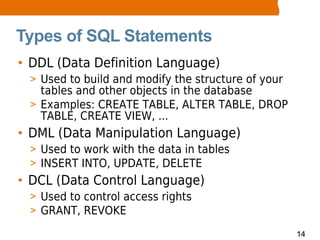
Types of SQL Statements
• DDL (Data Definition Language)
 > Used to build and modify the structure of your
   tables and other objects in the database
 > Examples: CREATE TABLE, ALTER TABLE, DROP
   TABLE, CREATE VIEW, ...
• DML (Data Manipulation Language)
 > Used to work with the data in tables
 > INSERT INTO, UPDATE, DELETE
• DCL (Data Control Language)
 > Used to control access rights
 > GRANT, REVOKE

                                                    14
SQL Basics:
 Databases
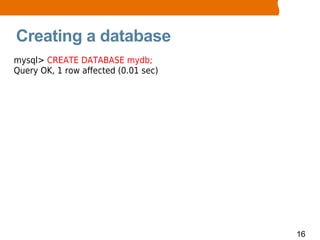
Creating a database
mysql> CREATE DATABASE mydb;
Query OK, 1 row affected (0.01 sec)


                                      16
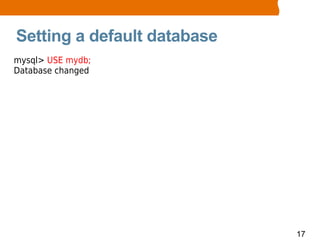
Setting a default database
mysql> USE mydb;
Database changed


                             17
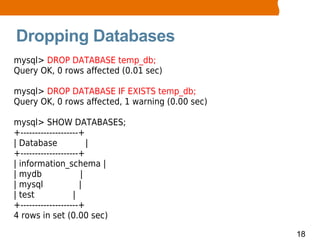
Dropping Databases
mysql> DROP DATABASE temp_db;
Query OK, 0 rows affected (0.01 sec)

mysql> DROP DATABASE IF EXISTS temp_db;
Query OK, 0 rows affected, 1 warning (0.00 sec)

mysql> SHOW DATABASES;
+--------------------+
| Database             |
+--------------------+
| information_schema |
| mydb               |
| mysql              |
| test             |
+--------------------+
4 rows in set (0.00 sec)

                                                  18
SQL Basics:
  Tables
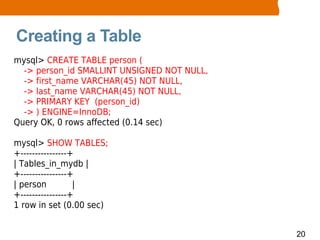
Creating a Table
mysql> CREATE TABLE person (
  -> person_id SMALLINT UNSIGNED NOT NULL,
  -> first_name VARCHAR(45) NOT NULL,
  -> last_name VARCHAR(45) NOT NULL,
  -> PRIMARY KEY (person_id)
  -> ) ENGINE=InnoDB;
Query OK, 0 rows affected (0.14 sec)

mysql> SHOW TABLES;
+----------------+
| Tables_in_mydb |
+----------------+
| person          |
+----------------+
1 row in set (0.00 sec)


                                             20
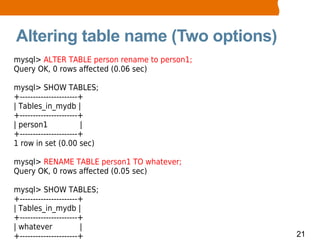
Altering table name (Two options)
mysql> ALTER TABLE person rename to person1;
Query OK, 0 rows affected (0.06 sec)

mysql> SHOW TABLES;
+----------------------+
| Tables_in_mydb |
+----------------------+
| person1              |
+----------------------+
1 row in set (0.00 sec)

mysql> RENAME TABLE person1 TO whatever;
Query OK, 0 rows affected (0.05 sec)

mysql> SHOW TABLES;
+----------------------+
| Tables_in_mydb |
+----------------------+
| whatever             |
+----------------------+                       21
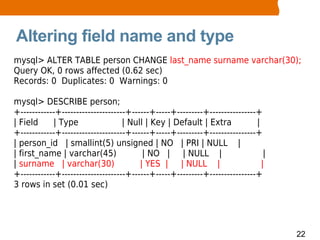
Altering field name and type
mysql> ALTER TABLE person CHANGE last_name surname varchar(30);
Query OK, 0 rows affected (0.62 sec)
Records: 0 Duplicates: 0 Warnings: 0

mysql> DESCRIBE person;
+------------+----------------------+------+-----+---------+----------------+
| Field     | Type                 | Null | Key | Default | Extra           |
+------------+----------------------+------+-----+---------+----------------+
| person_id | smallint(5) unsigned | NO | PRI | NULL |
| first_name | varchar(45)               | NO | | NULL |                       |
| surname | varchar(30)                 | YES | | NULL |                      |
+------------+----------------------+------+-----+---------+----------------+
3 rows in set (0.01 sec)


                                                                                   22
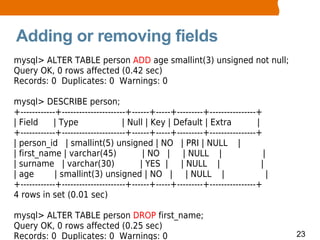
Adding or removing fields
mysql> ALTER TABLE person ADD age smallint(3) unsigned not null;
Query OK, 0 rows affected (0.42 sec)
Records: 0 Duplicates: 0 Warnings: 0

mysql> DESCRIBE person;
+------------+----------------------+------+-----+---------+----------------+
| Field     | Type                 | Null | Key | Default | Extra           |
+------------+----------------------+------+-----+---------+----------------+
| person_id | smallint(5) unsigned | NO | PRI | NULL |
| first_name | varchar(45)               | NO | | NULL |                       |
| surname | varchar(30)                 | YES | | NULL |                      |
| age        | smallint(3) unsigned | NO | | NULL |                             |
+------------+----------------------+------+-----+---------+----------------+
4 rows in set (0.01 sec)

mysql> ALTER TABLE person DROP first_name;
Query OK, 0 rows affected (0.25 sec)
Records: 0 Duplicates: 0 Warnings: 0                                                23
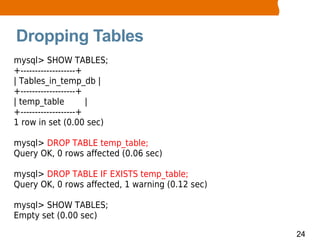
Dropping Tables
mysql> SHOW TABLES;
+-------------------+
| Tables_in_temp_db |
+-------------------+
| temp_table          |
+-------------------+
1 row in set (0.00 sec)

mysql> DROP TABLE temp_table;
Query OK, 0 rows affected (0.06 sec)

mysql> DROP TABLE IF EXISTS temp_table;
Query OK, 0 rows affected, 1 warning (0.12 sec)

mysql> SHOW TABLES;
Empty set (0.00 sec)

                                                  24
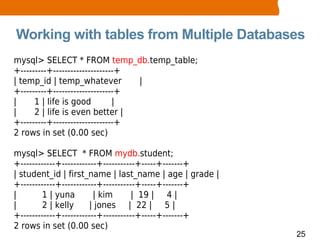
Working with tables from Multiple Databases
mysql> SELECT * FROM temp_db.temp_table;
+---------+---------------------+
| temp_id | temp_whatever         |
+---------+---------------------+
|     1 | life is good         |
|     2 | life is even better |
+---------+---------------------+
2 rows in set (0.00 sec)

mysql> SELECT * FROM mydb.student;
+------------+------------+-----------+-----+-------+
| student_id | first_name | last_name | age | grade |
+------------+------------+-----------+-----+-------+
|        1 | yuna        | kim       | 19 | 4 |
|        2 | kelly      | jones | 22 | 5 |
+------------+------------+-----------+-----+-------+
2 rows in set (0.00 sec)
                                                        25
SQL Basics:
  Fields
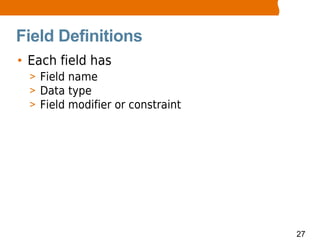
Field Definitions
• Each field has
  > Field name
  > Data type
  > Field modifier or constraint


                                   27
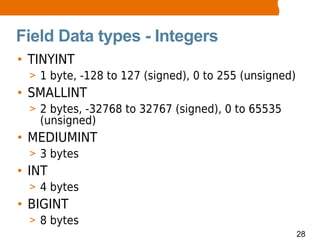
Field Data types - Integers
• TINYINT
  > 1 byte, -128 to 127 (signed), 0 to 255 (unsigned)
• SMALLINT
  > 2 bytes, -32768 to 32767 (signed), 0 to 65535
    (unsigned)
• MEDIUMINT
  > 3 bytes
• INT
  > 4 bytes
• BIGINT
  > 8 bytes
                                                        28
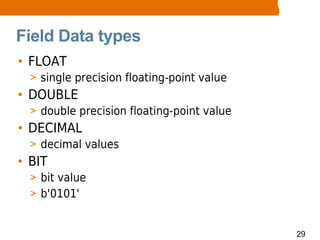
Field Data types
• FLOAT
  > single precision floating-point value
• DOUBLE
  > double precision floating-point value
• DECIMAL
  > decimal values
• BIT
  > bit value
  > b'0101'


                                            29
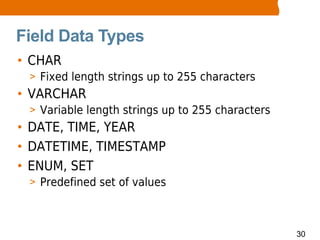
Field Data Types
• CHAR
 > Fixed length strings up to 255 characters
• VARCHAR
 > Variable length strings up to 255 characters
• DATE, TIME, YEAR
• DATETIME, TIMESTAMP
• ENUM, SET
 > Predefined set of values


                                                  30
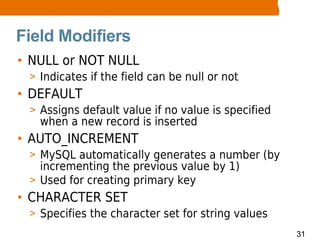
Field Modifiers
• NULL or NOT NULL
 > Indicates if the field can be null or not
• DEFAULT
 > Assigns default value if no value is specified
   when a new record is inserted
• AUTO_INCREMENT
 > MySQL automatically generates a number (by
   incrementing the previous value by 1)
 > Used for creating primary key
• CHARACTER SET
 > Specifies the character set for string values
                                                    31
SQL Basics:
INSERT/UPDATE/DELETE
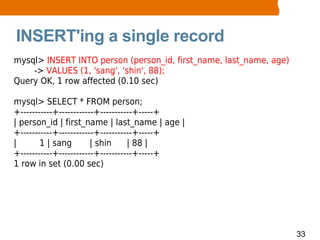
INSERT'ing a single record
mysql> INSERT INTO person (person_id, first_name, last_name, age)
    -> VALUES (1, 'sang', 'shin', 88);
Query OK, 1 row affected (0.10 sec)

mysql> SELECT * FROM person;
+-----------+------------+-----------+-----+
| person_id | first_name | last_name | age |
+-----------+------------+-----------+-----+
|       1 | sang        | shin     | 88 |
+-----------+------------+-----------+-----+
1 row in set (0.00 sec)


                                                                    33
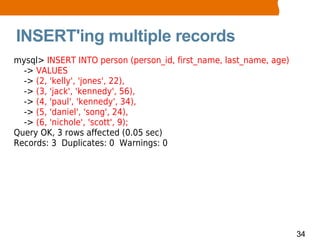
INSERT'ing multiple records
mysql> INSERT INTO person (person_id, first_name, last_name, age)
  -> VALUES
  -> (2, 'kelly', 'jones', 22),
  -> (3, 'jack', 'kennedy', 56),
  -> (4, 'paul', 'kennedy', 34),
  -> (5, 'daniel', 'song', 24),
  -> (6, 'nichole', 'scott', 9);
Query OK, 3 rows affected (0.05 sec)
Records: 3 Duplicates: 0 Warnings: 0


                                                                    34
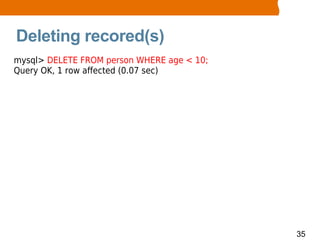
Deleting recored(s)
mysql> DELETE FROM person WHERE age < 10;
Query OK, 1 row affected (0.07 sec)


                                            35
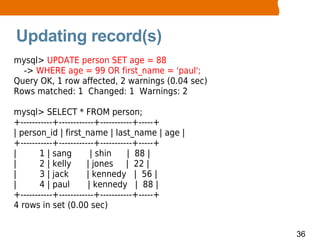
Updating record(s)
mysql> UPDATE person SET age = 88
  -> WHERE age = 99 OR first_name = 'paul';
Query OK, 1 row affected, 2 warnings (0.04 sec)
Rows matched: 1 Changed: 1 Warnings: 2

mysql> SELECT * FROM person;
+-----------+------------+-----------+-----+
| person_id | first_name | last_name | age |
+-----------+------------+-----------+-----+
|       1 | sang        | shin     | 88 |
|       2 | kelly      | jones | 22 |
|       3 | jack       | kennedy | 56 |
|       4 | paul       | kennedy | 88 |
+-----------+------------+-----------+-----+
4 rows in set (0.00 sec)


                                                  36
SQL Basics:
 SELECT
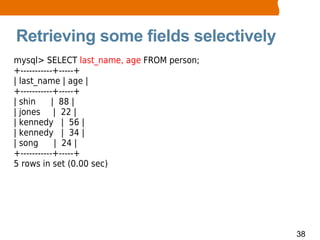
Retrieving some fields selectively
mysql> SELECT last_name, age FROM person;
+-----------+-----+
| last_name | age |
+-----------+-----+
| shin      | 88 |
| jones | 22 |
| kennedy | 56 |
| kennedy | 34 |
| song       | 24 |
+-----------+-----+
5 rows in set (0.00 sec)


                                            38
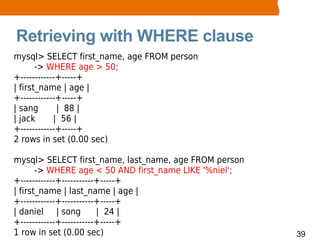
Retrieving with WHERE clause
mysql> SELECT first_name, age FROM person
       -> WHERE age > 50;
+------------+-----+
| first_name | age |
+------------+-----+
| sang       | 88 |
| jack      | 56 |
+------------+-----+
2 rows in set (0.00 sec)

mysql> SELECT first_name, last_name, age FROM person
       -> WHERE age < 50 AND first_name LIKE '%niel';
+------------+-----------+-----+
| first_name | last_name | age |
+------------+-----------+-----+
| daniel | song          | 24 |
+------------+-----------+-----+
1 row in set (0.00 sec)                                 39
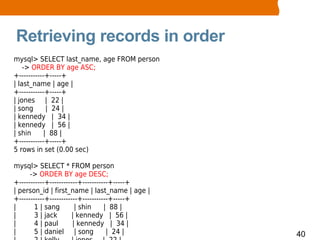
Retrieving records in order
mysql> SELECT last_name, age FROM person
    -> ORDER BY age ASC;
+-----------+-----+
| last_name | age |
+-----------+-----+
| jones | 22 |
| song       | 24 |
| kennedy | 34 |
| kennedy | 56 |
| shin      | 88 |
+-----------+-----+
5 rows in set (0.00 sec)

mysql> SELECT * FROM person
      -> ORDER BY age DESC;
+-----------+------------+-----------+-----+
| person_id | first_name | last_name | age |
+-----------+------------+-----------+-----+
|       1 | sang        | shin     | 88 |
|       3 | jack      | kennedy | 56 |
|       4 | paul       | kennedy | 34 |
|       5 | daniel | song           | 24 |     40
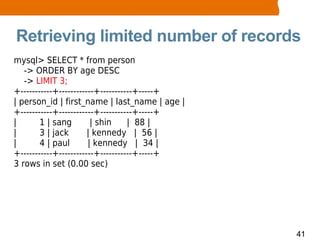
Retrieving limited number of records
mysql> SELECT * from person
   -> ORDER BY age DESC
   -> LIMIT 3;
+-----------+------------+-----------+-----+
| person_id | first_name | last_name | age |
+-----------+------------+-----------+-----+
|       1 | sang        | shin     | 88 |
|       3 | jack       | kennedy | 56 |
|       4 | paul       | kennedy | 34 |
+-----------+------------+-----------+-----+
3 rows in set (0.00 sec)


                                               41
Basic SQL Commands:
 Arithmetic Functions
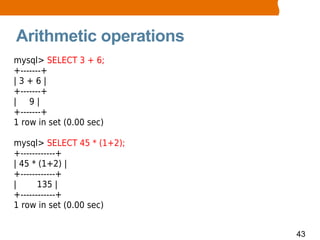
Arithmetic operations
mysql> SELECT 3 + 6;
+-------+
|3+6|
+-------+
| 9|
+-------+
1 row in set (0.00 sec)

mysql> SELECT 45 * (1+2);
+------------+
| 45 * (1+2) |
+------------+
|      135 |
+------------+
1 row in set (0.00 sec)


                            43
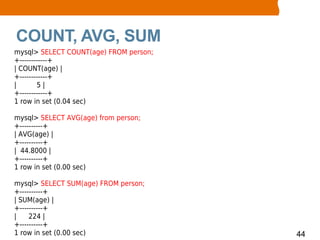
COUNT, AVG, SUM
mysql> SELECT COUNT(age) FROM person;
+------------+
| COUNT(age) |
+------------+
|       5|
+------------+
1 row in set (0.04 sec)

mysql> SELECT AVG(age) from person;
+----------+
| AVG(age) |
+----------+
| 44.8000 |
+----------+
1 row in set (0.00 sec)

mysql> SELECT SUM(age) FROM person;
+----------+
| SUM(age) |
+----------+
|    224 |
+----------+
1 row in set (0.00 sec)                 44
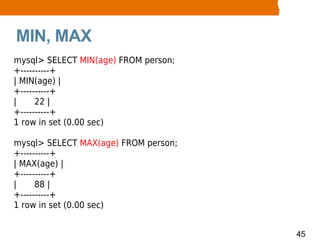
MIN, MAX
mysql> SELECT MIN(age) FROM person;
+----------+
| MIN(age) |
+----------+
|     22 |
+----------+
1 row in set (0.00 sec)

mysql> SELECT MAX(age) FROM person;
+----------+
| MAX(age) |
+----------+
|     88 |
+----------+
1 row in set (0.00 sec)


                                      45
Reading and Executing
   SQL Script File
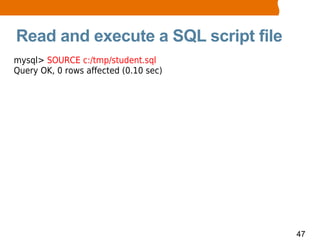
Read and execute a SQL script file
mysql> SOURCE c:/tmp/student.sql
Query OK, 0 rows affected (0.10 sec)


                                       47
Thank you!


         Sang Shin
http://www.javapassion.com
     “Learning is fun!”

                             48
                             49

Mysql basics1

  • 1.
    MySQL Basics I Sang Shin http://www.javapassion.com “Learning is fun!” 1
  • 2.
    Topics • What is MySQL? • Installation of MySQL server • “mysql” command-line client • SQL basics > Concept & terminology > Databases, tables, fields > Insert/Update/Delete > Retrieving records through SELECT > Arithmetic operations • Read and execute SQL script file 2
  • 3.
  • 4.
    What is MySQL? •Most popular open source database > High performance > High reliability > Ease of use • Runs many of the world's most demanding websites > Yahoo, Google, YouTube, ... • “M” of LAMP (Linux, Apache, MySQL, PHP) stack • Runs on all possible OS platforms 4
  • 5.
    MySQL Products • MySQLcommunity server > Free • MySQL Enterprise > Commercial > Enterprise features - monitoring • MySQL Cluster > Provides fault tolerance • MySQL embedded database > Embedded in small devices • MySQL Workbench > GUI tool 5
  • 6.
  • 7.
    MySQL Server • “mysqld”is a runnable program which represents MySQL database server 7
  • 8.
    Installation Options • Windows > MySQL database server can be installed either runnable program or Windows service • Other platforms (Linux, MacOS, OpenSolaris) > As part of LAMP stack or > Independently as runnable program 8
  • 9.
  • 10.
    What is “mysql”command-line client? • Comes with MySQL package • Connects to the running MySQL database server when run • Can be run either in interactive mode or non-interactive mode • When run in interactive mode, it provides a shell in which SQL commands can be executed • Can be run with many options > mysql --help 10
  • 11.
  • 12.
    What is SQL? •SQL is language for retrieving and manipulating data in a relational database > Data definition > Data manipulation > Data control • Open standard - ANSI > Vendor implementations add vendor-specific features, however 12
  • 13.
    SQL Terminology • Table > A set of rows > Analogous to a “file” • Row > Analogous to a record of a “file” • Column > A column is analogous to a field of a record > Each column in a given row has a single value • Primary Key > One of more columns whose contents are unique within a table and thus can be used to identify a row of that table 13
  • 14.
    Types of SQLStatements • DDL (Data Definition Language) > Used to build and modify the structure of your tables and other objects in the database > Examples: CREATE TABLE, ALTER TABLE, DROP TABLE, CREATE VIEW, ... • DML (Data Manipulation Language) > Used to work with the data in tables > INSERT INTO, UPDATE, DELETE • DCL (Data Control Language) > Used to control access rights > GRANT, REVOKE 14
  • 15.
  • 16.
    Creating a database mysql>CREATE DATABASE mydb; Query OK, 1 row affected (0.01 sec) 16
  • 17.
    Setting a defaultdatabase mysql> USE mydb; Database changed 17
  • 18.
    Dropping Databases mysql> DROPDATABASE temp_db; Query OK, 0 rows affected (0.01 sec) mysql> DROP DATABASE IF EXISTS temp_db; Query OK, 0 rows affected, 1 warning (0.00 sec) mysql> SHOW DATABASES; +--------------------+ | Database | +--------------------+ | information_schema | | mydb | | mysql | | test | +--------------------+ 4 rows in set (0.00 sec) 18
  • 19.
  • 20.
    Creating a Table mysql>CREATE TABLE person ( -> person_id SMALLINT UNSIGNED NOT NULL, -> first_name VARCHAR(45) NOT NULL, -> last_name VARCHAR(45) NOT NULL, -> PRIMARY KEY (person_id) -> ) ENGINE=InnoDB; Query OK, 0 rows affected (0.14 sec) mysql> SHOW TABLES; +----------------+ | Tables_in_mydb | +----------------+ | person | +----------------+ 1 row in set (0.00 sec) 20
  • 21.
    Altering table name(Two options) mysql> ALTER TABLE person rename to person1; Query OK, 0 rows affected (0.06 sec) mysql> SHOW TABLES; +----------------------+ | Tables_in_mydb | +----------------------+ | person1 | +----------------------+ 1 row in set (0.00 sec) mysql> RENAME TABLE person1 TO whatever; Query OK, 0 rows affected (0.05 sec) mysql> SHOW TABLES; +----------------------+ | Tables_in_mydb | +----------------------+ | whatever | +----------------------+ 21
  • 22.
    Altering field nameand type mysql> ALTER TABLE person CHANGE last_name surname varchar(30); Query OK, 0 rows affected (0.62 sec) Records: 0 Duplicates: 0 Warnings: 0 mysql> DESCRIBE person; +------------+----------------------+------+-----+---------+----------------+ | Field | Type | Null | Key | Default | Extra | +------------+----------------------+------+-----+---------+----------------+ | person_id | smallint(5) unsigned | NO | PRI | NULL | | first_name | varchar(45) | NO | | NULL | | | surname | varchar(30) | YES | | NULL | | +------------+----------------------+------+-----+---------+----------------+ 3 rows in set (0.01 sec) 22
  • 23.
    Adding or removingfields mysql> ALTER TABLE person ADD age smallint(3) unsigned not null; Query OK, 0 rows affected (0.42 sec) Records: 0 Duplicates: 0 Warnings: 0 mysql> DESCRIBE person; +------------+----------------------+------+-----+---------+----------------+ | Field | Type | Null | Key | Default | Extra | +------------+----------------------+------+-----+---------+----------------+ | person_id | smallint(5) unsigned | NO | PRI | NULL | | first_name | varchar(45) | NO | | NULL | | | surname | varchar(30) | YES | | NULL | | | age | smallint(3) unsigned | NO | | NULL | | +------------+----------------------+------+-----+---------+----------------+ 4 rows in set (0.01 sec) mysql> ALTER TABLE person DROP first_name; Query OK, 0 rows affected (0.25 sec) Records: 0 Duplicates: 0 Warnings: 0 23
  • 24.
    Dropping Tables mysql> SHOWTABLES; +-------------------+ | Tables_in_temp_db | +-------------------+ | temp_table | +-------------------+ 1 row in set (0.00 sec) mysql> DROP TABLE temp_table; Query OK, 0 rows affected (0.06 sec) mysql> DROP TABLE IF EXISTS temp_table; Query OK, 0 rows affected, 1 warning (0.12 sec) mysql> SHOW TABLES; Empty set (0.00 sec) 24
  • 25.
    Working with tablesfrom Multiple Databases mysql> SELECT * FROM temp_db.temp_table; +---------+---------------------+ | temp_id | temp_whatever | +---------+---------------------+ | 1 | life is good | | 2 | life is even better | +---------+---------------------+ 2 rows in set (0.00 sec) mysql> SELECT * FROM mydb.student; +------------+------------+-----------+-----+-------+ | student_id | first_name | last_name | age | grade | +------------+------------+-----------+-----+-------+ | 1 | yuna | kim | 19 | 4 | | 2 | kelly | jones | 22 | 5 | +------------+------------+-----------+-----+-------+ 2 rows in set (0.00 sec) 25
  • 26.
  • 27.
    Field Definitions • Eachfield has > Field name > Data type > Field modifier or constraint 27
  • 28.
    Field Data types- Integers • TINYINT > 1 byte, -128 to 127 (signed), 0 to 255 (unsigned) • SMALLINT > 2 bytes, -32768 to 32767 (signed), 0 to 65535 (unsigned) • MEDIUMINT > 3 bytes • INT > 4 bytes • BIGINT > 8 bytes 28
  • 29.
    Field Data types •FLOAT > single precision floating-point value • DOUBLE > double precision floating-point value • DECIMAL > decimal values • BIT > bit value > b'0101' 29
  • 30.
    Field Data Types •CHAR > Fixed length strings up to 255 characters • VARCHAR > Variable length strings up to 255 characters • DATE, TIME, YEAR • DATETIME, TIMESTAMP • ENUM, SET > Predefined set of values 30
  • 31.
    Field Modifiers • NULLor NOT NULL > Indicates if the field can be null or not • DEFAULT > Assigns default value if no value is specified when a new record is inserted • AUTO_INCREMENT > MySQL automatically generates a number (by incrementing the previous value by 1) > Used for creating primary key • CHARACTER SET > Specifies the character set for string values 31
  • 32.
  • 33.
    INSERT'ing a singlerecord mysql> INSERT INTO person (person_id, first_name, last_name, age) -> VALUES (1, 'sang', 'shin', 88); Query OK, 1 row affected (0.10 sec) mysql> SELECT * FROM person; +-----------+------------+-----------+-----+ | person_id | first_name | last_name | age | +-----------+------------+-----------+-----+ | 1 | sang | shin | 88 | +-----------+------------+-----------+-----+ 1 row in set (0.00 sec) 33
  • 34.
    INSERT'ing multiple records mysql>INSERT INTO person (person_id, first_name, last_name, age) -> VALUES -> (2, 'kelly', 'jones', 22), -> (3, 'jack', 'kennedy', 56), -> (4, 'paul', 'kennedy', 34), -> (5, 'daniel', 'song', 24), -> (6, 'nichole', 'scott', 9); Query OK, 3 rows affected (0.05 sec) Records: 3 Duplicates: 0 Warnings: 0 34
  • 35.
    Deleting recored(s) mysql> DELETEFROM person WHERE age < 10; Query OK, 1 row affected (0.07 sec) 35
  • 36.
    Updating record(s) mysql> UPDATEperson SET age = 88 -> WHERE age = 99 OR first_name = 'paul'; Query OK, 1 row affected, 2 warnings (0.04 sec) Rows matched: 1 Changed: 1 Warnings: 2 mysql> SELECT * FROM person; +-----------+------------+-----------+-----+ | person_id | first_name | last_name | age | +-----------+------------+-----------+-----+ | 1 | sang | shin | 88 | | 2 | kelly | jones | 22 | | 3 | jack | kennedy | 56 | | 4 | paul | kennedy | 88 | +-----------+------------+-----------+-----+ 4 rows in set (0.00 sec) 36
  • 37.
  • 38.
    Retrieving some fieldsselectively mysql> SELECT last_name, age FROM person; +-----------+-----+ | last_name | age | +-----------+-----+ | shin | 88 | | jones | 22 | | kennedy | 56 | | kennedy | 34 | | song | 24 | +-----------+-----+ 5 rows in set (0.00 sec) 38
  • 39.
    Retrieving with WHEREclause mysql> SELECT first_name, age FROM person -> WHERE age > 50; +------------+-----+ | first_name | age | +------------+-----+ | sang | 88 | | jack | 56 | +------------+-----+ 2 rows in set (0.00 sec) mysql> SELECT first_name, last_name, age FROM person -> WHERE age < 50 AND first_name LIKE '%niel'; +------------+-----------+-----+ | first_name | last_name | age | +------------+-----------+-----+ | daniel | song | 24 | +------------+-----------+-----+ 1 row in set (0.00 sec) 39
  • 40.
    Retrieving records inorder mysql> SELECT last_name, age FROM person -> ORDER BY age ASC; +-----------+-----+ | last_name | age | +-----------+-----+ | jones | 22 | | song | 24 | | kennedy | 34 | | kennedy | 56 | | shin | 88 | +-----------+-----+ 5 rows in set (0.00 sec) mysql> SELECT * FROM person -> ORDER BY age DESC; +-----------+------------+-----------+-----+ | person_id | first_name | last_name | age | +-----------+------------+-----------+-----+ | 1 | sang | shin | 88 | | 3 | jack | kennedy | 56 | | 4 | paul | kennedy | 34 | | 5 | daniel | song | 24 | 40
  • 41.
    Retrieving limited numberof records mysql> SELECT * from person -> ORDER BY age DESC -> LIMIT 3; +-----------+------------+-----------+-----+ | person_id | first_name | last_name | age | +-----------+------------+-----------+-----+ | 1 | sang | shin | 88 | | 3 | jack | kennedy | 56 | | 4 | paul | kennedy | 34 | +-----------+------------+-----------+-----+ 3 rows in set (0.00 sec) 41
  • 42.
    Basic SQL Commands: Arithmetic Functions
  • 43.
    Arithmetic operations mysql> SELECT3 + 6; +-------+ |3+6| +-------+ | 9| +-------+ 1 row in set (0.00 sec) mysql> SELECT 45 * (1+2); +------------+ | 45 * (1+2) | +------------+ | 135 | +------------+ 1 row in set (0.00 sec) 43
  • 44.
    COUNT, AVG, SUM mysql>SELECT COUNT(age) FROM person; +------------+ | COUNT(age) | +------------+ | 5| +------------+ 1 row in set (0.04 sec) mysql> SELECT AVG(age) from person; +----------+ | AVG(age) | +----------+ | 44.8000 | +----------+ 1 row in set (0.00 sec) mysql> SELECT SUM(age) FROM person; +----------+ | SUM(age) | +----------+ | 224 | +----------+ 1 row in set (0.00 sec) 44
  • 45.
    MIN, MAX mysql> SELECTMIN(age) FROM person; +----------+ | MIN(age) | +----------+ | 22 | +----------+ 1 row in set (0.00 sec) mysql> SELECT MAX(age) FROM person; +----------+ | MAX(age) | +----------+ | 88 | +----------+ 1 row in set (0.00 sec) 45
  • 46.
    Reading and Executing SQL Script File
  • 47.
    Read and executea SQL script file mysql> SOURCE c:/tmp/student.sql Query OK, 0 rows affected (0.10 sec) 47
  • 48.
    Thank you! Sang Shin http://www.javapassion.com “Learning is fun!” 48 49