MYSQL BASICS
#burningkeyboards
@denis_ristic
MYSQL BASICS
INTRO
‣ MySQL is the most popular Open Source Relational SQL Database
Management System
‣ A database is a separate application that stores a collection of data. Each
database has one or more distinct APIs for creating, accessing, managing,
searching and replicating the data it holds.
‣ A Relational DataBase Management System (RDBMS) is a software that:
‣ Enables you to implement a database with tables, columns and indexes.
‣ Guarantees the Referential Integrity between rows of various tables.
‣ Updates the indexes automatically.
‣ Interprets an SQL query and combines information from various tables.
2
MYSQL BASICS
TERMINOLOGY
‣ Database − A database is a collection of tables, with related data.
‣ Table − A table is a matrix with data. A table in a database looks like a simple spreadsheet.
‣ Column − One column (data element) contains data of one and the same kind, for example the column
postcode.
‣ Row − A row (= tuple, entry or record) is a group of related data, for example the data of one subscription.
‣ Redundancy − Storing data twice, redundantly to make the system faster.
‣ Primary Key − A primary key is unique. A key value can not occur twice in one table. With a key, you can only
find one row.
‣ Foreign Key − A foreign key is the linking pin between two tables.
‣ Compound Key − A compound key (composite key) is a key that consists of multiple columns, because one
column is not sufficiently unique.
‣ Index − An index in a database resembles an index at the back of a book.
‣ Referential Integrity − Referential Integrity makes sure that a foreign key value always points to an existing
row.
3
MYSQL BASICS
CREATING AND USING A DATABASE
‣ CREATE DATABASE mydatabase;
‣ USE mydatabase;
‣ GRANT ALL ON menagerie.* TO ‘user'@'localhost';
‣ SHOW TABLES;
‣ CREATE TABLE pets (name VARCHAR(20), owner
VARCHAR(20), species VARCHAR(20), sex CHAR(1), birth
DATE, death DATE);
‣ DESCRIBE pets;
4
MYSQL BASICS
INSERTING DATA
‣ LOAD DATA LOCAL INFILE '/path/pet.txt' INTO TABLE
pets;
‣ Whistler Gwen bird N 1997-12-09 N
‣ INSERT INTO pets VALUES
('Puffball','Diane','hamster','f','1999-03-30',NULL);
5
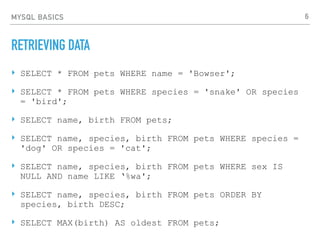
MYSQL BASICS
RETRIEVING DATA
‣ SELECT * FROM pets WHERE name = 'Bowser';
‣ SELECT * FROM pets WHERE species = 'snake' OR species
= 'bird';
‣ SELECT name, birth FROM pets;
‣ SELECT name, species, birth FROM pets WHERE species =
'dog' OR species = 'cat';
‣ SELECT name, species, birth FROM pets WHERE sex IS
NULL AND name LIKE ‘%wa';
‣ SELECT name, species, birth FROM pets ORDER BY
species, birth DESC;
‣ SELECT MAX(birth) AS oldest FROM pets;
6
MYSQL BASICS
UPDATING AND DELETING DATA
‣ UPDATE pets SET sex = NULL WHERE species = 'dog' OR
species = 'cat';
‣ DELETE FROM pets WHERE species = 'dog';
7
MYSQL BASICS
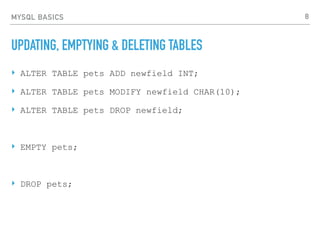
UPDATING, EMPTYING & DELETING TABLES
‣ ALTER TABLE pets ADD newfield INT;
‣ ALTER TABLE pets MODIFY newfield CHAR(10);
‣ ALTER TABLE pets DROP newfield;
‣ EMPTY pets;
‣ DROP pets;
8
MYSQL BASICS
JOINS
SELECT a.tutorial_id, a.tutorial_author,
b.tutorial_count
FROM tutorials_tbl AS a, tcount_tbl AS b
WHERE a.tutorial_author = b.tutorial_author;
SELECT a.tutorial_id, a.tutorial_author,
b.tutorial_count
FROM tutorials_tbl AS a
LEFT JOIN tcount_tbl AS b ON a.tutorial_author =
b.tutorial_author;
9
MYSQL BASICS
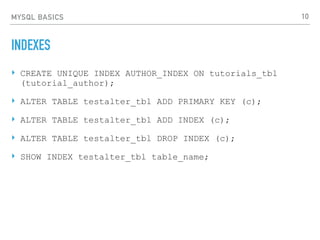
INDEXES
‣ CREATE UNIQUE INDEX AUTHOR_INDEX ON tutorials_tbl
(tutorial_author);
‣ ALTER TABLE testalter_tbl ADD PRIMARY KEY (c);
‣ ALTER TABLE testalter_tbl ADD INDEX (c);
‣ ALTER TABLE testalter_tbl DROP INDEX (c);
‣ SHOW INDEX testalter_tbl table_name;
10
MYSQL BASICS
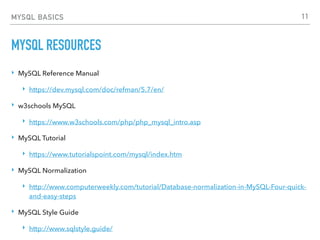
MYSQL RESOURCES
‣ MySQL Reference Manual
‣ https://dev.mysql.com/doc/refman/5.7/en/
‣ w3schools MySQL
‣ https://www.w3schools.com/php/php_mysql_intro.asp
‣ MySQL Tutorial
‣ https://www.tutorialspoint.com/mysql/index.htm
‣ MySQL Normalization
‣ http://www.computerweekly.com/tutorial/Database-normalization-in-MySQL-Four-quick-
and-easy-steps
‣ MySQL Style Guide
‣ http://www.sqlstyle.guide/
11
MYSQL
OPTIMIZATION
MYSQL OPTIMIZATION
EXPLAIN
desc recipes;
+-------------+--------------+------+-----+---------+----------------+
| Field | Type | Null | Key | Default | Extra |
+-------------+--------------+------+-----+---------+----------------+
| id | int(11) | NO | PRI | NULL | auto_increment |
| name | varchar(400) | NO | MUL | NULL | |
| description | text | YES | | NULL | |
| category_id | int(11) | YES | MUL | NULL | |
| chef_id | int(255) | NO | MUL | NULL | |
| created | datetime | YES | | NULL | |
+-------------+--------------+------+-----+---------+----------------+
13
MYSQL OPTIMIZATION
EXPLAIN
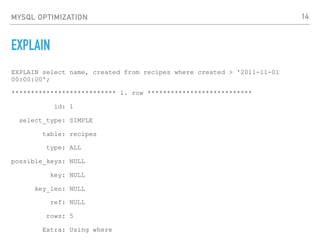
EXPLAIN select name, created from recipes where created > '2011-11-01
00:00:00';
*************************** 1. row ***************************
id: 1
select_type: SIMPLE
table: recipes
type: ALL
possible_keys: NULL
key: NULL
key_len: NULL
ref: NULL
rows: 5
Extra: Using where
14
MYSQL OPTIMIZATION
EXPLAIN
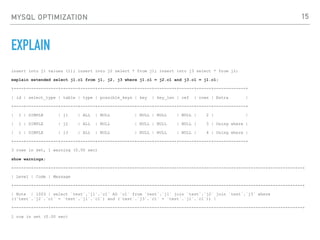
insert into j1 values (1); insert into j2 select * from j1; insert into j3 select * from j2;
explain extended select j1.c1 from j1, j2, j3 where j1.c1 = j2.c1 and j3.c1 = j1.c1;
+----+-------------+-------+------+---------------+------+---------+------+------+-------------+
| id | select_type | table | type | possible_keys | key | key_len | ref | rows | Extra |
+----+-------------+-------+------+---------------+------+---------+------+------+-------------+
| 1 | SIMPLE | j1 | ALL | NULL | NULL | NULL | NULL | 2 | |
| 1 | SIMPLE | j2 | ALL | NULL | NULL | NULL | NULL | 3 | Using where |
| 1 | SIMPLE | j3 | ALL | NULL | NULL | NULL | NULL | 4 | Using where |
+----+-------------+-------+------+---------------+------+---------+------+------+-------------+
3 rows in set, 1 warning (0.00 sec)
show warnings;
+-------+------+------------------------------------------------------------------------------------------------------+
| Level | Code | Message
+-------+------+------------------------------------------------------------------------------------------------------+
| Note | 1003 | select `test`.`j1`.`c1` AS `c1` from `test`.`j1` join `test`.`j2` join `test`.`j3` where
((`test`.`j2`.`c1` = `test`.`j1`.`c1`) and (`test`.`j3`.`c1` = `test`.`j1`.`c1`)) |
+-------+------+------------------------------------------------------------------------------------------------------+
1 row in set (0.00 sec)
15
MYSQL OPTIMIZATION
SLOW QUERY LOG
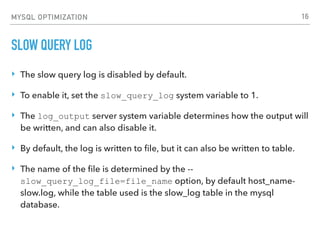
‣ The slow query log is disabled by default.
‣ To enable it, set the slow_query_log system variable to 1.
‣ The log_output server system variable determines how the output will
be written, and can also disable it.
‣ By default, the log is written to file, but it can also be written to table.
‣ The name of the file is determined by the --
slow_query_log_file=file_name option, by default host_name-
slow.log, while the table used is the slow_log table in the mysql
database.
16
MYSQL OPTIMIZATION
SLOW QUERY LOG
‣ Slow query is defined as a query that takes longer than long_query_time
to run, by default 10 seconds. Microseconds are allowed for logging into
file, but not for logging into a table. This value can be adjusted dynamically.
‣ By default only non-administrative statements are logged, as well as queries
that use indexes. It can be particularly useful to include queries without
indexes in the log (regardless of time taken), and this is set with the
log_queries_not_using_indexes setting. Queries on tables containing
0 rows or 1 row will not be logged.
‣ Slow administrative queries, which include ALTER TABLE, ANALYZE TABLE,
CHECK TABLE, CREATE INDEX, DROP INDEX, OPTIMIZE TABLE, and
REPAIR TABLE statements, can also be stored by using the --log-slow-
admin-statements setting.
17
MYSQL OPTIMIZATION
MYSQL OPTIMIZATION
‣ mysqltunner.pl
‣ https://raw.githubusercontent.com/major/MySQLTuner-perl/master/mysqltuner.pl
‣ Before we start:
‣ Change one setting at a time! This is the only way to estimate if a change is beneficial.
‣ Most settings can be changed at runtime with SET GLOBAL. It is very handy and it allows you to quickly
revert the change if it creates any problem. But in the end, you want the setting to be adjusted
permanently in the configuration file.
‣ A change in the configuration is not visible even after a MySQL restart? Did you use the correct
configuration file? Did you put the setting in the right section [mysqld]?
‣ The server refuses to start after a change: did you use the correct unit? For instance,
innodb_buffer_pool_size should be set in bytes while max_connection is dimensionless.
‣ Do not allow duplicate settings in the configuration file. If you want to keep track of the changes, use
version control.
‣ Don’t do naive math, like “my new server has 2x RAM, I’ll just make all the values 2x the previous ones”.
18
MYSQL OPTIMIZATION
MYSQL OPTIMIZATION
./mysqltuner.pl
>> MySQLTuner 0.9.8 - Major Hayden <major@mhtx.net>
>> Bug reports, feature requests, and downloads at http://mysqltuner.com/
>> Run with '--help' for additional options and output filtering
Please enter your MySQL administrative login: <-- root
Please enter your MySQL administrative password: <-- yourrootsqlpassword
-------- General Statistics --------------------------------------------------
[--] Skipped version check for MySQLTuner script
[!!] Your MySQL version 4.1.11-Debian_etch1-log is EOL software! Upgrade soon!
[OK] Operating on 32-bit architecture with less than 2GB RAM
-------- Storage Engine Statistics -------------------------------------------
[--] Status: +Archive -BDB -Federated +InnoDB +ISAM -NDBCluster
[--] Data in MyISAM tables: 301M (Tables: 2074)
[--] Data in HEAP tables: 379K (Tables: 9)
[!!] InnoDB is enabled but isn't being used
[!!] ISAM is enabled but isn't being used
[!!] Total fragmented tables: 215
-------- Performance Metrics -------------------------------------------------
[--] Up for: 12d 18h 33m 30s (1B q [1K qps], 185K conn, TX: 3B, RX: 377M)
[--] Reads / Writes: 78% / 22%
[--] Total buffers: 2.6M per thread and 58.0M global
[OK] Maximum possible memory usage: 320.5M (20% of installed RAM)
[OK] Slow queries: 0% (17/1B)
[OK] Highest usage of available connections: 32% (32/100)
[OK] Key buffer size / total MyISAM indexes: 16.0M/72.3M
[OK] Key buffer hit rate: 99.9%
[OK] Query cache efficiency: 99.9%
[!!] Query cache prunes per day: 47549
[OK] Sorts requiring temporary tables: 0%
[!!] Temporary tables created on disk: 28%
[OK] Thread cache hit rate: 99%
[!!] Table cache hit rate: 0%
[OK] Open file limit used: 12%
[OK] Table locks acquired immediately: 99%
[!!] Connections aborted: 20%
19
MYSQL OPTIMIZATION
MYSQL OPTIMIZATION
-------- Recommendations -----------------------------------------------------
General recommendations:
Add skip-innodb to MySQL configuration to disable InnoDB
Add skip-isam to MySQL configuration to disable ISAM
Run OPTIMIZE TABLE to defragment tables for better performance
Enable the slow query log to troubleshoot bad queries
When making adjustments, make tmp_table_size/max_heap_table_size equal
Reduce your SELECT DISTINCT queries without LIMIT clauses
Increase table_cache gradually to avoid file descriptor limits
Your applications are not closing MySQL connections properly
Variables to adjust:
query_cache_size (> 16M)
tmp_table_size (> 32M)
max_heap_table_size (> 16M)
table_cache (> 64)
20
MYSQL OPTIMIZATION
MYSQL OPTIMIZATION RESOURCES
‣ MySQL Documentation
‣ https://dev.mysql.com/doc/refman/5.7/en/optimization.html
‣ How to Optimize MySQL Performance Using MySQLTuner
‣ https://www.linode.com/docs/databases/mysql/how-to-optimize-
mysql-performance-using-mysqltuner
21

15 MySQL Basics #burningkeyboards

  • 1.
  • 2.
    MYSQL BASICS INTRO ‣ MySQLis the most popular Open Source Relational SQL Database Management System ‣ A database is a separate application that stores a collection of data. Each database has one or more distinct APIs for creating, accessing, managing, searching and replicating the data it holds. ‣ A Relational DataBase Management System (RDBMS) is a software that: ‣ Enables you to implement a database with tables, columns and indexes. ‣ Guarantees the Referential Integrity between rows of various tables. ‣ Updates the indexes automatically. ‣ Interprets an SQL query and combines information from various tables. 2
  • 3.
    MYSQL BASICS TERMINOLOGY ‣ Database− A database is a collection of tables, with related data. ‣ Table − A table is a matrix with data. A table in a database looks like a simple spreadsheet. ‣ Column − One column (data element) contains data of one and the same kind, for example the column postcode. ‣ Row − A row (= tuple, entry or record) is a group of related data, for example the data of one subscription. ‣ Redundancy − Storing data twice, redundantly to make the system faster. ‣ Primary Key − A primary key is unique. A key value can not occur twice in one table. With a key, you can only find one row. ‣ Foreign Key − A foreign key is the linking pin between two tables. ‣ Compound Key − A compound key (composite key) is a key that consists of multiple columns, because one column is not sufficiently unique. ‣ Index − An index in a database resembles an index at the back of a book. ‣ Referential Integrity − Referential Integrity makes sure that a foreign key value always points to an existing row. 3
  • 4.
    MYSQL BASICS CREATING ANDUSING A DATABASE ‣ CREATE DATABASE mydatabase; ‣ USE mydatabase; ‣ GRANT ALL ON menagerie.* TO ‘user'@'localhost'; ‣ SHOW TABLES; ‣ CREATE TABLE pets (name VARCHAR(20), owner VARCHAR(20), species VARCHAR(20), sex CHAR(1), birth DATE, death DATE); ‣ DESCRIBE pets; 4
  • 5.
    MYSQL BASICS INSERTING DATA ‣LOAD DATA LOCAL INFILE '/path/pet.txt' INTO TABLE pets; ‣ Whistler Gwen bird N 1997-12-09 N ‣ INSERT INTO pets VALUES ('Puffball','Diane','hamster','f','1999-03-30',NULL); 5
  • 6.
    MYSQL BASICS RETRIEVING DATA ‣SELECT * FROM pets WHERE name = 'Bowser'; ‣ SELECT * FROM pets WHERE species = 'snake' OR species = 'bird'; ‣ SELECT name, birth FROM pets; ‣ SELECT name, species, birth FROM pets WHERE species = 'dog' OR species = 'cat'; ‣ SELECT name, species, birth FROM pets WHERE sex IS NULL AND name LIKE ‘%wa'; ‣ SELECT name, species, birth FROM pets ORDER BY species, birth DESC; ‣ SELECT MAX(birth) AS oldest FROM pets; 6
  • 7.
    MYSQL BASICS UPDATING ANDDELETING DATA ‣ UPDATE pets SET sex = NULL WHERE species = 'dog' OR species = 'cat'; ‣ DELETE FROM pets WHERE species = 'dog'; 7
  • 8.
    MYSQL BASICS UPDATING, EMPTYING& DELETING TABLES ‣ ALTER TABLE pets ADD newfield INT; ‣ ALTER TABLE pets MODIFY newfield CHAR(10); ‣ ALTER TABLE pets DROP newfield; ‣ EMPTY pets; ‣ DROP pets; 8
  • 9.
    MYSQL BASICS JOINS SELECT a.tutorial_id,a.tutorial_author, b.tutorial_count FROM tutorials_tbl AS a, tcount_tbl AS b WHERE a.tutorial_author = b.tutorial_author; SELECT a.tutorial_id, a.tutorial_author, b.tutorial_count FROM tutorials_tbl AS a LEFT JOIN tcount_tbl AS b ON a.tutorial_author = b.tutorial_author; 9
  • 10.
    MYSQL BASICS INDEXES ‣ CREATEUNIQUE INDEX AUTHOR_INDEX ON tutorials_tbl (tutorial_author); ‣ ALTER TABLE testalter_tbl ADD PRIMARY KEY (c); ‣ ALTER TABLE testalter_tbl ADD INDEX (c); ‣ ALTER TABLE testalter_tbl DROP INDEX (c); ‣ SHOW INDEX testalter_tbl table_name; 10
  • 11.
    MYSQL BASICS MYSQL RESOURCES ‣MySQL Reference Manual ‣ https://dev.mysql.com/doc/refman/5.7/en/ ‣ w3schools MySQL ‣ https://www.w3schools.com/php/php_mysql_intro.asp ‣ MySQL Tutorial ‣ https://www.tutorialspoint.com/mysql/index.htm ‣ MySQL Normalization ‣ http://www.computerweekly.com/tutorial/Database-normalization-in-MySQL-Four-quick- and-easy-steps ‣ MySQL Style Guide ‣ http://www.sqlstyle.guide/ 11
  • 12.
  • 13.
    MYSQL OPTIMIZATION EXPLAIN desc recipes; +-------------+--------------+------+-----+---------+----------------+ |Field | Type | Null | Key | Default | Extra | +-------------+--------------+------+-----+---------+----------------+ | id | int(11) | NO | PRI | NULL | auto_increment | | name | varchar(400) | NO | MUL | NULL | | | description | text | YES | | NULL | | | category_id | int(11) | YES | MUL | NULL | | | chef_id | int(255) | NO | MUL | NULL | | | created | datetime | YES | | NULL | | +-------------+--------------+------+-----+---------+----------------+ 13
  • 14.
    MYSQL OPTIMIZATION EXPLAIN EXPLAIN selectname, created from recipes where created > '2011-11-01 00:00:00'; *************************** 1. row *************************** id: 1 select_type: SIMPLE table: recipes type: ALL possible_keys: NULL key: NULL key_len: NULL ref: NULL rows: 5 Extra: Using where 14
  • 15.
    MYSQL OPTIMIZATION EXPLAIN insert intoj1 values (1); insert into j2 select * from j1; insert into j3 select * from j2; explain extended select j1.c1 from j1, j2, j3 where j1.c1 = j2.c1 and j3.c1 = j1.c1; +----+-------------+-------+------+---------------+------+---------+------+------+-------------+ | id | select_type | table | type | possible_keys | key | key_len | ref | rows | Extra | +----+-------------+-------+------+---------------+------+---------+------+------+-------------+ | 1 | SIMPLE | j1 | ALL | NULL | NULL | NULL | NULL | 2 | | | 1 | SIMPLE | j2 | ALL | NULL | NULL | NULL | NULL | 3 | Using where | | 1 | SIMPLE | j3 | ALL | NULL | NULL | NULL | NULL | 4 | Using where | +----+-------------+-------+------+---------------+------+---------+------+------+-------------+ 3 rows in set, 1 warning (0.00 sec) show warnings; +-------+------+------------------------------------------------------------------------------------------------------+ | Level | Code | Message +-------+------+------------------------------------------------------------------------------------------------------+ | Note | 1003 | select `test`.`j1`.`c1` AS `c1` from `test`.`j1` join `test`.`j2` join `test`.`j3` where ((`test`.`j2`.`c1` = `test`.`j1`.`c1`) and (`test`.`j3`.`c1` = `test`.`j1`.`c1`)) | +-------+------+------------------------------------------------------------------------------------------------------+ 1 row in set (0.00 sec) 15
  • 16.
    MYSQL OPTIMIZATION SLOW QUERYLOG ‣ The slow query log is disabled by default. ‣ To enable it, set the slow_query_log system variable to 1. ‣ The log_output server system variable determines how the output will be written, and can also disable it. ‣ By default, the log is written to file, but it can also be written to table. ‣ The name of the file is determined by the -- slow_query_log_file=file_name option, by default host_name- slow.log, while the table used is the slow_log table in the mysql database. 16
  • 17.
    MYSQL OPTIMIZATION SLOW QUERYLOG ‣ Slow query is defined as a query that takes longer than long_query_time to run, by default 10 seconds. Microseconds are allowed for logging into file, but not for logging into a table. This value can be adjusted dynamically. ‣ By default only non-administrative statements are logged, as well as queries that use indexes. It can be particularly useful to include queries without indexes in the log (regardless of time taken), and this is set with the log_queries_not_using_indexes setting. Queries on tables containing 0 rows or 1 row will not be logged. ‣ Slow administrative queries, which include ALTER TABLE, ANALYZE TABLE, CHECK TABLE, CREATE INDEX, DROP INDEX, OPTIMIZE TABLE, and REPAIR TABLE statements, can also be stored by using the --log-slow- admin-statements setting. 17
  • 18.
    MYSQL OPTIMIZATION MYSQL OPTIMIZATION ‣mysqltunner.pl ‣ https://raw.githubusercontent.com/major/MySQLTuner-perl/master/mysqltuner.pl ‣ Before we start: ‣ Change one setting at a time! This is the only way to estimate if a change is beneficial. ‣ Most settings can be changed at runtime with SET GLOBAL. It is very handy and it allows you to quickly revert the change if it creates any problem. But in the end, you want the setting to be adjusted permanently in the configuration file. ‣ A change in the configuration is not visible even after a MySQL restart? Did you use the correct configuration file? Did you put the setting in the right section [mysqld]? ‣ The server refuses to start after a change: did you use the correct unit? For instance, innodb_buffer_pool_size should be set in bytes while max_connection is dimensionless. ‣ Do not allow duplicate settings in the configuration file. If you want to keep track of the changes, use version control. ‣ Don’t do naive math, like “my new server has 2x RAM, I’ll just make all the values 2x the previous ones”. 18
  • 19.
    MYSQL OPTIMIZATION MYSQL OPTIMIZATION ./mysqltuner.pl >>MySQLTuner 0.9.8 - Major Hayden <major@mhtx.net> >> Bug reports, feature requests, and downloads at http://mysqltuner.com/ >> Run with '--help' for additional options and output filtering Please enter your MySQL administrative login: <-- root Please enter your MySQL administrative password: <-- yourrootsqlpassword -------- General Statistics -------------------------------------------------- [--] Skipped version check for MySQLTuner script [!!] Your MySQL version 4.1.11-Debian_etch1-log is EOL software! Upgrade soon! [OK] Operating on 32-bit architecture with less than 2GB RAM -------- Storage Engine Statistics ------------------------------------------- [--] Status: +Archive -BDB -Federated +InnoDB +ISAM -NDBCluster [--] Data in MyISAM tables: 301M (Tables: 2074) [--] Data in HEAP tables: 379K (Tables: 9) [!!] InnoDB is enabled but isn't being used [!!] ISAM is enabled but isn't being used [!!] Total fragmented tables: 215 -------- Performance Metrics ------------------------------------------------- [--] Up for: 12d 18h 33m 30s (1B q [1K qps], 185K conn, TX: 3B, RX: 377M) [--] Reads / Writes: 78% / 22% [--] Total buffers: 2.6M per thread and 58.0M global [OK] Maximum possible memory usage: 320.5M (20% of installed RAM) [OK] Slow queries: 0% (17/1B) [OK] Highest usage of available connections: 32% (32/100) [OK] Key buffer size / total MyISAM indexes: 16.0M/72.3M [OK] Key buffer hit rate: 99.9% [OK] Query cache efficiency: 99.9% [!!] Query cache prunes per day: 47549 [OK] Sorts requiring temporary tables: 0% [!!] Temporary tables created on disk: 28% [OK] Thread cache hit rate: 99% [!!] Table cache hit rate: 0% [OK] Open file limit used: 12% [OK] Table locks acquired immediately: 99% [!!] Connections aborted: 20% 19
  • 20.
    MYSQL OPTIMIZATION MYSQL OPTIMIZATION --------Recommendations ----------------------------------------------------- General recommendations: Add skip-innodb to MySQL configuration to disable InnoDB Add skip-isam to MySQL configuration to disable ISAM Run OPTIMIZE TABLE to defragment tables for better performance Enable the slow query log to troubleshoot bad queries When making adjustments, make tmp_table_size/max_heap_table_size equal Reduce your SELECT DISTINCT queries without LIMIT clauses Increase table_cache gradually to avoid file descriptor limits Your applications are not closing MySQL connections properly Variables to adjust: query_cache_size (> 16M) tmp_table_size (> 32M) max_heap_table_size (> 16M) table_cache (> 64) 20
  • 21.
    MYSQL OPTIMIZATION MYSQL OPTIMIZATIONRESOURCES ‣ MySQL Documentation ‣ https://dev.mysql.com/doc/refman/5.7/en/optimization.html ‣ How to Optimize MySQL Performance Using MySQLTuner ‣ https://www.linode.com/docs/databases/mysql/how-to-optimize- mysql-performance-using-mysqltuner 21