MySQL Performance Tuning
1
Course topics
Introduction
 MySQL Overview
 MySQL Products and Tools
 MySQL Services and Support
 MySQL Web Pages
 MySQL Courses
 MySQL Certification
 MySQL Documentation
2
Course topics
Performance Tuning Basics
 Thinking About Performance
 Areas to Tune
 Performance Tuning Terminology
 Benchmark Planning
 Benchmark Errors
 Tuning Steps
 General Tuning Session
 Deploying MySQL and Benchmarking
3
Course topics
Performance Tuning Tools
 MySQL Monitoring Tools
 Open Source Community Monitoring Tools
 Benchmark Tools
 Stress Tools
4
Course topics
MySQL Server Tuning
 Major Components of the MySQL Server
 MySQL Thread Handling
 MySQL Memory Usage
 Simultaneous Connections in MySQL
 Reusing Threads
 Effects of Thread Caching
 Reusing Tables
 Setting table open_cache
5
Course topics
MySQL Query Cache
 MySQL Query Cache
 When to Use the MySQL Query Cache
 When NOT to Use the MySQL Query Cache
 MySQL Query Cache Settings
 MySQL Query Cache Status Variables
 Improve Query Cache Results
6
Course topics
InnoDB
 InnoDB Storage Engine
 InnoDB Storage Engine Uses
 Using the InnoDB Storage Engine
 InnoDB Log Files and Buffers
 Committing Transactions
 InnoDB Table Design
 SHOW ENGINE INNODB STATUS
 InnoDB Monitors and Settings
7
Course topics
MyISAM
 MyISAM Storage Engine Uses
 MyISAM Table Design
 Optimizing MyISAM
 MyISAM Table Locks
 MyISAM Settings
 MyISAM Key Cache
 MyISAM Full-Text Search
8
Course topics
Other MySQL Storage Engines and Issues
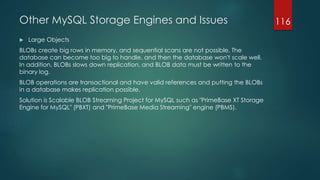
 Large Objects
 MEMORY Storage Engine Uses
 MEMORY Storage Engine Performance
 Multiple Storage Engine Advantages
 Single Storage Engine Advantages
9
Course topics
Schema Design and Performance
 Schema Design Considerations
 Normalization and Performance
 Schema Design
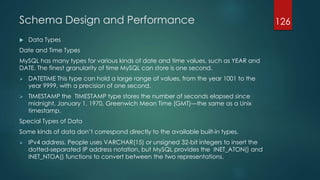
 Data Types
 Indexes
 Partitioning
10
Course topics
MySQL Query Performance
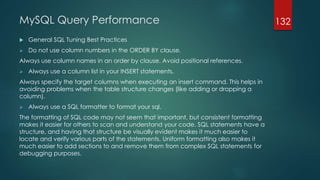
 General SQL Tuning Best Practices
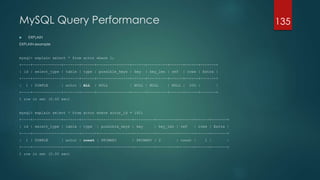
 EXPLAIN
 MySQL Optimizer
 Finding Problematic Queries
 Improve Query Executions
 Locate and Correct Problematic Queries
11
Course topics
Performance Tuning Extras
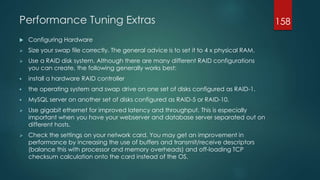
 Configuring Hardware
 Considering Operating Systems
 Operating Systems Configurations
 Logging
 Backup and Recovery
12
Introduction
 MySQL Overview
MySQL is a database management system.
A database is a structured collection of data.
MySQL databases are relational.
A relational database stores data in separate tables rather than putting all
the data in one big storeroom.
MySQL software is Open Source.
Open Source means that it is possible for anyone to use and modify the
software.
MySQL Server works in client/server or embedded systems.
The MySQL Database Software is a client/server system that consists of a
multi-threaded SQL server that supports different backend, several
different client programs and libraries, administrative tools, and a wide
range of application programming interfaces (APIs).
13
Introduction
 MySQL Products and Tools
MySQL Database Server
It is a fully integrated transaction-safe, ACID compliant database with full commit,
rollback, crash recovery and row level locking capabilities
MySQL Connectors
MySQL provides standards-based drivers for JDBC, ODBC, and .Net enabling
developers to build database applications
MySQL Replication
MySQL Replication enables users to cost-effectively deliver application
performance, scalability and high availability.
MySQL Fabric
MySQL Fabric is an extensible framework for managing farms of MySQL Servers.
14
Introduction
 MySQL Products and Tools
MySQL Partitioning
MySQL Partitioning enables developers and DBAs to improve database
performance and simplify the management of very large databases.
MySQL Utilities
MySQL Utilities is a set of command-line tools that are used to work with
MySQL servers.
MySQL Workbench
MySQL Workbench provides data modeling, SQL development, and
comprehensive administration tools for server configuration, user
administration, backup, and much more.
15
Introduction
 MySQL Services and Support
MySQL Technical Support Services provide direct access to our expert
MySQL Support engineers who are ready to assist you in the
development, deployment, and management of MySQL applications.
Even though you might have highly skilled technical staff that can
solve your issues, MySQL Support Engineers can typically solve those
same issues a lot faster. A vast majority of the problems the MySQL
Support Engineers encounter, they have seen before. So an issue that
could take several weeks for your staff to research and resolve, may be
solved in a matter of hours by the MySQL Support team.
16
Introduction
 MySQL Web Pages
Home page http://www.mysql.com/
Downloads http://www.mysql.com/downloads/
Documentation http://dev.mysql.com/doc/
Developer Zone http://dev.mysql.com/
17
Introduction
 MySQL Courses
 MySQL Database Administrator
MySQL for Beginners
MySQL for Database Administrators
MySQL Performance Tuning
MySQL High Availability
MySQL Cluster
 MySQL Developer
MySQL for Beginners
MySQL and PHP - Developing Dynamic Web Applications
MySQL for Developers
MySQL Developer Techniques
MySQL Advanced Stored Procedures
18
Introduction
 MySQL Certification
 Competitive Advantage
The rigorous process of becoming Oracle certified makes you a better technologist.
The knowledge gained through training and practice will significantly expand the
skill set and increase one's credibility when interviewing for jobs.
 Salary Advancement
Companies value skilled workers. According to Oracle's 2012 salary survey, more
than 80% of Oracle Certified individuals reported a promotion, compensation
increase or other career improvements as a result of becoming certified.
 Opportunity and Credibility
The skills and knowledge gained by becoming certified will lead to greater
confidence and increased career security. Expanded skill set will also help unlock
opportunities with employers and potential employers.
19
Introduction
 MySQL Documentation
Main source to MySQL official documentation is found at
http://dev.mysql.com/doc/ or http://docs.oracle.com/cd/E17952_01/
Anyway it’s quite easy to find whatever you need being a well
documented database system.
20
Performance Tuning Basics
 Thinking about performance
Performance is measured by the time required to complete a task. In
other words, performance is response time.
A database server’s performance is measured by query response time,
and the unit of measurement is time per query.
So if the goal is to reduce response time, we need to understand why
the server requires a certain amount of time to respond to a query,
and reduce or eliminate whatever unnecessary work it’s doing to
achieve the result.
In other words, we need to measure where the time goes. This leads to
our second important principle of optimization: you cannot reliably
optimize what you cannot measure.
Your first job is therefore to measure where time is spent.
21
Performance Tuning Basics
 Areas to tune
Performance is usually pinned at few parameters:
 Hardware
 MySQL Configuration
 Schema and Queries
 Application Architecture
22
Performance Tuning Basics
 Areas to tune -> Hardware
 CPU
MySQL works fine on 64-bit architectures, that's now the default. Make sure
you use a 64-bit operating system on 64-bit hardware.
The number of CPUs MySQL can use effectively and how it scales under
increasing load depend on both the workload and the system
architecture.
The CPU architecture (RISC, CISC, depth of pipeline, etc.), CPU model, and
operating system all affect MySQL’s scaling pattern.
A good choice is to adopt up to 24 cores CPUs.
23
Performance Tuning Basics
 Areas to tune -> Hardware
 RAM
The biggest reason to have a lot of memory isn’t so you can hold a lot of
data in memory: it’s ultimately so you can avoid disk I/O, which is orders of
magnitude slower than accessing data in memory. The trick is to balance
the memory and disk size, speed, cost, and other qualities so you get good
performance for your workload.
To ensure a reliable work and a good performance standard, MySQL
environment should count up to 100's of GB.
24
Performance Tuning Basics
 Areas to tune -> Hardware
 I/O
The main bottleneck in a database environment is usually located at a
mechanical layer such disk drivers and storage. Transaction logs and
temporary spaces are heavy consumers of I/O, and affect performance
for all users of the database. This is why disks have to wait for spindle, read
and write operations and swapping between RAM and dedicated
partitions.
Storage engines often keep their data and/or indexes in single large files,
which means RAID (Redundant Array of Inexpensive Disks) is usually the
most feasible option for storing a lot of data. 7 RAID can help with
redundancy, storage size, caching, and speed.
25
Performance Tuning Basics
 Areas to tune -> Hardware
 Network
Modern NIC (Network Interface Cards) are capable of high speeds, high
bandwidth and low latency.
For best performances and robustness, dedicated servers can rely on
bonding and teaming OS features.
1Gb Ethernet are good enough to ensure optimal throughput even in
clustered configurations
26
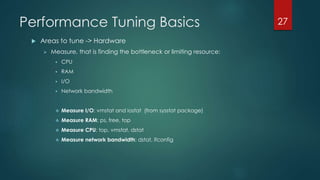
Performance Tuning Basics
 Areas to tune -> Hardware
 Measure, that is finding the bottleneck or limiting resource:
 CPU
 RAM
 I/O
 Network bandwidth
 Measure I/O: vmstat and iostat (from sysstat package)
 Measure RAM: ps, free, top
 Measure CPU: top, vmstat, dstat
 Measure network bandwidth: dstat, ifconfig
27
Performance Tuning Basics
 Areas to tune -> MySQL Configuration
MySQL allows a DBA or developer to modify parameters including the
maximum number of client connections, the size of the query cache, the
execution style of different logs, index memory cache size, the network
protocol used for client-server communications, and dozens of others. This
is done by editing the “my.cnf” configuration file, as in this example:
[mysqld]
performance_schema
performance_schema_events_waits_history_size=20
performance_schema_events_waits_history_long_size=15000
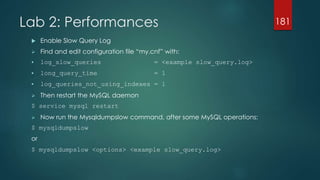
log_slow_queries = slow_query.log
long_query_time = 1
log_queries_not_using_indexes = 1
28
Performance Tuning Basics
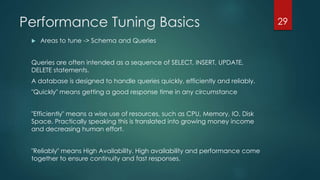
 Areas to tune -> Schema and Queries
Queries are often intended as a sequence of SELECT, INSERT, UPDATE,
DELETE statements.
A database is designed to handle queries quickly, efficiently and reliably.
"Quickly" means getting a good response time in any circumstance
"Efficiently" means a wise use of resources, such as CPU, Memory, IO, Disk
Space. Practically speaking this is translated into growing money income
and decreasing human effort.
"Reliably" means High Availability. High availability and performance come
together to ensure continuity and fast responses.
29
Performance Tuning Basics
 Areas to tune -> Application Architecture
Not all application performance problems come from MySQL, as well
as not all application performance problems which come from MySQL
are resolved on MySQL level.
One of architecture questions changing how application logic
translates to queries is a great optimization.
To have an application working better, it’s fundamental to tune the
statement, tune the code and the tune the logic behind it.
30
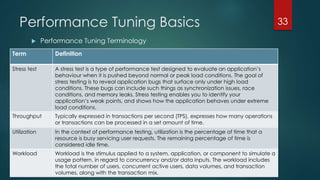
Performance Tuning Basics
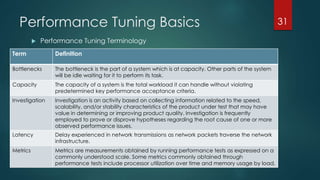
 Performance Tuning Terminology
31
Term Definition
Bottlenecks The bottleneck is the part of a system which is at capacity. Other parts of the system
will be idle waiting for it to perform its task.
Capacity The capacity of a system is the total workload it can handle without violating
predetermined key performance acceptance criteria.
Investigation Investigation is an activity based on collecting information related to the speed,
scalability, and/or stability characteristics of the product under test that may have
value in determining or improving product quality. Investigation is frequently
employed to prove or disprove hypotheses regarding the root cause of one or more
observed performance issues.
Latency Delay experienced in network transmissions as network packets traverse the network
infrastructure.
Metrics Metrics are measurements obtained by running performance tests as expressed on a
commonly understood scale. Some metrics commonly obtained through
performance tests include processor utilization over time and memory usage by load.
Performance Tuning Basics
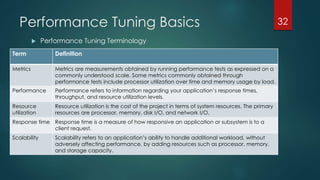
 Performance Tuning Terminology
32
Term Definition
Metrics Metrics are measurements obtained by running performance tests as expressed on a
commonly understood scale. Some metrics commonly obtained through
performance tests include processor utilization over time and memory usage by load.
Performance Performance refers to information regarding your application’s response times,
throughput, and resource utilization levels.
Resource
utilization
Resource utilization is the cost of the project in terms of system resources. The primary
resources are processor, memory, disk I/O, and network I/O.
Response time Response time is a measure of how responsive an application or subsystem is to a
client request.
Scalability Scalability refers to an application’s ability to handle additional workload, without
adversely affecting performance, by adding resources such as processor, memory,
and storage capacity.
Performance Tuning Basics
 Performance Tuning Terminology
33
Term Definition
Stress test A stress test is a type of performance test designed to evaluate an application’s
behaviour when it is pushed beyond normal or peak load conditions. The goal of
stress testing is to reveal application bugs that surface only under high load
conditions. These bugs can include such things as synchronization issues, race
conditions, and memory leaks. Stress testing enables you to identify your
application’s weak points, and shows how the application behaves under extreme
load conditions.
Throughput Typically expressed in transactions per second (TPS), expresses how many operations
or transactions can be processed in a set amount of time.
Utilization In the context of performance testing, utilization is the percentage of time that a
resource is busy servicing user requests. The remaining percentage of time is
considered idle time.
Workload Workload is the stimulus applied to a system, application, or component to simulate a
usage pattern, in regard to concurrency and/or data inputs. The workload includes
the total number of users, concurrent active users, data volumes, and transaction
volumes, along with the transaction mix.
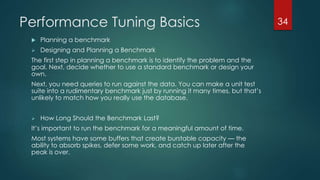
Performance Tuning Basics
 Planning a benchmark
 Designing and Planning a Benchmark
The first step in planning a benchmark is to identify the problem and the
goal. Next, decide whether to use a standard benchmark or design your
own.
Next, you need queries to run against the data. You can make a unit test
suite into a rudimentary benchmark just by running it many times, but that’s
unlikely to match how you really use the database.
 How Long Should the Benchmark Last?
It’s important to run the benchmark for a meaningful amount of time.
Most systems have some buffers that create burstable capacity — the
ability to absorb spikes, defer some work, and catch up later after the
peak is over.
34
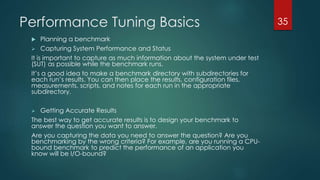
Performance Tuning Basics
 Planning a benchmark
 Capturing System Performance and Status
It is important to capture as much information about the system under test
(SUT) as possible while the benchmark runs.
It’s a good idea to make a benchmark directory with subdirectories for
each run’s results. You can then place the results, configuration files,
measurements, scripts, and notes for each run in the appropriate
subdirectory.
 Getting Accurate Results
The best way to get accurate results is to design your benchmark to
answer the question you want to answer.
Are you capturing the data you need to answer the question? Are you
benchmarking by the wrong criteria? For example, are you running a CPU-
bound benchmark to predict the performance of an application you
know will be I/O-bound?
35
Performance Tuning Basics
 Benchmark errors
The BENCHMARK() function can be used to compare the speed of MySQL functions
or operators. For example:
mysql> SELECT BENCHMARK(100000000, CONCAT('a','b'));
However, this cannot be used to compare queries:
mysql> SELECT BENCHMARK(100, SELECT `id` FROM `lines`);
ERROR 1064 (42000): You have an error in your SQL syntax;check
the manual that corresponds to your MySQL server version for the
right syntax to use near 'SELECT `id` FROM `lines`)' at line 1
As MySQL needs a fraction of a second just to parse the query and the system is
probably busy doing other things, too, benchmarks with runtimes of less than 5-10s
can be considered as totally meaningless and equally runtimes differences in that
order of magnitude as pure chance.
36
Performance Tuning Basics
 Benchmark errors
As a general rule, when you run multiple instance of any
benchmarking tools, as you increase the number of concurrent
connections, you might encounter a "Too many connections" error.
You need to adjust MySQL's 'max_connections' variable, which controls
the maximum number of concurrent connections allowed by the
server.
37
Performance Tuning Basics
 Tuning steps
 Step 1 - Storage Engines (MyISAM, InnoDB)
 Step 2 - Connections
 Step 3 - Sessions
 Step 4 - Query Cache
 Step 5 - Queries
 Step 6 - Schema
38
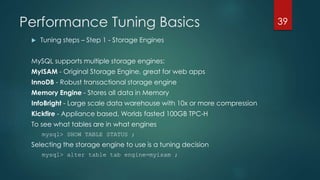
Performance Tuning Basics
 Tuning steps – Step 1 - Storage Engines
MySQL supports multiple storage engines:
MyISAM - Original Storage Engine, great for web apps
InnoDB - Robust transactional storage engine
Memory Engine - Stores all data in Memory
InfoBright - Large scale data warehouse with 10x or more compression
Kickfire - Appliance based, Worlds fasted 100GB TPC-H
To see what tables are in what engines
mysql> SHOW TABLE STATUS ;
Selecting the storage engine to use is a tuning decision
mysql> alter table tab engine=myisam ;
39
Performance Tuning Basics
 Tuning steps – Step 1 – MyISAM
The primary tuning factor in MyISAM are its two caches:
 key_buffer_cache should be 25% of available memory
 system cache - leave 75% of available memory free
Available memory is:
 All on a dedicated server, if the server has 8GB, use 2GB for the
key_buffer_cache and leave the rest free for the system cache to use.
 Percent of the part of the server allocated for MySQL, i.e. if you have a
server with 8GB, but are using 4GB for other applications then use 1GB
for the key_buffer_cache and leave the remaining 3GB free for the
system cache to use.
Maximum size for a single key buffer cache is 4GB
40
Performance Tuning Basics
 Tuning steps – Step 1 – MyISAM
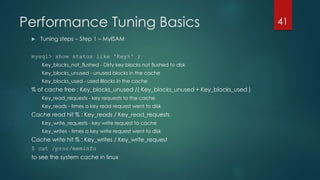
mysql> show status like 'Key%' ;
Key_blocks_not_flushed - Dirty key blocks not flushed to disk
Key_blocks_unused - unused blocks in the cache
Key_blocks_used - used Blocks in the cache
% of cache free : Key_blocks_unused /( Key_blocks_unused + Key_blocks_used )
Key_read_requests - key requests to the cache
Key_reads - times a key read request went to disk
Cache read hit % : Key_reads / Key_read_requests
Key_write_requests - key write request to cache
Key_writes - times a key write request went to disk
Cache write hit % : Key_writes / Key_write_request
$ cat /proc/meminfo
to see the system cache in linux
41
Performance Tuning Basics
 Tuning steps – Step 1 – InnoDB
Unlike MyISAM InnoDB uses a single cache for both index and data
Innodb_buffer_pool_size - should be 70-80% of available memory.
It is not uncommon for this to be very large, i.e. 44GB on a system with
40GB of memory.
Make sure its not set so large as to cause swapping!
mysql>show status like 'Innodb_buffer%' ;
InnoDB can use direct IO on systems that support it, linux, FreeBSD, and
Solaris.
Innodb_flush_method = O_DIRECT
42
Performance Tuning Basics
 Tuning steps – Step 2 – Connections
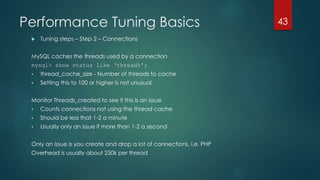
MySQL caches the threads used by a connection
mysql> show status like ‘thread%’;
 thread_cache_size - Number of threads to cache
 Setting this to 100 or higher is not unusual
Monitor Threads_created to see if this is an issue
 Counts connections not using the thread cache
 Should be less that 1-2 a minute
 Usually only an issue if more than 1-2 a second
Only an issue is you create and drop a lot of connections, i.e. PHP
Overhead is usually about 250k per thread
43
Performance Tuning Basics
 Tuning steps – Step 3 – Sessions
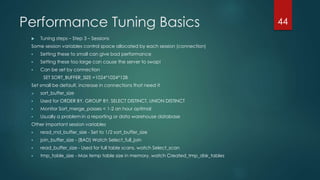
Some session variables control space allocated by each session (connection)
 Setting these to small can give bad performance
 Setting these too large can cause the server to swap!
 Can be set by connection
SET SORT_BUFFER_SIZE =1024*1024*128
Set small be default, increase in connections that need it
 sort_buffer_size
 Used for ORDER BY, GROUP BY, SELECT DISTINCT, UNION DISTINCT
 Monitor Sort_merge_passes < 1-2 an hour optimal
 Usually a problem in a reporting or data warehouse database
Other important session variables
 read_rnd_buffer_size - Set to 1/2 sort_buffer_size
 join_buffer_size - (BAD) Watch Select_full_join
 read_buffer_size - Used for full table scans, watch Select_scan
 tmp_table_size - Max temp table size in memory, watch Created_tmp_disk_tables
44
Performance Tuning Basics
 Tuning steps – Step 4 – Query Cache
MySQL Query Cache caches both the query and the full result set
 query_cache_type - Controls behavior
 0 or OFF - Not used (buffer may still be allocated)
 1 or ON cache all unless SELECT SQL_NO_CACHE (DEFAULT)
 2 or DEMAND cache none unless SELECT SQL_CACHE
 query_cache_size - Determines the size of the cache
mysql> show status like 'Qc%' ;
Gives great performance if:
 Identical queries returning identical data are used often
 No or rare inserts, updates or deletes
Best Practice
 Set to DEMAND
 Add SQL_CACHE to appropriate queries
45
Performance Tuning Basics
 Tuning steps – Step 5 – Queries
 Often the #1 issue in overall performance
 Always have the slow query log on
http://dev.mysql.com/doc/refman/5.5/en/slow-query-log.html
Analyze using mysqldumpslow
 Use: log_queries_not_using_indexes
 Check it regularly
 Use mysqldumpslow
 Best practice is to automate running mysqldumpslow every morning
and email results to DBA, DBDev, etc.
 Understand and use EXPLAIN
 Select_scan - Number of full table scans
 Select_full_join - Joins without indexes
46
Performance Tuning Basics
 Tuning steps – Step 5 – Queries
The IN clause in MySLQ is very fast!
Select ... Where idx IN(1,23,345,456) - Much faster than a join
Don’t wrap your indexes in expressions in Where
 Select ... Where func(idx) = 20 [index ignored]
 Select .. Where idx = otherfunc(20) [may use index]
Best practice : Keep index alone on left side of condition
Avoid % at the start of LIKE on an index
 Select ... Where idx LIKE(‘ABC%’) can use index
 Select ... Where idx LIKE(‘%XYZ’) must do full table scan
Use union all when appropriate, default is union distinct!
Understand left/right joins and use only when needed.
47
Performance Tuning Basics
 Tuning steps – Step 6 – Schema
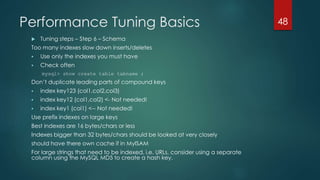
Too many indexes slow down inserts/deletes
 Use only the indexes you must have
 Check often
mysql> show create table tabname ;
Don’t duplicate leading parts of compound keys
 index key123 (col1,col2,col3)
 index key12 (col1,col2) <- Not needed!
 index key1 (col1) <-- Not needed!
Use prefix indexes on large keys
Best indexes are 16 bytes/chars or less
Indexes bigger than 32 bytes/chars should be looked at very closely
should have there own cache if in MyISAM
For large strings that need to be indexed, i.e. URLs, consider using a separate
column using the MySQL MD5 to create a hash key.
48
Performance Tuning Basics
 Tuning steps – Step 6 – Schema
Size = performance, smaller is better
Size is important. Do not automatically use 255 for VARCHAR
Temp tables, most caches, expand to full size
Use “procedure analyse” to determine the optimal types given the values in your
table
mysql> select * from tab procedure analyse (64,2000)G
Consider the types:
 enum: http://dev.mysql.com/doc/refman/5.5/en/enum.html
 set: http://dev.mysql.com/doc/refman/5.5/en/set.html
Compress large strings
 Use the MySQL COMPRESS and UNCOMPRESS functions
 Very important in InnoDB!
49
Performance Tuning Basics
 General Tuning Session
 Never make a change in production first
 Have a good benchmark or reliable load
 Start with a good baseline
 Only change 1 thing at a time
 identify a set of possible changes
 try each change separately
 try in combinations of 2, then 3, etc.
 Monitor the results
 Query performance - query analyzer, slow query log, etc.
 throughput
 single query time
 average query time
 CPU - top, vmstat
 IO - iostat, top, vmstat, bonnie++
 Network bandwidth
 Document and save the results
50
Performance Tuning Basics
 Deploying MySQL and Benchmarking
Benchmarking can be a very revealing process. It can be used to
isolate performance problems, and drill down to specific bottlenecks.
More importantly, it can be used to compare different servers in your
environment, so you have an expectation of performance from those
servers, before you put them to work servicing your application.
MySQL can be deployed on a spectrum of different servers. Some
may be servers we physically setup in a data centre, while others are
managed hosting servers, and still others are cloud hosted.
Benchmarking can help give us a picture of what we're dealing with.
51
Performance Tuning Basics
 Deploying MySQL and Benchmarking
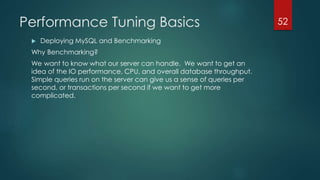
Why Benchmarking?
We want to know what our server can handle. We want to get an
idea of the IO performance, CPU, and overall database throughput.
Simple queries run on the server can give us a sense of queries per
second, or transactions per second if we want to get more
complicated.
52
Performance Tuning Basics
 Deploying MySQL and Benchmarking
 Benchmarking Disk IO
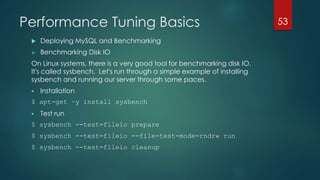
On Linux systems, there is a very good tool for benchmarking disk IO.
It's called sysbench. Let's run through a simple example of installing
sysbench and running our server through some paces.
 Installation
$ apt-get –y install sysbench
 Test run
$ sysbench --test=fileio prepare
$ sysbench --test=fileio --file-test-mode=rndrw run
$ sysbench --test=fileio cleanup
53
Performance Tuning Basics
 Deploying MySQL and Benchmarking
 Benchmarking CPU
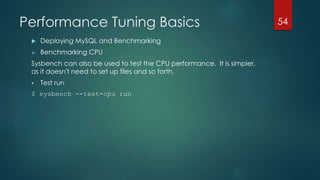
Sysbench can also be used to test the CPU performance. It is simpler,
as it doesn't need to set up files and so forth.
 Test run
$ sysbench --test=cpu run
54
Performance Tuning Basics
 Deploying MySQL and Benchmarking
 Benchmarking Database Throughput
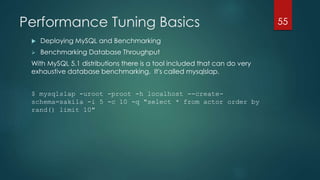
With MySQL 5.1 distributions there is a tool included that can do very
exhaustive database benchmarking. It's called mysqlslap.
$ mysqlslap -uroot -proot -h localhost --create-
schema=sakila -i 5 -c 10 -q "select * from actor order by
rand() limit 10"
55
Performance Tuning Tools
 MySQL Monitoring Tools
 Open Source Community Monitoring Tools
 Benchmark Tools
 Stress Tools
56
Performance Tuning Tools
 MySQL Monitoring Tools
 MySQL Enterprise Monitor
http://www.mysql.com/products/enterprise/monitor.html
 MySQL Workbench
http://www.mysql.com/products/workbench/
 Percona Toolkit for MySQL
http://www.percona.com/software/percona-toolkit
57
Performance Tuning Tools
 Open Source Community Monitoring Tools
 Mysqladmin
 Mysqlreport
 Innotop http://sourceforge.net/projects/innotop/
 Oprofile http://oprofile.sourceforge.net/about/
 Sysbench http://sysbench.sf.net/
 Percona Monitoring Plugins
http://www.percona.com/software/percona-monitoring-plugins
 Mytop
58
Performance Tuning Tools
 Benchmarck Tools
 MySQL Super Smack http://jeremy.zawodny.com/mysql/super-smack/
 Database Test Suite http://sourceforge.net/projects/osdldbt/
 Percona’s TPCC-MySQL Tool https://launchpad.net/perconatools
 MySQL’s BENCHMARK() Function. MySQL has a handy BENCHMARK()
function that you can use to test execution speeds for certain types of
operations. You use it by specifying a number of times to execute and an
expression to execute.
 sysbench
sysbench https://launchpad.net/sysbench is a multithreaded system
benchmarking tool. Its goal is to get a sense of system performance, in
terms of the factors important for running a database server.
59
Performance Tuning Tools
 Stress Tools
 Mysqltuner http://mysqltuner.pl/
 Neotys
http://www.neotys.com/product/monitoring-mysql-web-load-testing.html
 IOZone http://www.iozone.org/
 Open Source Database Benchmark http://osdb.sourceforge.net/
 Mysqlslap http://dev.mysql.com/doc/refman/5.5/en/mysqlslap.html
60
MySQL Server Tuning
Most of the tuning work should start from the core, being the MySQL server
itself. In this case, “server” matches the presence of a mysqld service running
on a physical machine, providing visible results as a response to queries, stored
procedures and make available data for any treatment, such as populating
dynamic web pages.
MySQL is very different from other database servers, and its architectural
characteristics make it useful for a wide range of purposes.
At the same time, MySQL can power embedded applications, data
warehouses, content indexing and delivery software, highly available
redundant systems, online transaction processing (OLTP), and much more.
61
MySQL Server Tuning
 Major Components of the MySQL Server
62
A picture of how MySQL’s components work
together will help you understand the server. Figure
shows a logical view of MySQL’s architecture.
The topmost layer contains the services that aren’t
unique to MySQL. They’re services most network-
based client/server tools or servers need: connection
handling, authentication, security, and so forth.
MySQL Server Tuning
 Major Components of the MySQL Server
63
The second layer is where things get interesting.
Much of MySQL’s brains are here, including the code
for query parsing, analysis, optimization, caching,
and all the built-in functions (e.g., dates, times, math,
and encryption). Any functionality provided across
storage engines lives at this level: stored procedures,
triggers, and views.
MySQL Server Tuning
 Major Components of the MySQL Server
64
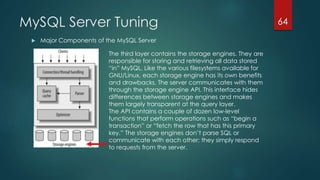
The third layer contains the storage engines. They are
responsible for storing and retrieving all data stored
“in” MySQL. Like the various filesystems available for
GNU/Linux, each storage engine has its own benefits
and drawbacks. The server communicates with them
through the storage engine API. This interface hides
differences between storage engines and makes
them largely transparent at the query layer.
The API contains a couple of dozen low-level
functions that perform operations such as “begin a
transaction” or “fetch the row that has this primary
key.” The storage engines don’t parse SQL or
communicate with each other; they simply respond
to requests from the server.
MySQL Server Tuning
 MySQL Thread Handling
65
Each client connection gets its own thread within the server process.
The connection’s queries execute within that single thread, which in turn resides on
one core or CPU.
The server caches threads, so they don’t need to be created and destroyed for
each new connection.
When clients (applications) connect to the MySQL server, the server needs to
authenticate them. Authentication is based on username, originating host, and
password. By default, connection manager threads associate each client
connection with a thread dedicated to it that handles authentication and request
processing for that connection. Manager threads create a new thread when
necessary but try to avoid doing so by consulting the thread cache first to see
whether it contains a thread that can be used for the connection. When a
connection ends, its thread is returned to the thread cache if the cache is not full.
MySQL Server Tuning
 MySQL Memory Usage
The following list indicates some of the ways that the mysqld server uses
memory.
 All threads share the MyISAM key buffer; its size is determined by the
key_buffer_size variable.
 Each thread that is used to manage client connections uses some thread-
specific space. The following list indicates these and which variables control
their size:
 stack (variable thread_stack)
 connection buffer (variable net_buffer_length)
 result buffer (variable net_buffer_length)
 All threads share the same base memory
 Each request that performs a sequential scan of a table allocates a read
buffer (variable read_buffer_size).
66
MySQL Server Tuning
 MySQL Memory Usage
 All joins are executed in a single pass, and most joins can be done without even
using a temporary table.
 When a thread is no longer needed, the memory allocated to it is released and returned to
the system unless the thread goes back into the thread cache.
 Almost all parsing and calculating is done in thread-local and reusable memory pools. No
memory overhead is needed for small items, so the normal slow memory allocation and
freeing is avoided. Memory is allocated only for unexpectedly large strings.
 A FLUSH TABLES statement or mysqladmin flush-tables command closes all tables that are
not in use at once and marks all in-use tables to be closed when the currently executing
thread finishes. This effectively frees most in-use memory. FLUSH TABLES does not return until
all tables have been closed.
 The server caches information in memory as a result of GRANT, CREATE USER, CREATE
SERVER, and INSTALL PLUGIN statements. This memory is not released by the corresponding
REVOKE, DROP USER, DROP SERVER, and UNINSTALL PLUGIN statements, so for a server that
executes many instances of the statements that cause caching, there will be an increase
in memory use. This cached memory can be freed with FLUSH PRIVILEGES.
67
MySQL Server Tuning
 Simultaneous Connections in MySQL
One means of limiting use of MySQL server resources is to set the global
max_user_connections system variable to a nonzero value.
This limits the number of simultaneous connections that can be made by any
given account, but places no limits on what a client can do once connected.
In addition, setting max_user_connections does not enable management of
individual accounts.
You can set max_connections at server startup or at runtime to control the
maximum number of clients that can connect simultaneously.
68
MySQL Server Tuning
 Reusing Threads
MySQL is a single process with multiple threads. Not all databases are architected this way;
some have multiple processes that communicate through shared memory or other means.
This is generally so fast that there isn’t really the need for connection pools as there is with other
databases.
However, many development environments and programming languages really want a
connection pool.
Many others use persistent connections by default, so that a connection isn’t really closed
when it’s closed.
There can be more than one solution to this problem, but the one that’s actually partially
implemented is a pool of threads.
The thread pool plugin is a commercial feature. It is not included in MySQL community
distributions.
This tool provides an alternative thread-handling model designed to reduce overhead and
improve performance. It implements a thread pool that increases server performance by
efficiently managing statement execution threads for large numbers of client connections.
To control and monitor how the server manages threads that handle client connections,
several system and status variables are relevant.
69
MySQL Server Tuning
 Effects of Thread Caching
MySQL uses a separate thread for each client connection. In environments
where applications do not attach to a database instance persistently, but
rather create and close a lot of connections every second, the process of
spawning new threads at high rate may start consuming significant CPU
resources. To alleviate this negative effect, MySQL implements thread cache,
which allows it to save threads from connections that are being closed and
reuse them for new connections. The parameter thread_cache_size defines
how many unused threads can be kept alive at any time.
The default value is 0 (no caching), which causes a thread to be set up for
each new connection and disposed of when the connection terminates. Set
thread_cache_size to N to enable N inactive connection threads to be
cached. thread_cache_size can be set at server startup or changed while
the server runs. A connection thread becomes inactive when the client
connection with which it was associated terminates.
70
MySQL Server Tuning
 Reusing Tables
MySQL is multi-threaded, so there may be many clients issuing queries for a
given table simultaneously. To minimize the problem with multiple client
sessions having different states on the same table, the table is opened
independently by each concurrent session. This uses additional memory but
normally increases performance.
When the table cache fills up, the server uses the following procedure to
locate a cache entry to use:
 Tables that are not currently in use are released, beginning with the table
least recently used.
 If a new table needs to be opened, but the cache is full and no tables can
be released, the cache is temporarily extended as necessary. When the
cache is in a temporarily extended state and a table goes from a used to
unused state, the table is closed and released from the cache.
71
MySQL Server Tuning
 Reusing Tables
You can determine whether your table cache is too small by checking the
mysqld status variable Opened_tables, which indicates the number of table-
opening operations since the server started
mysql> SHOW GLOBAL STATUS LIKE 'Opened_tables';
+---------------+-------+
| Variable_name | Value |
+---------------+-------+
| Opened_tables | 277 |
+---------------+-------+
72
MySQL Server Tuning
 Setting table_open_cache
The table_open_cache and max_connections system variables affect the
maximum number of files the server keeps open. If you increase one or both of
these values, you may run up against a limit imposed by your operating system
on the per-process number of open file descriptors. Many operating systems
permit you to increase the open-files limit, although the method varies widely
from system to system. Consult your operating system documentation to
determine whether it is possible to increase the limit and how to do so.
table_open_cache is related to max_connections. For example, for 200
concurrent running connections, specify a table cache size of at least 200 * N,
where N is the maximum number of tables per join in any of the queries which
you execute. You must also reserve some extra file descriptors for temporary
tables and files.
Make sure that your operating system can handle the number of open file
descriptors implied by the table_open_cache setting. If table_open_cache is
set too high, MySQL may run out of file descriptors and refuse connections, fail
to perform queries, and be very unreliable.
73
MySQL Query Cache
 MySQL Query Cache
The query cache stores the text of a SELECT statement together with the corresponding result
that was sent to the client. If an identical statement is received later, the server retrieves the
results from the query cache rather than parsing and executing the statement again. The
query cache is shared among sessions, so a result set generated by one client can be sent in
response to the same query issued by another client.
Before even parsing a query, MySQL checks for it in the query cache, if the cache is enabled.
This operation is a case-sensitive hash lookup. If the query differs from a similar query in the
cache by even a single byte, it won’t match and the query processing will go to the next
stage.
The query cache can be useful in an environment where you have tables that do not change
very often and for which the server receives many identical queries. This is a typical situation for
many Web servers that generate many dynamic pages based on database content. For
example, when an order form queries a table to display the lists of all US states or all countries
in the world, those values can be retrieved from the query cache. Although the values would
probably be retrieved from memory in any case (from the InnoDB buffer pool or MyISAM key
cache), using the query cache avoids the overhead of processing the query, deciding
whether to use a table scan, and locating the data block for each row.
The query cache always contains current and reliable data. Any insert, update, delete, or
other modification to a table causes any relevant entries in the query cache to be flushed.
74
MySQL Query Cache
 When to Use the MySQL Query Cache
The query cache offers the potential for substantial performance
improvement. Query Cache is quite helpful for MySQL performance
optimization tasks and is great for certain applications, typically simple
applications deployed on limited scale or applications dealing with small data
sets. Query Cache comes handy under few particular situations:
 Third party application – You can’t change how it works with MySQL to add
caching but you can enable query cache so it works faster.
 Low load applications – If you’re building application which is not designed
for extreme load, like many personal application query cache might be all
you need. Especially if it is mostly read only scenario.
75
MySQL Query Cache
 When NOT to Use the MySQL Query Cache
As a first consideration, the query cache is disabled by default. This means that having the
query cache on has some overhead, even if no queries are ever cached. This means also that
Query Cache has relative benefits.
The cache is not used for queries of the following types:
 Queries that are a subquery of an outer query
 Queries executed within the body of a stored function, trigger, or event
Caching works on full queries only, so it does not work for subselects, inline views or parts of
UNION.
Only SELECT queries are cached, SHOW commands or stored procedure calls are not, even if
stored procedure would simply preform select to retrieve data from table.
Might not work with transactions – Different transactions may see different states of the
database, depending on the updates they have performed and even depending on
snapshot they are working on. If you’re using statements outside of transaction you have best
chance for them to be cached.
Limited amount of usable memory – Queries are constantly being invalidated from query
cache by table updates, this means number of queries in cache and memory used can’t
grow forever even if your have very large amount of different queries being run.
76
MySQL Query Cache
 MySQL Query Cache Settings
The query cache system variables all have names that begin with query_cache_.
The have_query_cache server system variable indicates whether the query cache
is available:
mysql> SHOW VARIABLES LIKE 'have_query_cache';
+------------------+-------+
| Variable_name | Value |
+------------------+-------+
| have_query_cache | YES |
+------------------+-------+
77
MySQL Query Cache
 MySQL Query Cache Settings
 query_alloc_block_size (defaults to 8192): the actual size of the memory blocks
created for result sets in the query cache (don’t adjust)
 query_cache_limit (defaults to 1048576): queries with result sets larger than this
won’t make it into the query cache
 query_cache_min_res_unit (defaults to 4096): the smallest size (in bytes) for
blocks in the query cache (don’t adjust)
 query_cache_size (defaults to 0): the total size of the query cache (disables
query cache if equal to 0)
 query_cache_type (defaults to 1): 0 means don’t cache, 1 means cache
everything, 2 means only cache result sets on demand
 query_cache_wlock_invalidate (defaults to FALSE): allows SELECTS to run from
query cache even though the MyISAM table is locked for writing
78
MySQL Query Cache
 MySQL Query Cache Status Variables
mysql> SHOW STATUS LIKE 'Qcache%';
+-------------------------+----------+
| Variable_name | Value |
+-------------------------+----------+
| Qcache_free_blocks | 1 |
| Qcache_free_memory | 16759696 |
| Qcache_hits | 0 |
| Qcache_inserts | 0 |
| Qcache_lowmem_prunes | 0 |
| Qcache_not_cached | 164 |
| Qcache_queries_in_cache | 0 |
| Qcache_total_blocks | 1 |
+-------------------------+----------+
79
MySQL Query Cache
 MySQL Query Cache Status Variables
Qcache_free_blocks: The number of free memory blocks in query cache.
Qcache_free_memory: The amount of free memory for query cache.
Qcache_hits: The number of cache hits.
Qcache_inserts: The number of queries added to the cache.
Qcache_lowmem_prunes: The number of queries that were deleted from the
cache because of low memory.
Qcache_not_cached: The number of non-cached queries (not cachable,
or due to query_cache_type).
Qcache_queries_in_cache: The number of queries registered in the cache.
Qcache_total_blocks: The total number of blocks in the query cache.
80
MySQL Query Cache
 Improve Query Cache Results
If you want to get optimized and speedy response from your MySQL server then you need to add following two configurations directive
to your MySQL server:
query_cache_size=SIZE
The amount of memory (SIZE) allocated for caching query results. The default value is 0, which disables the query cache.
query_cache_type=OPTION
Set the query cache type. Possible options are as follows:
 0 : Don’t cache results in or retrieve results from the query cache.
 1 : Cache all query results except for those that begin with SELECT S_NO_CACHE.
 2 : Cache results only for queries that begin with SELECT SQL_CACHE
You can setup them in /etc/my.cnf (Red Hat) or /etc/mysql/my.cnf (Debian) file:
$ vi /etc/mysql/my.cnf
Append config directives as follows:
query_cache_size = 268435456
query_cache_type=1
query_cache_limit=1048576
81
InnoDB
 InnoDB Storage Engine
InnoDB is a storage engine for MySQL. MySQL 5.5 and later use it by default, rather than
MyISAM. It provides the standard ACID-compliant transaction features, along with
foreign key support (Declarative Referential Integrity).
The InnoDB tables fully support ACID-compliant and transactions. They are also very
optimal for performance. InnoDB table supports foreign keys, commit, rollback, roll-and
forward operations. The size of the InnoDB table can be up to 64TB.
The InnoDB storage engine maintains its own buffer pool for caching data and indexes
in main memory. When the innodb_file_per_table setting is enabled, each new InnoDB
table and its associated indexes are stored in a separate file. When the
innodb_file_per_table option is disabled, InnoDB stores all its tables and indexes in the
single system tablespace, which may consist of several files (or raw disk partitions).
InnoDB tables can handle large quantities of data, even on operating systems where
file size is limited to 2GB.
ACID - Atomicity, Consistency, Isolation, Durability
82
InnoDB
 InnoDB Storage Engine Uses
 Transactions
If your application requires transactions, InnoDB is the most stable, well-integrated,
proven choice. MyISAM is a good choice if a task doesn’t require transactions and
issues primarily either SELECT or INSERT queries. Sometimes specific components of an
application (such as logging) fall into this category.

 Backups
The need to perform regular backups might also influence your choice. If your server
can be shut down at regular intervals for backups, the storage engines are equally
easy to deal with. However, if you need to perform online backups, you basically need
InnoDB.
 Crash recovery
If you have a lot of data, you should seriously consider how long it will take to recover
from a crash. MyISAM tables become corrupt more easily and take much longer to
recover than InnoDB tables. In fact, this is one of the most important reasons why a lot
of people use InnoDB when they don’t need transactions.
83
InnoDB
 Using the InnoDB Storage Engine
InnoDB is designed to handle transactional applications that require crash recovery,
referential integrity, high levels of user concurrency and fast response times.
When to use InnoDB?
 You are developing an application that requires ACID compliance. At the very
least, your application demands the storage layer support the notion of
transactions.
 You require expedient crash recovery. Almost all production sites fall into this
category, however MyISAM table recovery times will obviously vary from one usage
pattern to the next. To estimate an accurate figure for your environment, try running
myisamchk over a many-gigabyte table from your application's backups on
hardware similar to what you have in production. While recovery times of MyISAM
tables increase with growth of the table, InnoDB table recovery times remain largely
constant throughout the life of the table.
 Your web site or application is mostly multi-user. The database is having to deal with
frequent UPDATEs to a single table and you would like to make better use of your
multi-processing hardware.
84
InnoDB
 InnoDB Log Files and Buffers
InnoDB is a general-purpose storage engine that balances high reliability and high
performance. It is a transactional storage engine and is fully ACID compliant, as
would be expected from any relational database. The durability guarantee
provided by InnoDB is made possible by the redo logs.
By default, InnoDB creates two redo log files (or just log files) ib_logfile0 and

ib_logfile1 within the data directory of MySQL.
The redo log files are used in a circular fashion. This means that the redo logs are
written from the beginning to end of first redo log file, then it is continued to be
written into the next log file, and so on till it reaches the last redo log file. Once the
last redo log file has been written, then redo logs are again written from the first redo
log file.
The log files are viewed as a sequence of blocks called "log blocks" whose size is
given by OS_FILE_LOG_BLOCK_SIZE which is equal to 512 bytes. Each log file has a
header whose size is given by LOG_FILE_HDR_SIZE, which is defined as
4*OS_FILE_LOG_BLOCK_SIZE.
85
InnoDB
 InnoDB Log Files and Buffers
The global log system object log_sys holds
important information related to log subsystem
of InnoDB.
This object points to various positions in the in-
memory redo log buffer and on-disk redo log
files.
The picture shows the locations pointed to by
the global log_sys object. The picture clearly
shows that the redo log buffer maps to a
specific portion of the redo log file.
86
InnoDB
 Committing Transactions
By default, MySQL starts the session for each new connection with autocommit
mode enabled, so MySQL does a commit after each SQL statement if that
statement did not return an error. If a statement returns an error, the commit or
rollback behavior depends on the error.
If a session that has autocommit disabled ends without explicitly committing the final
transaction, MySQL rolls back that transaction.
Some statements implicitly end a transaction, as if you had done a COMMIT before
executing the statement.
To optimize InnoDB transaction processing, find the ideal balance between the
performance overhead of transactional features and the workload of your server.
The default MySQL setting AUTOCOMMIT=1 can impose performance limitations on
a busy database server. Where practical, wrap several related DML operations into
a single transaction, by issuing SET AUTOCOMMIT=0 or a START TRANSACTION
statement, followed by a COMMIT statement after making all the changes.
87
InnoDB
 Committing Transactions
Avoid performing rollbacks after inserting, updating, or deleting huge numbers of
rows. If a big transaction is slowing down server performance, rolling it back can
make the problem worse, potentially taking several times as long to perform as the
original DML operations. Killing the database process does not help, because the
rollback starts again on server startup.
When rows are modified or deleted, the rows and associated undo logs are not
physically removed immediately, or even immediately after the transaction
commits. The old data is preserved until transactions that started earlier or
concurrently are finished, so that those transactions can access the previous state of
modified or deleted rows. Thus, a long-running transaction can prevent InnoDB from
purging data that was changed by a different transaction.
88
InnoDB
 InnoDB Table Design
 Use short PRIMARY KEY
 Primary key is part of all other indexes on table
 Consider artificial auto_increment PRIMARY KEY and UNIQUE for original PRIMARY KEY
 INT keys are faster than VARCHAR/CHAR
 PRIMARY KEY is most efficient for lookups
 Reference tables by PRIMARY KEY when possible
 Do not update PRIMARY KEY
 This will require all other keys to be modified for row
 This often requires row relocation to other page
 Cluster your accesses by PRIMARY KEY
 Inserts in PRIMARY KEY order are much faster.
89
InnoDB
 InnoDB Table Design
InnoDB creates each table and associated primary key index either in the system
tablespace, or in a separate tablespace (represented by a .ibd file).
Always set up a primary key for each InnoDB table, specifying the column or
columns that:
 Are referenced by the most important queries.
 Are never left blank.
 Never have duplicate values.
 Rarely if ever change value once inserted.
Although the table works correctly without you defining a primary key, the primary
key is involved with many aspects of performance and is a crucial design aspect for
any large or frequently used table.
InnoDB provides an optimization that significantly improves scalability and
performance of SQL statements that insert rows into tables with AUTO_INCREMENT
columns.
90
InnoDB
 InnoDB Table Design
Limits on InnoDB Tables
 A table can contain a maximum of 1000 columns.
 A table can contain a maximum of 64 secondary indexes.
 By default, an index key for a single-column index can be up to 767 bytes.
 The InnoDB internal maximum key length is 3500 bytes, but MySQL itself restricts
this to 3072 bytes.
 The maximum row length is slightly less than half of a database page. The
default database page size in InnoDB is 16KB.
 Although InnoDB supports row sizes larger than 65,535 bytes internally, MySQL itself
imposes a row-size limit of 65,535 for the combined size of all columns.
91
InnoDB
 SHOW ENGINE INNODB STATUS
The InnoDB storage engine exposes a lot of information about its internals in the output of SHOW ENGINE INNODB STATUS. Unlike most of
the SHOW commands, its output consists of a single string, not rows and columns.
HEADER
The first section is the header, which simply announces the beginning of the output, the current date and time, and how long it has been
since the last printout.
SEMAPHORES
If you have a high-concurrency workload, you might want to pay attention to the next section, SEMAPHORES . It contains two kinds of
data: event counters and, optionally, a list of current waits. If you’re having trouble with bottlenecks, you can use this information to help
you find the bottlenecks.
LATEST FOREIGN KEY ERROR
This section, LATEST FOREIGN KEY ERROR, doesn’t appear unless your server has had a foreign key error. Sometimes the problem is to do
with a transaction and the parent or child rows it was looking for while trying to insert, update, or delete a record.
LATEST DETECTED DEADLOCK
Like the foreign key section, the LATEST DETECTED DEADLOCK section appears only if your server has had a deadlock. The deadlock error
messages are also overwritten every time there’s a new error, and the pt-deadlock -logger tool from Percona Toolkit can help you save
these for later analysis. A deadlock is a cycle in the waits-for graph, which is a data structure of row locks held and waited for. The cycle
can be arbitrarily large.
92
InnoDB
 SHOW ENGINE INNODB STATUS
FILE I/O
The FILE I/O section shows the state of the I/O helper threads, along with performance counters.
INSERT BUFFER AND ADAPTIVE HASH INDEX
This section shows the status of these two structures inside InnoDB.
LOG
This section shows statistics about InnoDB’s transaction log (redo log) subsystem.

BUFFER POOL AND MEMORY
This section shows statistics about InnoDB’s buffer pool and how it uses memory.
ROW OPERATIONS
This section shows miscellaneous InnoDB statistics.
93
InnoDB
 InnoDB Monitors and Settings
InnoDB monitors provide information about the InnoDB internal state. This information is
useful for performance tuning. There are four types of InnoDB monitors:
 The standard InnoDB Monitor displays the following types of information:
 Table and record locks held by each active transaction.
 Lock waits of a transaction.
 Semaphore waits of threads.
 Pending file I/O requests.
 Buffer pool statistics.
 Purge and insert buffer merge activity of the main InnoDB thread.
 The InnoDB Lock Monitor is like the standard InnoDB Monitor but also provides
extensive lock information.
 The InnoDB Tablespace Monitor prints a list of file segments in the shared tablespace
and validates the tablespace allocation data structures.
 The InnoDB Table Monitor prints the contents of the InnoDB internal data dictionary.
94
InnoDB
 InnoDB Monitors and Settings
When switched on, InnoDB monitors print data about every 15 seconds. Server
output usually is directed to the error log. This data is useful in performance tuning.
InnoDB sends diagnostic output to stderr or to files rather than to stdout or fixed-size
memory buffers, to avoid potential buffer overflows.
The output of SHOW ENGINE INNODB STATUS is written to a status file in the MySQL
data directory every fifteen seconds. The name of the file is innodb_status.pid,
where pid is the server process ID. InnoDB removes the file for a normal shutdown.
95
InnoDB
 InnoDB Monitors and Settings
 Enabling the Standard InnoDB Monitor
To enable the standard InnoDB Monitor for periodic output, create the innodb_monitor
table:
CREATE TABLE innodb_monitor (a INT) ENGINE=INNODB;

To disable the standard InnoDB Monitor, drop the table:
DROP TABLE innodb_monitor;
 Enabling the InnoDB Lock Monitor
To enable the InnoDB Lock Monitor for periodic output, create the innodb_lock_monitor
table:
CREATE TABLE innodb_lock_monitor (a INT) ENGINE=INNODB;
To disable the InnoDB Lock Monitor, drop the table:
DROP TABLE innodb_lock_monitor;
96
InnoDB
 InnoDB Monitors and Settings
 Enabling the InnoDB Tablespace Monitor
To enable the InnoDB Tablespace Monitor for periodic output, create the
innodb_tablespace_monitor table:
CREATE TABLE innodb_tablespace_monitor (a INT) ENGINE=INNODB;
To disable the standard InnoDB Tablespace Monitor, drop the table:
DROP TABLE innodb_tablespace_monitor;
 Enabling the InnoDB Table Monitor
To enable the InnoDB Table Monitor for periodic output, create the innodb_table_monitor
table:
CREATE TABLE innodb_table_monitor (a INT) ENGINE=INNODB;
To disable the InnoDB Table Monitor, drop the table:
DROP TABLE innodb_table_monitor;
97
InnoDB
 InnoDB Monitors and Settings
 To fine tune InnoDB working parameters, first check their values.
mysql> show variables like 'innodb_buffer%';
+------------------------------+-----------+
| Variable_name | Value |
+------------------------------+-----------+
| innodb_buffer_pool_instances | 1 |
| innodb_buffer_pool_size | 134217728 |
+------------------------------+-----------+
mysql> show variables like 'innodb_log%';
+---------------------------+---------+
| Variable_name | Value |
+---------------------------+---------+
| innodb_log_buffer_size | 8388608 |
| innodb_log_file_size | 5242880 |
| innodb_log_files_in_group | 2 |
| innodb_log_group_home_dir | ./ |
+---------------------------+---------+
98
InnoDB
 InnoDB Monitors and Settings
 To make the modification persistent, edit the “my.cnf” configuration file.
$ vi /etc/mysql/my.cnf
Add the following lines with values as needed:
# innodb
innodb_buffer_pool_size = 128M
innodb_log_file_size = 32M
99
MyISAM
 MyISAM Storage Engine Uses
MyISAM is a storage engine employed by MySQL database that was used by
default prior to MySQL version 5.5 (released in December, 2009). It is based on
ISAM (Indexed Sequential Access Method), an indexing algorithm developed by
IBM that allows retrieving information from large sets of data in a fast way.
 Read-only tables. If your applications use tables that are never or rarely
modified, you can safely change their storage engine to MyISAM.
 Replication configuration. Replication enables you to automatically keep
several databases synchronized. Unlike clustering, in which all nodes are self-
sufficient, replication suggests that you assign different roles to different servers.
Particularly, you can make an InnoDB-based Master database which is used
for writing and processing data and MyISAM-based Slave database which is
used for reading.
 Backup. The most effective approach to MySQL backup is a combination of
Master-to-Slave replication and backup of Slave Servers.
100
MyISAM
 MyISAM Table Design
MyISAM is no longer the default storage engine. All new tables will be created with
InnoDB storage engine if you do not specify any storage engine name. But if you
want to create a new table with MyISAM storage engine explicitly, you can specify
"ENGINE = MYISAM" as the end of the "CREATE TABLE" statement.
MyISAM supports three different storage formats. The fixed and dynamic format are
chosen automatically depending on the type of columns you are using. The
compressed format can be created only with the myisampack utility.
101
MyISAM
 MyISAM Table Design
Static-format tables have these characteristics:
 CHAR and VARCHAR columns are space-padded to the specified column width,
although the column type is not altered. BINARY and VARBINARY columns are
padded with 0x00 bytes to the column width.
 Very quick.
 Easy to cache.
 Easy to reconstruct after a crash, because rows are located in fixed positions.
 Reorganization is unnecessary unless you delete a huge number of rows and
want to return free disk space to the operating system. To do this, use OPTIMIZE
TABLE or myisamchk -r.
 Usually require more disk space than dynamic-format tables.
102
MyISAM
 MyISAM Table Design
Dynamic-format tables have these characteristics:
 All string columns are dynamic except those with a length less than four.
 Each row is preceded by a bitmap that indicates which columns contain the empty
string (for string columns) or zero (for numeric columns). Note that this does not include
columns that contain NULL values. If a string column has a length of zero after trailing
space removal, or a numeric column has a value of zero, it is marked in the bitmap
and not saved to disk. Nonempty strings are saved as a length byte plus the string
contents.
 Much less disk space usually is required than for fixed-length tables.
 Each row uses only as much space as is required. However, if a row becomes larger, it
is split into as many pieces as are required, resulting in row fragmentation. For
example, if you update a row with information that extends the row length, the row
becomes fragmented. In this case, you may have to run OPTIMIZE TABLE or myisamchk
-r from time to time to improve performance. Use myisamchk -ei to obtain table
statistics.
 More difficult than static-format tables to reconstruct after a crash, because rows may
be fragmented into many pieces and links (fragments) may be missing.
103
MyISAM
 MyISAM Table Design
Compressed tables have the following characteristics:
 Compressed tables take very little disk space. This minimizes disk usage, which is
helpful when using slow disks (such as CD-ROMs).
 Each row is compressed separately, so there is very little access overhead. The header
for a row takes up one to three bytes depending on the biggest row in the table. Each
column is compressed differently. There is usually a different Huffman tree for each
column. Some of the compression types are:
 Suffix space compression.
 Prefix space compression.
 Numbers with a value of zero are stored using one bit.
 If values in an integer column have a small range, the column is stored using the
smallest possible type. For example, a BIGINT column (eight bytes) can be stored as a
TINYINT column (one byte) if all its values are in the range from -128 to 127.
 If a column has only a small set of possible values, the data type is converted to
ENUM.
 A column may use any combination of the preceding compression types.
104
MyISAM
 Optimizing MyISAM
The MyISAM storage engine performs best with read-mostly data or with low-concurrency operations,
because table locks limit the ability to perform simultaneous updates.
Some general tips for speeding up queries on MyISAM tables:
 To help MySQL better optimize queries, use ANALYZE TABLE or run myisamchk --analyze on a table
after it has been loaded with data. This updates a value for each index part that indicates the
average number of rows that have the same value.
 Try to avoid complex SELECT queries on MyISAM tables that are updated frequently, to avoid
problems with table locking that occur due to contention between readers and writers.
 For MyISAM tables that change frequently, try to avoid all variable-length columns (VARCHAR,
BLOB, and TEXT).
 Use INSERT DELAYED when you do not need to know when your data is written. This reduces the
overall insertion impact because many rows can be written with a single disk write.
 Use OPTIMIZE TABLE periodically to avoid fragmentation with dynamic-format MyISAM tables.
 You can increase performance by caching queries or answers in your application and then
executing many inserts or updates together. Locking the table during this operation ensures that
the index cache is only flushed once after all updates.
105
MyISAM
 MyISAM Table Locks
To achieve a very high lock speed, MySQL uses table locking for almost all storage
engines including MyISAM.
Table lock is exactly what does it mean: it locks the entire table.
When a client has to write to a table (insert, delete, update, etc.), it acquires a write
lock. This keeps all other read and write operations pending.
When nobody is writing, readers can obtain read locks, which don’t conflict with
other read locks.
106
MyISAM
 MyISAM Table Locks
Considerations for Table Locking
Table locking in MySQL is deadlock-free for storage engines that use table-level locking.
Deadlock avoidance is managed by always requesting all needed locks at once at the
beginning of a query and always locking the tables in the same order.
MySQL grants table write locks as follows:
 If there are no locks on the table, put a write lock on it.
 Otherwise, put the lock request in the write lock queue.
MySQL grants table read locks as follows:
 If there are no write locks on the table, put a read lock on it.
 Otherwise, put the lock request in the read lock queue.
The MyISAM storage engine supports concurrent inserts to reduce contention between
readers and writers for a given table: If a MyISAM table has no free blocks in the middle
of the data file, rows are always inserted at the end of the data file. In this case, you can
freely mix concurrent INSERT and SELECT statements for a MyISAM table without locks.
107
MyISAM
 MyISAM Settings
MyISAM offers table-level locking, meaning that when data is being written into a table, the whole table is
locked, and if there are other writes that must be performed at the same time on the same table, they will
have to wait until the first one has finished writing data.
The problems of table-level locking are only noticeable on very busy servers. For the typical website scenario,
usually MyISAM offers better performance at a lower server cost.
If the load on the MySQL server is very high and the server is not using the swap file, before upgrading the
server with a more expensive one with more processing power, you may want to try and alter its tables to use
the MyISAM engine instead of the InnoDB to see what happens.
In the end, which engine you should use will depend on the particular scenario of the server.
If you decide to use only MyISAM tables, you must add the following configuration lines to your my.cnf file:
default-storage-engine=MyISAM
default-tmp-storage-engine=MyISAM
If you only have MyISAM tables, you can disable the InnoDB engine, which will save you RAM, by adding the
following line to your my.cnf file:
skip-innodb
Note, however, that if you don't add the two lines presented above to your my.cnf file, the skip-innodb
configuration will prevent your MySQL server from starting, since current versions of the MySQL server uses
InnoDB by default.
108
MyISAM
 MyISAM Key Cache
To minimize disk I/O, the MyISAM storage engine exploits a strategy that is used by
many database management systems. It employs a cache mechanism to keep the
most frequently accessed table blocks in memory:
 For index blocks, a special structure called the key cache (or key buffer) is
maintained. The structure contains a number of block buffers where the most-
used index blocks are placed.
 For data blocks, MySQL uses no special cache. Instead it relies on the native
operating system file system cache.
The MyISAM key caches are also referred to as key buffers; there is one by default,
but you can create more. MyISAM caches only indexes, not data (it lets the
operating system cache the data). If you use mostly MyISAM, you should allocate a
lot of memory to the key caches.
109
MyISAM
 MyISAM Key Cache
To control the size of the key cache, use the key_buffer_size system variable. If
this variable is set equal to zero, no key cache is used. The key cache also is not
used if the key_buffer_size value is too small to allocate the minimal number of block
buffers.
key caches should not be bigger than the total index size or 25% to 50% of the
amount of memory you reserved for operating system caches.
By default, MyISAM caches all indexes in the default key buffer, but you can create
multiple named key buffers. This lets you keep more than 4 GB of indexes in memory
at once. To create key buffers named key_buffer_1 and key_buffer_2 , each sized
at 1 GB, place the following in the “my,cnf” configuration file:
key_buffer_1.key_buffer_size = 1G
key_buffer_2.key_buffer_size = 1G
110
MyISAM
 MyISAM Full-Text Search
MySQL has support for full-text indexing and searching:
 A full-text index in MySQL is an index of type FULLTEXT.
 Full-text indexes can be used only with MyISAM tables. Full-text indexes can be
created only for CHAR, VARCHAR, or TEXT columns.
 A FULLTEXT index definition can be given in the CREATE TABLE statement when a
table is created, or added later using ALTER TABLE or CREATE INDEX.
 For large data sets, it is much faster to load your data into a table that has no
FULLTEXT index and then create the index after that, than to load data into a
table that has an existing FULLTEXT index.
Full-text searching is performed using MATCH() ... AGAINST syntax. MATCH() takes a
comma-separated list that names the columns to be searched. AGAINST takes a
string to search for, and an optional modifier that indicates what type of search to
perform. The search string must be a string value that is constant during query
evaluation.
111
MyISAM
 MyISAM Full-Text Search
Before you can perform full-text search in a column of a table, you must index its data and re-index its data
whenever the data of the column changes. In MySQL, the full-text index is a kind of index named FULLTEXT.
You can define the FULLTEXT index in a variety of ways:
 Typically, you define the FULLTEXT index for a column when you create a new table by using the CREATE TABLE.
CREATE TABLE posts (
id int(4) NOT NULL AUTO_INCREMENT,
title varchar(255) NOT NULL,
post_content text,
PRIMARY KEY (id),
FULLTEXT KEY post_content (post_content)
) ENGINE=MyISAM;
 In case you already have an existing tables and want to define full-text indexes, you can use the ALTER TABLE
statement or CREATE INDEX statement.
 This is the syntax of define a FULLTEXT index using the ALTER TABLE statement:
ALTER TABLE table_name ADD FULLTEXT(column_name1, column_name2,…)
 You can also use CREATE INDEX statement to create FULLTEXT index for existing tables.
CREATE FULLTEXT INDEX index_name ON table_name(idx_column_name,...)
112
MyISAM
 MyISAM Full-Text Search
SPHINX
Sphinx http://www.sphinxsearch.com is a free, open source, full-text search engine,
designed from the ground up to integrate well with databases. It has DBMS-like
features, is very fast, supports distributed searching, and scales well. It is also
designed for efficient memory and disk I/O, which is important because they’re
often the limiting factors for large operations.
Sphinx works well with MySQL. It can be used to accelerate a variety of queries,
including full-text searches; you can also use it to perform fast grouping and sorting
operations, among other applications.
113
MyISAM
 MyISAM Full-Text Search
SPHINX
Sphinx can complement a MySQL-based application in many ways, increasing
performance where MySQL is not a good solution and adding functionality MySQL
can’t provide.
Typical usage scenarios include:
 Fast, efficient, scalable, relevant full-text searches
 Optimizing WHERE conditions on low-selectivity indexes or columns without
indexes
 Optimizing ORDER BY ... LIMIT N queries and GROUP BY queries
 Generating result sets in parallel
 Scaling up and scaling out
 Aggregating partitioned data
114
Other MySQL Storage Engines and Issues
 Large Objects
Even though MySQL is used to power a lot of web sites and applications that handle
large binary objects (BLOBs) like images, videos or audio files, these objects are
usually not stored in MySQL tables directly today. The reason for that is that the
MySQL Client/Server protocol applies certain restrictions on the size of objects that
can be returned and that the overall performance is not acceptable, as the current
MySQL storage engines have not really been optimized to properly handle large
numbers of BLOBs.
In MySQL the maximum size of a given blob can be up to 4 GB. MySQL doesn't offer
any other parameter directly impacting blob performance.
115
Other MySQL Storage Engines and Issues
 Large Objects
BLOBs create big rows in memory, and sequential scans are not possible. The
database can become too big to handle, and then the database won't scale well.
In addition, BLOBs slows down replication, and BLOB data must be written to the
binary log.
BLOB operations are transactional and have valid references and putting the BLOBs
in a database makes replication possible.
Solution is Scalable BLOB Streaming Project for MySQL such as "PrimeBase XT Storage
Engine for MySQL" (PBXT) and "PrimeBase Media Streaming" engine (PBMS).
116
Other MySQL Storage Engines and Issues
 MEMORY Storage Engine Uses
The MEMORY storage engine creates special-purpose tables with contents that are
stored in memory. Because the data is vulnerable to crashes, hardware issues, or
power outages, only use these tables as temporary work areas or read-only caches
for data pulled from other tables.
A typical use case for the MEMORY engine involves these characteristics:
 Operations involving transient, non-critical data such as session management or
caching. When the MySQL server halts or restarts, the data in MEMORY tables is
lost.
 In-memory storage for fast access and low latency. Data volume can fit entirely
in memory without causing the operating system to swap out virtual memory
pages.
 A read-only or read-mostly data access pattern (limited updates).
Basically, it’s a engine that’s really only useful for a single connection in limited use
cases.
117
Other MySQL Storage Engines and Issues
 MEMORY Storage Engine Performance
People often wants to use the MySQL memory engine to store web sessions or other similar volatile
data.
There are good reasons for that, here are the main ones:
 Data is volatile, it is not the end of the world if it is lost
 Elements are accessed by primary key so hash index are good
 Sessions tables are accessed heavily (reads/writes), using Memory tables save disk IO
Unfortunately, the Memory engine also has some limitations that can prevent its use on a large scale:
 Bound by the memory of one server
 Variable length data types like varchar are expanded
 Bound to the CPU processing of one server
 The Memory engine only supports table level locking, limiting concurrency
Those limitations can be hit fairly rapidly, especially if the session payload data is large.
However, MEMORY performance is constrained by contention resulting from single-thread execution
and table lock overhead when processing updates.
MySQL Cluster offers the same features as the MEMORY engine with higher performance levels.
118
Other MySQL Storage Engines and Issues
 Multiple Storage Engine Advantages
MySQL supports several storage engines that act as handlers for different table types. MySQL storage engines include
both those that handle transaction-safe tables and those that handle non-transaction-safe tables.
Transaction-safe tables (TSTs) have several advantages over non-transaction-safe tables (NTSTs):
 Safer. Even if MySQL crashes or you get hardware problems, you can get your data back, either by automatic
recovery or from a backup plus the transaction log.
 You can combine many statements and accept them all at the same time with the COMMIT statement (if
autocommit is disabled).
 You can execute ROLLBACK to ignore your changes (if autocommit is disabled).
 If an update fails, all your changes will be restored. (With non-transaction-safe tables, all changes that have
taken place are permanent.)
Transaction-safe storage engines can provide better concurrency for tables that get many updates concurrently with
reads.
 Non-transaction-safe tables have several advantages of their own, all of which occur because there is no
transaction overhead:
 Much faster
 Lower disk space requirements
 Less memory required to perform updates
You can combine transaction-safe and non-transaction-safe tables in the same statements to get the best of both
worlds.
119
Other MySQL Storage Engines and Issues
 Single Storage Engine Advantages
One of the strenght points of MySQL is support for Multiple Storage engines, and from the
glance view it is indeed great to provide users with same top level SQL interface allowing
them to store their data many different way. As nice as it sounds the in theory this benefit
comes at very significant cost in performance, operational and development complexity.
What is interesting for probably 95% of applications single storage engine would be good
enough. In fact people already do not love to mix multiple storage engines very actively
because of potential complications involved.
Now lets think what we could have if we have a version of MySQL Server which drops
everything but Innodb (or any else) Storage engine: we could save a lot of CPU cycles by
having storage format same as processing format. We could tune Optimizer to handle
Innodb specifics well. We could get rid of SQL level table locks and using Innodb internal
data dictionary instead of Innodb files. We would use Innodb transactional log for
replication. Finally backup can be done safely.
Single Storage Engine server would be also a lot easier to test and operate.
This also would not mean one has to give up flexibility completely, for example one can
imagine having Innodb tables which do not log the changes, hence being faster for
update operations. One could also lock them in memory to ensure predictable in
memory performance.
120
Schema Design and Performance
 Schema Design Considerations
Good logical and physical design is the cornerstone of high performance, and you must
design your schema for the specific queries you will run. This often involves trade-offs.
Adding counter and summary tables is a great way to optimize queries, but they can be
expensive to maintain. MySQL’s particular features and implementation details influence
this quite a bit. The most optimization tricks for MySQL focus on query performance or
server tuning. But the optimization starts with the design of the database schema. When
you forget to optimize the base of your database (the structure), then you will pay the
price of your laxity from the beginning of your work with the database. Sure, every
storage engine have his own advantages and disadvantages. But regardless of the
engine you choose, you should consider some items in your database schema.
As a quick rule of thumb, consider these initial few steps:
 Do not index columns that you not need in a select
 Use clever refactoring to admit changes to current schema
 Choose the minimal character set, that fits the actual needs
 Use triggers just, only when needed
121
Schema Design and Performance
 Normalization and Performance
In a normalized database, each fact is represented once and only once.
Conversely, in a denormalized database, information is duplicated, or stored in
multiple places.
Database normalization is a process by which an existing schema is modified to
bring its component tables into compliance with a series of progressive normal
forms.
The goal of database normalization is to ensure that every non-key column in every
table is directly dependent on the key, the whole key and nothing but the key and
with this goal come benefits in the form of reduced redundancies, fewer anomalies,
and improved efficiencies. While normalization is not the be-all and end-all of good
design, a normalized schema provides a good starting point for further
development.
122
Schema Design and Performance
 Normalization and Performance
Why normalization is a preferred approach in terms of performance:
 You cannot write generic queries/views to access the data. Basically, all queries in the
code need to by dynamic, so you can put in the right table name.
 Maintaining the data becomes cumbersome. Instead of updating a single table, you
have to update multiple tables.
 Performance is a mixed bag. Although you might save the overhead of storing the
customer id in each table, you incur another cost. Having lots of smaller tables means
lots of tables with partially filled pages. Depending on the number of jobs per
customer and number of overall customers, you might actually be multiplying the
amount of space used. In the worst case of one job per customer where a page
contains -- say -- 100 jobs, you would be multiplying the required space by about 100.
 The last point also applies to the page cache in memory. So, data in one table that
would fit into memory might not fit into memory when split among many tables.
Through the process of database normalization it's possible to bring the schema's tables
into conformance with progressive normal forms. As a result the tables each represent a
single entity (a book, an author, a subject, etc) and we benefit from decreased
redundancy, fewer anomalies and improved efficiency.
123
Schema Design and Performance
 Schema Design
The major schema design principle states you should use one table per object of interest. That means
one table for users, one table for pages, one table for posts, etc. Use a normalized database for
transactional data.
Although there are universally bad and good design principles, there are also issues that arise from
how MySQL is implemented.
 Too many columns. MySQL storage engines interacts with the server storing rows in buffers. High
CPU consumption can be noticed when using extremely wide tables (hundreds of columns), even
though only a few columns were actually used. This can have a cost with the server’s
performance characteristics.
 Too many joins. MySQL has a limitation of 61 tables per join. It’s better to have a dozen or fewer
tables per query if you need queries to execute very fast with high concurrency.
 ENUM. Enumerated value type are a problem in database design. It's preferrable to have a INT as
a foreign key for quick lookups.
 SET. An ENUM permits the column to hold one value from a set of defined values. A SET permits
the column to hold one or more values from a set of defined values: this may lead to confusion.
 NULL. It's a good practice to avoid NULL when possible, but consider MySQL does index NULL,
which doesn’t include non-values in indexes.
124
Schema Design and Performance
 Data Types
MySQL supports a large variety of data types, and choosing the correct type to store your data is
crucial to getting good performance.
 Whole Numbers There are two kinds of numbers: whole numbers and real numbers (numbers with
a fractional part). If you’re storing whole numbers, use one of the integer types: TINYINT, SMALLINT,
MEDIUMINT, INT or BIGINT.
 Real Numbers Real numbers are numbers that have a fractional part. However, they aren’t just for
fractional numbers; you can also use DECIMAL to store integers that are so large they don’t fit in
BIGINT. The FLOAT and DOUBLE types support approximate calculations with standard floating-
point math.
 String Types MySQL supports quite a few string data types, with many variations on each.
 VARCHAR stores variable-length character strings and is the most common string data type.
 CHAR is fixed-length: MySQL always allocates enough space for the specified number of
characters.
 BLOB and TEXT are string data types designed to store large amounts of data as either binary or
character strings, respectively.
 Using ENUM instead of a string type Sometimes you can use an ENUM column instead of
conventional string types. An ENUM column can store a predefined set of distinct string values.
125
Schema Design and Performance
 Data Types
Date and Time Types
MySQL has many types for various kinds of date and time values, such as YEAR and
DATE. The finest granularity of time MySQL can store is one second.
 DATETIME This type can hold a large range of values, from the year 1001 to the
year 9999, with a precision of one second.
 TIMESTAMP the TIMESTAMP type stores the number of seconds elapsed since
midnight, January 1, 1970, Greenwich Mean Time (GMT)—the same as a Unix
timestamp.
Special Types of Data
Some kinds of data don’t correspond directly to the available built-in types.
 IPv4 address. People uses VARCHAR(15) or unsigned 32-bit integers to insert the
dotted-separated IP address notation, but MySQL provides the INET_ATON() and
INET_NTOA() functions to convert between the two representations.
126
Schema Design and Performance
 Indexes
Indexes (also called “keys” in MySQL) are data structures that storage engines use to find rows quickly. Without an
index, MySQL must begin with the first row and then read through the entire table to find the relevant rows.
The easiest way to understand how an index works in MySQL is to think about the index in a book. To find out where a
particular topic is discussed in a book, you look in the index, and it tells you the page number(s) where that term
appears.
MySQL uses indexes for these operations:
 To find the rows matching a WHERE clause quickly.
 To eliminate rows from consideration. If there is a choice between multiple indexes, MySQL normally uses the
index that finds the smallest number of rows.
 To retrieve rows from other tables when performing joins. MySQL can use indexes on columns more efficiently if
they are declared as the same type and size.
 For comparisons between non binary string columns, both columns should use the same character set.
 Comparison of dissimilar columns.
 To find the MIN() or MAX() value for a specific indexed column key_col.
 To sort or group a table if the sorting or grouping is done on a leftmost prefix of a usable key.
Indexes are less important for queries on small tables, or big tables where report queries process most or all of the
rows. When a query needs to access most of the rows, reading sequentially is faster than working through an index.
Sequential reads minimize disk seeks, even if not all the rows are needed for the query.
127
Schema Design and Performance
 Indexes
Types of Indexes
There are many types of indexes, each designed to perform well for different purposes. Indexes are implemented in
the storage engine layer, not the server layer: so they are not standardized. Indexing works slightly differently in each
engine, and not all engines support all types of indexes.
B-Tree Indexes
This is the default index for most storage engines in MySql. The general idea of a B-Tree is that all the values are stored
in order, and each leaf page is the same distance from the root. A B-Tree index speeds up data access because the
storage engine doesn’t have to scan the whole table to find the desired data. Instead, it starts at the root node.
Hash indexes
A hash index is built on a hash table and is useful only for exact lookups that use every column in the index. 4 For
each row, the storage engine computes a hash code of the indexed columns, which is a small value that will
probably differ from the hash codes computed for other rows with different key values. It stores the hash codes in the
index and stores a pointer to each row in a hash table.
Spatial (R-Tree) indexes
MyISAM supports spatial indexes, which you can use with partial types such as GEOMETRY. Unlike B-Tree indexes,
spatial indexes don’t require WHERE clauses to operate on a leftmost prefix of the index. They index the data by all
dimensions at the same time. As a result, lookups can use any combination of dimensions efficiently.
Full-text indexes
FULLTEXT is a special type of index that finds keywords in the text instead of comparing values directly to the values in
the index. It is much more analogous to what a search engine does than to simple WHERE parameter matching.
128
Schema Design and Performance
 Partitioning
Partitioning is performed by logically dividing one large table into small physical
fragments.
Partitioning may bring several advantages:
 In some situations query performance can be significantly increased, especially when
the most intensively used table area is a separate partition or a small number of
partitions. Such a partition and its indexes are more easily placed in the memory than
the index of the whole table.
 When queries or updates are using a large percentage of one partition, the
performance may be increased simply through a more beneficial sequential access
to this partition on the disk, instead of using the index and random read access for the
whole table. In our case the B-Tree (itemid, clock) type of indexes are used that
substantially benefit in performance from partitioning.
 Mass INSERT and DELETE can be performed by simply deleting or adding partitions, as
long as this possibility is planned for when creating the partition. The ALTER TABLE
statement will work much faster than any statement for mass insertion or deletion.
 It is not possible to use tablespaces for InnoDB tables in MySQL. You get one directory -
one database. Thus, to transfer a table partition file it must by physically copied to
another medium and then referenced using a symbolic link.
129
Schema Design and Performance
 Partitioning
Partitioned Tables
A partitioned table is a single logical table that’s composed of multiple physical
subtables. The way MySQL implements partitioning means that indexes are defined per-
partition, rather than being created over the entire table.
How Partitioning Works
As we’ve mentioned, partitioned tables have multiple underlying tables, which are
represented by Handler objects. You can’t access the partitions directly. Each partition is
managed by the storage engine in the normal fashion (all partitions must use the same
storage engine), and any indexes defined over the table are actually implemented as
identical indexes over each underlying partition.
Types of Partitioning
MySQL supports several types of partitioning. The most common type we’ve seen used is
range partitioning, in which each partition is defined to accept a specific range of values
for some column or columns, or a function over those columns. Next slides brings further
details.
130
MySQL Query Performance
 General SQL Tuning Best Practices
The goals of writing any SQL statement include delivering quick response times, using the
least CPU resources, and achieving the fewest number of I/O operations BUT there are
not many cases where these so-called best practices can be applied in a real life
situation.
 Do not use SELECT * in your queries.
Always write the required column names after the SELECT statement: this technique
results in reduced disk I/O and better performance.
 Always use table aliases when your SQL statement involves more than one source.
If more than one table is involved in a from clause, each column name must be qualified
using either the complete table name or an alias. The alias is preferred. It is more human
readable to use aliases instead of writing columns with no table information.
 Use the more readable ANSI-Standard Join clauses instead of the old style joins.
With ANSI joins, the WHERE clause is used only for filtering data. Where as with older style
joins, the WHERE clause handles both the join condition and filtering data. Furthermore
ANSI join syntax supports the full outer join.
131
MySQL Query Performance
 General SQL Tuning Best Practices
 Do not use column numbers in the ORDER BY clause.
Always use column names in an order by clause. Avoid positional references.
 Always use a column list in your INSERT statements.
Always specify the target columns when executing an insert command. This helps in
avoiding problems when the table structure changes (like adding or dropping a
column).
 Always use a SQL formatter to format your sql.
The formatting of SQL code may not seem that important, but consistent formatting
makes it easier for others to scan and understand your code. SQL statements have a
structure, and having that structure be visually evident makes it much easier to
locate and verify various parts of the statements. Uniform formatting also makes it
much easier to add sections to and remove them from complex SQL statements for
debugging purposes.
132
MySQL Query Performance
 EXPLAIN
The EXPLAIN command is the main way to find out how the query optimizer decides
to execute queries. This feature has limitations and doesn’t always tell the truth, but
its output is the best information available, and it’s worth studying so you can learn
how your queries are executed. Learning to interpret EXPLAIN will also help you
learn how MySQL’s optimizer works.
To use EXPLAIN, simply add the word EXPLAIN just before the SELECT keyword in
your query. MySQL will set a flag on the query. When it executes the query, the flag
causes it to return information about each step in the execution plan, instead of
executing it. It returns one or more rows, which show each part of the execution
plan and the order of execution.
133
MySQL Query Performance
 EXPLAIN
EXPLAIN tells you:
 In which order the tables are read
 What types of read operations that are made
 Which indexes could have been used
 Which indexes are used
 How the tables refer to each other
 How many rows the optimizer estimates to retrieve from each table
134
MySQL Query Performance
 EXPLAIN
EXPLAIN example
mysql> explain select * from actor where 1;
+----+-------------+-------+------+---------------+------+---------+------+------+-------+
| id | select_type | table | type | possible_keys | key | key_len | ref | rows | Extra |
+----+-------------+-------+------+---------------+------+---------+------+------+-------+
| 1 | SIMPLE | actor | ALL | NULL | NULL | NULL | NULL | 200 | |
+----+-------------+-------+------+---------------+------+---------+------+------+-------+
1 row in set (0.00 sec)
mysql> explain select * from actor where actor_id = 192;
+----+-------------+-------+-------+---------------+---------+---------+-------+------+-------+
| id | select_type | table | type | possible_keys | key | key_len | ref | rows | Extra |
+----+-------------+-------+-------+---------------+---------+---------+-------+------+-------+
| 1 | SIMPLE | actor | const | PRIMARY | PRIMARY | 2 | const | 1 | |
+----+-------------+-------+-------+---------------+---------+---------+-------+------+-------+
1 row in set (0.00 sec)
135
MySQL Query Performance
 EXPLAIN - Output
136
Column Description
id The SELECT identifier
select_type The SELECT type
table The table for the output row
partitions The matching partitions
type The join type
possible_keys The possible indexes to choose
key The index actually chosen
key_len The length of the chosen key
ref The columns compared to the index
rows Estimate of rows to be examined
filtered Percentage of rows filtered by table condition
Extra Additional information
MySQL Query Performance
 EXPLAIN - Types
137
Column Description
system The table has only one row
const At the most one matching row, treated as a constant
eq_ref One row per row from previous tables
ref Several rows with matching index value
ref_or_null Like ref, plus NULL values
index_merge Several index searches are merged
unique_subquery Same as ref for some subqueries
index_subquery As above for non-unique indexes
range A range index scan
index The whole index is scanned
ALL A full table scan
MySQL Query Performance
 EXPLAIN - SELECT
138
SELECT TYPE Description
simple Simple SELECT (not using UNION or subqueries)
primary Outermost SELECT
union Second or later SELECT statement in a UNION
dependent union
Second or later SELECT statement in a UNION, dependent on outer
query
union result Result of a UNION.
subquery First SELECT in subquery
dependent subquery First SELECT in subquery, dependent on outer query
derived Derived table SELECT (subquery in FROM clause)
uncacheable subquery
A subquery for which the result cannot be cached and must be re-
evaluated for each row of the outer query
uncacheable union
The second or later select in a UNION that belongs to an
uncacheable subquery
MySQL Query Performance
 EXPLAIN – Performance troubleshooting
When dealing with a real-world application there is a number of tables with many
relations between them, but sometimes it’s hard to anticipate the most optimal way
to write a query. This is a sample query which uses tables with no indexes or primary
keys, only to demonstrate the impact of such a bad design by writing a pretty awful
query.
EXPLAIN SELECT * FROM
orderdetails d
INNER JOIN orders o ON d.orderNumber = o.orderNumber
INNER JOIN products p ON p.productCode = d.productCode
INNER JOIN productlines l ON p.productLine = l.productLine
INNER JOIN customers c on c.customerNumber = o.customerNumber
WHERE o.orderNumber = 10101G
139
MySQL Query Performance
 EXPLAIN – Performance troubleshooting
********************** 1. row **********************
id: 1
select_type: SIMPLE
table: l
type: ALL
possible_keys: NULL
key: NULL
key_len: NULL
ref: NULL
rows: 7
Extra:
********************** 2. row **********************
id: 1
select_type: SIMPLE
table: p
type: ALL
possible_keys: NULL
key: NULL
key_len: NULL
ref: NULL
rows: 110
Extra: Using where; Using join buffer
140
MySQL Query Performance
 EXPLAIN – Performance troubleshooting
********************** 3. row **********************
id: 1
select_type: SIMPLE
table: c
type: ALL
possible_keys: NULL
key: NULL
key_len: NULL
ref: NULL
rows: 122
Extra: Using join buffer
********************** 4. row **********************
id: 1
select_type: SIMPLE
table: o
type: ALL
possible_keys: NULL
key: NULL
key_len: NULL
ref: NULL
rows: 326
Extra: Using where; Using join buffer
141
MySQL Query Performance
 EXPLAIN – Performance troubleshooting
********************** 5. row **********************
id: 1
select_type: SIMPLE
table: d
type: ALL
possible_keys: NULL
key: NULL
key_len: NULL
ref: NULL
rows: 2996
Extra: Using where; Using join buffer
5 rows in set (0.00 sec)
If you look at the above result, you can see all of the symptoms of a bad query. But even if I wrote a
better query, the results would still be the same since there are no indexes. The join type is shown as
“ALL” (which is the worst), which means MySQL was unable to identify any keys that can be used in
the join and hence the possible_keys and key columns are null.
142
MySQL Query Performance
 EXPLAIN – Performance troubleshooting
Now lets add some obvious indexes, such as primary keys for each table, and execute the query
once again. As a general rule of thumb, you can look at the columns used in the JOIN clauses of the
query as good candidates for keys because MySQL will always scan those columns to find matching
records.Let’s re-run the same query again after adding the indexes and the result should look like this:
********************** 1. row **********************
id: 1
select_type: SIMPLE
table: o
type: const
possible_keys: PRIMARY,customerNumber
key: PRIMARY
key_len: 4
ref: const
rows: 1
Extra:
143
MySQL Query Performance
 EXPLAIN – Performance troubleshooting
********************** 2. row **********************
id: 1
select_type: SIMPLE
table: c
type: const
possible_keys: PRIMARY
key: PRIMARY
key_len: 4
ref: const
rows: 1
Extra:
********************** 3. row **********************
id: 1
select_type: SIMPLE
table: d
type: ref
possible_keys: PRIMARY
key: PRIMARY
key_len: 4
ref: const
rows: 4
Extra:
144
MySQL Query Performance
 EXPLAIN – Performance troubleshooting
********************** 4. row **********************
id: 1
select_type: SIMPLE
table: p
type: eq_ref
possible_keys: PRIMARY,productLine
key: PRIMARY
key_len: 17
ref: classicmodels.d.productCode
rows: 1
Extra:
********************** 5. row **********************
id: 1
select_type: SIMPLE
table: l
type: eq_ref
possible_keys: PRIMARY
key: PRIMARY
key_len: 52
ref: classicmodels.p.productLine
rows: 1
Extra:
After adding indexes, the number of records scanned has been brought down to 1 × 1 × 4 × 1 × 1 = 4. That means for each record with orderNumber 10101 in the orderdetails table, MySQL was able to directly find the matching record in all other tables
using the indexes and didn’t have to resort to scanning the entire table.
145
MySQL Query Performance
 MySQL Optimizer
 The MySQL Query Optimizer
The goal of MySQL optimizer is to take a SQL query as input and produce an optimal execution plan
for the query.
When you issue a query that selects rows, MySQL analyzes it to see if any optimizations can be used
to process the query more quickly. In this section, we'll look at how the query optimizer works.
The MySQL query optimizer takes advantage of indexes, of course, but it also uses other information.
For example, if you issue the following query, MySQL will execute it very quickly, no matter how large
the table is:
SELECT * FROM tbl_name WHERE 0;
In this case, MySQL looks at the WHERE clause, realizes that no rows can possibly satisfy the query, and
doesn't even bother to search the table. You can see this by issuing an EXPLAIN statement, which tells
MySQL to display some information about how it would execute a SELECT query without actually
executing it.
Optimizer is enabled by issuing the following:
set optimizer_trace=1;
146
MySQL Query Performance
 MySQL Optimizer
 How the Optimizer Works
The MySQL query optimizer has several goals, but its primary aims are to use indexes
whenever possible and to use the most restrictive index in order to eliminate as many
rows as possible as soon as possible.
The reason the optimizer tries to reject rows is that the faster it can eliminate rows from
consideration, the more quickly the rows that do match your criteria can be found.
Queries can be processed more quickly if the most restrictive tests can be done first. You
can help the optimizer take advantage of indexes by using the following guidelines:
 Try to compare columns that have the same data type. When you use indexed
columns in comparisons, use columns that are of the same type. Identical data types
will give you better performance than dissimilar types.
 Try to make indexed columns stand alone in comparison expressions. If you use a
column in a function call or as part of a more complex term in an arithmetic
expression, MySQL can't use the index because it must compute the value of the
expression for every row.
147
MySQL Query Performance
 MySQL Optimizer
 How the Optimizer Works
 Don't use wildcards at the beginning of a LIKE pattern. Some string searches use
a WHERE clause. Don't put '%' on both sides of the string simply out of habit.
 Use EXPLAIN to verify optimizer operation. The EXPLAIN statement can tell you
whether indexes are being used. This information is helpful when you're trying
different ways of writing a statement or checking whether adding indexes
actually will make a difference in query execution efficiency.
 Give the optimizer hints when necessary. Normally, the MySQL optimizer considers
itself free to determine the order in which to scan tables to retrieve rows most
quickly. On occasion, the optimizer will make a non-optimal choice. If you find
this happening, you can override the optimizer's choice using the STRAIGHT_JOIN
keyword.
148
MySQL Query Performance
 MySQL Optimizer
 How the Optimizer Works
 Take advantage of areas in which the optimizer is more mature. MySQL can do
joins and subqueries, but subquery support is more recent, having been added in
MySQL 4.1. Consequently, the optimizer has been better tuned for joins than for
subqueries in some cases.
 Test alternative forms of queries, but run them more than once. When testing
alternative forms of a query (for example, a subquery versus an equivalent join),
run it several times each way. If you run a query only once each of two different
ways, you'll often find that the second query is faster just because information
from the first query is still cached and need not actually be read from the disk.
 Avoid overuse of MySQL's automatic type conversion. MySQL will perform
automatic type conversion, but if you can avoid conversions, you may get better
performance.
149
MySQL Query Performance
 MySQL Optimizer
 Overriding Optimization
It sounds odd, but there may be times when you'll want to defeat MySQL's
optimization behaviour.
To override the optimizer's table join order. Use STRAIGHT_JOIN to force the optimizer
to use tables in a particular order. If you do this, you should order the tables so that
the first table is the one from which the smallest number of rows will be chosen.
To empty a table with minimal side effects. When you need to empty a MyISAM
table completely, it's fastest to have the server just drop the table and re-create it
based on the description stored in its .frm file. To do this, use a TRUNCATE TABLE
statement.
150
MySQL Query Performance
 Finding Problematic Queries
Database performance is affected by many factors. One of them is the query
optimizer. To be sure the query optimizer is not introducing noise to well functioning
queries we must analyse slow queries, if any. Watch the Slow query log first, as stated
previously in the course. By default, the slow query log is disabled. To specify the
initial slow query log state explicitly, use
mysqld --slow_query_log[={0|1}]
With no argument or an argument of 1, --slow_query_log enables the log. With
an argument of 0, this option disables the log.
One of best tools to accomplish query analysis execution is pt-query-digest from
Percona. It’s a third party tool that relies on logs, processlist, and tcpdump.
You also need the log to include all the queries, not just those that take more than N
seconds. The reason is that some queries are individually quick, and would not be
logged if you set the long_query_time configuration variable to 1 or more seconds.
You want that threshold to be 0 seconds while you’re collecting logs.
151
MySQL Query Performance
 Finding Problematic Queries
Another good practice involves processlist and show explain:
mysql> show processlist;
mysql> show explain for <PID>;
An evolution to this approach comes from the performance_schema database. There are many
ways to analyze via queries
 events_statements_summary_by_digest
 count_star, sum_timer_wait, min_timer_wait, avg_timer_wait, max_timer_wait
 digest_text, digest
 sum_rows_examined, sum_created_tmp_disk_tables, sum_select_full_join
 events_statements_history
 sql_text, digest_text, digest
 timer_start, timer_end, timer_wait
 rows_examined, created_tmp_disk_tables, select_full_join
152
MySQL Query Performance
 Improve Query Executions
One nice feature added to the EXPLAIN statement in MySQL > 4.1 is the EXTENDED keyword which
provides you with some helpful additional information on query optimization. It should be used
together with SHOW WARNINGS to get information about how query looks after transformation as well
as what other notes the optimizer may wish to tell us.
While it may look like a regular EXPLAIN statement, MySQL brings the SQL statement into its optimized
form. Using SHOW WARNINGS afterwards prints out the optimized SELECT statement.
Adding the EXPLAIN EXTENDED prefix to the statement below will execute the statement behind the
scenes so that the compiler optimizations can be analyzed:
EXPLAIN EXTENDED SELECT COUNT(*) FROM employees WHERE id IN (SELECT emp_id FROM
bonuses);
The resulting output table is very much like the one produced by the regular EXPLAIN except for the
added filtered column in the second last position. The filtered column indicates an estimated
percentage of table rows that will be filtered by the table condition. Hence, the rows column shows
the estimated number of rows examined and rows × filtered / 100 calculates the number of rows that
will be joined with previous tables.
Applying EXPLAIN EXTENDED to our query gives us the opportunity to run the Show Warnings
statement afterwards to see final optimized query:
SHOW WARNINGS;
153
MySQL Query Performance
 Locate and Correct Problematic Queries
Finding bad queries is a big part of optimization. Queries, or groups of queries, are bad
because:
 they are slow and provide a bad user experience
 they add too much load to the system
 they block other queries from running
In real world, problematic queries can result from improper situations:
 Bad query plan
 Rewrite the query
 Force a good query plan
 Bad optimizer settings
 Do tuning
 Query is inherently complex
 Don't waste time with it
 Look for other solutions
154
MySQL Query Performance
 Locate and Correct Problematic Queries
 Baseline. Always establish the current baseline of MySQL performance before any changes are made.
Otherwise it is really only a guess afterwards whether the changes improved MySQL performance. The
easiest way to baseline MySQL performance is with mysqlreport.
 Assess Baseline. The report that mysqlreport writes can contain a lot of information, but for our purpose
here there are only three things we need to look at. It is not necessary to understand the nature of these
values at this point, but they give us an idea how well or not MySQL is really running.
 Log Slow Queries and Wait. By default MySQL does not log slow queries and the slow query time is 10
seconds. This needs to be changed by adding these lines under the [msyqld] section in /etc/my.cnf:
log-slow-queries
long_query_time = 1
Restart MySQL and wait at least a full day. This will cause MySQL to log all queries which take longer than 1 second to
execute.
 Isolate Top 10 Slow Queries. The easiest way to isolate the top 10 slowest queries in the slow queries log is
to use mysqlsla. Run mysqlsla on your slow queries log and save the output to a file. For example:
"mysqlsla --log-type slow /var/lib/mysql/slow_queries.log > ~/top_10_slow_queries".
That command will create a file in your home directory called top_10_slow_queries.
 Post-fix Proof. Presuming that your MySQL expert was able to fix the top slow queries, the final step is to
actually prove this is the case and not just coincidence. Restart MySQL and wait as long as MySQL had
ran in the first step (at least a day ideally). Then baseline MySQL performance again with mysqlreport.
Compare the first report with this second report, specifically the three values we looked at in step two
(Read ratio, Slow, and Waited).
155
Performance Tuning Extras
 Configuring Hardware
Your MySQL server can perform only as well as its weakest link, and the operating
system and the hardware on which it runs are often limiting factors. The disk size, the
available memory and CPU resources, the network, and the components that link
them all limit the system’s ultimate capacity. MySQL requires significant memory
amounts in order to provide optimal performance. The fastest and most effective
change that you can make to improve performance is to increase the amount of
RAM on your web server - get as much as possible (e.g. 4GB or more). Increasing
primary memory will reduce the need for processes to swap to disk and will enable
your server to handle more users.
156
Performance Tuning Extras
 Configuring Hardware
 Better performance is gained by obtaining the best processor capability you can,
i.e. dual or dual core processors. A modern BIOS should allow you to enable
hyperthreading, but check if this makes a difference to the overall performance
of the processors by using a CPU benchmarking tool.
 If you can afford them, use SCSI hard disks instead of SATA drives. SATA drives will
increase your system's CPU utilization, whereas SCSI drives have their own
integrated processors and come into their own when you have multiple drives. If
you must have SATA drives, check that your motherboard and the drives
themselves support NCQ (Native Command Queuing).
 Purchase hard disks with a low seek time. This will improve the overall speed of
your system, especially when accessing MySQL tablespaces and datafiles.
157
Performance Tuning Extras
 Configuring Hardware
 Size your swap file correctly. The general advice is to set it to 4 x physical RAM.
 Use a RAID disk system. Although there are many different RAID configurations
you can create, the following generally works best:
 install a hardware RAID controller
 the operating system and swap drive on one set of disks configured as RAID-1.
 MySQL server on another set of disks configured as RAID-5 or RAID-10.
 Use gigabit ethernet for improved latency and throughput. This is especially
important when you have your webserver and database server separated out on
different hosts.
 Check the settings on your network card. You may get an improvement in
performance by increasing the use of buffers and transmit/receive descriptors
(balance this with processor and memory overheads) and off-loading TCP
checksum calculation onto the card instead of the OS.
158
Performance Tuning Extras
 Considering Operating Systems
You can use Linux (recommended), Unix-based, Windows or Mac OS X for the server
operating system. *nix operating systems generally require less memory than Mac OS X or
Windows servers for doing the same task as the server is configured with just a shell
interface. Additionally Linux does not have licensing fees attached, but can have a big
learning curve if you're used to another operating system. If you have a large number of
processors running SMP, you may also want to consider using a highly tuned OS such as
Solaris.
Check your own OS and vendor specific instructions for optimization steps.
 For Linux look at the Linux Performance Team site.
 Linux investigate the hdparm command, e.g. hdparm -m16 -d1 can be used to
enable read/write on multiple sectors and DMA. Mount disks with the async and
noatime options.
 For Windows set the server to be optimized for network applications (Control Panel,
Network Connections, LAN connection, Properties, File & Printer Sharing for Microsoft
Networks, Properties, Optimization). You can also search the Microsoft TechNet site for
optimization documents.
159
Performance Tuning Extras
 Operating Systems Configurations
Windows
If you install MySQL on a Windows system and used the Windows Installation Wizard,
the most is already done. When that wizard completes, it most likely launched the
MySQL Configuration Wizard which walked you through the process of configuring
the database. When the wizard starts for the first time, it asks you if you'd like to
perform a standard configuration or a detailed configuration. The standard
configuration process consists of two steps: service options and security options.
You'll first see a screen asking you if you'd like to install MySQL as a service. In most
cases, you should select this option. Running the database as a service lets it run in
the background without requiring user interaction. The second phase of the
standard configuration process allows you to set two types of security settings. The
first is the use of a root password, which is strongly recommended. This root password
controls access to the most sensitive administration tasks on your server. The second
option you'll select on this screen is whether you'd like to have an anonymous user
account. We recommend that you do not enable this option unless absolutely
necessary to increase the security of your system.
160
Performance Tuning Extras
 Operating Systems Configurations
Linux
whatever the distribution chosen, the configuration is based on the file my.cnf. Most of the cases,
you should not touch this file. By default, it will have the following entries:
[mysqld]
datadir=/var/lib/mysql
socket=/var/lib/mysql/mysql.sock
[mysql.server]
user=mysql
basedir=/var/lib
[safe_mysqld]
err-log=/var/log/mysqld.log
pid-file=/var/run/mysqld/mysqld.pid
161
Performance Tuning Extras
 Logging
MySQL Server has several logs that can help you find out what activity is taking place.
 Error log Problems encountered starting, running, or stopping mysqld
 General query log Established client connections and statements received from clients
 Binary log Statements that change data (also used for replication)
 Relay log Data changes received from a replication master server
 Slow query log Queries that took more than long_query_time seconds to execute
By default, no logs are enabled and the server writes files for all enabled logs in the data
directory.
162
Performance Tuning Extras
 Logging
Logging parameters are located under [mysqld] section in /etc/my.cnf configuration file. A
typical schema should be the following:
[mysqld]
log-bin=/var/log/mysql-bin.log
log=/var/log/mysql.log
log-error=/var/log/mysql-error.log
log-slow-queries=/var/log/mysql-slowquery.log
163
Performance Tuning Extras
 Logging
 Error Log
Error Log goes to syslog due to /etc/mysql/conf.d/mysqld_safe_syslog.cnf, which contains the following:
[mysqld_safe]
syslog
 General Query Log
To enable General Query Log, uncomment (or add) the relevant lines
general_log_file = /var/log/mysql/mysql.log
general_log = 1
 Slow Query Log
To enable Slow Query Log, uncomment (or add) the relevant lines
log_slow_queries = /var/log/mysql/mysql-slow.log
long_query_time = 2
log-queries-not-using-indexes
Restart MySQL server after changes
This method requires a server restart.
$ Service mysql restart
164
Performance Tuning Extras
 Backup and Recovery
It is important to back up your databases so that you can recover your data and be
up and running again in case problems occur, such as system crashes, hardware
failures, or users deleting data by mistake. Backups are also essential as a safeguard
before upgrading a MySQL installation, and they can be used to transfer a MySQL
installation to another system or to set up replication slave servers.
165
Performance Tuning Extras
 Backup and Recovery
Logical Backups
Logical Backup (mysqldump)
Amongst other things, the mysqldump command allows you to do logical backups of your database by producing the SQL statements
necessary to rebuild all the schema objects. An example is shown below.
$ # All DBs
$ mysqldump --user=root --password=mypassword --all-databases > all_backup.sql
$ # Individual DB (or comma separated list for multiple DBs)
$ mysqldump --user=root --password=mypassword mydatabase > mydatabase_backup.sql
$ # Individual Table
$ mysqldump --user=root --password=mypassword mydatabase mytable > mydatabase_mytable_backup.sql
Recovery from Logical Backup (mysql)
The logical backup created using the mysqldump command can be applied to the database using the MySQL command line tool, as
shown below.
$ # All DBs
$ mysql --user=root --password=mypassword < all_backup.sql
$ # Individual DB
$ mysql --user=root --password=mypassword --database=mydatabase < mydatabase_backup.sql
166
Performance Tuning Extras
 Backup and Recovery
Cold Backups
Cold backups are a type of physical backup as you copy the database files while the database is offline.
Cold Backup
The basic process of a cold backup involves stopping MySQL, copying the files, the restarting MySQL. You can use
whichever method you want to copy the files (cp, scp, tar, zip etc.).
# service mysqld stop
# cd /var/lib/mysql
# tar -cvzf /tmp/mysql-backup.tar.gz ./*
# service mysqld start
Recovery from Cold Backup
To recover the database from a cold backup, stop MySQL, restore the backup files and start MySQL again.
# service mysqld stop
# cd /var/lib/mysql
# tar -xvzf /tmp/mysql-backup.tar.gz
# service mysqld start
167
Performance Tuning Extras
 Backup and Recovery
Binary Logs : Point In Time Recovery (PITR)
Binary logs record all changes to the databases, which are important if you need to do a Point In Time Recovery (PITR). Without the binary logs, you can
only recover the database to the point in time of a specific backup. The binary logs allow you to wind forward from that point by applying all the
changes that were written to the binary logs. Unless you have a read-only system, it is likely you will need to enable the binary logs.
To enable the binary blogs, edit the "/etc/my.cnf" file, uncommenting the "log_bin" entry.
# Remove leading # to turn on a very important data integrity option: logging
# changes to the binary log between backups.
log_bin
The binary logs will be written to the "datadir" location specified in the "/etc/my.cnf" file, with a default prefix of "mysqld". If you want alter the prefix
and path you can do this by specifying an explicit base name.
# Prefix set to "mydb". Stored in the default location.
log_bin=mydb
# Files stored in "/u01/log_bin" with the prefix "mydb".
log_bin=/u01/log_bin/mydb
Restart the MySQL service for the change to take effect.
# service mysqld restart
The mysqlbinlog utility converts the contents of the binary logs to text, which can be replayed against the database.
168
Conclusion
Course Overview
Course Aims
 Understand the basics of performance tuning
 Use performance tuning tools
 Tune the MySQL Server instance to improve performance
 Improve performance of tables based on the storage engine being used
 Implement proper Schema Design to improve performance
 Improve the performance of MySQL Queries
 Describe additional items related to performance tuning
169
Conclusion
Training and Certification Website
The following is a small list of sites of interest for related MySQL training course.
Oracle University
http://education.oracle.com/pls/web_prod-plq-ad/db_pages.getpage?page_id=3
MySQL Training
http://www.mysql.it/training/
MySQL Certifications
http://www.mysql.it/certification/
170
Conclusion
Course evaluation
Please answer to the questions in order to verify the knowledge achieved during this
course. Thanks.
171
Conclusion
Thank you!
172
Conclusion
Q & A
173
Lab 1: Basic MySQL operations
 MySQL installation
On Debian Linux distros, this is done by entering the command:
$ sudo apt-get –y install mysql-server
Other distributions rely on similar commands, such as SuSE Zypper, Red
Hat YUM and others.
 Set root password
$ mysql -u root
mysql> SET PASSWORD FOR 'ROOT'@'LOCALHOST“ PASSWORD(‘root');
 Set host
mysql> GRANT ALL PRIVILEGES ON *.* TO 'root'@'%' IDENTIFIED BY
'root' WITH GRANT OPTION;
mysql> FLUSH PRIVILEGES;
174
Lab 1: MySQL DB connection
 MySQL connection
On the command line, just type
$ mysql –u root -p
Then you are prompted to insert the password. Once entered, a banner greets you
and a new command prompt appears:
Enter password:
Welcome to the MySQL monitor. Commands end with ; or g.
Your MySQL connection id is 70
Server version: 5.5.38-0+wheezy1-log (Debian)
Copyright (c) 2000, 2014, Oracle and/or its affiliates. All rights reserved.
Oracle is a registered trademark of Oracle Corporation and/or its
affiliates. Other names may be trademarks of their respective
owners.
Type 'help;' or 'h' for help. Type 'c' to clear the current input
statement.
mysql>
175
Lab 1: MySQL Environment
 OS commands
$ cat /proc/cpuinfo
$ cat /proc/meminfo
$ iostat –dx 5
$ netstat –an
$ dstat
176
Lab 1: MySQL Environment
 First MySQL server configuration. Find and edit the main
configuration file called “my,cnf” and enter these values, then
restart MySQL
[mysqld]
performance_schema
performance_schema_events_waits_history_size=20
performance_schema_events_waits_history_long_size=15000
log_slow_queries = slow_query.log
long_query_time = 1
log_queries_not_using_indexes = 1
$ service mysql restart
177
Lab 1: Benchmarks
 Try to use native BENCHMARK() function to compare operators
mysql> SELECT BENCHMARK(100000000, CONCAT('a','b'));
Now try the same function against queries:
mysql> use sakila;
mysql> SELECT BENCHMARK(100, SELECT `actor_id` FROM
`actor`);
Did it work? Why?
178
Lab 1: Storage engines
Create a brand new table without specifying the engine to use:
use test;
mysql> CREATE TABLE char_test( char_col CHAR(10));
Try to To see what tables are in what engines
mysql> SHOW TABLE STATUS;
Selecting the storage engine to use is a tuning decision
mysql> alter table char_test engine=myisam;
Re-run the previous command to see the differences:
mysql> SHOW TABLE STATUS;
179
Lab 1: I/O Benchmark
 Install “sysbench” and try to run it with simple options as shown before:
$ sysbench --test=fileio prepare
$ sysbench --test=fileio --file-test-mode=rndrw run
$ sysbench --test=fileio cleanup
 Install “iozone” and try the same:
$ iozone –a
You can also save the output to a spreadsheet using iozone -b
$ ./iozone -a -b output.xls
180
Lab 2: Performances
 Enable Slow Query Log
 Find and edit configuration file “my.cnf” with:
 log_slow_queries = <example slow_query.log>
 long_query_time = 1
 log_queries_not_using_indexes = 1
 Then restart the MySQL daemon
$ service mysql restart
 Now run the Mysqldumpslow command, after some MySQL operations:
$ mysqldumpslow
or
$ mysqldumpslow <options> <example slow_query.log>
181
Lab 2: MySQL Query Cache
 Let’s assume we have a standard “my.cnf” configuration file. To enable query
cache, we have to edit it
$ vi /etc/mysql/my.cnf
 Append the following lines and then restart the MySQL daemon
query_cache_size = 268435456
query_cache_type=1
query_cache_limit=1048576
$ service mysql restart
 Now run a benchmark session and keep note of the results
$ mysqlslap -uroot -proot -h localhost --create-schema=sakila -i 5
-c 10 -q "select * from actor order by rand() limit 10"
182
Lab 2: MySQL Query Cache
 Disable query cache in any of following ways, from inside MySQL prompt:
 SET GLOBAL query_cache_size=0;
 SHOW GLOBAL STATUS LIKE ‘QCache%’;
 SET SESSION query_cache_type=0;
 Re-run the benchmark session and observe the differences
$ mysqlslap -uroot -proot -h localhost --create-schema=sakila -i 5
-c 10 -q "select * from actor order by rand() limit 10"
183
Lab 3: InnoDB
 Launch and figure out how InnoDB is set on the server:
 SHOW ENGINE INNODB STATUS;
 Enable the InnoDB logging facilities
mysql> use mysql;
mysql> CREATE TABLE innodb_monitor (a INT) ENGINE=INNODB;
mysql> CREATE TABLE innodb_lock_monitor (a INT) ENGINE=INNODB;
mysql> CREATE TABLE innodb_tablespace_monitor (a INT)
ENGINE=INNODB;
mysql> CREATE TABLE innodb_table_monitor (a INT) ENGINE=INNODB;
184
Lab 3: MyISAM
 Choose and use any Sakila DB table to define a FULLTEXT index using the ALTER
TABLE statement:
mysql> ALTER TABLE table_name ADD FULLTEXT(column_name1,
column_name2,…)
 You can also use CREATE INDEX statement to create FULLTEXT index for existing
tables.
mysql> CREATE FULLTEXT INDEX index_name ON
able_name(idx_column_name,...)
 Use any benchmark tool to see the differences in speed during queries without
and with the fulltext indexing enabled.
185
Lab 3: MyISAM with Sphinx
 Example: create a table
CREATE TABLE `film` (
`film_id` smallint(5) unsigned NOT NULL
auto_increment,
`title` varchar(255) NOT NULL,
`description` text,
`last_update` timestamp NOT NULL default
CURRENT_TIMESTAMP on update CURRENT_TIMESTAMP,
...
PRIMARY KEY (`film_id`),
...
) ENGINE=InnoDB ;
186
Lab 3: MyISAM with Sphinx
 Example: edit the sphinx.conf file
source film
{
type = mysql
sql_host = localhost
sql_user = sakila_ro
sql_pass = 123456
sql_db = sakila
sql_port = 3306# optional, default is 3306
sql_query = 
SELECT film_id, title, UNIX_TIMESTAMP(last_update) AS
last_update_timestamp FROM film
sql_attr_int = film_id
sql_attr_timestamp = last_update_timestamp
sql_query_info = SELECT * FROM film WHERE film_id=$id
}
187
Lab 3: MyISAM with Sphinx
 Example: edit the sphinx.conf file
index film
{
source = film
path = /usr/bin/sphinx/data/film
}
Run queries
188
Lab 3: MyISAM with Sphinx
 Example: create a table using the Sphinx Storage Engine (SphinxSE)
CREATE TABLE sphinx_film
(
film_id INT NOT NULL,
weight INT NOT NULL,
query VARCHAR(3072) NOT NULL,
last_update INT,
INDEX(query)
) ENGINE=SPHINX
CONNECTION="sphinx://localhost:12321/film";
189
Lab 3: MyISAM with Sphinx
 Example: SphinxSE queries
SELECT * FROM sphinx_film WHERE query='drama';
SELECT * FROM sphinx_film INNER JOIN file USING
(film_id) WHERE query='drama';
SELECT * FROM sphinx_film
INNER JOIN file USING(film_id) WHERE query='drama;limit=50';
SELECT * FROM sphinx_film
INNER JOIN file USING(film_id) WHERE
query='drama;limit=50;sort=attr_asc:last_update';
SELECT * FROM sphinx_film INNER JOIN file USING
(film_id) WHERE query='drama;limit=50;groupby=day:last_update';
190
Lab 4: Explain
 EXPLAIN
Suppose you want to rewrite the following UPDATE statement to make it EXPLAIN -able:
mysql> UPDATE sakila.actor
INNER JOIN sakila.film_actor USING (actor_id)
SET actor.last_update=film_actor.last_update;
The following EXPLAIN statement is not equivalent to the UPDATE , because it doesn’t
require the server to retrieve the last_update column from either table:
mysql> EXPLAIN SELECT film_actor.actor_id
-> FROM sakila.actor
-> INNER JOIN sakila.film_actor USING (actor_id)G
191
Lab 4: Explain
 EXPLAIN
This is a better situation, close to the first one:
mysql> EXPLAIN SELECT film_actor.last_update, actor.last_update
-> FROM sakila.actor
-> INNER JOIN sakila.film_actor USING (actor_id)G
Rewriting queries like this is not an exact science, but it’s often good enough to help
you understand what a query will do.
192
Lab 4: Critical queries
 Make practice with these commands:
mysql> show processlist;
mysql> show explain for <PID>;
 Make practice with information_schema database
information_schema is the database where the information about all the other
databases is kept, for example names of a database or a table, the data type of
columns, access privileges, etc. It is a built-in virtual database with the sole purpose of
providing information about the database system itself. The MySQL server automatically
populates the tables in the information_schema.
193
Lab 4: Performance_schema queries
 Once enabled, try to use the performance_schema monitoring database
$ vi /etc/my.cnf
[mysqld]
performance_schema=on
mysql> USE performance_schema;
mysql> SELECT TABLE_NAME FROM INFORMATION_SCHEMA.TABLES WHERE TABLE_SCHEMA =
'performance_schema';
mysql> SHOW TABLES FROM performance_schema;
mysql> SHOW CREATE TABLE setup_timersG
mysql> UPDATE setup_instruments SET ENABLED = 'YES', TIMED = 'YES';
mysql> UPDATE setup_consumers SET ENABLED = 'YES';
mysql> SELECT * FROM events_waits_currentG
194
Lab 4: Performance_schema queries
mysql> SELECT THREAD_ID, NUMBER_OF_BYTES
-> FROM events_waits_history
-> WHERE EVENT_NAME LIKE 'wait/io/file/%'
-> AND NUMBER_OF_BYTES IS NOT NULL;
 Performance Schema Runtime Configuration
mysql> SELECT TABLE_NAME FROM INFORMATION_SCHEMA.TABLES
-> WHERE TABLE_SCHEMA = 'performance_schema'
-> AND TABLE_NAME LIKE 'setup%';
195
Case studies 196
Case studies – Case study n. 1
 Scope of Problem
 Overnight the query performance went from <1ms to 50x worse.
 Nothing changed in terms of server configuration, schema, etc.
 Tried throttling the server to 1/2 of its workload
 from 20k QPS to 10k QPS
 no improvement
197
Case studies – Case study n. 1
 Considerations
 Change in config client doesn't know about?
 Hardware problem such as a failing disk?
 Load increase: data growth or QPS crossed a "tipping point"?
 Schema changes client doesn't know about (missing index?)
 Network component such as DNS?
198
Case studies – Case study n. 1
 Elimination of easy possibilities:
 ALL queries are found to be slower in slow-query-log
 eliminates DNS as a possibility.
 Queries are slow when run via Unix socket
 eliminates network.
 No errors in dmesg or RAID controller
 suggests (doesn't eliminate) that hardware is not the problem.
 Detailed historical metrics show no change in Handler_ graphs
 suggests (doesn't eliminate) that indexing is not the problem.
 Also, combined with the fact that ALL queries are 50x slower, very strong reason to
believe indexing is not the problem.
199
Case studies – Case study n. 1
 Investigation of the obvious:
 Aggregation of SHOW PROCESSLIST shows queries are not in Locked status.
 Investigating SHOW INNODB STATUS shows no problems with semaphores, transaction
states such as "commit", main thread, or other likely culprits.
However, SHOW INNODB STATUS shows many queries in "" status, as here:
---TRANSACTION 4 3879540100, ACTIVE 0 sec, process
no 26028, OS thread id 1344928080
MySQL thread id 344746, query id 1046183178
10.16.221.148 webuser
SELECT ....
 All such queries are simple and well-optimized according to EXPLAIN.
The system has 8 CPUs, Intel(R) Xeon(R) CPU E5450 @ 3.00GHz and a RAID controller with 8
Intel XE-25 SSD drives behind it, with BBU and WriteBack caching.
200
Case studies – Case study n. 1
 vmstat 5
r b swpd free buff cache si so bi bo in cs us sy id wa
4 0 875356 1052616 372540 8784584 0 0 13 3320 13162 49545 18 7 75 0
4 0 875356 1070604 372540 8785072 0 0 29 4145 12995 47492 18 7 75 0
3 0 875356 1051384 372544 8785652 0 0 38 5011 13612 55506 22 7 71 0
 iostat -dx 5
Device: rrqm/s wrqm/s r/s w/s rkB/s wkB/s avgrq-sz avgqu-sz await svctm %util
sda 0.00 61.20 1.20 329.20 15.20 4111.20 24.98 0.03 0.09 0.09 3.04
dm-0 0.00 0.00 0.80 390.60 12.80 4112.00 21.08 0.03 0.08 0.07 2.88
 mpstat 5
10:36:12 PM CPU %user %nice %sys %iowait %irq %soft %steal %idle intr/s
10:36:17 PM all 18.81 0.05 3.22 0.22 0.24 2.71 0.00 74.75 13247.40
10:36:17 PM 0 19.57 0.00 3.52 0.98 0.20 2.74 0.00 72.99 1939.00
10:36:17 PM 1 18.27 0.00 3.08 0.38 0.19 2.50 0.00 75.58 1615.40
201
Case studies – Case study n. 1
 Premature Conclusion
As a result of all the above, we conclude that nothing external to the database is obviously
the problem
The system is not virtualized
I expect the database to be able to perform normally.
 What to do next?
Try to use a tool to make things easy.
 Solution: use pt-ioprofile (from Percona Tool Kit).
202
Case studies – Case study n. 1
 Solution
 Start innotop (just to have a realtime monitor)
 Disable query cache.
 Watch QPS change in innotop.
 Additional Confirmation
 The slow query log also confirms queries back to normal
tail -f /var/log/slow.log | perl pt-query-digest --run-time 30s --report-
format=profile
203
Case studies 204
Case studies – Case study n. 2
 Information Provided
 About 4PM on Saturday, queries suddenly began taking insanely long to complete
 From sub-ms to many minutes.
 As far as the customer knew, nothing had changed.
 Nobody was at work.
 They had disabled selected apps where possible to reduce load.
205
Case studies – Case study n. 2
 Overview
 They are running 5.0.77-percona-highperf-b13.
 The server has an EMC SAN
 with a RAID5 array of 5 disks, and LVM on top of that
 Server has 2 quad-core CPUSXeon L5420 @ 2.50GHz.
 No virtualization.
 They tried restarting mysqld
 It has 64GB of RAM, so it's not warm yet.
206
Case studies – Case study n. 2
 Train of thought
 The performance drop is way too sudden and large.
 On a weekend, when no one is working on the system.
 Something is seriously wrong.
 Look for things wrong first.
207
Case studies – Case study n. 2
 Elimination of easy possibilities:
 First, confirm that queries are actually taking a long time to complete.
 They all are, as seen in processlist.
 Check the SAN status.
 They checked and reported that it's not showing any errors or failed disks.
208
Case studies – Case study n. 2
 Investigation of the obvious:
 Server's incremental status variables don't look amiss
 150+ queries in commit status.
 Many transactions are waiting for locks inside InnoDB
 But no semaphore waits, and main thread seems OK.
 iostat and vmstat at 5-second intervals:
 Suspicious IO performance and a lot of iowait
 But virtually no work being done.
209
Case studies – Case study n. 2
iostat
Device: rrqm/s wrqm/s r/s w/s rsec/s wsec/s avgrq-sz avgqu-sz await svctm %util
sda 0.00 0.00 0.00 0.00 0.00 0.00 0.00 0.00 0.00 0.00 0.00
sdb 0.00 49.00 10.00 104.00 320.00 8472.00 77.12 2.29 20.15 8.78 100.10
sdb1 0.00 49.00 10.00 104.00 320.00 8472.00 77.12 2.29 20.15 8.78 100.10
vmstat
r b swpd free buff cache si so bi bo in cs us sy id wa st
5 1 176 35607308 738468 19478720 0 0 48 351 0 0 1 0 96 3 0
0 1 176 35605912 738472 19478820 0 0 560 848 2019 2132 4 1 83 13 0
0 2 176 35605788 738480 19479048 0 0 608 872 2395 2231 0 1 85 14 0
From vmstat/iostat:
 It looks like something is blocking commits
 Likely to be either a serious bug (a transaction that has gotten the commit mutex and is hung?) or a
hardware problem.
 IO unreasonably slow, so that is probably the problem.
210
Case studies – Case study n. 2
 Analysis
 Because the system is not "doing anything,"
 profiling where CPU time is spent is probably useless.
 We already know that it's spent waiting on mutexes in the commit problem, so oprofile
will probably show nothing.
 ✦ Other options that come to mind:
 profile IO calls with strace -c
 benchmark the IO system, since it seems to be suspicious.
211
Case studies – Case study n. 2
Oprofile ★ As expected: nothing useful in oprofile
samples % symbol name
6331 15.3942 buf_calc_page_new_checksum
2008 5.1573 sync_array_print_long_waits
2004 4.8728 MYSQLparse(void*)
1724 4.1920 srv_lock_timeout_and_monitor_thread
1441 3.5039 rec_get_offsets_func
1098 2.6698 my_utf8_uni
780 1.8966 mem_pool_fill_free_list
762 1.8528 my_strnncollsp_utf8
682 1.6583 buf_page_get_gen
650 1.5805 MYSQLlex(void*, void*)
604 1.4687 btr_search_guess_on_hash
566 1.3763 read_view_open_now
strace –c ★ Nothing relevant after 30 seconds or so.
Process 24078 attached - interrupt to quit
Process 24078 detached%
time seconds usecs/call calls errors syscall
100.00 0.098978 14140 7 select
0.00 0.000000 0 7 accept
212
Case studies – Case study n. 2
 Examine history
 Look at 'sar' for historical reference.
 Ask the client to look at their graphs to see if there are obvious changes around 4PM.
 Observations
 writes dropped dramatically around 4:40
 at the same time iowait increased a lot
 corroborated by the client's graphs
 points to decreased performance of the IO subsystem
 SAN attached by fibre channel, so it could be
 this server
 the SAN
 the connection
 the specific device on the SAN.
213
Case studies – Case study n. 2
 Elimination of Options:
 Benchmark /dev/sdb1 and see if it looks reasonable.
 This box or the SAN?
 check the same thing from another server.
 Tool: use iozone with the -I flag (O_DIRECT).
 The result was 54 writes per second on the first iteration
 canceled it after that because that took so long.
 Conclusions
 Customer said RAID failed after all
 Moral of the story: information != facts
 Customer‟s web browser had cached SAN status page!
214
Case studies 215
Case studies – Case study n. 3
 Information from the start
 Sometimes (once every day or two) the server starts to reject connections with a
max_connections error.
 This lasts from 10 seconds to a couple of minutes and is sporadic.
 Server specs:
 16 cores
 12GB of RAM, 900MB data
 Data on Intel XE-25 SSD
 Running MySQL 5.1 with InnoDB Plugin
216
Case studies – Case study n. 3
 Considerations
 Pile-ups cause long queue waits?
 thus incoming new connections exceed max_connections?
 Pile-ups can be
 the query cache
 InnoDB mutexes
217
Case studies – Case study n. 3
 Elimination
 There are no easy possibilities.
 We'd previously worked with this client and the DB wasn't the problem then.
 Queries aren't perfect, but are still running in less than 10ms normally.
 Investigation
 Nothing is obviously wrong.
 Server looks fine in normal circumstances.
218
Case studies – Case study n. 3
 Analysis
 We are going to have to capture server activity when the problem happens.
 We can't do anything without good diagnostic data.
 Decision: install 'collect' (from Aspersa) and wait.
For further info, please refer to Percona Aspersa Official Site:
http://www.percona.com/blog/2011/04/17/aspersa-tools-bit-ly-download-shortcuts/
 After several pile-ups nothing very helpful was gathered
 But then we got a good one
 This took days/a week
 Result of diagnostics data: too much information!
219
Case studies – Case study n. 3
 During the Freeze
 Connections increased from normal 5-15 to over 300.
 QPS was about 1-10k.
 Lots of Com_admin_commands.
 Vast majority of "real" queries are Com_select (300-2000 per second)
 There are only 5 or so Com_update, other Com_are zero.
 No table locking.
 Lots of query cache activity, but normal-looking.
 no lowmem_prunes.
 20 to 100 sorts per second
 between 1k and 12k rows sorted per second.
220
Case studies – Case study n. 3
 During the Freeze
 Between 12 and 90 temp tables created per second
 about 3 to 5 of them created on disk.
 Most queries doing index scans or range scans – not full table scans or cross joins.
 InnoDB operations are just reads, no writes.
 InnoDB doesn't write much log or anything.
 InnoDB status:
 ✦ InnoDB main thread was in "flushing buffer pool pages“ and there were basically no dirty
pages.
 ✦ Most transactions were waiting in the InnoDB queue.
 "12 queries inside InnoDB, 495 queries in queue"
 ✦ The log flush process was caught up.
 ✦ The InnoDB buffer pool wasn't even close to being full (much bigger than the data size).
221
Case studies – Case study n. 3
 There were mostly 2 types of queries in SHOW PROCESSLIST, most of them in the following
states:
$ grep State: status-file | sort | uniq -c | sort -nr
161 State: Copying to tmp table
156 State: Sorting result
136 State: statistics
222
Case studies – Case study n. 3
iostat
Device: rrqm/s wrqm/s r/s w/s rsec/s wsec/s avgrq-sz avgqu-sz await svctm %util
sda3 0.04 493.63 0.65 15.49 142.18 4073.09 261.18 0.17 10.68 1.02 1.65
sda3 0.00 8833.00 1.00 500.00 8.00 86216.00 172.10 5.05 11.95 0.59 29.40
sda3 0.00 33557.00 0.00 451.00 0.00 206248.00 457.31 123.25 238.00 1.90 85.90
sda3 0.00 33911.00 0.00 565.00 0.00 269792.00 477.51 143.80 245.43 1.77 100.00
sda3 0.00 38258.00 0.00 649.00 0.00 309248.00 476.50 143.01 231.30 1.54 100.10
sda3 0.00 34237.00 0.00 589.00 0.00 281784.00 478.41 142.58 232.15 1.70 100.00
vmstat
r b swpd free buff cache si so bi bo in cs us sy id wa st
50 2 86064 1186648 3087764 4475244 0 0 5 138 0 0 1 1 98 0 0
13 0 86064 1922060 3088700 4099104 0 0 4 37240 312832 50367 25 39 34 2 0
2 5 86064 2676932 3088812 3190344 0 0 0 136604 116527 30905 9 12 71 9 0
1 4 86064 2782040 3088812 3087336 0 0 0 153564 34739 10988 2 3 86 9 0
0 4 86064 2871880 3088812 2999636 0 0 0 163176 22950 6083 2 2 89 8 0
Oprofile
samples % image name app name symbol name
473653 63.5323 no-vmlinux no-vmlinux /no-vmlinux
95164 12.7646 mysqld mysqld /usr/libexec/mysqld
53107 7.1234 libc-2.10.1.so libc-2.10.1.so memcpy
223
Case studies – Case study n. 3
 Analysis:
 There is a lot of data here
 most of it points to nothing in particular except "need more research."
 For example, in oprofile, what does build_template() do in InnoDB?
 Why is memcpy() such a big consumer of time?
 What is hidden within the 'mysqld' image/symbol?
 We could spend a lot of time on these things.
 In looking for things that just don't make sense, the iostat data is very strange.
 We can see hundreds of MB per second written to disk for sustained periods
 but there isn't even that much data in the whole database.
 So clearly this can't simply be InnoDB's "furious flushing" problem
 Virtually no reading from disk is happening in this period of time.
 Raw disk stats show that all the time is consumed in writes.
 There is an enormous queue on the disk.
224
Case studies – Case study n. 3
 Analysis:
 There was no swap activity, and 'ps' confirmed that nothing else significant was
happening.
 'df -h' and 'lsof' showed that:
 mysqld's temp files became large
 disk free space was noticeably changed while this pattern happened.
 So mysqld was writing GB to disk in short bursts
 Although this is not fully instrumented inside of MySQL, we know that
 MySQL only writes data, logs, sort, and temp tables to disk.
 Thus, we can eliminate data and logs.
 Discussion with developers revealed that some kinds of caches could expire and cause a
stampede on the database.
225
Case studies – Case study n. 3
 Conclusion
Based on reasoning and knowledge of internals: it is likely that poorly optimized queries are
causing a storm of very large temp tables on disk.
 Plan of Attack
 Optimize the 2 major kinds of queries found in SHOW PROCESSLIST so they don't use temp
tables on disk.
 These queries are fine in isolation, but when there is a rush on the database, can pile up.
 Problem resolved after removing temporary tables on disk
226

My sql performance tuning course

  • 1.
  • 2.
    Course topics Introduction  MySQLOverview  MySQL Products and Tools  MySQL Services and Support  MySQL Web Pages  MySQL Courses  MySQL Certification  MySQL Documentation 2
  • 3.
    Course topics Performance TuningBasics  Thinking About Performance  Areas to Tune  Performance Tuning Terminology  Benchmark Planning  Benchmark Errors  Tuning Steps  General Tuning Session  Deploying MySQL and Benchmarking 3
  • 4.
    Course topics Performance TuningTools  MySQL Monitoring Tools  Open Source Community Monitoring Tools  Benchmark Tools  Stress Tools 4
  • 5.
    Course topics MySQL ServerTuning  Major Components of the MySQL Server  MySQL Thread Handling  MySQL Memory Usage  Simultaneous Connections in MySQL  Reusing Threads  Effects of Thread Caching  Reusing Tables  Setting table open_cache 5
  • 6.
    Course topics MySQL QueryCache  MySQL Query Cache  When to Use the MySQL Query Cache  When NOT to Use the MySQL Query Cache  MySQL Query Cache Settings  MySQL Query Cache Status Variables  Improve Query Cache Results 6
  • 7.
    Course topics InnoDB  InnoDBStorage Engine  InnoDB Storage Engine Uses  Using the InnoDB Storage Engine  InnoDB Log Files and Buffers  Committing Transactions  InnoDB Table Design  SHOW ENGINE INNODB STATUS  InnoDB Monitors and Settings 7
  • 8.
    Course topics MyISAM  MyISAMStorage Engine Uses  MyISAM Table Design  Optimizing MyISAM  MyISAM Table Locks  MyISAM Settings  MyISAM Key Cache  MyISAM Full-Text Search 8
  • 9.
    Course topics Other MySQLStorage Engines and Issues  Large Objects  MEMORY Storage Engine Uses  MEMORY Storage Engine Performance  Multiple Storage Engine Advantages  Single Storage Engine Advantages 9
  • 10.
    Course topics Schema Designand Performance  Schema Design Considerations  Normalization and Performance  Schema Design  Data Types  Indexes  Partitioning 10
  • 11.
    Course topics MySQL QueryPerformance  General SQL Tuning Best Practices  EXPLAIN  MySQL Optimizer  Finding Problematic Queries  Improve Query Executions  Locate and Correct Problematic Queries 11
  • 12.
    Course topics Performance TuningExtras  Configuring Hardware  Considering Operating Systems  Operating Systems Configurations  Logging  Backup and Recovery 12
  • 13.
    Introduction  MySQL Overview MySQLis a database management system. A database is a structured collection of data. MySQL databases are relational. A relational database stores data in separate tables rather than putting all the data in one big storeroom. MySQL software is Open Source. Open Source means that it is possible for anyone to use and modify the software. MySQL Server works in client/server or embedded systems. The MySQL Database Software is a client/server system that consists of a multi-threaded SQL server that supports different backend, several different client programs and libraries, administrative tools, and a wide range of application programming interfaces (APIs). 13
  • 14.
    Introduction  MySQL Productsand Tools MySQL Database Server It is a fully integrated transaction-safe, ACID compliant database with full commit, rollback, crash recovery and row level locking capabilities MySQL Connectors MySQL provides standards-based drivers for JDBC, ODBC, and .Net enabling developers to build database applications MySQL Replication MySQL Replication enables users to cost-effectively deliver application performance, scalability and high availability. MySQL Fabric MySQL Fabric is an extensible framework for managing farms of MySQL Servers. 14
  • 15.
    Introduction  MySQL Productsand Tools MySQL Partitioning MySQL Partitioning enables developers and DBAs to improve database performance and simplify the management of very large databases. MySQL Utilities MySQL Utilities is a set of command-line tools that are used to work with MySQL servers. MySQL Workbench MySQL Workbench provides data modeling, SQL development, and comprehensive administration tools for server configuration, user administration, backup, and much more. 15
  • 16.
    Introduction  MySQL Servicesand Support MySQL Technical Support Services provide direct access to our expert MySQL Support engineers who are ready to assist you in the development, deployment, and management of MySQL applications. Even though you might have highly skilled technical staff that can solve your issues, MySQL Support Engineers can typically solve those same issues a lot faster. A vast majority of the problems the MySQL Support Engineers encounter, they have seen before. So an issue that could take several weeks for your staff to research and resolve, may be solved in a matter of hours by the MySQL Support team. 16
  • 17.
    Introduction  MySQL WebPages Home page http://www.mysql.com/ Downloads http://www.mysql.com/downloads/ Documentation http://dev.mysql.com/doc/ Developer Zone http://dev.mysql.com/ 17
  • 18.
    Introduction  MySQL Courses MySQL Database Administrator MySQL for Beginners MySQL for Database Administrators MySQL Performance Tuning MySQL High Availability MySQL Cluster  MySQL Developer MySQL for Beginners MySQL and PHP - Developing Dynamic Web Applications MySQL for Developers MySQL Developer Techniques MySQL Advanced Stored Procedures 18
  • 19.
    Introduction  MySQL Certification Competitive Advantage The rigorous process of becoming Oracle certified makes you a better technologist. The knowledge gained through training and practice will significantly expand the skill set and increase one's credibility when interviewing for jobs.  Salary Advancement Companies value skilled workers. According to Oracle's 2012 salary survey, more than 80% of Oracle Certified individuals reported a promotion, compensation increase or other career improvements as a result of becoming certified.  Opportunity and Credibility The skills and knowledge gained by becoming certified will lead to greater confidence and increased career security. Expanded skill set will also help unlock opportunities with employers and potential employers. 19
  • 20.
    Introduction  MySQL Documentation Mainsource to MySQL official documentation is found at http://dev.mysql.com/doc/ or http://docs.oracle.com/cd/E17952_01/ Anyway it’s quite easy to find whatever you need being a well documented database system. 20
  • 21.
    Performance Tuning Basics Thinking about performance Performance is measured by the time required to complete a task. In other words, performance is response time. A database server’s performance is measured by query response time, and the unit of measurement is time per query. So if the goal is to reduce response time, we need to understand why the server requires a certain amount of time to respond to a query, and reduce or eliminate whatever unnecessary work it’s doing to achieve the result. In other words, we need to measure where the time goes. This leads to our second important principle of optimization: you cannot reliably optimize what you cannot measure. Your first job is therefore to measure where time is spent. 21
  • 22.
    Performance Tuning Basics Areas to tune Performance is usually pinned at few parameters:  Hardware  MySQL Configuration  Schema and Queries  Application Architecture 22
  • 23.
    Performance Tuning Basics Areas to tune -> Hardware  CPU MySQL works fine on 64-bit architectures, that's now the default. Make sure you use a 64-bit operating system on 64-bit hardware. The number of CPUs MySQL can use effectively and how it scales under increasing load depend on both the workload and the system architecture. The CPU architecture (RISC, CISC, depth of pipeline, etc.), CPU model, and operating system all affect MySQL’s scaling pattern. A good choice is to adopt up to 24 cores CPUs. 23
  • 24.
    Performance Tuning Basics Areas to tune -> Hardware  RAM The biggest reason to have a lot of memory isn’t so you can hold a lot of data in memory: it’s ultimately so you can avoid disk I/O, which is orders of magnitude slower than accessing data in memory. The trick is to balance the memory and disk size, speed, cost, and other qualities so you get good performance for your workload. To ensure a reliable work and a good performance standard, MySQL environment should count up to 100's of GB. 24
  • 25.
    Performance Tuning Basics Areas to tune -> Hardware  I/O The main bottleneck in a database environment is usually located at a mechanical layer such disk drivers and storage. Transaction logs and temporary spaces are heavy consumers of I/O, and affect performance for all users of the database. This is why disks have to wait for spindle, read and write operations and swapping between RAM and dedicated partitions. Storage engines often keep their data and/or indexes in single large files, which means RAID (Redundant Array of Inexpensive Disks) is usually the most feasible option for storing a lot of data. 7 RAID can help with redundancy, storage size, caching, and speed. 25
  • 26.
    Performance Tuning Basics Areas to tune -> Hardware  Network Modern NIC (Network Interface Cards) are capable of high speeds, high bandwidth and low latency. For best performances and robustness, dedicated servers can rely on bonding and teaming OS features. 1Gb Ethernet are good enough to ensure optimal throughput even in clustered configurations 26
  • 27.
    Performance Tuning Basics Areas to tune -> Hardware  Measure, that is finding the bottleneck or limiting resource:  CPU  RAM  I/O  Network bandwidth  Measure I/O: vmstat and iostat (from sysstat package)  Measure RAM: ps, free, top  Measure CPU: top, vmstat, dstat  Measure network bandwidth: dstat, ifconfig 27
  • 28.
    Performance Tuning Basics Areas to tune -> MySQL Configuration MySQL allows a DBA or developer to modify parameters including the maximum number of client connections, the size of the query cache, the execution style of different logs, index memory cache size, the network protocol used for client-server communications, and dozens of others. This is done by editing the “my.cnf” configuration file, as in this example: [mysqld] performance_schema performance_schema_events_waits_history_size=20 performance_schema_events_waits_history_long_size=15000 log_slow_queries = slow_query.log long_query_time = 1 log_queries_not_using_indexes = 1 28
  • 29.
    Performance Tuning Basics Areas to tune -> Schema and Queries Queries are often intended as a sequence of SELECT, INSERT, UPDATE, DELETE statements. A database is designed to handle queries quickly, efficiently and reliably. "Quickly" means getting a good response time in any circumstance "Efficiently" means a wise use of resources, such as CPU, Memory, IO, Disk Space. Practically speaking this is translated into growing money income and decreasing human effort. "Reliably" means High Availability. High availability and performance come together to ensure continuity and fast responses. 29
  • 30.
    Performance Tuning Basics Areas to tune -> Application Architecture Not all application performance problems come from MySQL, as well as not all application performance problems which come from MySQL are resolved on MySQL level. One of architecture questions changing how application logic translates to queries is a great optimization. To have an application working better, it’s fundamental to tune the statement, tune the code and the tune the logic behind it. 30
  • 31.
    Performance Tuning Basics Performance Tuning Terminology 31 Term Definition Bottlenecks The bottleneck is the part of a system which is at capacity. Other parts of the system will be idle waiting for it to perform its task. Capacity The capacity of a system is the total workload it can handle without violating predetermined key performance acceptance criteria. Investigation Investigation is an activity based on collecting information related to the speed, scalability, and/or stability characteristics of the product under test that may have value in determining or improving product quality. Investigation is frequently employed to prove or disprove hypotheses regarding the root cause of one or more observed performance issues. Latency Delay experienced in network transmissions as network packets traverse the network infrastructure. Metrics Metrics are measurements obtained by running performance tests as expressed on a commonly understood scale. Some metrics commonly obtained through performance tests include processor utilization over time and memory usage by load.
  • 32.
    Performance Tuning Basics Performance Tuning Terminology 32 Term Definition Metrics Metrics are measurements obtained by running performance tests as expressed on a commonly understood scale. Some metrics commonly obtained through performance tests include processor utilization over time and memory usage by load. Performance Performance refers to information regarding your application’s response times, throughput, and resource utilization levels. Resource utilization Resource utilization is the cost of the project in terms of system resources. The primary resources are processor, memory, disk I/O, and network I/O. Response time Response time is a measure of how responsive an application or subsystem is to a client request. Scalability Scalability refers to an application’s ability to handle additional workload, without adversely affecting performance, by adding resources such as processor, memory, and storage capacity.
  • 33.
    Performance Tuning Basics Performance Tuning Terminology 33 Term Definition Stress test A stress test is a type of performance test designed to evaluate an application’s behaviour when it is pushed beyond normal or peak load conditions. The goal of stress testing is to reveal application bugs that surface only under high load conditions. These bugs can include such things as synchronization issues, race conditions, and memory leaks. Stress testing enables you to identify your application’s weak points, and shows how the application behaves under extreme load conditions. Throughput Typically expressed in transactions per second (TPS), expresses how many operations or transactions can be processed in a set amount of time. Utilization In the context of performance testing, utilization is the percentage of time that a resource is busy servicing user requests. The remaining percentage of time is considered idle time. Workload Workload is the stimulus applied to a system, application, or component to simulate a usage pattern, in regard to concurrency and/or data inputs. The workload includes the total number of users, concurrent active users, data volumes, and transaction volumes, along with the transaction mix.
  • 34.
    Performance Tuning Basics Planning a benchmark  Designing and Planning a Benchmark The first step in planning a benchmark is to identify the problem and the goal. Next, decide whether to use a standard benchmark or design your own. Next, you need queries to run against the data. You can make a unit test suite into a rudimentary benchmark just by running it many times, but that’s unlikely to match how you really use the database.  How Long Should the Benchmark Last? It’s important to run the benchmark for a meaningful amount of time. Most systems have some buffers that create burstable capacity — the ability to absorb spikes, defer some work, and catch up later after the peak is over. 34
  • 35.
    Performance Tuning Basics Planning a benchmark  Capturing System Performance and Status It is important to capture as much information about the system under test (SUT) as possible while the benchmark runs. It’s a good idea to make a benchmark directory with subdirectories for each run’s results. You can then place the results, configuration files, measurements, scripts, and notes for each run in the appropriate subdirectory.  Getting Accurate Results The best way to get accurate results is to design your benchmark to answer the question you want to answer. Are you capturing the data you need to answer the question? Are you benchmarking by the wrong criteria? For example, are you running a CPU- bound benchmark to predict the performance of an application you know will be I/O-bound? 35
  • 36.
    Performance Tuning Basics Benchmark errors The BENCHMARK() function can be used to compare the speed of MySQL functions or operators. For example: mysql> SELECT BENCHMARK(100000000, CONCAT('a','b')); However, this cannot be used to compare queries: mysql> SELECT BENCHMARK(100, SELECT `id` FROM `lines`); ERROR 1064 (42000): You have an error in your SQL syntax;check the manual that corresponds to your MySQL server version for the right syntax to use near 'SELECT `id` FROM `lines`)' at line 1 As MySQL needs a fraction of a second just to parse the query and the system is probably busy doing other things, too, benchmarks with runtimes of less than 5-10s can be considered as totally meaningless and equally runtimes differences in that order of magnitude as pure chance. 36
  • 37.
    Performance Tuning Basics Benchmark errors As a general rule, when you run multiple instance of any benchmarking tools, as you increase the number of concurrent connections, you might encounter a "Too many connections" error. You need to adjust MySQL's 'max_connections' variable, which controls the maximum number of concurrent connections allowed by the server. 37
  • 38.
    Performance Tuning Basics Tuning steps  Step 1 - Storage Engines (MyISAM, InnoDB)  Step 2 - Connections  Step 3 - Sessions  Step 4 - Query Cache  Step 5 - Queries  Step 6 - Schema 38
  • 39.
    Performance Tuning Basics Tuning steps – Step 1 - Storage Engines MySQL supports multiple storage engines: MyISAM - Original Storage Engine, great for web apps InnoDB - Robust transactional storage engine Memory Engine - Stores all data in Memory InfoBright - Large scale data warehouse with 10x or more compression Kickfire - Appliance based, Worlds fasted 100GB TPC-H To see what tables are in what engines mysql> SHOW TABLE STATUS ; Selecting the storage engine to use is a tuning decision mysql> alter table tab engine=myisam ; 39
  • 40.
    Performance Tuning Basics Tuning steps – Step 1 – MyISAM The primary tuning factor in MyISAM are its two caches:  key_buffer_cache should be 25% of available memory  system cache - leave 75% of available memory free Available memory is:  All on a dedicated server, if the server has 8GB, use 2GB for the key_buffer_cache and leave the rest free for the system cache to use.  Percent of the part of the server allocated for MySQL, i.e. if you have a server with 8GB, but are using 4GB for other applications then use 1GB for the key_buffer_cache and leave the remaining 3GB free for the system cache to use. Maximum size for a single key buffer cache is 4GB 40
  • 41.
    Performance Tuning Basics Tuning steps – Step 1 – MyISAM mysql> show status like 'Key%' ; Key_blocks_not_flushed - Dirty key blocks not flushed to disk Key_blocks_unused - unused blocks in the cache Key_blocks_used - used Blocks in the cache % of cache free : Key_blocks_unused /( Key_blocks_unused + Key_blocks_used ) Key_read_requests - key requests to the cache Key_reads - times a key read request went to disk Cache read hit % : Key_reads / Key_read_requests Key_write_requests - key write request to cache Key_writes - times a key write request went to disk Cache write hit % : Key_writes / Key_write_request $ cat /proc/meminfo to see the system cache in linux 41
  • 42.
    Performance Tuning Basics Tuning steps – Step 1 – InnoDB Unlike MyISAM InnoDB uses a single cache for both index and data Innodb_buffer_pool_size - should be 70-80% of available memory. It is not uncommon for this to be very large, i.e. 44GB on a system with 40GB of memory. Make sure its not set so large as to cause swapping! mysql>show status like 'Innodb_buffer%' ; InnoDB can use direct IO on systems that support it, linux, FreeBSD, and Solaris. Innodb_flush_method = O_DIRECT 42
  • 43.
    Performance Tuning Basics Tuning steps – Step 2 – Connections MySQL caches the threads used by a connection mysql> show status like ‘thread%’;  thread_cache_size - Number of threads to cache  Setting this to 100 or higher is not unusual Monitor Threads_created to see if this is an issue  Counts connections not using the thread cache  Should be less that 1-2 a minute  Usually only an issue if more than 1-2 a second Only an issue is you create and drop a lot of connections, i.e. PHP Overhead is usually about 250k per thread 43
  • 44.
    Performance Tuning Basics Tuning steps – Step 3 – Sessions Some session variables control space allocated by each session (connection)  Setting these to small can give bad performance  Setting these too large can cause the server to swap!  Can be set by connection SET SORT_BUFFER_SIZE =1024*1024*128 Set small be default, increase in connections that need it  sort_buffer_size  Used for ORDER BY, GROUP BY, SELECT DISTINCT, UNION DISTINCT  Monitor Sort_merge_passes < 1-2 an hour optimal  Usually a problem in a reporting or data warehouse database Other important session variables  read_rnd_buffer_size - Set to 1/2 sort_buffer_size  join_buffer_size - (BAD) Watch Select_full_join  read_buffer_size - Used for full table scans, watch Select_scan  tmp_table_size - Max temp table size in memory, watch Created_tmp_disk_tables 44
  • 45.
    Performance Tuning Basics Tuning steps – Step 4 – Query Cache MySQL Query Cache caches both the query and the full result set  query_cache_type - Controls behavior  0 or OFF - Not used (buffer may still be allocated)  1 or ON cache all unless SELECT SQL_NO_CACHE (DEFAULT)  2 or DEMAND cache none unless SELECT SQL_CACHE  query_cache_size - Determines the size of the cache mysql> show status like 'Qc%' ; Gives great performance if:  Identical queries returning identical data are used often  No or rare inserts, updates or deletes Best Practice  Set to DEMAND  Add SQL_CACHE to appropriate queries 45
  • 46.
    Performance Tuning Basics Tuning steps – Step 5 – Queries  Often the #1 issue in overall performance  Always have the slow query log on http://dev.mysql.com/doc/refman/5.5/en/slow-query-log.html Analyze using mysqldumpslow  Use: log_queries_not_using_indexes  Check it regularly  Use mysqldumpslow  Best practice is to automate running mysqldumpslow every morning and email results to DBA, DBDev, etc.  Understand and use EXPLAIN  Select_scan - Number of full table scans  Select_full_join - Joins without indexes 46
  • 47.
    Performance Tuning Basics Tuning steps – Step 5 – Queries The IN clause in MySLQ is very fast! Select ... Where idx IN(1,23,345,456) - Much faster than a join Don’t wrap your indexes in expressions in Where  Select ... Where func(idx) = 20 [index ignored]  Select .. Where idx = otherfunc(20) [may use index] Best practice : Keep index alone on left side of condition Avoid % at the start of LIKE on an index  Select ... Where idx LIKE(‘ABC%’) can use index  Select ... Where idx LIKE(‘%XYZ’) must do full table scan Use union all when appropriate, default is union distinct! Understand left/right joins and use only when needed. 47
  • 48.
    Performance Tuning Basics Tuning steps – Step 6 – Schema Too many indexes slow down inserts/deletes  Use only the indexes you must have  Check often mysql> show create table tabname ; Don’t duplicate leading parts of compound keys  index key123 (col1,col2,col3)  index key12 (col1,col2) <- Not needed!  index key1 (col1) <-- Not needed! Use prefix indexes on large keys Best indexes are 16 bytes/chars or less Indexes bigger than 32 bytes/chars should be looked at very closely should have there own cache if in MyISAM For large strings that need to be indexed, i.e. URLs, consider using a separate column using the MySQL MD5 to create a hash key. 48
  • 49.
    Performance Tuning Basics Tuning steps – Step 6 – Schema Size = performance, smaller is better Size is important. Do not automatically use 255 for VARCHAR Temp tables, most caches, expand to full size Use “procedure analyse” to determine the optimal types given the values in your table mysql> select * from tab procedure analyse (64,2000)G Consider the types:  enum: http://dev.mysql.com/doc/refman/5.5/en/enum.html  set: http://dev.mysql.com/doc/refman/5.5/en/set.html Compress large strings  Use the MySQL COMPRESS and UNCOMPRESS functions  Very important in InnoDB! 49
  • 50.
    Performance Tuning Basics General Tuning Session  Never make a change in production first  Have a good benchmark or reliable load  Start with a good baseline  Only change 1 thing at a time  identify a set of possible changes  try each change separately  try in combinations of 2, then 3, etc.  Monitor the results  Query performance - query analyzer, slow query log, etc.  throughput  single query time  average query time  CPU - top, vmstat  IO - iostat, top, vmstat, bonnie++  Network bandwidth  Document and save the results 50
  • 51.
    Performance Tuning Basics Deploying MySQL and Benchmarking Benchmarking can be a very revealing process. It can be used to isolate performance problems, and drill down to specific bottlenecks. More importantly, it can be used to compare different servers in your environment, so you have an expectation of performance from those servers, before you put them to work servicing your application. MySQL can be deployed on a spectrum of different servers. Some may be servers we physically setup in a data centre, while others are managed hosting servers, and still others are cloud hosted. Benchmarking can help give us a picture of what we're dealing with. 51
  • 52.
    Performance Tuning Basics Deploying MySQL and Benchmarking Why Benchmarking? We want to know what our server can handle. We want to get an idea of the IO performance, CPU, and overall database throughput. Simple queries run on the server can give us a sense of queries per second, or transactions per second if we want to get more complicated. 52
  • 53.
    Performance Tuning Basics Deploying MySQL and Benchmarking  Benchmarking Disk IO On Linux systems, there is a very good tool for benchmarking disk IO. It's called sysbench. Let's run through a simple example of installing sysbench and running our server through some paces.  Installation $ apt-get –y install sysbench  Test run $ sysbench --test=fileio prepare $ sysbench --test=fileio --file-test-mode=rndrw run $ sysbench --test=fileio cleanup 53
  • 54.
    Performance Tuning Basics Deploying MySQL and Benchmarking  Benchmarking CPU Sysbench can also be used to test the CPU performance. It is simpler, as it doesn't need to set up files and so forth.  Test run $ sysbench --test=cpu run 54
  • 55.
    Performance Tuning Basics Deploying MySQL and Benchmarking  Benchmarking Database Throughput With MySQL 5.1 distributions there is a tool included that can do very exhaustive database benchmarking. It's called mysqlslap. $ mysqlslap -uroot -proot -h localhost --create- schema=sakila -i 5 -c 10 -q "select * from actor order by rand() limit 10" 55
  • 56.
    Performance Tuning Tools MySQL Monitoring Tools  Open Source Community Monitoring Tools  Benchmark Tools  Stress Tools 56
  • 57.
    Performance Tuning Tools MySQL Monitoring Tools  MySQL Enterprise Monitor http://www.mysql.com/products/enterprise/monitor.html  MySQL Workbench http://www.mysql.com/products/workbench/  Percona Toolkit for MySQL http://www.percona.com/software/percona-toolkit 57
  • 58.
    Performance Tuning Tools Open Source Community Monitoring Tools  Mysqladmin  Mysqlreport  Innotop http://sourceforge.net/projects/innotop/  Oprofile http://oprofile.sourceforge.net/about/  Sysbench http://sysbench.sf.net/  Percona Monitoring Plugins http://www.percona.com/software/percona-monitoring-plugins  Mytop 58
  • 59.
    Performance Tuning Tools Benchmarck Tools  MySQL Super Smack http://jeremy.zawodny.com/mysql/super-smack/  Database Test Suite http://sourceforge.net/projects/osdldbt/  Percona’s TPCC-MySQL Tool https://launchpad.net/perconatools  MySQL’s BENCHMARK() Function. MySQL has a handy BENCHMARK() function that you can use to test execution speeds for certain types of operations. You use it by specifying a number of times to execute and an expression to execute.  sysbench sysbench https://launchpad.net/sysbench is a multithreaded system benchmarking tool. Its goal is to get a sense of system performance, in terms of the factors important for running a database server. 59
  • 60.
    Performance Tuning Tools Stress Tools  Mysqltuner http://mysqltuner.pl/  Neotys http://www.neotys.com/product/monitoring-mysql-web-load-testing.html  IOZone http://www.iozone.org/  Open Source Database Benchmark http://osdb.sourceforge.net/  Mysqlslap http://dev.mysql.com/doc/refman/5.5/en/mysqlslap.html 60
  • 61.
    MySQL Server Tuning Mostof the tuning work should start from the core, being the MySQL server itself. In this case, “server” matches the presence of a mysqld service running on a physical machine, providing visible results as a response to queries, stored procedures and make available data for any treatment, such as populating dynamic web pages. MySQL is very different from other database servers, and its architectural characteristics make it useful for a wide range of purposes. At the same time, MySQL can power embedded applications, data warehouses, content indexing and delivery software, highly available redundant systems, online transaction processing (OLTP), and much more. 61
  • 62.
    MySQL Server Tuning Major Components of the MySQL Server 62 A picture of how MySQL’s components work together will help you understand the server. Figure shows a logical view of MySQL’s architecture. The topmost layer contains the services that aren’t unique to MySQL. They’re services most network- based client/server tools or servers need: connection handling, authentication, security, and so forth.
  • 63.
    MySQL Server Tuning Major Components of the MySQL Server 63 The second layer is where things get interesting. Much of MySQL’s brains are here, including the code for query parsing, analysis, optimization, caching, and all the built-in functions (e.g., dates, times, math, and encryption). Any functionality provided across storage engines lives at this level: stored procedures, triggers, and views.
  • 64.
    MySQL Server Tuning Major Components of the MySQL Server 64 The third layer contains the storage engines. They are responsible for storing and retrieving all data stored “in” MySQL. Like the various filesystems available for GNU/Linux, each storage engine has its own benefits and drawbacks. The server communicates with them through the storage engine API. This interface hides differences between storage engines and makes them largely transparent at the query layer. The API contains a couple of dozen low-level functions that perform operations such as “begin a transaction” or “fetch the row that has this primary key.” The storage engines don’t parse SQL or communicate with each other; they simply respond to requests from the server.
  • 65.
    MySQL Server Tuning MySQL Thread Handling 65 Each client connection gets its own thread within the server process. The connection’s queries execute within that single thread, which in turn resides on one core or CPU. The server caches threads, so they don’t need to be created and destroyed for each new connection. When clients (applications) connect to the MySQL server, the server needs to authenticate them. Authentication is based on username, originating host, and password. By default, connection manager threads associate each client connection with a thread dedicated to it that handles authentication and request processing for that connection. Manager threads create a new thread when necessary but try to avoid doing so by consulting the thread cache first to see whether it contains a thread that can be used for the connection. When a connection ends, its thread is returned to the thread cache if the cache is not full.
  • 66.
    MySQL Server Tuning MySQL Memory Usage The following list indicates some of the ways that the mysqld server uses memory.  All threads share the MyISAM key buffer; its size is determined by the key_buffer_size variable.  Each thread that is used to manage client connections uses some thread- specific space. The following list indicates these and which variables control their size:  stack (variable thread_stack)  connection buffer (variable net_buffer_length)  result buffer (variable net_buffer_length)  All threads share the same base memory  Each request that performs a sequential scan of a table allocates a read buffer (variable read_buffer_size). 66
  • 67.
    MySQL Server Tuning MySQL Memory Usage  All joins are executed in a single pass, and most joins can be done without even using a temporary table.  When a thread is no longer needed, the memory allocated to it is released and returned to the system unless the thread goes back into the thread cache.  Almost all parsing and calculating is done in thread-local and reusable memory pools. No memory overhead is needed for small items, so the normal slow memory allocation and freeing is avoided. Memory is allocated only for unexpectedly large strings.  A FLUSH TABLES statement or mysqladmin flush-tables command closes all tables that are not in use at once and marks all in-use tables to be closed when the currently executing thread finishes. This effectively frees most in-use memory. FLUSH TABLES does not return until all tables have been closed.  The server caches information in memory as a result of GRANT, CREATE USER, CREATE SERVER, and INSTALL PLUGIN statements. This memory is not released by the corresponding REVOKE, DROP USER, DROP SERVER, and UNINSTALL PLUGIN statements, so for a server that executes many instances of the statements that cause caching, there will be an increase in memory use. This cached memory can be freed with FLUSH PRIVILEGES. 67
  • 68.
    MySQL Server Tuning Simultaneous Connections in MySQL One means of limiting use of MySQL server resources is to set the global max_user_connections system variable to a nonzero value. This limits the number of simultaneous connections that can be made by any given account, but places no limits on what a client can do once connected. In addition, setting max_user_connections does not enable management of individual accounts. You can set max_connections at server startup or at runtime to control the maximum number of clients that can connect simultaneously. 68
  • 69.
    MySQL Server Tuning Reusing Threads MySQL is a single process with multiple threads. Not all databases are architected this way; some have multiple processes that communicate through shared memory or other means. This is generally so fast that there isn’t really the need for connection pools as there is with other databases. However, many development environments and programming languages really want a connection pool. Many others use persistent connections by default, so that a connection isn’t really closed when it’s closed. There can be more than one solution to this problem, but the one that’s actually partially implemented is a pool of threads. The thread pool plugin is a commercial feature. It is not included in MySQL community distributions. This tool provides an alternative thread-handling model designed to reduce overhead and improve performance. It implements a thread pool that increases server performance by efficiently managing statement execution threads for large numbers of client connections. To control and monitor how the server manages threads that handle client connections, several system and status variables are relevant. 69
  • 70.
    MySQL Server Tuning Effects of Thread Caching MySQL uses a separate thread for each client connection. In environments where applications do not attach to a database instance persistently, but rather create and close a lot of connections every second, the process of spawning new threads at high rate may start consuming significant CPU resources. To alleviate this negative effect, MySQL implements thread cache, which allows it to save threads from connections that are being closed and reuse them for new connections. The parameter thread_cache_size defines how many unused threads can be kept alive at any time. The default value is 0 (no caching), which causes a thread to be set up for each new connection and disposed of when the connection terminates. Set thread_cache_size to N to enable N inactive connection threads to be cached. thread_cache_size can be set at server startup or changed while the server runs. A connection thread becomes inactive when the client connection with which it was associated terminates. 70
  • 71.
    MySQL Server Tuning Reusing Tables MySQL is multi-threaded, so there may be many clients issuing queries for a given table simultaneously. To minimize the problem with multiple client sessions having different states on the same table, the table is opened independently by each concurrent session. This uses additional memory but normally increases performance. When the table cache fills up, the server uses the following procedure to locate a cache entry to use:  Tables that are not currently in use are released, beginning with the table least recently used.  If a new table needs to be opened, but the cache is full and no tables can be released, the cache is temporarily extended as necessary. When the cache is in a temporarily extended state and a table goes from a used to unused state, the table is closed and released from the cache. 71
  • 72.
    MySQL Server Tuning Reusing Tables You can determine whether your table cache is too small by checking the mysqld status variable Opened_tables, which indicates the number of table- opening operations since the server started mysql> SHOW GLOBAL STATUS LIKE 'Opened_tables'; +---------------+-------+ | Variable_name | Value | +---------------+-------+ | Opened_tables | 277 | +---------------+-------+ 72
  • 73.
    MySQL Server Tuning Setting table_open_cache The table_open_cache and max_connections system variables affect the maximum number of files the server keeps open. If you increase one or both of these values, you may run up against a limit imposed by your operating system on the per-process number of open file descriptors. Many operating systems permit you to increase the open-files limit, although the method varies widely from system to system. Consult your operating system documentation to determine whether it is possible to increase the limit and how to do so. table_open_cache is related to max_connections. For example, for 200 concurrent running connections, specify a table cache size of at least 200 * N, where N is the maximum number of tables per join in any of the queries which you execute. You must also reserve some extra file descriptors for temporary tables and files. Make sure that your operating system can handle the number of open file descriptors implied by the table_open_cache setting. If table_open_cache is set too high, MySQL may run out of file descriptors and refuse connections, fail to perform queries, and be very unreliable. 73
  • 74.
    MySQL Query Cache MySQL Query Cache The query cache stores the text of a SELECT statement together with the corresponding result that was sent to the client. If an identical statement is received later, the server retrieves the results from the query cache rather than parsing and executing the statement again. The query cache is shared among sessions, so a result set generated by one client can be sent in response to the same query issued by another client. Before even parsing a query, MySQL checks for it in the query cache, if the cache is enabled. This operation is a case-sensitive hash lookup. If the query differs from a similar query in the cache by even a single byte, it won’t match and the query processing will go to the next stage. The query cache can be useful in an environment where you have tables that do not change very often and for which the server receives many identical queries. This is a typical situation for many Web servers that generate many dynamic pages based on database content. For example, when an order form queries a table to display the lists of all US states or all countries in the world, those values can be retrieved from the query cache. Although the values would probably be retrieved from memory in any case (from the InnoDB buffer pool or MyISAM key cache), using the query cache avoids the overhead of processing the query, deciding whether to use a table scan, and locating the data block for each row. The query cache always contains current and reliable data. Any insert, update, delete, or other modification to a table causes any relevant entries in the query cache to be flushed. 74
  • 75.
    MySQL Query Cache When to Use the MySQL Query Cache The query cache offers the potential for substantial performance improvement. Query Cache is quite helpful for MySQL performance optimization tasks and is great for certain applications, typically simple applications deployed on limited scale or applications dealing with small data sets. Query Cache comes handy under few particular situations:  Third party application – You can’t change how it works with MySQL to add caching but you can enable query cache so it works faster.  Low load applications – If you’re building application which is not designed for extreme load, like many personal application query cache might be all you need. Especially if it is mostly read only scenario. 75
  • 76.
    MySQL Query Cache When NOT to Use the MySQL Query Cache As a first consideration, the query cache is disabled by default. This means that having the query cache on has some overhead, even if no queries are ever cached. This means also that Query Cache has relative benefits. The cache is not used for queries of the following types:  Queries that are a subquery of an outer query  Queries executed within the body of a stored function, trigger, or event Caching works on full queries only, so it does not work for subselects, inline views or parts of UNION. Only SELECT queries are cached, SHOW commands or stored procedure calls are not, even if stored procedure would simply preform select to retrieve data from table. Might not work with transactions – Different transactions may see different states of the database, depending on the updates they have performed and even depending on snapshot they are working on. If you’re using statements outside of transaction you have best chance for them to be cached. Limited amount of usable memory – Queries are constantly being invalidated from query cache by table updates, this means number of queries in cache and memory used can’t grow forever even if your have very large amount of different queries being run. 76
  • 77.
    MySQL Query Cache MySQL Query Cache Settings The query cache system variables all have names that begin with query_cache_. The have_query_cache server system variable indicates whether the query cache is available: mysql> SHOW VARIABLES LIKE 'have_query_cache'; +------------------+-------+ | Variable_name | Value | +------------------+-------+ | have_query_cache | YES | +------------------+-------+ 77
  • 78.
    MySQL Query Cache MySQL Query Cache Settings  query_alloc_block_size (defaults to 8192): the actual size of the memory blocks created for result sets in the query cache (don’t adjust)  query_cache_limit (defaults to 1048576): queries with result sets larger than this won’t make it into the query cache  query_cache_min_res_unit (defaults to 4096): the smallest size (in bytes) for blocks in the query cache (don’t adjust)  query_cache_size (defaults to 0): the total size of the query cache (disables query cache if equal to 0)  query_cache_type (defaults to 1): 0 means don’t cache, 1 means cache everything, 2 means only cache result sets on demand  query_cache_wlock_invalidate (defaults to FALSE): allows SELECTS to run from query cache even though the MyISAM table is locked for writing 78
  • 79.
    MySQL Query Cache MySQL Query Cache Status Variables mysql> SHOW STATUS LIKE 'Qcache%'; +-------------------------+----------+ | Variable_name | Value | +-------------------------+----------+ | Qcache_free_blocks | 1 | | Qcache_free_memory | 16759696 | | Qcache_hits | 0 | | Qcache_inserts | 0 | | Qcache_lowmem_prunes | 0 | | Qcache_not_cached | 164 | | Qcache_queries_in_cache | 0 | | Qcache_total_blocks | 1 | +-------------------------+----------+ 79
  • 80.
    MySQL Query Cache MySQL Query Cache Status Variables Qcache_free_blocks: The number of free memory blocks in query cache. Qcache_free_memory: The amount of free memory for query cache. Qcache_hits: The number of cache hits. Qcache_inserts: The number of queries added to the cache. Qcache_lowmem_prunes: The number of queries that were deleted from the cache because of low memory. Qcache_not_cached: The number of non-cached queries (not cachable, or due to query_cache_type). Qcache_queries_in_cache: The number of queries registered in the cache. Qcache_total_blocks: The total number of blocks in the query cache. 80
  • 81.
    MySQL Query Cache Improve Query Cache Results If you want to get optimized and speedy response from your MySQL server then you need to add following two configurations directive to your MySQL server: query_cache_size=SIZE The amount of memory (SIZE) allocated for caching query results. The default value is 0, which disables the query cache. query_cache_type=OPTION Set the query cache type. Possible options are as follows:  0 : Don’t cache results in or retrieve results from the query cache.  1 : Cache all query results except for those that begin with SELECT S_NO_CACHE.  2 : Cache results only for queries that begin with SELECT SQL_CACHE You can setup them in /etc/my.cnf (Red Hat) or /etc/mysql/my.cnf (Debian) file: $ vi /etc/mysql/my.cnf Append config directives as follows: query_cache_size = 268435456 query_cache_type=1 query_cache_limit=1048576 81
  • 82.
    InnoDB  InnoDB StorageEngine InnoDB is a storage engine for MySQL. MySQL 5.5 and later use it by default, rather than MyISAM. It provides the standard ACID-compliant transaction features, along with foreign key support (Declarative Referential Integrity). The InnoDB tables fully support ACID-compliant and transactions. They are also very optimal for performance. InnoDB table supports foreign keys, commit, rollback, roll-and forward operations. The size of the InnoDB table can be up to 64TB. The InnoDB storage engine maintains its own buffer pool for caching data and indexes in main memory. When the innodb_file_per_table setting is enabled, each new InnoDB table and its associated indexes are stored in a separate file. When the innodb_file_per_table option is disabled, InnoDB stores all its tables and indexes in the single system tablespace, which may consist of several files (or raw disk partitions). InnoDB tables can handle large quantities of data, even on operating systems where file size is limited to 2GB. ACID - Atomicity, Consistency, Isolation, Durability 82
  • 83.
    InnoDB  InnoDB StorageEngine Uses  Transactions If your application requires transactions, InnoDB is the most stable, well-integrated, proven choice. MyISAM is a good choice if a task doesn’t require transactions and issues primarily either SELECT or INSERT queries. Sometimes specific components of an application (such as logging) fall into this category.  Backups The need to perform regular backups might also influence your choice. If your server can be shut down at regular intervals for backups, the storage engines are equally easy to deal with. However, if you need to perform online backups, you basically need InnoDB.  Crash recovery If you have a lot of data, you should seriously consider how long it will take to recover from a crash. MyISAM tables become corrupt more easily and take much longer to recover than InnoDB tables. In fact, this is one of the most important reasons why a lot of people use InnoDB when they don’t need transactions. 83
  • 84.
    InnoDB  Using theInnoDB Storage Engine InnoDB is designed to handle transactional applications that require crash recovery, referential integrity, high levels of user concurrency and fast response times. When to use InnoDB?  You are developing an application that requires ACID compliance. At the very least, your application demands the storage layer support the notion of transactions.  You require expedient crash recovery. Almost all production sites fall into this category, however MyISAM table recovery times will obviously vary from one usage pattern to the next. To estimate an accurate figure for your environment, try running myisamchk over a many-gigabyte table from your application's backups on hardware similar to what you have in production. While recovery times of MyISAM tables increase with growth of the table, InnoDB table recovery times remain largely constant throughout the life of the table.  Your web site or application is mostly multi-user. The database is having to deal with frequent UPDATEs to a single table and you would like to make better use of your multi-processing hardware. 84
  • 85.
    InnoDB  InnoDB LogFiles and Buffers InnoDB is a general-purpose storage engine that balances high reliability and high performance. It is a transactional storage engine and is fully ACID compliant, as would be expected from any relational database. The durability guarantee provided by InnoDB is made possible by the redo logs. By default, InnoDB creates two redo log files (or just log files) ib_logfile0 and ib_logfile1 within the data directory of MySQL. The redo log files are used in a circular fashion. This means that the redo logs are written from the beginning to end of first redo log file, then it is continued to be written into the next log file, and so on till it reaches the last redo log file. Once the last redo log file has been written, then redo logs are again written from the first redo log file. The log files are viewed as a sequence of blocks called "log blocks" whose size is given by OS_FILE_LOG_BLOCK_SIZE which is equal to 512 bytes. Each log file has a header whose size is given by LOG_FILE_HDR_SIZE, which is defined as 4*OS_FILE_LOG_BLOCK_SIZE. 85
  • 86.
    InnoDB  InnoDB LogFiles and Buffers The global log system object log_sys holds important information related to log subsystem of InnoDB. This object points to various positions in the in- memory redo log buffer and on-disk redo log files. The picture shows the locations pointed to by the global log_sys object. The picture clearly shows that the redo log buffer maps to a specific portion of the redo log file. 86
  • 87.
    InnoDB  Committing Transactions Bydefault, MySQL starts the session for each new connection with autocommit mode enabled, so MySQL does a commit after each SQL statement if that statement did not return an error. If a statement returns an error, the commit or rollback behavior depends on the error. If a session that has autocommit disabled ends without explicitly committing the final transaction, MySQL rolls back that transaction. Some statements implicitly end a transaction, as if you had done a COMMIT before executing the statement. To optimize InnoDB transaction processing, find the ideal balance between the performance overhead of transactional features and the workload of your server. The default MySQL setting AUTOCOMMIT=1 can impose performance limitations on a busy database server. Where practical, wrap several related DML operations into a single transaction, by issuing SET AUTOCOMMIT=0 or a START TRANSACTION statement, followed by a COMMIT statement after making all the changes. 87
  • 88.
    InnoDB  Committing Transactions Avoidperforming rollbacks after inserting, updating, or deleting huge numbers of rows. If a big transaction is slowing down server performance, rolling it back can make the problem worse, potentially taking several times as long to perform as the original DML operations. Killing the database process does not help, because the rollback starts again on server startup. When rows are modified or deleted, the rows and associated undo logs are not physically removed immediately, or even immediately after the transaction commits. The old data is preserved until transactions that started earlier or concurrently are finished, so that those transactions can access the previous state of modified or deleted rows. Thus, a long-running transaction can prevent InnoDB from purging data that was changed by a different transaction. 88
  • 89.
    InnoDB  InnoDB TableDesign  Use short PRIMARY KEY  Primary key is part of all other indexes on table  Consider artificial auto_increment PRIMARY KEY and UNIQUE for original PRIMARY KEY  INT keys are faster than VARCHAR/CHAR  PRIMARY KEY is most efficient for lookups  Reference tables by PRIMARY KEY when possible  Do not update PRIMARY KEY  This will require all other keys to be modified for row  This often requires row relocation to other page  Cluster your accesses by PRIMARY KEY  Inserts in PRIMARY KEY order are much faster. 89
  • 90.
    InnoDB  InnoDB TableDesign InnoDB creates each table and associated primary key index either in the system tablespace, or in a separate tablespace (represented by a .ibd file). Always set up a primary key for each InnoDB table, specifying the column or columns that:  Are referenced by the most important queries.  Are never left blank.  Never have duplicate values.  Rarely if ever change value once inserted. Although the table works correctly without you defining a primary key, the primary key is involved with many aspects of performance and is a crucial design aspect for any large or frequently used table. InnoDB provides an optimization that significantly improves scalability and performance of SQL statements that insert rows into tables with AUTO_INCREMENT columns. 90
  • 91.
    InnoDB  InnoDB TableDesign Limits on InnoDB Tables  A table can contain a maximum of 1000 columns.  A table can contain a maximum of 64 secondary indexes.  By default, an index key for a single-column index can be up to 767 bytes.  The InnoDB internal maximum key length is 3500 bytes, but MySQL itself restricts this to 3072 bytes.  The maximum row length is slightly less than half of a database page. The default database page size in InnoDB is 16KB.  Although InnoDB supports row sizes larger than 65,535 bytes internally, MySQL itself imposes a row-size limit of 65,535 for the combined size of all columns. 91
  • 92.
    InnoDB  SHOW ENGINEINNODB STATUS The InnoDB storage engine exposes a lot of information about its internals in the output of SHOW ENGINE INNODB STATUS. Unlike most of the SHOW commands, its output consists of a single string, not rows and columns. HEADER The first section is the header, which simply announces the beginning of the output, the current date and time, and how long it has been since the last printout. SEMAPHORES If you have a high-concurrency workload, you might want to pay attention to the next section, SEMAPHORES . It contains two kinds of data: event counters and, optionally, a list of current waits. If you’re having trouble with bottlenecks, you can use this information to help you find the bottlenecks. LATEST FOREIGN KEY ERROR This section, LATEST FOREIGN KEY ERROR, doesn’t appear unless your server has had a foreign key error. Sometimes the problem is to do with a transaction and the parent or child rows it was looking for while trying to insert, update, or delete a record. LATEST DETECTED DEADLOCK Like the foreign key section, the LATEST DETECTED DEADLOCK section appears only if your server has had a deadlock. The deadlock error messages are also overwritten every time there’s a new error, and the pt-deadlock -logger tool from Percona Toolkit can help you save these for later analysis. A deadlock is a cycle in the waits-for graph, which is a data structure of row locks held and waited for. The cycle can be arbitrarily large. 92
  • 93.
    InnoDB  SHOW ENGINEINNODB STATUS FILE I/O The FILE I/O section shows the state of the I/O helper threads, along with performance counters. INSERT BUFFER AND ADAPTIVE HASH INDEX This section shows the status of these two structures inside InnoDB. LOG This section shows statistics about InnoDB’s transaction log (redo log) subsystem. BUFFER POOL AND MEMORY This section shows statistics about InnoDB’s buffer pool and how it uses memory. ROW OPERATIONS This section shows miscellaneous InnoDB statistics. 93
  • 94.
    InnoDB  InnoDB Monitorsand Settings InnoDB monitors provide information about the InnoDB internal state. This information is useful for performance tuning. There are four types of InnoDB monitors:  The standard InnoDB Monitor displays the following types of information:  Table and record locks held by each active transaction.  Lock waits of a transaction.  Semaphore waits of threads.  Pending file I/O requests.  Buffer pool statistics.  Purge and insert buffer merge activity of the main InnoDB thread.  The InnoDB Lock Monitor is like the standard InnoDB Monitor but also provides extensive lock information.  The InnoDB Tablespace Monitor prints a list of file segments in the shared tablespace and validates the tablespace allocation data structures.  The InnoDB Table Monitor prints the contents of the InnoDB internal data dictionary. 94
  • 95.
    InnoDB  InnoDB Monitorsand Settings When switched on, InnoDB monitors print data about every 15 seconds. Server output usually is directed to the error log. This data is useful in performance tuning. InnoDB sends diagnostic output to stderr or to files rather than to stdout or fixed-size memory buffers, to avoid potential buffer overflows. The output of SHOW ENGINE INNODB STATUS is written to a status file in the MySQL data directory every fifteen seconds. The name of the file is innodb_status.pid, where pid is the server process ID. InnoDB removes the file for a normal shutdown. 95
  • 96.
    InnoDB  InnoDB Monitorsand Settings  Enabling the Standard InnoDB Monitor To enable the standard InnoDB Monitor for periodic output, create the innodb_monitor table: CREATE TABLE innodb_monitor (a INT) ENGINE=INNODB; To disable the standard InnoDB Monitor, drop the table: DROP TABLE innodb_monitor;  Enabling the InnoDB Lock Monitor To enable the InnoDB Lock Monitor for periodic output, create the innodb_lock_monitor table: CREATE TABLE innodb_lock_monitor (a INT) ENGINE=INNODB; To disable the InnoDB Lock Monitor, drop the table: DROP TABLE innodb_lock_monitor; 96
  • 97.
    InnoDB  InnoDB Monitorsand Settings  Enabling the InnoDB Tablespace Monitor To enable the InnoDB Tablespace Monitor for periodic output, create the innodb_tablespace_monitor table: CREATE TABLE innodb_tablespace_monitor (a INT) ENGINE=INNODB; To disable the standard InnoDB Tablespace Monitor, drop the table: DROP TABLE innodb_tablespace_monitor;  Enabling the InnoDB Table Monitor To enable the InnoDB Table Monitor for periodic output, create the innodb_table_monitor table: CREATE TABLE innodb_table_monitor (a INT) ENGINE=INNODB; To disable the InnoDB Table Monitor, drop the table: DROP TABLE innodb_table_monitor; 97
  • 98.
    InnoDB  InnoDB Monitorsand Settings  To fine tune InnoDB working parameters, first check their values. mysql> show variables like 'innodb_buffer%'; +------------------------------+-----------+ | Variable_name | Value | +------------------------------+-----------+ | innodb_buffer_pool_instances | 1 | | innodb_buffer_pool_size | 134217728 | +------------------------------+-----------+ mysql> show variables like 'innodb_log%'; +---------------------------+---------+ | Variable_name | Value | +---------------------------+---------+ | innodb_log_buffer_size | 8388608 | | innodb_log_file_size | 5242880 | | innodb_log_files_in_group | 2 | | innodb_log_group_home_dir | ./ | +---------------------------+---------+ 98
  • 99.
    InnoDB  InnoDB Monitorsand Settings  To make the modification persistent, edit the “my.cnf” configuration file. $ vi /etc/mysql/my.cnf Add the following lines with values as needed: # innodb innodb_buffer_pool_size = 128M innodb_log_file_size = 32M 99
  • 100.
    MyISAM  MyISAM StorageEngine Uses MyISAM is a storage engine employed by MySQL database that was used by default prior to MySQL version 5.5 (released in December, 2009). It is based on ISAM (Indexed Sequential Access Method), an indexing algorithm developed by IBM that allows retrieving information from large sets of data in a fast way.  Read-only tables. If your applications use tables that are never or rarely modified, you can safely change their storage engine to MyISAM.  Replication configuration. Replication enables you to automatically keep several databases synchronized. Unlike clustering, in which all nodes are self- sufficient, replication suggests that you assign different roles to different servers. Particularly, you can make an InnoDB-based Master database which is used for writing and processing data and MyISAM-based Slave database which is used for reading.  Backup. The most effective approach to MySQL backup is a combination of Master-to-Slave replication and backup of Slave Servers. 100
  • 101.
    MyISAM  MyISAM TableDesign MyISAM is no longer the default storage engine. All new tables will be created with InnoDB storage engine if you do not specify any storage engine name. But if you want to create a new table with MyISAM storage engine explicitly, you can specify "ENGINE = MYISAM" as the end of the "CREATE TABLE" statement. MyISAM supports three different storage formats. The fixed and dynamic format are chosen automatically depending on the type of columns you are using. The compressed format can be created only with the myisampack utility. 101
  • 102.
    MyISAM  MyISAM TableDesign Static-format tables have these characteristics:  CHAR and VARCHAR columns are space-padded to the specified column width, although the column type is not altered. BINARY and VARBINARY columns are padded with 0x00 bytes to the column width.  Very quick.  Easy to cache.  Easy to reconstruct after a crash, because rows are located in fixed positions.  Reorganization is unnecessary unless you delete a huge number of rows and want to return free disk space to the operating system. To do this, use OPTIMIZE TABLE or myisamchk -r.  Usually require more disk space than dynamic-format tables. 102
  • 103.
    MyISAM  MyISAM TableDesign Dynamic-format tables have these characteristics:  All string columns are dynamic except those with a length less than four.  Each row is preceded by a bitmap that indicates which columns contain the empty string (for string columns) or zero (for numeric columns). Note that this does not include columns that contain NULL values. If a string column has a length of zero after trailing space removal, or a numeric column has a value of zero, it is marked in the bitmap and not saved to disk. Nonempty strings are saved as a length byte plus the string contents.  Much less disk space usually is required than for fixed-length tables.  Each row uses only as much space as is required. However, if a row becomes larger, it is split into as many pieces as are required, resulting in row fragmentation. For example, if you update a row with information that extends the row length, the row becomes fragmented. In this case, you may have to run OPTIMIZE TABLE or myisamchk -r from time to time to improve performance. Use myisamchk -ei to obtain table statistics.  More difficult than static-format tables to reconstruct after a crash, because rows may be fragmented into many pieces and links (fragments) may be missing. 103
  • 104.
    MyISAM  MyISAM TableDesign Compressed tables have the following characteristics:  Compressed tables take very little disk space. This minimizes disk usage, which is helpful when using slow disks (such as CD-ROMs).  Each row is compressed separately, so there is very little access overhead. The header for a row takes up one to three bytes depending on the biggest row in the table. Each column is compressed differently. There is usually a different Huffman tree for each column. Some of the compression types are:  Suffix space compression.  Prefix space compression.  Numbers with a value of zero are stored using one bit.  If values in an integer column have a small range, the column is stored using the smallest possible type. For example, a BIGINT column (eight bytes) can be stored as a TINYINT column (one byte) if all its values are in the range from -128 to 127.  If a column has only a small set of possible values, the data type is converted to ENUM.  A column may use any combination of the preceding compression types. 104
  • 105.
    MyISAM  Optimizing MyISAM TheMyISAM storage engine performs best with read-mostly data or with low-concurrency operations, because table locks limit the ability to perform simultaneous updates. Some general tips for speeding up queries on MyISAM tables:  To help MySQL better optimize queries, use ANALYZE TABLE or run myisamchk --analyze on a table after it has been loaded with data. This updates a value for each index part that indicates the average number of rows that have the same value.  Try to avoid complex SELECT queries on MyISAM tables that are updated frequently, to avoid problems with table locking that occur due to contention between readers and writers.  For MyISAM tables that change frequently, try to avoid all variable-length columns (VARCHAR, BLOB, and TEXT).  Use INSERT DELAYED when you do not need to know when your data is written. This reduces the overall insertion impact because many rows can be written with a single disk write.  Use OPTIMIZE TABLE periodically to avoid fragmentation with dynamic-format MyISAM tables.  You can increase performance by caching queries or answers in your application and then executing many inserts or updates together. Locking the table during this operation ensures that the index cache is only flushed once after all updates. 105
  • 106.
    MyISAM  MyISAM TableLocks To achieve a very high lock speed, MySQL uses table locking for almost all storage engines including MyISAM. Table lock is exactly what does it mean: it locks the entire table. When a client has to write to a table (insert, delete, update, etc.), it acquires a write lock. This keeps all other read and write operations pending. When nobody is writing, readers can obtain read locks, which don’t conflict with other read locks. 106
  • 107.
    MyISAM  MyISAM TableLocks Considerations for Table Locking Table locking in MySQL is deadlock-free for storage engines that use table-level locking. Deadlock avoidance is managed by always requesting all needed locks at once at the beginning of a query and always locking the tables in the same order. MySQL grants table write locks as follows:  If there are no locks on the table, put a write lock on it.  Otherwise, put the lock request in the write lock queue. MySQL grants table read locks as follows:  If there are no write locks on the table, put a read lock on it.  Otherwise, put the lock request in the read lock queue. The MyISAM storage engine supports concurrent inserts to reduce contention between readers and writers for a given table: If a MyISAM table has no free blocks in the middle of the data file, rows are always inserted at the end of the data file. In this case, you can freely mix concurrent INSERT and SELECT statements for a MyISAM table without locks. 107
  • 108.
    MyISAM  MyISAM Settings MyISAMoffers table-level locking, meaning that when data is being written into a table, the whole table is locked, and if there are other writes that must be performed at the same time on the same table, they will have to wait until the first one has finished writing data. The problems of table-level locking are only noticeable on very busy servers. For the typical website scenario, usually MyISAM offers better performance at a lower server cost. If the load on the MySQL server is very high and the server is not using the swap file, before upgrading the server with a more expensive one with more processing power, you may want to try and alter its tables to use the MyISAM engine instead of the InnoDB to see what happens. In the end, which engine you should use will depend on the particular scenario of the server. If you decide to use only MyISAM tables, you must add the following configuration lines to your my.cnf file: default-storage-engine=MyISAM default-tmp-storage-engine=MyISAM If you only have MyISAM tables, you can disable the InnoDB engine, which will save you RAM, by adding the following line to your my.cnf file: skip-innodb Note, however, that if you don't add the two lines presented above to your my.cnf file, the skip-innodb configuration will prevent your MySQL server from starting, since current versions of the MySQL server uses InnoDB by default. 108
  • 109.
    MyISAM  MyISAM KeyCache To minimize disk I/O, the MyISAM storage engine exploits a strategy that is used by many database management systems. It employs a cache mechanism to keep the most frequently accessed table blocks in memory:  For index blocks, a special structure called the key cache (or key buffer) is maintained. The structure contains a number of block buffers where the most- used index blocks are placed.  For data blocks, MySQL uses no special cache. Instead it relies on the native operating system file system cache. The MyISAM key caches are also referred to as key buffers; there is one by default, but you can create more. MyISAM caches only indexes, not data (it lets the operating system cache the data). If you use mostly MyISAM, you should allocate a lot of memory to the key caches. 109
  • 110.
    MyISAM  MyISAM KeyCache To control the size of the key cache, use the key_buffer_size system variable. If this variable is set equal to zero, no key cache is used. The key cache also is not used if the key_buffer_size value is too small to allocate the minimal number of block buffers. key caches should not be bigger than the total index size or 25% to 50% of the amount of memory you reserved for operating system caches. By default, MyISAM caches all indexes in the default key buffer, but you can create multiple named key buffers. This lets you keep more than 4 GB of indexes in memory at once. To create key buffers named key_buffer_1 and key_buffer_2 , each sized at 1 GB, place the following in the “my,cnf” configuration file: key_buffer_1.key_buffer_size = 1G key_buffer_2.key_buffer_size = 1G 110
  • 111.
    MyISAM  MyISAM Full-TextSearch MySQL has support for full-text indexing and searching:  A full-text index in MySQL is an index of type FULLTEXT.  Full-text indexes can be used only with MyISAM tables. Full-text indexes can be created only for CHAR, VARCHAR, or TEXT columns.  A FULLTEXT index definition can be given in the CREATE TABLE statement when a table is created, or added later using ALTER TABLE or CREATE INDEX.  For large data sets, it is much faster to load your data into a table that has no FULLTEXT index and then create the index after that, than to load data into a table that has an existing FULLTEXT index. Full-text searching is performed using MATCH() ... AGAINST syntax. MATCH() takes a comma-separated list that names the columns to be searched. AGAINST takes a string to search for, and an optional modifier that indicates what type of search to perform. The search string must be a string value that is constant during query evaluation. 111
  • 112.
    MyISAM  MyISAM Full-TextSearch Before you can perform full-text search in a column of a table, you must index its data and re-index its data whenever the data of the column changes. In MySQL, the full-text index is a kind of index named FULLTEXT. You can define the FULLTEXT index in a variety of ways:  Typically, you define the FULLTEXT index for a column when you create a new table by using the CREATE TABLE. CREATE TABLE posts ( id int(4) NOT NULL AUTO_INCREMENT, title varchar(255) NOT NULL, post_content text, PRIMARY KEY (id), FULLTEXT KEY post_content (post_content) ) ENGINE=MyISAM;  In case you already have an existing tables and want to define full-text indexes, you can use the ALTER TABLE statement or CREATE INDEX statement.  This is the syntax of define a FULLTEXT index using the ALTER TABLE statement: ALTER TABLE table_name ADD FULLTEXT(column_name1, column_name2,…)  You can also use CREATE INDEX statement to create FULLTEXT index for existing tables. CREATE FULLTEXT INDEX index_name ON table_name(idx_column_name,...) 112
  • 113.
    MyISAM  MyISAM Full-TextSearch SPHINX Sphinx http://www.sphinxsearch.com is a free, open source, full-text search engine, designed from the ground up to integrate well with databases. It has DBMS-like features, is very fast, supports distributed searching, and scales well. It is also designed for efficient memory and disk I/O, which is important because they’re often the limiting factors for large operations. Sphinx works well with MySQL. It can be used to accelerate a variety of queries, including full-text searches; you can also use it to perform fast grouping and sorting operations, among other applications. 113
  • 114.
    MyISAM  MyISAM Full-TextSearch SPHINX Sphinx can complement a MySQL-based application in many ways, increasing performance where MySQL is not a good solution and adding functionality MySQL can’t provide. Typical usage scenarios include:  Fast, efficient, scalable, relevant full-text searches  Optimizing WHERE conditions on low-selectivity indexes or columns without indexes  Optimizing ORDER BY ... LIMIT N queries and GROUP BY queries  Generating result sets in parallel  Scaling up and scaling out  Aggregating partitioned data 114
  • 115.
    Other MySQL StorageEngines and Issues  Large Objects Even though MySQL is used to power a lot of web sites and applications that handle large binary objects (BLOBs) like images, videos or audio files, these objects are usually not stored in MySQL tables directly today. The reason for that is that the MySQL Client/Server protocol applies certain restrictions on the size of objects that can be returned and that the overall performance is not acceptable, as the current MySQL storage engines have not really been optimized to properly handle large numbers of BLOBs. In MySQL the maximum size of a given blob can be up to 4 GB. MySQL doesn't offer any other parameter directly impacting blob performance. 115
  • 116.
    Other MySQL StorageEngines and Issues  Large Objects BLOBs create big rows in memory, and sequential scans are not possible. The database can become too big to handle, and then the database won't scale well. In addition, BLOBs slows down replication, and BLOB data must be written to the binary log. BLOB operations are transactional and have valid references and putting the BLOBs in a database makes replication possible. Solution is Scalable BLOB Streaming Project for MySQL such as "PrimeBase XT Storage Engine for MySQL" (PBXT) and "PrimeBase Media Streaming" engine (PBMS). 116
  • 117.
    Other MySQL StorageEngines and Issues  MEMORY Storage Engine Uses The MEMORY storage engine creates special-purpose tables with contents that are stored in memory. Because the data is vulnerable to crashes, hardware issues, or power outages, only use these tables as temporary work areas or read-only caches for data pulled from other tables. A typical use case for the MEMORY engine involves these characteristics:  Operations involving transient, non-critical data such as session management or caching. When the MySQL server halts or restarts, the data in MEMORY tables is lost.  In-memory storage for fast access and low latency. Data volume can fit entirely in memory without causing the operating system to swap out virtual memory pages.  A read-only or read-mostly data access pattern (limited updates). Basically, it’s a engine that’s really only useful for a single connection in limited use cases. 117
  • 118.
    Other MySQL StorageEngines and Issues  MEMORY Storage Engine Performance People often wants to use the MySQL memory engine to store web sessions or other similar volatile data. There are good reasons for that, here are the main ones:  Data is volatile, it is not the end of the world if it is lost  Elements are accessed by primary key so hash index are good  Sessions tables are accessed heavily (reads/writes), using Memory tables save disk IO Unfortunately, the Memory engine also has some limitations that can prevent its use on a large scale:  Bound by the memory of one server  Variable length data types like varchar are expanded  Bound to the CPU processing of one server  The Memory engine only supports table level locking, limiting concurrency Those limitations can be hit fairly rapidly, especially if the session payload data is large. However, MEMORY performance is constrained by contention resulting from single-thread execution and table lock overhead when processing updates. MySQL Cluster offers the same features as the MEMORY engine with higher performance levels. 118
  • 119.
    Other MySQL StorageEngines and Issues  Multiple Storage Engine Advantages MySQL supports several storage engines that act as handlers for different table types. MySQL storage engines include both those that handle transaction-safe tables and those that handle non-transaction-safe tables. Transaction-safe tables (TSTs) have several advantages over non-transaction-safe tables (NTSTs):  Safer. Even if MySQL crashes or you get hardware problems, you can get your data back, either by automatic recovery or from a backup plus the transaction log.  You can combine many statements and accept them all at the same time with the COMMIT statement (if autocommit is disabled).  You can execute ROLLBACK to ignore your changes (if autocommit is disabled).  If an update fails, all your changes will be restored. (With non-transaction-safe tables, all changes that have taken place are permanent.) Transaction-safe storage engines can provide better concurrency for tables that get many updates concurrently with reads.  Non-transaction-safe tables have several advantages of their own, all of which occur because there is no transaction overhead:  Much faster  Lower disk space requirements  Less memory required to perform updates You can combine transaction-safe and non-transaction-safe tables in the same statements to get the best of both worlds. 119
  • 120.
    Other MySQL StorageEngines and Issues  Single Storage Engine Advantages One of the strenght points of MySQL is support for Multiple Storage engines, and from the glance view it is indeed great to provide users with same top level SQL interface allowing them to store their data many different way. As nice as it sounds the in theory this benefit comes at very significant cost in performance, operational and development complexity. What is interesting for probably 95% of applications single storage engine would be good enough. In fact people already do not love to mix multiple storage engines very actively because of potential complications involved. Now lets think what we could have if we have a version of MySQL Server which drops everything but Innodb (or any else) Storage engine: we could save a lot of CPU cycles by having storage format same as processing format. We could tune Optimizer to handle Innodb specifics well. We could get rid of SQL level table locks and using Innodb internal data dictionary instead of Innodb files. We would use Innodb transactional log for replication. Finally backup can be done safely. Single Storage Engine server would be also a lot easier to test and operate. This also would not mean one has to give up flexibility completely, for example one can imagine having Innodb tables which do not log the changes, hence being faster for update operations. One could also lock them in memory to ensure predictable in memory performance. 120
  • 121.
    Schema Design andPerformance  Schema Design Considerations Good logical and physical design is the cornerstone of high performance, and you must design your schema for the specific queries you will run. This often involves trade-offs. Adding counter and summary tables is a great way to optimize queries, but they can be expensive to maintain. MySQL’s particular features and implementation details influence this quite a bit. The most optimization tricks for MySQL focus on query performance or server tuning. But the optimization starts with the design of the database schema. When you forget to optimize the base of your database (the structure), then you will pay the price of your laxity from the beginning of your work with the database. Sure, every storage engine have his own advantages and disadvantages. But regardless of the engine you choose, you should consider some items in your database schema. As a quick rule of thumb, consider these initial few steps:  Do not index columns that you not need in a select  Use clever refactoring to admit changes to current schema  Choose the minimal character set, that fits the actual needs  Use triggers just, only when needed 121
  • 122.
    Schema Design andPerformance  Normalization and Performance In a normalized database, each fact is represented once and only once. Conversely, in a denormalized database, information is duplicated, or stored in multiple places. Database normalization is a process by which an existing schema is modified to bring its component tables into compliance with a series of progressive normal forms. The goal of database normalization is to ensure that every non-key column in every table is directly dependent on the key, the whole key and nothing but the key and with this goal come benefits in the form of reduced redundancies, fewer anomalies, and improved efficiencies. While normalization is not the be-all and end-all of good design, a normalized schema provides a good starting point for further development. 122
  • 123.
    Schema Design andPerformance  Normalization and Performance Why normalization is a preferred approach in terms of performance:  You cannot write generic queries/views to access the data. Basically, all queries in the code need to by dynamic, so you can put in the right table name.  Maintaining the data becomes cumbersome. Instead of updating a single table, you have to update multiple tables.  Performance is a mixed bag. Although you might save the overhead of storing the customer id in each table, you incur another cost. Having lots of smaller tables means lots of tables with partially filled pages. Depending on the number of jobs per customer and number of overall customers, you might actually be multiplying the amount of space used. In the worst case of one job per customer where a page contains -- say -- 100 jobs, you would be multiplying the required space by about 100.  The last point also applies to the page cache in memory. So, data in one table that would fit into memory might not fit into memory when split among many tables. Through the process of database normalization it's possible to bring the schema's tables into conformance with progressive normal forms. As a result the tables each represent a single entity (a book, an author, a subject, etc) and we benefit from decreased redundancy, fewer anomalies and improved efficiency. 123
  • 124.
    Schema Design andPerformance  Schema Design The major schema design principle states you should use one table per object of interest. That means one table for users, one table for pages, one table for posts, etc. Use a normalized database for transactional data. Although there are universally bad and good design principles, there are also issues that arise from how MySQL is implemented.  Too many columns. MySQL storage engines interacts with the server storing rows in buffers. High CPU consumption can be noticed when using extremely wide tables (hundreds of columns), even though only a few columns were actually used. This can have a cost with the server’s performance characteristics.  Too many joins. MySQL has a limitation of 61 tables per join. It’s better to have a dozen or fewer tables per query if you need queries to execute very fast with high concurrency.  ENUM. Enumerated value type are a problem in database design. It's preferrable to have a INT as a foreign key for quick lookups.  SET. An ENUM permits the column to hold one value from a set of defined values. A SET permits the column to hold one or more values from a set of defined values: this may lead to confusion.  NULL. It's a good practice to avoid NULL when possible, but consider MySQL does index NULL, which doesn’t include non-values in indexes. 124
  • 125.
    Schema Design andPerformance  Data Types MySQL supports a large variety of data types, and choosing the correct type to store your data is crucial to getting good performance.  Whole Numbers There are two kinds of numbers: whole numbers and real numbers (numbers with a fractional part). If you’re storing whole numbers, use one of the integer types: TINYINT, SMALLINT, MEDIUMINT, INT or BIGINT.  Real Numbers Real numbers are numbers that have a fractional part. However, they aren’t just for fractional numbers; you can also use DECIMAL to store integers that are so large they don’t fit in BIGINT. The FLOAT and DOUBLE types support approximate calculations with standard floating- point math.  String Types MySQL supports quite a few string data types, with many variations on each.  VARCHAR stores variable-length character strings and is the most common string data type.  CHAR is fixed-length: MySQL always allocates enough space for the specified number of characters.  BLOB and TEXT are string data types designed to store large amounts of data as either binary or character strings, respectively.  Using ENUM instead of a string type Sometimes you can use an ENUM column instead of conventional string types. An ENUM column can store a predefined set of distinct string values. 125
  • 126.
    Schema Design andPerformance  Data Types Date and Time Types MySQL has many types for various kinds of date and time values, such as YEAR and DATE. The finest granularity of time MySQL can store is one second.  DATETIME This type can hold a large range of values, from the year 1001 to the year 9999, with a precision of one second.  TIMESTAMP the TIMESTAMP type stores the number of seconds elapsed since midnight, January 1, 1970, Greenwich Mean Time (GMT)—the same as a Unix timestamp. Special Types of Data Some kinds of data don’t correspond directly to the available built-in types.  IPv4 address. People uses VARCHAR(15) or unsigned 32-bit integers to insert the dotted-separated IP address notation, but MySQL provides the INET_ATON() and INET_NTOA() functions to convert between the two representations. 126
  • 127.
    Schema Design andPerformance  Indexes Indexes (also called “keys” in MySQL) are data structures that storage engines use to find rows quickly. Without an index, MySQL must begin with the first row and then read through the entire table to find the relevant rows. The easiest way to understand how an index works in MySQL is to think about the index in a book. To find out where a particular topic is discussed in a book, you look in the index, and it tells you the page number(s) where that term appears. MySQL uses indexes for these operations:  To find the rows matching a WHERE clause quickly.  To eliminate rows from consideration. If there is a choice between multiple indexes, MySQL normally uses the index that finds the smallest number of rows.  To retrieve rows from other tables when performing joins. MySQL can use indexes on columns more efficiently if they are declared as the same type and size.  For comparisons between non binary string columns, both columns should use the same character set.  Comparison of dissimilar columns.  To find the MIN() or MAX() value for a specific indexed column key_col.  To sort or group a table if the sorting or grouping is done on a leftmost prefix of a usable key. Indexes are less important for queries on small tables, or big tables where report queries process most or all of the rows. When a query needs to access most of the rows, reading sequentially is faster than working through an index. Sequential reads minimize disk seeks, even if not all the rows are needed for the query. 127
  • 128.
    Schema Design andPerformance  Indexes Types of Indexes There are many types of indexes, each designed to perform well for different purposes. Indexes are implemented in the storage engine layer, not the server layer: so they are not standardized. Indexing works slightly differently in each engine, and not all engines support all types of indexes. B-Tree Indexes This is the default index for most storage engines in MySql. The general idea of a B-Tree is that all the values are stored in order, and each leaf page is the same distance from the root. A B-Tree index speeds up data access because the storage engine doesn’t have to scan the whole table to find the desired data. Instead, it starts at the root node. Hash indexes A hash index is built on a hash table and is useful only for exact lookups that use every column in the index. 4 For each row, the storage engine computes a hash code of the indexed columns, which is a small value that will probably differ from the hash codes computed for other rows with different key values. It stores the hash codes in the index and stores a pointer to each row in a hash table. Spatial (R-Tree) indexes MyISAM supports spatial indexes, which you can use with partial types such as GEOMETRY. Unlike B-Tree indexes, spatial indexes don’t require WHERE clauses to operate on a leftmost prefix of the index. They index the data by all dimensions at the same time. As a result, lookups can use any combination of dimensions efficiently. Full-text indexes FULLTEXT is a special type of index that finds keywords in the text instead of comparing values directly to the values in the index. It is much more analogous to what a search engine does than to simple WHERE parameter matching. 128
  • 129.
    Schema Design andPerformance  Partitioning Partitioning is performed by logically dividing one large table into small physical fragments. Partitioning may bring several advantages:  In some situations query performance can be significantly increased, especially when the most intensively used table area is a separate partition or a small number of partitions. Such a partition and its indexes are more easily placed in the memory than the index of the whole table.  When queries or updates are using a large percentage of one partition, the performance may be increased simply through a more beneficial sequential access to this partition on the disk, instead of using the index and random read access for the whole table. In our case the B-Tree (itemid, clock) type of indexes are used that substantially benefit in performance from partitioning.  Mass INSERT and DELETE can be performed by simply deleting or adding partitions, as long as this possibility is planned for when creating the partition. The ALTER TABLE statement will work much faster than any statement for mass insertion or deletion.  It is not possible to use tablespaces for InnoDB tables in MySQL. You get one directory - one database. Thus, to transfer a table partition file it must by physically copied to another medium and then referenced using a symbolic link. 129
  • 130.
    Schema Design andPerformance  Partitioning Partitioned Tables A partitioned table is a single logical table that’s composed of multiple physical subtables. The way MySQL implements partitioning means that indexes are defined per- partition, rather than being created over the entire table. How Partitioning Works As we’ve mentioned, partitioned tables have multiple underlying tables, which are represented by Handler objects. You can’t access the partitions directly. Each partition is managed by the storage engine in the normal fashion (all partitions must use the same storage engine), and any indexes defined over the table are actually implemented as identical indexes over each underlying partition. Types of Partitioning MySQL supports several types of partitioning. The most common type we’ve seen used is range partitioning, in which each partition is defined to accept a specific range of values for some column or columns, or a function over those columns. Next slides brings further details. 130
  • 131.
    MySQL Query Performance General SQL Tuning Best Practices The goals of writing any SQL statement include delivering quick response times, using the least CPU resources, and achieving the fewest number of I/O operations BUT there are not many cases where these so-called best practices can be applied in a real life situation.  Do not use SELECT * in your queries. Always write the required column names after the SELECT statement: this technique results in reduced disk I/O and better performance.  Always use table aliases when your SQL statement involves more than one source. If more than one table is involved in a from clause, each column name must be qualified using either the complete table name or an alias. The alias is preferred. It is more human readable to use aliases instead of writing columns with no table information.  Use the more readable ANSI-Standard Join clauses instead of the old style joins. With ANSI joins, the WHERE clause is used only for filtering data. Where as with older style joins, the WHERE clause handles both the join condition and filtering data. Furthermore ANSI join syntax supports the full outer join. 131
  • 132.
    MySQL Query Performance General SQL Tuning Best Practices  Do not use column numbers in the ORDER BY clause. Always use column names in an order by clause. Avoid positional references.  Always use a column list in your INSERT statements. Always specify the target columns when executing an insert command. This helps in avoiding problems when the table structure changes (like adding or dropping a column).  Always use a SQL formatter to format your sql. The formatting of SQL code may not seem that important, but consistent formatting makes it easier for others to scan and understand your code. SQL statements have a structure, and having that structure be visually evident makes it much easier to locate and verify various parts of the statements. Uniform formatting also makes it much easier to add sections to and remove them from complex SQL statements for debugging purposes. 132
  • 133.
    MySQL Query Performance EXPLAIN The EXPLAIN command is the main way to find out how the query optimizer decides to execute queries. This feature has limitations and doesn’t always tell the truth, but its output is the best information available, and it’s worth studying so you can learn how your queries are executed. Learning to interpret EXPLAIN will also help you learn how MySQL’s optimizer works. To use EXPLAIN, simply add the word EXPLAIN just before the SELECT keyword in your query. MySQL will set a flag on the query. When it executes the query, the flag causes it to return information about each step in the execution plan, instead of executing it. It returns one or more rows, which show each part of the execution plan and the order of execution. 133
  • 134.
    MySQL Query Performance EXPLAIN EXPLAIN tells you:  In which order the tables are read  What types of read operations that are made  Which indexes could have been used  Which indexes are used  How the tables refer to each other  How many rows the optimizer estimates to retrieve from each table 134
  • 135.
    MySQL Query Performance EXPLAIN EXPLAIN example mysql> explain select * from actor where 1; +----+-------------+-------+------+---------------+------+---------+------+------+-------+ | id | select_type | table | type | possible_keys | key | key_len | ref | rows | Extra | +----+-------------+-------+------+---------------+------+---------+------+------+-------+ | 1 | SIMPLE | actor | ALL | NULL | NULL | NULL | NULL | 200 | | +----+-------------+-------+------+---------------+------+---------+------+------+-------+ 1 row in set (0.00 sec) mysql> explain select * from actor where actor_id = 192; +----+-------------+-------+-------+---------------+---------+---------+-------+------+-------+ | id | select_type | table | type | possible_keys | key | key_len | ref | rows | Extra | +----+-------------+-------+-------+---------------+---------+---------+-------+------+-------+ | 1 | SIMPLE | actor | const | PRIMARY | PRIMARY | 2 | const | 1 | | +----+-------------+-------+-------+---------------+---------+---------+-------+------+-------+ 1 row in set (0.00 sec) 135
  • 136.
    MySQL Query Performance EXPLAIN - Output 136 Column Description id The SELECT identifier select_type The SELECT type table The table for the output row partitions The matching partitions type The join type possible_keys The possible indexes to choose key The index actually chosen key_len The length of the chosen key ref The columns compared to the index rows Estimate of rows to be examined filtered Percentage of rows filtered by table condition Extra Additional information
  • 137.
    MySQL Query Performance EXPLAIN - Types 137 Column Description system The table has only one row const At the most one matching row, treated as a constant eq_ref One row per row from previous tables ref Several rows with matching index value ref_or_null Like ref, plus NULL values index_merge Several index searches are merged unique_subquery Same as ref for some subqueries index_subquery As above for non-unique indexes range A range index scan index The whole index is scanned ALL A full table scan
  • 138.
    MySQL Query Performance EXPLAIN - SELECT 138 SELECT TYPE Description simple Simple SELECT (not using UNION or subqueries) primary Outermost SELECT union Second or later SELECT statement in a UNION dependent union Second or later SELECT statement in a UNION, dependent on outer query union result Result of a UNION. subquery First SELECT in subquery dependent subquery First SELECT in subquery, dependent on outer query derived Derived table SELECT (subquery in FROM clause) uncacheable subquery A subquery for which the result cannot be cached and must be re- evaluated for each row of the outer query uncacheable union The second or later select in a UNION that belongs to an uncacheable subquery
  • 139.
    MySQL Query Performance EXPLAIN – Performance troubleshooting When dealing with a real-world application there is a number of tables with many relations between them, but sometimes it’s hard to anticipate the most optimal way to write a query. This is a sample query which uses tables with no indexes or primary keys, only to demonstrate the impact of such a bad design by writing a pretty awful query. EXPLAIN SELECT * FROM orderdetails d INNER JOIN orders o ON d.orderNumber = o.orderNumber INNER JOIN products p ON p.productCode = d.productCode INNER JOIN productlines l ON p.productLine = l.productLine INNER JOIN customers c on c.customerNumber = o.customerNumber WHERE o.orderNumber = 10101G 139
  • 140.
    MySQL Query Performance EXPLAIN – Performance troubleshooting ********************** 1. row ********************** id: 1 select_type: SIMPLE table: l type: ALL possible_keys: NULL key: NULL key_len: NULL ref: NULL rows: 7 Extra: ********************** 2. row ********************** id: 1 select_type: SIMPLE table: p type: ALL possible_keys: NULL key: NULL key_len: NULL ref: NULL rows: 110 Extra: Using where; Using join buffer 140
  • 141.
    MySQL Query Performance EXPLAIN – Performance troubleshooting ********************** 3. row ********************** id: 1 select_type: SIMPLE table: c type: ALL possible_keys: NULL key: NULL key_len: NULL ref: NULL rows: 122 Extra: Using join buffer ********************** 4. row ********************** id: 1 select_type: SIMPLE table: o type: ALL possible_keys: NULL key: NULL key_len: NULL ref: NULL rows: 326 Extra: Using where; Using join buffer 141
  • 142.
    MySQL Query Performance EXPLAIN – Performance troubleshooting ********************** 5. row ********************** id: 1 select_type: SIMPLE table: d type: ALL possible_keys: NULL key: NULL key_len: NULL ref: NULL rows: 2996 Extra: Using where; Using join buffer 5 rows in set (0.00 sec) If you look at the above result, you can see all of the symptoms of a bad query. But even if I wrote a better query, the results would still be the same since there are no indexes. The join type is shown as “ALL” (which is the worst), which means MySQL was unable to identify any keys that can be used in the join and hence the possible_keys and key columns are null. 142
  • 143.
    MySQL Query Performance EXPLAIN – Performance troubleshooting Now lets add some obvious indexes, such as primary keys for each table, and execute the query once again. As a general rule of thumb, you can look at the columns used in the JOIN clauses of the query as good candidates for keys because MySQL will always scan those columns to find matching records.Let’s re-run the same query again after adding the indexes and the result should look like this: ********************** 1. row ********************** id: 1 select_type: SIMPLE table: o type: const possible_keys: PRIMARY,customerNumber key: PRIMARY key_len: 4 ref: const rows: 1 Extra: 143
  • 144.
    MySQL Query Performance EXPLAIN – Performance troubleshooting ********************** 2. row ********************** id: 1 select_type: SIMPLE table: c type: const possible_keys: PRIMARY key: PRIMARY key_len: 4 ref: const rows: 1 Extra: ********************** 3. row ********************** id: 1 select_type: SIMPLE table: d type: ref possible_keys: PRIMARY key: PRIMARY key_len: 4 ref: const rows: 4 Extra: 144
  • 145.
    MySQL Query Performance EXPLAIN – Performance troubleshooting ********************** 4. row ********************** id: 1 select_type: SIMPLE table: p type: eq_ref possible_keys: PRIMARY,productLine key: PRIMARY key_len: 17 ref: classicmodels.d.productCode rows: 1 Extra: ********************** 5. row ********************** id: 1 select_type: SIMPLE table: l type: eq_ref possible_keys: PRIMARY key: PRIMARY key_len: 52 ref: classicmodels.p.productLine rows: 1 Extra: After adding indexes, the number of records scanned has been brought down to 1 × 1 × 4 × 1 × 1 = 4. That means for each record with orderNumber 10101 in the orderdetails table, MySQL was able to directly find the matching record in all other tables using the indexes and didn’t have to resort to scanning the entire table. 145
  • 146.
    MySQL Query Performance MySQL Optimizer  The MySQL Query Optimizer The goal of MySQL optimizer is to take a SQL query as input and produce an optimal execution plan for the query. When you issue a query that selects rows, MySQL analyzes it to see if any optimizations can be used to process the query more quickly. In this section, we'll look at how the query optimizer works. The MySQL query optimizer takes advantage of indexes, of course, but it also uses other information. For example, if you issue the following query, MySQL will execute it very quickly, no matter how large the table is: SELECT * FROM tbl_name WHERE 0; In this case, MySQL looks at the WHERE clause, realizes that no rows can possibly satisfy the query, and doesn't even bother to search the table. You can see this by issuing an EXPLAIN statement, which tells MySQL to display some information about how it would execute a SELECT query without actually executing it. Optimizer is enabled by issuing the following: set optimizer_trace=1; 146
  • 147.
    MySQL Query Performance MySQL Optimizer  How the Optimizer Works The MySQL query optimizer has several goals, but its primary aims are to use indexes whenever possible and to use the most restrictive index in order to eliminate as many rows as possible as soon as possible. The reason the optimizer tries to reject rows is that the faster it can eliminate rows from consideration, the more quickly the rows that do match your criteria can be found. Queries can be processed more quickly if the most restrictive tests can be done first. You can help the optimizer take advantage of indexes by using the following guidelines:  Try to compare columns that have the same data type. When you use indexed columns in comparisons, use columns that are of the same type. Identical data types will give you better performance than dissimilar types.  Try to make indexed columns stand alone in comparison expressions. If you use a column in a function call or as part of a more complex term in an arithmetic expression, MySQL can't use the index because it must compute the value of the expression for every row. 147
  • 148.
    MySQL Query Performance MySQL Optimizer  How the Optimizer Works  Don't use wildcards at the beginning of a LIKE pattern. Some string searches use a WHERE clause. Don't put '%' on both sides of the string simply out of habit.  Use EXPLAIN to verify optimizer operation. The EXPLAIN statement can tell you whether indexes are being used. This information is helpful when you're trying different ways of writing a statement or checking whether adding indexes actually will make a difference in query execution efficiency.  Give the optimizer hints when necessary. Normally, the MySQL optimizer considers itself free to determine the order in which to scan tables to retrieve rows most quickly. On occasion, the optimizer will make a non-optimal choice. If you find this happening, you can override the optimizer's choice using the STRAIGHT_JOIN keyword. 148
  • 149.
    MySQL Query Performance MySQL Optimizer  How the Optimizer Works  Take advantage of areas in which the optimizer is more mature. MySQL can do joins and subqueries, but subquery support is more recent, having been added in MySQL 4.1. Consequently, the optimizer has been better tuned for joins than for subqueries in some cases.  Test alternative forms of queries, but run them more than once. When testing alternative forms of a query (for example, a subquery versus an equivalent join), run it several times each way. If you run a query only once each of two different ways, you'll often find that the second query is faster just because information from the first query is still cached and need not actually be read from the disk.  Avoid overuse of MySQL's automatic type conversion. MySQL will perform automatic type conversion, but if you can avoid conversions, you may get better performance. 149
  • 150.
    MySQL Query Performance MySQL Optimizer  Overriding Optimization It sounds odd, but there may be times when you'll want to defeat MySQL's optimization behaviour. To override the optimizer's table join order. Use STRAIGHT_JOIN to force the optimizer to use tables in a particular order. If you do this, you should order the tables so that the first table is the one from which the smallest number of rows will be chosen. To empty a table with minimal side effects. When you need to empty a MyISAM table completely, it's fastest to have the server just drop the table and re-create it based on the description stored in its .frm file. To do this, use a TRUNCATE TABLE statement. 150
  • 151.
    MySQL Query Performance Finding Problematic Queries Database performance is affected by many factors. One of them is the query optimizer. To be sure the query optimizer is not introducing noise to well functioning queries we must analyse slow queries, if any. Watch the Slow query log first, as stated previously in the course. By default, the slow query log is disabled. To specify the initial slow query log state explicitly, use mysqld --slow_query_log[={0|1}] With no argument or an argument of 1, --slow_query_log enables the log. With an argument of 0, this option disables the log. One of best tools to accomplish query analysis execution is pt-query-digest from Percona. It’s a third party tool that relies on logs, processlist, and tcpdump. You also need the log to include all the queries, not just those that take more than N seconds. The reason is that some queries are individually quick, and would not be logged if you set the long_query_time configuration variable to 1 or more seconds. You want that threshold to be 0 seconds while you’re collecting logs. 151
  • 152.
    MySQL Query Performance Finding Problematic Queries Another good practice involves processlist and show explain: mysql> show processlist; mysql> show explain for <PID>; An evolution to this approach comes from the performance_schema database. There are many ways to analyze via queries  events_statements_summary_by_digest  count_star, sum_timer_wait, min_timer_wait, avg_timer_wait, max_timer_wait  digest_text, digest  sum_rows_examined, sum_created_tmp_disk_tables, sum_select_full_join  events_statements_history  sql_text, digest_text, digest  timer_start, timer_end, timer_wait  rows_examined, created_tmp_disk_tables, select_full_join 152
  • 153.
    MySQL Query Performance Improve Query Executions One nice feature added to the EXPLAIN statement in MySQL > 4.1 is the EXTENDED keyword which provides you with some helpful additional information on query optimization. It should be used together with SHOW WARNINGS to get information about how query looks after transformation as well as what other notes the optimizer may wish to tell us. While it may look like a regular EXPLAIN statement, MySQL brings the SQL statement into its optimized form. Using SHOW WARNINGS afterwards prints out the optimized SELECT statement. Adding the EXPLAIN EXTENDED prefix to the statement below will execute the statement behind the scenes so that the compiler optimizations can be analyzed: EXPLAIN EXTENDED SELECT COUNT(*) FROM employees WHERE id IN (SELECT emp_id FROM bonuses); The resulting output table is very much like the one produced by the regular EXPLAIN except for the added filtered column in the second last position. The filtered column indicates an estimated percentage of table rows that will be filtered by the table condition. Hence, the rows column shows the estimated number of rows examined and rows × filtered / 100 calculates the number of rows that will be joined with previous tables. Applying EXPLAIN EXTENDED to our query gives us the opportunity to run the Show Warnings statement afterwards to see final optimized query: SHOW WARNINGS; 153
  • 154.
    MySQL Query Performance Locate and Correct Problematic Queries Finding bad queries is a big part of optimization. Queries, or groups of queries, are bad because:  they are slow and provide a bad user experience  they add too much load to the system  they block other queries from running In real world, problematic queries can result from improper situations:  Bad query plan  Rewrite the query  Force a good query plan  Bad optimizer settings  Do tuning  Query is inherently complex  Don't waste time with it  Look for other solutions 154
  • 155.
    MySQL Query Performance Locate and Correct Problematic Queries  Baseline. Always establish the current baseline of MySQL performance before any changes are made. Otherwise it is really only a guess afterwards whether the changes improved MySQL performance. The easiest way to baseline MySQL performance is with mysqlreport.  Assess Baseline. The report that mysqlreport writes can contain a lot of information, but for our purpose here there are only three things we need to look at. It is not necessary to understand the nature of these values at this point, but they give us an idea how well or not MySQL is really running.  Log Slow Queries and Wait. By default MySQL does not log slow queries and the slow query time is 10 seconds. This needs to be changed by adding these lines under the [msyqld] section in /etc/my.cnf: log-slow-queries long_query_time = 1 Restart MySQL and wait at least a full day. This will cause MySQL to log all queries which take longer than 1 second to execute.  Isolate Top 10 Slow Queries. The easiest way to isolate the top 10 slowest queries in the slow queries log is to use mysqlsla. Run mysqlsla on your slow queries log and save the output to a file. For example: "mysqlsla --log-type slow /var/lib/mysql/slow_queries.log > ~/top_10_slow_queries". That command will create a file in your home directory called top_10_slow_queries.  Post-fix Proof. Presuming that your MySQL expert was able to fix the top slow queries, the final step is to actually prove this is the case and not just coincidence. Restart MySQL and wait as long as MySQL had ran in the first step (at least a day ideally). Then baseline MySQL performance again with mysqlreport. Compare the first report with this second report, specifically the three values we looked at in step two (Read ratio, Slow, and Waited). 155
  • 156.
    Performance Tuning Extras Configuring Hardware Your MySQL server can perform only as well as its weakest link, and the operating system and the hardware on which it runs are often limiting factors. The disk size, the available memory and CPU resources, the network, and the components that link them all limit the system’s ultimate capacity. MySQL requires significant memory amounts in order to provide optimal performance. The fastest and most effective change that you can make to improve performance is to increase the amount of RAM on your web server - get as much as possible (e.g. 4GB or more). Increasing primary memory will reduce the need for processes to swap to disk and will enable your server to handle more users. 156
  • 157.
    Performance Tuning Extras Configuring Hardware  Better performance is gained by obtaining the best processor capability you can, i.e. dual or dual core processors. A modern BIOS should allow you to enable hyperthreading, but check if this makes a difference to the overall performance of the processors by using a CPU benchmarking tool.  If you can afford them, use SCSI hard disks instead of SATA drives. SATA drives will increase your system's CPU utilization, whereas SCSI drives have their own integrated processors and come into their own when you have multiple drives. If you must have SATA drives, check that your motherboard and the drives themselves support NCQ (Native Command Queuing).  Purchase hard disks with a low seek time. This will improve the overall speed of your system, especially when accessing MySQL tablespaces and datafiles. 157
  • 158.
    Performance Tuning Extras Configuring Hardware  Size your swap file correctly. The general advice is to set it to 4 x physical RAM.  Use a RAID disk system. Although there are many different RAID configurations you can create, the following generally works best:  install a hardware RAID controller  the operating system and swap drive on one set of disks configured as RAID-1.  MySQL server on another set of disks configured as RAID-5 or RAID-10.  Use gigabit ethernet for improved latency and throughput. This is especially important when you have your webserver and database server separated out on different hosts.  Check the settings on your network card. You may get an improvement in performance by increasing the use of buffers and transmit/receive descriptors (balance this with processor and memory overheads) and off-loading TCP checksum calculation onto the card instead of the OS. 158
  • 159.
    Performance Tuning Extras Considering Operating Systems You can use Linux (recommended), Unix-based, Windows or Mac OS X for the server operating system. *nix operating systems generally require less memory than Mac OS X or Windows servers for doing the same task as the server is configured with just a shell interface. Additionally Linux does not have licensing fees attached, but can have a big learning curve if you're used to another operating system. If you have a large number of processors running SMP, you may also want to consider using a highly tuned OS such as Solaris. Check your own OS and vendor specific instructions for optimization steps.  For Linux look at the Linux Performance Team site.  Linux investigate the hdparm command, e.g. hdparm -m16 -d1 can be used to enable read/write on multiple sectors and DMA. Mount disks with the async and noatime options.  For Windows set the server to be optimized for network applications (Control Panel, Network Connections, LAN connection, Properties, File & Printer Sharing for Microsoft Networks, Properties, Optimization). You can also search the Microsoft TechNet site for optimization documents. 159
  • 160.
    Performance Tuning Extras Operating Systems Configurations Windows If you install MySQL on a Windows system and used the Windows Installation Wizard, the most is already done. When that wizard completes, it most likely launched the MySQL Configuration Wizard which walked you through the process of configuring the database. When the wizard starts for the first time, it asks you if you'd like to perform a standard configuration or a detailed configuration. The standard configuration process consists of two steps: service options and security options. You'll first see a screen asking you if you'd like to install MySQL as a service. In most cases, you should select this option. Running the database as a service lets it run in the background without requiring user interaction. The second phase of the standard configuration process allows you to set two types of security settings. The first is the use of a root password, which is strongly recommended. This root password controls access to the most sensitive administration tasks on your server. The second option you'll select on this screen is whether you'd like to have an anonymous user account. We recommend that you do not enable this option unless absolutely necessary to increase the security of your system. 160
  • 161.
    Performance Tuning Extras Operating Systems Configurations Linux whatever the distribution chosen, the configuration is based on the file my.cnf. Most of the cases, you should not touch this file. By default, it will have the following entries: [mysqld] datadir=/var/lib/mysql socket=/var/lib/mysql/mysql.sock [mysql.server] user=mysql basedir=/var/lib [safe_mysqld] err-log=/var/log/mysqld.log pid-file=/var/run/mysqld/mysqld.pid 161
  • 162.
    Performance Tuning Extras Logging MySQL Server has several logs that can help you find out what activity is taking place.  Error log Problems encountered starting, running, or stopping mysqld  General query log Established client connections and statements received from clients  Binary log Statements that change data (also used for replication)  Relay log Data changes received from a replication master server  Slow query log Queries that took more than long_query_time seconds to execute By default, no logs are enabled and the server writes files for all enabled logs in the data directory. 162
  • 163.
    Performance Tuning Extras Logging Logging parameters are located under [mysqld] section in /etc/my.cnf configuration file. A typical schema should be the following: [mysqld] log-bin=/var/log/mysql-bin.log log=/var/log/mysql.log log-error=/var/log/mysql-error.log log-slow-queries=/var/log/mysql-slowquery.log 163
  • 164.
    Performance Tuning Extras Logging  Error Log Error Log goes to syslog due to /etc/mysql/conf.d/mysqld_safe_syslog.cnf, which contains the following: [mysqld_safe] syslog  General Query Log To enable General Query Log, uncomment (or add) the relevant lines general_log_file = /var/log/mysql/mysql.log general_log = 1  Slow Query Log To enable Slow Query Log, uncomment (or add) the relevant lines log_slow_queries = /var/log/mysql/mysql-slow.log long_query_time = 2 log-queries-not-using-indexes Restart MySQL server after changes This method requires a server restart. $ Service mysql restart 164
  • 165.
    Performance Tuning Extras Backup and Recovery It is important to back up your databases so that you can recover your data and be up and running again in case problems occur, such as system crashes, hardware failures, or users deleting data by mistake. Backups are also essential as a safeguard before upgrading a MySQL installation, and they can be used to transfer a MySQL installation to another system or to set up replication slave servers. 165
  • 166.
    Performance Tuning Extras Backup and Recovery Logical Backups Logical Backup (mysqldump) Amongst other things, the mysqldump command allows you to do logical backups of your database by producing the SQL statements necessary to rebuild all the schema objects. An example is shown below. $ # All DBs $ mysqldump --user=root --password=mypassword --all-databases > all_backup.sql $ # Individual DB (or comma separated list for multiple DBs) $ mysqldump --user=root --password=mypassword mydatabase > mydatabase_backup.sql $ # Individual Table $ mysqldump --user=root --password=mypassword mydatabase mytable > mydatabase_mytable_backup.sql Recovery from Logical Backup (mysql) The logical backup created using the mysqldump command can be applied to the database using the MySQL command line tool, as shown below. $ # All DBs $ mysql --user=root --password=mypassword < all_backup.sql $ # Individual DB $ mysql --user=root --password=mypassword --database=mydatabase < mydatabase_backup.sql 166
  • 167.
    Performance Tuning Extras Backup and Recovery Cold Backups Cold backups are a type of physical backup as you copy the database files while the database is offline. Cold Backup The basic process of a cold backup involves stopping MySQL, copying the files, the restarting MySQL. You can use whichever method you want to copy the files (cp, scp, tar, zip etc.). # service mysqld stop # cd /var/lib/mysql # tar -cvzf /tmp/mysql-backup.tar.gz ./* # service mysqld start Recovery from Cold Backup To recover the database from a cold backup, stop MySQL, restore the backup files and start MySQL again. # service mysqld stop # cd /var/lib/mysql # tar -xvzf /tmp/mysql-backup.tar.gz # service mysqld start 167
  • 168.
    Performance Tuning Extras Backup and Recovery Binary Logs : Point In Time Recovery (PITR) Binary logs record all changes to the databases, which are important if you need to do a Point In Time Recovery (PITR). Without the binary logs, you can only recover the database to the point in time of a specific backup. The binary logs allow you to wind forward from that point by applying all the changes that were written to the binary logs. Unless you have a read-only system, it is likely you will need to enable the binary logs. To enable the binary blogs, edit the "/etc/my.cnf" file, uncommenting the "log_bin" entry. # Remove leading # to turn on a very important data integrity option: logging # changes to the binary log between backups. log_bin The binary logs will be written to the "datadir" location specified in the "/etc/my.cnf" file, with a default prefix of "mysqld". If you want alter the prefix and path you can do this by specifying an explicit base name. # Prefix set to "mydb". Stored in the default location. log_bin=mydb # Files stored in "/u01/log_bin" with the prefix "mydb". log_bin=/u01/log_bin/mydb Restart the MySQL service for the change to take effect. # service mysqld restart The mysqlbinlog utility converts the contents of the binary logs to text, which can be replayed against the database. 168
  • 169.
    Conclusion Course Overview Course Aims Understand the basics of performance tuning  Use performance tuning tools  Tune the MySQL Server instance to improve performance  Improve performance of tables based on the storage engine being used  Implement proper Schema Design to improve performance  Improve the performance of MySQL Queries  Describe additional items related to performance tuning 169
  • 170.
    Conclusion Training and CertificationWebsite The following is a small list of sites of interest for related MySQL training course. Oracle University http://education.oracle.com/pls/web_prod-plq-ad/db_pages.getpage?page_id=3 MySQL Training http://www.mysql.it/training/ MySQL Certifications http://www.mysql.it/certification/ 170
  • 171.
    Conclusion Course evaluation Please answerto the questions in order to verify the knowledge achieved during this course. Thanks. 171
  • 172.
  • 173.
  • 174.
    Lab 1: BasicMySQL operations  MySQL installation On Debian Linux distros, this is done by entering the command: $ sudo apt-get –y install mysql-server Other distributions rely on similar commands, such as SuSE Zypper, Red Hat YUM and others.  Set root password $ mysql -u root mysql> SET PASSWORD FOR 'ROOT'@'LOCALHOST“ PASSWORD(‘root');  Set host mysql> GRANT ALL PRIVILEGES ON *.* TO 'root'@'%' IDENTIFIED BY 'root' WITH GRANT OPTION; mysql> FLUSH PRIVILEGES; 174
  • 175.
    Lab 1: MySQLDB connection  MySQL connection On the command line, just type $ mysql –u root -p Then you are prompted to insert the password. Once entered, a banner greets you and a new command prompt appears: Enter password: Welcome to the MySQL monitor. Commands end with ; or g. Your MySQL connection id is 70 Server version: 5.5.38-0+wheezy1-log (Debian) Copyright (c) 2000, 2014, Oracle and/or its affiliates. All rights reserved. Oracle is a registered trademark of Oracle Corporation and/or its affiliates. Other names may be trademarks of their respective owners. Type 'help;' or 'h' for help. Type 'c' to clear the current input statement. mysql> 175
  • 176.
    Lab 1: MySQLEnvironment  OS commands $ cat /proc/cpuinfo $ cat /proc/meminfo $ iostat –dx 5 $ netstat –an $ dstat 176
  • 177.
    Lab 1: MySQLEnvironment  First MySQL server configuration. Find and edit the main configuration file called “my,cnf” and enter these values, then restart MySQL [mysqld] performance_schema performance_schema_events_waits_history_size=20 performance_schema_events_waits_history_long_size=15000 log_slow_queries = slow_query.log long_query_time = 1 log_queries_not_using_indexes = 1 $ service mysql restart 177
  • 178.
    Lab 1: Benchmarks Try to use native BENCHMARK() function to compare operators mysql> SELECT BENCHMARK(100000000, CONCAT('a','b')); Now try the same function against queries: mysql> use sakila; mysql> SELECT BENCHMARK(100, SELECT `actor_id` FROM `actor`); Did it work? Why? 178
  • 179.
    Lab 1: Storageengines Create a brand new table without specifying the engine to use: use test; mysql> CREATE TABLE char_test( char_col CHAR(10)); Try to To see what tables are in what engines mysql> SHOW TABLE STATUS; Selecting the storage engine to use is a tuning decision mysql> alter table char_test engine=myisam; Re-run the previous command to see the differences: mysql> SHOW TABLE STATUS; 179
  • 180.
    Lab 1: I/OBenchmark  Install “sysbench” and try to run it with simple options as shown before: $ sysbench --test=fileio prepare $ sysbench --test=fileio --file-test-mode=rndrw run $ sysbench --test=fileio cleanup  Install “iozone” and try the same: $ iozone –a You can also save the output to a spreadsheet using iozone -b $ ./iozone -a -b output.xls 180
  • 181.
    Lab 2: Performances Enable Slow Query Log  Find and edit configuration file “my.cnf” with:  log_slow_queries = <example slow_query.log>  long_query_time = 1  log_queries_not_using_indexes = 1  Then restart the MySQL daemon $ service mysql restart  Now run the Mysqldumpslow command, after some MySQL operations: $ mysqldumpslow or $ mysqldumpslow <options> <example slow_query.log> 181
  • 182.
    Lab 2: MySQLQuery Cache  Let’s assume we have a standard “my.cnf” configuration file. To enable query cache, we have to edit it $ vi /etc/mysql/my.cnf  Append the following lines and then restart the MySQL daemon query_cache_size = 268435456 query_cache_type=1 query_cache_limit=1048576 $ service mysql restart  Now run a benchmark session and keep note of the results $ mysqlslap -uroot -proot -h localhost --create-schema=sakila -i 5 -c 10 -q "select * from actor order by rand() limit 10" 182
  • 183.
    Lab 2: MySQLQuery Cache  Disable query cache in any of following ways, from inside MySQL prompt:  SET GLOBAL query_cache_size=0;  SHOW GLOBAL STATUS LIKE ‘QCache%’;  SET SESSION query_cache_type=0;  Re-run the benchmark session and observe the differences $ mysqlslap -uroot -proot -h localhost --create-schema=sakila -i 5 -c 10 -q "select * from actor order by rand() limit 10" 183
  • 184.
    Lab 3: InnoDB Launch and figure out how InnoDB is set on the server:  SHOW ENGINE INNODB STATUS;  Enable the InnoDB logging facilities mysql> use mysql; mysql> CREATE TABLE innodb_monitor (a INT) ENGINE=INNODB; mysql> CREATE TABLE innodb_lock_monitor (a INT) ENGINE=INNODB; mysql> CREATE TABLE innodb_tablespace_monitor (a INT) ENGINE=INNODB; mysql> CREATE TABLE innodb_table_monitor (a INT) ENGINE=INNODB; 184
  • 185.
    Lab 3: MyISAM Choose and use any Sakila DB table to define a FULLTEXT index using the ALTER TABLE statement: mysql> ALTER TABLE table_name ADD FULLTEXT(column_name1, column_name2,…)  You can also use CREATE INDEX statement to create FULLTEXT index for existing tables. mysql> CREATE FULLTEXT INDEX index_name ON able_name(idx_column_name,...)  Use any benchmark tool to see the differences in speed during queries without and with the fulltext indexing enabled. 185
  • 186.
    Lab 3: MyISAMwith Sphinx  Example: create a table CREATE TABLE `film` ( `film_id` smallint(5) unsigned NOT NULL auto_increment, `title` varchar(255) NOT NULL, `description` text, `last_update` timestamp NOT NULL default CURRENT_TIMESTAMP on update CURRENT_TIMESTAMP, ... PRIMARY KEY (`film_id`), ... ) ENGINE=InnoDB ; 186
  • 187.
    Lab 3: MyISAMwith Sphinx  Example: edit the sphinx.conf file source film { type = mysql sql_host = localhost sql_user = sakila_ro sql_pass = 123456 sql_db = sakila sql_port = 3306# optional, default is 3306 sql_query = SELECT film_id, title, UNIX_TIMESTAMP(last_update) AS last_update_timestamp FROM film sql_attr_int = film_id sql_attr_timestamp = last_update_timestamp sql_query_info = SELECT * FROM film WHERE film_id=$id } 187
  • 188.
    Lab 3: MyISAMwith Sphinx  Example: edit the sphinx.conf file index film { source = film path = /usr/bin/sphinx/data/film } Run queries 188
  • 189.
    Lab 3: MyISAMwith Sphinx  Example: create a table using the Sphinx Storage Engine (SphinxSE) CREATE TABLE sphinx_film ( film_id INT NOT NULL, weight INT NOT NULL, query VARCHAR(3072) NOT NULL, last_update INT, INDEX(query) ) ENGINE=SPHINX CONNECTION="sphinx://localhost:12321/film"; 189
  • 190.
    Lab 3: MyISAMwith Sphinx  Example: SphinxSE queries SELECT * FROM sphinx_film WHERE query='drama'; SELECT * FROM sphinx_film INNER JOIN file USING (film_id) WHERE query='drama'; SELECT * FROM sphinx_film INNER JOIN file USING(film_id) WHERE query='drama;limit=50'; SELECT * FROM sphinx_film INNER JOIN file USING(film_id) WHERE query='drama;limit=50;sort=attr_asc:last_update'; SELECT * FROM sphinx_film INNER JOIN file USING (film_id) WHERE query='drama;limit=50;groupby=day:last_update'; 190
  • 191.
    Lab 4: Explain EXPLAIN Suppose you want to rewrite the following UPDATE statement to make it EXPLAIN -able: mysql> UPDATE sakila.actor INNER JOIN sakila.film_actor USING (actor_id) SET actor.last_update=film_actor.last_update; The following EXPLAIN statement is not equivalent to the UPDATE , because it doesn’t require the server to retrieve the last_update column from either table: mysql> EXPLAIN SELECT film_actor.actor_id -> FROM sakila.actor -> INNER JOIN sakila.film_actor USING (actor_id)G 191
  • 192.
    Lab 4: Explain EXPLAIN This is a better situation, close to the first one: mysql> EXPLAIN SELECT film_actor.last_update, actor.last_update -> FROM sakila.actor -> INNER JOIN sakila.film_actor USING (actor_id)G Rewriting queries like this is not an exact science, but it’s often good enough to help you understand what a query will do. 192
  • 193.
    Lab 4: Criticalqueries  Make practice with these commands: mysql> show processlist; mysql> show explain for <PID>;  Make practice with information_schema database information_schema is the database where the information about all the other databases is kept, for example names of a database or a table, the data type of columns, access privileges, etc. It is a built-in virtual database with the sole purpose of providing information about the database system itself. The MySQL server automatically populates the tables in the information_schema. 193
  • 194.
    Lab 4: Performance_schemaqueries  Once enabled, try to use the performance_schema monitoring database $ vi /etc/my.cnf [mysqld] performance_schema=on mysql> USE performance_schema; mysql> SELECT TABLE_NAME FROM INFORMATION_SCHEMA.TABLES WHERE TABLE_SCHEMA = 'performance_schema'; mysql> SHOW TABLES FROM performance_schema; mysql> SHOW CREATE TABLE setup_timersG mysql> UPDATE setup_instruments SET ENABLED = 'YES', TIMED = 'YES'; mysql> UPDATE setup_consumers SET ENABLED = 'YES'; mysql> SELECT * FROM events_waits_currentG 194
  • 195.
    Lab 4: Performance_schemaqueries mysql> SELECT THREAD_ID, NUMBER_OF_BYTES -> FROM events_waits_history -> WHERE EVENT_NAME LIKE 'wait/io/file/%' -> AND NUMBER_OF_BYTES IS NOT NULL;  Performance Schema Runtime Configuration mysql> SELECT TABLE_NAME FROM INFORMATION_SCHEMA.TABLES -> WHERE TABLE_SCHEMA = 'performance_schema' -> AND TABLE_NAME LIKE 'setup%'; 195
  • 196.
  • 197.
    Case studies –Case study n. 1  Scope of Problem  Overnight the query performance went from <1ms to 50x worse.  Nothing changed in terms of server configuration, schema, etc.  Tried throttling the server to 1/2 of its workload  from 20k QPS to 10k QPS  no improvement 197
  • 198.
    Case studies –Case study n. 1  Considerations  Change in config client doesn't know about?  Hardware problem such as a failing disk?  Load increase: data growth or QPS crossed a "tipping point"?  Schema changes client doesn't know about (missing index?)  Network component such as DNS? 198
  • 199.
    Case studies –Case study n. 1  Elimination of easy possibilities:  ALL queries are found to be slower in slow-query-log  eliminates DNS as a possibility.  Queries are slow when run via Unix socket  eliminates network.  No errors in dmesg or RAID controller  suggests (doesn't eliminate) that hardware is not the problem.  Detailed historical metrics show no change in Handler_ graphs  suggests (doesn't eliminate) that indexing is not the problem.  Also, combined with the fact that ALL queries are 50x slower, very strong reason to believe indexing is not the problem. 199
  • 200.
    Case studies –Case study n. 1  Investigation of the obvious:  Aggregation of SHOW PROCESSLIST shows queries are not in Locked status.  Investigating SHOW INNODB STATUS shows no problems with semaphores, transaction states such as "commit", main thread, or other likely culprits. However, SHOW INNODB STATUS shows many queries in "" status, as here: ---TRANSACTION 4 3879540100, ACTIVE 0 sec, process no 26028, OS thread id 1344928080 MySQL thread id 344746, query id 1046183178 10.16.221.148 webuser SELECT ....  All such queries are simple and well-optimized according to EXPLAIN. The system has 8 CPUs, Intel(R) Xeon(R) CPU E5450 @ 3.00GHz and a RAID controller with 8 Intel XE-25 SSD drives behind it, with BBU and WriteBack caching. 200
  • 201.
    Case studies –Case study n. 1  vmstat 5 r b swpd free buff cache si so bi bo in cs us sy id wa 4 0 875356 1052616 372540 8784584 0 0 13 3320 13162 49545 18 7 75 0 4 0 875356 1070604 372540 8785072 0 0 29 4145 12995 47492 18 7 75 0 3 0 875356 1051384 372544 8785652 0 0 38 5011 13612 55506 22 7 71 0  iostat -dx 5 Device: rrqm/s wrqm/s r/s w/s rkB/s wkB/s avgrq-sz avgqu-sz await svctm %util sda 0.00 61.20 1.20 329.20 15.20 4111.20 24.98 0.03 0.09 0.09 3.04 dm-0 0.00 0.00 0.80 390.60 12.80 4112.00 21.08 0.03 0.08 0.07 2.88  mpstat 5 10:36:12 PM CPU %user %nice %sys %iowait %irq %soft %steal %idle intr/s 10:36:17 PM all 18.81 0.05 3.22 0.22 0.24 2.71 0.00 74.75 13247.40 10:36:17 PM 0 19.57 0.00 3.52 0.98 0.20 2.74 0.00 72.99 1939.00 10:36:17 PM 1 18.27 0.00 3.08 0.38 0.19 2.50 0.00 75.58 1615.40 201
  • 202.
    Case studies –Case study n. 1  Premature Conclusion As a result of all the above, we conclude that nothing external to the database is obviously the problem The system is not virtualized I expect the database to be able to perform normally.  What to do next? Try to use a tool to make things easy.  Solution: use pt-ioprofile (from Percona Tool Kit). 202
  • 203.
    Case studies –Case study n. 1  Solution  Start innotop (just to have a realtime monitor)  Disable query cache.  Watch QPS change in innotop.  Additional Confirmation  The slow query log also confirms queries back to normal tail -f /var/log/slow.log | perl pt-query-digest --run-time 30s --report- format=profile 203
  • 204.
  • 205.
    Case studies –Case study n. 2  Information Provided  About 4PM on Saturday, queries suddenly began taking insanely long to complete  From sub-ms to many minutes.  As far as the customer knew, nothing had changed.  Nobody was at work.  They had disabled selected apps where possible to reduce load. 205
  • 206.
    Case studies –Case study n. 2  Overview  They are running 5.0.77-percona-highperf-b13.  The server has an EMC SAN  with a RAID5 array of 5 disks, and LVM on top of that  Server has 2 quad-core CPUSXeon L5420 @ 2.50GHz.  No virtualization.  They tried restarting mysqld  It has 64GB of RAM, so it's not warm yet. 206
  • 207.
    Case studies –Case study n. 2  Train of thought  The performance drop is way too sudden and large.  On a weekend, when no one is working on the system.  Something is seriously wrong.  Look for things wrong first. 207
  • 208.
    Case studies –Case study n. 2  Elimination of easy possibilities:  First, confirm that queries are actually taking a long time to complete.  They all are, as seen in processlist.  Check the SAN status.  They checked and reported that it's not showing any errors or failed disks. 208
  • 209.
    Case studies –Case study n. 2  Investigation of the obvious:  Server's incremental status variables don't look amiss  150+ queries in commit status.  Many transactions are waiting for locks inside InnoDB  But no semaphore waits, and main thread seems OK.  iostat and vmstat at 5-second intervals:  Suspicious IO performance and a lot of iowait  But virtually no work being done. 209
  • 210.
    Case studies –Case study n. 2 iostat Device: rrqm/s wrqm/s r/s w/s rsec/s wsec/s avgrq-sz avgqu-sz await svctm %util sda 0.00 0.00 0.00 0.00 0.00 0.00 0.00 0.00 0.00 0.00 0.00 sdb 0.00 49.00 10.00 104.00 320.00 8472.00 77.12 2.29 20.15 8.78 100.10 sdb1 0.00 49.00 10.00 104.00 320.00 8472.00 77.12 2.29 20.15 8.78 100.10 vmstat r b swpd free buff cache si so bi bo in cs us sy id wa st 5 1 176 35607308 738468 19478720 0 0 48 351 0 0 1 0 96 3 0 0 1 176 35605912 738472 19478820 0 0 560 848 2019 2132 4 1 83 13 0 0 2 176 35605788 738480 19479048 0 0 608 872 2395 2231 0 1 85 14 0 From vmstat/iostat:  It looks like something is blocking commits  Likely to be either a serious bug (a transaction that has gotten the commit mutex and is hung?) or a hardware problem.  IO unreasonably slow, so that is probably the problem. 210
  • 211.
    Case studies –Case study n. 2  Analysis  Because the system is not "doing anything,"  profiling where CPU time is spent is probably useless.  We already know that it's spent waiting on mutexes in the commit problem, so oprofile will probably show nothing.  ✦ Other options that come to mind:  profile IO calls with strace -c  benchmark the IO system, since it seems to be suspicious. 211
  • 212.
    Case studies –Case study n. 2 Oprofile ★ As expected: nothing useful in oprofile samples % symbol name 6331 15.3942 buf_calc_page_new_checksum 2008 5.1573 sync_array_print_long_waits 2004 4.8728 MYSQLparse(void*) 1724 4.1920 srv_lock_timeout_and_monitor_thread 1441 3.5039 rec_get_offsets_func 1098 2.6698 my_utf8_uni 780 1.8966 mem_pool_fill_free_list 762 1.8528 my_strnncollsp_utf8 682 1.6583 buf_page_get_gen 650 1.5805 MYSQLlex(void*, void*) 604 1.4687 btr_search_guess_on_hash 566 1.3763 read_view_open_now strace –c ★ Nothing relevant after 30 seconds or so. Process 24078 attached - interrupt to quit Process 24078 detached% time seconds usecs/call calls errors syscall 100.00 0.098978 14140 7 select 0.00 0.000000 0 7 accept 212
  • 213.
    Case studies –Case study n. 2  Examine history  Look at 'sar' for historical reference.  Ask the client to look at their graphs to see if there are obvious changes around 4PM.  Observations  writes dropped dramatically around 4:40  at the same time iowait increased a lot  corroborated by the client's graphs  points to decreased performance of the IO subsystem  SAN attached by fibre channel, so it could be  this server  the SAN  the connection  the specific device on the SAN. 213
  • 214.
    Case studies –Case study n. 2  Elimination of Options:  Benchmark /dev/sdb1 and see if it looks reasonable.  This box or the SAN?  check the same thing from another server.  Tool: use iozone with the -I flag (O_DIRECT).  The result was 54 writes per second on the first iteration  canceled it after that because that took so long.  Conclusions  Customer said RAID failed after all  Moral of the story: information != facts  Customer‟s web browser had cached SAN status page! 214
  • 215.
  • 216.
    Case studies –Case study n. 3  Information from the start  Sometimes (once every day or two) the server starts to reject connections with a max_connections error.  This lasts from 10 seconds to a couple of minutes and is sporadic.  Server specs:  16 cores  12GB of RAM, 900MB data  Data on Intel XE-25 SSD  Running MySQL 5.1 with InnoDB Plugin 216
  • 217.
    Case studies –Case study n. 3  Considerations  Pile-ups cause long queue waits?  thus incoming new connections exceed max_connections?  Pile-ups can be  the query cache  InnoDB mutexes 217
  • 218.
    Case studies –Case study n. 3  Elimination  There are no easy possibilities.  We'd previously worked with this client and the DB wasn't the problem then.  Queries aren't perfect, but are still running in less than 10ms normally.  Investigation  Nothing is obviously wrong.  Server looks fine in normal circumstances. 218
  • 219.
    Case studies –Case study n. 3  Analysis  We are going to have to capture server activity when the problem happens.  We can't do anything without good diagnostic data.  Decision: install 'collect' (from Aspersa) and wait. For further info, please refer to Percona Aspersa Official Site: http://www.percona.com/blog/2011/04/17/aspersa-tools-bit-ly-download-shortcuts/  After several pile-ups nothing very helpful was gathered  But then we got a good one  This took days/a week  Result of diagnostics data: too much information! 219
  • 220.
    Case studies –Case study n. 3  During the Freeze  Connections increased from normal 5-15 to over 300.  QPS was about 1-10k.  Lots of Com_admin_commands.  Vast majority of "real" queries are Com_select (300-2000 per second)  There are only 5 or so Com_update, other Com_are zero.  No table locking.  Lots of query cache activity, but normal-looking.  no lowmem_prunes.  20 to 100 sorts per second  between 1k and 12k rows sorted per second. 220
  • 221.
    Case studies –Case study n. 3  During the Freeze  Between 12 and 90 temp tables created per second  about 3 to 5 of them created on disk.  Most queries doing index scans or range scans – not full table scans or cross joins.  InnoDB operations are just reads, no writes.  InnoDB doesn't write much log or anything.  InnoDB status:  ✦ InnoDB main thread was in "flushing buffer pool pages“ and there were basically no dirty pages.  ✦ Most transactions were waiting in the InnoDB queue.  "12 queries inside InnoDB, 495 queries in queue"  ✦ The log flush process was caught up.  ✦ The InnoDB buffer pool wasn't even close to being full (much bigger than the data size). 221
  • 222.
    Case studies –Case study n. 3  There were mostly 2 types of queries in SHOW PROCESSLIST, most of them in the following states: $ grep State: status-file | sort | uniq -c | sort -nr 161 State: Copying to tmp table 156 State: Sorting result 136 State: statistics 222
  • 223.
    Case studies –Case study n. 3 iostat Device: rrqm/s wrqm/s r/s w/s rsec/s wsec/s avgrq-sz avgqu-sz await svctm %util sda3 0.04 493.63 0.65 15.49 142.18 4073.09 261.18 0.17 10.68 1.02 1.65 sda3 0.00 8833.00 1.00 500.00 8.00 86216.00 172.10 5.05 11.95 0.59 29.40 sda3 0.00 33557.00 0.00 451.00 0.00 206248.00 457.31 123.25 238.00 1.90 85.90 sda3 0.00 33911.00 0.00 565.00 0.00 269792.00 477.51 143.80 245.43 1.77 100.00 sda3 0.00 38258.00 0.00 649.00 0.00 309248.00 476.50 143.01 231.30 1.54 100.10 sda3 0.00 34237.00 0.00 589.00 0.00 281784.00 478.41 142.58 232.15 1.70 100.00 vmstat r b swpd free buff cache si so bi bo in cs us sy id wa st 50 2 86064 1186648 3087764 4475244 0 0 5 138 0 0 1 1 98 0 0 13 0 86064 1922060 3088700 4099104 0 0 4 37240 312832 50367 25 39 34 2 0 2 5 86064 2676932 3088812 3190344 0 0 0 136604 116527 30905 9 12 71 9 0 1 4 86064 2782040 3088812 3087336 0 0 0 153564 34739 10988 2 3 86 9 0 0 4 86064 2871880 3088812 2999636 0 0 0 163176 22950 6083 2 2 89 8 0 Oprofile samples % image name app name symbol name 473653 63.5323 no-vmlinux no-vmlinux /no-vmlinux 95164 12.7646 mysqld mysqld /usr/libexec/mysqld 53107 7.1234 libc-2.10.1.so libc-2.10.1.so memcpy 223
  • 224.
    Case studies –Case study n. 3  Analysis:  There is a lot of data here  most of it points to nothing in particular except "need more research."  For example, in oprofile, what does build_template() do in InnoDB?  Why is memcpy() such a big consumer of time?  What is hidden within the 'mysqld' image/symbol?  We could spend a lot of time on these things.  In looking for things that just don't make sense, the iostat data is very strange.  We can see hundreds of MB per second written to disk for sustained periods  but there isn't even that much data in the whole database.  So clearly this can't simply be InnoDB's "furious flushing" problem  Virtually no reading from disk is happening in this period of time.  Raw disk stats show that all the time is consumed in writes.  There is an enormous queue on the disk. 224
  • 225.
    Case studies –Case study n. 3  Analysis:  There was no swap activity, and 'ps' confirmed that nothing else significant was happening.  'df -h' and 'lsof' showed that:  mysqld's temp files became large  disk free space was noticeably changed while this pattern happened.  So mysqld was writing GB to disk in short bursts  Although this is not fully instrumented inside of MySQL, we know that  MySQL only writes data, logs, sort, and temp tables to disk.  Thus, we can eliminate data and logs.  Discussion with developers revealed that some kinds of caches could expire and cause a stampede on the database. 225
  • 226.
    Case studies –Case study n. 3  Conclusion Based on reasoning and knowledge of internals: it is likely that poorly optimized queries are causing a storm of very large temp tables on disk.  Plan of Attack  Optimize the 2 major kinds of queries found in SHOW PROCESSLIST so they don't use temp tables on disk.  These queries are fine in isolation, but when there is a rush on the database, can pile up.  Problem resolved after removing temporary tables on disk 226