WWW.THETECHFIRM.CO
M
© 2016, The Technology Firm
Measuring Performance
Quickstart
Tony Fortunato
The Technology Firm
www.Thetechfirm.com
© 2016, The Technology Firm WWW.THETECHFIRM.COM
Goal
 Measuring performance is not a straight forward exercise because:
• Many variables need to be documented
• Many other variables will be missed
• Choosing the appropriate methodology is key
• Tool selection is also important
 Choosing what type of performance you want to measure is your first step.
• Observing existing traffic.
• Generate your own traffic
 Regardless of performance type, you should always start with a local baseline
2
© 2016, The Technology Firm WWW.THETECHFIRM.COM
What Makes A Tool Effective
© 2016, The Technology Firm WWW.THETECHFIRM.COM
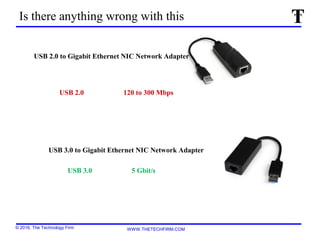
USB 3.0 to Gigabit Ethernet NIC Network Adapter
USB 2.0 120 to 300 Mbps
USB 3.0 5 Gbit/s
Is there anything wrong with this
USB 2.0 to Gigabit Ethernet NIC Network Adapter
© 2016, The Technology Firm WWW.THETECHFIRM.COM
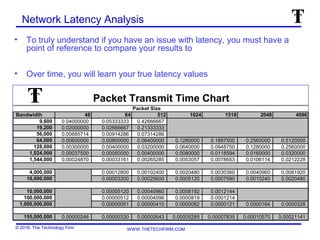
Network Latency Analysis
• To truly understand if you have an issue with latency, you must have a
point of reference to compare your results to
• Over time, you will learn your true latency values
Packet Transmit Time Chart
Packet Size
Bandwidth 48 64 512 1024 1518 2048 4096
9,600 0.04000000 0.05333333 0.42666667
19,200 0.02000000 0.02666667 0.21333333
56,000 0.00685714 0.00914286 0.07314286
64,000 0.00600000 0.00800000 0.06400000 0.1280000 0.1897500 0.2560000 0.5120000
128,000 0.00300000 0.00400000 0.03200000 0.0640000 0.0948750 0.1280000 0.2560000
1,024,000 0.00037500 0.00050000 0.00400000 0.0080000 0.0118594 0.0160000 0.0320000
1,544,000 0.00024870 0.00033161 0.00265285 0.0053057 0.0078653 0.0106114 0.0212228
4,000,000 0.00012800 0.00102400 0.0020480 0.0030360 0.0040960 0.0081920
16,000,000 0.00003200 0.00025600 0.0005120 0.0007590 0.0010240 0.0020480
10,000,000 0.00005120 0.00040960 0.0008192 0.0012144
100,000,000 0.00000512 0.00004096 0.0000819 0.0001214
1,000,000,000 0.00000051 0.00000410 0.0000082 0.0000121 0.0000164 0.0000328
155,000,000 0.00000248 0.00000330 0.00002643 0.00005285 0.00007835 0.00010570 0.00021141
© 2016, The Technology Firm WWW.THETECHFIRM.COM
Observing Existing Traffic
 The following items need to be documented when considering this task:
• Date/Time
• Any business events – year end, tax season, etc.
• Duration of test
• Application information
• Client computer specifications/Operating system
• Software overview (SQL, WEB, multi-tier)
• How you will intercept data (span, tap, hub)
• Test script (manual)
• Can you automate the test (autoit, macros)
• How many tests are you performing
 I do 5, drop the high/low and average the 3
6
© 2016, The Technology Firm WWW.THETECHFIRM.COM
Generate your own Traffic
 The following items need to be documented when considering this task:
• Date/Time
• Any business events – year end, tax season, etc.
• Duration of test
• Application information
• Client computer specifications/Operating system
• Are you using the disk – local or network drive
• If you are using a file, what is the size
• What is the slowest link between hosts
• How long do you want to test for
• What is the direction of traffic generation (upload vs download vs both)
• Can the test be automated
• What protocol/application do you want to use
• How many tests are you performing
 I do 5, drop the high/low and average the 3
7
© 2016, The Technology Firm WWW.THETECHFIRM.COM
Don’t guess at file sizes
Determining Proper File Size
To get an approximate idea of the proper file size:
• Bandwidth of the slowest link between the client server
• Divide by 8 (bits in a Byte)
• Multiply by number of seconds
• Example:
• 100 Mbps / 8 = 12.5 MBps x 10 seconds = 125 MB file
© 2016, The Technology Firm WWW.THETECHFIRM.COM
Always Start With A Local Baseline
9
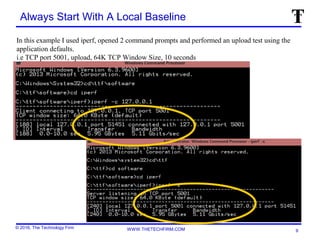
In this example I used iperf, opened 2 command prompts and performed an upload test using the
application defaults.
i.e TCP port 5001, upload, 64K TCP Window Size, 10 seconds
© 2016, The Technology Firm WWW.THETECHFIRM.COM
A Local Baseline Can Also Be a VM Baseline
10
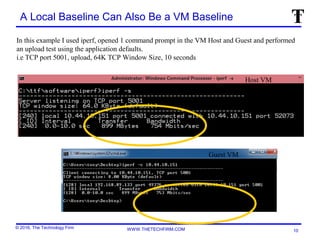
In this example I used iperf, opened 1 command prompt in the VM Host and Guest and performed
an upload test using the application defaults.
i.e TCP port 5001, upload, 64K TCP Window Size, 10 seconds
Guest VM
Host VM
© 2016, The Technology Firm WWW.THETECHFIRM.COM
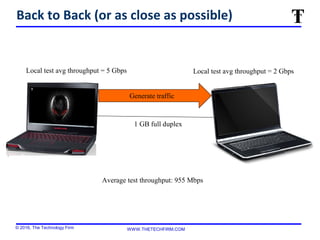
Back to Back (or as close as possible)
Generate traffic
1 GB full duplex
Local test avg throughput = 5 Gbps Local test avg throughput = 2 Gbps
Average test throughput: 955 Mbps
© 2016, The Technology Firm WWW.THETECHFIRM.COM
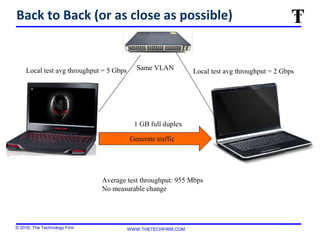
Back to Back (or as close as possible)
1 GB full duplex
Local test avg throughput = 5 Gbps Local test avg throughput = 2 Gbps
Average test throughput: 955 Mbps
No measurable change
Same VLAN
Generate traffic
© 2016, The Technology Firm WWW.THETECHFIRM.COM
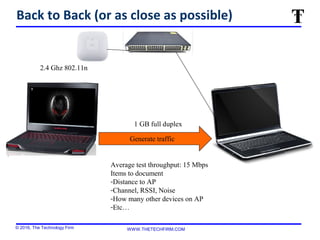
Back to Back (or as close as possible)
1 GB full duplex
Average test throughput: 15 Mbps
Items to document
-Distance to AP
-Channel, RSSI, Noise
-How many other devices on AP
-Etc…
2.4 Ghz 802.11n
Generate traffic
© 2016, The Technology Firm WWW.THETECHFIRM.COM
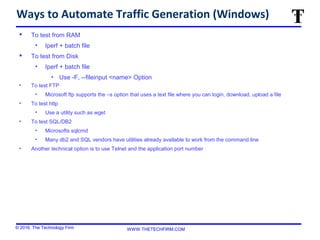
Ways to Automate Traffic Generation (Windows)
 To test from RAM
• Iperf + batch file
 To test from Disk
• Iperf + batch file
• Use -F, --fileinput <name> Option
• To test FTP
• Microsoft ftp supports the –s option that uses a text file where you can login, download, upload a file
• To test http
• Use a utility such as wget
• To test SQL/DB2
• Microsofts sqlcmd
• Many db2 and SQL vendors have utilities already available to work from the command line
• Another technical option is to use Telnet and the application port number
© 2016, The Technology Firm WWW.THETECHFIRM.COM
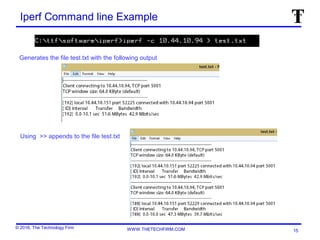
Iperf Command line Example
Generates the file test.txt with the following output
15
Using >> appends to the file test.txt
© 2016, The Technology Firm WWW.THETECHFIRM.COM
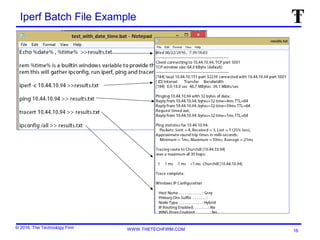
Iperf Batch File Example
16
© 2016, The Technology Firm WWW.THETECHFIRM.COM
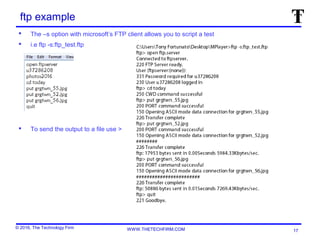
ftp example
 The –s option with microsoft’s FTP client allows you to script a test
 i.e ftp -s:ftp_test.ftp
 To send the output to a file use >
17
© 2016, The Technology Firm WWW.THETECHFIRM.COM
wget To Measure Throughput With HTTP
D:softwarewget>wget http://churchill/300mb
--2013-09-27 21:24:05-- http://churchill/300mb
Resolving churchill... 10.44.10.94
Connecting to churchill|10.44.10.94|:80... connected.
HTTP request sent, awaiting response... 200 OK
Length: 333202944 (318M) [application/octet-stream]
Saving to: `300mb'
100%[======================================>] 333,202,944 1.47M/s in 3m 20s
2013-09-27 21:27:25 (1.59 MB/s) - `300mb' saved [333202944/333202944]
D:softwarewget>wget http://churchill/8mb
--2013-09-27 21:35:07-- http://churchill/8mb
Resolving churchill... 10.44.10.94
Connecting to churchill|10.44.10.94|:80... connected
HTTP request sent, awaiting response... 200 OK
Length: 9062704 (8.6M) [application/octet-stream]
Saving to: `8mb.1'
100%[======================================>] 9,062,704 1.38M/s in 6.9s
2013-09-27 21:35:14 (1.25 MB/s) - `8mb.1' saved [9062704/9062704]

Performance test

  • 1.
    WWW.THETECHFIRM.CO M © 2016, TheTechnology Firm Measuring Performance Quickstart Tony Fortunato The Technology Firm www.Thetechfirm.com
  • 2.
    © 2016, TheTechnology Firm WWW.THETECHFIRM.COM Goal  Measuring performance is not a straight forward exercise because: • Many variables need to be documented • Many other variables will be missed • Choosing the appropriate methodology is key • Tool selection is also important  Choosing what type of performance you want to measure is your first step. • Observing existing traffic. • Generate your own traffic  Regardless of performance type, you should always start with a local baseline 2
  • 3.
    © 2016, TheTechnology Firm WWW.THETECHFIRM.COM What Makes A Tool Effective
  • 4.
    © 2016, TheTechnology Firm WWW.THETECHFIRM.COM USB 3.0 to Gigabit Ethernet NIC Network Adapter USB 2.0 120 to 300 Mbps USB 3.0 5 Gbit/s Is there anything wrong with this USB 2.0 to Gigabit Ethernet NIC Network Adapter
  • 5.
    © 2016, TheTechnology Firm WWW.THETECHFIRM.COM Network Latency Analysis • To truly understand if you have an issue with latency, you must have a point of reference to compare your results to • Over time, you will learn your true latency values Packet Transmit Time Chart Packet Size Bandwidth 48 64 512 1024 1518 2048 4096 9,600 0.04000000 0.05333333 0.42666667 19,200 0.02000000 0.02666667 0.21333333 56,000 0.00685714 0.00914286 0.07314286 64,000 0.00600000 0.00800000 0.06400000 0.1280000 0.1897500 0.2560000 0.5120000 128,000 0.00300000 0.00400000 0.03200000 0.0640000 0.0948750 0.1280000 0.2560000 1,024,000 0.00037500 0.00050000 0.00400000 0.0080000 0.0118594 0.0160000 0.0320000 1,544,000 0.00024870 0.00033161 0.00265285 0.0053057 0.0078653 0.0106114 0.0212228 4,000,000 0.00012800 0.00102400 0.0020480 0.0030360 0.0040960 0.0081920 16,000,000 0.00003200 0.00025600 0.0005120 0.0007590 0.0010240 0.0020480 10,000,000 0.00005120 0.00040960 0.0008192 0.0012144 100,000,000 0.00000512 0.00004096 0.0000819 0.0001214 1,000,000,000 0.00000051 0.00000410 0.0000082 0.0000121 0.0000164 0.0000328 155,000,000 0.00000248 0.00000330 0.00002643 0.00005285 0.00007835 0.00010570 0.00021141
  • 6.
    © 2016, TheTechnology Firm WWW.THETECHFIRM.COM Observing Existing Traffic  The following items need to be documented when considering this task: • Date/Time • Any business events – year end, tax season, etc. • Duration of test • Application information • Client computer specifications/Operating system • Software overview (SQL, WEB, multi-tier) • How you will intercept data (span, tap, hub) • Test script (manual) • Can you automate the test (autoit, macros) • How many tests are you performing  I do 5, drop the high/low and average the 3 6
  • 7.
    © 2016, TheTechnology Firm WWW.THETECHFIRM.COM Generate your own Traffic  The following items need to be documented when considering this task: • Date/Time • Any business events – year end, tax season, etc. • Duration of test • Application information • Client computer specifications/Operating system • Are you using the disk – local or network drive • If you are using a file, what is the size • What is the slowest link between hosts • How long do you want to test for • What is the direction of traffic generation (upload vs download vs both) • Can the test be automated • What protocol/application do you want to use • How many tests are you performing  I do 5, drop the high/low and average the 3 7
  • 8.
    © 2016, TheTechnology Firm WWW.THETECHFIRM.COM Don’t guess at file sizes Determining Proper File Size To get an approximate idea of the proper file size: • Bandwidth of the slowest link between the client server • Divide by 8 (bits in a Byte) • Multiply by number of seconds • Example: • 100 Mbps / 8 = 12.5 MBps x 10 seconds = 125 MB file
  • 9.
    © 2016, TheTechnology Firm WWW.THETECHFIRM.COM Always Start With A Local Baseline 9 In this example I used iperf, opened 2 command prompts and performed an upload test using the application defaults. i.e TCP port 5001, upload, 64K TCP Window Size, 10 seconds
  • 10.
    © 2016, TheTechnology Firm WWW.THETECHFIRM.COM A Local Baseline Can Also Be a VM Baseline 10 In this example I used iperf, opened 1 command prompt in the VM Host and Guest and performed an upload test using the application defaults. i.e TCP port 5001, upload, 64K TCP Window Size, 10 seconds Guest VM Host VM
  • 11.
    © 2016, TheTechnology Firm WWW.THETECHFIRM.COM Back to Back (or as close as possible) Generate traffic 1 GB full duplex Local test avg throughput = 5 Gbps Local test avg throughput = 2 Gbps Average test throughput: 955 Mbps
  • 12.
    © 2016, TheTechnology Firm WWW.THETECHFIRM.COM Back to Back (or as close as possible) 1 GB full duplex Local test avg throughput = 5 Gbps Local test avg throughput = 2 Gbps Average test throughput: 955 Mbps No measurable change Same VLAN Generate traffic
  • 13.
    © 2016, TheTechnology Firm WWW.THETECHFIRM.COM Back to Back (or as close as possible) 1 GB full duplex Average test throughput: 15 Mbps Items to document -Distance to AP -Channel, RSSI, Noise -How many other devices on AP -Etc… 2.4 Ghz 802.11n Generate traffic
  • 14.
    © 2016, TheTechnology Firm WWW.THETECHFIRM.COM Ways to Automate Traffic Generation (Windows)  To test from RAM • Iperf + batch file  To test from Disk • Iperf + batch file • Use -F, --fileinput <name> Option • To test FTP • Microsoft ftp supports the –s option that uses a text file where you can login, download, upload a file • To test http • Use a utility such as wget • To test SQL/DB2 • Microsofts sqlcmd • Many db2 and SQL vendors have utilities already available to work from the command line • Another technical option is to use Telnet and the application port number
  • 15.
    © 2016, TheTechnology Firm WWW.THETECHFIRM.COM Iperf Command line Example Generates the file test.txt with the following output 15 Using >> appends to the file test.txt
  • 16.
    © 2016, TheTechnology Firm WWW.THETECHFIRM.COM Iperf Batch File Example 16
  • 17.
    © 2016, TheTechnology Firm WWW.THETECHFIRM.COM ftp example  The –s option with microsoft’s FTP client allows you to script a test  i.e ftp -s:ftp_test.ftp  To send the output to a file use > 17
  • 18.
    © 2016, TheTechnology Firm WWW.THETECHFIRM.COM wget To Measure Throughput With HTTP D:softwarewget>wget http://churchill/300mb --2013-09-27 21:24:05-- http://churchill/300mb Resolving churchill... 10.44.10.94 Connecting to churchill|10.44.10.94|:80... connected. HTTP request sent, awaiting response... 200 OK Length: 333202944 (318M) [application/octet-stream] Saving to: `300mb' 100%[======================================>] 333,202,944 1.47M/s in 3m 20s 2013-09-27 21:27:25 (1.59 MB/s) - `300mb' saved [333202944/333202944] D:softwarewget>wget http://churchill/8mb --2013-09-27 21:35:07-- http://churchill/8mb Resolving churchill... 10.44.10.94 Connecting to churchill|10.44.10.94|:80... connected HTTP request sent, awaiting response... 200 OK Length: 9062704 (8.6M) [application/octet-stream] Saving to: `8mb.1' 100%[======================================>] 9,062,704 1.38M/s in 6.9s 2013-09-27 21:35:14 (1.25 MB/s) - `8mb.1' saved [9062704/9062704]