Silverlight smooth streaming
Wireshark analysis

                            Yossi Cohen
                            DSP-IP


    Fast Forward Your Development     www.dsp-ip.com
SILVERLIGHT INTRODUCTION


   Fast Forward Your Development   www.dsp-ip.com
Smooth Streaming

• Microsoft’s implementation of HTTP-based
  adaptive streaming
• A hybrid media delivery method that acts like
  streaming but is in fact a series of short
  progressive downloads
• Leverages existing HTTP caches
• Client can seamlessly switch video quality and bit
  rate based on perceived network bandwidth and
  CPU resources


       Fast Forward Your Development    www.dsp-ip.com
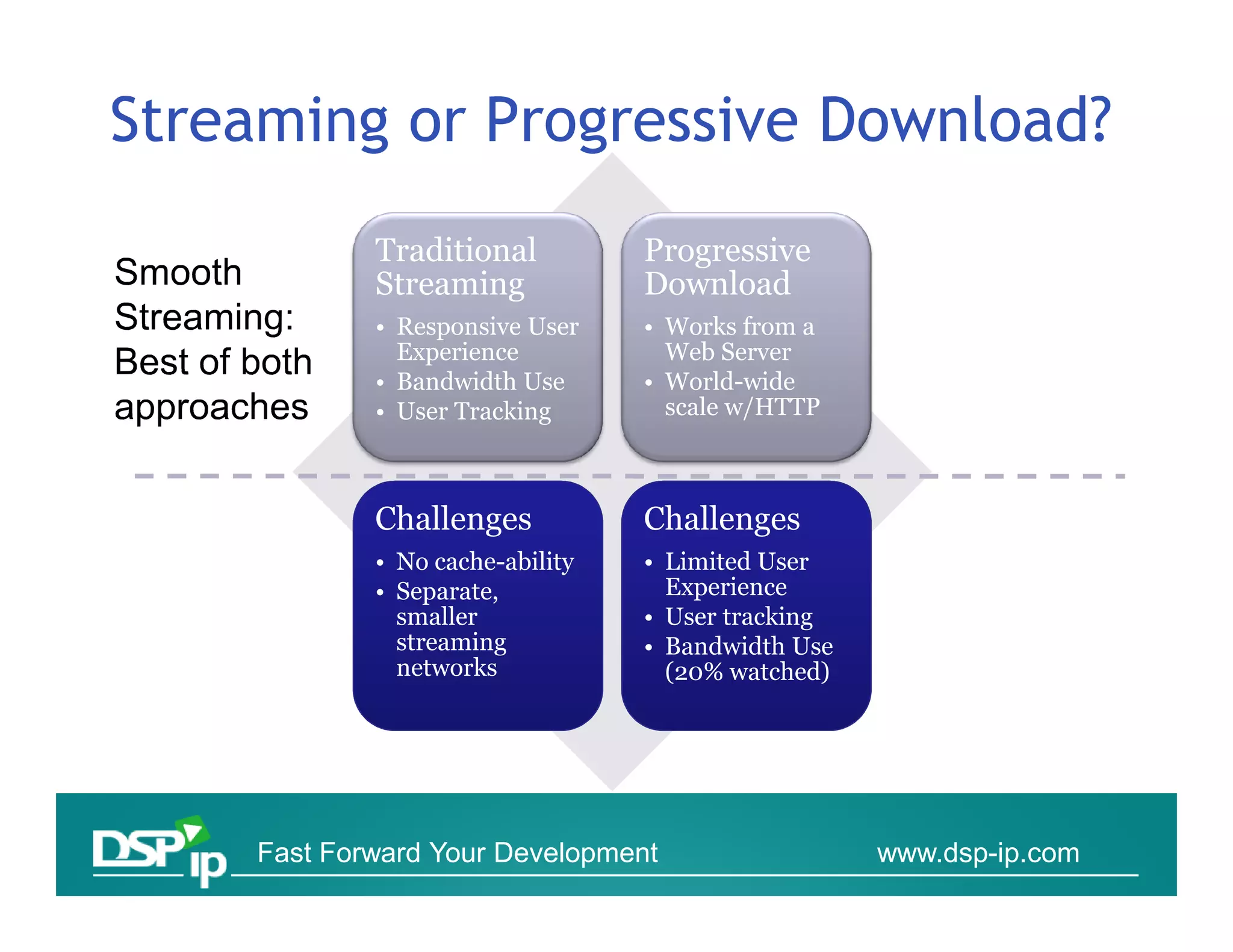
Streaming or Progressive Download?
            Traditional          Progressive
            Streaming            Download
            • Responsive User    • Works from a
              Experience           Web Server
            • Bandwidth Use      • World-wide
            • User Tracking        scale w/HTTP


            Challenges           Challenges
            • No cache-ability   • Limited User
            • Separate,            Experience
              smaller            • User tracking
              streaming          • Bandwidth Use
              networks             (20% watched)


    Fast Forward Your Development                  www.dsp-ip.com
Smooth Streaming Design
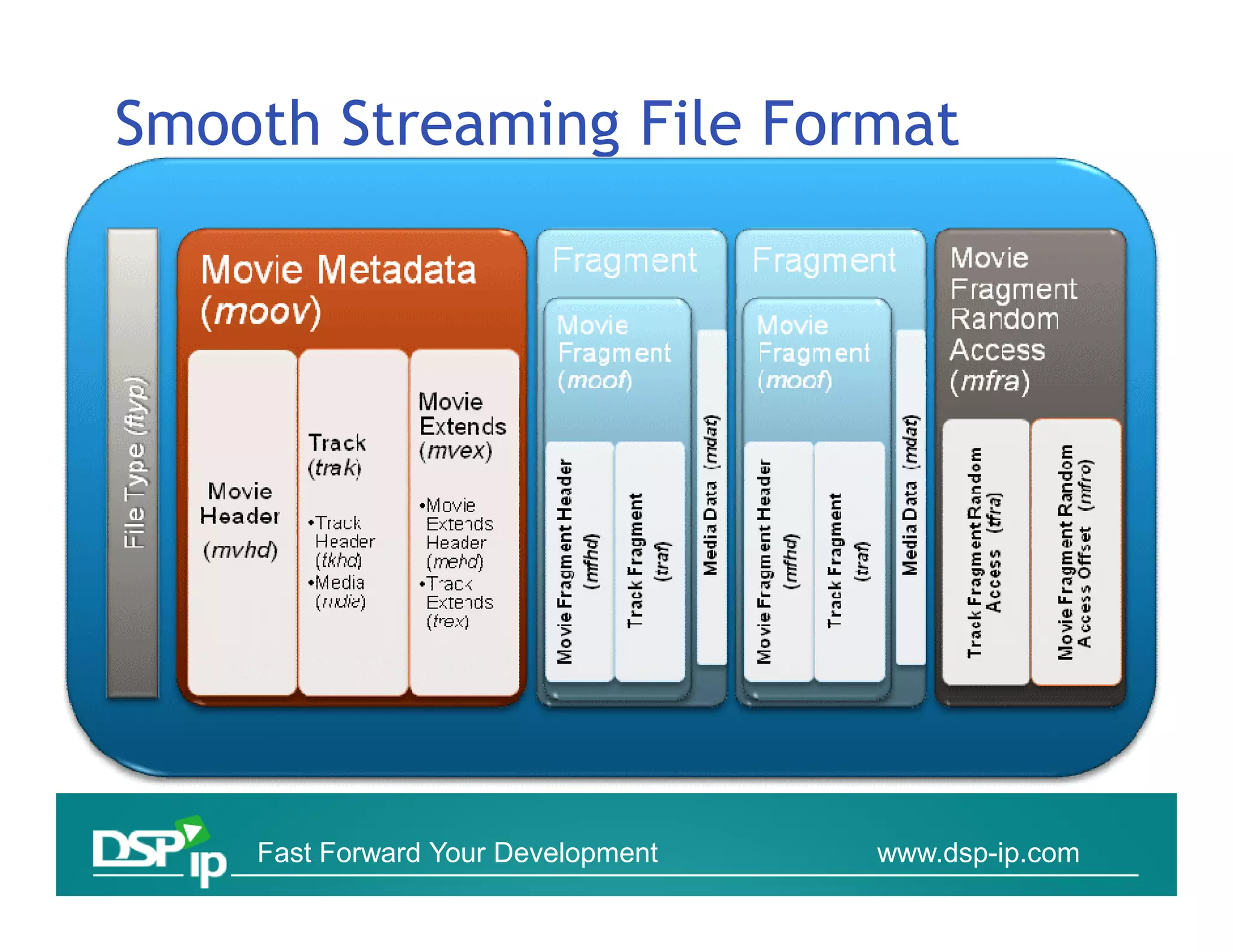
• Smooth Streaming File Format based on MP4
  (ISO Base Media File Format)
• Video is encoded and stored on disk as one
  contiguous MP4 file
  ▫ Separate file for each bit rate
• Each video Group of Pictures (GOP) is stored in a
  Movie Fragment box
  ▫ This allows easy fragmentation at key frames
• Contiguous file is virtually split up into chunks
  when responding to a client request


        Fast Forward Your Development    www.dsp-ip.com
Content Provider Benefits
• Cheaper to deploy
  ▫ Can utilize any generic HTTP caches/proxies
  ▫ Doesn’t require specialized servers
    at every node
• Better scalability and reach
  ▫ Reduces “last mile” issues because it can
    dynamically adapt to inferior network conditions
• Audience can adapt to the content, rather than
  requiring the content providers to guess which bit
  rates are most likely to be accessible to their
  audience

       Fast Forward Your Development     www.dsp-ip.com
End User Benefits
• Fast start-up and seek times
 ▫ Start-up/seeking can be initiated on the lowest bit
   rate before moving up to a higher bit rate
• No buffering, no disconnects, no
  playback stutter
 ▫ As long as the user meets the minimum
   bit rate requirement
• Seamless bit rate switching based on network
  conditions and CPU capabilities.
• A generally consistent, smooth
  playback experience

      Fast Forward Your Development      www.dsp-ip.com
Evolution
• Previous versions of MS streaming divide the file
  into many chunkc 0001.vid 0002.vid etc
• Problematic in caching, CDNs, CMS etc
• Today all fragments of a file are contained in a
  single bitstream container. Typically 1 fragment
  = 1 video GOP.


      Fast Forward Your Development    www.dsp-ip.com
SILVERLIGHT FILES


Containers & Configuration files


     Fast Forward Your Development   www.dsp-ip.com
Format options
•   ASF/WMV – native Microsoft Format
•   MPEG4 File-Format
•   AVI
•   OGG


        Fast Forward Your Development   www.dsp-ip.com
MP4 over ASF file format
• MP4 is a lightweight container format with less
  overhead than ASF
• MP4 is easier to parse in managed (.NET) code
• MP4 is based on a widely used standard, making
  3rd party adoption and support easier
• MP4 has native H.264 video support
• MP4 was designed to natively support payload
  fragmentation within the file


      Fast Forward Your Development   www.dsp-ip.com
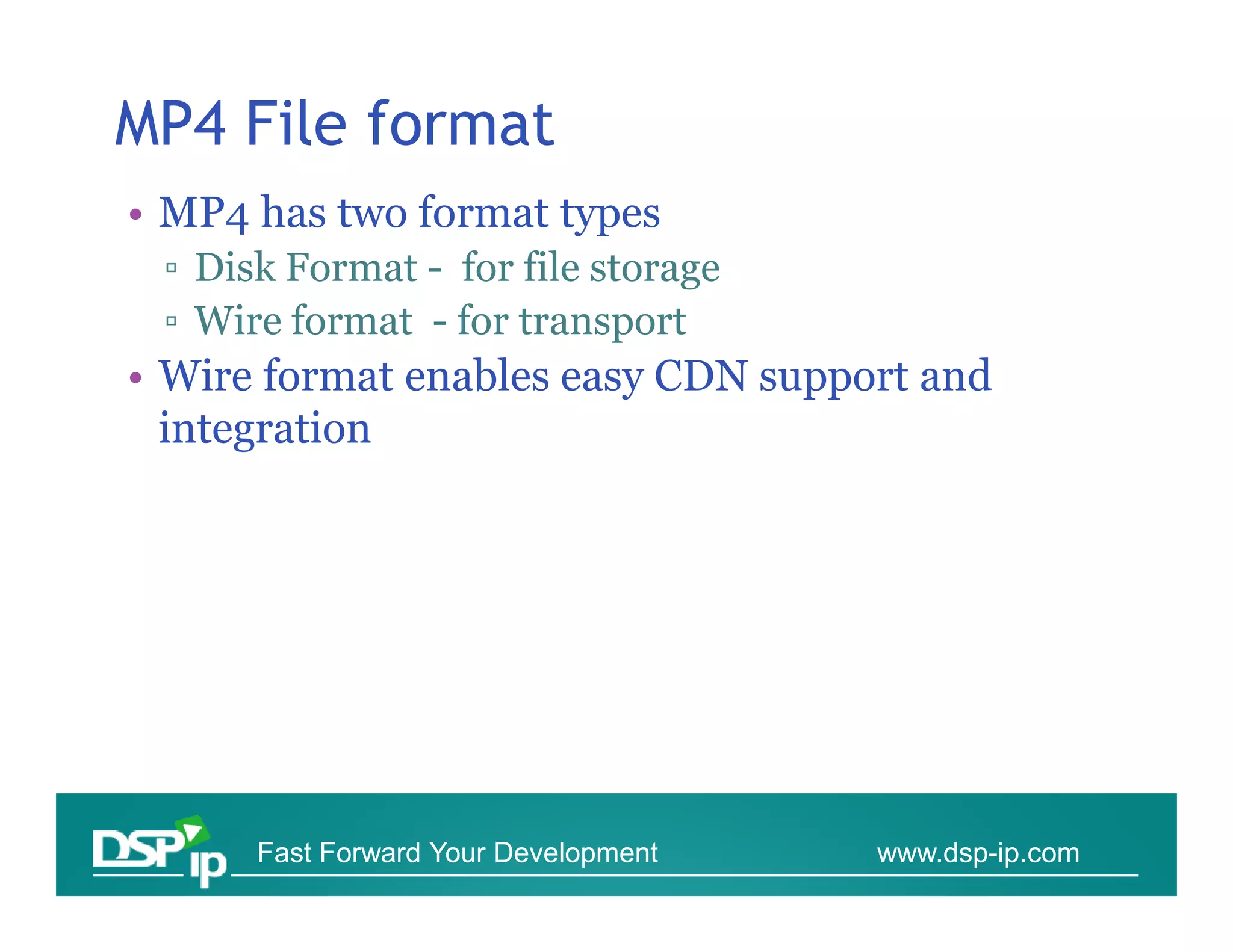
MP4 File format
• MP4 has two format types
 ▫ Disk Format - for file storage
 ▫ Wire format - for transport
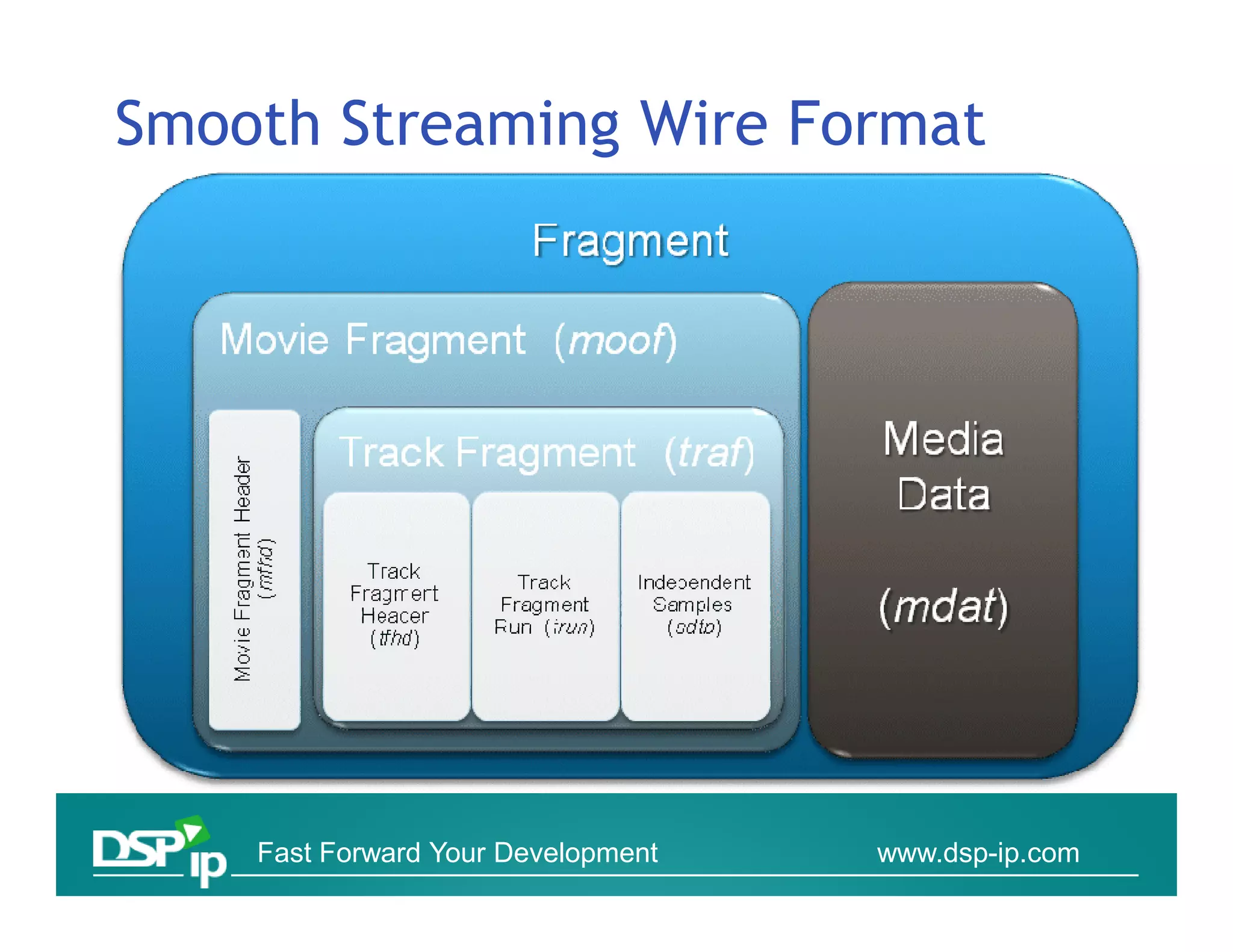
• Wire format enables easy CDN support and
  integration


      Fast Forward Your Development   www.dsp-ip.com
Smooth Streaming File Format


    Fast Forward Your Development   www.dsp-ip.com
Smooth Streaming Wire Format


    Fast Forward Your Development   www.dsp-ip.com
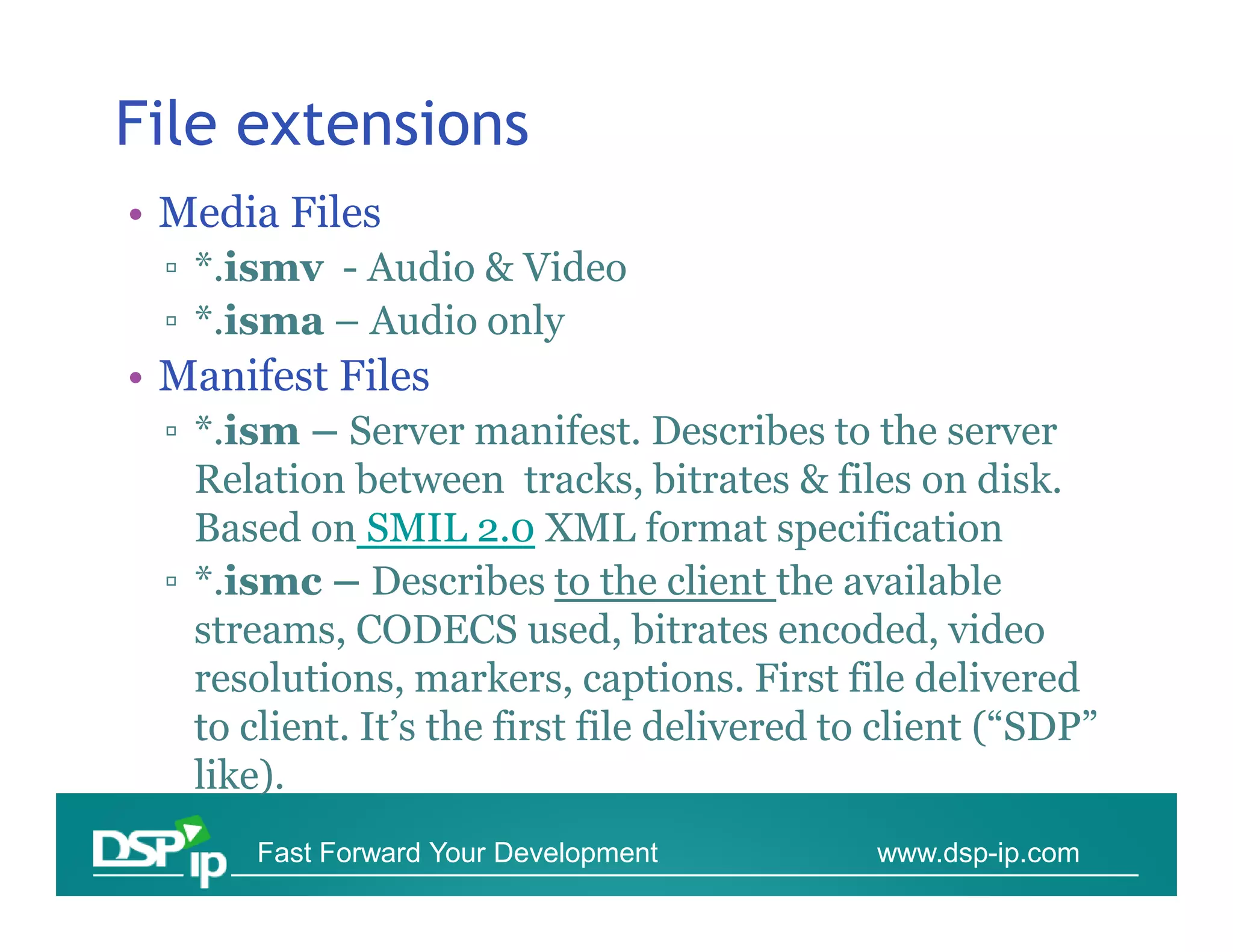
File extensions
• Media Files
 ▫ *.ismv - Audio & Video
 ▫ *.isma – Audio only
• Manifest Files
 ▫ *.ism – Server manifest. Describes to the server
   Relation between tracks, bitrates & files on disk.
   Based on SMIL 2.0 XML format specification
 ▫ *.ismc – Describes to the client the available
   streams, CODECS used, bitrates encoded, video
   resolutions, markers, captions. First file delivered
   to client. It’s the first file delivered to client (“SDP”
   like).
      Fast Forward Your Development           www.dsp-ip.com
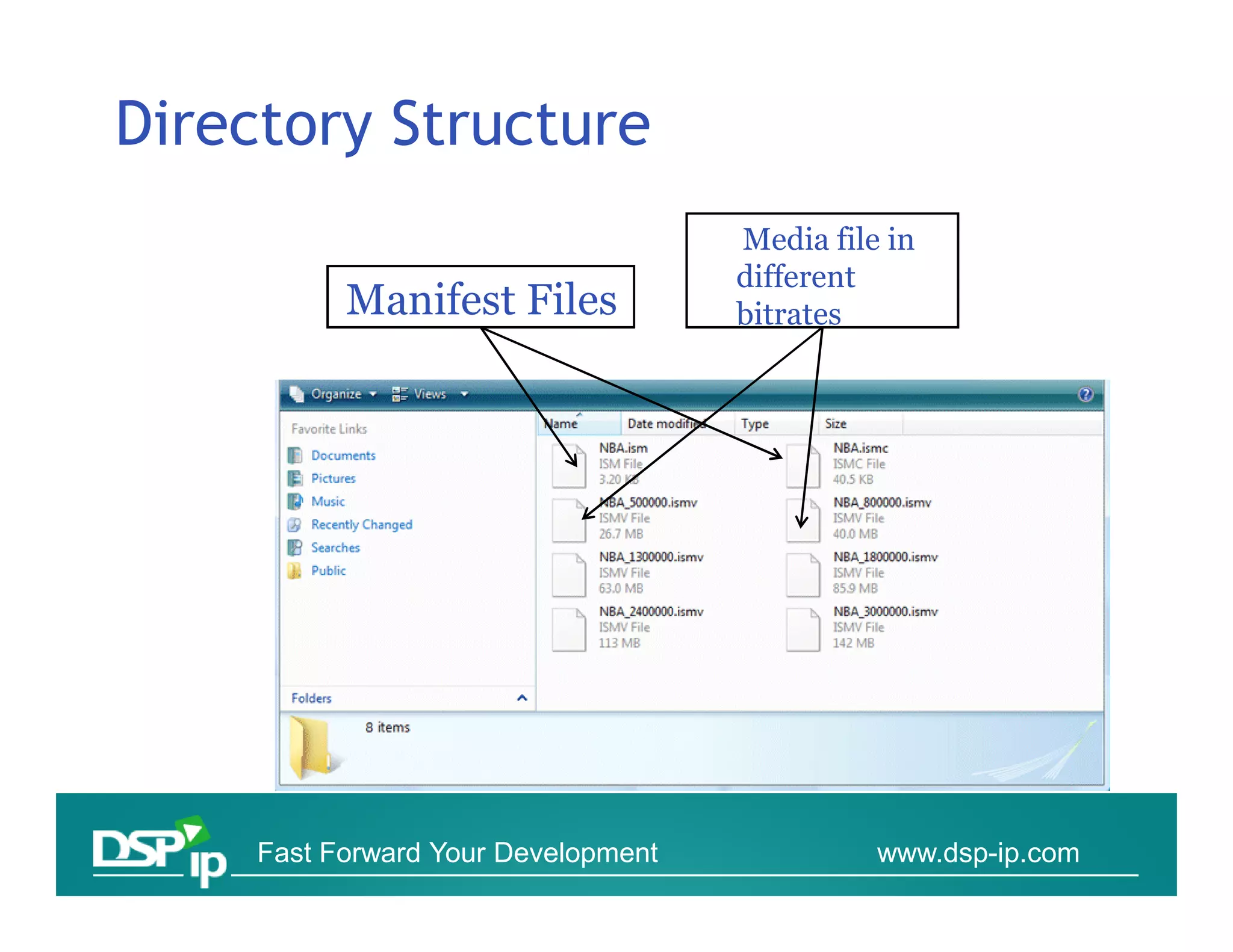
Directory Structure
                                     Media file in
                                     different
           Manifest Files            bitrates


     Fast Forward Your Development             www.dsp-ip.com
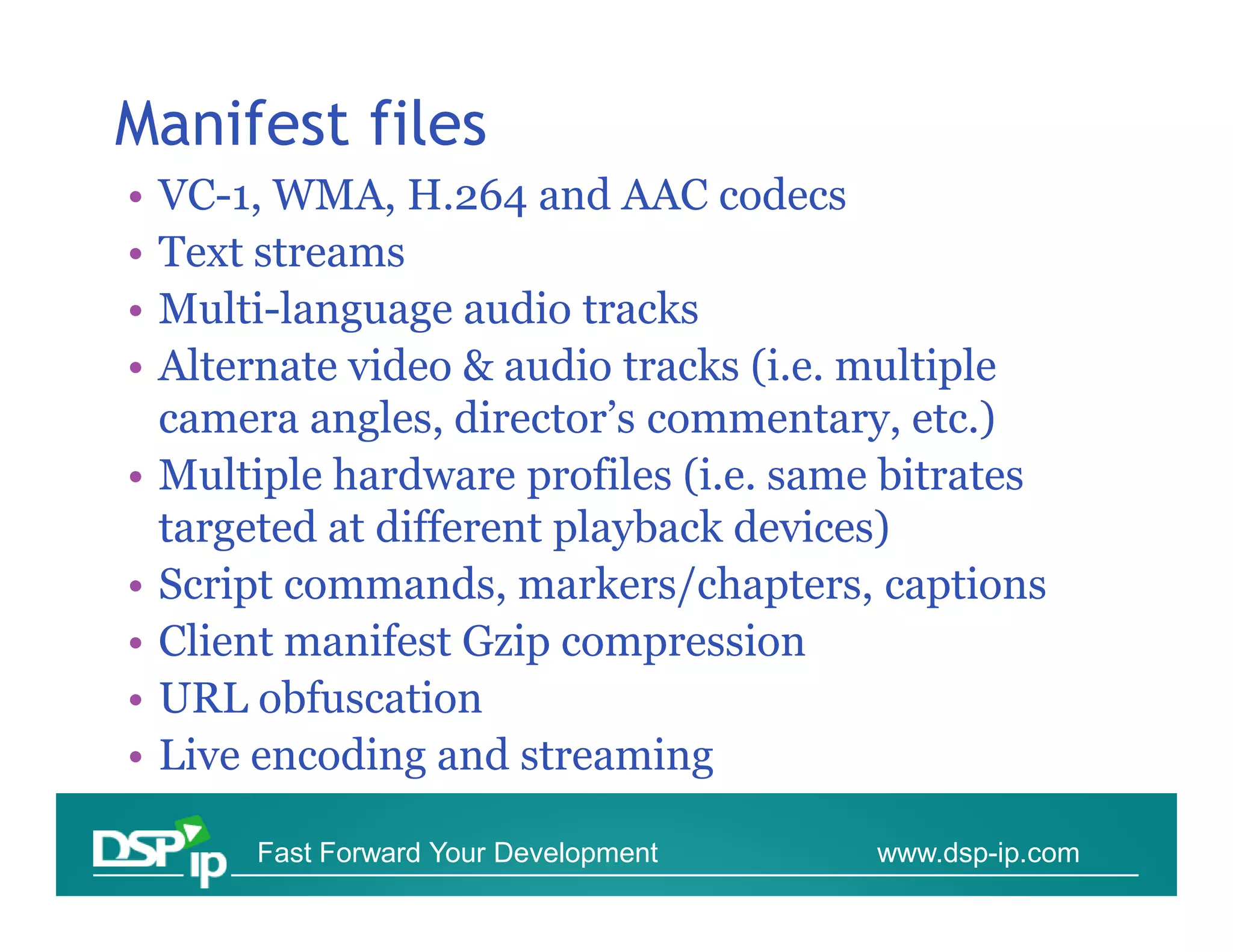
Manifest files
•   VC-1, WMA, H.264 and AAC codecs
•   Text streams
•   Multi-language audio tracks
•   Alternate video & audio tracks (i.e. multiple
    camera angles, director’s commentary, etc.)
•   Multiple hardware profiles (i.e. same bitrates
    targeted at different playback devices)
•   Script commands, markers/chapters, captions
•   Client manifest Gzip compression
•   URL obfuscation
•   Live encoding and streaming

         Fast Forward Your Development   www.dsp-ip.com
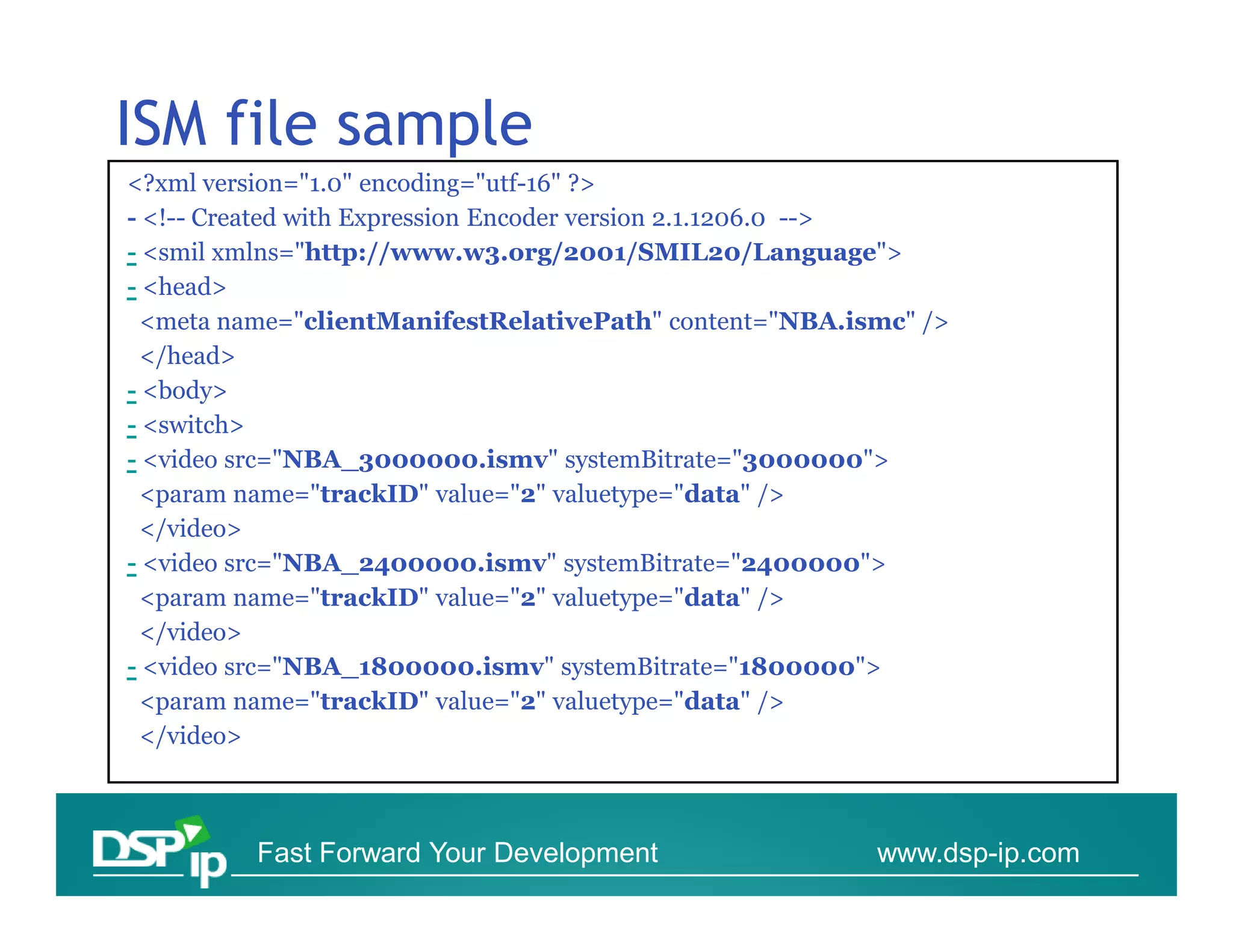
ISM file sample
<?xml version="1.0" encoding="utf-16" ?>
- <!-- Created with Expression Encoder version 2.1.1206.0 -->
- <smil xmlns="http://www.w3.org/2001/SMIL20/Language">
- <head>
 <meta name="clientManifestRelativePath" content="NBA.ismc" />
 </head>
- <body>
- <switch>
- <video src="NBA_3000000.ismv" systemBitrate="3000000">
 <param name="trackID" value="2" valuetype="data" />
 </video>
- <video src="NBA_2400000.ismv" systemBitrate="2400000">
 <param name="trackID" value="2" valuetype="data" />
 </video>
- <video src="NBA_1800000.ismv" systemBitrate="1800000">
 <param name="trackID" value="2" valuetype="data" />
 </video>


         Fast Forward Your Development                  www.dsp-ip.com
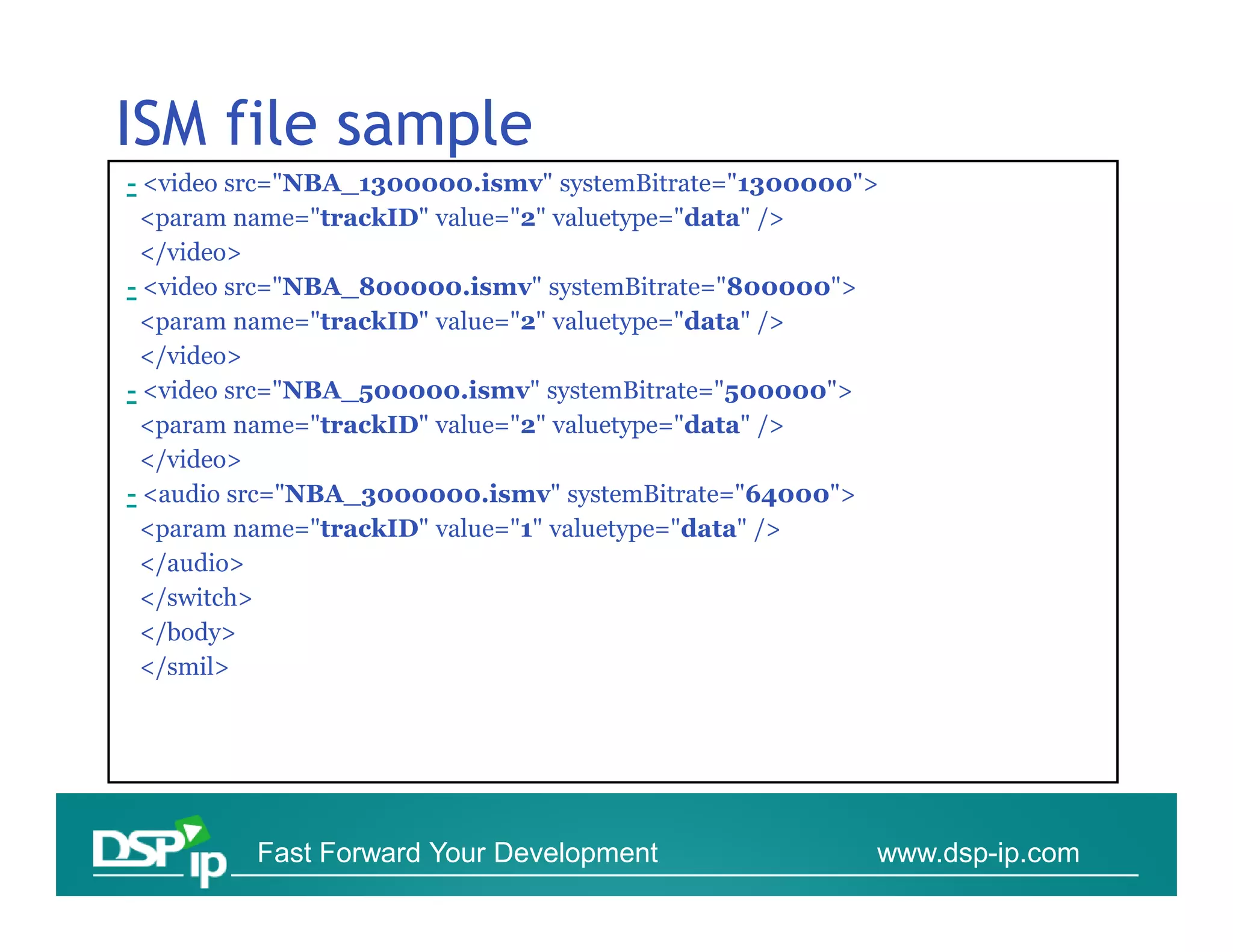
ISM file sample
- <video src="NBA_1300000.ismv" systemBitrate="1300000">
 <param name="trackID" value="2" valuetype="data" />
 </video>
- <video src="NBA_800000.ismv" systemBitrate="800000">
 <param name="trackID" value="2" valuetype="data" />
 </video>
- <video src="NBA_500000.ismv" systemBitrate="500000">
 <param name="trackID" value="2" valuetype="data" />
 </video>
- <audio src="NBA_3000000.ismv" systemBitrate="64000">
 <param name="trackID" value="1" valuetype="data" />
 </audio>
 </switch>
 </body>
 </smil>


         Fast Forward Your Development                 www.dsp-ip.com
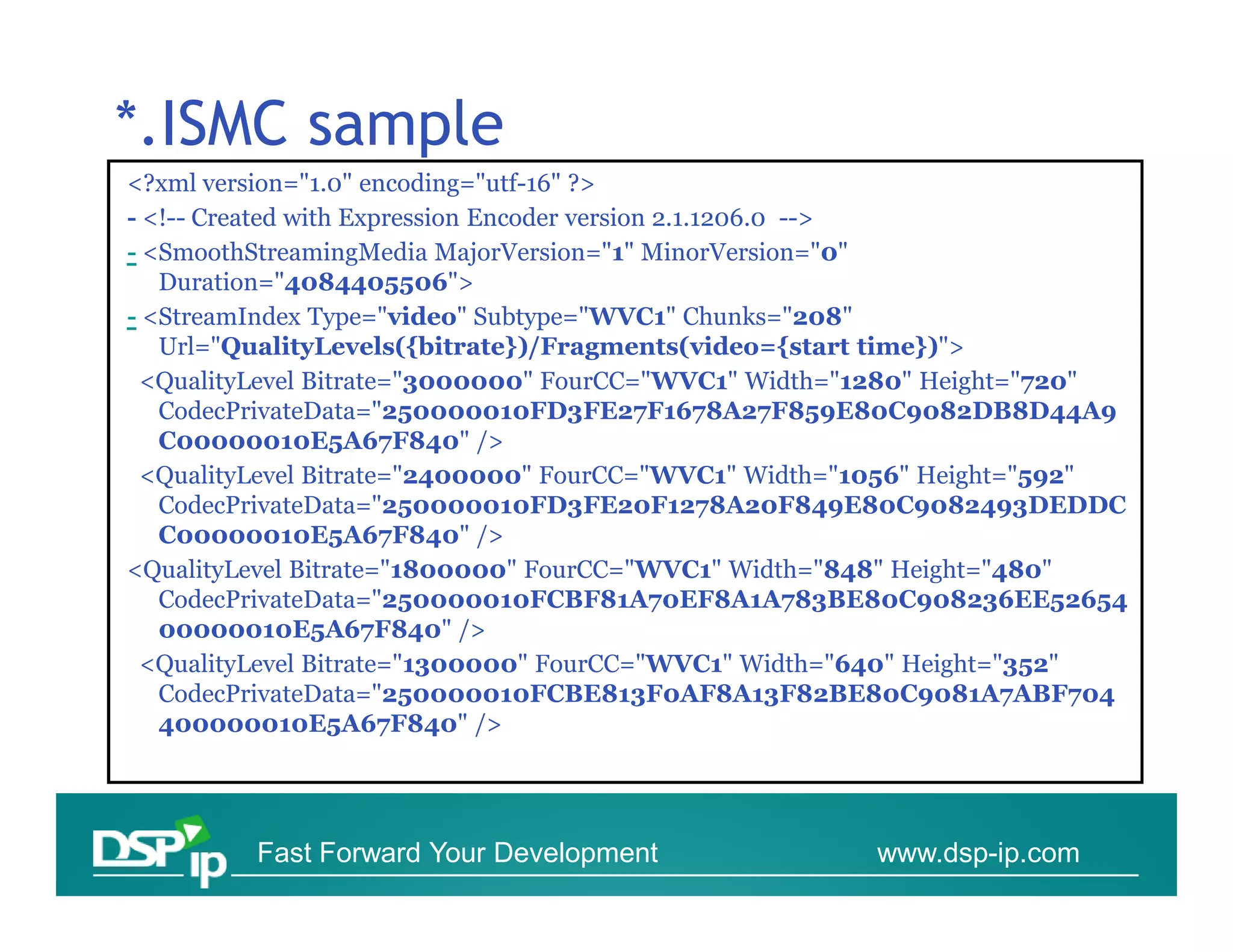
*.ISMC sample
<?xml version="1.0" encoding="utf-16" ?>
- <!-- Created with Expression Encoder version 2.1.1206.0 -->
- <SmoothStreamingMedia MajorVersion="1" MinorVersion="0"
   Duration="4084405506">
- <StreamIndex Type="video" Subtype="WVC1" Chunks="208"
   Url="QualityLevels({bitrate})/Fragments(video={start time})">
 <QualityLevel Bitrate="3000000" FourCC="WVC1" Width="1280" Height="720"
   CodecPrivateData="250000010FD3FE27F1678A27F859E80C9082DB8D44A9
   C00000010E5A67F840" />
 <QualityLevel Bitrate="2400000" FourCC="WVC1" Width="1056" Height="592"
   CodecPrivateData="250000010FD3FE20F1278A20F849E80C9082493DEDDC
   C00000010E5A67F840" />
<QualityLevel Bitrate="1800000" FourCC="WVC1" Width="848" Height="480"
   CodecPrivateData="250000010FCBF81A70EF8A1A783BE80C908236EE52654
   00000010E5A67F840" />
 <QualityLevel Bitrate="1300000" FourCC="WVC1" Width="640" Height="352"
   CodecPrivateData="250000010FCBE813F0AF8A13F82BE80C9081A7ABF704
   400000010E5A67F840" />


         Fast Forward Your Development               www.dsp-ip.com
SILVERLIGHT SESSION


Initiation and Flow


     Fast Forward Your Development   www.dsp-ip.com
Smooth Streaming Protocol

• Smooth Streaming Protocol uses HTTP
  [RFC2616] as its underlying transport .
• The Server role in the protocol is stateless
  ▫ Enabling (potentially) different instance of the
    server to handle client requests
  ▫ Request can utilize any generic HTTP
    caches/proxies - > Lowering CDN costs


        Fast Forward Your Development       www.dsp-ip.com
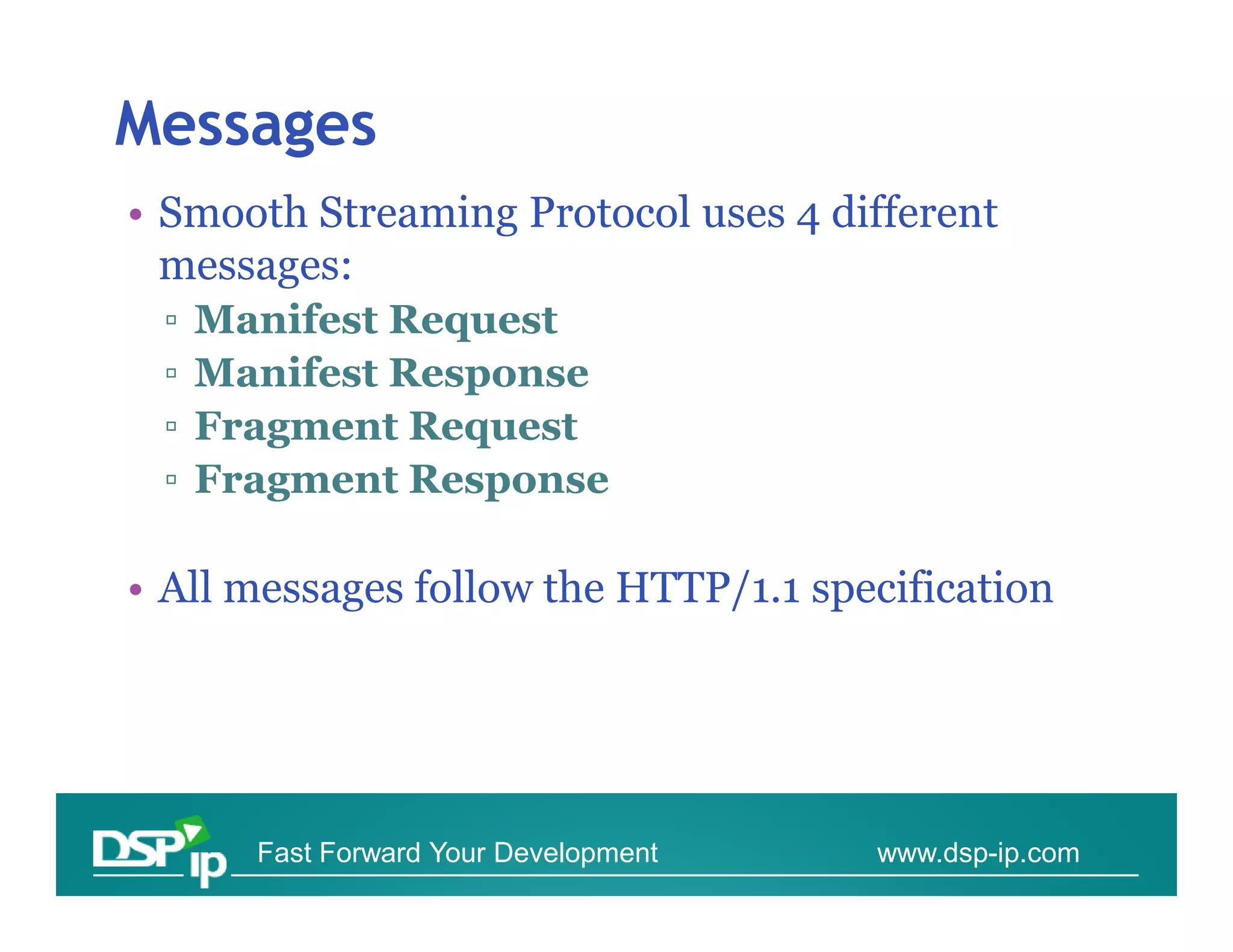
Messages
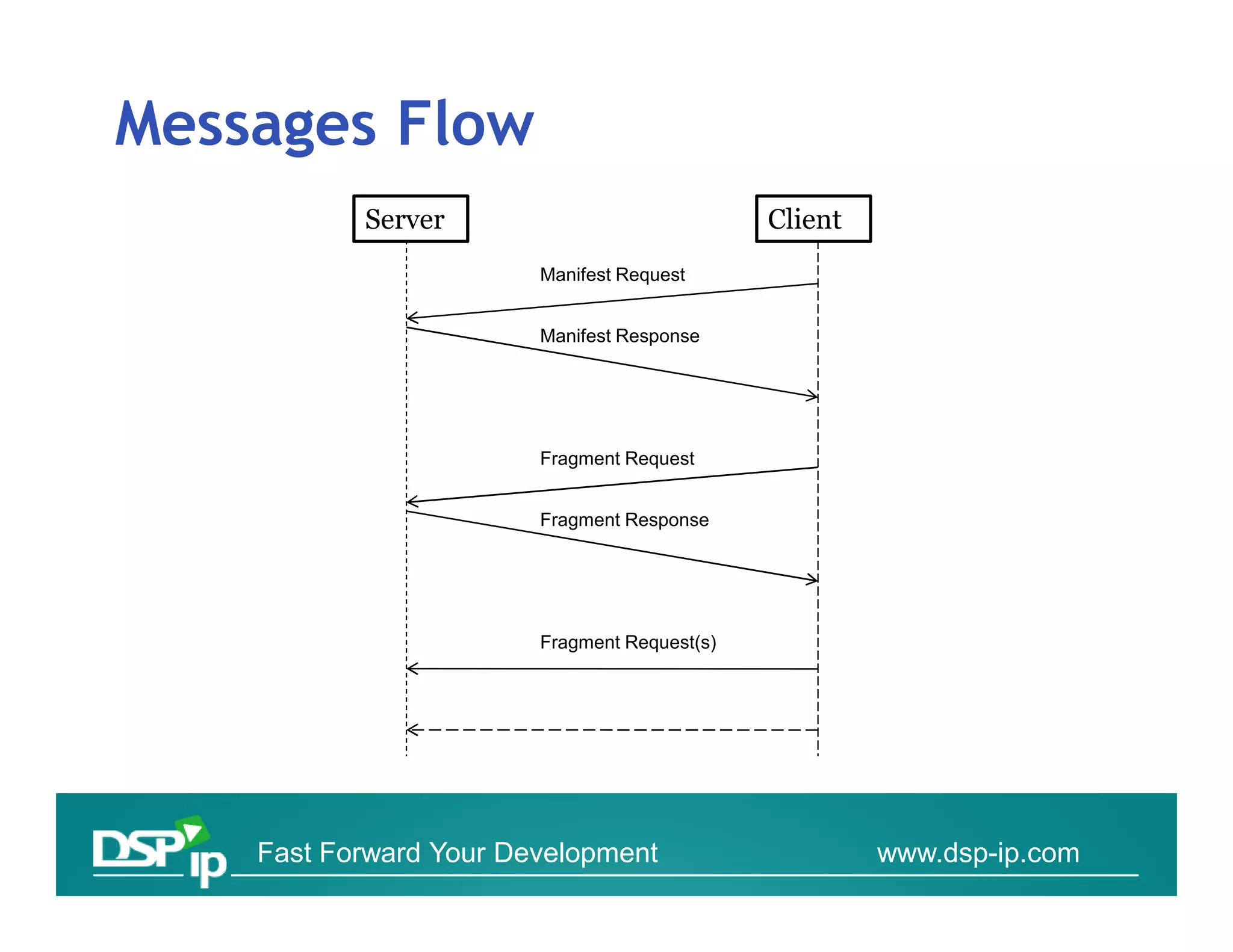
• Smooth Streaming Protocol uses 4 different
  messages:
 ▫   Manifest Request
 ▫   Manifest Response
 ▫   Fragment Request
 ▫   Fragment Response

• All messages follow the HTTP/1.1 specification


       Fast Forward Your Development   www.dsp-ip.com
Messages Flow
           Server                             Client
                        Manifest Request


                        Manifest Response


                        Fragment Request


                        Fragment Response


                        Fragment Request(s)


    Fast Forward Your Development                      www.dsp-ip.com
Messages
• Manifest Request and Fragment Request
  message MUST use the HTTP "GET" method,
  generated by the client.

• Manifest Request and Fragment Request
  message use the HTTP Response messages.
  Status-Code SHOULD be 200.


      Fast Forward Your Development   www.dsp-ip.com
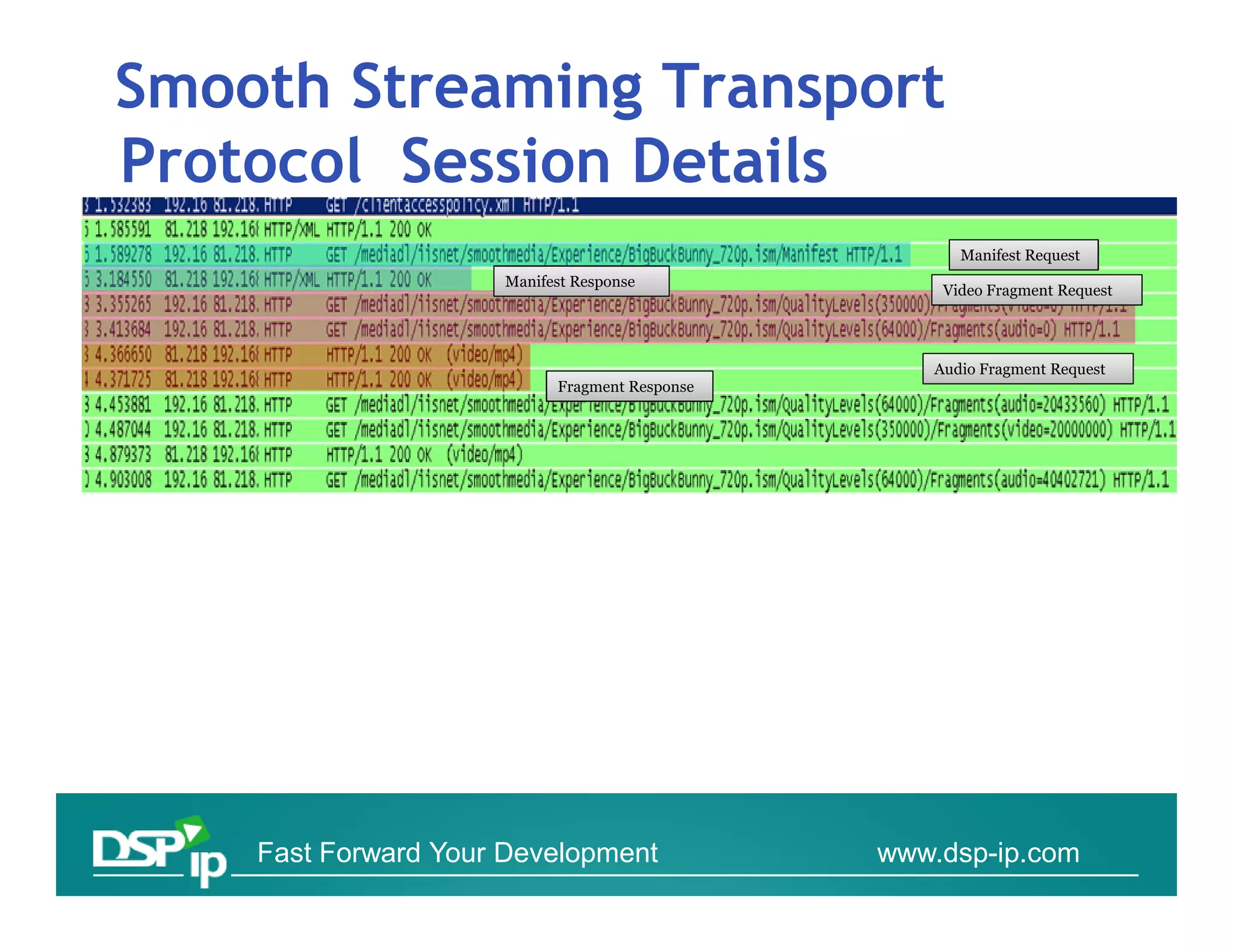
Smooth Streaming Transport
Protocol Session Details
                                                     Manifest Request
                     Manifest Response
                                                   Video Fragment Request


                                                  Audio Fragment Request
                           Fragment Response


    Fast Forward Your Development              www.dsp-ip.com
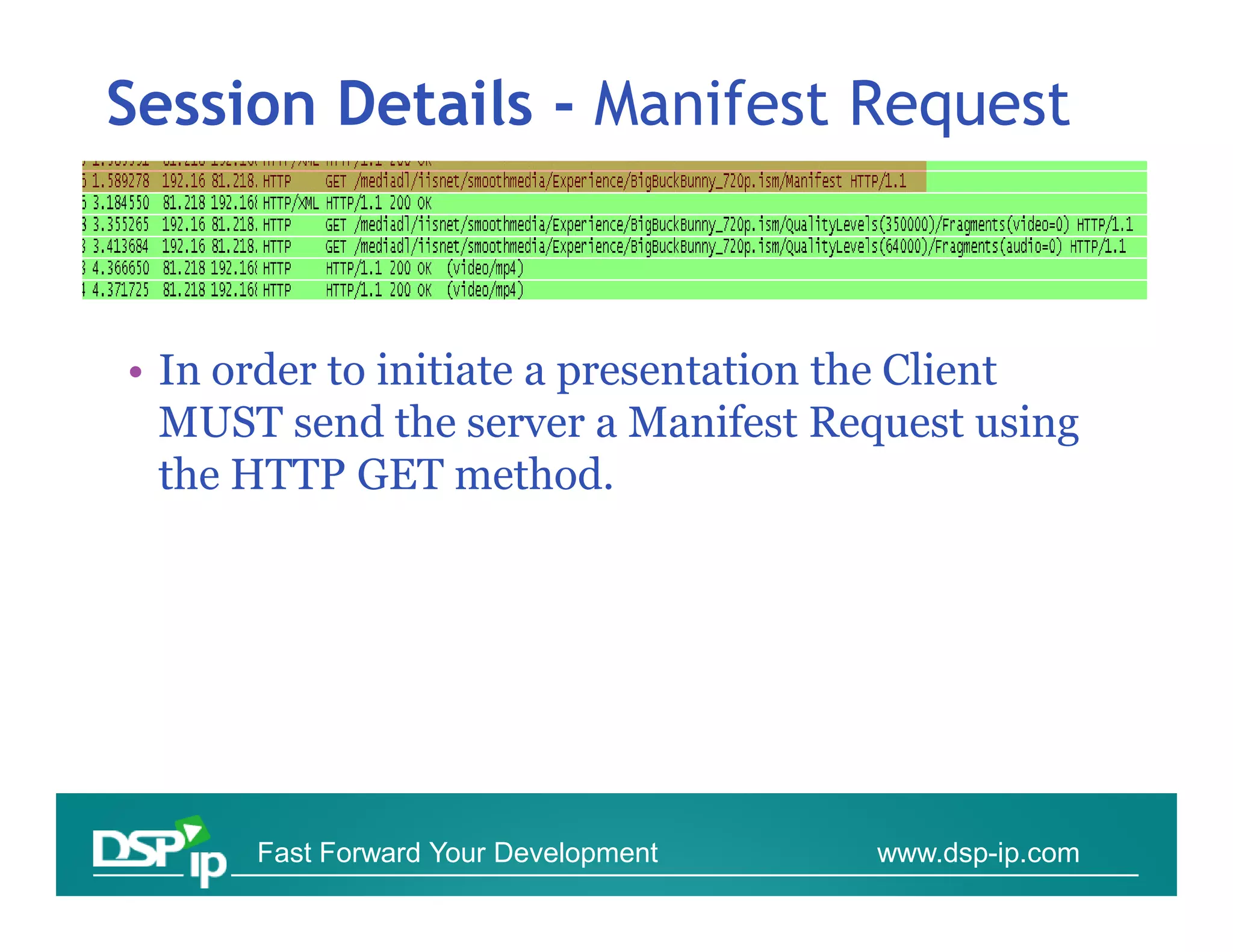
Session Details - Manifest Request


• In order to initiate a presentation the Client
  MUST send the server a Manifest Request using
  the HTTP GET method.


      Fast Forward Your Development   www.dsp-ip.com
Session Details - Manifest Response


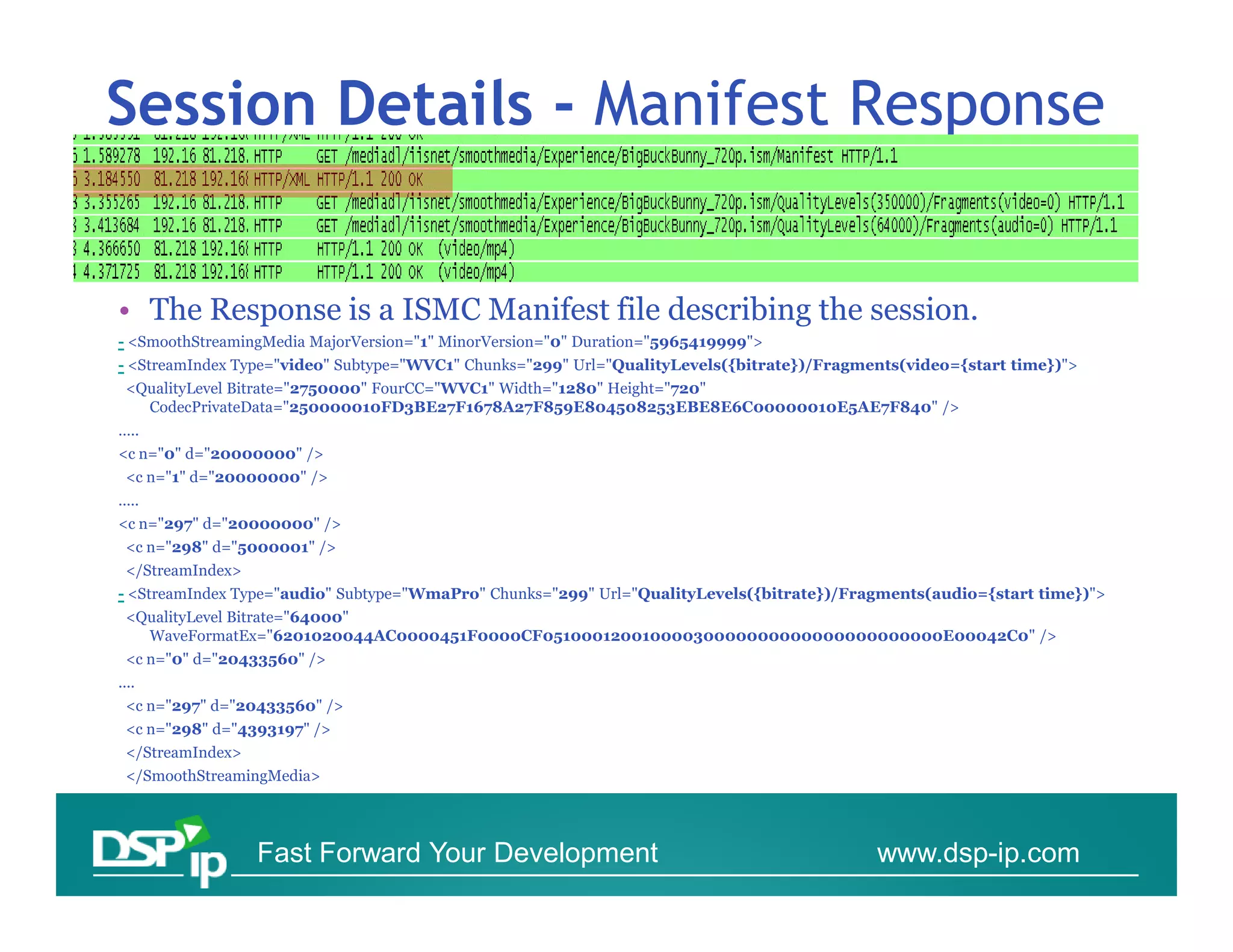
• The Response is a ISMC Manifest file describing the session.
- <SmoothStreamingMedia MajorVersion="1" MinorVersion="0" Duration="5965419999">
- <StreamIndex Type="video" Subtype="WVC1" Chunks="299" Url="QualityLevels({bitrate})/Fragments(video={start time})">
 <QualityLevel Bitrate="2750000" FourCC="WVC1" Width="1280" Height="720"
   CodecPrivateData="250000010FD3BE27F1678A27F859E804508253EBE8E6C00000010E5AE7F840" />
…..
<c n="0" d="20000000" />
 <c n="1" d="20000000" />
.....
<c n="297" d="20000000" />
 <c n="298" d="5000001" />
 </StreamIndex>
- <StreamIndex Type="audio" Subtype="WmaPro" Chunks="299" Url="QualityLevels({bitrate})/Fragments(audio={start time})">
 <QualityLevel Bitrate="64000"
   WaveFormatEx="6201020044AC0000451F0000CF05100012001000030000000000000000000000E00042C0" />
 <c n="0" d="20433560" />
....
 <c n="297" d="20433560" />
 <c n="298" d="4393197" />
 </StreamIndex>
 </SmoothStreamingMedia>


                  Fast Forward Your Development                                             www.dsp-ip.com
Manifest Response reviewed
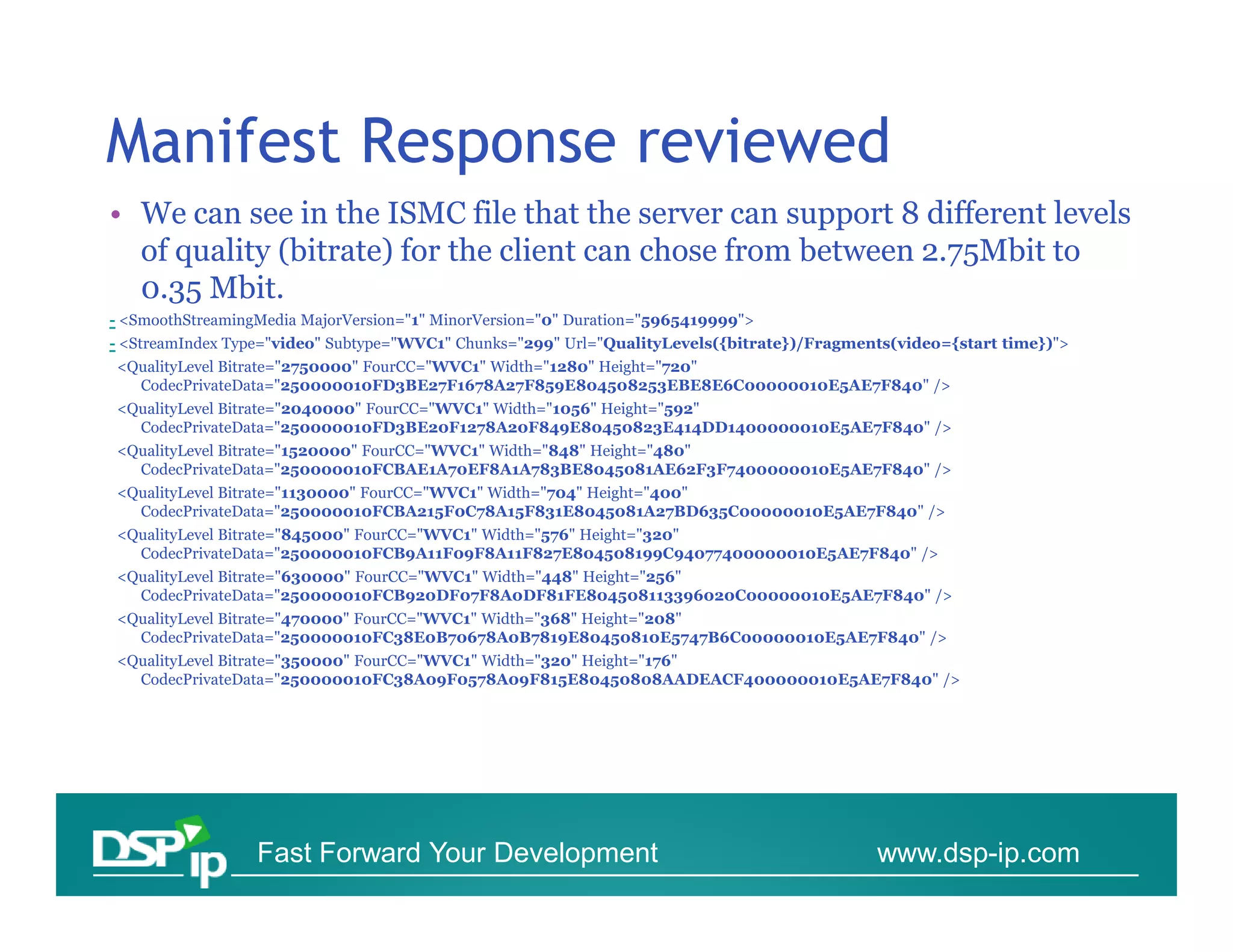
• We can see in the ISMC file that the server can support 8 different levels
  of quality (bitrate) for the client can chose from between 2.75Mbit to
  0.35 Mbit.
- <SmoothStreamingMedia MajorVersion="1" MinorVersion="0" Duration="5965419999">
- <StreamIndex Type="video" Subtype="WVC1" Chunks="299" Url="QualityLevels({bitrate})/Fragments(video={start time})">
<QualityLevel Bitrate="2750000" FourCC="WVC1" Width="1280" Height="720"
  CodecPrivateData="250000010FD3BE27F1678A27F859E804508253EBE8E6C00000010E5AE7F840" />
<QualityLevel Bitrate="2040000" FourCC="WVC1" Width="1056" Height="592"
  CodecPrivateData="250000010FD3BE20F1278A20F849E80450823E414DD1400000010E5AE7F840" />
<QualityLevel Bitrate="1520000" FourCC="WVC1" Width="848" Height="480"
  CodecPrivateData="250000010FCBAE1A70EF8A1A783BE8045081AE62F3F7400000010E5AE7F840" />
<QualityLevel Bitrate="1130000" FourCC="WVC1" Width="704" Height="400"
  CodecPrivateData="250000010FCBA215F0C78A15F831E8045081A27BD635C00000010E5AE7F840" />
<QualityLevel Bitrate="845000" FourCC="WVC1" Width="576" Height="320"
  CodecPrivateData="250000010FCB9A11F09F8A11F827E804508199C94077400000010E5AE7F840" />
<QualityLevel Bitrate="630000" FourCC="WVC1" Width="448" Height="256"
  CodecPrivateData="250000010FCB920DF07F8A0DF81FE804508113396020C00000010E5AE7F840" />
<QualityLevel Bitrate="470000" FourCC="WVC1" Width="368" Height="208"
  CodecPrivateData="250000010FC38E0B70678A0B7819E80450810E5747B6C00000010E5AE7F840" />
<QualityLevel Bitrate="350000" FourCC="WVC1" Width="320" Height="176"
  CodecPrivateData="250000010FC38A09F0578A09F815E80450808AADEACF400000010E5AE7F840" />


                  Fast Forward Your Development                                              www.dsp-ip.com
Manifest Response – reviewed
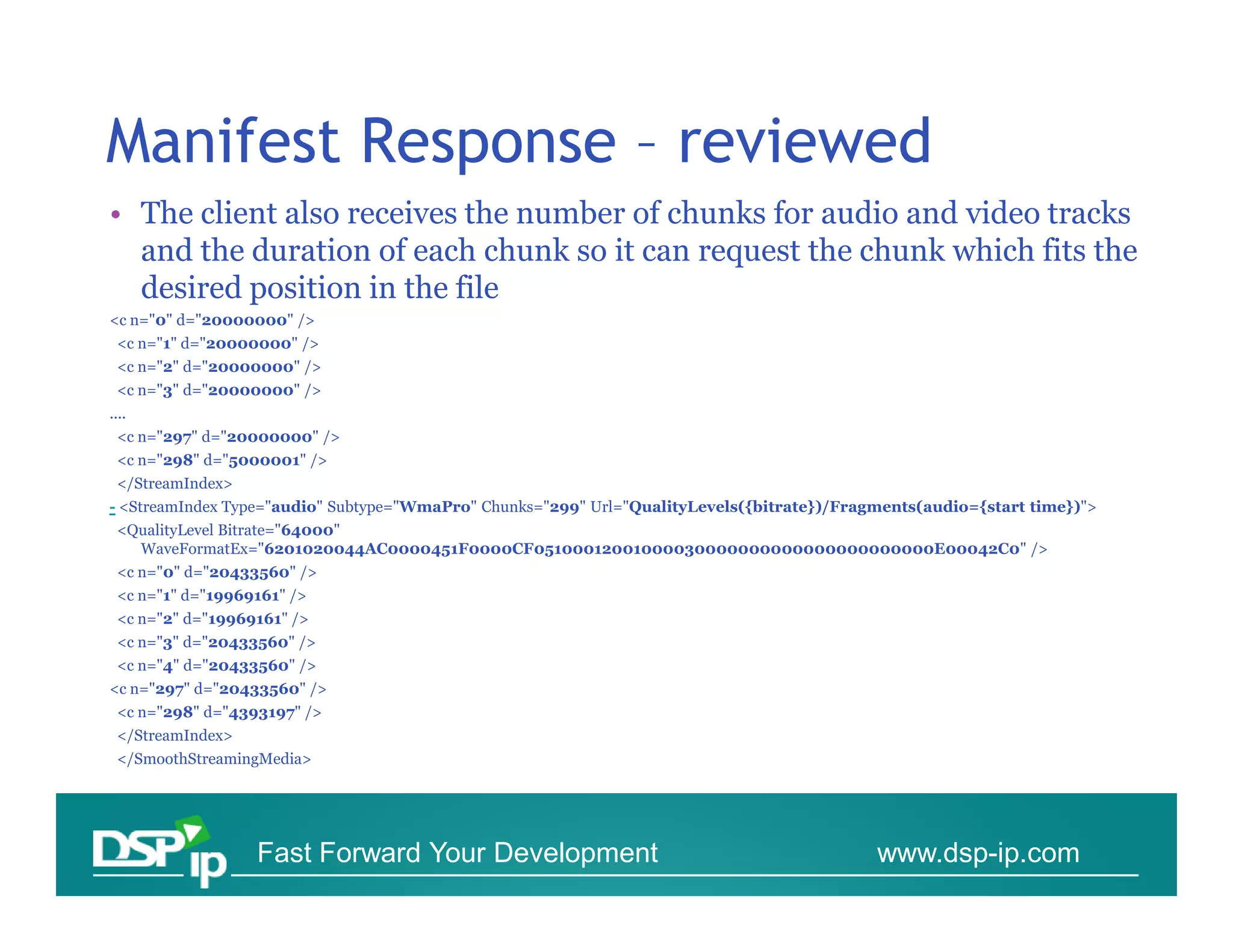
• The client also receives the number of chunks for audio and video tracks
  and the duration of each chunk so it can request the chunk which fits the
  desired position in the file
<c n="0" d="20000000" />
 <c n="1" d="20000000" />
 <c n="2" d="20000000" />
 <c n="3" d="20000000" />
....
 <c n="297" d="20000000" />
 <c n="298" d="5000001" />
 </StreamIndex>
- <StreamIndex Type="audio" Subtype="WmaPro" Chunks="299" Url="QualityLevels({bitrate})/Fragments(audio={start time})">
 <QualityLevel Bitrate="64000"
   WaveFormatEx="6201020044AC0000451F0000CF05100012001000030000000000000000000000E00042C0" />
 <c n="0" d="20433560" />
 <c n="1" d="19969161" />
 <c n="2" d="19969161" />
 <c n="3" d="20433560" />
 <c n="4" d="20433560" />
<c n="297" d="20433560" />
 <c n="298" d="4393197" />
 </StreamIndex>
 </SmoothStreamingMedia>


                  Fast Forward Your Development                                             www.dsp-ip.com
Session Details – Fragment Request


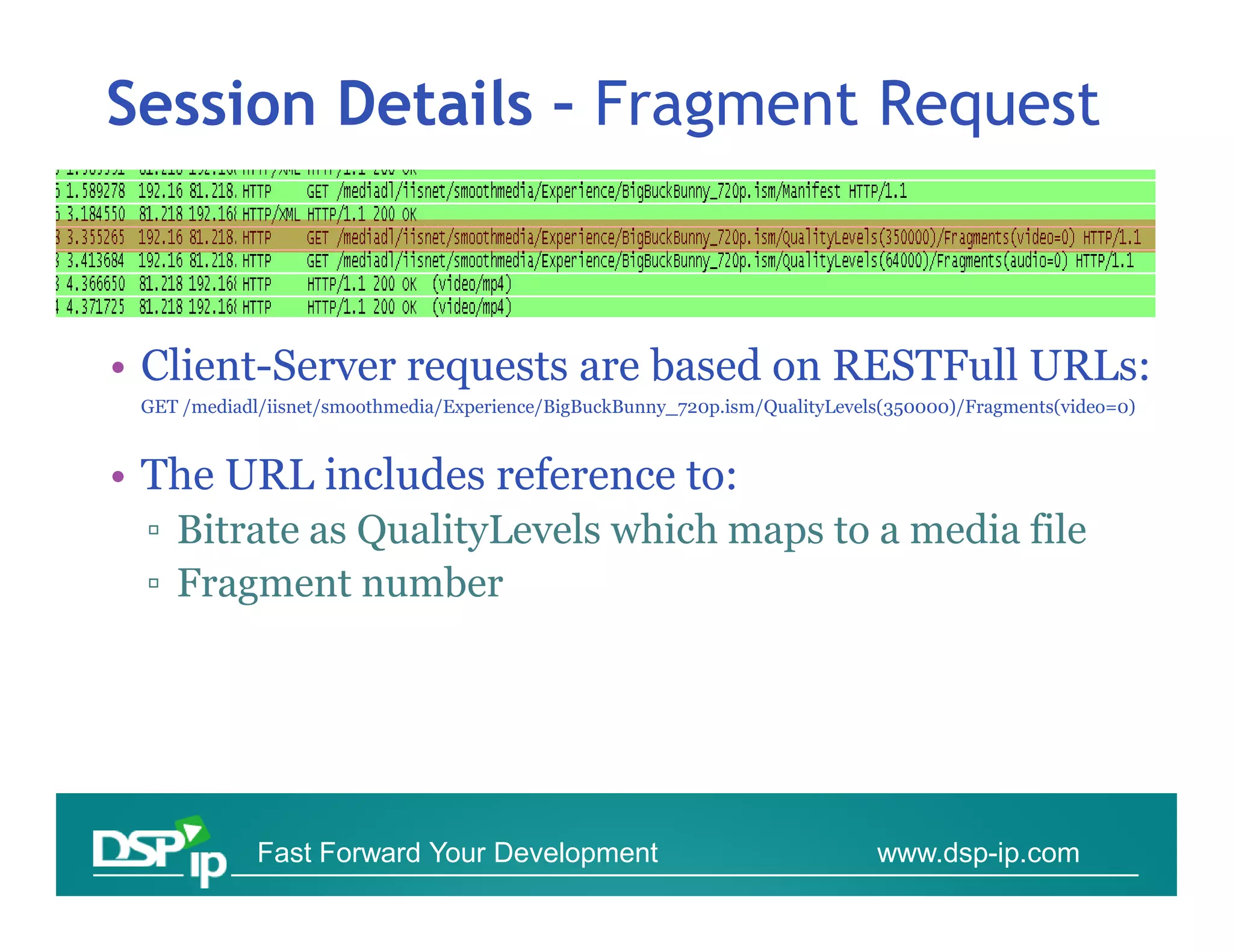
• Client-Server requests are based on RESTFull URLs:
 GET /mediadl/iisnet/smoothmedia/Experience/BigBuckBunny_720p.ism/QualityLevels(350000)/Fragments(video=0)


• The URL includes reference to:
 ▫ Bitrate as QualityLevels which maps to a media file
 ▫ Fragment number


             Fast Forward Your Development                                    www.dsp-ip.com
Session Details – Fragment Response


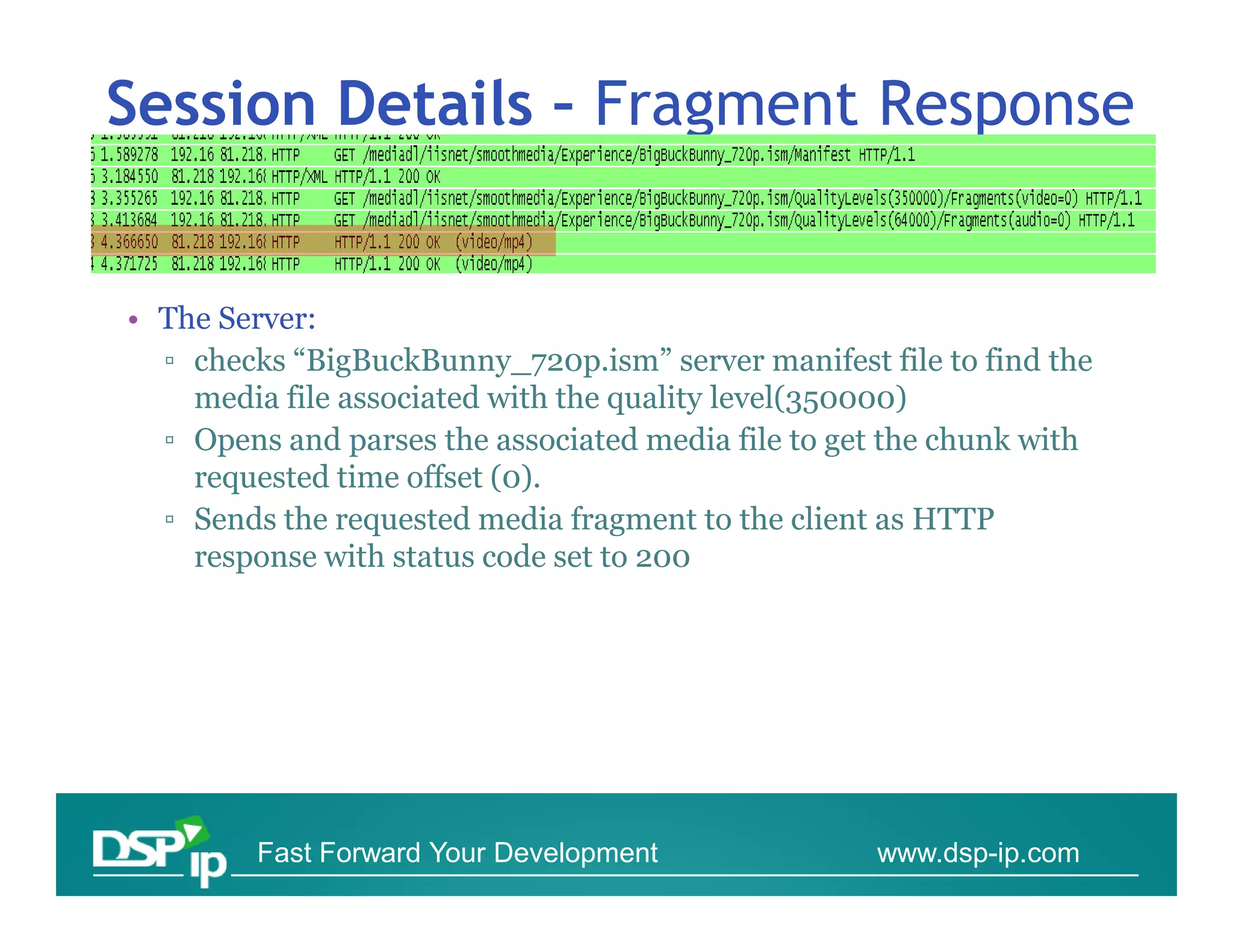
• The Server:
  ▫ checks “BigBuckBunny_720p.ism” server manifest file to find the
    media file associated with the quality level(350000)
  ▫ Opens and parses the associated media file to get the chunk with
    requested time offset (0).
  ▫ Sends the requested media fragment to the client as HTTP
    response with status code set to 200


         Fast Forward Your Development              www.dsp-ip.com
DSP-IP Contact information
For Course materials licensing & lecture request contact:
   Adi Yakov
   Training and Courses Manager
   adi@dsp-
   adi@dsp-ip.com
   +972-9-8651933
    972-
For projects development services contact:
   Alona Ashkenazi
   Technology Management Services :
   alona@dsp-
   alona@dsp-ip.com
   +972-
   +972-9-8850956              www.dsp-ip.
                               www.dsp-ip.com
                                   Mail : info@dsp-ip.com
                                          info@dsp-ip.
                                   Phone: 972- 8850956,
                                   Phone: +972-9-8850956,
                                   Fax : +972-50- 8962910
                                           972-50-


       Fast Forward Your Development             www.dsp-ip.com
Refrences
• Most valuable refrence:
  http://alexzambelli.com/blog/2009/02/10/smo
  oth-streaming-architecture/


      Fast Forward Your Development   www.dsp-ip.com
DSP-IP Contact information
For Course materials licensing & lecture request contact:
   Adi Yakov
   Training and Courses Manager
   adi@dsp-
   adi@dsp-ip.com
   +972-
   +972-9-8651933
For projects development services contact:
   Alona Ashkenazi
   Technology Management Services :
   alona@dsp-
   alona@dsp-ip.com
   +972-
   +972-9-8850956              www.dsp-ip.
                               www.dsp-ip.com
                                   Mail : info@dsp-ip.com
                                          info@dsp-ip.
                                   Phone: 972- 8850956,
                                   Phone: +972-9-8850956,
                                   Fax : +972-50- 8962910
                                           972-50-


       Fast Forward Your Development             www.dsp-ip.com

Silverlight Wireshark Analysis

  • 1.
    Silverlight smooth streaming Wiresharkanalysis Yossi Cohen DSP-IP Fast Forward Your Development www.dsp-ip.com
  • 2.
    SILVERLIGHT INTRODUCTION Fast Forward Your Development www.dsp-ip.com
  • 3.
    Smooth Streaming • Microsoft’simplementation of HTTP-based adaptive streaming • A hybrid media delivery method that acts like streaming but is in fact a series of short progressive downloads • Leverages existing HTTP caches • Client can seamlessly switch video quality and bit rate based on perceived network bandwidth and CPU resources Fast Forward Your Development www.dsp-ip.com
  • 4.
    Streaming or ProgressiveDownload? Traditional Progressive Streaming Download • Responsive User • Works from a Experience Web Server • Bandwidth Use • World-wide • User Tracking scale w/HTTP Challenges Challenges • No cache-ability • Limited User • Separate, Experience smaller • User tracking streaming • Bandwidth Use networks (20% watched) Fast Forward Your Development www.dsp-ip.com
  • 5.
    Smooth Streaming Design •Smooth Streaming File Format based on MP4 (ISO Base Media File Format) • Video is encoded and stored on disk as one contiguous MP4 file ▫ Separate file for each bit rate • Each video Group of Pictures (GOP) is stored in a Movie Fragment box ▫ This allows easy fragmentation at key frames • Contiguous file is virtually split up into chunks when responding to a client request Fast Forward Your Development www.dsp-ip.com
  • 6.
    Content Provider Benefits •Cheaper to deploy ▫ Can utilize any generic HTTP caches/proxies ▫ Doesn’t require specialized servers at every node • Better scalability and reach ▫ Reduces “last mile” issues because it can dynamically adapt to inferior network conditions • Audience can adapt to the content, rather than requiring the content providers to guess which bit rates are most likely to be accessible to their audience Fast Forward Your Development www.dsp-ip.com
  • 7.
    End User Benefits •Fast start-up and seek times ▫ Start-up/seeking can be initiated on the lowest bit rate before moving up to a higher bit rate • No buffering, no disconnects, no playback stutter ▫ As long as the user meets the minimum bit rate requirement • Seamless bit rate switching based on network conditions and CPU capabilities. • A generally consistent, smooth playback experience Fast Forward Your Development www.dsp-ip.com
  • 8.
    Evolution • Previous versionsof MS streaming divide the file into many chunkc 0001.vid 0002.vid etc • Problematic in caching, CDNs, CMS etc • Today all fragments of a file are contained in a single bitstream container. Typically 1 fragment = 1 video GOP. Fast Forward Your Development www.dsp-ip.com
  • 9.
    SILVERLIGHT FILES Containers &Configuration files Fast Forward Your Development www.dsp-ip.com
  • 10.
    Format options • ASF/WMV – native Microsoft Format • MPEG4 File-Format • AVI • OGG Fast Forward Your Development www.dsp-ip.com
  • 11.
    MP4 over ASFfile format • MP4 is a lightweight container format with less overhead than ASF • MP4 is easier to parse in managed (.NET) code • MP4 is based on a widely used standard, making 3rd party adoption and support easier • MP4 has native H.264 video support • MP4 was designed to natively support payload fragmentation within the file Fast Forward Your Development www.dsp-ip.com
  • 12.
    MP4 File format •MP4 has two format types ▫ Disk Format - for file storage ▫ Wire format - for transport • Wire format enables easy CDN support and integration Fast Forward Your Development www.dsp-ip.com
  • 13.
    Smooth Streaming FileFormat Fast Forward Your Development www.dsp-ip.com
  • 14.
    Smooth Streaming WireFormat Fast Forward Your Development www.dsp-ip.com
  • 15.
    File extensions • MediaFiles ▫ *.ismv - Audio & Video ▫ *.isma – Audio only • Manifest Files ▫ *.ism – Server manifest. Describes to the server Relation between tracks, bitrates & files on disk. Based on SMIL 2.0 XML format specification ▫ *.ismc – Describes to the client the available streams, CODECS used, bitrates encoded, video resolutions, markers, captions. First file delivered to client. It’s the first file delivered to client (“SDP” like). Fast Forward Your Development www.dsp-ip.com
  • 16.
    Directory Structure Media file in different Manifest Files bitrates Fast Forward Your Development www.dsp-ip.com
  • 17.
    Manifest files • VC-1, WMA, H.264 and AAC codecs • Text streams • Multi-language audio tracks • Alternate video & audio tracks (i.e. multiple camera angles, director’s commentary, etc.) • Multiple hardware profiles (i.e. same bitrates targeted at different playback devices) • Script commands, markers/chapters, captions • Client manifest Gzip compression • URL obfuscation • Live encoding and streaming Fast Forward Your Development www.dsp-ip.com
  • 18.
    ISM file sample <?xmlversion="1.0" encoding="utf-16" ?> - <!-- Created with Expression Encoder version 2.1.1206.0 --> - <smil xmlns="http://www.w3.org/2001/SMIL20/Language"> - <head> <meta name="clientManifestRelativePath" content="NBA.ismc" /> </head> - <body> - <switch> - <video src="NBA_3000000.ismv" systemBitrate="3000000"> <param name="trackID" value="2" valuetype="data" /> </video> - <video src="NBA_2400000.ismv" systemBitrate="2400000"> <param name="trackID" value="2" valuetype="data" /> </video> - <video src="NBA_1800000.ismv" systemBitrate="1800000"> <param name="trackID" value="2" valuetype="data" /> </video> Fast Forward Your Development www.dsp-ip.com
  • 19.
    ISM file sample -<video src="NBA_1300000.ismv" systemBitrate="1300000"> <param name="trackID" value="2" valuetype="data" /> </video> - <video src="NBA_800000.ismv" systemBitrate="800000"> <param name="trackID" value="2" valuetype="data" /> </video> - <video src="NBA_500000.ismv" systemBitrate="500000"> <param name="trackID" value="2" valuetype="data" /> </video> - <audio src="NBA_3000000.ismv" systemBitrate="64000"> <param name="trackID" value="1" valuetype="data" /> </audio> </switch> </body> </smil> Fast Forward Your Development www.dsp-ip.com
  • 20.
    *.ISMC sample <?xml version="1.0"encoding="utf-16" ?> - <!-- Created with Expression Encoder version 2.1.1206.0 --> - <SmoothStreamingMedia MajorVersion="1" MinorVersion="0" Duration="4084405506"> - <StreamIndex Type="video" Subtype="WVC1" Chunks="208" Url="QualityLevels({bitrate})/Fragments(video={start time})"> <QualityLevel Bitrate="3000000" FourCC="WVC1" Width="1280" Height="720" CodecPrivateData="250000010FD3FE27F1678A27F859E80C9082DB8D44A9 C00000010E5A67F840" /> <QualityLevel Bitrate="2400000" FourCC="WVC1" Width="1056" Height="592" CodecPrivateData="250000010FD3FE20F1278A20F849E80C9082493DEDDC C00000010E5A67F840" /> <QualityLevel Bitrate="1800000" FourCC="WVC1" Width="848" Height="480" CodecPrivateData="250000010FCBF81A70EF8A1A783BE80C908236EE52654 00000010E5A67F840" /> <QualityLevel Bitrate="1300000" FourCC="WVC1" Width="640" Height="352" CodecPrivateData="250000010FCBE813F0AF8A13F82BE80C9081A7ABF704 400000010E5A67F840" /> Fast Forward Your Development www.dsp-ip.com
  • 21.
    SILVERLIGHT SESSION Initiation andFlow Fast Forward Your Development www.dsp-ip.com
  • 22.
    Smooth Streaming Protocol •Smooth Streaming Protocol uses HTTP [RFC2616] as its underlying transport . • The Server role in the protocol is stateless ▫ Enabling (potentially) different instance of the server to handle client requests ▫ Request can utilize any generic HTTP caches/proxies - > Lowering CDN costs Fast Forward Your Development www.dsp-ip.com
  • 23.
    Messages • Smooth StreamingProtocol uses 4 different messages: ▫ Manifest Request ▫ Manifest Response ▫ Fragment Request ▫ Fragment Response • All messages follow the HTTP/1.1 specification Fast Forward Your Development www.dsp-ip.com
  • 24.
    Messages Flow Server Client Manifest Request Manifest Response Fragment Request Fragment Response Fragment Request(s) Fast Forward Your Development www.dsp-ip.com
  • 25.
    Messages • Manifest Requestand Fragment Request message MUST use the HTTP "GET" method, generated by the client. • Manifest Request and Fragment Request message use the HTTP Response messages. Status-Code SHOULD be 200. Fast Forward Your Development www.dsp-ip.com
  • 26.
    Smooth Streaming Transport ProtocolSession Details Manifest Request Manifest Response Video Fragment Request Audio Fragment Request Fragment Response Fast Forward Your Development www.dsp-ip.com
  • 27.
    Session Details -Manifest Request • In order to initiate a presentation the Client MUST send the server a Manifest Request using the HTTP GET method. Fast Forward Your Development www.dsp-ip.com
  • 28.
    Session Details -Manifest Response • The Response is a ISMC Manifest file describing the session. - <SmoothStreamingMedia MajorVersion="1" MinorVersion="0" Duration="5965419999"> - <StreamIndex Type="video" Subtype="WVC1" Chunks="299" Url="QualityLevels({bitrate})/Fragments(video={start time})"> <QualityLevel Bitrate="2750000" FourCC="WVC1" Width="1280" Height="720" CodecPrivateData="250000010FD3BE27F1678A27F859E804508253EBE8E6C00000010E5AE7F840" /> ….. <c n="0" d="20000000" /> <c n="1" d="20000000" /> ..... <c n="297" d="20000000" /> <c n="298" d="5000001" /> </StreamIndex> - <StreamIndex Type="audio" Subtype="WmaPro" Chunks="299" Url="QualityLevels({bitrate})/Fragments(audio={start time})"> <QualityLevel Bitrate="64000" WaveFormatEx="6201020044AC0000451F0000CF05100012001000030000000000000000000000E00042C0" /> <c n="0" d="20433560" /> .... <c n="297" d="20433560" /> <c n="298" d="4393197" /> </StreamIndex> </SmoothStreamingMedia> Fast Forward Your Development www.dsp-ip.com
  • 29.
    Manifest Response reviewed •We can see in the ISMC file that the server can support 8 different levels of quality (bitrate) for the client can chose from between 2.75Mbit to 0.35 Mbit. - <SmoothStreamingMedia MajorVersion="1" MinorVersion="0" Duration="5965419999"> - <StreamIndex Type="video" Subtype="WVC1" Chunks="299" Url="QualityLevels({bitrate})/Fragments(video={start time})"> <QualityLevel Bitrate="2750000" FourCC="WVC1" Width="1280" Height="720" CodecPrivateData="250000010FD3BE27F1678A27F859E804508253EBE8E6C00000010E5AE7F840" /> <QualityLevel Bitrate="2040000" FourCC="WVC1" Width="1056" Height="592" CodecPrivateData="250000010FD3BE20F1278A20F849E80450823E414DD1400000010E5AE7F840" /> <QualityLevel Bitrate="1520000" FourCC="WVC1" Width="848" Height="480" CodecPrivateData="250000010FCBAE1A70EF8A1A783BE8045081AE62F3F7400000010E5AE7F840" /> <QualityLevel Bitrate="1130000" FourCC="WVC1" Width="704" Height="400" CodecPrivateData="250000010FCBA215F0C78A15F831E8045081A27BD635C00000010E5AE7F840" /> <QualityLevel Bitrate="845000" FourCC="WVC1" Width="576" Height="320" CodecPrivateData="250000010FCB9A11F09F8A11F827E804508199C94077400000010E5AE7F840" /> <QualityLevel Bitrate="630000" FourCC="WVC1" Width="448" Height="256" CodecPrivateData="250000010FCB920DF07F8A0DF81FE804508113396020C00000010E5AE7F840" /> <QualityLevel Bitrate="470000" FourCC="WVC1" Width="368" Height="208" CodecPrivateData="250000010FC38E0B70678A0B7819E80450810E5747B6C00000010E5AE7F840" /> <QualityLevel Bitrate="350000" FourCC="WVC1" Width="320" Height="176" CodecPrivateData="250000010FC38A09F0578A09F815E80450808AADEACF400000010E5AE7F840" /> Fast Forward Your Development www.dsp-ip.com
  • 30.
    Manifest Response –reviewed • The client also receives the number of chunks for audio and video tracks and the duration of each chunk so it can request the chunk which fits the desired position in the file <c n="0" d="20000000" /> <c n="1" d="20000000" /> <c n="2" d="20000000" /> <c n="3" d="20000000" /> .... <c n="297" d="20000000" /> <c n="298" d="5000001" /> </StreamIndex> - <StreamIndex Type="audio" Subtype="WmaPro" Chunks="299" Url="QualityLevels({bitrate})/Fragments(audio={start time})"> <QualityLevel Bitrate="64000" WaveFormatEx="6201020044AC0000451F0000CF05100012001000030000000000000000000000E00042C0" /> <c n="0" d="20433560" /> <c n="1" d="19969161" /> <c n="2" d="19969161" /> <c n="3" d="20433560" /> <c n="4" d="20433560" /> <c n="297" d="20433560" /> <c n="298" d="4393197" /> </StreamIndex> </SmoothStreamingMedia> Fast Forward Your Development www.dsp-ip.com
  • 31.
    Session Details –Fragment Request • Client-Server requests are based on RESTFull URLs: GET /mediadl/iisnet/smoothmedia/Experience/BigBuckBunny_720p.ism/QualityLevels(350000)/Fragments(video=0) • The URL includes reference to: ▫ Bitrate as QualityLevels which maps to a media file ▫ Fragment number Fast Forward Your Development www.dsp-ip.com
  • 32.
    Session Details –Fragment Response • The Server: ▫ checks “BigBuckBunny_720p.ism” server manifest file to find the media file associated with the quality level(350000) ▫ Opens and parses the associated media file to get the chunk with requested time offset (0). ▫ Sends the requested media fragment to the client as HTTP response with status code set to 200 Fast Forward Your Development www.dsp-ip.com
  • 33.
    DSP-IP Contact information ForCourse materials licensing & lecture request contact: Adi Yakov Training and Courses Manager adi@dsp- adi@dsp-ip.com +972-9-8651933 972- For projects development services contact: Alona Ashkenazi Technology Management Services : alona@dsp- alona@dsp-ip.com +972- +972-9-8850956 www.dsp-ip. www.dsp-ip.com Mail : info@dsp-ip.com info@dsp-ip. Phone: 972- 8850956, Phone: +972-9-8850956, Fax : +972-50- 8962910 972-50- Fast Forward Your Development www.dsp-ip.com
  • 34.
    Refrences • Most valuablerefrence: http://alexzambelli.com/blog/2009/02/10/smo oth-streaming-architecture/ Fast Forward Your Development www.dsp-ip.com
  • 35.
    DSP-IP Contact information ForCourse materials licensing & lecture request contact: Adi Yakov Training and Courses Manager adi@dsp- adi@dsp-ip.com +972- +972-9-8651933 For projects development services contact: Alona Ashkenazi Technology Management Services : alona@dsp- alona@dsp-ip.com +972- +972-9-8850956 www.dsp-ip. www.dsp-ip.com Mail : info@dsp-ip.com info@dsp-ip. Phone: 972- 8850956, Phone: +972-9-8850956, Fax : +972-50- 8962910 972-50- Fast Forward Your Development www.dsp-ip.com