HA Deployment Architecture with HAProxy
By
K Ganapathi, Technical Director, eProcurement Project(GePNIC)
National Informatics Centre
Chennai, India
Agenda
• What is HAProxy?
• Any Alternative to HAProxy?
• Why HAProxy?
• Implementation – HAProxy & Keepalived.
The content of his presentation has been created in
such a way that even the participants who are part of
development team with no or less server
administration work can understand the concept of
High Availability, learn and implement two packages
HAProxy and Keepalived in their production
environment.
What is HAProxy?
• It is a open source, free, fast and easy to configure
solution for implementing
- High Availability
- High Performance-Scale out
- Load Balancing
- DDoS Prevention
Alternate to HAProxy?
• Nginx
• Linux Virtual Server – (LVS)
• AWS Elastic LB
• Varnish
• F5 ….
Alternate to HAProxy?
• Nginx - Can be used as both web server & load balancer (reverse proxy).
• Linux Virtual Server – (LVS) – Very fast, works as layer-4 LB, configuration is
not user friendly.
• AWS Elastic LB - for Amazon Cloud infrastructure users.
• Varnish - Not in much use and activities
• F5 - Hardware LB, costly solution compared to SW LB. Can be installed as
common data centre infrastructure and used by all the co-located
users.
....a long list
Why HAProxy?
• Used by Lot of Industry Majors like Twitter, AO Labs, Airbnb, Adobe
Advt. Cloud, Alibaba, Fedora, GitHub, Kernel.org ...
• Redhat-OpenShift & other Cloud Operators – RedHat openly declares
that it is using HAProxy in their Container and Cloud suits. Other
cloud players are also using HAProxy but don’t declare it in open.
• Any of our neighbours using it ? Yes! – Many of our internal project
teams are using HAProxy over years. Only thing is that there is no
knowledge sharing among the peer groups. In our eProcurement
project we are using it for more than a year now for three of our
portals with high concurrent connections.
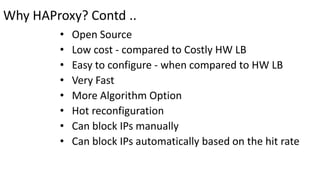
Why HAProxy? Contd ..
• Open Source
• Low cost - compared to Costly HW LB
• Easy to configure - when compared to HW LB
• Very Fast
• More Algorithm Option
• Hot reconfiguration
• Can block IPs manually
• Can block IPs automatically based on the hit rate
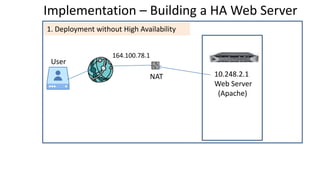
Implementation – Building a HA Web Server
10.248.2.1
Web Server
(Apache)
User
NAT
164.100.78.1
1. Deployment without High Availability
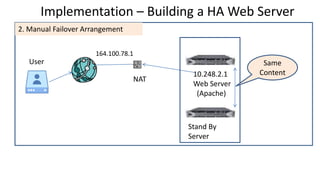
Implementation – Building a HA Web Server
10.248.2.1
Web Server
(Apache)
User
NAT
164.100.78.1
Stand By
Server
2. Manual Failover Arrangement
Same
Content
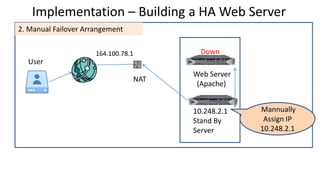
Implementation – Building a HA Web Server
Web Server
(Apache)
User
NAT
164.100.78.1
10.248.2.1
Stand By
Server
2. Manual Failover Arrangement
Down
Mannually
Assign IP
10.248.2.1
Can we automate the Failover arrangement?
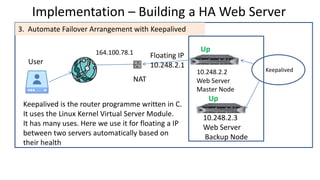
Implementation – Building a HA Web Server
10.248.2.2
Web Server
Master Node
User
NAT
164.100.78.1
s
3. Automate Failover Arrangement with Keepalived
Up
Keepalived
10.248.2.3
Web Server
Backup Node
Up
Floating IP
10.248.2.1
Keepalived is the router programme written in C.
It uses the Linux Kernel Virtual Server Module.
It has many uses. Here we use it for floating a IP
between two servers automatically based on
their health
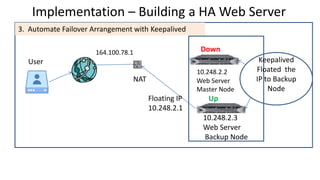
Implementation – Building a HA Web Server
10.248.2.2
Web Server
Master Node
User
NAT
164.100.78.1
3. Automate Failover Arrangement with Keepalived
Down
10.248.2.3
Web Server
Backup Node
UpFloating IP
10.248.2.1
Keepalived
Floated the
IP to Backup
Node
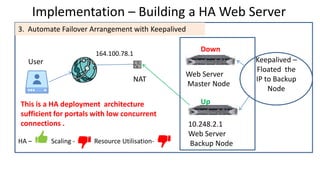
Implementation – Building a HA Web Server
Web Server
Master Node
User
NAT
164.100.78.1
Down
Keepalived –
Floated the
IP to Backup
Node
10.248.2.1
Web Server
Backup Node
Up
3. Automate Failover Arrangement with Keepalived
HA – Scaling - Resource Utilisation-
This is a HA deployment architecture
sufficient for portals with low concurrent
connections .
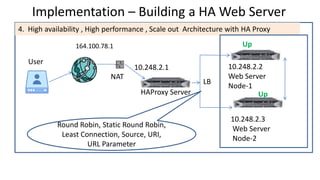
Implementation – Building a HA Web Server
10.248.2.2
Web Server
Node-1
User
NAT
164.100.78.1
4. High availability , High performance , Scale out Architecture with HA Proxy
Up
10.248.2.3
Web Server
Node-2
UpHAProxy Server
LB
10.248.2.1
Round Robin, Static Round Robin,
Least Connection, Source, URI,
URL Parameter
10.248.2.2
Web Server
Node-1
User
NAT
164.100.78.1 Down
10.248.2.3
Web Server
Node-2
UpHAProxy Server
LB
10.248.2.1 X

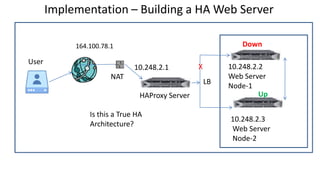
Is this a True HA
Architecture?
Implementation – Building a HA Web Server
10.248.2.2
Web Server
Node-1
User
NAT
164.100.78.1
UP
10.248.2.3
Web Server
Node-2
UpHAProxy Server
LB
10.248.2.1
DownX
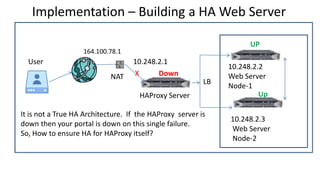
It is not a True HA Architecture. If the HAProxy server is
down then your portal is down on this single failure.
So, How to ensure HA for HAProxy itself?
10.248.2.4
Node-1
User
NAT
164.100.78.1
10.248.2.5
Node-2
HAProxy Server
Master Node LB
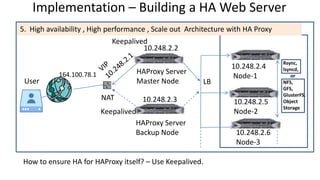
Implementation – Building a HA Web Server
HAProxy Server
Backup Node
Keepalived
Keepalived
5. High availability , High performance , Scale out Architecture with HA Proxy
10.248.2.6
Node-3
Rsync,
lsyncd,
or
NFS,
GFS,
GlusterFS,
Object
Storage
10.248.2.3
10.248.2.2
How to ensure HA for HAProxy itself? – Use Keepalived.
10.248.2.4
Node-1
User
164.100.78.1
10.248.2.5
Node-2
HAProxy Server
Master Node LB
Implementation – Building a HA Web Server
HAProxy Server
Backup Node
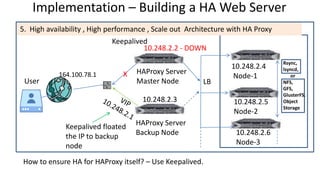
Keepalived floated
the IP to backup
node
Keepalived
5. High availability , High performance , Scale out Architecture with HA Proxy
10.248.2.6
Node-3
Rsync,
lsyncd,
or
NFS,
GFS,
GlusterFS,
Object
Storage
10.248.2.3
10.248.2.2 - DOWN
How to ensure HA for HAProxy itself? – Use Keepalived.
X
10.248.2.4
Node-1
10.248.2.5
Node-2
HAProxy Server
Master Node
HAProxy-Keepalived– Installation
HAProxy Server
Backup Node
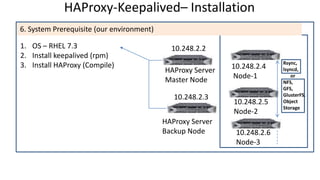
6. System Prerequisite (our environment)
10.248.2.6
Node-3
Rsync,
lsyncd,
or
NFS,
GFS,
GlusterFS,
Object
Storage
10.248.2.3
1. OS – RHEL 7.3
2. Install keepalived (rpm)
3. Install HAProxy (Compile)
10.248.2.2
HAProxy-Keepalived– Installation
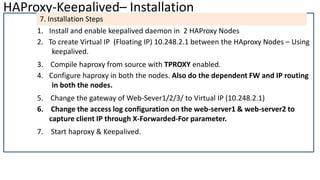
7. Installation Steps
1. Install and enable keepalived daemon in 2 HAProxy Nodes
2. To create Virtual IP (Floating IP) 10.248.2.1 between the HAproxy Nodes – Using
keepalived.
3. Compile haproxy from source with TPROXY enabled.
4. Configure haproxy in both the nodes. Also do the dependent FW and IP routing
in both the nodes.
5. Change the gateway of Web-Sever1/2/3/ to Virtual IP (10.248.2.1)
6. Change the access log configuration on the web-server1 & web-server2 to
capture client IP through X-Forwarded-For parameter.
7. Start haproxy & Keepalived.
HAProxy-Keepalived– Installation
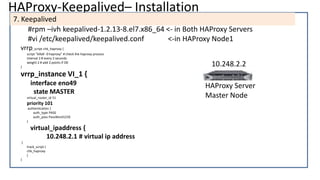
7. Keepalived
#rpm –ivh keepalived-1.2.13-8.el7.x86_64 <- in Both HAProxy Servers
#vi /etc/keepalived/keepalived.conf <-in HAProxy Node1
vrrp_script chk_haproxy {
script "killall -0 haproxy" # check the haproxy process
interval 2 # every 2 seconds
weight 2 # add 2 points if OK
}
vrrp_instance VI_1 {
interface eno49
state MASTER
virtual_router_id 51
priority 101
authentication {
auth_type PASS
auth_pass PassWord123$
}
virtual_ipaddress {
10.248.2.1 # virtual ip address
}
track_script {
chk_haproxy
}
}
HAProxy Server
Master Node
10.248.2.2
HAProxy-Keepalived– Installation Contd..
7. Keepalived
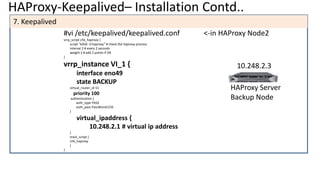
#vi /etc/keepalived/keepalived.conf <-in HAProxy Node2
vrrp_script chk_haproxy {
script "killall -0 haproxy" # check the haproxy process
interval 2 # every 2 seconds
weight 2 # add 2 points if OK
}
vrrp_instance VI_1 {
interface eno49
state BACKUP
virtual_router_id 51
priority 100
authentication {
auth_type PASS
auth_pass PassWord123$
}
virtual_ipaddress {
10.248.2.1 # virtual ip address
}
track_script {
chk_haproxy
}
}
HAProxy Server
Backup Node
10.248.2.3
HAProxy-Keepalived– Installation Contd..
7. Keepalived
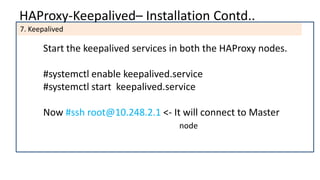
Start the keepalived services in both the HAProxy nodes.
#systemctl enable keepalived.service
#systemctl start keepalived.service
Now #ssh root@10.248.2.1 <- It will connect to Master
node
HAProxy-Keepalived– Installation Contd..
7. Keepalived
How to confirm that the IP 10.248.2.1 is floating between the nodes?
Now both the HAProxy nodes 10.248.2.2 & 10.248.2.3 are up and running.
Now #ssh root@10.248.2.1 <- It will connect to Master
node (10.248.2.2).
Now down the server with IP 10.248.2.2.
again #ssh root@10.248.2.1 <- Now it will connect to backup node
(10.248.2.3).
If the master node 10.248.2.2 is up, then the IP 10.248.2.1 will be floated to
this master node.
HAProxy-Keepalived– Installation Contd..
7. HAProxy Installation
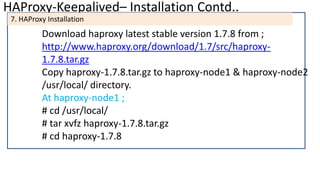
Download haproxy latest stable version 1.7.8 from ;
http://www.haproxy.org/download/1.7/src/haproxy-
1.7.8.tar.gz
Copy haproxy-1.7.8.tar.gz to haproxy-node1 & haproxy-node2
/usr/local/ directory.
At haproxy-node1 ;
# cd /usr/local/
# tar xvfz haproxy-1.7.8.tar.gz
# cd haproxy-1.7.8
HAProxy-Keepalived– Installation Contd..
7. HAProxy Installation
# make TARGET=linux2628 CPU=native USE_PCRE=1 USE_LIBCRYPT=1
USE_LINUX_SPLICE=1 USE_LINUX_TPROXY=1
# make install target=linux2628
Now haproxy binary was installed in /usr/local/sbin/
Give a soft link to /usr/sbin also;
# ln -s /usr/local/sbin/haproxy /usr/sbin
Now copy the haproxy startup script to /etc/init.d
# scp examples/haproxy.init /etc/init.d/haproxy
HAProxy-Keepalived– Installation Contd..
7. HAProxy Configuration
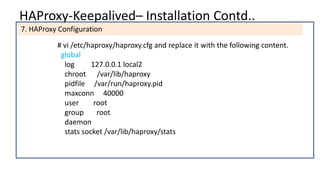
# vi /etc/haproxy/haproxy.cfg and replace it with the following content.
global
log 127.0.0.1 local2
chroot /var/lib/haproxy
pidfile /var/run/haproxy.pid
maxconn 40000
user root
group root
daemon
stats socket /var/lib/haproxy/stats
HAProxy-Keepalived– Installation Contd..
7. HAProxy Configuration
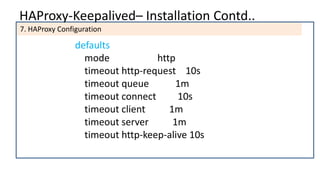
defaults
mode http
timeout http-request 10s
timeout queue 1m
timeout connect 10s
timeout client 1m
timeout server 1m
timeout http-keep-alive 10s
HAProxy-Keepalived– Installation Contd..
7. HAProxy Configuration
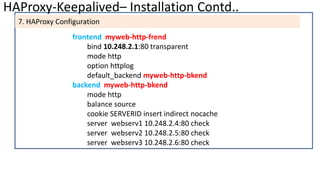
frontend myweb-http-frend
bind 10.248.2.1:80 transparent
mode http
option httplog
default_backend myweb-http-bkend
backend myweb-http-bkend
mode http
balance source
cookie SERVERID insert indirect nocache
server webserv1 10.248.2.4:80 check
server webserv2 10.248.2.5:80 check
server webserv3 10.248.2.6:80 check
HAProxy-Keepalived– Installation Contd..
7. HAProxy Configuration
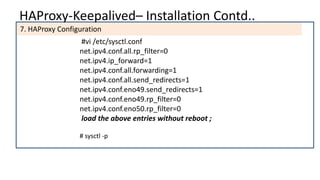
#vi /etc/sysctl.conf
net.ipv4.conf.all.rp_filter=0
net.ipv4.ip_forward=1
net.ipv4.conf.all.forwarding=1
net.ipv4.conf.all.send_redirects=1
net.ipv4.conf.eno49.send_redirects=1
net.ipv4.conf.eno49.rp_filter=0
net.ipv4.conf.eno50.rp_filter=0
load the above entries without reboot ;
# sysctl -p
HAProxy-Keepalived– Installation Contd..
7. HAProxy Configuration
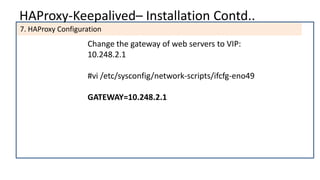
Change the gateway of web servers to VIP:
10.248.2.1
#vi /etc/sysconfig/network-scripts/ifcfg-eno49
GATEWAY=10.248.2.1
HAProxy-Keepalived– Installation Contd..
Change the access log configuration on the web-server1 , web-server2 and web-
server3 to capture client IP through X-Forwarded-For parameter.
On all the web servers ie. 10.248.2.4 , 10.248.2.5 & 10.248.2.6 change access log
configuration as follow;
# vi /usr/local/apache/httpd.conf
HAProxy-Keepalived– Installation Contd..
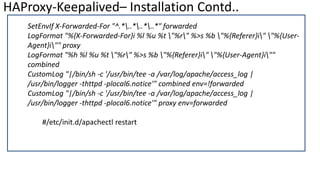
SetEnvIf X-Forwarded-For "^.*..*..*..*" forwarded
LogFormat "%{X-Forwarded-For}i %l %u %t "%r" %>s %b "%{Referer}i" "%{User-
Agent}i"" proxy
LogFormat "%h %l %u %t "%r" %>s %b "%{Referer}i" "%{User-Agent}i""
combined
CustomLog "|/bin/sh -c '/usr/bin/tee -a /var/log/apache/access_log |
/usr/bin/logger -thttpd -plocal6.notice'" combined env=!forwarded
CustomLog "|/bin/sh -c '/usr/bin/tee -a /var/log/apache/access_log |
/usr/bin/logger -thttpd -plocal6.notice'" proxy env=forwarded
#/etc/init.d/apachectl restart
10.248.2.4
Node-1
User
NAT
164.100.78.1
10.248.2.5
Node-2
HAProxy Server
Master Node LB
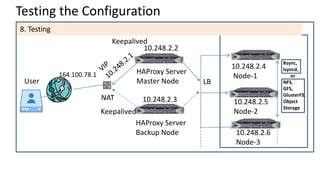
Testing the Configuration
HAProxy Server
Backup Node
Keepalived
Keepalived
8. Testing
10.248.2.6
Node-3
Rsync,
lsyncd,
or
NFS,
GFS,
GlusterFS,
Object
Storage
10.248.2.3
10.248.2.2
Extra Bytes
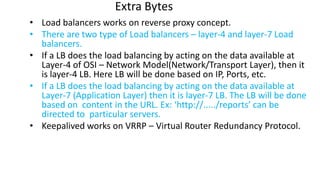
• Load balancers works on reverse proxy concept.
• There are two type of Load balancers – layer-4 and layer-7 Load
balancers.
• If a LB does the load balancing by acting on the data available at
Layer-4 of OSI – Network Model(Network/Transport Layer), then it
is layer-4 LB. Here LB will be done based on IP, Ports, etc.
• If a LB does the load balancing by acting on the data available at
Layer-7 (Application Layer) then it is layer-7 LB. The LB will be done
based on content in the URL. Ex: ‘http://...../reports’ can be
directed to particular servers.
• Keepalived works on VRRP – Virtual Router Redundancy Protocol.
Extra Bytes – Contd..
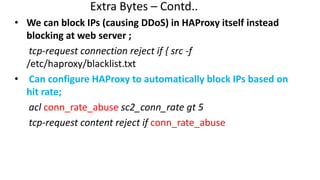
• We can block IPs (causing DDoS) in HAProxy itself instead
blocking at web server ;
tcp-request connection reject if { src -f
/etc/haproxy/blacklist.txt
• Can configure HAProxy to automatically block IPs based on
hit rate;
acl conn_rate_abuse sc2_conn_rate gt 5
tcp-request content reject if conn_rate_abuse
Credits
Thanks to
• Mr. Willy Tarreau, who still maintains the HAProxy project and
a core contributor to Linux kernel.
• Team of keepalived.org, working on sponsored funds to give
keepalived to industry, which is being widely used in large
data centre infrastructure and cloud products.
• RedHat for helping me in PoC.
• Our GePNIC (eProcurement) DC Support team for helping me
in PoC and taking HAProxy to production.
HAProxy-Keepalived– References
References:
 https://www.loadbalancer.org/blog/configure-haproxy-with-tproxy-
kernel-for-full-transparent-proxy/
 https://ubuntuforums.org/archive/index.php/t-2168372.html
 /usr/local/haproxy-1.7.8/README
 http://www.keepalived.org/
 Live configuration files being used in eProcurement Project.
Thank you ….
K Ganapathi
Technical Director
eProcurement Project(GePNIC)
National Informatics Centre
Chennai, India
kganapathi@nic.in

HA Deployment Architecture with HAProxy and Keepalived

  • 1.
    HA Deployment Architecturewith HAProxy By K Ganapathi, Technical Director, eProcurement Project(GePNIC) National Informatics Centre Chennai, India
  • 2.
    Agenda • What isHAProxy? • Any Alternative to HAProxy? • Why HAProxy? • Implementation – HAProxy & Keepalived.
  • 3.
    The content ofhis presentation has been created in such a way that even the participants who are part of development team with no or less server administration work can understand the concept of High Availability, learn and implement two packages HAProxy and Keepalived in their production environment.
  • 4.
    What is HAProxy? •It is a open source, free, fast and easy to configure solution for implementing - High Availability - High Performance-Scale out - Load Balancing - DDoS Prevention
  • 5.
    Alternate to HAProxy? •Nginx • Linux Virtual Server – (LVS) • AWS Elastic LB • Varnish • F5 ….
  • 6.
    Alternate to HAProxy? •Nginx - Can be used as both web server & load balancer (reverse proxy). • Linux Virtual Server – (LVS) – Very fast, works as layer-4 LB, configuration is not user friendly. • AWS Elastic LB - for Amazon Cloud infrastructure users. • Varnish - Not in much use and activities • F5 - Hardware LB, costly solution compared to SW LB. Can be installed as common data centre infrastructure and used by all the co-located users. ....a long list
  • 7.
    Why HAProxy? • Usedby Lot of Industry Majors like Twitter, AO Labs, Airbnb, Adobe Advt. Cloud, Alibaba, Fedora, GitHub, Kernel.org ... • Redhat-OpenShift & other Cloud Operators – RedHat openly declares that it is using HAProxy in their Container and Cloud suits. Other cloud players are also using HAProxy but don’t declare it in open. • Any of our neighbours using it ? Yes! – Many of our internal project teams are using HAProxy over years. Only thing is that there is no knowledge sharing among the peer groups. In our eProcurement project we are using it for more than a year now for three of our portals with high concurrent connections.
  • 8.
    Why HAProxy? Contd.. • Open Source • Low cost - compared to Costly HW LB • Easy to configure - when compared to HW LB • Very Fast • More Algorithm Option • Hot reconfiguration • Can block IPs manually • Can block IPs automatically based on the hit rate
  • 9.
    Implementation – Buildinga HA Web Server 10.248.2.1 Web Server (Apache) User NAT 164.100.78.1 1. Deployment without High Availability
  • 10.
    Implementation – Buildinga HA Web Server 10.248.2.1 Web Server (Apache) User NAT 164.100.78.1 Stand By Server 2. Manual Failover Arrangement Same Content
  • 11.
    Implementation – Buildinga HA Web Server Web Server (Apache) User NAT 164.100.78.1 10.248.2.1 Stand By Server 2. Manual Failover Arrangement Down Mannually Assign IP 10.248.2.1
  • 12.
    Can we automatethe Failover arrangement? Implementation – Building a HA Web Server
  • 13.
    Implementation – Buildinga HA Web Server 10.248.2.2 Web Server Master Node User NAT 164.100.78.1 s 3. Automate Failover Arrangement with Keepalived Up Keepalived 10.248.2.3 Web Server Backup Node Up Floating IP 10.248.2.1 Keepalived is the router programme written in C. It uses the Linux Kernel Virtual Server Module. It has many uses. Here we use it for floating a IP between two servers automatically based on their health
  • 14.
    Implementation – Buildinga HA Web Server 10.248.2.2 Web Server Master Node User NAT 164.100.78.1 3. Automate Failover Arrangement with Keepalived Down 10.248.2.3 Web Server Backup Node UpFloating IP 10.248.2.1 Keepalived Floated the IP to Backup Node
  • 15.
    Implementation – Buildinga HA Web Server Web Server Master Node User NAT 164.100.78.1 Down Keepalived – Floated the IP to Backup Node 10.248.2.1 Web Server Backup Node Up 3. Automate Failover Arrangement with Keepalived HA – Scaling - Resource Utilisation- This is a HA deployment architecture sufficient for portals with low concurrent connections .
  • 16.
    Implementation – Buildinga HA Web Server 10.248.2.2 Web Server Node-1 User NAT 164.100.78.1 4. High availability , High performance , Scale out Architecture with HA Proxy Up 10.248.2.3 Web Server Node-2 UpHAProxy Server LB 10.248.2.1 Round Robin, Static Round Robin, Least Connection, Source, URI, URL Parameter
  • 17.
    10.248.2.2 Web Server Node-1 User NAT 164.100.78.1 Down 10.248.2.3 WebServer Node-2 UpHAProxy Server LB 10.248.2.1 X Is this a True HA Architecture? Implementation – Building a HA Web Server
  • 18.
    Implementation – Buildinga HA Web Server 10.248.2.2 Web Server Node-1 User NAT 164.100.78.1 UP 10.248.2.3 Web Server Node-2 UpHAProxy Server LB 10.248.2.1 DownX It is not a True HA Architecture. If the HAProxy server is down then your portal is down on this single failure. So, How to ensure HA for HAProxy itself?
  • 19.
    10.248.2.4 Node-1 User NAT 164.100.78.1 10.248.2.5 Node-2 HAProxy Server Master NodeLB Implementation – Building a HA Web Server HAProxy Server Backup Node Keepalived Keepalived 5. High availability , High performance , Scale out Architecture with HA Proxy 10.248.2.6 Node-3 Rsync, lsyncd, or NFS, GFS, GlusterFS, Object Storage 10.248.2.3 10.248.2.2 How to ensure HA for HAProxy itself? – Use Keepalived.
  • 20.
    10.248.2.4 Node-1 User 164.100.78.1 10.248.2.5 Node-2 HAProxy Server Master NodeLB Implementation – Building a HA Web Server HAProxy Server Backup Node Keepalived floated the IP to backup node Keepalived 5. High availability , High performance , Scale out Architecture with HA Proxy 10.248.2.6 Node-3 Rsync, lsyncd, or NFS, GFS, GlusterFS, Object Storage 10.248.2.3 10.248.2.2 - DOWN How to ensure HA for HAProxy itself? – Use Keepalived. X
  • 21.
    10.248.2.4 Node-1 10.248.2.5 Node-2 HAProxy Server Master Node HAProxy-Keepalived–Installation HAProxy Server Backup Node 6. System Prerequisite (our environment) 10.248.2.6 Node-3 Rsync, lsyncd, or NFS, GFS, GlusterFS, Object Storage 10.248.2.3 1. OS – RHEL 7.3 2. Install keepalived (rpm) 3. Install HAProxy (Compile) 10.248.2.2
  • 22.
    HAProxy-Keepalived– Installation 7. InstallationSteps 1. Install and enable keepalived daemon in 2 HAProxy Nodes 2. To create Virtual IP (Floating IP) 10.248.2.1 between the HAproxy Nodes – Using keepalived. 3. Compile haproxy from source with TPROXY enabled. 4. Configure haproxy in both the nodes. Also do the dependent FW and IP routing in both the nodes. 5. Change the gateway of Web-Sever1/2/3/ to Virtual IP (10.248.2.1) 6. Change the access log configuration on the web-server1 & web-server2 to capture client IP through X-Forwarded-For parameter. 7. Start haproxy & Keepalived.
  • 23.
    HAProxy-Keepalived– Installation 7. Keepalived #rpm–ivh keepalived-1.2.13-8.el7.x86_64 <- in Both HAProxy Servers #vi /etc/keepalived/keepalived.conf <-in HAProxy Node1 vrrp_script chk_haproxy { script "killall -0 haproxy" # check the haproxy process interval 2 # every 2 seconds weight 2 # add 2 points if OK } vrrp_instance VI_1 { interface eno49 state MASTER virtual_router_id 51 priority 101 authentication { auth_type PASS auth_pass PassWord123$ } virtual_ipaddress { 10.248.2.1 # virtual ip address } track_script { chk_haproxy } } HAProxy Server Master Node 10.248.2.2
  • 24.
    HAProxy-Keepalived– Installation Contd.. 7.Keepalived #vi /etc/keepalived/keepalived.conf <-in HAProxy Node2 vrrp_script chk_haproxy { script "killall -0 haproxy" # check the haproxy process interval 2 # every 2 seconds weight 2 # add 2 points if OK } vrrp_instance VI_1 { interface eno49 state BACKUP virtual_router_id 51 priority 100 authentication { auth_type PASS auth_pass PassWord123$ } virtual_ipaddress { 10.248.2.1 # virtual ip address } track_script { chk_haproxy } } HAProxy Server Backup Node 10.248.2.3
  • 25.
    HAProxy-Keepalived– Installation Contd.. 7.Keepalived Start the keepalived services in both the HAProxy nodes. #systemctl enable keepalived.service #systemctl start keepalived.service Now #ssh root@10.248.2.1 <- It will connect to Master node
  • 26.
    HAProxy-Keepalived– Installation Contd.. 7.Keepalived How to confirm that the IP 10.248.2.1 is floating between the nodes? Now both the HAProxy nodes 10.248.2.2 & 10.248.2.3 are up and running. Now #ssh root@10.248.2.1 <- It will connect to Master node (10.248.2.2). Now down the server with IP 10.248.2.2. again #ssh root@10.248.2.1 <- Now it will connect to backup node (10.248.2.3). If the master node 10.248.2.2 is up, then the IP 10.248.2.1 will be floated to this master node.
  • 27.
    HAProxy-Keepalived– Installation Contd.. 7.HAProxy Installation Download haproxy latest stable version 1.7.8 from ; http://www.haproxy.org/download/1.7/src/haproxy- 1.7.8.tar.gz Copy haproxy-1.7.8.tar.gz to haproxy-node1 & haproxy-node2 /usr/local/ directory. At haproxy-node1 ; # cd /usr/local/ # tar xvfz haproxy-1.7.8.tar.gz # cd haproxy-1.7.8
  • 28.
    HAProxy-Keepalived– Installation Contd.. 7.HAProxy Installation # make TARGET=linux2628 CPU=native USE_PCRE=1 USE_LIBCRYPT=1 USE_LINUX_SPLICE=1 USE_LINUX_TPROXY=1 # make install target=linux2628 Now haproxy binary was installed in /usr/local/sbin/ Give a soft link to /usr/sbin also; # ln -s /usr/local/sbin/haproxy /usr/sbin Now copy the haproxy startup script to /etc/init.d # scp examples/haproxy.init /etc/init.d/haproxy
  • 29.
    HAProxy-Keepalived– Installation Contd.. 7.HAProxy Configuration # vi /etc/haproxy/haproxy.cfg and replace it with the following content. global log 127.0.0.1 local2 chroot /var/lib/haproxy pidfile /var/run/haproxy.pid maxconn 40000 user root group root daemon stats socket /var/lib/haproxy/stats
  • 30.
    HAProxy-Keepalived– Installation Contd.. 7.HAProxy Configuration defaults mode http timeout http-request 10s timeout queue 1m timeout connect 10s timeout client 1m timeout server 1m timeout http-keep-alive 10s
  • 31.
    HAProxy-Keepalived– Installation Contd.. 7.HAProxy Configuration frontend myweb-http-frend bind 10.248.2.1:80 transparent mode http option httplog default_backend myweb-http-bkend backend myweb-http-bkend mode http balance source cookie SERVERID insert indirect nocache server webserv1 10.248.2.4:80 check server webserv2 10.248.2.5:80 check server webserv3 10.248.2.6:80 check
  • 32.
    HAProxy-Keepalived– Installation Contd.. 7.HAProxy Configuration #vi /etc/sysctl.conf net.ipv4.conf.all.rp_filter=0 net.ipv4.ip_forward=1 net.ipv4.conf.all.forwarding=1 net.ipv4.conf.all.send_redirects=1 net.ipv4.conf.eno49.send_redirects=1 net.ipv4.conf.eno49.rp_filter=0 net.ipv4.conf.eno50.rp_filter=0 load the above entries without reboot ; # sysctl -p
  • 33.
    HAProxy-Keepalived– Installation Contd.. 7.HAProxy Configuration Change the gateway of web servers to VIP: 10.248.2.1 #vi /etc/sysconfig/network-scripts/ifcfg-eno49 GATEWAY=10.248.2.1
  • 34.
    HAProxy-Keepalived– Installation Contd.. Changethe access log configuration on the web-server1 , web-server2 and web- server3 to capture client IP through X-Forwarded-For parameter. On all the web servers ie. 10.248.2.4 , 10.248.2.5 & 10.248.2.6 change access log configuration as follow; # vi /usr/local/apache/httpd.conf
  • 35.
    HAProxy-Keepalived– Installation Contd.. SetEnvIfX-Forwarded-For "^.*..*..*..*" forwarded LogFormat "%{X-Forwarded-For}i %l %u %t "%r" %>s %b "%{Referer}i" "%{User- Agent}i"" proxy LogFormat "%h %l %u %t "%r" %>s %b "%{Referer}i" "%{User-Agent}i"" combined CustomLog "|/bin/sh -c '/usr/bin/tee -a /var/log/apache/access_log | /usr/bin/logger -thttpd -plocal6.notice'" combined env=!forwarded CustomLog "|/bin/sh -c '/usr/bin/tee -a /var/log/apache/access_log | /usr/bin/logger -thttpd -plocal6.notice'" proxy env=forwarded #/etc/init.d/apachectl restart
  • 36.
    10.248.2.4 Node-1 User NAT 164.100.78.1 10.248.2.5 Node-2 HAProxy Server Master NodeLB Testing the Configuration HAProxy Server Backup Node Keepalived Keepalived 8. Testing 10.248.2.6 Node-3 Rsync, lsyncd, or NFS, GFS, GlusterFS, Object Storage 10.248.2.3 10.248.2.2
  • 37.
    Extra Bytes • Loadbalancers works on reverse proxy concept. • There are two type of Load balancers – layer-4 and layer-7 Load balancers. • If a LB does the load balancing by acting on the data available at Layer-4 of OSI – Network Model(Network/Transport Layer), then it is layer-4 LB. Here LB will be done based on IP, Ports, etc. • If a LB does the load balancing by acting on the data available at Layer-7 (Application Layer) then it is layer-7 LB. The LB will be done based on content in the URL. Ex: ‘http://...../reports’ can be directed to particular servers. • Keepalived works on VRRP – Virtual Router Redundancy Protocol.
  • 38.
    Extra Bytes –Contd.. • We can block IPs (causing DDoS) in HAProxy itself instead blocking at web server ; tcp-request connection reject if { src -f /etc/haproxy/blacklist.txt • Can configure HAProxy to automatically block IPs based on hit rate; acl conn_rate_abuse sc2_conn_rate gt 5 tcp-request content reject if conn_rate_abuse
  • 39.
    Credits Thanks to • Mr.Willy Tarreau, who still maintains the HAProxy project and a core contributor to Linux kernel. • Team of keepalived.org, working on sponsored funds to give keepalived to industry, which is being widely used in large data centre infrastructure and cloud products. • RedHat for helping me in PoC. • Our GePNIC (eProcurement) DC Support team for helping me in PoC and taking HAProxy to production.
  • 40.
    HAProxy-Keepalived– References References:  https://www.loadbalancer.org/blog/configure-haproxy-with-tproxy- kernel-for-full-transparent-proxy/ https://ubuntuforums.org/archive/index.php/t-2168372.html  /usr/local/haproxy-1.7.8/README  http://www.keepalived.org/  Live configuration files being used in eProcurement Project.
  • 41.
    Thank you …. KGanapathi Technical Director eProcurement Project(GePNIC) National Informatics Centre Chennai, India kganapathi@nic.in