CEH | CHFI
Agenda
 Introduction to OSSIM
 How to deploy & configure OSSEC agents
 Configuring syslog and enabling plugins
 Scanning your network for assets and
vulnerabilities
 OSSIM Demo
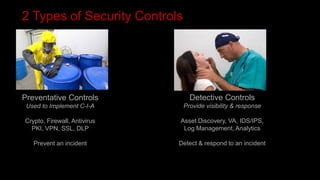
2 Types of Security Controls
Preventative Controls
Used to Implement C-I-A
Crypto, Firewall, Antivirus
PKI, VPN, SSL, DLP
Prevent an incident
Detective Controls
Provide visibility & response
Asset Discovery, VA, IDS/IPS,
Log Management, Analytics
Detect & respond to an incident
The Big Question
 IF WE ALREADY HAVE PREVENTATIVE CONTROLS…
 WHY SHOULD WE CARE ABOUT DETECTIVE
CONTROLS?
Prevention has proven to be elusive
A detailed study of 56 “Large US firms”
Results:
102 successful intrusions between them
EVERY WEEK!
“There are two types of companies that use
computers. Victims of crime that know they
are victims of crime and victims of crime that
don’t have a clue yet.”
- James Routh, 2007
CISO Depository Trust Clearing Corporation
Some pretty savvy recent victims
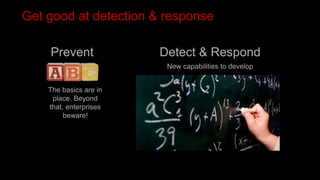
Get good at detection & response
Prevent Detect & Respond
The basics are in
place. Beyond
that, enterprises
beware!
New capabilities to develop
Many professional SOC’s are powered by open source
There’s an App for that!
PRADS NFSend
P0F
OVALdi
MDL
OpenFPC
PADS
Challenge: How do we make sense
of all these?
Lets get started!
The World’s Most Widely Used SIEM
MEET OSSIM
OSSIM is trusted by 195,000+ security professionals in 175 countries…and counting
Established and launched by security engineers out of necessity
Users enjoy all of the features of a traditional SIEM – and more
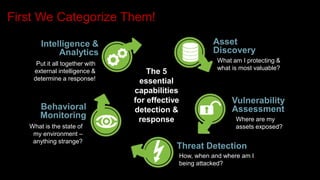
First We Categorize Them!
What is the state of
my environment –
anything strange?
Put it all together with
external intelligence &
determine a response!
The 5
essential
capabilities
for effective
detection &
response
Vulnerability
Assessment
Threat Detection
Behavioral
Monitoring
Intelligence &
Analytics
What am I protecting &
what is most valuable?
Asset
Discovery
How, when and where am I
being attacked?
Where are my
assets exposed?
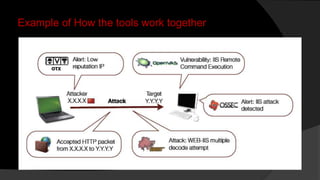
Example of How the tools work together
Tools Classification
HOW IT WORKS
TOOLS integrated with AlienVault OSSIM are classified by behavior of
the tool with the network
Active: they generate traffic in network being monitored
Passive: they analyze network traffic without generating any traffic
Passive tools require port mirroring (SPAN)
configured in network equipment or virtual
machines to analyze traffic
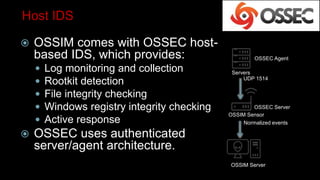
Host IDS
 OSSIM comes with OSSEC host-
based IDS, which provides:
 Log monitoring and collection
 Rootkit detection
 File integrity checking
 Windows registry integrity checking
 Active response
 OSSEC uses authenticated
server/agent architecture.
OSSIM Sensor
OSSEC Server
Servers
OSSEC Agent
OSSIM Server
UDP 1514
Normalized events
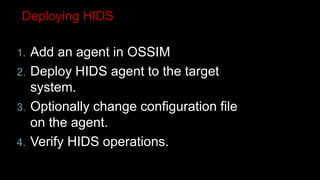
Deploying HIDS
1. Add an agent in OSSIM
2. Deploy HIDS agent to the target
system.
3. Optionally change configuration file
on the agent.
4. Verify HIDS operations.
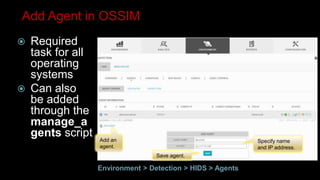
Add an
agent.
Save agent.
Specify name
and IP address.
Add Agent in OSSIM
 Required
task for all
operating
systems
 Can also
be added
through the
manage_a
gents script
Environment > Detection > HIDS > Agents
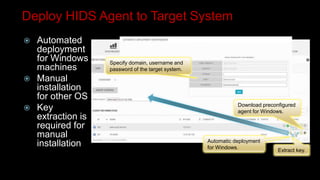
Specify domain, username and
password of the target system.
Download preconfigured
agent for Windows.
Automatic deployment
for Windows.
Extract key.
Deploy HIDS Agent to Target System
 Automated
deployment
for Windows
machines
 Manual
installation
for other OS
 Key
extraction is
required for
manual
installation
Configuration
file.
Log
file.
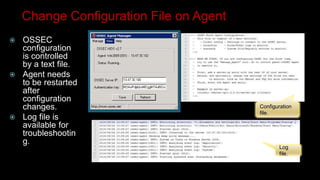
Change Configuration File on Agent
 OSSEC
configuration
is controlled
by a text file.
 Agent needs
to be restarted
after
configuration
changes.
 Log file is
available for
troubleshootin
g.
Agent status
should be active.
Verify HIDS Operations
 Displays
overview of
OSSEC
events and
agent
information
Environment > Detection > HIDS > Overview
OSSEC events.
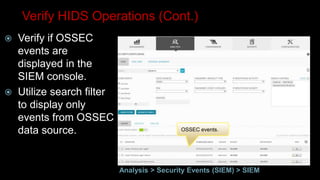
Verify HIDS Operations (Cont.)
 Verify if OSSEC
events are
displayed in the
SIEM console.
 Utilize search filter
to display only
events from OSSEC
data source.
Analysis > Security Events (SIEM) > SIEM
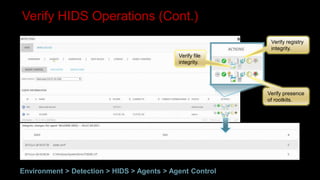
Verify HIDS Operations (Cont.)
Environment > Detection > HIDS > Agents > Agent Control
Verify registry
integrity.
Verify presence
of rootkits.
Verify file
integrity.
Syslog & Plugins
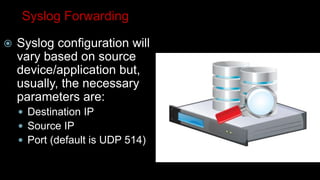
Syslog Forwarding
 Syslog configuration will
vary based on source
device/application but,
usually, the necessary
parameters are:
 Destination IP
 Source IP
 Port (default is UDP 514)
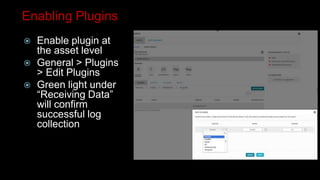
Enabling Plugins
 Enable plugin at
the asset level
 General > Plugins
> Edit Plugins
 Green light under
“Receiving Data”
will confirm
successful log
collection
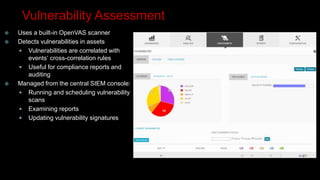
Vulnerability Assessment
 Uses a built-in OpenVAS scanner
 Detects vulnerabilities in assets
 Vulnerabilities are correlated with
events‘ cross-correlation rules
 Useful for compliance reports and
auditing
 Managed from the central SIEM console:
 Running and scheduling vulnerability
scans
 Examining reports
 Updating vulnerability signatures
Advanced Options
 Vulnerability assessment can be:
 Authenticated (SSH and SMB)
 Unauthenticated
 Predefined profiles can be selected:
 Non destructive full and slow scan
 Non destructive full and fast scan
 Full and fast scan including destructive
tests
 Custom profiles can be created.
Vulnerability Assessment Configuration
1. (Optionally) tune global vulnerability
assessment settings.
2. (Optionally) create a set of credentials.
3. (Optionally) create a scanning profile.
4. Create a vulnerability scan job.
5. Examine scanning results.
6. Optionally create a vulnerability or compliance
report.
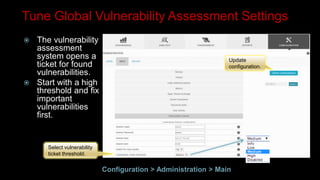
Update
configuration.
Select vulnerability
ticket threshold.
Tune Global Vulnerability Assessment Settings
 The vulnerability
assessment
system opens a
ticket for found
vulnerabilities.
 Start with a high
threshold and fix
important
vulnerabilities
first.
Configuration > Administration > Main
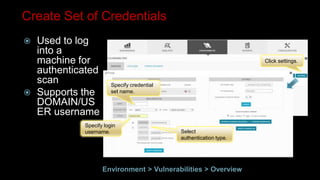
Specify login
username.
Specify credential
set name.
Select
authentication type.
Click settings.
Create Set of Credentials
 Used to log
into a
machine for
authenticated
scan
 Supports the
DOMAIN/US
ER username
Environment > Vulnerabilities > Overview
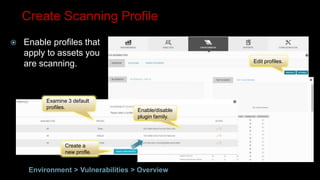
Examine 3 default
profiles.
Enable/disable
plugin family.
Create a
new profle.
Edit profiles.
Create Scanning Profile
 Enable profiles that
apply to assets you
are scanning.
Environment > Vulnerabilities > Overview
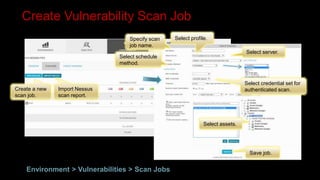
Create a new
scan job.
Import Nessus
scan report.
Select schedule
method.
Specify scan
job name.
Select profile.
Select server.
Select assets.
Select credential set for
authenticated scan.
Save job.
Create Vulnerability Scan Job
Environment > Vulnerabilities > Scan Jobs
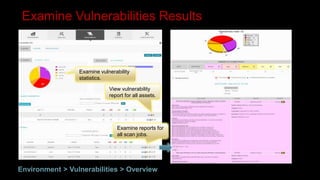
Examine vulnerability
statistics.
View vulnerability
report for all assets.
Examine reports for
all scan jobs.
Examine Vulnerabilities Results
Environment > Vulnerabilities > Overview
OSSIM Demo
Questions & Answers
OSSIM Overview

OSSIM Overview

  • 1.
  • 2.
    Agenda  Introduction toOSSIM  How to deploy & configure OSSEC agents  Configuring syslog and enabling plugins  Scanning your network for assets and vulnerabilities  OSSIM Demo
  • 3.
    2 Types ofSecurity Controls Preventative Controls Used to Implement C-I-A Crypto, Firewall, Antivirus PKI, VPN, SSL, DLP Prevent an incident Detective Controls Provide visibility & response Asset Discovery, VA, IDS/IPS, Log Management, Analytics Detect & respond to an incident
  • 4.
    The Big Question IF WE ALREADY HAVE PREVENTATIVE CONTROLS…  WHY SHOULD WE CARE ABOUT DETECTIVE CONTROLS? Prevention has proven to be elusive A detailed study of 56 “Large US firms” Results: 102 successful intrusions between them EVERY WEEK!
  • 5.
    “There are twotypes of companies that use computers. Victims of crime that know they are victims of crime and victims of crime that don’t have a clue yet.” - James Routh, 2007 CISO Depository Trust Clearing Corporation Some pretty savvy recent victims
  • 6.
    Get good atdetection & response Prevent Detect & Respond The basics are in place. Beyond that, enterprises beware! New capabilities to develop
  • 7.
    Many professional SOC’sare powered by open source There’s an App for that! PRADS NFSend P0F OVALdi MDL OpenFPC PADS Challenge: How do we make sense of all these?
  • 8.
  • 9.
    The World’s MostWidely Used SIEM MEET OSSIM OSSIM is trusted by 195,000+ security professionals in 175 countries…and counting Established and launched by security engineers out of necessity Users enjoy all of the features of a traditional SIEM – and more
  • 10.
    First We CategorizeThem! What is the state of my environment – anything strange? Put it all together with external intelligence & determine a response! The 5 essential capabilities for effective detection & response Vulnerability Assessment Threat Detection Behavioral Monitoring Intelligence & Analytics What am I protecting & what is most valuable? Asset Discovery How, when and where am I being attacked? Where are my assets exposed?
  • 11.
    Example of Howthe tools work together
  • 12.
    Tools Classification HOW ITWORKS TOOLS integrated with AlienVault OSSIM are classified by behavior of the tool with the network Active: they generate traffic in network being monitored Passive: they analyze network traffic without generating any traffic Passive tools require port mirroring (SPAN) configured in network equipment or virtual machines to analyze traffic
  • 13.
    Host IDS  OSSIMcomes with OSSEC host- based IDS, which provides:  Log monitoring and collection  Rootkit detection  File integrity checking  Windows registry integrity checking  Active response  OSSEC uses authenticated server/agent architecture. OSSIM Sensor OSSEC Server Servers OSSEC Agent OSSIM Server UDP 1514 Normalized events
  • 14.
    Deploying HIDS 1. Addan agent in OSSIM 2. Deploy HIDS agent to the target system. 3. Optionally change configuration file on the agent. 4. Verify HIDS operations.
  • 15.
    Add an agent. Save agent. Specifyname and IP address. Add Agent in OSSIM  Required task for all operating systems  Can also be added through the manage_a gents script Environment > Detection > HIDS > Agents
  • 16.
    Specify domain, usernameand password of the target system. Download preconfigured agent for Windows. Automatic deployment for Windows. Extract key. Deploy HIDS Agent to Target System  Automated deployment for Windows machines  Manual installation for other OS  Key extraction is required for manual installation
  • 17.
    Configuration file. Log file. Change Configuration Fileon Agent  OSSEC configuration is controlled by a text file.  Agent needs to be restarted after configuration changes.  Log file is available for troubleshootin g.
  • 18.
    Agent status should beactive. Verify HIDS Operations  Displays overview of OSSEC events and agent information Environment > Detection > HIDS > Overview
  • 19.
    OSSEC events. Verify HIDSOperations (Cont.)  Verify if OSSEC events are displayed in the SIEM console.  Utilize search filter to display only events from OSSEC data source. Analysis > Security Events (SIEM) > SIEM
  • 20.
    Verify HIDS Operations(Cont.) Environment > Detection > HIDS > Agents > Agent Control Verify registry integrity. Verify presence of rootkits. Verify file integrity.
  • 21.
  • 22.
    Syslog Forwarding  Syslogconfiguration will vary based on source device/application but, usually, the necessary parameters are:  Destination IP  Source IP  Port (default is UDP 514)
  • 23.
    Enabling Plugins  Enableplugin at the asset level  General > Plugins > Edit Plugins  Green light under “Receiving Data” will confirm successful log collection
  • 24.
    Vulnerability Assessment  Usesa built-in OpenVAS scanner  Detects vulnerabilities in assets  Vulnerabilities are correlated with events‘ cross-correlation rules  Useful for compliance reports and auditing  Managed from the central SIEM console:  Running and scheduling vulnerability scans  Examining reports  Updating vulnerability signatures
  • 25.
    Advanced Options  Vulnerabilityassessment can be:  Authenticated (SSH and SMB)  Unauthenticated  Predefined profiles can be selected:  Non destructive full and slow scan  Non destructive full and fast scan  Full and fast scan including destructive tests  Custom profiles can be created.
  • 26.
    Vulnerability Assessment Configuration 1.(Optionally) tune global vulnerability assessment settings. 2. (Optionally) create a set of credentials. 3. (Optionally) create a scanning profile. 4. Create a vulnerability scan job. 5. Examine scanning results. 6. Optionally create a vulnerability or compliance report.
  • 27.
    Update configuration. Select vulnerability ticket threshold. TuneGlobal Vulnerability Assessment Settings  The vulnerability assessment system opens a ticket for found vulnerabilities.  Start with a high threshold and fix important vulnerabilities first. Configuration > Administration > Main
  • 28.
    Specify login username. Specify credential setname. Select authentication type. Click settings. Create Set of Credentials  Used to log into a machine for authenticated scan  Supports the DOMAIN/US ER username Environment > Vulnerabilities > Overview
  • 29.
    Examine 3 default profiles. Enable/disable pluginfamily. Create a new profle. Edit profiles. Create Scanning Profile  Enable profiles that apply to assets you are scanning. Environment > Vulnerabilities > Overview
  • 30.
    Create a new scanjob. Import Nessus scan report. Select schedule method. Specify scan job name. Select profile. Select server. Select assets. Select credential set for authenticated scan. Save job. Create Vulnerability Scan Job Environment > Vulnerabilities > Scan Jobs
  • 31.
    Examine vulnerability statistics. View vulnerability reportfor all assets. Examine reports for all scan jobs. Examine Vulnerabilities Results Environment > Vulnerabilities > Overview
  • 32.
  • 33.