Using Cyber Security 
Assessment Tools on 
Industrial Control Systems (ICS) 
Dale Peterson, Stephen Hilt 
peterson@digitalbond.com, hilt@digitalbond.com 
Twitter: @digitalbond
Digital Bond Research 
• Funded by DHS, DoE, UK and Japanese Gov, … 
• Funded by Digital Bond 
• Add ICS Intelligence to Security Tools 
– Redpoint, Bandolier, Quickdraw, Basecamp 
– Digital Bond is vendor neutral 
– We do not sell, install or support any products 
All Available For Free At Digitalbond.com
• S4x15 is January 13-16 in Miami Beach 
• Advanced, highly technical sessions from the 
best global ICSsec talent 
• See agenda and videos from past S4 at 
digitalbond.com
ICS Security Assessments 
• Digital Bond performed our first ICS security 
assessment in 2000 … 15 years ago 
• Digital Bond performs assessments on live / 
operational / running critical infrastructure ICS 
– Power plants, pipelines, water treatment, chemical 
manufacturing, transportation 
• Digital Bond uses scanning tools 
• And we have never caused an unacceptable 
impact to operations
Assessment Types 
• Asset Owner / ICS End User Assessments 
– Is the ICS deployed and maintained in a good security 
practice configuration? 
– Are known vulnerabilities remediated / fixed? 
– This presentation covers Asset Owner Assessments 
• Assessments for Vendors / New Purchases 
– Attempts to find new, 0day vulnerabilities 
– Very advanced testing, uses some commercial and 
free tools, but also a lot of custom code/tools 
– Digital Bond Labs does these
Asset Owner Assessments 
• Architecture Review 
• Configuration Inspection 
• Physical Inspection 
• Policy and Procedure Review and Audit 
• Interview (very important for determining risk) 
and 
• Online Scanning/Testing/Exploits
Current State of ICS Security 
• Many organizations are just beginning to worry 
about ICS security 
– They may have a poorly configured firewall 
– They may have some anti-virus running 
– Little else in the way of ICS cyber security 
– Some in oil/gas have been working ICSsec for 5+ years 
• ICS protocols and PLC’s are insecure by design 
– They lack basic security such as authentication 
– Access = compromise 
– Impact is limited to engineering and automation skill
Efficient Risk Reduction 
What should I do next? 
Where should you spend your next $ or 
hour of time on ICS cyber security to 
get the maximum risk reduction or 
improvement in security posture? 
• Assessment should provide a list of actions 
prioritized by efficient risk reduction 
• Companies have limited ability to add security
Prioritization 
• Threat 
– Very difficult to determine 
– Typically look at the accessibility of the device/system 
• Vulnerability 
– Assessment can clearly identify this 
• Impact 
– This is the most important factor 
– Don’t waste time on small impact risks, eg serial 
connected panels 
– Talk to the Operations team, what would happen if …
Even the most basic, simple, 
non-intrusive scan of 
a PLC or ICS application can cause 
a denial of service condition. 
TR UE!
Example 1 
• Safety PLC 
– Simple port scan of a safety PLC caused it to crash, 
and it did not recover when rebooted 
– Additional scanning found a port that was used to load 
new firmware did not have authentication or even 
check parameters 
– Any activity on the port started a firmware update 
process 
– PLC needed to be completely reloaded to recover
Example 2 
• Redundant Pair of Real Time Servers 
– Issues read and write commands to PLC’s 
– Provides data and forwards commands from HMI / 
Operator Stations 
• Scan of Standby Server … no problem 
• Scan of Hot/Active Server … crash and failover
You cannot and should not use security 
scanning tools on an operational ICS 
because they can cause important 
things to crash. 
Fal se!
How To Scan ICS 
• Staging area or lab 
– Some sites have non-operational systems to test 
• Leverage redundancy 
– An ICS should not have a single point of failure 
– Many operator stations / HMI 
– Hot and standby servers 
• Select best testing time 
– Many processes have key times weekly or daily were a 
computer or device outage is more difficult to handle
Questions For Operations: 
1. Is it acceptable if computer x 
crashes during the testing window? 
2. Can you recover the system in an 
acceptable time frame if it crashes? 
Answer: Yes … s chedule scan
Answer: No … important security finding 
• You have a recovery issue 
– Don’t touch that because the guy who knew how it 
worked is no longer with the company 
– What is your Recovery Time Objective (RTO)? 
– Do you have a proven ability to meet your RTO? 
or 
• You have a single point of failure 
– Missing redundancy 
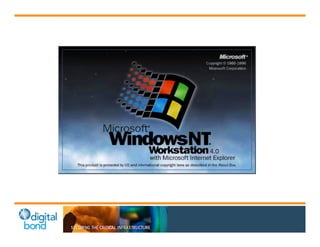
– We can never reboot or have an outage of a Windows 
NT, XP, 2003, 2008, 7 … FRAGILITY
Create Your Scan List 
• Work with Operations to identify one of each 
time of computer or device 
• Find a sample that you can scan, assuming it 
may go down, without having an unacceptable 
impact to Operations 
– Always assume it will go down 
– Most common case is reboot to recover 
• Sometimes warranted even if scanned system doesn’t crash 
– Things are much better than 10 years ago
Scanning Tool Categories 
• Basic Enumeration (what is it?) 
• Full featured scan (1000’s of tests) 
• Basic, random data fuzz testing 
• Secondary application testing 
– Web servers, databases 
• Exploit proof of concept
Broad Based Security Scanner 
• Nessus from Tenable Network Security 
• Nexpose from Rapid 7 
• Retina from Beyond Trust 
• DeepDiscovery from Trend Micro 
Or 
• Scanning as a service, Qualys
Nessus Basics 
• Nessus is a proprietary comprehensive 
vulnerability scanner which is developed by 
Tenable Network Security. Nessus is the world's 
most popular vulnerability scanner, taking first 
place in the 2000, 2003, and 2006 security tools 
survey.[2] Tenable Network Security estimates 
that it is used by over 75,000 organizations 
worldwide. 
– http://en.wikipedia.org/wiki/Nessus_(software)
Nessus Basics 
• Nessus 5.2.7 will be utilized for these labs 
– Nessus is available from 
http://www.tenable.com/products/nessus 
– Instructions to install and configure can be found from 
Tenable 
– Cost $1500 per year license 
– What is included: 
• 68,000 + Plugins to check for various Vulnerabilities and 
security settings. 
• SCADA Specific Plugins 
• Ability to run audit policies (available from Tenable’s website) 
• Scheduled scans 
• Export into HTML, CSV, or Nessus formats.
Nessus Basics 
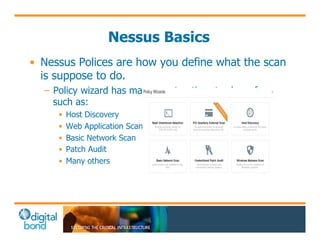
• Nessus Polices are how you define what the scan 
is suppose to do. 
– Policy wizard has many great options to chose from 
such as: 
• Host Discovery 
• Web Application Scanning 
• Basic Network Scan 
• Patch Audit 
• Many others
Nessus Basics 
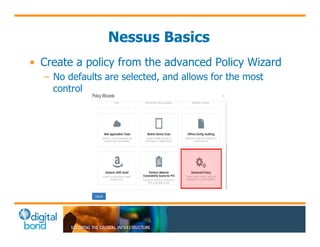
• Create a policy from the advanced Policy Wizard 
– No defaults are selected, and allows for the most 
control
Nessus Basics 
• Credentialed Scan vs Non Credentialed Scan 
– Port scanning – Credentialed scans use netstat to 
gather open port information, where as with out 
credentialed it will try to send probes to each port. 
– Credentialed scans will use local checks for 
vulnerabilities which will be more accurate than trying 
to use banner information that can be collected about 
the service.
Nessus Configuration 
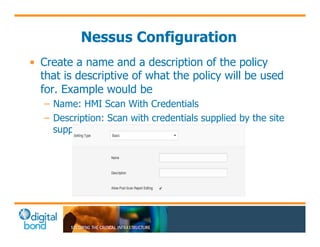
• Create a name and a description of the policy 
that is descriptive of what the policy will be used 
for. Example would be 
– Name: HMI Scan With Credentials 
– Description: Scan with credentials supplied by the site 
support personnel
Nessus Configuration 
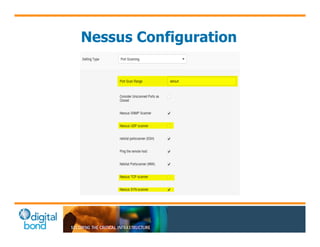
• Setting Type > Port Scanning 
– This is where one would change the ports if you are 
not doing a credentialed scan and want to see ports 1 
– 65535 . 
– Consider using the UDP scanning option. This will 
increase the time of scan, but can collect some UDP 
information if credentials are not available. 
– If not using credentialed scanning, consider changing 
from SYN scan to TCP scan.
Nessus Configuration
Nessus Configuration 
• Setting Type > Performance 
– These setting are used for when you need to slow the 
scan down, or speed it up based on your 
requirements. Normally the defaults will be good to 
start, and can be altered if you have issues with 
scanning.
Nessus Configuration 
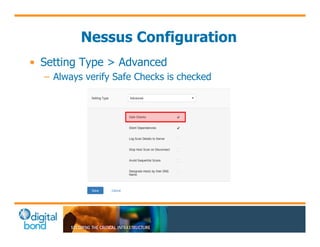
• Setting Type > Advanced 
– Always verify Safe Checks is checked
Nessus Configuration 
• Credential Types 
– Windows Credentials 
• Windows XP and Server 2003 an Administrator can be used 
• Windows 7 and Server 2008 the Administrator, or a Domain 
Admin 
– SSH Credentials 
• Su to root 
• Sudo as user used to log in 
• Cisco “Enable” 
• Others
Nessus Configuration 
• Credential Types 
– Plain Text Credentials 
• telnet 
• rsh 
• rexec
Nessus Configuration
Nessus Configuration 
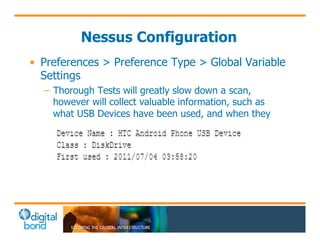
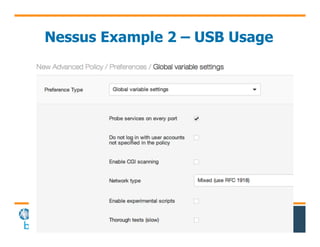
• Preferences > Preference Type > Global Variable 
Settings 
– Thorough Tests will greatly slow down a scan, 
however will collect valuable information, such as 
what USB Devices have been used, and when they 
were lasted used.
Nessus Lab 1 
• Configure Nessus Policies 
– Configure A Policy to use various credentials 
– Within Advanced settings for performance and 
thorough checks
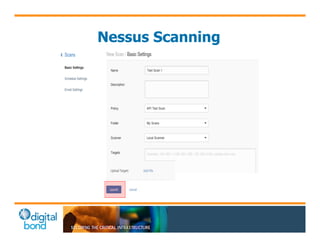
Nessus Scanning 
• Once policies have been created scans can be 
configured against one or more hosts. 
– Basic Settings: 
• Name of Scan 
• Hosts to be scanned, and what policy to use 
– Schedule: 
• Now 
• On Demand 
• Scheduled 
– Email Settings: 
• Email when scan launches and finishes if SMTP server is 
configured.
Nessus Scanning
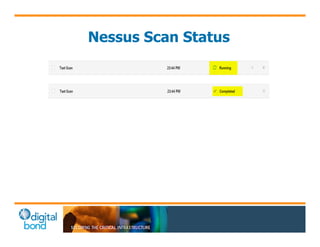
Nessus Scan Status
Nessus Lab 2 
• Running a scan 
– Configure Scan with policies created 
• Review Scan Output 
– Review scan results in Nessus “API XP Test Scan” and 
“API XP Test” 
• What stands out to you? 
• Export Results 
– Export the results in multiple formats
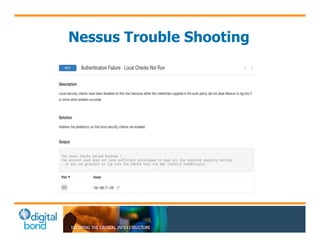
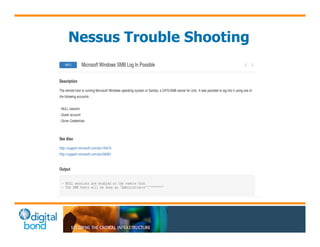
Nessus Trouble Shooting
Nessus Trouble Shooting 
• My scans are failing, now what? 
– Ensure that the setting in the local security policies 
called, "Network access: Sharing and security model 
for local accounts", is set to "Classic". 
– Ensure that User Account Control is turned off for the 
sessoin by setting HKLMSOFTWAREMicrosoft 
WindowsCurrentVersionPoliciessystem 
LocalAccountTokenFilterPolicy to 1. 0 will 
disable again. 
– Check the firewall settings. If there is a firewall make 
sure you are allowing 135/445 as well and File and 
Print Sharing is turned on. Usually, best option is to 
disable during the duration of the scan. 
– Ensure that both the Windows Management 
Instrumentation Service and the Remote Registry 
Service have been started on the target
Nessus Trouble Shooting 
• Cont. 
– Ensure Anti-Virus, such as SEP, isn’t blocking the scan. 
Most Anti-Virus solutions can be disabled during the 
duration of the scan. 
– Ensure you are using the correct credentials by testing 
them. 
– Network Issues may cause some scans to fail, ensure 
the network is in a state that can support a scan.
Nessus Trouble Shooting
Security Patching 
• ICS scans often identify many missing patches 
– Microsoft security patches 
– 3rd party / application software security patches 
– Security software security patches, eg anti-virus 
– Even ICS security patches 
Question: What is the security finding? 
Answer: Ineffective security patching program
Security Patching in ICS 
• Good security practice is to apply patches in a 
reasonable time after available 
– IT / corporate network typically 30 days 
– Best in ICS is typically quarterly / 90 days 
Question: Can you go from little or no security 
patching to applying all patches every 90 days? 
Think Efficient Risk Reduction
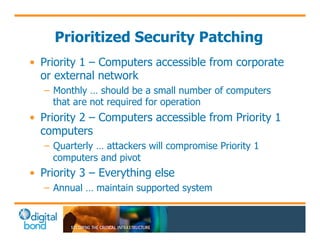
Prioritized Security Patching 
• Priority 1 – Computers accessible from corporate 
or external network 
– Monthly … should be a small number of computers 
that are not required for operation 
• Priority 2 – Computers accessible from Priority 1 
computers 
– Quarterly … attackers will compromise Priority 1 
computers and pivot 
• Priority 3 – Everything else 
– Annual … maintain supported system
Controversial 
• If you can do better, great 
– Shorter patching windows are better security, but 
– We see many owner/operators fail in patching 
• Select some achievable plan, succeed, and then 
shorten patching window 
• Also … if an attacker can reach a Priority 3 
computer he can compromise the ICS even if it is 
patched … ICS is insecure by design
Know Your Scanner 
• These are complex, full feature products 
• Default scan configurations will miss a lot of 
what you want to know in an assessment 
• Take a class from the vendor or skilled teacher
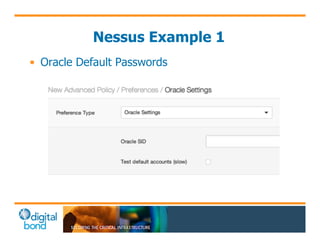
Nessus Example 1 
• Oracle Default Passwords
Nessus Example 2 – USB Usage 
• USB Drive Usage
Bandolier 
• Funded by US Dept. of Energy / Vendors / 
Digital Bond 
• Identify security settings in ICS applications 
• Create Nessus .audit files for use with the 
policy compliance plugins 
• Distribute through Digital Bond site and 
and vendor support channels
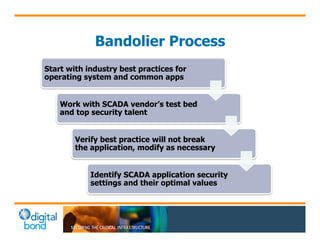
Bandolier Process 
Start with industry best practices for 
operating system and common apps 
Work with SCADA vendor’s test bed 
and top security talent 
Verify best practice will not break 
the application, modify as necessary 
Identify SCADA application security 
settings and their optimal values
Bandolier Scope 
• Underlying operating systems 
Similar to other best practice guidance, but addresses 
specific control system requirements 
A good starting point for all ICS 
• Supporting applications 
Web servers, database servers, etc… 
• Control system application 
Has its own security configuration
Current Audit Files 
Available for these control system applications: 
– ABB 800xA 
– AREVA e-terra 
– CSI UCOS 
– Emerson Ovation 
– Matrikon OPC 
– OSIsoft PI 
– Siemens Spectrum 
– SNC GENe 
– Telvent OASyS DNA
Uses for Bandolier 
• Asset owners and vendors getting value 
• Acceptance testing 
• Validation testing 
– System upgrades 
– Patching 
– Configuration changes 
• Periodic security testing 
• Site audits in response to incidents and issues
Bandolier Audit Check Examples 
• Has the default ems user account been 
removed? 
• Are DCOM permissions set correctly for the OPC 
server? 
• Are the correct SCADA user permissions 
assigned? 
• Are unneeded ports/services disabled?
Bandolier Customization 
• Local security policies 
Example: Password length/complexity requirements 
• Unique system requirements 
Example: different set of software installed that requires 
a service that would otherwise be disabled 
• Additional local user accounts or security groups 
May affect ACL’s 
• Naming conventions 
Example: user/groups/files named differently and need 
to be changed in audit file
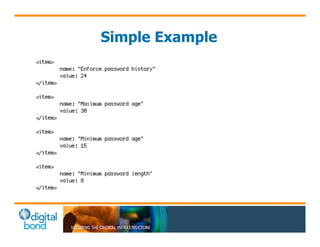
Simple Example
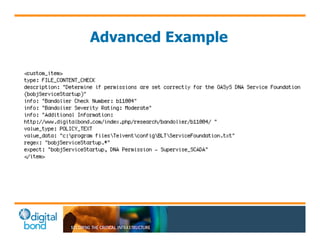
Advanced Example
Access Control List Objects 
• File Access Control Checks 
• Registry Access Control Checks 
• Service Access Control Checks 
• Launch Permission Control Checks 
• Launch2 Permission Control Checks 
• Access Permission Control Checks
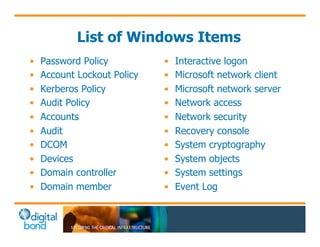
List of Windows Items 
• Password Policy 
• Account Lockout Policy 
• Kerberos Policy 
• Audit Policy 
• Accounts 
• Audit 
• DCOM 
• Devices 
• Domain controller 
• Domain member 
• Interactive logon 
• Microsoft network client 
• Microsoft network server 
• Network access 
• Network security 
• Recovery console 
• System cryptography 
• System objects 
• System settings 
• Event Log
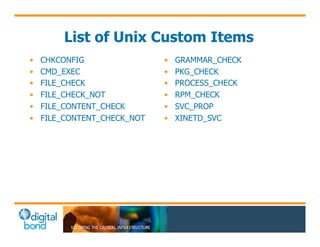
List of Unix Custom Items 
• CHKCONFIG 
• CMD_EXEC 
• FILE_CHECK 
• FILE_CHECK_NOT 
• FILE_CONTENT_CHECK 
• FILE_CONTENT_CHECK_NOT 
• GRAMMAR_CHECK 
• PKG_CHECK 
• PROCESS_CHECK 
• RPM_CHECK 
• SVC_PROP 
• XINETD_SVC
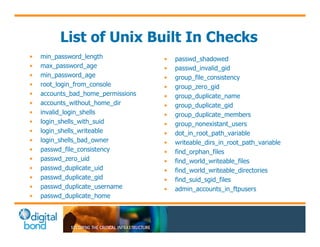
List of Unix Built In Checks 
• min_password_length 
• max_password_age 
• min_password_age 
• root_login_from_console 
• accounts_bad_home_permissions 
• accounts_without_home_dir 
• invalid_login_shells 
• login_shells_with_suid 
• login_shells_writeable 
• login_shells_bad_owner 
• passwd_file_consistency 
• passwd_zero_uid 
• passwd_duplicate_uid 
• passwd_duplicate_gid 
• passwd_duplicate_username 
• passwd_duplicate_home 
• passwd_shadowed 
• passwd_invalid_gid 
• group_file_consistency 
• group_zero_gid 
• group_duplicate_name 
• group_duplicate_gid 
• group_duplicate_members 
• group_nonexistant_users 
• dot_in_root_path_variable 
• writeable_dirs_in_root_path_variable 
• find_orphan_files 
• find_world_writeable_files 
• find_world_writeable_directories 
• find_suid_sgid_files 
• admin_accounts_in_ftpusers
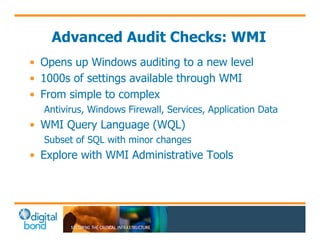
Advanced Audit Checks: WMI 
• Opens up Windows auditing to a new level 
• 1000s of settings available through WMI 
• From simple to complex 
Antivirus, Windows Firewall, Services, Application Data 
• WMI Query Language (WQL) 
Subset of SQL with minor changes 
• Explore with WMI Administrative Tools
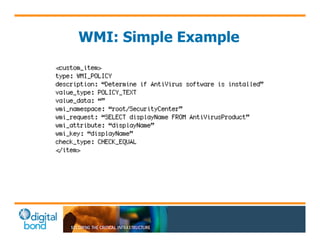
WMI: Simple Example
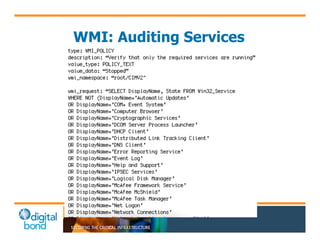
WMI: Auditing Services
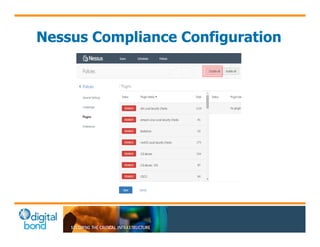
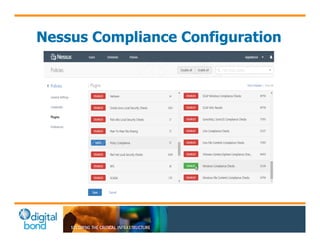
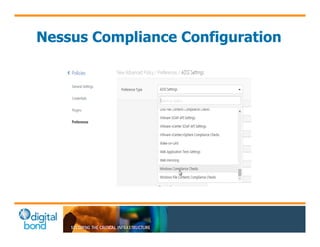
Nessus Compliance Configuration
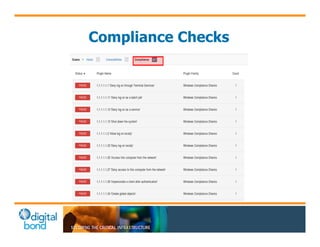
Compliance Checks
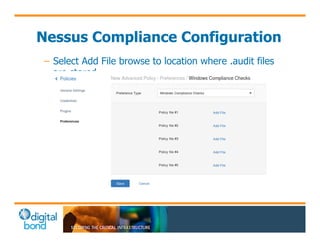
Nessus Compliance Configuration 
– Select Add File browse to location where .audit files 
are stored
Nmap 
• Nmap ("Network Mapper") is a free and open 
source utility for network discovery and security 
auditing. Many systems and network 
administrators also find it useful for tasks such as 
network inventory, managing service upgrade 
schedules, and monitoring host or service uptime 
– http://nmap.org/
Nmap Basics 
• Discovery of Systems via ARP or ICMP 
• Enumeration of systems 
– TCP Scanning 
– UDP Scanning 
– Specifying targets port/s and port ranges 
– Scripts and Service Probes 
– Other options for control systems
Nmap Basics 
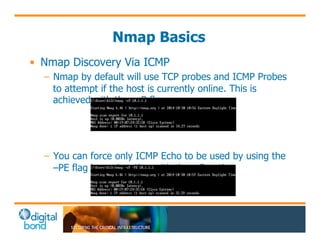
• Nmap Discovery Via ICMP 
– Nmap by default will use TCP probes and ICMP Probes 
to attempt if the host is currently online. This is 
achieved with the –sP flag 
– You can force only ICMP Echo to be used by using the 
–PE flag in conjunction with the -sP option
Nmap Basics 
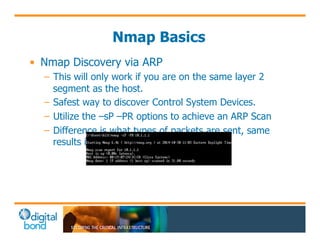
• Nmap Discovery via ARP 
– This will only work if you are on the same layer 2 
segment as the host. 
– Safest way to discover Control System Devices. 
– Utilize the –sP –PR options to achieve an ARP Scan 
– Difference is what types of packets are sent, same 
results in most cases.
Nmap Basics 
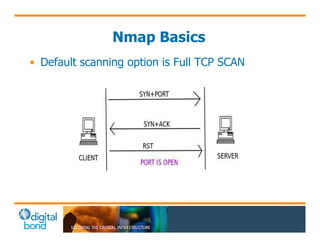
• Default scanning option is Full TCP SCAN
Nmap Basics 
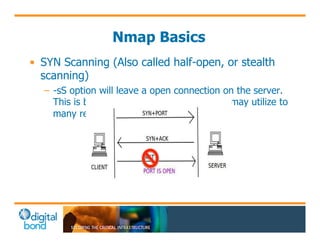
• SYN Scanning (Also called half-open, or stealth 
scanning) 
– -sS option will leave a open connection on the server. 
This is bad thing in Control Systems as it may utilize to 
many resources and cause an issue.
Nmap Basics 
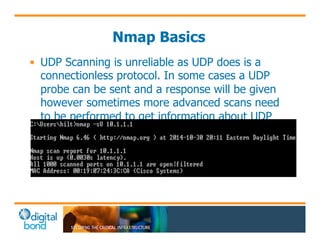
• UDP Scanning is unreliable as UDP does is a 
connectionless protocol. In some cases a UDP 
probe can be sent and a response will be given 
however sometimes more advanced scans need 
to be performed to get information about UDP 
services.
Nmap Lab 1 
• Run discovery scan on network 
– Run Nmap on network to discover assets 
– Review Results 
• Configure Full TCP Scan 
– Run Nmap with options for full TCP scan 
– Run Nmap with options for SYN Scan 
• Configure default UDP Scan 
– Run Nmap on remote host for basic enumeration of 
UDP
Nmap Basics 
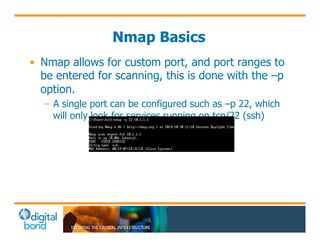
• Nmap allows for custom port, and port ranges to 
be entered for scanning, this is done with the –p 
option. 
– A single port can be configured such as –p 22, which 
will only look for services running on tcp/22 (ssh)
Nmap Basics 
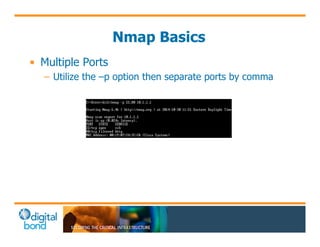
• Multiple Ports 
– Utilize the –p option then separate ports by comma
Nmap Basics 
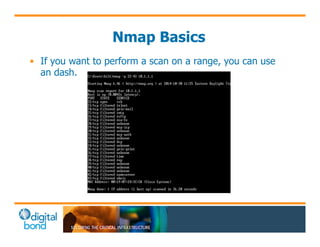
• If you want to perform a scan on a range, you can use 
an dash.
Nmap Basics 
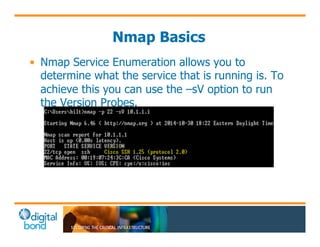
• Nmap Service Enumeration allows you to 
determine what the service that is running is. To 
achieve this you can use the –sV option to run 
the Version Probes.
Nmap Basics 
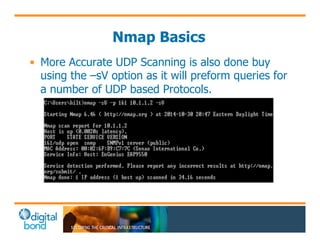
• More Accurate UDP Scanning is also done buy 
using the –sV option as it will preform queries for 
a number of UDP based Protocols.
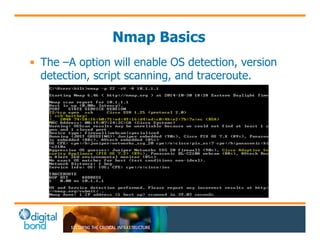
Nmap Basics 
• The –A option will enable OS detection, version 
detection, script scanning, and traceroute.
Nmap Basics 
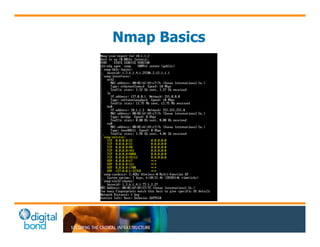
• Again with SNMP You can gather a lot of 
information about a host, if the host is using a 
default community string, or if you know the 
community string, Nmap can pull information 
such as Netstats from the hosts.
Nmap Basics
Nmap Basics 
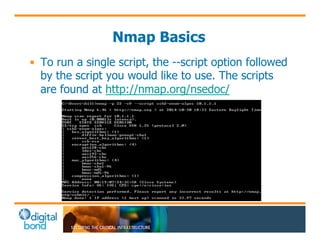
• To run a single script, the --script option followed 
by the script you would like to use. The scripts 
are found at http://nmap.org/nsedoc/
Nmap Lab 2 
• Nmap a single port 
• Nmap multiple ports 
• Configure Nmap to run Service Enumerations 
– Run Service Probes 
– Run default Nmap Scripts 
• Configure Nmap to run single Nmap Scripts 
– Run a single Nmap Script on a port of interest
Redpoint 
• Redpoint is a Digital Bond research project to 
enumerate ICS applications and devices. 
Redpoint is used to pull information that would 
be helpful in secondary testing. The Redpoint 
Nmap Scripts use legitimate protocol or 
application commands to discover and 
enumerate devices and applications. There is no 
effort to exploit or crash anything. However 
many ICS devices and applications are fragile 
and can crash or respond in an unexpected way 
to any unexpected traffic so use with care.
Redpoint 
• Public Scripts Include: 
– BACnet (Building Automation and Control Networks) 
– Ethernet/IP 
– Siemens S7 Communications 
– Modicon 
• https://github.com/digitalbond/Redpoint/
Redpoint 
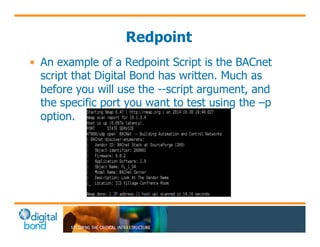
• An example of a Redpoint Script is the BACnet 
script that Digital Bond has written. Much as 
before you will use the --script argument, and 
the specific port you want to test using the –p 
option.
Redpoint 
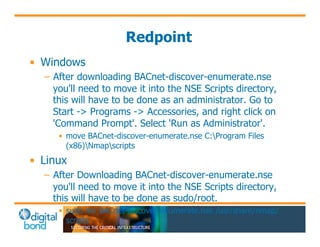
• Windows 
– After downloading BACnet-discover-enumerate.nse 
you'll need to move it into the NSE Scripts directory, 
this will have to be done as an administrator. Go to 
Start -> Programs -> Accessories, and right click on 
'Command Prompt'. Select 'Run as Administrator'. 
• move BACnet-discover-enumerate.nse C:Program Files 
(x86)Nmapscripts 
• Linux 
– After Downloading BACnet-discover-enumerate.nse 
you'll need to move it into the NSE Scripts directory, 
this will have to be done as sudo/root. 
• sudo mv BACnet-discover-enumerate.nse /usr/share/nmap/ 
scripts
Service Probes 
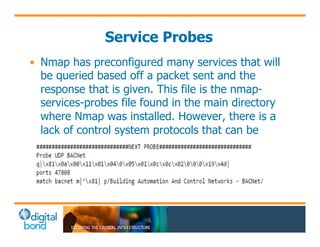
• Nmap has preconfigured many services that will 
be queried based off a packet sent and the 
response that is given. This file is the nmap-services- 
probes file found in the main directory 
where Nmap was installed. However, there is a 
lack of control system protocols that can be 
probed, an example of a new probe for BACnet 
looks like.
Nmap Lab 3 
• Run BACnet Redpoint script against target 
– Basic scan 
– Scan with –script-args 
• Review Service Probes File 
– Create Nmap Service Probe for BACnet 
• C:Program Files (x86)Nmap 
• /usr/share/nmap/ 
• Run only service probes looking for BACnet
Shodan 
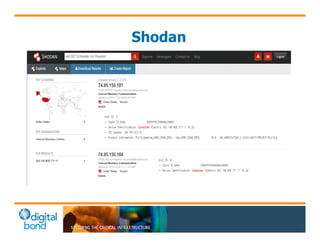
• Shodan is a search engine that lets the user find 
specific types of computers (routers, servers, 
etc.) connected to the internet using a variety of 
filters. It is best described it as a search engine 
of service banners.
Shodan 
• Free Accounts Allow you Basic Searches 
• Upgrades to add SSL ports and the ability to use 
the API 
• Shodan crawls the internet every 30 days for 
banners 
– Ports include 80, 443, 145, 21, 23, 1433, 502, 102, 
44818, 47808.
Shodan 
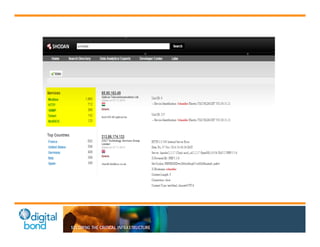
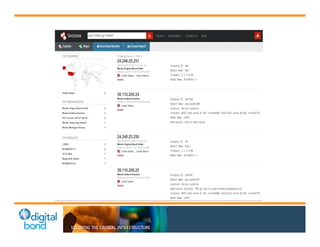
• Basic String Search for PLCs 
– Simatic 
– Schneider 
– Rockwell 
– etc
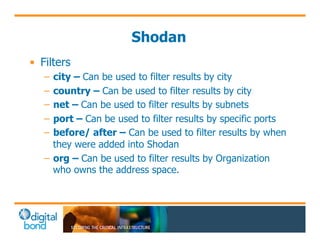
Shodan 
• Filters 
– city – Can be used to filter results by city 
– country – Can be used to filter results by city 
– net – Can be used to filter results by subnets 
– port – Can be used to filter results by specific ports 
– before/ after – Can be used to filter results by when 
they were added into Shodan 
– org – Can be used to filter results by Organization 
who owns the address space.
Shodan
Shodan Lab 
• Find ICS Devices in your town 
– Utilize the port: option and the city: option 
• Look for ICS Devices that May belong to your 
company 
– Utilize the port: option and the org: option 
• Look for other interesting ICS devices that may 
be of interest 
– Play with Filters and see if you can find something 
good.
Random Data Fuzzing 
• ICS vendors historically only performed positive 
testing 
– Does the application or device perform properly when 
receiving a legitimate command or packet 
• Hackers, scanners, new applications may send 
something unexpected 
– Will the application/device handle the “error” properly 
– Or will it crash 
• This is a crude test 
– Not intelligent fuzzing that the vendor should perform
Secondary Testing 
• May not be necessary 
– Usually required after an ICS security program has 
been running for 2 to 3 years 
– An attacker will take the easiest path to success 
• Specialized tools and techniques 
– Web application testing 
– Database testing 
– Password cracking 
– Man-in-the-middle / ARP spoofing
Proof of Concept Exploits 
• If assessor is uncertain if vulnerability can be 
exploited 
– Eliminate false positives 
– Should be attempted to accurately determine risk 
– Denial of service vs. remotely run attacker code 
• Prove the danger of missing security patches / 
default credentials / other vulnerabilities 
– Show the Operator Station on your laptop 
– Attack compromise and pivot
How Many Assessments? 
What if you have 50 or 100 factories or plants? 
Should you perform an ICS security assessment at 
each factory or plant?
Recommendation 
• Pick 3 to 5 different sites 
– Pick a variety of size and types of plants 
– Select a representative sample 
– Perform assessments on the samples 
• Identify the common high priority findings 
• Define a common set of required security controls 
– Not too much in the first year 
• Define how the controls will be audited 
• Add additional controls in years 2, 3, …
Questions

API Training 10 Nov 2014

  • 1.
    Using Cyber Security Assessment Tools on Industrial Control Systems (ICS) Dale Peterson, Stephen Hilt peterson@digitalbond.com, hilt@digitalbond.com Twitter: @digitalbond
  • 2.
    Digital Bond Research • Funded by DHS, DoE, UK and Japanese Gov, … • Funded by Digital Bond • Add ICS Intelligence to Security Tools – Redpoint, Bandolier, Quickdraw, Basecamp – Digital Bond is vendor neutral – We do not sell, install or support any products All Available For Free At Digitalbond.com
  • 3.
    • S4x15 isJanuary 13-16 in Miami Beach • Advanced, highly technical sessions from the best global ICSsec talent • See agenda and videos from past S4 at digitalbond.com
  • 4.
    ICS Security Assessments • Digital Bond performed our first ICS security assessment in 2000 … 15 years ago • Digital Bond performs assessments on live / operational / running critical infrastructure ICS – Power plants, pipelines, water treatment, chemical manufacturing, transportation • Digital Bond uses scanning tools • And we have never caused an unacceptable impact to operations
  • 5.
    Assessment Types •Asset Owner / ICS End User Assessments – Is the ICS deployed and maintained in a good security practice configuration? – Are known vulnerabilities remediated / fixed? – This presentation covers Asset Owner Assessments • Assessments for Vendors / New Purchases – Attempts to find new, 0day vulnerabilities – Very advanced testing, uses some commercial and free tools, but also a lot of custom code/tools – Digital Bond Labs does these
  • 6.
    Asset Owner Assessments • Architecture Review • Configuration Inspection • Physical Inspection • Policy and Procedure Review and Audit • Interview (very important for determining risk) and • Online Scanning/Testing/Exploits
  • 7.
    Current State ofICS Security • Many organizations are just beginning to worry about ICS security – They may have a poorly configured firewall – They may have some anti-virus running – Little else in the way of ICS cyber security – Some in oil/gas have been working ICSsec for 5+ years • ICS protocols and PLC’s are insecure by design – They lack basic security such as authentication – Access = compromise – Impact is limited to engineering and automation skill
  • 8.
    Efficient Risk Reduction What should I do next? Where should you spend your next $ or hour of time on ICS cyber security to get the maximum risk reduction or improvement in security posture? • Assessment should provide a list of actions prioritized by efficient risk reduction • Companies have limited ability to add security
  • 9.
    Prioritization • Threat – Very difficult to determine – Typically look at the accessibility of the device/system • Vulnerability – Assessment can clearly identify this • Impact – This is the most important factor – Don’t waste time on small impact risks, eg serial connected panels – Talk to the Operations team, what would happen if …
  • 10.
    Even the mostbasic, simple, non-intrusive scan of a PLC or ICS application can cause a denial of service condition. TR UE!
  • 11.
    Example 1 •Safety PLC – Simple port scan of a safety PLC caused it to crash, and it did not recover when rebooted – Additional scanning found a port that was used to load new firmware did not have authentication or even check parameters – Any activity on the port started a firmware update process – PLC needed to be completely reloaded to recover
  • 12.
    Example 2 •Redundant Pair of Real Time Servers – Issues read and write commands to PLC’s – Provides data and forwards commands from HMI / Operator Stations • Scan of Standby Server … no problem • Scan of Hot/Active Server … crash and failover
  • 13.
    You cannot andshould not use security scanning tools on an operational ICS because they can cause important things to crash. Fal se!
  • 14.
    How To ScanICS • Staging area or lab – Some sites have non-operational systems to test • Leverage redundancy – An ICS should not have a single point of failure – Many operator stations / HMI – Hot and standby servers • Select best testing time – Many processes have key times weekly or daily were a computer or device outage is more difficult to handle
  • 15.
    Questions For Operations: 1. Is it acceptable if computer x crashes during the testing window? 2. Can you recover the system in an acceptable time frame if it crashes? Answer: Yes … s chedule scan
  • 17.
    Answer: No …important security finding • You have a recovery issue – Don’t touch that because the guy who knew how it worked is no longer with the company – What is your Recovery Time Objective (RTO)? – Do you have a proven ability to meet your RTO? or • You have a single point of failure – Missing redundancy – We can never reboot or have an outage of a Windows NT, XP, 2003, 2008, 7 … FRAGILITY
  • 18.
    Create Your ScanList • Work with Operations to identify one of each time of computer or device • Find a sample that you can scan, assuming it may go down, without having an unacceptable impact to Operations – Always assume it will go down – Most common case is reboot to recover • Sometimes warranted even if scanned system doesn’t crash – Things are much better than 10 years ago
  • 19.
    Scanning Tool Categories • Basic Enumeration (what is it?) • Full featured scan (1000’s of tests) • Basic, random data fuzz testing • Secondary application testing – Web servers, databases • Exploit proof of concept
  • 20.
    Broad Based SecurityScanner • Nessus from Tenable Network Security • Nexpose from Rapid 7 • Retina from Beyond Trust • DeepDiscovery from Trend Micro Or • Scanning as a service, Qualys
  • 21.
    Nessus Basics •Nessus is a proprietary comprehensive vulnerability scanner which is developed by Tenable Network Security. Nessus is the world's most popular vulnerability scanner, taking first place in the 2000, 2003, and 2006 security tools survey.[2] Tenable Network Security estimates that it is used by over 75,000 organizations worldwide. – http://en.wikipedia.org/wiki/Nessus_(software)
  • 22.
    Nessus Basics •Nessus 5.2.7 will be utilized for these labs – Nessus is available from http://www.tenable.com/products/nessus – Instructions to install and configure can be found from Tenable – Cost $1500 per year license – What is included: • 68,000 + Plugins to check for various Vulnerabilities and security settings. • SCADA Specific Plugins • Ability to run audit policies (available from Tenable’s website) • Scheduled scans • Export into HTML, CSV, or Nessus formats.
  • 23.
    Nessus Basics •Nessus Polices are how you define what the scan is suppose to do. – Policy wizard has many great options to chose from such as: • Host Discovery • Web Application Scanning • Basic Network Scan • Patch Audit • Many others
  • 24.
    Nessus Basics •Create a policy from the advanced Policy Wizard – No defaults are selected, and allows for the most control
  • 25.
    Nessus Basics •Credentialed Scan vs Non Credentialed Scan – Port scanning – Credentialed scans use netstat to gather open port information, where as with out credentialed it will try to send probes to each port. – Credentialed scans will use local checks for vulnerabilities which will be more accurate than trying to use banner information that can be collected about the service.
  • 26.
    Nessus Configuration •Create a name and a description of the policy that is descriptive of what the policy will be used for. Example would be – Name: HMI Scan With Credentials – Description: Scan with credentials supplied by the site support personnel
  • 27.
    Nessus Configuration •Setting Type > Port Scanning – This is where one would change the ports if you are not doing a credentialed scan and want to see ports 1 – 65535 . – Consider using the UDP scanning option. This will increase the time of scan, but can collect some UDP information if credentials are not available. – If not using credentialed scanning, consider changing from SYN scan to TCP scan.
  • 28.
  • 29.
    Nessus Configuration •Setting Type > Performance – These setting are used for when you need to slow the scan down, or speed it up based on your requirements. Normally the defaults will be good to start, and can be altered if you have issues with scanning.
  • 30.
    Nessus Configuration •Setting Type > Advanced – Always verify Safe Checks is checked
  • 31.
    Nessus Configuration •Credential Types – Windows Credentials • Windows XP and Server 2003 an Administrator can be used • Windows 7 and Server 2008 the Administrator, or a Domain Admin – SSH Credentials • Su to root • Sudo as user used to log in • Cisco “Enable” • Others
  • 32.
    Nessus Configuration •Credential Types – Plain Text Credentials • telnet • rsh • rexec
  • 33.
  • 34.
    Nessus Configuration •Preferences > Preference Type > Global Variable Settings – Thorough Tests will greatly slow down a scan, however will collect valuable information, such as what USB Devices have been used, and when they were lasted used.
  • 35.
    Nessus Lab 1 • Configure Nessus Policies – Configure A Policy to use various credentials – Within Advanced settings for performance and thorough checks
  • 36.
    Nessus Scanning •Once policies have been created scans can be configured against one or more hosts. – Basic Settings: • Name of Scan • Hosts to be scanned, and what policy to use – Schedule: • Now • On Demand • Scheduled – Email Settings: • Email when scan launches and finishes if SMTP server is configured.
  • 37.
  • 38.
  • 39.
    Nessus Lab 2 • Running a scan – Configure Scan with policies created • Review Scan Output – Review scan results in Nessus “API XP Test Scan” and “API XP Test” • What stands out to you? • Export Results – Export the results in multiple formats
  • 40.
  • 41.
    Nessus Trouble Shooting • My scans are failing, now what? – Ensure that the setting in the local security policies called, "Network access: Sharing and security model for local accounts", is set to "Classic". – Ensure that User Account Control is turned off for the sessoin by setting HKLMSOFTWAREMicrosoft WindowsCurrentVersionPoliciessystem LocalAccountTokenFilterPolicy to 1. 0 will disable again. – Check the firewall settings. If there is a firewall make sure you are allowing 135/445 as well and File and Print Sharing is turned on. Usually, best option is to disable during the duration of the scan. – Ensure that both the Windows Management Instrumentation Service and the Remote Registry Service have been started on the target
  • 42.
    Nessus Trouble Shooting • Cont. – Ensure Anti-Virus, such as SEP, isn’t blocking the scan. Most Anti-Virus solutions can be disabled during the duration of the scan. – Ensure you are using the correct credentials by testing them. – Network Issues may cause some scans to fail, ensure the network is in a state that can support a scan.
  • 43.
  • 44.
    Security Patching •ICS scans often identify many missing patches – Microsoft security patches – 3rd party / application software security patches – Security software security patches, eg anti-virus – Even ICS security patches Question: What is the security finding? Answer: Ineffective security patching program
  • 45.
    Security Patching inICS • Good security practice is to apply patches in a reasonable time after available – IT / corporate network typically 30 days – Best in ICS is typically quarterly / 90 days Question: Can you go from little or no security patching to applying all patches every 90 days? Think Efficient Risk Reduction
  • 46.
    Prioritized Security Patching • Priority 1 – Computers accessible from corporate or external network – Monthly … should be a small number of computers that are not required for operation • Priority 2 – Computers accessible from Priority 1 computers – Quarterly … attackers will compromise Priority 1 computers and pivot • Priority 3 – Everything else – Annual … maintain supported system
  • 47.
    Controversial • Ifyou can do better, great – Shorter patching windows are better security, but – We see many owner/operators fail in patching • Select some achievable plan, succeed, and then shorten patching window • Also … if an attacker can reach a Priority 3 computer he can compromise the ICS even if it is patched … ICS is insecure by design
  • 48.
    Know Your Scanner • These are complex, full feature products • Default scan configurations will miss a lot of what you want to know in an assessment • Take a class from the vendor or skilled teacher
  • 49.
    Nessus Example 1 • Oracle Default Passwords
  • 50.
    Nessus Example 2– USB Usage • USB Drive Usage
  • 51.
    Bandolier • Fundedby US Dept. of Energy / Vendors / Digital Bond • Identify security settings in ICS applications • Create Nessus .audit files for use with the policy compliance plugins • Distribute through Digital Bond site and and vendor support channels
  • 52.
    Bandolier Process Startwith industry best practices for operating system and common apps Work with SCADA vendor’s test bed and top security talent Verify best practice will not break the application, modify as necessary Identify SCADA application security settings and their optimal values
  • 53.
    Bandolier Scope •Underlying operating systems Similar to other best practice guidance, but addresses specific control system requirements A good starting point for all ICS • Supporting applications Web servers, database servers, etc… • Control system application Has its own security configuration
  • 54.
    Current Audit Files Available for these control system applications: – ABB 800xA – AREVA e-terra – CSI UCOS – Emerson Ovation – Matrikon OPC – OSIsoft PI – Siemens Spectrum – SNC GENe – Telvent OASyS DNA
  • 55.
    Uses for Bandolier • Asset owners and vendors getting value • Acceptance testing • Validation testing – System upgrades – Patching – Configuration changes • Periodic security testing • Site audits in response to incidents and issues
  • 56.
    Bandolier Audit CheckExamples • Has the default ems user account been removed? • Are DCOM permissions set correctly for the OPC server? • Are the correct SCADA user permissions assigned? • Are unneeded ports/services disabled?
  • 57.
    Bandolier Customization •Local security policies Example: Password length/complexity requirements • Unique system requirements Example: different set of software installed that requires a service that would otherwise be disabled • Additional local user accounts or security groups May affect ACL’s • Naming conventions Example: user/groups/files named differently and need to be changed in audit file
  • 58.
  • 59.
  • 60.
    Access Control ListObjects • File Access Control Checks • Registry Access Control Checks • Service Access Control Checks • Launch Permission Control Checks • Launch2 Permission Control Checks • Access Permission Control Checks
  • 61.
    List of WindowsItems • Password Policy • Account Lockout Policy • Kerberos Policy • Audit Policy • Accounts • Audit • DCOM • Devices • Domain controller • Domain member • Interactive logon • Microsoft network client • Microsoft network server • Network access • Network security • Recovery console • System cryptography • System objects • System settings • Event Log
  • 62.
    List of UnixCustom Items • CHKCONFIG • CMD_EXEC • FILE_CHECK • FILE_CHECK_NOT • FILE_CONTENT_CHECK • FILE_CONTENT_CHECK_NOT • GRAMMAR_CHECK • PKG_CHECK • PROCESS_CHECK • RPM_CHECK • SVC_PROP • XINETD_SVC
  • 63.
    List of UnixBuilt In Checks • min_password_length • max_password_age • min_password_age • root_login_from_console • accounts_bad_home_permissions • accounts_without_home_dir • invalid_login_shells • login_shells_with_suid • login_shells_writeable • login_shells_bad_owner • passwd_file_consistency • passwd_zero_uid • passwd_duplicate_uid • passwd_duplicate_gid • passwd_duplicate_username • passwd_duplicate_home • passwd_shadowed • passwd_invalid_gid • group_file_consistency • group_zero_gid • group_duplicate_name • group_duplicate_gid • group_duplicate_members • group_nonexistant_users • dot_in_root_path_variable • writeable_dirs_in_root_path_variable • find_orphan_files • find_world_writeable_files • find_world_writeable_directories • find_suid_sgid_files • admin_accounts_in_ftpusers
  • 64.
    Advanced Audit Checks:WMI • Opens up Windows auditing to a new level • 1000s of settings available through WMI • From simple to complex Antivirus, Windows Firewall, Services, Application Data • WMI Query Language (WQL) Subset of SQL with minor changes • Explore with WMI Administrative Tools
  • 65.
  • 66.
  • 67.
  • 68.
  • 69.
  • 70.
  • 71.
    Nessus Compliance Configuration – Select Add File browse to location where .audit files are stored
  • 72.
    Nmap • Nmap("Network Mapper") is a free and open source utility for network discovery and security auditing. Many systems and network administrators also find it useful for tasks such as network inventory, managing service upgrade schedules, and monitoring host or service uptime – http://nmap.org/
  • 73.
    Nmap Basics •Discovery of Systems via ARP or ICMP • Enumeration of systems – TCP Scanning – UDP Scanning – Specifying targets port/s and port ranges – Scripts and Service Probes – Other options for control systems
  • 74.
    Nmap Basics •Nmap Discovery Via ICMP – Nmap by default will use TCP probes and ICMP Probes to attempt if the host is currently online. This is achieved with the –sP flag – You can force only ICMP Echo to be used by using the –PE flag in conjunction with the -sP option
  • 75.
    Nmap Basics •Nmap Discovery via ARP – This will only work if you are on the same layer 2 segment as the host. – Safest way to discover Control System Devices. – Utilize the –sP –PR options to achieve an ARP Scan – Difference is what types of packets are sent, same results in most cases.
  • 76.
    Nmap Basics •Default scanning option is Full TCP SCAN
  • 77.
    Nmap Basics •SYN Scanning (Also called half-open, or stealth scanning) – -sS option will leave a open connection on the server. This is bad thing in Control Systems as it may utilize to many resources and cause an issue.
  • 78.
    Nmap Basics •UDP Scanning is unreliable as UDP does is a connectionless protocol. In some cases a UDP probe can be sent and a response will be given however sometimes more advanced scans need to be performed to get information about UDP services.
  • 79.
    Nmap Lab 1 • Run discovery scan on network – Run Nmap on network to discover assets – Review Results • Configure Full TCP Scan – Run Nmap with options for full TCP scan – Run Nmap with options for SYN Scan • Configure default UDP Scan – Run Nmap on remote host for basic enumeration of UDP
  • 80.
    Nmap Basics •Nmap allows for custom port, and port ranges to be entered for scanning, this is done with the –p option. – A single port can be configured such as –p 22, which will only look for services running on tcp/22 (ssh)
  • 81.
    Nmap Basics •Multiple Ports – Utilize the –p option then separate ports by comma
  • 82.
    Nmap Basics •If you want to perform a scan on a range, you can use an dash.
  • 83.
    Nmap Basics •Nmap Service Enumeration allows you to determine what the service that is running is. To achieve this you can use the –sV option to run the Version Probes.
  • 84.
    Nmap Basics •More Accurate UDP Scanning is also done buy using the –sV option as it will preform queries for a number of UDP based Protocols.
  • 85.
    Nmap Basics •The –A option will enable OS detection, version detection, script scanning, and traceroute.
  • 86.
    Nmap Basics •Again with SNMP You can gather a lot of information about a host, if the host is using a default community string, or if you know the community string, Nmap can pull information such as Netstats from the hosts.
  • 87.
  • 88.
    Nmap Basics •To run a single script, the --script option followed by the script you would like to use. The scripts are found at http://nmap.org/nsedoc/
  • 89.
    Nmap Lab 2 • Nmap a single port • Nmap multiple ports • Configure Nmap to run Service Enumerations – Run Service Probes – Run default Nmap Scripts • Configure Nmap to run single Nmap Scripts – Run a single Nmap Script on a port of interest
  • 90.
    Redpoint • Redpointis a Digital Bond research project to enumerate ICS applications and devices. Redpoint is used to pull information that would be helpful in secondary testing. The Redpoint Nmap Scripts use legitimate protocol or application commands to discover and enumerate devices and applications. There is no effort to exploit or crash anything. However many ICS devices and applications are fragile and can crash or respond in an unexpected way to any unexpected traffic so use with care.
  • 91.
    Redpoint • PublicScripts Include: – BACnet (Building Automation and Control Networks) – Ethernet/IP – Siemens S7 Communications – Modicon • https://github.com/digitalbond/Redpoint/
  • 92.
    Redpoint • Anexample of a Redpoint Script is the BACnet script that Digital Bond has written. Much as before you will use the --script argument, and the specific port you want to test using the –p option.
  • 93.
    Redpoint • Windows – After downloading BACnet-discover-enumerate.nse you'll need to move it into the NSE Scripts directory, this will have to be done as an administrator. Go to Start -> Programs -> Accessories, and right click on 'Command Prompt'. Select 'Run as Administrator'. • move BACnet-discover-enumerate.nse C:Program Files (x86)Nmapscripts • Linux – After Downloading BACnet-discover-enumerate.nse you'll need to move it into the NSE Scripts directory, this will have to be done as sudo/root. • sudo mv BACnet-discover-enumerate.nse /usr/share/nmap/ scripts
  • 94.
    Service Probes •Nmap has preconfigured many services that will be queried based off a packet sent and the response that is given. This file is the nmap-services- probes file found in the main directory where Nmap was installed. However, there is a lack of control system protocols that can be probed, an example of a new probe for BACnet looks like.
  • 95.
    Nmap Lab 3 • Run BACnet Redpoint script against target – Basic scan – Scan with –script-args • Review Service Probes File – Create Nmap Service Probe for BACnet • C:Program Files (x86)Nmap • /usr/share/nmap/ • Run only service probes looking for BACnet
  • 96.
    Shodan • Shodanis a search engine that lets the user find specific types of computers (routers, servers, etc.) connected to the internet using a variety of filters. It is best described it as a search engine of service banners.
  • 97.
    Shodan • FreeAccounts Allow you Basic Searches • Upgrades to add SSL ports and the ability to use the API • Shodan crawls the internet every 30 days for banners – Ports include 80, 443, 145, 21, 23, 1433, 502, 102, 44818, 47808.
  • 98.
    Shodan • BasicString Search for PLCs – Simatic – Schneider – Rockwell – etc
  • 100.
    Shodan • Filters – city – Can be used to filter results by city – country – Can be used to filter results by city – net – Can be used to filter results by subnets – port – Can be used to filter results by specific ports – before/ after – Can be used to filter results by when they were added into Shodan – org – Can be used to filter results by Organization who owns the address space.
  • 101.
  • 103.
    Shodan Lab •Find ICS Devices in your town – Utilize the port: option and the city: option • Look for ICS Devices that May belong to your company – Utilize the port: option and the org: option • Look for other interesting ICS devices that may be of interest – Play with Filters and see if you can find something good.
  • 104.
    Random Data Fuzzing • ICS vendors historically only performed positive testing – Does the application or device perform properly when receiving a legitimate command or packet • Hackers, scanners, new applications may send something unexpected – Will the application/device handle the “error” properly – Or will it crash • This is a crude test – Not intelligent fuzzing that the vendor should perform
  • 105.
    Secondary Testing •May not be necessary – Usually required after an ICS security program has been running for 2 to 3 years – An attacker will take the easiest path to success • Specialized tools and techniques – Web application testing – Database testing – Password cracking – Man-in-the-middle / ARP spoofing
  • 106.
    Proof of ConceptExploits • If assessor is uncertain if vulnerability can be exploited – Eliminate false positives – Should be attempted to accurately determine risk – Denial of service vs. remotely run attacker code • Prove the danger of missing security patches / default credentials / other vulnerabilities – Show the Operator Station on your laptop – Attack compromise and pivot
  • 108.
    How Many Assessments? What if you have 50 or 100 factories or plants? Should you perform an ICS security assessment at each factory or plant?
  • 109.
    Recommendation • Pick3 to 5 different sites – Pick a variety of size and types of plants – Select a representative sample – Perform assessments on the samples • Identify the common high priority findings • Define a common set of required security controls – Not too much in the first year • Define how the controls will be audited • Add additional controls in years 2, 3, …
  • 110.