vulnerability scanner
We are going to talk about …
 History & Background of Nessus
 Hardware Requirement & Installation Procedure
 Features Available in Nessus
 Functionalities Nessus Provides &
 Conclude summarizing What did we Learn
So lets begin !
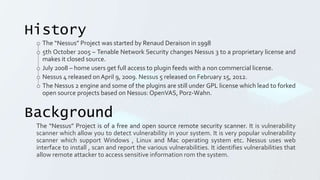
History
o The “Nessus” Project was started by Renaud Deraison in 1998
o 5th October 2005 – Tenable Network Security changes Nessus 3 to a proprietary license and
makes it closed source.
o July 2008 – home users get full access to plugin feeds with a non commercial license.
o Nessus 4 released onApril 9, 2009. Nessus 5 released on February 15, 2012.
o The Nessus 2 engine and some of the plugins are still under GPL license which lead to forked
open source projects based on Nessus: OpenVAS, Porz-Wahn.
Background
The “Nessus” Project is of a free and open source remote security scanner. It is vulnerability
scanner which allow you to detect vulnerability in your system. It is very popular vulnerability
scanner which support Windows , Linux and Mac operating system etc. Nessus uses web
interface to install , scan and report the various vulnerabilities. It identifies vulnerabilities that
allow remote attacker to access sensitive information rom the system.
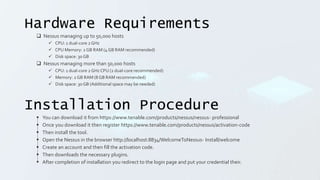
Hardware Requirements
 Nessus managing up to 50,000 hosts
 CPU: 1 dual-core 2 GHz
 CPU Memory: 2 GB RAM (4 GB RAM recommended)
 Disk space: 30 GB
 Nessus managing more than 50,000 hosts
 CPU: 1 dual-core 2 GHz CPU (2 dual-core recommended)
 Memory: 2 GB RAM (8 GB RAM recommended)
 Disk space: 30 GB (Additional space may be needed)
Installation Procedure
 You can download it from https://www.tenable.com/products/nessus/nessus- professional
 Once you download it then register https://www.tenable.com/products/nessus/activation-code
 Then install the tool.
 Open the Nessus in the browser http://localhost:8834/WelcomeToNessus- Install/welcome
 Create an account and then fill the activation code.
 Then downloads the necessary plugins.
 After completion of installation you redirect to the login page and put your credential their.
Features
 NASL – the Nessus Attack Scripting Language, a language designed specifically to write security tests easily and
quickly Up-to-date SecurityVulnerability
 Database – focuses on the development of security checks for newly disclosed vulnerabilities Tests Multiple Hosts
Simultaneously Smart
 Service Recognition – Nessus does not expect the target hosts to respect IANA assigned port numbers
 Multiple Services – if two or more web servers run on the same host, on different ports, Nessus will identify and test
all of them.
 Plugin Cooperation – no unnecessary checks are performed. If a FTP server does not offer anonymous logins, then
anonymous login related security checks will not be performed.
 Complete Reports – detects security vulnerabilities and the risk level of each (Info, Low, Medium, High, and
Critical), and also offers solutions.
 Full SSL Support – tests services offered over SSL such as HTTPS, SMTPS, IMAPS.
 Smart Plugins (optional) – ”optimization” option that will determine which plugins should or should not be
launched against the remote host.
 Non-Destructive (optional) – Certain checks can be detrimental to specific network services. For avoiding a service
failure, enable the ”safe checks” option, which will tell Nessus not to exploit real flaws to determine if a
vulnerability is present.
Functionalities
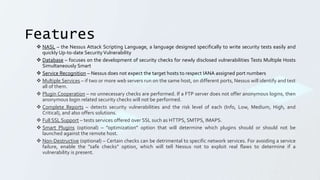
Web Application Test:
Web testing, or web application test, is a software practice that ensures quality by testing that the
functionality of a given web application is working as intended or as per the requirements. Web testing
allows you to find bugs at any given time, prior to a release, or on a day-to-day basis.
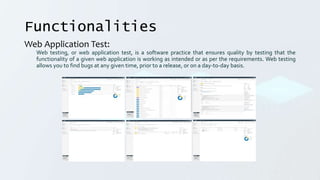
Discovering Hosts:
Host discovery is one of the earliest phases of network reconnaissance. The adversary usually starts with
a range of IP addresses belonging to a target network and uses various methods to determine if an host
is present at that IP address. Host discovery is usually referred to as 'Ping' scanning using a sonar analogy.
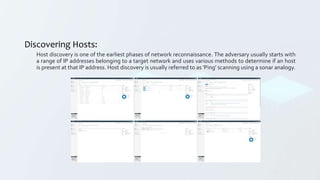
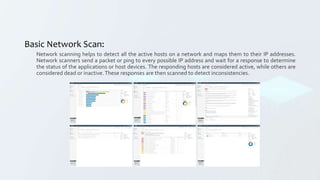
Basic Network Scan:
Network scanning helps to detect all the active hosts on a network and maps them to their IP addresses.
Network scanners send a packet or ping to every possible IP address and wait for a response to determine
the status of the applications or host devices. The responding hosts are considered active, while others are
considered dead or inactive.These responses are then scanned to detect inconsistencies.
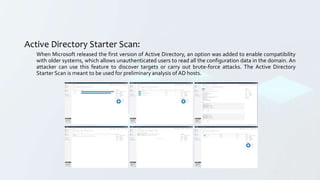
Active Directory Starter Scan:
When Microsoft released the first version of Active Directory, an option was added to enable compatibility
with older systems, which allows unauthenticated users to read all the configuration data in the domain. An
attacker can use this feature to discover targets or carry out brute-force attacks. The Active Directory
Starter Scan is meant to be used for preliminary analysis of AD hosts.
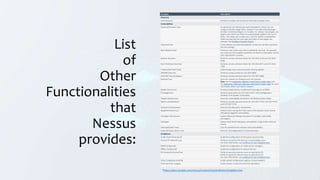
List
of
Other
Functionalities
that
Nessus
provides:
Template Description
Discovery
Host Discovery Performs a simple scan to discover live hosts and open ports.
Vulnerabilities
Advanced Dynamic Scan An advanced scan without any recommendations, where you can
configure dynamic plugin filters instead of manually selecting plugin
families or individual plugins. As Tenable, Inc. releases new plugins, any
plugins that match your filters are automatically added to the scan or
policy. This allows you to tailor your scans for specific vulnerabilities
while ensuring that the scan stays up to date as new plugins are
released. See Configure Dynamic Plugins.
Advanced Scan A scan without any recommendations, so that you can fully customize
the scan settings.
Basic Network Scan Performs a full system scan that is suitable for any host. For example,
you could use this template to perform an internal vulnerability scan on
your organization's systems.
Badlock Detection Performs remote and local checks for CVE-2016-2118 and CVE-2016-
0128.
Bash Shellshock Detection Performs remote and local checks for CVE-2014-6271 and CVE-2014-
7169.
Credentialed Patch Audit Authenticates hosts and enumerates missing updates.
DROWN Detection Performs remote checks for CVE-2016-0800.
Intel AMT Security Bypass Performs remote and local checks for CVE-2017-5689.
Malware Scan Scans for malware on Windows and Unix systems.
Note: See the Application, Malware, and Content Audits video and
the Application, Malicious Software, and Content Audits video for more
information about scanning for malware.
Mobile Device Scan Assesses mobile devices via Microsoft Exchange or an MDM.
PrintNightmare Performs local checks for CVE-2021-34527, the PrintNightmare
Windows Print Spooler vulnerability.
Shadow Brokers Scan Scans for vulnerabilities disclosed in the Shadow Brokers leaks.
Spectre and Meltdown Performs remote and local checks for CVE-2017-5753, CVE-2017-5715,
and CVE-2017-5754.
WannaCry Ransomware Scans for the WannaCry ransomware.
Ripple20 Remote Scan Detects hosts running the Treck stack in the network, which may be
affected by Ripple20 vulnerabilities.
Zerologon Remote Scan Detects Microsoft Netlogon elevation of privilege vulnerability
(Zerologon).
Solorigate Detects SolarWinds Solorigate vulnerabilities using remote and local
checks.
Web Application Tests Scan for published and unknown web vulnerabilities.
Active Directory Starter Scan Scans for misconfigurations in Active Directory.
Compliance
Audit Cloud Infrastructure Audits the configuration of third-party cloud services.
Internal PCI Network Scan Performs an internal PCI DSS (11.2.1) vulnerability scan.
For more information, see Unofficial PCI ASV Validation Scan.
MDM Config Audit Audits the configuration of mobile device managers.
Offline Config Audit Audits the configuration of network devices.
PCI Quarterly External Scan Performs quarterly external scans as required by PCI.
Performs quarterly external scans as required by PCI.
For more information, see Unofficial PCI ASV Validation Scan.
Policy Compliance Auditing Audits system configurations against a known baseline.
SCAP and OVAL Auditing Audits systems using SCAP and OVAL definitions.
*https://docs.tenable.com/nessus/Content/ScanAndPolicyTemplates.htm
Conclusion
Nessus is a remote security scanning tool, which scans a computer and raises an alert if it
discovers any vulnerabilities that malicious hackers could use to gain access to any computer
you have connected to a network. It does this by running multiple checks on a given computer,
testing to see if any of these attacks could be used to break into the computer or otherwise
harm it.
Nessus comes with a lot of advantages like: Free for non-commercial use; Available on
multiple operating systems (Windows, Mac OS, various distributions of Linux); Advanced scans
for networks, websites, operating systems, mobile devices. By default Nessus does “Safe
Checks” which ensure that there won't be any adverse effects on the system or network.
Aggressive and in-deep checks (e.g. DoS attacks) can be enabled at user’s will. Does Good for
Security Audits & can Scan multiple hosts on the same scan.
On the other hand Nessus is Hard to configure for beginners. The free non-commercial license
is limited to up to 16 IP addresses that must be within the same household & has limited
support for Ubuntu, Fedora Core, FreeBSD, Debian.
This was presented by:
Archit Jain [20BCAR0250]
Aryan Samsukha [20BCAR0225]
Suman Garai [20BCAR0246]
Utsav [20BCAR0265]
Thank You &
Have a Nice Day
🙂
20210906-Nessus-FundamentalInfoSec.ppsx

20210906-Nessus-FundamentalInfoSec.ppsx

  • 1.
  • 2.
    We are goingto talk about …  History & Background of Nessus  Hardware Requirement & Installation Procedure  Features Available in Nessus  Functionalities Nessus Provides &  Conclude summarizing What did we Learn So lets begin !
  • 3.
    History o The “Nessus”Project was started by Renaud Deraison in 1998 o 5th October 2005 – Tenable Network Security changes Nessus 3 to a proprietary license and makes it closed source. o July 2008 – home users get full access to plugin feeds with a non commercial license. o Nessus 4 released onApril 9, 2009. Nessus 5 released on February 15, 2012. o The Nessus 2 engine and some of the plugins are still under GPL license which lead to forked open source projects based on Nessus: OpenVAS, Porz-Wahn. Background The “Nessus” Project is of a free and open source remote security scanner. It is vulnerability scanner which allow you to detect vulnerability in your system. It is very popular vulnerability scanner which support Windows , Linux and Mac operating system etc. Nessus uses web interface to install , scan and report the various vulnerabilities. It identifies vulnerabilities that allow remote attacker to access sensitive information rom the system.
  • 4.
    Hardware Requirements  Nessusmanaging up to 50,000 hosts  CPU: 1 dual-core 2 GHz  CPU Memory: 2 GB RAM (4 GB RAM recommended)  Disk space: 30 GB  Nessus managing more than 50,000 hosts  CPU: 1 dual-core 2 GHz CPU (2 dual-core recommended)  Memory: 2 GB RAM (8 GB RAM recommended)  Disk space: 30 GB (Additional space may be needed) Installation Procedure  You can download it from https://www.tenable.com/products/nessus/nessus- professional  Once you download it then register https://www.tenable.com/products/nessus/activation-code  Then install the tool.  Open the Nessus in the browser http://localhost:8834/WelcomeToNessus- Install/welcome  Create an account and then fill the activation code.  Then downloads the necessary plugins.  After completion of installation you redirect to the login page and put your credential their.
  • 5.
    Features  NASL –the Nessus Attack Scripting Language, a language designed specifically to write security tests easily and quickly Up-to-date SecurityVulnerability  Database – focuses on the development of security checks for newly disclosed vulnerabilities Tests Multiple Hosts Simultaneously Smart  Service Recognition – Nessus does not expect the target hosts to respect IANA assigned port numbers  Multiple Services – if two or more web servers run on the same host, on different ports, Nessus will identify and test all of them.  Plugin Cooperation – no unnecessary checks are performed. If a FTP server does not offer anonymous logins, then anonymous login related security checks will not be performed.  Complete Reports – detects security vulnerabilities and the risk level of each (Info, Low, Medium, High, and Critical), and also offers solutions.  Full SSL Support – tests services offered over SSL such as HTTPS, SMTPS, IMAPS.  Smart Plugins (optional) – ”optimization” option that will determine which plugins should or should not be launched against the remote host.  Non-Destructive (optional) – Certain checks can be detrimental to specific network services. For avoiding a service failure, enable the ”safe checks” option, which will tell Nessus not to exploit real flaws to determine if a vulnerability is present.
  • 6.
    Functionalities Web Application Test: Webtesting, or web application test, is a software practice that ensures quality by testing that the functionality of a given web application is working as intended or as per the requirements. Web testing allows you to find bugs at any given time, prior to a release, or on a day-to-day basis.
  • 7.
    Discovering Hosts: Host discoveryis one of the earliest phases of network reconnaissance. The adversary usually starts with a range of IP addresses belonging to a target network and uses various methods to determine if an host is present at that IP address. Host discovery is usually referred to as 'Ping' scanning using a sonar analogy.
  • 8.
    Basic Network Scan: Networkscanning helps to detect all the active hosts on a network and maps them to their IP addresses. Network scanners send a packet or ping to every possible IP address and wait for a response to determine the status of the applications or host devices. The responding hosts are considered active, while others are considered dead or inactive.These responses are then scanned to detect inconsistencies.
  • 9.
    Active Directory StarterScan: When Microsoft released the first version of Active Directory, an option was added to enable compatibility with older systems, which allows unauthenticated users to read all the configuration data in the domain. An attacker can use this feature to discover targets or carry out brute-force attacks. The Active Directory Starter Scan is meant to be used for preliminary analysis of AD hosts.
  • 10.
    List of Other Functionalities that Nessus provides: Template Description Discovery Host DiscoveryPerforms a simple scan to discover live hosts and open ports. Vulnerabilities Advanced Dynamic Scan An advanced scan without any recommendations, where you can configure dynamic plugin filters instead of manually selecting plugin families or individual plugins. As Tenable, Inc. releases new plugins, any plugins that match your filters are automatically added to the scan or policy. This allows you to tailor your scans for specific vulnerabilities while ensuring that the scan stays up to date as new plugins are released. See Configure Dynamic Plugins. Advanced Scan A scan without any recommendations, so that you can fully customize the scan settings. Basic Network Scan Performs a full system scan that is suitable for any host. For example, you could use this template to perform an internal vulnerability scan on your organization's systems. Badlock Detection Performs remote and local checks for CVE-2016-2118 and CVE-2016- 0128. Bash Shellshock Detection Performs remote and local checks for CVE-2014-6271 and CVE-2014- 7169. Credentialed Patch Audit Authenticates hosts and enumerates missing updates. DROWN Detection Performs remote checks for CVE-2016-0800. Intel AMT Security Bypass Performs remote and local checks for CVE-2017-5689. Malware Scan Scans for malware on Windows and Unix systems. Note: See the Application, Malware, and Content Audits video and the Application, Malicious Software, and Content Audits video for more information about scanning for malware. Mobile Device Scan Assesses mobile devices via Microsoft Exchange or an MDM. PrintNightmare Performs local checks for CVE-2021-34527, the PrintNightmare Windows Print Spooler vulnerability. Shadow Brokers Scan Scans for vulnerabilities disclosed in the Shadow Brokers leaks. Spectre and Meltdown Performs remote and local checks for CVE-2017-5753, CVE-2017-5715, and CVE-2017-5754. WannaCry Ransomware Scans for the WannaCry ransomware. Ripple20 Remote Scan Detects hosts running the Treck stack in the network, which may be affected by Ripple20 vulnerabilities. Zerologon Remote Scan Detects Microsoft Netlogon elevation of privilege vulnerability (Zerologon). Solorigate Detects SolarWinds Solorigate vulnerabilities using remote and local checks. Web Application Tests Scan for published and unknown web vulnerabilities. Active Directory Starter Scan Scans for misconfigurations in Active Directory. Compliance Audit Cloud Infrastructure Audits the configuration of third-party cloud services. Internal PCI Network Scan Performs an internal PCI DSS (11.2.1) vulnerability scan. For more information, see Unofficial PCI ASV Validation Scan. MDM Config Audit Audits the configuration of mobile device managers. Offline Config Audit Audits the configuration of network devices. PCI Quarterly External Scan Performs quarterly external scans as required by PCI. Performs quarterly external scans as required by PCI. For more information, see Unofficial PCI ASV Validation Scan. Policy Compliance Auditing Audits system configurations against a known baseline. SCAP and OVAL Auditing Audits systems using SCAP and OVAL definitions. *https://docs.tenable.com/nessus/Content/ScanAndPolicyTemplates.htm
  • 11.
    Conclusion Nessus is aremote security scanning tool, which scans a computer and raises an alert if it discovers any vulnerabilities that malicious hackers could use to gain access to any computer you have connected to a network. It does this by running multiple checks on a given computer, testing to see if any of these attacks could be used to break into the computer or otherwise harm it. Nessus comes with a lot of advantages like: Free for non-commercial use; Available on multiple operating systems (Windows, Mac OS, various distributions of Linux); Advanced scans for networks, websites, operating systems, mobile devices. By default Nessus does “Safe Checks” which ensure that there won't be any adverse effects on the system or network. Aggressive and in-deep checks (e.g. DoS attacks) can be enabled at user’s will. Does Good for Security Audits & can Scan multiple hosts on the same scan. On the other hand Nessus is Hard to configure for beginners. The free non-commercial license is limited to up to 16 IP addresses that must be within the same household & has limited support for Ubuntu, Fedora Core, FreeBSD, Debian.
  • 12.
    This was presentedby: Archit Jain [20BCAR0250] Aryan Samsukha [20BCAR0225] Suman Garai [20BCAR0246] Utsav [20BCAR0265] Thank You & Have a Nice Day 🙂