i


    OSI Model
    Computer Networks
    & Internet Computing

    Nifras Ismail
2


OSI / ISO MODEL
Contents
Introduction ....................................................................................................................................3
Layer 7 – Application Layer ................................................................................................................5
Layer 6 – Presentation Layer ..............................................................................................................6
Layer 5 – Session Layer ......................................................................................................................7
Layer 4 – Transport Layer ..................................................................................................................8
Layer 3 – Network Layer ....................................................................................................................8
Layer 2 – Data Link Layer ....................................................................................................................9
Layer 1 - Physical Layer .................................................................................................................... 10


References
      1.   TechExams.net Tech Notes by. John Hiemstra
      2.   Computer Networks by. Andrew S. Tanenbaum
      3.   Computer Networks and Internet computing Lecture notes by. Dr. K. Sarveswaran
      4.   http://www.9tut.com/


1


1
    If I make any mistakes or comments about this book mail me : iamnifras@live.com
3


OSI / ISO MODEL
Introduction
   SI Model                network devices        data transmit
O                                  .

                        postal system

1. Write your letter
2. Insert it into an envelope
3. Write information about sender and receiver on that envelope
4. Stamp it
5. Go to the post office and drop it into a mail inbox
                                        we go through some steps to achieve the target,
          2 computers           connect                    steps follow                  .
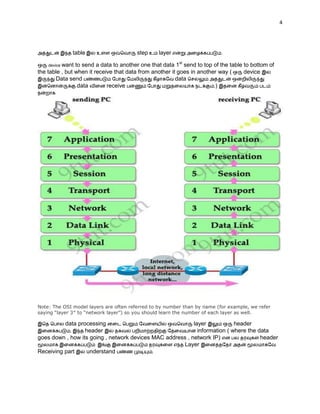
                                  OSI Model      . There is 7 steps in this model to connect to
pc’s


This OSI Table is must be memorized in your heart by the correct order. You can easily

                     All People Seem To Need Data Processing
memorized by the sentence below.
4


              table                     step     layer                     .

    device want to send a data to another one that data 1st send to top of the table to bottom of
the table , but when it receive that data from another it goes in another way (      device
       Data send                                         data
                 data        receive                                    .)


Note: The OSI model layers are often referred to by number than by name (for example, we refer
saying “layer 3″ to “network layer”) so you should learn the number of each layer as well.

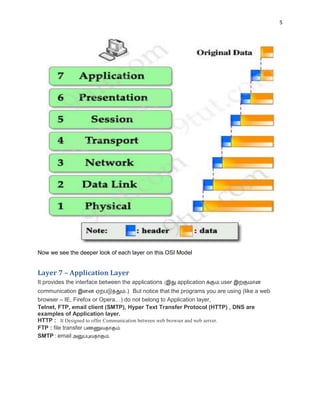
          data processing                                  layer            header
            ,     header                                     information ( where the data
goes down , how its going , network devices MAC address , network IP)                 header
                                                      Layer
Receiving part    understand                .
5


Now we see the deeper look of each layer on this OSI Model


Layer 7 – Application Layer
It provides the interface between the applications (   application    user
communication                    .) But notice that the programs you are using (like a web
browser – IE, Firefox or Opera…) do not belong to Application layer,
Telnet, FTP, email client (SMTP), Hyper Text Transfer Protocol (HTTP) , DNS are
examples of Application layer.
HTTP :
FTP : file transfer            .
SMTP : email                .
6


OPTIONAL :
DNS (Domain Name System)
It provides domain name to the IPs
All hosts and IPs are saved in a file, that is name as host.txt in ARPANET, So thousands of host
name providing is not a simple problem its very complex, so they invented a method to provide the
Domain Name System that is simply say DNS – This is an hierarchically domain based system.
This domain names are provide like as postal system that is country , state, town, road and home.
Domain names provide in 2 main top levels they are
     1. Generic
     2. Countries
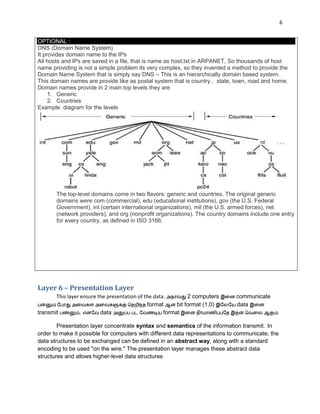
Example diagram for the levels


       The top-level domains come in two flavors: generic and countries. The original generic
       domains were com (commercial), edu (educational institutions), gov (the U.S. Federal
       Government), int (certain international organizations), mil (the U.S. armed forces), net
       (network providers), and org (nonprofit organizations). The country domains include one entry
       for every country, as defined in ISO 3166.


Layer 6 – Presentation Layer
       This layer ensure the presentation of the data.         2 computers    communicate
                                              format      bit format (1,0)    data
transmit          .       data                       format                                   .


        Presentation layer concentrate syntax and semantics of the information transmit. In
order to make it possible for computers with different data representations to communicate, the
data structures to be exchanged can be defined in an abstract way, along with a standard
encoding to be used ''on the wire.'' The presentation layer manages these abstract data
structures and allows higher-level data structures
7


         In general, it acts as a translator of the network. For example, you want to send an
email and the Presentation will format your data into email format. Or you want to send photos
to your friend, the Presentation layer will format your data into GIF, JPG or PNG… format.

Dictionary
    1. Concentrate –
    2. Syntax –
    3. Semantics –
    4. Transmit –
    5. Representation –
    6. Exchanged –
    7. Abstract way –
    8. Encoding –
    9. Manage –
    10. High-level structure – Human                     structure
    11. General –


Layer 5 – Session Layer
The session layer allows users on different machines to establish sessions, maintained
communication between them.
   -                communication                                                          .


Sessions offer various services including

       1. Dialog control -
       2. Token Management
       3. Synchronization. –           communication
                               .            120MB Download                 file 80MB
           crash                                     80MB                         .

Dictionary Dig
    1. Crash -
    2. Token -
    3. Establish -
8


Layer 4 – Transport Layer
          Accept data from above layer and split it up into small segments –                          layer
                                       segments                    Network layer               pass
         duty      .

        Ensure all segments arrive correctly and upper layers isolated by inevitable changes in
hardware devices ( send                order        all segment                  .
hardware devices ( Routers , hubs , etc…….)
          layers                    .
This layer maintain
   1. Flow control of data –                       data                 .
   2. Provides for error checking and recovery of data - error checking ( error- free – point –
        to – point channels) point point    errors      check                  .
                 protocol
TCP ( Transmission Control Protocol) , UDP ( User Diagram Protocol ) , NETBEUI , SPX


Dictionary Dig
    1. Split –
    2. Segments –
    3. Arrive –
    4. Isolate –
    5. Inevitable-
    6. Flow –
    7. Provide –
    8. Recovery –
    9. Diagram –
    10. Destination -


Layer 3 – Network Layer
Transport Layer           segments                                 packets             .       packets
                              .    packets                     original data
destination                                           .                            address routing table
         packets                                          routing              .


Network layer                                              :


    1.    Path determination – source to destination path                                  .
    2.    Routing – putting address
    3.    Delivery of packets across the inter-networks. – networks                             packets
          delivery         .

                packets                      connection               ,                                       .


    4.    Responsible for logical addressing (Example :IP)
9


               protocols    :
IP, IPX, ICMP, RIP, OSPX, BGF

Network layor                   devices :
Layer 3 Switches , Routers , WAP ( Wireless access point – wireless routers)


Dictionary Dig
    1. Determination –
    2. Across –
    3. Path –
    4. Delivery –
    5. Responsible –
    6. Put -


Layer 2 – Data Link Layer
Packets       Layer3                     message         Data frames               header
add                    .

This header contains :

    1. Adding hardware destination (MAC address) – doing by switches
    2. Source address

And this header is also responsible to finding the next destination device on the local network,

Note. Layer-3 ( Network layer ) finding the last destination path ( network ) not care who is the
receiving device

Example of devices use in layer 2 are : switches , bridges ,WAPs ,

It divides into mainly 2 parts :

    1.    LLC – Logical link control
    -     Managing frames
    -     Flow control
    -     Error control
    2.    MAC – Media access control
    -     Carries physical addresses (MAC addresses)


Dictionary Dig
    1. Contains-
    2. Find-
    3. Local network –
10


       4.    Care –
       5.    Divides-
       6.    Manage
       7.    Carries-
       8.    Access -


Layer -1 Physical Layer
The Physical Layer defines the physical characteristics of the network such as connections,
voltage levels and timing. –                                             .


           layer bit (1,0)       data                       .


       -     Computer wire      data transfer      1,0 format                              1
             voltage 0              voltage                     layer                  .-( how many volts
             should be used to represent a 1 and how many for a 0)
       -              bit                       nano seconds
       -     Initial connection     established

       -     How many pins networks connectors pluged.                    physical layer
                             .


    layer                    devices : Repeaters and hubs                            Transmission medium
(copper wire, UTP, STP ,fiber …)                                                             .


i
    I’m a student , If I make a mistake in this book please inform me - iamnifras@live.com

OSI model (Tamil)

  • 1.
    i OSI Model Computer Networks & Internet Computing Nifras Ismail
  • 2.
    2 OSI / ISOMODEL Contents Introduction ....................................................................................................................................3 Layer 7 – Application Layer ................................................................................................................5 Layer 6 – Presentation Layer ..............................................................................................................6 Layer 5 – Session Layer ......................................................................................................................7 Layer 4 – Transport Layer ..................................................................................................................8 Layer 3 – Network Layer ....................................................................................................................8 Layer 2 – Data Link Layer ....................................................................................................................9 Layer 1 - Physical Layer .................................................................................................................... 10 References 1. TechExams.net Tech Notes by. John Hiemstra 2. Computer Networks by. Andrew S. Tanenbaum 3. Computer Networks and Internet computing Lecture notes by. Dr. K. Sarveswaran 4. http://www.9tut.com/ 1 1 If I make any mistakes or comments about this book mail me : iamnifras@live.com
  • 3.
    3 OSI / ISOMODEL Introduction SI Model network devices data transmit O . postal system 1. Write your letter 2. Insert it into an envelope 3. Write information about sender and receiver on that envelope 4. Stamp it 5. Go to the post office and drop it into a mail inbox we go through some steps to achieve the target, 2 computers connect steps follow . OSI Model . There is 7 steps in this model to connect to pc’s This OSI Table is must be memorized in your heart by the correct order. You can easily All People Seem To Need Data Processing memorized by the sentence below.
  • 4.
    4 table step layer . device want to send a data to another one that data 1st send to top of the table to bottom of the table , but when it receive that data from another it goes in another way ( device Data send data data receive .) Note: The OSI model layers are often referred to by number than by name (for example, we refer saying “layer 3″ to “network layer”) so you should learn the number of each layer as well. data processing layer header , header information ( where the data goes down , how its going , network devices MAC address , network IP) header Layer Receiving part understand .
  • 5.
    5 Now we seethe deeper look of each layer on this OSI Model Layer 7 – Application Layer It provides the interface between the applications ( application user communication .) But notice that the programs you are using (like a web browser – IE, Firefox or Opera…) do not belong to Application layer, Telnet, FTP, email client (SMTP), Hyper Text Transfer Protocol (HTTP) , DNS are examples of Application layer. HTTP : FTP : file transfer . SMTP : email .
  • 6.
    6 OPTIONAL : DNS (DomainName System) It provides domain name to the IPs All hosts and IPs are saved in a file, that is name as host.txt in ARPANET, So thousands of host name providing is not a simple problem its very complex, so they invented a method to provide the Domain Name System that is simply say DNS – This is an hierarchically domain based system. This domain names are provide like as postal system that is country , state, town, road and home. Domain names provide in 2 main top levels they are 1. Generic 2. Countries Example diagram for the levels The top-level domains come in two flavors: generic and countries. The original generic domains were com (commercial), edu (educational institutions), gov (the U.S. Federal Government), int (certain international organizations), mil (the U.S. armed forces), net (network providers), and org (nonprofit organizations). The country domains include one entry for every country, as defined in ISO 3166. Layer 6 – Presentation Layer This layer ensure the presentation of the data. 2 computers communicate format bit format (1,0) data transmit . data format . Presentation layer concentrate syntax and semantics of the information transmit. In order to make it possible for computers with different data representations to communicate, the data structures to be exchanged can be defined in an abstract way, along with a standard encoding to be used ''on the wire.'' The presentation layer manages these abstract data structures and allows higher-level data structures
  • 7.
    7 In general, it acts as a translator of the network. For example, you want to send an email and the Presentation will format your data into email format. Or you want to send photos to your friend, the Presentation layer will format your data into GIF, JPG or PNG… format. Dictionary 1. Concentrate – 2. Syntax – 3. Semantics – 4. Transmit – 5. Representation – 6. Exchanged – 7. Abstract way – 8. Encoding – 9. Manage – 10. High-level structure – Human structure 11. General – Layer 5 – Session Layer The session layer allows users on different machines to establish sessions, maintained communication between them. - communication . Sessions offer various services including 1. Dialog control - 2. Token Management 3. Synchronization. – communication . 120MB Download file 80MB crash 80MB . Dictionary Dig 1. Crash - 2. Token - 3. Establish -
  • 8.
    8 Layer 4 –Transport Layer Accept data from above layer and split it up into small segments – layer segments Network layer pass duty . Ensure all segments arrive correctly and upper layers isolated by inevitable changes in hardware devices ( send order all segment . hardware devices ( Routers , hubs , etc…….) layers . This layer maintain 1. Flow control of data – data . 2. Provides for error checking and recovery of data - error checking ( error- free – point – to – point channels) point point errors check . protocol TCP ( Transmission Control Protocol) , UDP ( User Diagram Protocol ) , NETBEUI , SPX Dictionary Dig 1. Split – 2. Segments – 3. Arrive – 4. Isolate – 5. Inevitable- 6. Flow – 7. Provide – 8. Recovery – 9. Diagram – 10. Destination - Layer 3 – Network Layer Transport Layer segments packets . packets . packets original data destination . address routing table packets routing . Network layer : 1. Path determination – source to destination path . 2. Routing – putting address 3. Delivery of packets across the inter-networks. – networks packets delivery . packets connection , . 4. Responsible for logical addressing (Example :IP)
  • 9.
    9 protocols : IP, IPX, ICMP, RIP, OSPX, BGF Network layor devices : Layer 3 Switches , Routers , WAP ( Wireless access point – wireless routers) Dictionary Dig 1. Determination – 2. Across – 3. Path – 4. Delivery – 5. Responsible – 6. Put - Layer 2 – Data Link Layer Packets Layer3 message Data frames header add . This header contains : 1. Adding hardware destination (MAC address) – doing by switches 2. Source address And this header is also responsible to finding the next destination device on the local network, Note. Layer-3 ( Network layer ) finding the last destination path ( network ) not care who is the receiving device Example of devices use in layer 2 are : switches , bridges ,WAPs , It divides into mainly 2 parts : 1. LLC – Logical link control - Managing frames - Flow control - Error control 2. MAC – Media access control - Carries physical addresses (MAC addresses) Dictionary Dig 1. Contains- 2. Find- 3. Local network –
  • 10.
    10 4. Care – 5. Divides- 6. Manage 7. Carries- 8. Access - Layer -1 Physical Layer The Physical Layer defines the physical characteristics of the network such as connections, voltage levels and timing. – . layer bit (1,0) data . - Computer wire data transfer 1,0 format 1 voltage 0 voltage layer .-( how many volts should be used to represent a 1 and how many for a 0) - bit nano seconds - Initial connection established - How many pins networks connectors pluged. physical layer . layer devices : Repeaters and hubs Transmission medium (copper wire, UTP, STP ,fiber …) . i I’m a student , If I make a mistake in this book please inform me - iamnifras@live.com