COMPUTER NETWORKS

    INTERNET
Definition
•   CN is a collection of two or more
    computers, which are connected to
    share information and resources.
•   Computers in a network are
    interconnected by telephone lines,
    coaxial cables, satellite links, radio
    or some other communication
    technique.
•   The computers can be
    geographically located anywhere.
Applications of Networks
  Resource Sharing
     Hardware (computing resources, disks, printers)
     Software (application software)
  Information Sharing
     Easy accessibility from anywhere (files, databases)
     Search Capability (WWW)
  Communication
     Email
     Message broadcast -prerecorded message to people
  Remote computing
    - Access thru network
  Distributed processing (GRID Computing)
 -Combination of several computers to process large
  amount of data.
Types / categories:
1.   Local Area Network (LAN) -Network in
     small geographical Area (Room,
     Building or a Campus) is called LAN
     (Local Area Network)

2.   Metropolitan Area Network (MAN) -
     Network in a City is call MAN
     (Metropolitan Area Network)

3.   Wide Area Network (WAN) -Network
     spread geographically (Country or
     across Globe) is called WAN (Wide
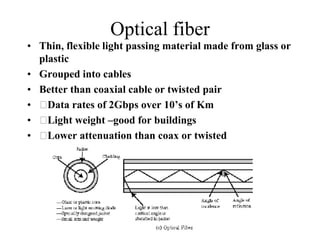
     Area Network)
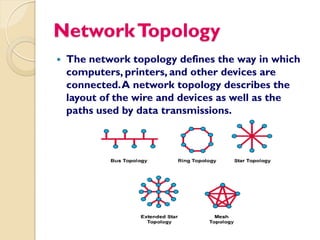
Network Topology
   The network topology defines the way in which
    computers, printers, and other devices are
    connected. A network topology describes the
    layout of the wire and devices as well as the
    paths used by data transmissions.
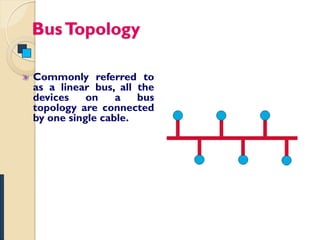
Bus Topology

Commonly referred to
as a linear bus, all the
devices    on    a   bus
topology are connected
by one single cable.
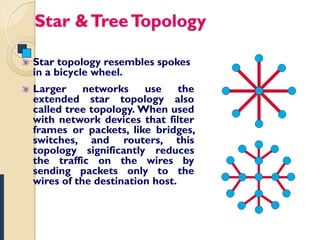
Star & Tree Topology

Star topology resembles spokes
in a bicycle wheel.
Larger     networks    use     the
extended star topology also
called tree topology. When used
with network devices that filter
frames or packets, like bridges,
switches, and routers, this
topology significantly reduces
the traffic on the wires by
sending packets only to the
wires of the destination host.
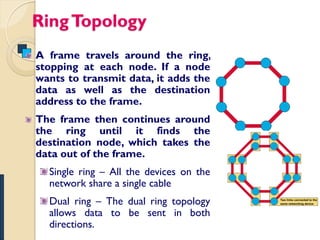
Ring Topology
A frame travels around the ring,
stopping at each node. If a node
wants to transmit data, it adds the
data as well as the destination
address to the frame.
The frame then continues around
the ring until it finds the
destination node, which takes the
data out of the frame.
  Single ring – All the devices on the
  network share a single cable
  Dual ring – The dual ring topology
  allows data to be sent in both
  directions.
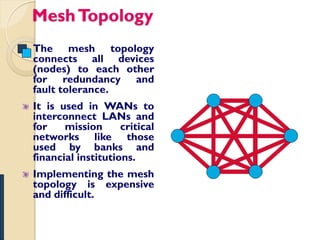
Mesh Topology
The mesh topology
connects all devices
(nodes) to each other
for redundancy and
fault tolerance.
It is used in WANs to
interconnect LANs and
for    mission      critical
networks like those
used by banks and
financial institutions.
Implementing the mesh
topology is expensive
and difficult.
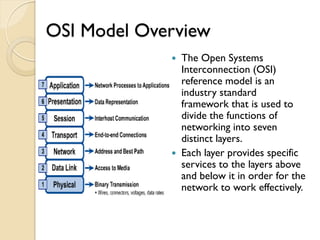
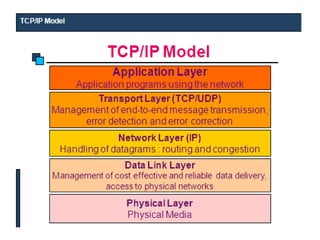
OSI Model Overview
              The Open Systems
               Interconnection (OSI)
               reference model is an
               industry standard
               framework that is used to
               divide the functions of
               networking into seven
               distinct layers.
              Each layer provides specific
               services to the layers above
               and below it in order for the
               network to work effectively.
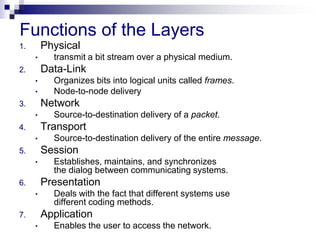
Functions of the Layers
1.       Physical
     •     transmit a bit stream over a physical medium.
2.       Data-Link
     •     Organizes bits into logical units called frames.
     •     Node-to-node delivery
3.       Network
     •     Source-to-destination delivery of a packet.
4.       Transport
     •     Source-to-destination delivery of the entire message.
5.       Session
     •     Establishes, maintains, and synchronizes
           the dialog between communicating systems.
6.       Presentation
     •     Deals with the fact that different systems use
           different coding methods.
7.       Application
     •     Enables the user to access the network.
Physical Layer
   It defines the physical and electrical characteristics
    of the N/W.
   This layer also defines what kind of network
    interface card must be installed in each computer
    and what kinds of hubs to be used.
   In other words the physical layer is a conduit
    (connection) between the computers networking
    hardware and its networking software.
   This layer communicates with the data link layer and
    regulates the transmission of a stream of bits over a
    physical medium.
   This layer also defines which transmission technique
    is used to send data over the cable.
Data Link Layer
   The function of data link layer is to transform the
    data into a line that is free of transmission errors
    and is responsible for node-to-node delivery
   On the sender side the data link layer divides the
    layer divides the stream of bits fro the N/W layer
    into a manageable form known as frames.
   These data frames are then transmitted
    sequentially to the receiver.
   On the receiver end the data link layer detects and
    corrects any errors in the transmitted data which
    it gets from the physical layer.
Network Layer
   The network layer provides the physical routing of
    the data that is it determines the path between
    the sender and receiver.
   The outbound data is passed down from the
    transport layer is encapsulated in the networks
    layers protocol and then sent to the data link layer
    for segmentation and transmission.
   This layer organizes frames from data link layer
    into packets and is passed to the transport layer
   Network layer provides uniform addressing
    mechanism so that more than one networks can be
    interconnected.
Transport Layer
   The basic function of the transport layer is to
    handle error recognition and recovery of the data
    packets.
   The T L establishes, maintains, and terminates
    communication between the sender and the
    receiver.
   At the receiving end transport layer rebuilds
    packets into the original message, and to ensure
    that the packets arrived correctly, the receiving
    transport layer sends receipt acknowledgments.
Session Layer
   The session layer organizes and synchronizes the
    exchange of data between the sending and
    receiving applications.
   The session layer lets each application at one end
    know the status of the other at the other end.
   An error in the sending application is handled by
    the session layer in such a manner so that the
    receiving application may know that the error has
    occurred.
   The SL can resynchronize applications that are
    currently connected to each other.
   This may be necessary when communications are
    temporarily interrupted or when an error has
    occurred that results in loss of data.
Presentation Layer
   The basic function of the presentation layer is to
    ensure that information sent from the application
    layer of one system would be readable by the
    application layer of another system.
   This is where application data is packed or
    unpacked ready for use by the running application.
   This layer also manages security issues by
    providing services such as data encryption and
    compresses data so that fewer bits need to be
    transferred on the N/W .
Application Layer
   The A L is the entrance point that programs use to
    access OSI model and utilize network resources.
   This layer represents the services that directly
    support applications.
   This OSI layer is closest to the end user.
   Application layer includes network software that
    directly serves the user , providing such things as
    the user interface and application featurs such as
    electronic Mail.
NETWORK STRUCTURE

The subnet interconnects hosts.

   Subnet
    ◦ Carries messages from host to host. It is made
      up of telecommunication lines (i.e. circuits,
      channels, trunks) and switching elements (i.e.
      Interface Message Processor’s, routers).

   Hosts
    ◦ End user machines or computers.
Services
   Connection-Oriented and Connectionless

    ◦ Connection-Oriented – before data is sent, the
      service from the sending computer must
      establish a connection with the receiving
      computer.

    ◦ Connectionless – data can be sent at any time by
      the service from the sending computer.
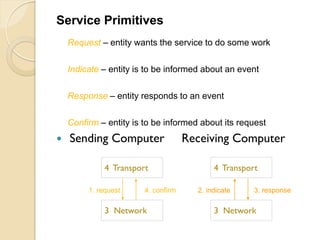
Service Primitives
    Request – entity wants the service to do some work

    Indicate – entity is to be informed about an event

    Response – entity responds to an event

    Confirm – entity is to be informed about its request
   Sending Computer                 Receiving Computer

              4 Transport                   4 Transport

         1. request     4. confirm     2. indicate    3. response

              3 Network                     3 Network
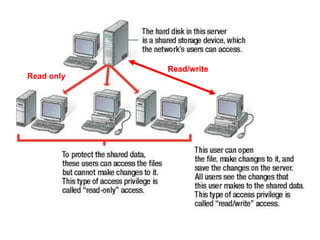
Read/write
Read only
1   2   3   4
Introduction to Computer Networks


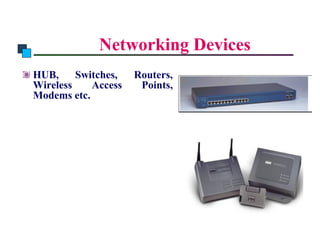
                      Networking Devices
      HUB,     Switches,       Routers,
      Wireless    Access        Points,
      Modems etc.
Network Devices
•    These devices interconnect individual computers
     and ensure that they communicate efficiently.
•    Some network devices are as below
1.   Network Interface Card
2.   Hub
3.   Repeater
4.   Switch
5.   Bridge
6.   Router
7.   Gateway
Network Devices
Network Interface Card
• Interface between the machine and the N/W.
• It connects the clients, servers and peripherals
   to the network via a port.
• Most network interfaces come as small circuit
   board that can be inserted onto one of the
   computers motherboard slots.
• Each network interface is associated with a
   unique address called its media access control
   (MAC) address.
• The MAC address helps in sending information to
   its intended destination.
Network Devices
Hub
• Is a small box that connects individual devices on
   a network so that they can communicate with one
   another.
• The hub operates by gathering the signals from
   individual network devices, optionally amplifying
   the signals and then sending them onto all other
   connected devices.
• Amplification of the signal ensures that devices
   on the network receive reliable information.
• Also known as concentrator, a hub works on
   physical layer of the OSI model.
Network Devices
Repeater
• Is an electronic device that operates on the
   physical layer of the OSI model.
• Signals that carry information within a network
   can travel a fixed distance.
• A repeater installed on the link receives signal ,
   regenerates it and sends the refreshed copy back
   to the link.
• Nowadays the terms repeater and hub are used
   synonymously, but they are actually not the same
• Although at its very basic level, a hub can be
   thought of as a multiport repeater.
Network Devices
Switch
• Like a hub a switch too connects individual
   devices on a network so that they can
   communicate with one another.
• Switches work on the data link layer of OSI
   model.
• Allows reducing overall network traffic
Network Devices
Bridge
• A bridge filters data traffic at a network
    boundry.
• It reduces the amount of traffic on a LAN by
    dividing it into two segments.
• Bridges operate at the data link layer of the OSI
    model.
• It inspects each incoming traffic and decides
    whether to forward or discard it .
• When a frame enters a bridge the bridge not
    only regenerates the signals but also checks the
    address of the destination and forwards the new
    copy only to the segment to which the address
    belongs
Network Devices
Router
•   A router is an essential network device for
    interconnecting two or more networks.
•   Routers aim is to trace the best route for information to
    travel .
•   As network traffic changes during the day routers can
    redirect information to take less congested routes.
•   A router creates or maintains a table called a routing
    table that stores the best route to certain destinations.
•   They can permit or deny network communications with a
    particular network.
Network Devices
Gateway
•   Is internetworking device which joins two different
    network protocols together.
•   It works on all seven layers of the OSI model
•   A gateway accepts the packet formatted for one protocol
    and converts the formatted packet into another protocol.
Introduction to Computer Networks


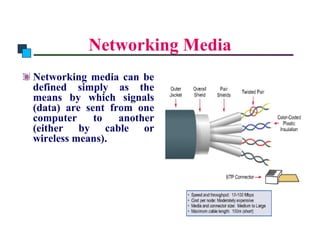
                    Networking Media
      Networking media can be
      defined simply as the
      means by which signals
      (data) are sent from one
      computer     to   another
      (either by cable or
      wireless means).
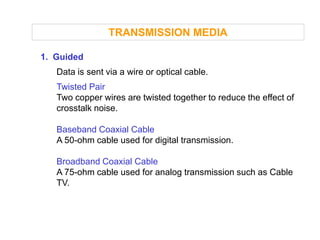
TRANSMISSION MEDIA

1. Guided
   Data is sent via a wire or optical cable.
   Twisted Pair
   Two copper wires are twisted together to reduce the effect of
   crosstalk noise.

   Baseband Coaxial Cable
   A 50-ohm cable used for digital transmission.

   Broadband Coaxial Cable
   A 75-ohm cable used for analog transmission such as Cable
   TV.
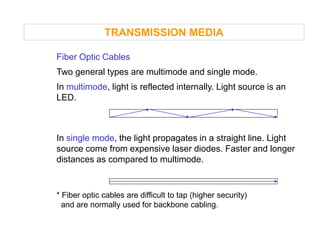
TRANSMISSION MEDIA

Fiber Optic Cables
Two general types are multimode and single mode.
In multimode, light is reflected internally. Light source is an
LED.


In single mode, the light propagates in a straight line. Light
source come from expensive laser diodes. Faster and longer
distances as compared to multimode.


* Fiber optic cables are difficult to tap (higher security)
  and are normally used for backbone cabling.
Twisted Pair
Two insulated copper wires in a spiral
 Number of pairs are bundled together
 Twisting decreases crosstalk
 Most common form for analog and digital
 Used in telephone system
 Subscriber loops
 From a person’s home to the local office of the phone
  company
 LANS
 10Mbps with newer at 100Mbps
Long Distance
 4 Mbps
 ISDN –Integrated Services Digital Network
Digital
 Repeaters required every 2 –3 kilometers
Analog
 Amplifiers required every 5-6 kilometers
 Bandwidth of 250KHz, carry a few voice channels
Susceptible to noise, shielded and unshielded
Compared to optical and coax twisted pair is
  limited in bandwidth, distance, and data rate
Coaxial Cable
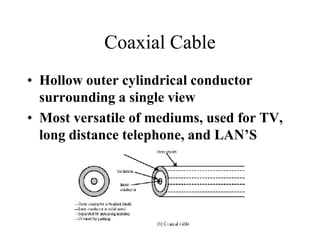
• Hollow outer cylindrical conductor
  surrounding a single view
• Most versatile of mediums, used for TV,
  long distance telephone, and LAN’S
Optical fiber
• Thin, flexible light passing material made from glass or
  plastic
• Grouped into cables
• Better than coaxial cable or twisted pair
•   Data rates of 2Gbps over 10’s of Km
•   Light weight –good for buildings
•   Lower attenuation than coax or twisted
TRANSMISSION MEDIA

2. Unguided
   Data is sent through the air.

   Line-of-sight
   Transmitter and receiver must “see” each other, such as a
   terrestrial microwave system.

   Communication Satellites
   A big microwave repeater in the sky. Data is broadcasted, and
   can be “pirated.”

   Radio
   Term used to include all frequency bands, such as FM, UHF,
   and VHF television.
• Wireless
• Broadcast Radio
     Radio -3kHz to 300Ghz
     Broadcast radio –30MHz to 1GHz
• Satellite Microwave 1 –10 GHz
• Infrared
Features & Working of the Internet
• Connected by many small networks in the world
   using TCP/IP protocol stack
• No specific path between any two hosts that are
   communicating
• Path is determined dynamically by Router, that
   relays the data from the source host to the
   destination host
• Data may need to go thru many routers before they
   reach the destination
• When data from different sources need to go thru a
   particular router, it will become busy and may delay
   or even lost the data
• Hence Internet is NOT a reliable network
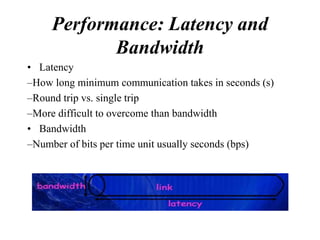
Performance: Latency and
            Bandwidth
• Latency
–How long minimum communication takes in seconds (s)
–Round trip vs. single trip
–More difficult to overcome than bandwidth
• Bandwidth
–Number of bits per time unit usually seconds (bps)
Addressing in TCP/IP
• Each TCP/IP address includes:
  – Internet Address
  – Protocol (TCP)
  – Port Number
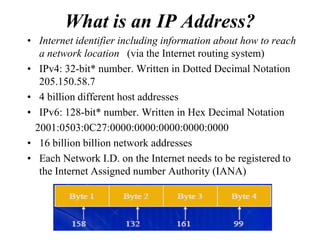
What is an IP Address?
• Internet identifier including information about how to reach
   a network location (via the Internet routing system)
• IPv4: 32-bit* number. Written in Dotted Decimal Notation
   205.150.58.7
• 4 billion different host addresses
• IPv6: 128-bit* number. Written in Hex Decimal Notation
  2001:0503:0C27:0000:0000:0000:0000:0000
• 16 billion billion network addresses
• Each Network I.D. on the Internet needs to be registered to
   the Internet Assigned number Authority (IANA)
Address
• Way to identify people / computers
• On the Internet, the term “address” is used loosely
• –Can mean many different things from an email address to
  a URL (Uniform resource locator)
• More specifically, 2 types:
• –Internet protocol (IP) address(or network address): 4-part
  numeric address
• e.g. 158.132.148.28
• –Domain name system (DNS) address
• e.g. LMS
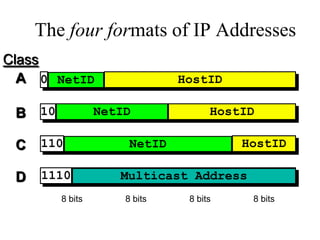
The four formats of IP Addresses
Class
  A 0 NetID                     HostID

 B   10            NetID              HostID

 C   110                NetID             HostID

 D   1110             Multicast Address
          8 bits       8 bits    8 bits    8 bits
Hardware vs. Software Firewalls
• Hardware Firewalls
–Protect an entire network
–Implemented on the router level
–Usually more expensive, harder to configure
• Software Firewalls
–Protect a single computer
–Usually less expensive, easier to configure
Firewall Rules

• Allow –traffic that flows automatically
  because it has been deemed as “safe” (Ex.
  Meeting Maker, Eudora, etc.)
• Block –traffic that is blocked because it has
  been deemed dangerous to your computer
• Ask –asks the user whether or not the traffic
  is allowed to pass through
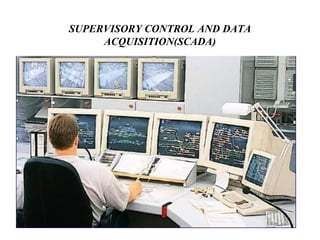
SUPERVISORY CONTROL AND DATA
     ACQUISITION(SCADA)
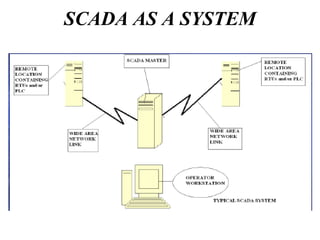
SCADA AS A SYSTEM
• SCADA refers to a system that collects data from
  various sensors at a factory, plant or in other
  remote locations and then sends this data to a
  central computer which then manages and controls
  the data.
• Data acquisition is the process of retrieving
  control information from the equipment which is
  out of order or may lead to some problem or when
  decisions are need to be taken according to the
  situation in the equipment. So this acquisition is
  done by continuous monitoring of the equipment
  to which it is employed. The data accessed are
  then forwarded onto a telemetry system ready for
  transfer to the different sites.
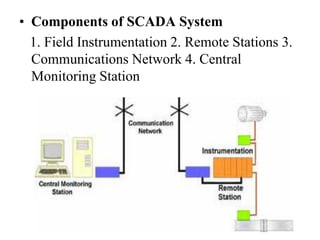
• Components of SCADA System
  1. Field Instrumentation 2. Remote Stations 3.
  Communications Network 4. Central
  Monitoring Station
BENEFITS OF SCADA

• Long distance monitoring
• Long distance training
• Protection against terrorism/vandalism-
  alarm
• Data management (engineering and
  operations)
• Automated operations with real time control
What is Internet & Web?
Internet is a world wide, noncommercial, freely
accessible Network of Computer Networks.

World Wide Web (WWW) is a vast, ever-
expanding collection of online documents and
information formatted in HTML and
distributed over the Internet.
Working of the Web
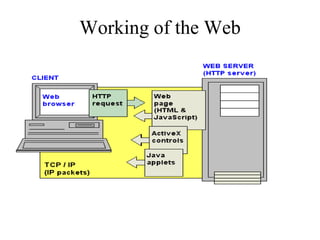
• Web documents live on Computers that run
  HTTP servers.
• HTTP servers can be hosted on UNIX ,
  Macintosh or PC’s.
• Browser requests the Web page from the Web
  server.
• Server sends the HTML pages over the
  Internet to your computer.
• Browser interprets the data and displays it on
  your screen.
Working of the Web
Web Page & Home Page


• Web Page : Document written in Web
  formatting language, HTML

• Home Page : This is the first page or the
  opening page of any web document.
Elements of Web Page
• Text : This is simple 7-bit ASCII , which can be
  easily represented by using the keys available on a
  standard keyboard.
• Graphics : Graphics add life to the web pages and
  makes them interesting to browse.
• Links and URL’s : Links are transporters of the
  Web. Links contain addresses of the Web files that
  they are referencing.
  Web address / site address is also known as URL
  (Uniform Resource Locator)

Networks internet

  • 1.
  • 2.
    Definition • CN is a collection of two or more computers, which are connected to share information and resources. • Computers in a network are interconnected by telephone lines, coaxial cables, satellite links, radio or some other communication technique. • The computers can be geographically located anywhere.
  • 3.
    Applications of Networks Resource Sharing Hardware (computing resources, disks, printers) Software (application software) Information Sharing Easy accessibility from anywhere (files, databases) Search Capability (WWW) Communication Email Message broadcast -prerecorded message to people Remote computing - Access thru network Distributed processing (GRID Computing) -Combination of several computers to process large amount of data.
  • 4.
    Types / categories: 1. Local Area Network (LAN) -Network in small geographical Area (Room, Building or a Campus) is called LAN (Local Area Network) 2. Metropolitan Area Network (MAN) - Network in a City is call MAN (Metropolitan Area Network) 3. Wide Area Network (WAN) -Network spread geographically (Country or across Globe) is called WAN (Wide Area Network)
  • 5.
    Network Topology  The network topology defines the way in which computers, printers, and other devices are connected. A network topology describes the layout of the wire and devices as well as the paths used by data transmissions.
  • 6.
    Bus Topology Commonly referredto as a linear bus, all the devices on a bus topology are connected by one single cable.
  • 7.
    Star & TreeTopology Star topology resembles spokes in a bicycle wheel. Larger networks use the extended star topology also called tree topology. When used with network devices that filter frames or packets, like bridges, switches, and routers, this topology significantly reduces the traffic on the wires by sending packets only to the wires of the destination host.
  • 8.
    Ring Topology A frametravels around the ring, stopping at each node. If a node wants to transmit data, it adds the data as well as the destination address to the frame. The frame then continues around the ring until it finds the destination node, which takes the data out of the frame. Single ring – All the devices on the network share a single cable Dual ring – The dual ring topology allows data to be sent in both directions.
  • 9.
    Mesh Topology The meshtopology connects all devices (nodes) to each other for redundancy and fault tolerance. It is used in WANs to interconnect LANs and for mission critical networks like those used by banks and financial institutions. Implementing the mesh topology is expensive and difficult.
  • 10.
    OSI Model Overview  The Open Systems Interconnection (OSI) reference model is an industry standard framework that is used to divide the functions of networking into seven distinct layers.  Each layer provides specific services to the layers above and below it in order for the network to work effectively.
  • 11.
    Functions of theLayers 1. Physical • transmit a bit stream over a physical medium. 2. Data-Link • Organizes bits into logical units called frames. • Node-to-node delivery 3. Network • Source-to-destination delivery of a packet. 4. Transport • Source-to-destination delivery of the entire message. 5. Session • Establishes, maintains, and synchronizes the dialog between communicating systems. 6. Presentation • Deals with the fact that different systems use different coding methods. 7. Application • Enables the user to access the network.
  • 12.
    Physical Layer  It defines the physical and electrical characteristics of the N/W.  This layer also defines what kind of network interface card must be installed in each computer and what kinds of hubs to be used.  In other words the physical layer is a conduit (connection) between the computers networking hardware and its networking software.  This layer communicates with the data link layer and regulates the transmission of a stream of bits over a physical medium.  This layer also defines which transmission technique is used to send data over the cable.
  • 13.
    Data Link Layer  The function of data link layer is to transform the data into a line that is free of transmission errors and is responsible for node-to-node delivery  On the sender side the data link layer divides the layer divides the stream of bits fro the N/W layer into a manageable form known as frames.  These data frames are then transmitted sequentially to the receiver.  On the receiver end the data link layer detects and corrects any errors in the transmitted data which it gets from the physical layer.
  • 14.
    Network Layer  The network layer provides the physical routing of the data that is it determines the path between the sender and receiver.  The outbound data is passed down from the transport layer is encapsulated in the networks layers protocol and then sent to the data link layer for segmentation and transmission.  This layer organizes frames from data link layer into packets and is passed to the transport layer  Network layer provides uniform addressing mechanism so that more than one networks can be interconnected.
  • 15.
    Transport Layer  The basic function of the transport layer is to handle error recognition and recovery of the data packets.  The T L establishes, maintains, and terminates communication between the sender and the receiver.  At the receiving end transport layer rebuilds packets into the original message, and to ensure that the packets arrived correctly, the receiving transport layer sends receipt acknowledgments.
  • 16.
    Session Layer  The session layer organizes and synchronizes the exchange of data between the sending and receiving applications.  The session layer lets each application at one end know the status of the other at the other end.  An error in the sending application is handled by the session layer in such a manner so that the receiving application may know that the error has occurred.  The SL can resynchronize applications that are currently connected to each other.  This may be necessary when communications are temporarily interrupted or when an error has occurred that results in loss of data.
  • 17.
    Presentation Layer  The basic function of the presentation layer is to ensure that information sent from the application layer of one system would be readable by the application layer of another system.  This is where application data is packed or unpacked ready for use by the running application.  This layer also manages security issues by providing services such as data encryption and compresses data so that fewer bits need to be transferred on the N/W .
  • 18.
    Application Layer  The A L is the entrance point that programs use to access OSI model and utilize network resources.  This layer represents the services that directly support applications.  This OSI layer is closest to the end user.  Application layer includes network software that directly serves the user , providing such things as the user interface and application featurs such as electronic Mail.
  • 19.
    NETWORK STRUCTURE The subnetinterconnects hosts.  Subnet ◦ Carries messages from host to host. It is made up of telecommunication lines (i.e. circuits, channels, trunks) and switching elements (i.e. Interface Message Processor’s, routers).  Hosts ◦ End user machines or computers.
  • 20.
    Services  Connection-Oriented and Connectionless ◦ Connection-Oriented – before data is sent, the service from the sending computer must establish a connection with the receiving computer. ◦ Connectionless – data can be sent at any time by the service from the sending computer.
  • 21.
    Service Primitives Request – entity wants the service to do some work Indicate – entity is to be informed about an event Response – entity responds to an event Confirm – entity is to be informed about its request  Sending Computer Receiving Computer 4 Transport 4 Transport 1. request 4. confirm 2. indicate 3. response 3 Network 3 Network
  • 22.
  • 23.
    1 2 3 4
  • 24.
    Introduction to ComputerNetworks Networking Devices HUB, Switches, Routers, Wireless Access Points, Modems etc.
  • 25.
    Network Devices • These devices interconnect individual computers and ensure that they communicate efficiently. • Some network devices are as below 1. Network Interface Card 2. Hub 3. Repeater 4. Switch 5. Bridge 6. Router 7. Gateway
  • 26.
    Network Devices Network InterfaceCard • Interface between the machine and the N/W. • It connects the clients, servers and peripherals to the network via a port. • Most network interfaces come as small circuit board that can be inserted onto one of the computers motherboard slots. • Each network interface is associated with a unique address called its media access control (MAC) address. • The MAC address helps in sending information to its intended destination.
  • 27.
    Network Devices Hub • Isa small box that connects individual devices on a network so that they can communicate with one another. • The hub operates by gathering the signals from individual network devices, optionally amplifying the signals and then sending them onto all other connected devices. • Amplification of the signal ensures that devices on the network receive reliable information. • Also known as concentrator, a hub works on physical layer of the OSI model.
  • 28.
    Network Devices Repeater • Isan electronic device that operates on the physical layer of the OSI model. • Signals that carry information within a network can travel a fixed distance. • A repeater installed on the link receives signal , regenerates it and sends the refreshed copy back to the link. • Nowadays the terms repeater and hub are used synonymously, but they are actually not the same • Although at its very basic level, a hub can be thought of as a multiport repeater.
  • 29.
    Network Devices Switch • Likea hub a switch too connects individual devices on a network so that they can communicate with one another. • Switches work on the data link layer of OSI model. • Allows reducing overall network traffic
  • 30.
    Network Devices Bridge • Abridge filters data traffic at a network boundry. • It reduces the amount of traffic on a LAN by dividing it into two segments. • Bridges operate at the data link layer of the OSI model. • It inspects each incoming traffic and decides whether to forward or discard it . • When a frame enters a bridge the bridge not only regenerates the signals but also checks the address of the destination and forwards the new copy only to the segment to which the address belongs
  • 31.
    Network Devices Router • A router is an essential network device for interconnecting two or more networks. • Routers aim is to trace the best route for information to travel . • As network traffic changes during the day routers can redirect information to take less congested routes. • A router creates or maintains a table called a routing table that stores the best route to certain destinations. • They can permit or deny network communications with a particular network.
  • 32.
    Network Devices Gateway • Is internetworking device which joins two different network protocols together. • It works on all seven layers of the OSI model • A gateway accepts the packet formatted for one protocol and converts the formatted packet into another protocol.
  • 33.
    Introduction to ComputerNetworks Networking Media Networking media can be defined simply as the means by which signals (data) are sent from one computer to another (either by cable or wireless means).
  • 34.
    TRANSMISSION MEDIA 1. Guided Data is sent via a wire or optical cable. Twisted Pair Two copper wires are twisted together to reduce the effect of crosstalk noise. Baseband Coaxial Cable A 50-ohm cable used for digital transmission. Broadband Coaxial Cable A 75-ohm cable used for analog transmission such as Cable TV.
  • 35.
    TRANSMISSION MEDIA Fiber OpticCables Two general types are multimode and single mode. In multimode, light is reflected internally. Light source is an LED. In single mode, the light propagates in a straight line. Light source come from expensive laser diodes. Faster and longer distances as compared to multimode. * Fiber optic cables are difficult to tap (higher security) and are normally used for backbone cabling.
  • 36.
    Twisted Pair Two insulatedcopper wires in a spiral Number of pairs are bundled together Twisting decreases crosstalk Most common form for analog and digital Used in telephone system Subscriber loops From a person’s home to the local office of the phone company LANS 10Mbps with newer at 100Mbps
  • 37.
    Long Distance 4Mbps ISDN –Integrated Services Digital Network Digital Repeaters required every 2 –3 kilometers Analog Amplifiers required every 5-6 kilometers Bandwidth of 250KHz, carry a few voice channels Susceptible to noise, shielded and unshielded Compared to optical and coax twisted pair is limited in bandwidth, distance, and data rate
  • 38.
    Coaxial Cable • Hollowouter cylindrical conductor surrounding a single view • Most versatile of mediums, used for TV, long distance telephone, and LAN’S
  • 39.
    Optical fiber • Thin,flexible light passing material made from glass or plastic • Grouped into cables • Better than coaxial cable or twisted pair • Data rates of 2Gbps over 10’s of Km • Light weight –good for buildings • Lower attenuation than coax or twisted
  • 40.
    TRANSMISSION MEDIA 2. Unguided Data is sent through the air. Line-of-sight Transmitter and receiver must “see” each other, such as a terrestrial microwave system. Communication Satellites A big microwave repeater in the sky. Data is broadcasted, and can be “pirated.” Radio Term used to include all frequency bands, such as FM, UHF, and VHF television.
  • 41.
    • Wireless • BroadcastRadio Radio -3kHz to 300Ghz Broadcast radio –30MHz to 1GHz • Satellite Microwave 1 –10 GHz • Infrared
  • 42.
    Features & Workingof the Internet • Connected by many small networks in the world using TCP/IP protocol stack • No specific path between any two hosts that are communicating • Path is determined dynamically by Router, that relays the data from the source host to the destination host • Data may need to go thru many routers before they reach the destination • When data from different sources need to go thru a particular router, it will become busy and may delay or even lost the data • Hence Internet is NOT a reliable network
  • 43.
    Performance: Latency and Bandwidth • Latency –How long minimum communication takes in seconds (s) –Round trip vs. single trip –More difficult to overcome than bandwidth • Bandwidth –Number of bits per time unit usually seconds (bps)
  • 45.
    Addressing in TCP/IP •Each TCP/IP address includes: – Internet Address – Protocol (TCP) – Port Number
  • 46.
    What is anIP Address? • Internet identifier including information about how to reach a network location (via the Internet routing system) • IPv4: 32-bit* number. Written in Dotted Decimal Notation 205.150.58.7 • 4 billion different host addresses • IPv6: 128-bit* number. Written in Hex Decimal Notation 2001:0503:0C27:0000:0000:0000:0000:0000 • 16 billion billion network addresses • Each Network I.D. on the Internet needs to be registered to the Internet Assigned number Authority (IANA)
  • 47.
    Address • Way toidentify people / computers • On the Internet, the term “address” is used loosely • –Can mean many different things from an email address to a URL (Uniform resource locator) • More specifically, 2 types: • –Internet protocol (IP) address(or network address): 4-part numeric address • e.g. 158.132.148.28 • –Domain name system (DNS) address • e.g. LMS
  • 48.
    The four formatsof IP Addresses Class A 0 NetID HostID B 10 NetID HostID C 110 NetID HostID D 1110 Multicast Address 8 bits 8 bits 8 bits 8 bits
  • 49.
    Hardware vs. SoftwareFirewalls • Hardware Firewalls –Protect an entire network –Implemented on the router level –Usually more expensive, harder to configure • Software Firewalls –Protect a single computer –Usually less expensive, easier to configure
  • 50.
    Firewall Rules • Allow–traffic that flows automatically because it has been deemed as “safe” (Ex. Meeting Maker, Eudora, etc.) • Block –traffic that is blocked because it has been deemed dangerous to your computer • Ask –asks the user whether or not the traffic is allowed to pass through
  • 51.
    SUPERVISORY CONTROL ANDDATA ACQUISITION(SCADA)
  • 52.
    SCADA AS ASYSTEM
  • 53.
    • SCADA refersto a system that collects data from various sensors at a factory, plant or in other remote locations and then sends this data to a central computer which then manages and controls the data. • Data acquisition is the process of retrieving control information from the equipment which is out of order or may lead to some problem or when decisions are need to be taken according to the situation in the equipment. So this acquisition is done by continuous monitoring of the equipment to which it is employed. The data accessed are then forwarded onto a telemetry system ready for transfer to the different sites.
  • 54.
    • Components ofSCADA System 1. Field Instrumentation 2. Remote Stations 3. Communications Network 4. Central Monitoring Station
  • 55.
    BENEFITS OF SCADA •Long distance monitoring • Long distance training • Protection against terrorism/vandalism- alarm • Data management (engineering and operations) • Automated operations with real time control
  • 56.
    What is Internet& Web? Internet is a world wide, noncommercial, freely accessible Network of Computer Networks. World Wide Web (WWW) is a vast, ever- expanding collection of online documents and information formatted in HTML and distributed over the Internet.
  • 57.
    Working of theWeb • Web documents live on Computers that run HTTP servers. • HTTP servers can be hosted on UNIX , Macintosh or PC’s. • Browser requests the Web page from the Web server. • Server sends the HTML pages over the Internet to your computer. • Browser interprets the data and displays it on your screen.
  • 58.
  • 59.
    Web Page &Home Page • Web Page : Document written in Web formatting language, HTML • Home Page : This is the first page or the opening page of any web document.
  • 60.
    Elements of WebPage • Text : This is simple 7-bit ASCII , which can be easily represented by using the keys available on a standard keyboard. • Graphics : Graphics add life to the web pages and makes them interesting to browse. • Links and URL’s : Links are transporters of the Web. Links contain addresses of the Web files that they are referencing. Web address / site address is also known as URL (Uniform Resource Locator)