Part I Overview
Chapter 1: Introduction


                          1
What is an Operating System?
§ A computer system can be roughly divided into
  the hardware, the operating system, the
  application programs, and the users.
§ The hardware (i.e., CPU, memory, I/O devices)
  provides the basic computing resources.
§ The application programs (e.g., web browsers,
  word processors, and compilers) are used to
  solve user problems.
§ The operating system controls and coordinates
  the use of hardware among various application
  programs.
                                              2
User View
§ PC Users: an operating system is a
  program that provides an easy-to-use
  interface for using the hardware.
§ Mainframe/Minicomputer Users: an
  operating system is a program that helps
  maximize the system resource utilization.
§ Workstation Users: an operating system
  is a program designed to compromise
  between individual usability and resource
  utilization.
                                          3
System View
§ A Resource Manager: the operating system allocates
  and reclaims the system hardware resources to and
  from user programs.
§ A Control Program: the operating system controls the
  execution of user programs to prevent errors and
  improper use of the computer.
§ There is no universal definition of what is an
  operating system. A common definition is that the
  operating system is the one program running at all
  times on the computer (i.e., the kernel). All other
  programs are application programs.

                                                  4
The Goals of an Operating System

§ Primary Goal: efficient operation of the
  computer system.
§ In some systems, it is easy of use.
§ In general, efficiency is far more important
  than easy of use.


                                            5
Computer-System Organization

§ Computer-System Operation
§ Storage Structure (von Neumann
  architecture):
  • CPU-Memory
  • Fetch-decode-execute-store
§ I/O structure
§ More on the next few slides
                                   6
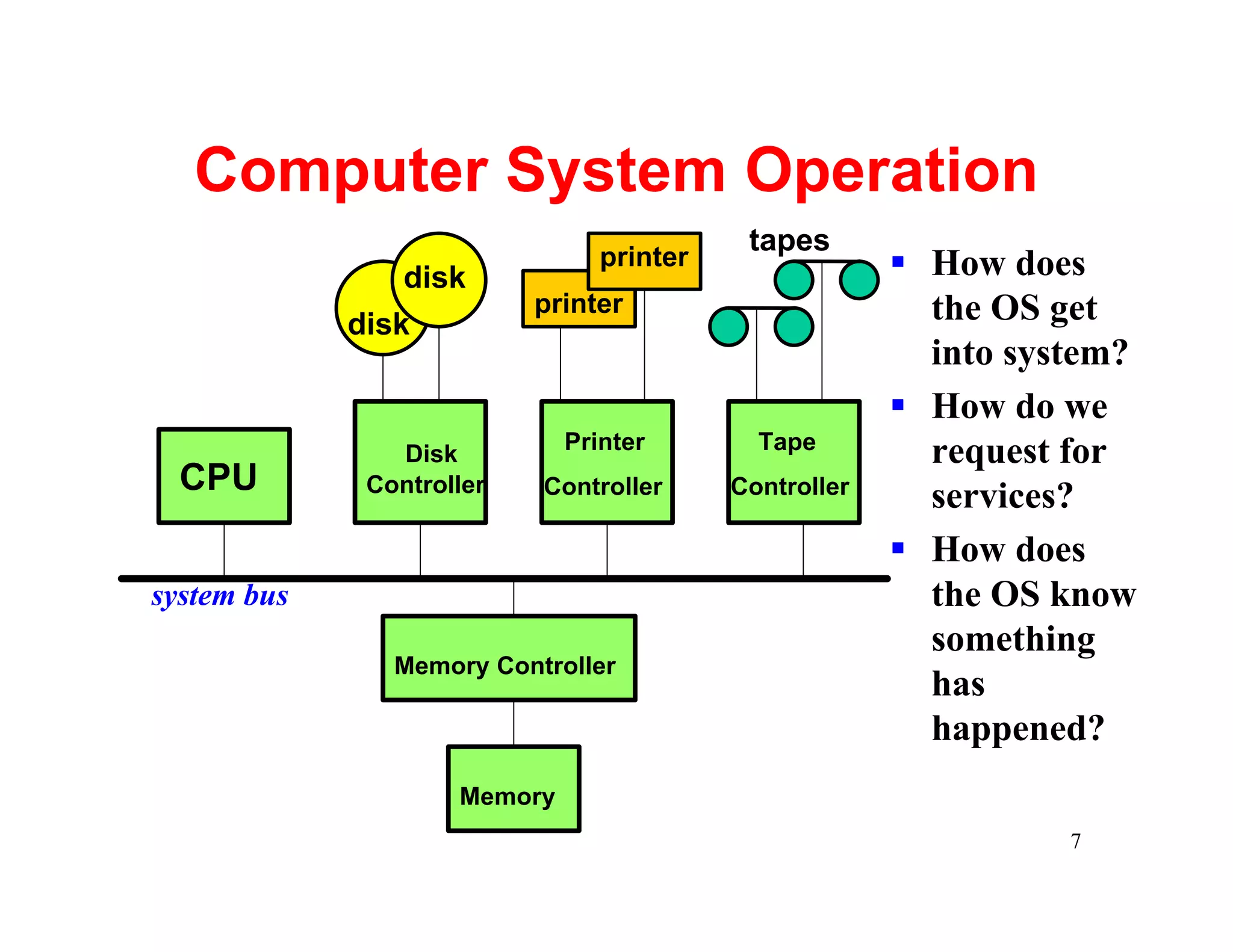
Computer System Operation
                                            tapes
                 disk
                                 printer                § How does
                           printer                        the OS get
             disk
                                                          into system?
                                                        § How do we
                              Printer        Tape
                Disk                                      request for
  CPU         Controller   Controller      Controller
                                                          services?
                                                        § How does
system bus                                                the OS know
                                                          something
                Memory Controller
                                                          has
                                                          happened?
                     Memory
                                                                  7
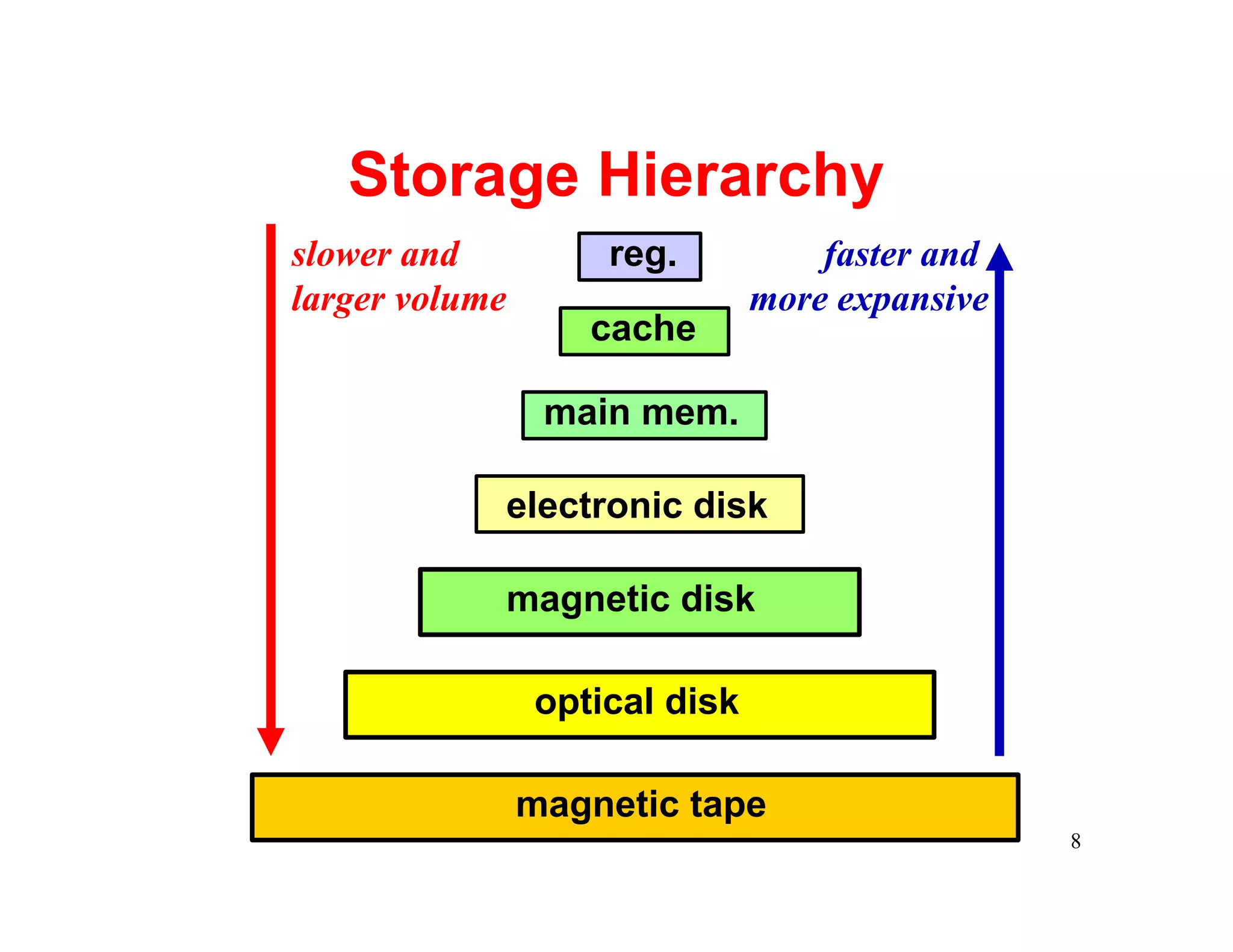
Storage Hierarchy
slower and          reg.           faster and
larger volume                  more expansive
                   cache

                 main mem.

            electronic disk

            magnetic disk

                optical disk

                magnetic tape
                                                8
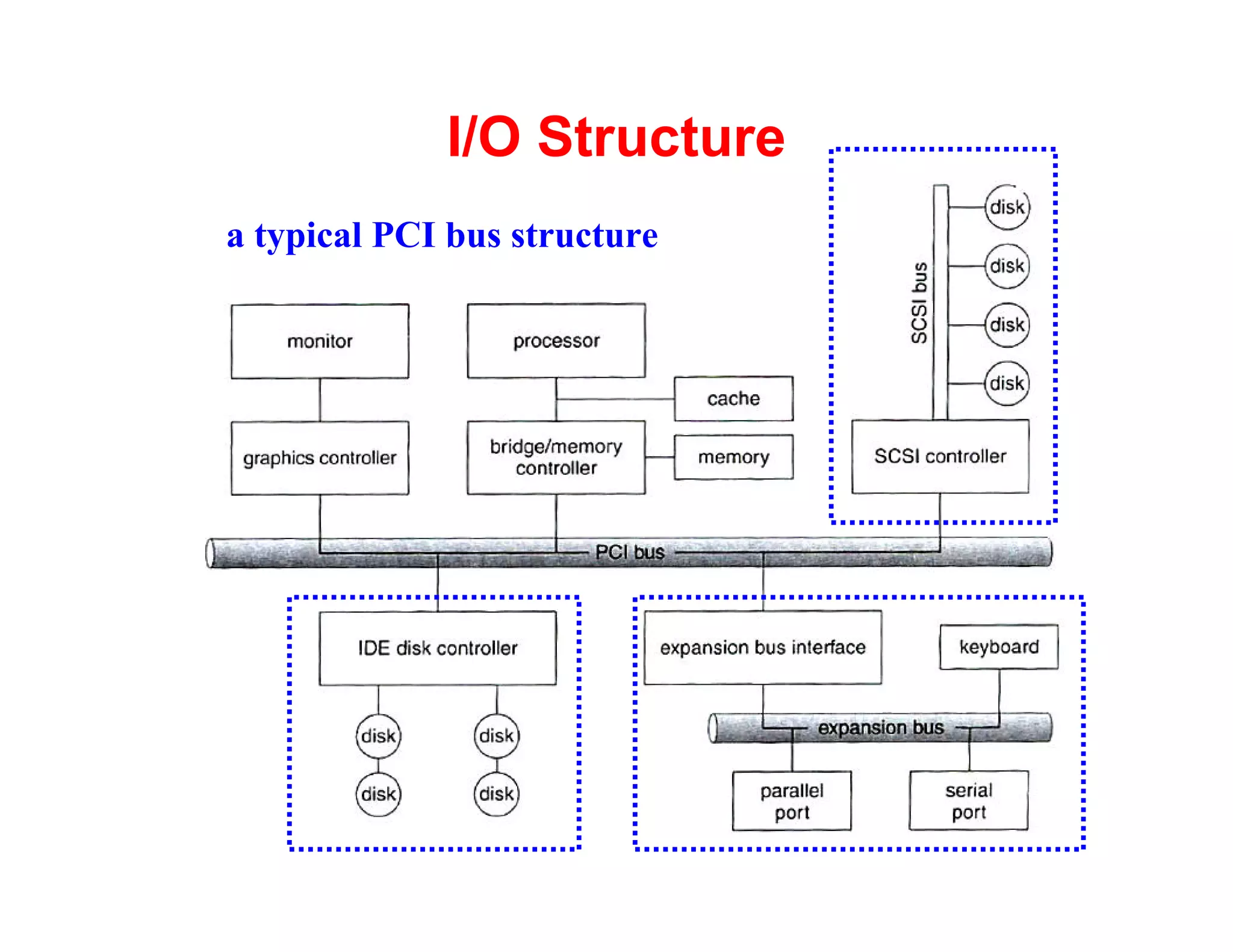
I/O Structure
a typical PCI bus structure


                              9
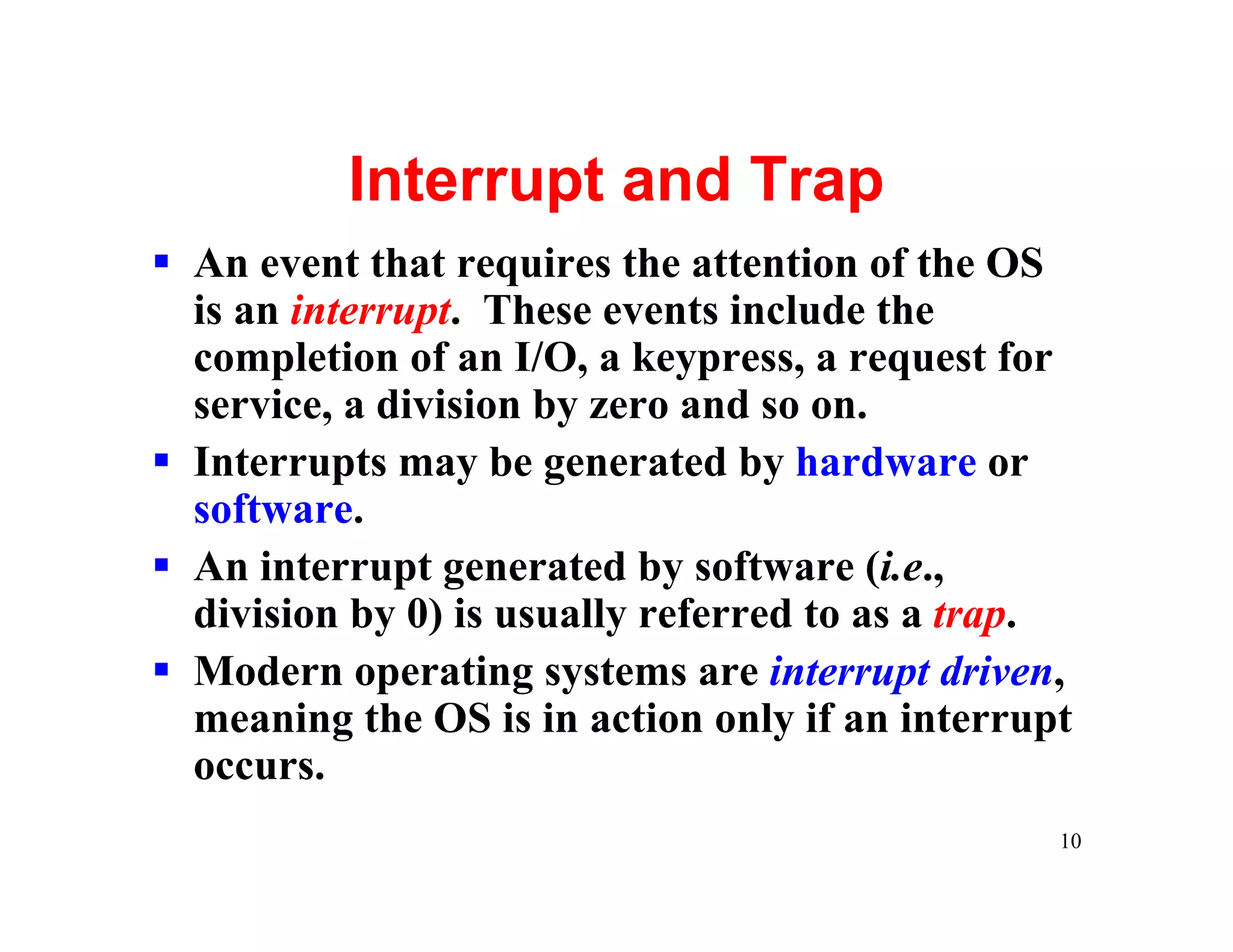
Interrupt and Trap
§ An event that requires the attention of the OS
  is an interrupt. These events include the
  completion of an I/O, a keypress, a request for
  service, a division by zero and so on.
§ Interrupts may be generated by hardware or
  software.
§ An interrupt generated by software (i.e.,
  division by 0) is usually referred to as a trap.
§ Modern operating systems are interrupt driven,
  meaning the OS is in action only if an interrupt
  occurs.
                                                 10
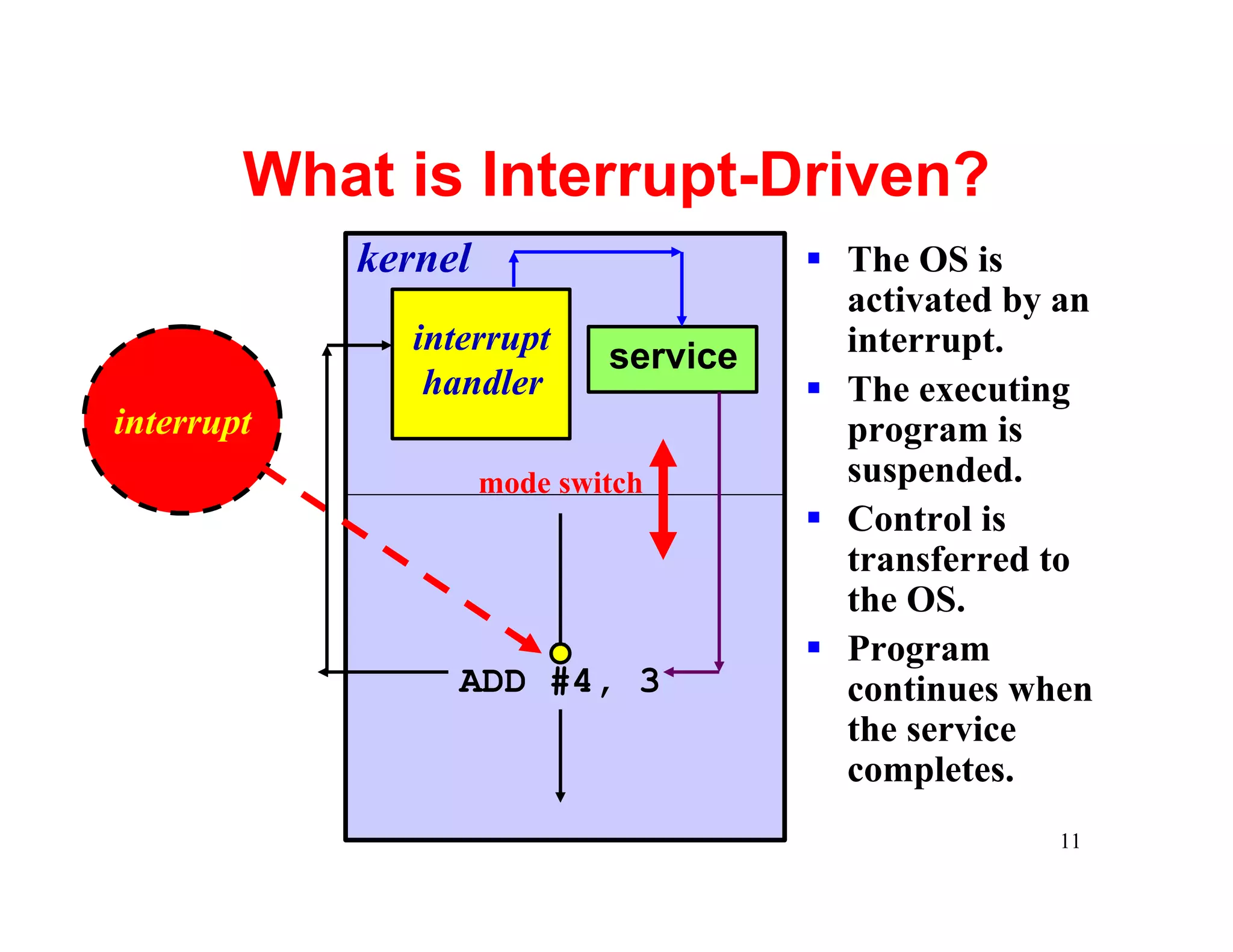
What is Interrupt-Driven?
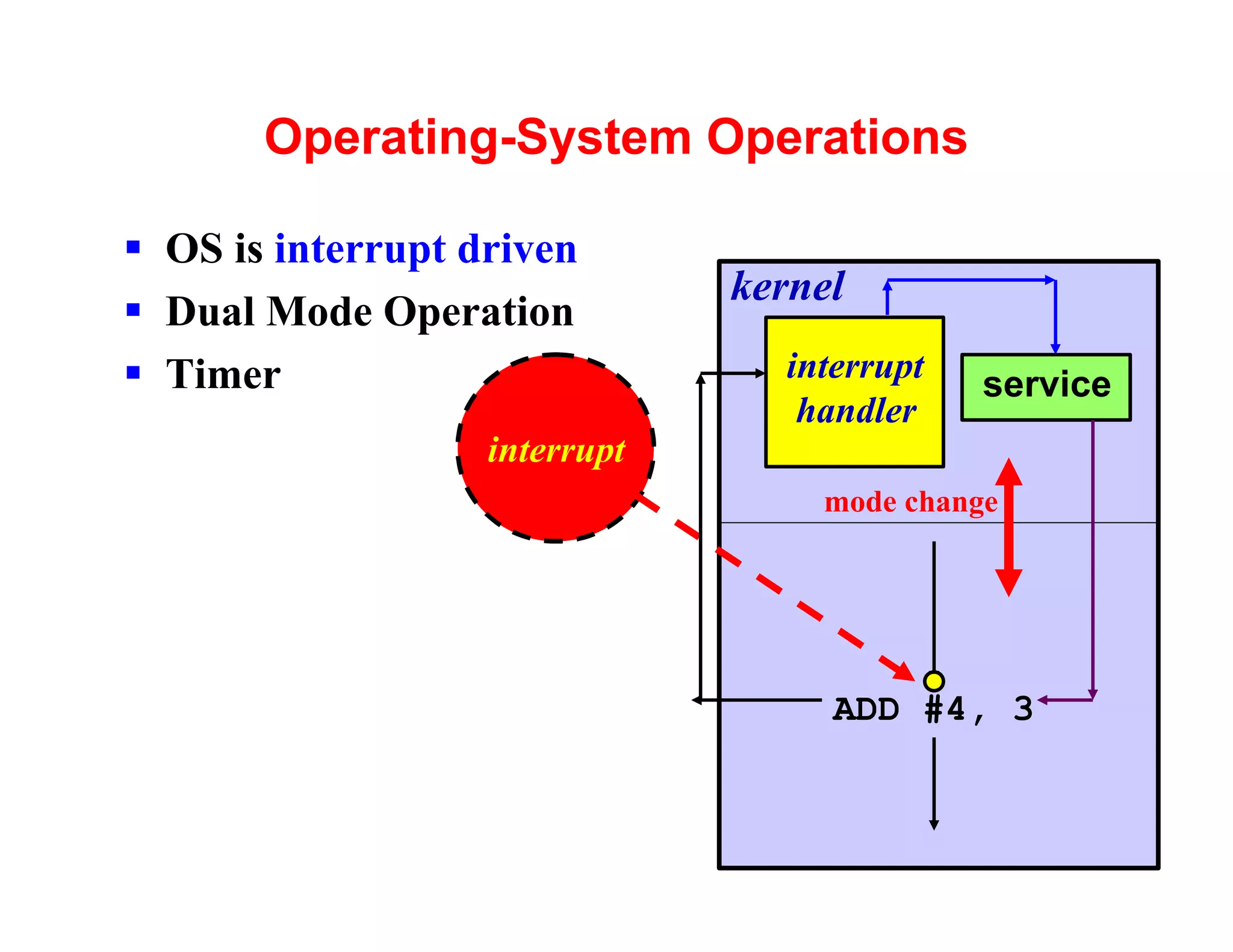
            kernel                     § The OS is
                                         activated by an
              interrupt                  interrupt.
                             service
               handler                 § The executing
interrupt                                program is
                     mode switch         suspended.
                                       § Control is
                                         transferred to
                                         the OS.
                                       § Program
                 ADD #4, 3               continues when
                                         the service
                                         completes.
                                                      11
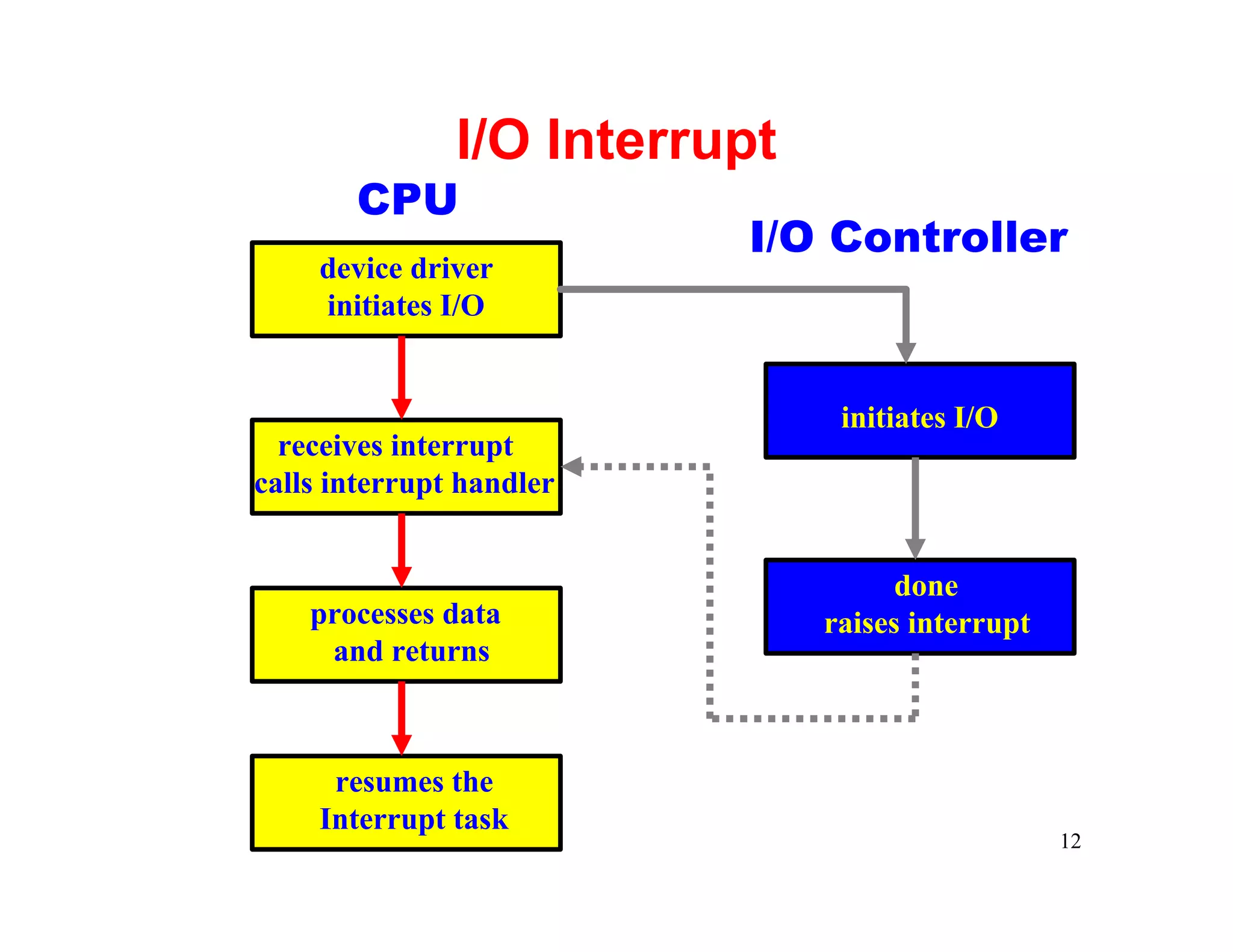
I/O Interrupt
       CPU
                          I/O Controller
     device driver
     initiates I/O


                                initiates I/O
  receives interrupt
calls interrupt handler


                                     done
    processes data             raises interrupt
     and returns


      resumes the
     Interrupt task
                                                  12
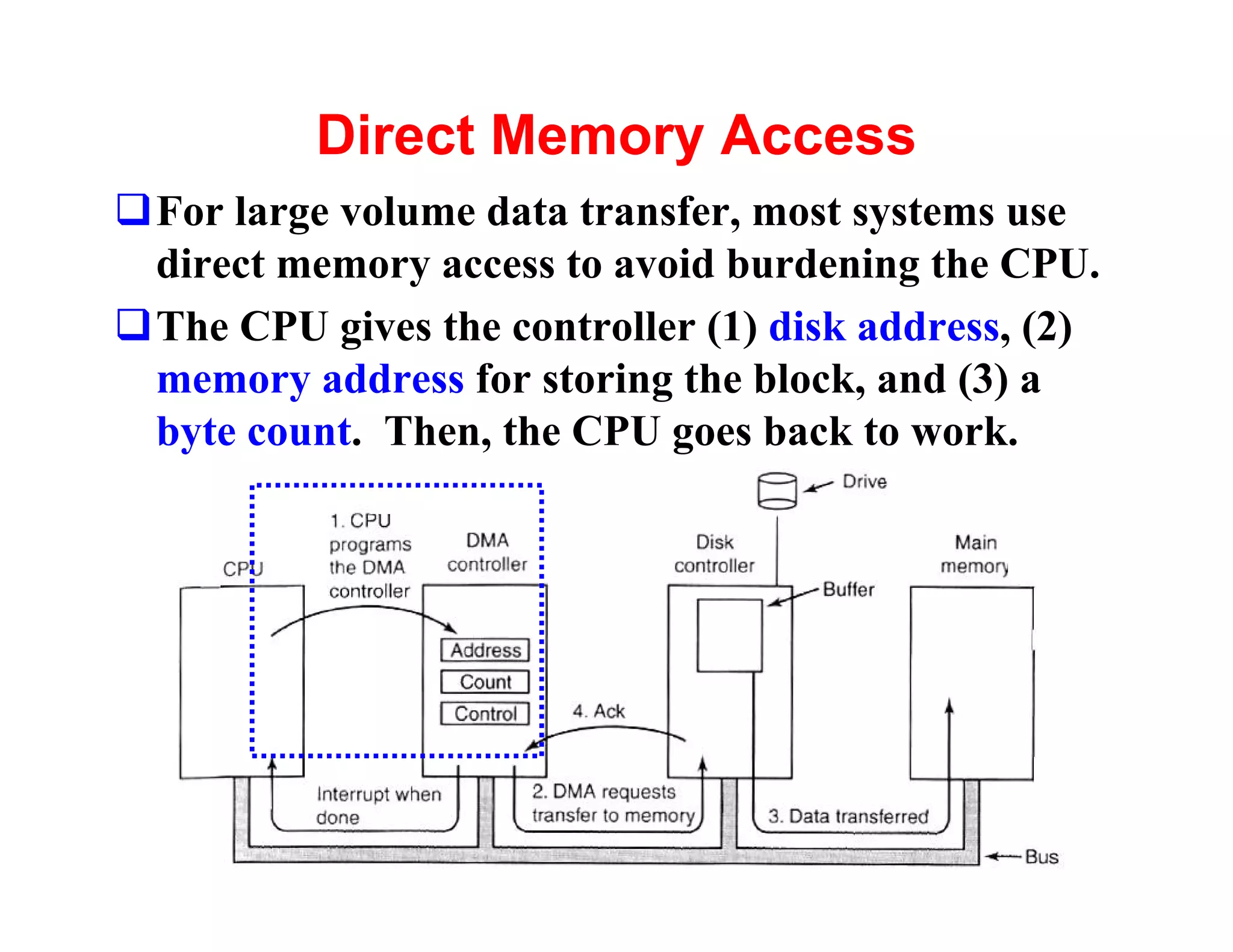
Direct Memory Access
qFor large volume data transfer, most systems use
 direct memory access to avoid burdening the CPU.
qThe CPU gives the controller (1) disk address, (2)
 memory address for storing the block, and (3) a
 byte count. Then, the CPU goes back to work.


                                                13
Computer-System Architecture
§ Single-Processor Systems
§ Multiprocessor Systems
§ Clustered Systems
   **details will be presented in next few pages**


                                                     14
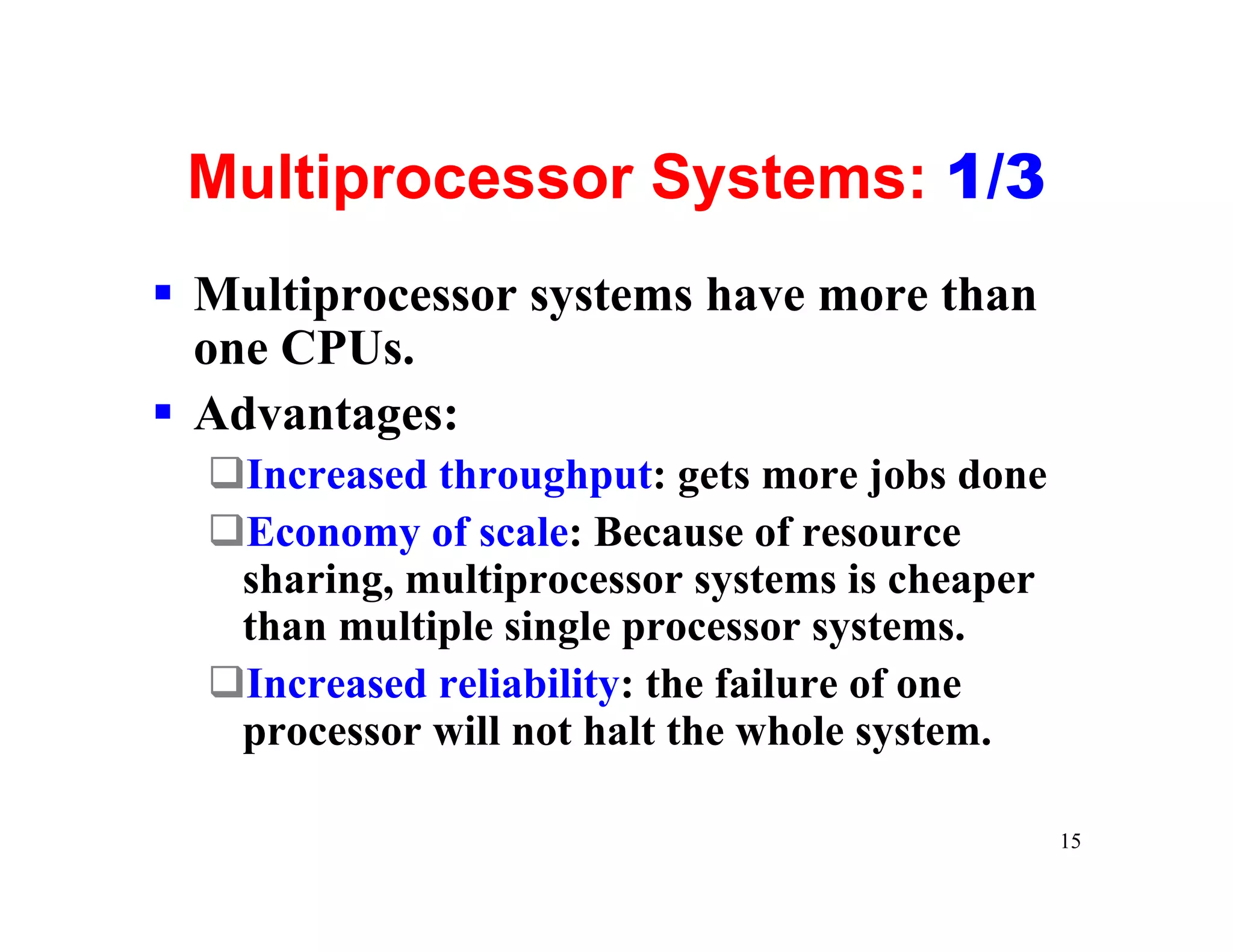
Multiprocessor Systems: 1/3
§ Multiprocessor systems have more than
  one CPUs.
§ Advantages:
  qIncreased throughput: gets more jobs done
  qEconomy of scale: Because of resource
   sharing, multiprocessor systems is cheaper
   than multiple single processor systems.
  qIncreased reliability: the failure of one
   processor will not halt the whole system.

                                                15
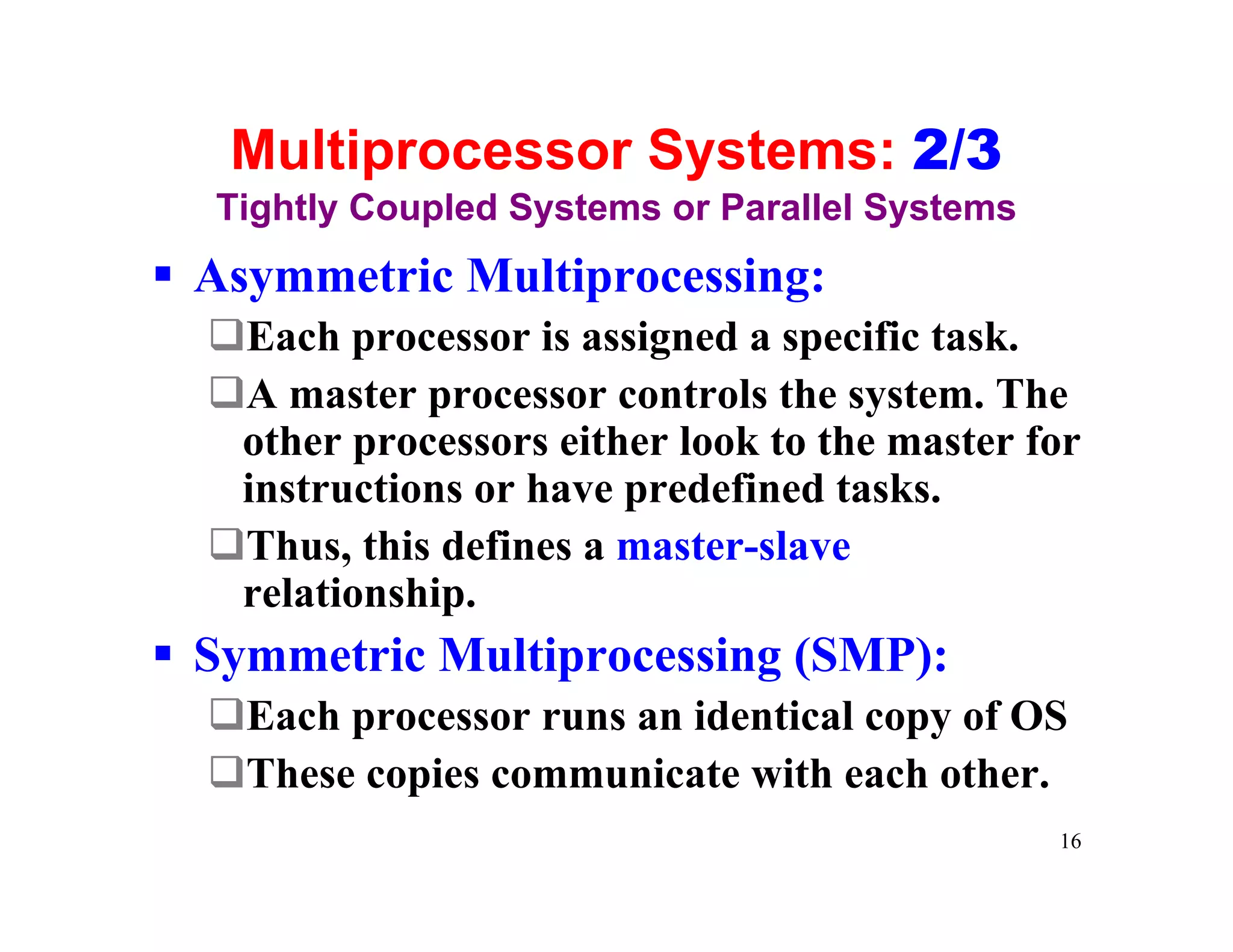
Multiprocessor Systems: 2/3
  Tightly Coupled Systems or Parallel Systems
§ Asymmetric Multiprocessing:
  qEach processor is assigned a specific task.
  qA master processor controls the system. The
   other processors either look to the master for
   instructions or have predefined tasks.
  qThus, this defines a master-slave
   relationship.
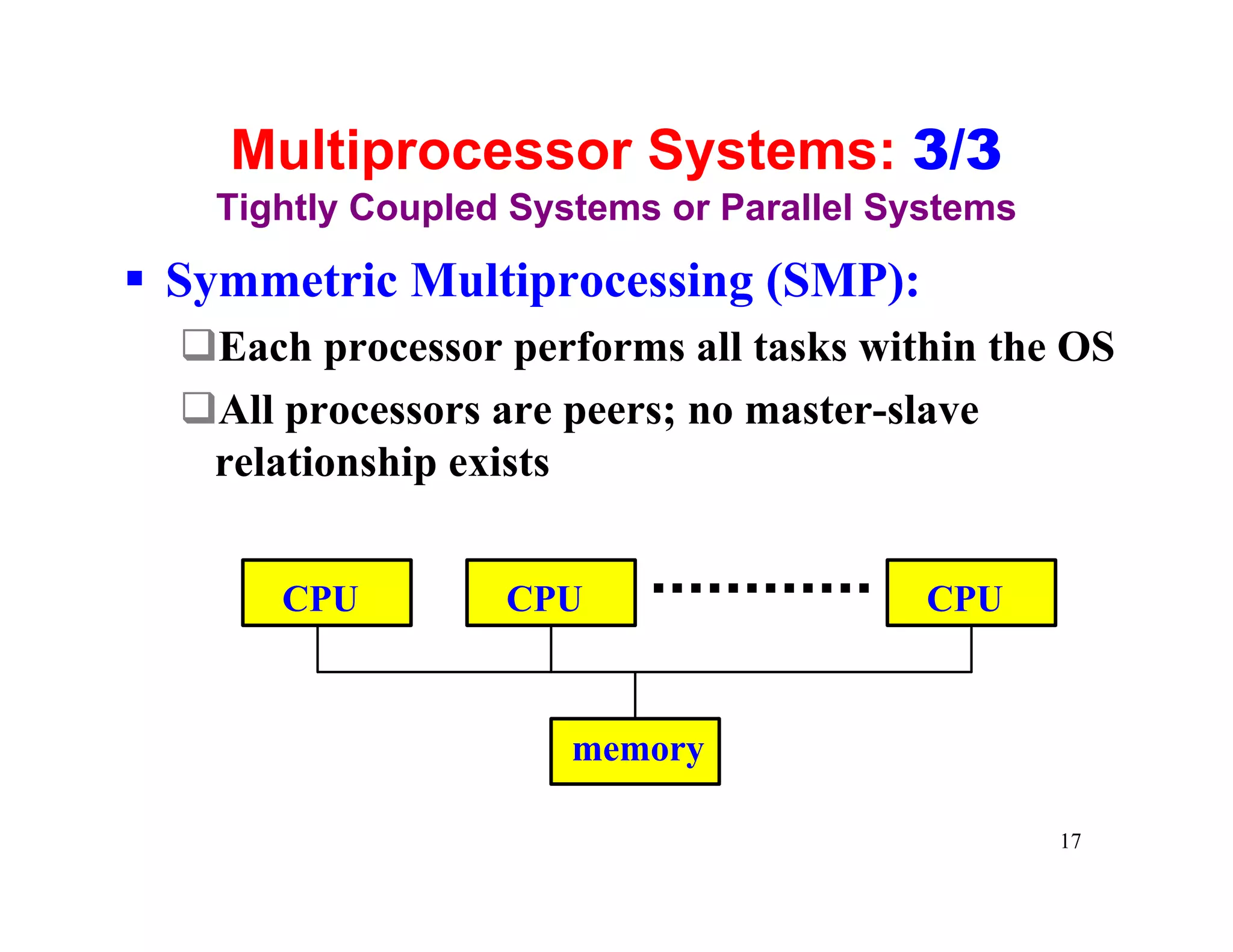
§ Symmetric Multiprocessing (SMP):
  qEach processor runs an identical copy of OS
  qThese copies communicate with each other.
                                                16
Multiprocessor Systems: 3/3
   Tightly Coupled Systems or Parallel Systems

§ Symmetric Multiprocessing (SMP):
  qEach processor performs all tasks within the OS
  qAll processors are peers; no master-slave
   relationship exists


       CPU        CPU                    CPU


                      memory

                                                 17
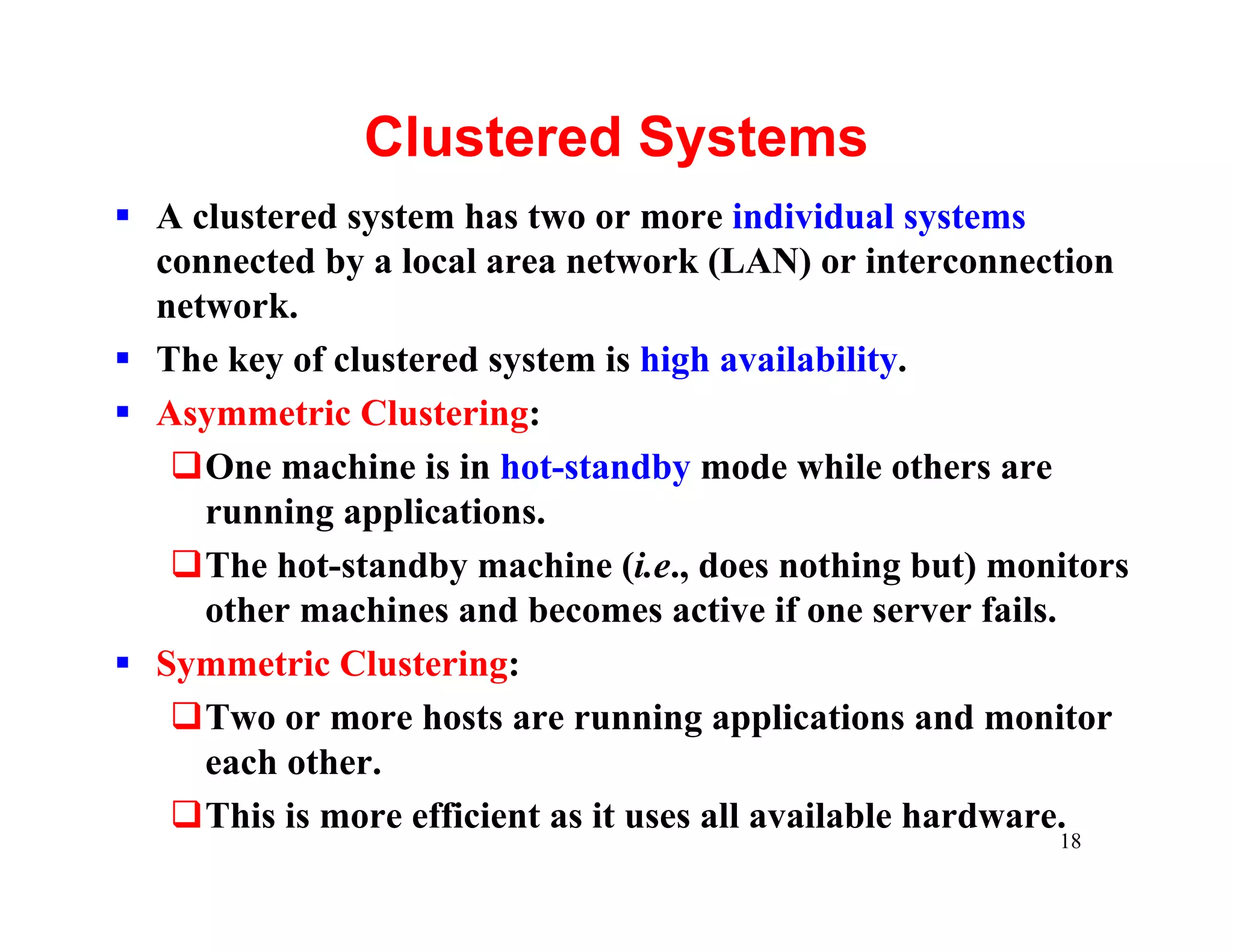
Clustered Systems
§ A clustered system has two or more individual systems
  connected by a local area network (LAN) or interconnection
  network.
§ The key of clustered system is high availability.
§ Asymmetric Clustering:
   qOne machine is in hot-standby mode while others are
     running applications.
   qThe hot-standby machine (i.e., does nothing but) monitors
     other machines and becomes active if one server fails.
§ Symmetric Clustering:
   qTwo or more hosts are running applications and monitor
     each other.
   qThis is more efficient as it uses all available hardware.
                                                        18
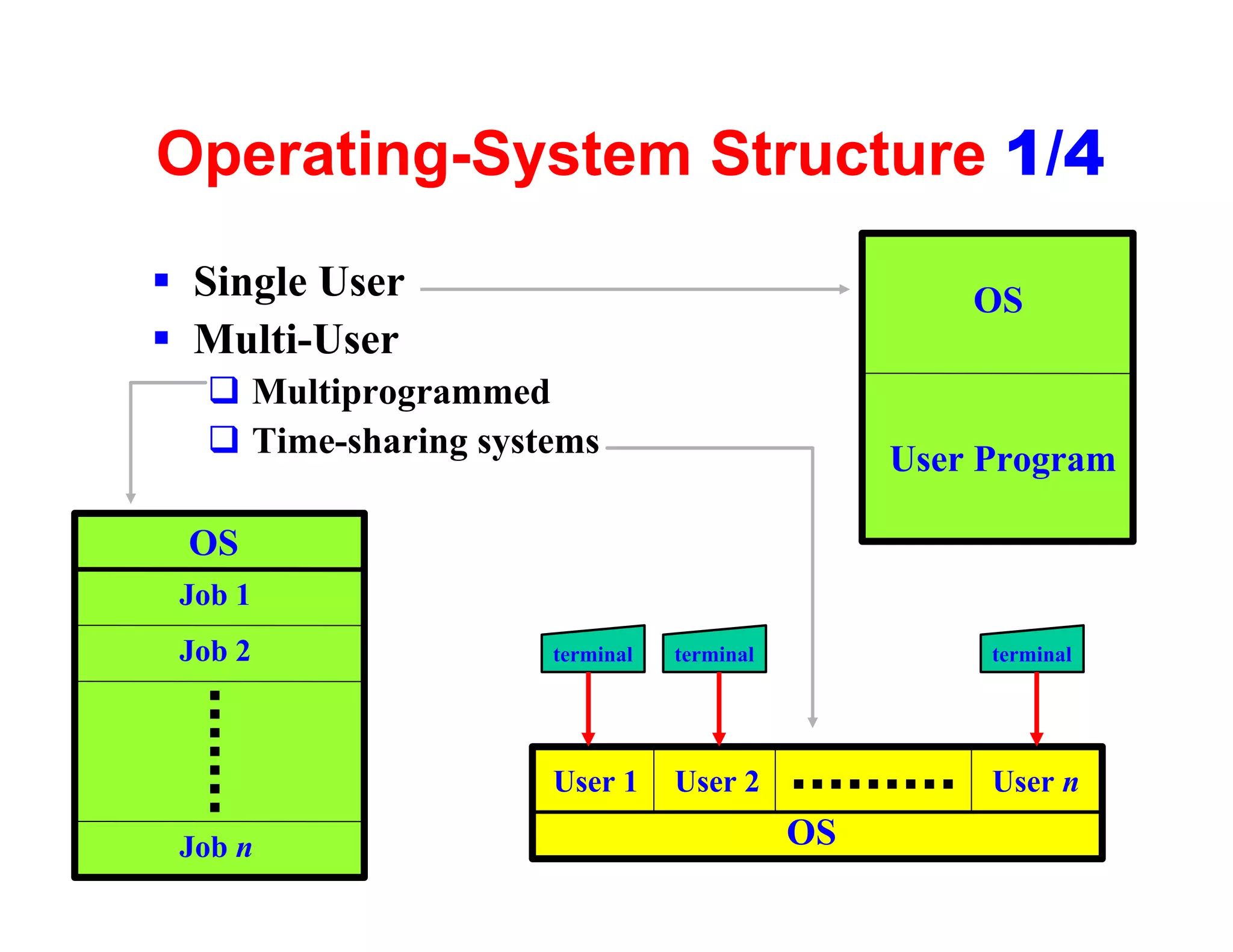
Operating-System Structure 1/4
§ Single User                                       OS
§ Multi-User
  q Multiprogrammed
  q Time-sharing systems                        User Program

 OS
 Job 1
 Job 2               terminal   terminal             terminal


                     User 1     User 2               User n

 Job n                                     OS              19
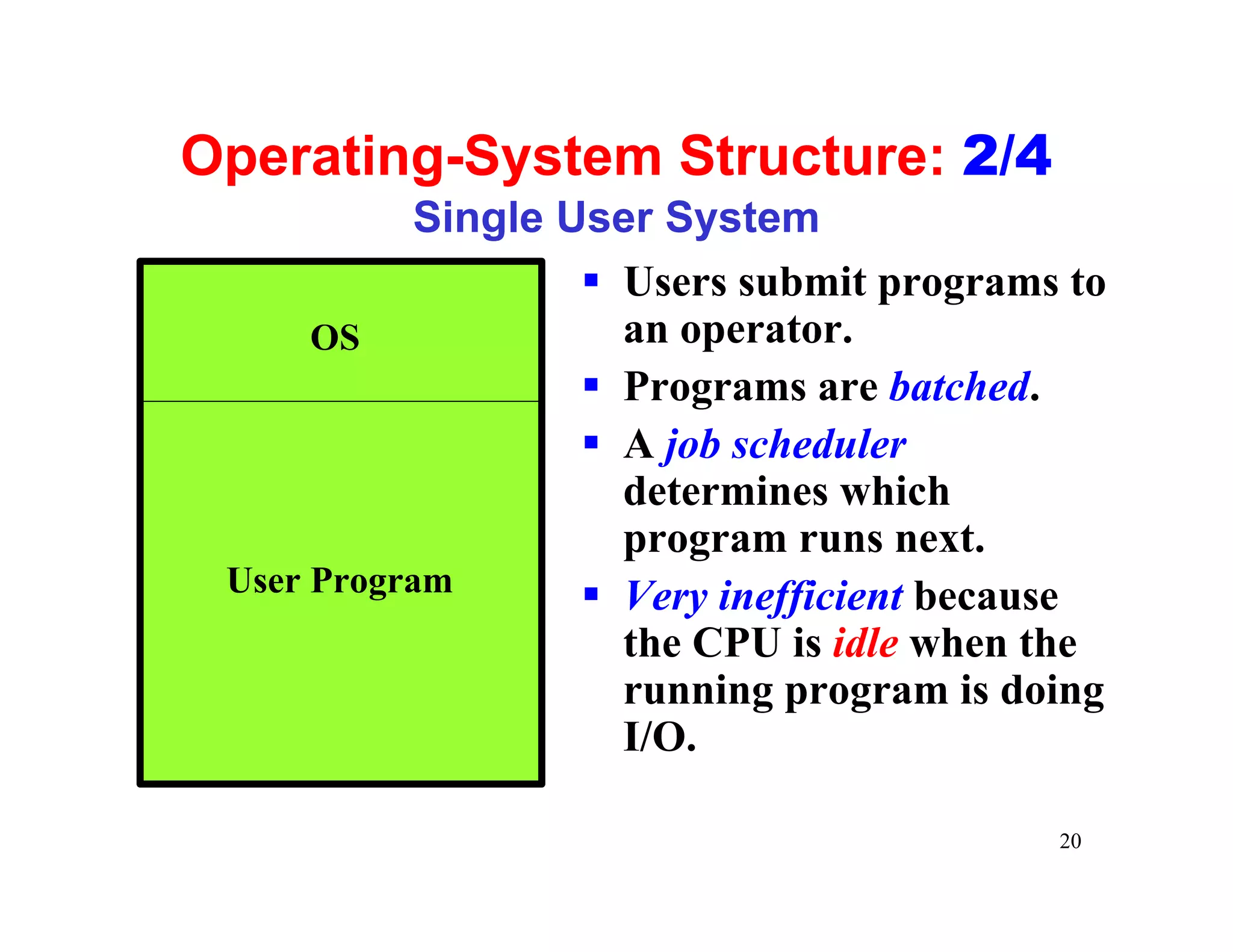
Operating-System Structure: 2/4
            Single User System
                    § Users submit programs to
      OS              an operator.
                    § Programs are batched.
                    § A job scheduler
                      determines which
                      program runs next.
 User Program       § Very inefficient because
                      the CPU is idle when the
                      running program is doing
                      I/O.

                                           20
Operating-System Structure: 3/4
    Multiprogrammed Systems

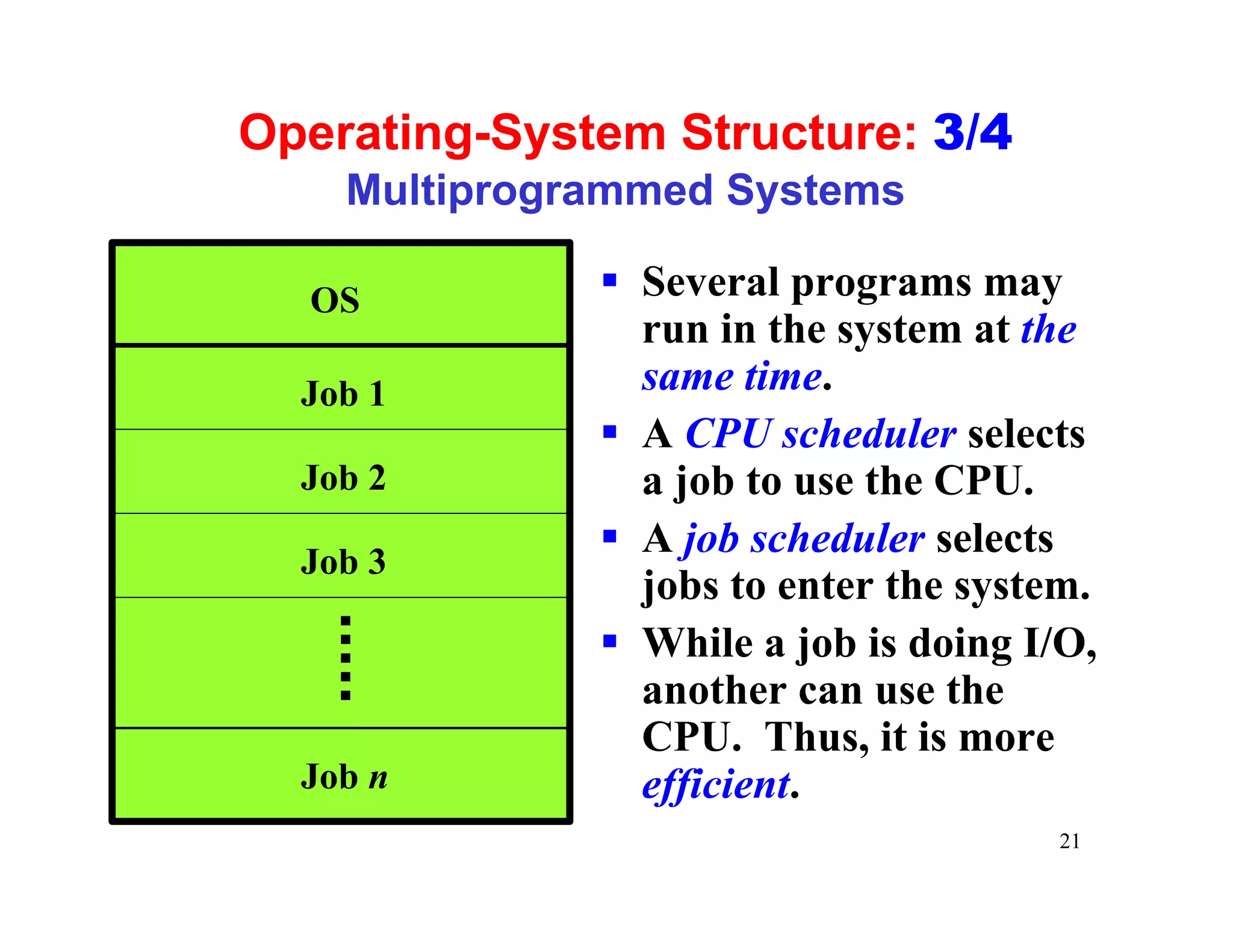
  OS          § Several programs may
                run in the system at the
  Job 1         same time.
              § A CPU scheduler selects
  Job 2         a job to use the CPU.
              § A job scheduler selects
  Job 3
                jobs to enter the system.
              § While a job is doing I/O,
                another can use the
                CPU. Thus, it is more
  Job n         efficient.
                                      21
Operating-System Structure: 4/4
            Time-Sharing Systems
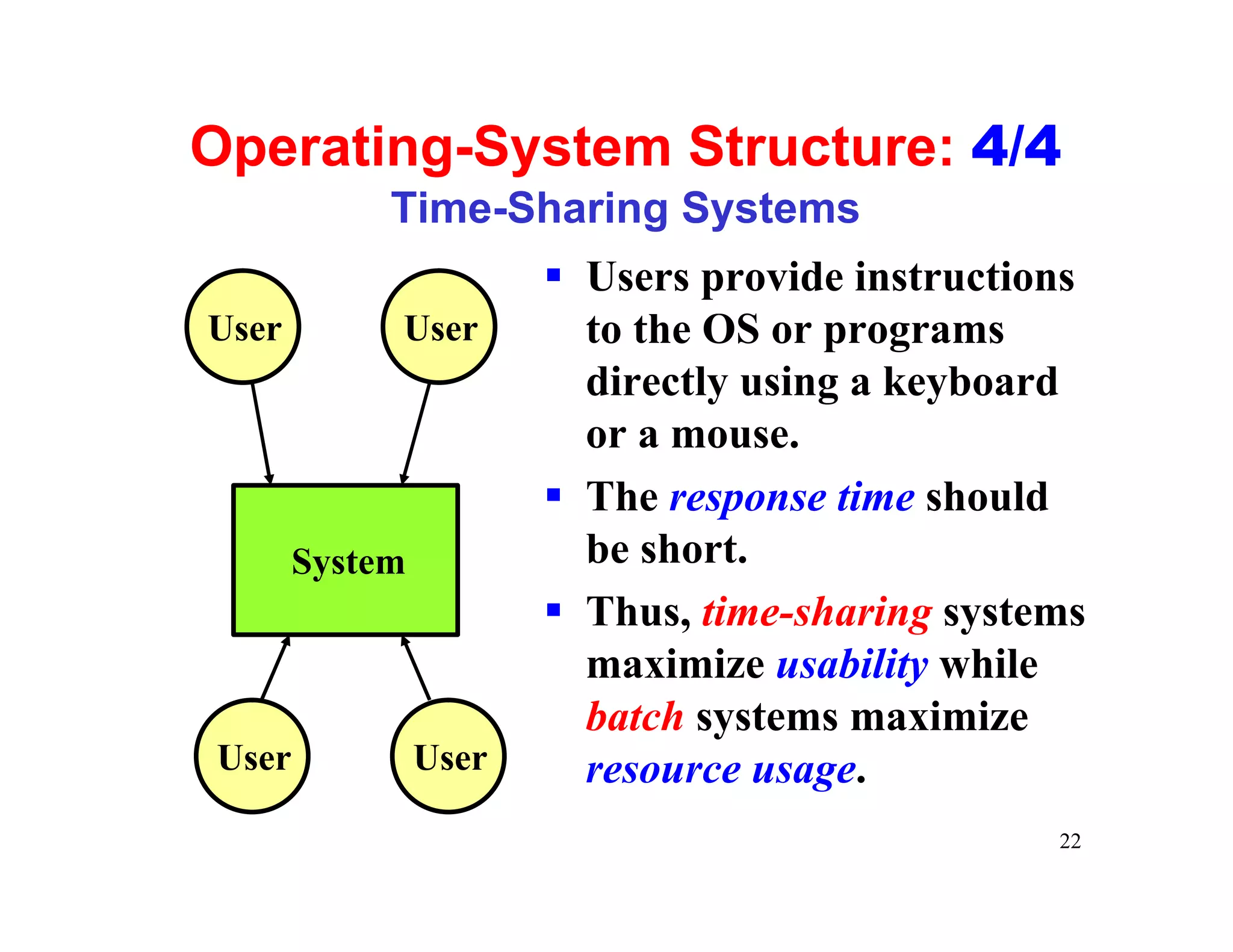
                       § Users provide instructions
User        User         to the OS or programs
                         directly using a keyboard
                         or a mouse.
                       § The response time should
       System            be short.
                       § Thus, time-sharing systems
                         maximize usability while
                         batch systems maximize
User            User     resource usage.
                                                 22
Operating-System Operations

§ OS is interrupt driven
                               kernel
§ Dual Mode Operation
§ Timer                          interrupt
                                             service
                                  handler
                   interrupt
                                   mode change


                                    ADD #4, 3


                                                 23
Dual-Mode Operation
§ Modern CPUs have two execution modes: user
  mode and supervisor (or system, monitor,
  privileged) mode, controlled by a mode bit.
§ The OS runs in supervisor mode and all user
  programs run in user mode.
§ Some instructions that may do harm to the OS
  (e.g., doing I/O) are privileged instructions.
  Privileged instructions can only be used in the
  supervisor model.
§ When the control switches to the OS (resp., a
  user program), execution mode will be changed
  to supervisor (resp., user) mode.
                                                24
Timer
§ Because the operating system must maintain the
  control over the CPU, we must prevent a user
  program from getting the CPU forever or not
  calling system service.
§ Use an interval timer! An interval timer is a
  count-down timer.
§ Before a user program runs, the OS sets the
  interval timer to certain value. Once the
  interval timer counts down to 0, an interrupt is
  generated and the OS can make appropriate
  action.
                                                25
Distributed Systems: 1/3
§ A distributed system is a collection of physically
  separate, possible heterogeneous computer
  systems that are networked to provide the users
  with access to the various resources that the
  system maintains.
§ By being able to communicate, distributed
  systems are able to share computational tasks,
  and provide a rich set of features to users.


                                                   26
Distributed Systems: 2/3
§ A network operating system is an OS that
   qprovides features such as file sharing across
     the network
   qincludes a communication scheme that allows
     different processes running on different
     computers to exchange messages
§ A computer in a network operating system acts
  autonomously from all other computers on the
  network, although it is aware of the network and
  is able to communicate with other computers.
                                                27
Distributed Systems: 3/3
§ A distributed operating system is less
  autonomous.
§ Different operating systems communicate closely
  enough to provide the illusion that only a single
  operating system controls the network.


                                                 28
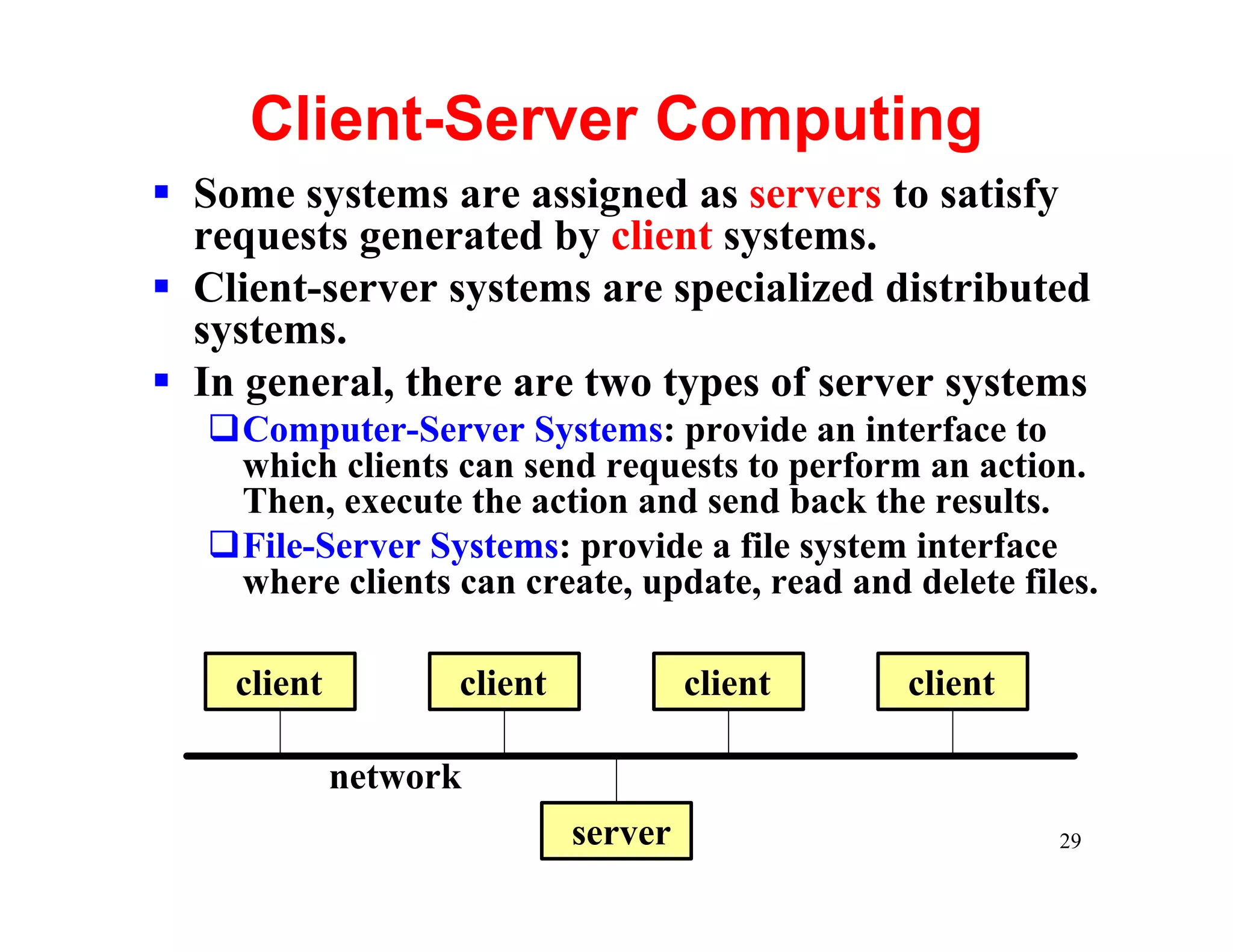
Client-Server Computing
§ Some systems are assigned as servers to satisfy
  requests generated by client systems.
§ Client-server systems are specialized distributed
  systems.
§ In general, there are two types of server systems
   qComputer-Server Systems: provide an interface to
    which clients can send requests to perform an action.
    Then, execute the action and send back the results.
   qFile-Server Systems: provide a file system interface
    where clients can create, update, read and delete files.

    client         client            client    client

             network
                            server                       29
Real-Time Operating Systems
§ A real-time operating system has well-defined,
  fixed time constraints.
§ Processing must be done within the defined
  constraints, or the system will fail.
§ Hard Real-Time Systems guarantee that critical
  tasks be completed on time.
§ Soft Real-Time Systems prioritize critical tasks.
  That is, a critical task get priority over other
  tasks, and retains that priority until it
  completes.
§ Embedded systems almost always run real-time
  operating systems.
                                                 30

1 introduction

  • 1.
    Part I Overview Chapter1: Introduction 1
  • 2.
    What is anOperating System? § A computer system can be roughly divided into the hardware, the operating system, the application programs, and the users. § The hardware (i.e., CPU, memory, I/O devices) provides the basic computing resources. § The application programs (e.g., web browsers, word processors, and compilers) are used to solve user problems. § The operating system controls and coordinates the use of hardware among various application programs. 2
  • 3.
    User View § PCUsers: an operating system is a program that provides an easy-to-use interface for using the hardware. § Mainframe/Minicomputer Users: an operating system is a program that helps maximize the system resource utilization. § Workstation Users: an operating system is a program designed to compromise between individual usability and resource utilization. 3
  • 4.
    System View § AResource Manager: the operating system allocates and reclaims the system hardware resources to and from user programs. § A Control Program: the operating system controls the execution of user programs to prevent errors and improper use of the computer. § There is no universal definition of what is an operating system. A common definition is that the operating system is the one program running at all times on the computer (i.e., the kernel). All other programs are application programs. 4
  • 5.
    The Goals ofan Operating System § Primary Goal: efficient operation of the computer system. § In some systems, it is easy of use. § In general, efficiency is far more important than easy of use. 5
  • 6.
    Computer-System Organization § Computer-SystemOperation § Storage Structure (von Neumann architecture): • CPU-Memory • Fetch-decode-execute-store § I/O structure § More on the next few slides 6
  • 7.
    Computer System Operation tapes disk printer § How does printer the OS get disk into system? § How do we Printer Tape Disk request for CPU Controller Controller Controller services? § How does system bus the OS know something Memory Controller has happened? Memory 7
  • 8.
    Storage Hierarchy slower and reg. faster and larger volume more expansive cache main mem. electronic disk magnetic disk optical disk magnetic tape 8
  • 9.
    I/O Structure a typicalPCI bus structure 9
  • 10.
    Interrupt and Trap §An event that requires the attention of the OS is an interrupt. These events include the completion of an I/O, a keypress, a request for service, a division by zero and so on. § Interrupts may be generated by hardware or software. § An interrupt generated by software (i.e., division by 0) is usually referred to as a trap. § Modern operating systems are interrupt driven, meaning the OS is in action only if an interrupt occurs. 10
  • 11.
    What is Interrupt-Driven? kernel § The OS is activated by an interrupt interrupt. service handler § The executing interrupt program is mode switch suspended. § Control is transferred to the OS. § Program ADD #4, 3 continues when the service completes. 11
  • 12.
    I/O Interrupt CPU I/O Controller device driver initiates I/O initiates I/O receives interrupt calls interrupt handler done processes data raises interrupt and returns resumes the Interrupt task 12
  • 13.
    Direct Memory Access qForlarge volume data transfer, most systems use direct memory access to avoid burdening the CPU. qThe CPU gives the controller (1) disk address, (2) memory address for storing the block, and (3) a byte count. Then, the CPU goes back to work. 13
  • 14.
    Computer-System Architecture § Single-ProcessorSystems § Multiprocessor Systems § Clustered Systems **details will be presented in next few pages** 14
  • 15.
    Multiprocessor Systems: 1/3 §Multiprocessor systems have more than one CPUs. § Advantages: qIncreased throughput: gets more jobs done qEconomy of scale: Because of resource sharing, multiprocessor systems is cheaper than multiple single processor systems. qIncreased reliability: the failure of one processor will not halt the whole system. 15
  • 16.
    Multiprocessor Systems: 2/3 Tightly Coupled Systems or Parallel Systems § Asymmetric Multiprocessing: qEach processor is assigned a specific task. qA master processor controls the system. The other processors either look to the master for instructions or have predefined tasks. qThus, this defines a master-slave relationship. § Symmetric Multiprocessing (SMP): qEach processor runs an identical copy of OS qThese copies communicate with each other. 16
  • 17.
    Multiprocessor Systems: 3/3 Tightly Coupled Systems or Parallel Systems § Symmetric Multiprocessing (SMP): qEach processor performs all tasks within the OS qAll processors are peers; no master-slave relationship exists CPU CPU CPU memory 17
  • 18.
    Clustered Systems § Aclustered system has two or more individual systems connected by a local area network (LAN) or interconnection network. § The key of clustered system is high availability. § Asymmetric Clustering: qOne machine is in hot-standby mode while others are running applications. qThe hot-standby machine (i.e., does nothing but) monitors other machines and becomes active if one server fails. § Symmetric Clustering: qTwo or more hosts are running applications and monitor each other. qThis is more efficient as it uses all available hardware. 18
  • 19.
    Operating-System Structure 1/4 §Single User OS § Multi-User q Multiprogrammed q Time-sharing systems User Program OS Job 1 Job 2 terminal terminal terminal User 1 User 2 User n Job n OS 19
  • 20.
    Operating-System Structure: 2/4 Single User System § Users submit programs to OS an operator. § Programs are batched. § A job scheduler determines which program runs next. User Program § Very inefficient because the CPU is idle when the running program is doing I/O. 20
  • 21.
    Operating-System Structure: 3/4 Multiprogrammed Systems OS § Several programs may run in the system at the Job 1 same time. § A CPU scheduler selects Job 2 a job to use the CPU. § A job scheduler selects Job 3 jobs to enter the system. § While a job is doing I/O, another can use the CPU. Thus, it is more Job n efficient. 21
  • 22.
    Operating-System Structure: 4/4 Time-Sharing Systems § Users provide instructions User User to the OS or programs directly using a keyboard or a mouse. § The response time should System be short. § Thus, time-sharing systems maximize usability while batch systems maximize User User resource usage. 22
  • 23.
    Operating-System Operations § OSis interrupt driven kernel § Dual Mode Operation § Timer interrupt service handler interrupt mode change ADD #4, 3 23
  • 24.
    Dual-Mode Operation § ModernCPUs have two execution modes: user mode and supervisor (or system, monitor, privileged) mode, controlled by a mode bit. § The OS runs in supervisor mode and all user programs run in user mode. § Some instructions that may do harm to the OS (e.g., doing I/O) are privileged instructions. Privileged instructions can only be used in the supervisor model. § When the control switches to the OS (resp., a user program), execution mode will be changed to supervisor (resp., user) mode. 24
  • 25.
    Timer § Because theoperating system must maintain the control over the CPU, we must prevent a user program from getting the CPU forever or not calling system service. § Use an interval timer! An interval timer is a count-down timer. § Before a user program runs, the OS sets the interval timer to certain value. Once the interval timer counts down to 0, an interrupt is generated and the OS can make appropriate action. 25
  • 26.
    Distributed Systems: 1/3 §A distributed system is a collection of physically separate, possible heterogeneous computer systems that are networked to provide the users with access to the various resources that the system maintains. § By being able to communicate, distributed systems are able to share computational tasks, and provide a rich set of features to users. 26
  • 27.
    Distributed Systems: 2/3 §A network operating system is an OS that qprovides features such as file sharing across the network qincludes a communication scheme that allows different processes running on different computers to exchange messages § A computer in a network operating system acts autonomously from all other computers on the network, although it is aware of the network and is able to communicate with other computers. 27
  • 28.
    Distributed Systems: 3/3 §A distributed operating system is less autonomous. § Different operating systems communicate closely enough to provide the illusion that only a single operating system controls the network. 28
  • 29.
    Client-Server Computing § Somesystems are assigned as servers to satisfy requests generated by client systems. § Client-server systems are specialized distributed systems. § In general, there are two types of server systems qComputer-Server Systems: provide an interface to which clients can send requests to perform an action. Then, execute the action and send back the results. qFile-Server Systems: provide a file system interface where clients can create, update, read and delete files. client client client client network server 29
  • 30.
    Real-Time Operating Systems §A real-time operating system has well-defined, fixed time constraints. § Processing must be done within the defined constraints, or the system will fail. § Hard Real-Time Systems guarantee that critical tasks be completed on time. § Soft Real-Time Systems prioritize critical tasks. That is, a critical task get priority over other tasks, and retains that priority until it completes. § Embedded systems almost always run real-time operating systems. 30