1
Presented by
Narender Singh Sandhu
2
 A program that controls the execution of
application programs
 An interface between applications and
hardware
3
 Convenience
◦ Makes the computer more convenient to use
 Efficiency
◦ Allows computer system resources to be used in an
efficient manner
 Ability to evolve
◦ Permit effective development, testing, and
introduction of new system functions without
interfering with service
4
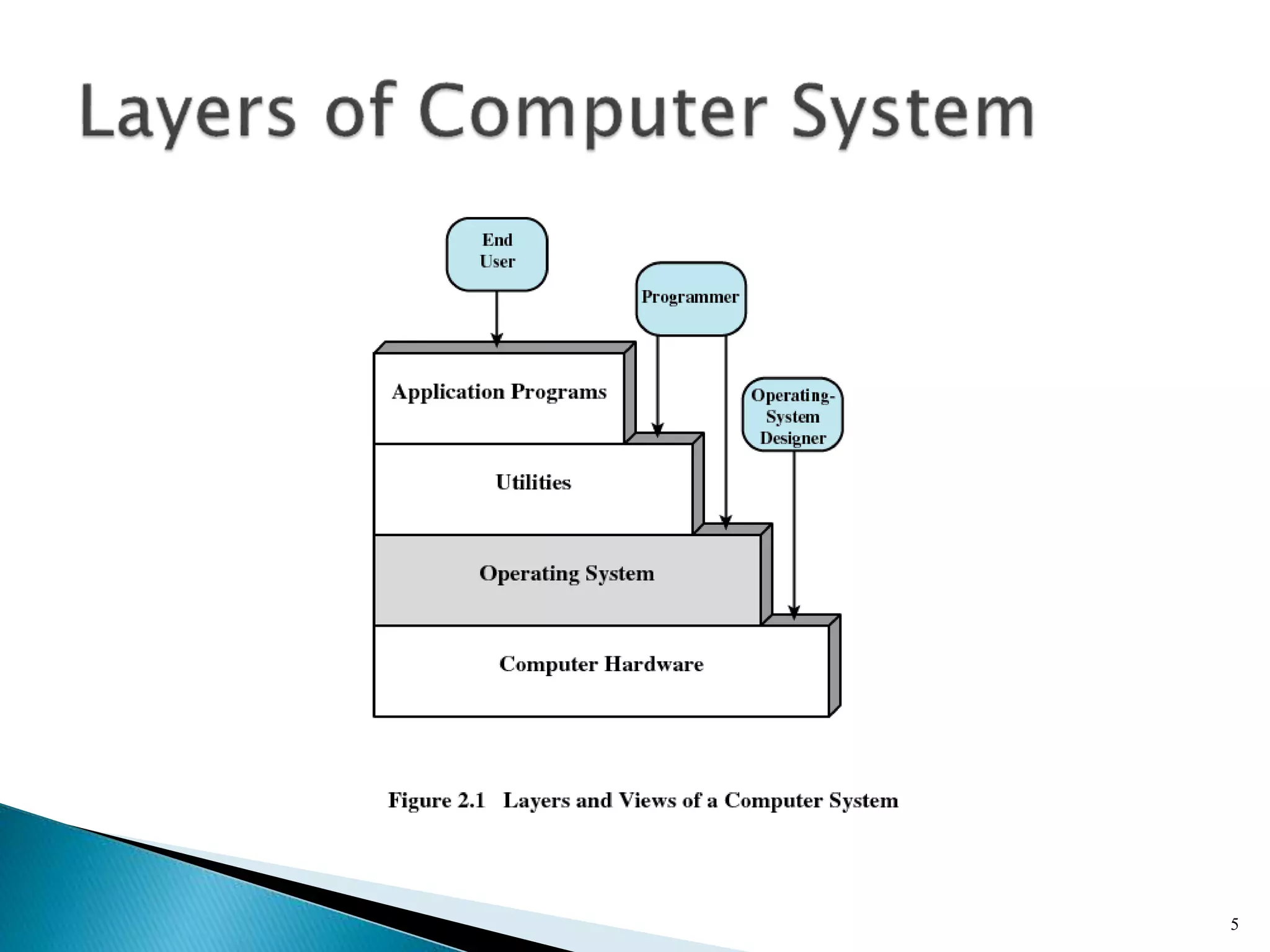
5
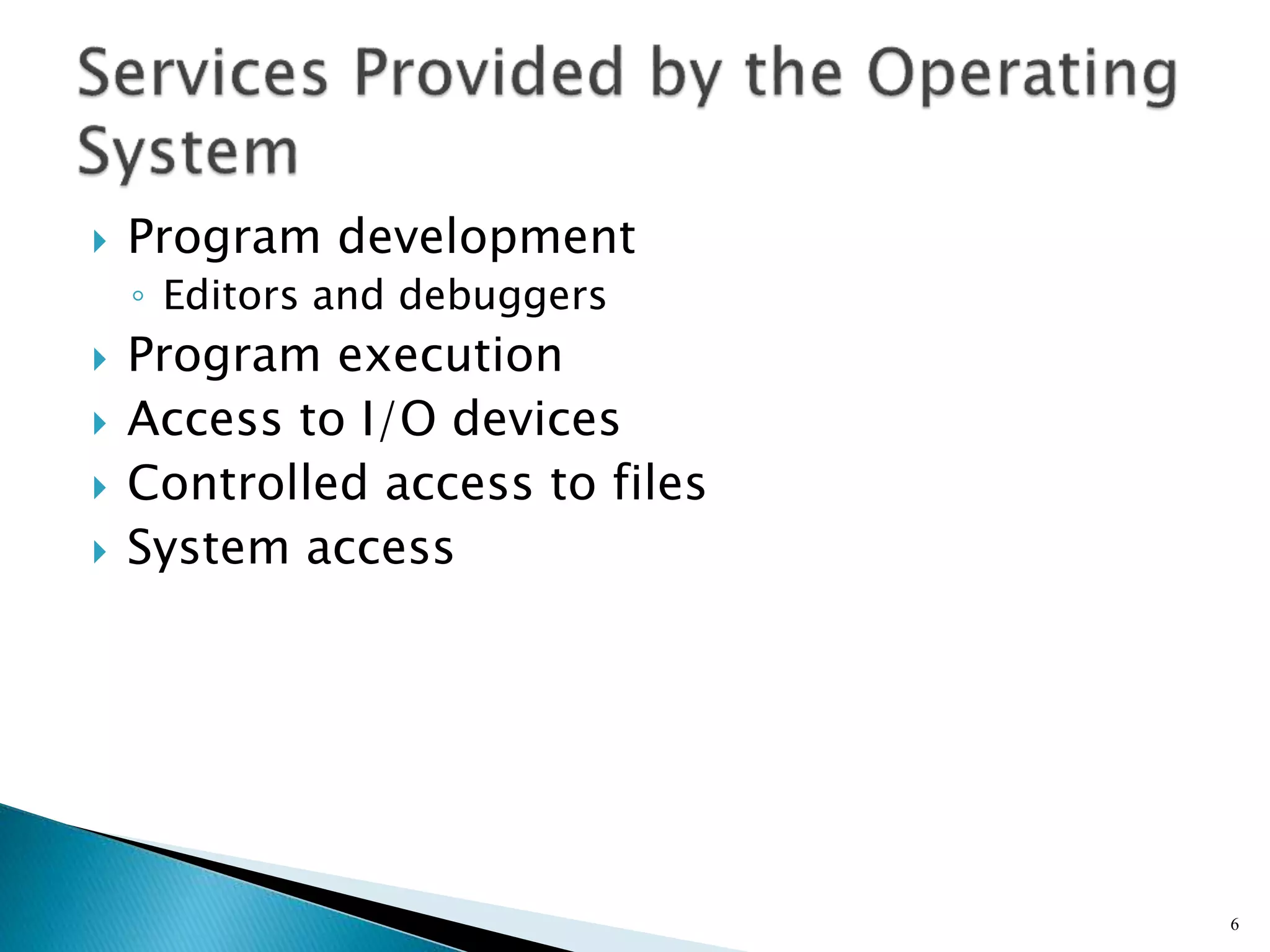
 Program development
◦ Editors and debuggers
 Program execution
 Access to I/O devices
 Controlled access to files
 System access
6
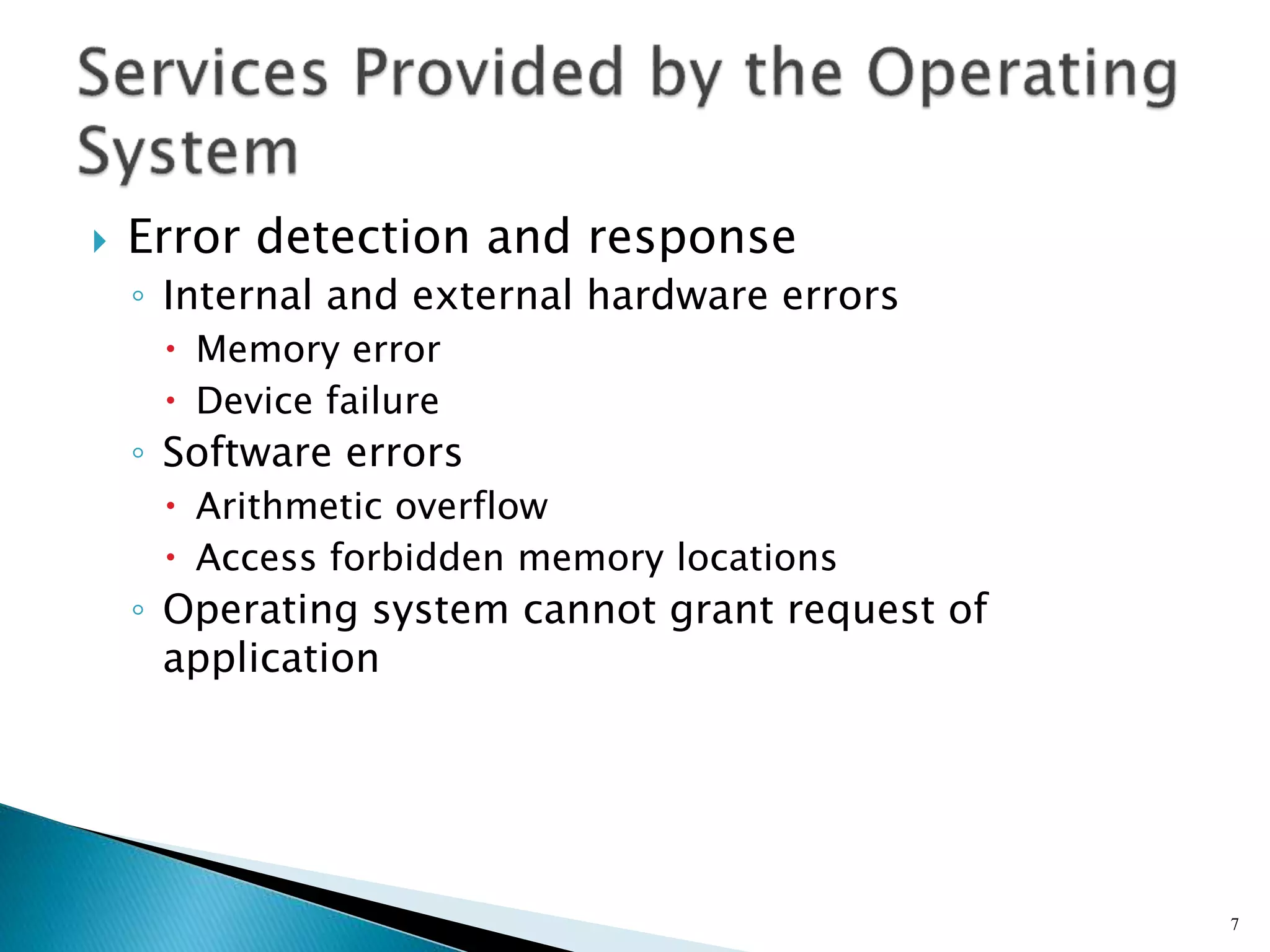
 Error detection and response
◦ Internal and external hardware errors
 Memory error
 Device failure
◦ Software errors
 Arithmetic overflow
 Access forbidden memory locations
◦ Operating system cannot grant request of
application
7
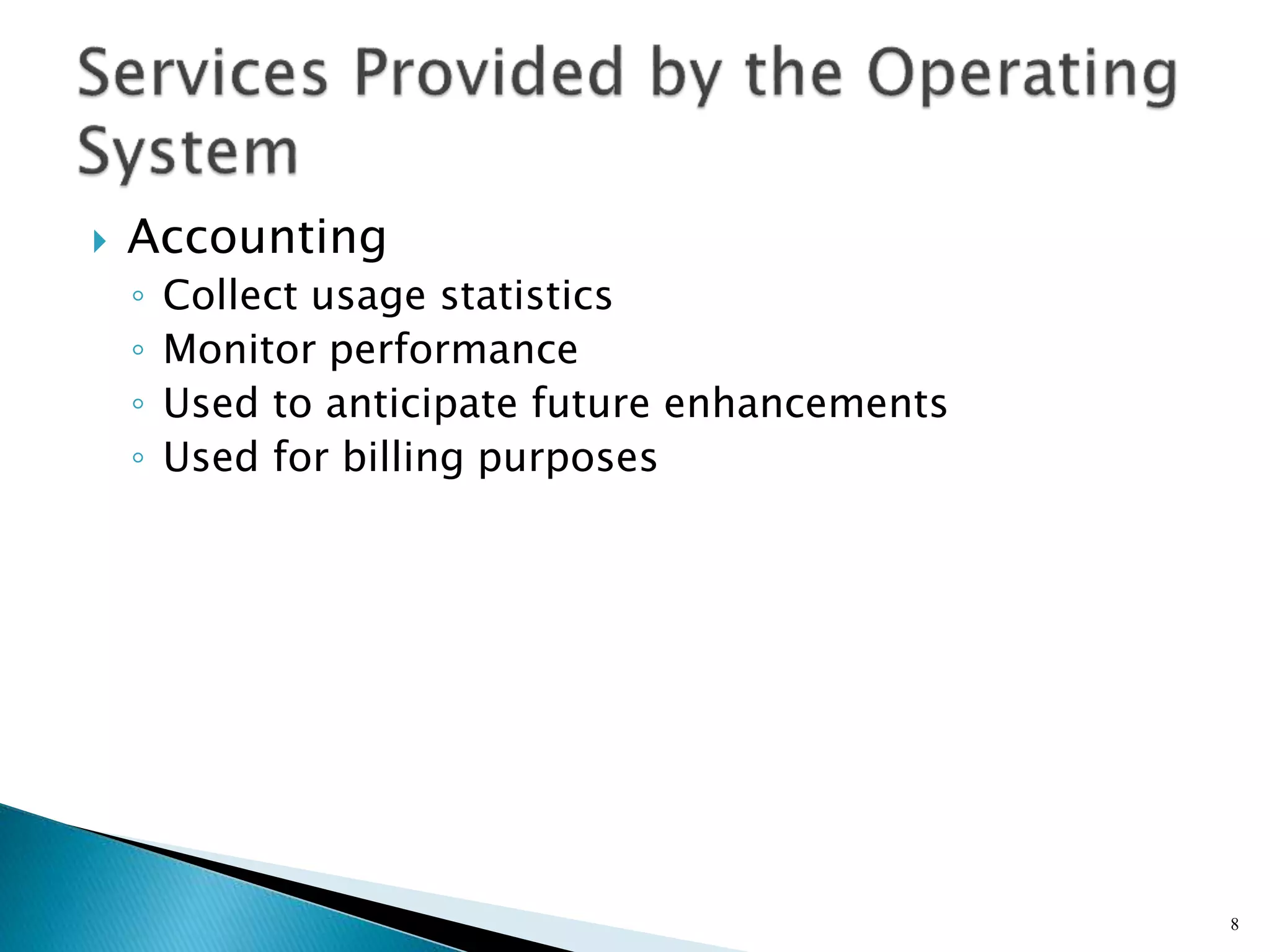
 Accounting
◦ Collect usage statistics
◦ Monitor performance
◦ Used to anticipate future enhancements
◦ Used for billing purposes
8
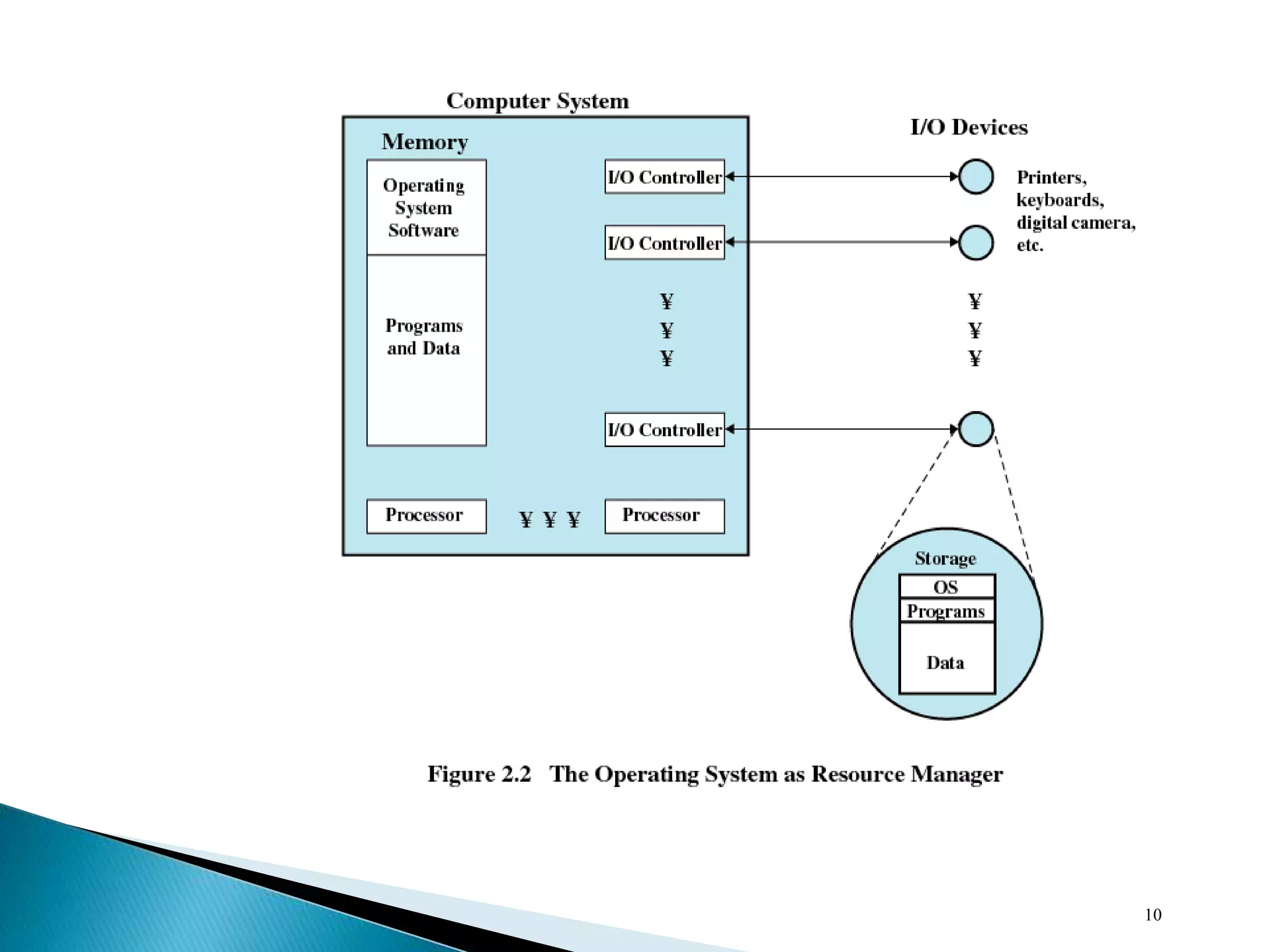
 Responsible for managing resources
 Functions same way as ordinary computer
software
◦ It is program that is executed
 Operating system relinquishes control of the
processor
9
10
 Portion of operating system that is in main
memory
 Contains most frequently used functions
 Also called the nucleus
11
 Hardware upgrades plus new types of
hardware
 New services
 Fixes
12
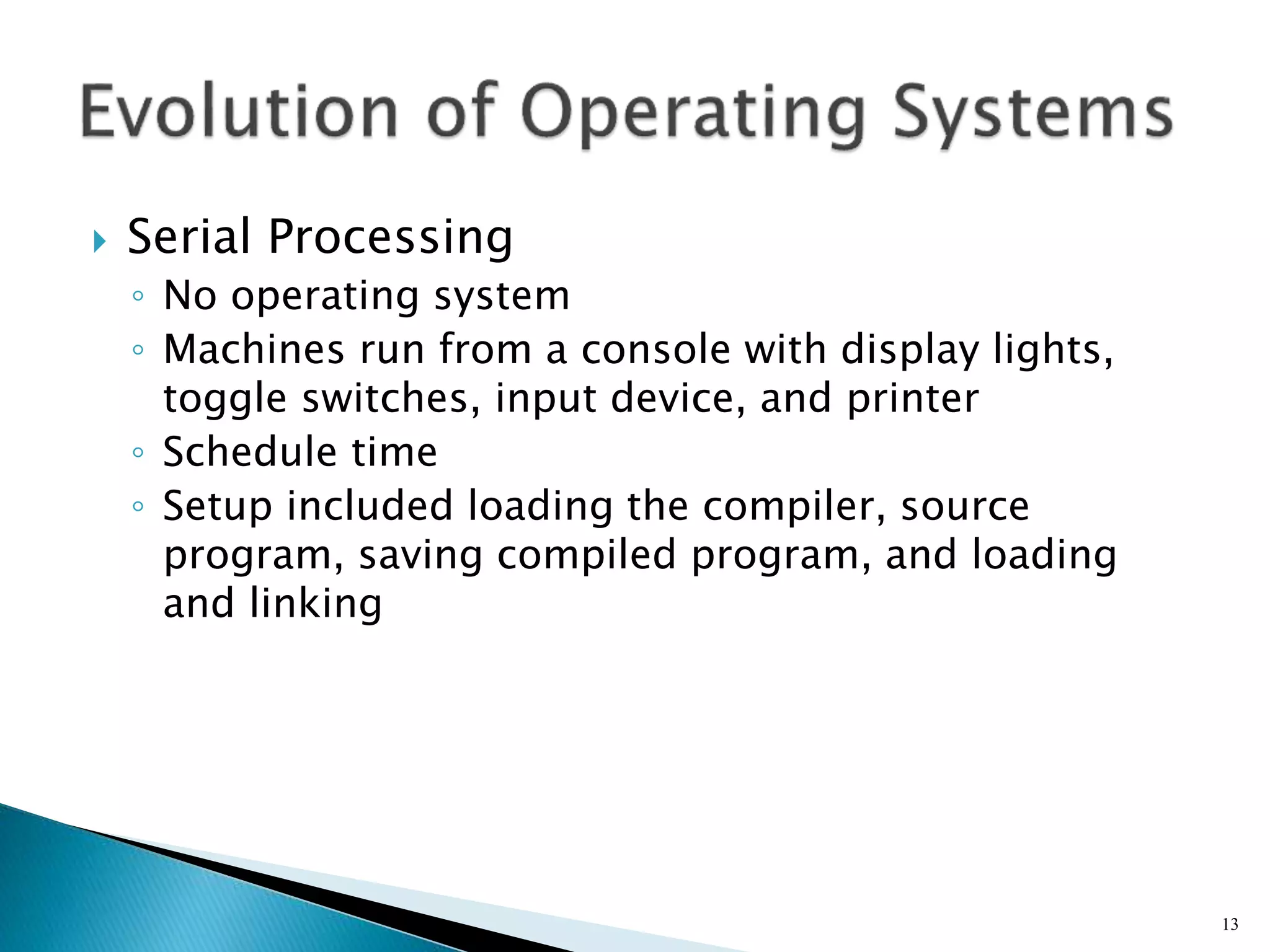
 Serial Processing
◦ No operating system
◦ Machines run from a console with display lights,
toggle switches, input device, and printer
◦ Schedule time
◦ Setup included loading the compiler, source
program, saving compiled program, and loading
and linking
13
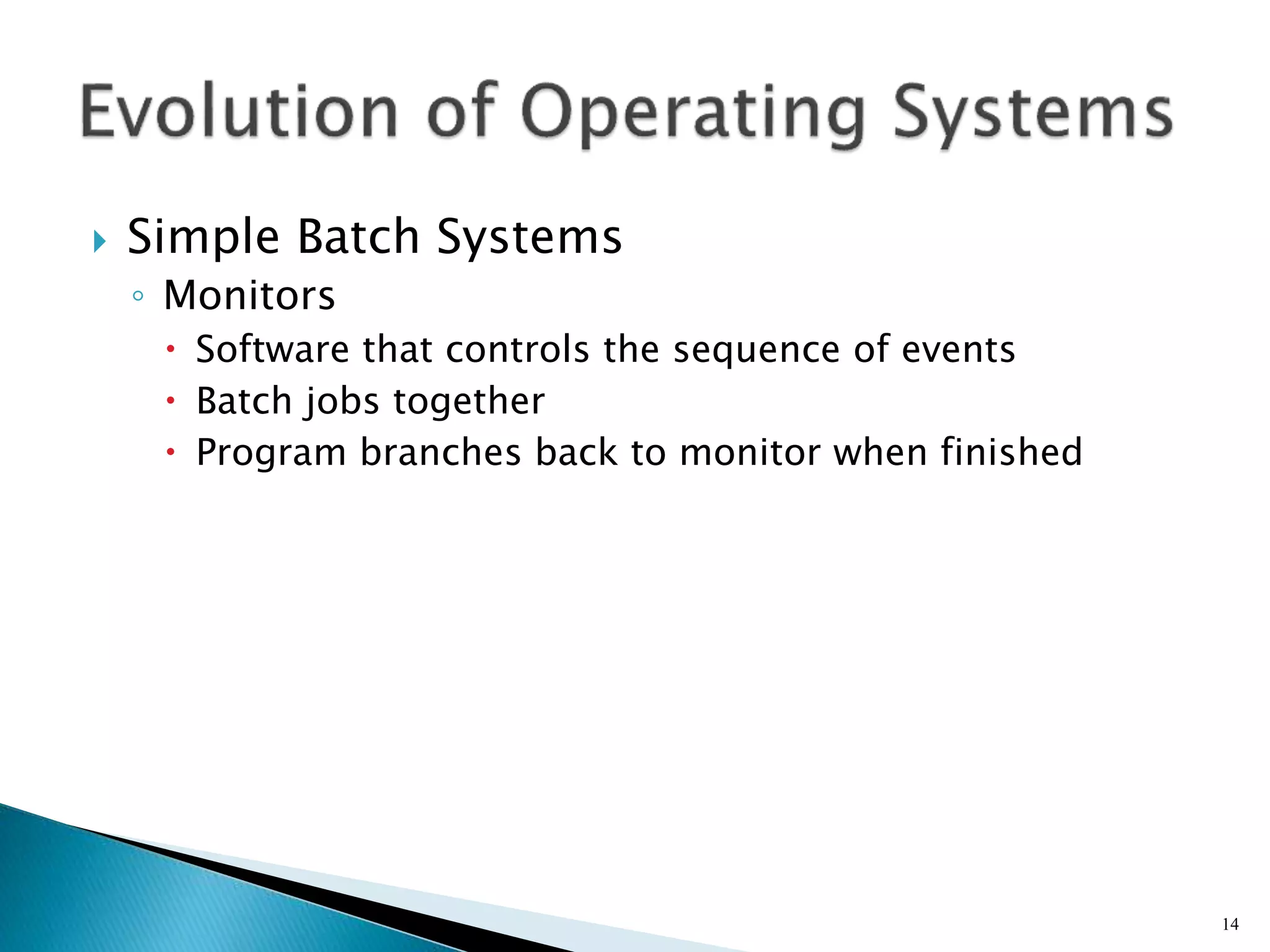
 Simple Batch Systems
◦ Monitors
 Software that controls the sequence of events
 Batch jobs together
 Program branches back to monitor when finished
14
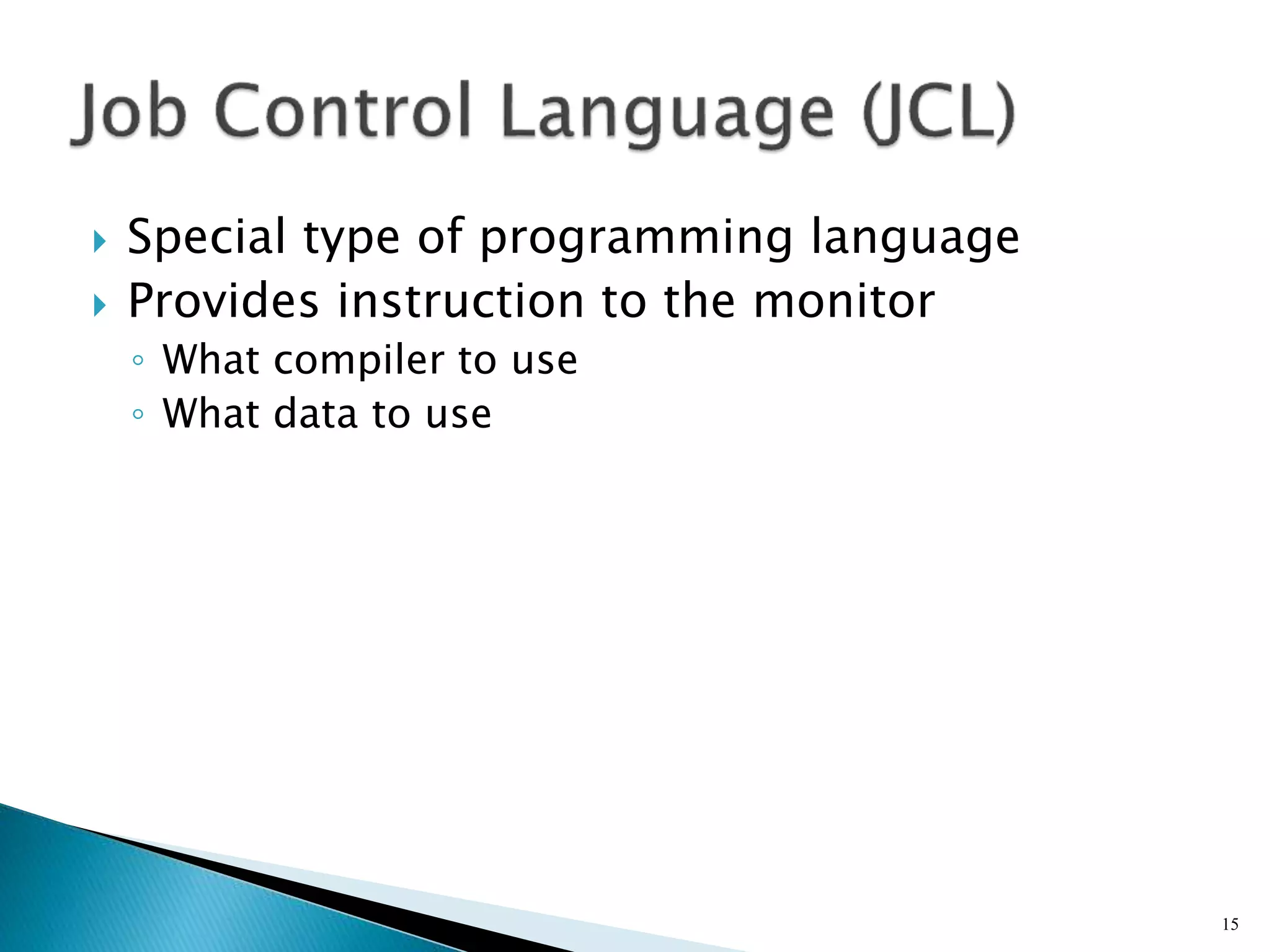
 Special type of programming language
 Provides instruction to the monitor
◦ What compiler to use
◦ What data to use
15
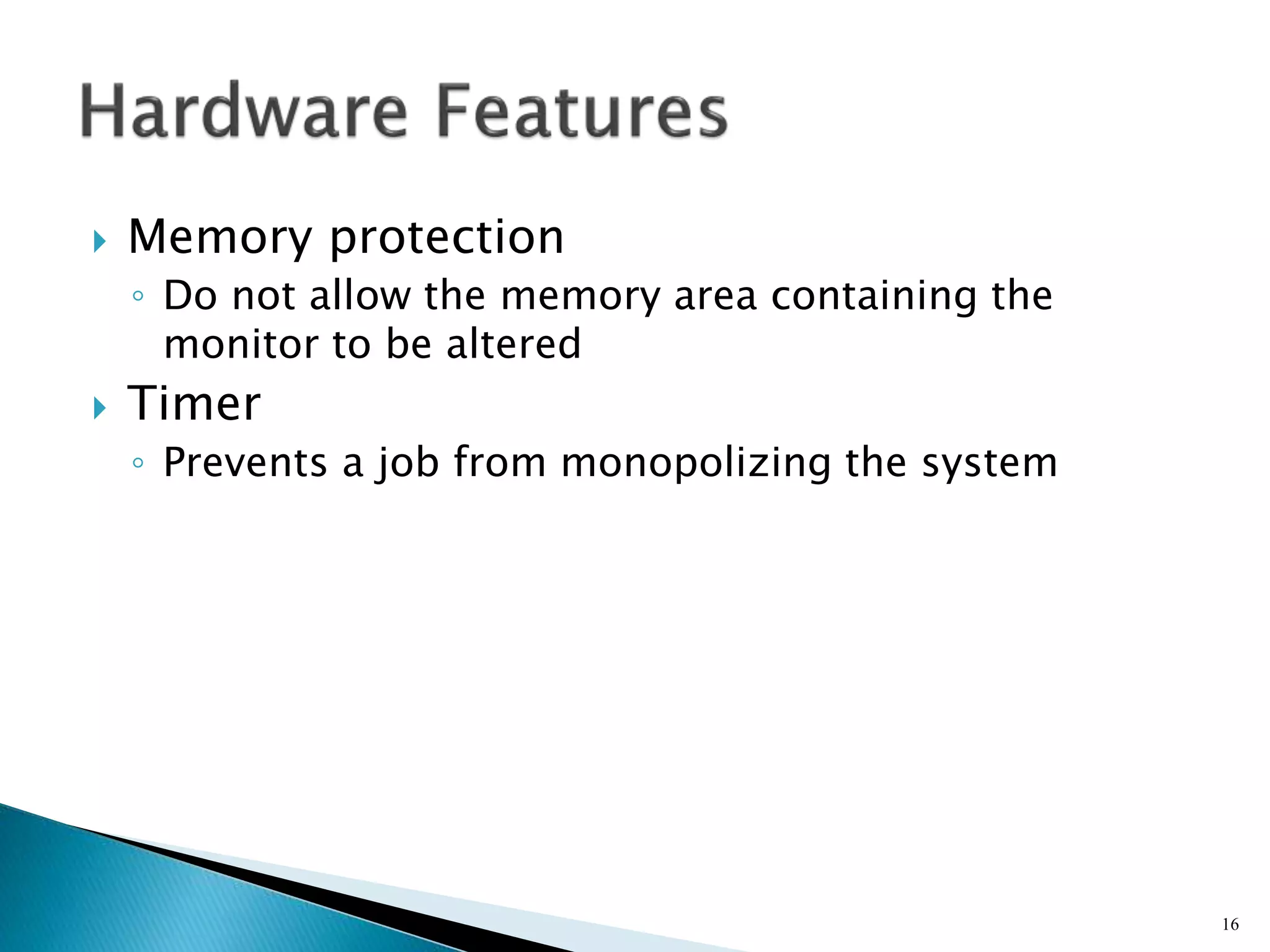
 Memory protection
◦ Do not allow the memory area containing the
monitor to be altered
 Timer
◦ Prevents a job from monopolizing the system
16
 Privileged instructions
◦ Certain machine level instructions can only be
executed by the monitor
 Interrupts
◦ Early computer models did not have this capability
17
 User program executes in user mode
◦ Certain instructions may not be executed
 Monitor executes in system mode
◦ Kernel mode
◦ Privileged instructions are executed
◦ Protected areas of memory may be accessed
18
19
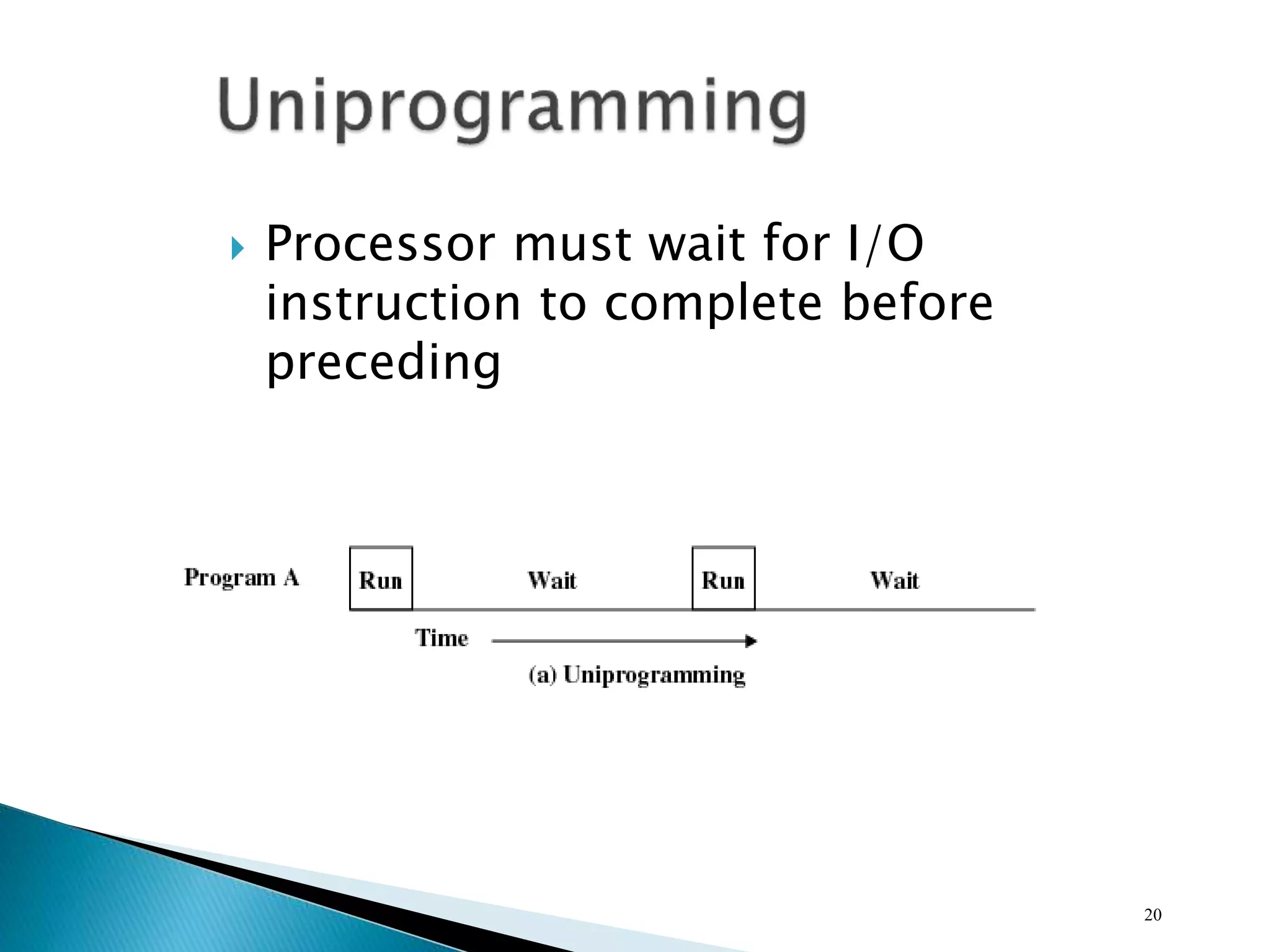
 Processor must wait for I/O
instruction to complete before
preceding
20
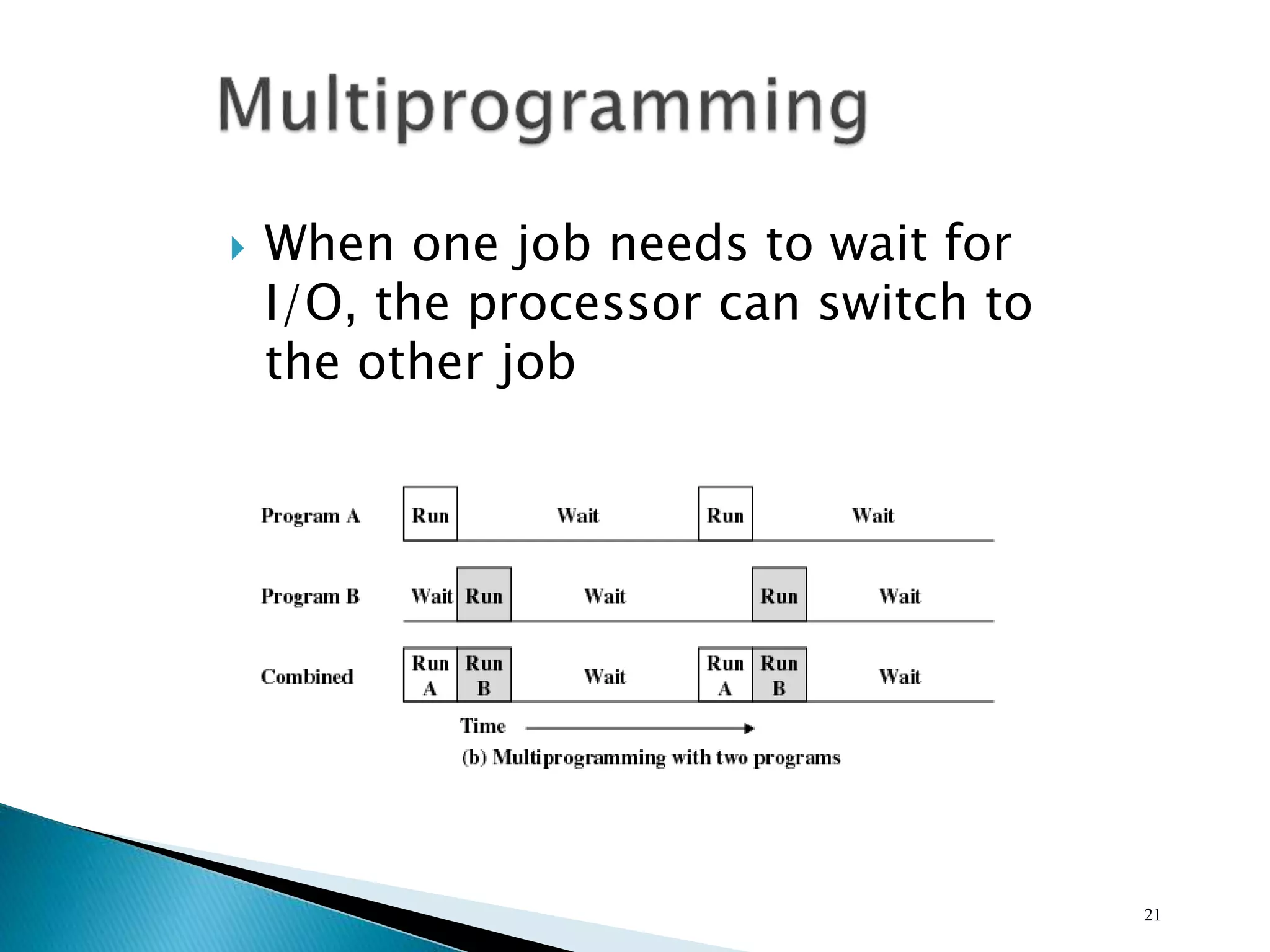
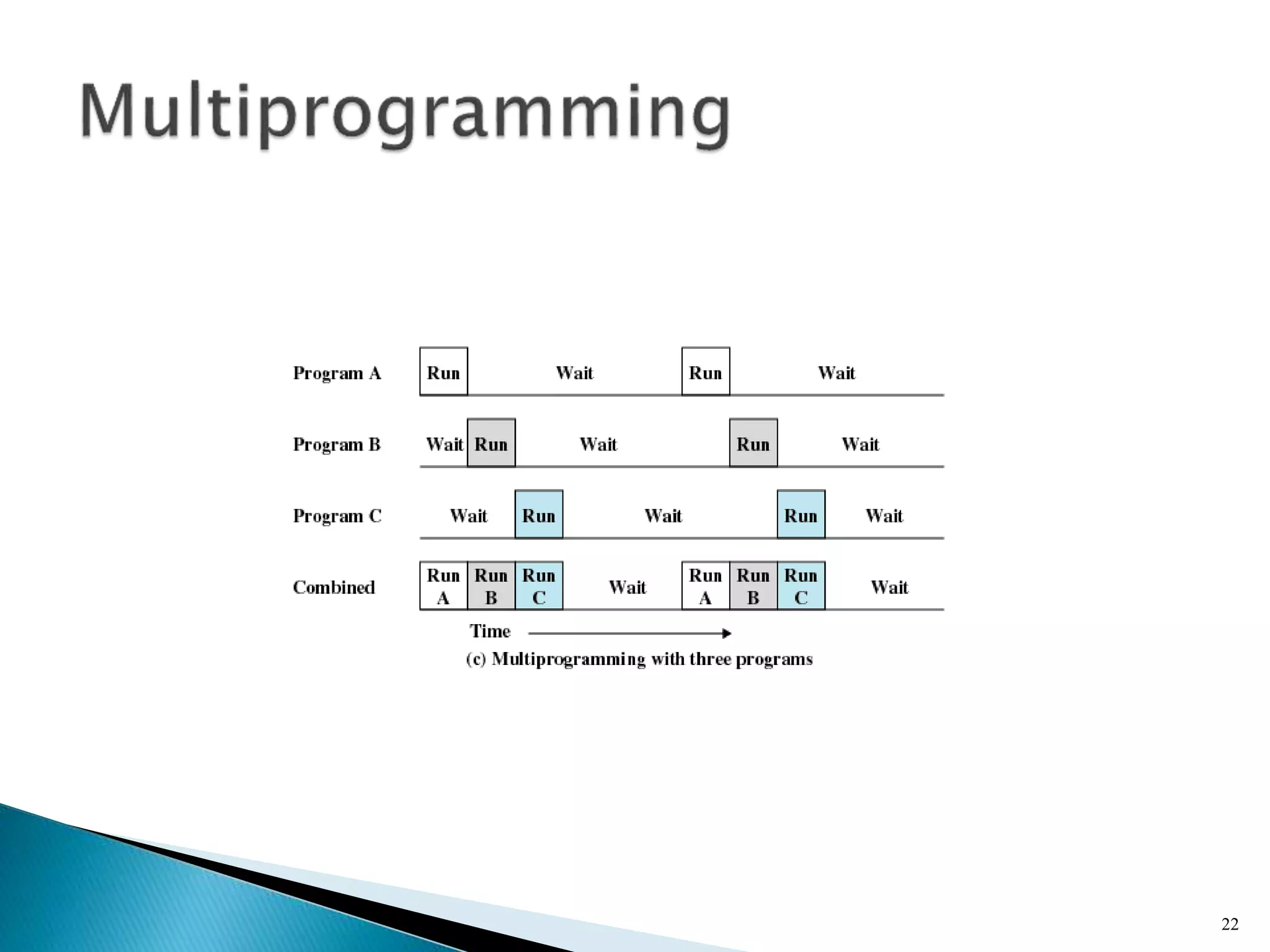
 When one job needs to wait for
I/O, the processor can switch to
the other job
21
22
23
24
 Using multiprogramming to handle multiple
interactive jobs
 Processor’s time is shared among multiple
users
 Multiple users simultaneously access the
system through terminals
25
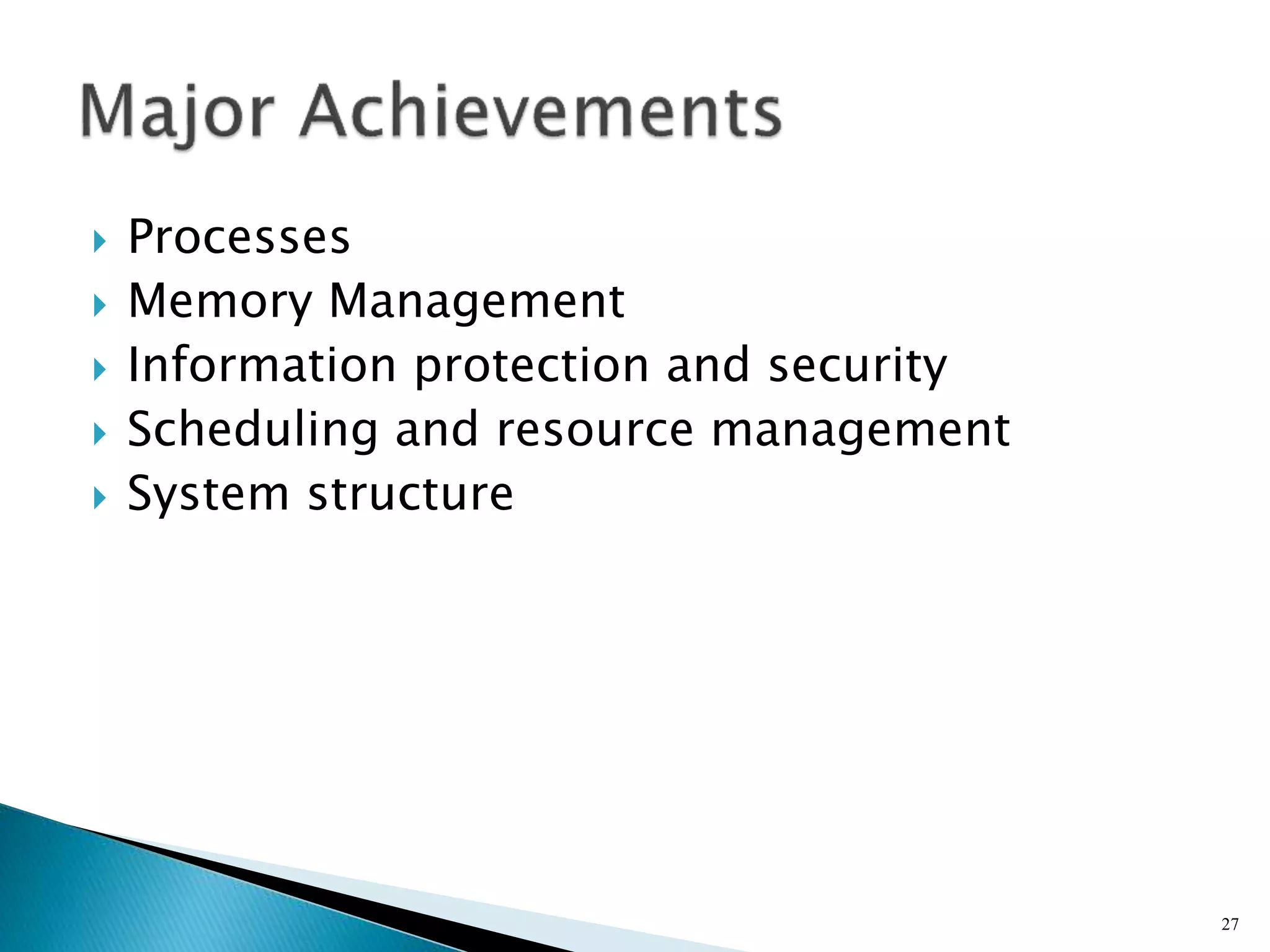
 First time-sharing system developed
at MIT
26
 Processes
 Memory Management
 Information protection and security
 Scheduling and resource management
 System structure
27
 A program in execution
 An instance of a program running on a
computer
 The entity that can be assigned to and
executed on a processor
 A unit of activity characterized by a single
sequential thread of execution, a current
state, and an associated set of system
resources
28
 Improper synchronization
◦ Ensure a process waiting for an I/O device receives
the signal
 Failed mutual exclusion
 Nondeterminate program operation
◦ Program should only depend on input to it, not on
the activities of other programs
 Deadlocks
29
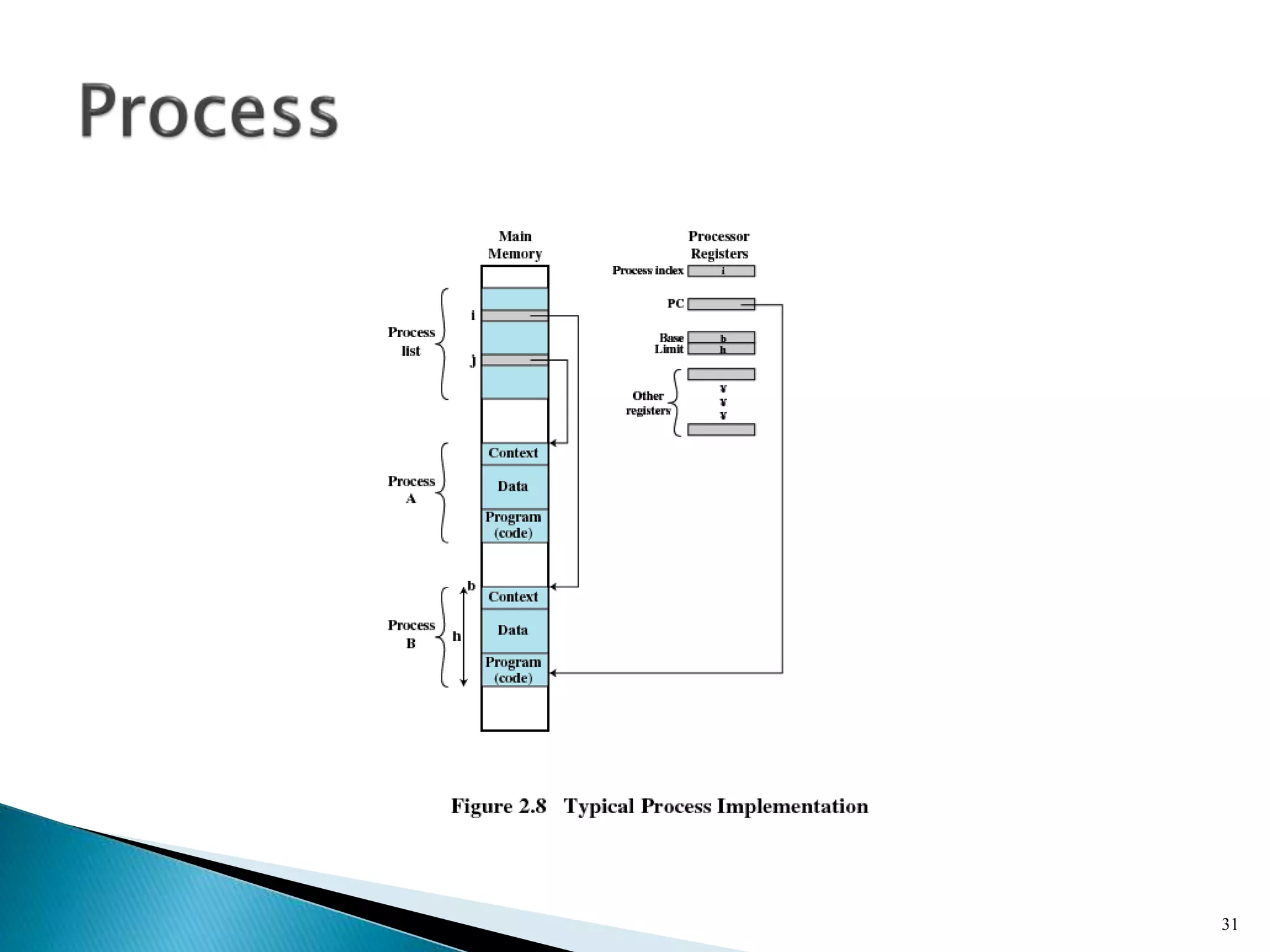
 Consists of three components
◦ An executable program
◦ Associated data needed by the program
◦ Execution context of the program
 All information the operating system needs to manage
the process
30
31
 Process isolation
 Automatic allocation and management
 Support of modular programming
 Protection and access control
 Long-term storage
32
 Allows programmers to address memory from
a logical point of view
 No hiatus between the execution of
successive processes while one process was
written out to secondary store and the
successor proceess was read in
33
 Implements long-term store
 Information stored in named objects called
files
34
 Allows process to be comprised of a number
of fixed-size blocks, called pages
 Virtual address is a page number and an
offset within the page
 Each page may be located any where in main
memory
 Real address or physical address in main
memory
35
36
37
 Availability
◦ Concerned with protecting the system against
interruption
 Confidentiality
◦ Assuring that users cannot read data for which
access is unauthorized
38
 Data integrity
◦ Protection of data from unauthorized modification
 Authenticity
◦ Concerned with the proper verification of the
identity of users and the validity of messages or
data
39
 Fairness
◦ Give equal and fair access to resources
 Differential responsiveness
◦ Discriminate among different classes of jobs
 Efficiency
◦ Maximize throughput, minimize response
time, and accommodate as many uses as
possible
40
41
 View the system as a series of levels
 Each level performs a related subset of
functions
 Each level relies on the next lower level to
perform more primitive functions
 This decomposes a problem into a number of
more manageable subproblems
42
 Level 1
◦ Electronic circuits
◦ Objects are registers, memory cells, and logic gates
◦ Operations are clearing a register or reading a
memory location
 Level 2
◦ Processor’s instruction set
◦ Operations such as add, subtract, load, and store
43
 Level 3
◦ Adds the concept of a procedure or subroutine,
plus call/return operations
 Level 4
◦ Interrupts
44
 Level 5
◦ Process as a program in execution
◦ Suspend and resume processes
 Level 6
◦ Secondary storage devices
◦ Transfer of blocks of data
 Level 7
◦ Creates logical address space for processes
◦ Organizes virtual address space into blocks
45
 Level 8
◦ Communication of information and messages
between processes
 Level 9
◦ Supports long-term storage of named files
 Level 10
◦ Provides access to external devices using
standardized interfaces
46
 Level 11
◦ Responsible for maintaining the association
between the external and internal identifiers
 Level 12
◦ Provides full-featured facility for the support of
processes
 Level 13
◦ Provides an interface to the operating system for
the user
47
 Microkernel architecture
◦ Assigns only a few essential functions to the kernel
 Address spaces
 Interprocess communication (IPC)
 Basic scheduling
48
 Multithreading
◦ Process is divided into threads that can run
concurrently
 Thread
 Dispatchable unit of work
 executes sequentially and is interruptable
 Process is a collection of one or more threads
49
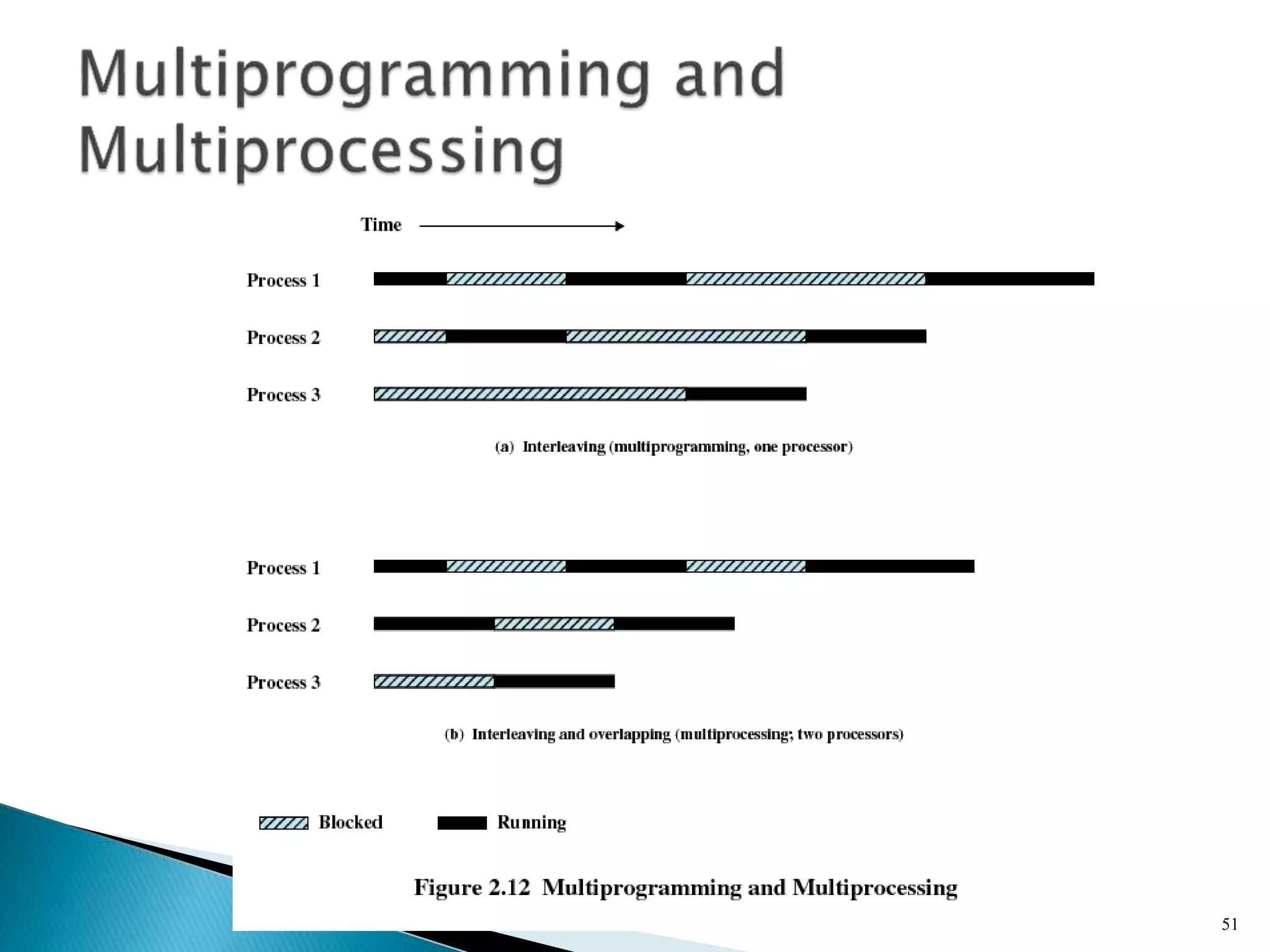
 Symmetric multiprocessing (SMP)
◦ There are multiple processors
◦ These processors share same main memory and I/O
facilities
◦ All processors can perform the same functions
50
51
 Distributed operating systems
◦ Provides the illusion of a single main memory space
and single secondary memory space
52
 Object-oriented design
◦ Used for adding modular extensions to a small
kernel
◦ Enables programmers to customize an operating
system without disrupting system integrity
53
 Modular structure for flexibility
 Executes on a variety of hardware platforms
 Supports application written for other
operating system
54
55
 Modified microkernel architecture
◦ Not a pure microkernel
◦ Many system functions outside of the microkernel
run in kernel mode
 Any module can be removed, upgraded, or
replaced without rewriting the entire system
56
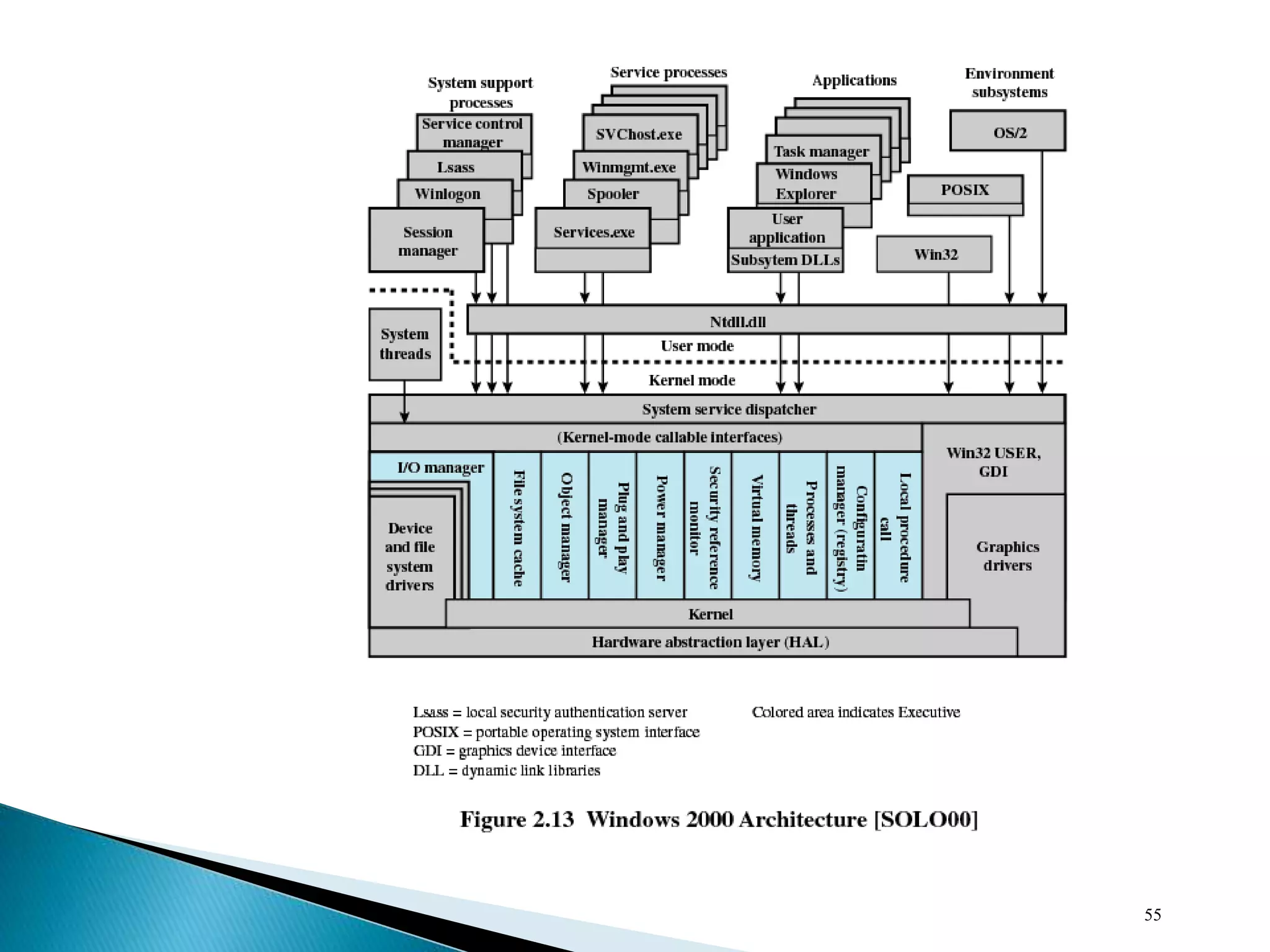
 Executive
◦ Contains base operating system services
 Memory management
 Process and thread management
 Security
 I/O
 Interprocess communication
 Kernel
◦ Consists of the most used components
57
 Hardware abstraction layer (HAL)
◦ Isolates the operating system from platform-
specific hardware differences
 Device drivers
◦ Translate user I/O function calls into specific
hardware device I/O requests
 Windowing and graphics systems
◦ Implements the graphical user interface (GUI)
58
 I/O manager
 Cache manager
 Object manager
 Plug and play manager
 Power manager
 Security reference monitor
 Virtual memory manager
 Process/thread manager
 Configuration manager
 Local procedure call (LPC) facility
59
 Special system support processes
◦ Ex: logon process and the session manager
 Service processes
 Environment subsystems
 User applications
60
 Simplifies the Executive
◦ Possible to construct a variety of APIs
 Improves reliability
◦ Each service runs on a separate process with its
own partition of memory
◦ Clients cannot not directly access hardware
 Provides a uniform means for applications to
communicate via LPC
 Provides base for distributed computing
61
 Operating system routines can run on any
available processor
 Different routines can execute
simultaneously on different processors
 Multiple threads of execution within a
single process may execute on different
processors simultaneously
 Server processes may use multiple threads
 Share data and resources between process
62
 Encapsulation
◦ Object consists of one or more data items and one
or more procedures
 Object class or instance
◦ Create specified instances of an object
 Inheritance
◦ Support to some extent in the Executive
 Polymorphism
63
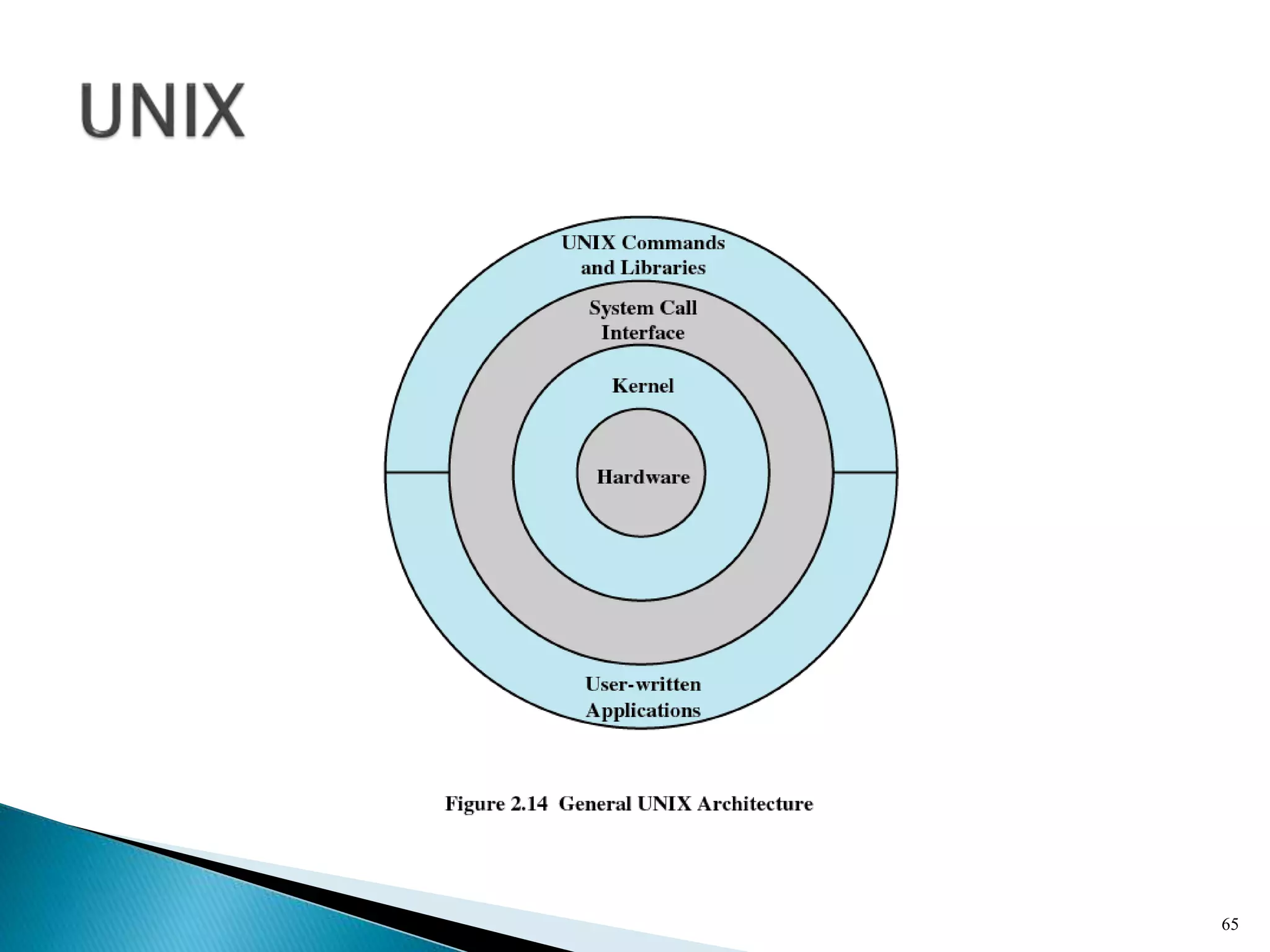
 Hardware is surrounded by the operating
system software
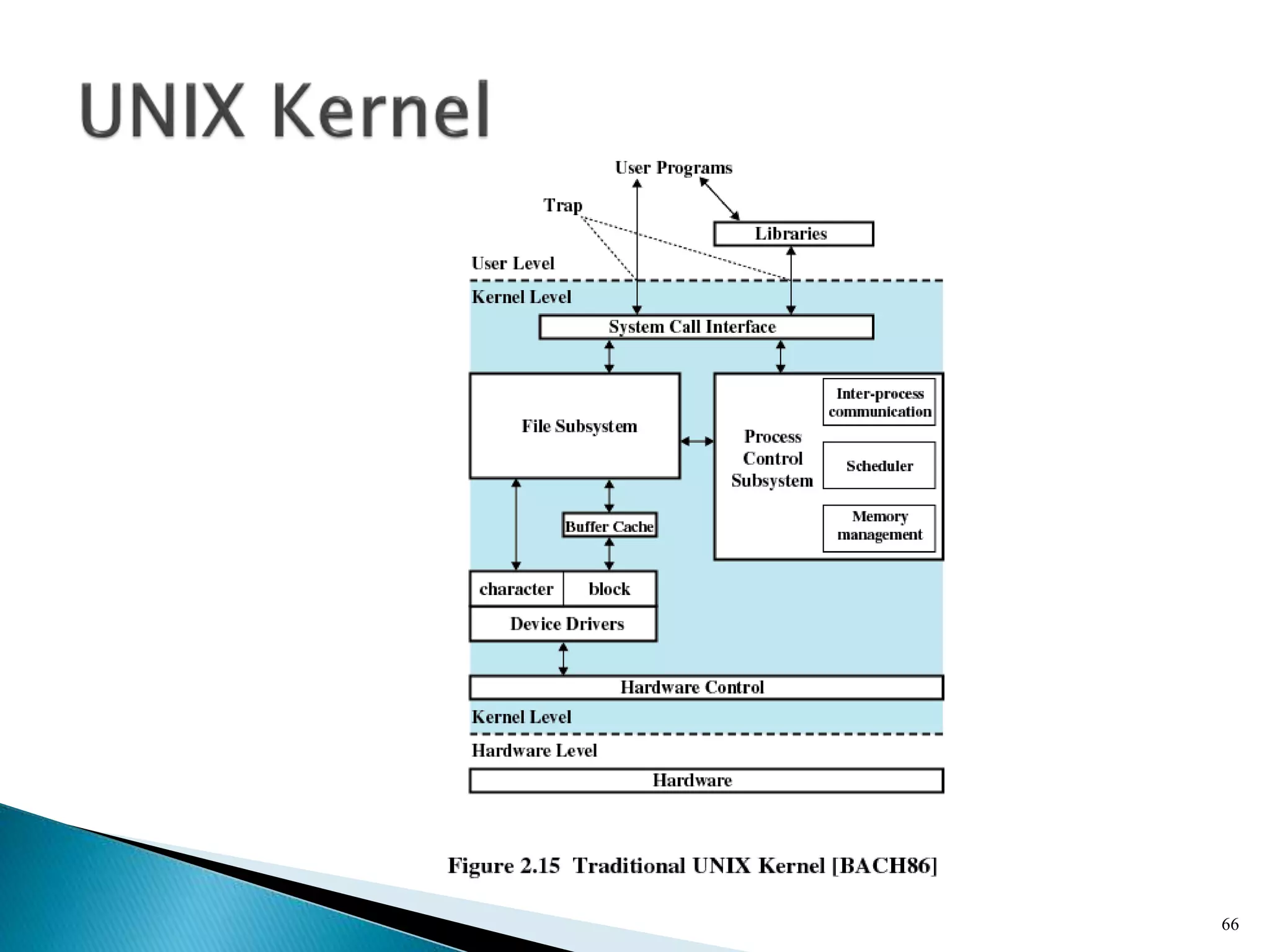
 Operating system is called the system kernel
 Comes with a number of user services and
interfaces
◦ Shell
◦ Components of the C compiler
64
65
66
67
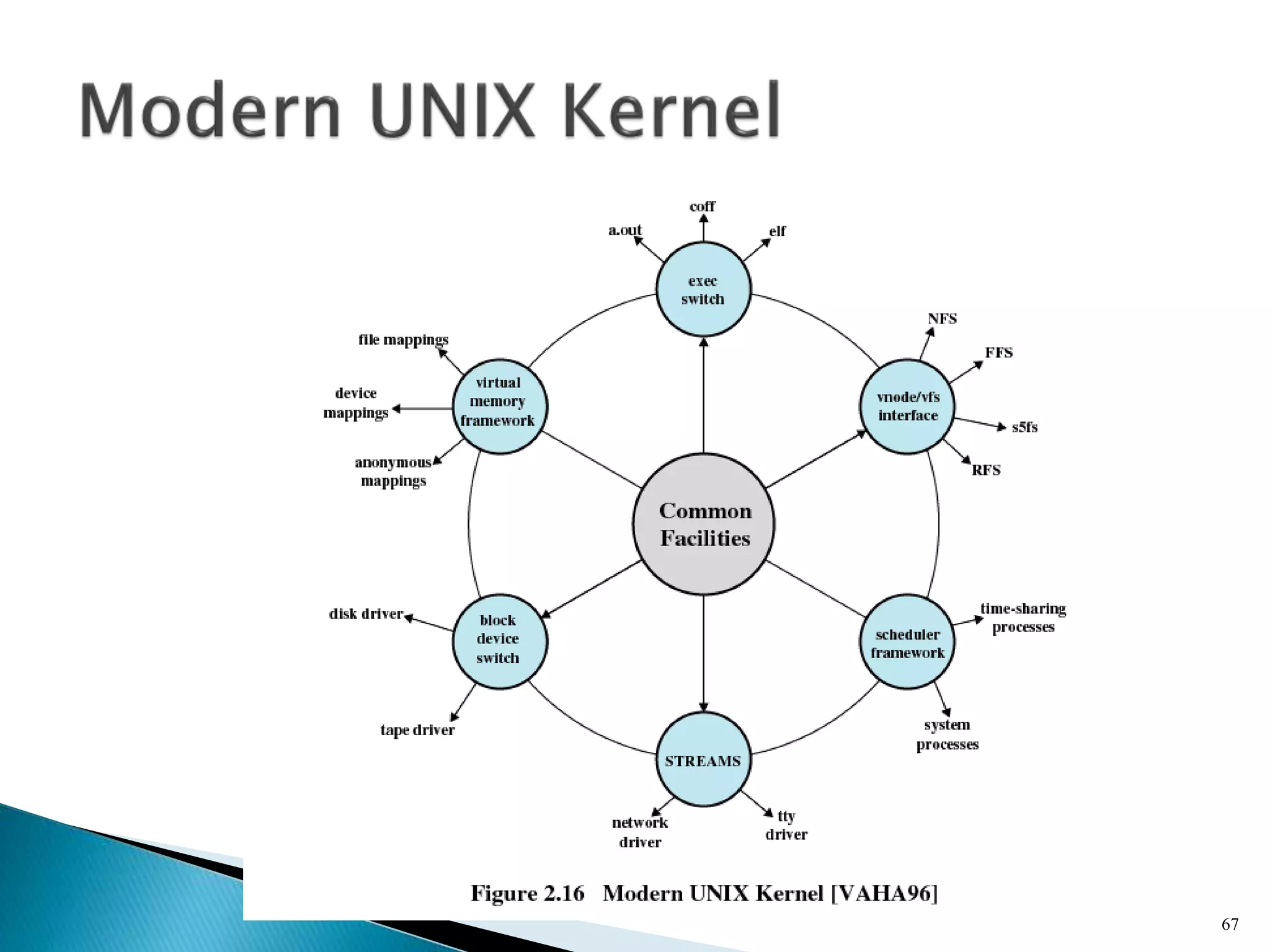
 System V Release 4 (SVR4)
 Solaris 9
 4.4BSD
 Linux
68
69

Operating system overview by narender singh sandhu

  • 1.
  • 2.
  • 3.
     A programthat controls the execution of application programs  An interface between applications and hardware 3
  • 4.
     Convenience ◦ Makesthe computer more convenient to use  Efficiency ◦ Allows computer system resources to be used in an efficient manner  Ability to evolve ◦ Permit effective development, testing, and introduction of new system functions without interfering with service 4
  • 5.
  • 6.
     Program development ◦Editors and debuggers  Program execution  Access to I/O devices  Controlled access to files  System access 6
  • 7.
     Error detectionand response ◦ Internal and external hardware errors  Memory error  Device failure ◦ Software errors  Arithmetic overflow  Access forbidden memory locations ◦ Operating system cannot grant request of application 7
  • 8.
     Accounting ◦ Collectusage statistics ◦ Monitor performance ◦ Used to anticipate future enhancements ◦ Used for billing purposes 8
  • 9.
     Responsible formanaging resources  Functions same way as ordinary computer software ◦ It is program that is executed  Operating system relinquishes control of the processor 9
  • 10.
  • 11.
     Portion ofoperating system that is in main memory  Contains most frequently used functions  Also called the nucleus 11
  • 12.
     Hardware upgradesplus new types of hardware  New services  Fixes 12
  • 13.
     Serial Processing ◦No operating system ◦ Machines run from a console with display lights, toggle switches, input device, and printer ◦ Schedule time ◦ Setup included loading the compiler, source program, saving compiled program, and loading and linking 13
  • 14.
     Simple BatchSystems ◦ Monitors  Software that controls the sequence of events  Batch jobs together  Program branches back to monitor when finished 14
  • 15.
     Special typeof programming language  Provides instruction to the monitor ◦ What compiler to use ◦ What data to use 15
  • 16.
     Memory protection ◦Do not allow the memory area containing the monitor to be altered  Timer ◦ Prevents a job from monopolizing the system 16
  • 17.
     Privileged instructions ◦Certain machine level instructions can only be executed by the monitor  Interrupts ◦ Early computer models did not have this capability 17
  • 18.
     User programexecutes in user mode ◦ Certain instructions may not be executed  Monitor executes in system mode ◦ Kernel mode ◦ Privileged instructions are executed ◦ Protected areas of memory may be accessed 18
  • 19.
  • 20.
     Processor mustwait for I/O instruction to complete before preceding 20
  • 21.
     When onejob needs to wait for I/O, the processor can switch to the other job 21
  • 22.
  • 23.
  • 24.
  • 25.
     Using multiprogrammingto handle multiple interactive jobs  Processor’s time is shared among multiple users  Multiple users simultaneously access the system through terminals 25
  • 26.
     First time-sharingsystem developed at MIT 26
  • 27.
     Processes  MemoryManagement  Information protection and security  Scheduling and resource management  System structure 27
  • 28.
     A programin execution  An instance of a program running on a computer  The entity that can be assigned to and executed on a processor  A unit of activity characterized by a single sequential thread of execution, a current state, and an associated set of system resources 28
  • 29.
     Improper synchronization ◦Ensure a process waiting for an I/O device receives the signal  Failed mutual exclusion  Nondeterminate program operation ◦ Program should only depend on input to it, not on the activities of other programs  Deadlocks 29
  • 30.
     Consists ofthree components ◦ An executable program ◦ Associated data needed by the program ◦ Execution context of the program  All information the operating system needs to manage the process 30
  • 31.
  • 32.
     Process isolation Automatic allocation and management  Support of modular programming  Protection and access control  Long-term storage 32
  • 33.
     Allows programmersto address memory from a logical point of view  No hiatus between the execution of successive processes while one process was written out to secondary store and the successor proceess was read in 33
  • 34.
     Implements long-termstore  Information stored in named objects called files 34
  • 35.
     Allows processto be comprised of a number of fixed-size blocks, called pages  Virtual address is a page number and an offset within the page  Each page may be located any where in main memory  Real address or physical address in main memory 35
  • 36.
  • 37.
  • 38.
     Availability ◦ Concernedwith protecting the system against interruption  Confidentiality ◦ Assuring that users cannot read data for which access is unauthorized 38
  • 39.
     Data integrity ◦Protection of data from unauthorized modification  Authenticity ◦ Concerned with the proper verification of the identity of users and the validity of messages or data 39
  • 40.
     Fairness ◦ Giveequal and fair access to resources  Differential responsiveness ◦ Discriminate among different classes of jobs  Efficiency ◦ Maximize throughput, minimize response time, and accommodate as many uses as possible 40
  • 41.
  • 42.
     View thesystem as a series of levels  Each level performs a related subset of functions  Each level relies on the next lower level to perform more primitive functions  This decomposes a problem into a number of more manageable subproblems 42
  • 43.
     Level 1 ◦Electronic circuits ◦ Objects are registers, memory cells, and logic gates ◦ Operations are clearing a register or reading a memory location  Level 2 ◦ Processor’s instruction set ◦ Operations such as add, subtract, load, and store 43
  • 44.
     Level 3 ◦Adds the concept of a procedure or subroutine, plus call/return operations  Level 4 ◦ Interrupts 44
  • 45.
     Level 5 ◦Process as a program in execution ◦ Suspend and resume processes  Level 6 ◦ Secondary storage devices ◦ Transfer of blocks of data  Level 7 ◦ Creates logical address space for processes ◦ Organizes virtual address space into blocks 45
  • 46.
     Level 8 ◦Communication of information and messages between processes  Level 9 ◦ Supports long-term storage of named files  Level 10 ◦ Provides access to external devices using standardized interfaces 46
  • 47.
     Level 11 ◦Responsible for maintaining the association between the external and internal identifiers  Level 12 ◦ Provides full-featured facility for the support of processes  Level 13 ◦ Provides an interface to the operating system for the user 47
  • 48.
     Microkernel architecture ◦Assigns only a few essential functions to the kernel  Address spaces  Interprocess communication (IPC)  Basic scheduling 48
  • 49.
     Multithreading ◦ Processis divided into threads that can run concurrently  Thread  Dispatchable unit of work  executes sequentially and is interruptable  Process is a collection of one or more threads 49
  • 50.
     Symmetric multiprocessing(SMP) ◦ There are multiple processors ◦ These processors share same main memory and I/O facilities ◦ All processors can perform the same functions 50
  • 51.
  • 52.
     Distributed operatingsystems ◦ Provides the illusion of a single main memory space and single secondary memory space 52
  • 53.
     Object-oriented design ◦Used for adding modular extensions to a small kernel ◦ Enables programmers to customize an operating system without disrupting system integrity 53
  • 54.
     Modular structurefor flexibility  Executes on a variety of hardware platforms  Supports application written for other operating system 54
  • 55.
  • 56.
     Modified microkernelarchitecture ◦ Not a pure microkernel ◦ Many system functions outside of the microkernel run in kernel mode  Any module can be removed, upgraded, or replaced without rewriting the entire system 56
  • 57.
     Executive ◦ Containsbase operating system services  Memory management  Process and thread management  Security  I/O  Interprocess communication  Kernel ◦ Consists of the most used components 57
  • 58.
     Hardware abstractionlayer (HAL) ◦ Isolates the operating system from platform- specific hardware differences  Device drivers ◦ Translate user I/O function calls into specific hardware device I/O requests  Windowing and graphics systems ◦ Implements the graphical user interface (GUI) 58
  • 59.
     I/O manager Cache manager  Object manager  Plug and play manager  Power manager  Security reference monitor  Virtual memory manager  Process/thread manager  Configuration manager  Local procedure call (LPC) facility 59
  • 60.
     Special systemsupport processes ◦ Ex: logon process and the session manager  Service processes  Environment subsystems  User applications 60
  • 61.
     Simplifies theExecutive ◦ Possible to construct a variety of APIs  Improves reliability ◦ Each service runs on a separate process with its own partition of memory ◦ Clients cannot not directly access hardware  Provides a uniform means for applications to communicate via LPC  Provides base for distributed computing 61
  • 62.
     Operating systemroutines can run on any available processor  Different routines can execute simultaneously on different processors  Multiple threads of execution within a single process may execute on different processors simultaneously  Server processes may use multiple threads  Share data and resources between process 62
  • 63.
     Encapsulation ◦ Objectconsists of one or more data items and one or more procedures  Object class or instance ◦ Create specified instances of an object  Inheritance ◦ Support to some extent in the Executive  Polymorphism 63
  • 64.
     Hardware issurrounded by the operating system software  Operating system is called the system kernel  Comes with a number of user services and interfaces ◦ Shell ◦ Components of the C compiler 64
  • 65.
  • 66.
  • 67.
  • 68.
     System VRelease 4 (SVR4)  Solaris 9  4.4BSD  Linux 68
  • 69.